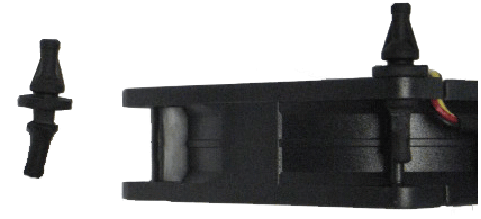
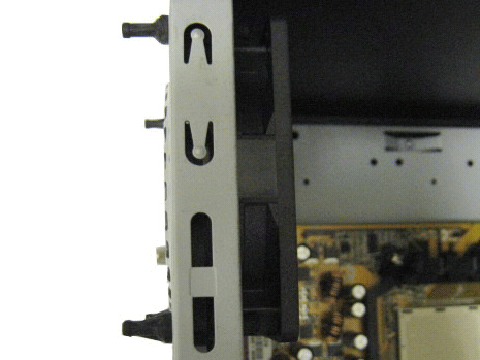
We test a total of 60 fans in 71 variations- 120mm and 140mm. Which cooling fan will rise to the top and take the crown?

What fan should you get?
You want to add fans to a computer case, or replace those that came with it. You want to put a fan on a heatsink, or replace the ones it came with. Often you want to know what fan to get for a particular application, and for good reason you don’t trust the specifications that sellers publish. The best way to decide on what fan to use for a particular application is to test a lot of them. Or you can read reviews where a lot of fans are compared. This is such a review.
Sixty fans are set up in 71 variations on a test system set to two heat levels — a mild overclock and stock — designed to see how well various fans cool, and how much noise they make doing it.
The Parade of the Fans: Pictures and Technical Specifications
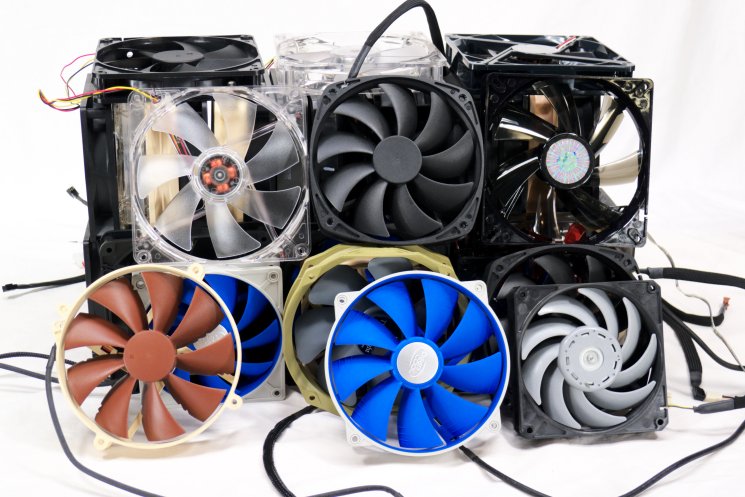
This section lists the fans to be compared and their specifications, as stated by the brand sellers. Most fans sold to consumers are made by a manufacturer for the brand seller, so you cannot be quite sure who actually built the fan. And you cannot be quite sure that the specs are accurate, or just marketing hype. This is, after all, why independent comparisons are important.
Under the specifications for each fan you will see “Measured in Free Air.” To give you an idea of how loud these fans would be if you used them as intake fans in the front of your case, the fans were run in open air, measured with an SPL meter (a device that measures sound pressure level) with the results recorded in decibels, A scale (dBA). The SPL was measured at 10cm and translated to an equivalent SPL at 1 meter, which is the standard comparison distance. Because of limitations in the equipment and the setting, the measurements tend to bottom out at 11 to 13 dBA. Fans can be quieter than that, but it won’t show up in these informal measurements.
Here is a rule of thumb for fan noise:
Under 12dB: inaudible
12-20dB: ultra-quiet
20-25dB: very quiet
25-30dB: quiet
30-35dB: moderate
35-40dB: moderately loud
40-50dB: loud
50-60dB: very loud
60+ dB: too loud!!!
The above are decibel readings at one meter. In a very quiet room you will not hear much under 30dB at one meter. But people are often much closer than that to their cases, so the quieter fans can be important.
The main results — the cooling power of these fans — will be shown in a set of charts in a separate section following the fan parade.
AeroCool Shark, Akasa Apache, Arctic Cooling F12 PWM
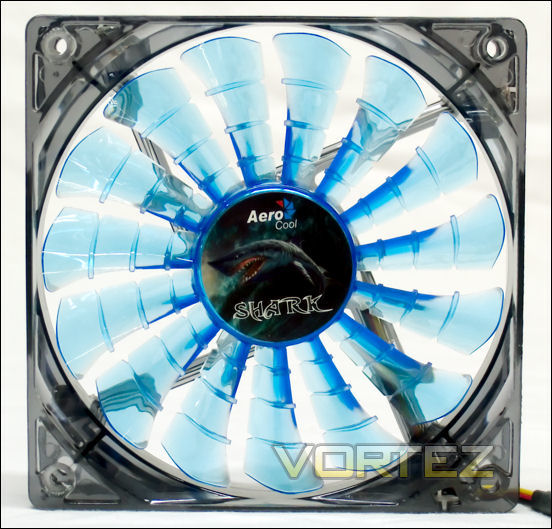
AeroCool Shark 12cm Blue Edition
The AeroCool Shark 12cm is a 120mm 15-bladed fan that has three ribs on each of its blades. This particular model has dark blue LED’s. Here is what AeroCool has to say about it:
• Unique and Stylish “Shark Fin” Fan Blade design w/ Quad Blue LEDs.
• 15 fan blades generates High Air Pressure and Air Flow – the most fan blades in the world !!!!
• Innovative Fluid Dynamic Bearing delivers longer life span, higher precision rotation and anti-shock function.
• Duo Mode Operation – The Shark fan operates in both “Power” mode (12V) and “Silence” mode (7V – with adaptation of Voltage reduction cable).
• All cables are “black” sleeved.
• Accessories include a Voltage Reduction cable, a 3 to 4 pin converter cable, 4 units of Anti-vibration Rubber Screws and 4 units of standard screws.
• 15 fan blades generates High Air Pressure and Air Flow – the most fan blades in the world !!!!
• Innovative Fluid Dynamic Bearing delivers longer life span, higher precision rotation and anti-shock function.
• Duo Mode Operation – The Shark fan operates in both “Power” mode (12V) and “Silence” mode (7V – with adaptation of Voltage reduction cable).
• All cables are “black” sleeved.
• Accessories include a Voltage Reduction cable, a 3 to 4 pin converter cable, 4 units of Anti-vibration Rubber Screws and 4 units of standard screws.
Product Page: Here
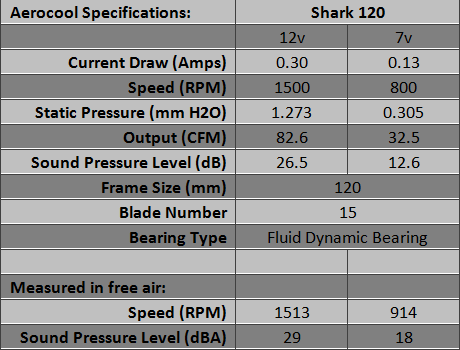
Overall, the subjective impression of this fan is that it seems to make too much noise at 12 Volts. However, at 7 Volts the fan is quiet. At neither speed is there any parasitic noise and no clicking. You can direct its output upward without feeling increased vibration. At seven Volts this is a very well-behaved fan.
The Molex adapter does not have an RPM feed for the motherboard, but it has close-fitting handsome black sleeving, as do all the wires associated with the Shark. The ‘Anti-vibration Screws‘ are only about 30mm long (not quite 1.25 inches), so they are too short to pull through; you must have access to the corners of the fan to use these. The fan and its kit are quite attractive, as is the box it comes in.
Akasa Apache
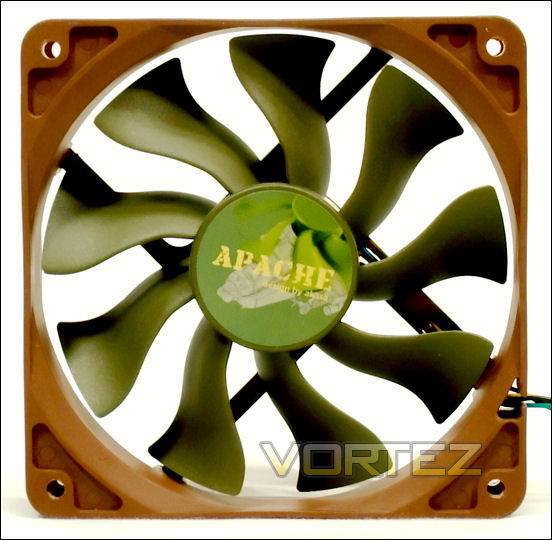
The Akasa Apache is a 120mm PWM controlled fan. It has wavy fan blades that look like the blades of a turbofan engine, such as you see on jetliners. Don’t be fooled, though. These are just wavy blades.
Akasa has this to say about their AK-FN057:
• Super silent APACHE fans in camouflage colours
• S-FLOW fan blade design delivers 30% higher airflow
• IP-54 military standard moisture and dust protection
• Super silent with PWM auto speed control
• Hydro Dynamic Bearing extends fan life up to 50,000 hours
• S-FLOW fan blade design delivers 30% higher airflow
• IP-54 military standard moisture and dust protection
• Super silent with PWM auto speed control
• Hydro Dynamic Bearing extends fan life up to 50,000 hours
They add this very useful note about PWM fans in general, and how you can use them:
PWM is a widely available feature on all current Intel and AMD platform based motherboards. It is more accurate than voltage regulation, energy saving and a fully automatic way of controlling the fan speed. PWM provides ultra quiet acoustics during normal PC use and high performance cooling under high system load. The Optional Akasa AK-CB002 cable adapter can provide the system with two additional PWM connectors if needed.
This is very useful information. Product Page: Here
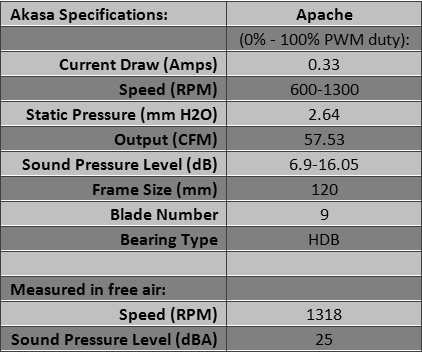
Inside its box, the Apache comes in a plastic case that contains four extra-long vibration isolators in addition to the fan. Their length makes them easy to pull through and grab. Akasa also makes a Viper fan that is very much like the Apache, but faster.
The PWM functions of the Akasa Apache were tested, using a grounded PWM wire for 0% PWM duty, and a Zalman PWM Mate to approximate 25%, 50%, 75% and 100% PWM duty. A quiet click can be heard a few inches away. To hear a faint click you must put your ear right up to the fan.
PWM duty of approximately 0, 25% and 50% produced speeds of 519, 755 and 1053 RPM with quiet clicking. 75% duty produced 1256 RPM with faint clicking, and 100% duty produced 1333 rpm with no clicking.
Arctic F12 PWM
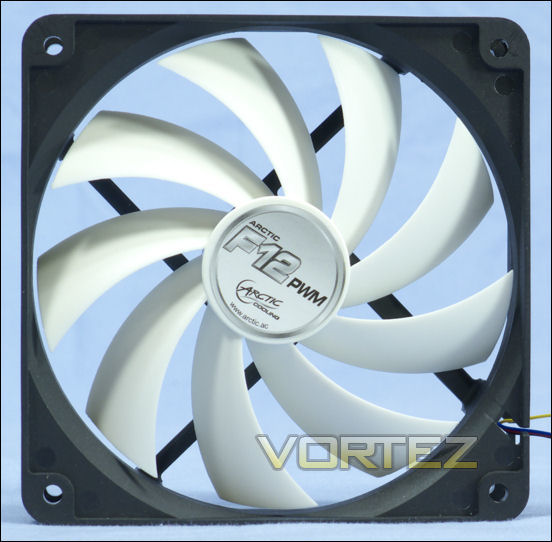
The F12 PWM is the PWM version of Arctic’s traditional-frame 120mm fan (they also sell a cage-type fan). They have this to say about the F PWM series:
Dedicated to operate 24 hours a day, 7 days per week, the F PWM CO series case fans cool your computer system quietly. The fan forwards the PWM signal from the CPU to the whole case ventilation system. Employing a Japanese dual ball bearing, the fan operates with reduced friction and hence its lifespan is substantially extended. The series offers you with superb performance while maintaining your computer systems under optimal temperature at all times.
Product Page: Here
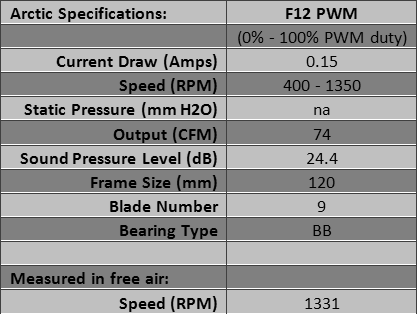
Arctic adds this under ‘Quick and Easy Setup:’
Via a single PWM signal, the CPU fan is controlled by the mainboard to maintain the ideal temperature of the CPU. The patented PST (PWM Sharing Technology) forwards the PWM signal to all other fans within the system so that all fans are spinning at the same speed. Such mechanism ensures silent operation when it is idle, but also gives sufficient performance when the demand comes.
Not only does the setup pass the PWM signal through to the next fan, but it also politely passes the next fan’s RPM signal back through to the motherboard. And if you don’t have another fan (it need not be PWM), the fan has its own RPM line to report its speed to the motherboard. The only fly in this ointment is Arctic’s use of fine wires throughout. But considering that this fan is usually sold inexpensively, the wire gauge was clearly a tradeoff that had to be made.
The PWM functions of the Arctic F12 PWM were tested, using a grounded PWM wire for 0% PWM duty, and a Zalman PWM Mate to approximate 25%, 50%, 75% and 100% PWM duty. A quiet click can be heard a few inches away. To hear a faint click you must put your ear right up to the fan.
At both 0% and 100% PWM duty the fan ran the same speed – 1350 rpm, which is weird. At that speed there was no clicking. At 25%, 50% and 75% duty the fan ran 1011, 1211 and 1290 RPM with quiet clicking.
Cooler Master Blade Master/Sickleflow, Coolink SwiF2 1201/120P
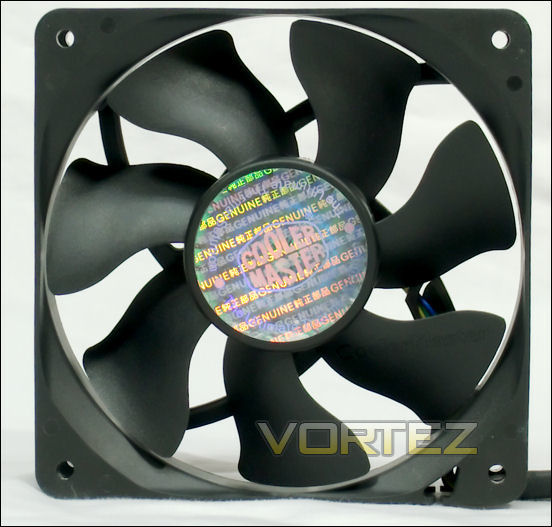
Cooler Master Blade Master
The Blade Master is another 120mm PWM fan, this time from Cooler Master. For a long time this was the fastest consumer grade computer PWM fan you could buy. It is the fan that came stock on Cooler Master’s famous Hyper 212 Plus CPU heatsink.
Cooler Master’s take on its Blade Master:
• Well-balanced cooling performance among fan airflow, air pressure and noise.
• Wide PWM fan speed range between 600 – 2000 R.P.M.
• Anti-vibration rubber pads around the edges to decrease noise.
• Distinguished blade shape for airflow improvement.
• Wide PWM fan speed range between 600 – 2000 R.P.M.
• Anti-vibration rubber pads around the edges to decrease noise.
• Distinguished blade shape for airflow improvement.
Product Page: Here
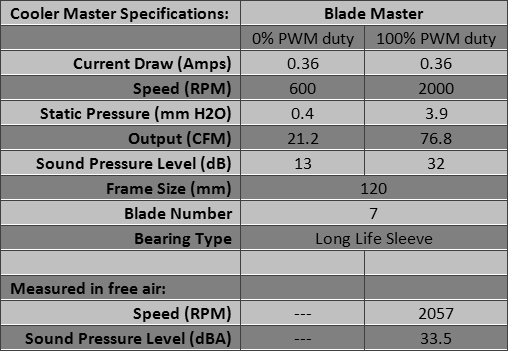
The wires are not sleeved. The fan comes with four 2mm thick triangular stick-on pads to reduce vibration. Model number is advertised as R4-BMBS-20PK-R0, but on the fan there are two sets of numbers — A12025-20CB-4BP-C1 and FA7C1212ME-5BPNA — that bear no relation to Cooler Master’s model number. The name ‘Cooler Master’ is stamped on one of the blades. Is it enough to cause some vibration? The fan does come with vibration pads, but does not seem excessively noisy even without them.
The PWM functions of the Blade Master were tested, using a grounded PWM wire for 0% PWM duty, and a Zalman PWM Mate to approximate 25%, 50%, 75% and 100% PWM duty. A quiet click can be heard a few inches away. To hear a faint click you must put your ear right up to the fan.
At 0 PWM duty, the Blade Master ran at 791 RPM with no clicking. At 25%, 840 RPM with very quiet clicking; at 50% 1293 RPM with fast quiet clicking; at 75% duty 1804 RPM with quiet clicking. At 100% the fan ran 2083 RPM with a tone, so if clicking was present it would not be heard.
Cooler Master Sickleflow 120:
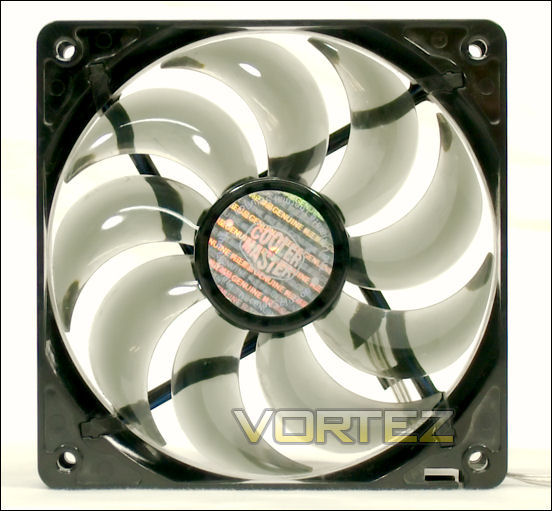
The Sickleflow ‘R4’ is a much-recommended fan because of its performance. Most people know by now that the 19 dB specification for this 2000 RPM fan is at best a mistake, but one that has not been corrected. Nonetheless, the fan does not sound loud for its speed, and it does its job well.
Cooler Master lists the features:
• Light-brown transparent fan blades for better LED effect.
• Long life sleeve bearing for longer life expectancy.
• Strong air flow to fortify cooling efficiency.
• Silent operation as an excellent choice for case cooling.
• RoHS compliance for protecting the environment.
• Long life sleeve bearing for longer life expectancy.
• Strong air flow to fortify cooling efficiency.
• Silent operation as an excellent choice for case cooling.
• RoHS compliance for protecting the environment.
Product Page: Here
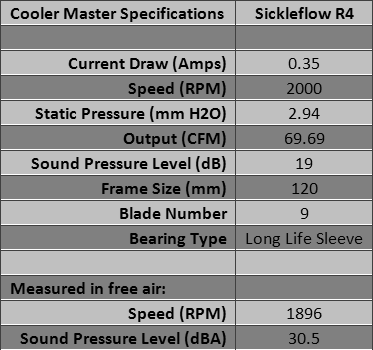
Model numbers are R4-L2R-20AC-GP for blue LED’s, R4-L2R-20AR-R1 for red, R4-L2R-20AG-R2 for green and R4-C2R-20AC-GP for no LED’s. On the label of the blue LED fan are the numbers A12025-20RB-3BN-F1 and DF12025 CF, which do not relate to a Cooler Master model number. The fan comes in a clear blister pack that also contains a Molex adapter.
Coolink SWiF2 120mm
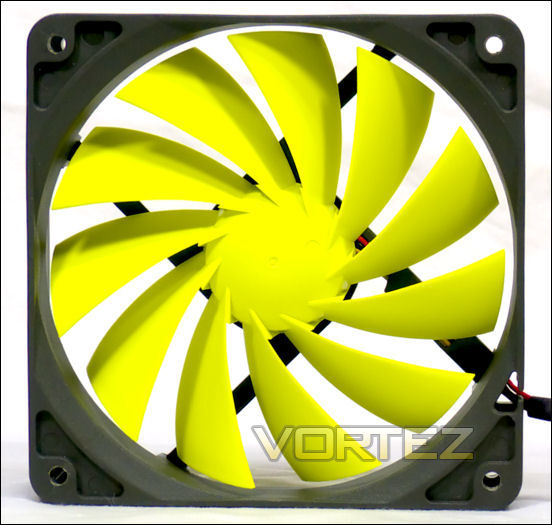
Coolink sells the SWiF2 120mm in three models: the 800 rpm SWiF2 1200, the 1200 rpm SWiF2 1201 and the PWM SWiF2 120P. Vortez.net uses the 1700 rpm 120P as a standard comparator in testing CPU coolers (hint: that means it is a good fan).
Coolink says this:
Featuring an innovative, all new 11-blade impeller design that achieves vast improvements in airflow/noise efficiency, the SWiF2 120mm series combines outstanding quietness with excellent performance and a unique, exciting colour scheme. The new hydro-dynamic bearing ensures whisper quiet operation and even better longevity, which is reflected in an enhanced warranty time of 60 months. Now also available with support for PWM fan speed control, the SWiF2 series provides exceptional silent-performance and includes a full range of trusted Coolink quality fans, suitable for all applications inside your system.
• innovative 11-blade impeller design
• supports PWM fan speed control
• high-performance hydro-dynamic bearing
• protective cable sleeving
• incl. Anti-Vibration Bolts & Screws
• PWM y-split cable for connecting multiple PWM fans
• trusted Coolink quality
• innovative 11-blade impeller design
• supports PWM fan speed control
• high-performance hydro-dynamic bearing
• protective cable sleeving
• incl. Anti-Vibration Bolts & Screws
• PWM y-split cable for connecting multiple PWM fans
• trusted Coolink quality
Product Page for SWiF2 1201 and 120P: Here
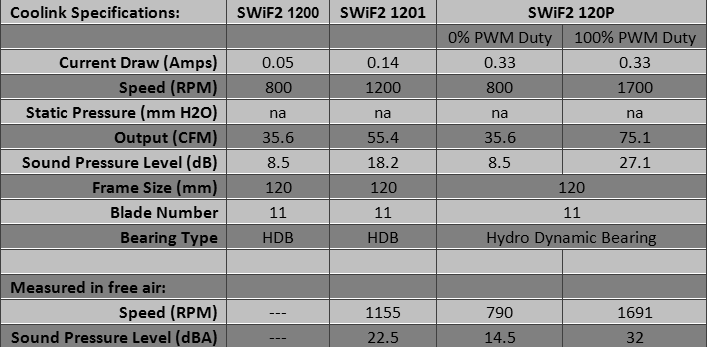
A quick inspection of the factory specs shows that the bottom range of the PWM fan corresponds to the same specs as the 800 rpm SWiF2 1200. So the SWiF2 120P was tested at 0% PWM duty to provide a proxy for the SWiF2 1200. Now you will know how well the SWiF2 1200 cools in addition to the 1201 and the 120P.
The ‘Anti-vibration Bolts & Screws‘ are only about 25mm (one inch) long, so they are too short to pull through; you must have access to the corners of the fan to use them. The cable ‘sleeving’ is black rubber tubing. The PWM Y-cable included with the 120P has the RPM reporting line going only to one arm of the Y — that is a good thing: it prevents the motherboard from receiving more than one input and getting confused about the RPM.
The PWM functions of the SWiF2 120P were tested, using a grounded PWM wire for 0% PWM duty, and a Zalman PWM Mate to approximate 25%, 50%, 75% and 100% PWM duty. A quiet click can be heard a few inches away. To hear a faint click you must put your ear right up to the fan.
At 0% PWM duty the 120P ran at 762 RPM, producing quiet clicking; 25%: 770RPM and very quiet clicking; 50% 1169 RPM and fast quiet clicking. At 75% and 100% the fan ran at 1584 and 1662 RPM with no clicking.
Deepcool UF120 / UF140, Enermax Cluster, Magma and T.B. Silent 140
Deepcool UF120 and UF140
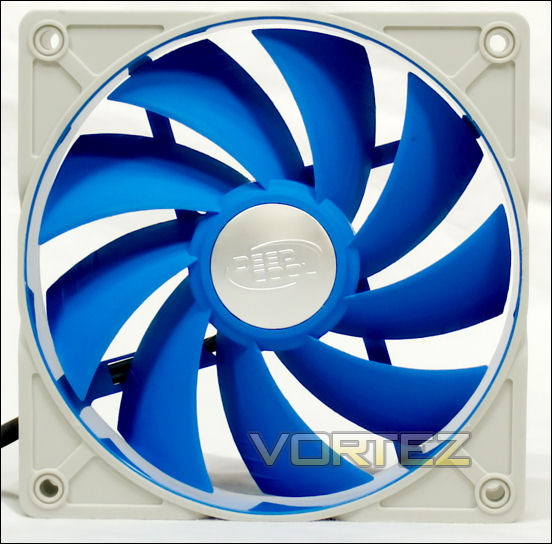
The Deepcool UF series are about the prettiest fans you will ever see. They are all a lovely shade of sky blue and off-white, a cloud-like color. All of the UF series are PWM — 80mm, 92mm, 120mm and 140mm. Each comes with a PWM-compatible Molex adapter (alas, with no RPM reporting wire), a PWM Y-cable with a single RPM-reporting wire to keep from confusing the motherboard, and a 7-Volt adapter (again, no RPM reporting wire). The 7 Volt adapter is interesting because it uses wires connected to the 12v and 5v Molex power wires. Alone among the UF fans and their accessories, it is not sleeved, but the 7v supply is a twisted wire pair. One final treasure among the accessories: a creamy translucent set of four of the best vibration-dampening ‘screws’ available. They are the type you would buy for yourself.
The 140mm UF140 has 120mm standard screw holes. They are placed to fit the fan where 120mm fans would normally go. In a square 120mm window, having a 140mm fan will cover the entire opening, where a 120mm fan will cover no more than 78%. This allows for more airflow or a quieter fan.
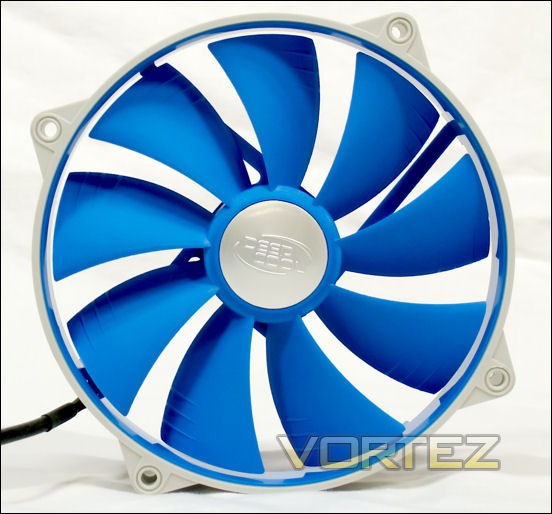
Deepcool has been sending their fans in a handsome box held shut by magnetic clasps and surrounded by a paper sleeve. It is impressive, but by the time you read this Deepcool will have replaced the elaborate packaging with a traditional box.
One feature Deepcool pioneered was the use of a vibration-absorbing layer covering the fan frames. The manufacturer shows cross sections of the frames and the coatings of the UF120 here, and the UF140 here. With Deepcool’s permission, here is their picture of a cross-section of the UF140:
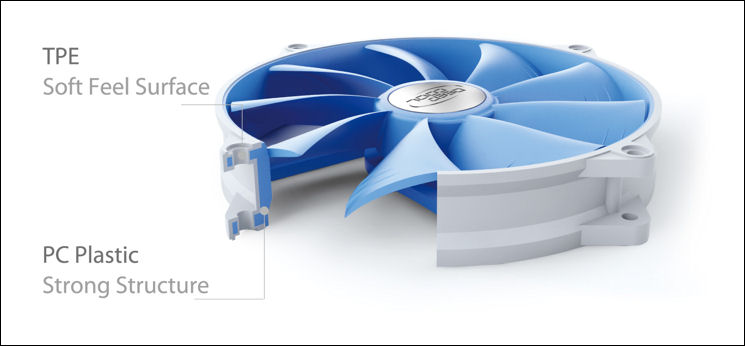
UF features according to Deepcool:
• Strong plastic frame with soft and elastic TPE cover to absorb operating vibration maximally.
• Special fan blade design to offer a unique visual effect when operating.
• 2 ball bearing to offer smooth rotation and long lifetime.
• Super silent and big airflow.
• Special fan blade design to offer a unique visual effect when operating.
• 2 ball bearing to offer smooth rotation and long lifetime.
• Super silent and big airflow.
Product Page UF120: Here
Product Page UF140: Here
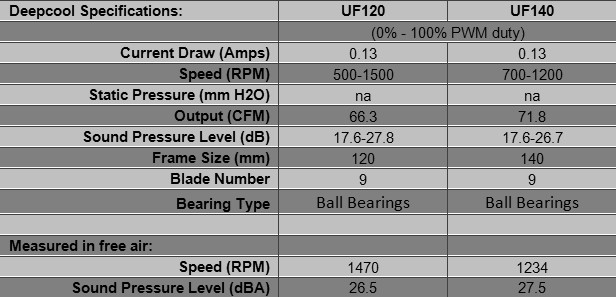
Specifications for the UF120 and UF140 at 7v are unavailable, and the rpm could not be read. However, measured in free air at 7v the SPL of the UF120 was 14 dBA, and the SPL of the UF140 was 14.5 dBA.
The PWM functions of the UF120 and UF140 were tested, using a grounded PWM wire for 0% PWM duty, and a Zalman PWM Mate to approximate 25%, 50%, 75% and 100% PWM duty. A quiet click can be heard a few inches away. To hear a faint click you must put your ear right up to the fan.
At 0-25% PWM duty the UF120 ran about 500 rpm with a quiet clicking or grinding sound. At 50% duty there is a faint fast clicking, at 75% a fainter faster click, and at 100% no clicking. The UF140 showed similar behavior: 662 rpm at 0-25% and 755 rpm at 50% PWM duty with quiet clicking or grinding; 1092 rpm at 75% PWM duty with a faint fast click, and 1250 rpm at 100% duty. At full speed the UF140 betrayed no clicking, but the frame did vibrate. Good thing it had a vibration-absorbing coating. Note that both fans responded to PWM control when they were on the 7v adapter; but they would start only with 50% PWM duty or higher.
All four fans, from 80mm to 140mm, have a solid feel, probably due to the vibration-absorbing coating on a strong frame. All the wires except the 7v adapter are closely invested with a tightly woven sleeving. The blades have three small fins on their outboard ends that indeed produce a subtle visual effect while spinning. Fans supplied by Deepcool.
BTW — for a geek treat, go to the Deepcooltech website and peruse what else they do (here). You may especially enjoy the quick tutorial on the various tradeoffs involved in making cooling devices (‘machining process’ here). Deepcool appears to manufacture their own fans.
Enermax Cluster and Magma
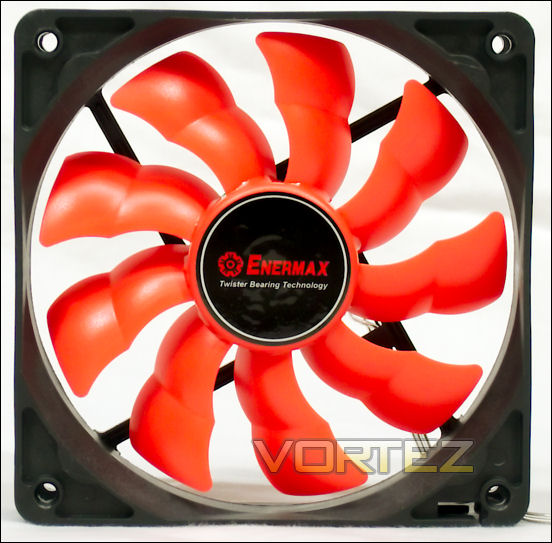
Like other sets of fans from the same manufacturer, these 120mm Enermax fans share bearings and blades. Where they differ is frame, color and circuitry. Among the features they share are Batwing blades and Twister bearings. The blades are interchangeable. In fact, the tested Cluster here is using the blade from an Everest, a 120mm thermally controlled fan.
Enermax on the Cluster UCCL12:
• “TWISTER” Bearing Technology with double lifetime than 2-ball bearing
• BATWING Blade Design and Carved HALO Frame for extra 20 ~ 30% airflow
• PWM fan speed control to keep your system silent and cool all the time
• Patented FAIRY Frame structure with aluminum ring for enhanced stability
• Detachable water-resistant blades for easy cleaning
• White LIGHTNING LED on/off
• Isolator-mounts for shockproof and easy installation
• BATWING Blade Design and Carved HALO Frame for extra 20 ~ 30% airflow
• PWM fan speed control to keep your system silent and cool all the time
• Patented FAIRY Frame structure with aluminum ring for enhanced stability
• Detachable water-resistant blades for easy cleaning
• White LIGHTNING LED on/off
• Isolator-mounts for shockproof and easy installation
Product Page: Here
Enermax on the Magma UCMA12:
• “TWISTER” Bearing Technology with double lifetime than 2-ball bearing
• BATWING Blade Design and Carved HALO Frame for extra 20 ~ 30% airflow
• The world 1st fan can run at 85° C at least for 100,000 hours
• Detachable water-resistant blades for easy cleaning
• Isolator-mounts for shockproof and easy installation
• BATWING Blade Design and Carved HALO Frame for extra 20 ~ 30% airflow
• The world 1st fan can run at 85° C at least for 100,000 hours
• Detachable water-resistant blades for easy cleaning
• Isolator-mounts for shockproof and easy installation
Product Page: Here
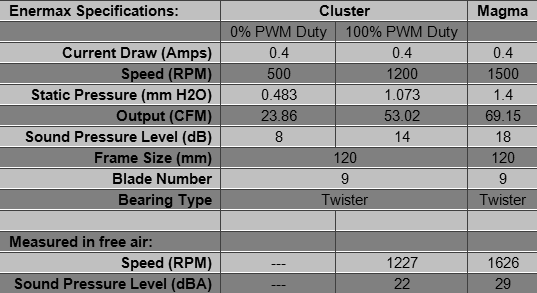
The Cluster’s wires are sleeved in a white mesh, to go with its white frame and blades. The Magma has shiny wires fused together like an extension cord. Both fans come in blister packs. Both come with 2-wire Molex adapters and a set of four double-ended vibration isolators. Those are convenient because you can put them on your fan, and then stick the other ends into the screw holes on your case. They are great for blind corners. Just don’t expect them to come easily out of the fans once you have them in. If you want to remove them they can be cut off. Double-ended vibration isolators are inexpensive and easily replaced.
The PWM functions of the Enermax Cluster were tested, using a grounded PWM wire for 0% PWM duty, and a Zalman PWM Mate to approximate 25%, 50%, 75% and 100% PWM duty. A quiet click can be heard a few inches away. To hear a faint click you must put your ear right up to the fan.
At 0% and 25% PWM duty, the Cluster ran at 488 and 500 RPM, with faint clicking. At 50%, 75% and 100% duty the fan ran at 735, 1083 and 1220 RPM with no clicking. Overall, a nice, quiet fan. The 1500 rpm Magma, on the other hand, made a noise like the wind blowing through a pine tree. Definitely easy on the ears, but definitely noticeable.
The Enermax T. B. Silence 120mm fans appear to be identical in design to the Cluster and Magma, but at 900 rpm they will be significantly quieter.
Enermax T. B. Silence 140mm UCTB14
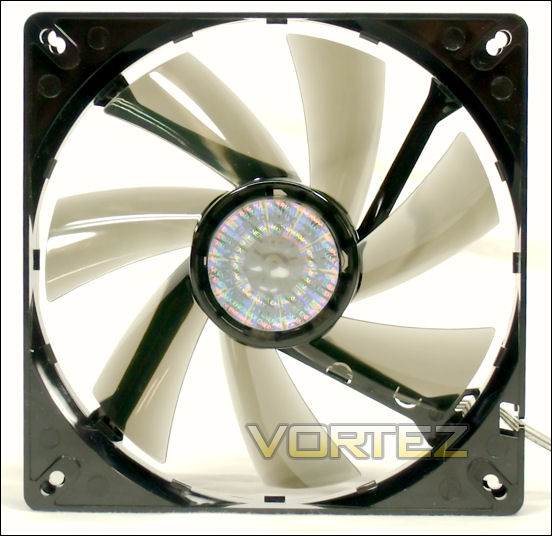
Enermax rode its Twister magnetic bearing and its Batwing blade to a series of fans — 80mm, 92mm, 120mm — until they reached 140mm. This fan. Then they changed the blade shape to what they call a “turbine” blade.
Enermax says this about their T. B. Silence line of fans:
• Performance cooling with a low-noise profile
• Twister Bearing technology for longer lifetime and low noise
• Batwing Blades design and Carved Halo Frame for extra 20~30% airflow (8cm, 9cm and 12cm fan only)
• Patented Modular Frame with aluminum ring for enhanced stability of structure (8cm, 9cm and 12cm fan only)
• Turbine Blades design for high-pressure airflow (14cm fan only)
• Detachable fan blades for easy cleaning
• Twister Bearing technology for longer lifetime and low noise
• Batwing Blades design and Carved Halo Frame for extra 20~30% airflow (8cm, 9cm and 12cm fan only)
• Patented Modular Frame with aluminum ring for enhanced stability of structure (8cm, 9cm and 12cm fan only)
• Turbine Blades design for high-pressure airflow (14cm fan only)
• Detachable fan blades for easy cleaning
Product Page: Here
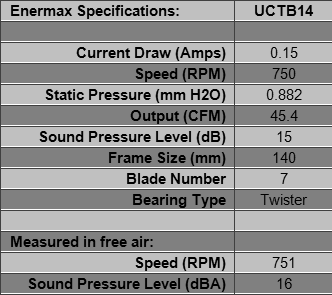
The Enermax T.B. Silence 140mm comes with four screws and a Molex adapter. The wires are shiny and fused like an extension cord. An unusual aspect of this fan is its slow speed. It is clearly designed to operate quietly.
Evercool Red Scorpion, Gelid Solutions Silent 12, Masscool BLD-12025V1
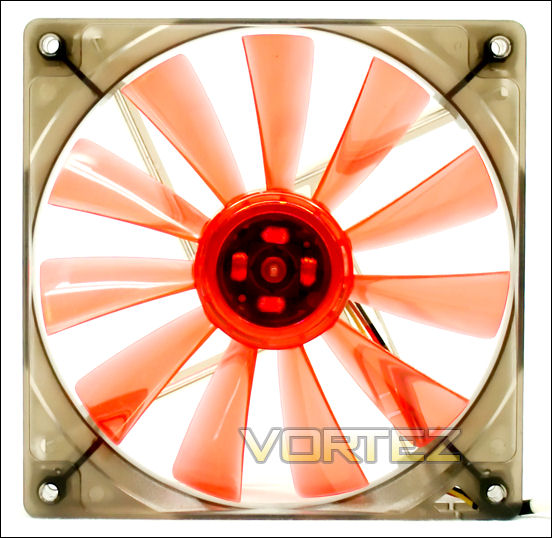
Evercool Red Scorpion 14cm
The RSF-14 is a pretty red fan that comes with a reduction adapter to allow you to cram the output of a 140mm fan into a 120mm circle. It actually works.
Evercool has this to say about their fan:
Compatible for 12 cm fan pitch positions on every computer side panels and chassis.
• Also comes with a 12 cm to 14 cm fan adapter that easily upgrades your fan.
• Equipped with a silent, large air volume, and long life 14 cm fan that draws hot air out quickly to ensure the system cooling efficiency.
• Easy to install, and very practical to use.
• Also comes with a 12 cm to 14 cm fan adapter that easily upgrades your fan.
• Equipped with a silent, large air volume, and long life 14 cm fan that draws hot air out quickly to ensure the system cooling efficiency.
• Easy to install, and very practical to use.
Product Page: Here
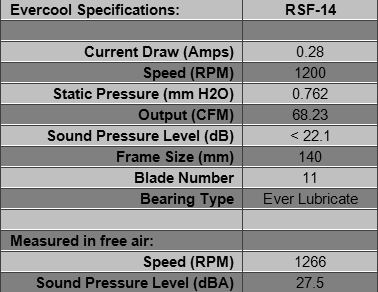
This fan is a variation on model EC14025L12EA. The product page has a link at the bottom to show you a picture of the blister pack. The picture shows the smoky translucent caliber-reducer pretty well. Evercool appears to manufacture their own fans.
Gelid Solutions Silent 12
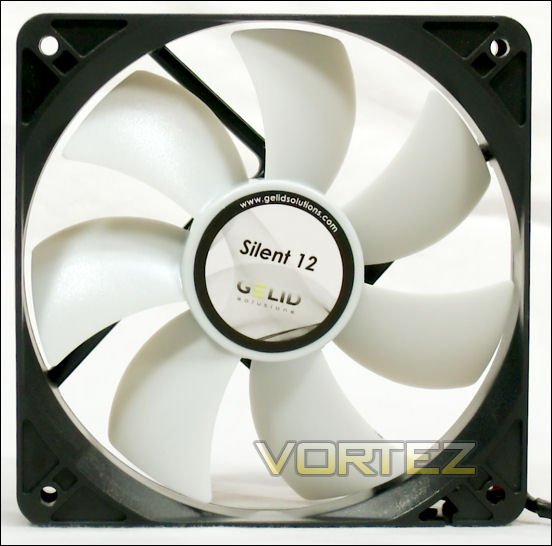
As with most fans, these have their ‘fans,’ people who liberally populate their cases with them. With their hydrodynamic bearings, the Silent 12’s are an inexpensive alternative to the ubiquitous sleeve bearing fan.
Gelid Solutions’s take on their fan:
Designed for Silent enthusiasts GELID Silent case fans provide additional airflow without increasing noise levels and at affordable prices. Precisely balanced fan blades and long life Hydro Dynamic bearing guarantee ultra low noise. To add to the silence fan mounts replace traditional screws and are made of high quality, temperature resistant, extra long lasting rubber and stop vibrations from the fan motor from traveling into your PC case.
Features:
• Silent Operation
• Optimized Fan Blades
• High Airflow &High Static Pressure
• Rubber Fan Mounts
• Silent Operation
• Optimized Fan Blades
• High Airflow &High Static Pressure
• Rubber Fan Mounts
Product Page: Here
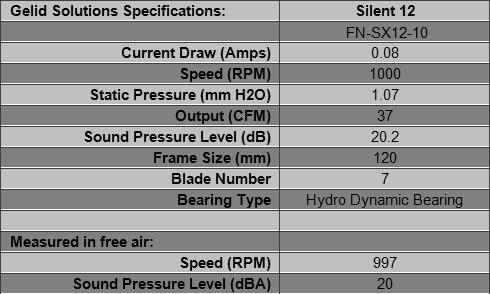
The fan tested was model FN-SX12-10. It comes with four double-ended vibration isolators. A good picture of them is here with a guide to using them here (they did it right in the latter picture).
What Gelid doesn’t mention is that with HDB, their fan can be pointed in any direction without degradation of the bearing.
Masscool BLD-12025V1
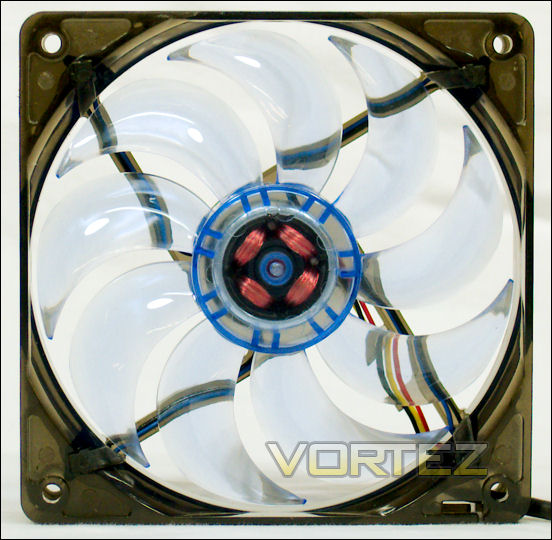
Masscool sells a variety of inexpensive but solid fans. This is an example. On close inspection it looks very much like a Cooler Master Sickleflow, but with ball bearings.
Masscool’s description of this fan:
• 4 blue LEDs
• Ball bearing
• 50,000 long life hours
• Maximum RPM up to 60CFM
• RoHS compliance for protecting the environment
• 3 pins /4 pins connector
• Ball bearing
• 50,000 long life hours
• Maximum RPM up to 60CFM
• RoHS compliance for protecting the environment
• 3 pins /4 pins connector
Product Page: Here
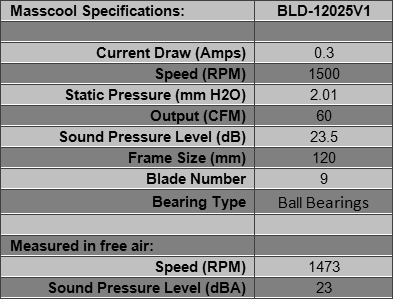
With this test fan the specs were accurate for speed and SPL. A soft, pleasant sound.
Mechatronics MD1238H12B, Nexus Real Silent Basic, Nidec Gentle Typhoon
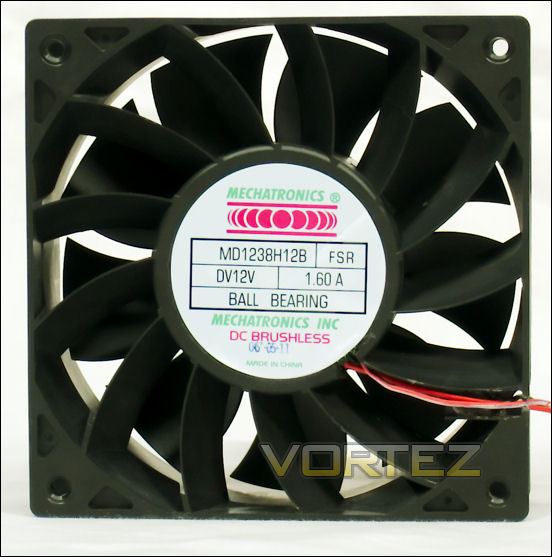
Mechatronics MD1238H12B
The Mechatronics MD1238H12B is an industrial fan, included here to show the limits of the test system. At a certain point the Megahalems cannot produce further cooling without an enormous additional input of airflow (i.e. — a lot more noise), and then you get only a small improvement. This fan demonstrates that effect. As for the fan, it is a fan-and-stator design with nine blades and 13 vanes. The effect of stator vanes is to increase static pressure.
Mechatronics says this about the MD1238 series:
• Features: high performance design
• Construction: UL94V-0 PBT impeller & frame
• Bearing option: ball bearing
• Connection: AWG 24,1007 lead wires
• Frame: reinforced flanged design
• Protection: thermal
• Options: tachometer output or locked rotor alarm
• Construction: UL94V-0 PBT impeller & frame
• Bearing option: ball bearing
• Connection: AWG 24,1007 lead wires
• Frame: reinforced flanged design
• Protection: thermal
• Options: tachometer output or locked rotor alarm
Product Page: Here (PDF)
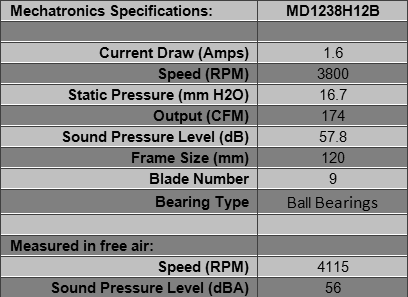
The 1238 series are 38mm thick. The wires for this fan are standard fan wires, so now we know that standard fan wires are 24 AWG. Always useful information to have. Given that the fan draws 1.6 Amps (over 19 Watts), do not connect it to a header on your motherboard.
Nexus Real Silent Basic Series
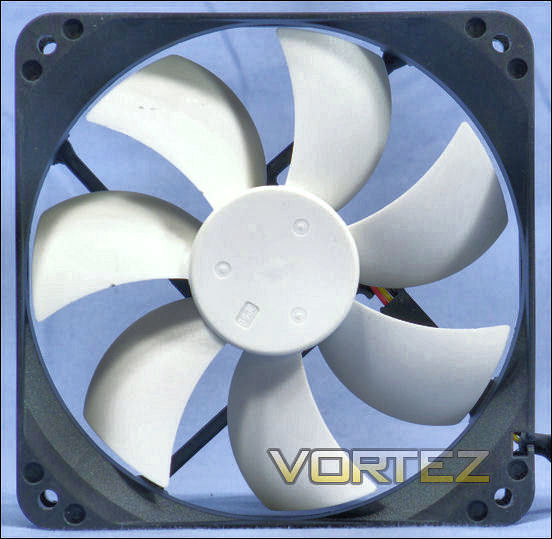
The Nexus Real Silent 120mm fan is the standard fan for testing heatsinks at SPCR, as an example of a quiet fan that produces decent airflow.
Nexus says this:
The Nexus 120mm Real Silent Case Fan is the ultimate solution to bring some extra airflow in your quiet computer. Don’t you just hate it when you have built a nice and quiet computer and it turns out that your high-end components are producing so much heat the temperatures in your computer case are getting too high? The Nexus Real Silent case fan is the solution for you. It provides the extra airflow your pc may require without being noticeable noise wise.
The Nexus 120mm Real Silent case fan is equipped with a double sided 4-pin power connector and a 3-pin motherboard connector. This allows you to connect the case fan directly to the power supply or to the motherboard.
The latest version of the Nexus Real Silent case fan comes in black and white and inside the package a set of 4 ultra-soft silicone Fan Mounts are supplied.
The Nexus 120mm Real Silent case fan is equipped with a double sided 4-pin power connector and a 3-pin motherboard connector. This allows you to connect the case fan directly to the power supply or to the motherboard.
The latest version of the Nexus Real Silent case fan comes in black and white and inside the package a set of 4 ultra-soft silicone Fan Mounts are supplied.
Product Page: Here
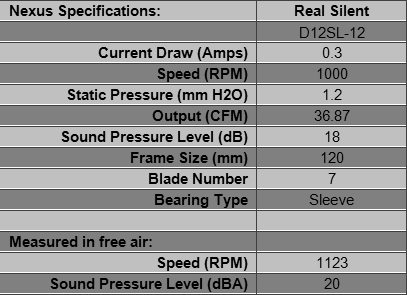
The model number and the look of the fan scream “Yate Loon,” but this fan is better than any sold under the Yate Loon name. This Nexus fan has a combination Molex and 3-pin plug power wiring (there is a picture at the link). Ideally this will allow the fan to draw power from the power supply while reporting its rpm to the motherboard; or simply to draw its power from either. Those four silicone mounts supplied with this fan are a fluorescent violet, and they are the very best vibration isolators you can buy, identical to the Deepcool vibration isolators except in color. Nexus sells a black set of those vibration isolators at various vendors. Of all the different ways of fastening a fan through its screw holes, these are the best.
Nidec Gentle Typhoon
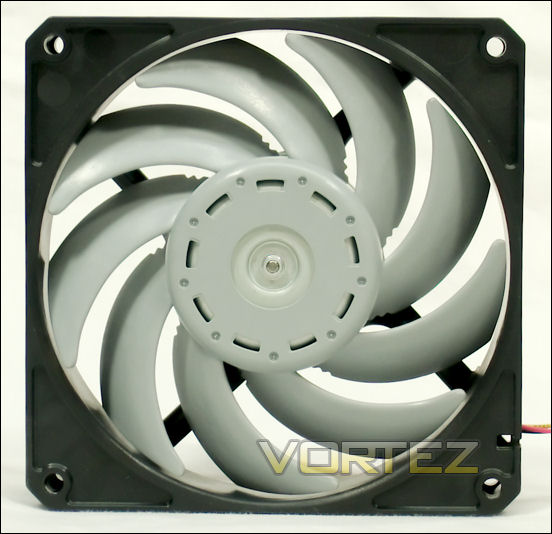
Nidec manufactures the Gentle Typhoon as an industrial fan, and Scythe sells them to the general public. This is an unusual arrangement in that the Scythe name is on the box only once while the Nidec name is splashed all around, including on the fan. Scythe’s name is not on the fan itself. One consequence of this arrangement is that you can go to Nidec’s website to get actual manufacturer’s specs on some of these fans.
Nidec’s catalog offers the GT’s in three speeds — 1450 rpm, 1850 rpm and 2150 rpm. Scythe sells these fans at lower speeds as well, but not the 2150 rpm. The GT’s need a higher rpm to produce the same cfm as other fans (compare them with Scythe’s Slip Stream fans, for example), but produce a larger static pressure compared to other fans with similar airflow. They run quietly, and retailers are always selling out, especially the 1850 rpm AP-15.
Scythe’s notes on Gentle Typhoons:
High Performance paired with low Noise Level – that’s what the new GentleTyphoon Fans by Nidec Servo Corp. are about
High Performance:
The GentleTyphoon achieves high airflow volume and low noise with the newly designed impeller, enabling silent cooling of the latest devices which run very hot.
Silent Operation:
The GentleTyphoon has a different type of tone. The fan propeller is designed to reduce the disturbing frequency fan noise to human ears.
Innovative Technology:
The newly designed motor and motor support mechanism of the GentleTyphoon uses a double vibration reduction structure. The new support mechanism uses coil dampers to greatly reduce vibration.
High Performance:
The GentleTyphoon achieves high airflow volume and low noise with the newly designed impeller, enabling silent cooling of the latest devices which run very hot.
Silent Operation:
The GentleTyphoon has a different type of tone. The fan propeller is designed to reduce the disturbing frequency fan noise to human ears.
Innovative Technology:
The newly designed motor and motor support mechanism of the GentleTyphoon uses a double vibration reduction structure. The new support mechanism uses coil dampers to greatly reduce vibration.
Nidec’s comments:
The new Gentle Typhoon(TM) is a low power, low profile box fan made for your next generation project. It boasts a wide low-noise operating range and a vibration-absorbing structure. It is even environmentally friendly.
Nidec provides many more details Here.
Nidec manufactures their own fans.
The fans to be tested are models D1225C12B1AP-11 (500 rpm), D1225C12B2AP-12 (800 rpm), D1225C12B3AP-13 (1150 rpm), D1225C12B4AP-14 (1450 rpm), D1225C12B5AP-15 (1850 rpm), and D1225C12B6AP-00 (2150 rpm). That last is not sold by Scythe, but is included here as a comparison.
Scythe Product Page for AP-11, AP-12, AP-13: Here
Nidec Product Page for AP-14, AP-15, AP-2150: Here (PDF)
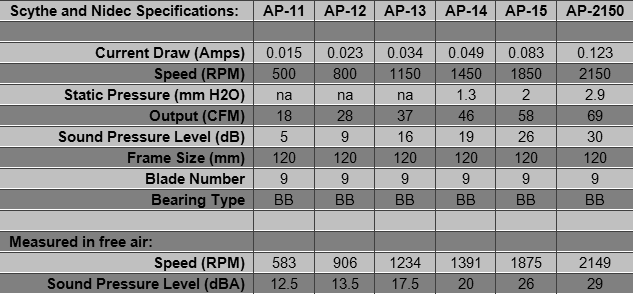
When Scythe sells fans they come with a set of four fan screws and a Molex pass-through with a power take-off for 3-pin fans. That adapter also has a wire and plug to transmit the rpm to the motherboard. These adapters are very useful as components of any number of projects.
Noctua NF-F12 PWM, Noctua NF-P12, NF-P12 PWM
Noctua NF-F12 PWM
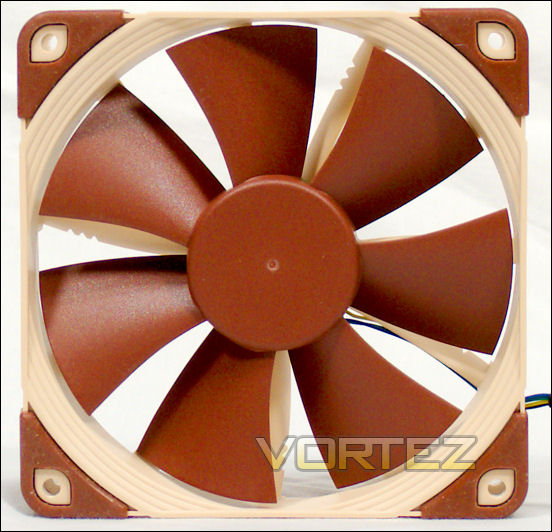
Noctua sells a number of different fans, several of which are reviewed here, starting with the NF-F12 PWM. The F12 was released at about the same time that Noctua released its other fans in PWM versions.
Here is Noctua’s press release:
Vienna, November 9th 2011 – Noctua today introduced the new NF-F12 120mm Focused Flow™ fan. Teaming up eleven stator guide vanes with a specially conceived seven blade impeller, the NF-F12’s Focused Flow™ system creates outstanding static pressure and focuses the airflow for superior performance on heatsinks and radiators. At the same time, a wide range of advanced aerodynamic design measures, second generation SSO-Bearings and Noctua’s new, custom designed PWM IC for fully automatic control guarantee astounding quietness of operation.
“Our award-winning NF-P12 has become a standard choice for pressure demanding applications such as CPU coolers and radiators, but we’ve been striving to achieve even better performance in this domain, and this is how the NF-F12 was born”, explains Mag. Roland Mossig, Noctua CEO. ”Due to the stator guide vanes focussing the airflow, it can push the air through dense fin stacks more effectively. This type of design has mostly been used for noisy high speed fans so far, so our engineers have put a lot of thought into keeping the noise in check.”
The NF-F12 uses a wide range of aerodynamic optimisations in order to refine the fan’s acoustic qualities. For example, the NF-F12’s stator guide vanes are set out in Varying Angular Distance and feature Vortex-Control Notches. Both measures help to spread the noise emission over a broader frequency spectrum and thus make the fan’s sound pattern more agreeable to the human ear. Another novel measure introduced with the NF-F12 is the Stepped Inlet Design, which adds turbulence to the influx in order to facilitate the transition from laminar flow to turbulent flow. This measure reduces tonal intake noise, improves flow attachment and increases suction capacity, especially in space restricted environments.
In addition to its advanced aerodynamic features, the NF-F12 is the first fan to implement the further optimised second generation of Noctua’s renowned, time-tested SSO bearing as well as the novel, custom designed NE-FD1 PWM IC for fully automatic PWM speed control. The NE-FD1 integrates Noctua’s Smooth Commutation Drive (SCD) technology for quieter operation and allows for ultra-low power consumption: Drawing only 0.6W, the NF-F12 consumes more than 50% less than many fans in the same speed range. This doesn’t only make it eco-friendly but also cuts down the electricity bill.
Last but not least, the NF-F12 comes with modular cabling, integrated anti-vibration pads and two speed settings for full flexibility. Its commanding performance, exhaustive set of features and Noctua’s trusted premium quality make it an elite choice for use on air coolers, radiators and other pressure demanding applications.
“Our award-winning NF-P12 has become a standard choice for pressure demanding applications such as CPU coolers and radiators, but we’ve been striving to achieve even better performance in this domain, and this is how the NF-F12 was born”, explains Mag. Roland Mossig, Noctua CEO. ”Due to the stator guide vanes focussing the airflow, it can push the air through dense fin stacks more effectively. This type of design has mostly been used for noisy high speed fans so far, so our engineers have put a lot of thought into keeping the noise in check.”
The NF-F12 uses a wide range of aerodynamic optimisations in order to refine the fan’s acoustic qualities. For example, the NF-F12’s stator guide vanes are set out in Varying Angular Distance and feature Vortex-Control Notches. Both measures help to spread the noise emission over a broader frequency spectrum and thus make the fan’s sound pattern more agreeable to the human ear. Another novel measure introduced with the NF-F12 is the Stepped Inlet Design, which adds turbulence to the influx in order to facilitate the transition from laminar flow to turbulent flow. This measure reduces tonal intake noise, improves flow attachment and increases suction capacity, especially in space restricted environments.
In addition to its advanced aerodynamic features, the NF-F12 is the first fan to implement the further optimised second generation of Noctua’s renowned, time-tested SSO bearing as well as the novel, custom designed NE-FD1 PWM IC for fully automatic PWM speed control. The NE-FD1 integrates Noctua’s Smooth Commutation Drive (SCD) technology for quieter operation and allows for ultra-low power consumption: Drawing only 0.6W, the NF-F12 consumes more than 50% less than many fans in the same speed range. This doesn’t only make it eco-friendly but also cuts down the electricity bill.
Last but not least, the NF-F12 comes with modular cabling, integrated anti-vibration pads and two speed settings for full flexibility. Its commanding performance, exhaustive set of features and Noctua’s trusted premium quality make it an elite choice for use on air coolers, radiators and other pressure demanding applications.
The stators are placed in a non-regular array, with varying angles between the vanes. According to Noctua, this reduces sharp peaks in the noise produced by the fan. They have a graph that shows the effect here.
From another press release:
The new PWM versions build on the proven designs and feature Noctua’s novel NE-FD1 IC for fully automatic control and ultra-low power consumption.
“Our customers have been asking us for PWM versions of our fans for a long time, but the available PWM fan driver ICs simply weren’t up to our quality standards”, explains Mag. Roland Mossig, Noctua CEO. “With our NE-FD1, we’ve now got our custom-designed IC that allows us to build PWM fans that consume less power and remain quieter at low speeds.”
Most conventional PWM fan driver ICs put out square signals that cause sudden torque impulses. These impulses can cause minute deformations of the entire fan structure which lead to audible “clicking” noises that are especially noticeable with many common PWM fans running at slower speeds. Adopting Noctua’s Smooth Commutation Drive (SCD) technology, the custom designed NE-FD1 PWM IC slows down the slew rate of the output signal in order to give a smoother, less sudden torque impulse. This way, PWM switching noises can be effectively suppressed and the fan runs even quieter, especially at low speeds.
Noctua’s NE-FD1 IC was not only fine-tuned for superior quietness, it has also been carefully optimised to allow for ultra-low power consumption. As a result, the new PWM models consume 25-40% less power than their non-PWM counterparts.
“Our customers have been asking us for PWM versions of our fans for a long time, but the available PWM fan driver ICs simply weren’t up to our quality standards”, explains Mag. Roland Mossig, Noctua CEO. “With our NE-FD1, we’ve now got our custom-designed IC that allows us to build PWM fans that consume less power and remain quieter at low speeds.”
Most conventional PWM fan driver ICs put out square signals that cause sudden torque impulses. These impulses can cause minute deformations of the entire fan structure which lead to audible “clicking” noises that are especially noticeable with many common PWM fans running at slower speeds. Adopting Noctua’s Smooth Commutation Drive (SCD) technology, the custom designed NE-FD1 PWM IC slows down the slew rate of the output signal in order to give a smoother, less sudden torque impulse. This way, PWM switching noises can be effectively suppressed and the fan runs even quieter, especially at low speeds.
Noctua’s NE-FD1 IC was not only fine-tuned for superior quietness, it has also been carefully optimised to allow for ultra-low power consumption. As a result, the new PWM models consume 25-40% less power than their non-PWM counterparts.
Product Page: Here
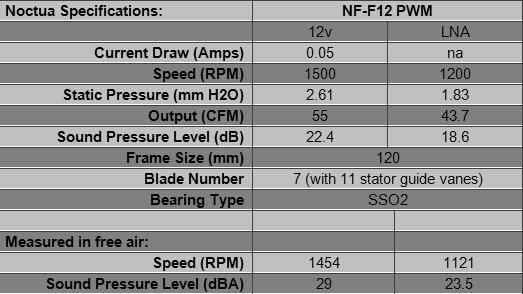
Careful listening did not reveal any clicking at all on this fan at any speed, at any PWM duty or at any Voltage. The Noctua engineers clearly achieved their objectives. The total absence of clicking in PWM fans is unique to Noctua.
To repeat: There was no clicking at all on this fan at any speed, at any Voltage.
Another thing: the speed of all Noctua PWM fans goes to zero when the PWM duty is zero. And as far as imprecise equipment could ascertain, the speed increased more or less in proportion to the PWM duty. This is also unique to Noctua fans.
Note that all eight corners of the frame are fitted into soft silicon gloves to attenuate any vibrations. The plastic case that slips into the box also contains the 4-pin Low Noise Adapter, or LNA as noted above, and four soft vibration isolators. These are only 26mm (an inch) long, so they cannot be pulled through from the other side of the fan. You must have access to the fan’s corners to use them.
The fan also contains a 4-pin Y-cable that allows two PWM fans to connect to a fan header, yet avoid confusing the motherboard because it reports only one fan’s speed. To avoid cord entanglements, the fan’s power cable is only eight inches (200mm) long, but there is a foot-long (300mm) 4-pin extension cable.
In case you missed it, Noctua intends this fan to be used on radiators in addition to heatsink coolers. The fan comes with a six year warranty. Users who have had trouble with their fans report on various forums that Noctua’s customer service has responded quickly and sent replacement fans at no charge, postpaid. Fan provided by Noctua.
Noctua NF-P12 and NF-P12 PWM
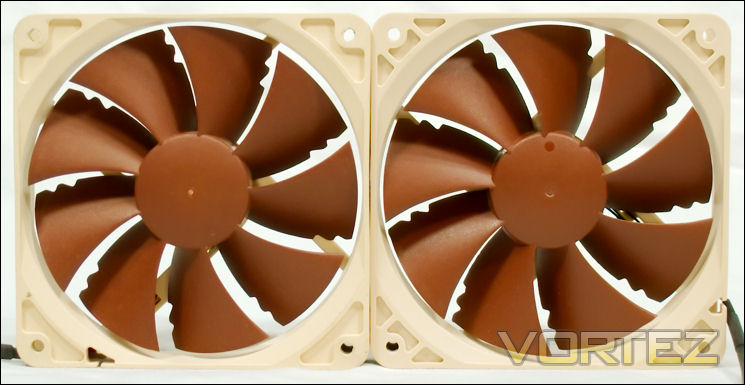
Above: NF-P12 on the left, NF-P12 PWM on the right. No changes but the circuits.
The P12 was for a long time Noctua’s go-to 120mm fan for their various heatsinks. Reasonably quiet, it performed fairly well. But it was a Voltage-controlled fan. To assist buyers in fan control they supplied a Low Noise Adapter (LNA) and an Ultra Low Noise Adapter (ULNA) with their fans so people did not need to buy fan controllers. But this did not address the users who wanted the higher speeds only when their computers were working hard. Then . . .
We will let Noctua speak for themselves:
Vienna, November 30th 2011 – Enlarging its portfolio of premium quality quiet fans, Noctua today announced PWM versions of its renowned NF-P12, NF-B9 and NF-R8 fans. Having received more than hundred awards and recommendations from the international press, the classic NF-P12, NF-B9 and NF-R8 fans helped to found Noctua’s reputation as a top-tier manufacturer of premium grade quiet cooling components. The new PWM versions build on the proven designs and feature Noctua’s novel NE-FD1 IC for fully automatic control and ultra-low power consumption.
“Our customers have been asking us for PWM versions of our fans for a long time, but the available PWM fan driver ICs simply weren’t up to our quality standards”, explains Mag. Roland Mossig, Noctua CEO. “With our NE-FD1, we’ve now got our custom-designed IC that allows us to build PWM fans that consume less power and remain quieter at low speeds.”
Most conventional PWM fan driver ICs put out square signals that cause sudden torque impulses. These impulses can cause minute deformations of the entire fan structure which lead to audible “clicking” noises that are especially noticeable with many common PWM fans running at slower speeds. Adopting Noctua’s Smooth Commutation Drive (SCD) technology, the custom designed NE-FD1 PWM IC slows down the slew rate of the output signal in order to give a smoother, less sudden torque impulse. This way, PWM switching noises can be effectively suppressed and the fan runs even quieter, especially at low speeds.
Noctua’s NE-FD1 IC was not only fine-tuned for superior quietness, it has also been carefully optimized to allow for ultra-low power consumption. As a result, the new PWM models consume 25-40% less power than their non-PWM counterparts.
All models come with Low-Noise Adaptors, 30cm cable extensions and 4-pin Y-cables that allow to connect a second PWM fan to the same fan header for automatic control. Equipped with Noctua’s signature SSO bearing and topped off with a 6 years manufacturer’s warranty, the NF-P12 PWM, NF-B9 PWM and NF-R8 PWM are a proven premium choice for the highest demands.
“Our customers have been asking us for PWM versions of our fans for a long time, but the available PWM fan driver ICs simply weren’t up to our quality standards”, explains Mag. Roland Mossig, Noctua CEO. “With our NE-FD1, we’ve now got our custom-designed IC that allows us to build PWM fans that consume less power and remain quieter at low speeds.”
Most conventional PWM fan driver ICs put out square signals that cause sudden torque impulses. These impulses can cause minute deformations of the entire fan structure which lead to audible “clicking” noises that are especially noticeable with many common PWM fans running at slower speeds. Adopting Noctua’s Smooth Commutation Drive (SCD) technology, the custom designed NE-FD1 PWM IC slows down the slew rate of the output signal in order to give a smoother, less sudden torque impulse. This way, PWM switching noises can be effectively suppressed and the fan runs even quieter, especially at low speeds.
Noctua’s NE-FD1 IC was not only fine-tuned for superior quietness, it has also been carefully optimized to allow for ultra-low power consumption. As a result, the new PWM models consume 25-40% less power than their non-PWM counterparts.
All models come with Low-Noise Adaptors, 30cm cable extensions and 4-pin Y-cables that allow to connect a second PWM fan to the same fan header for automatic control. Equipped with Noctua’s signature SSO bearing and topped off with a 6 years manufacturer’s warranty, the NF-P12 PWM, NF-B9 PWM and NF-R8 PWM are a proven premium choice for the highest demands.
Essentially Noctua replaced the IC (integrated circuit) of their fans, with no other changes. Thus you do not see the ‘SSO2’ bearings of the NF-F12 in these fans.
NF-P12 Product Page: Here
NF-P12 PWM Product Page: Here
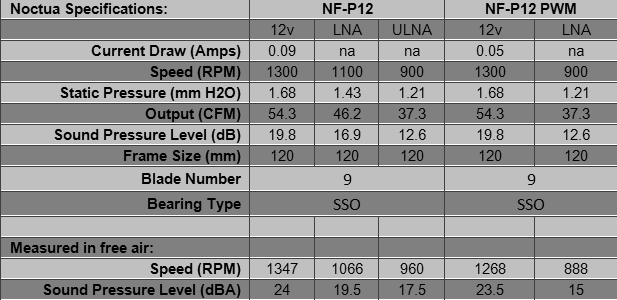
Careful listening did not reveal any clicking at all on the PWM fan at any speed, at any Voltage. The Noctua engineers clearly achieved their objectives. The total absence of clicking in PWM fans is unique to Noctua.
To repeat: There was no clicking at all on the NF-P12 PWM at any speed, at any Voltage.
Another thing: the speed of all Noctua PWM fans goes to zero when the PWM duty is zero. And as far as imprecise equipment could ascertain, the speed increased more or less in proportion to the PWM duty. This is also unique to Noctua fans.
All cables are handsomely sleeved. The LNA for the P12 is not the same as the LNA for the F12. The PWM fan also comes with a 4-pin Y-cable that allows two PWM fans to connect to a fan header, yet avoid confusing the motherboard because it reports only one fan’s speed. To avoid cord entanglements, the fan’s power cable is only eight inches (200mm) long, but there is a foot long (300mm) 4-pin extension cable.
For both the original and the PWM P12’s, the plastic case that slips into the box also contains four soft vibration isolators. These are only 26mm (an inch) long, so they cannot be pulled through from the other side of the fan. You must have access to the fan’s corners to use them. The non-PWM P12 includes a Molex to 3-pin adapter.
As usual for Noctua, the fans come with a six-year warranty. Users who have had trouble with their fans report on various forums that Noctua’s customer service has responded quickly and sent replacement fans at no charge, postpaid. The NF-P12 PWM was provided by Noctua.
Noctua NF-P14 FLX and NF-S12B, NZXT 120mm and 140mm case fans
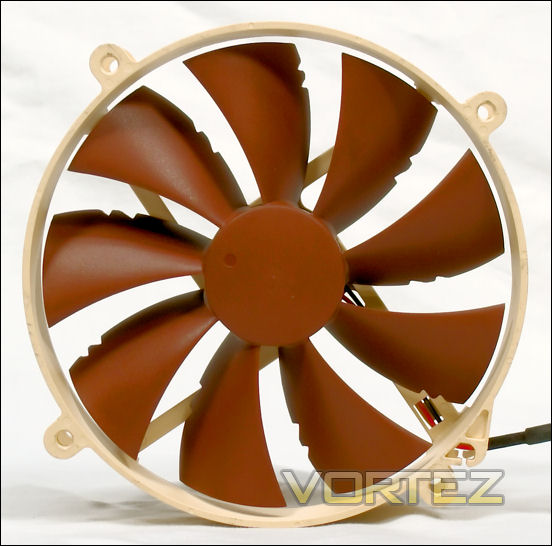
Noctua NF-P14 FLX
The NF-P14 is the center fan of the Noctua NH-D14, their tandem tower supercooler. They do make a PWM version that comes with the Noctua NH-D14 SE2011, but the PWM version of this fan is not sold at retail (Noctua may be getting ready to replace it). The NF-P14 FLX is sold retail, however. The FLX means that it comes with a Low Noise Adapter (LNA) and an Ultra Low Noise Adapter (ULNA). This fan is often used as a case fan, in part because its Voltage adapters allow it to various speeds without a fan controller, in part because its screw holes are those of a 120mm fan, because its bearings allow it to point its output upward with no deterioration of bearing performance, and because people like its performance. Additionally, this fan’s retail package includes adapters that will allow it to fit 140mm standard screw holes. That makes it a very flexible fan, so it earns its “FLX” label .
Noctua describes their fan:
Following in the footsteps of the successful NF-P12, the NF-P14 is a highly optimised, premium quality 140mm fan with Vortex-Control Notches for superb quietness and outstanding aerodynamic efficiency. Metal reinforcements, SCD2 technology and Noctua’s premium grade SSO-Bearing guarantee exceptional running smoothness and excellent long-term stability. Using the same hole-spacing as common 120mm fans and achieving a superior airflow/noise ratio, the NF-P14 is ideal for upgrading 120mm CPU or case fans.
140mm Impeller with Vortex Control Notches
Thanks to its psycho-acoustically optimised nine blade impeller with staggered Vortex-Control Notches, the NF-P14 combines superb quietness with exceptional airflow and static pressure.
Metal Reinforcements
Both the impeller hub and the bearing shell of the NF-P14 are metal reinforced in order to achieve ultimate manufacturing precision, high durability and vibration-free running.
Round frame with 120mm mounting holes
Using a round frame with the same hole-spacing as common 120mm fans and producing more airflow due to its larger diameter, the NF-P14 is a perfect upgrade for 120mm CPU or case fans. Thanks to the supplied adaptors, the NF-P14 also fits common 140mm mounting holes.
3 speed settings for full flexibility
Providing 1200, 900 and 750 rpm speed settings via the supplied Low-Noise and Ultra-Low-Noise Adapters, the NF-P14 FLX (Flexibility) can be fine-tuned for superior airflow or maximum quietness.
Smooth Commutation Drive 2
The latest version of Noctua’s advanced SCD drive system ensures superb running smoothness by eliminating torque variations and switching noises.
140mm Impeller with Vortex Control Notches
Thanks to its psycho-acoustically optimised nine blade impeller with staggered Vortex-Control Notches, the NF-P14 combines superb quietness with exceptional airflow and static pressure.
Metal Reinforcements
Both the impeller hub and the bearing shell of the NF-P14 are metal reinforced in order to achieve ultimate manufacturing precision, high durability and vibration-free running.
Round frame with 120mm mounting holes
Using a round frame with the same hole-spacing as common 120mm fans and producing more airflow due to its larger diameter, the NF-P14 is a perfect upgrade for 120mm CPU or case fans. Thanks to the supplied adaptors, the NF-P14 also fits common 140mm mounting holes.
3 speed settings for full flexibility
Providing 1200, 900 and 750 rpm speed settings via the supplied Low-Noise and Ultra-Low-Noise Adapters, the NF-P14 FLX (Flexibility) can be fine-tuned for superior airflow or maximum quietness.
Smooth Commutation Drive 2
The latest version of Noctua’s advanced SCD drive system ensures superb running smoothness by eliminating torque variations and switching noises.
Product Page: Here.
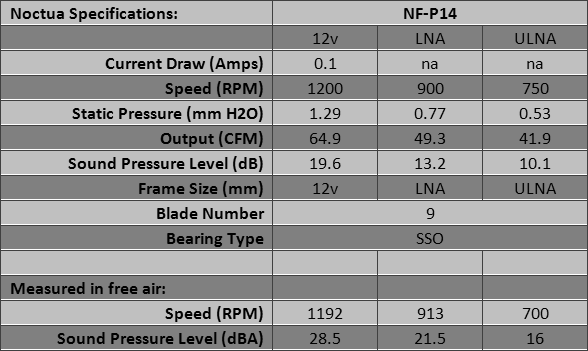
All cables are tightly sleeved. The plastic case that slips into the box also contains a Molex to 3-pin adapter and four soft vibration isolators. These latter are only 26mm (an inch) long, so they cannot be pulled through from the other side of the fan. You must have access to the fan’s corners to use them.
As usual for Noctua, the fans come with a six-year warranty. Users who have had trouble with their fans report on various forums that Noctua’s customer service has responded quickly and sent replacement fans at no charge, postpaid.
Noctua NF-S12B
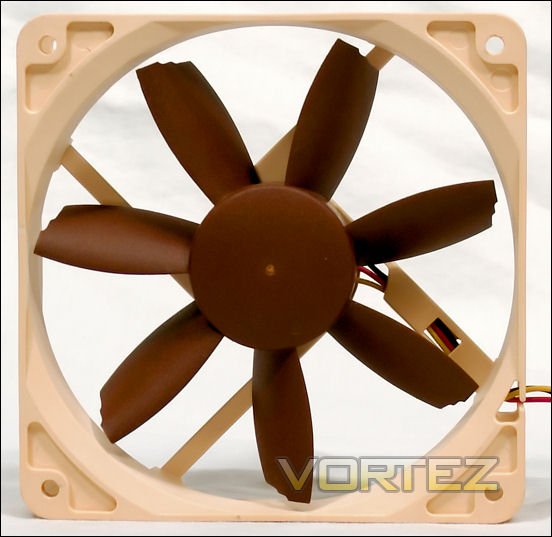
The S12B is an update of Noctua’s older NF-S12. The latter is still available in some places, but you might wish to avoid it and get the NF-S12B instead. This fan is intended by Noctua as a case fan.
Noctua’s description of this fan:
Succeeding the vastly successful NF-S12, the NF-S12B is a next generation quiet fan featuring Noctua’s advanced SCD2 technology as well as a highly optimised blade geometry with Bevelled Blade Tips that improves its award-winning predecessor’s airflow efficiency by up to 10%. Topped off with Noctua’s time-tested SSO-Bearing, 6 years warranty and versatile 1200/900/600 rpm speed settings, the NF-S12B FLX is a premium quality fan that offers full flexibility in quiet to ultra-quiet case cooling.
Highly optimised impeller with Bevelled Blade Tips
Thanks to its further refined blade geometry with extended leading edges and Bevelled Blade Tips, the NF-S12B achieves up to 10% more airflow and static pressure than its much acclaimed predecessor at the same noise level.
3 speed settings for full flexibility
Providing 1200, 900 and 600 rpm speed settings via the supplied Low-Noise and Ultra-Low-Noise Adapters, the FLX (Flexibility) version can be fine-tuned for superior airflow or maximum quietness.
Smooth Commutation Drive 2
The latest version of Noctua’s advanced SCD drive system ensures superb running smoothness by eliminating torque variations and switching noises.
SSO-Bearing
Noctua’s time-tested SSO-Bearing technology has become synonymous with supremely quiet operation and exceptional long-term stability.
Highly optimised impeller with Bevelled Blade Tips
Thanks to its further refined blade geometry with extended leading edges and Bevelled Blade Tips, the NF-S12B achieves up to 10% more airflow and static pressure than its much acclaimed predecessor at the same noise level.
3 speed settings for full flexibility
Providing 1200, 900 and 600 rpm speed settings via the supplied Low-Noise and Ultra-Low-Noise Adapters, the FLX (Flexibility) version can be fine-tuned for superior airflow or maximum quietness.
Smooth Commutation Drive 2
The latest version of Noctua’s advanced SCD drive system ensures superb running smoothness by eliminating torque variations and switching noises.
SSO-Bearing
Noctua’s time-tested SSO-Bearing technology has become synonymous with supremely quiet operation and exceptional long-term stability.
Product Page: Here
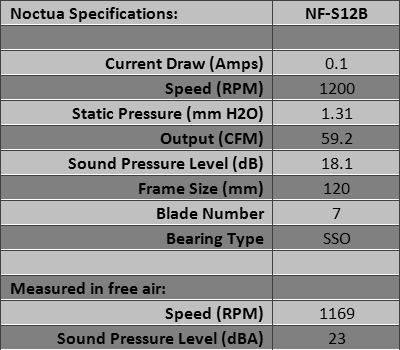
All cables are tightly sleeved. The plastic case that slips into the box also contains a Molex to 3-pin adapter and four soft vibration isolators. These latter are only 26mm (an inch) long, so they cannot be pulled through from the other side of the fan. You must have access to the fan’s corners to use them.
As usual for Noctua, the fans come with a six-year warranty. Users who have had trouble with their fans report on various forums that Noctua’s customer service has responded quickly and sent replacement fans at no charge, postpaid.
NZXT 120mm and 140mm case fans
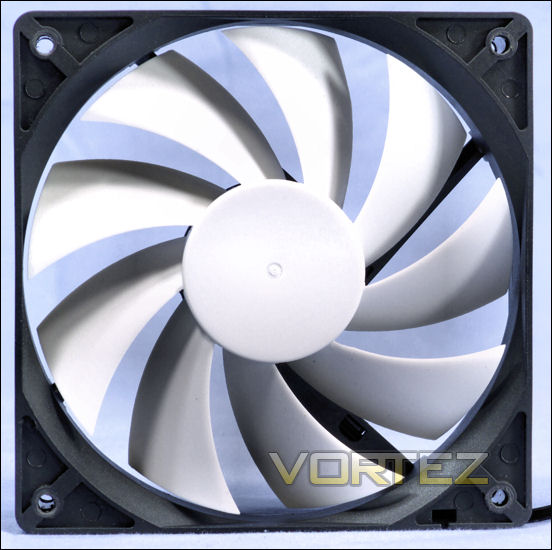
NZXT was known initially for its cases, but has branched out to other products. As part of its marketing cases, it also sells case fans. The NZXT fans tested here are 120mm (above) and 140mm (below) fans removed from a case. NZXT sells their fans at retail, though.
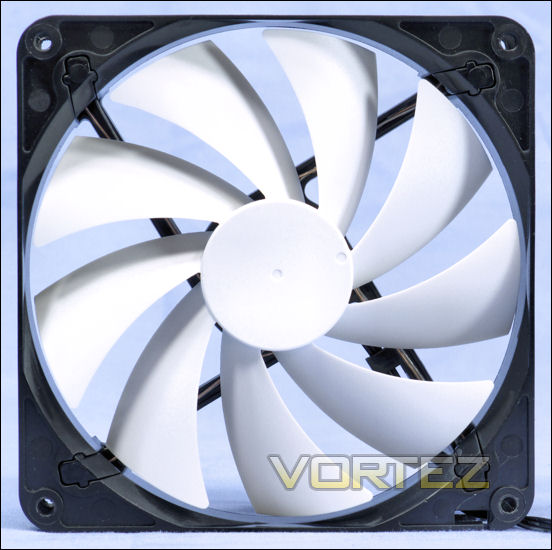
They say this about their 120mm and 140mm ‘enthusiast case fans’:
120mm 9 Blade Rifle Bearing Fan 1300 RPM
9 Blade rifle bearing fan
Sleeved Cables
Two years warranty
9 Blade rifle bearing fan
Sleeved Cables
Two years warranty
Product Page FN-120RB: Here
Product Page FN-140RB: Here
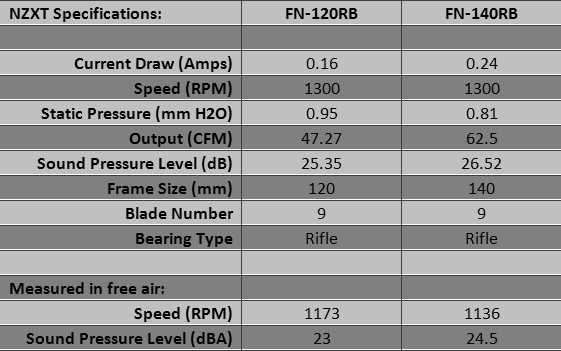
Unlike some fans supplied with cases, the fans that come with NZXT cases always have RPM reporting lines, which makes them usable anywhere you need to monitor the speed of your fans.
Prolimatech Blue Vortex 14, Rosewill RFA-120BL and RFX-120BL
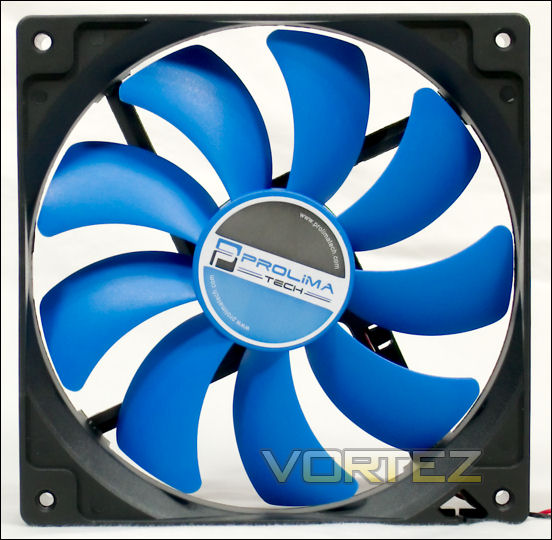
Prolimatech Blue Vortex 14
Prolimatech is a recent startup whose first product was the Megahalems, the heatsink that is used to compare the cooling of the fans in this study. Later Prolimatech began making other heatsinks and selling fans, including a line of 120mm and 140mm Vortex fans, as well as a ‘Vortex Fan Aluminum Series’.
Here is what Prolimatech says about the Blue Vortex 14:
Prolimatech has finally entered the market of system fans in the name of Blue Vortex! Blue Vortex comes in 140x25x25mm and is perfectly balanced between performance and noise. Who says you can’t have best of both worlds? Best of all, it is designed to work optimally with Prolimatech’s Armageddon. Blue Vortex will keep your Armageddon and your CPU cool while humming at a lowly 17 dB. So pick one up now! We promise you will be amazed.
• Specifically designed to work with Prolimatech Armageddon for best performance to noise ratio.
• Stable bearing for long life operation at minimal noise level.
• Quality material used in fan blades for a solid structure design.
• Specifically designed to work with Prolimatech Armageddon for best performance to noise ratio.
• Stable bearing for long life operation at minimal noise level.
• Quality material used in fan blades for a solid structure design.
Prolimatech provides a P/Q curve chart here, and a 3D drawing here.
Product Page: Here
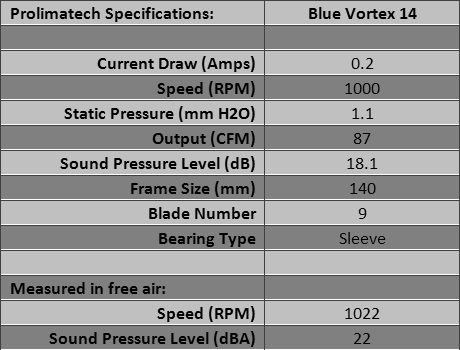
It’s a pretty fan. Nice colors. It comes with four screws and a Molex to 3-pin adapter. The fan’s wires are twisted as an alternate to sleeving.
Rosewill RFA-120BL
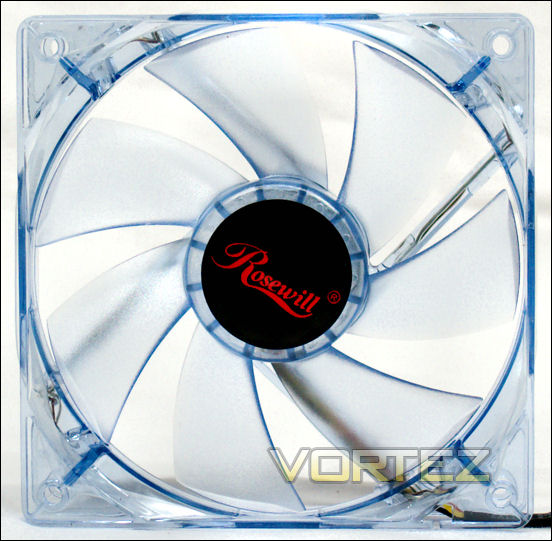
Rosewill is the house brand for Newegg. RFA-120BL is a case fan.
Their description:
If you need to move more air than you can with an average 120mm fan, the Rosewill RFA-120-BL is your solution. Featuring a top speed of 2000RPM this fan pushes up to 74.48CFM. The sleeve bearing motor is designed for long life and the exterior mounted speed control makes it easy to adjust. The blue LEDs add a bit of atmosphere to your late night sessions.
Product Page: Here
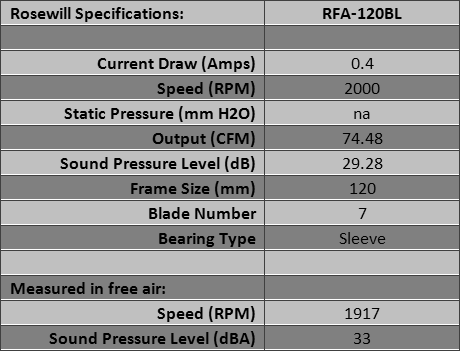
The fan’s cable is tightly sleeved. It comes with eight fan screws and a Molex to 3-pin adapter. It is generally not bundled with a speed controller. For that you would get an RFX-120.
Rosewill RFX-120BL
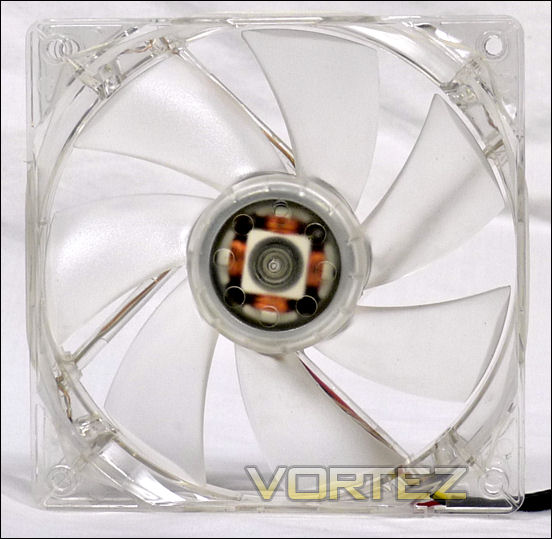
Rosewill is the house brand for Newegg. RFX-120BL is a case fan that is bundled with its own single-channel fan speed controller. Neither the Newegg nor Rosewill sites have anything to say about their fan except its specifications.
Product Page: Here
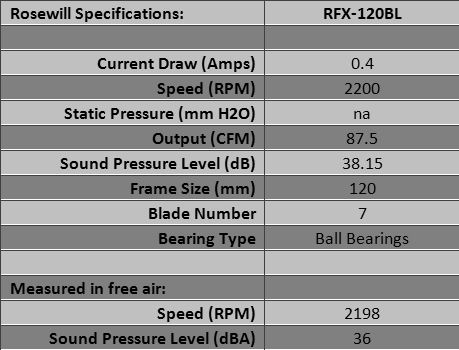
In addition to the fan controller this fan comes with a finger guard, screws and a Molex pass-through with 12 Volt 3-pin power take-off for the fan. Considering that you can buy this kit for $8-10US, it is a bit of a bargain. And the LED’s are a really cheerful color of blue that puts a smile on your face.
San Ace 120x38mm fans and San Ace ‘Silent’ series
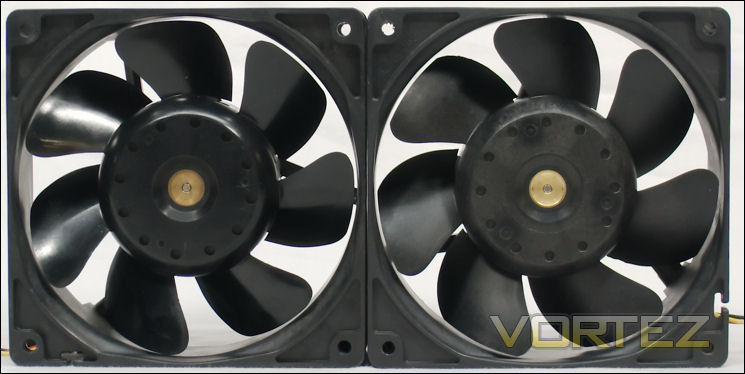
San Ace 120x38mm fans
Sanyo Denki manufactures its own fans and sells most of them under the San Ace brand. The San Ace 109R1212H1011 was long considered the king of fans among overclockers. Its successor is the 9G1212H1011, with similar specs but a lower current draw. The former is available as a used item. The 9G1212H1011 (the -011 has open corners) is sold by a few brave retailers in the US and the UK. The 9G1212H101 (closed corners) is available at Premier/Farnell/Newark, as well as some industrial vendors. The above picture pairs the two fans. As you can see, they haven’t changed much. They are, after all, industrial fans.
These fans were included in the comparison in part because they were and are popular fans, and because they help to define the limits of the test system. When you get to a certain point on any heatsink, only marginal gains in cooling can be made, and then only at the cost of some noise.
Product Page at Sanyo Denki for a fan similar to the 109R1212H1011: Here. However, the original specs are no longer available at Sanyo Denki. A representative old listing at a retailer: Here
Product Page 9G1212H1011: Here (Currently in production.)
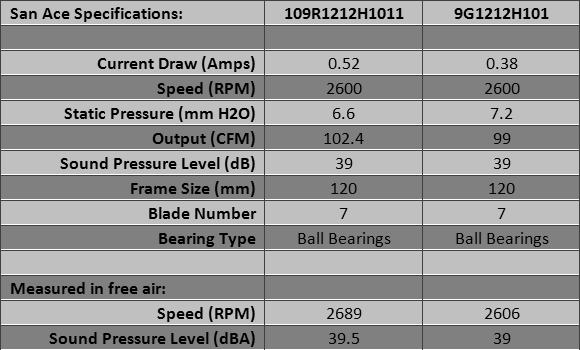
Retailers will sleeve and put plugs on San Ace fans for you, but if you buy from industrial suppliers you will have to do the work yourself.
San Ace ‘Silent’ series
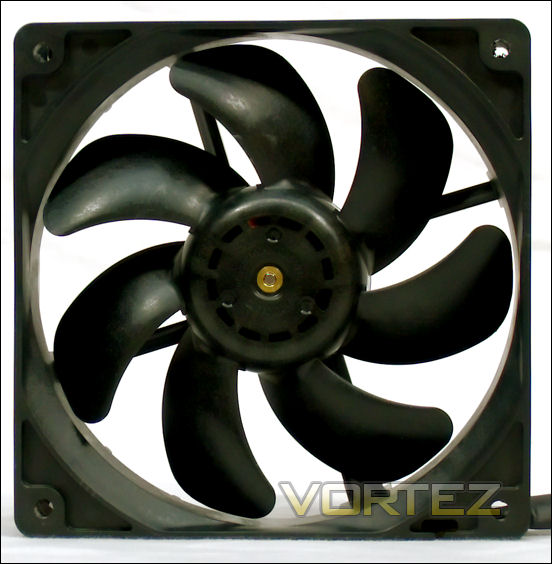
Sanyo Denki manufactures its own fans and sells most of them under the San Ace brand. You can see that this is an industrial fan, with the four models differentiated by speed setting and PCB — Voltage control vs. PWM, etc. If you have a Seasonic power supply, for example, you likely have a version of this fan in it.
Product Page for San Ace 120x25mm fans, including the 9S1212x401 and 9S1212x4011 ‘Silent’ series: Here. Scroll down to the last two charts.
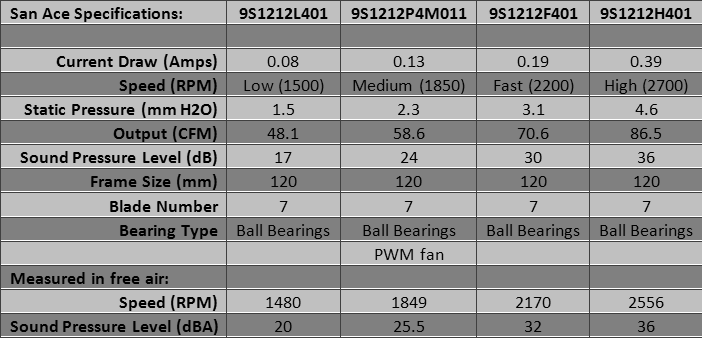
It was not until 2008 that Sanyo Denki reached out to engineers by making Newark (part of the Premier Farnell Group) a distributor of its fans (press release). If you want one of these you must go through Newark, Premier Farnell or an industrial distributor. If you have the ability to put plugs on bare wires, you might find it worthwhile to get one of these.
Scythe Kaze Maru 2 (Slip Stream 140) and Slip Stream 120mm
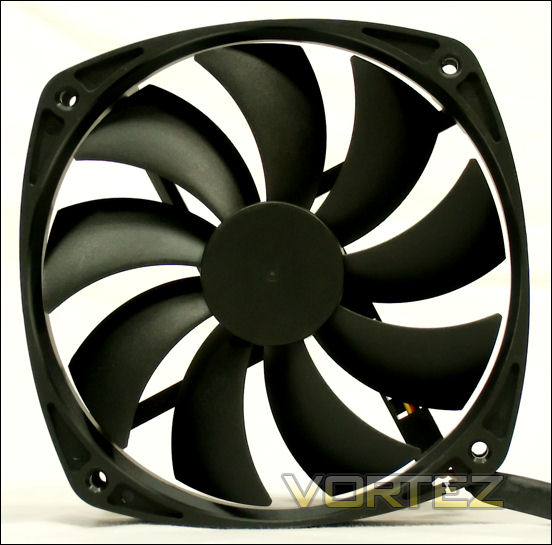
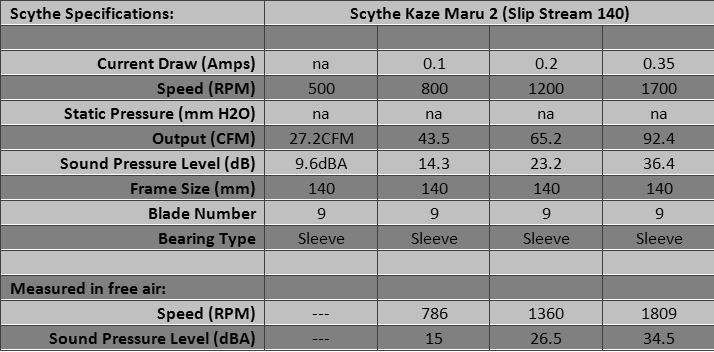
Scythe Kaze Maru 2 (Slip Stream 140)
The Kaze Maru 2 is Scythe’s replacement for the Kaze Maru 140mm sleeve bearing fan series. Scythe alternately calls these Slip Stream 140 fans, leveraging their Slip Stream brand. Don’t bother looking for the original Kaze Maru unless you can get them cheaply. These are better fans.
Scythe notes:
By applying the new SLIP STREAM 140mm fan, wider area can be cooled compared to 120mm fans while keeping low noise and high airflow.
Kaze Maru 2 fans are available at 500 rpm (SM1425SL12SL), 800 rpm (SM1425SL12L), 1200 rpm (SM1425SL12M) and 1700 rpm (SM1425SL12H). The faster three were tested.
Kaze Maru 2 Product Page: Here
Similar to the 120mm Slip Stream fans, the Slip Stream 140 have modest 40mm hubs.
These fans, like the Deepcool and Noctua 140mm fans, have screw holes compatible with 120mm fans, so they will fit on a case in most positions that will accommodate a 120mm fan. The benefit, as noted above, is that there is a larger swept area through which the fan will move its air. A 120mm fan blade sweeps across less than 78% of a 120mm square fan opening. A 140mm fan sweeps across all of it, and wastes little (look at the picture of the Deepcool UF140 and you will see how it works). For less noise you can get better airflow. Hence the design of this and the previous series of Kaze Maru fans. Scythe also sells a PWM version of the KM2 that has a Voltage regulating controller included with the fan.
As sleeve bearing fans these should best not be employed with their airflow directed upward. Before you install a sleeve bearing fan, open the label, remove the plug and put oil in the well. Every six months you should check the well and add more oil if it is needed. Your sleeve bearing fan will last longer that way.
Each Scythe fan comes with a set of four fan screws and a Molex pass-through that has a power take-off for 3-pin fans. That adapter also has a wire and plug to transmit the rpm to the motherboard. These adapters are very useful as components of any number of projects.
Scythe Slip Stream series
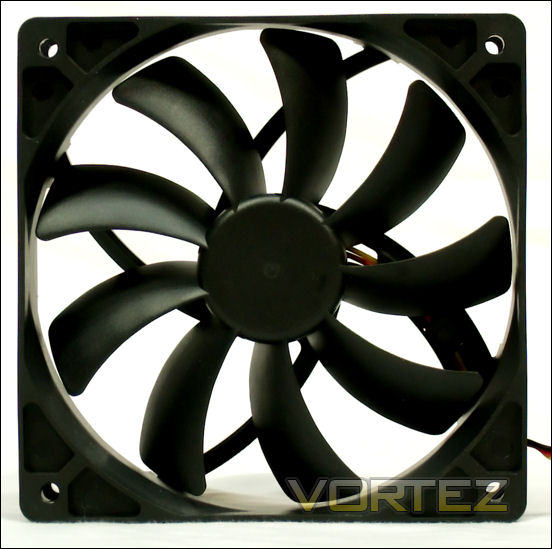
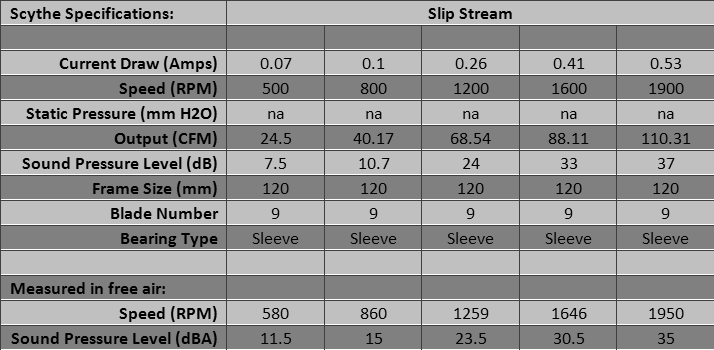
This series of 120mm sleeve bearing fans is probably your quintessential case fan. For its speed at any given rpm, it produces more cfm and less static pressure than a number of other fan designs. Yet it is a highly successful fan when used in heatsinks that do not have dense fin stacks. It has a reasonably small 36mm hub, which is designed to improve airflow.
Scythe says:
Silent user can obtain more airflow without sacrificing in noise level and power user can get extra airflow from the static pressure feature. Total 5 different rpm to choose from! (500rpm ~ 1900rpm)
Five versions are sold: 500 rpm (SY1225SL12SL), 800 rpm (SY1225SL12L), 1200 rpm (SY1225SL12M), 1600 rpm (SY1225SL12H) and 1900 rpm (SY1225SL12SH).
Product Page: Here
As sleeve bearing fans these should best not be employed with their airflow directed upward. Before you install a sleeve bearing fan, open the label, remove the plug and put oil in the well. Every six months you should check the well and add more oil if it is needed. Your sleeve bearing fan will last longer this way.
When Scythe sells fans they come with a set of four fan screws and a Molex pass-through that has a power take-off for 3-pin fans. That adapter also has a wire and plug to transmit the rpm to the motherboard. These adapters are very useful as components of any number of projects.
Scythe is selling PWM versions of some Slip Streams. A PWM Slip Stream equips the Mugen 2, for example. Having PWM Slip Streams opens up the possibility of having your case fans run their speed up and down with the increasing and decreasing demands of your CPU. Just get a “PWM Splitter” and have some fun.
Thermalright TR-FDB-12-1300, TY-140 and X-Silent 140
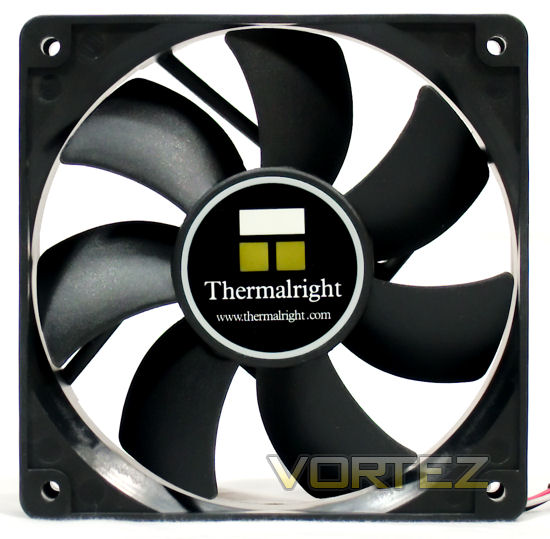
Thermalright TR-FDB-12-1300
The Thermalright TR-FDB-12-1300 is a classic 7-bladed case fan with a fluid dynamic bearing (FDB). It can be installed in any orientation without degradation of its bearing.
Thermalright describes these “Special features:”
Japanese imported Fluid Dynamic Bearing Technology to reduced noise and vibration. Work best with Thermalright’s heatsinks for that perfect balance of performance and silence.
60,000 hours under normal room temperature. Longer life expectancy than other leading brands.
High rate of Air Flow even under low RPM.
7V of power usage; can be adjusted via fan control device.
Four speed variation to choose from (800 RPM, 1,000 RPM, 1,300 RPM, 1,600 RPM, and 2,000 RPM).
All Thermalright FDB fans are under 3 year warranty.
60,000 hours under normal room temperature. Longer life expectancy than other leading brands.
High rate of Air Flow even under low RPM.
7V of power usage; can be adjusted via fan control device.
Four speed variation to choose from (800 RPM, 1,000 RPM, 1,300 RPM, 1,600 RPM, and 2,000 RPM).
All Thermalright FDB fans are under 3 year warranty.
Product Page: Here
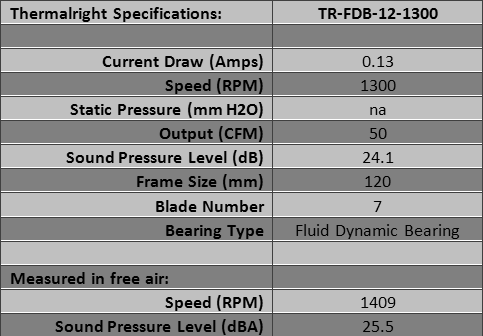
The fan comes with no accessories. What Thermalright doesn’t mention is that with FDB, their fan can be pointed in any direction without degradation of the bearing. A list of their 120mm fans, showing all five of their FDB fans, is here. To be fair to the TR website, their FDB line used to consist of four fans running from 1000 to 2000 rpm. The 800 rpm was added to the line later.
Thermalright TY-140
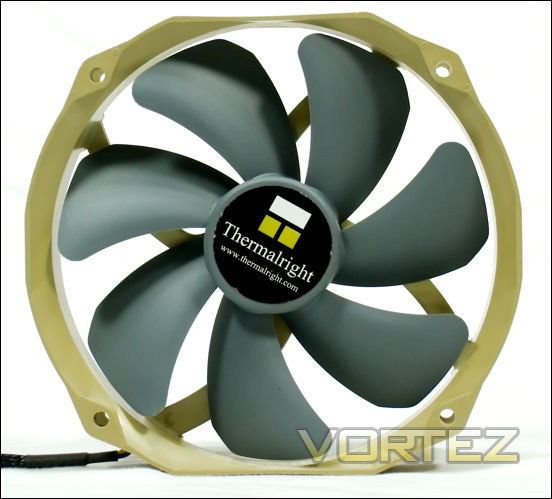
For a while the Thermalright TY-140 was the only 140mm fan that had PWM control. It is also a very good fan — it performs very well. It is peculiar in that its frame is 140 by 160mm with the intake and exhaust sides flaring 10mm on each side. This actually seems to improve its cooling performance on a heatsink, though. The screw holes are set at standard 120mm fan positions, so the TY-140 will be able to replace 120mm fans in many places.
Thermalright describes these “Special features:”
PWM fan, provides simple and easy adjustment of fan speed with the latest ETC IC.
Seven Silent Torpedo Blades – “submerges”, gives most quiet and efficient airflow
Enhanced Hyper-Flow Bearing (EHFB) – to ensure consistent and stable rpm, prolonged lifetime of usage.
Aerodynamic body–Less friction around the edges and give more centered and concentrated airflow.
12 cm mounting hole–allows installation on the 12 cm dimension, so will be compatible with most coolers without having the need to buy extra kit for 14cm fan.
Seven Silent Torpedo Blades – “submerges”, gives most quiet and efficient airflow
Enhanced Hyper-Flow Bearing (EHFB) – to ensure consistent and stable rpm, prolonged lifetime of usage.
Aerodynamic body–Less friction around the edges and give more centered and concentrated airflow.
12 cm mounting hole–allows installation on the 12 cm dimension, so will be compatible with most coolers without having the need to buy extra kit for 14cm fan.
Product Page: Here
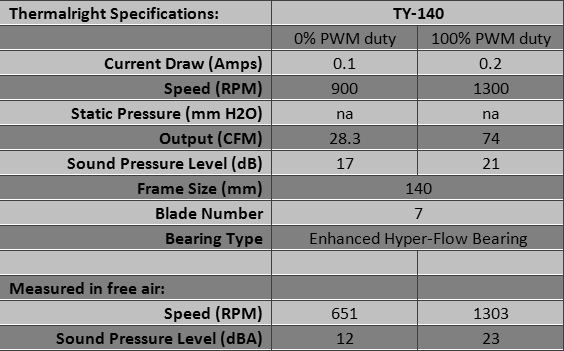
The fan comes with no accessories.
Thermalright X-Silent 140
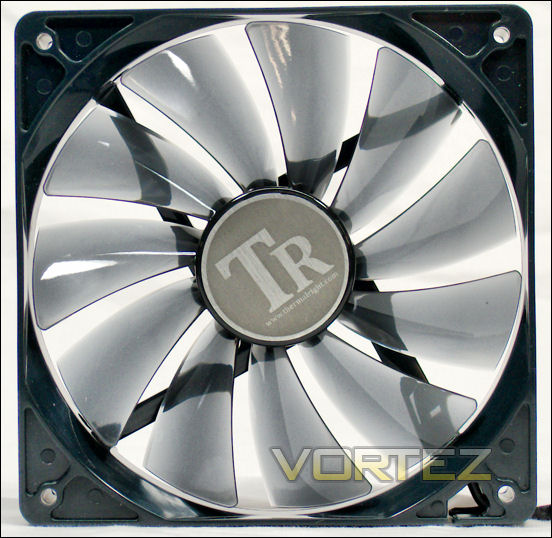
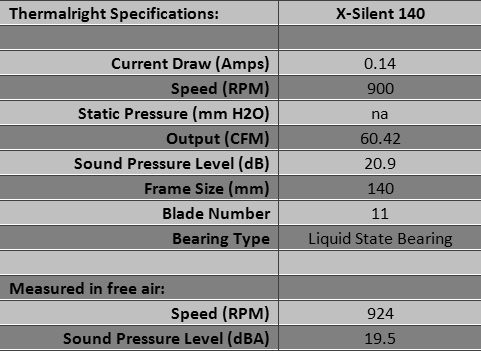
Thermalright’s X-Silent 140 is a 140mm fan with 140mm screw holes, a real 140mm case fan. Spinning under 1000 rpm, it is quiet.
Thermalright says this under “Special features:”
Eleven highly efficient, low noise emission fan blades.
Liquid state bearing and 50,000 long life hours.
7V of power usage; can be adjusted via fan controller device.
Includes tooling-free Anti-vibration Rubber screws for use on the chassis fan.
All Thermalright X-Silent fans are under one year warranty.
Liquid state bearing and 50,000 long life hours.
7V of power usage; can be adjusted via fan controller device.
Includes tooling-free Anti-vibration Rubber screws for use on the chassis fan.
All Thermalright X-Silent fans are under one year warranty.
Product Page: Here
Despite the fancy bearing, this fan vibrates when the air output is pointed upward, so it behaves like a sleeve bearing fan in that regard.
The X-Silent 140 comes with screws, a Molex to 3-pin adapter and four extra-long vibration isolators, making it easy to fish through the fan’s closed corners, grab and pull, even in a hard-to reach recess. Be careful, though. This kind of vibration isolator is easy to break.
Titan Kukri; XSPC 120mm and 140mm Xinruilian fans
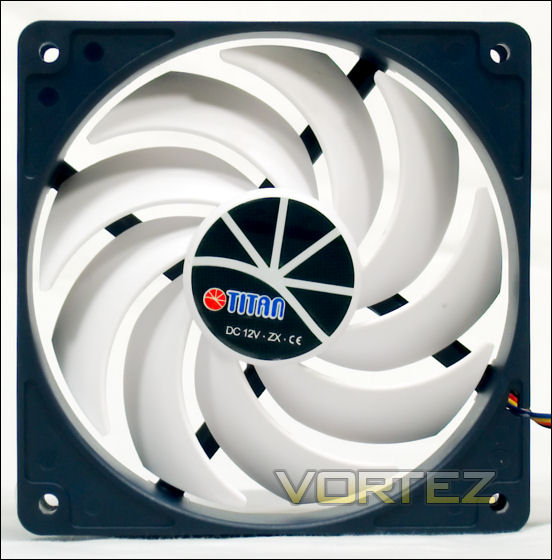
Titan Kukri
This fan is sometimes advertised as an “Evercool Titan Kukri.” You might think that Evercool is the contract manufacturer, but a perusal of the Titan website indicates of plethora of fans with many variations. In short, it looks like a manufacturer’s website. So the Evercool connection — if it is not a mistake — is a mystery.
The Kukri appears to be modeled after the Gentle Typhoon. Titan says:
With the constant demand of better computing performance, the energy consumption rises to meet users’ expectations which eventually results into heat increase. To prevent the over-heating problem for your computer, TITAN introduces the newly innovative kurkri fan, TFD-12025H12ZP/KU(RB). Its name originates from a symbolic weapon for Gurkha regiments and the Nepali Army which represents the courage of the bearer in the battlefield.
The nine curved blades are designed to produce stronger air pressure, speeding up the heat dissipation, and maintain a lower noise level.
The nine curved blades are designed to produce stronger air pressure, speeding up the heat dissipation, and maintain a lower noise level.
Product Page: Here
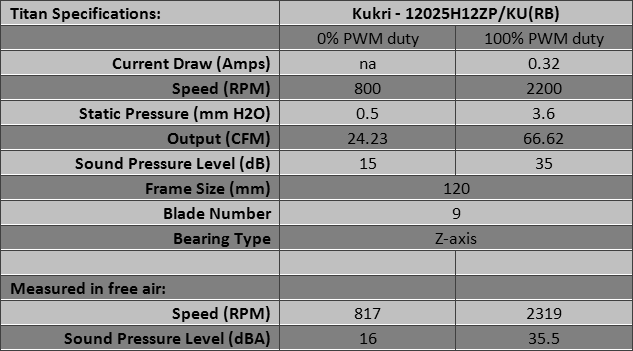
The fan comes with screws, a Molex to 3-pin adapter, four little rubber washers with a sticky side, and four vibration isolators. Those last are 35mm long but shaped so that they do not extend through the thickness of the fan, so they cannot be grasped on the other side and pulled through. You must have access to the corners to use them.
XSPC 120mm Xinruilian fans
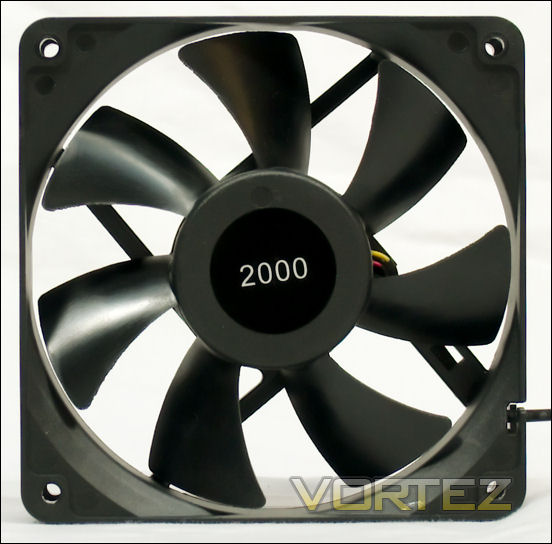
XSPC is a radiator seller based in the UK. They offer fans from Xinruilian, who describe themselves as a manufacturer. The fans offered are the RDL1225S, at 1200 rpm and 1650 rpm, the RDM1225S at 2000 rpm and the RDM1425S at 1350 rpm. They are sleeve bearing fans, yet XSPC confidently sells them for use in any orientation. The fan shown above is the 120mm RDM1225S-2000. The fan below is the 140mm RDM1425S.
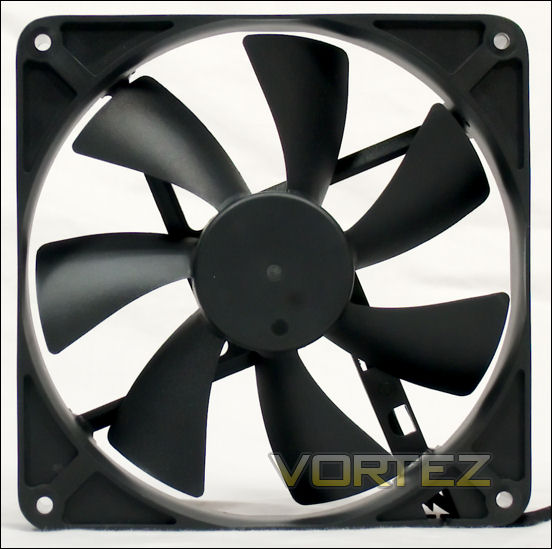
They describe these fans as “Designed for XSPC radiators and cases,” with:
– Low Noise (~29dbA)
– Operating Voltage Range 5.5-13.8V
– 3 Pin Power Connector
– RPM Monitor Wire
– 45cm Wire
– Open Corners
– 25mm Depth
– Operating Voltage Range 5.5-13.8V
– 3 Pin Power Connector
– RPM Monitor Wire
– 45cm Wire
– Open Corners
– 25mm Depth
For the 140mm RDM1425S they specify ‘Closed Corners.’
Product Page XSPC RDL1225S 1200: Here
Product Page XSPC RDL1225S 1650: Here
Product Page XSPC RDM 1225S 2000: Here
Product Page XSPC RDM 1425S: Here
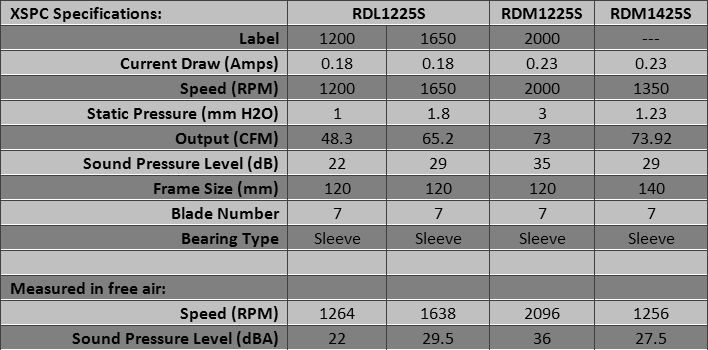
The 120mm fans are solid. Xinruilian (at x-fan.com) also sells these fans with ball bearings. A unique feature (at least of the XSPC fans) is that the heatshrink tubing starts inside the hub, crosses the strut and extends more than an inch beyond the frame, perhaps more than 30mm. Then the close mesh sleeving takes over.
Xinruilian is also the source of XSPC’s 140mm fan. The frame appears identical to that of some other 140mm fans, so the provenance must not be taken for granted. Xinruilian makes fans. Did they make these fans? Who can tell? In any case, XSPC says they are as ‘Designed for XSPC radiators and cases.’ Unlike the 120mm Xinruilian fans, which were strongly built, this 140mm specimen was ordinary, and resembled some other fans. And like a typical sleeve bearing fan, it had increased vibration when its output was pointed upward. But it has the XSPC/Xinruilian from-the-hub heatshrink tubing that extends more than an inch beyond the frame, leading to black sleeving. It looks nice.
As sleeve bearing fans these should best not be employed with their airflow directed upward. Before you install a sleeve bearing fan, open the label, remove the plug and put oil in the well. Every six months you should check the well and add more oil if it is needed. Your sleeve bearing fan will last longer this way. The XSPC fans were supplied by Koolertek.com, the US vendor.
Yate Loon 120mm and 140mm fans
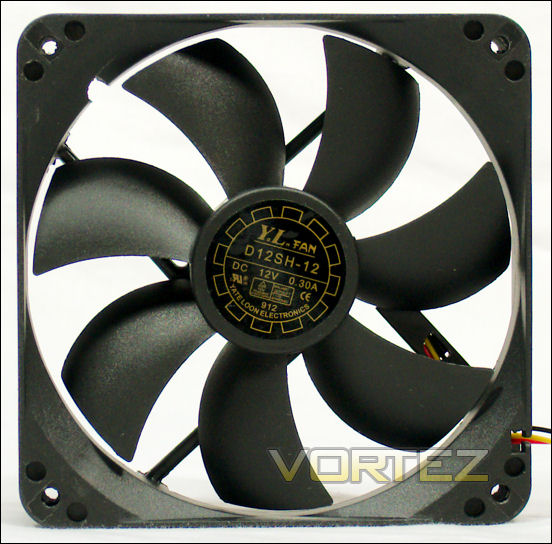
Yate Loon 120mm fans
Here is where the network of subcontracting among Chinese manufacturers gets tricky. There has been some controversy about the Yate Loon fans — which were ‘genuine,’ which were ‘fake.’ It appears that all are ‘genuine,’ in that they seem to have been made on contract to Yate Loon. Or maybe Yate Loon simply assembles fans with varying innards depending on the requests of its customers. After all, who would want to counterfeit some of the least expensive brand name fans made? You can pay $6US for your fan, or $4US. And it appears that the motors of the more expensive fans are larger and the fans do not wear out as fast as the less expensive variety.
Why does it matter? Because the 2200 rpm D12SH-12 often beats other far more expensive fans when they are compared on heatsinks. There is one review site that uses the D12SH-12 as its standard test fan. But it is not a “silent” fan.
Here is what Yate Loon say about themselves:
Yate Loon Electronics Co., Ltd. is a leading DC fan manufacturer In taiwan & china. We specialized in DC fan, blower, VGA fan, Ice box fan, NB fan and others fan. We supply any models you want. Any needs for OEM or ODM are welcome. As we have an excellent factory management, We may provide the on-time delivery and the most competitive prices to our buyers.
MAJOR CUSTOMERS : DELTA, SPI, LITEON, ACBEL, BESTEC, HIPRO , CWT, HUNTKEY, SANTAK, GREATWALL, ADVANTECH, WAECO, IPV
MAJOR CUSTOMERS : DELTA, SPI, LITEON, ACBEL, BESTEC, HIPRO , CWT, HUNTKEY, SANTAK, GREATWALL, ADVANTECH, WAECO, IPV
They say nothing in particular about these fans. Product Page: Here
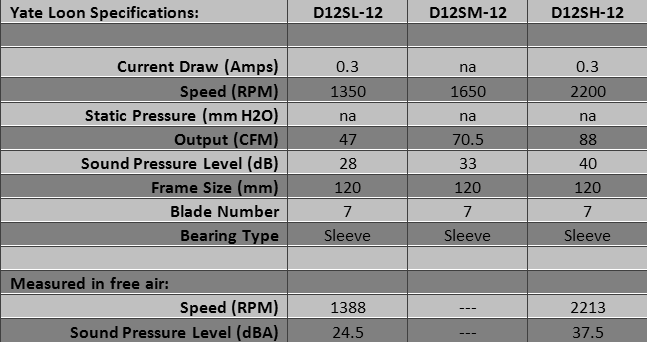
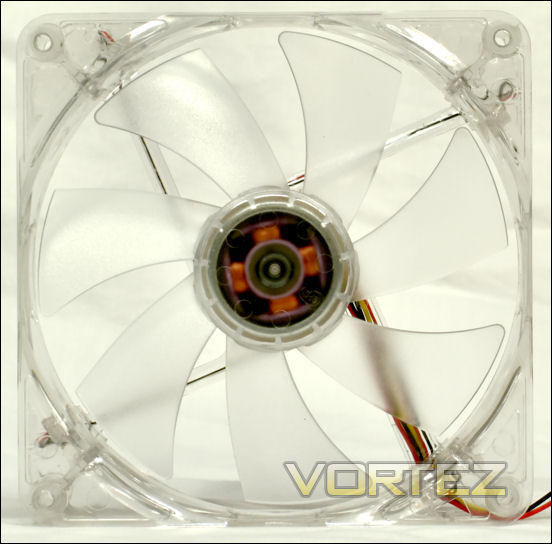
You can find Yate Loon fans that click, and some that don’t. You can find some with straight 3-pin plugs, and some with an attached Molex pass-through. Some come with LED’s. And as if to mess with your head, the LED Yate Loon fans come with fans blades shaped differently from the blades of their black brethren.
As sleeve bearing fans these should best not be employed with their airflow directed upward. Before you install a sleeve bearing fan, open the label, remove the plug and put oil in the well. Every six months you should check the well and add more oil if it is needed. Your sleeve bearing fan will last longer this way.
Yate Loon 140mm fans
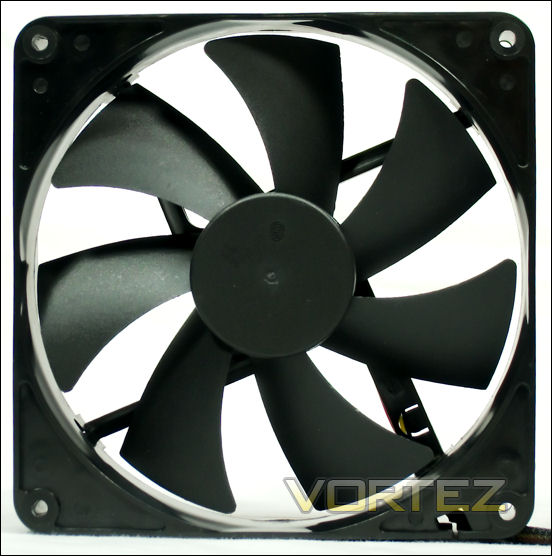
As the black blade on a black frame can be rather boring, the last fan pictured in this study will be a D14SL-124B. The 4B at the end stands for 4 Blue LED’s.
Product Page: Here
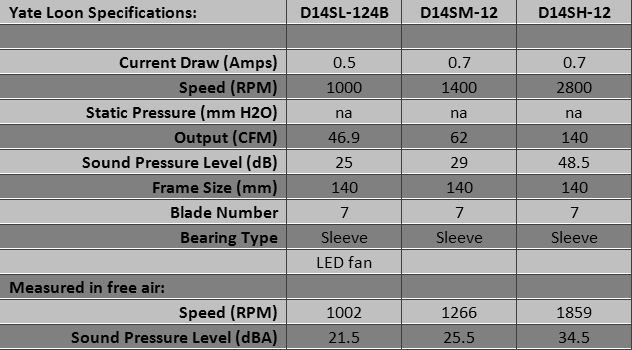
Neither of the highspeed 140mm fans available for this review ran much faster than 1800 rpm. Comments in various forums indicate that this fan generally runs about 1800 rpm or so, no matter what the specs may say. Unlike the 120mm YL fans, the 140mm all come with the same blade shape.
As sleeve bearing fans these should best not be employed with their airflow directed upward. Before you install a sleeve bearing fan, open the label, remove the plug and put oil in the well. Every six months you should check the well and add more oil if it is needed. Your sleeve bearing fan will last longer this way.
Test Setup and Methodology
Fans are designed to move air and thereby cool things. So to compare fans, their ability to cool things should be compared. How to test a computer fan’s cooling ability? The most convenient way is to have it blow through a heatsink, preferably one with as little wind resistance as possible. The Megahalems was designed to allow a low-output (i.e. — quiet) fan to produce a large degree of cooling. One design element that reduces its wind resistance is that the twelve ends of its six heatpipes are aligned in two rows in line with the airflow, reducing the cross section blocking the airflow to two 6mm heatpipes.
The other important aspect of a fan’s performance is how much noise it makes trying to cool things. Placing a sound pressure meter 10cm from the face of the fan will allow a standard noise comparison between fans.
The point of both measurements is not to produce absolute values, but comparative values. The comparisons allow you to choose between various fans. So, for example, the OCCT stress software is better for comparisons than Linpack. The OCCT produces a steady stress level that is not as intense as Linpack. This stable, moderate heating allows for better comparisons between fans.
Although an operator of a server farm would care about a few tenths of an Amp per fan, this is not an important issue for most computer enthusiasts. So the actual current draw of these fans was not measured. As for Voltage, all the fans were plugged into the same socket in the wiring of the same power supply unit to assure identical Voltage. Compared to your PSU, the Voltage will differ, so these measurements are of comparative value only.
Test system
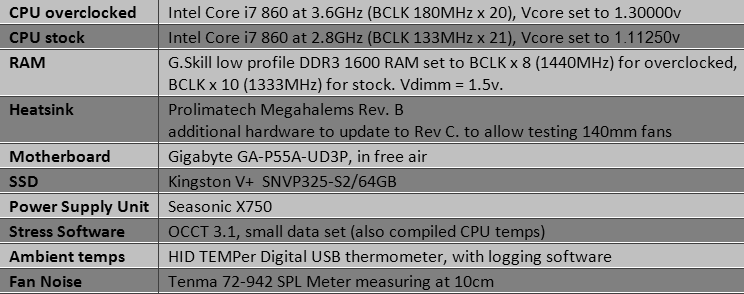
CPU core 0 (hottest) temperatures were reported and logged at the nearest degree centigrade once per second. Ambient temperatures were logged at the nearest 0.1 degree centigrade ten times per minute. Averages were taken of the segment from 10 minutes to 40 minutes, to allow the system to reach equilibrium. Temperature Over Ambient (TOA) is the difference between the mean core temp and the mean ambient temp. For ambient temperatures between 19C and 24C, the TOA is stable from one measurement to another.
Sound pressure level (SPL) on the heatsink was recorded to nearest 0.5 dBA at 10cm, then converted to the equivalent SPL at 1 meter by subtracting 20 dB.
Each fan’s RPM on the heatsink was noted. The fan speed often differed somewhat from its speed in free air.
The first three charts show the TOA and SPL for the comparison fans on the overclocked system, arranged by fan manufacturer and fan name, by TOA and by SPL. The next three charts show a smaller group of fans on the non-overclocked system, where the cooler test provided a way to test the less powerful fans. Finally, to satisfy the curious, there is a chart comparing actual RPM vs TOA for 7-blade and 9-blade fans.
The Megahalems Rev. B was upgraded to Rev. C with parts supplied by Prolimatech.
Performance: Overclocked System (Arranged by Name)
Here are the results of fan-testing, arranged by fan manufacturer and model name — and by fan speed. Use this page to look up the performance of a specific fan. To compare it to other fans, use the numbers you get here to find it on the TOA and SPL pages.
Some models have colloquial names rather than explicit model numbers. For the exact model numbers, look them up on the fan pages.
Some of the fans are set in groups marked by a triple caret. These are groups of fans that differ only in RPM. This presentation allows you to see the reciprocal effect that fan speed has on noise and cooling power.
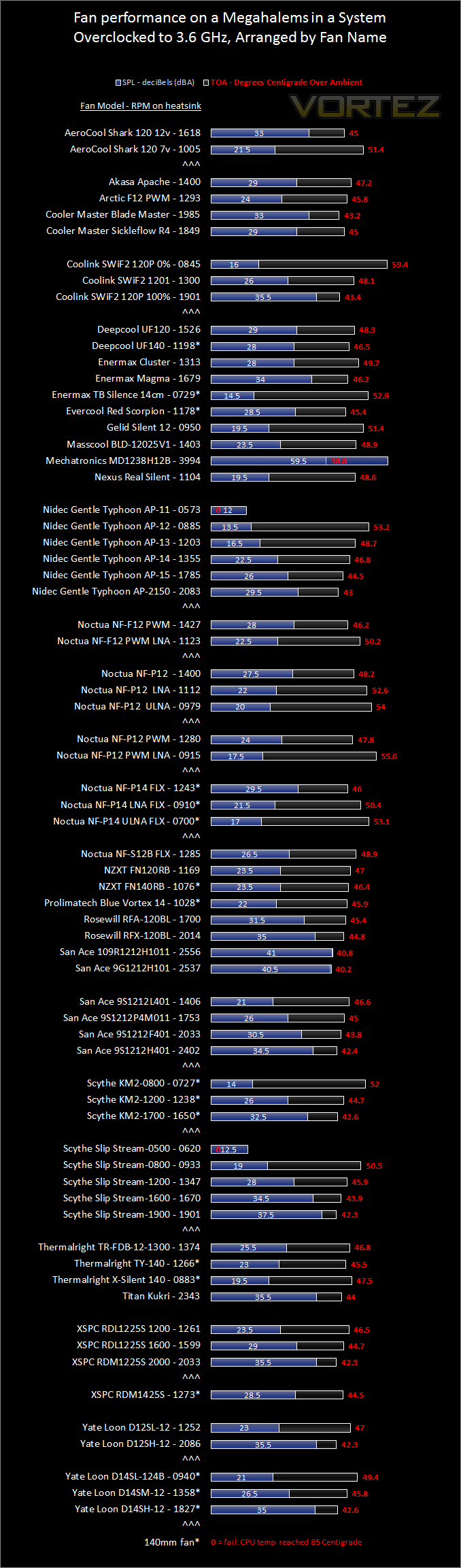
Performance: Overclocked System (Arranged by Temp/Ambient)
Here the fan data is arranged by cooling performance, or Temperature Over Ambient (TOA), with the highest power fans on top. You can see that the top cooling fans are also the noisiest.
Perversely, the best use of this page is to find the quietest fans. By looking down to find the level of performance that you need, you will see which fans of comparable cooling power make the least amount of noise. Here, for example, you see why so many people love their Nidec Gentle Typhoon AP-15’s. You can also see that the Arctic F12, the Thermalright TY-140 and the Prolimatech Blue Vortex perform very well.
To see the best-cooling quiet fans, look at the next page.
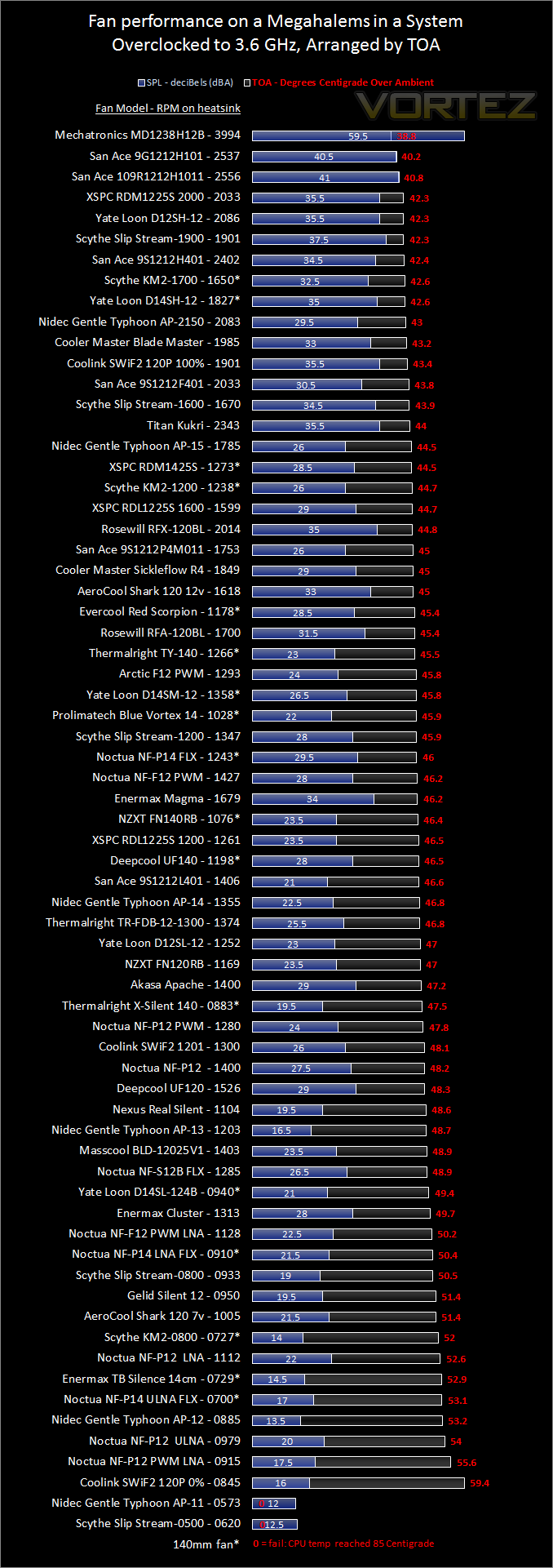
Performance: Overclocked System (Arranged by Sound Pressure Level)
This is the chart where you will find which among the quiet fans cool the best. Determine what level of noise you can tolerate, and look down to see how well various fans cool at that sound level. The Nidec Gentle Typhoon AP-13 and the Thermalright X-Silent 140 stand out as effective coolers among the quieter fans.
You will also notice that the quietest fans cannot cool this overclocked system enough to keep the CPU within the limits set for it. Yet for a case fan, a gentle unit might be perfectly satisfactory. The next page covers a less intense setup to assess the performance of the quietest fans.
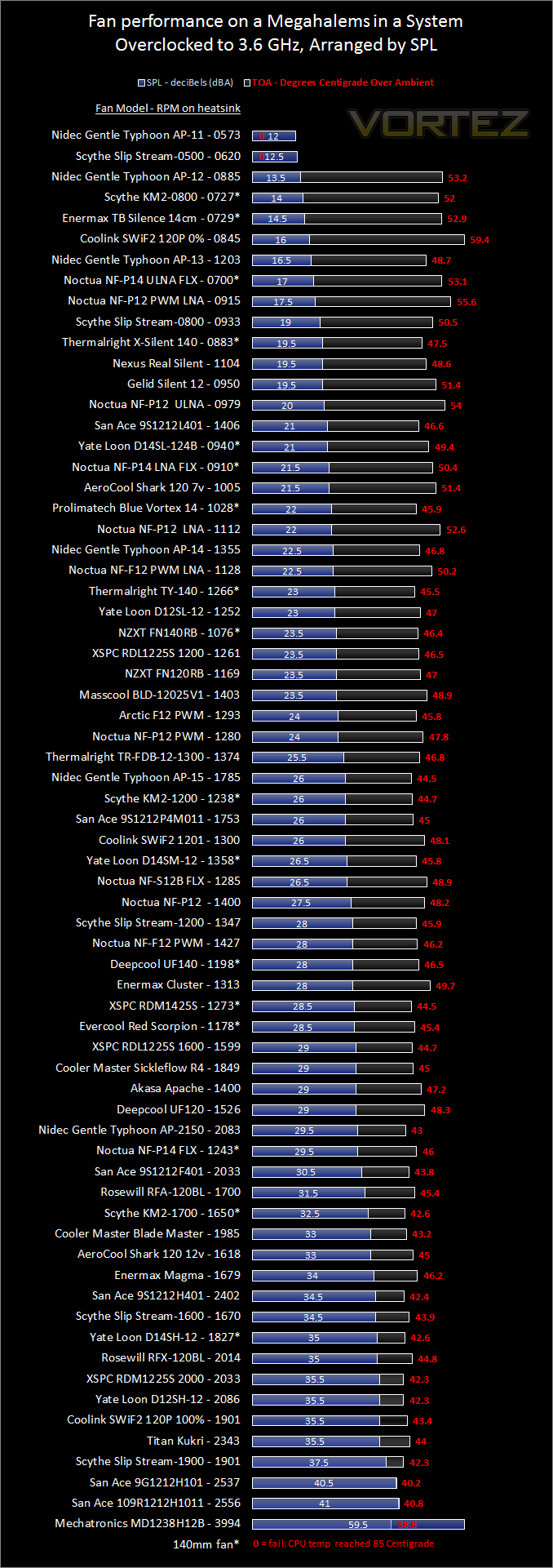
Performance: Non-Overclocked System
The charts on this page compare various fans that run slowly and make little noise. Even though they may not cool down an overclocked system they may be just what you want for case fans.
Some of these fans are connected to Voltage reducing adapters. The brand sellers include these so you will not need a fan controller. In addition to their monetary cost, fan controllers usually cost you a 5.25-inch slot, and may cost you some noise, as some fan controllers can make a fan noisy. The Noctua is on a resistor, and the Deepcool fans are on an adapter that bridges the 12v and 5v lines of your PSU to produce a net 7 Volts. The Coolink SWiF2 120P is run a 0% PWM duty to emulate a SWiF2 1200, which is designed to run at 800 RPM. The Thermalright TY-140 is run at 0% PWM because it is an important fan, and you may wish to know how it sounds at idle.
Use the first chart to look up a specific fan. Use the second to compare fan noise (approximated by Sound Pressure Level, or SPL) for fans of similar cooling power. And use the third chart to compare the cooling power of fans with similar SPL’s. Note that due to the limitations of the test system, fan SPL below 12-14 dBA cannot be assessed. Some of these fans almost certainly run more quietly than their measurements.
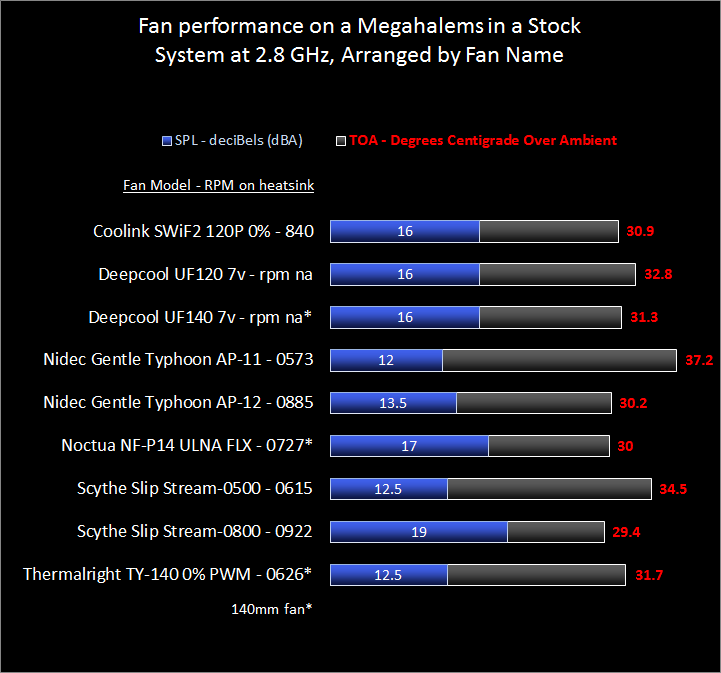
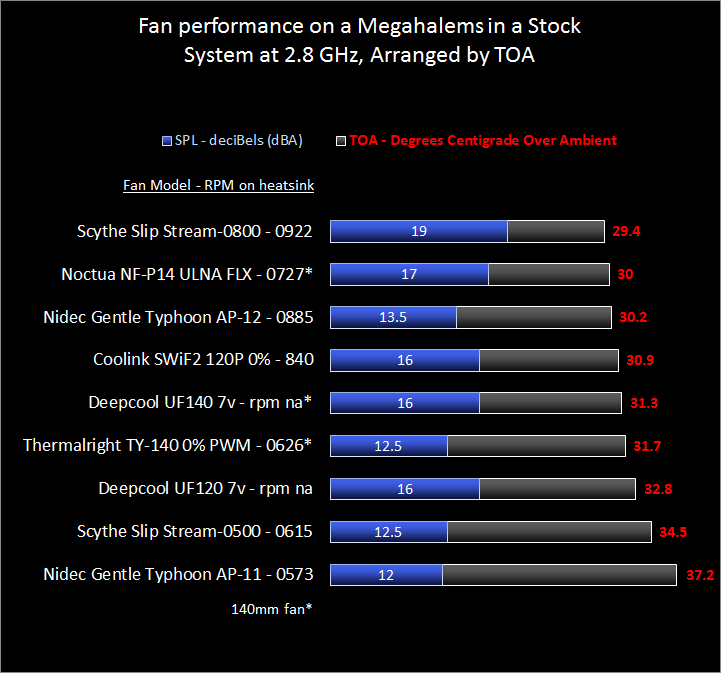
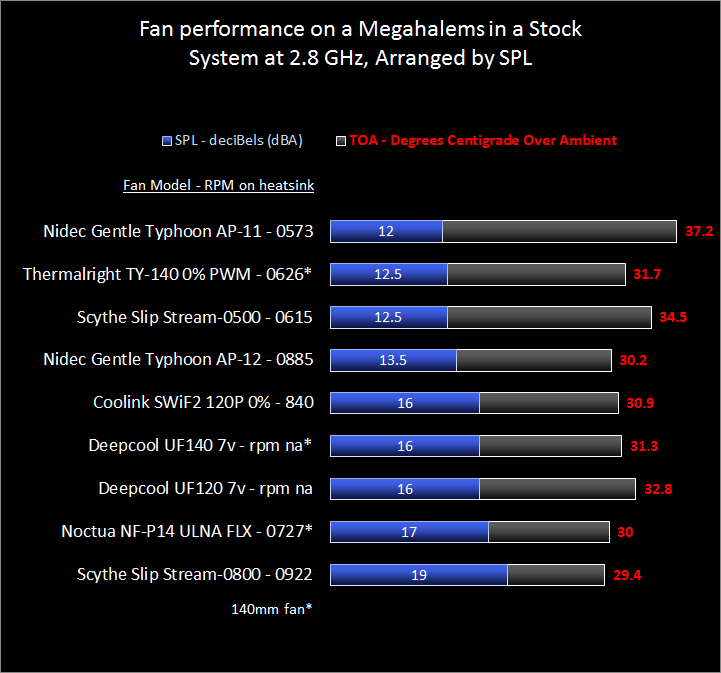
Some of the fans were also measured on the overclocked setup. In this way you can mentally compare the less powerful fans with those in the overclocked comparisons.
Fan Performance on a non-overclocked system
Aggregate comparisons
When it comes to fans, users ask a number of questions. For example: Are 140mm fans better than 120mm? Do fans with more than seven blades cool better? The data collected here gives an opportunity to address some of those questions.
Start with fan speed. There is certainly a relationship between RPM and cooling. And for a given RPM, a 140mm fan should blow more air than a 120mm fan. Will this testing system pick up the difference between 120mm and 140mm fans?
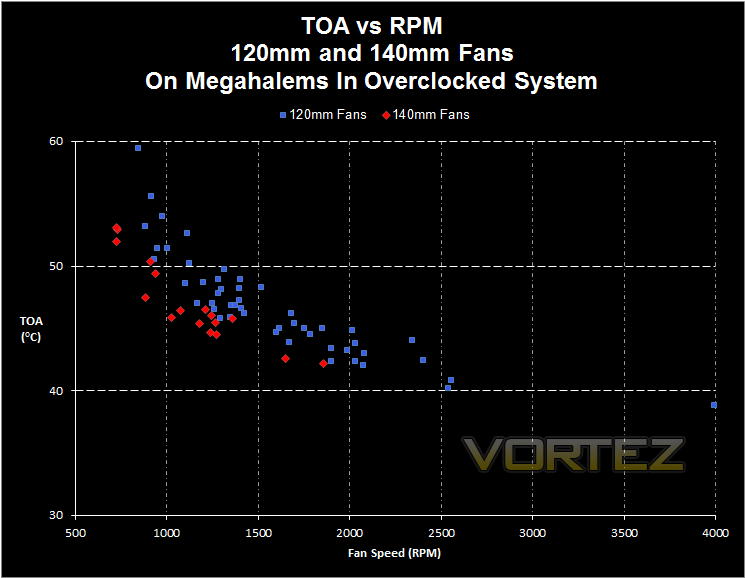
The answer is yes, it does. For any given RPM, the 140mm fans blow more air — cool better — than 120mm fans. So, now to address the question of whether 9+ bladed fans cool better than 7-bladed fans:
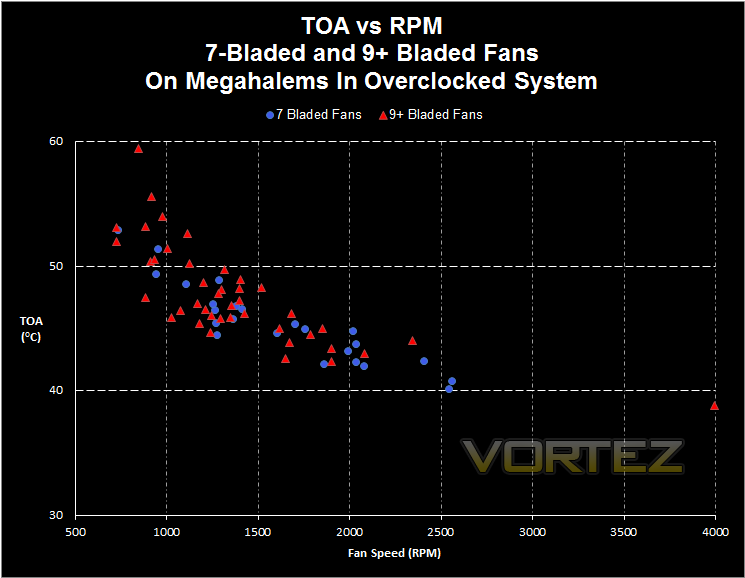
Apparently not. There is no real difference in cooling. Fans of vary blade number are thoroughly intermixed. So, based on fan speed, it does not matter how many blades a fan has — at least if it has seven or more blades. Three-blade and five-blade fans were not examined in this study.
But who cares about RPM? What most computer builders really care about is noise. Given a certain level of noise, do 140mm fans cool better than 120mm fans?
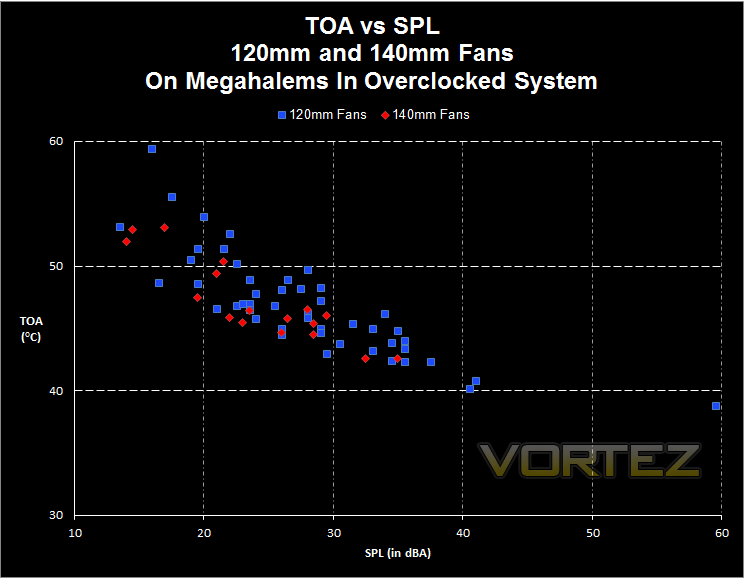
And the answer is . . . Maybe. The two fan sizes are intermixed, but the 140mm fans show up in the cooler half of the distribution. There may be a difference there, but there is too much overlap to make any clear distinction. This corroborates the experience of some people who have used a 120mm fan in the center of an NH-D14 instead of the stock 140mm fan. They say they see excellent results.
Now, is there a difference between 7-bladed fans and 9+ bladed fans for a given SPL?
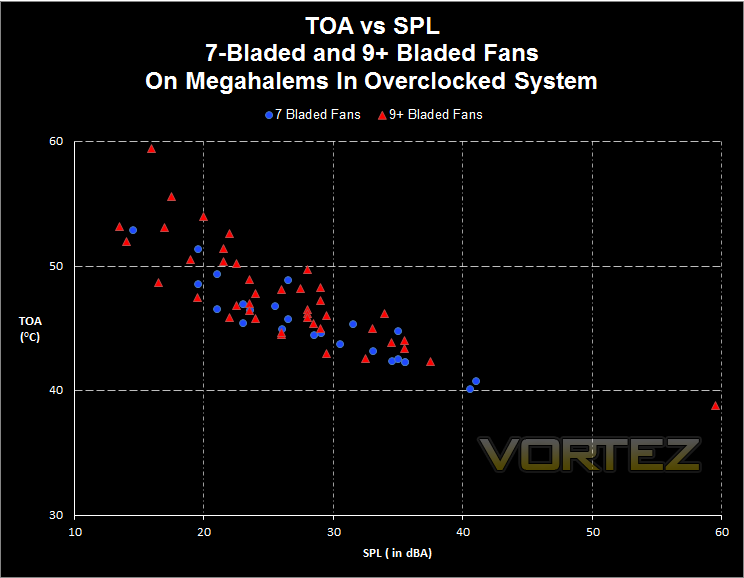
No, it seems. Or, if you like to read trends from tea leaves, you might say that 7-bladed fans trend to performing better. Now that would be a surprise.
OK. Perhaps data that includes both 120mm and 140mm fans clouds the picture. So look at a chart containing only 120mm fans, comparing 7-bladed and 9+ bladed models:
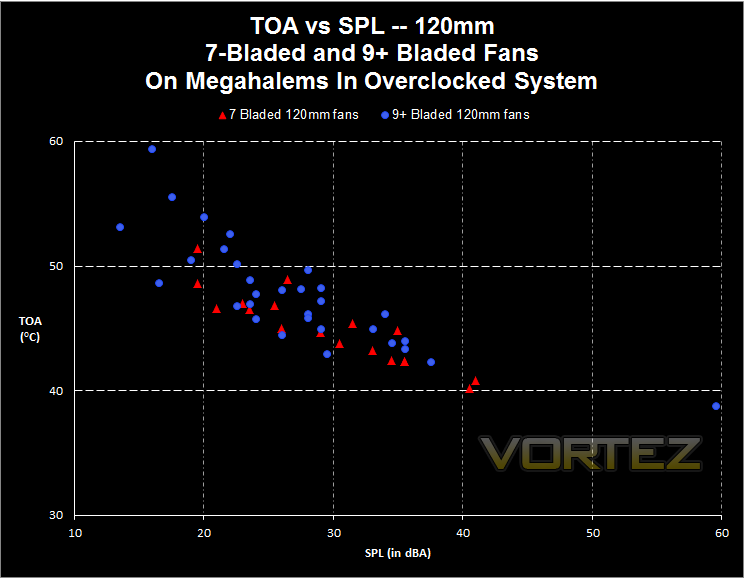
The pattern is gone: 120mm 7-bladed fans and 120mm fans with nine or more blades cool about the same for any particular sound pressure level.
Perhaps one lesson here is that fan manufacturers have learned to optimize their designs, so there is no systematic difference between kinds of fans. Yet there is a difference between individual fans. You can see in all the data that at any noise level some fans cool better than others — sometimes by six to eight degrees centigrade. That’s a lot. Clearly the inter-fan difference is more important than fan dimension or blade number (within limits for both).
The take-away lesson: don’t be fooled by the prettiness of a fan. Or its price. And don’t pay attention to blade number. Instead, do your homework. Find out which fans work best for the job you want done.
Conclusion
The faster a fan spins, the more air it pushes and the more noise it makes. The Devil, as always, is in the details. You have been swamped with details, and yet there are more fans out there than this review can cover.
First of all, the brand sellers’ specifications for these fans were collected and presented in a consistent format. Then the fans were measured for speed and noise. Of course, most of the fans ran at around their specified speed. Even with the varying Voltages that power supplies can produce, the fans were close. Where some of them were not close was in the noise (SPL) they produced. Some sellers you learn to trust, some not.
Next the fans took their turns blowing into a heatsink and cooling it. The results are there for you to read. As much as you would like some reviewer to sing rhapsodies over some fan or other piece of equipment, there is no substitute for you looking at the data yourself. Care was taken to arrange the information in useful ways, so you can find just the right fan for your various needs.
Finally, you get to see how fan speed, noise and cooling power relate to each other. One thing that becomes clear is how dearly you will pay in noise to get those last few degrees of cooling. If you want much better cooling than what you have, a better heatsink will get you better results than a stronger fan.
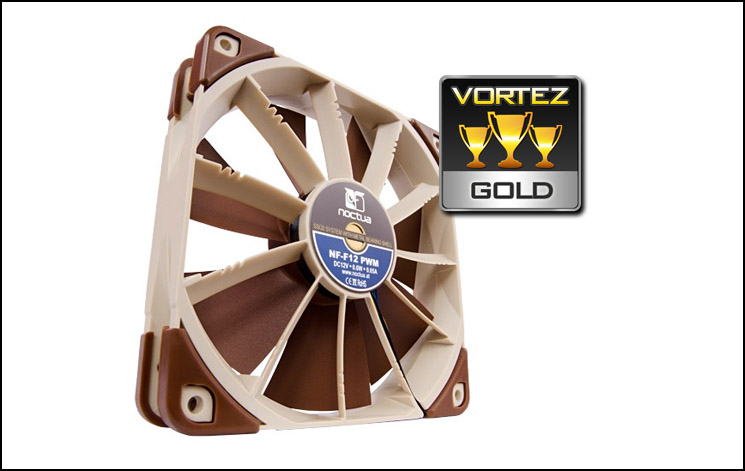
The Noctua NF-F12 PWM brings three innovations to 25mm fans. First of all, it brings the stator vane design to 25mm consumer fans. The stator vanes improve the static pressure, which allows this fan to excel when it is used on radiators, as well as holding its own on heatsinks.
The second innovation is something new in stator vanes — varying angular distance. It not only makes these fans quieter, but it is a great idea. A fan that spends less energy making noise probably spends more energy pushing air. It is an innovation you might later see on industrial fans.
The third innovation is the non-clicking PWM circuits. At low speed, all you hear from this fan is air. This is such a good idea that since the introduction of this fan, the click-free PWM circuit has spread to all of Noctua’s fans.
Of course, there are a number of other innovations with this fan, but the three above make this a GOLD fan.
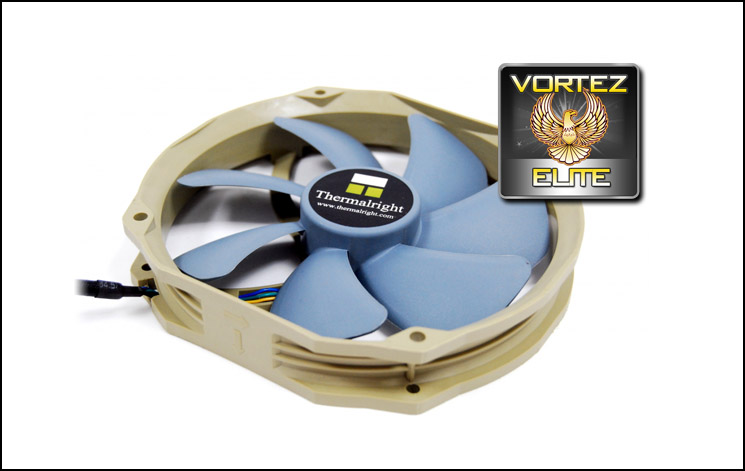
The Thermalright TY-140 is a quiet fan that is quite versatile. With its 120mm screw holes it will fit most places in a case where you would normally fit a 120mm fan. But with its wider sweep this 140mm fan moves air gentler and more quietly than a 120mm fan. Other fan sellers are only recently making PWM 140mm fans, but this fan is widely available, and at a moderate cost. An ELITE fan.
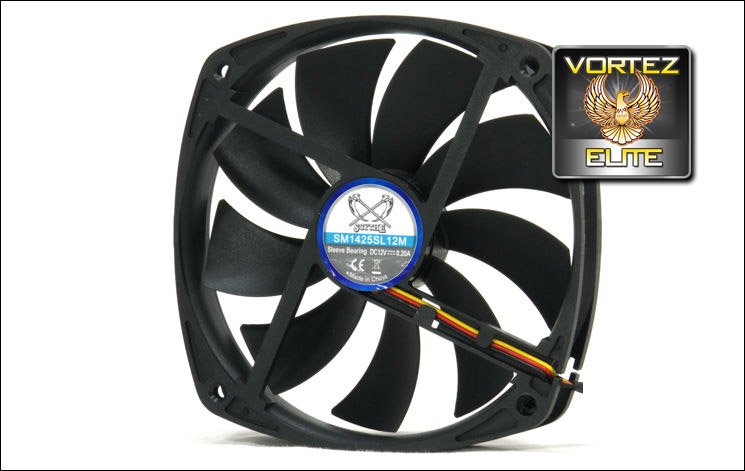
The Kaze Maru 2 / Slip Stream 140 is another 140mm fan with 120mm screw holes, and it also will fit most places in a case where you would normally fit a 120mm fan. The range of KM2 fans gives you a choice of how loud you want your fan to be, while giving you among the best cooling power at any noise level. As with any sleeve bearing fan a KM2 needs periodic attention, but the excellence of the fan’s performance and its low price make it among the ELITE.

Click here for an explanation of our awards at Vortez.net.