







Antec claims that the Easy SATA is a hassle-free product for accessing your SATA HDDs.
Product on Review: Antec Easy SATA Hot Swap Hard Drive CaddyManufacturer and Sponsor: Antec
MSRP: $29.95 USD
Street Price: $20 USD

With computer cases such as the Performance One P182 and the Gamer Cases Nine Hundred Two in their product offering, Antec has become a favourite amongst gaming and silent computing enthusiasts. Antec’s robust line of computer cases and power supplies are the better known facet of this company. Recently, however, Antec has decided to expand its line of PC accessories to include the Easy SATA hot swap hard drive cage.
Today, hard drives have become very affordable as the cost per gigabyte of storage decreases by a moment’s notice. As such, backing up computers or storing data onto hard drives other than those internally installed has grown popular amongst users. In order to access such hard drives, one could use an external hard drive enclosure, but swapping between hard drives with such a device can become exhausting. On the other hand, the Easy SATA provides a quick way of swapping between multiple hard drives. This product effectively makes hard drives nearly as convenient as DVDs, though hard drives are obviously larger than the latter! This review will focus on the Antec Easy SATA, and it will be examined whether or not this is truly an “easy” solution of bringing the hot swap capability to your system.
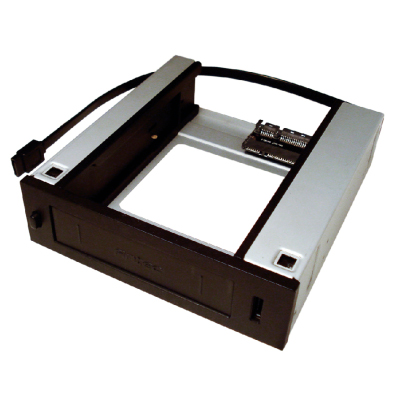
The Antec Easy SATA hot swap hard drive caddy.
About Antec:
Antec, Inc. is the global leader in high-performance computer components and accessories for the gaming, PC upgrade and Do-It-Yourself markets. Founded in 1986, Antec is recognized as a pioneer in the industry and has maintained its position as a worldwide market leader and international provider of quiet, efficient and innovative products. Antec has also achieved great success in the distribution channel, meeting the demands of quality-conscious system builders, VARs and integrators.
Antec’s offering of enclosures includes a wide range of cases, such as its advanced Performance One Series, economical New Solution Series and VERIS family of media components designed for the home theater PC market. Antec’s products also include front line power supplies, such as its premium Signature Series, powerful TruePower Quattro Series and EarthWatts, one of the most environmentally friendly power supplies available. PC gamers are an increasingly significant consumer of performance components, and many Antec products are designed for the gaming demographic, like the premier gamer enclosure: the Nine Hundred. Antec also offers a line of computer accessories comprising many original products, including its patented LED fans and notebook cooling solutions.
Features and Specifications
On May 14th 2009, Antec announced that they would be adding the Easy SATA to their line of products. The device itself is suggested to be sold at $29.95 USD, making it a highly affordable to own. Weighing in possible rebates sweeten the deal even more.Link: Press Release of the Antec Easy SATA
In terms of features, the Easy SATA is a hot swap 3.5” SATA hard drive caddy that can be installed into a 5.25” drive bay. It has a black finish, which should make it easy to match with any computer case, seeing as most modern computer cases have black finishes.
Antec mentions that the Easy SATA has a locking mechanism that holds the hard drive when it is inserted into the device. This should avoid any chances of accidently knocking the hard drive out of the SATA and power connectors or the caddy itself.
Link: Features
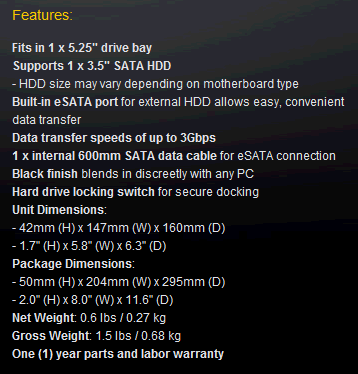
An eSATA port is also available in the front bezel of the Easy SATA. This should be pleasing for those who have systems that do not have an available eSATA port.
The Easy SATA’s page on Antec’s website notes that it has a warranty of 1 year. This is unfortunate because the press release of the Antec Easy SATA mentioned that it was backed by “Antec’s Quality 3-Year Limited Warranty”. Nevertheless, given the simple nature of the device, the Easy SATA should last for many years without any trouble.
Overall, the Antec Easy SATA has all the common and essential features for a hot swap hard drive caddy, with the addition of an eSATA port and a locking switch.
Packaging and Contents
The Antec Easy SATA is sold in a fairly attractive clamshell plastic packaging. Two sheets of paper inside clamshell give information on the product. Yellow, blue, grey and black inks are used on the paper, which are typical colours of Antec. The front of the packaging gives a quick description of the nature of the device, whereas the back of the packaging gives an enumeration of features. The packaging indicates that the warranty period of the Easy SATA is of 1 year, which confirms that the warranty period mentioned in the press release was changed. The back also has information regarding the installation of the product into a computer case, as well as its functionality.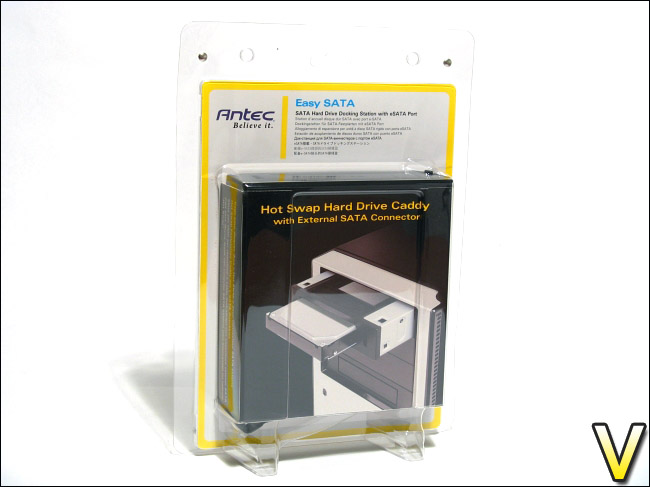
The front view of the packaging.
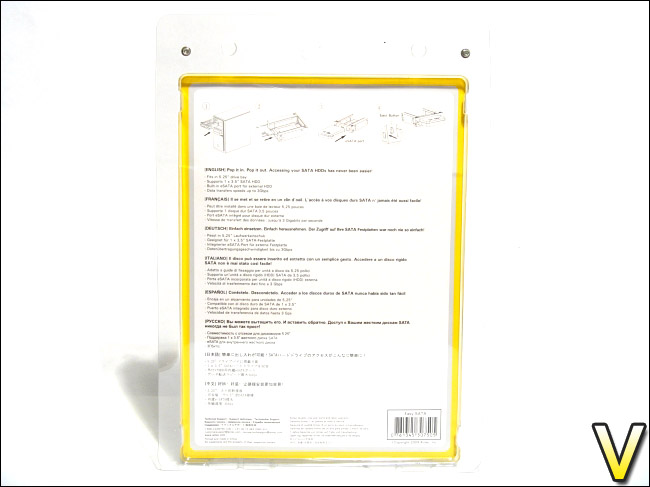
The back view of the packaging.
The sides of the packaging give a short description of the Easy SATA in a variety of languages, demonstrating that the product should be available in many different countries.
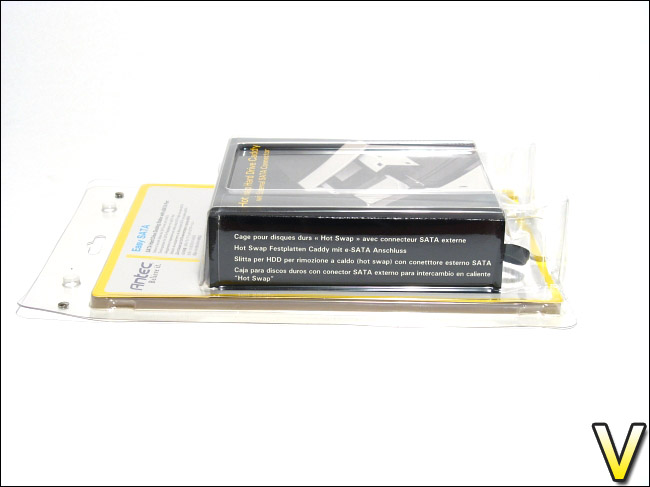
The left view of the packaging.
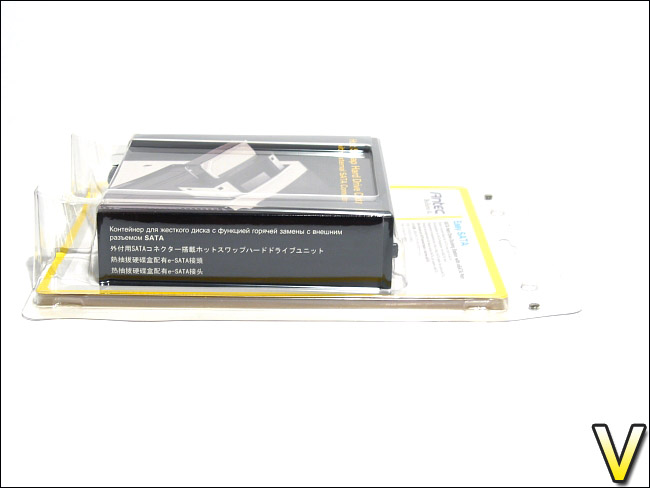
The right view of the packaging.
A bottom view of the packaging reveals the bottom of the Easy SATA. One can easily see the SATA and power connector as well as the SATA cable of the eSATA port. The top of the packaging reveals the black faceplate of the Easy SATA.
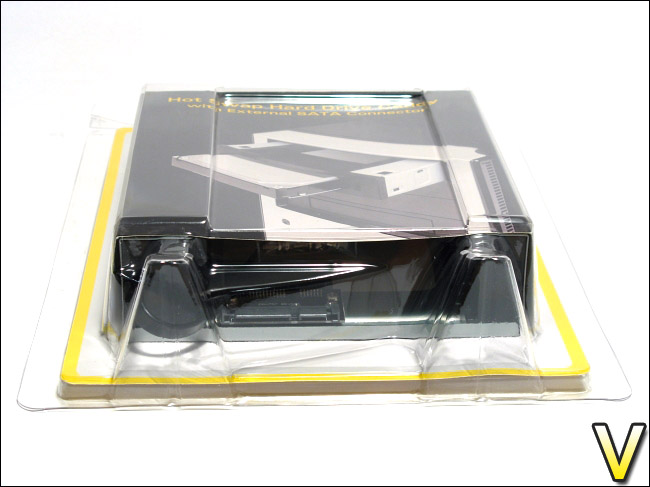
The bottom view of the packaging offers a glimpse of the product.
The plastic clamshell packaging is resealable and is locked in two spots by overlapping plastic. Thankfully, the clamshell is not entirely heat sealed like the packaging of many other electronics, which would make opening it a nightmare and prone to injuring the customer. In order to reinforce the packaging, a metal tab is placed at each of the locking plastic. This cannot be removed, and must be cut away in order to open the box.
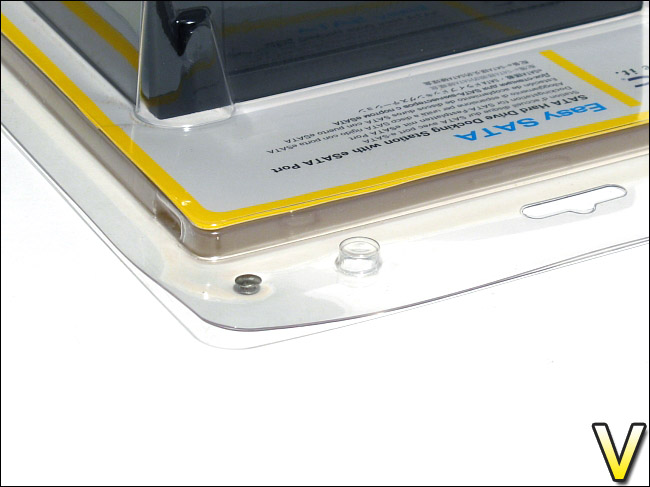
The clamshell is thankfully not heat sealed, making it much easier to open.
In terms of packaging, Antec has done a fairly good job. The plastic clamshell allows customers to easily glimpse the product without opening it. The resealable clamshell is also highly welcomed, although cutting the small metal tabs to open it could have been avoided if a small self-adhesive seal was used instead. The size of the packaging is adequate, but I feel that it was slightly too tall. In comparison to other manufacturers, Antec has done a good job regarding packing material.
Overall Look
The Antec Easy SATA comes with the bare minimum of accessories. In addition to the Easy SATA itself, 8 screws are included to for installation into a computer case. Although most computer cases already include such screws, it was kind of Antec to include it with their product. The screws themselves were found in a resealable plastic bag, taped onto the back of the paper of the packaging. No manual is included and it is not needed. Instead, the back of the packaging offers a short diagram on how to use the device.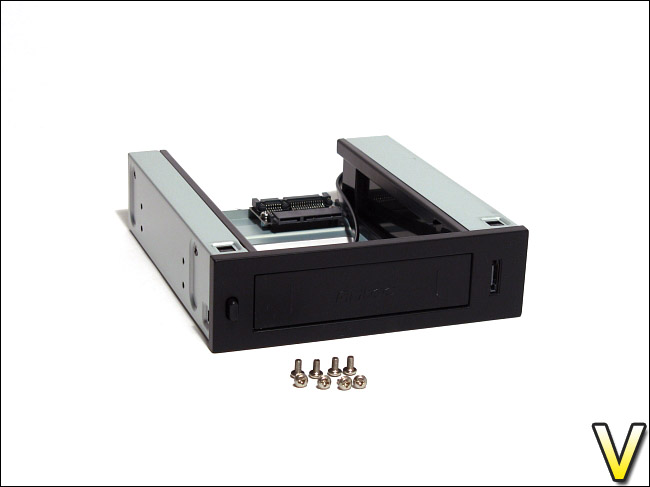
The Antec Easy SATA and the included 8 screws.
As stated earlier in the features and specifications, the Easy SATA comes with a black matte front bezel. The bezel has a slight rough and grainy texture, which is unlike most devices such as DVD writers and 5.25” bay covers of computer cases. No doubt, Antec was attempting to add some style to the device. The Antec logo is embossed on the flap of the device. The flap itself can be opened to allow for the installation of a 3.5” hard drive. Near the embossed logo are two small embossed vertical stripes. On the left side of the front bezel is a small button that controls the locking mechanism of the Easy SATA. On the right side, the eSATA port can be seen.
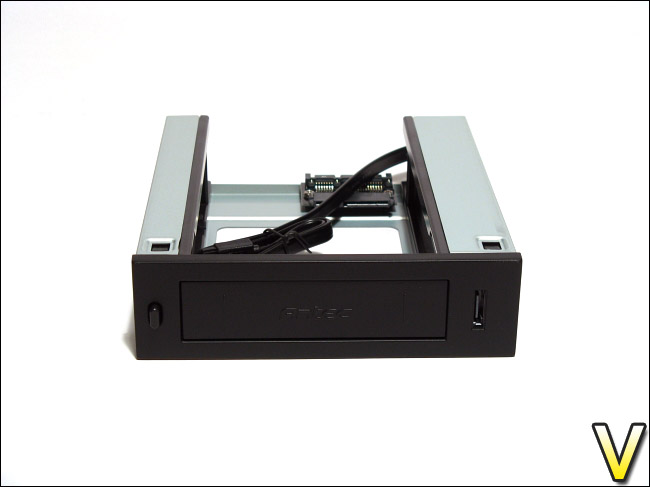
A lock button, a flap and an eSATA port at the front.
At an angle, it can be seen that the Antec Easy SATA has the typical 4 screw holes on each of its sides so that it can be installed in a conventional 5.25” drive bay. Inside the Antec Easy SATA are plastic drive rails on each side. These facilitate the entry of an inserted hard drive by routing it properly into the SATA and power connectors. Each of these plastic rails is held in place by 3 black screws; 2 are found on the side and 1 is found at the bottom.
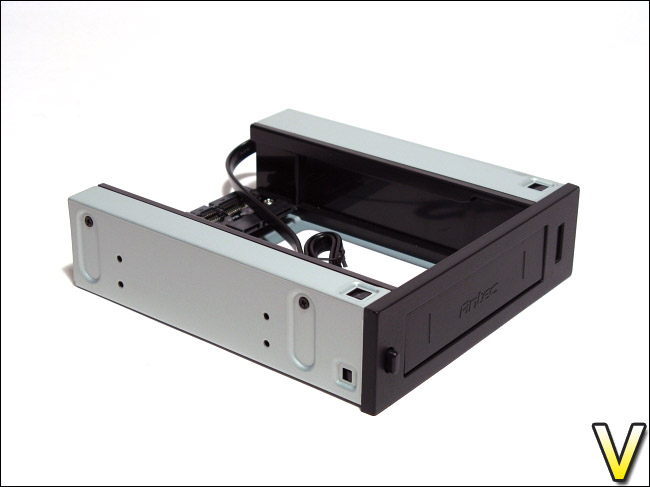
A side view of the device.
The rear of the Easy SATA reveals its simple system. The device contains a female power-and-SATA connector to male power-and-SATA connector adapter. The straight SATA cable of the eSATA port can also be seen. Antec mentions that it has a length of 600 mm, or 2 feet, but 150 mm of it is routed inside the plastic housing and cannot be used. Therefore, only 450mm of the cable is revealed. The length is acceptable, but it is shorter than the typical SATA cable of 900 mm, or 3 feet. Some users may find this a problem if they install the device in a large case. Therefore, Antec should include a longer 900 mm or 3 feet cable, or provide a male SATA port with a detachable SATA cable instead.
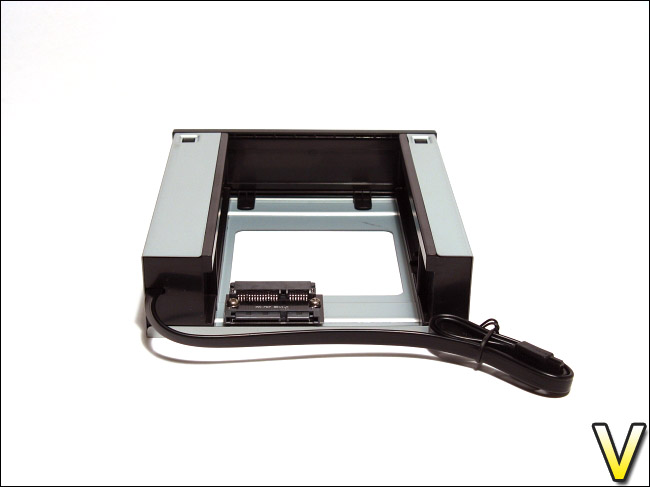
A 450mm SATA cable and a SATA and power adapter.
The underside of the Easy SATA is simple and has a large opening. The opening should allow an inserted hard drive to breathe and stay a bit cooler during operation.
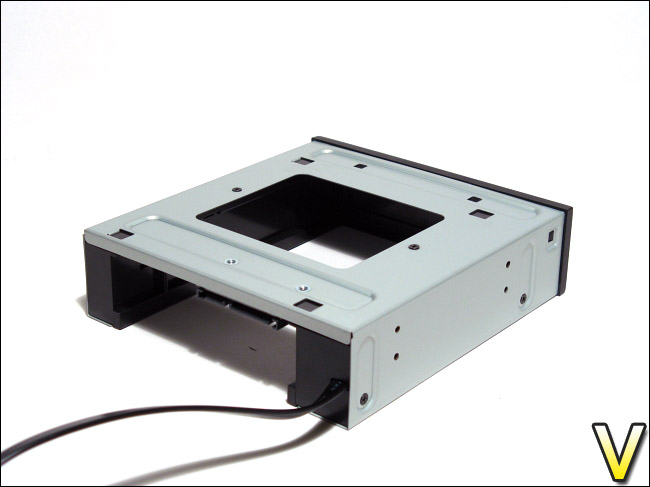
The Antec Easy SATA has a fairly open design for ventilation.
Closer Look
The female to male power and SATA adapter of the Antec Easy SATA is held in place by two screws. Its product number is PA-707 and its revision is 1.0. Given the simple nature of the device, the Easy SATA should allow an installed hard drive to have transfer speed rates similar to as if the hard drive was installed directly to an internal SATA port.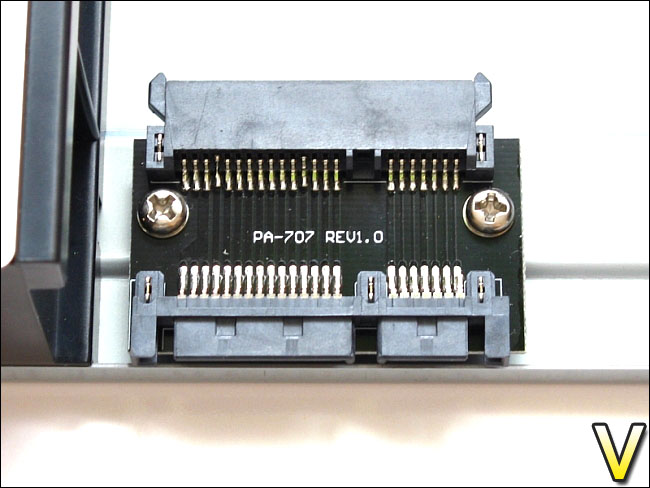
A simple female to male SATA and power adapter.
Although Antec advertises the button on the front bezel as an “eject button” on its packaging, it is merely a button that controls the locking mechanism inside the Easy SATA. Indeed, a small tab inside the Easy SATA depresses if the front button is pressed. The tab is large enough so that it can fit the screw hole on the side of a hard drive. It has a slight angle, making it possible to depress it if a hard drive is inserted hard enough.
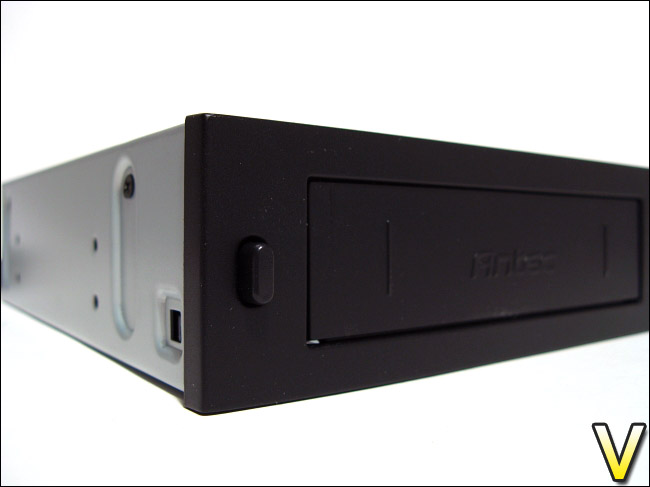
The lock button, and a slight view of the scratches on the upper left of the flap.
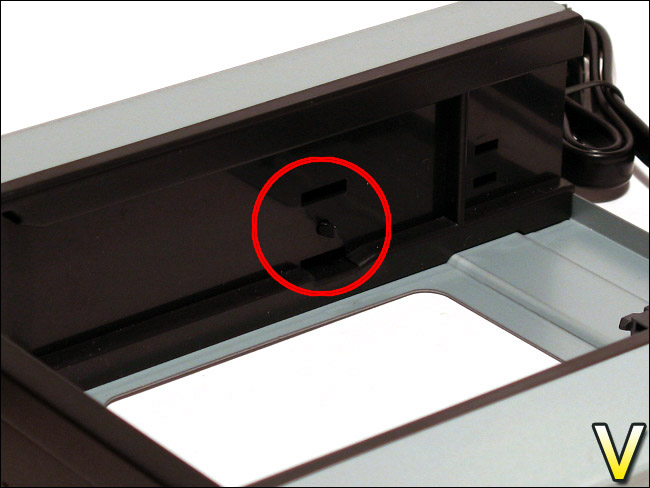
The small plastic locking tab inside the device.
The simple locking mechanism of the Easy SATA works fairly well. Nevertheless, I believe that the small locking tab needs to be depressed with the button whenever a hard drive is inserted. If not, a nice amount of force will be needed to depress the tab with an inserted hard drive. This becomes apparent with a hard drive such as the Hitachi DeskStar T7K500 HDT725025VLAT80 250GB, which has a gap before the screw hole. Therefore, if the locking tab is not depressed prior to insertion, it will lock into the gap before reaching the screw hole. Pushing the hard drive harder into the device locked it in place properly, but how much force the small tab can withstand before breaking is unknown.
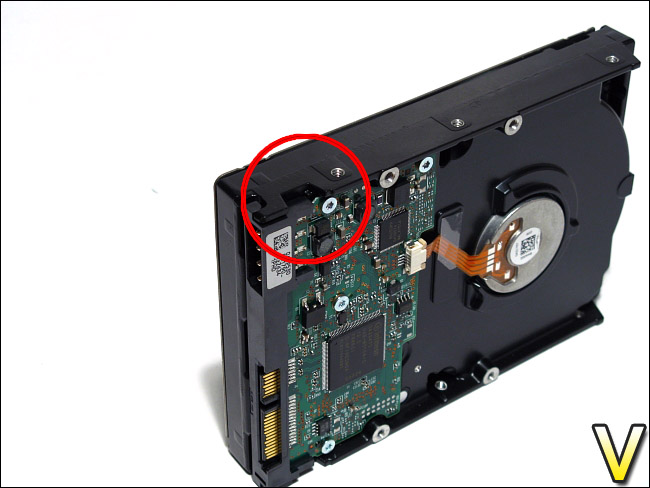
The gap before the screw hole makes inserting the HDD difficult.
The front bezel of the Easy SATA is held into place by six plastic tabs, which is similar to the bezel of most 5.25” DVD writers. The eSATA port of the device is screwed onto the front bezel, and it is a simple eSATA to SATA adapter.
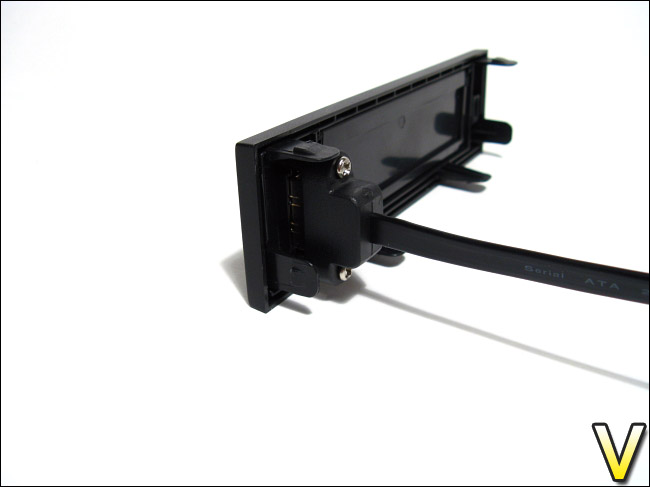
The eSATA to SATA adapter, with a 600 mm straight SATA cable.
All metal edges of the Easy SATA are not sharp and you should not have any cuts while handling the device. The overall build of the device is very good and it feels quite sturdy. The only complain I have for it is its locking mechanism. The small locking tab inside the Easy SATA seems fragile. Insertion of a hard drive into the device is quirky unless the locking tab is manually depressed with the front button. A rounded locking tab might have avoided this, seeing as it would be more easily depressed by the force of an inserted hard drive.
Furthermore, an eject button would have been preferably included with the Easy SATA. Removing a hard drive is a manual process and can be quite difficult given the fact that the hard drive fits quite snugly to the power and SATA connector of the Easy SATA.
Installation and Drivers
Antec does not include an installation manual with the Easy SATA, and it is not required. The device is installed into the computer case like any other 5.25” drive bay by screwing it into place. Four screws, two on each side, are usually sufficient to secure the device.Usage of the Easy SATA is as simple as plugging the device to a free SATA power cable and connecting it with a SATA cable to a free internal SATA port. The eSATA port of the Easy SATA also requires a free internal SATA port, if ever it will be used. As such, the Easy SATA requires two internal SATA ports in total.
Although no manual is available with the Easy SATA, Antec has a mechanical drawing that explains a bit its functioning. The drawing is available on Antec’s website:
Link: Download “Mechanical Drawing”
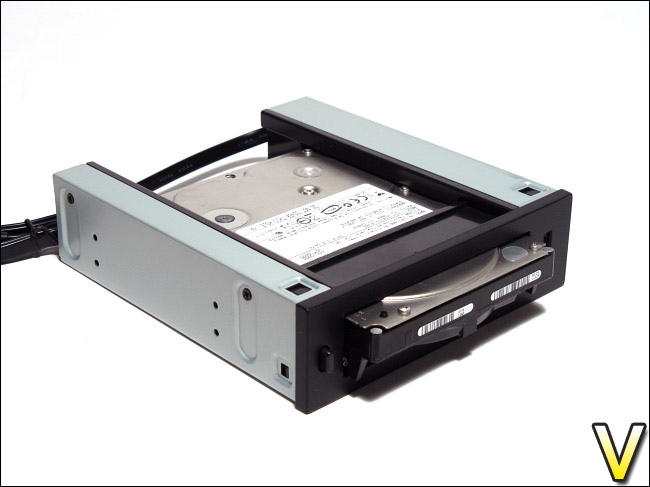
The inserted hard drive sticks out by about 1.5 cm, which may interfere with the door of a computer case.
In order to install a 3.5” SATA hard drive into the device, the front bezel button should be depressed to release the locking mechanism and to avoid breaking the locking tab when the hard drive is inserted. Once the hard drive is inserted, the button is released and the hard drive should be locked into place and plugged into the connectors. If you release the button a bit earlier, you might hear the faint click of the locking mechanism. The hard drive cannot be fully inserted into the Easy SATA; approximately 1.5 cm of the hard drive will be exposed. This is essential for removing the hard drive seeing as the Easy SATA does not have an eject button.
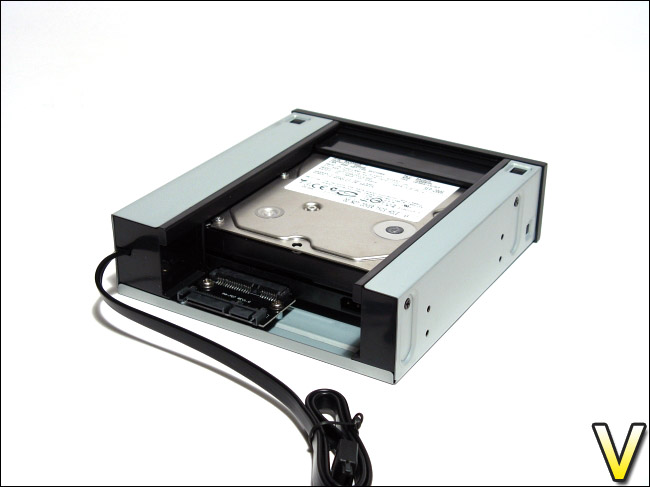
The hard drive is simply inserted into the device.
Seeing as the Antec Easy SATA has a black matte finish, it should fit the style of most computer cases. In this review, the device was installed into an Antec NSK3480 mini tower case, and its bezel flushes well with the rest of the front bezel of the case.
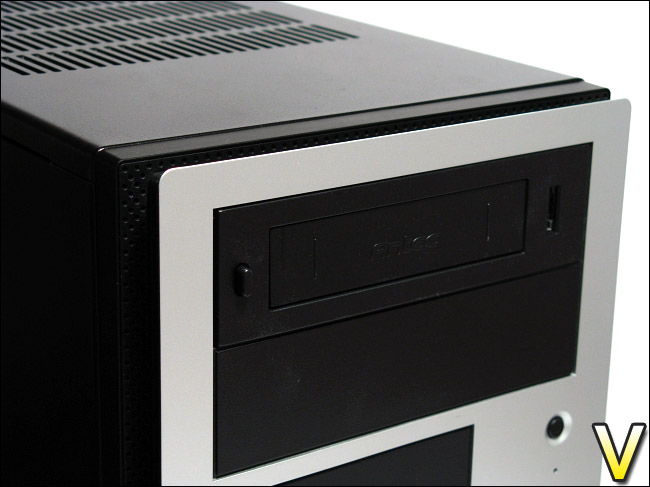
The Easy SATA easily matches the design of most cases.
In order to remove the hard drive from the Easy SATA, the front button must be depressed. Once the locking mechanism is released, the hard drive is grasped and pulled outwards. The small amount of exposed hard drive is enough for most people to get a good grip. People with larger fingers might have some difficulty because only 1.5 cm of the hard drive is exposed. A good grip is also essential because the hard drive connects quite tightly to the Easy SATA. Antec should consider an eject button that releases the hard drive from the power and SATA connectors in their future hot swap hard drive caddies.
Elsewhere, the bezel of the Easy SATA is susceptible to being scratched when inserting a hard drive. Given the front bezel’s grainy texture, scratches are not extensive but are noticeable when examined closely. Although two small embossed vertical stripes on the front bezel attempt to not let the hard drive touch the bezel, the small screws on top of the hard drive were still able to reach it. A smooth matte finish or larger vertical stripes might have avoided this.
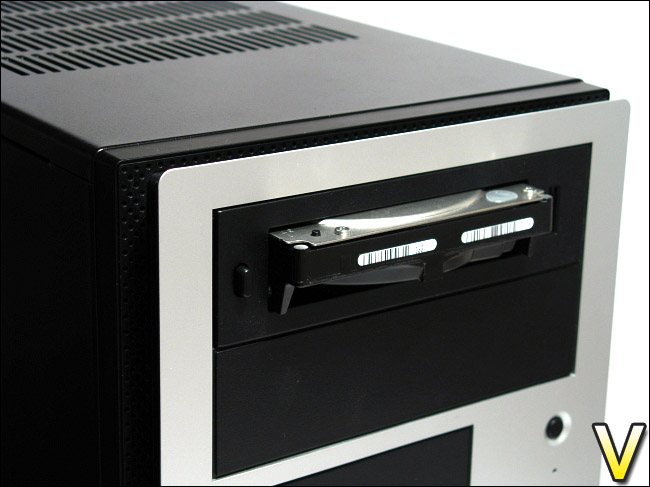
The hard drive is exposed a bit to allow gripping it during removal.
Installed hard drives are recognized by Windows Vista, and drivers are installed automatically, which may require a system reboot. In order to support the hot swap capability, your system may need the appropriate south bridge drivers and the Easy SATA should be plugged to an AHCI-enabled SATA port.
Test System and Testing Methodology
Testing MethodologyIn order to determine the Antec Easy SATA hard drive caddy’s performance, the benchmarks of two software will be used: HD Tune and HD Tach. Both tests will measure the read performance of the Easy SATA when a hard drive is inserted into it. The Easy SATA will be attached to an available internal SATA port of the Gigabyte GA-MA78GM-S2H motherboard. The Easy SATA’s results will be compared to the transfer speeds of the hard drive installed directly to an internal SATA port.
The hard drive that will be used for testing is the Hitachi DeskStar T7K500 HDT725025VLAT80 250GB, a fairly modest 7200RPM hard drive.
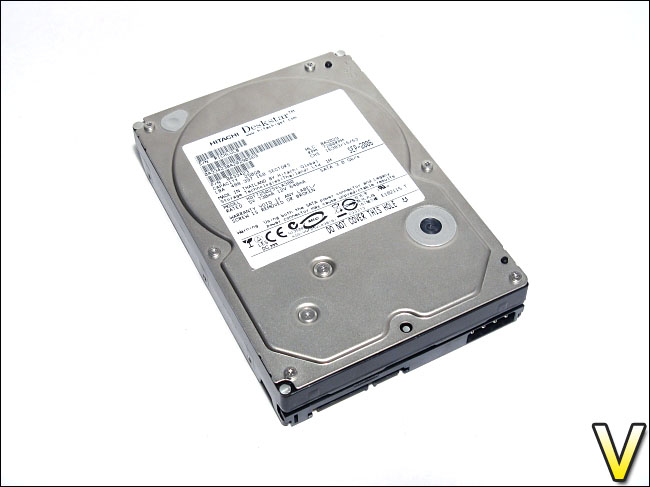
The Hitachi DeskStar, a modest 3.5” hard drive.
Benchmarks
– Test 1: Read performance in HD Tune 2.55
– Test 2: Read performance in HD Tach 3.0.4.0 (Long Bench with 32mb zones)
– Hard Drive Tested: Hitachi DeskStar T7K500 HDT725025VLAT80 250GB SATA2 7200RPM 8MB 8.5ms 3.5IN
Test Setup
– CPU: AMD Athlon X2 5000+ Black Edition @ 2.6 GHz 1.15V
– Motherboard: Gigabyte GA-MA78GM-S2H 780G
– RAM: Corsair XMS2 TWIN2X4096-6400C5 PC2-6400 2x2GB
– Case: Antec NSK3480 mATX
– Power supply: Antec EarthWatts 380W
– CPU cooler: Noctua NH-U12P with Noctua NF-P12 @ 5V
– Case fan: Noctua NF-P12 @ 5V
– Hard drive 1: Western Digital Caviar SE16 WD6400AAKS 640GB
– Hard drive 2: Hitachi DeskStar T7K500 HDT725025VLAT80 250GB
– DVD Drive: LG GH22NS30 DVD Writer
– OS: Windows Vista Ultimate SP1 64bit
– Mouse pad: QPAD|UC Large
– Monitor: Dell E207WFP 20” TN
Ambient Temperature: 25ºC
Test Results: HD Tune and HD Tach
Test 1: HD Tune 2.55Read performance
In terms of transfer speed rates, the Antec Easy SATA recorded a minimum of 33.2 MB/sec, a maximum of 63.2 MB/sec and an average of 51.5 MB/sec. The burst rate was 59.9 MB/sec and the access time was 14.1 ms. These numbers are highly respectable. Notice that the temperature monitoring was available for the hard drive in HD Tune. Indeed, by using the Easy SATA, it was as if the hard drive was directly connected to an internal SATA port.
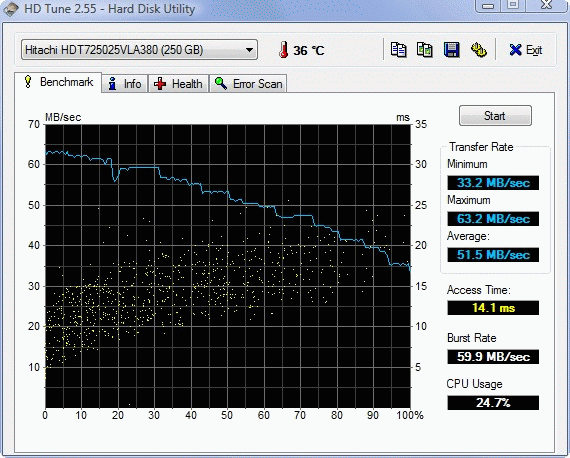
The performance in HD Tune 2.55.
Test 2: HD Tach 3.0.4.0
Read performance (Long Bench with 32mb zones)
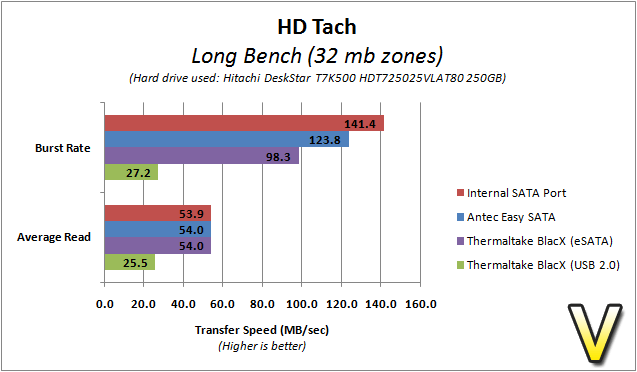
The Easy SATA’s performance in HD Tach was similar to that of HD Tune. The average read transfer rate was 54.0 MB/sec and the burst rate was 123.8 MB/sec. The random access time was slightly better at 13.6 ms.
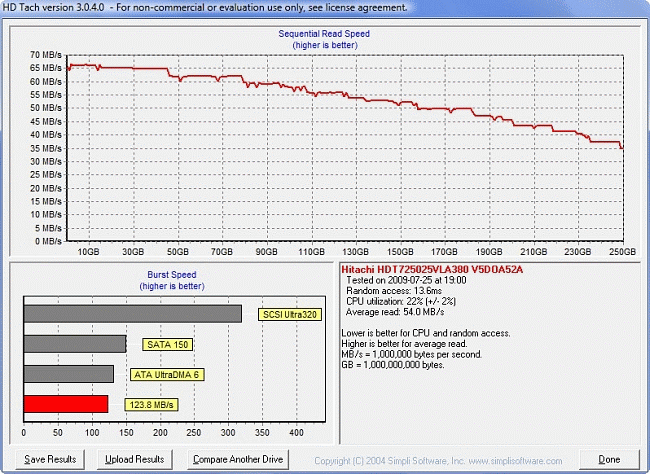
The performance in HD Tach 3.04.0.
Overall Usage
A summary of benchmarks and a comparison to an internal SATA connector
When compared to the performance of the hard drive connected to an internal SATA port, the Antec Easy SATA had very good results. The Easy SATA’s results in both HD Tune and HD Tach were identical to it, asides from the burst rate.
In terms of usage, the Antec Easy SATA was fairly simple to use. The only downside was that insertion required depressing the front locking button, and the removal of the hard drive was manual. Gripping the hard drive during removal was more or less comfortable, given that the hard drive was not greatly exposed. An eject button would have very preferred. The hot swap capability worked without any trouble in Windows Vista.
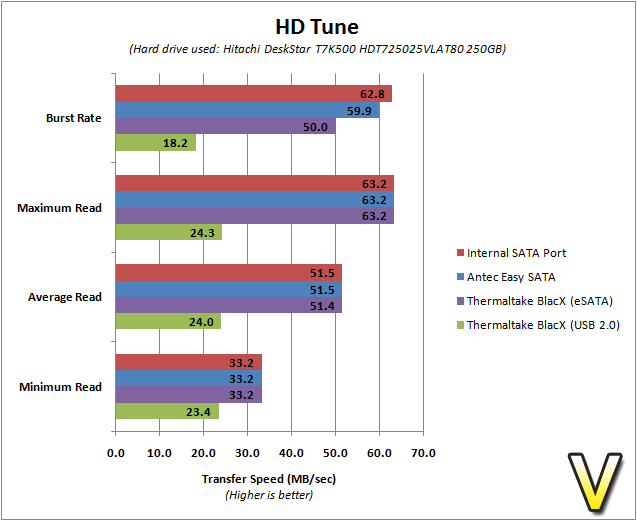
The Easy SATA performed remarkably well, matching the performance of the internally installed hard drive.
Noise and Temperature
Although the Easy SATA does not have any anti-vibration rubber or silicone integrated into its design, it does feature a strong build, staying true to Antec’s sturdy metal used in their computer cases. The plastic rails are also well screwed into the frame of the Easy SATA. Overall, the Easy SATA did not rattle or vibrate immensely when a hard drive was inserted. Seeing as the hard drive is slightly exposed when installed, the low idle and seek noise of the hard drive may be heard.
The Antec Easy SATA does not feature any active cooling or a passive heatsink. Instead, the Easy SATA has a fairly open design to allow the hard drive to breathe. Thus, to remain cool, the hard drive must take advantage of the air circulation in the case. In terms of cooling, this is more or less ideal because the airflow across the 5.25” drive bays is usually poor.
During operation and after five consecutive HD Tach “Long Bench”, the temperature of the Hitachi DeskStar T7K500 HDT725025VLAT80 reached 43 ºC (ambient temperature: 25ºC). This is an acceptable temperature, but those looking for cool operation might be disappointed. However, this should not be a problem because the hard drive will likely be quickly swapped anyway. In comparison, when the hard drive is installed in the bottom chamber of the Antec NSK3480 mini tower case, its temperature was about 38ºC.
In order to promote air circulation, Antec could have made some small vents in the front bezel of the Easy SATA. I suspect, however, that their effect would be minimal. Therefore, this is more of a limitation of non-active cooling hard drive caddies in general. It is a sacrifice one must make for a silent device.
Conclusion
As its name suggest, the Easy SATA is marketed by Antec as an “easy” solution to bringing hot swap capabilities to your computer system. Not only does it offer a convenient way of accessing and removing hard drives, the performance of the Easy SATA matched the transfer speed rates of a hard drive connected directly to an internal SATA port. Thus, for those looking for an alternative to installing a SATA hard drive into their computer case, the Easy SATA is a good solution without the loss of performance or reliability.Nevertheless, the Antec Easy SATA is not without its faults. The black matte finish is susceptible to being scratched when inserting a hard drive. The scratches are minimal and are likely not to be noticed, but this detracts from the overall quality of the product. Furthermore, removal of an inserted hard drive is a manual process that also involves releasing the locking mechanism via a button. Given the fact that the hard drive fits quite snugly in the device, accomplishing this task may be difficult for some at first. A latch or lever system, such as the one seen in the Thermaltake BlacX, that facilitates the hard drive’s diconnection from the Easy SATA’s connectors would be preferable.
Such faults are quite minor, and are easily ignorable. Indeed, the Easy SATA offers excellent performance, an eSATA port, a locking mechanism and a straight-forward design.
Given its suggested price of only $29.99 USD, the Antec Easy SATA is positioned as a highly affordable device. The deal is sweetened even more by that fact that some retailers sell this hard drive caddy for only $20.00 USD. With the performance and sturdy design that the Easy SATA possesses, Antec’s product is “easily” a good buy.
Thus, the Antec Easy SATA hot swap hard drive caddy is given the Vortez Hardware Silver award. Vortez Hardware would like to thank Antec for providing this review sample, and we hope to see more Antec PC accessories in the future.
Pros
+ Excellent performance; similar to that of internal SATA because the Easy SATA uses an adapter that gives a direct link to the internal SATA port, i.e. it has no SATA link controller chip
+ Good hard drive locking mechanism; ensures that the hard drive is secured in the device
+ Good value; one of the cheapest hot swap hard drive caddies available
+ Straight-forward design; insertion of hard drive is simple, but requires releasing the locking mechanism
+ Sturdy build; no rattling or strong vibrations noticed from an installed hard drive
Cons
– Absence of a proper eject button; makes removal of the hard drive slightly difficult
– Adequate passive cooling; the hard drive must take advantage of air circulation in the case, which may not always be good
– Hard drive is not fully inserted into the device; installed hard drives stick out by about 1.5 cm, which may interfere with doors of some computer cases
– Short SATA cable for the eSATA port; although it has a length of 600mm, only 450 mm can be used to route across the computer case
– Support for 3.5” SATA hard drives only, and none for 2.5” hard drives; an unfortunate limitation of hard drive caddies in general, and difficult to correct
To discuss this review, please visit our forum.
