







Zotac has sent us their ultra compact ITX Core 2 based motherboard for review.
Product on Review: Zotac GeForce 9300-ITX WiFi
Manufacturer and Sponsor: Zotac
Street Price: £110-£115
Zotac have been kind enough to send us their GeForce 9300-ITX WiFi motherboard for review.
They’re a well known and highly regarded company despite being relatively new to computer hardware manufacture.

ZOTAC International (MCO) Limited was established in 2006 with a mission to deliver superb quality of NVIDIA graphic solutions to the industry. It has strong backup from parent group, PC Partner Ltd. Headquartered in Hong Kong, factory in Mainland China and regional sales offices in Europe, Asia Pacific and North America. The support ZOTAC provides is currently the largest of its kind around the world.
With 40 SMT lines, 6,000 workers and 100,000 square-feet meter, ZOTAC features a full array of state-of-the-art facilities and machineries. In addition, ZOTAC has over 130 R&D professionals in Hong Kong, China and warranty and service center in strategic countries to enable effective and efficient worldwide as well as localized sales and marketing supports.
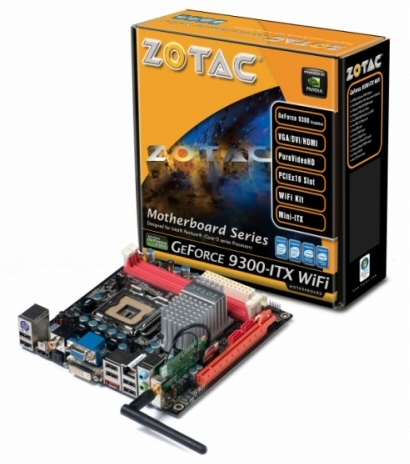
The Zotac GeForce 9300-ITX WiFi.
Let’s see how this new motherboard performs.
Specifications:
Model
Model GeForce 9300-ITX WiFi
Chipset
Manufacturer NVIDIA
GPU GeForce 9300
CPU Compatibility
Intel Core 2 Duo
Intel Core 2 Quad
Intel Core 2 Extreme
Intel Pentium
Intel Celeron
Socket LGA775
Front-side bus Up to 1333 MHz
Memory
Memory Type DDR2
Memory Speed 667/800 MHz
Slots 2 240-pin DIMM
Capacity Up to 8GB
Integrated Wifi
Compatibility 802.11b/g
Ports
DVI 1
HDMI 1
VGA 1
SATA 2 (SATA 3.0 Gbps)
eSATA 1 (SATA 3.0 Gpbs)
USB 2.0 12 (6 on back panel, 6 via pin header)
Ethernet 10/100/1000
Extras
Cooler Passive (no fan)
Windows Vista Premium ready
As you can see the GeForce 9300-ITX WiFi is a comprehensively specified little package.
It offers virtually full socket 775 compatibility all the way up to the more power hungry 65nm Core 2 Quad.
Gigabit lan and fast wireless G WiFi support are valuable additions to the spec sheet too. Indeed, the modern DirectX 10 GPU solution combined with an integrated HDMI output offers the final cherry on the cake. An ITX form factor capable of full HD playback for HTPC use.
Let’s take a look at the board…
Packaging and included extras:
The GeForce 9300-ITX WiFi comes in a typically colourful Zotac branded box.
The brightly coloured front provides basic information on the specific functions of the board while the back provides information on the experience Nvidia’s chipset will likely provide. The side of the box contains specific information on the board full list of specifications.
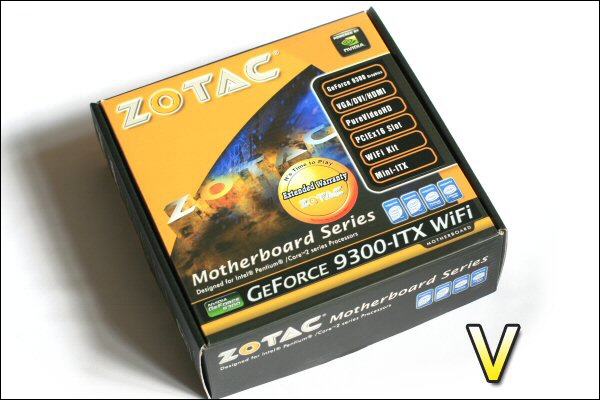
Front view of the packaging.
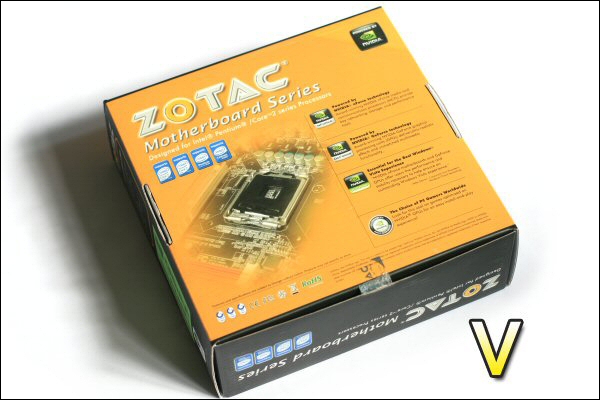
Rear view of the packaging.
Upon opening you are greeted by the motherboard itself.
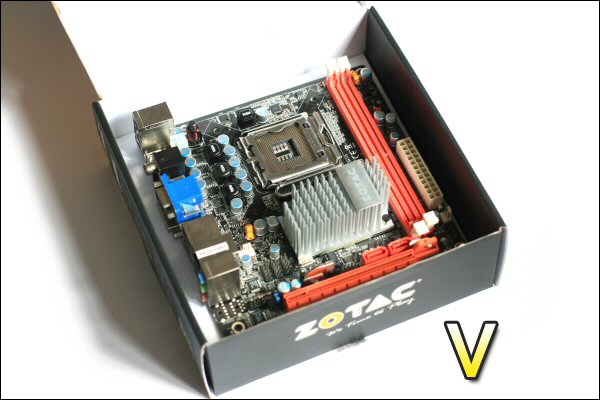
Opening the box reveals the motherboard.
Below this you will find the various instructions, warranty documentation, CD’s, blanking plate and the obligatory case sticker. One extra addition is the wireless aerial that can be installed onto the motherboard for full WiFi connectivity.
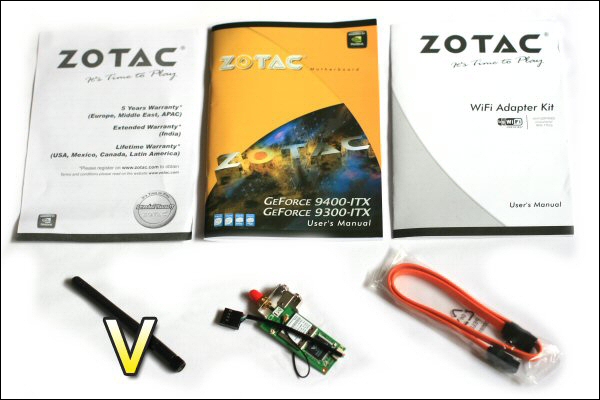
The paperwork, CD, SATA cable and WiFi adapter supplied with the motherboard.
The board itself has a lot crammed onto it. It’s impressive when you consider this board could support a high end Quad core, top end GPU like the 4870X2 or GTX295 and a massive 8gb of DDR2.
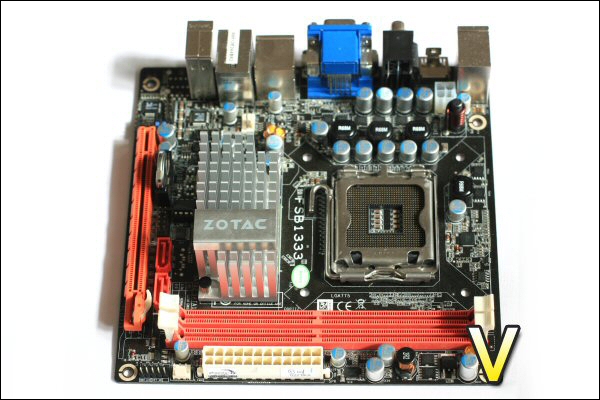
Full view of the motherboard.
When you consider the compact size of the board next to the sheer amount of items placed on it you can see that the location of certain sockets, heatsinks and expansion slots is very important. It looks like a good deal of thought has gone into the boards design.
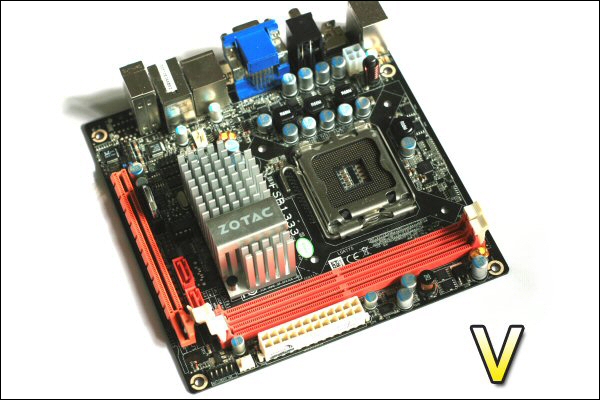
There’s a great deal crammed onto the PCB.
Let’s take a closer look…
A closer look:
The CPU socket itself is astonishingly clean and clear of obstructions. The stock cooler will surely fit comfortably in this space.
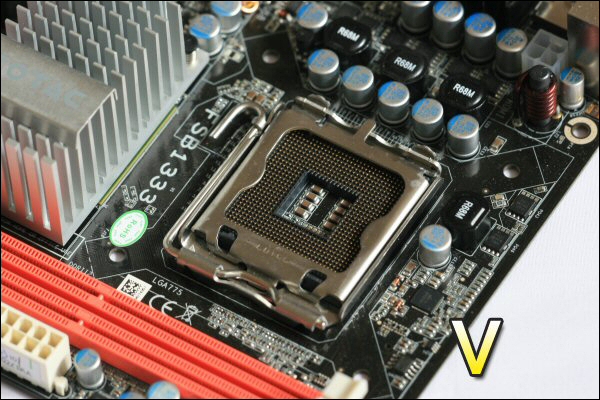
The C2D 775 socket.
The DDR2 sockets are fairly closely spaced but with such limited space there would quite honestly be no other way of doing this. Certainly not a major issue at all.
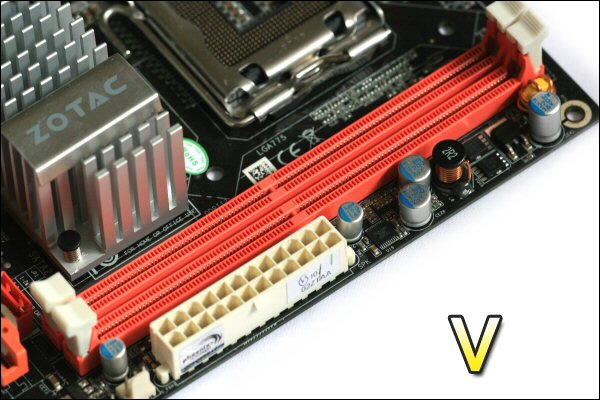
DDR2 slots are tightly spaced but useable.
The mainboards 24-pin ATX socket is neatly placed below the DDR2 slots and most importantly the locking clip side faces away from the ram slots meaning there should be no issues removing it when DDR2 is installed.
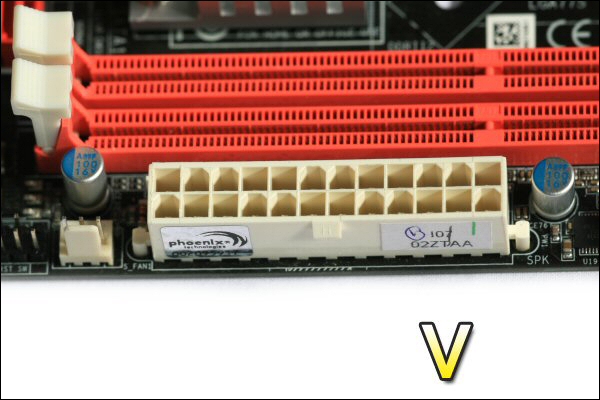
24-pin ATX socket should be easy to use.
The 12v mainboard socket is also placed well out of harms way.
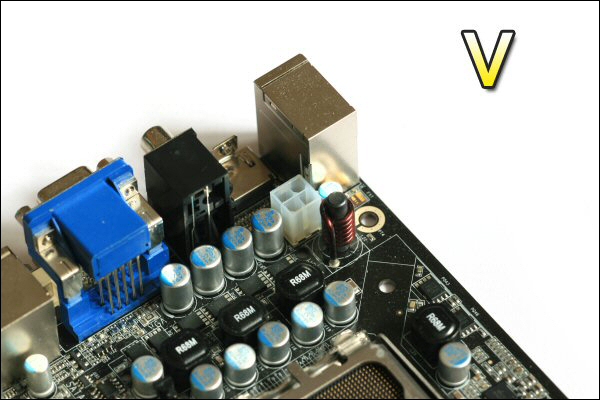
The story is the same for the 12v – plenty of room.
The PCI-E 16x slot is located at the side of the motherboard. It’s quite close to the two SATA II sockets but as the locking side of those SATA’s is on the other side there should be no issues when it comes to the removal of SATA plugs. The only slight issue for the PCI-E slot is that the card release lever is surrounded and consequently obscured by the lower SATA socket and the two DDR2 locking clips. This could prove tricky if you wanted to remove an installed GPU while both DDR2 slots and the lower of the two SATA sockets were populated.
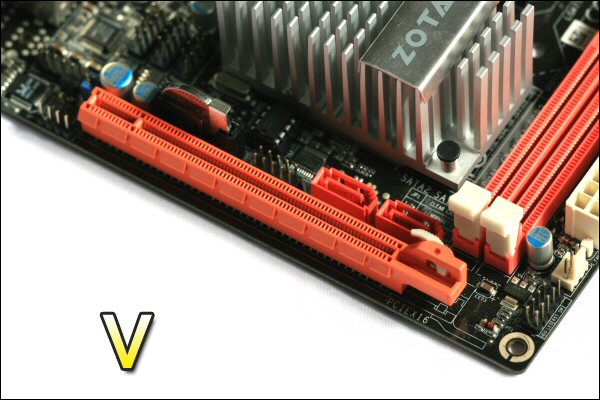
Installation of SATA plugs should be easy but PCI-E users might have problems.
The GeForce 9300-ITX WiFi is dominated by the large northbridge heatsink. Though despite its size it manages not to interfere with any other component on the board. Hopefully, considering its size, it will also cool the chipset sufficiently well.
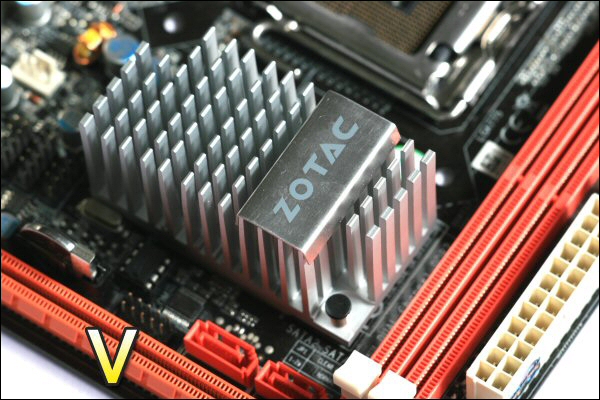
The large Northbridge heatsink doesn’t interfere with other board components – thumbs up from me!
Around the back of the board we see a fairly standard layout. 6x USB sockets, a PS/2 keyboard socket, an E-SATA slot, both an optical and coaxial digital output, the obligatory analogue audio inputs and outputs and a VGA and DVI socket too. An unusual addition (although more boards are sporting them these days) is the ‘HTPC friendly’ HDMI socket.
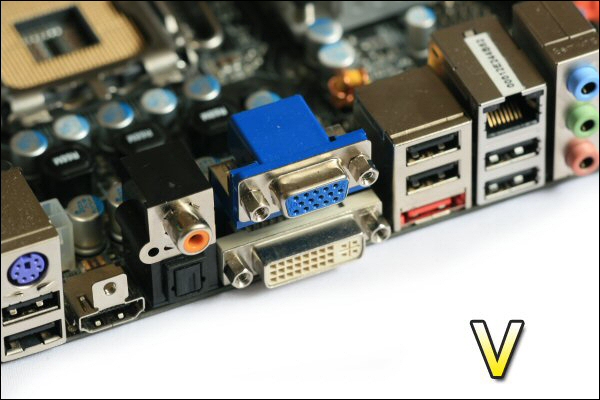
An excellent selection of connections including HDMI.
Finally, i must mention that there are also three sets of headers for extra USB breakout plates. One if these headers is required for the supplied WiFi adaptor so with this is mind you’d only be able to have a maximum of 10x USB connections with it installed. Only 10! I remember the days when 2 was the most you’d find!!!
Well, all that seemed fairly impressive – let’s see how it does in real life.
Hardware setup, overclocking and test aims:
CPU: e2160
RAM: 2gb Geil ULL PC6400 DDR2
HDD: 80gb WD 5400rpm laptop HDD
Optical drive: Panasonic slot loading laptop DVDRW
CPU cooler: Akasa AK-956SF heatsink
Case: Morex Noah ITX with integrated 80w PSU
Installation was very straightforward. The layout helped a great deal and was complete in around 20 minutes. The WiFi adaptor screwed straight onto the board and didn’t foul the I/O plate at the rear of the case.
Initially i tried to overclock the e2160 CPU i had installed in the board and i also tried to clock its onboard GPU.
The stock speed of the components were:
CPU: 1.8ghz
GPU: 450mhz / 1200mhz
I managed to overclock both components to an unexpected and fairly impressive level:
CPU: 3ghz (0.08v increase)
GPU: 580mhz / 1400mhz (0.02v increase)
While overclocking i also tested the operating temperature of the hardware using OCCT to fully load it as well as monitoring temperatures.
First up was the CPU:
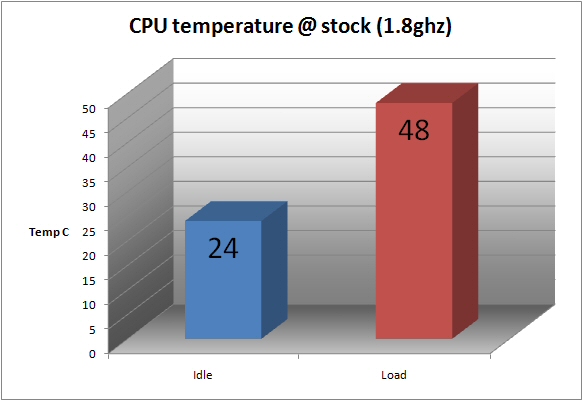
These temperatures are fairly standard for the e2160 @ stock.
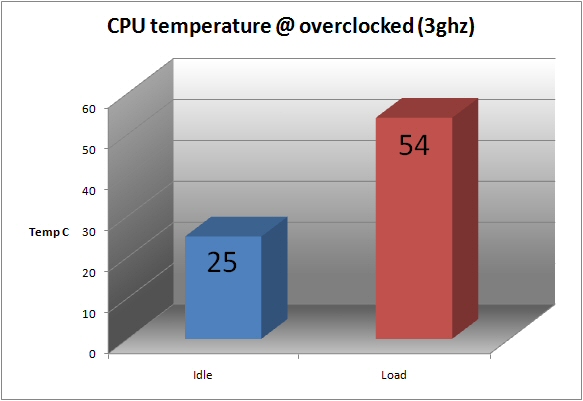
Not much of an increase really – probably more to do with the small bump in voltage.
Finally came the GPU:
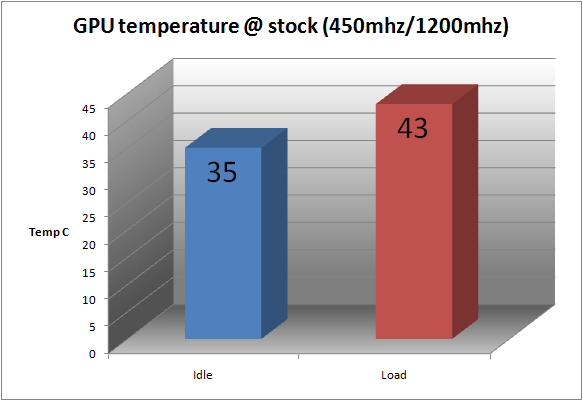
I was very impressed with the operating temperature here.
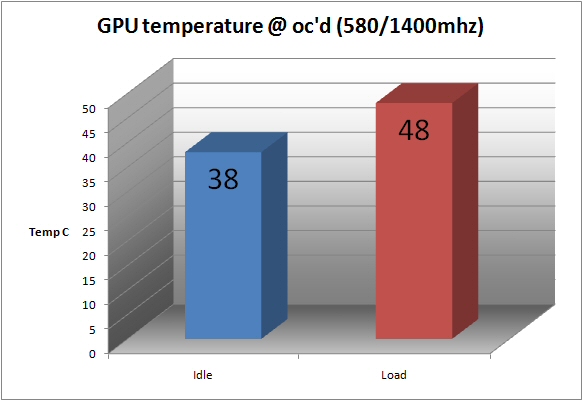
And even more impressed by this ‘overclocked’ result – very cool!!!
Now that i have the stock and overclocked speeds available i will endeavour to test how well it performs and what extra ‘free’ performance is available through overclocking.
I will try a variety of tests with the GeForce 9300-ITX WiFi to assess it’s desktop, AV and gaming credentials.
Testing:
Initially i wanted to consider raw hardware performance and desktop capability.
I used Everest’s trial version to check performance details. Below are the results from the system at stock speeds and in overclocked form:
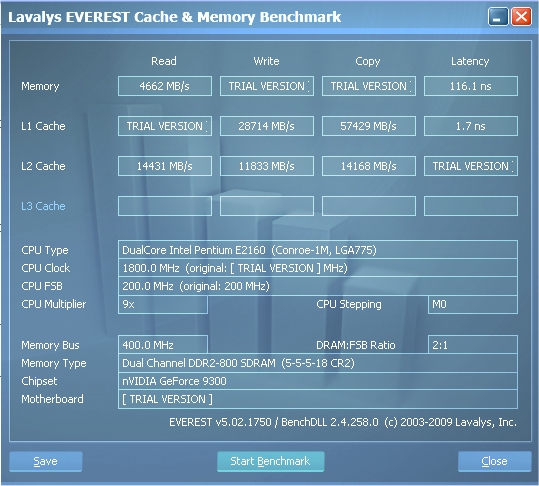
Stock results with Everest.
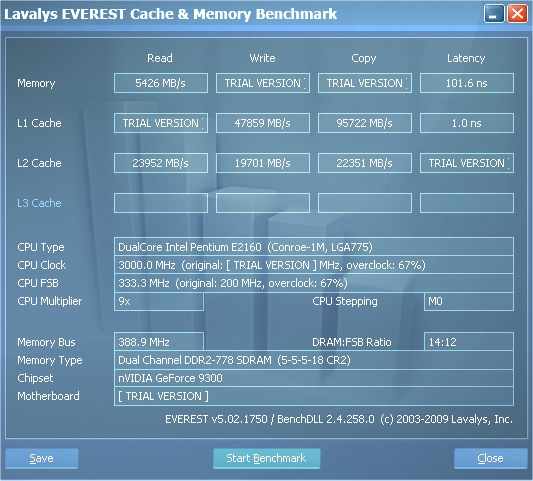
Overclocked results with Everest.
As you can see there was a healthy boost provided by the increased CPU clock speed.
Next up was Futuremark’s PCMark05:
Stock PCMark05 score @ 1280×1024
Physics and 3D 126.89 FPS
3D – Pixel Shader 82.79 FPS
Web Page Rendering 2.4 Pages/s
File Decryption 49.6 MB/s
2D Graphics Memory – 64 Lines 510.71 FPS
Multithreaded Test 2
Text Edit 119.36 Pages/s
Image Decompression 25.2 MPixels/s
Multithreaded Test 3
File Compression 4.21 MB/s
File Encryption 23.57 MB/s
Overclocked PCMark05 score @ 1280×1024
Physics and 3D 158.98 FPS
3D – Pixel Shader 89.2 FPS
Web Page Rendering 3.88 Pages/s
File Decryption 82.3 MB/s
2D Graphics Memory – 64 Lines 538.07 FPS
Multithreaded Test 2
Text Edit 196.39 Pages/s
Image Decompression 41.82 MPixels/s
Multithreaded Test 3
File Compression 6.88 MB/s
File Encryption 40.96 MB/s
As you can see there was a sizeable boost provided by the combination of both CPU and GPU overclocks. Some of the results are almost double – quite an increase i’m sure you’ll agree!
Sticking with Futuremark i decided to move onto their gaming benchmark program 3DMark06.
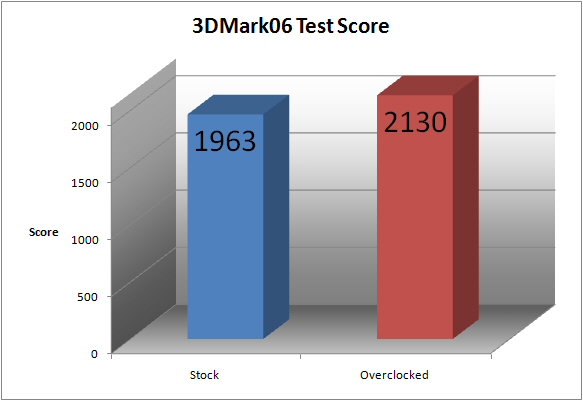
Stock and overclocked results for 3DMark06.
The actual results seem to show that the GeForce 9300-ITX WiFi’s onboard GPU isn’t up to much. For example my old ATi X850 did better and my 7800GT managed a score more than double this amount.
Lets see how it does with real world games…
Testing continued:
I chose to test two games with the GeForce 9300-ITX WiFi.
First up was Far Cry 2 – a very intensive test of any hardware. Through testing it became apparent a low resolution was needed so i picked two resolutions and used a Sony 40W4000 HD TV as the monitor.
I started at 1360×768 (‘Optimal Settings’ all low with shadows OFF) but the poor performance meant i had to reduce the resolution.
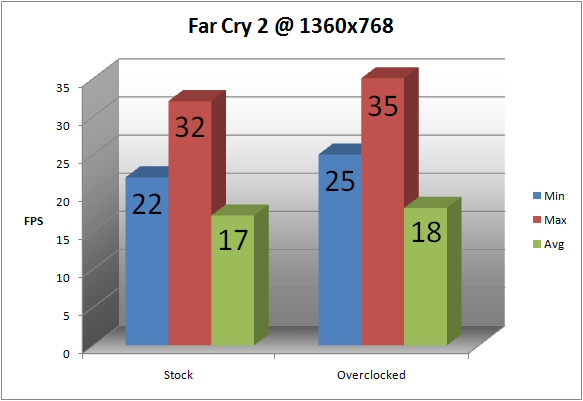
Some small numbers there.
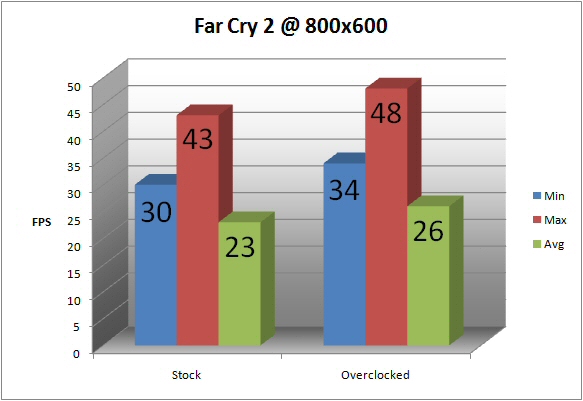
This is an improvement – when overclocked the chipset allows fairly decent gameplay.
Call Of Duty 4 was my next choice. A popular shooter with a well designed game engine. Once again i began by using 1360×768 (‘Standard Settings’ with no AA and no V-Sync) but had to drop to 800×600 to get decent gaming framerates.
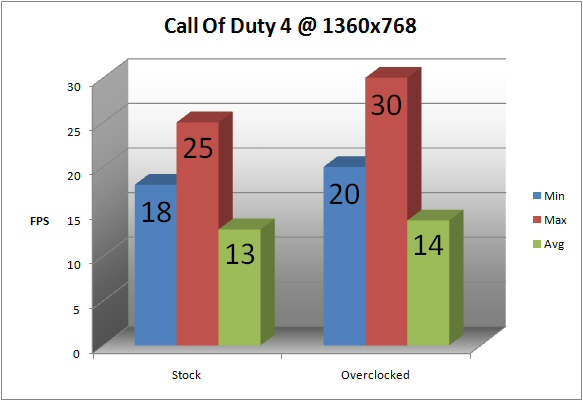
Once again we see some small numbers.
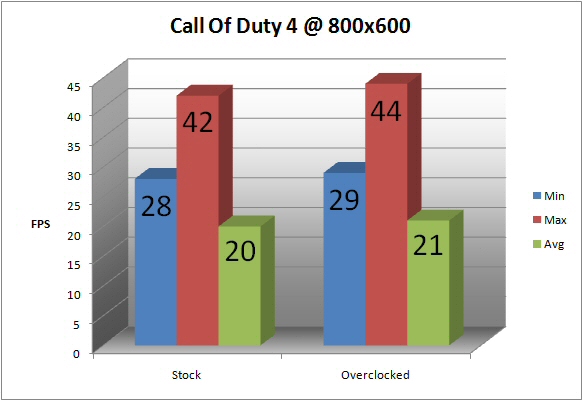
Reducing the resolution helps.
So there we have it – not a monster gaming performance but i suppose if you wanted that you’d add a GPU using that 16x PCI-E slot.
Lastly i used an LG Bluray/HDDVD drive to see how the GeForce 9300-ITX WiFi’s coped with HD material.
I once again used my Sony 40W4000 and an HDMI cable to assess it’s 1080p performance. It happily played everything i threw at it. Indeed i also downloaded a few full HD videos from Microsoft’s HD site to see if they caused any issues.
I’m happy to report that all in all the playback was smooth and trouble free.
Sound:
As it will no doubt be used as the heart of an HTPC we need to know how its fan control will aid quiet operation. Unfortunately the Zotac showed that its fan control was a little limited and tended to run at full pelt all the time.
While this may not be an issue if you plan to use a quiet cooler or volt mod your fans it would be a problem for those of you that just want to plug and play – in my opinion the fan control would be a little intrusive in a quiet room.
Conclusion:
I\\\’ve found the Zotac GeForce 9300-ITX WiFi to be a very well thought out unit. It provides all the functionality any user could reasonably want and does all this in a wonderfully compact form factor.
It\\\’s average price at the time of writing is a touch more than standard sized motherboards. What you pay for here is the reduction in size. The standard 5 year Zotac warranty also provides a useful and reassuring safety blanket too.
It\\\’s layout is largely exemplary with only a couple of niggles. Indeed, my only real concern is the fanspeed setting. Although a decent heatsink or voltmodded fan would make this a non-issue.
In my opinion the board clocks very well and surprised me a great deal in this department.
I can thoroughly recommend the Zotac GeForce 9300-ITX WiFi for anyone looking for a very compact gaming or AV based PC. Indeed it\\\’s quad core compatibility could mean it would make a useful but incredibly tiny encoding and editing machine too.
I must finally point out that i was very close to giving the board our \\\’Silver\\\’ award due to both the slightly lacklustre performance of the onboard GPU and that dodgy fan control. But i realised that gamers would obviously add a GPU and anyone wanting a silent HTPC would invest in a quiter cooler or slower fan.
With that i will award it our \\\’Gold\\\’ award. A comprehensively designed and tidy solution for high end power users looking to build in a tiny form factor.
Vortez Hardware would like to thank Zotac for supplying the GeForce 9300-ITX WiFi for review.
