







Today we’ll be looking at CoolIT’s attempt at making water cooling accessible to the mainstream market with their Domino A.L.C.
Product on Review: CoolIT Domino A.L.C CPU CoolerManufacturer and Sponsor: CoolIT Systems
MSRP: $79.99 USD
Street Price: £79.99
Liquid cooling has for a long time been the desired formed of cooling for enthusiasts. For some, it provides extreme cooling while for others, it offers silence without compromise. But for many, it is also a work of art and I’m sure everyone has drooled over the work of someone’s tidy network of tubing, filled with UV sensitive coolant, at some point in their life! The problem is that this has mostly certainly been a playground restricted to the more risk taking, patient and determined enthusiasts amongst us.
This is where CoolIT Systems comes in. What they bring is a liquid cooling system that is all contained, easy to install but that also hopes to bring its benefits to people who may not be ready for a proper liquid cooling solution. It might take the fun out of researching and building a system of your own but the fact that it requires no need for maintenance coupled with no mobility issues, makes it a very attractive product.

About CoolIT Systems:
For years, CoolIT has been working with leaders in the computer industry to research, design, and provide an affordable new cooling product that provides a comprehensive solution for end users while exceeding high OEM standards. This carefully designed and patented technology unleashes the full potential of a PC, providing superior cooling performance while reducing system level noise and improving reliability of vital components. This small, but potent, pre-assembled product can also be easily installed inside any standard chassis. The CoolIT MTEC Technology can be found in the top names in performance computing like Dell, Alienware, Velocity Micro, MAINGEAR, Hypersonic, Biohazard, Ultra, Ultraforce, Systemax, BFG, Commodore Gaming, War Machine and Shuttle.
Aside from the current product offering, there are several additional products poised for release in the coming months to service the demanding cooling requirements of high performance video cards, multi-processor computers, and servers.
Leveraging the technology
CoolIT Systems is a world leader in supplying electronics cooling products, with an excellent reputation in the design, development, and manufacturing of liquid cooling systems using our patented MTEC™ based technology. Our innovative products exceed strenuous performance requirements and provide solid value to our customers. To provide our customers with world-class products, our highly experienced engineering team offers complete lab and testing facilities including the latest design and analysis software and hardware.
The CoolIT Domino A.L.C CPU Cooler
CoolIT brings innovation in a package that will appeal to the savvy tech users as well as the wider market so let’s see how effective the Domino Advance Liquid Cooling really is.
Features and Specifications
Features
•Superior cooling performance with whisper quiet operation
•User selectable modes of operation at the simple push of a button
•Self-regulating temperature control to ensure continuous protection
•Intuitive LCD display communicating system status
•Visual and auditory alerts should the system require attention
•Simple and quick installation
•Over 50,000 hours of maintenance-free operation.
Supported Processors
•Intel 775/1366
•AMD AM2/AM2+
Operation Modes (Fan Speeds)
•Quiet: 1100-2500 RPM
•Performance*: 1100-2500 RPM
•Full: 2900 RPM
*System automatically increases cooling performance at an increased rate compared to Quiet Mode.
Physical Specifications
•Dimensions: 14.0 x 12.5 x 15.5 mm
•Weight: 1.03 kg
•Operating Voltage: 11.6-12.4V
•Power Consumption: 8W (Max)
•Life Cycle: 50,000 Hours (MTBF)
Fan
•Long life, low noise
•Dimension: 120 x 120 x 25 mm
•Noise: 19.2 dBA (Min)
Pump
•CFF1 long life ceramic bearing
•Noise: <21 dBA
Radiator
•Custom engineered for low noise heat dissipation
•Dimension: 157 x 120 x 27 mm
CPU FHE (Fluid Heat Exchanger)
•Copper Micro-Channel
•Surface Dimension: 50 x 50 mm
Coolant
•Proprietary with anticorrosion/antifungal additives
CPU Thermal Grease
•Proprietary Pro Advanced Thermal Compound
Warranty
2 Year Manufacturer
The design of the Domino Advanced Liquid Cooling systems makes for usage that matches your needs. The three modes, quiet, performance and full can be switched on the fly via the press of a button, ideal for when you just want a quiet running computer whilst listening to music or watching a film, or full speed whilst gaming at full blast. Performance mode is the ideal blend of the two modes but thanks to the intelligent temperature monitoring, the cooling adjusts to meet your cooling needs.
Dimension wise, this will fit in any case with 120mm fan mounting holes at the back ensuring that you can still use all your memory sticks and adequate space for airflow in the case. The backwards facing fan also means all the heat is extracted out of the case. The system is composed of a radiator fitted with a 120mm fan, a pump and a CPU Fluid Heat Exchanger for maximum heat dissipation. The coolant is pre-applied to make sure the user experiences minimal problem when installing, making this very user friendly. CoolIT’s confidence in this product is certainly reflected in the 2 years Manufacturer warranty!
To top it off, CoolIT ensures maximum compatibility with all high end systems today with their Intel and AMD backplates.
Packaging

The front view of the box
The CoolIT Domino A.L.C comes in a fairly standard large cardboard box. The front depicts the actual cooling system. The colours are a bit bland, giving it a more professional attire but it doesn’t spare us the relevant information.
A close up on the features
Some of the features and specifications are listed through illustrations.
The clamshell box in which it comes packaged in
Inside the box, the Domino A.L.C is enclosed in a flexible plastic clamshell cover, securing it firmly to prevent damage.
The bundle and the manual
The backplates are packaged in foam and the CPU block attached to the tubing has a small square plastic cover to protect it and the pre-applied thermal paste.
Closer Look
Side view of the unit
The unit in all its glory. At the back is the radiator and 120mm fan and on the side, we can see the LCD screen to monitor temperature and fan/pump speed.

Face on view of the unit. The rubber mounts for the fan can be seen at the back
The unit is very sleek looking while remaining sturdy.

The three backplates help give a tight mount for the waterblock
There are three mounting plates provided, the top being the LGA 1366 one, the left being the AMD mount and the bottom being the LGA775 plate. The Intel plates come with padding.

View of the fan at the back which exhausts hot air at the back of the case
The fan is a 7 bladed 120mm fan that has a rotational speed ranging from 1100-2900rpm based on the setting chosen and the temperature.
The whole system doesn’t take much space inside the computer and would fare well in smaller cases
Here we get a better view of the radiator and the CPU block. Both have been designed for maximum heat dissipation. The fin spacing is quite narrow to maximise surface area on the radiator but not so much that airflow will be reduced dramatically.
Closer Look (Continued)
The FHE is larger than the CPU area to ensure full contact
The Fluid Heat Exchanger i.e. the CPU water block has a flat mirror finish for a larger surface area of contact between it and the processor. The mounting uses 4 spring loaded screws that can be disassembled to fit AMD and LGA775 systems. By default it’s shipped ready for LGA1366 motherboards. The retention bracket ensures a tight secure fit.

The pump may look plasticky but it’s certainly robust with its ceramic construct
Behind the LCD screen, there is some information on the different settings and their benefits. This can also be found in the manual. The pump is installed next to the screen and according to the specifications, its ceramic bearing has a long life and low noise output.

The single radiator used by the Domino A.L.C
A closer look at the radiator shows the corrugated pattern of the metal. Sadly, the material used was too flexible and bent easily with little pressure applied. On the side are the two hoses with one passing through the pump. The barbs seemed a bit flimsy at first, not the regular metal ones on proper liquid cooled setups, but they did the job and withstood the pressure and temperatures. The pump and reservoir were built next to each other to minimize the number of tubing used, easing setup for beginners who might be put off by a cable jungle.
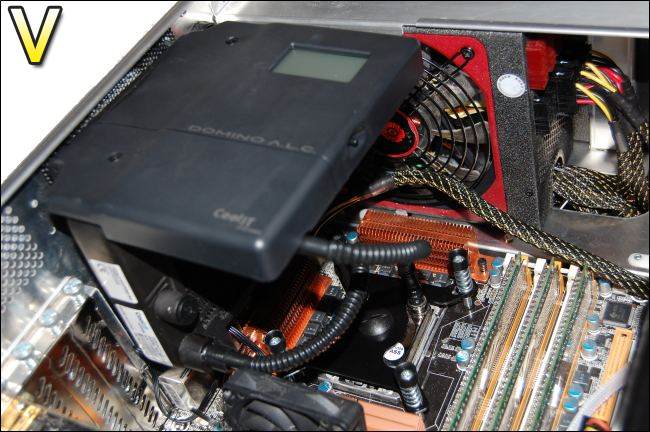
There is a lot of space remaining and fewer cables compared to heatsink alternatives
Once installed, it sits comfortably in the computer. Rather than the fan being screwed at the back, it uses rubber mounts to prevent vibration. The good thing about this system is that unlike a massive heatsink, it puts no strain on the motherboard. The tubing are of adequate length to prevent tangling.
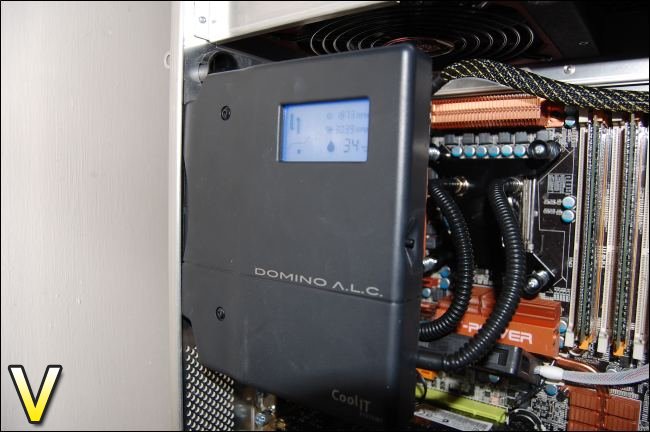
The display is crisp and clear to read. However it’s best viewed straight on
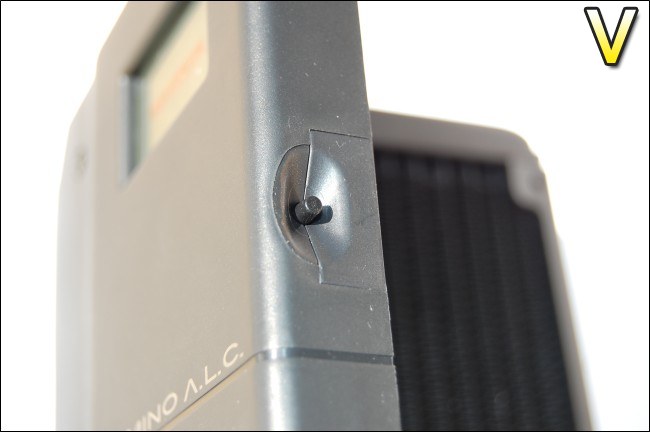
Switched on, the LCD screen turns on and gives a plethora of information concerning fan/pump speeds, coolant temperature and the operating mode. The depressed area on the edge holds the button that allows you to change the operating mode between Quiet, Performance and Full.
Installation and observations
One of the highlights of the CoolIT Domino A.L.C system is the installation. It’s surprisingly easy and requires minimal effort. Just to be sure though, CoolIT provide a step by step guide in the manual for setting it up. By default the Domino A.L.C is prepared for LGA1366 mountings and all you have to do is to simply place the back plate behind the motherboard, lining them up with the holes, and screw the FHE (Fluid Heat Exchanger) into them from above. To do so, press the spring loaded screws and twist, using a screwdriver to tighten it. The thermal paste is already pre-applied for convenience.The rest of the system is a bit harder to install, nonetheless, it’s very straight forward. Making sure not to put too much pressure on the tubing and barbs, align the radiator and back fan with the exhaust blow hole. The fan uses rubber fan mounts which you just have to pull through. It does require some wriggling about to get them out of the hole but once done, it allows for vibration free operation.
For AMD and LGA775 systems, the retention bracket has to be disassembled and refitted by removing 4 “C” clips and moving the spring loaded screws in different notches.
Observations
On starting up the computer, I noticed the hazard warning beeping but this was only due to the fact that it initially didn’t have enough power to feed the fan and pump. By the time the computer had gone past the post screen, it was no longer an issue. I still had to make do with the beeping every time I switched on the computer though. I won’t take any points from CoolIT because it was mostly something to do with the motherboard or power supply. In fact, I commend it on the fact that they implemented a warning system that worked accordingly.
The downside of using it in my case was that I could not read the LCD screen but this was built for windowed cases and as such, it’s an excellent accessory to have. The display is clearest when viewed straight on and it was sharp and easy to read everything. All the information is relevant and the additional graphics gives a good representation of the setting it’s on, as shown in the above illustration. Changing mode is also very simple and quick. At the press of a button, you will be greeted by a beep to confirm the mode.
The fan speed ranged from 1200-2700rpm from Quiet mode to Full. Performance was a good compromise in terms of noise and gave adequate cooling. When in Full mode, the fan still slowed down when the temperatures weren’t high, to lower noise levels. On the whole though, I was a bit disappointed with the noise level it generated for a cooler marketed for its silence. In Quiet mode, it was barely audible and ramping it up into Performance mode made the fan speed up to 1600rpm which was above the level of my case fans. It is still bearable though and if you are gaming or listening to music, this would be the perfect setting. Full mode on the other hand was like a mini tornado with the fan at a stormy 2700rpm. Unless you are using a headset, it will be hard to cope with the sheer noise generated. The alternative is to place the computer away from you! The pump speed remains at 3000rpm no matter what setting is selected. The main problem about the mode switching though is that you need to remove the side panel to gain access to the button. Thankfully the Domino A.L.C is able to automatically control the speed based on the temperatures.
Test Setup
CPU – Intel Core i7 920 – 4ghz
RAM – 6GB (3x2GB) OCZ platinum DDR3 1333mhz
Motherboard – Biostar T-Power x58
Graphics Card – Gainward 896MB GTX260 216
Power Supply – Enermax Revolution 85+ 850W
Hard Drive – Samsung F1 320GB Western Digital Caviar WD3200AAKS 320GB
Drivers – ForceWare 185.66
CPU Coolers:
Noctua NH-U12P SE1366
Thermolab Baram
CoolIT Domino A.L.C
Program Suite:
Core Temp 0.99.5
LinX stress Test
PC Wizard
How I tested:
Testing will be based on temperatures recorded by Coretemp and PC wizard after 20 passes of LinX stress test. The absolute temperatures recorded in the tables are averages of the 4 cores and the delta value provided for a fair comparison, taking into account ambient temperatures. The test will be run at stock speed and at an overclocked speed of 4ghz.
Results


At stock speed, the CoolIT does quite well and manages to keep the Core i7 at reasonable temperatures. Performance mode was quite a leap ahead of Quiet, while not being too loud. Full mode was only slightly better cooling wise but it was a lot louder so Performance is definitely the best compromise in this case. On the whole though, the CoolIT system lagged behind the heatsink based ones.

At 4ghz, the Domino A.L.C begins to struggle against the heatsinks. The sheer amount of heat being dissipated by the overclocked i7 seems far too much for a single radiator to cool. Performance mode managed to sustain it through the stress test but Quiet resulted in a shut down to prevent the temperatures from creeping over 100 degrees Centigrade, hence the lack of results. Full mode did a much better job, at the expense of noise. The Thermolab Baram was exceptional here but more on this in another review!

The coolant temperature can be read directly from the Domino A.L.C’s own display. There was a definite correlation between the fan speed and the temperature, the higher speeds leading to lower temperatures as expected. The temperature drops were seen as soon as the mode was changed suggesting that the fan and radiator were doing an excellent and noticeable job of cooling the liquid.

Again, we see that the temperatures have risen as just as expected with the high heat output of the overclocked i7. The temperature difference of the coolant however between stock and overclocked isn’t as significant the that of the actual CPU. It may be that the heat isn’t being transferred effectively to the liquid.

Here is shown the effect of changing modes and its effect on the fan speed. At 1200rpm, the Domino A.L.C cannot be heard above my case fans but a step up to Performance and it’s definitely audible, although not too intrusive. Full mode on the other hand was as noticeable as a hurricane entering your house. No difference is seen between idle and load since they cooler still managed to cope well under stress and so the fans didn’t have to ramp up in speed.
Under load at 4ghz, we see how the fans automatically kick in to try and lower temps when it gets too high. Performance mode is where we see the most significant change, preventing the temperature from going overboard by increasing the fan speed by 600rpm. Even on Full mode, the fan still managed to ramp up slightly. The fan was designed to go up to 2900rpm by specification.
I have to add that while gaming, temperatures were ranging between 45-60 degrees but the CPU was not being stressed massively as opposed to the LinX test. The test represents a worse case scenario and determines the performance of the coolers in the most extreme computing environment.
Conclusion
The CoolIT Domino A.L.C is a bit of a mixed bag. On the one hand, it\\\’s a highly innovative and attractive product that oozes class but still manages to be user friendly. But on the other hand, the cooling performance is not what you\\\’d expect from a liquid cooling system. For someone wanting to experiment with water cooling but thinks it might be too risky, the CoolIT Domino A.L.C is a brilliant introduction as to what to expect in terms of the components that make up the whole system. As someone who has never used water cooling before, I was thoroughly impressed with the package and personally learnt a lot from the experience to make sure that one day, I could easily build my own setup. For those that still like the idea of liquid cooling but lack the patience to maintain it, this is again a good solution. It is surprisingly easy to work with and all the components making up the system are secure, so are not likely to leak. The Domino A.L.C has certainly made liquid cooling accessible to the mainstream market.Performance wise though, the CoolIT Domino A.L.C did not deliver what it promised. It lagged behind the heatsink based coolers throughout the testing and at 4ghz, the temperatures were beyond 90 degrees centigrade. On Full, the system was far too loud for general usage and thankfully Performance mode gave acceptable results generally in terms of noise and cooling. At stock speeds and during general gaming however, the cooler coped very well and at no time gave extreme readings.
Pros:
•Very well bundled
•Extremely easy to install and set up
•Highly innovative
•Decent cooling performance
•User friendly and informative LCD screen
•Interchangeable modes
•Maintenance free with 2 year warranty
•No stress on motherboard
Cons:
•Noise
•Performance not on par with more popular heatsink based coolers
•High price tag
•LCD screen not as effective in non windowed cases
•Requires side panel to be taken off to switch between cooling modes
It\\\’s hard to conclude a product that is so highly innovative and with so much thought gone into it but that lacks the ability to match other coolers. For a first time liquid cooler user, this might just be what you want and you\\\’ll certainly learn a lot from it to make a step up further down the line into proper water cooling. Enthusiasts looking for cool and quiet solutions though might want to stick with tried and tested heatsinks.
I will give the CoolIT Domino A.L.C the Vortez Hardware Bronze Award for its innovations and for creating a market that will certainly show a lot of growth in the future. A certain other company has already \\\”borrowed\\\” the idea and created an alternative…It would be interesting to see how they compare head to head.
To discuss this article, please visit out forums

