







We have a treat for you today. A World EXCLUSIVE – first review of Mushkin’s brand new GPU series, UltimateFX.
Product on Review: Mushkin UltimateFX GeForce GTX 295
Manufacturer and Sponsor: Mushkin
Street Price: Unconfirmed
This is a product from one of the godfathers of PC hardware manufacture. Mushkin are a legend in the high performance memory business. Here we have something that i hope will be rather special as they are entering the VGA market with a bang! Here we have the new single PCB ‘UltimateFX GeForce GTX 295’… one of the very fastest graphics cards on the market right now.
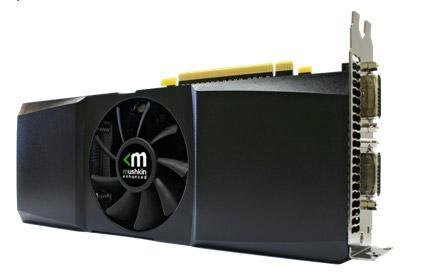
Mushkin UltimateFX GeForce GTX 295
First things first – a little more information about Mushkin:
Founded in 1994, Mushkin is best known for producing “Enhanced” memory modules. Located at the base of the Rocky Mountains in Denver, Colorado Mushkin provides performance enhanced computer products to users worldwide. Exceptional quality, enhanced performance and unparalleled customer support are what make Mushkin products the best in the industry.
With customers including everyone from Apple Computer and NASA to gamers and web browsers, Mushkin knows what is important to customers – enhanced performance with uncompromised quality. With Mushkin you Get More.

15 years in the business must count for something… lets take a look at the card!
Packaging and features
Well i must say that first impressions most definitely count for something. The UltimateFX GeForce GTX 295 comes in a gorgeous wooden box which is very neatly finished with chromed hinges and latches and the UltimateFX logo on the top. Additional card details are shown on some subtle stickers attached to the front of the box itself.

The gorgeous box the 295 is supplied in.
Inside the card is protected by the quintessential ‘anti-static’ bag and the whole lot is encased within a carefully cut out foam section. Other accompanying goodies are a driver CD, HD audio passthrough cable, DVI to VGA adapter and a DVI to HDMI adapter.

Box open showing contents.

Driver CD, audio passthrough cable and DVI adapters to connect VGA and HDMI cables.
As with the dual PCB GTX 295 the card is comprised of two cores. It has 240 stream processors per core making a total of 480.
It’s default core and shader speeds are identical to the dual PCB card running at 576mhz and 1242mhz respectively. Only the memory frequency is different at 1008mhz – so virtually identical really.
The numbers alone are incredibly impressive. As the very newest card in the NVidia range it provides a staggering spec sheet.
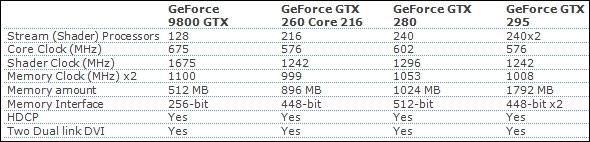
Specifications of the GTX 295 when compared to other cards in NVidia’s GPU range.
As the evolution of the dual PCB’d GTX 295 it is ultimately identical. It has the same number of stream processors, same amount of memory, same memory interface, it uses the same 55nm process as the previous version and uses the same amount of power too – it’s performance will be the same when run at the same speeds.
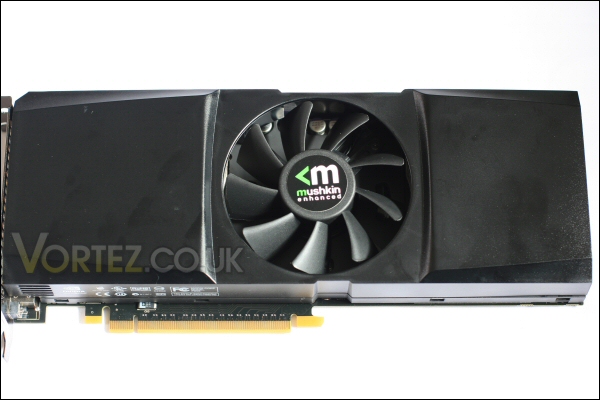
Front of the UltimateFX GTX 295.

Rear of the UltimateFX GTX 295.
The cooling solution has been changed as a result of the single PCB design. In many ways it echoes the older 7900GTX cooler of days gone by! A clean and simple design dominated by a large centrally located cooling fan.
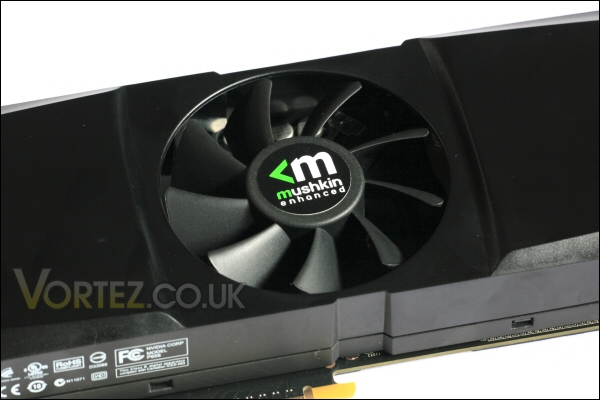
The UltimateFX GTX 295’s cooling fan.
Packaging and features continued
Each end is vented to allow the hot air to be exhausted immediately away from the cores.

Internal vent.

External vent.
The socket end of the card includes dual DVI sockets. This version of the card does not have the inbuilt HDMI socket – one can only assume that this is because space is prioritised by the aforementioned cooling vent.

‘DVI sockets only’ this time round.
It uses the industry standard PCI-E 16x plug. A card as fast as this will need a full speed slot to work optimally.

PCI-E 16x socket.
The standard single SLi connector is placed on the top of the card to allow for connection to another GTX 295. One can only imagine what resolution you’d be running to need that kind of processing power!!!

SLi connector.
The Mushkin UltimateFX GeForce GTX 295 incorporates the same 6-pin PCI-E connector and the larger 8-pin design. A reflection of the high power demands of the card. For those that use older PSU’s with no 8-pin connectors a suitable adapter will be required as there was not one supplied in the case (this may change in the future as this is an early retail sample).

Power sockets.
Once again i will mention that the size of a high end card like this could cause problems if the space in your case is limited. As with the old GTX 295 the card is very long meaning the depth of the case will be a factor. Hopefully the new cooler will provide good performance but despite this decent airflow must also be considered carefully. So decent cable tidying skills and some degree of cool air flowing towards it would definitely be advisable.
Testing
The Mushkin GTX 295 will be compared alongside a couple of standard GTX 260’s (65nm – 192 stream processor model) run both individually and in dual card SLi (both cards are identical to the reference NVidia design running at standard clocks) as well as two Zotac cards comprising of the highly overclocked ‘GTX 285 AMP! Edition’ and a standard clocked dual PCB GTX 295.
Full spec of the test PC is:
CPU: AMD Phenom II 720 Tri-core @ 3.4ghz
Motherboard: ASUS M3N-HT Deluxe Heatpipe
Memory: 8gb (4x 2gb) OCZ Platinum PC8000 DDR2
HDD: 320gb Samsung Spinpoint F1
Operating system: Vista 64 Business
GPU: 2x GTX 260’s, Zotac GTX 285 AMP! Edition, Zotac GTX 295 and the Mushkin GTX 295
PSU: Tagan Piperock 1100w (modular)
Cooling: Custom watercooling for CPU and motherboard chipset – GPU’s all use their original stock cooling
Case: Mountain Mods – H2g0 enclosure

The UltimateFX GeForce GTX 295 in place.
Initial testing was compiled using Futuremark’s two most recent GPU benchmarking programs – the older 3DMark06 and their newest 3DMark Vantage. These were the newest patched versions at the time of the review.
(Note: In the case of 3DMark Vantage PhysX was enabled in the ‘Nvidia Control Panel’ since it was utilised in the test.)
The GTX 260 and GTX 285 GPU’s were tested using NVidia’s GeForce driver set – 182.50. The Zotac GTX 295 was tested using NVidea’s GeForce 186.16 driver set.
The Mushkin GTX 295 was tested using NVidia’s newest 190.38 driver set.
Note: As in my previous GTX 295 review i did try both the 186.18 and 190.38 driver sets with the Mushkin GTX 295 to test for any performance changes. On this occasion i noticed a slight increase in performance virtually across the board. There were a couple of blips but this could be down to natural variances in the testing.
The operating temperature of this newer single PCB’d GTX 295 was cooler than that of the dual PCB version of the card. When idling each core was 5c cooler but more astonishingly the full load temperatures were 17-18c cooler on each core. A massive difference i’m sure you’ll agree – it’s all the more impressive when you consider that the production process (and consequently power usage) is identical to the ‘hot running’ dual PCB version. It seems that the split heatsinks may aid the cooling of the card by some considerable amount. Full load temps were achieved by looping the Far Cry 2 long Ranch demo and ambient temperatures only fluctuated by 3 degrees at most.
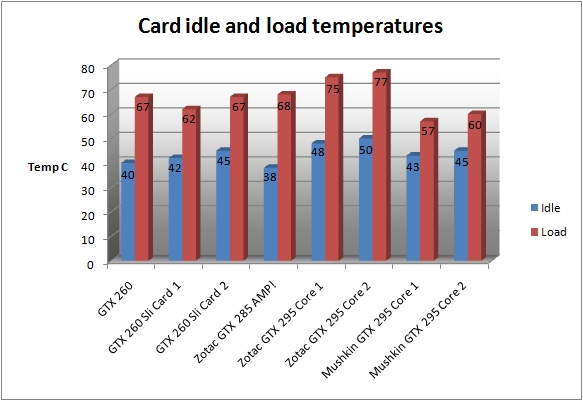
Temperatures for all cards tested.
3DMark06 and Vantage
Firstly we look at the 3DMark06 results. Here you can see the other cards are beaten by the GTX 295.
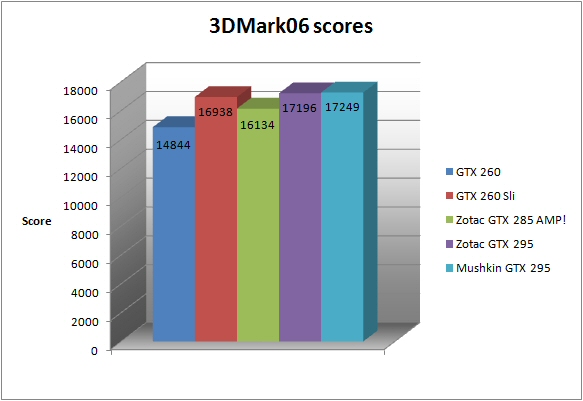
3DMark06.
Let’s see if this performance is carried through to Vantage.
Unlike 3DMark06 Vantage shows GPU specific scores which helps identify performance increase. By looking at the graphs i’ve provided you can see a more clear indication of performance increases with better and multiple cards.
You can see that the GTX 295 likes Vantage and offers some impressive performance figures. It soundly beats the other cards tested.
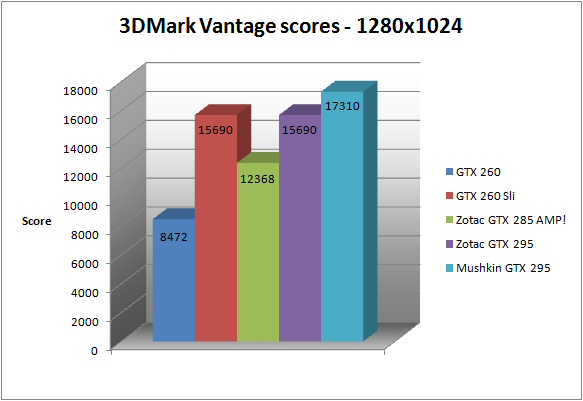
Vantage @ 1280.
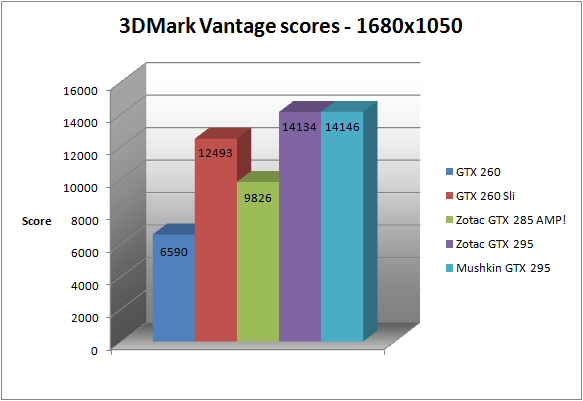
Vantage @ 1680.
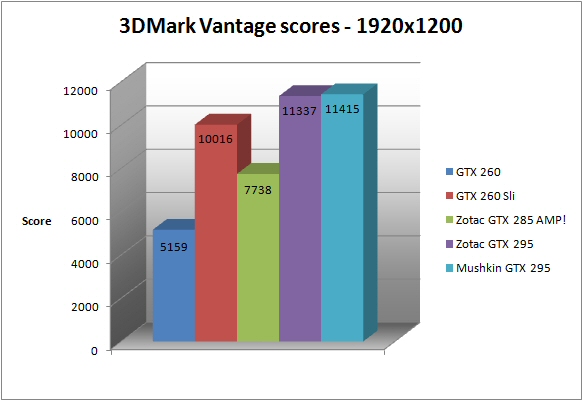
Vantage @ 1920.
All the games (besides one) were run at the highest settings with all available AA and AF settings set to full – only Far Cry was run @ 2xAA to allow playability on the single GTX 260 @ 1920×1200. These cards are designed for top flight gaming so on the whole there’s little point in running lower settings.
Bioshock
Bioshock performance is assessed first.
At all resolutions the Mushkin betters the competition. It had the best framerate score of the cards tested @ 1280×1024.
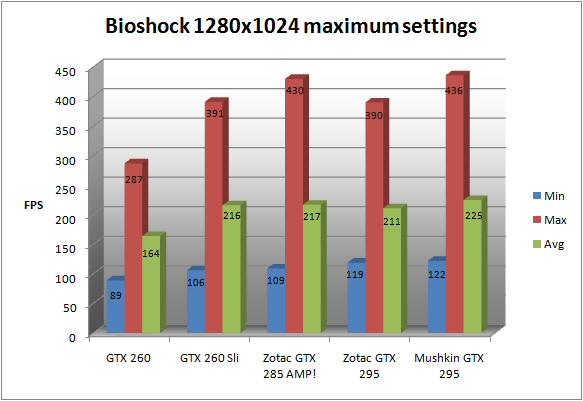
Performance @ 1280.
1680×1050 sees the GTX 295 producing great minimum frame rates once again.
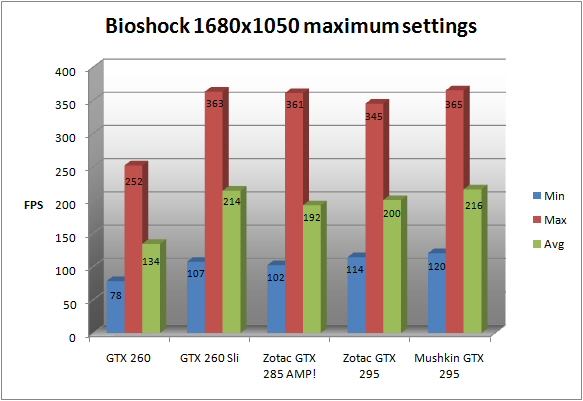
Performance @ 1680.
The GTX 295 is mighty impressive at 1920×1200 too. A great performance for the cool running single card unit.
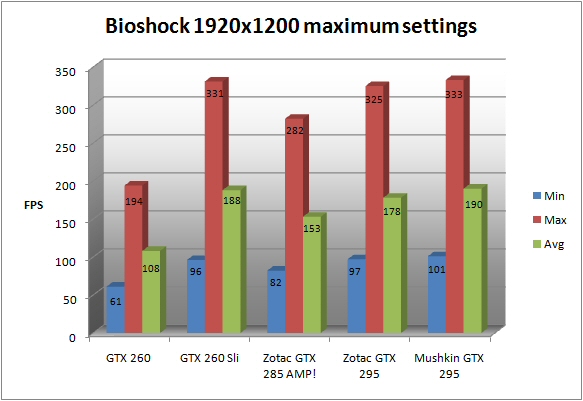
Performance @ 1920.
Blacksite
Blacksite is a personal favourite that happily pushes graphics hardware quite hard.
At 1280×1024 the Mushkin GTX 295 returns the best scores across the board.
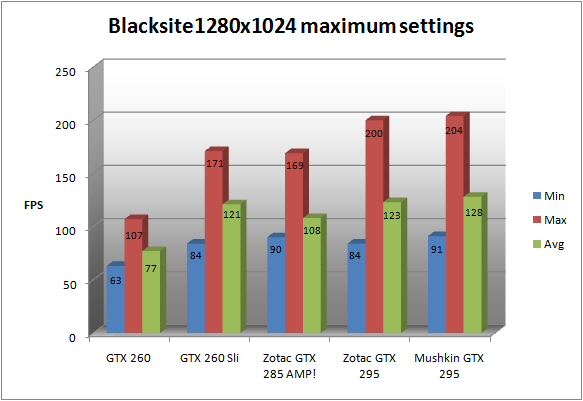
Performance @ 1280.
1680×1050 showed the new GTX 295 produce an average and maximum framerate score that was just over double that of the lone GTX 260.
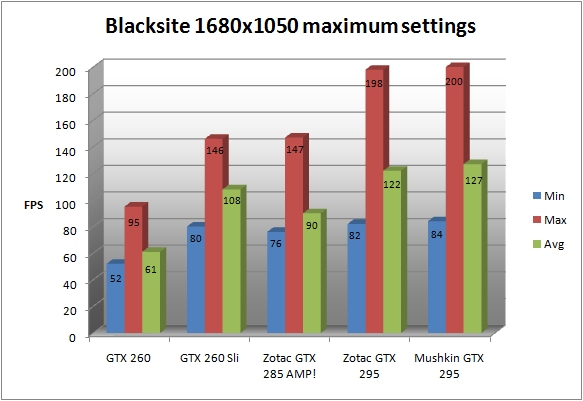
Performance @ 1680.
1920×1200 showed the same too.
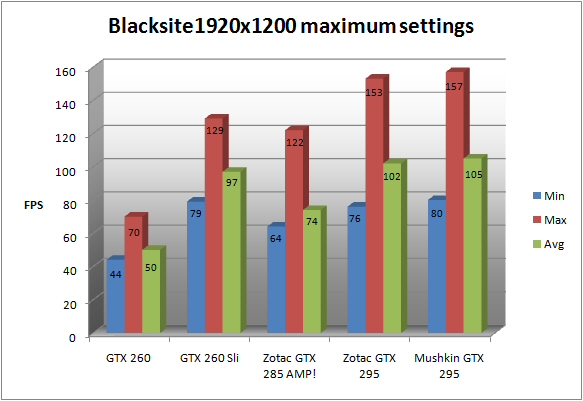
Performance @ 1920.
Call Of Duty 4
A gamers favourite… Call Of Duty 4. Despite running just fine on mid and even lower end hardware it scales well enough to show true performance increases in even the highest end kit.
The two 295’s trade blows here at every resolution tested.
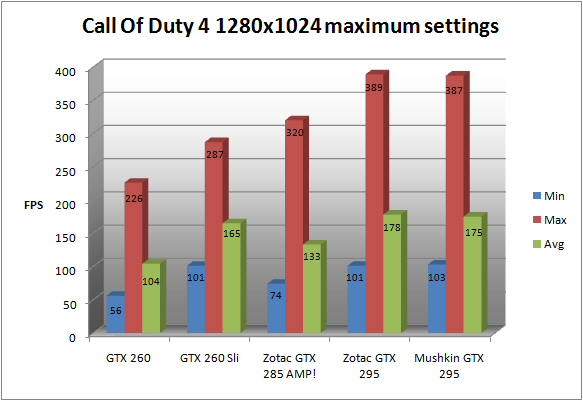
Performance @ 1280.
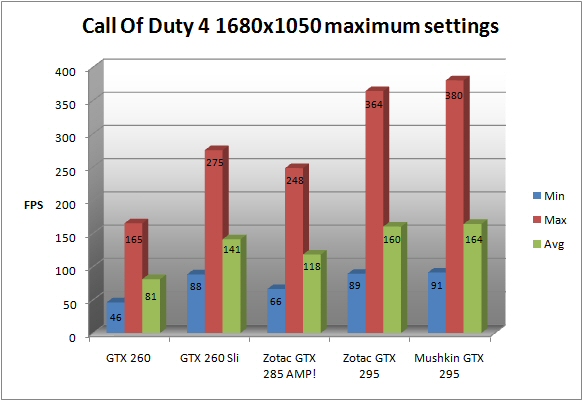
Performance @ 1680.
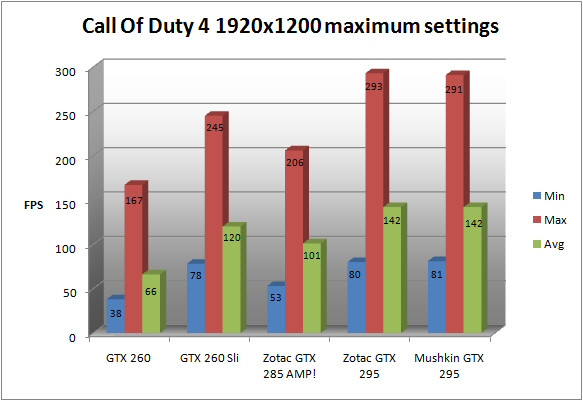
Performance @ 1920.
The Mushkin soundly beats all the other competition with only the SLi’d 260’s getting close. The maximum framerates are massively better.
Colin McRea DiRT
Our first racing game on test is Colin McRea DiRT.
At all resolutions the Mushkin betters it’s dual PCB’d brother.
At the lower resolutions only the GTX 260 SLi setup betters the Mushkin GTX 295.
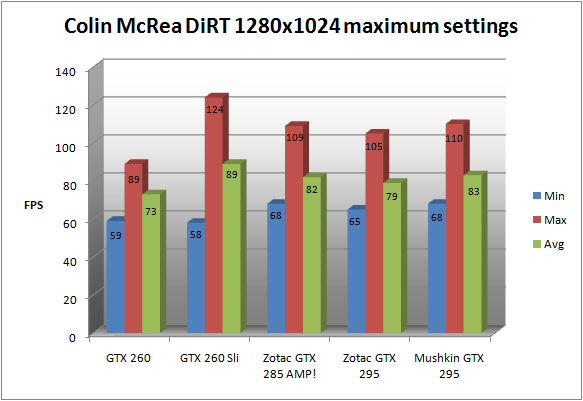
Performance @ 1280.
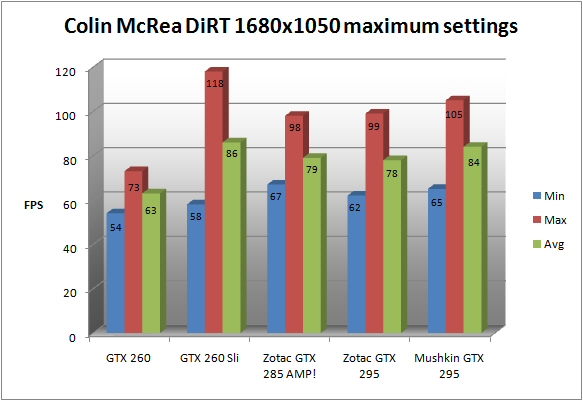
Performance @ 1680.
The Mushkin sees off all the competition including the GTX 260 SLi setup at 1920×1200.
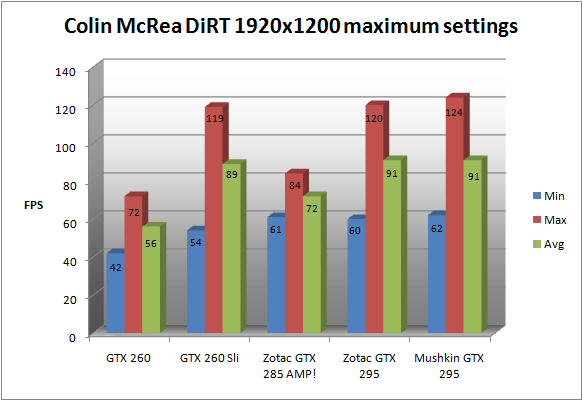
Performance @ 1920.
Dead Space
Deadspace, a very scary third person shooter, is the next game to test the Mushkin.
1280×1024 shows all of the cards bar the single GTX 260 to return the same frame performance. At this low resolution and with these high end cards the raw performance must surely be CPU limited.
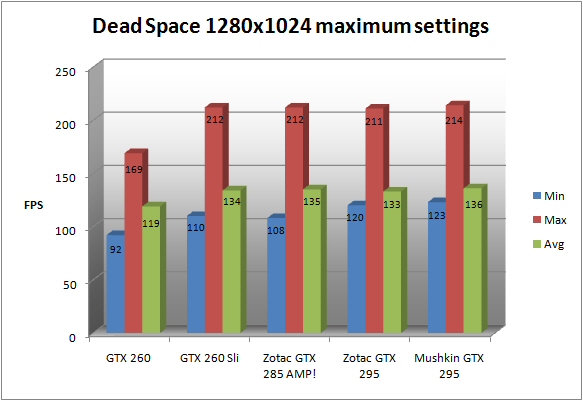
Performance @ 1280.
At 1680×1050 and 1920×1200 the three SLi based cards pull out a considerable lead. The additional boost provided by the extra cores really helps increase the framerates.
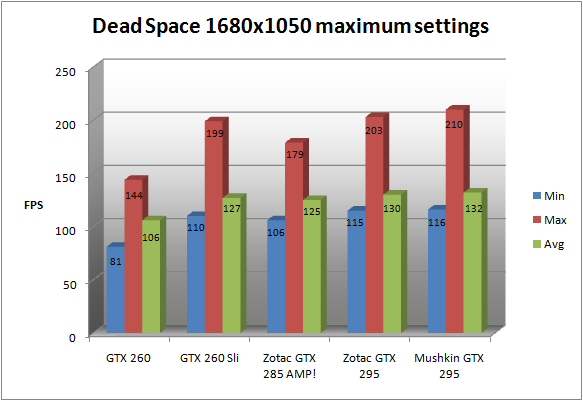
Performance @ 1680.
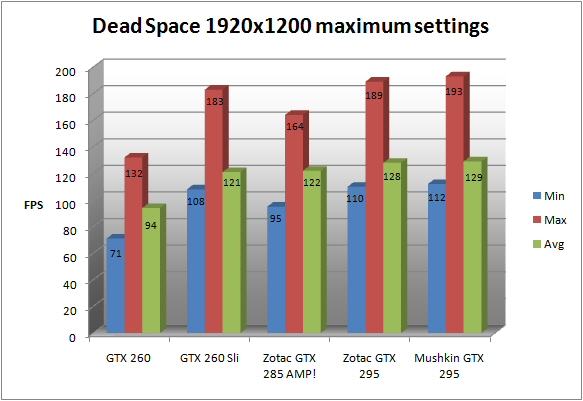
Performance @ 1920.
Fallout 3
Fallout 3 is up next. As in my previous reviews the performance i get with the various hardware tested seems to indicate that there is a framerate cap. This of course leads to almost identical looking results.
Accross the board you will see that the Mushkin GTX 295 is at the sharp end of the pack almost throughout. Although i would guess that, apart from the single GTX 260 at 1680×1050 and above, you’d be hard pressed to notice a difference between any of the higher end card set ups in the test.
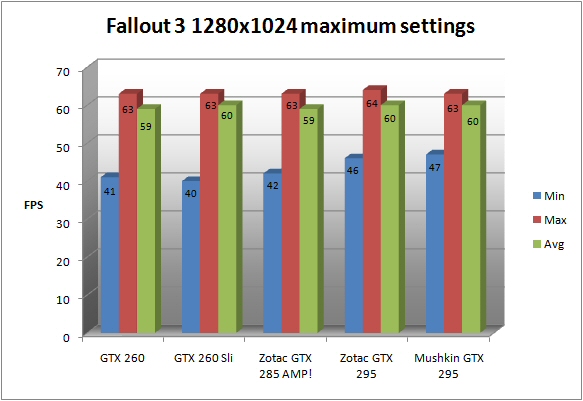
Performance @ 1280.
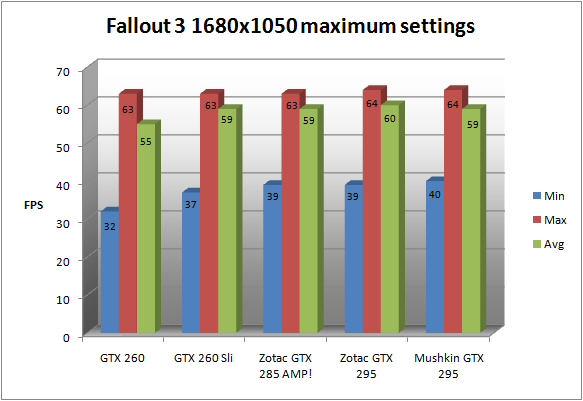
Performance @ 1680.
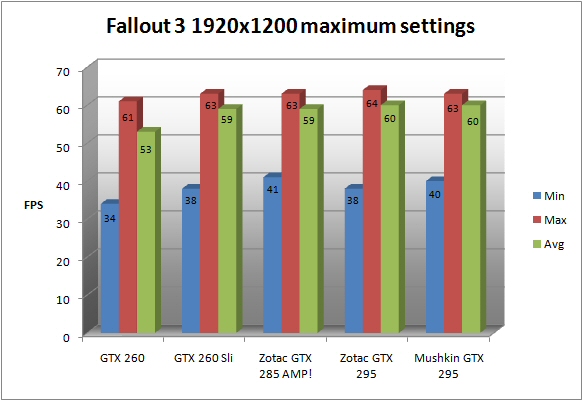
Performance @ 1920.
All settings were maxed with full AA and AF too!
Far Cry 2
Far Cry 2 – a bit of a disappointment but with it’s useful bench feature and complex gaming engine it’s a useful test none the less.
The Mushkin returns some interesting results. When compared to the previous GTX 295 it provides great maximum framerates but seemingly at the cost of minimum and average framerates. This is most probably down to the newer driver revision rather than anything else. I ran the test a few times to check but always got ultimately the same result.
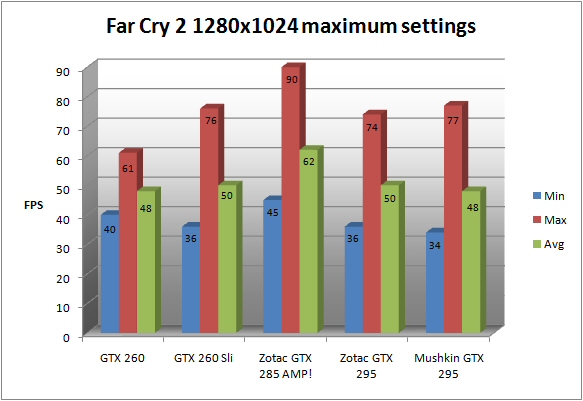
Performance @ 1280.
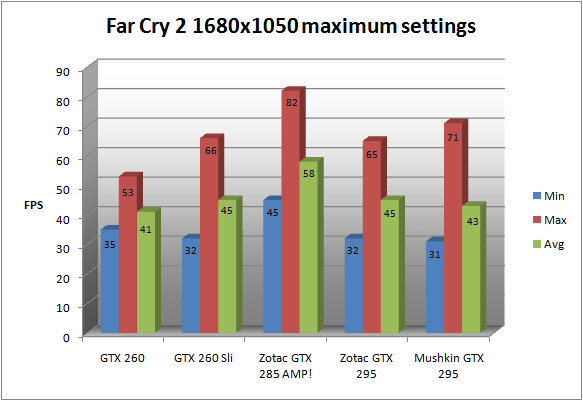
Performance @ 1680.
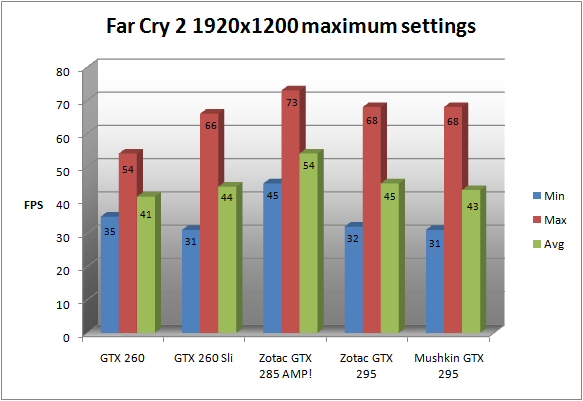
Performance @ 1920.
I don’t think it works particularly well with SLi’d hardware since both the GTX 285 and even the lone GTX 260 return decent (and some would say slightly more stable looking) numbers.
Race Driver GRID
Back to racing games again with Race Driver GRID.
Through all the resolutions it’s easy to see that the Mushkin GTX 295 returns a great performance. Only the GTX 285 provides better minimum and average framerates at the lowest 1280×1024 resolution.
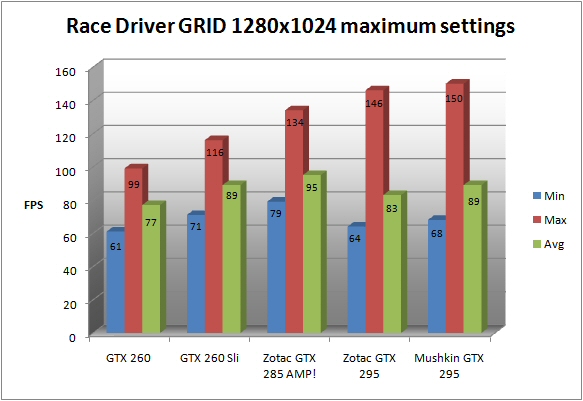
Performance @ 1280.
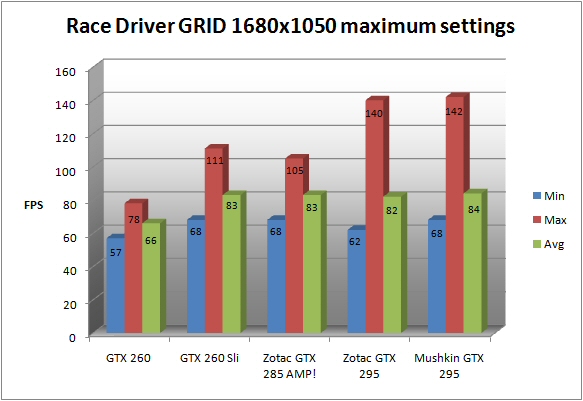
Performance @ 1680.
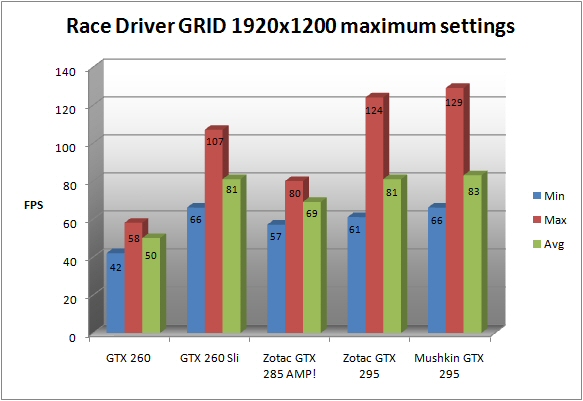
Performance @ 1920.
A very dominant result indeed.
Test Drive Unlimited
Last but not least is Test Drive Unlimited. A free roaming driving experience rather than the standard track based approach seen in most car racing games.
As seen in my previous reviews using this game it is fairly apparent that it does not get on well with SLi setups.
It ultimately matches the dual PCB’d GTX 295 tested a couple of months back. The single cored GTX 285 rules the roost here though.
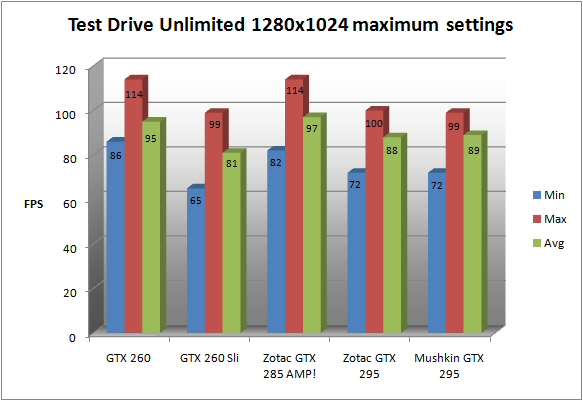
Performance @ 1280.
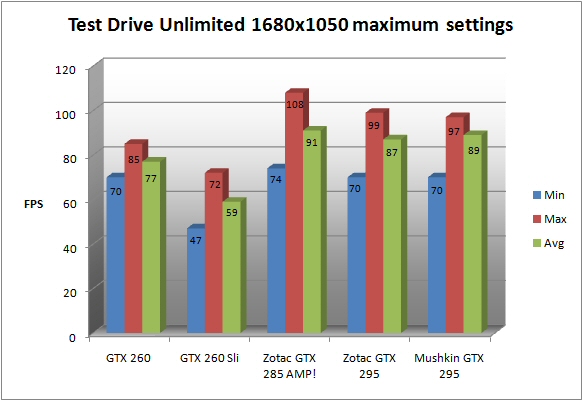
Performance @ 1680.
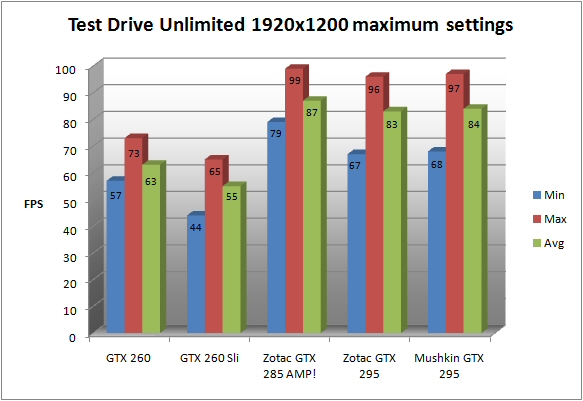
Performance @ 1920.
Overclocking
With this new single PCB design the Mushkin UltimateFX GTX 295 has already shown itself to be a very cool runner. Let’s see how it clocks.
I used NVidia’s own onboard control panel to adjust the GPU clocks – it managed the following clocks:
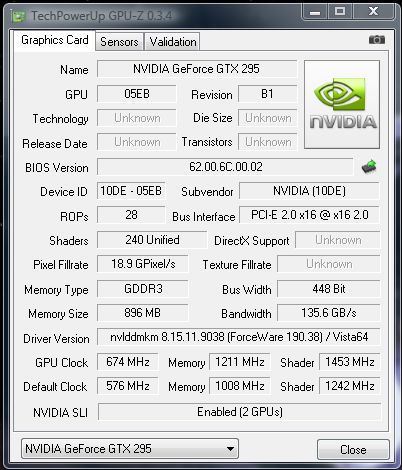
GPU-Z.
Core Clock – 576MHz to 674MHz
Memory Clock – 1008MHz to 1211MHz
Shader Clock – 1242MHz to 1453MHz
I then tested the cards 3DMark performance:
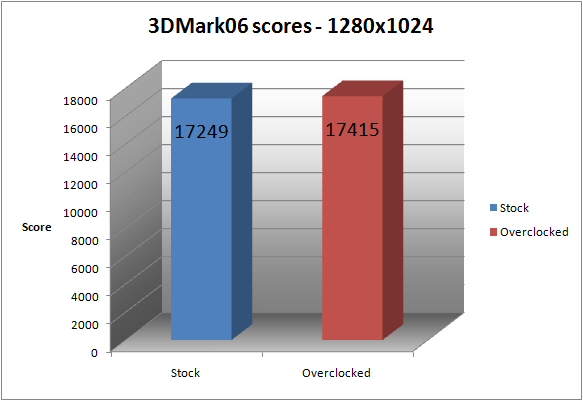
3DMark06.

Vantage @ 1280.

Vantage @ 1680.

Vantage @ 1920.
Then i finally tested the performance increase in some of the games already benched:
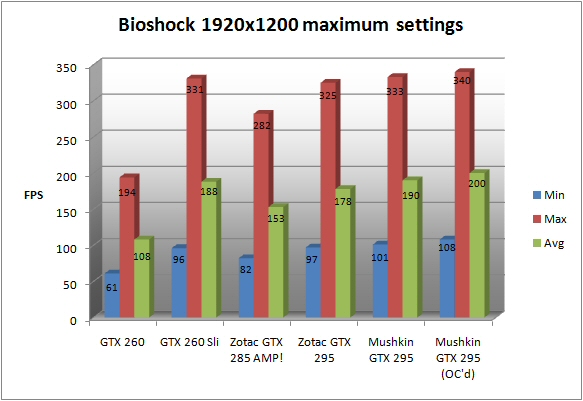
Bioshock.
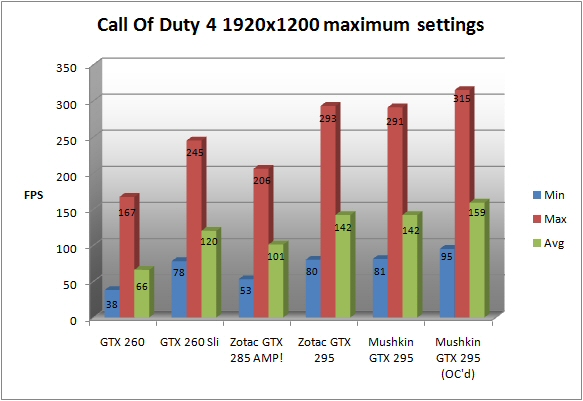
Call Of Duty 4.
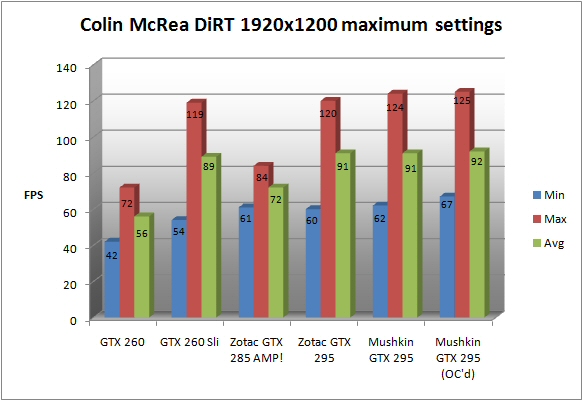
Colin McRea DiRT.
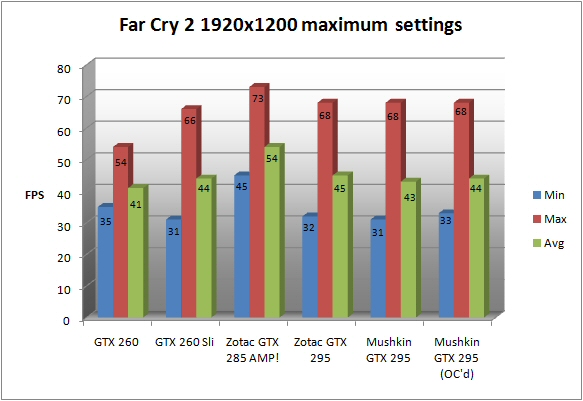
Far Cry 2.
As you can see there’s a fairly healthy increase across the board. If you ever need the extra performance it’s nice to have it available. I also noted that temperatures only rose very slightly and the card remained fairly quiet through all gaming tests.
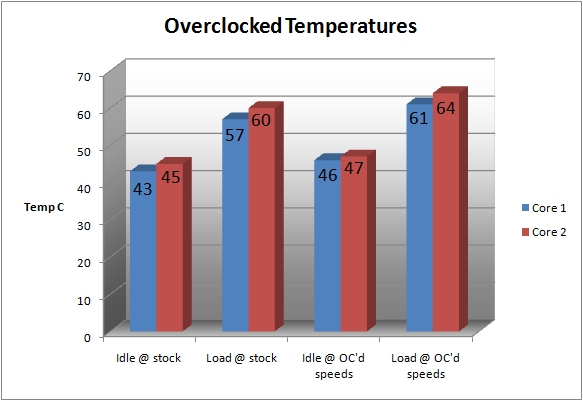
Overclocked temperatures.
Conclusion
The Mushkin is a wonderful piece of kit.
It is expensive and the bundle isn’t particularly expansive but it is packaged nicely and the performance simply speaks for itself.

The Mushkin UltimateFX GeForce GTX 295 graphics card.
As of now, and due to this being a very early review sample, i could not find a price online but when you consider that similar alternatives cost around £350 you can see it is not an inconsiderable amount of money.
As i’ve mentioned before… if you are considering a card such as this you may also be looking into multi GPU solutions as well. This new GTX 295 provides blistering performance in a cool running and relatively compact unit. If you only have a relatively modest PSU and a motherboard with a single 16x PCI-E slot it would be an easy solution to high end gaming power.
In order to get a similarly performing dual card set up running you would have to purchase a very capable (and expensive) PSU, an expensive SLi capable motherboard, a large case with adequate cooling for the multi GPU solution and an understanding that their electricity bill would be slightly higher as a result.
Like the previous 295 i tested i would say that the Mushkin isn’t the downright best outright value but (and it\\\’s a big BUT!) it does offer an incredibly attractive solution for someone wanting a cool running but incredibly powerful gaming card.
Also remember that there will most likely be some inherent savings when compared to a full blown dual card SLi setup.
In conclusion i can only say that it\\\’s a great card that comes thoroughly recommended!
Vortez Hardware would like to thank Mushkin for providing us with the UltimateFX GTX 295. To Discuss this review please visit our forum.
