ASUS have a great reputation in the performance motherboard market and they hope to solidify that opinion with their new Crosshair IV Extreme.
Product on Review: Crosshair IV Extreme AM3 motherboard
Manufacturer: ASUS
Expected Price: around £280
Once again we are in the presence of something very special here at Vortez, the highly anticipated new motherboard from ASUS… the Crosshair IV Extreme. Sharing some similarities with its ‘Formula’ sibling the Extreme brings a selection of additional features to the table and is designed to represent the pinnacle of performance hardware for AMD’s AM3 platform. It’s almost certainly going be on a few enthusiasts Christmas lists!
ASUS are a major player in PC hardware markets producing a raft of both components for computers and computers themselves. The motherboard market is particularly highly regarded by enthusiasts who rely on ASUS to produce boards that provide excellent performing and feature rich boards!
As with all facets of the PC hardware market these days competition is fierce between the manufacturers and the need to produce bleeding edge featured boards first is a constant aim. ASUS have certainly met that challenge head on in recent years with their high end RoG (Republic of Gamers) branded boards and their most recent creation looks to be no different!
Specifications
| CPU AMD Socket AM3 ;Phenom™II /Athlon™II /Sempron™ 100 Series Processors AMD 140W CPU Support AMD Cool ‘n’ Quiet™ Technology Supports 45nm CPU Chipset AMD 890FX/SB850 System Bus Up to 5200 MT/s ; HyperTransport™ 3.0 Memory 4 x DIMM, Max. 16 GB, DDR3 2000(O.C.)/1600/1333/1066 ECC,Non-ECC,Un-buffered Memory Expansion Slots 5 x PCIe 2.0 x16 (dual @ x16, triple @x16, quad@x16 x16 x8 x8) 1 x PCI 2.2 Multi-GPU Support Support Lucid HYDRALOGIX / ATI CrossFire™X Technology Storage SB850 Chipset 6 xSATA 6.0 Gb/s ports Support RAID 0,1,5,10 2 x JMicron® 363 controllers: 2 x SATA 3Gb/s ports (Gray) 1 x Power External SATA 3Gb/s ports at rear (SATA On-the-Go) 1 x External SATA 3Gb/s ports at rear (SATA On-the-Go) * Due to the Windows XP/ Vista limitation, the RAID array with the total capacity over 2TB cannot be set as a boot disk. A RAID array over 2TB can only be set as a data disk only. LAN Intel® Gigabit LAN Audio 8-Channel High Definition Audio CODEC – Blu-ray audio layer Content Protection – Supports Jack-Detection, Multi-streaming, Front Panel Jack-Retasking – Supports 1 Optical S/PDIF out port at back I/O USB NEC USB3.0 Controller: – 2 x USB 3.0/2.0 ports at rear AMD SB850 chipset: – 13 x USB 2.0/1.1 ports (6 ports at mid-board, 6 ports at rear, 1 port at rear is also for ROG connect) Back Panel I/O Ports 2 x External SATA 1 x S/PDIF Out (Optical) 1 x IEEE 1394a 1 x LAN(RJ45) port 8 -Channel Audio I/O 1 x Clr CMOS switch 1 x PS/2 Keyboard port(purple) 2 x USB 3.0/2.0 ports 7 x USB 2.0/1.1 ports (1 port is also for ROG Connect) 1 x ROG Connect On/Off switch 1 x RC Bluetooth switch Internal I/O Connectors 3 x USB connectors supports additional 6 USB 2.0 ports 1 x IEEE 1394a connector 1 x S/PDIF Out connector 1 x En/Dis-able Clr CMOS connector Front panel audio connector System Panel connector 8 x SATA connectors: 6 x SATA 6Gb/s connectors (Red) & 2 x SATA 3Gb/s connectors (Gray) 8 x Fan connectors: 1 x CPU / 1 x PWR / 3 x Chassis / 3 x Optional 7 x ProbeIt measurement points 3 x Thermal sensor connectors 1 x 24-pin ATX power connector 1 x 8-pin ATX 12V power connector 2 x EZ Plug connectors (4-pin Molex Power connectors) 1 x OC Station header 1 x RC Bluetooth header 1 x Core unlocker switch 1 x Power on switch 1 x Reset switch 1 x Go Button 1 x BIOS switch button 1 x Fan connector for thermal module 1 x ROG light connector Form Factor Extended ATX Form Factor 12 inch x 10.6 inch ( 30.5 cm x 26.9 cm ) |
Now let’s take a look at the board…
Packaging and board
Standard RoG packaging greets the user with a velcroed flap allowing a view of the board within.
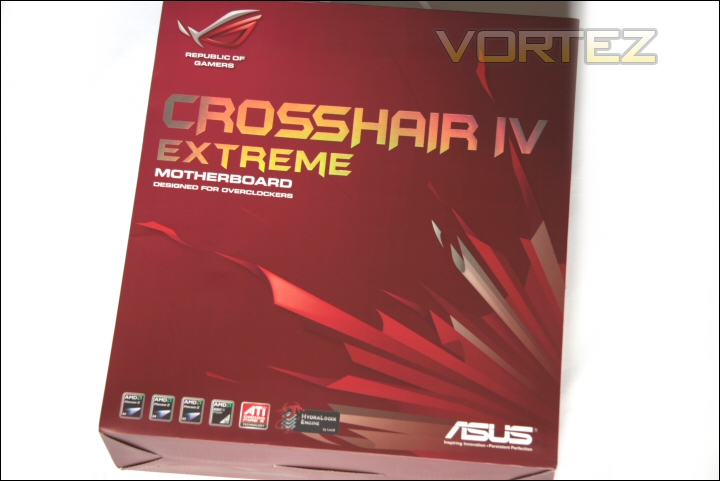
Box front.
It’s a surprisingly heavy package – perhaps it’s the accessories within that add to the weight but I suspect the board itself is a weighty item!
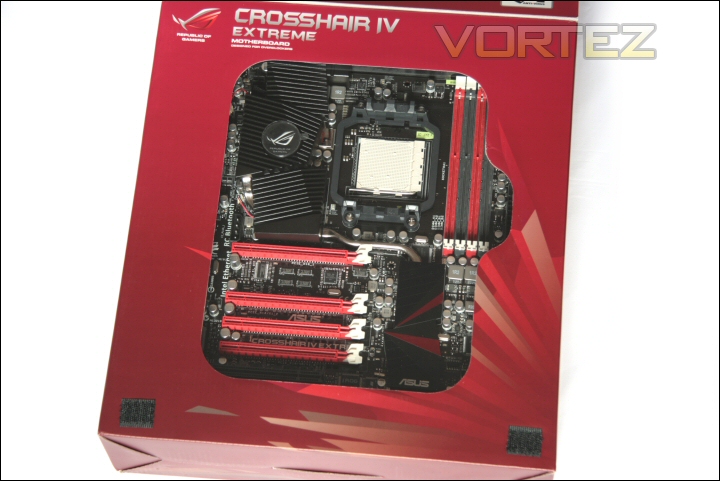
Viewing window.
The rear states the general features of the board – simple but at least you know what you’re getting! Within you will find two separate containers… one for the Crosshair IV Extreme and the other for the accessories.
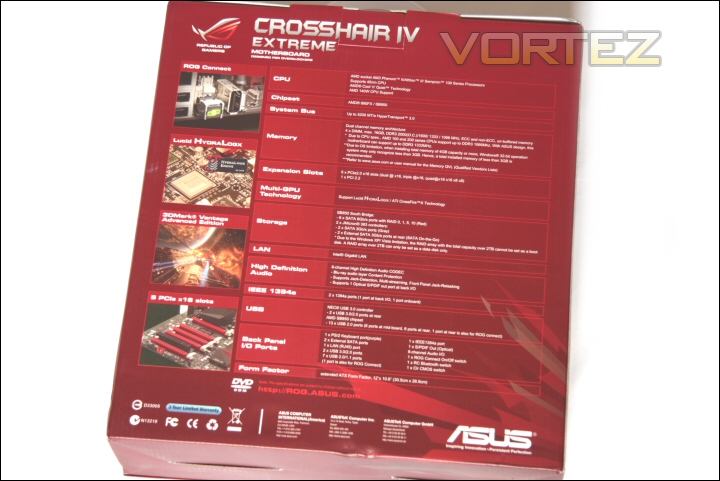
Box rear.
The accessories bundled with the C4E are great in number – as well as the various standard items including the driver and utility disc, manual, stickers, I/O plate and cabling you also receive an additional USB/firewire breakout PCI plate, come temp monitoring cabling, probeit cabling for the use of a multimeter and an ATi crossfire bridge.
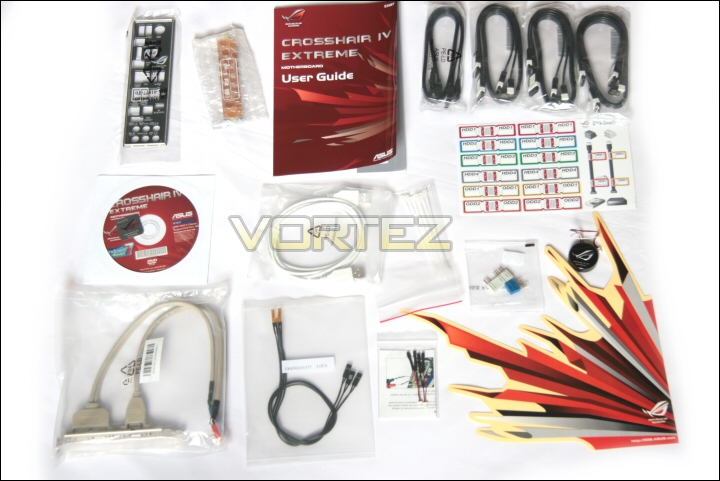
Lots of bundled accessories!
They also include a replacement illuminated RoG logo.
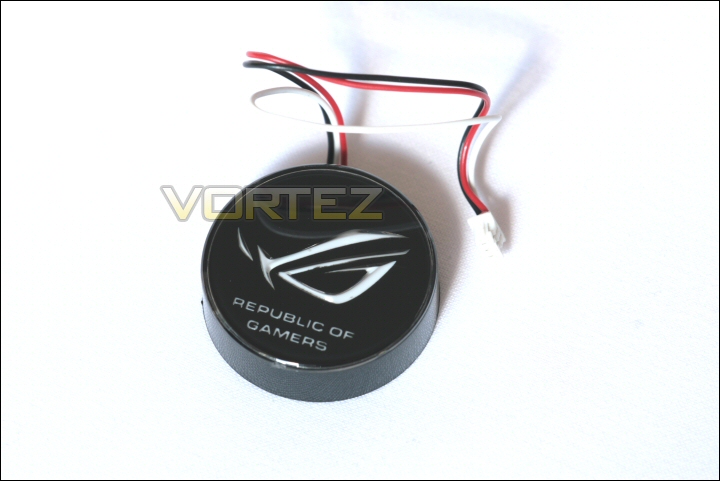
The RoG logo.
Moving onto the board you can see that it’s an incredibly impressive looking piece of hardware.
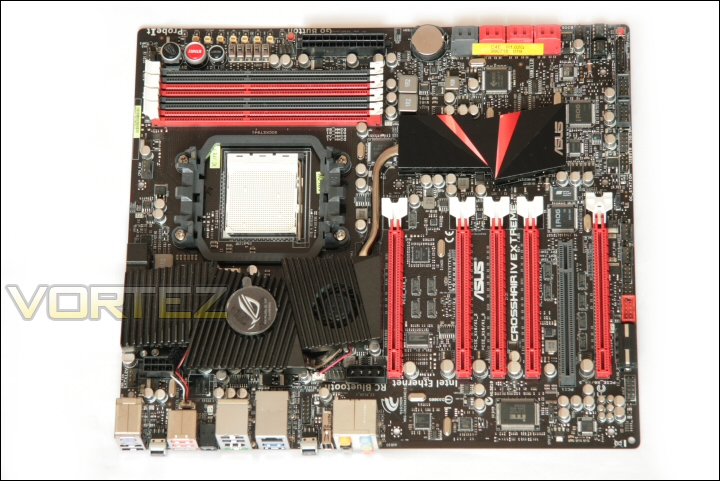
Crosshair IV Extreme.
The main focus from a distance is most definitely those five bright red PCIe 2.0 x16 slots…. it certainly helps give the impression that it’s a board that means business!
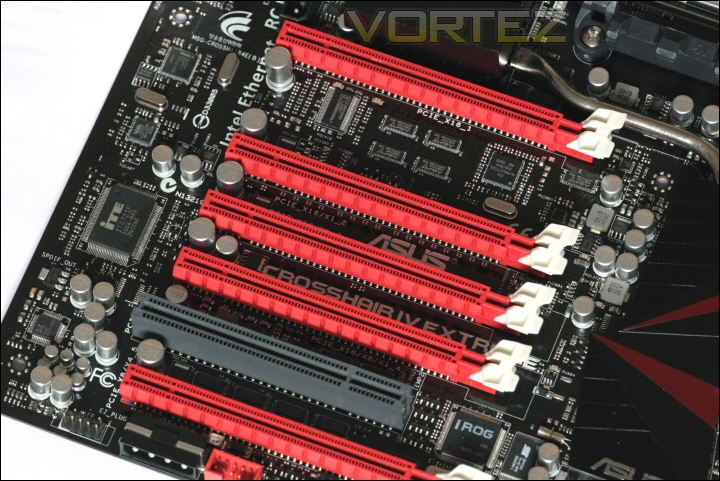
Lots of PCIe x16 slots.
The base of the board includes the standard AM3 backplate but is ultimately quite tidy and fairly component free.
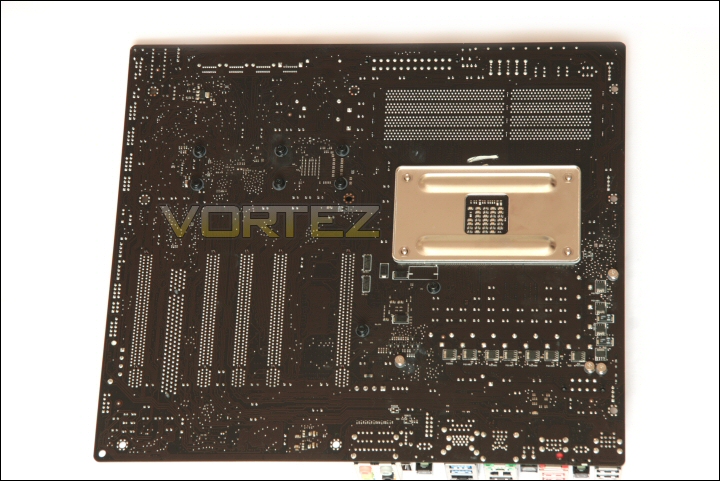
Crosshair IV Extreme base.
You can see that the boards integrated heatsink solution is actually held in place by spring mounted screws which will hopefully provide better ‘harder’ contact and improve cooling.
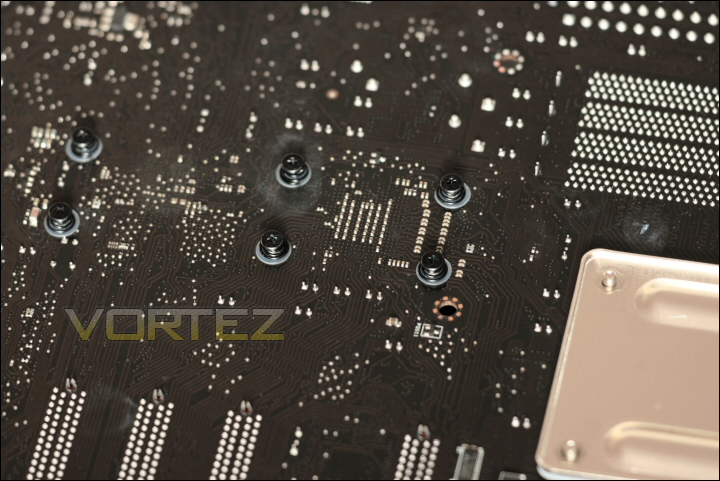
Screw mounted heatsink.
Heatsink assembly
Up close I can list some of the features contained in the Crosshair 4 Extreme – the first of which is that imposing heatsink assembly.
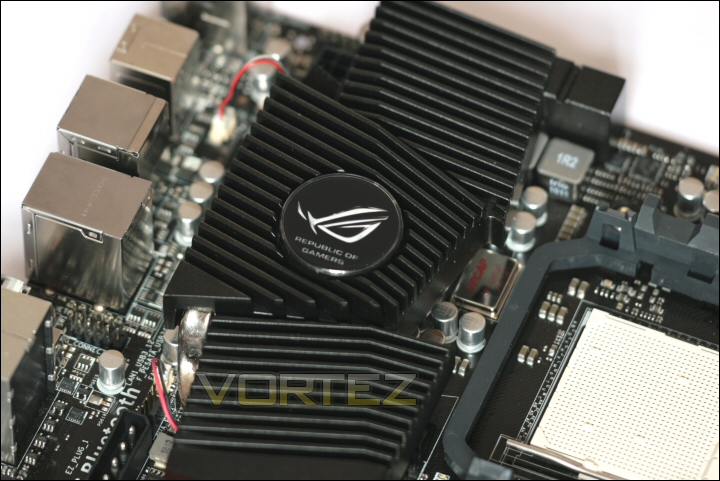
The large heatsink.
Despite its size (which would suggest a passive design) it does include a small ‘laptop style’ blower that provides airflow to the northbridge and mosfet portions of the heatsink. This will hopefully allow safer high voltage/clockspeed usage without the need for additional cooling solutions and extra fans.
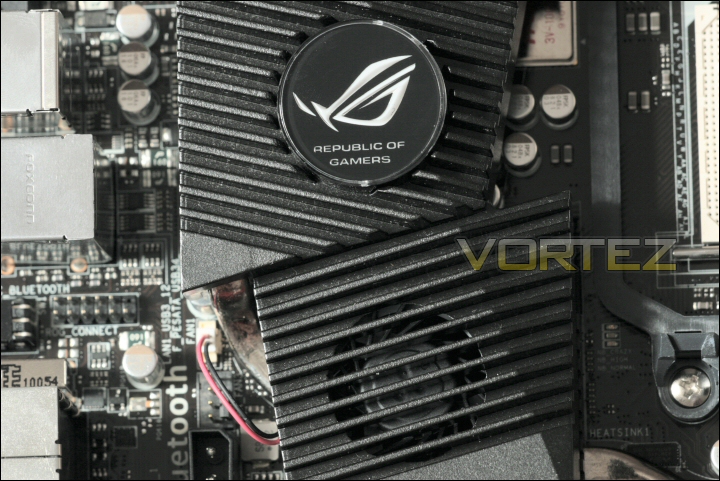
Look closely and you’ll see the fan.
Once removed you can see the work the heatsink’s doing – a combination of thermal pads and thermal paste accross the mosfet and northbridge chipset respectively.
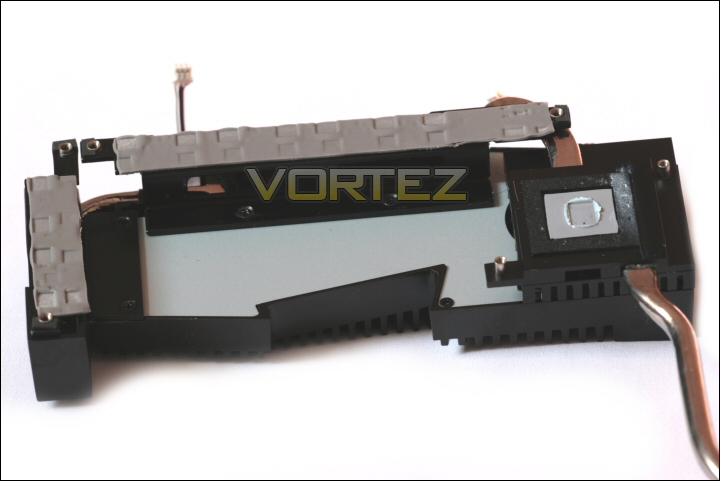
The underside of the sink.
Seperating the upper portion of the cooler from the lower shows what’s going on. The blower section is just that – pretty much cosmetic but still structural in that it flows air over the lower heatsink section.
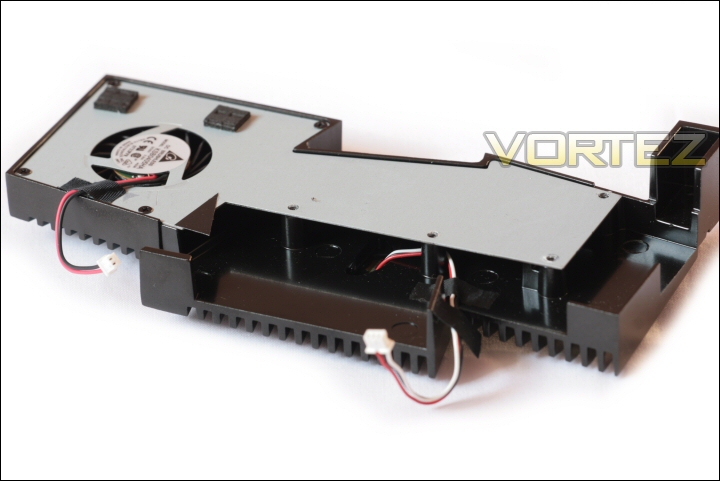
The blower section.
That lower section is the business end with the heatpipe and finned heatsink array working to cool the board components they come into contact with.
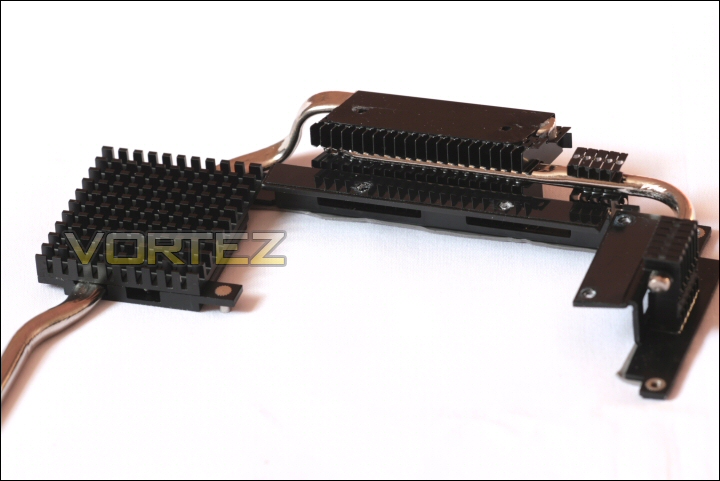
The bare heatsink.
This upper main assembly is attached via a heatpipe to the southbridge heatsink. Under this sink resides the southbridge chipset and also virtually the most important feature of this board… the Lucid HydraLogix chip which you will see in a minute.
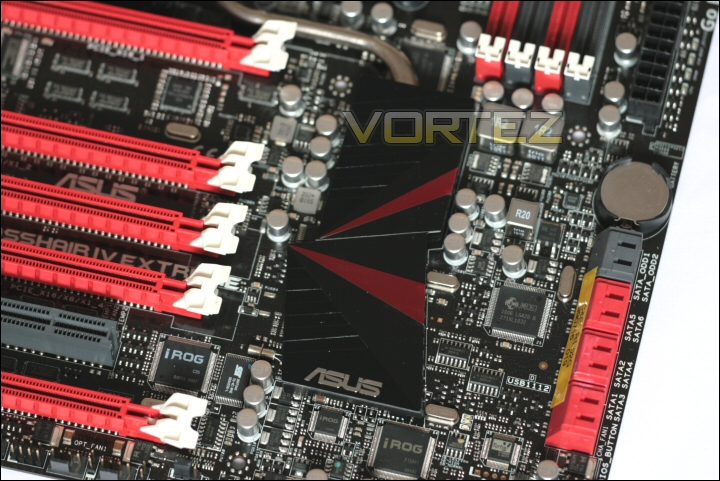
The southbridge heatsink.
The underside of this sink shows the same thermal pad/paste combination. The chipst is contacted with paste while the Hydra uses the thermal pad.
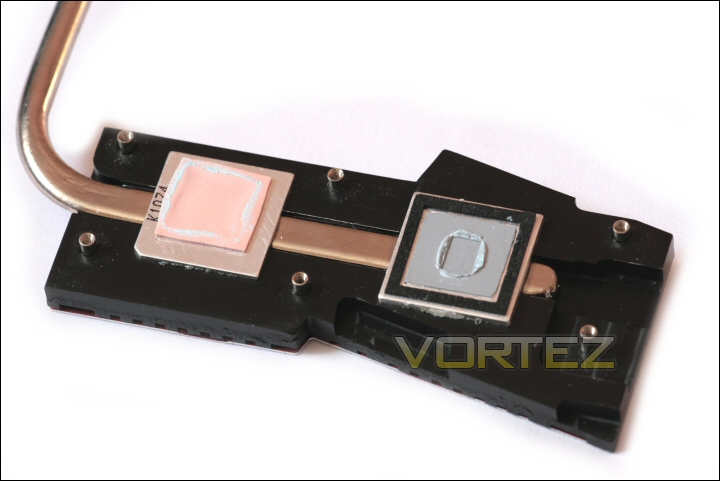
The underside.
Board features
Looking to the board the 890FX northbridge is a compact looking chip – with the memory controller present on the CPU the chipset doesn’t need to be so complex. It should still be an impressive performer if it’s little brother (Crosshair IV Formula) is anything to go by. It still packs ATi Crossfire control in that tiny silicone sliver!
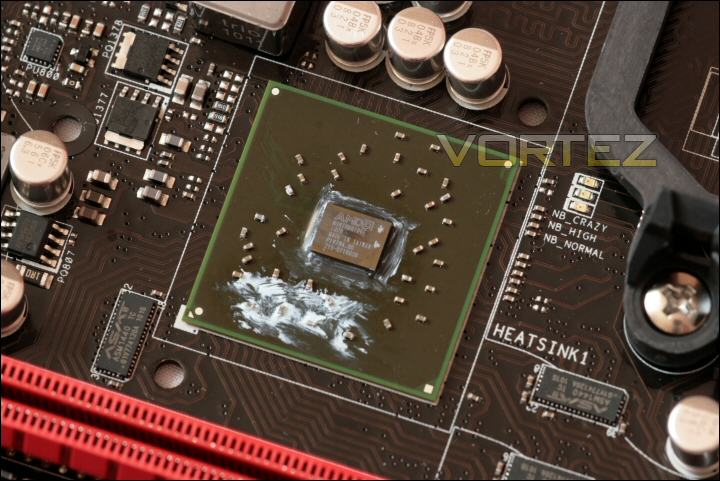
The 890FX northbridge.
Further down the board your attention is immediately drawn to the Lucid HydraLogix chipset. The use of the thermal pad in the heatsink is explained since the Lucid chip is covered by an integrated heatspreader. This chipset not only allows Nvidia SLi functionality on an AMD chipset (something that Nvidia can’t be too happy about!) but it also offers an even more interesting ability! No longer will users wishing to upgrade their not so bleeding edge GPU from one manufacturer for a brand new model from another have to sell that older card – the Lucid HydraLogix will allow enthusiasts to retain that slightly older card and use it alongside their new investment. A mixture of ATi and Nvidia cards can be used side by side for additional performance where previously none could be gained.
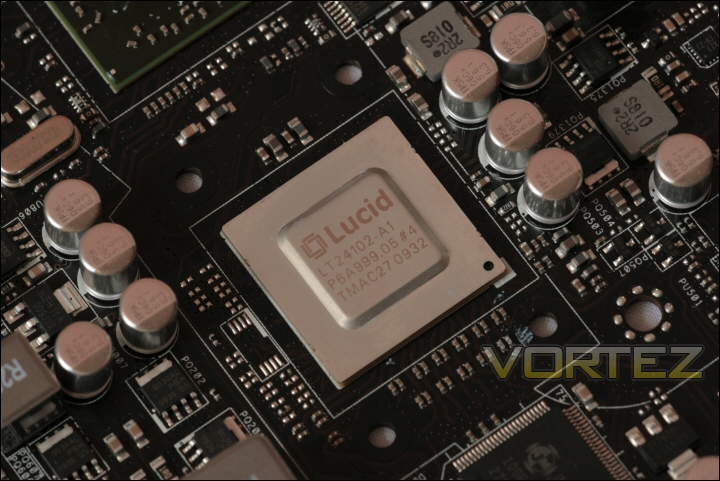
The Lucid chipset.
Below the Lucid HydraLogix is the AMD SB850 southbridge. Like the northbridge it’s a tiny chip and provides the SATA and USB control on the board.
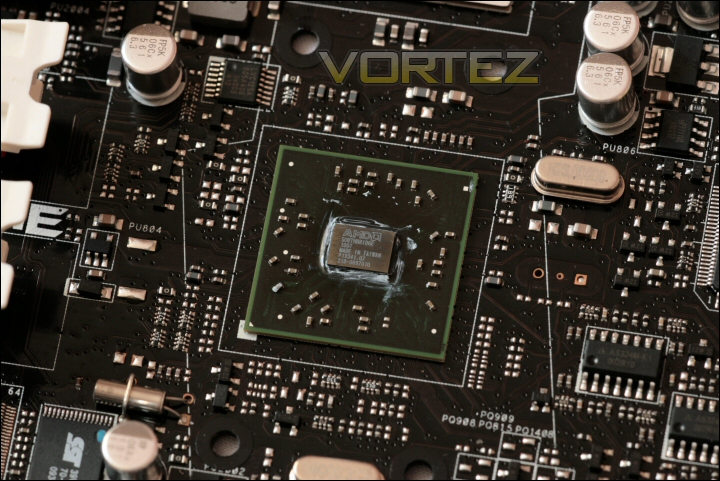
The SB850 southbridge.
While the heatsink was out of the way I was able to take a closer look at some of the components cocooned by it. The 8+2 Phase power section for the board is considerable with a vast array of mosfets, caps and chokes to provide a stable, steady and powerful supply to the CPU. It’s very impressive looking and should help push any given CPU to its full potential.
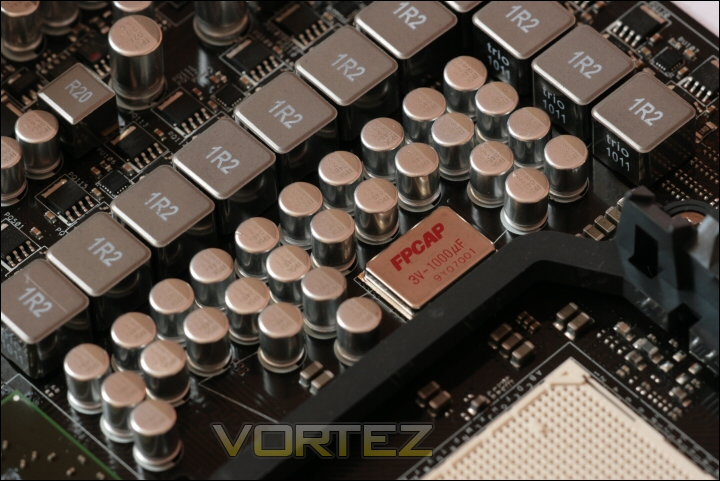
The Extreme’s power section.
Also hidden away was the NEC D720200F1 USB 3.0 controller which sat below and to the left of the 8pin 12v CPU power socket. This tiny chip gives the board its ultra fast USB 3.0 support – certainly a handy feature since drives and devices that utilise this fast bus are starting to appear more readily these days.
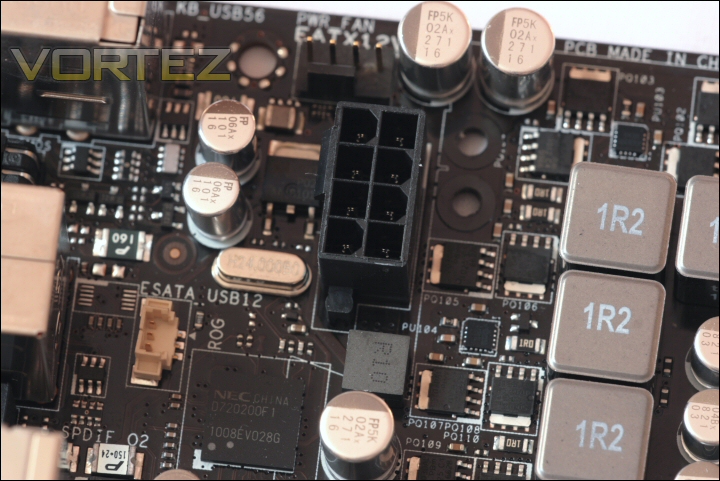
The NEC D720200F1.
Also of note are the additional molex sockets which have been placed on the board to supplement power delivery to important portions of the board. These EZ plugs are especially important when multiple GPU’s have been installed since they work to improve the stability of the power supply to those cards through the PCIe slots.
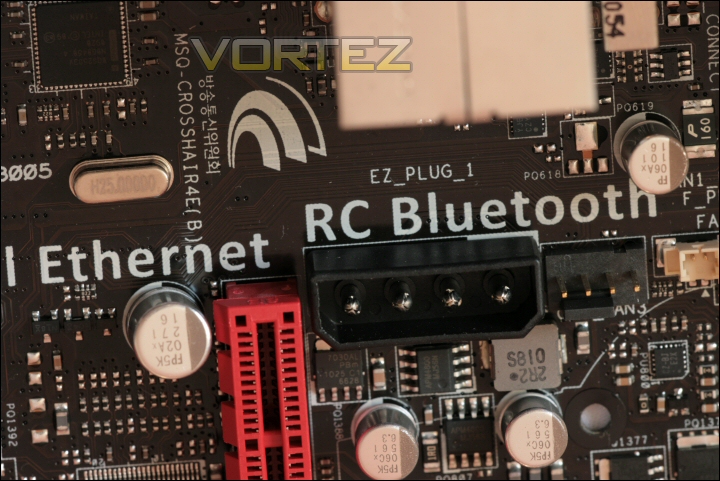
Upper EZ plug.
There are two on board – one near the I/O plate (seen above) and the other at the base of the board.
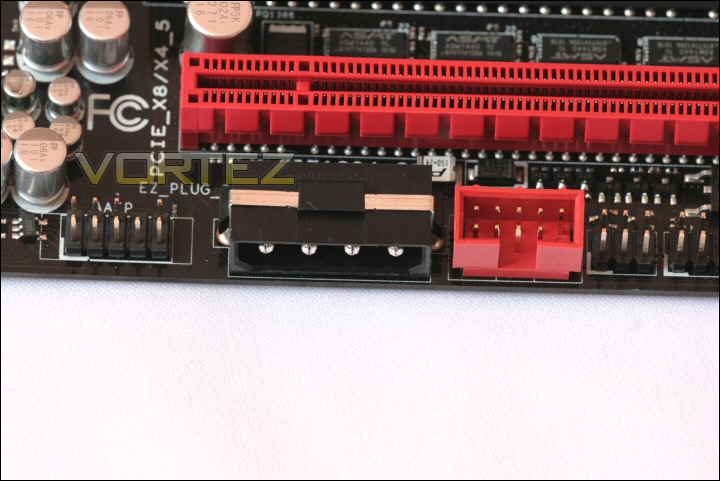
Lower EZ plug.
Board features continued
Once the heatsink is back in place (don’t worry I reapplied the thermal paste) we can look more closely at the remainder of the motherboard.
Beginning at the top of the board we can see the CPU and DDR3 sockets. A fairly standard layout which could mean that larger ‘high end’ CPU heatsinks might interfere with some of the larger heatsinked DDR3 dimms we see today.
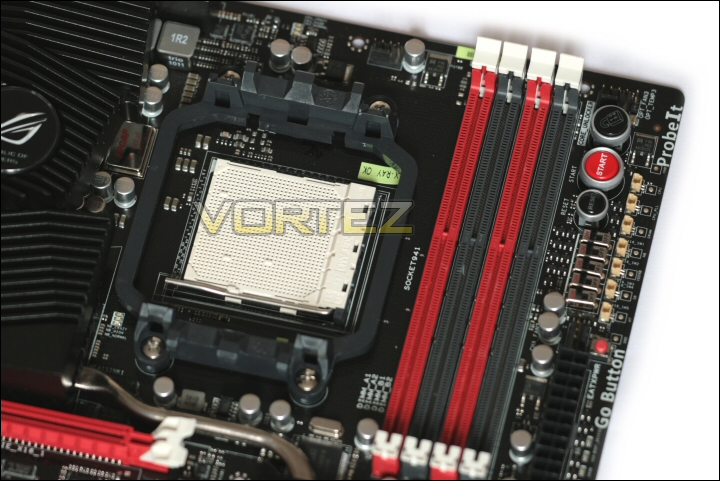
CPU and DDR3 sockets.
To the right of the DIMM slots we see some standard (for RoG boards) features. The very useful start and reset buttons and ASUS’ excellent ‘Core Unlocker’ are there as are the excellent ‘Probe It’ voltage monitoring points. A new feature delivered by this board is the PCIe x16 Lane Switch – as its name suggests this feature allows the user to deactivate any given lane (or lanes) at the flick of a switch. A users could utilise this for fault detection or simply to deactivate specific PCIe lanes for GPU comparison and testing.
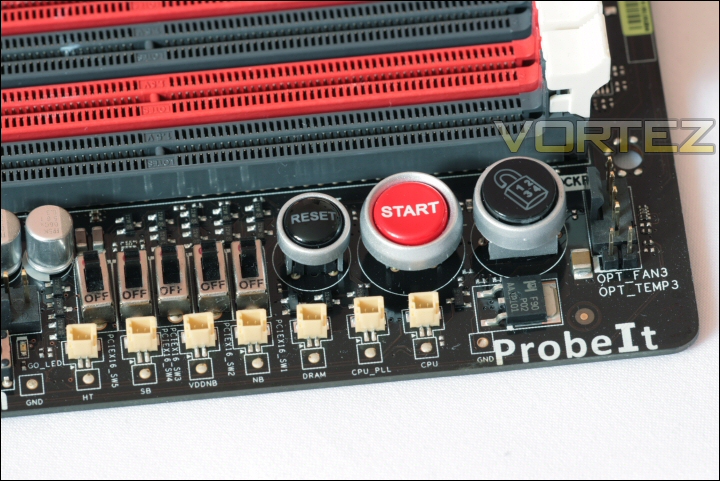
PCIe Lane Switch is a useful new feature.
Below these are the ‘Go Button’ recovery feature, the 24pin ATX connector and the BIOS battery. Just below the ATX connector you can see the four system status lights – these help to identify issues during system boot failures.
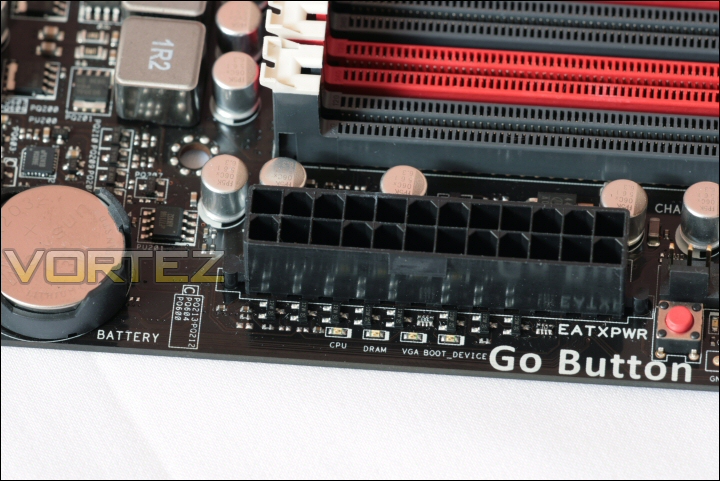
Status lights help identify issues.
SATA storage is not going to be an issue with 8 sockets available. The red ones are SATA 3 – 6.0Gb/s capable while the remaining two (provided by the JMicron 363 controller) are only standard SATA 2 – 3.0Gb/s.
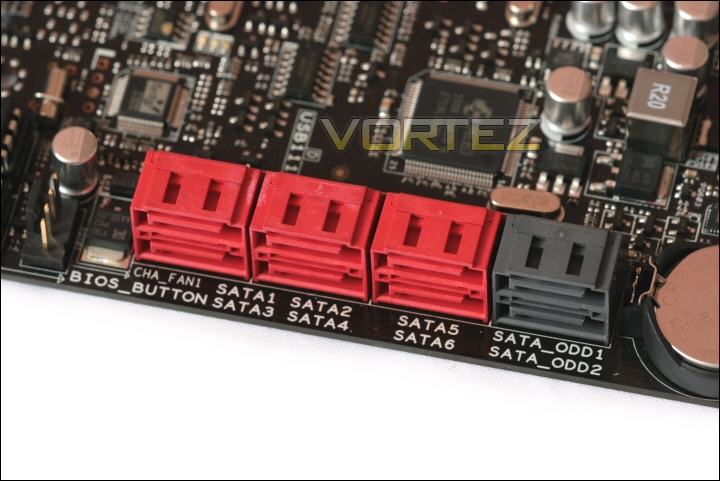
SATA sockets.
At the base of the board, just below the SATA sockets, we find the dual bios chips and the bios switch button. This is not only a wonderful failsafe feature but also allows the end user to set a lower speed 24/7 overclock on one and a high speed benching style overclock on the other. You can see tiny yellow LED’s at the base of each BIOS chip – each will illuminate as it is activated. Also present are the front panel pins for the motherboard. As ever ASUS have provided their excellent Q-Connector for fiddle free installation.
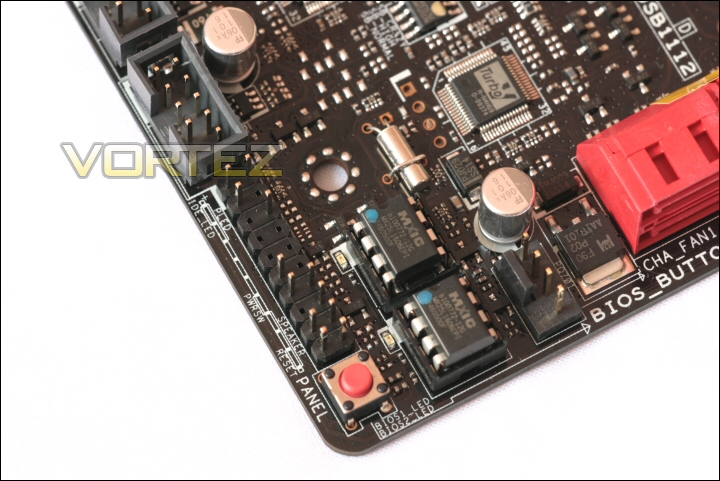
The two BIOS chips.
Between these and the southbridge heatsink we find a selection of RoG chips. These all support the iRoG feature set to allow remote clocking and almost full system manipulation and monitoring. With RoG iDirect and RC Bluetooth it can all be done remotely and these are the chipsets that allow it.
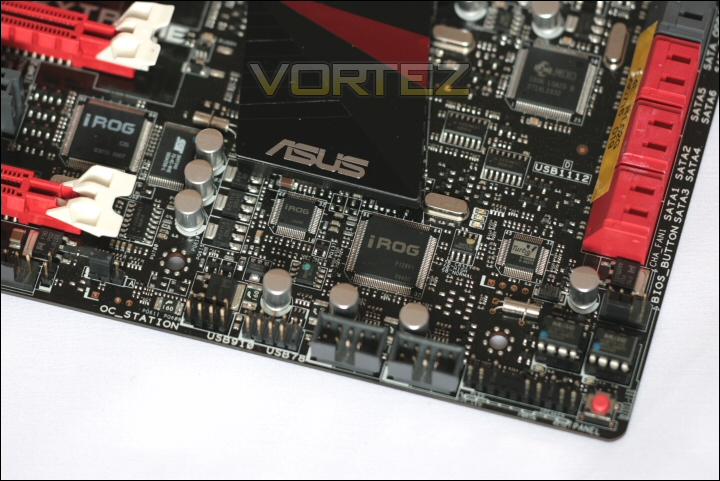
The iRoG chips.
These remote features may seem somewhat gimicky now, but as with all bleeding edge technology like this they will help develop future integrated features like many of the ones we take for granted today. The ability to monitor your system’s voltages, temperatures and clock speeds using a compatible Bluetooth enabled device is actually quite a novel but nice approach. Imagine being able to check all those parameters while gaming – no need to stop and minimise your session since all the information is there in front of you on your phone!
The final portion of the board is the I/O plate. In the case of the Crosshair IV Extreme there’s a great deal going on! There’s a keyboard PS2 socket, a CMOS clear switch, 6x USB 2.0 sockets, 2x USB 3.0 sockets (in blue), a SPDIF optical output, an IEEE 1394a firewire port, 2x external SATA 3.0Gb/s ports, a gigabit LAN port, RoG Connect switch next to the vertically orientated RoG Connect USB socket and the standard 8 channel analogue audio sockets.
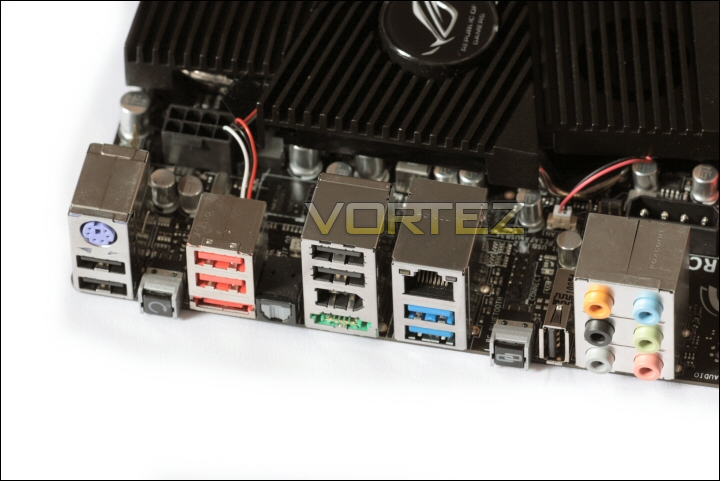
The I/O plate.
Software
The bundled programs consist of the standard AI Suite II from ASUS, the AMD Overdrive Utility (AOD), the Lucid drivers suite and Adobe Reader for access to the manuals. You get the RoG Connect and RC Bluetooth software for the remote clocking and monitoring mentioned earlier.
There are also a couple of additional programs you’d normally have to pay for:
The first is Kaspersky AntiVirus – an effective Virus checking program that I’ve had the pleasure of using in the past. Unlike many other AntiVirus products on the market this program doesn’t seem to impact on the performance of a PC as much as others I’ve used.
The second program is 3DMark Vantage which (as I’m sure you all already know) is one of THE most popular and widely used benchmarking suites in circulation. Certainly nice to have it bundled and what better to do with your new flagship motherboard than overclock it and then test to see if your hard work has paid off!
Ai Suite II is easily installed via the driver and utility disk. All of the bundled programs are pre selected during the install so it’s very much a ‘one click’ affair.
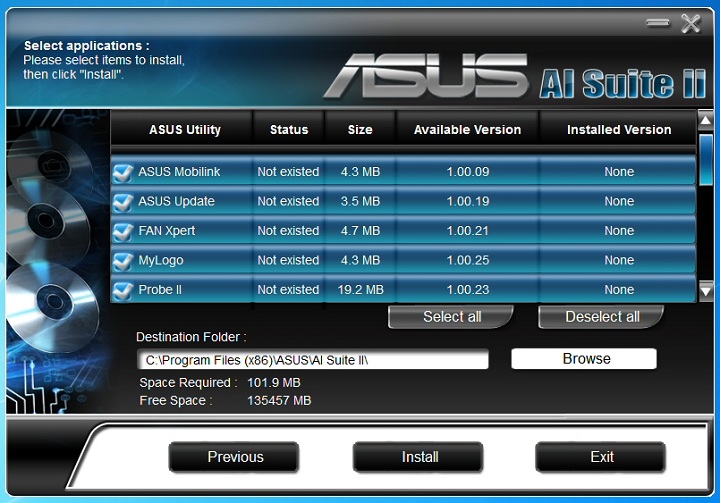
AI Suite II install.
Once it’s installed and the computer reboots you have access to the full AI Suite II. The features on this a variety of programs aimed at monitoring and control of the board.
Fan Xpert allows both automatic and user created fan profiles. It monitors temperature trends and adjusts the fan speed.
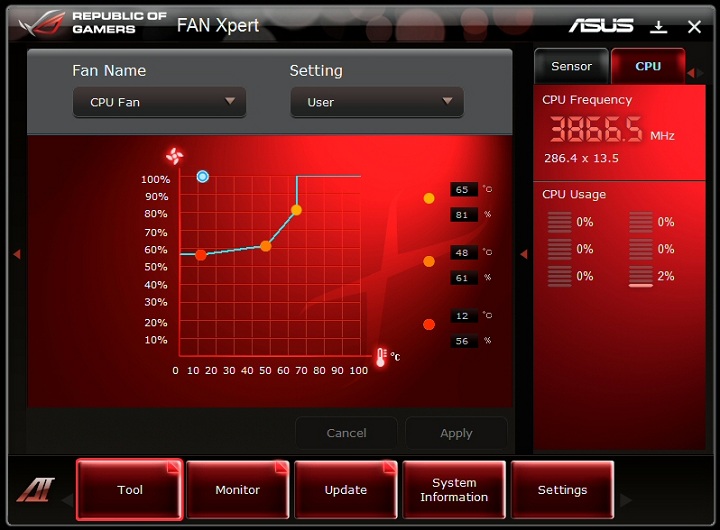
Fan Xpert.
TurboV Evo allows on the fly system manipulation, clocking and overvolting. It’s a comprehensive suite and is certainly very useful for a quick system speed boost when needed.
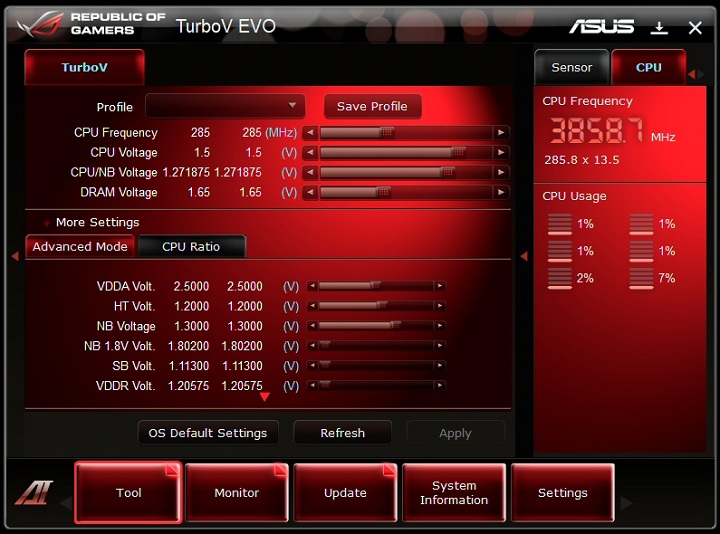
TurboV Evo.
Probe II allows voltage monitoring and alert control. Useful to know what’s going on if you’re running a high stress overclock.
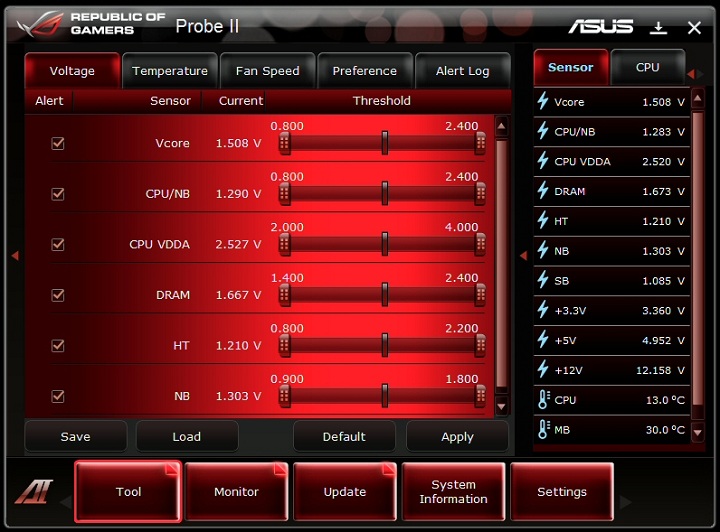
Probe II.
Finally we see the Sensor Recorder. As the name suggests you’re able to see voltage, temp, clockspeed and fanspeed trends in graphical timeline format. The graph can be moved in all directins and also zoomed in and out of if needed.
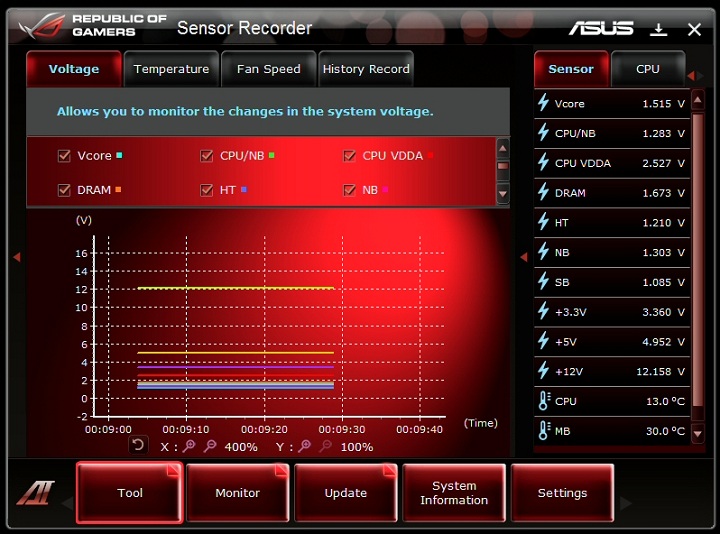
Sensor Recorder.
The Lucid HydraLogix software installation is another easy process. Click ok on each of the windows your presented with and there you have it. Once active the Hydra software is very low key and immensely uncluttered – as you can see the configuration page has only 3 options. It really is that simple.
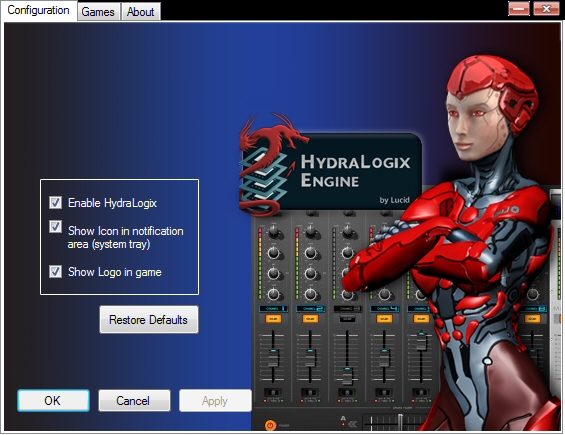
HydraLogix config page.
The other page of note is the games section. This lists all compatible games and the ‘.exe’ used to activate them.
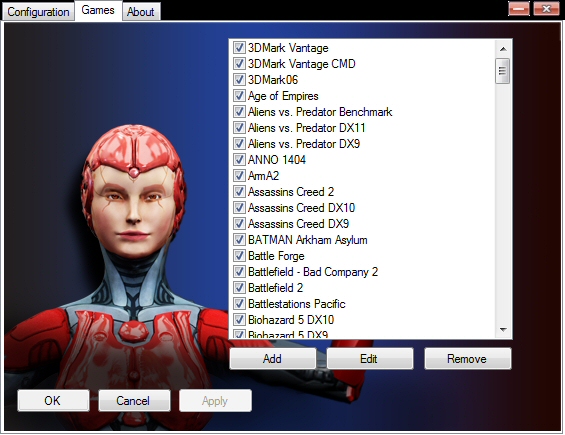
Game section.
It almost seems too simple when you consider the ATi and Nvidia systems at work. In fact, when using my two GTX260’s I didn’t have to install the SLi bridge either.
My Logo is a fun addition to the fairly serious programs i’ve covered so far. From here you can select your own custom bios logo that will be displayed during startup. You can select any 640×480 image you like to customise your pc!
All in all it’s certainly an impressive motherboard and bundle – the build quality seems second to none and the features on offer rival that of any AM3 board I’ve seen on the market.
Setup and overclocking
Test setup
CPU: Phenom II X6 1055T @ 2.8GHz
RAM: 4gb OCZ 1333MHz
HDD: 160gb WD 7200rpm SATA HDD
Optical drive: NEC DVDRW
CPU cooler: Coolermaster Hyper TX3
PSU: Nexus RX-8500 850w
GPU: 2x Gainward GTX260
Case: Dimastech Bench/Test Table Easy V2.5
Overclocking
Having recently both the ASUS M4A89GTD PRO/USB3 and Crosshair IV Formula I expect a lot from the Extreme.
After the recent ECS review where I could not get the 1055T past 3.2ghz I hoped that this board could push further.
The board did not dissappoint with an immediate clock to 3.52GHz with slightly upped voltages and a boosted FSB.
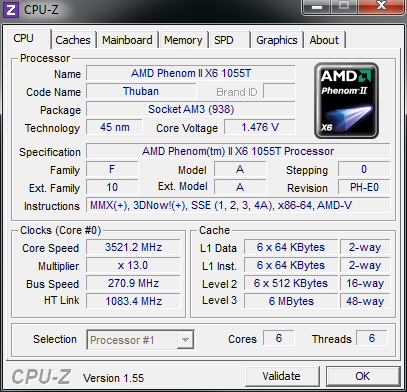
3.52GHz.
After tweaking the HT Link and voltage slightly and with a boost to CPU core voltage and FSB my final resulting clock was 3.86GHz.
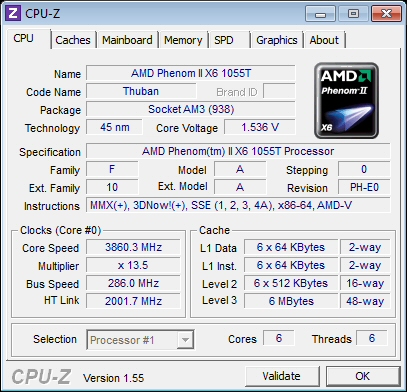
3.86GHz.
Any kind of 1GHz+ overclock is impressive – especially when you consider that’s 6 cores at work.
It was bench test and OCCT stress test stable which was good enough for me – after all you could spend days tweaking these and I just wanted to get onto benching.
Install, noise and temps
The build
ASUS are well versed in component placement so the layout of the board helps during installation. It went into the Dimastech easily and quickly and posed no issues as multiple GPU’s were installed.
Sound
The PWM fan control on the ASUS Crosshair IV Extreme was very good indeed. My only reservation comes from that laptop style blower as it is noisy during operation. Now I know this is an ‘Extreme’ bench style board so that is not as much of an issue but I thought I’d mention it none the less.
Temperatures
Motherboard temps were kept well under control during testing.
As you can see CPU temperatures were also very good under normal and mild clocking but the Hyper TX3 could not keep up with the hex core at full tilt and under full stress. During normal usage temperatures were never an issue though.
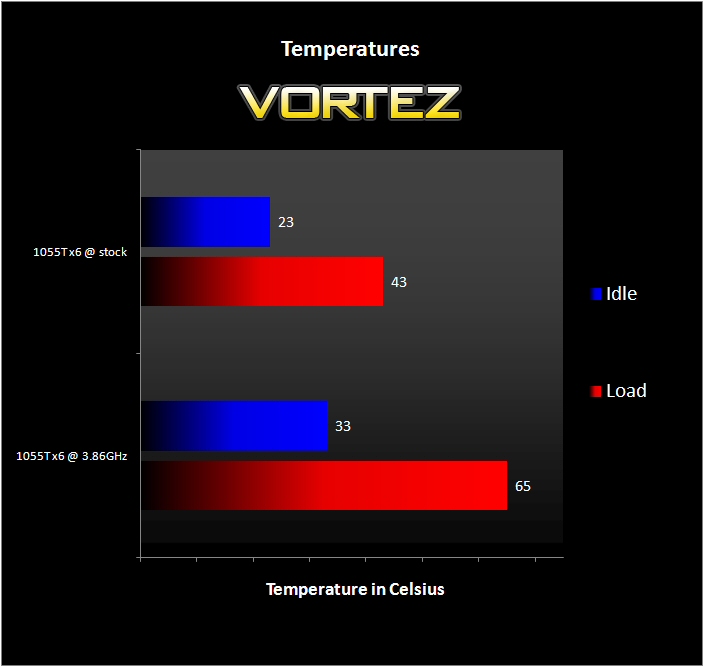
Temperatures.
PCMark05 and SuperPi
I tested desktop performance initially using Futuremark’s PCMark05, SuperPi, Cinebench and the x264 HD benchmark.
PCMark05 is a benchmarking suite from futuremark. It tests many aspects of desktop computing for a good overall impression of system performance.
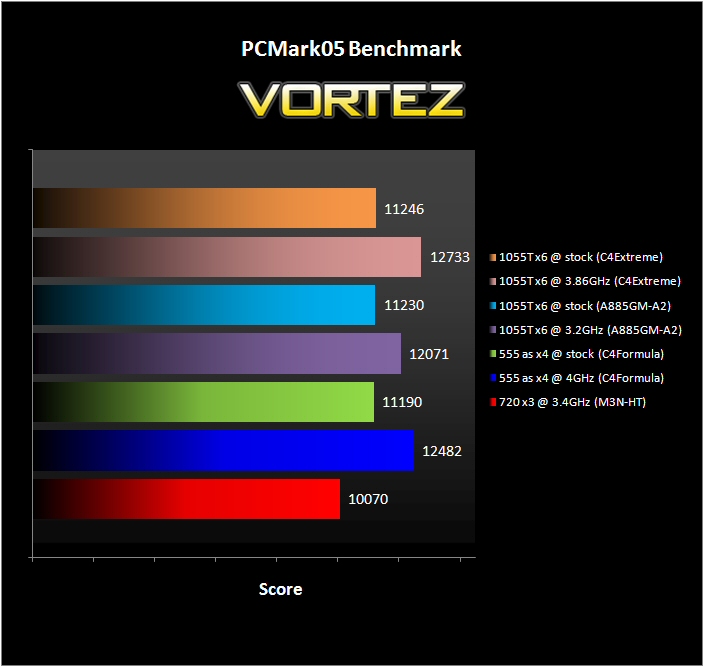
PCMark05.
The results are as expected with the identical stock speeds from the ECS to Extreme virtually matching.
SuperPi is a much used benchmarking tool to identify raw computing performance.
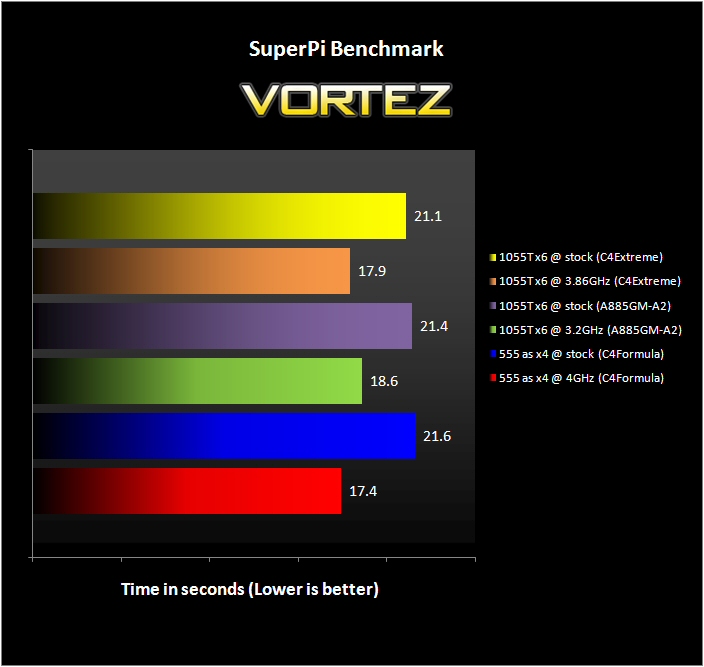
SuperPi.
As in previous reviews the biggest boost in performance comes from the increase of clockspeed rather than core count. Ram timings and other system clocks also effect the results as can be seen between the stock HEX results from the Extreme (faster) and the ECS (slower).
Cinebench and x264 HD
Cinebench provides a real world test rendering a 3D image in realtime.
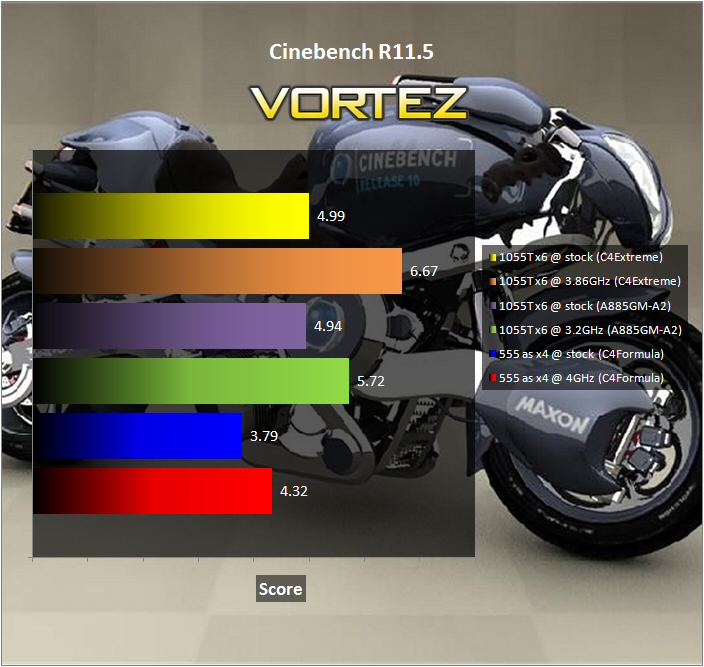
Cinebench.
Multithreading is obviously the winner here since there is a marked boost in performance between the 555 unlocked to Quad and the 1055T Hex cores. Add that impressive 3.86GHz overclock and the results speak for themselves!
Finally I used the x264 HD benchmark – it makes four passes over two different files to generate a result. I took the average of each of the four results from the two groups to generate the final result you can see in the graph.
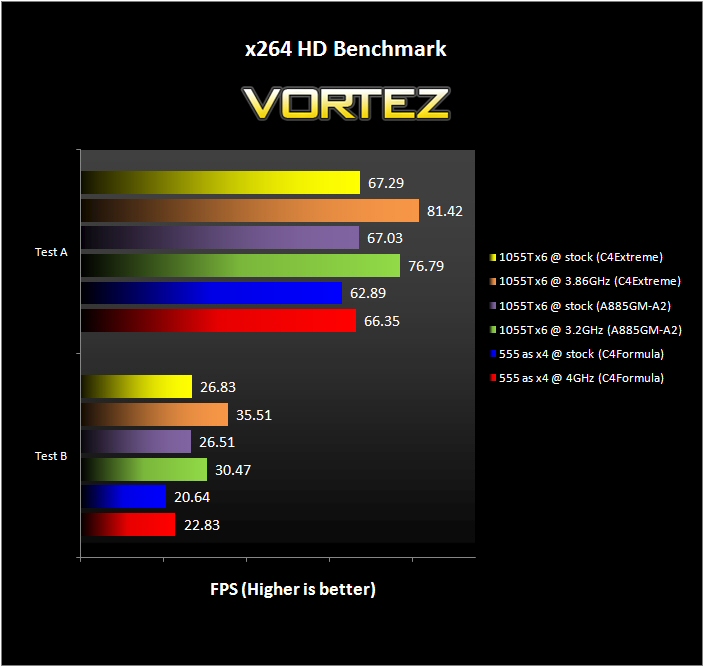
x264 HD.
Multiple cores vertainly offer additional performance – the 1055T @ 3.86GHz offers quite a chunk of additional performance… especially in Test B.
3DMark06 and Vantage
Now we move onto graphical performance as any RoG branded board rightly deserves to be tested on!
First up we take a look at Futuremark’s 3DMark06 benchmark program.
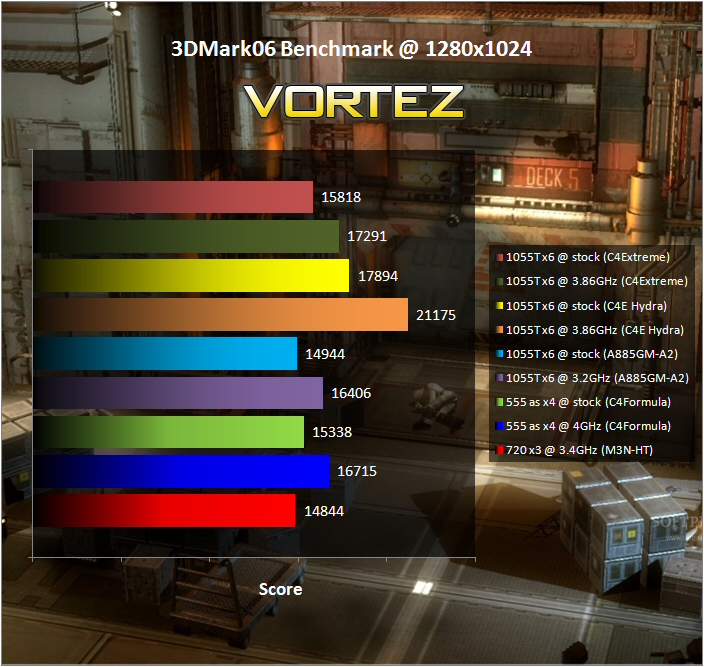
3DMark06.
The numbers are certainly competitive and once you combine that 3.86GHz overclock with the HydraLogix driven dual GTX260’s the result is incredibly impressive as it bursts through the 20K point barrier!
I then tried Futuremark’s newer 3DMark Vantage benchmark program.
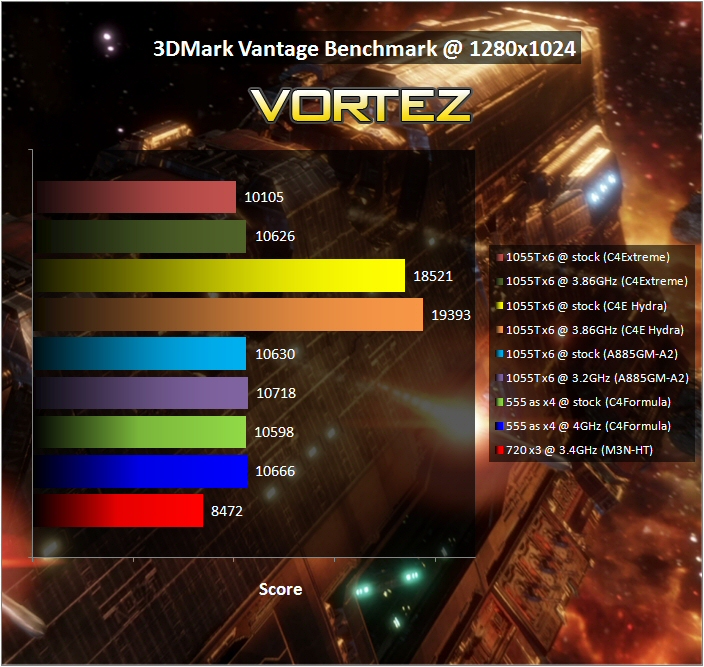
Vantage.
The results are quite samey until you add the Hydra dual GPU’s – when active the score very nearly double. Vantage certainly likes extra cards.
Blacksite and Dead Space
Blacksite was the first game bench. It’s well coded and is a good test for decent hardware.
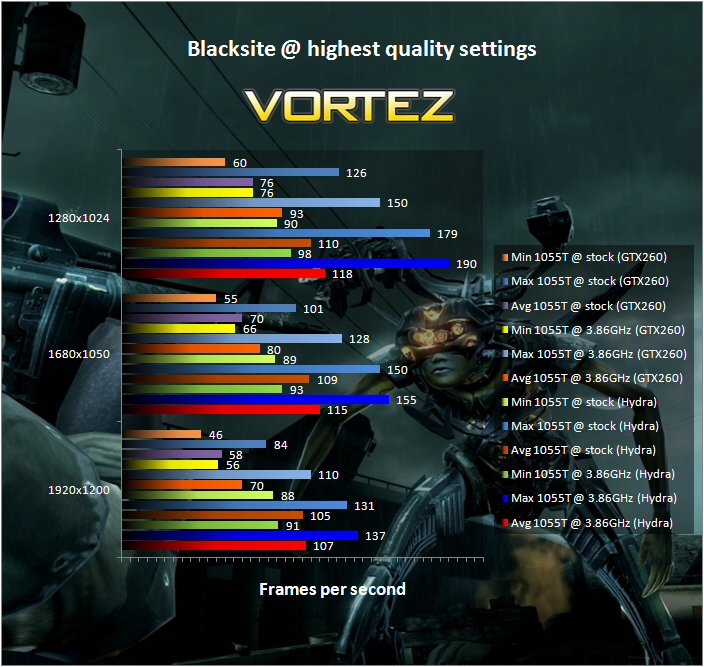
Blacksite.
Results clearly show the performance increase provided by overclocking. Add an extra GPU to that and it leaps forward again.
Next up was Dead Space – a popular survival horror game.
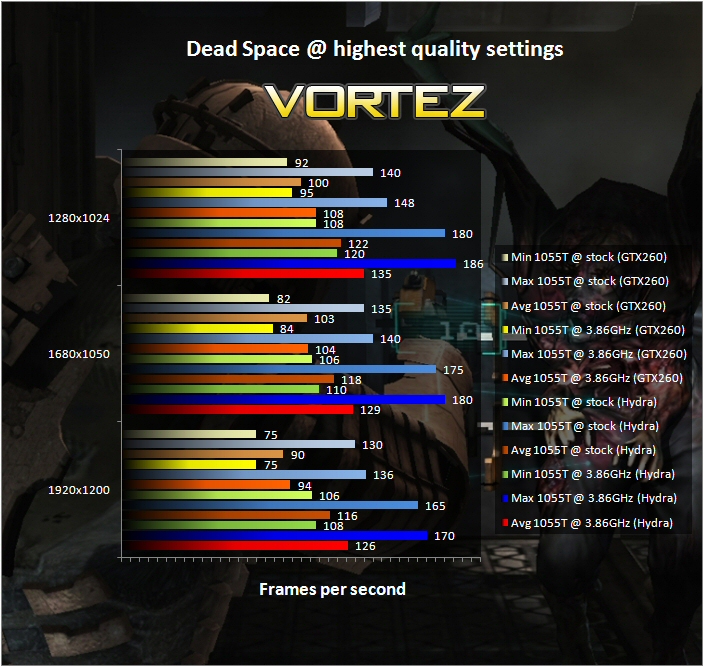
Dead Space.
The increased performance offered by both clockspeed and that additional GPU mirror the Blacksite results.
Far Cry 2 and Unreal Tournament III
Far Cry 2 is a useful test and provides a benchmarking program itself which makes it easy to test.
Far Cry 2.
A boost is evident again as you can see in the graph. The only negative findings are the particularly low minimum framerates @ 1680 and 1920 res’ for the Hydra Multi GPU setup and also a strange graphical glitch effected by the HDR and Bloom settings. The second issue was most probably a driver related bug.
The last game on test was Unreal Tournament III. This is a highly regarded first person shooter with online credentials.
Unreal Tournament III.
This was the only game that seemed to suffer in terms of its average framerate when using Lucid HydraLogix. That being said I would comment that my impression of the playback of the benchmark actually seemed smoother when Hydra was ‘on’. It might well be that while the average framerate was indeed lower with Hydra the minimum framerate may well have been higher leading to a perceptibly smoother presentation.
Conclusion
Well it’s certainly an impressive piece of hardware. ASUS RoG branded motherboards are generally pretty special and the Crosshair IV Extreme is no exception.
Yes, you can virtually guarantee that it won’t be cheap and yes, some other board may well provide 95% of the performance. But what must be remembered here is that it is not the aim of a board like this. You purchase a RoG ‘Extreme’ board to have the best performing, feature laden and cutting edge piece of hardware possible.
The ASUS Crosshair IV Extreme.
In this respect the Crosshair IV Extreme gives the impression of succeeding very competently.
My only absolute reservations are the likelihood of a high price tag and the fact the northbridge fan is too intrusive.
Pros
+ Very impressive overclocking performance
+ Cool running chipset
+ Comprehensive software bundle
+ ROG connect provides excellent level of control and monitoring
+ Nice board layout
+ Great looking
Cons
– It is not cheap
– The Northbridge blower style fan is far from quiet
+ Very impressive overclocking performance
+ Cool running chipset
+ Comprehensive software bundle
+ ROG connect provides excellent level of control and monitoring
+ Nice board layout
+ Great looking
Cons
– It is not cheap
– The Northbridge blower style fan is far from quiet
Update 01/10/2010 – Having now confirmed that the expeceted price will be a heady £280 I award the Crosshair IV Extreme our Silver award.
Vortez Hardware would like to thank ASUS for supplying the Crosshair IV Extreme for review.
Discuss this review on our forums.
Discuss this review on our forums.