







NZXT’s latest fan controller is a stunner, but is it all form over function? Read on to find out.
Product on Review: NZXT Sentry LXE
Manufacturer and Sponsor: NZXT
Price: €59.90 £50.80

Since the earliest days of high performance hardware, it’s needed cooling somehow. The element of control over the cooling fans used is now of even more importance when using performance hardware in your office, bedroom and even lounge. Fan controllers over the years have mostly trodden the same design path – simple drive bay devices with dials that adjust fan RPM, often with temperature monitoring. Indeed, this has always seemed like the most sensible design but it’s no longer particularly exciting. NZXT began to shake this up with the release of their first Sentry fan controller, which was met with a warm reception back in 2007, featuring an LCD screen with temperature readings and control over 2 fans, and most importantly it was affordable. The Sentry 2 followed, which we looked at ourselves here at Vortez and was worthy of a Silver award. The Sentry LX also demonstrated that NZXT could integrate a complex 5-fan control and temperature monitoring touch screen unit into 2 drive bays, however this isn’t the most convenient use of space. The use of 2 5.25” drive bays may be unacceptable for a lot of users.
Step in the Sentry LXE, an externally mounted 5-fan controller with temperature monitoring and automatic fan control, via a touch screen interface.
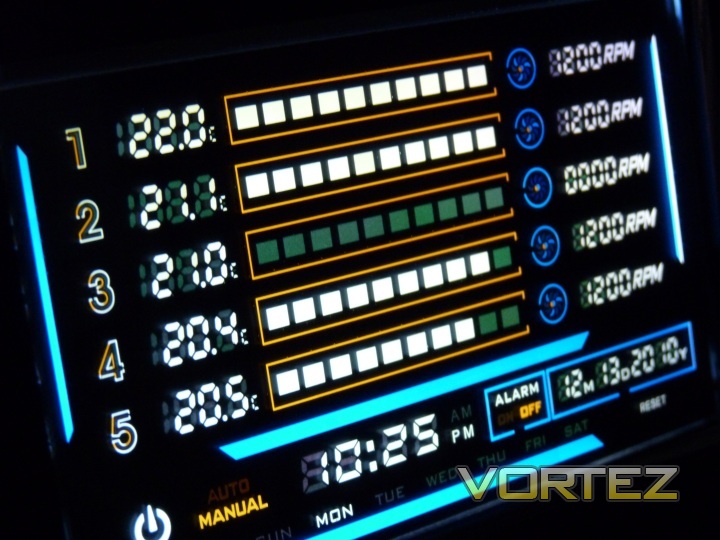
A little more about NZXT, as described by themselves:
NZXT, a company built upon gamer’s dreams, hopes to create products that put consumers first. With the objective of designing unique products catered for hardware enthusiasts and gamers, NZXT has grown into a globally renowned brand recognized for dedication towards creating the next great gaming product. NZXT has won numerous awards from media and publications from across the globe with a product line spanning from gaming chassis, power, and gaming input devices. As a corporation formed by gamers, NZXT continues to expand into new horizons and push the limits further with each product unveiling.
Our dedicated sales and customer service team will work diligently to earn your trust and loyalty. All our products are built with high quality material and engineered in the best conditions.
NZXT products are designed and engineered in the United States and manufactured overseas in China and Taiwan.
NZXT was established in 2004 in Los Angeles, California.
Our dedicated sales and customer service team will work diligently to earn your trust and loyalty. All our products are built with high quality material and engineered in the best conditions.
NZXT products are designed and engineered in the United States and manufactured overseas in China and Taiwan.
NZXT was established in 2004 in Los Angeles, California.
Specifications and Features
So you’ve probably read the price up there and wondering what all that gets you. In short, plenty. You can control up to five fans at a max of 10W per channel, a fairly common number for fan controllers that will accommodate almost all regular fans out there with the exception of more specialist high airflow and RPM fans. If you have one of those, you’ll already know that you’ll need a more powerful controller. If not, read on! As well as fan control, the Sentry LXE offers 5 temperature monitoring probes, which can be located wherever you choose inside the case. The bulk of the unit itself is the touch screen, housed inside a thick aluminium case with a black, brushed finish. Through this, all offered control is possible, as well as time/date display and temperature alarm functions. The internal wiring and cabling is routed through a card, which fits into one of your case’s expansion slots.
Here’s what NZXT themselves say about the features:
• Intuitive Touch Screen LCD – Advanced, touch screen LCD displays temperatures in C/F, RPMs, along with the date, time, and day of the week. Users have the ability to switch the display off for complete darkness for more immersive gaming sessions
• Complete Control – 5 Temperature Probes keep tabs on thermals throughout the case while the 5 Fan controllers adjust the fans’ RPM speed for at least 10W per channel. Allows users to automatically adjust the fan speeds to correspond to a specific temperature, manually customize for extreme overclocking capabilities, or set to absolute silence
• Temperature Alarm – Instant notification if temperatures rise above a designated point
• Sleek Design – Brushed aluminium frame provides sleek aesthetics for any desktop.
• Rechargeable Battery – The Sentry LXE features a rechargeable battery for up to 500 times, keeping the LXE life time longer without the hassle of replacing batteries constantly.
• Using a NZXT developed PCI board and external touch display, the LXE allows for more 5.25″ bays freed up for other peripherals. Environment. Simply set the fan controller atop your PC or desktop and connect through PCI card interface.
Packaging and Bundle
The Sentry LXE comes packaged in a medium-sized cardboard box (as seen below), and is wrapped in plastic within, with most accessories in small bags and the ‘expansion card’ in an anti-static bag (with cables attached). I could bore you with pictures of plastic wrapping like some reviews do, but I’ve elected to cut to the chase here.
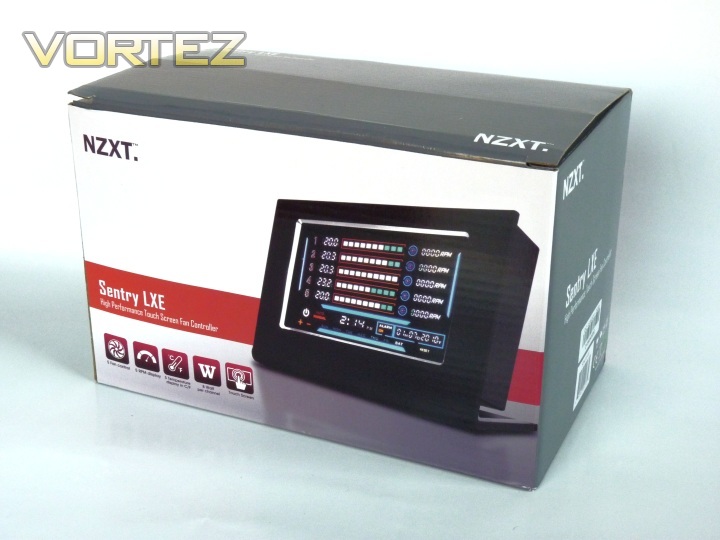
The Sentry LXE in its box with brief feature list and product shot
So what’s included? See below:
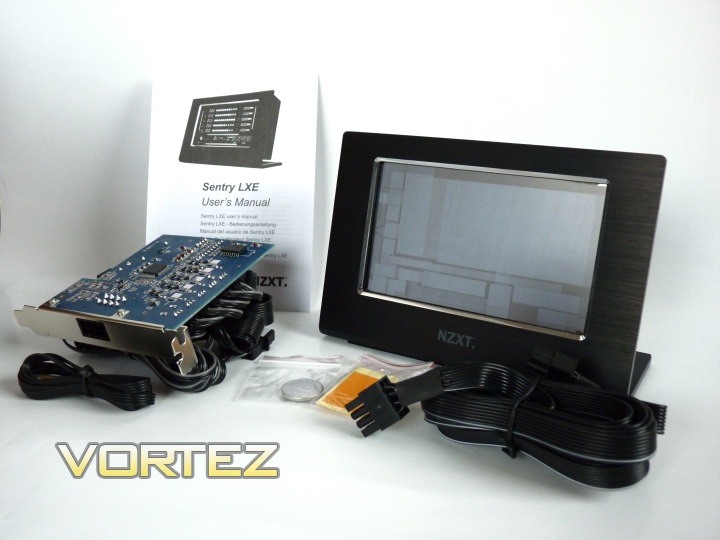
The bundled contents, showing the main unit, expansion card, all cables, battery, stickers and manual
You get, obviously, the main touch screen control unit, the expansion card shaped PCB, housing the main electronics with the fan extensions, power cable (molex conenction) and temperature probes attached. You also have a short, but to the point manual in a variety of European languages, a battery (to remember your settings and date etc), stickers to attach temperature probes, two screws, a spare temperature probe and finally the cable to run from the expansion card to the main unit itself, providing signal and power.
A comprehensive package with pretty much everything you could ask for with a fan controller.
Closer Look
The Sentry LXE, as you may have already gathered, is a stunning looking piece of kit. Let’s take a look in more detail.
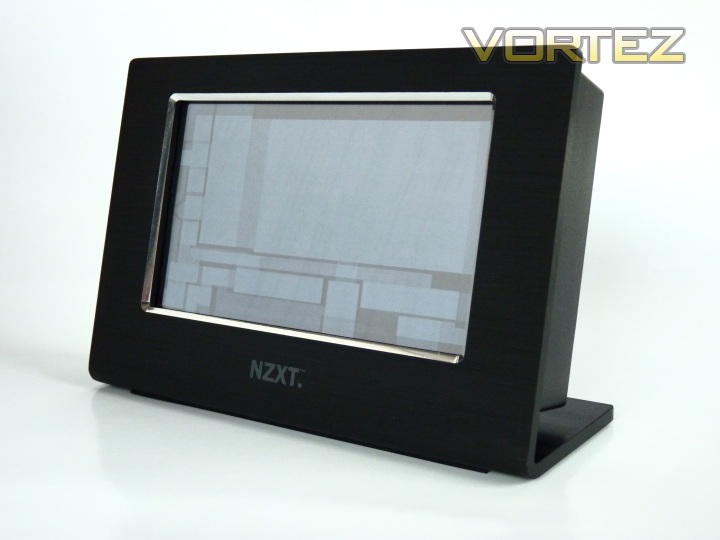
The main control unit, sporting the NZXT logo and a black brushed aluminium finish
The main unit looks even better in the flesh, so to speak. It’s about 10.5 cm in height, with a 13.4 cm screen (5.27”). You can see the touch sensitive areas of the screen quite clearly in the shot above. This is not the case in use, thankfully, though it provides a convenient first look into what the sizes and dimensions of the areas you must press are. I’ll go into more depth about that later.
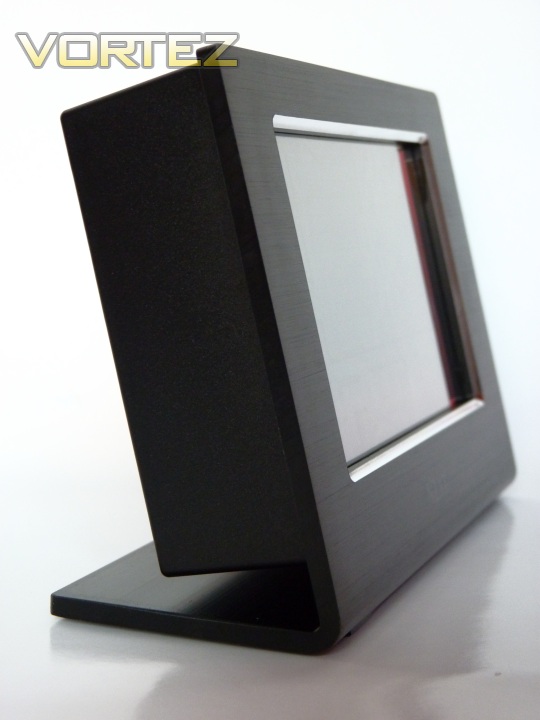
The control unit from the side. More sturdy than sleek.
The thickness of the unit can be seen above. It’s no wafer thin LCD panel, but quite a sturdy looking brushed aluminium frame with a large black plastic box behind. This houses the touch panel and some of the associated control electronics. The screen doesn’t sit vertically, speaking for myself, my desk isn’t at the same level as my eyes, so this is an essential consideration that NZXT have got right. From a design standpoint, the bulk of the unit is not so hot, but from a practicality standpoint, it makes more sense. Again, I’ll explain why later on in the review.
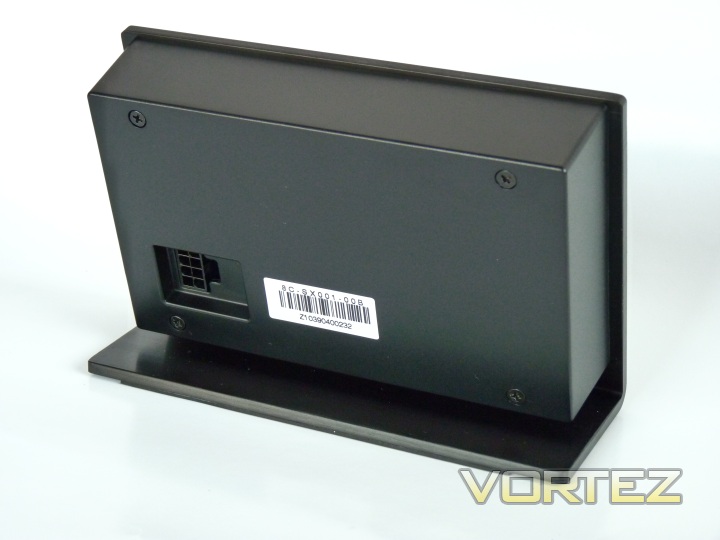
The rear of the control unit, showing connector for signal and power
The back of the unit shows a mostly uninteresting barcode (though certainly worth keeping if you need to claim the warranty), four screws that hold the main housing in place and the 8-pin connector that provides a power and signal connection to the expansion card located in the case, via the black cable already shown.
Closer Look cont’d
We’ve seen the control unit itself, and indeed, this is the bit you should be really concerned with seeing as it will be on your desk – but there’s a lot more to the Sentry LXE. As the main unit is no longer designed to fit into your PC’s case, there must still be a presence there to attach fans, temperature probes and provide power to these items, as well as relay this data to the control unit. This is performed by the expansion card bundled in the package. It is, essentially, a fan controller without any control that mounts into a spare expansion slot. Users of multi-GPU setups may find this to be a deal breaker, as even with one slot free, space can be tight.
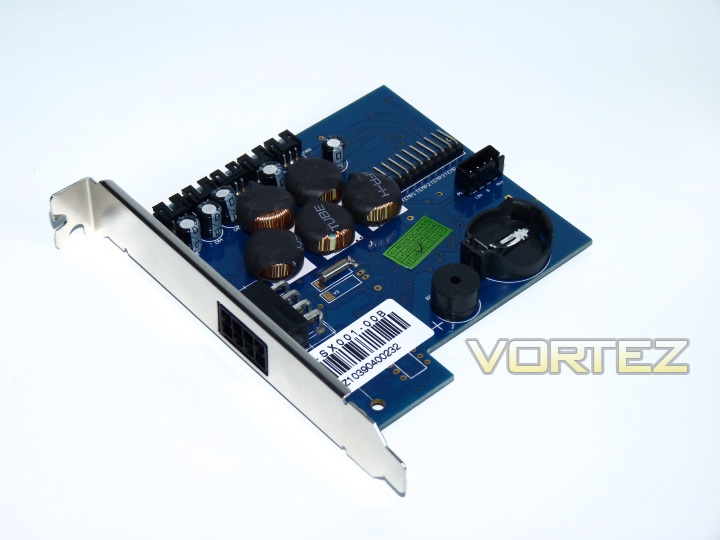
The expansion card, complete with space for battery and power/fan/temperature connectors. This fits into any regular full-height expansion slot
The bracket of the card is split by the 8-pin power connector, which is connected to the large black cable seen in the package content that then connects to the control unit.
Flipping the card around, the actual fan connectors become visible:
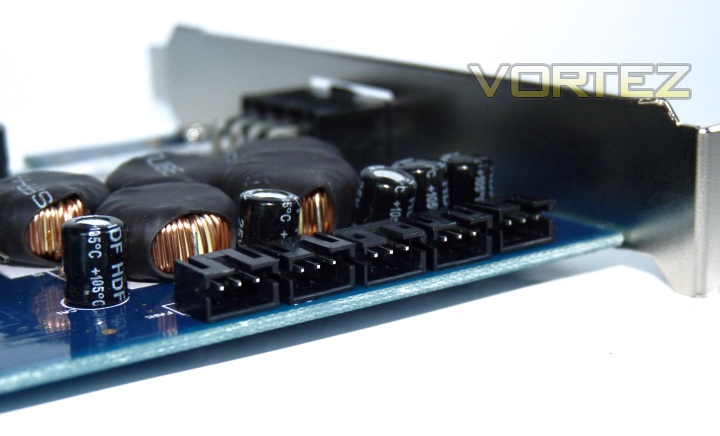
These may not look like a regular fan connection, and you’d be right to assume so. The 3-pin connectors are electrically identical to a 3-pin fan’s connectors, but the size and form differ. The supplied cables only connect to these ports, so you cannot attach a fan without using the long supplied cables. I’m not sure why NZXT have chosen to do this, as it adds to the cable management nightmare that you’ll see over the page! The only reason I can see is that it means you have to replace them with NZXT parts or buy another unit if you misplace the cables – not cool.
Installation
The only real installation involved with the Sentry LXE is the expansion card and associated cable routing. On opening the package, you’re greeted by this:
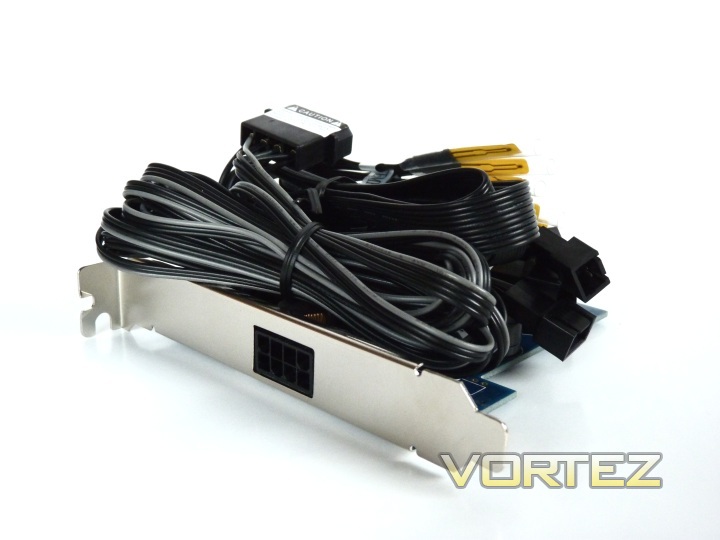
The expansion card and all associated cables in a neat bundle
This looks manageable, at first. There are 3 different types of connection: firstly, the molex power, then the five 3-pin fan cables, then five temperature probes. Once you’ve unwrapped the cables it should look something like this:

Avid cable-managers look away now
Now there’s a whole bundle of cables to route around your case, depending on fan location. It is also likely to be the case that your fans already have a fairly sizeable length of wire, so there is going to be a lot to route and hide, if you’re that way inclined. If you’re spending £50+ on a fan controller, you really ought to be.
NZXT’s bundled manual suggests you install the card and all cables in the case first, then pop in the battery. In my case, this just wasn’t possible as the card mounts upside down and my free slots are near the bottom of the case. Luckily, putting in the battery first doesn’t cause any real issues, but if you’re the type who follows instructions meticulously, this just adds to the frustration of getting this product installed.
After much blood, sweat and cursing, the controller was installed:
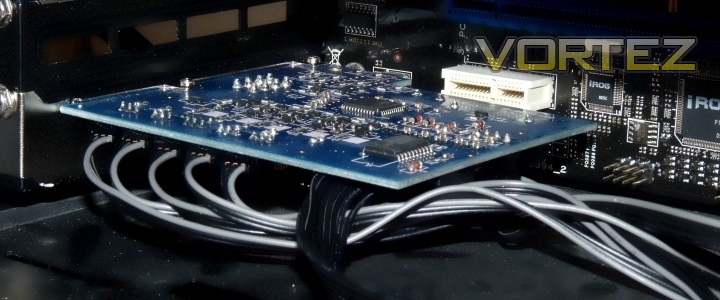
The card doesn’t use a slot to connect or for power, but it does use the space
Once you’re installed and cables are routed and happy, hopefully it’s not something you’ll have to repeat often. I have connected 4 fans, despite having 5 fans in my case as one of them is a fan that utilises Pulse Width Modulation (PWM) as the form of speed control. The Sentry doesn’t support this format, unlike a lot of new controllers – The Zalman ZM-MFC1 Combo to name just one. PWM fans were typically reserved for CPU cooler duties and had lost favour for a long time, but have seen a recent resurgence thanks to new great performing PWM fans becoming available once more, such as the popular Akasa Apache and Viper series.
I would have also liked to see options for plugging 3-pin fans directly into the card and also a mounting option for a 5.25” or 3.5” drive bay, as this is much more convenient for cable routing and doesn’t hog what may be essential space for some.
Connecting the main cable from the control unit to the expansion card is the final step, which also reminds us of how this controller is not designed with mobility in mind. If you’re looking for something to move about with a LAN PC, look to a drive bay mounted controller as this one comes in too many bits and just isn’t convenient for transport.
Next we’ll move onto how the controller actually performs.
Testing Methods
I will be testing the Sentry LXE with the system below:
CPU: AMD Phenom II X4 965BE @ 3.8GHz
CPU Cooler: Corsair H50 w/ 2x Xilence Red Wing 1200RPM Push/Pull
Motherboard: ASUS Crosshair III Formula
RAM: 2x2GB G.Skill Ripjaw DDR3 1600MHz
Sound: Creative X-Fi Xtreme Gamer
GFX: AMD Radeon HD 5870
HDD: Mushkin Callisto Deluxe 40GB SSD, 2x1TB Samsung F1 RAID0
PSU: Corsair HX620
CPU Cooler: Corsair H50 w/ 2x Xilence Red Wing 1200RPM Push/Pull
Motherboard: ASUS Crosshair III Formula
RAM: 2x2GB G.Skill Ripjaw DDR3 1600MHz
Sound: Creative X-Fi Xtreme Gamer
GFX: AMD Radeon HD 5870
HDD: Mushkin Callisto Deluxe 40GB SSD, 2x1TB Samsung F1 RAID0
PSU: Corsair HX620
Most of this isn’t relevant, but I am running four fans – 2 x Xilence Red Wing 1200 RPM (on the H50 radiator) and 2 x Yate Loon D12SL-12 1200 RPM as case fans. These are all connected to the controller. Temperature probes are located in the vicinity of each fan – you can essentially put them anywhere you like using the sticky tape for more difficult areas, though most performance hardware now has its own internal temperature sensor, the days of probes as a necessity are long gone. Now they serve as a method to help visualise the movement of hot and cool air through my case.
Performance
So, the main question, does it work? Initially I had problems with the unit retaining any of the date and RPM saved info. I believe this was to do with the rechargeable battery not being charged, so if it looks like it’s broken at first, it may just be this phenomenon. Once it was up and running, the Sentry LXE works beautifully. I mean that literally, take a look at it on the desk below:
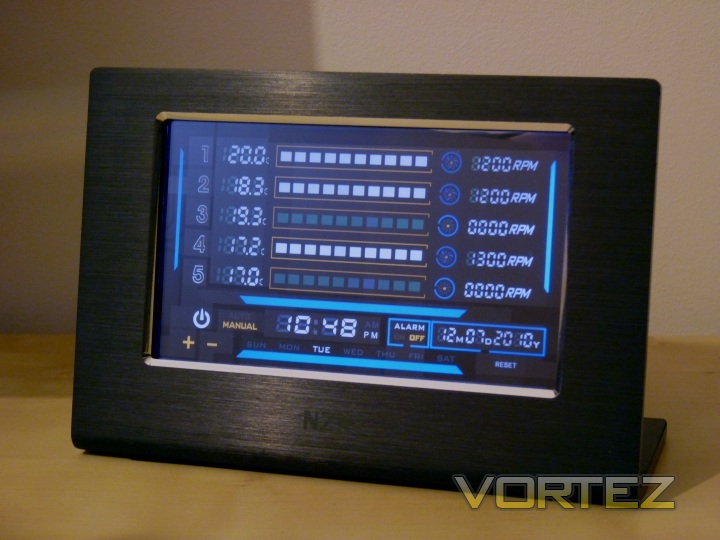
The Sentry LXE will not look out of place on any enthusiasts desk
Again, this is a great looking controller. I should also stress that the screen brightness in real life is much higher than the above shot shows.
I would first recommend a browse of the manual to figure out how to use the controls. They’re not as obvious as you may expect due to the limitations of the touch-sensitive areas. A drag across the RPM scale would have been a nice touch, but instead you must press the channel number twice and then use the +/- buttons at the bottom to alter RPM. I think this helps keep costs down, but it’s not a fluid or quick method to switch between more than one fan. For example, when moving from gaming with your fans at high RPM to sitting back and watching a movie, you may want to alter the RPM of up to 5 fans. On the Sentry LXE, this is a long and tedious process if you use the manual mode. The automatic mode does some of the work for you, and is tied into the temperatures, allowing a minimum setting of 50% RPM. The manual mode allows you to reduce to just 40% RPM, but serious enthusiasts may find even this limiting, especially on higher RPM fans, where other controllers will allow you to reduce fans to a stop. The reason for this limitation is unclear, it must be more of user-orientated decision by NZXT rather than a technical limitation. It does ensure that fans do not stop completely (which may obviously have undesirable effects), which may be something that a novice (or even more seasoned) user would be unaware of.
To get a better feel for the operation of the Sentry LXE, I’ve created a short clip, as seen below. Here I will show how to change the fan RPM, alarm temperature as well as date and time. There are also controls to sound an alarm (a short beep from the speaker mounted on the expansion card), which I’d recommend turning off as it insists on sounding on each boot up. Although somewhat reminiscent of older PCs that beeped loudly on POSTing, it soon grates at you. You can also turn off the screen if you wish, using the power button above the +/- controls. This doesn’t turn off the fans or change any settings, it’s purely to get the bright lights and flicking numbers out of your face if you’ve had enough or it’s late and dark. Personally, it makes a rather handy and attractive screen for a clock and date to be shown too. The update delay can be observed too – 2 seconds.
The video also highlights another point to consider about the responsiveness of the Sentry LXE. The touch buttons are not that sensitive. If you’re used to a smartphone or similar, you’ll find this more akin to pressing a physical button than a gentle tap on the screen. You’ll note how the Sentry LXE tips backwards as I press one of the higher buttons – this is a combination of sensitivity and the centre of gravity being ever so slightly off. On the base of the LXE, there are rubber strips that keep it in place and gripped to a desk. Other reviews have noted that these don’t help and it still slides around, but I have experienced the opposite; it sticks to my wooden desk with no problems at all.
In addition to the lack of responsiveness of the touch buttons, some areas (particularly the +/- buttons) are very small. If you have large fingers this may be yet another source of frustration in using this device. I had no real problems once I was used to the responsive areas, but this can’t be ignored as the +/- buttons are arguably the most important and most used as well as being amongst the smallest. A decision for form over function from NZXT; somewhat of a microcosm of the entire product. Read on for an explanation.
Conclusion
The Sentry LXE leaves me with mixed emotions, as there’s a lot to like about this product, but it comes with its fair share of niggles and limitations.
Stunning looks and design are the high point of this controller
There’s no doubt that the Sentry LXE is a breakaway product from the established design ideals in the fan controller market. For this, I can give NZXT nothing but credit – they have brought a totally new product to market and they’ve done it in style. The Sentry LXE is, by some way, the best and most dramatic looking fan controller I’ve ever used or even seen. It controls the fan speeds well, monitors temperatures just fine and is equipped with even more functions besides, such as temperature alarms and time/date display.
It is, however, not without fault. The first one to discover is the frustrating installation, with just too many cables and mandatory extensions to keep track of and route without wanting to tear your hair out. Luckily, most will only ever have to do this once or twice. Secondly, the execution of control and user input could be better. Some touch buttons are frustratingly small and not particularly responsive until you have the knack, changing RPM moves from being a simple twist of a dial on a traditional controller to a long and tedious drawn out exercise, especially with many fans to change. Then there’s the price; £50 puts this in the very highest price bracket and pretty much a class of its own, as well as being roughly twice the price of some of the most popular controllers on the market now. Other problems such as the lack of PWM support and loss of one expansion slot may be deal breakers for some users too.
The Sentry LXE is aimed towards the high end user; everything about the product reflects that – price, quality and design included. It looks sleek and sophisticated paired with any high end gaming system, and if you can ignore the various flaws where it falls slightly short, this may well be the best finishing piece to add to your new high end rig.
Pros
+ Fantastic looking fan controller
+ Control for 5 fans
+ Good quality build
+ Does not use any drive bays
+ Adequate temperature readings
Cons
– Fiddly interface
– Long winded to use
– Frustrating installation
– Uses one expansion slot
– Priced much higher than competition
+ Fantastic looking fan controller
+ Control for 5 fans
+ Good quality build
+ Does not use any drive bays
+ Adequate temperature readings
Cons
– Fiddly interface
– Long winded to use
– Frustrating installation
– Uses one expansion slot
– Priced much higher than competition
For these reasons, I think the NZXT Sentry is worthy of a Vortez Silver award.

