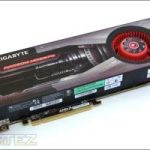
GIGABYTE have sent us their variant of the Cayman based AMD HD6970, let’s see how it stacks up against the competition
Product on Review: Gigabyte HD6970 2GB GV-R697D52GD-B
Manufacturer and Sponsor: Gigabyte
MSRP: £289
Street Price: £289.99
Back in December, AMD released their much awaited Cayman based HD69XX series of cards. It represented a transition to a revised architecture that was more catered towards compute performance with new features such as Morphological Anti-Aliasing and enhanced tessellation performance to meet the requirements of newer DX10/11 titles. For the most part, the HD6970 was a success despite its specifications appearing subtly different to the highly popular but ageing HD5870. Employing the VLIW4 architecture, AMD had managed to maintain improved performance over their previous generation of card without compromising on die size. We found the HD6970 to be an 18% improvement over the HD5870 on average despite sporting 1536 stream processors rather than the 1600 available on the Cypress HD5870 GPU. On the other hand, we were disappointed to see that for a next generation flagship graphics card (until we see the HD6990), the performance increase was still not enough to outcompete Nvidia’s simultaneously released refreshed line-up.
The HD6970 has been positioned to compete against Nvidia’s GTX480 and GTX570 at an RRP just below £300. The card boasts the new refined VLIW4 architecture with 1536 stream processors and 96 texture units forming the basis of the GPU. An improved render back end also helps improved Anti-Aliasing performance, which coupled with the 2GB on board framebuffer has proven to be of great benefit at high in game settings. Built on the 40nm manufacturing process, the HD6970 is one of the biggest GPU cores to come from AMD (ATI) but it represents a stop gap solution before the onslaught on new GPUs to be manufactured on the 28nm process later this year.

Our HD6970 variant on test today is courtesy of GIGABYTE, poised to go against the ASUS HD6970 we reviewed previously. GIGABYTE are no strangers to the world of graphics cards, being well established as one of the most innovative manufacturers around. Known for their use of high grade Ultra Durable components and cooling solutions such as the SOC Windforce X3 cooling design, GIGABYTE have always tried to stay ahead of the competition in various markets. Our sample however, follows the standard reference design, same as the ASUS card we reviewed so we can expect more of the same. The card features the same 1536 stream processors and 96 texture units found on the ASUS. It also sticks to the reference clock speeds of 880/5500MHz, 10MHz less on the core than the ASUS but this is no disadvantage to those users ready to overclock themselves or for those unwilling to pay the premium of the pre-overclocked ASUS card. It will be interesting to see how the two manufacturers fare against each other when armed with the same weapons.
A bit about GIGABYTE:
Technology has moved beyond machines and circuitry. It is the foundation of modern life and has become an integral part of how we learn, share, and create with others in an interconnected world.
With over 20 years of manufacturing knowledge, GIGABYTE thrives on delivering the latest technology to users around the globe. We develop, test, and manufacture a wide range of products following strict quality and environmental control standards.
Our reputation as a pioneer in motherboard innovation has allowed us to diversify our product range to include graphics cards, notebooks, desktop PCs, PC components, cellular phones, server and data centre solutions, and more.
Spirit of Innovation
GIGABYTE was founded in 1986 in a small lab by four young engineers passionate to make their mark on the industry. GIGABYTE remains dedicated to the core belief of improving the lives of our users by manufacturing products that are high-performing, reliable, and of excellent quality. Here are some of GIGABYTE’s innovation highlights:
-USB 3.0
-Ultra Durable Technology
-GPU Gauntlet sorting
-Docking Netbook
Technology has moved beyond machines and circuitry. It is the foundation of modern life and has become an integral part of how we learn, share, and create with others in an interconnected world.
With over 20 years of manufacturing knowledge, GIGABYTE thrives on delivering the latest technology to users around the globe. We develop, test, and manufacture a wide range of products following strict quality and environmental control standards.
Our reputation as a pioneer in motherboard innovation has allowed us to diversify our product range to include graphics cards, notebooks, desktop PCs, PC components, cellular phones, server and data centre solutions, and more.
Spirit of Innovation
GIGABYTE was founded in 1986 in a small lab by four young engineers passionate to make their mark on the industry. GIGABYTE remains dedicated to the core belief of improving the lives of our users by manufacturing products that are high-performing, reliable, and of excellent quality. Here are some of GIGABYTE’s innovation highlights:
-USB 3.0
-Ultra Durable Technology
-GPU Gauntlet sorting
-Docking Netbook
With that covered, let’s have a more detailed look at the card.
Specifications
Cayman is the rightful heir to the successful Cypress core. For the most part, the architecture is much the same with some tweaks to increase efficiency and performance per die size. The GPU comes in two variants, Cayman Pro and Cayman XT, the former found on board the HD6950 and the latter on the HD6970. Originally, the Cayman core was poised to be manufactured on the 32nm manufacturing process which would have brought along many new features and possibly better performance in the same package. However, TSMC cancelled the process so Cayman had to resort to the more mature 40nm process, sacrificing many of the new features promised.
The biggest change to the architecture is the use of the VLIW4 design instead of the VLIW5 design used since DX9 graphics cards were first introduced. The main reason was to increase efficiency in newer DX10/11 titles and to put more emphasis on GPGPU computing. The VLIW4 architecture introduces a narrower Stream Processing Unit, in which the 5th stream processor named the “t-unit” has been removed leaving just 4. Despite the Unit only being able to process 4 operations instead of 5, the advantage is that the space saved allows the core to have more SIMD clusters. The end result is that Cayman can have up to 24 SIMD clusters (24 on the HD6970 and 22 on the HD6950) whereas Cypress only had up to 20 SIMDs (20 on the HD5870 and 18 on the HD5850), giving Cayman a 10% improvement per mm squared compared to previous VLIW5 architecture (as used on Barts also). The architecture is now more catered towards GPU Compute than before and the higher SIMD count also gives additional texturing performance. Each SIMD from both architectures contains 4 texture units so Cayman now benefits from up to 96 units rather than the 80 available on Cypress.
Cayman: VLIW4, 24 SIMD clusters, 96 texture units
Cypress: VLIW5, 20 SIMD clusters, 80 texture units
Another benefit of the new core is its improved dual 8th generation tessellator that bring up to 3 times the tessellation performance of the HD5870.
As mentioned, Cayman comes in two variants as found on the HD6950 and HD6970. The key difference is that the HD6950 has 22 SIMD clusters instead of 24 on the HD6970, leading to fewer texture units (88 vs. 96) and fewer stream processors (1408 vs. 1536). The GPU boasts an impressive 2.64 billion transistors on a die size 389mm squared. For reference, the mainstream Barts core sports 1.7 billion transistors on a 255mm squared package. A 256-bit GDDR5 memory bus is still supported but this time 2GB of VRAM is provided to compete with Nvidia’s offerings.
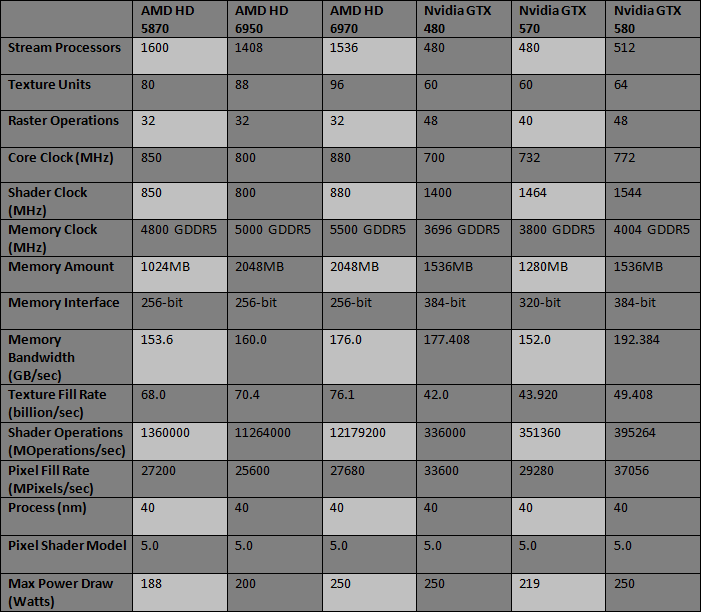
Cayman is a step ahead of Cypress and Nvidia when it comes to texturing performance but the stream processor deficit means that the pixel fill rate and shader operation can’t quite match up to the HD5870. The question is whether the more efficient design can give better performance in real gaming situations. One downside of the Cayman core is its maximum power consumption but that is always the risk with packing more transistors into ever larger cores. AMD have PowerTune to regulate the TDP so we don’t expect the power draw to exceed 250W. More will be revealed about PowerTune later on.
Product Specifications
Graphics Engine: AMD HD6970
Model: GIGABYTE GV-R697D5-2GD-B
Bus Standard: PCI Express x16 2.1 (Compatible with 1.1)
Memory Size (MB): 2048 GDDR5
Memory Interface: 256-bit
Core Clock Speed (MHz): 880
Stream Processors: 1536
Shader Clock (MHz): 880
Memory Clock Speed (MHz): 5500
3D API: Direct X 11 & OpenGL 4.0
DVI Output: 2 (DVI-I & 1 DVI-D)
HDMI: 1 (HDMI 1.4a w/audio (8 channel LPCM & bitstream))
DisplayPort: 2 mini DPs 1.2 (1 DP-to-mini DP adapter supplied)
VGA: Supported using DVI-to-VGA adapter
Display Output (Max Resolution): 2560 x 1600
Crossfire Support: Yes
Card Dimension (mm): 274 x 115 x 35
Graphics Engine: AMD HD6970
Model: GIGABYTE GV-R697D5-2GD-B
Bus Standard: PCI Express x16 2.1 (Compatible with 1.1)
Memory Size (MB): 2048 GDDR5
Memory Interface: 256-bit
Core Clock Speed (MHz): 880
Stream Processors: 1536
Shader Clock (MHz): 880
Memory Clock Speed (MHz): 5500
3D API: Direct X 11 & OpenGL 4.0
DVI Output: 2 (DVI-I & 1 DVI-D)
HDMI: 1 (HDMI 1.4a w/audio (8 channel LPCM & bitstream))
DisplayPort: 2 mini DPs 1.2 (1 DP-to-mini DP adapter supplied)
VGA: Supported using DVI-to-VGA adapter
Display Output (Max Resolution): 2560 x 1600
Crossfire Support: Yes
Card Dimension (mm): 274 x 115 x 35
Features
Get Immersed with AMD Eyefinity Technology
•Enable ultra-high resolution multi-monitor gaming with 2GB of high speed GDDR5 memory.
•Expand your favourite games across up to 4 displays with AMD Eyefinity technology for an expansive field of view.
•See more of the battle than ever before with up to 4 simultaneous displays.
•Get the freedom and flexibility to upgrade. This modular solution enables you to add additional displays.
•Put your productivity into overdrive and let up to 4 displays put all the information you need right before your eyes.
•Don’t choose between play and work. Let up to 4 displays help you enjoy games, movies and the web at the same time.
Get Amazing EyeDefinition Graphics with DirectX 11 Technology
•New and advanced architecture featuring full DirectX® 11 support and scalable geometry processing.
•Featuring a new and advanced architecture with scalable geometry processing, the AMD Radeon HD™ 6900 Series is purpose-built to dominate your games.
•Maximum efficiency & performance. AMD PowerTune technology puts exceptionally intelligent power management under your control.
•Raise the bar for beautifully smooth image quality with Enhanced Quality Anti-Aliasing (EQAA).
•Dual advanced programmable tessellation engines for twice the geometry processing performance of previous generations.
•Play your favorite games in full stereo 3D, and get incredibly rich and interactive gameplay with AMD HD3D technology.
Speed Up Applications and Enjoy Brilliant Video with AMD EyeSpeed Technology
•Unleash the most demanding applications with AMD Accelerated Parallel Processing (APP) technology.
•Supports double precision floating point arithmetic to handle computationally intense workloads.
•Smooth visual quality with AMD EyeSpeed visual acceleration technology.
•Experience Blu-ray 3D as it was intended with AMD HD3D technology.
•Take advantage of AMD Radeon™ HD 6900 Series graphics’ Dolby TrueHD and 3D HDTV support.
Put out Stunning Visual and Unrivalled Audio Experience with HD3D Technology
•Stereo 3D display/glasses support
•Stereo 3D gaming
•Blu-ray™ 3D support
•3rd Party stereo 3D middleware software support
•Launching with AMD Radeon™ 6900 Series GPUs
40nm Technology
Faster clocks, double the transistor density of earlier 40 nm technology. 40nm technology helped make HD6970 series products the most advanced GPUs ever highest clocks speeds, incredible feature integration, full performance and precision all the time, and ability to take advantage of future, higher-speed memories.
AVIVO HD
Avivo™HD could provide vibrant high fidelity, flawlessly smooth next-generation video playback. Avivo™HD technology easily allows your PCs to become digital home media centre by its compelling video pipeline design that comprises the latest high definition video hardware acceleration, including H.264 and WMV9.
AMD CrossFireX™ Technology
Upgrade to even greater 3D performance quickly and easily thanks to plug-and-play ATI CrossFireX multi-GPU technology
Catalyst Control Center
ATI’s all-new Catalyst Control Centre goes far beyond traditional driver configuration software—it’s a feature-rich and stable 3D acceleration control application that puts you in complete command of your ATI visual processing unit (VPU). Catalyst Control Centre offers exceptional graphics performance and visual quality for the ultimate in performance, stability, and innovation. Safe GPU overclocking, custom profiles, and assignable hotkeys are just a few of the many new features. You’ll also enjoy frequent updates, reliable customer service, and an interactive user feedback program, all backed by ATI’s technical confidence, industry-leading capability, and uncompromising commitment to creating your ultimate visual experience.
Shader Model 5.0
Shader Model 5.0 adds support for indexed temporaries which can be quite useful for certain tasks. Regular direct temporary access is preferable is most cases. One reason is that indexed temporaries are hard to optimize. The shader optimizer may not be able to identify optimizations across indexed accesses that could otherwise have been detected. Furthermore, indexed temporaries tend to increase register pressure a lot. An ordinary shader that contains for instance a few dozen variables will seldom consume a few dozen temporaries in the end but is likely to be optimized down to a handful depending on what the shader does. This is because the shader optimizer can easily track all variables and reuse registers. This is typically not possible for indexed temporaries, thus the register pressure of the shader may increase dramatically. This could be detrimental to performance as it reduces the hardware’s ability to hide latencies.
AMD PowerPlay™ Technology
Power draw scales according to activity so when GPU activity is low, the power draw is minimal
Microsoft DX 11
The power of DirectX® 11 with awesome performance, stunning visual effects, and more dynamic interactivity than ever before. Ensures the best performance and application compatibility for all DirectX® 11 applications. Microsoft® DirectX® 11 games, with stunning 3D graphics and shading effects.
Faster clocks, double the transistor density of earlier 40 nm technology. 40nm technology helped make HD6970 series products the most advanced GPUs ever highest clocks speeds, incredible feature integration, full performance and precision all the time, and ability to take advantage of future, higher-speed memories.
AVIVO HD
Avivo™HD could provide vibrant high fidelity, flawlessly smooth next-generation video playback. Avivo™HD technology easily allows your PCs to become digital home media centre by its compelling video pipeline design that comprises the latest high definition video hardware acceleration, including H.264 and WMV9.
AMD CrossFireX™ Technology
Upgrade to even greater 3D performance quickly and easily thanks to plug-and-play ATI CrossFireX multi-GPU technology
Catalyst Control Center
ATI’s all-new Catalyst Control Centre goes far beyond traditional driver configuration software—it’s a feature-rich and stable 3D acceleration control application that puts you in complete command of your ATI visual processing unit (VPU). Catalyst Control Centre offers exceptional graphics performance and visual quality for the ultimate in performance, stability, and innovation. Safe GPU overclocking, custom profiles, and assignable hotkeys are just a few of the many new features. You’ll also enjoy frequent updates, reliable customer service, and an interactive user feedback program, all backed by ATI’s technical confidence, industry-leading capability, and uncompromising commitment to creating your ultimate visual experience.
Shader Model 5.0
Shader Model 5.0 adds support for indexed temporaries which can be quite useful for certain tasks. Regular direct temporary access is preferable is most cases. One reason is that indexed temporaries are hard to optimize. The shader optimizer may not be able to identify optimizations across indexed accesses that could otherwise have been detected. Furthermore, indexed temporaries tend to increase register pressure a lot. An ordinary shader that contains for instance a few dozen variables will seldom consume a few dozen temporaries in the end but is likely to be optimized down to a handful depending on what the shader does. This is because the shader optimizer can easily track all variables and reuse registers. This is typically not possible for indexed temporaries, thus the register pressure of the shader may increase dramatically. This could be detrimental to performance as it reduces the hardware’s ability to hide latencies.
AMD PowerPlay™ Technology
Power draw scales according to activity so when GPU activity is low, the power draw is minimal
Microsoft DX 11
The power of DirectX® 11 with awesome performance, stunning visual effects, and more dynamic interactivity than ever before. Ensures the best performance and application compatibility for all DirectX® 11 applications. Microsoft® DirectX® 11 games, with stunning 3D graphics and shading effects.
Packaging and Content
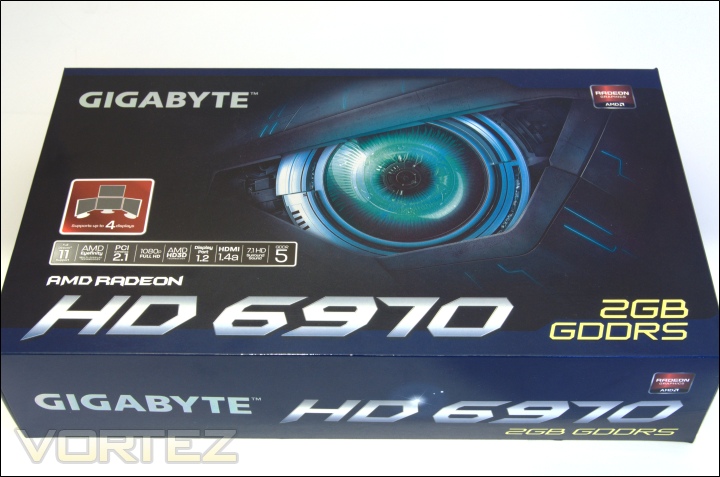
The front of the box
GIGABYTE have opted for the minimalistic approach with their packaging, shying away from bright and vibrant artistic flair accustomed to so many manufacturers these days. The box provides a clean façade with a robotic eye being the central attraction. The general theme of the packaging isn’t obvious but users will no doubt care more about what’s inside than outside. Nonetheless, Gigabyte make use of the front face to list key features of AMD’s HD6970 such as DirectX 11 support, HD capabilities and compatibility with the latest DisplayPort and HDMI standards. The model of the card is boldly printed across the bottom as well as the on-board 2GB framebuffer is also illustrated.
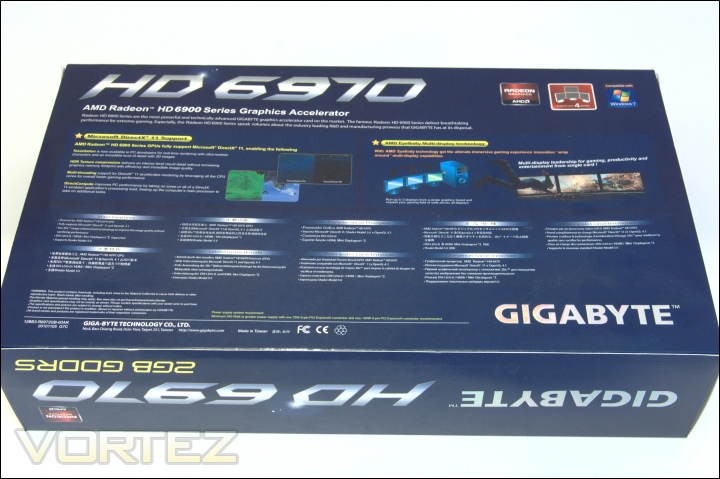
The back of the box
Onto the back of the box, some of the key features of the graphics card are illustrated, namely DirectX 11 support which bring new technologies such as Direct Compute, Multi-threading, Tessellation and HDR texture compression, and Eyefinity display technology, supporting up to 4 displays. The main features are also listed in 8 other languages. The actual specifications of the HD6970 have been omitted from the packaging.
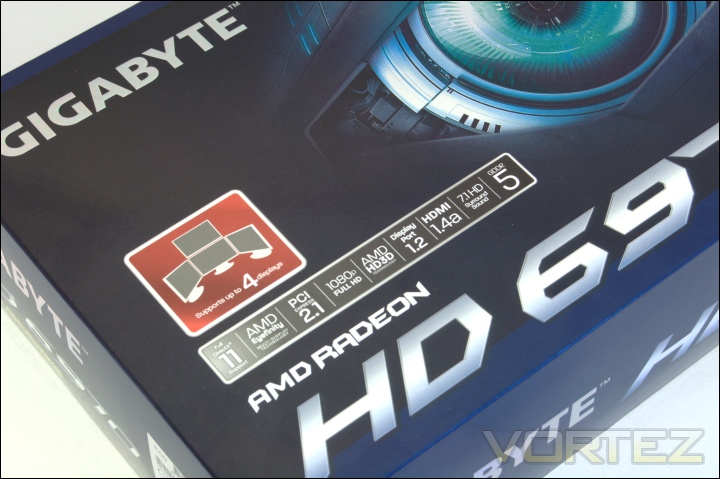
AMD features
The features are clearly illustrated on the front to inform users what they can expect. Gigabyte highlight AMD’s foray into a more diversified user experience when it comes to display technology. Not only does AMD’s new generation of cards support up to 4 displays in Eyefinity, but they now have added 3D functionality. As standard with AMD’s line up, the HD6970 also provides 7.1 surround sound.
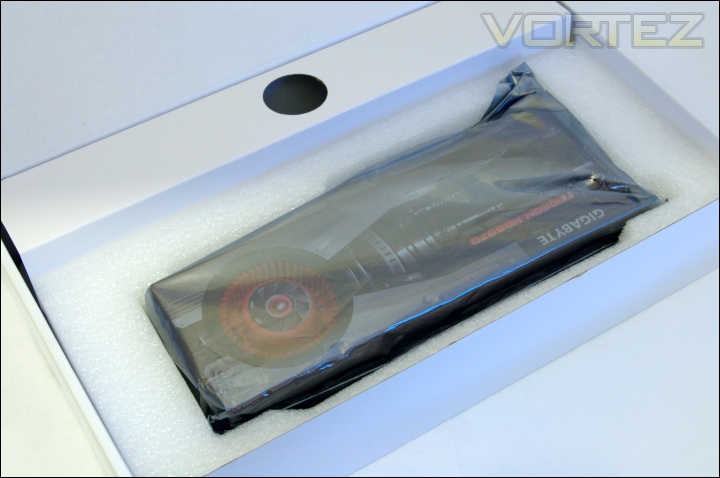
Inside the box
Upon opening the box, we are met with a simple white cardboard box holding the graphics card in a foam enclosure and the rest of the bundle in various compartments. The graphics card itself is well secured and comes wrapped in an anti-static bag. Next to the card is a holed lid containing all the necessary accessories and beneath the foam enclosure are the driver CD and documents.
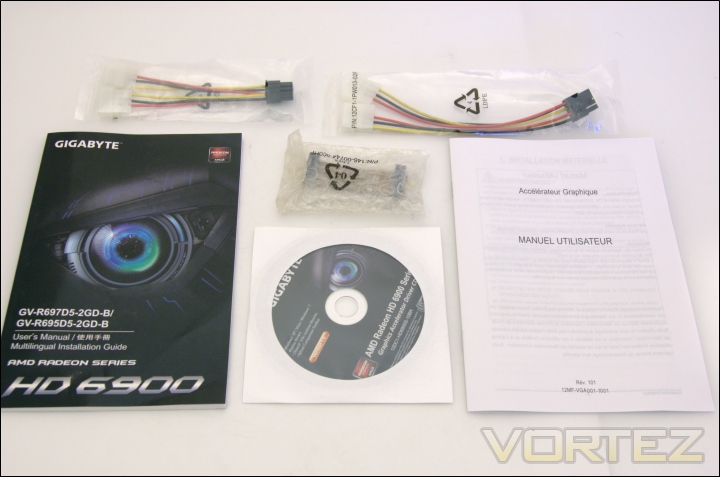
The bundle
The bundle includes:
– 1 x Dual Molex to 8 Pin power adapter
– 1 x Dual Molex to 6 Pin power adapter
– 1 Crossfire Bridge
– 1 x Multi-lingual quick-installation guide
– 1 x French user guide
– Driver disc
The bundle is fairly mundane and despite 2 mini DisplayPort connectors on the card, no adapters have been provided to ensure compatibility with regular DisplayPort cables. Another omitted accessory is a DVI to VGA adapter. Given that most high end monitors have DVI ports, it’s not a significant oversight. This is akin to the ASUS bundle.
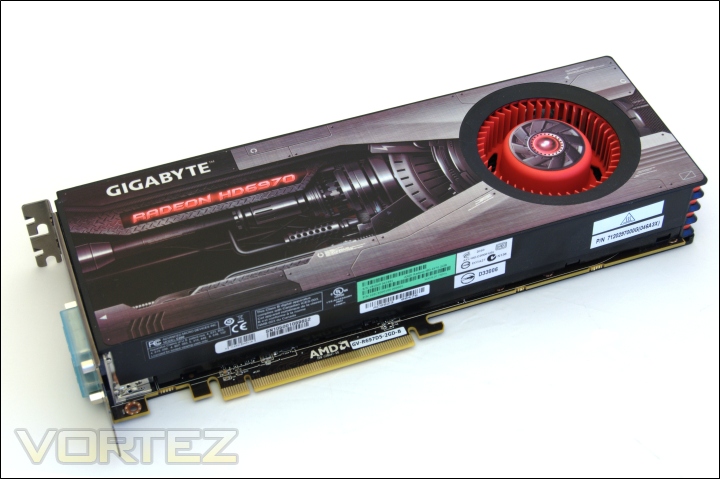
The graphics card
The GIGABYTE HD6970 follows the same AMD reference design found on the ASUS HD6970 and the HIS HD6950. Unlike ASUS, Gigabyte have opted for an attractive gun metal decal with some sort of engine design that incorporates the fan as part of the theme. The shroud uses the same “ribbed” design on the side and a standard blower style cooler. The card spans 27.4cm in length.
Closer Look
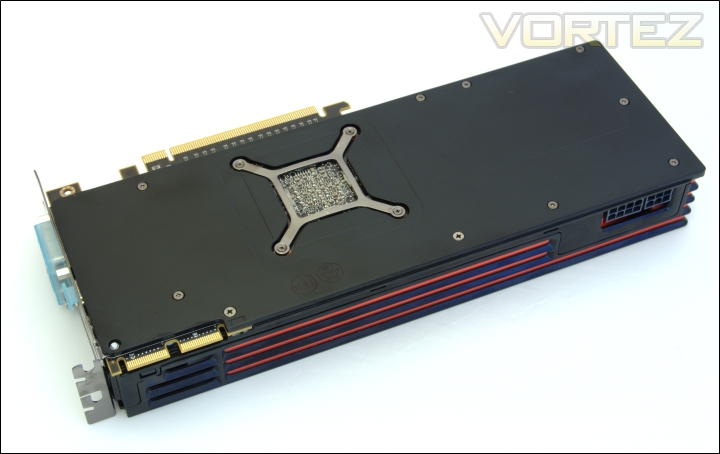
The back of the graphics card
The distinctive feature on the back of the card is the metal backplate for support and additional heat dissipation. The underlying heatsink is secured to the PCB by the X shaped bracket and 4 spring loaded screws. Removing the cooler requires the 10 screws at the back to be undone and two additional ones from the I/O plate. Removing the shroud and cooler is not covered by warranty so take great care if doing so.
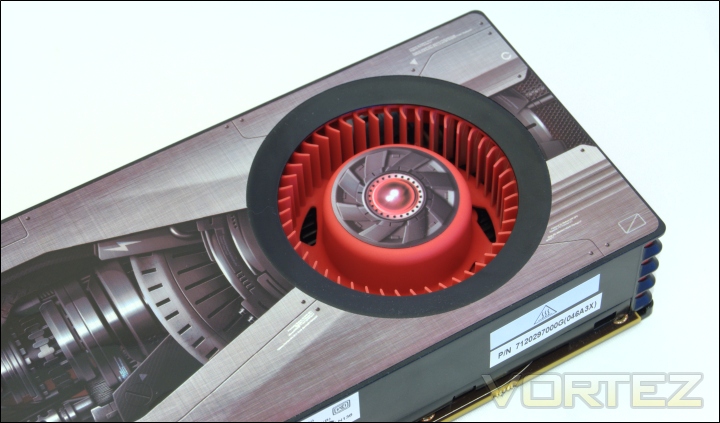
The fan
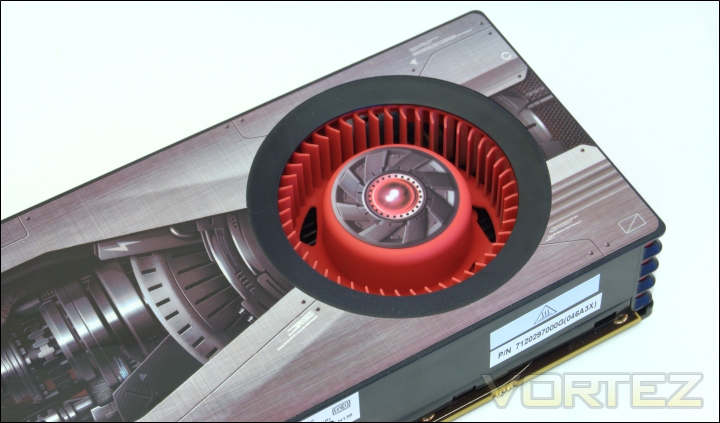
The fan uses a finned blower design to push air towards the rear of the card, hence exhausting hot ait out of the case. GIGABYTE have stuck their own decal over the rotor for added visual appeal. The fan supports PWM functionality and can be controlled by users or temperature based profiles.
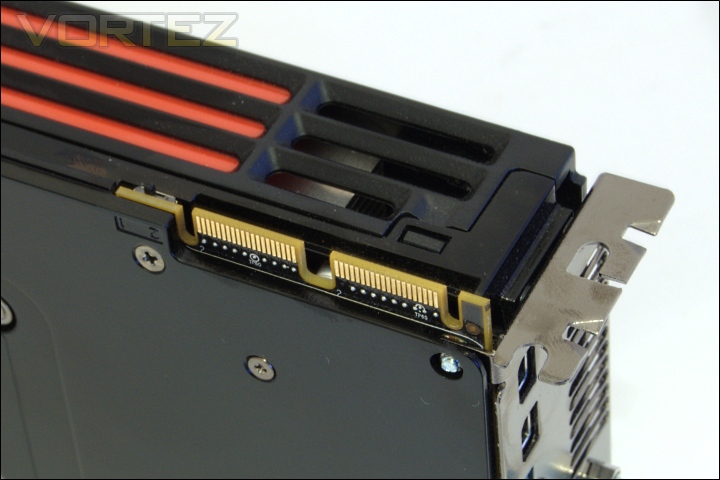
The CrossFire connectors
Unlike the HD6870, the HD6950 sports two CrossFire connectors on the side for up to 4 graphics card to be used in CrossFireX. The side profile of the shroud is dominated by the ribbed design. There are also vents above the CrossFire connectors where heat can be partially extracted from.
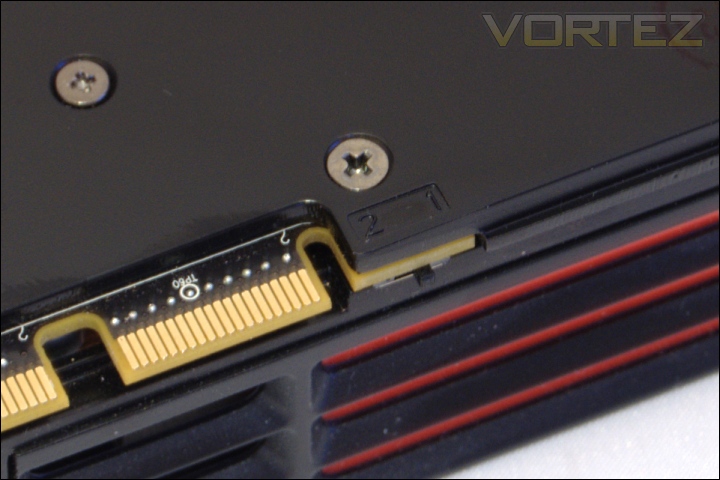
The BIOS Switch
As seen before, AMD have implemented a new unique feature to their new series of graphics card in the form of the BIOS switch shown above. The ‘1’ & ‘2’ labels indicate that users can switch between two BIOS for safer end user update. Since the launch of the HD5870, it has been quite common to see users flash their graphics card to support voltage tweaking or to simply update the BIOS. AMD are ensuring that this process is safer by implementing a protected factory default setting, ‘2’, and an unprotected BIOS, ‘1’, which users can update. The switch is connected directly to the PCB, next to the CrossFire connectors. A phenomenon of this feature has been the growing popularity of unlocking HD6950s to fully fledged Cayman cores. The HD6970 cannot be unlocked further
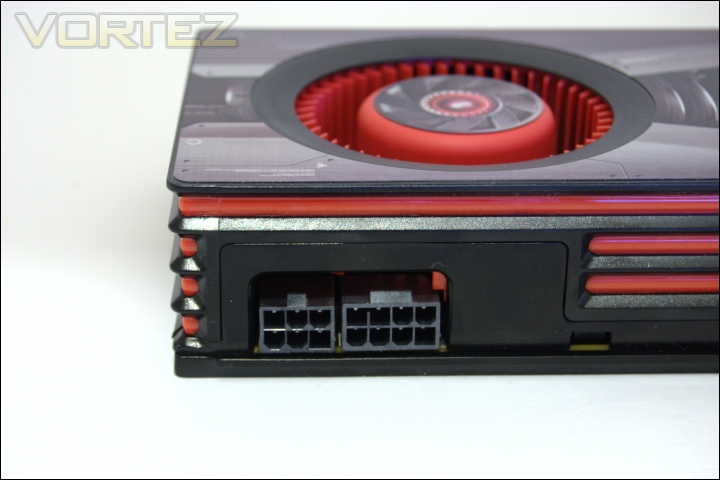
The PCIe power connectors
Unlike the HD6950, the HD6970 has one 6 pin and one 8 pin PCIe power connectors, immediately suggesting high power draw. These are conveniently situated on the side rather than at the end to ensure that the cables do not get in the way of HDD cages or other components. Molex to 6/8pin converters have been provided for those power supplies lacking the required PCIe power cables. A minimum 600W power supply with 12V rail current rating of 42A is highly recommended.
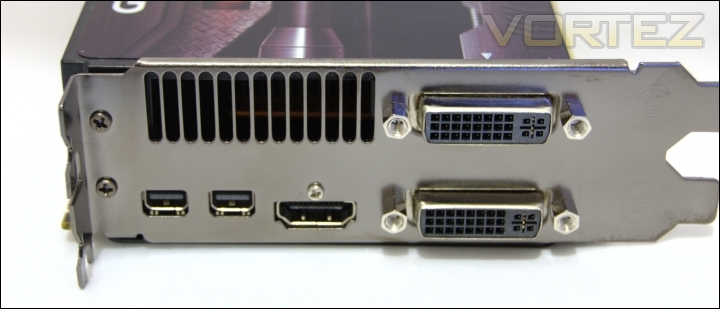
The I/O panel
The rear I/O panel has a wide selection of connectors, more so than on previous reference cards. On the right are two traditional Dual Link DVI-I connectors and for those still using VGA outputs, an adapter is provided. Furthermore, a single HDMI 1.4a port is built in and two mini DisplayPorts supporting the latest 1.2 standard. The ports are an example of AMD’s evolution on their display and video decoding features over the HD5XXX series. The main advantage of the new DisplayPort standard is the double bandwidth over the previous 1.1 ports, taking it from 10.8Gbps to 21.6Gbps. In real world applications, it means that a single port can support up to 2 2560×1600 monitors and 4 1920×1200 monitors through daisy chaining or by using an MST hub. The hub means that the card itself no longer has to sport up to 6 individual ports as was found on the Eyefinity6 special edition cards. As such, the two provided ports can easily drive 6 monitors at 1920×1200. If a hub isn’t available and daisy chaining not feasible, the 5 ports can still support up to 4 displays in Eyefinity as illustrated at the back of the box. The higher bandwidth of the DP is also relied on for AMD’s new 3D stereoscopy initiative. Unfortunately HIS do not provide adapters for the mini DisplayPorts. Small vents are also present from which heat is exhausted from.
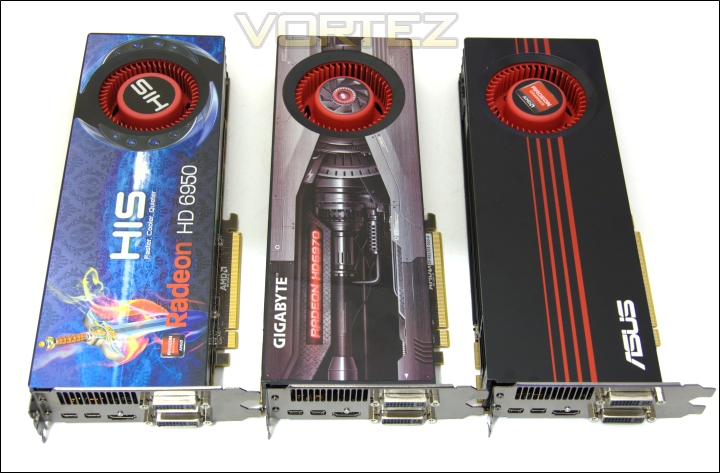
Graphics card comparison HIS HD6950 VS GIGABYTE HD6970 VS ASUS HD6950
Comparing the three reference designed HD69XX cards, we see very little difference apart from the livery on the shroud. All three cards are 27.4cm in length but have their power connectors conveniently placed on the side to ensure compatibility in most cases without conflicting with HDD bays. The main physical differences between the HD6950 and the HD6970 are the power connectors.
Closer Look (Continued)
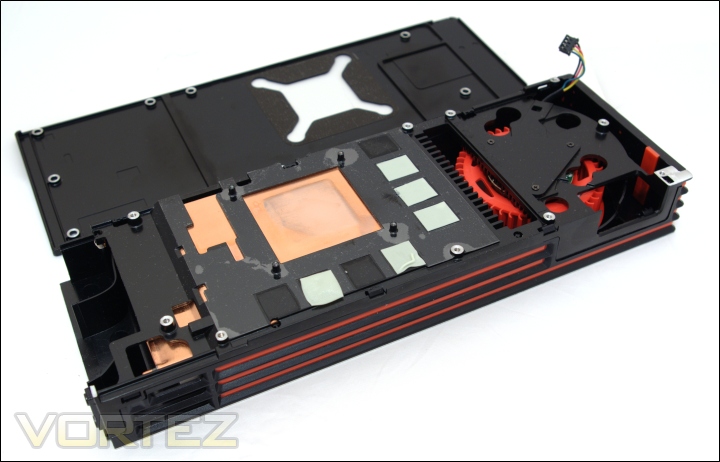
The cooler and shroud
When we remove the cooler and shroud, the sheer size is clearly recognisable. The shroud is a combination of plastic and aluminium on the outer case and metal on the underside to cool the memory chips. The thermal pads are indicative of the 8 memory modules on the PCB itself. The fan is attached to the metal bracing, which pushes air through the heatsink and towards the rear. The heatsink no longer uses a heat pipe design but instead employs a vapour chamber to ensure better cooling and consequently quieter operation. Its construction is a combination of aluminium fins and copper base.
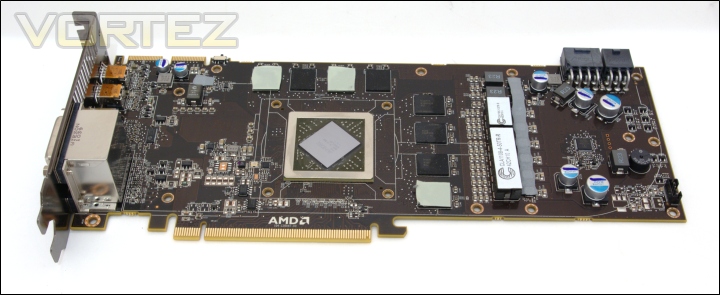
The bare PCB
The bare PCB reveals the layout of the individual components. Unlike the HD6870, the power circuitry has gone back to its traditional placement towards the power connectors. The GPU area is set in the middle and surrounded by 8 memory modules. The PCB is exactly the same as the ASUS HD6970 card.
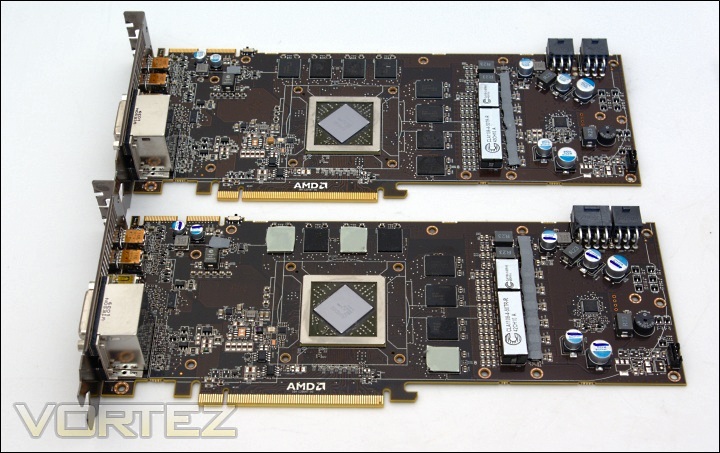
HD6970 vs. HD6950 PCB
The PCBs used for both the HD6950 and HD6970 are identical, the only differences being the components used on-board. The near HD6970 sports an 8 pin PCIe power connector instead of a second 6 pin connector. The memory modules and GPU also cater to the higher end nature of the HD6970. Apart from those, it would be hard to distinguish the two boards at a mere glance.
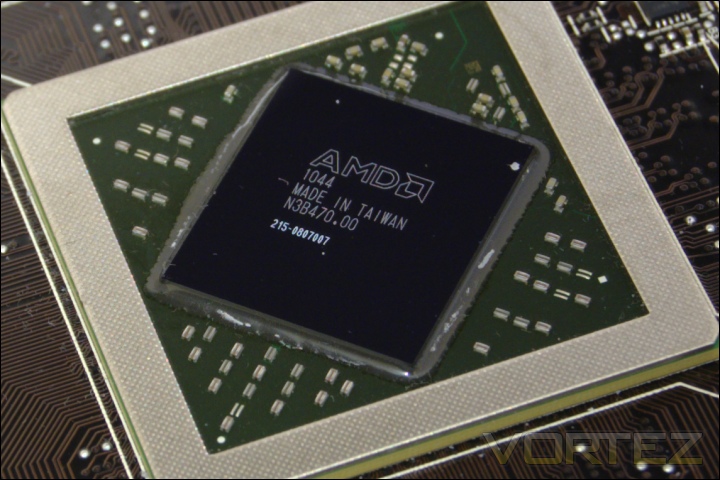
The Cayman GPU
The Cayman core seen here has a die size of 389 mm squared, significantly larger than the 255mm squared Barts core and the 334mm squared Cypress core. This is the largest AMD core since the notorious R600 core design which came at 420 mm squared. The fabrication is still on the 40nm process due to the lack of readily available 32nm or 28nm manufacturing.
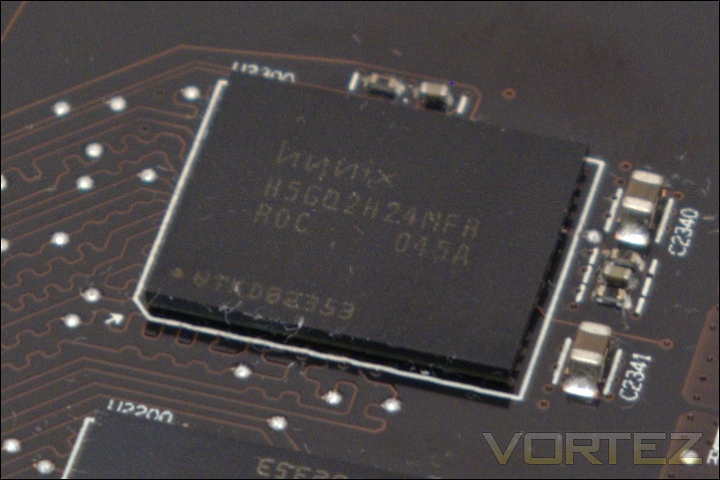
The 8 Hynix memory modules
The memory modules are once again GDDR5 chips sourced from Hynix rather than Samsung. The H5GQ 2H24MFR ROC 045A chips operate at 1.5V. The RO denotes that the memory is rated at 6GHz, superior to the modules used on the HD6950. Unlike the HD6870, the memory controller is more robust and can benefit from the full potential of the Hynix module. Each module is 256MB to give a total of 2GB of VRAM.
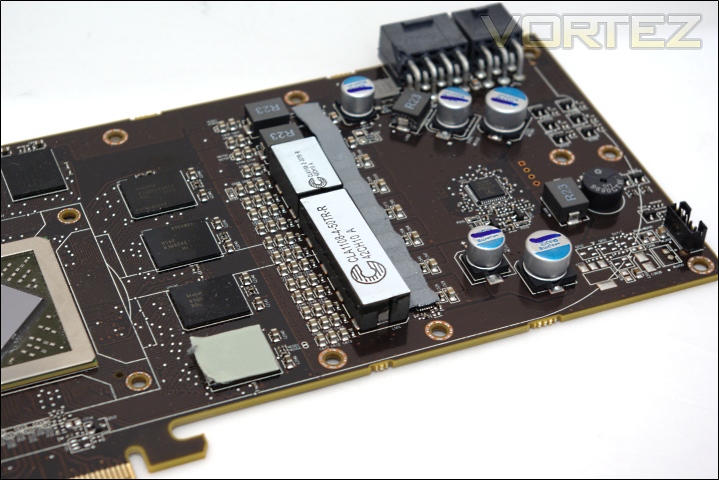
The VRM circuitry
The CLA1108-4 chokes are unique additions to the card for a robust VRM power circuitry. The card appears to use a 6 phase PWM design, similar to the HD6950.
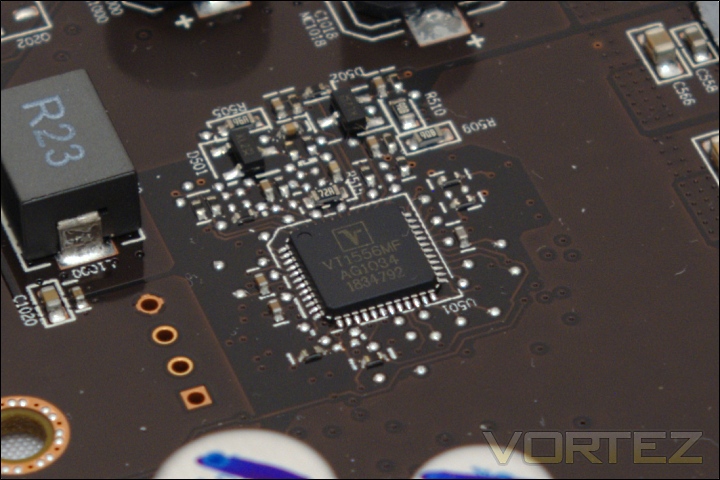
The Volterra VT1556MF voltage controller
The Volterra VT1556MF voltage controller sees its first use on the HD6900 series. MSI’s Afterburner application has been updated (Beta 2.1.0.7) to support voltage tweaking on the HD6970 so ASUS SmartDoctor is no longer the sole application to support the feature.
Test Setup
CPU – Intel Core i7 920
RAM – 6GB (3x2GB) OCZ Platinum DDR3 1333MHz
Motherboard – ASUS Rampage III Extreme
Power Supply – Enermax Revolution 85+ 850W
Hard Drive – OCZ Vertex 2E 120GB
Samsung F3 1TB
Samsung F1 320GB
Cooler – Noctua NH-D14
Graphics Cards:
GIGABYTE HD6970 2048MB @ 880/5500MHz & 916/5940MHz Overclocked – ATI Catalyst 10.12a (8.790.6.2)
ASUS GTX580 1536MB @ 782/4000MHz & 903/4220MHz Overclocked – Forceware 262.99ASUS HD6970 2048MB @ 890/5500MHz & 949/5896MHz Overclocked – ATI Catalyst 10.12a (8.790.6.2)
HIS HD6950 2048MB @ 800/5000MHz & 865/5500MHz Overclocked – ATI Catalyst 10.11 (8.790.6.0, 8.790.6.2 & 8.800)
Nvidia GTX480 1536MB @ 700/3696MHz & 799/3906MHz Overclocked – Forceware 260.99
MSI R6870 2PM2D1GD5 1024MB @ 900/4200MHz – ATI Catalyst 10.10
XFX HD5870 1024MB @ 850/4800MHz & 942/5200MHz Overclocked – ATI Catalyst 10.10
Note – The latest 10.12a drivers used from AMD’s website are still identified as 10.11 drivers. They are a slightly updated build of the drivers used for the HD6950 review (8.790.6.2). Through testing, we discovered this particular driver set to provide better performance than the latest 11.1 drivers.
Benchmark Suite
MSI Afterburner & Kombustor
GPU-z
Crysis Warhead using the FRAMEBUFFER Crysis benchmark tool
Far Cry 2
Metro 2033
Resident Evil 5
Street Fighter IV
Unreal Tournament 3 using the HOC Bench tool
Colin McRae DIRT 2
Batman: Arkham Asylum
Battlefield Bad Company 2
Mafia II Demo
Colin McRae DIRT 2
Alien VS Predator
H.A.W.X 2
3DMark 11
3DMark Vantage
Unigine V2.1 DX 11 Benchmark
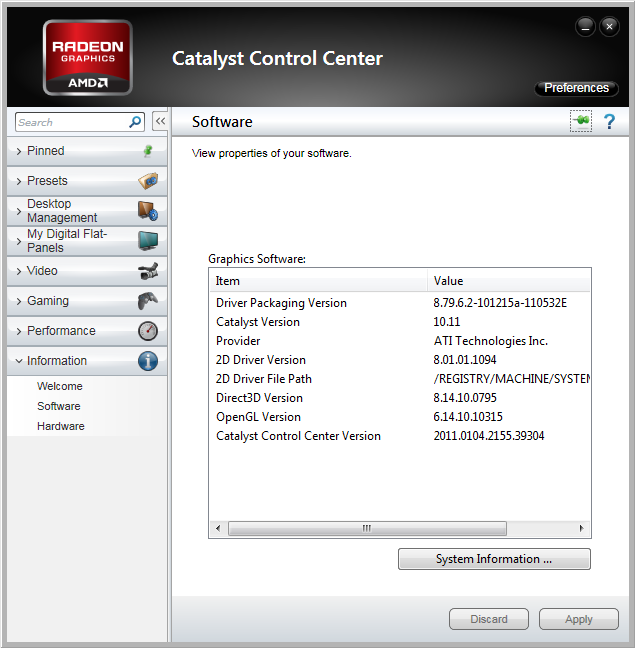
AMD PowerTune & Software
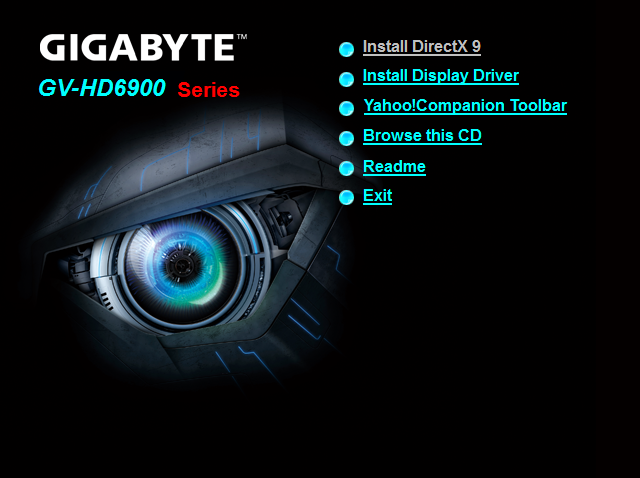
The bundled disc doesn’t contain much in terms of extra, merely the drivers and a very unpopular Yahoo toolbar. It’s very strange to have this included on the CD.
AMD PowerTune
Overclocking is nothing without stability and for most enthusiasts; applications such as Furmark, OCCT or MSI Kombustor have been the stress test of choice to truly load graphics cards. However, both AMD and Nvidia have voiced their concerns against the use of such applications due to the number of cards killed as a result of high temperatures and unforgiving load. They believe that stress tests are not representative of gaming loads and should therefore not be used as an indicator for stability.
This is where PowerTune comes in. The basic concept is that it locks the GPU’s thermal design power (TDP) to a pre-determined value such that when it is exceeded, the GPU will try to lower power usage. This is achieved by simply lowering the clock speed when the pre-determined TDP is attained under load. On the HD6950, the PowerTune Maximum Power is set to 200W whilst on the HD6970, it is set to 250W. AMD claim that typical gaming loads would draw 140W using the HD6950 and up to 200W using the HD6970, meaning that in typical scenarios, gamers shouldn’t worry about their cards reaching the maximum TDP and throttling. The main situation where it PowerTune would kick in is under heavy loads from programs such as the stress test applications mentioned above.
Overclocking presents another scenario where throttling might occur. Not surprisingly, overclocking will increase the power draw both in game and in stress tests closer to 200W/250W. This means that the card will be more susceptible to throttling as they exceed the PowerTune maximum TDP. AMD realise that PowerTune may not appeal overclockers but rather than giving them the option to disable the feature, they provide power control settings in Overdrive. Raising the limit to 20% sets the new maximum TDP to 240W on the HD6950 and 300W on the HD6970, still within ATX specifications. This gives overclockers additional headroom before throttling occurs. It also means that at stock clocks, the chance of getting reduced performance is much less. Conversely, to increase power efficiency, the power control settings can be reduced by 20%, making it ideal in situations where higher clock speeds are not needed.
In some ways, the system is akin to Turbo mode on both AMD and Intel CPUs. In the latter case, if power draw is within the TDP, the CPUs will have their speed boosted. Therefore, under light load, the CPUs will operate faster and simply clock to default speeds when the TDP is reached. In the HD69XX’s case, the core works at its default clocks and throttles when the TDP is reached. Nvidia have employed a similar feature on their GTX580/570 for the same reasons as AMD.
Throughout the benchmarks, the PowerTune limit was set at 20% to ensure overclocking headroom. However, at stock speeds, there was no noticeable performance difference between the 0 and 20% settings.
Temperature & Overclocking
The GIGABYTE HD6970 is a standard reference card with no additional tweaking. As such, it comes clocked at the default 880/5500MHz. Regardless of that, it is still a very high clock speed relative to other cards on the market, with enough headroom to break the 900MHz barrier. The card operates at an idle voltage of 1.0V and 1.175V under load, the same as the ASUS card. When idling, the card reduces its speed to 500/5500MHz to draw less power. The higher than normal 2D clocks are due to two monitors being used and to prevent subsequent flickering.
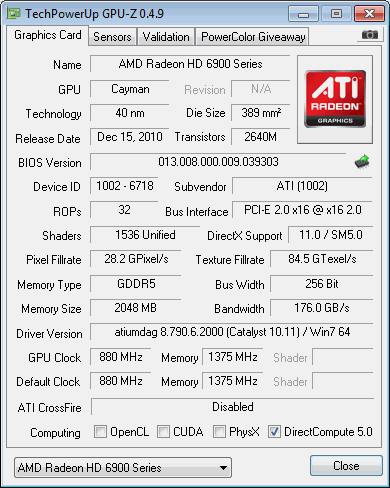
Stock
Overclocking on the GIGABYTE card was a simple matter of using AMD’s Catalyst Overdrive and MSI Afterburner. Unlike the ASUS card, the GIGABYTE doesn’t bundle any overclocking software so third party tools had to be relied on. MSI Afterburner has always been our weapon of choice anyway thanks to its flexibility and in-depth overclocking features. In the end, the HD6970 achieved a somewhat dismal 916/5920MHz, 33MHz less on the core than the ASUS card but 24MHz higher on the memory. The clock speed increase represents a 4% boost over the stock core speed and 7.6% over the memory clock speed. The idle and load voltages were kept at the default 1.0/1.175V respectively. Stability was ensured by using MSI Kombustor and prolonged gaming sessions. It is now possible to use MSI’s Afterburner application to increase the core voltage but the card was tested prior to the Beta’s release so overclocking was done on the stock voltage.
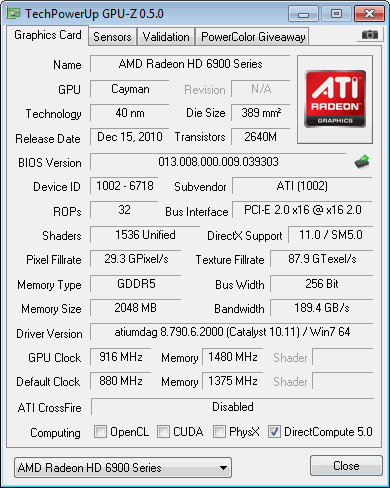
Overclocked
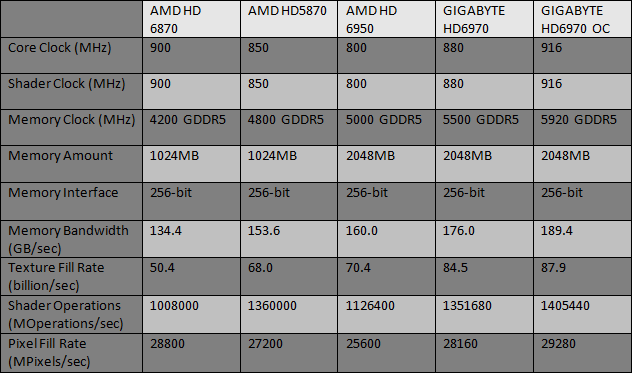
The 4% boost in core clock speed is reflected by the same increase in Pixel/texture fill rate and shader operations and similarly the increase in memory clock speed leads to the same increase in memory bandwidth.
The average performance increase from the overclock was 4.2%, an almost linear scaling with the core clock increase. Interestingly, it is the same performance improvement achieved by the higher overclock of the ASUS card. This highlights the fact that voltage tweaking can cause the graphics card to exceed the TDP envelope and thus cause PowerTune to kick in to reduce power consumption. With the GIGABYTE card, this is not an issue.
Temperature & Noise
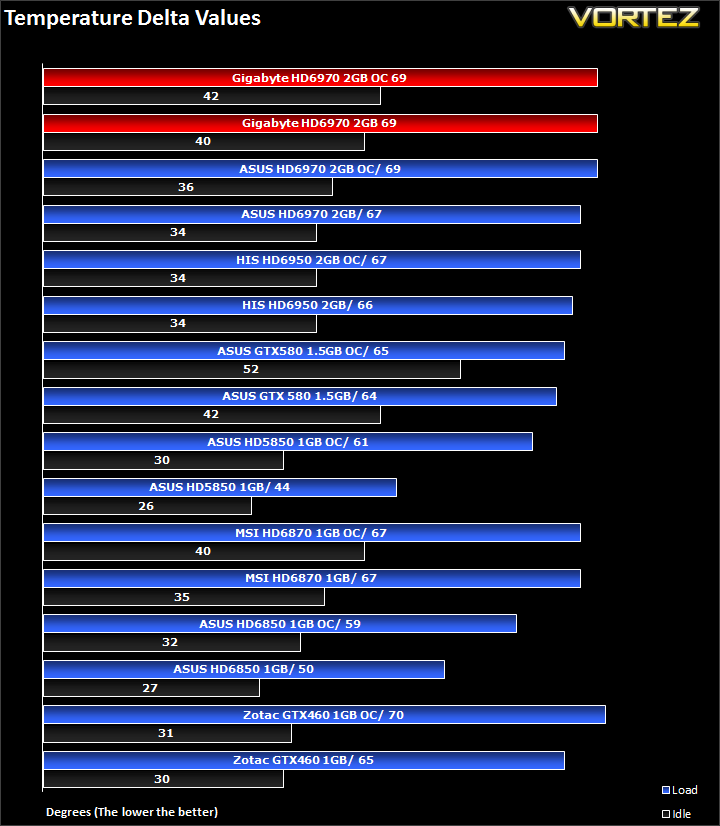
The reference vapour chamber cooler is an effective method of taming one of AMD’s biggest and hottest GPUs. It manages to achieve a delta temperature of 40C at idle and 42C when overclocked, operating at 28% and 32% fan speeds respectively. The fan is quiet at those speeds, only becoming audible at over 40%. Under load, the cooler keeps the graphics card at an acceptable 69C delta at both clock speeds. The difference is that the fan operates at 51% at stock clocks, ramping up to 57% to cool the higher clock speeds. At 52%, the fan becomes quite intrusive but thankfully, this only occurs under heavy load when games will most likely drown the sound of the fan.
Crysis Warhead
Following the success of Crysis, the stand alone expansion “Warhead” was hotly anticipated to bring more game play, more weapons, improved visuals whilst maintaining better performance, the latter being what gamers wanted most. After all how many people upgraded their rigs just to play this game… In the game, you play as the upbeat Brit Sergeant “Psycho” Sykes, chasing down a Korean nuclear warhead. Throw in some ice shooting aliens and we’re bound to have a great game. It sure delivered.
Testing was done using Framebuffer’s Crysis Warhead benchmarking tool. The tests were configured to DirectX 10 at Enthusiast levels. Each test on the Ambush map was looped three times from which the average FPS was recorded.
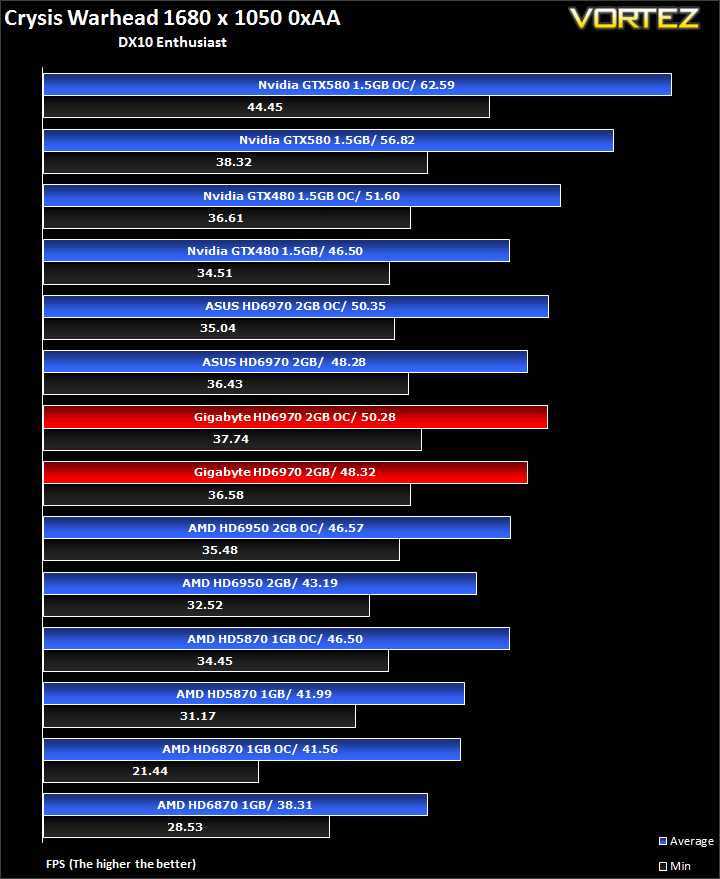
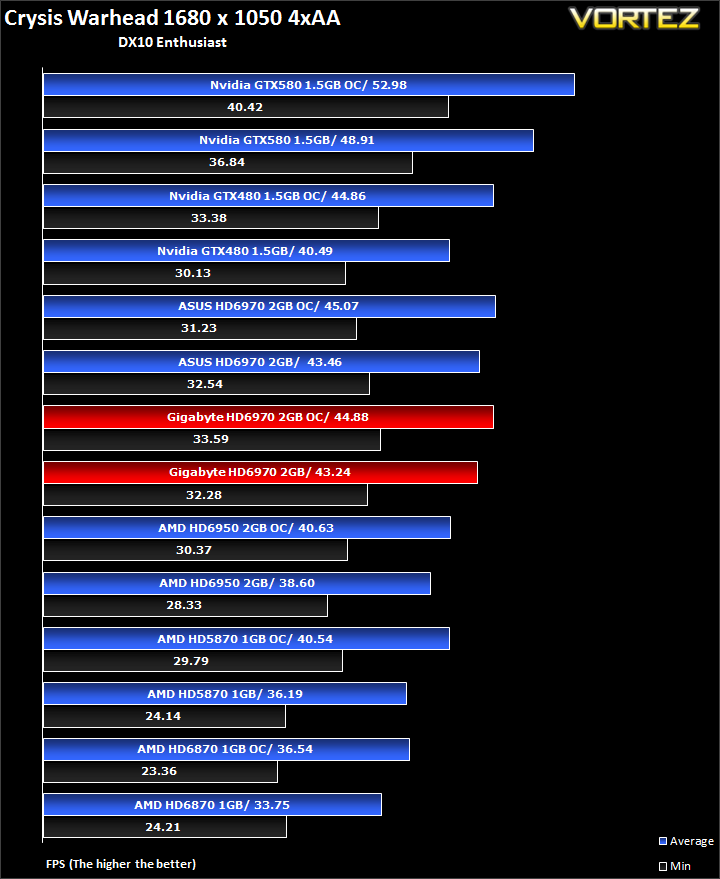
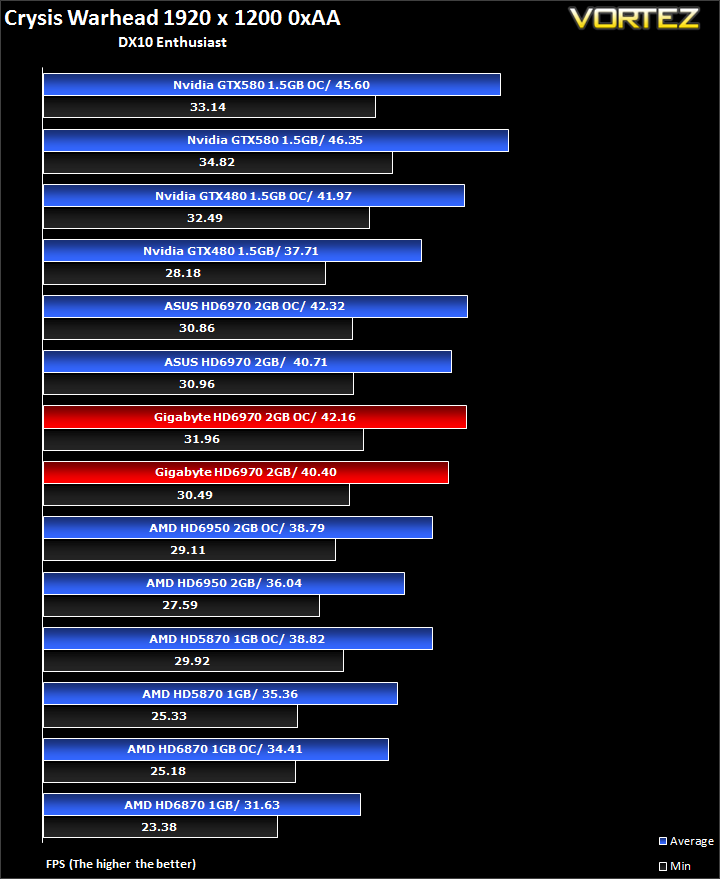
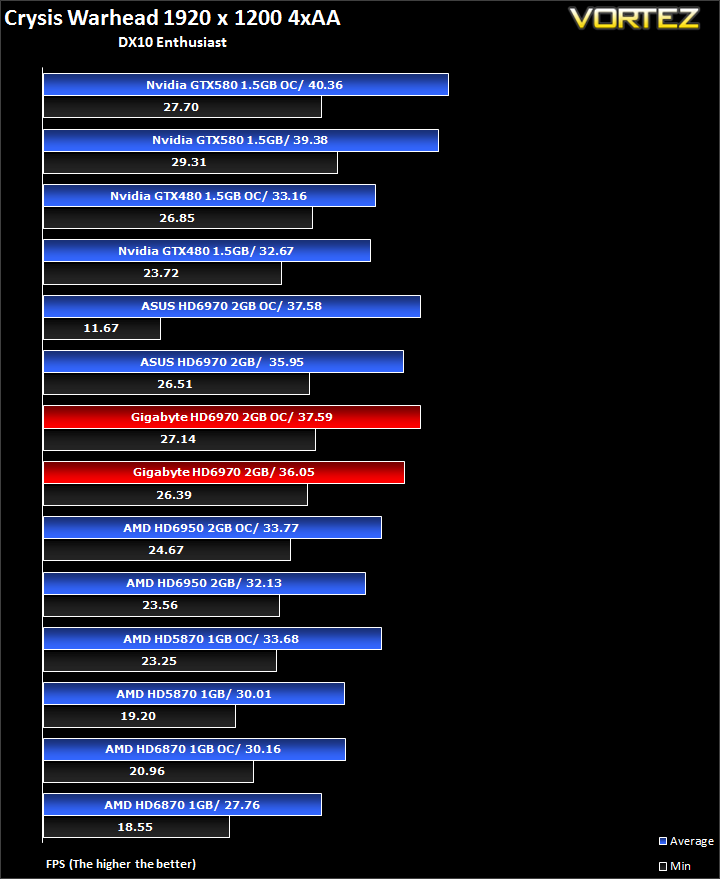
The two HD6970s perform very similarly in Crysis with very little difference between the two. The ASUS manages to grab the most marginal of leads over the GIGABYTE thanks to its 10MHz overclock when looking at default speeds. Even when both are overclocked, the GIGABYTE keeps up despite the much higher overclock on the ASUS card.
Far Cry 2
One of the most hyped games of 2008, Far Cry 2 had some big shoes to fill. It was built to be the next best thing since well… Far Cry I suppose. Combining an open-world game play with highly detailed graphics, physics and AI, what more could we possibly want? The game puts us in the body of a malaria inflicted mercenary hunting down the “Jackal” in the heart of Africa, in a bid to stop an on-going conflict between two rival factions. The storyline can be hard to follow sometimes but I’m no game reviewer, so let’s concentrate on the graphics and performance. After all, we all need to know if our hardware will be able to handle the scorching savannah burning at the hands of our flamethrowers.
The bundled benchmarking tool was used on Far Cry 2, configuring the settings to Ultra and DX10. The small ranch level was chosen and each configuration was looped three times from which the average FPS was recorded.
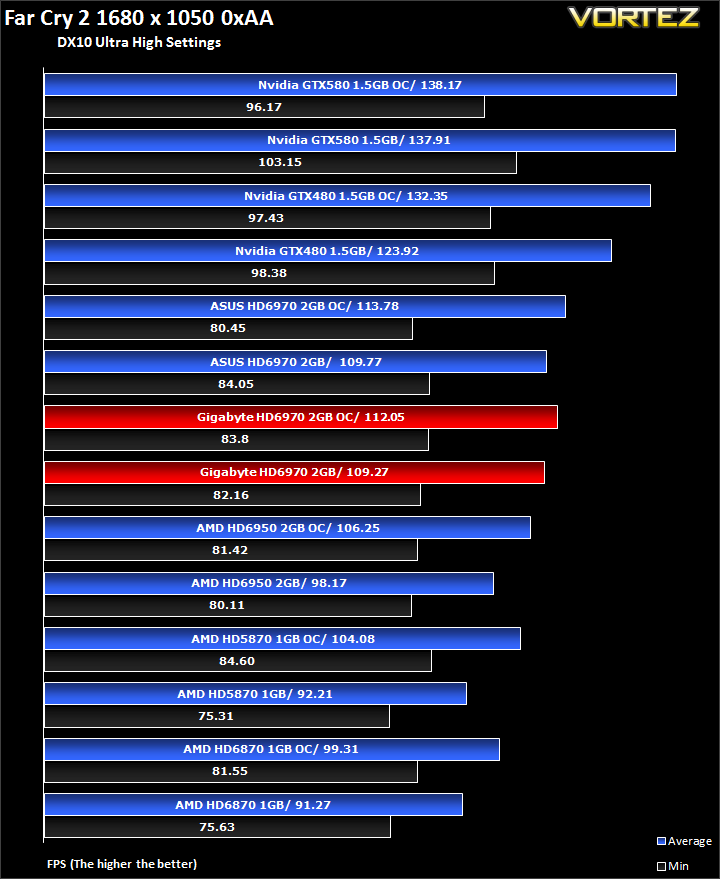
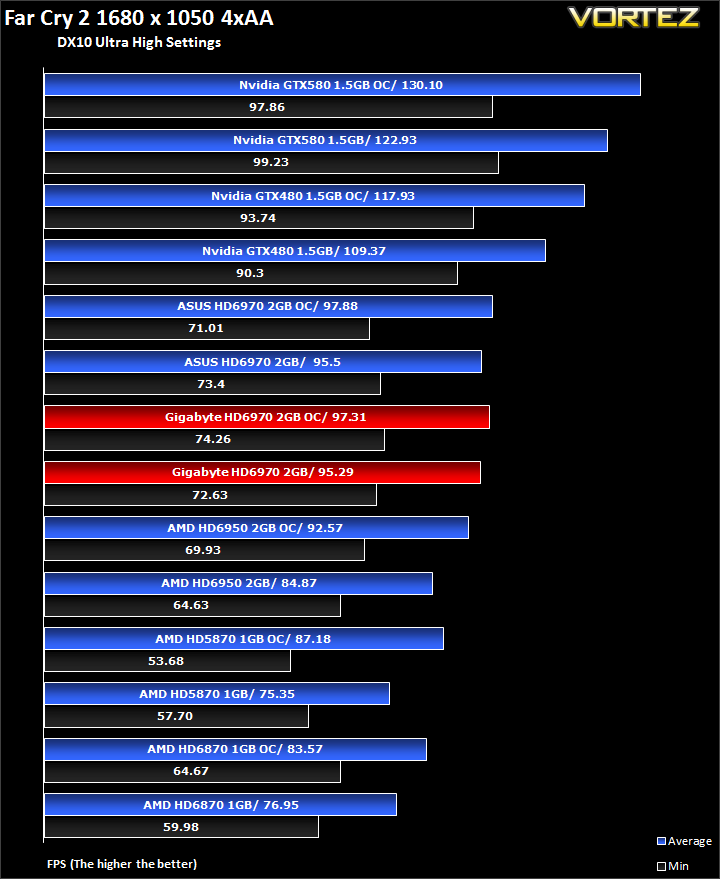
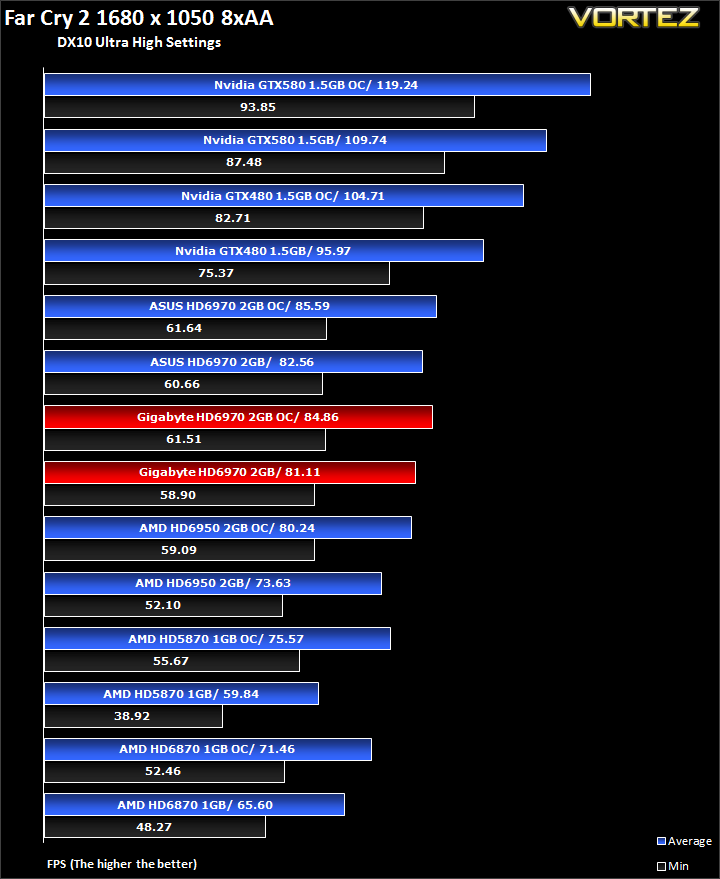
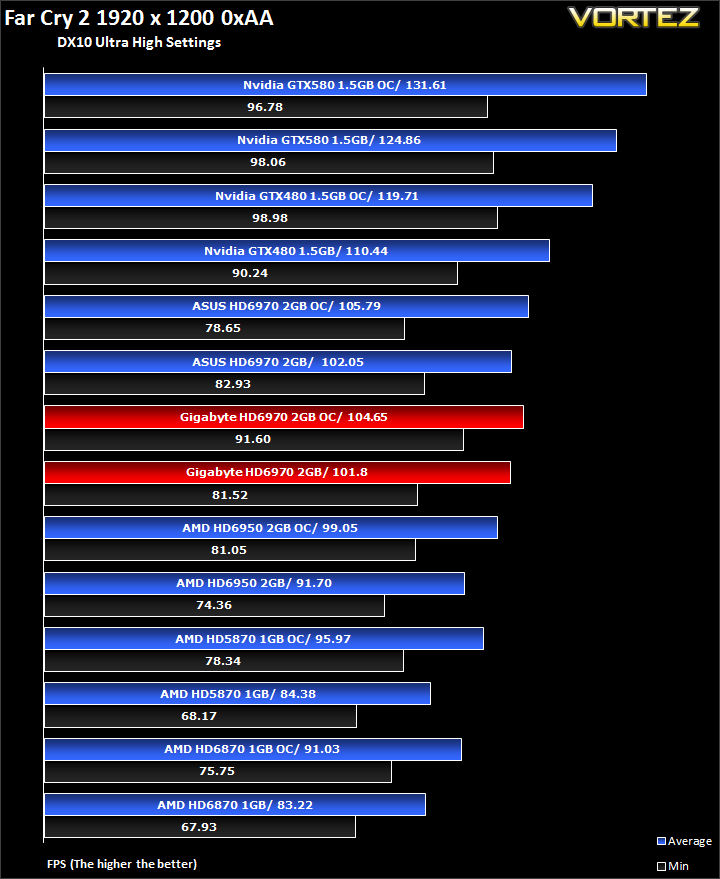
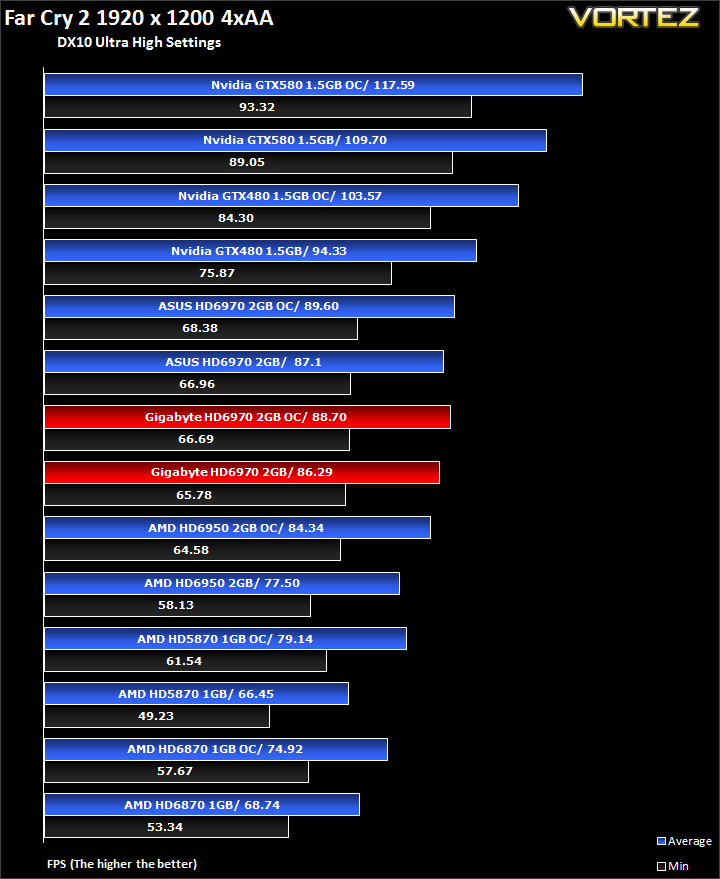
A mere 1% differentiates the two HD6970s, albeit favouring the ASUS card and its higher clocks. Even with its clock speed deficiency, the GIGABYTE card holds its own very well at both stock and overclocked speeds.
Metro 2033
Based on Novel by the same name, Metro 2033 is a first person shooter with elements of survival horror. As Artyom, you trawl through the mutant infested metro systems of post-apocalyptic Moscow. The game delivers presents a grim ambience that reflects on the overall atmosphere of the underground setting. Metro 2033 uses the setting as a back drop to showcase some of the best visuals of any games out now, making it the ideal benchmark for those looking for the best graphics card.
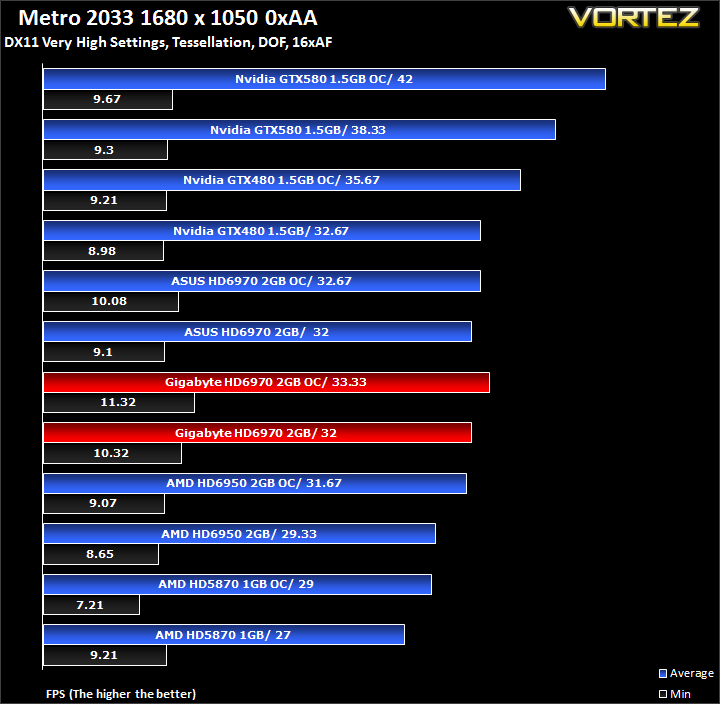
The bundled benchmarking tool was used on Metro 2033, configuring the settings to Very High and making use of DirectX 11. The frontline scene was looped 3 times for each configuration. The average FPS was recorded at the end.
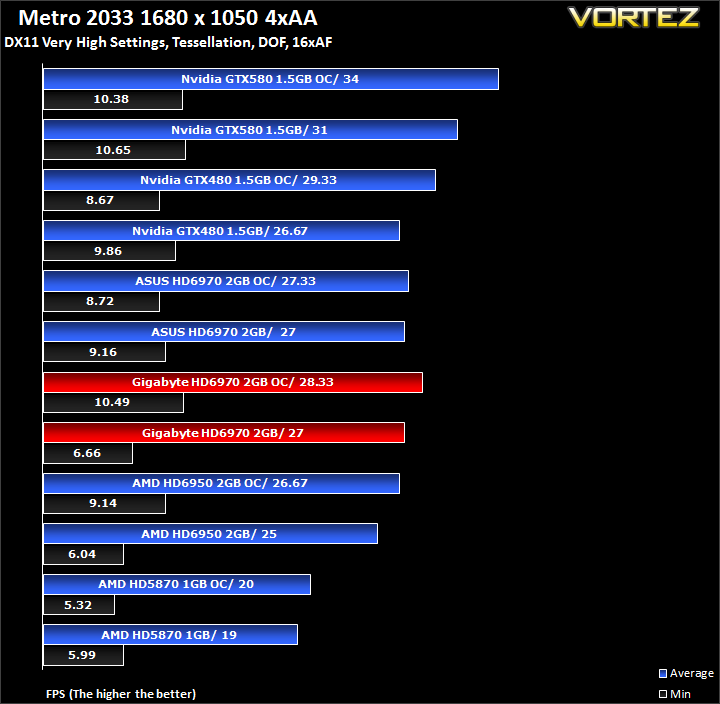
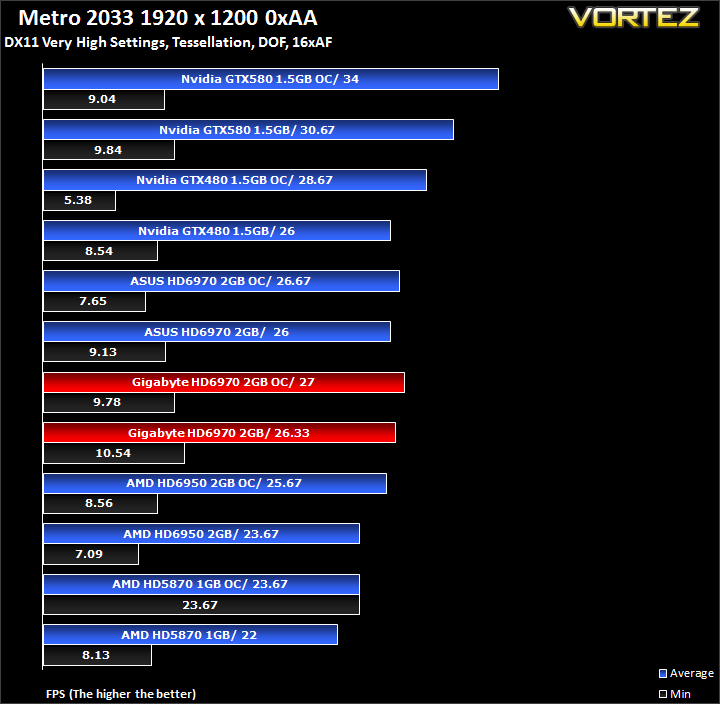
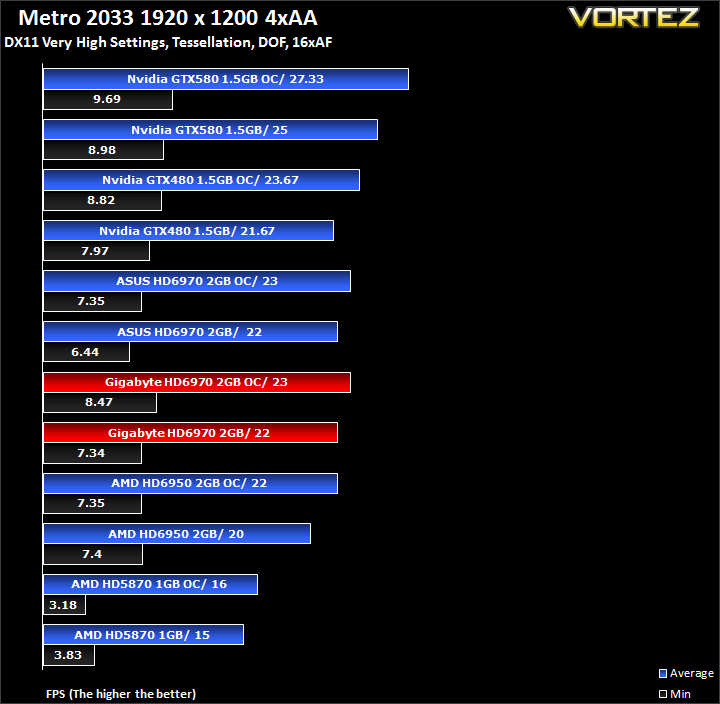
In Metro 2033, GIGABYTE claims a victory over the ASUS card, an impressive feat because of its lower clocks. At default clocks, it outperforms the ASUS HD6970 by a mere 0.3% but by a greater 1.7% margin when overclocked.
Resident Evil 5
Resident Evil 5 is the sequel to the Resident Evil series, exploring the life of main protagonist, Chris Redfield. You play as either Chris Redfield or Sheva Alomar in an African desert area in Kijuju. In true Resident Evil fashion, your main objective is to investigate a terrorist bio-organic weapon threat whilst killing infected “Majinis” on your way.
The Resident Evil 5 benchmark tool was used to test performance. All settings were set to the maximum possible and the average FPS was recorded at the end.
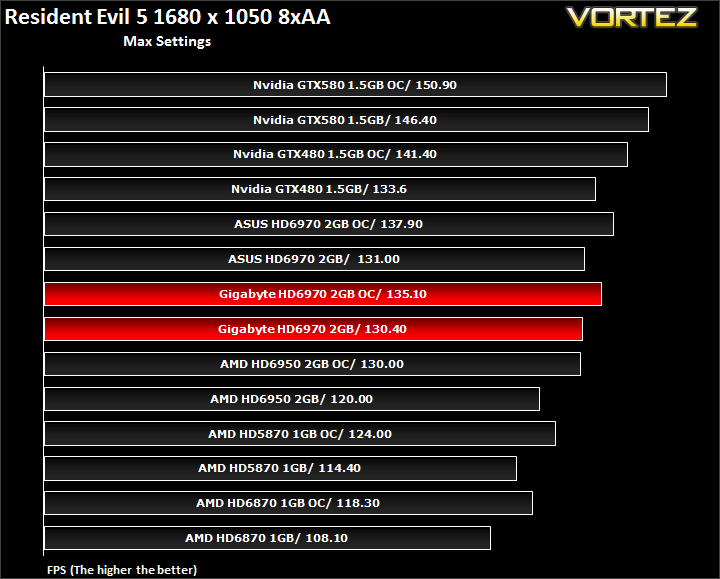
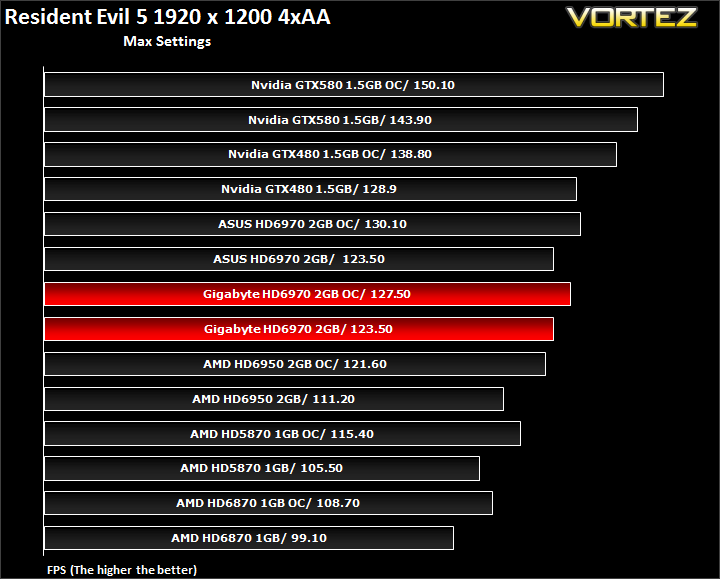
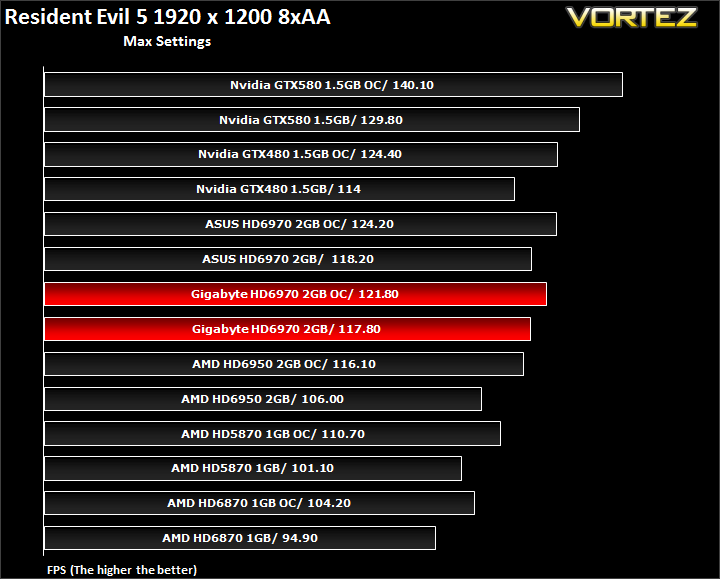
Again, the GIGABYTE falls slightly behind the pre-overclocked ASUS card by 0.5% on average and by another 1.5% when both are overclocked.
Street Fighter IV
Street Fighter is back in its 4th iteration and it’s bigger and better than ever. Combining fluid, fast based sparring with stunning artistic visuals, the game delivers tremendous game play. Be reacquainted with some of the most popular characters in video game history while you battle your way to the top, be it with Ryu or the mighty Bison. The game might be frustratingly hard in some cases but there’s nothing like the satisfaction of K.O’ing your opponent with a well stringed death bringing combo.
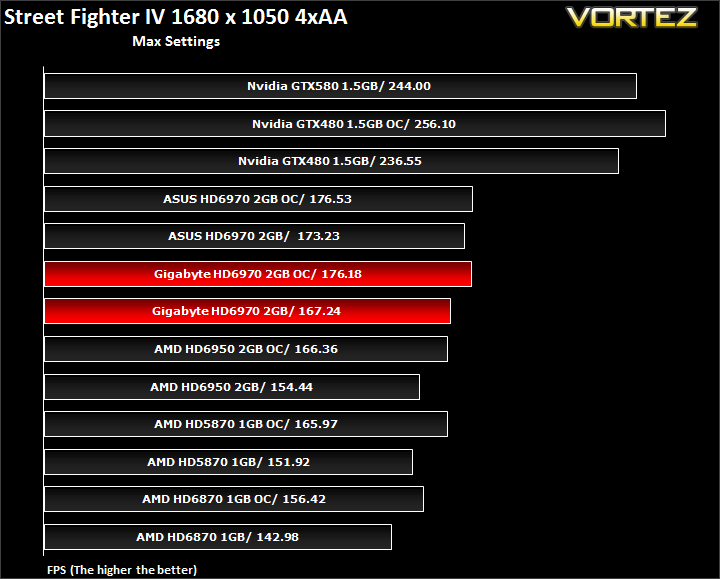
The Street Fighter IV benchmark tool was used to test performance. All settings were set to the maximum possible and the average FPS was recorded at the end.
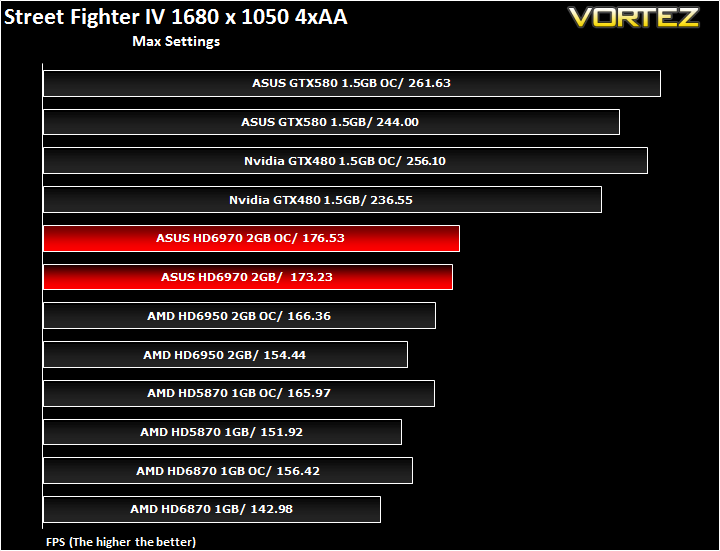
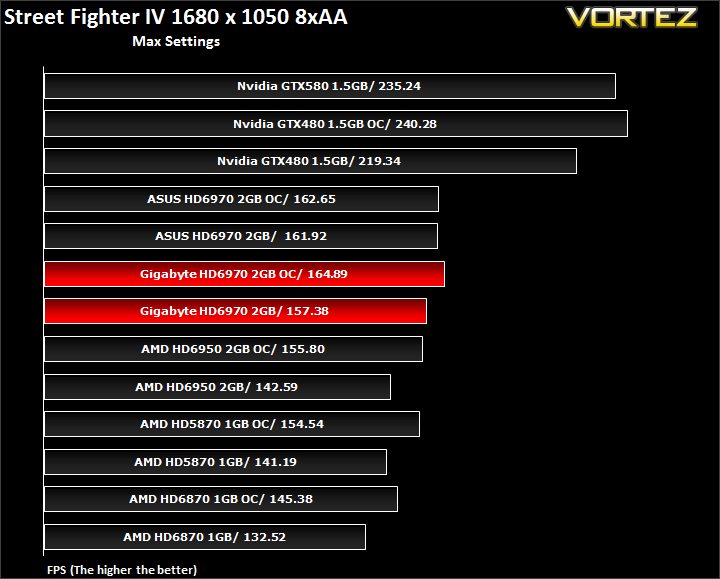
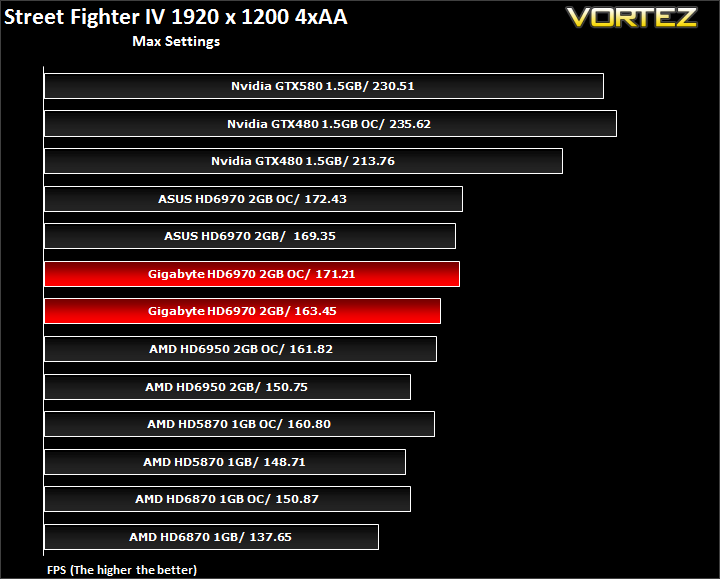
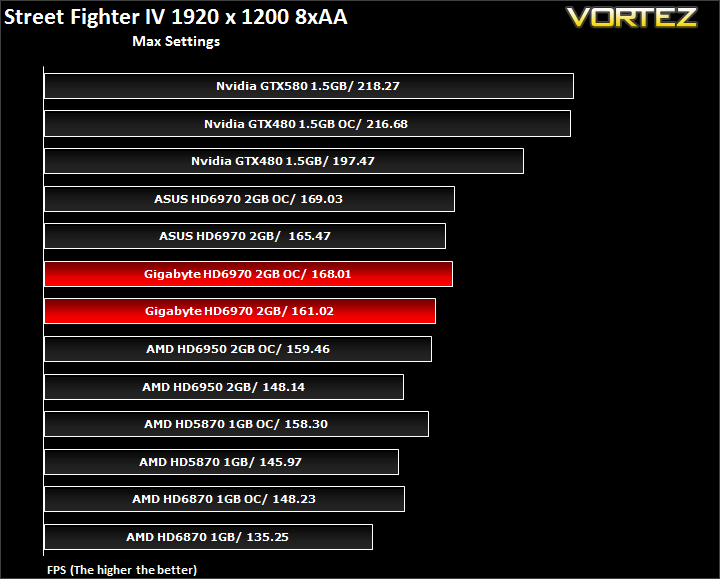
Here, the GIGABYTE falls behind the ASUS by 3% at the factory set speeds but overclocking minimises the gap despite the ASUS card having the clock speed advantage.
Unreal Tournament 3 & Batman Arkham Asylum
Unreal Tournament 3
Built around the unreal 3 engine, Unreal Tournament is all about mindless fast paced shooting, decapitation with a plethora of game modes to so in. Not much else can be said really except that it promises hours of enjoyment on multiplier whether it be against bots, your friends at a LAN or online. It was one of the more popular games out there to adopt PhysX in the form of partially destructible maps, tornadoes and hail.
The Hardware OC UT3 benchmarking tool was used to test the game. The maximum in game settings were used including motion blur. Anistropic filtering was set to 16x and no Anti-Aliasing was used. The Containment was benchmarked and the average FPS recorded at the end.
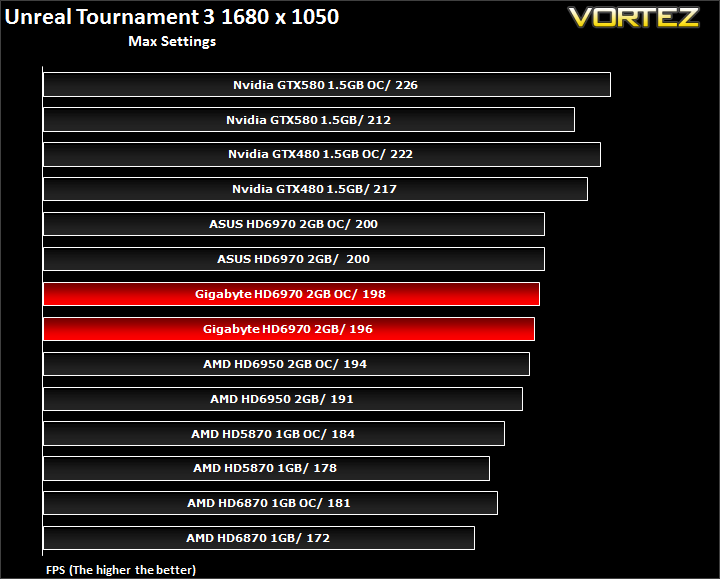
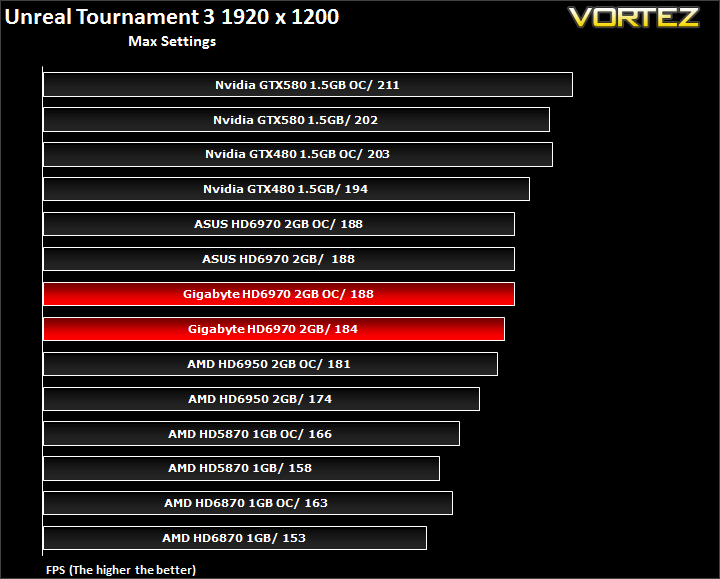
The GIGABYTE HD6970 once again loses to the ASUS at default speeds thanks to the latter’s pre-overclock. Nonetheless it manages to reduce the gap to a mere 0.5% when both are overclocked.
Batman Arkham Asylum
The Dark Knight takes on his greatest challenge yet when he becomes trapped with all of his most dangerous villains inside the insane asylum of Gotham City – Arkham Asylum. The game exposes you to a unique, dark and atmospheric adventure that takes you to the depths of Arkham Asylum, Gotham’s psychiatric hospital for the criminally insane.
The in-game benchmarking tool was used to test performance. All the display settings were set to very high. No AA was used and PhsyX was only enabled if specified in the charts. The average FPS was recorded at the end.
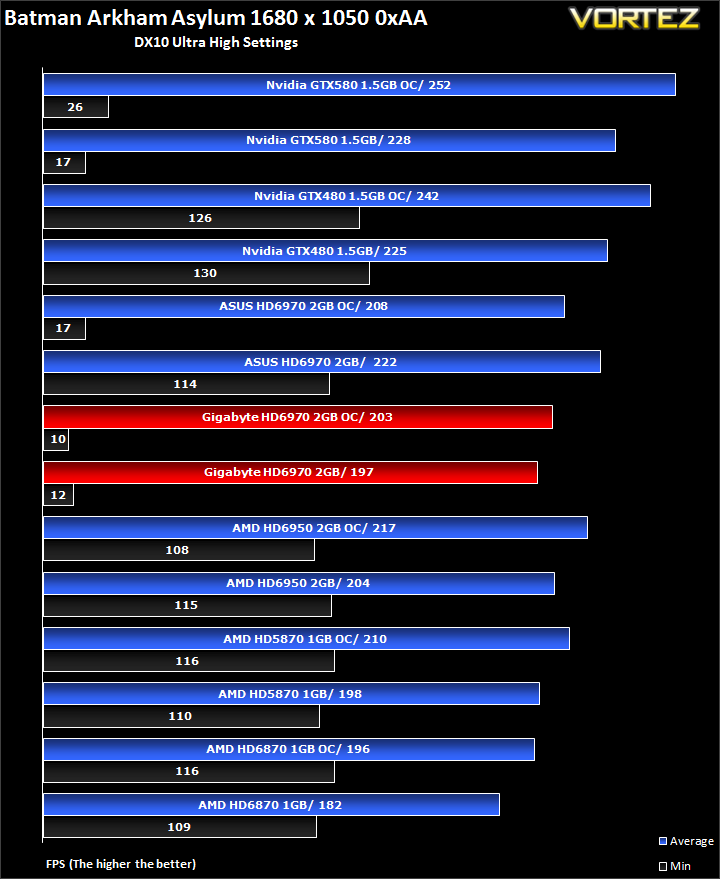
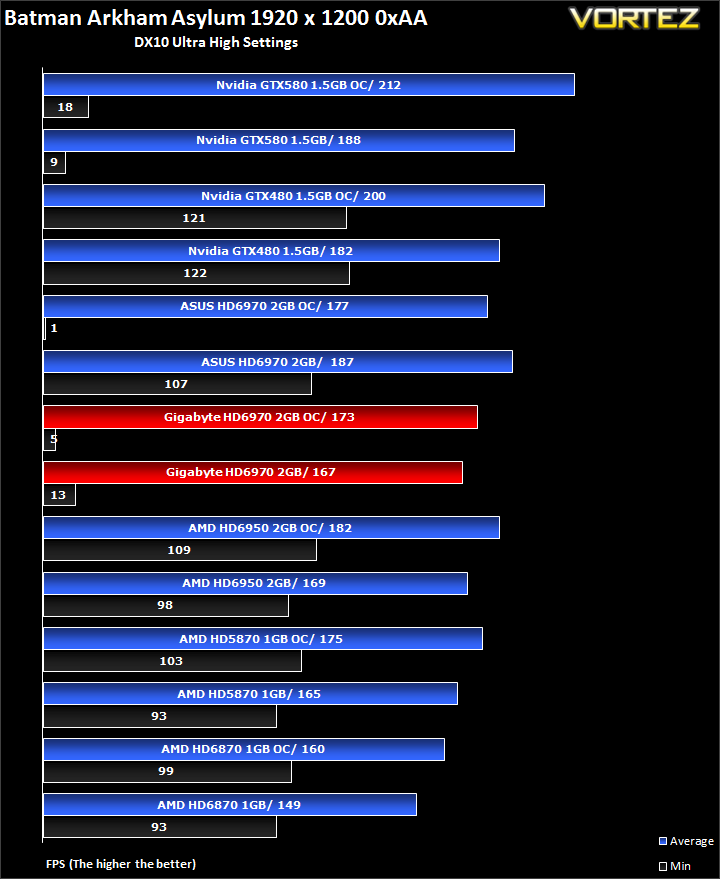
The GIGABYTE suffered from some strange stutters in Batman and this consequently reduces the average FPS. The result is 12% lower performance than the ASUS card at stock speeds. When overclocked, the performance advantage held by the ASUS reduces to 2%.
Colin McRae DIRT 2
DIRT is back and it’s bigger than ever. With an onslaught of famous X-Games competitors such as Ken Block and Dave Mirra, extreme is being brought back to rally. The game not only delivers outstanding gameplay in lush environments but also stunning visuals in the form of Direct X 11 implementation. If you want some fast paced, arcade style racing, then look no further than Colin McRae DIRT 2.
The in-game benchmarking tool was used to test performance. All the display settings were set to the maximum available and DirectX 11 was applied. The average FPS was recorded at the end.
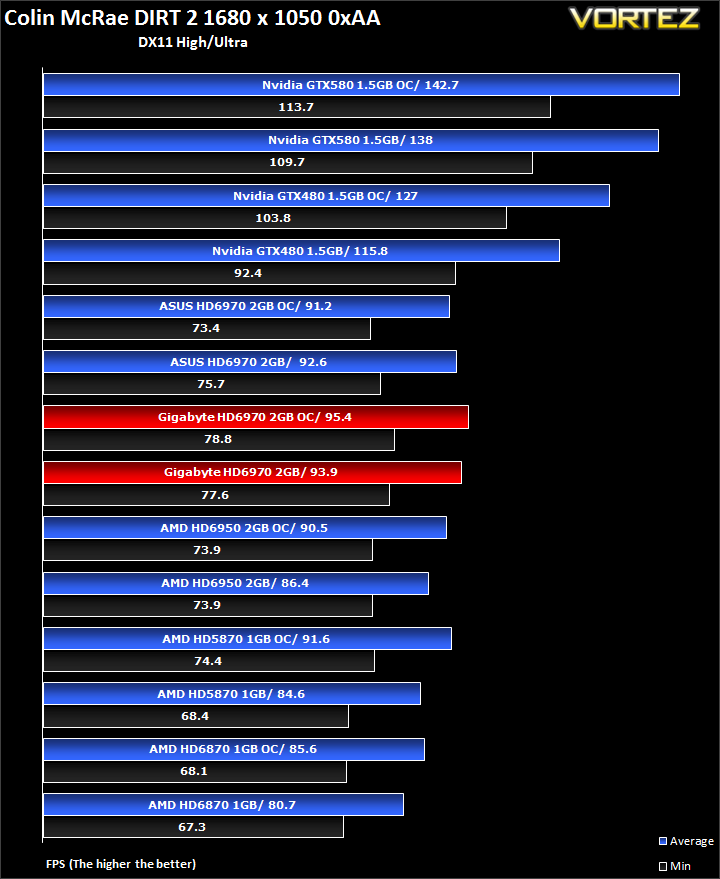
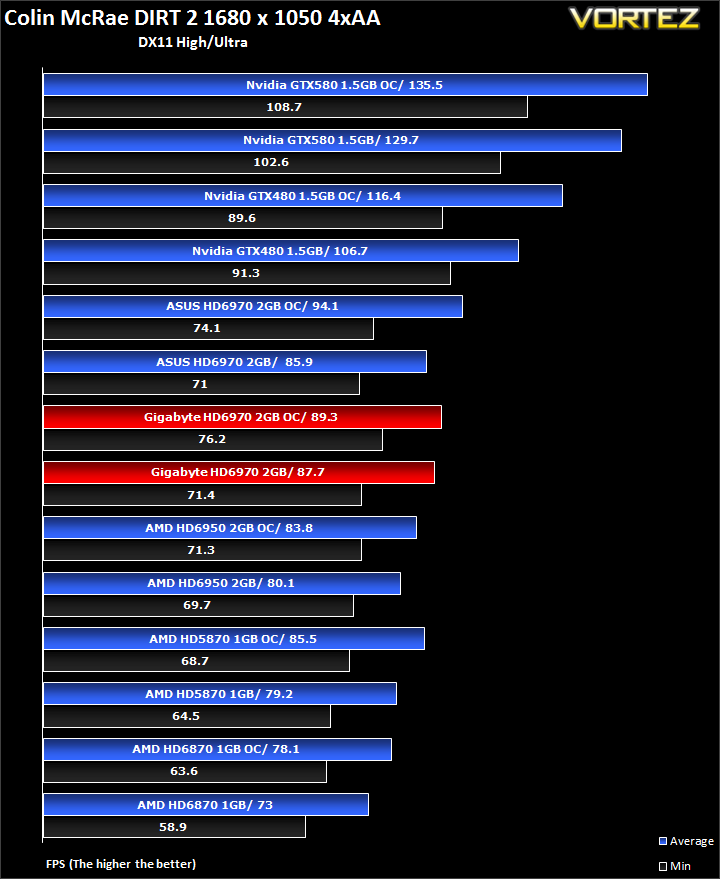
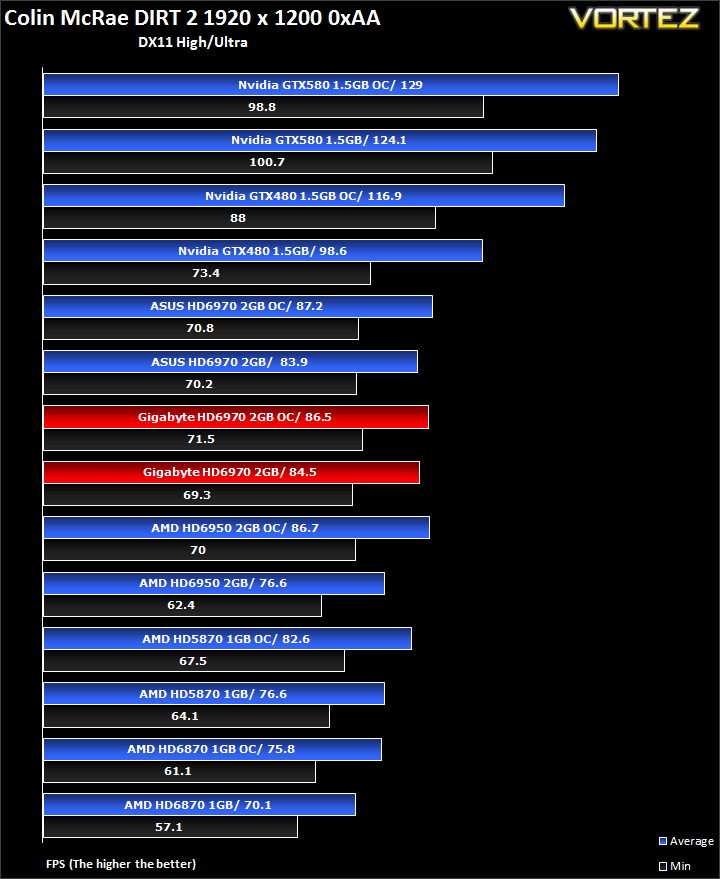
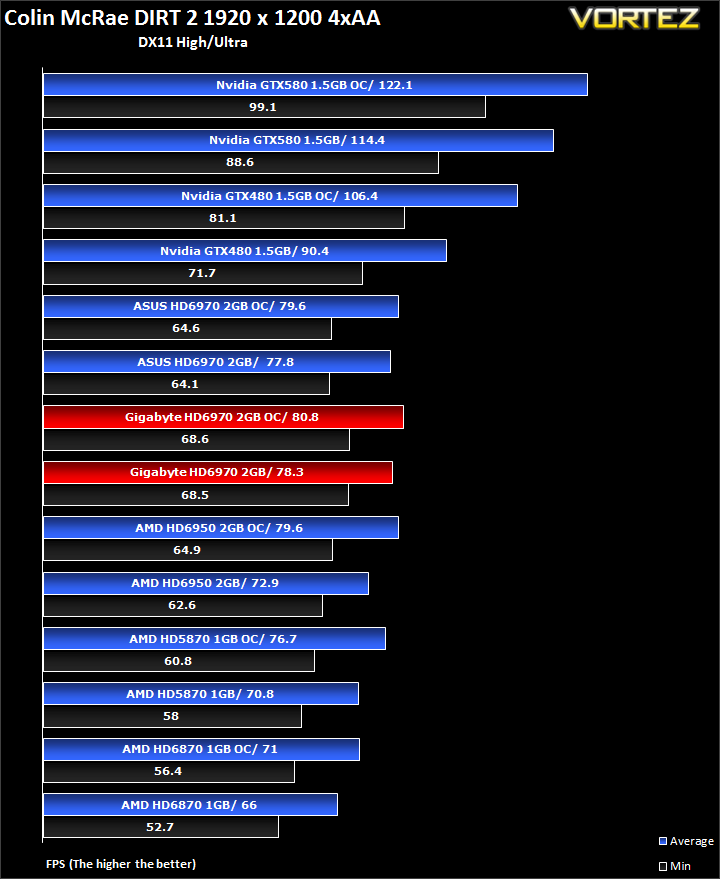
GIGABYTE’s HD6970 manages to grab a small lead here and even when overclock, there is hardly any difference between the two HD6970s. It’s impressive to see that the lower overclock on the GIGABYTE is enough to increase the performance without being affected by PowerTune’s TDP limit.
Battlefield Bad Company 2
Battlefield Bad Company 2 is the new rendition of the widely successful Battlefield series of game. Having more in common with the console release of Bad Company, the sequel hopes to inject the DNA of the timeless Battlefield 2 online experience with the witty action packed single player shooting adventure of the original. As Private Preston Marlowe, your goal as a member of Bad Company is to once again save the world by securing a scalar weapon device.
Fraps was used to test performance. Each test was conducted at the start of the ‘Upriver’ level ensuring that the same actions and paths were taken during the 2 minute sample. All settings were set to the highest available in game with AF set to 16x and HBAO turned on. The average FPS was recorded by FRAPS at the end of each walk through.
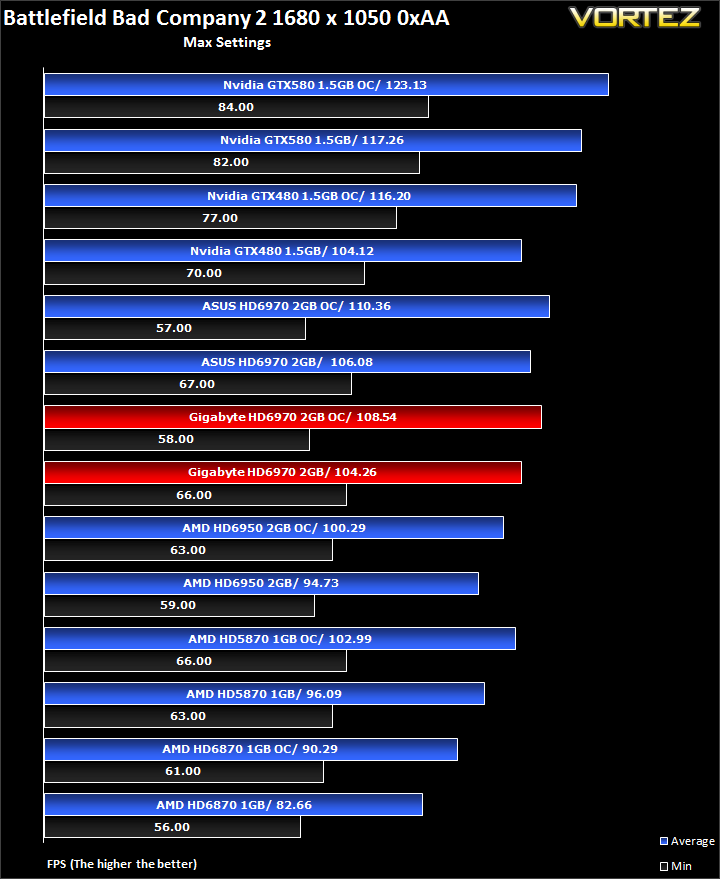
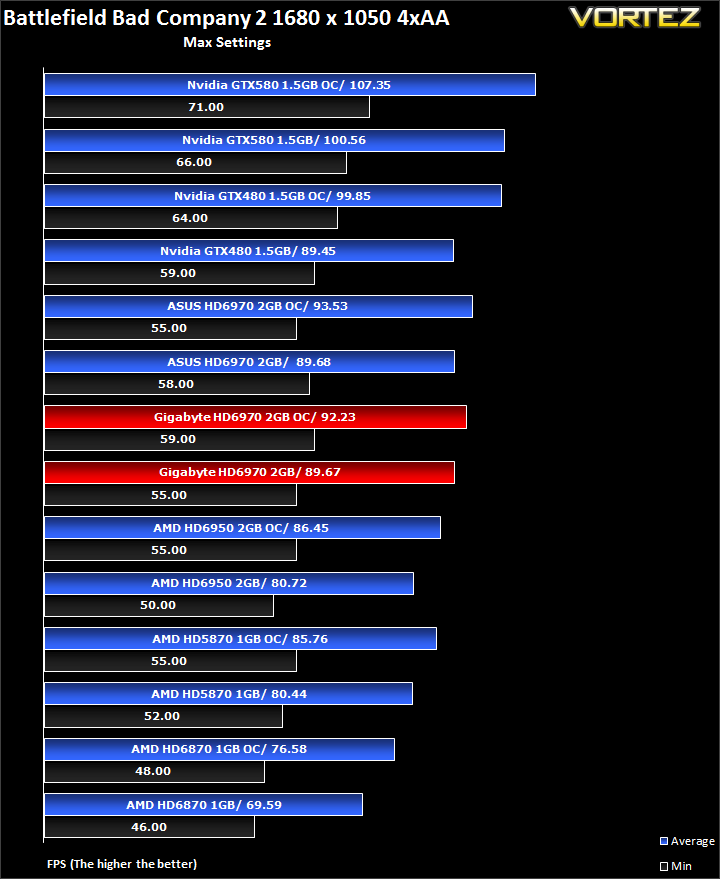
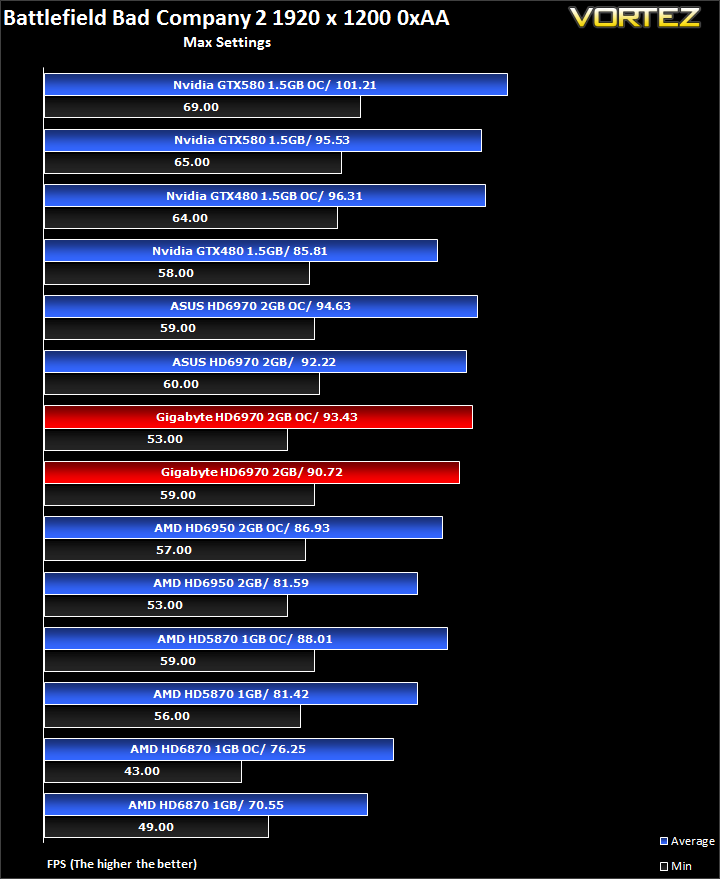
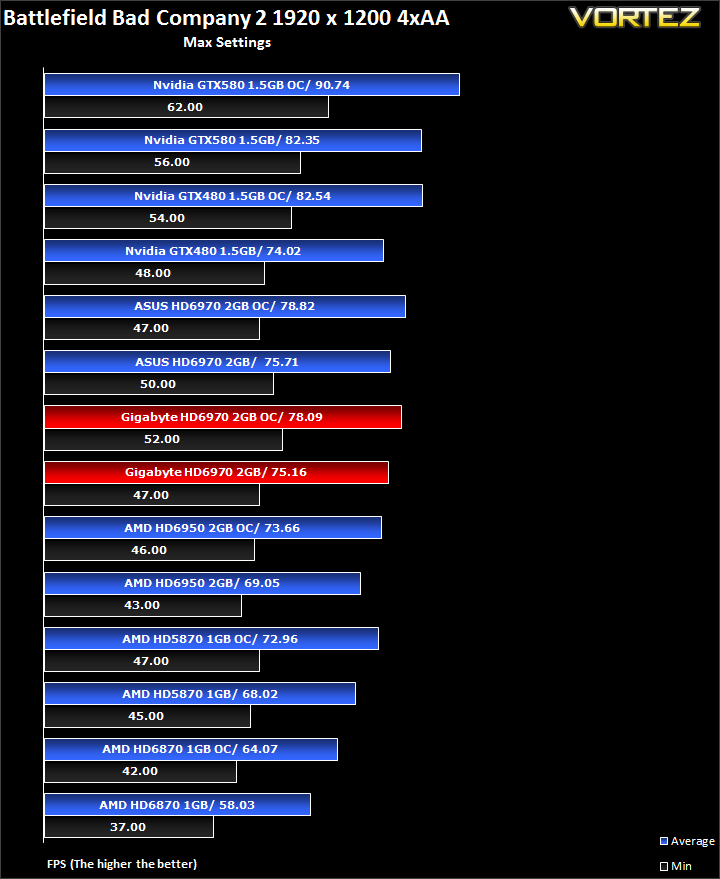
As expected, there is very little difference between the HD6970s, although the ASUS still takes a slight 1% lead at both clock settings.
Mafia II Demo
Following the success of Mafia back in 2002, the third person action adventure game is back with a new grittier and darker world. As Vito Scaletta, an aspiring made man, your job is to work through the twist and turns of Mafia lifestyle. The more blood spilt, the more you get in return but the lifestyle was never meant to be an ideal one. Set in the visually stunning Empire City, the wartime references provide the ever present back drop to a rife period in America’s history, in which potential for exploitation becomes Vito’s key focus.
The in-game benchmarking tool was used to test performance. All the display settings were set to the maximum available in-game. PhsyX was only enabled if specified in the charts. The average FPS was recorded at the end.
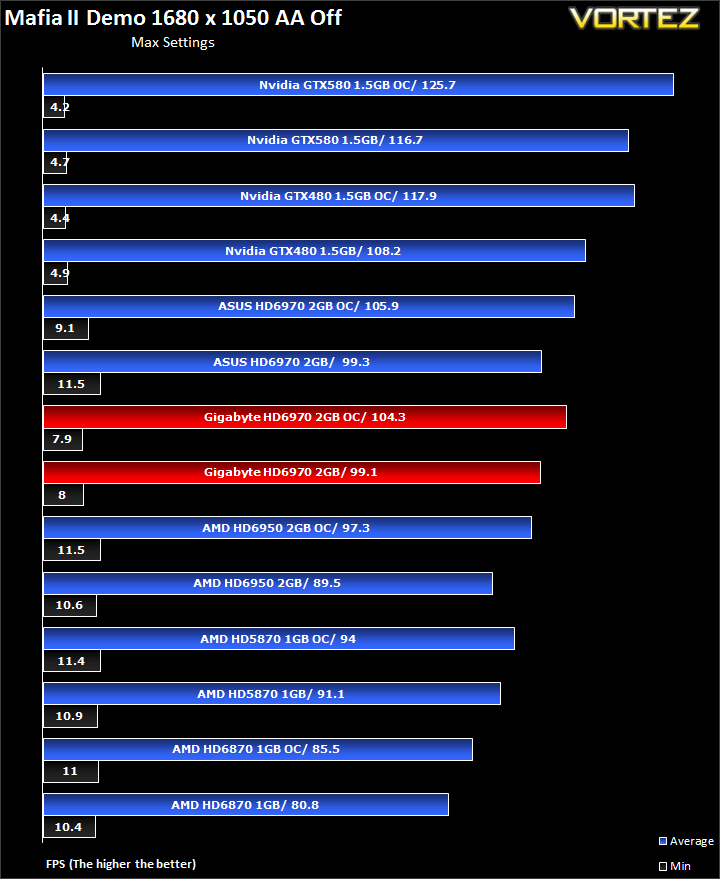
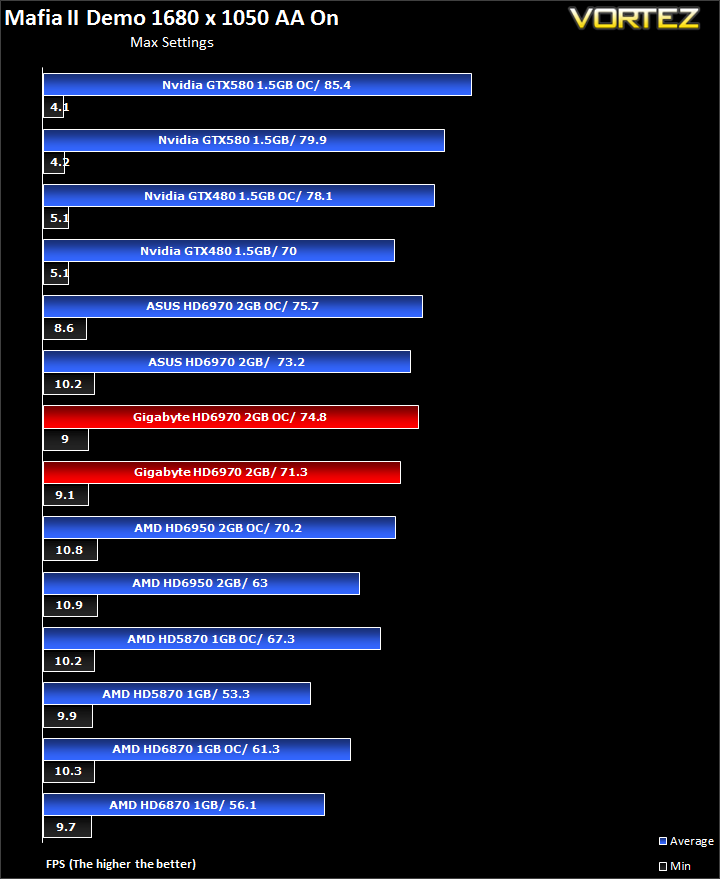
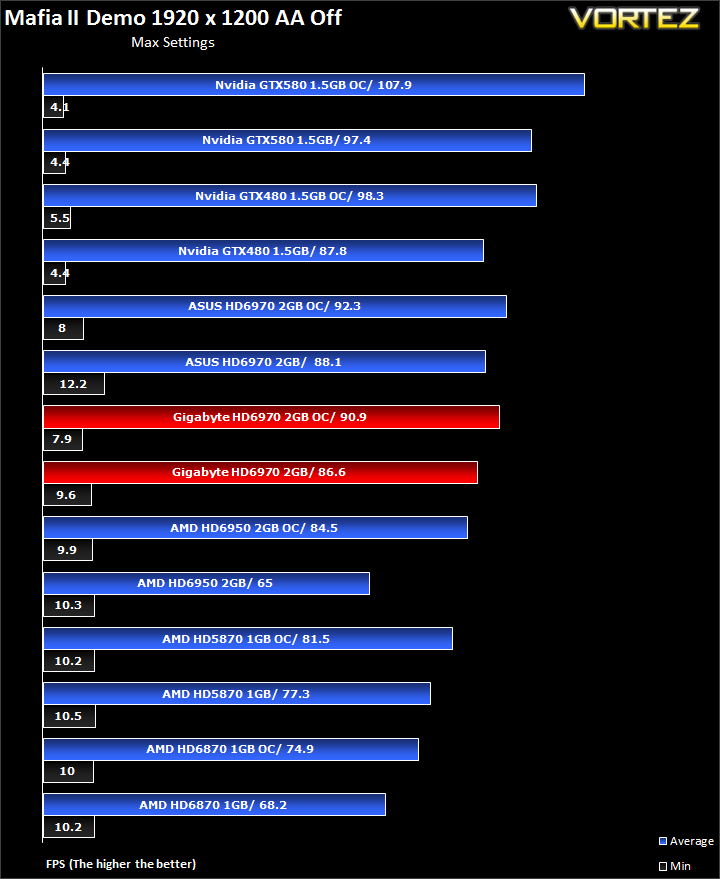
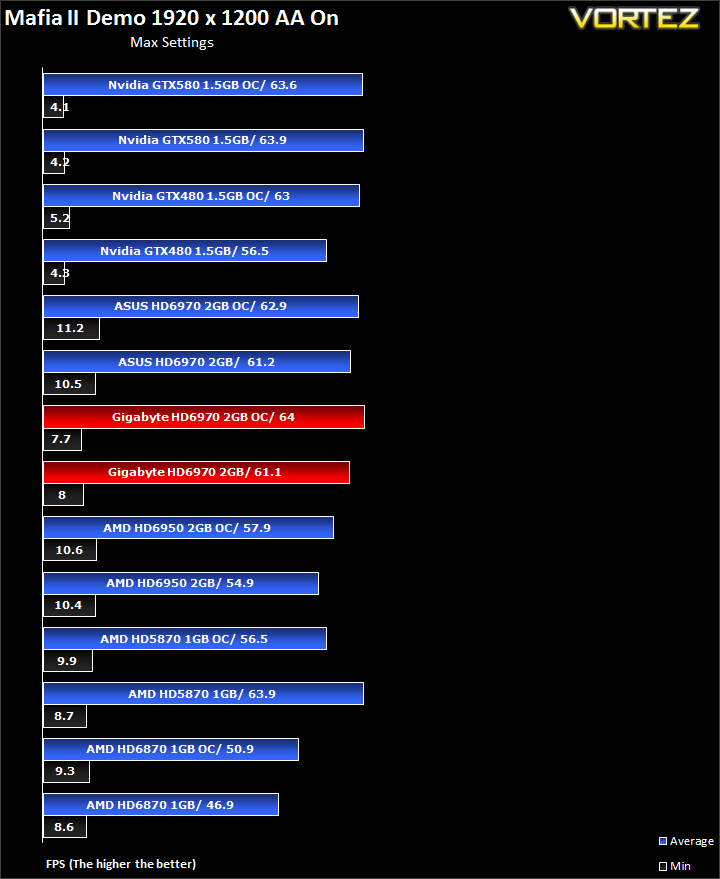
The same trend seen in Battlefield Bad Company 2 can be found here. The two HD6970s perform very closely to each other and the ASUS card fails to widen the gap with its higher overclock over the GIGABYTE card.
Alien VS Predator
Spawned from the popular Alien and Predator franchises, Rebellion have collaborated to bring the legendary war to us through the medium of a first-person shooter. The game forces you to hunt, prey and most importantly survive in the swamp colony of Freya’s prospect as a Predator, Alien or Marine. The stunning visuals add to the sense of dread and terror that we have become so accustomed to seeing with the series.
The stand-alone Alien VS Predator benchmark tool was used for testing here. All the settings were set to very high and Tessellation was applied. The average FPS was recorded at the end.
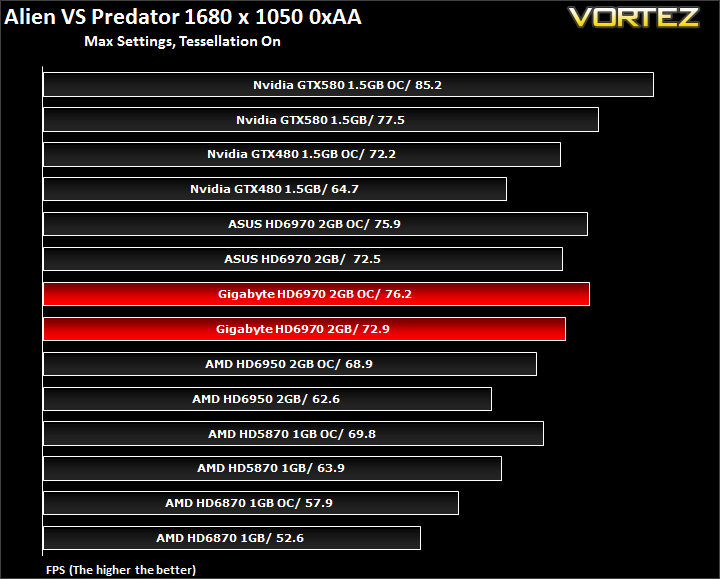
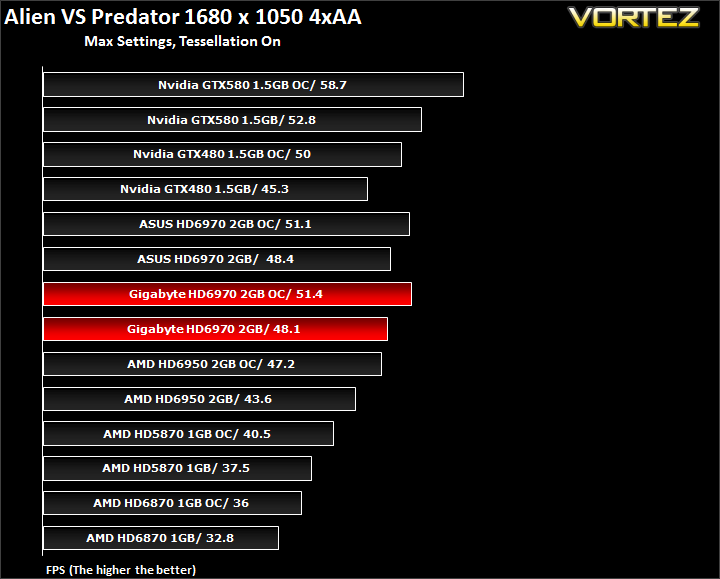
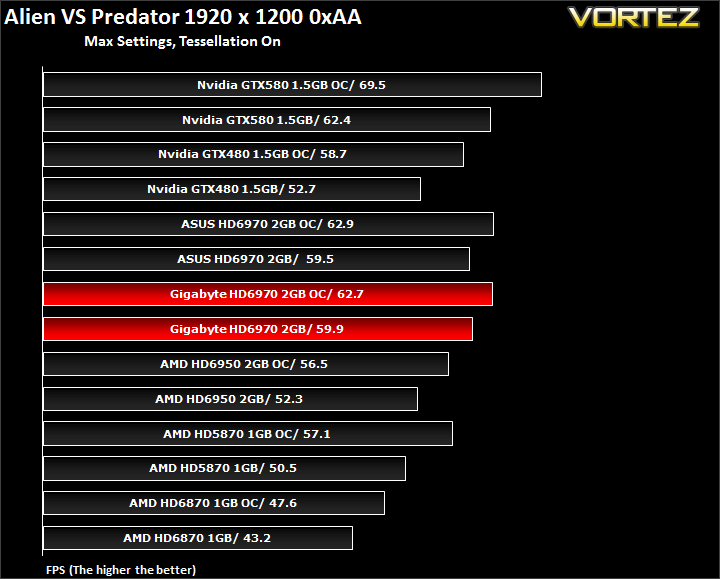
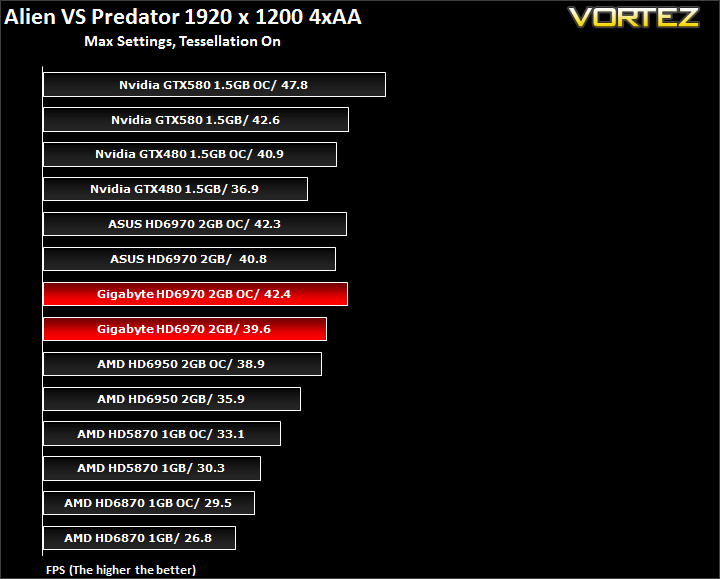
Yet again, there is less than 1% difference between the two HD6970s.
H.A.W.X 2
Tom Clancy’s H.A.W.X. 2 is an arcade-style flight action game from Ubisoft. H.A.W.X.2 is DX11 ready and therefore like other simulators such as DIRT2 has stunning scenery and a truly breath-taking visual experience. Using hardware terrain tessellation, H.A.W.X.2 relies on raw GPU power because a series of detailed triangles are required to be rendered. This surely has to be one of the most taxing benchmarks all our featured games, H.A.W.X.2 presents some of the best tessellation execution in any title to date.
The in-game benchmark from the demo was used fort testing. All the maximum settings were used throughout testing. The average FPS was recorded at the end.
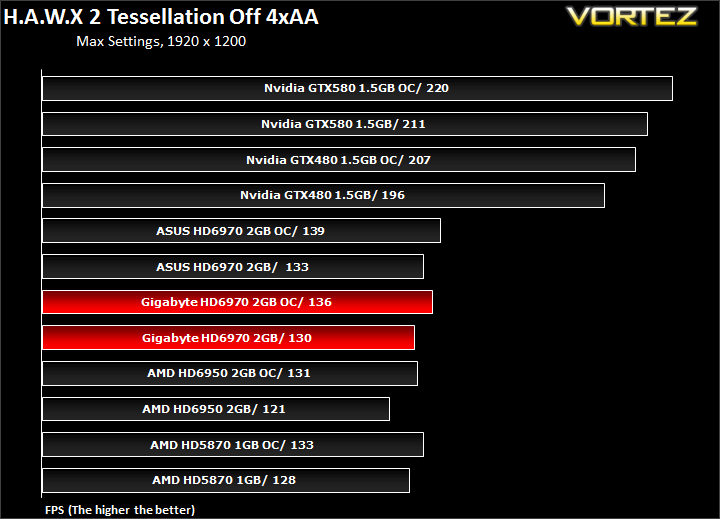
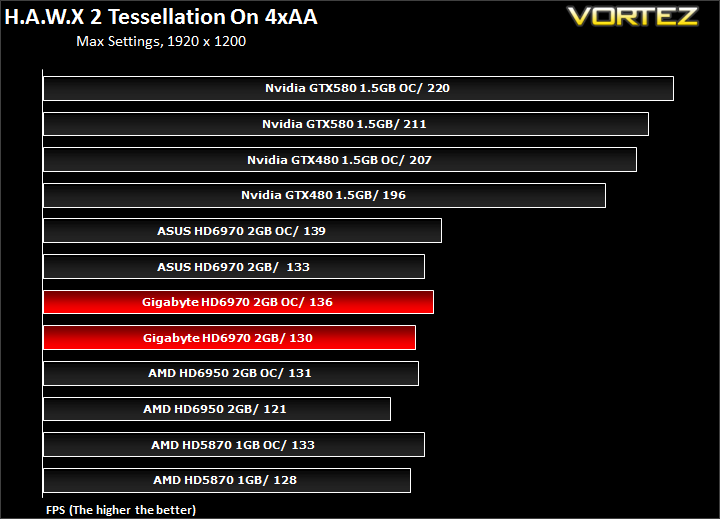
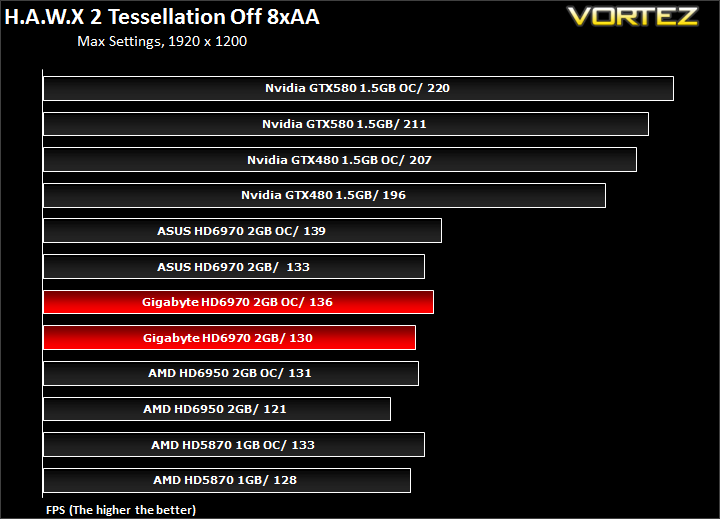
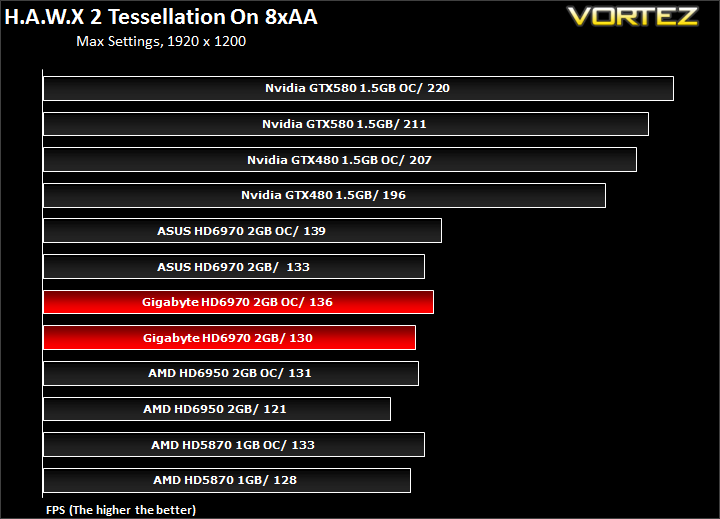
The ASUS HD6970 manages to grab a 2.6% performance lead over the GIGABYTE with its 10MHz pre-overclock. Yet again though, GIGABYTE demonstrate that voltage tweaking to yield a high core clock is not always beneficial and thus manages to outperform the ASUS card when overclocked.
3DMark 11 & Vantage
3DMark Vantage
This Vantage benchmark suite from Futuremark introduces DX 10 & PhysX support. Despite being on the verge of DX 11 games arriving, Vantage still proves a popular testing ground for enthusiasts.
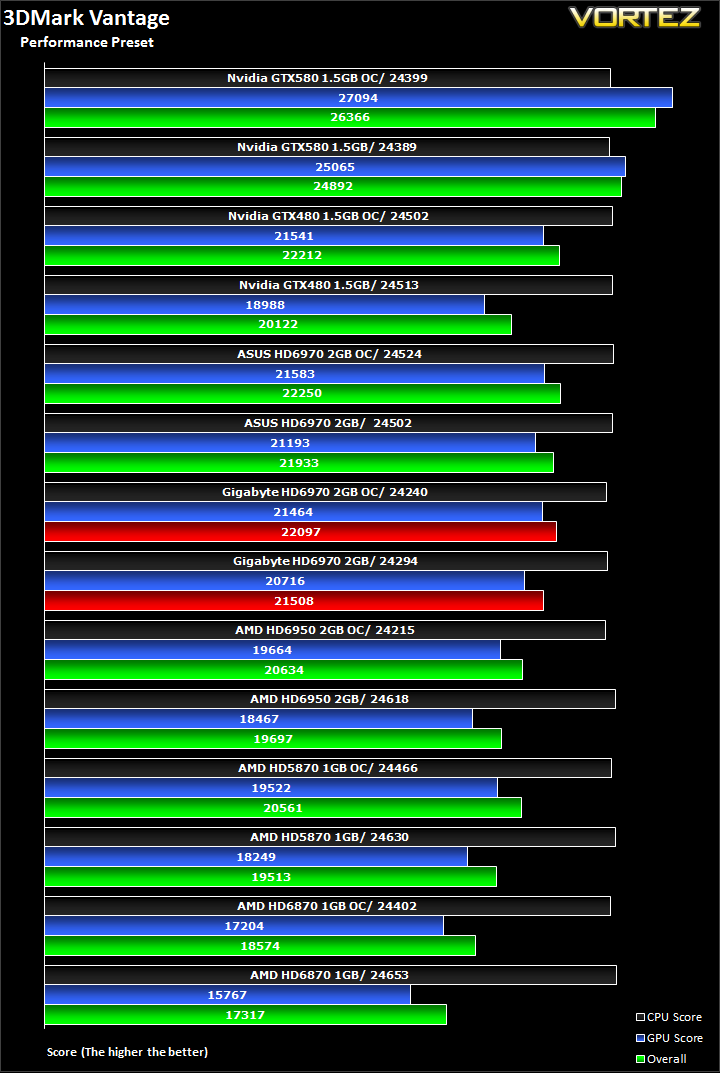
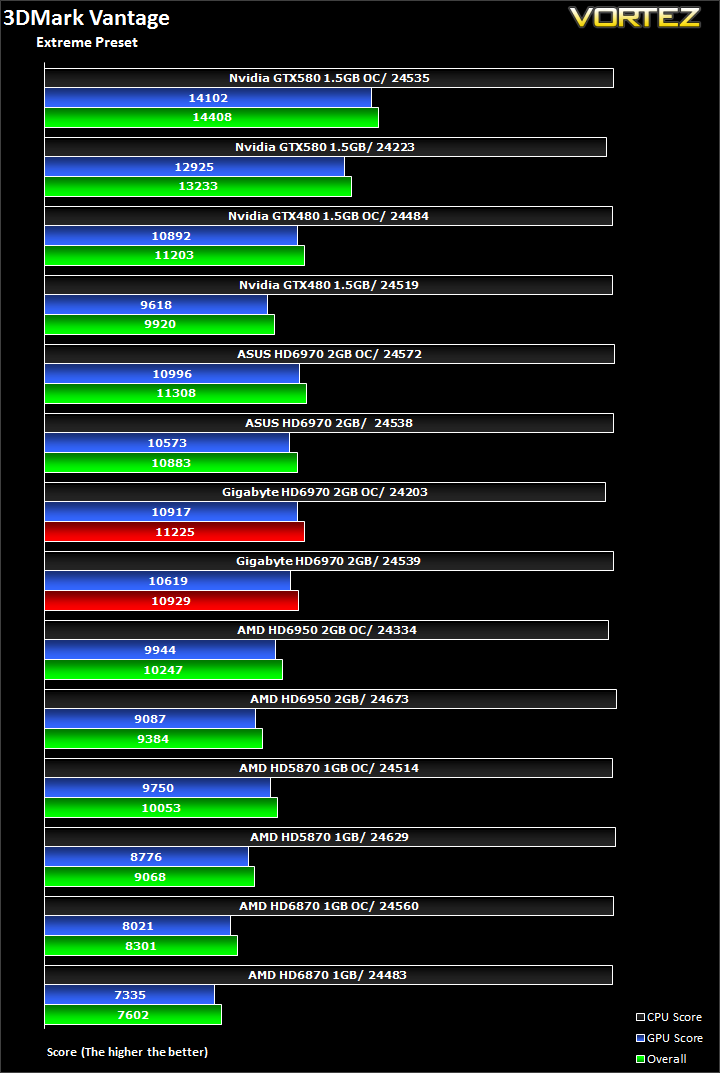
A mere 0.7% separates the two cards, favouring the ASUS in this case.
3DMark 11
Finally here is the latest Futuremark benchmark suite, bringing DX11 and tessellation to benchmarkers. Will it bring your computers to their knees?
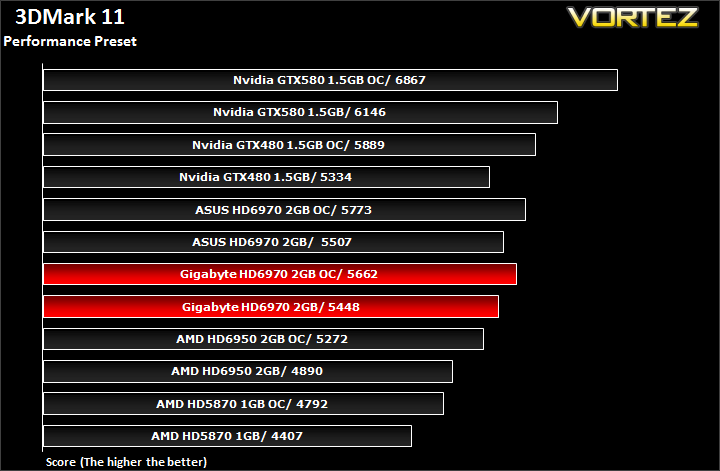
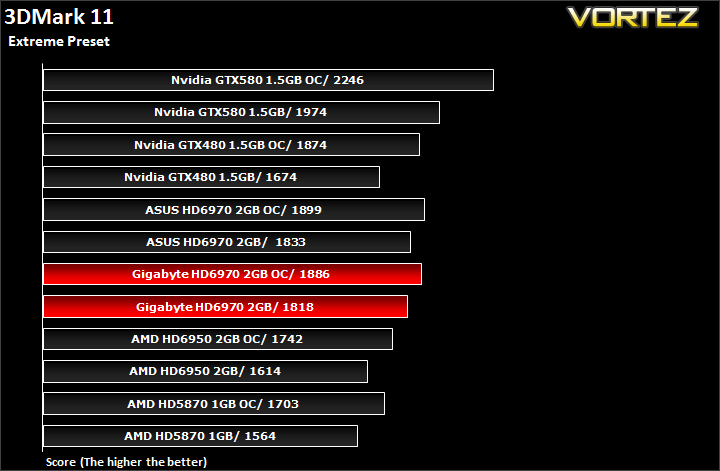
Similarly here, the performance difference is less around 1% in favour of the higher clocked ASUS HD6970.
Unigine V2.1 Benchmark
Unigine’s benchmark is to showcase the benefits of DX 11 and the use of tessellation as opposed to normal rendering techniques. The demo has impressive visuals that give an insight into what we can expect from gaming in the future.
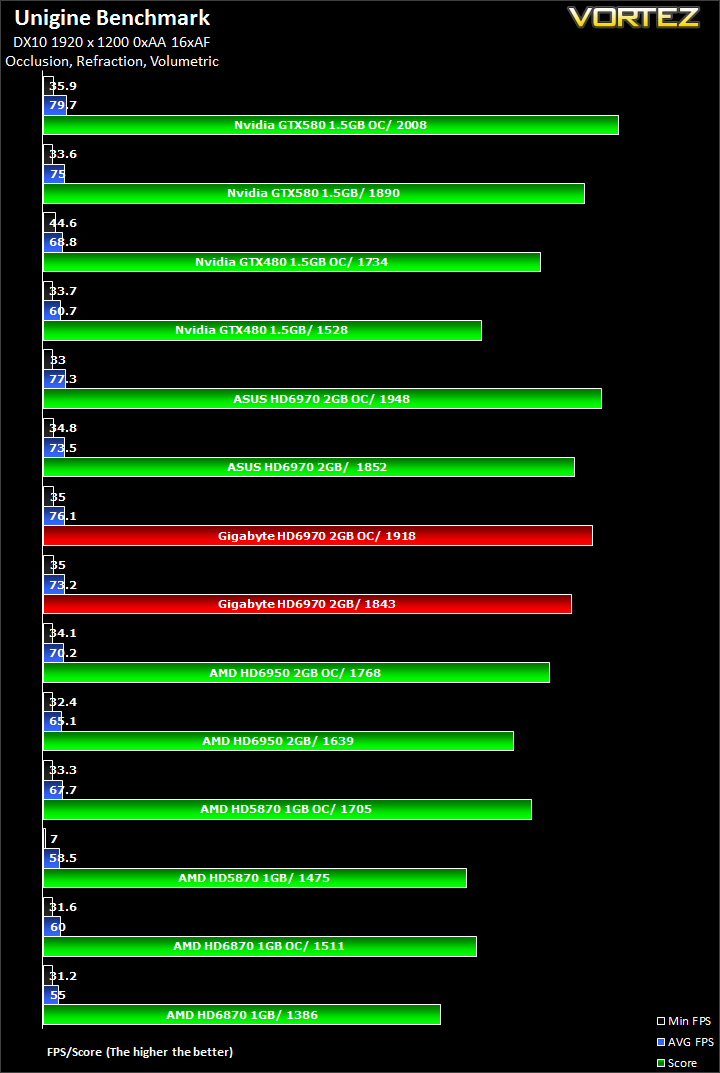
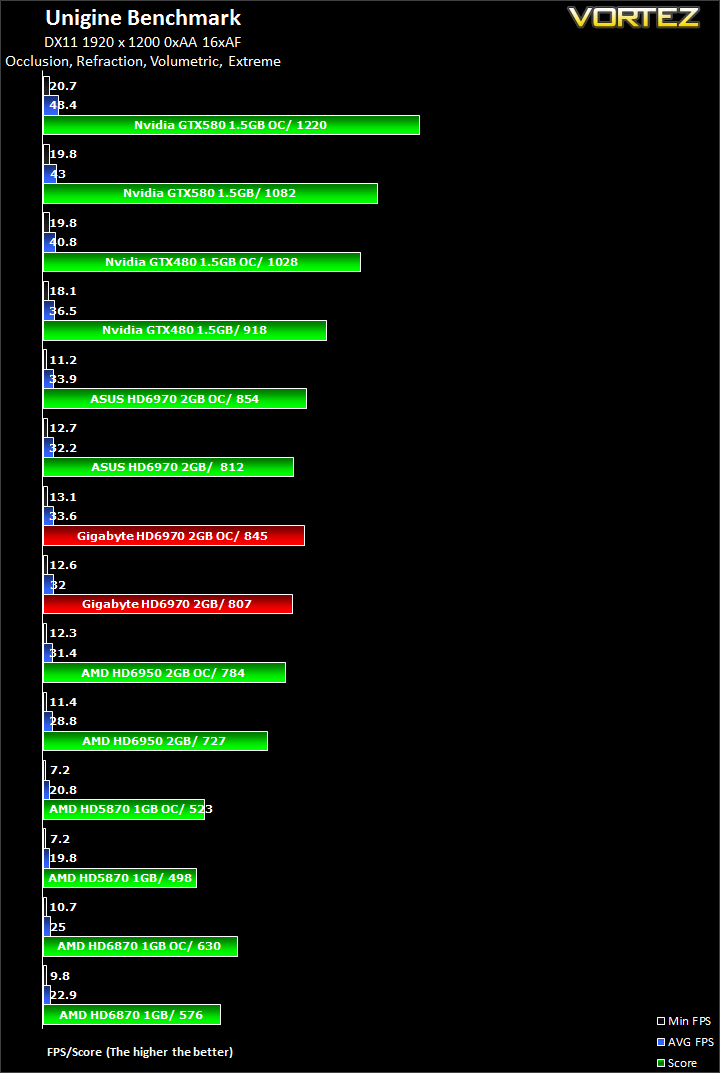
As you have guessed, there isn’t much to separate the two HD6970s in the benchmark at both settings.
Power Consumption
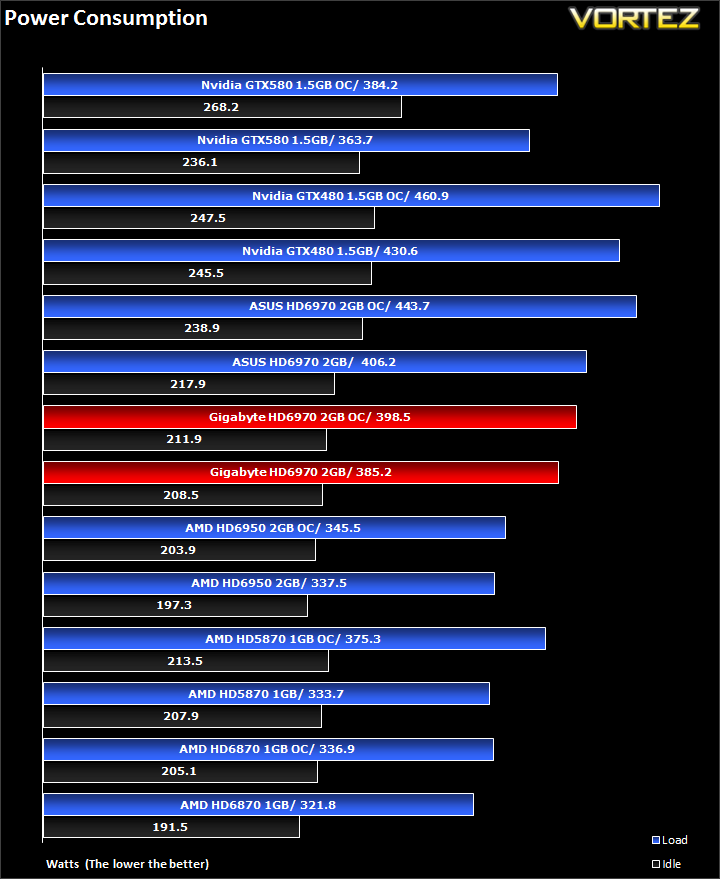
If there is one area where the GIGABYTE HD6970 can claim a clear victory, it’s the power consumption. It draws 15W less than the ASUS card at default speeds and more impressively, it draws 45W less when overclocked at a very small cost in performance. Compared to other graphics cards on the market, the GIGABYTE HD6970 fares favourably against the power hungry GTX480, its closest rival (the GTX570 results will be coming soon). However, it fails to provide the same efficiency as the GF110 based GTX580, an indication that Nvidia’s GTX570 will dethrone AMD’s reputation of providing efficient cores, which the former does already. In that sense, it is still disappointing to see that the power consumption being amongst the highest and significantly more than the HD6950.
Tessellation
DX 10
DX 11 Tessellation off
DX 11 Tessellation off – wireframe mode
DX 11 Tessellation on

DX 11 Tessellation on – wireframe mode
Let’s focus on a few characteristics of tessellation in the first image. Firstly, when we compare the wireframe mode, it is clear that tessellation, triangular in this case, is adding a lot more features and details, which may at first not be recognisable. The surfaces are divided in many more triangles, allowing the objects to replicate more complex structures. The ground for example is one of the features that benefits from it. To make it as efficient as possible, tessellation becomes a function of distance, generating more polygons closer to the viewer.
Now let’s look at the application of this. If we gaze at the rock pillar closest to us, we can immediately notice that with tessellation, they are not just mere square blocks but instead have irregular surfaces, more representative of a natural rock. Now, let’s move on to the stairs, which again is a notable improvement on past rendering methods. Rather than being flat, they have depth, giving the impression of real steps as opposed to a slide. The same applies to the cobbled road although the compressed/downsized pictures make it hard to judge. The last thing I’ll point out are the tiled roofs. With tessellation, the individual tiles form a more complex/realistic shape instead of appearing flat with repeated textures. You’ll have to take my word for it if you don’t notice them or try the demo for yourself!
Conclusion
This particular HD6970 is the first GIGABYTE graphics we have had on review here at Vortez and for the most part it lived up to our expectations. Throughout the benchmark suite, I mostly looked at the difference between itself and the ASUS variant of the HD6970, both of which following the reference design so I will take the opportunity here to give a quick rundown of its overall performance against other cards as well.First and foremost, AMD have done a tremendous job with their HD6970s despite being unable to make the transition to the 28nm manufacturing process. A move to the smaller process would have allowed more stream processors, possibly higher clock speeds, and some new features. Unfortunately AMD had to sacrifice those to avoid increasing the die size much further on the 40nm manufacturing process. The main drawback has been the unhealthily high power consumption but on the brighter side, the improved tessellation engine, render back end, and most notably the new VLIW4 architecture has ensured much better performance than the old generation Cypress GPU despite the 64 stream processor deficit. The increase in texture units to 96, and 2GB framebuffer have also gone a long way to enhance AA and high resolution performance. These are portrayed throughout the review where the HD6970 extend its lead over previous AMD cards or closes the gap against Nvidia’s GTX580.

In terms of performance, I’ll start with the two HD6970s. The ASUS came with a 10MHz pre-overclock and managed a final core clock of 950 MHz through voltage tweaking. The GIGABYTE did not go through the same treatment and yet still managed to keep up with the ASUS. Even when overclocked to a lower final core speed of 916 MHz, it didn’t perform any differently to the ASUS, highlighting the drawback of voltage tweaking, and subsequently higher power consumption and PowerTune limitations. As mentioned previously, it is now possible to tweak the GIGABYTE’s voltages using Afterburner but there isn’t much need to do so. Overall, there was only 1% performance difference between the two, favouring the ASUS card. Power consumption on the other hand is the GIGABYTE’s main advantage.
Compared to other AMD offerings, namely the previous generation HD5870, GIGABYTE’s HD6970 leads by an average of 18%, and reduced 12% margin when overclocked. The main benefit of the 6 series is improved tessellation performance in games such as H.A.W.X 2, Metro 2033 and the Unigine benchmark. Against the cheaper HD6950, the HD6970 leads by 11%. We have to point out at this point that the 2GB HD6950 can be fully unlocked to a HD6970 if they follow the reference design.
The Nvidia GTX480 and GTX570 are AMD’s target competition this round. At stock speeds, the GTX480 we had on test came out on top by an average of 3.7% across all games. Even if we disregard H.A.W.X 2, which favours Nvidia cards much more, the performance difference is around 1.5% in favour of the GTX480. In a few situations, the HD6970 makes better usage of its 2GB memory to close the gap on the Nvidia card but it lacks the raw power to take the crown. Unfortunately, it gets worse when both are overclocked seeing as how the headroom on the HD6970 was relatively less than on the GTX480 in this case. In the end, the GTX480 took an average lead of 9.5%. It appears that Nvidia still provides better tessellation performance in Unigine.
The GIGABYTE HD6970 is a very appealing product but lacks any extras to give it the edge over its competition. It will be interesting to see future SOC variants of the HD6970. At its current price point, it is noticeably more expensive than the HD6950 and directly on competition with Nvidia GTX570, which is an issue AMD have to address to remain competitive.
Pros
+Good performance
+Improved tessellation and AA performance
+Cool and quiet operation
+Eyefinity support
+Well packaged
+Aesthetically pleasing
+Doesn’t hit the TDP limit when overclocked
+Brilliant aftersales support
Cons
-Weak bundle
-Overclocking headroom
-Not on par with equivalent Nvidia graphics card
-Fragile shroud
-Price
+Good performance
+Improved tessellation and AA performance
+Cool and quiet operation
+Eyefinity support
+Well packaged
+Aesthetically pleasing
+Doesn’t hit the TDP limit when overclocked
+Brilliant aftersales support
Cons
-Weak bundle
-Overclocking headroom
-Not on par with equivalent Nvidia graphics card
-Fragile shroud
-Price
The GIGABYTE HD6970 earns itself Vortez Bronze Award.