The best things come in small packages so they say. Does the diminutive X79 mATX board from ASRock hold true to that old adage?
Product on Review: ASRock X79 Extreme4-MManufacturer: ASRock

Street Price: £170 inc. VAT
ASRock have gone from strength to strength lately. We adored their Z68 Fata1ty offering and the Extreme version based on the same chipset with both Intel based motherboards gaining our coveted Gold awards. Often overlooked by consumers, the ASRock boards used to play second fiddle to the big boys but they are rapidly gaining a reputation for producing quality, robust, great looking, high performance motherboards. Today we will be investigating the X79 based ASRock motherboard to see if carries on from the solid foundations their Z68 range has laid.
The two X79 based motherboards we have reviewed thus far have both thrilled and frustrated in one form and another. Overclocking was good, if somewhat fragmented in operation. Both boards offered a mass of features and of course both motherboards were based upon the X79 chipset. Perhaps the most basic comparison though was that they are both ATX based. Being a high end enthusiasts chipset it would be easy to forget about those who crave the same power but prefer a smaller package and thus ASRock sent us their X79 Extreme4-M, and mATX motherboard that looks to offer the same (or better?) performance yet from the smaller mATX specification.
Personally, I’ve never been a fan of mATX. For a media PC then I can see the point but perhaps (somewhat arrogantly) I frowned upon a motherboard that didn’t offer all of the features the ATX boards could, most often due to the size difference. Lest we forget however, the vast majority of users will never have multiple GPU setups or an additional sound card so there is little need for multiple PCIe slots. Yes, it’s nice to have the option but at what cost? mATX in years gone by had also trimmed back on other features. Less PATA/SATA ports, less USB ports, pretty much less of everything but in truth, can you honestly say that you ever fill all of your SATA ports, populate all of your PCIe slots or indeed use all of the USB ports? Not many I would wager. So why then are mATX motherboards overlooked in favour there bigger brothers? Like I said previously, a large value is placed on the ‘it’s nice to have’ phrase. It’s also nice to have a Ferrari but if you are never going to use it what’s the point?
With today’s society looking for more value for money, better efficiency yet all bundled up in a smaller package you would think it makes sense to opt for a mATX motherboard. As we will see, bigger does not always translate to better and despite being smaller, the ASRock may just have one or two tricks up its sleeve to outperform its bigger competitors. The legend of David and Goliath spring to mind with this review so it remains to be seen if the ASRock can sling-shot its way past the giants or will it be crushed beneath the sole of the bigger ATX motherboards? I think it’s time we found out…
About ASRock
ASRock Inc. is established in 2002, specialized in the field of motherboards. ASRock strives to build up its own brand. With the 3C design concept, “Creativity, Consideration, Cost-effectiveness”, the company explores the limit of motherboards manufacturing while paying attention on the eco issue at the same time, developing products with the consideration of eco-friendly concept.
ASRock has been growing fast and become world third largest motherboard brand with headquarter in Taipei, Taiwan and branches in Europe and the USA. The young and vibrant company targets from mainstream to enthusiast MB segments for different kinds of users, owning reputation around the world market with its reliability and proficiency.
ASRock has been growing fast and become world third largest motherboard brand with headquarter in Taipei, Taiwan and branches in Europe and the USA. The young and vibrant company targets from mainstream to enthusiast MB segments for different kinds of users, owning reputation around the world market with its reliability and proficiency.
Specification & Features
Specifications
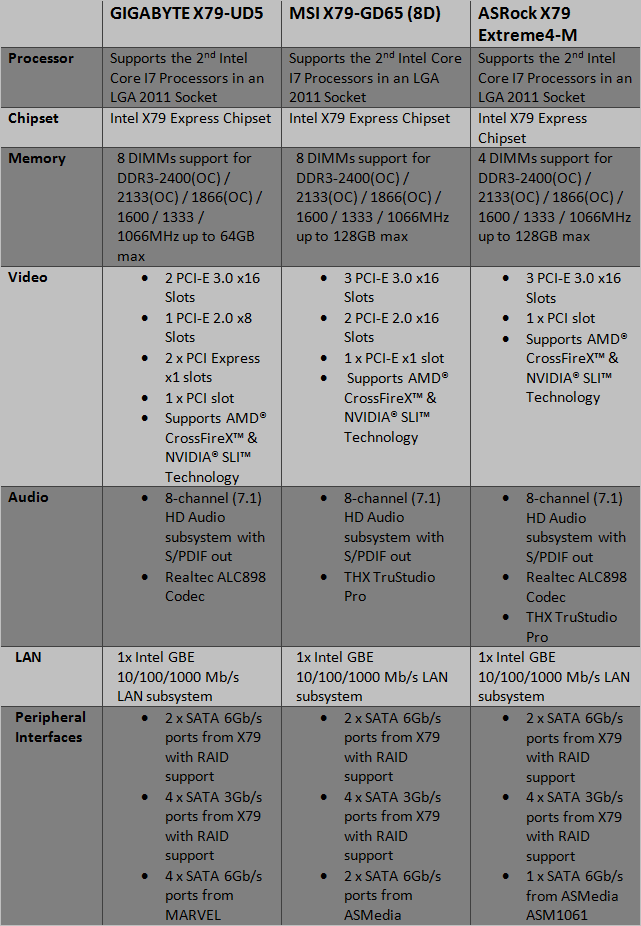
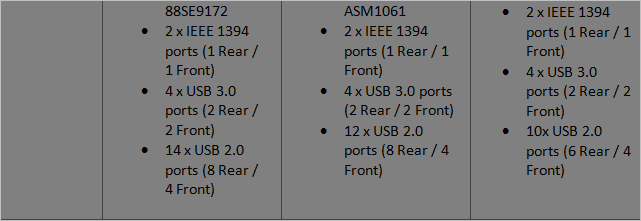
As expected, the trimmed mATX X79 ASRock motherboard has a few less features than its bigger brethren however, it still has the same features, just slightly less in number. We have 3x PCIe Gen3 slots, plenty for an SLI or Crossfire setup. There’s also an additional PCI slot for those who still make use of this format. 10 USB 2.0 ports along with a further 2x USB 3.0 ports should be enough to ensure even the biggest peripheral setups are catered for. Perhaps the biggest omission is the loss of four DIMM sockets. 4GB modules are now becoming the norm for X79 chipsets so 16GB of DDR3, again should be plenty, especially as QUAD channel is supported. If that’s not enough then the ASRock Extreme4-M motherboard supports expansion up to 32GB (although the X79 chipset supports up to 128GB I would have thought 64GB is feasible through the 4 DIMM slots should 16GB modules ever become available).
So all in all there really is not a great deal missing from the mATX motherboard, certainly nothing you would really miss unless you have a monster setup requiring masses of PCIe ports. So, what else does the ASRock Extreme4-M have to offer?
Features
Digi Power – By adopting digital pulse-width modulation (PWM), the ASRock motherboard can provide CPU Vcore voltage more efficiently and smoothly. Compared to analog PWM, digital PWM can optimize the CPU power solution and provide a proper and stable Vcore for the processor.
Advanced 6+2 Power Phase – The advanced 6+2 Power Phase features sturdy components and completely smooth power delivery to the CPU. It offers unmatched overclocking capability and enhanced performance with the lowest temperatures for PC gaming enthusiasts.
Premium Gold Caps – Premium Gold Caps are luxury capacitors. These 100% Japan-made solid capacitors are sleek, high gloss caps with a premium gold coating representing long life and stable performance.
Next-Gen PCI-E 3.0 Support – The ASRock motherboards support the Next-Gen PCI-E 3.0! PCI Express 3.0 can maximize the bandwidth for the next-gen PCI Express 3.0 VGA cards, provide ultimate graphics performance.
X-FAN – Greater air flow, faster heat dissipation! ASRock X-FAN allows the motherboard to breathe smoothly. It will be automatically activated only when the system rises to a certain temperature under heavy-loading. Normally, ASRock X-FAN will remain deactivated to give users the quietest computing experience.
UEFI BIOS – Unified Extensible Firmware Interface (UEFI) is a revolutionary BIOS utility which offers tweak-friendly options in an advanced viewing interface. Compared with traditional BIOS design, the latest UEFI utility provides lots improved functions.
THX TruStudio – THX TruStudio is specially designed to bring the same great audio experience found in live performances, films, and recording studios to the PC.
AXTU – The All-in-1 Tuning Software – ASRock Extreme Tuning Utility (AXTU) is an all-in-one software to fine-tune different features in an user-friendly interface, which includes Hardware Monitor, Fan Control, Overclocking, OC DNA and IES.
XFast LAN Technology – ASRock XFast LAN is a smart productivity tool to help you manage your priorities of internet applications, simplify your digital life and accomplish more. The innovative features include : Internet Application Prioritization, Lower Latency in Game, Traffic Shaping and Real-Time Analysis of Your Data. It’s the smartest way to control your web programs.
XFast RAM Technology – ASRock XFast RAM is a new function that is included into ASRock Extreme Tuning Utility (AXTU). It fully utilizes the memory space that cannot be used under Windows® 32-bit OS. ASRock XFast RAM also shortens the loading time of previously visited websites, making web surfing faster than ever. And it also boosts the speed of Adobe Photoshop 5 times faster. Another advantage of ASRock XFast RAM is that it reduces the frequency of accessing your SSDs or HDDs in order to extend their lifespan.
ASRock XFast Charger – XFast Charger is the best and fastest technology to charge your mobile devices via PC. With the superb XFast Charger USB port, users are assured to enjoy the quick charging experience anytime. In addition to Apple devices, it is also capable of Charging the BC 1.1 standard smart devices.
ASRock XFast USB Technology – ASRock XFast USB Technology redefines the new standard in high performance computing. Proving once again to be the pioneer in motherboard industry, ASRock XFast USB Series Motherboards integrate with the latest XFast USB Technology which delivers the world’s fastest USB data transfer speed. According to the below graph, it shows that the ASRock XFast USB technology can even boost USB 3.0 performance up to 469.30%!
Crashless BIOS – ASRock Crashless BIOS allows users to update their BIOS without fear of failing. If power loss occurs during the BIOS update process, ASRock Crashless BIOS will automatically finish the BIOS update procedure after regaining power. Please note that BIOS files need to be placed in the root directory of your USB disk. Only USB 2.0 ports support this feature.
Packaging & Accessories
Box Front
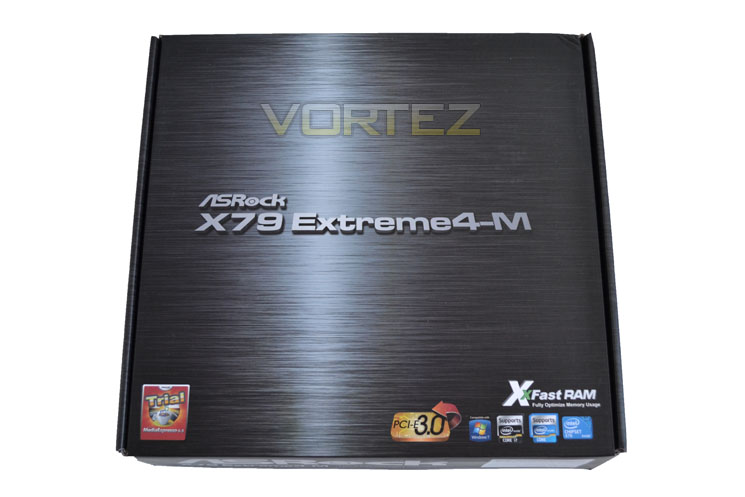
The front of the package has the main product title centred on a printed metallic effect backdrop. With only a few little product feature emblems towards the bottom of the package, the overall feel is very subdued yet classy in appearance.
Box Rear
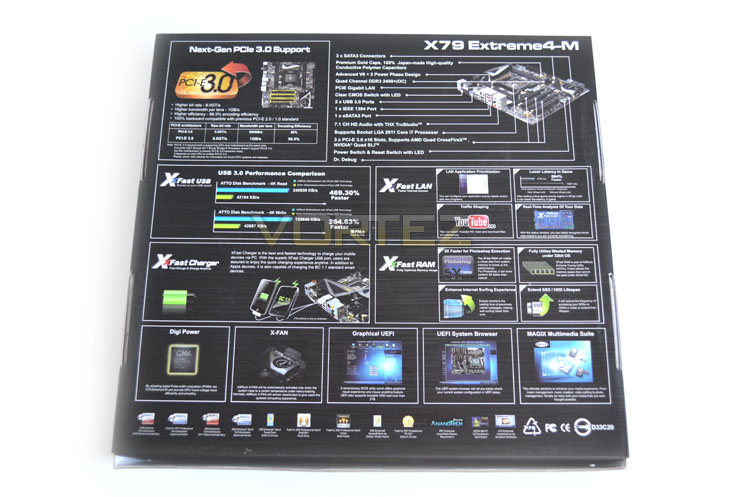
Flipping the box over we see the rear of the package. In contrast to the front of the box, the rear shows off a wall of features explaining briefly which each has to offer. Of these features, PCIe 3.0 support and ASRock’s ‘X’ features take pride of place.
Accessories
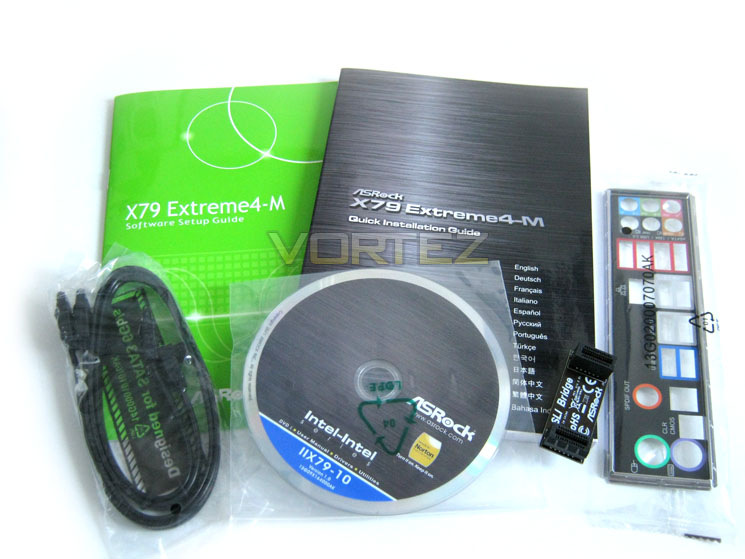
Opening the box up we find that the accessories are simply placed atop of a cardboard shelf. The accessories are relatively sparse in comparison to the previous X79 we have reviewed thus far. With a multi-lingual motherboard manual and English software (BIOS) taking care of the narrative the only other bits included are a small, rigid SLI bridge, a couple of SATA cables, I/O shield and a driver/utility DVD.
I would have liked to have seen more SATA cables included and perhaps a rear USB/e-SATA bracket included as the accessory list is pretty basic. That said you have everything included to get you started.
First Look
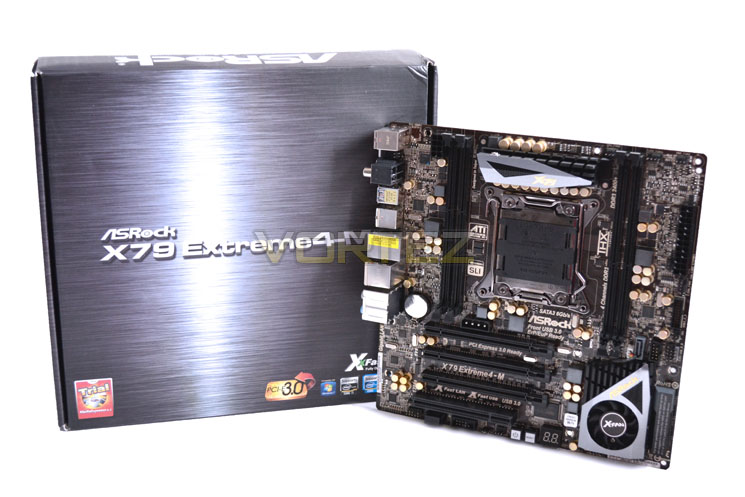
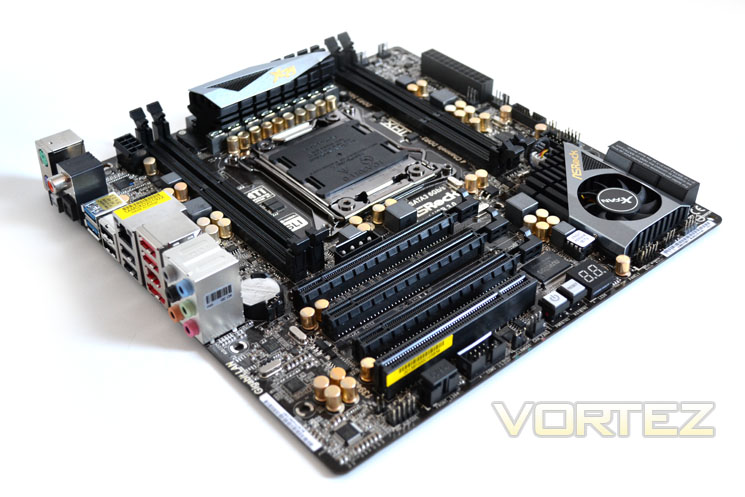
Here we get a first glimpse of the mainboard. In the same guise as the Z68 motherboard we reviewed earlier, the X79 mATX version is a dark brown/black PCB with black sockets. Flashes of gold and silver can be seen throughout the mainboard which makes for a stunning looking motherboard. All too often we see manufacturers sticking to their own colours resembling L.A gang warfare but the ASRock is content with a very classy looking black affair which as any women will tell you, never goes out of fashion.
Overall, the package is neat, tidy and good looking. More accessories would certainly be welcomed however as for near £200, I would be aggrieved to buy more SATA cables should I have more than two SATA drives which most likely, represents the majority of enthusiasts.
Let’s take a closer at the todays review sample…
Closer Look Pt.1
Board Front
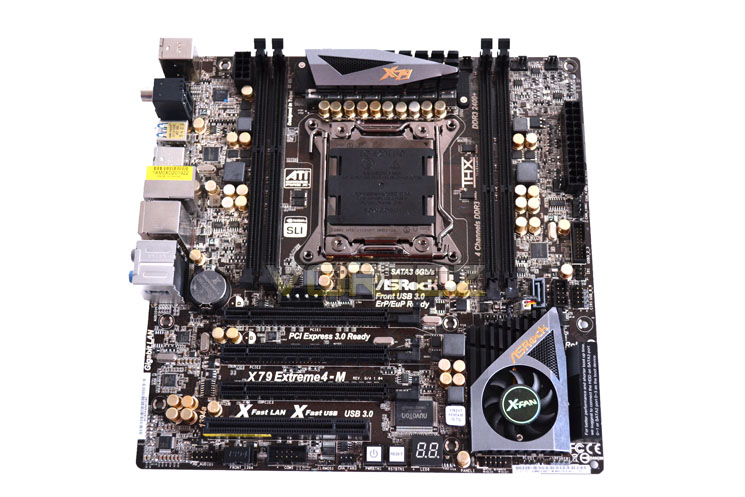
As you can see, the ASRock X79 Extreme4-M has the same colour scheme as the rest of the Extreme range being black gold and silver. All of the plastic slots are black and while the mainboard is screen printed black, as we saw with the MSI X79 board, the copper traces shine through the printed to give the mainboard a dark brown look. It actually doesn’t look too bad on this board, certainly not as contrasting as the blue MSI mainboard but I would perhaps like to see ASRock print there PCB’s matt black like GIGABYTE and ZOTAC which in my opinion, look much more professional. The gold caps look stunning and contrast well with the dark features of the motherboard.
Board Rear
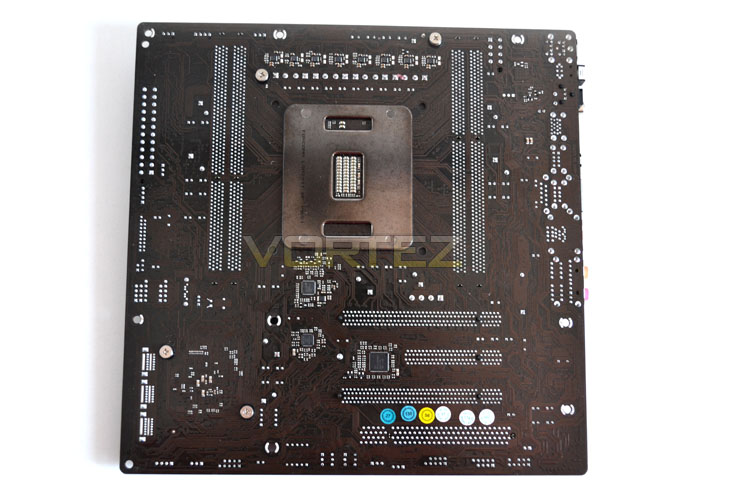
The rear of the board is not as bare as we have seen in the past having a clockgen chip and POScaps among others so it appears that ASRock are making as much use of the available space as possible. Fortunately these are far enough away from the CPU heatsink mount holes that any backplate will not come into contact with them.
LGA 2011 Socket
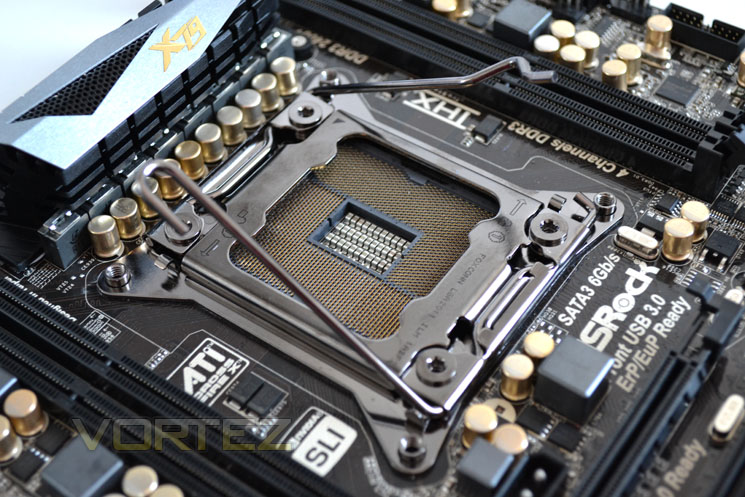
The socket area is perhaps not best suited to extreme cooling due to the number of solid caps and chokes in the vicinity. Being an mATX board space was always going to be tight and the ASRock X79 Extreme4-M is no different. The board uses a FOXCONN sockets as opposed to the LOTES sockets we have seen in our previous X79 reviews. For all intents and purposes though, both sockets appear identical.
PCIe Area
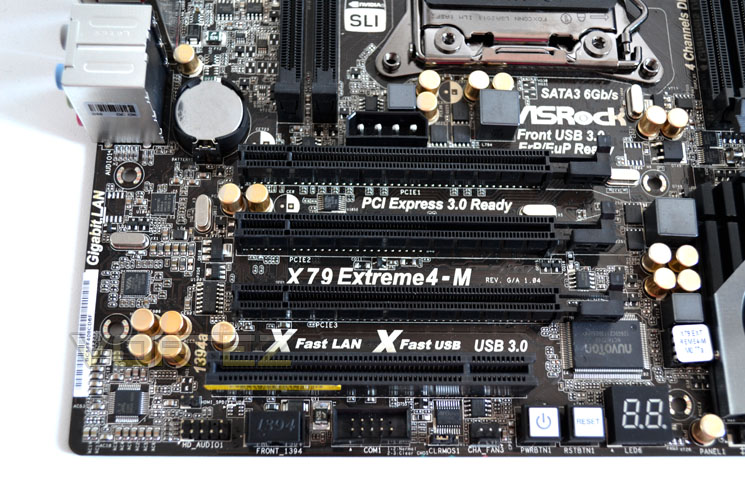
Being an mATX motherboard, the PCIe are will inevitably take a hit in the number of ports it can supply. The ASRock board does however manage to cram in 3x PCIe 3.0 x16 ports and a PCI port which means it can support both SLI and TRI SLI along with CrossfireX should you want a multi GPU setup. In reality it is unlikely that a triple GPU setup will be used due to the slots being placed directly next to one another which plagues all mATX motherboards. The ASRock board uses a neat design in that the socket clasps are not spring loaded. Instead, there are small locks that slide into place to hold the PCIe card into position.
X-Fan
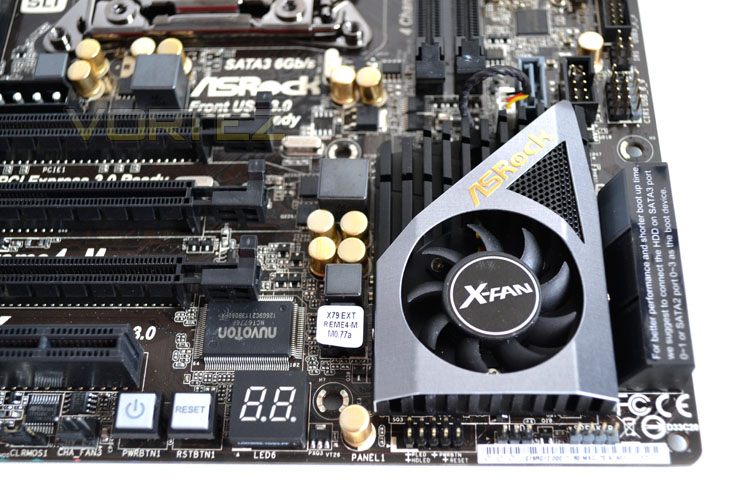
Dominating the bottom right quarter of the motherboard is the X79 Chipset heatsink. Unlike the full size ATX motherboards, the ASRock X79 has active cooling on the X79 chipset. Throughout testing though the fan rarely span up and when it did it was inaudible which was a pleasant surprise as I feared this could be one area which would deter many buyers.
SATA Ports
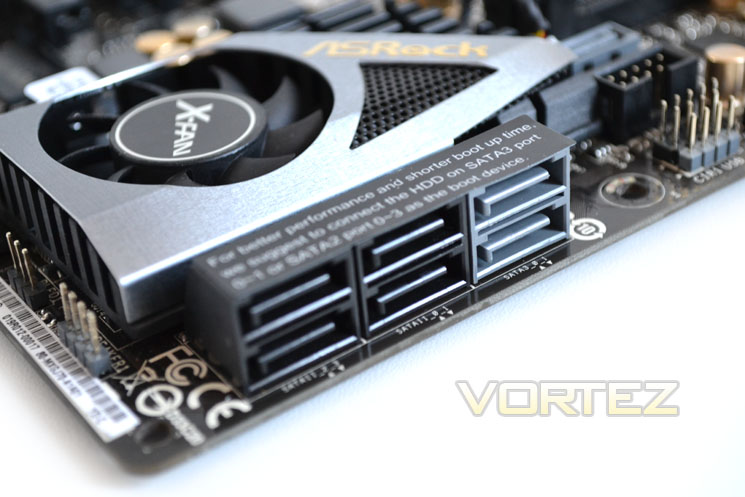
There are six 7 SATA ports in total, 6 at right angles to the mainboard with a further slot facing upwards behind these. 3 of the ports are SATA 6GB/s (2via X79, 1 via ASMedia) with the remaining four ports being 3GB/s capable ports courtesy of the Intel chipset.
I/O Area
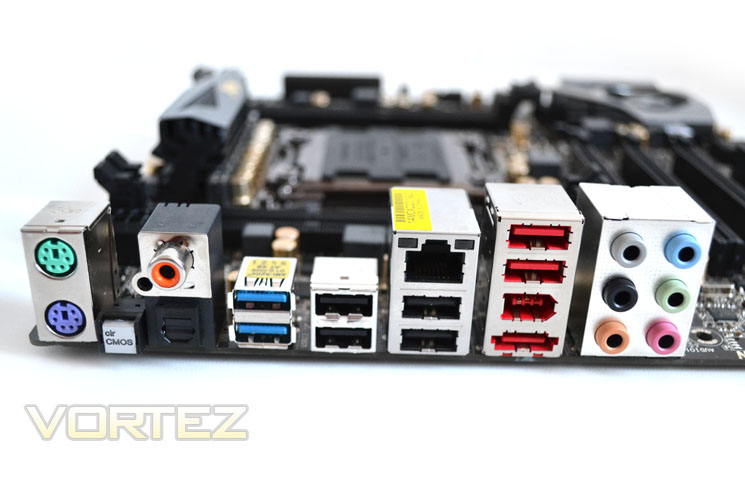
The I/O area of the ASRock X79 Extreme-M is as complete as any of the X79 range having the following options: PS2 Keyboard and mouse ports, Clear CMOS button, Coaxial and optical SPDIF Out ports, 2x USB 3.0 ports, 6x USB 2.0 ports, RJ45 LAN port, eSATA3 port, IEEE 1394 port, and 6x 3.5mm Audio ports support 7.1 surround sound.
Power Supply
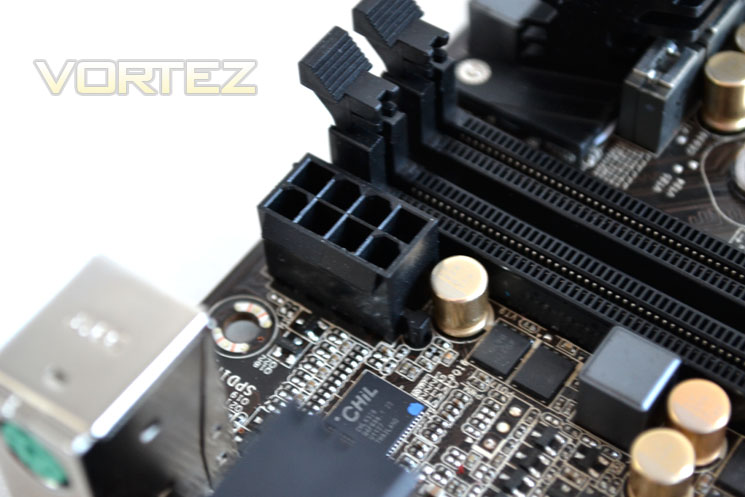
A single 8-pin socket is available to provide the additional 12v power to the CPU which is conveniently placed to the left of the memory DIMMs. This is coupled with the main 24pin ATX power socket for the mainboard and an optional MOLEX socket above the 1st GPU slot to supply extra juice to the GPU’s in extreme overclocking circumstances.
Closer Look Pt.2
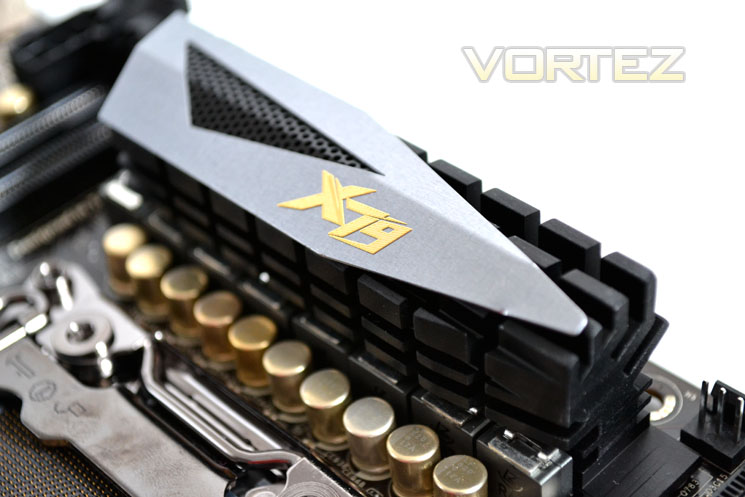
While the X-fan active heatsink takes control of the chipset, a small heatsink has to make do with passive cooling in order to keep VRM temperatures under control. In testing, this heatsink got extremely hot and required active cooling for our best overclock (more on that later).
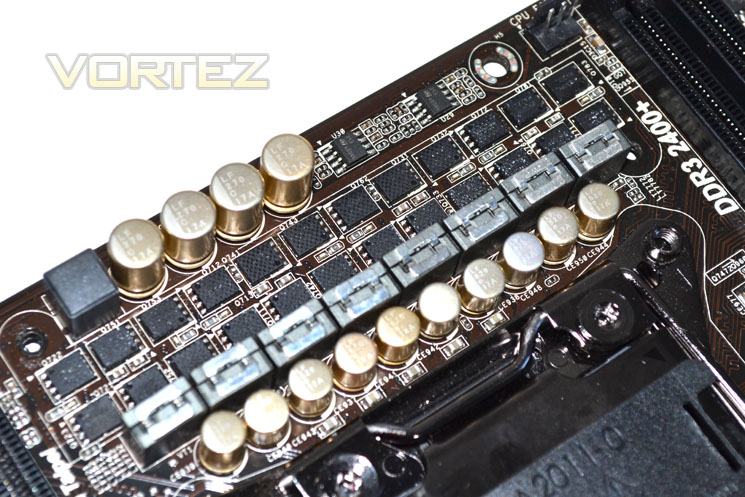
6+2 Phase control
While some motherboards make use of a huge voltage regulation module, the ASRock has a much smaller V6+2 phase design. ASRock claim this provides unmatched overclocking ability – a very bold claim that we are sure to put to the test later in the review. The ‘Premium Gold Caps’ are as the name suggests, luxury capacitors. Being 100% Japanese-made they are long lasting and should represent very stable performance.
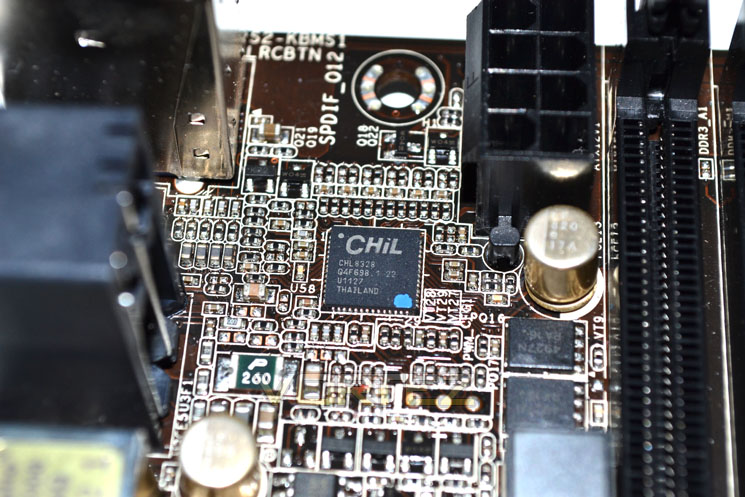
CHiL regulator
Coupled with the VRM module, the CHiL chip controls the Digi Power function of the mainboard. Thanks to the digital PWM (Pulse Width Modulation), CPU voltage supply is both cleaner and more stable which should make for some interesting overclocking. We have seen these chips used on graphics cards to great effect so hopefully the same results will be seen here.
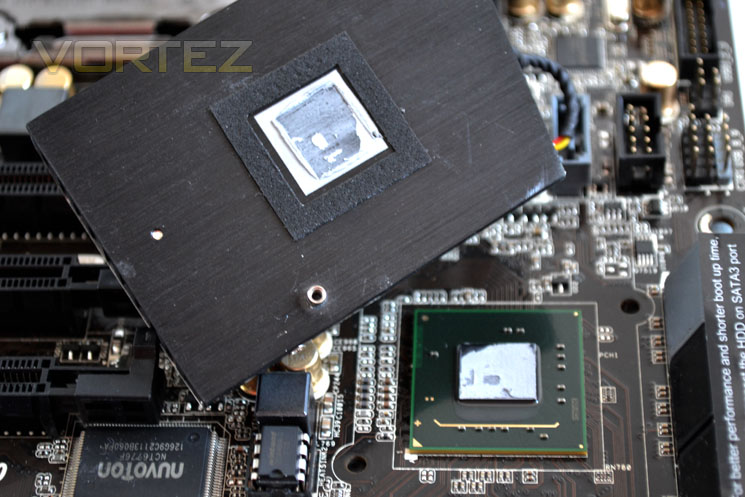
X79 Chipset Cooling
The X79 chipset doesn’t appear to get too hot in the tests we performed prior to this motherboard review. Regardless, ASRock deemed fit to attach a small fan to the heatsink which as you can see above, made very good contact with the chipset which should ensure excellent heat transfer.
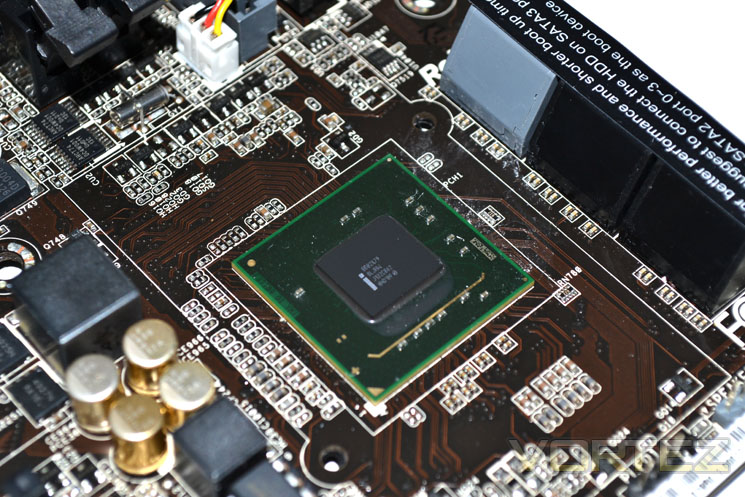
X79 Chipset
Here we a shot of the X79 silicon. It communicates with the i7 processor (DMI) at 20Gb/s and is responsible for communicating with the USB ports (480Mb/s), LAN, SATA (6Gb/s) and up to 8 PCI Express 2.0 ports (5GB/s each).
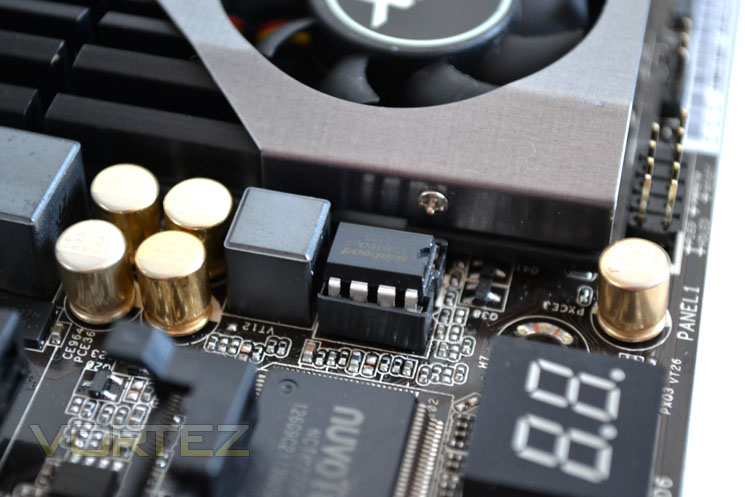
Winbond BIOS chip
The BIOS is provided by means of a removable Winbond BIOS chip. Unfortunately this motherboard does not have a backup BIOS as with high end motherboards however ASRock claim that there configuration is ‘Crashless’ meaning that should there be a power failure during BIOS update procedure, the BIOS update will continue when power is restored!
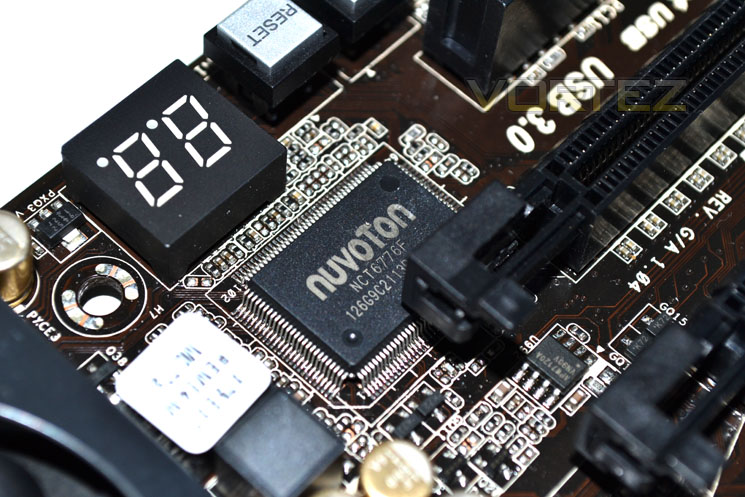
Super I/O
NUVOTON takes care of Super I/O monitoring including the smart fan system and temperature monitoring. The NCT6776F provides two high-speed serial communication port (UART), which includes a 16-byte send/receive FIFO, a programmable baud rate generator, complete modem-control capability, and a processor interrupt system.
Above this chip we see that there is an LED Debug (red). This is a great little tool that helps system builders and overclockers alike decipher where potential problems lay during non-boot scenarios. Next to this are power and reset buttons which are proper buttons unlike some used on other motherboards and are easily identifiable.
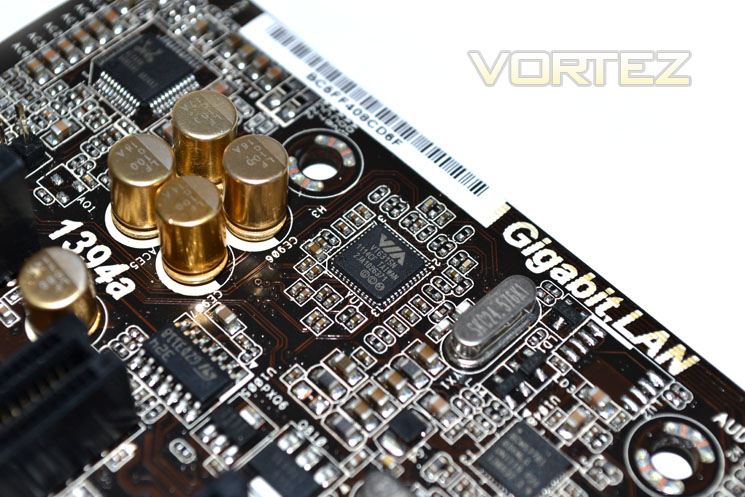
FireWire
The VIA VT6315 host controller provides high performance serial connectivity by implementing Link and Physical (PHY) layers for both IEEE 1394 and 1394a High Performance Serial Bus. Supporting the latest high speed IEEE 1394a standards, the VIA VT6315 can detect connected device types and automatically configure data speeds to 100, 200, or 400 Mbps transmitting both asynchronous and isochronous (real-time) data packets.
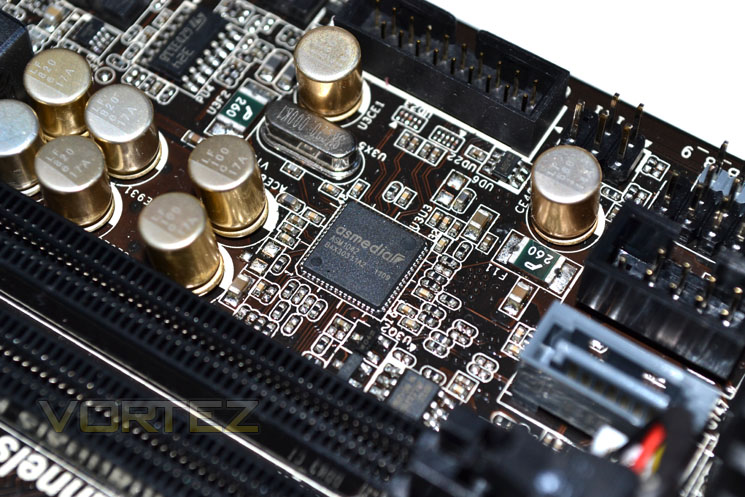
ASMedia USB control
The ASMedia ASM1042 SuperSpeed USB 3.0 Host Controller is designed for high speed and low power data transmit. It also supports backwards compatibility with current USB2.0 standard, being used in the PC, mobile, consumer and communication application.
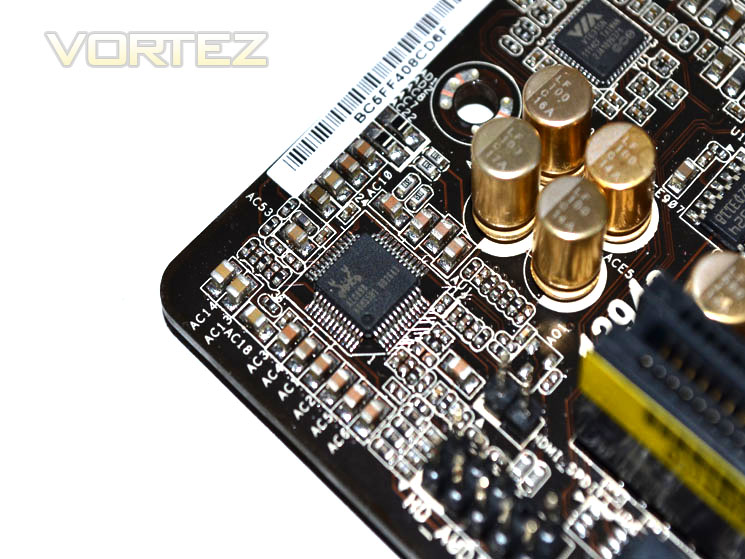
Realtek Audio
Finally we see the ASRock X79 Extreme4-M employs Realtek in the form of the ALC898 Codec to provide the motherboards 7.1 audio capability.
Let’s take a look at the test setup we will be using for today’s review…
Test Setup
When we decided to put the test bench together for X79 we wanted a system that would not only perform well but also last the test of time given that X58 has been around for some 3 years now so we saw no reason to believe that its successor, X79 would not be able to do the same.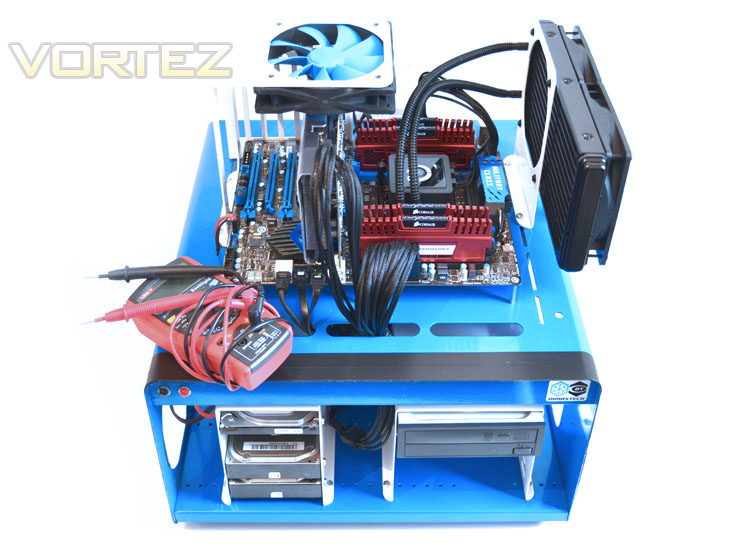
Some of the components for our test bench were kindly donated by CORSAIR who provided the majority of components without whom we would not have been able to bring you this review so a big thanks to them. Thanks also go to MSI who donated their NVIDIA GTX560Ti.
Motherboards on test:
ASRock X79 Extreme4-M
GIGABYTE X79-UD5
MSI X79A-GD65(8d)
X79 Test Setup
CPU: Intel Core i7-3960X Extreme Edition
Graphics Card: NVIDIA GTX560Ti
RAM – 16GB (4x4GB) Corsair Vengeance (Red) DDR3 @ 1866MHz 9-10-9-27
Power Supply – Corsair TX750M 750W
Hard Drive – Hitachi SATA II 250GB
Samsung F3 1TB
Cooler – Corsair H100
CPU: Intel Core i7-3960X Extreme Edition
Graphics Card: NVIDIA GTX560Ti
RAM – 16GB (4x4GB) Corsair Vengeance (Red) DDR3 @ 1866MHz 9-10-9-27
Power Supply – Corsair TX750M 750W
Hard Drive – Hitachi SATA II 250GB
Samsung F3 1TB
Cooler – Corsair H100
Benchmarks
Cinebench 11.5 – CPU Score
x264 HD 4.0 – 1st and 2nd pass encoding
SiSoftware SANDRA 2011 – CPU benchmarks
AIDA64 – CPU benchmarks
CyberLink MediaEspresso 6.5 – Convert 145MB MP4 to avi
PCMark 7 – System Benchmark
3DMark 11 – Performance and Extreme preset Overall and Physics Score
Games – Crysis 2, DiRT3, Metro 2033
Other Software
Core Temp 0.99.5
LinX stress Test
CPUID HWMonitor
Overclocking & BIOS Configuration
The ASRock X79 Extreme4-M has impressed us thus far but the one area that has perhaps let our previous subjects down have been the BIOS. Various anomolies plagued both the GIGABYTE and MSI boards so it was with trepidation that I pressed the .del key and….nothing. Pressing .del unfortunately didn’t do anything to enter the BIOS. Fortunately, ASRock allow BIOS loading via the F2 function key which worked fine. Not the best start then.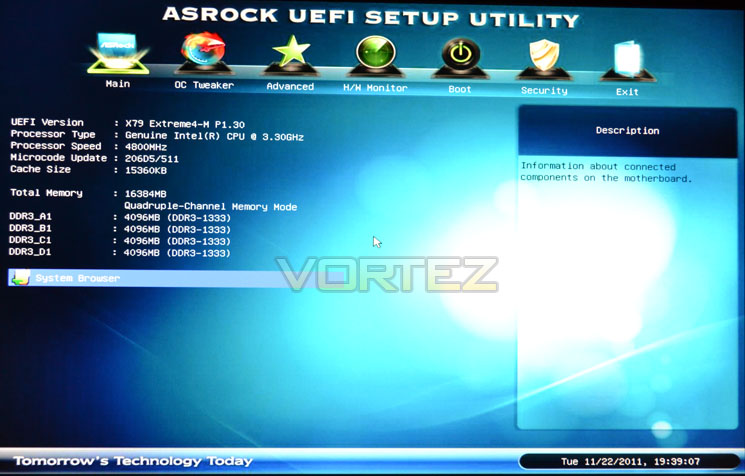
The BIOS is however very well laid out and appears much less intimidating than the MSI or GIGABYTE varieties. All the basic functionality is there and the GUI is intuitive and easy to use with the visuals updated and freshened up over the P67 chipset versions.
overclocking
The Intel Core i7 3960X is stock clocked to 3.3GHZ (3.6Ghz Turbo 2.0 enabled) in stock form with a couple of cores occasionally reaching 3.8/3.9 GHz as per the norm for this processor.
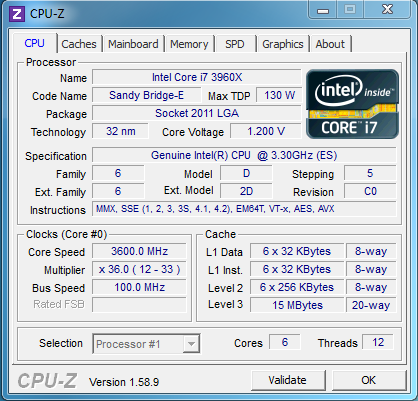
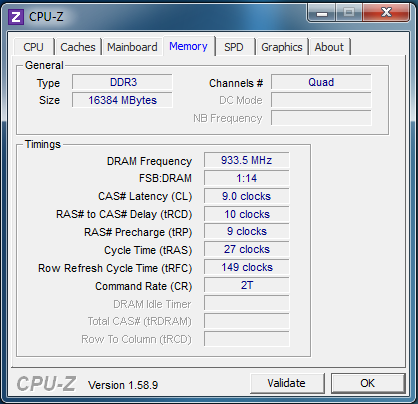
We initially had the same issues we have had with all of the X79 motherboards reviewed thus far in that we could not disable Speedstep. However a beta BIOS (soon to be released to the public) sorted the issue out. We used the most recent beta BIOS (1.32 at time of writing) and thankfully, the flashing of the BIOS ran very smooth with no hiccups which is good considering the ASRock only has a single BIOS chip. As stated earlier in the review though the ASRock is equipped with a CrashFree BIOS but I was reluctant to test that feature out by switching the setup off mid-flash!
The overclocking settings appeared basic upon initial viewing with relatively few options available. However, once you begin to drill down using the set of sub-menus, almost every overclocking option is available. I am still not sold on the various levels (5) of load line calibration available, while its good that these levels are available, with no explanation of what each level achieves it is a case of trial and error to see which setting deters vdroop the most. I found that level one will over volt the CPU and then the over voltage will decrease through levels 1-5. Level 3 worked best while overclocking our setup keeping the voltage closest to what was set in the BIOS under load conditions but with all overclocking settings, each option will be particular to the individual setup used.
I started out by setting the basic overclocking options (CPU multi, Vcore etc) to the same as our previous best overclocker, the MSI. With 1.45 vcore set and a 48×100 frequency the board burst into life but unfortunately locked up upon windows loading. Entering back into the UEFI BIOS I made a few small adjustments and hey presto, 4.8GHz was fine. A quick stress test later confirmed that all was ok to continue. Venturing further I increased the voltage to a maximum 1.5v (1.515 according to CPU-Z with the LLC set to level 3). With this voltage dialed in I managed to hit the ‘golden’ 5000MHz! Not only that but it was stable too although temperatures were beginning to become uncomfortable (75c+). Unfortunately this was as far as the multipliers would let me go as 51×100 simply refused to boot. Not deterred I upped the base clock slowly to 105 until a semi-stable 5040MHz was attained. While this would run some benchmarks, other cpu intensive benchmarks simply refused so I backed it back down to the stable albeit toasty, 5GHz.
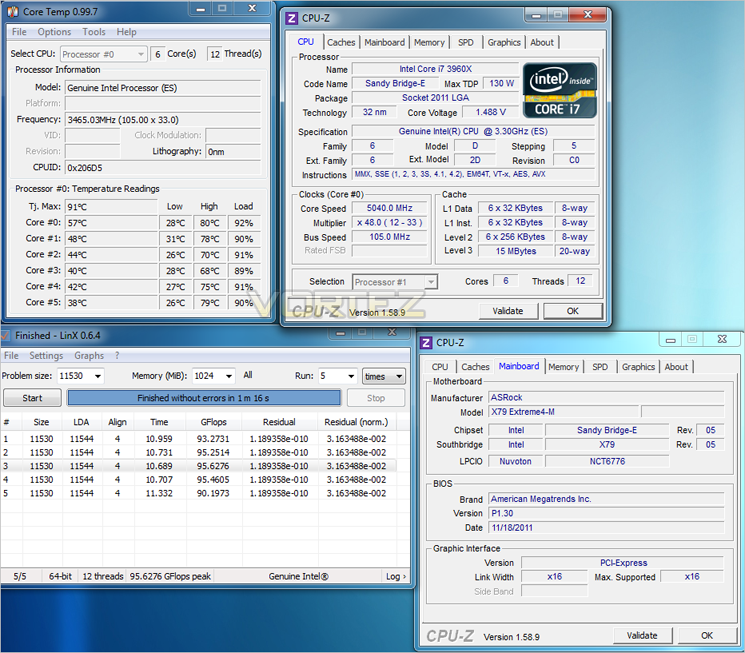
This is the best we have achieved thus far on the X79 platform and by a massive 240MHz! This is an astounding achievement by the little ASRock motherboard putting both the GIGABYTE and MSI ATX motherboards with both bigger VRM’s and overclocking features quite frankly, in the shade. Not only that but the ASRock is also the first motherboard we have tested that have allowed any meaningful baseclock adjustement with a high multiplier. While it is only 5MHz (105MHz in total), it was both bootable and benchable at this speed which is more than can be said for the motherboards in our previous reviews.
Overall, the ASRock was a pleasure to overclock with. It was, for the most part, predictable making overclocking easier and less frustrating. Coupled with the LED Debug information it was easier to decypher where the problems lay. The CPU LLC worked quite well although worryingly when idle, with the LLC set to level 1 and a cpu vcore of 1.5v, the actual vcore reported was 1.556! Adjusting the LLC to mid-range however faired best to represent what the cpu was getting under load compared to what I inputted in the BIOS. The motherboard kept voltages relatively stable despite it’s small digital 6+2 Phase design. In fairness to the MSI and GIGABYTE motherboards, I have had more time to play with this one and ASRock have had more time to iron out some of the issues both it and the other boards suffered from. That said, the ASRock has performed extremely well and thus far, the overclocks have not been matched by either the MSI or GIGABYTE! As always I will keep you posted on any and all developments should they arise.
Let’s take a peek at the power consumption figures of today’s review sample…
Power Consumption
To test for power consumption we use the same basic components for each motherboard on test. Readings are then taken from the wall both in stock (Optimised defaults loaded) and maximum overclocked (Voltages may vary).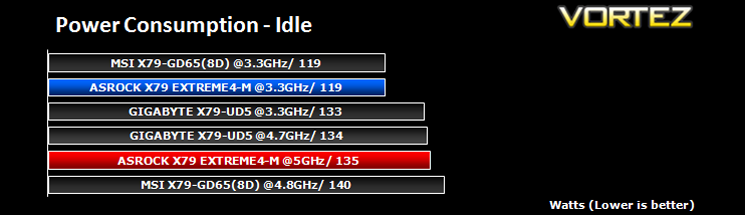
In stock form, the ASRock motherboard is par for the course matching the MSI at stock settings.
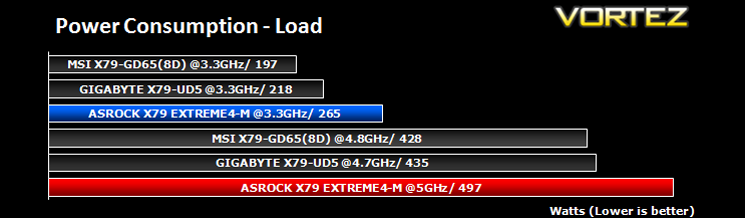
No surprises that the ASRock consumed far more power when overclocked than the other motherboards on test due to the much higher voltages for the higher overclock attained. Also it is worth mentioning again that the VRM heatsink got extremely hot under load. The BIOS does have an option to prevent VRM overheat (VRM protection) however for the purposes of maximum overclocking we disabled this feature and placed a fan over the area to keep temperatures under control. We contacted ASRock regarding the power efficiency of the motherboard which despite the high temps seemed abnormally high. ASRock have assured us that their tech team are working on this and it should be solved in future BIOS releases.
Time to take a look at the synthetic performance of the ASRock Extreme4-M as we run it through our suite of benchmarks…
SiSoftware Sandra
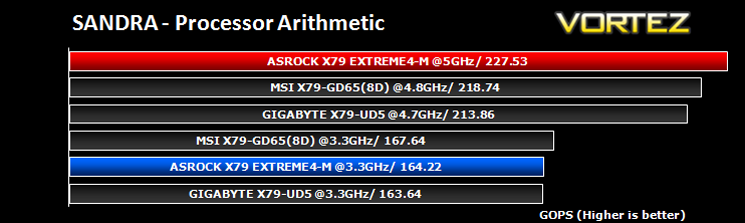
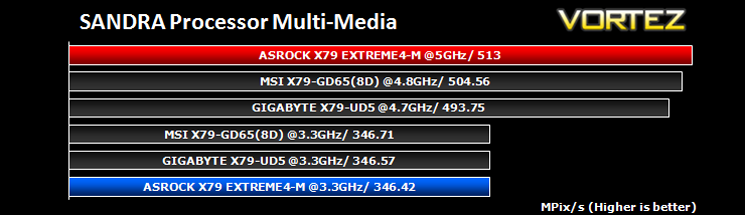
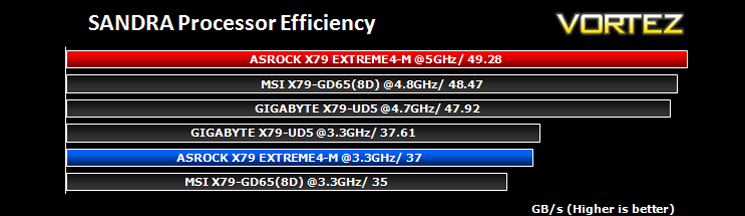
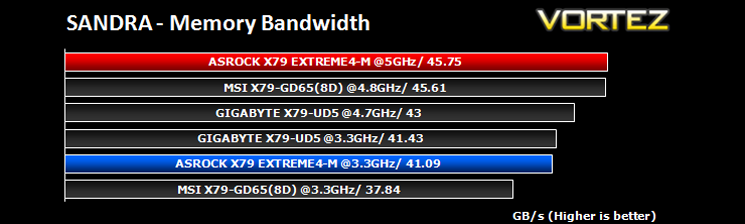
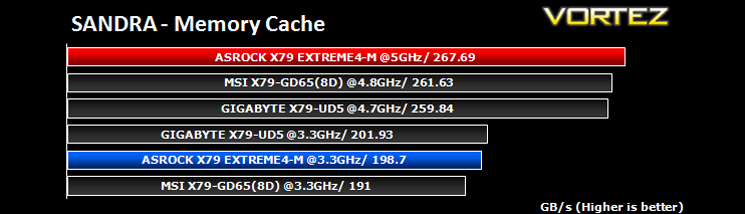
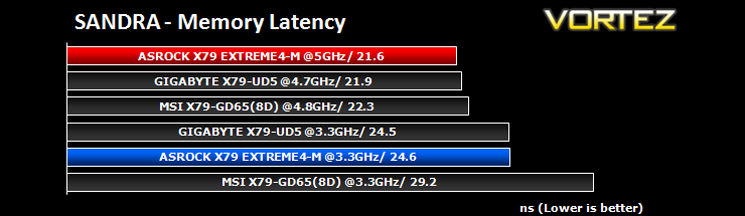
SANDRA isn’t always a benchmark that is included in hardware reviews but I believe it shouldn’t be ignored. SANDRA provides a vigorous package that tests your system in a rather large array of benchmarks. There are many aspects of benchmark that can be executed. We will be considering – CPU and memory tests.
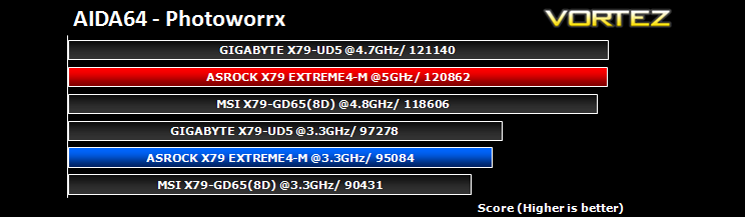
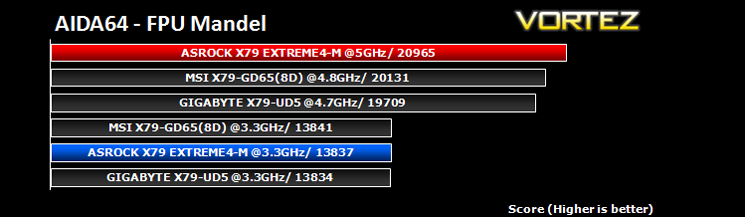
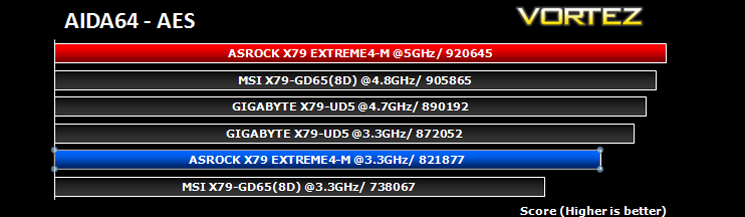
AIDA64
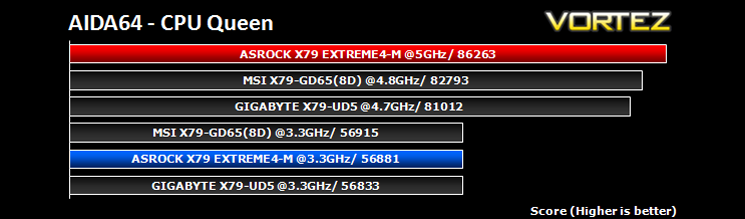
This simple integer benchmark focuses on the branch prediction capabilities and the misprediction penalties of the CPU. It finds the solutions for the classic “Queens problem” on a 10 by 10 sized chessboard. At the same clock speed theoretically the processor with the shorter pipeline and smaller misprediction penalties will attain higher benchmark scores. For example — with HyperThreading disabled — the Intel Northwood core processors get higher scores than the Intel Prescott core based ones due to the 20-step vs 31-step long pipeline. CPU Queen test uses integer MMX, SSE2 and SSSE3 optimizations.
x264 HD
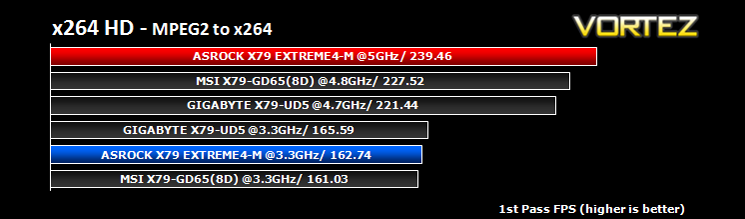
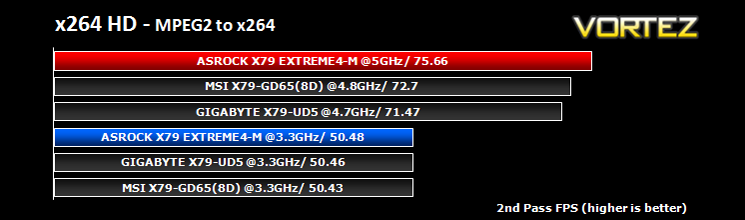
Simply put, this test measures how fast your machine can encode a short, DVD quality MPEG-2 video clip into a high-quality x264 video clip. What’s x264, you ask? It’s more or less the next-generation Xvid/DivX codec. I think it’s ideal for a benchmark because the application (x264.exe) reports fairly accurate compression results (in frames per second) for each pass of the video encoding process, and it uses multi-core processors very efficiently. The test uses multiple cores efficiently to give a good representation of real world performance.
Cinebench 11.5
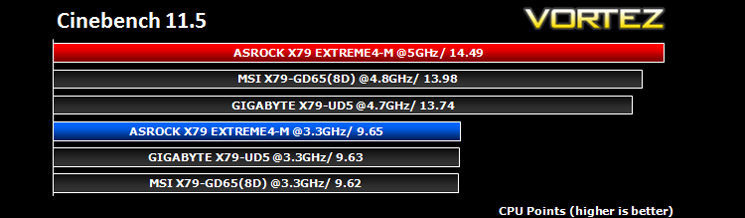
Based on the MAXON animation software CINEMA 4D, Cinebench is a test suite that uses the system’s processing power to render a photorealistic 3D scene. This makes it an excellent benchmark to measure CPU and motherboard performances.
CINEBENCH can measure systems with up to 64 processor threads. This test scene contains approximately 2,000 objects which in turn contain more than 300,000 polygons in total, and uses sharp and blurred reflections, area lights, shadows, procedural shaders, antialiasing, and much more. The result is displayed in points (pts). The higher the number, the faster your processor.
CINEBENCH can measure systems with up to 64 processor threads. This test scene contains approximately 2,000 objects which in turn contain more than 300,000 polygons in total, and uses sharp and blurred reflections, area lights, shadows, procedural shaders, antialiasing, and much more. The result is displayed in points (pts). The higher the number, the faster your processor.
Futuremark PCMark 7
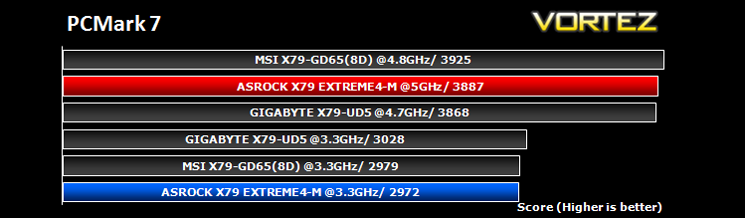
PCMark 7 is a tool provided by FutureMark that tests the PCs ability in general office and everyday use. It produces a number that reflects the all-round performance of the PC and is useful to compare between differing setups. For more information, visit the FutureMark website.
Futuremark 3DMark 2011
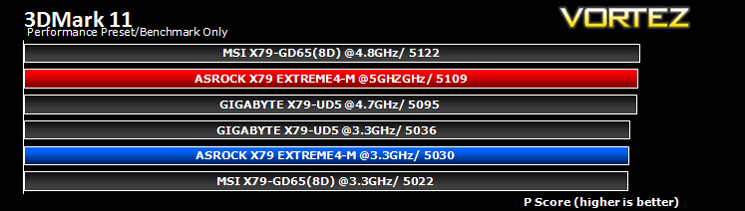
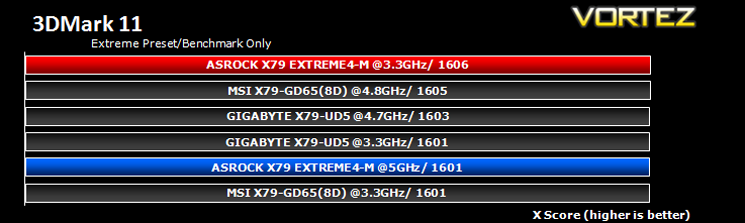
Designed to measure your PC’s gaming performance 3DMark 11 makes extensive use of all the new features in DirectX 11 including tessellation, compute shaders and multi-threading. Trusted by gamers worldwide to give accurate and unbiased results, 3DMark 11 is the best way to consistently and reliably test DirectX 11 under game-like loads.
Gaming Benchmarks
Crysis 2
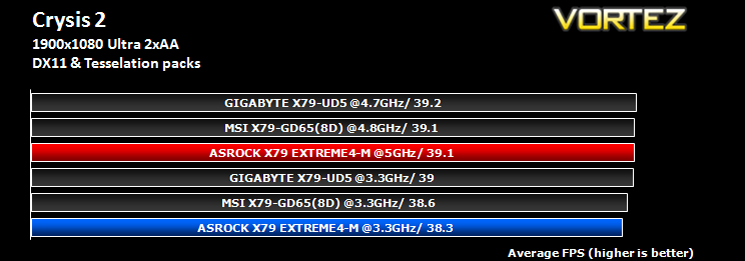
Crytek took an internet beating from its loyal fans due to the fact that they pandered to the console masses and dumbed down the graphics to DirectX 9. Fortunately, fans of the PC version of Crysis managed to force Cryteks hand and they have since developed a DX11 patch and have also enhanced the textures with added tesselation. It is for this reason that we have decided to include it in our suite of benchmarks.
Crytek took an internet beating from its loyal fans due to the fact that they pandered to the console masses and dumbed down the graphics to DirectX 9. Fortunately, fans of the PC version of Crysis managed to force Cryteks hand and they have since developed a DX11 patch and have also enhanced the textures with added tesselation. It is for this reason that we have decided to include it in our suite of benchmarks.
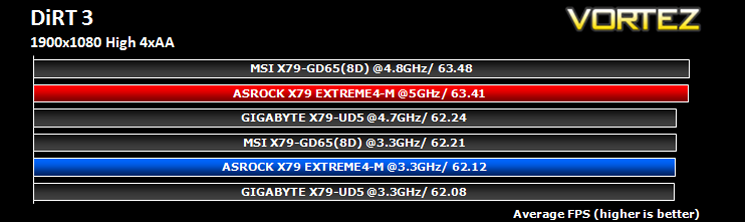
DiRT3
As players race to elevate their global standing, DiRT 3 is back delivering mud, sweat and gears world over: from the intense weather-beaten rally stages of Europe, Africa and the US, to executing performance driving showcases and career challenges where car control is pushed to spectacular limits.
As players race to elevate their global standing, DiRT 3 is back delivering mud, sweat and gears world over: from the intense weather-beaten rally stages of Europe, Africa and the US, to executing performance driving showcases and career challenges where car control is pushed to spectacular limits.
Metro 2033
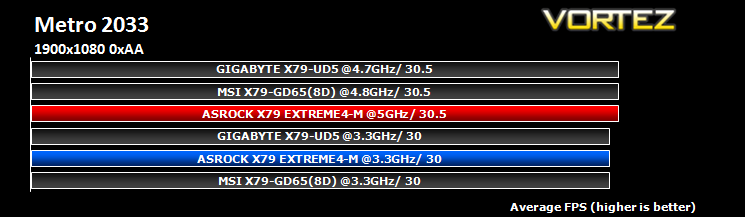
Based on the novel by the same name, Metro 2033 is a first person shooter with elements of survival horror. As Artyom, you trawl through the mutant infested metro systems of post-apocalyptic Moscow. The game delivers presents a grim ambience that reflects on the overall atmosphere of the underground setting. Metro 2033 uses the setting as a back drop to showcase some of the best visuals of any games out now, making it the ideal benchmark for those looking for the best graphics card.
Based on the novel by the same name, Metro 2033 is a first person shooter with elements of survival horror. As Artyom, you trawl through the mutant infested metro systems of post-apocalyptic Moscow. The game delivers presents a grim ambience that reflects on the overall atmosphere of the underground setting. Metro 2033 uses the setting as a back drop to showcase some of the best visuals of any games out now, making it the ideal benchmark for those looking for the best graphics card.
Conclusion
The ASRock Extreme4-M is a class act of that there can be no doubt. It has pretty much everything going for it: Looks, size and performance by the bucket load. So are there any improvements to be made?
The packaging, while very smart is basic to say the least. The manner in which the mainboard is separated from the accessories is not very good with just a cardboard square acting as a partition. The same could be said of the accessories which while adequate, do not suggest that this is an expensive item. Of particular criticism are the paltry two SATA cables provided. With up to 7 SATA ports, not including e-SATA, the number of cables could be increased. The motherboard manual upon first inspection appears very thick however, when you come to realise that it is multilingual and thus it only contains the very basic installation and setup information needed you do feel a little short changed. There is a separate manual explaining the UEFI BIOS functions in greater detail but this only goes so far to make up for the other short falls. It could be argued that most other motherboards only feature the same essential accessories but these little oversights are what contribute to separating the absolute best from the also-rans.
While writing this review there have been a couple of BIOS updates so the support for the mainboard is definitely there. Whether this will continue long into the future remains to be seen. ASRock however are making some very big noises in the enthusiast market in a bid to improving their reputation so I have no reason not to believe that continued support will be offered long into the expected lifespan of the motherboard. Speaking of the BIOS; the ASRock UEFI BIOS is perhaps the most polished I have seen on the X79 platform to date. While it is not as in-depth as the other two motherboards we have reviewed based on the X79 chipset, it does exactly what it says on the tin and goes to prove you do not always need the multitude of minor adjustments and settings to get the best performance from a PC setup. ASRock have concentrated on building a BIOS that is both user friendly, easy to follow yet complex enough to keep the overclocking community content. There are a few more tweaks I would like to see like manually inputting the figures rather than scrolling through the options and full mouse compatibility would also be nice as scrolling through the options with a mouse wheel can be hit or miss.
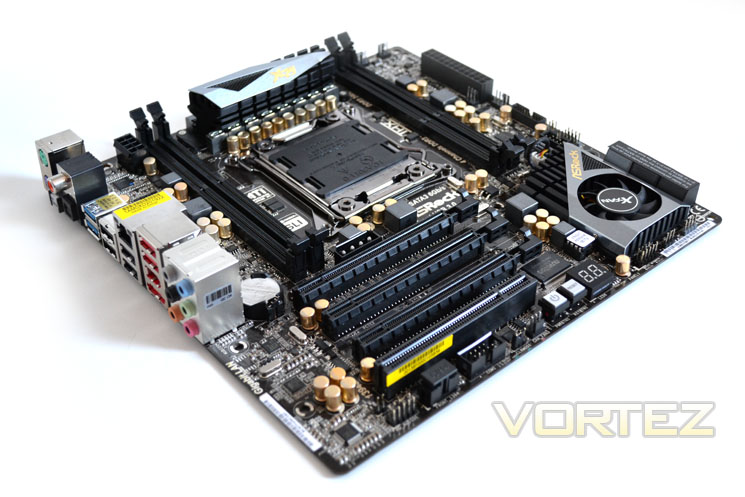
Did I mention the motherboards great looks? To some, the ASRock X79 Extreme4-M may look a little understated, especially when compared to some of the more garish offerings on the market today. It does however look very professional with its sleek black sockets and flashes of gold and silver. If you were hoping for ‘weaponized’ heatsinks or arachnid heatpipes sprouting from every crevice then you would do well to look elsewhere. This motherboard is neat, tidy, understated yet brimming with quality; it doesn’t need gimmicks. The on-board features are well laid out with the power/reset buttons easily identified and attainable. Even the CMOS clear button on the I/O shield is illuminated for ease of use. My initial concerns over the X79 chipset heatsink having a fan were unfounded as the fan rarely span up, if at all and when it did it was inaudible. I would have liked to have seen a beefier VRM heatsink as for the 5GHz overclock it needed a fan positioning over the area to keep temperatures under control. My only other complaint would be the positioning of the MOLEX power socket to provide extra juice to the GPU’s under extreme overclocking conditions. I say extreme overclocking conditions as for the most part this is not what this motherboard is aimed at but given the performance of the motherboard, that statement could and perhaps should be retracted.
Overclocking with the Extreme4-M was sublime. Reaching and indeed exceeding the 5GHz barrier was an achievement in itself but getting there was much more satisfying and enjoyable than with the previous motherboards we have reviewed. I was left with eagerness in that I am certain the CPU could be pushed further on this motherboard given extra voltage and better cooling. Such is the confidence this motherboard gives you. My better judgement (fear) however made me refrain from getting too carried away though and thus I stuck with 5GHz rather than destroying a CPU with silly voltage adjustments. I will perhaps save that honour for the Extreme4-M’s bigger brother, the Extreme9 which is the flagship motherboard from ASRock. Given the performance of the Extreme4-M, it is hard to imagine what the range topper can achieve, such is this little gem’s all-round capability. With that in mind it would be quite easy to forget that we are dealing with an mATX motherboard and not some E-ATX, gazillion phase, quad SLI eating monster. Our suite of benchmarks did however tell another story in that while the ASRock may well have been the highest overclocker, it was on occasion out done by the lower clocked offerings. A result of CPU throttling due to the toasty temperatures or simply a performance deficit due to hardware latency? It’s hard to say either way but it is something certainly worth mentioning as while the performance was by no means poor, it did throw up a couple of surprisingly average results despite its mammoth overclock, none more so than the GPU benchmarks where it fell short on more than one occasion.
Overall then, what we have reviewed today is, for the most part, the performance leader and depending on your taste, the best looking X79 motherboard we have had the pleasure of reviewing thus far. Improvements could be made to the product as an overall package as for £170 you don’t get a great deal of extras which was slightly disappointing. David has however certainly struck down the Goliaths of the motherboard world, or at least shown them how it’s done in the overclocking department. With the performance tweaked a little and accessory list improved, it would certainly be a platinum maybe even elite however, because of these minor shortfalls the ASRock X79 Extreme4-M receives the same colour award as its all Japanese capacitors – Vortez Gold. If you plan on investing in X79 and want small form factor, the ASRock X79 Extreme4-M has got to be at the top of your shopping list.
Pros:
+ Fantastic overclocking ability
+ User friendly UEFI BIOS
+ Great aesthetics
+ Good on-board Features
+ LED Debug
+ Innovative PCIe lock/release catch
+ Good ASRock Software bundle
Cons:
– Slightly lower than average GPU performance
– Loadline Calibration can be excessive
– MOLEX Power positioning
– 4 DIMM slots
– Basic accessories
+ Fantastic overclocking ability
+ User friendly UEFI BIOS
+ Great aesthetics
+ Good on-board Features
+ LED Debug
+ Innovative PCIe lock/release catch
+ Good ASRock Software bundle
Cons:
– Slightly lower than average GPU performance
– Loadline Calibration can be excessive
– MOLEX Power positioning
– 4 DIMM slots
– Basic accessories


Click here for an explanation of our awards at Vortez.net. Thanks to ASRock for providing today’s review sample.