







The New Year marks an auspicious start for most. The question is whether it will greet the newly emerging Zero Infinity brand with open hands.

Manufacturer and Sponsor: Zero Infinity/Caseking
MSRP: 69.90Euros
Street Price: 69.90Euros
In most situations, you would be easily forgiven for opting for a well-established manufacturer when looking to purchase a new product. Certainly, there’s nothing wrong sticking with a tried and tested brand whose growth has marched hand in hand with their excellent quality and service. For many companies, such success could only have been achieved through years of experience and close attention to their users’ needs, making sure these are met to generate greater appeal. We only have to look at the likes of ASUS, MSI and Gigabyte and their vast history to understand the effort required to reach such heights. But the cooling world has always been different; new brands crop up all the time, sometimes successfully but more often being forgotten just as quickly as they emerged. The key to being recognised has always been innovation and today we will be looking at a new brand who have gone to extra lengths to achieve just that; Zero Infinity.
The recently established Zero Infinity are looking to take on the CPU Cooling market by storm with their flagship dual tower cooler, the Free Flow+. Following the lead of our favourite CPU Coolers; the Noctua NH-D14, Thermalright Silver Arrow, Phanteks PH-TC14PE and Alpenföhn K2, Zero Infinity have already set their sights on the cream of the crop which is one excellent way of getting our undivided attention. Couple the heatsink with five 8mm heat pipes (inspired by the Phanteks?) and three 140mm fans, the aptly named Free Flow+ contains all the right ingredients for the perfect recipe, on paper at least. Although Zero Infinity’s line up of products includes a range of cooling solutions for different situations, such as the more compact Phantom Knight, VESTA and SHIVA alternatives, as well as a range of power supplies and RAM heatsinks, it is their dual tower Free Flow+ that will be the focus of today’s review. The cooler boasts a number of features on top of what we have already mentioned. Not dissimilar to our chart leading coolers, the Free Flow+ sports an aluminium and copper construction with a nickel plated finish preventing material degradation as well as boosting aesthetic appeal. The 46 aluminium fins have been designed for optimal heat dissipation surface area which aims to match the best despite the slightly more compact size of the heatsink compared to the other 4 dual tower coolers. Perhaps the most noteworthy feature of the heatsink is its use of Direct Touch Technology to put the five heat pipes in direct contact with the CPU. This is by no means unique as we have previously seen the same feature on other less renowned dual towers like the Tuniq Tower 120 Extreme and the Coolink Corator DS. It remains to be seen whether this is indicative of the performance we can expect from the Free Flow+.
Zero Degrees, Infinite Power
Zero Infinity, a division of Hong Kong based Eastwood Technology Limited. Our main objective is to provide innovative power and thermal solutions for the most demanding gamers and extreme hardware enthusiast.
At Zero Infinity, we understand that “consumers are the life and blood of our business, without them, we wouldn’t be here”. Consumer’s satisfaction is the most important values of our business. Our team of designers and engineers shares one goal in common. To design products that has impeccable performance and flawless quality.
ZERO INFINITY was established by a team of enthusiast, mainly producing high quality computer coolers with unique design.
Our main categories include: Power Supplies, Heat-sink and RAM cooling solutions. As one of the top producers of high quality and high performance power supplies, our whole range of power supplies have been certified with 80Plus.
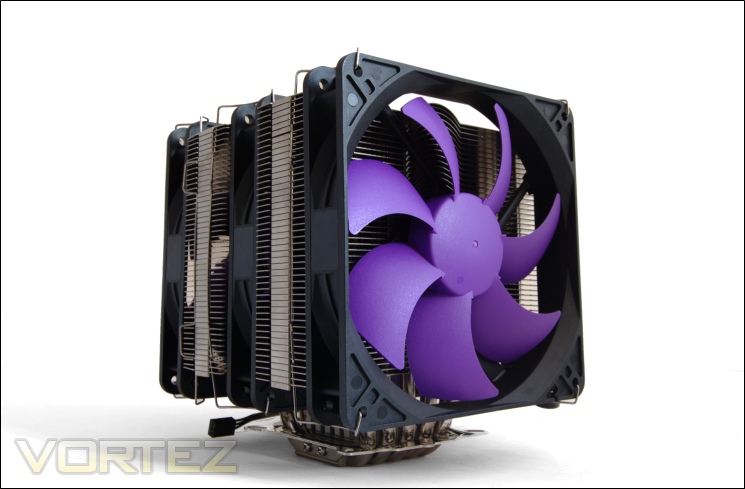
Armed with three 140mm fans and five 8mm Direct Touch heat pipes, is the Free Flow+ enough to let enthusiast welcome Zero Infinity into their lives?
Features & Specifications
•5pcs High Performance U-type Heat Pipe w/CPU Chip
•Easy Installation
•Direct H.T.C (Heat Pipe Touch Chip) Technology
•5 Copper Heat Pipes
•140mm NDB fans
•Aluminium fins
•Tool-Free clip
Specifications
•Cooler dimensions with no fans: 111x140x165mm (LxWxH)
•Cooler dimensions with fans: 162x140x165mm (LxWxH)
•Cooler weight: 1496g (With 2 fans) / 1057g (With no fans)
•Heat pipe: 8mm x5 units
•Cooler material: full copper heat pipes and base (HDT), aluminium alloy fins
•Compatibility: Intel Socket LGA1155, 1156, LGA1366, LGA775/771 and AMD AM2/2+/AM3, FM1
Fan Specifications
•Fan Dimension: 140x140x25mm
•Fan Speed: 1200 RPM
•Fan Weight: 154g
The features and specifications provided by Zero Infinity is quite sparse, and unlike many coolers we have covered before, there is little about the innovative features the Free Flow+ were designed with. Regardless, we can see that the cooler boasts some impressive characteristics, the key one being its dual tower design and 3 140mm fans operating at 1200RPM. Its five 8mm copper U-shaped heat pipes follows Phanteks’s suit, which as we know is currently the best CPU Cooler around, so that is a promising start for the Free Flow+. It is debatable whether Direct Touch technology aids in further cooler potential but we will investigate this in more depth later on.
In absolute terms, the Free Flow+ is a beast of a cooler and yet relative to other high end dual tower coolers, it is actually fairly compact. In terms of width, it is comparable to the Phanteks at 140mm, 4mm less than the K2. Height-wise, it stands at 165mm where other coolers tend to be 160mm or thereabouts. The depth on the other hand, isn’t as substantial as the other 3 high-end dual tower coolers. The heatsink itself is 111mm in depth, 25mm less than the Phanteks PH-TC14PE. This means that the Free Flow+ can accommodate an extra third fan without being deeper than the Phanteks using only two fans. So, despite losing some surface area, it makes up using a third fan.
The weight of the Free Flow+ is also significantly higher than the K2, our heaviest tested cooler, by 118g. Whereas the heatsink itself is only 7g heavier, the additional fan contributes to the added weight. The question is how a more compact heatsink can be heavier and whether the weight causes undue stress on the motherboard.
Packaging and Content
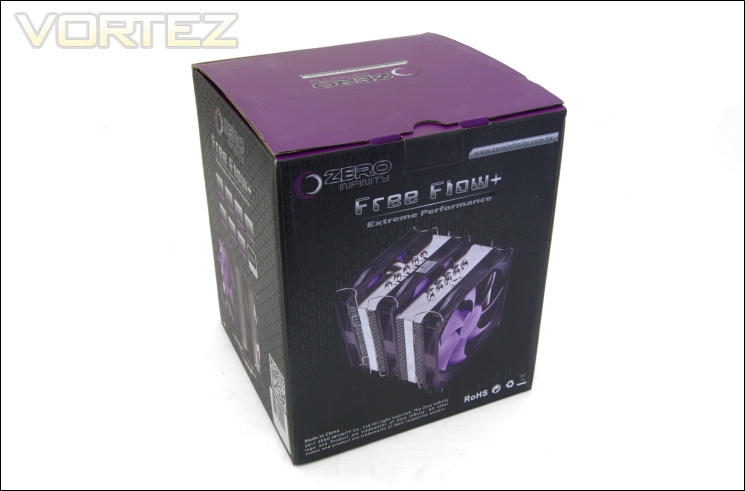
The packaging
Zero Infinity have gone for an eye-catching black and purple theme with their packaging and cooler. The packaging is very robust and users will be immediately taken aback by its sheer size, not unexpected given the nature of its content. The packaging is sparse on details but what it lacks in terms of information, it makes up for in pictures of the cooler from various angles. Looking at the face of the package, we see Zero Infinity display their cooler proudly with all three fans installed and above that is the Free Flow+ name.
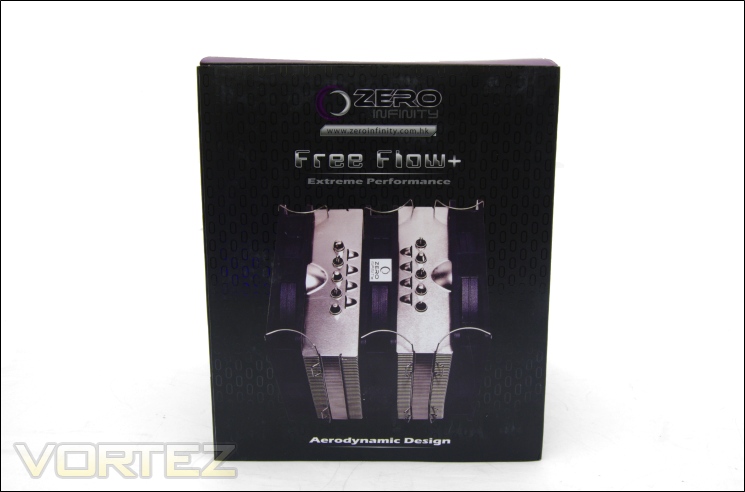
The front of the box
On the other side, we get a glimpse of the cooler from the top, showing its heat pipe layout and apparent ‘aerodynamic design’. Zero Infinity are keen on promoting their own brand, hence their website URL plastered beneath their logo.
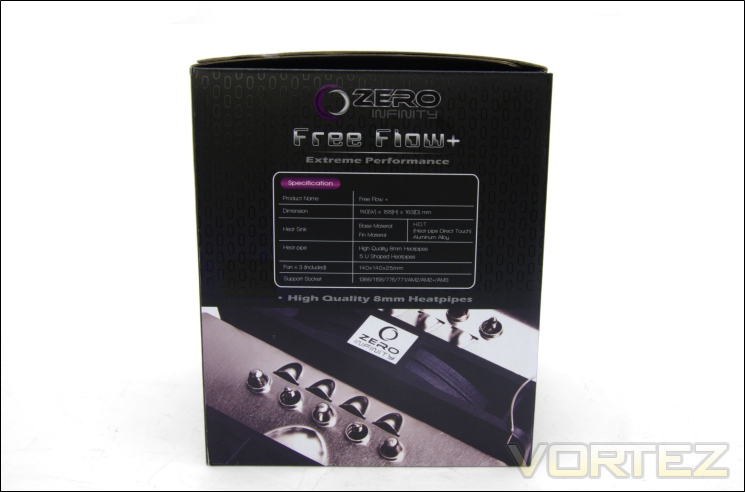
The specifications
On one side of the box is listed all the specifications. These only cover the main aspects of the cooler such as construction material, the heat pipe count, size and socket support. The opposite face also lists compatible CPUs which include Xeon CPU on LGA771 boards.
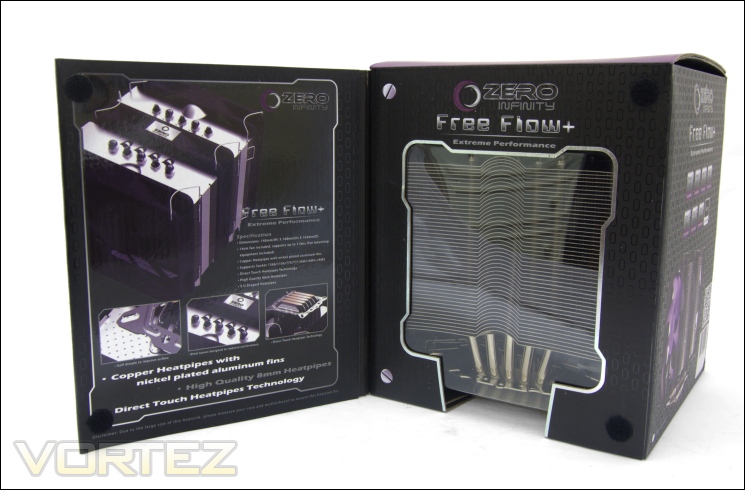
A glimpse through the window
The box makes use of a front flap which when opened reveals a window to the heatsink inside. The inside of the flap lists all the specifications once more, this time with visual depictions of the heatsink’s key features. These include the five 8mm heat pipes, and the HDT base.
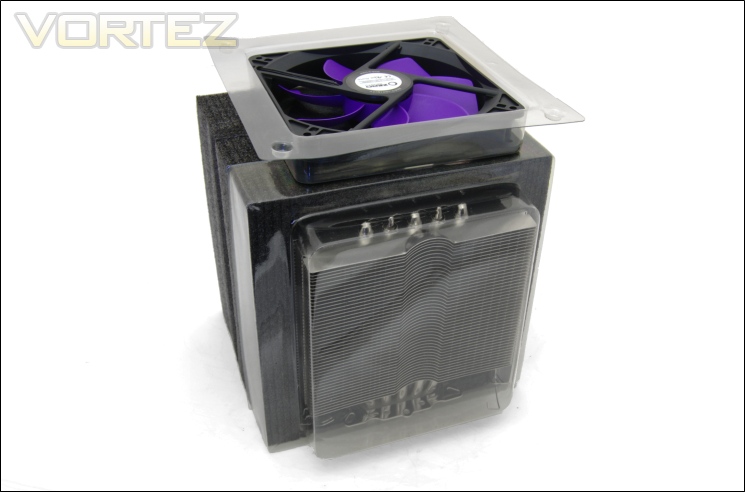
The inside
Inside, the heatsink and fans are very securely packaged. One fan is housed inside a blister pack whereas the heatsink is encased in foam with an additional plastic cover providing further protection. At the back of the foam enclosure are two more fans housed in a larger blister packed nicely tucked within the foam.
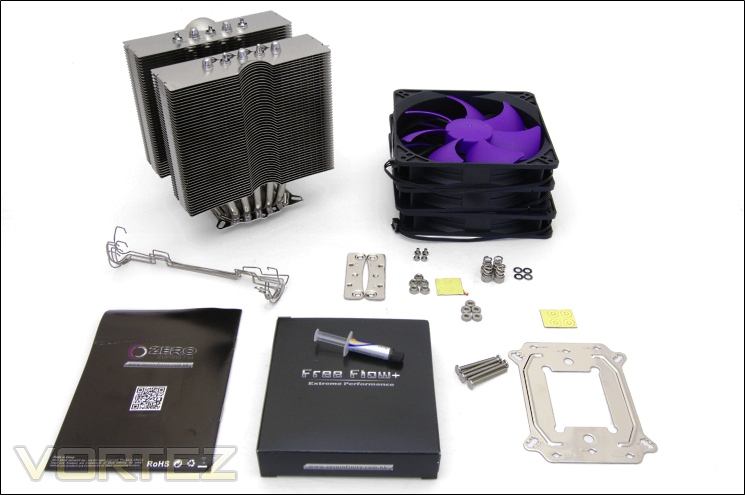
The bundle
The bundled accessories, more specifically the mounting kit, indicate to us that the Free Flow+ is possibly manufactured by another OEM. The mounting kit is the same one shared by the Alpenföhn Triglav and Nordwand, and Tuniq coolers. Normally, this isn’t a bad thing but as we will see later, the mounting kit isn’t implemented on the Free Flow+ very well. Without digressing, the bundle includes:
-1x Free Flow+ Heatsink
-3x Fans
-4x Nuts
-6x Fan Mounting Clips
-1x 1g Thermal Grease Tube
-5x N1 Intel Screws
-2x AM2 Brackets
-4x B2 AMD Screws
-5x N2 AMD Screws
-5x Bolts
-4x Intel Isolating Rings
-4x AMD Isolating Rings
-8x Washers
-1x Manual
Zero Infinity have been thoughtful enough to include some spare accessories in case some of the smaller components get lost. A QR code on the front of the leaflet will take users with an appropriate app straight to their website, if the URL is too difficult to type manually…
Closer Look
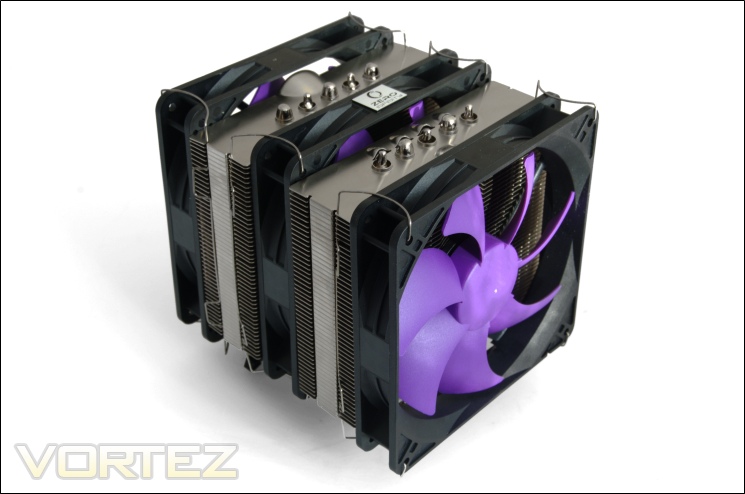
The Zero Infinity Free Flow+
Our initial impression of the Free Flow+ is mostly a positive one. Three fans and five 8mm heat pipes combined with the cooling potential of two radiator stacks screams extreme performance. The three 140mm purple and black fans dominate the aesthetics of the cooler as well as its airflow focussed design. In some ways, it differs to other dual tower coolers in that it relies more on airflow than merely surface area. Aesthetically, the Free Flow+ isn’t as easy on the eye as the like of the K2 or the Phanteks. It’s not so much the purple and black colour scheme (very unique in its own right) as it is the dull finish of the heatsink and the protruding fan wire clips.
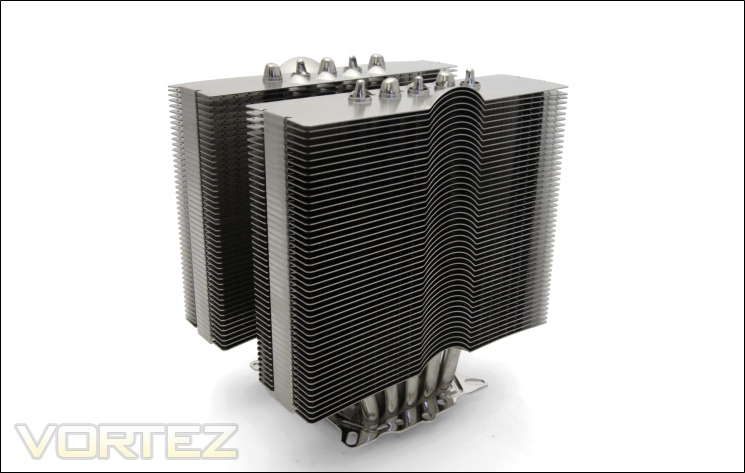
The heatsink
Removing the fans to show the heatsink on its own reveals a very quirky looking design. The two radiators feature laminar fins that are characterised by a convex upward bulge in the middle. Strangely, the symmetrical nature of the heatsink means that this feature appears on opposite sides of the cooler which begs the question as to what purpose it serves and how it helps with airflow given that the latter is unidirectional (ideally).
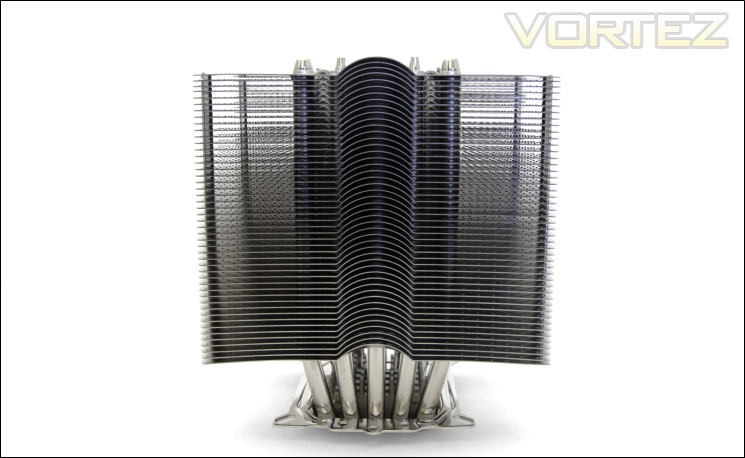
The front face
From the front face, the shape of the fin array is more distinguishable and the central upwards curvature is more apparent. These appear as half-hemispherical shape and yet on either side, the fins are perfectly flat. The real purpose of this feature is unknown, other than increasing the fin surface area but then we ask ourselves why this isn’t consistent across the whole fin rather than localised in the centre. In effect, it is possible that it forces cool air from the front ‘push’ fan down on to the rest of the fin such that turbulence is generated. On the other radiator, the opposite happens due to the opposing orientation of the curvature promoting a more aerodynamic flow. From the front, we can also see the five U shaped heat pipes distributed closely across the centre.
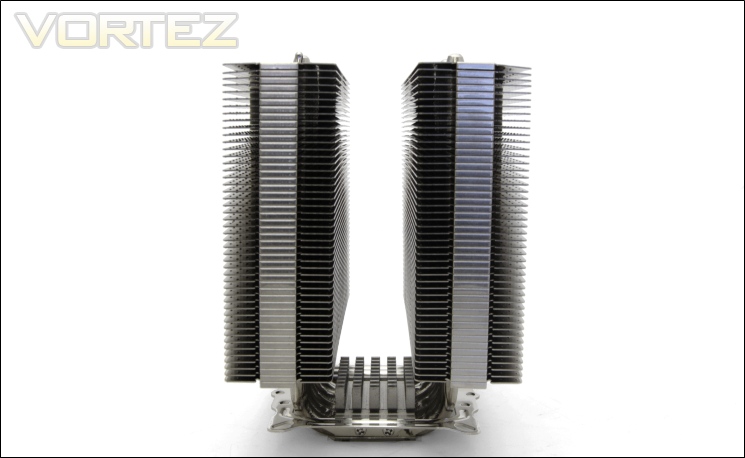
The side profile
The side view reveals a perfectly symmetrical design with both radiators being identical but orientated in opposite directions. In total, the Free Flow+ radiators feature 46 fins separated by a 2mm gap. Each stack is 39mm deep and 140mm wide to produce a fin surface area of around 5460mm squared, although this is a conservative guess due to the convex bulge further increasing it. The surface area is less than other dual tower coolers but we have to remember that the Free Flow+ is a more compact design.
The fins
The fins are interlocked at the side as indicated by the closed fins running down the centre of each stack.
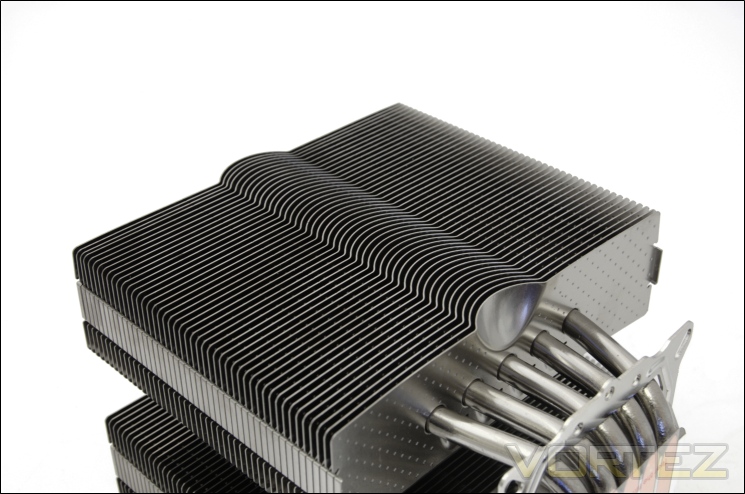
The fin array
And again from a different angle, we see the distinctive shape of the fins. The spherical protrusions extend less than midway across the depth of the fin.
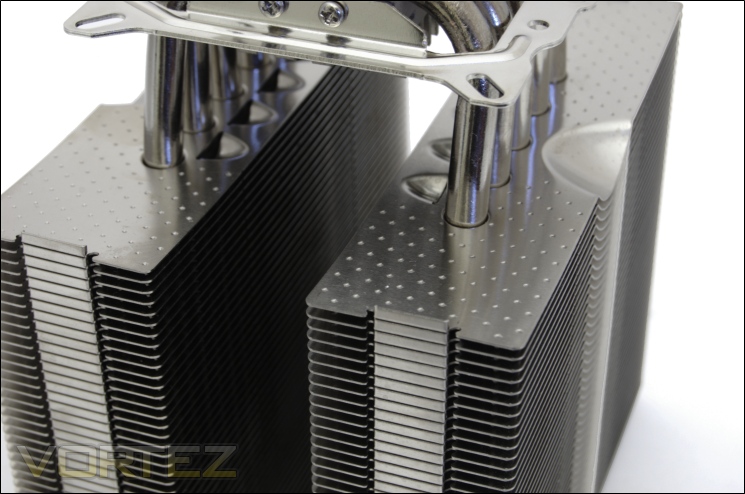
Closer look at the fins
Taking a closer look at the surface of the fins, we see regularly distributed ‘dimples’ that further contribute to the surface area and promote turbulence.
Closer Look (Continued)
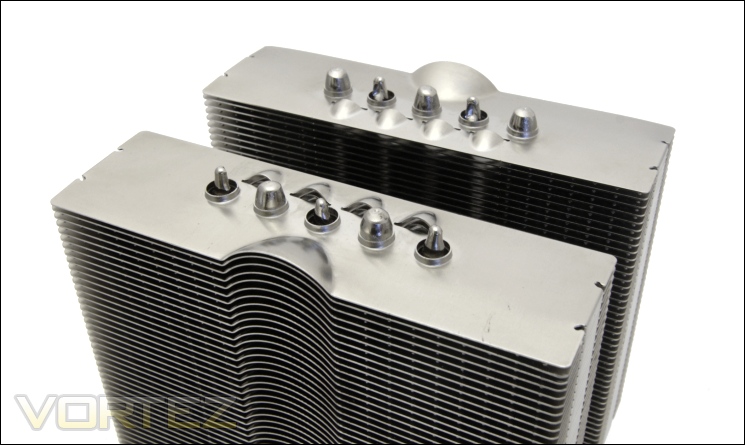
The top fin
Across the top plate, we see the end of the five 8mm heat pipes, half of which have tapered end and the other half being rounded. The heat pipes have each end going through one radiator to maximise heat transfer and aligned such that airflow can pass across all of them. One strange design decision however is the small distance separating each one when the fin surface area is so large. It makes for an inefficient design since the heat can’t dissipate as effectively across the whole fin. With all five gathered towards the centre of the radiators, it also means that they lie behind the fan dead zone as opposed to the areas with greater airflow. Between the heat pipes are four more small conical grooves that replicate the front curvature, possibly serving the same purpose.
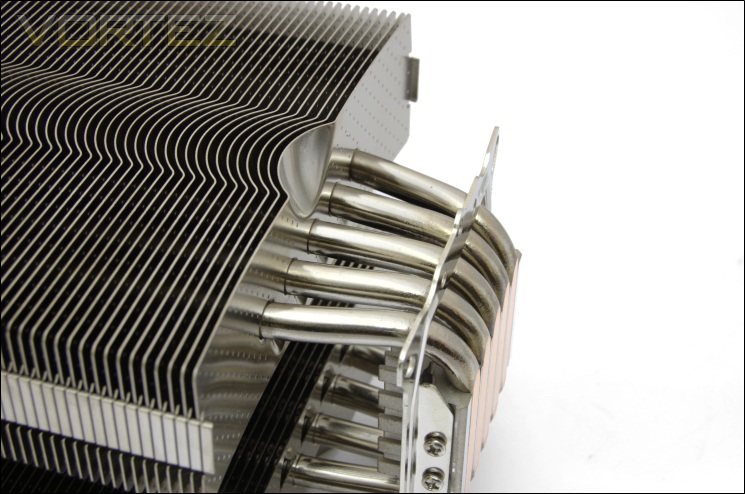
The heat pipes
Following the same design decision made by Phanteks, and not wrongly so, the Free Flow+ makes use of five 8mm heat pipes for heat transfer. These are of nickel-plated copper construction for durability, efficiency and aesthetics. It is still strange not to see the heat pipes distributed more even across the radiators and as we will see later on, it has a major impact on performance.
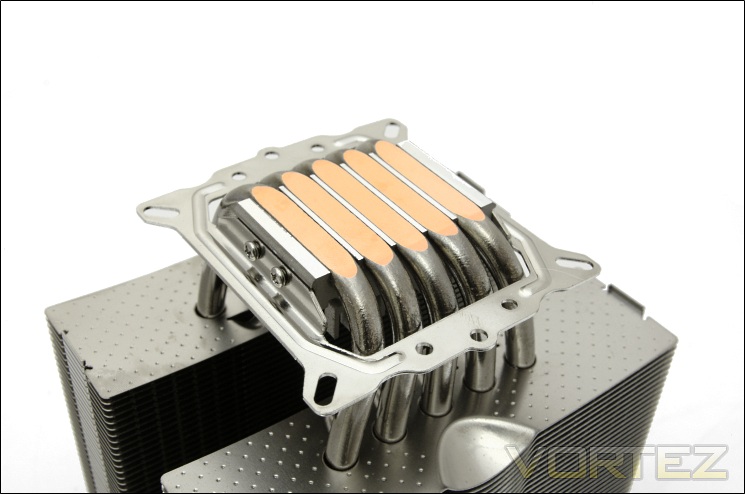
The base of the heatsink
To many, the base of the Free Flow+ will appear very familiar. It features the same mounting bracket found on other coolers such as the Triglav, Nordwand and Tuniq Tower, suggesting the same OEM. The base also features Direct Touch technology, meaning the heat pipes are exposed and in direct contact with the CPU. Personally, I prefer the idea of a base plate to help distribute heat from the CPU, especially when the heat pipes are numerous and thick.
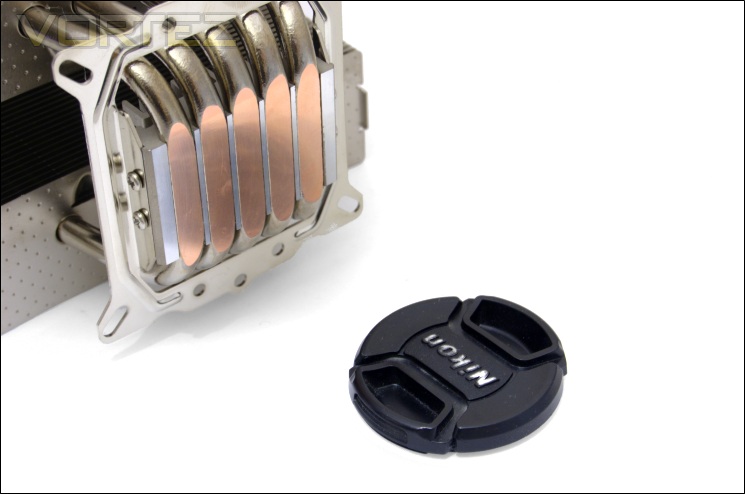
The base finish
The base is fairly flat, having been milled to reduce the gap between the heat pipes and the encasing block. The finish is not quite a mirror finish.
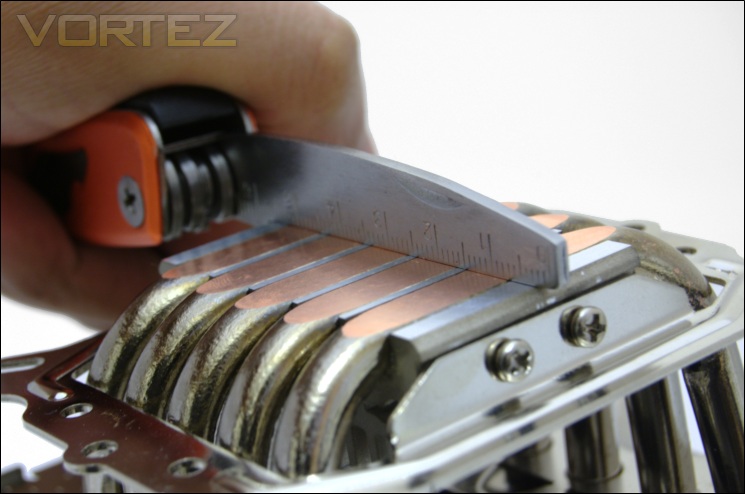
The heat pipes
The base surface displays little to no gap so we can expect excellent contact with the CPU underneath it.
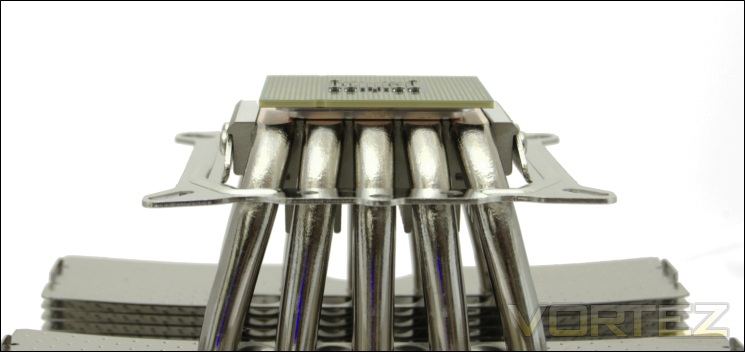
The flatness of the base
One of the problems of having too many heat pipes is that they don’t end up overlaying the CPU. The Alpenföhn K2 and Phanteks PH-TC14PE makes use of a copper base plate to alleviate the issue to varying success but unfortunately, the problem is far more prominent with the Free Flow+. We observe with an Intel Core i7 990x on top that the side heat pipes do not fully come into contact with the CPU HIS, rendering them useless for heat dissipation. As such, the cooler is less efficient. Considering newer Sandy Bridge CPUs are even smaller, the Free Flow+ will prove even less effective coupled with them.
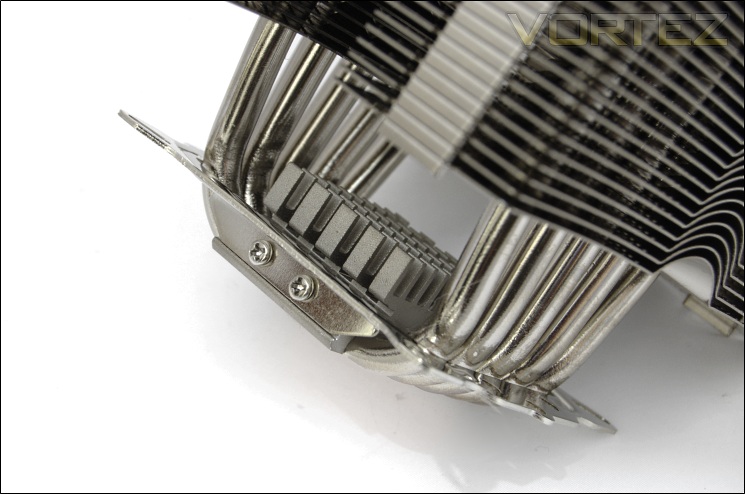
The integrated base heatsink
The base features an additional integrated heatsink, akin to that found on the Matterhorn and Nordwand coolers.
Closer Look (Continued)
The fans
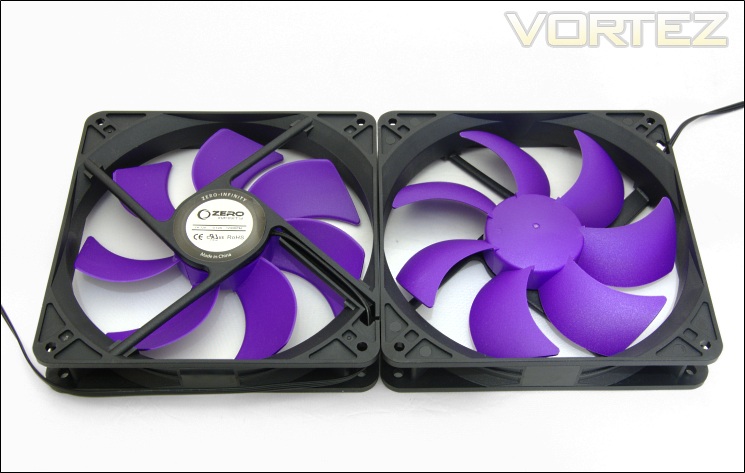
The purple and black fans are certainly one of the more eye-catching features of the Free Flow+. Bundled with three, each is 140mm in size and operates at 1200RPM. Although not yet listed on their site, they are likely to be similar to Zero Infinity’s 1800RPM variant that use long-life sleeve bearing. The fans have 7 blades and unlike a lot of other 140mm fans we have come across, these use square frames with 140mm mounting holes instead of 120mm ones, limiting compatibility with other coolers. The plastic construction makes the fans feel fairly mundane although not fragile.
The fan header and cable
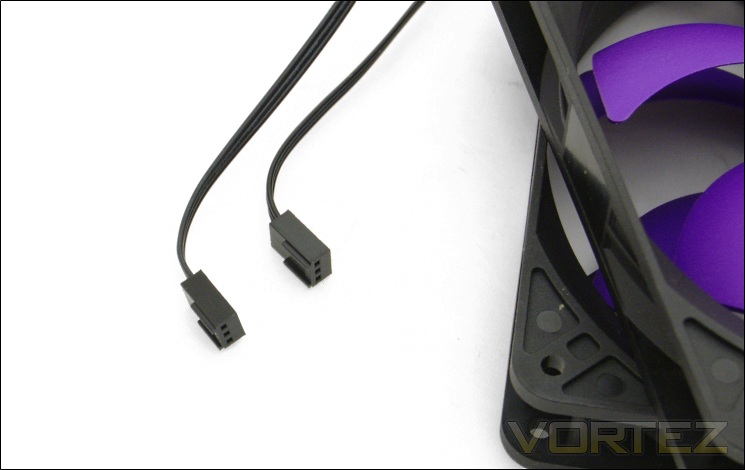
The fans have three pin headers and thus lack PWM functionality. The cables are low profile flat cables akin to those used by Corsair. The help give the fan cables a nicer finish without requiring unnecessary braiding.
Installing the fans
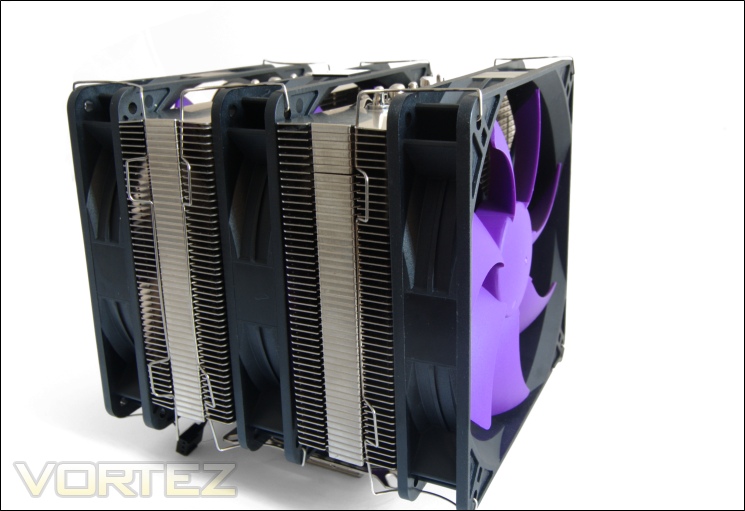
The fans are installed using 6 bundled metal fan clips designed to support 140mm fan mounting holes only, unless of course you bend them… Having to constantly change fans during testing means that I generally have a good grasp of how easy the wire clips are to handle when installing the fans. Unfortunately in this case, they are an absolute pain. The end of the wire clips first have to be inserted into the mounting holes followed by clipping the side into the heatsink grooves using the two tabs. The latter step proved very awkward because the tabs wouldn’t clip between the fins with ease. The fact that the tabs face towards the fan also means that unclipping them (both tabs at the same time) puts unnecessary pressure on your fingertips, as the red etchings on my fingers demonstrated. My advice would be to install the cooler and fans prior to putting the motherboard back into your case.
Installing the cooler
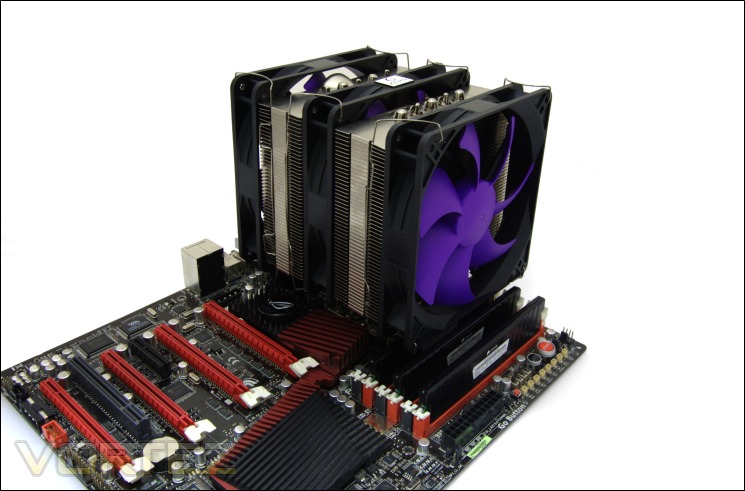
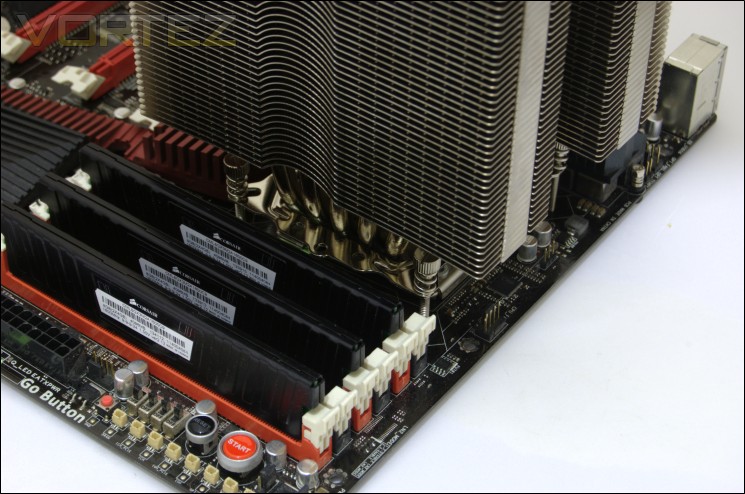
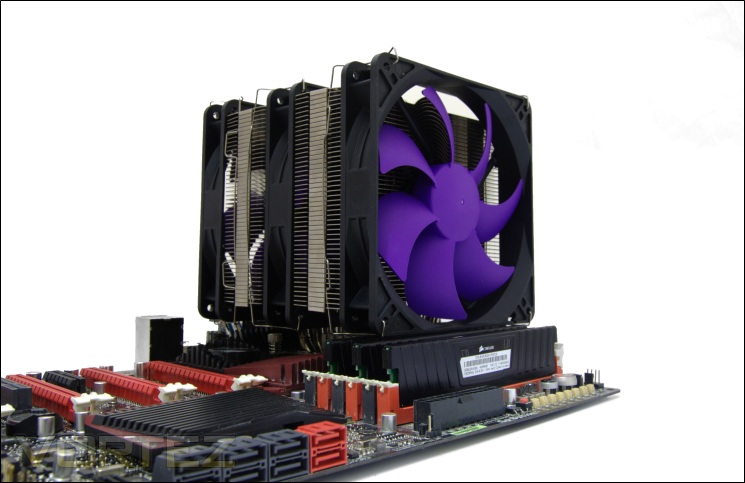
The profile of the Free Flow+ is characterised mostly by its three towering fans almost obscuring the heatsink itself. The cooler is without a doubt amongst the largest we have tested, although thankfully not protruding as far forward as the other dual tower coolers. Nonetheless, it still dominates the landscape of the motherboard.
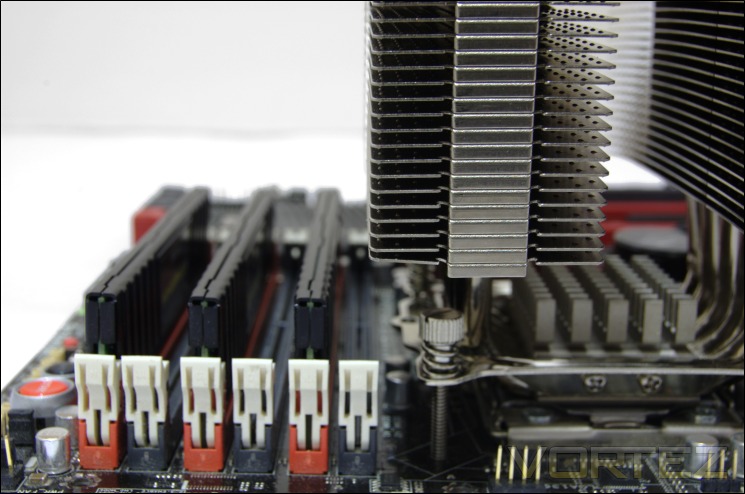
Mmemory compatibility without the fans
Without the front fan, the heatsink barely manages to overhang the first memory slot. A tall large memory heat spreader may still have issues being installed in the slot but as usual low profile modules are preferable.
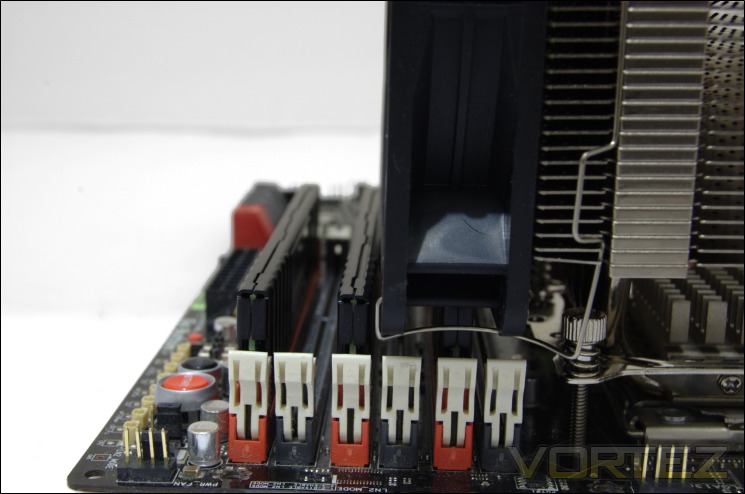
Memory compatibility with the fans
With the fan installed, the depth extends to overhang the first three slots adjacent to the CPU. This represents fewer covered slots than the K2, Silver Arrow, NH-D14 and PH-TC14PE but the downside is that the 140mm limits your memory choice. Since there is limited margin for moving the fans upwards, not even modules like the G.Skill RipJaws can be accommodated.
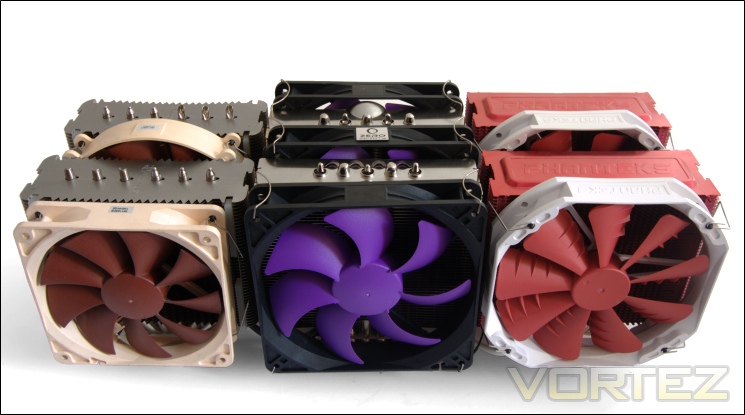
Noctua NH-D14 VS Zero Infinity Free Flow+ VS Phanteks PH-TC14PE
Side by side, we observe that the Free Flow+ radiators are narrower than the other two coolers’ allowing it to accommodate a third fan to have a similar overall depth.
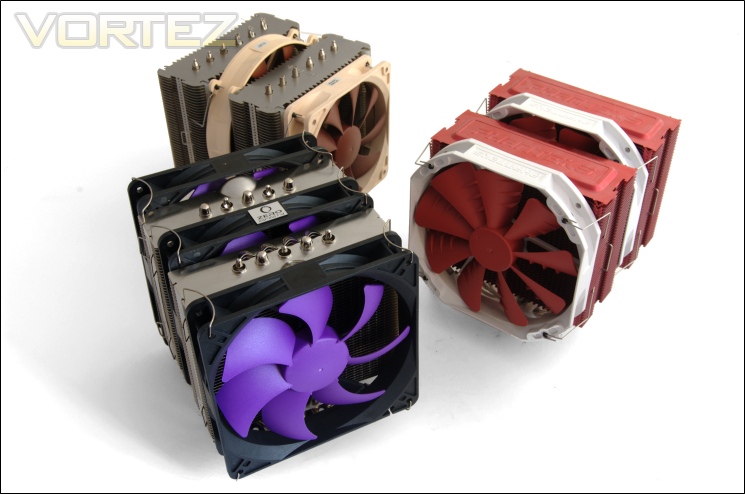
Noctua NH-D14 VS Zero Infinity Free Flow+ VS Phanteks PH-TC14PE
Aesthetically, the Free Flow+ doesn’t impress as much as the Phanteks or Noctua. The colour scheme might appeal to those looking for an alternative design, but the heatsink itself doesn’t share the same quality finish as the other two.
Test Setup
CPU – Intel Core i7 920 – 2.66/4.0GHz
RAM – 6GB (3x2GB) OCZ Platinum DDR3 1333MHz
Motherboard – ASUS Rampage III Extreme
Graphics card – Inno3D GTX570 1.25GB
Power Supply – Enermax Revolution 85+ 850W
Hard Drive – OCZ Vertex 2E 120GB
Samsung F1 320GB
Samsung F3 1TB
Case – Lian Li B25B
Drivers – Nvidia ForceWare 285.38
CPU Coolers:
Enermax ETS-T40-TA including tests using 1 stock fan, 2 Noctua NF-P12s and 2 SWiF2-120Ps
Alpenföhn Himalaya including tests using 1/ 2 Föhn 140, 2 Noctua NF-P12s/NF-P14s and 2 SWiF2-120Ps
Alpenföhn K2 including tests using 2 stock fans, 2 Föhn 140, 2/3 Noctua NF-P12s/NF-P14s and 2 SWiF2-120Ps
Cooler Master Hyper 612S including tests using 1 stock fan, 2 Noctua NF-P12s/NF-P14s and 2 SWiF2-120Ps
Corsair H100 including tests using 2/4 stock fans, 2 Noctua NF-P12s and 2 SWiF2-120Ps
Phanteks PH-TC14PE including tests using 3 Phanteks PH-F140TS, 2 Noctua NF-P12s/NF-P14s and 2 SWiF2-120Ps
Alpenföhn Triglav including tests using 1 stock fan, 2 Noctua NF-P12s/NF-P14s and 2 SWiF2-120Ps
Antec KÜHLER H2O 620 including tests using 1 stock fan, 2 Noctua NF-P12s and 2 SWiF2-120Ps
Antec KÜHLER H2O 920 including tests using 2 stock fans, 2 Noctua NF-P12s and 2 SWiF2-120Ps
Prolimatech Genesis including tests using 2 Noctua NF-P12s/NF-P14s, 2 SWiF2-120Ps and 2 Prolimatech Blue Vortex 14s
NZXT Havik 140 including tests using 2 NZXT fans, 2 Noctua NF-P12s/NF-P14s and 2 SWiF2-120Ps
Alpenföhn Matterhorn including tests using 2 Noctua NF-P12s/NF-P14s, 2 SWiF2-120Ps and 2 Föhn 120 Wing Boost fans
Prolimatech Super Mega including tests using 2 Noctua NF-P12s/NF-P14s, 2 SWiF2-120Ps and 2 Prolimatech Blue Vortex 14s
Noctua NH-C14 (U.L.N.A and default speed) including tests using 2 SWiF2-120Ps
Thermalright Silver Arrow including passive and tests using 2 Noctua NF-P12s and 2 SWiF2-120Ps
Thermalright HR-02 including passive and tests using Noctua NF-12/NF-P14s and Thermalright TR TY-140
Thermaltake Frio (Low/med/high speed) including tests using 2 Noctua NF-P12s
Corsair H50 including tests using 2 Noctua NF-P12s and 2 SWiF2-120Ps
CoolIT ECO A.L.C including tests using 2 Noctua NF-P12s and 2 SWiF2-120Ps
Thermalright Venomous X using 2 Noctua NF-P12s and 2 SWiF2-120Ps
Coolink Corator DS including tests with dual fan setups
Tuniq Propeller 120(High speed fan)
Noctua NH-C12P SE14
Prolimatech Megahalem
Noctua NH-D14 (U.L.N.A and default speed)
Noctua NH-U12P SE1366
Thermolab Baram (with 2 Noctua NF-P12 fans)
CoolIT Domino A.L.C
Sunbeam Core Contact Freezer
Cooler Master Hyper 212 Plus including test with 2 Noctua NF-P12 fans
Alpenföhn Nordwand including test with 2 Noctua NF-P12 fans
Tuniq Tower 120 Extreme (Low/med/high speed)
Program Suite:
Core Temp 0.99.5
LinX stress Test
CPUID HWMonitor
How I tested:
Testing will be based on temperatures recorded by Core Temp and HWMonitor after 20 passes of LinX stress test. The maximum absolute temperatures will be recorded after the test and averaged over the 4 cores. The delta is then calculated by substituting the ambient temperature recorded near the intake fans. All tests are conducted with the i7 920 at its default 2.66GHz stock speed and overclocked to 4GHz. As always, the tests are done inside my own Lian Li B25B case to simulate real world conditions. To keep the tests standardised and based on people’s tendency to use their own thermal paste, we apply Thermalright’s ChillFactor II thermal paste to all coolers unless specified in the result entries (where the bundled thermal paste performs better).
Installation
As previously mentioned, the mounting kit is no different to what we’ve seen with the Alpenföhn Triglav and Nordwand. The only difference is that the Free Flow+ is almost twice the weight and larger so the process isn’t as straight forward as it should be… As usual, we will focus on installation on the LGA1366 platform.
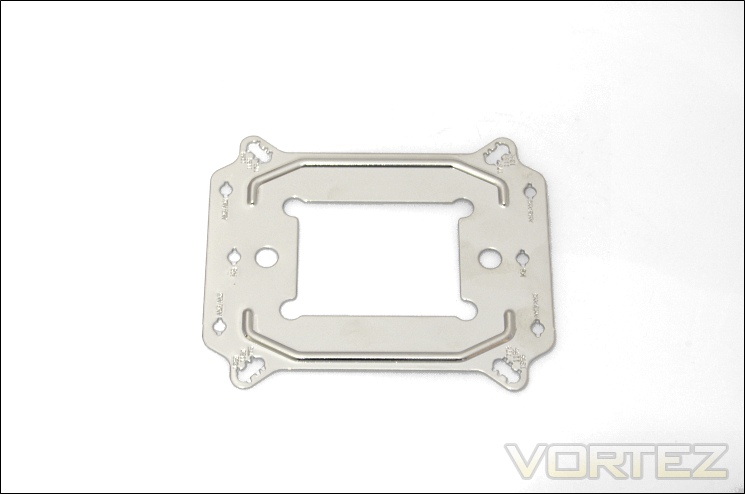
1.) Locate the universal motherboard backplate and identify the appropriate mounting holes.
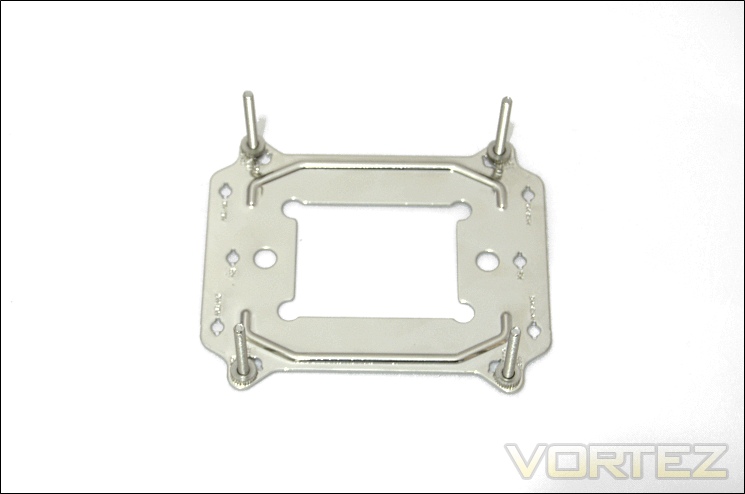
2.) Insert the long screws into the appropriate mounting holes making sure that the notches on the screws are secured. Screw in the isolating rings to secure the long screws.
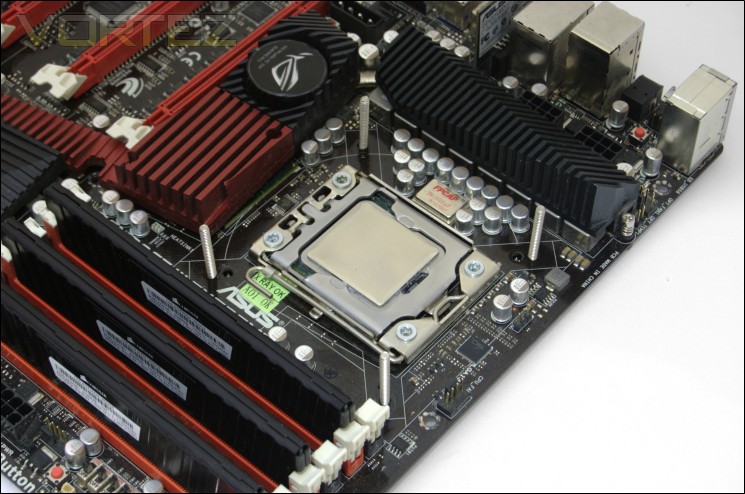
3.) Install the backplate into the motherboard.
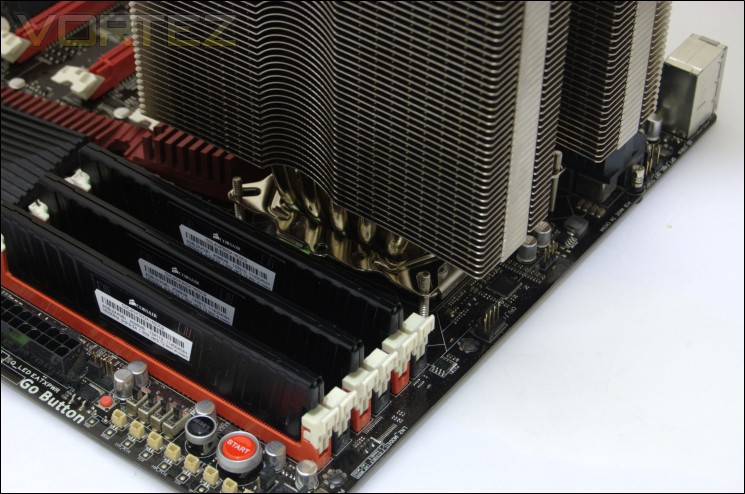
4.) Apply thermal paste and place the heatsink on top of the CPU making sure the long screws go through each corner of the heatsink’s integrated bracket.
5. Use the spring loaded screws to tighten down the heatsink.
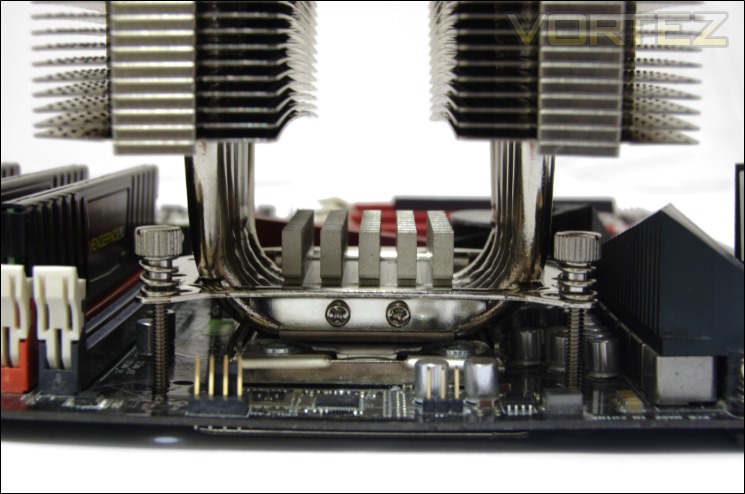
Contrary to our previous experience with this particular mounting kit, the process proved much harder this time. The reason is down to the size and shape of the dual radiator heatsink. Since the two radiators block access to the spring loaded screws, it is impossible to mount the cooler inside a case (unlike the other dual tower coolers) and so it is imperative to so outside of the chassis. Normally, I tend to mount all coolers outside the chassis before putting the motherboard back in but they tend not to restrict me from remounting from within the case if I need to reseat them. Unfortunately, this isn’t possible with the Free Flow+ so if you need to reseat the cooler for any particular reason, you would have to remove the motherboard.
An annoyance of having to first install the cooler onto the motherboard before putting it back into the chassis is that I was subsequently unable to reach the motherboard mounting holes when trying to secure it to the motherboard tray. The result is that the weight of the cooler flexed the motherboard. Had the spring loaded screws been accessible, it would have meant that I could first mount the cooler backplate to the motherboard, install the motherboard into the case, and then install the heatsink (as is the case for other coolers using the same mounting mechanism). It goes to show that mounting kits need to be designed with the cooler in mind.
Results (Grouped)
The results have been arranged in terms of the fan configuration that yields the best results for each cooler. However, it is important to take into account that many coolers come with their own fans and changing those increases the costs significantly, so the “out of the box” cooler configurations have been highlighted in red each group.
Stock

The Free Flow+ with its three fans yields a delta temperature of 31.75C. Scaling with the number of fans certainly makes a difference as we see how taking the third fan increases temperatures by 1C. However, the single fan (in the middle) is only 0.25C behind the two fan configuration. Going to a passive configuration increases temperatures by 4.75C for a final delta of 37.75C. Impressively, the single 140mm fan yields lower temperatures than two Noctua NF-P12s by 0.5C thanks to the greater surface area it covers. Comparing dual fan configurations on the Free Flow+, the best performance is generated by the two Noctua NF-P14s, followed by the Coolink SWiF2-120Ps and finally the stock fans.
Results (Ascending order)
Stock

With its three fans, the Free Flow+ is comparable to a Corsair H100 with its two fans at 1300RPM and only a mere 0.25C behind the default Thermalright Silver Arrow configuration. Going to two fans allows it to still compete with the Corsair H100 using two high RPM Coolink fans. With a single fan, performance matches the NZXT Havik and the Prolimatech Genesis, both of the latter also using 120mm fans. Coupled with two Noctua NF-P14s, performance is still on par with the K2. The SWiF2-120P fans give performance to match the Himalaya using the same fans and the Prolimatech Genesis using two lower RPM Noctua NF-P12s. With two Noctua NF-P12s, performance drops down but the Free Flow+ can still match likes of the Thermalright Archon.
Results (In-depth analysis)
In the next comparison, we look at the default cooler performance as they come out of the box with their bundled fans. Coolers that come with no fans have been coupled with Noctua’s NF-P12 or fans that the manufacturers intended their coolers to be used with.
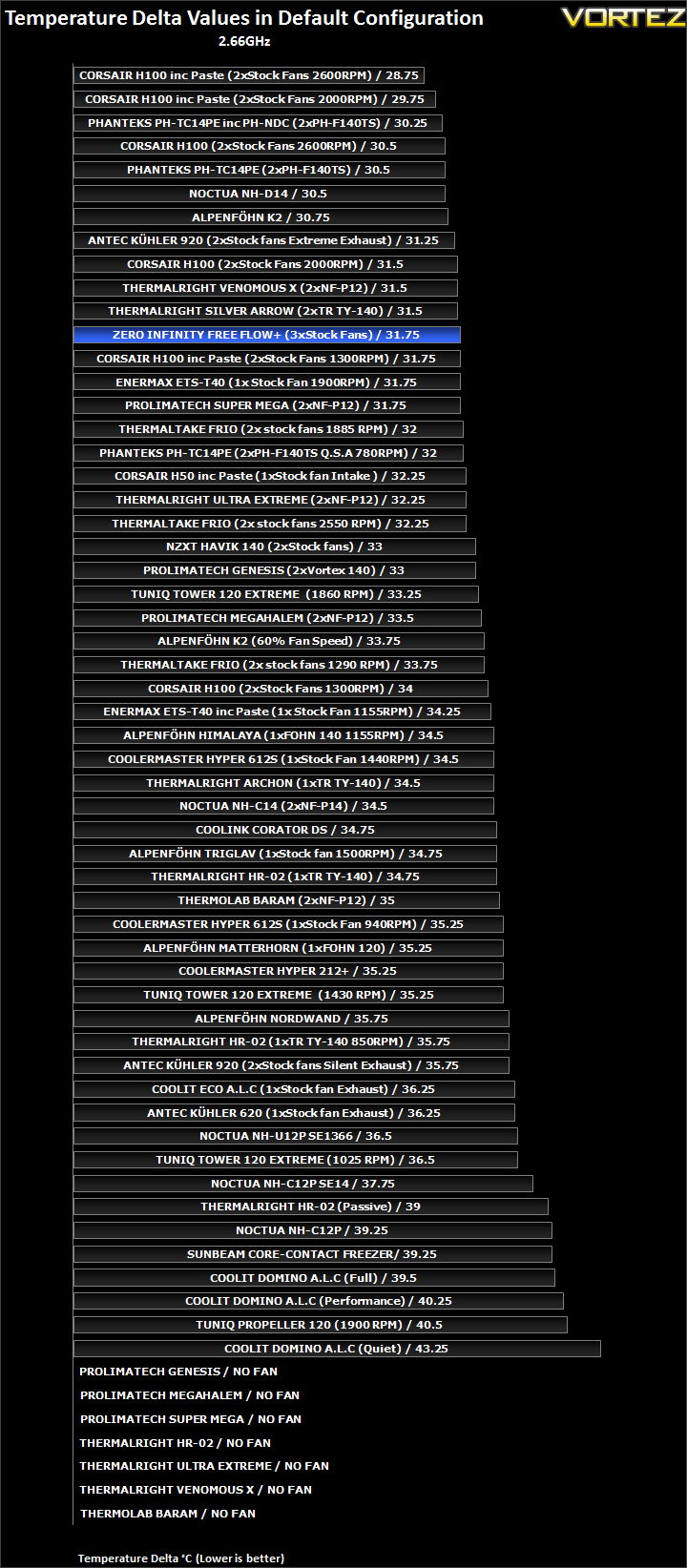
In its default configuration, the Free Flow+ is fairly impressive. It is only 0.25C behind the Thermalright Silver Arrow although it is unable to compare to the Phanteks which shares its five 8mm heat piped design. It is the only cooler to come with three fans as standard on our list.
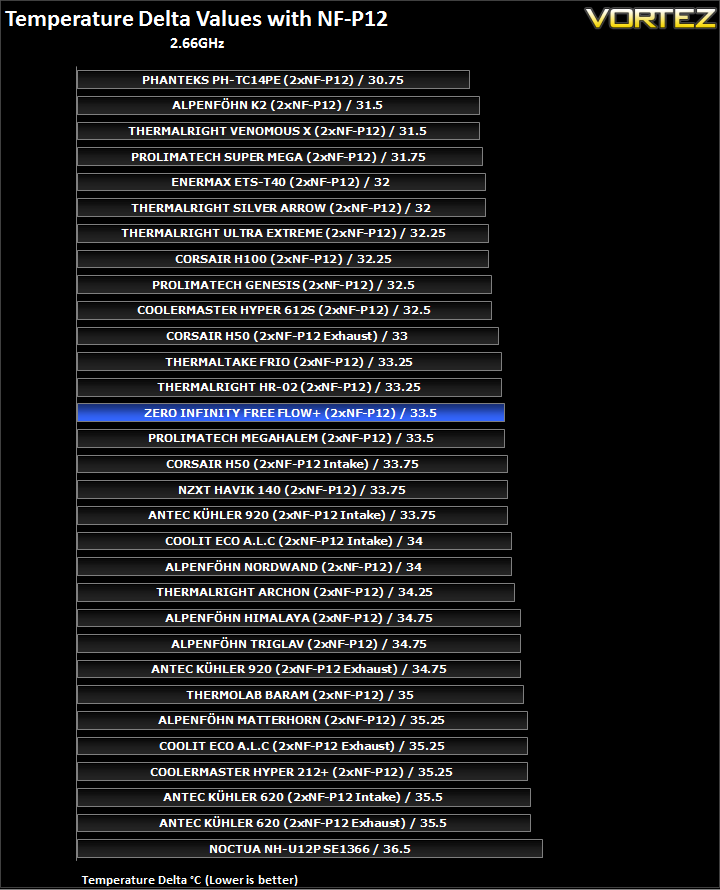
Efficiency with the Noctua fans isn’t as impressive as the other dual tower coolers. Instead, it matches the much older Prolimatech Megahalem.
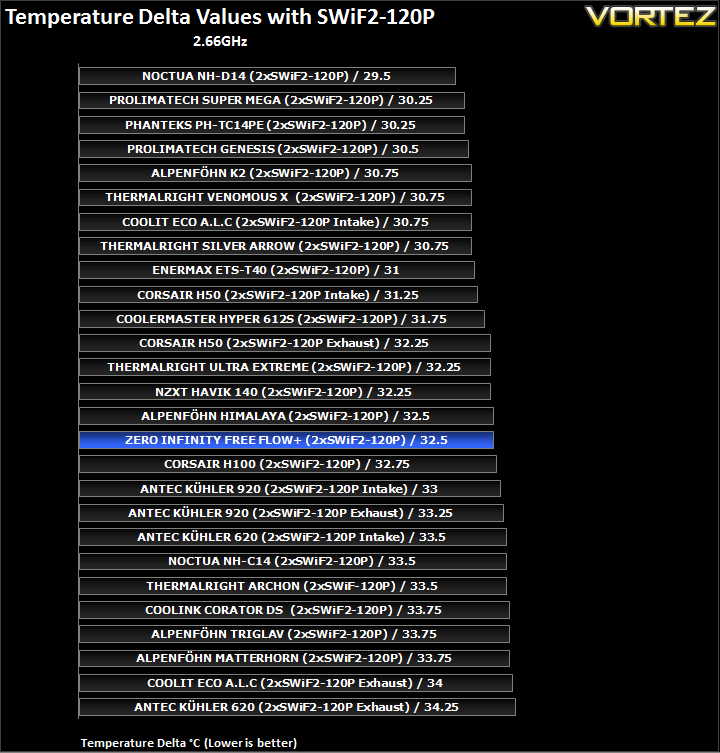
With the faster Coolink fans, the Free Flow+ finds itself lower down the table although still matching the Corsair H100 in efficiency.
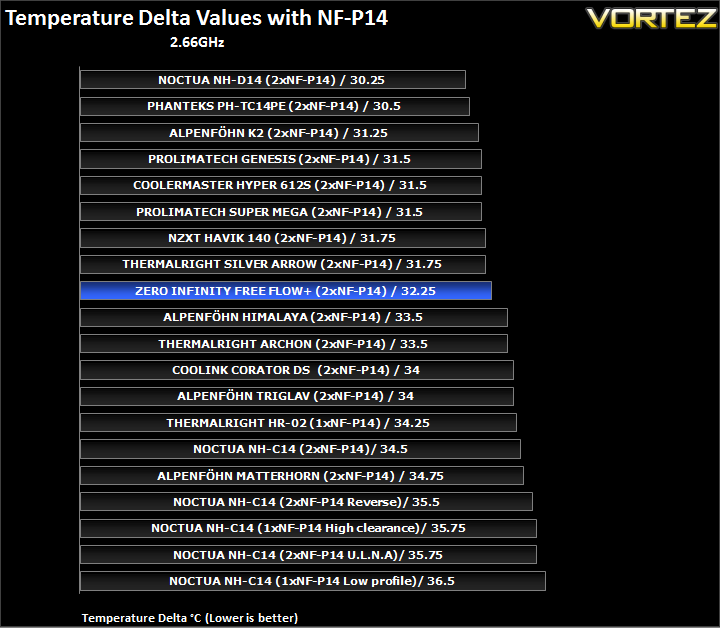
The Free Flow+ performs more favourably with the 140mm Noctua fans, highlighting its reliance on larger fans to help dissipate heat from the wide fins.
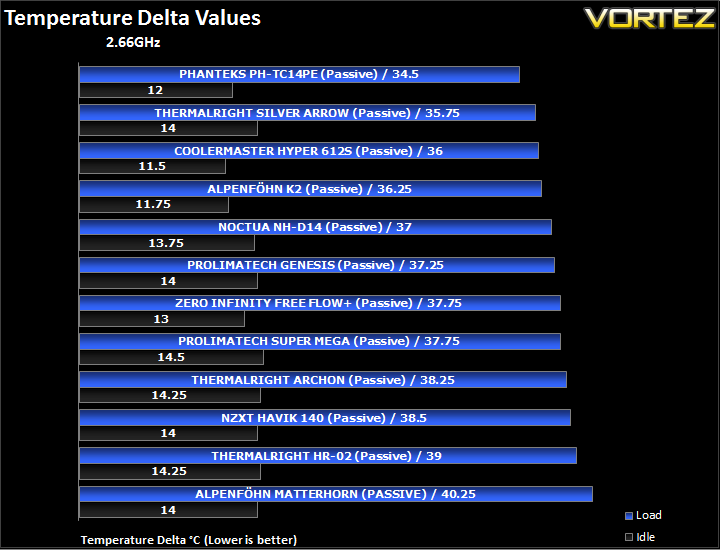
Passively, the Free Flow+ boasts some fairly good results. It matches the Prolimatech Super Mega but fails to match the other dual tower alternatives.
Results Overclocked (Grouped)
The results have been arranged in terms of the fan configuration that yields the best results for each cooler. However, it is important to take into account that many coolers come with their own fans and changing those increases the costs significantly, so the “out of the box” cooler configurations have been highlighted in red each group.
4GHz

With the overclocked CPU, the Free Flow+ generates a delta temperature of 59C in its default three fan setup. Removing one fan increases the delta by 0.75C and removing a second one to leave only the middle one increases the delta by a further 1.5C. This time, the Coolink fans help give the best performance with a delta temperature of 58.25C. The two Noctua NF-P14s prove more effective than the stock fans, lowering temperatures by 0.25C compared to the default configuration. The NF-P12s on the other hand are less capable, performing worse than a single 140mm stock fan.
Results Overclocked (Ascending order)
4GHz

Unfortunately, the Free Flow+ results seem to concentrate in the lower half of our chart, despite its many high end attributes. In its default configuration, it is outdone by the likes of the Thermalright Archon and is a only mere 0.25C ahead of the Cooler Master Hyper 612S, the latter bundled with a single 120mm fan. With only two fans, the more compact Thermalright HR-02 proves superior and the Free Flow+ can only match the Alpenföhn Matterhorn with its two 120mm Föhn 120 fans. Its single fan performance drops performance further, falling short of the HR-02 with a single TR TY-140 at 850RPM. Coupled with two Coolink fans instead, the Free Flow+ is on par with the Coolink Corator DS sporting the same fan setup, another dual tower cooler featuring HDT. Opting for the 140mm Noctua NF-P14s put the cooler in line with the Thermalright Archon using two 120mm Noctua fans.
Results Overclocked (In-depth analysis)
In the next comparison, we look at the default cooler performance as they come out of the box with their bundled fans. Coolers that come with no fans have been coupled with Noctua’s NF-P12 or fans that the manufacturers intended their coolers to be used with.
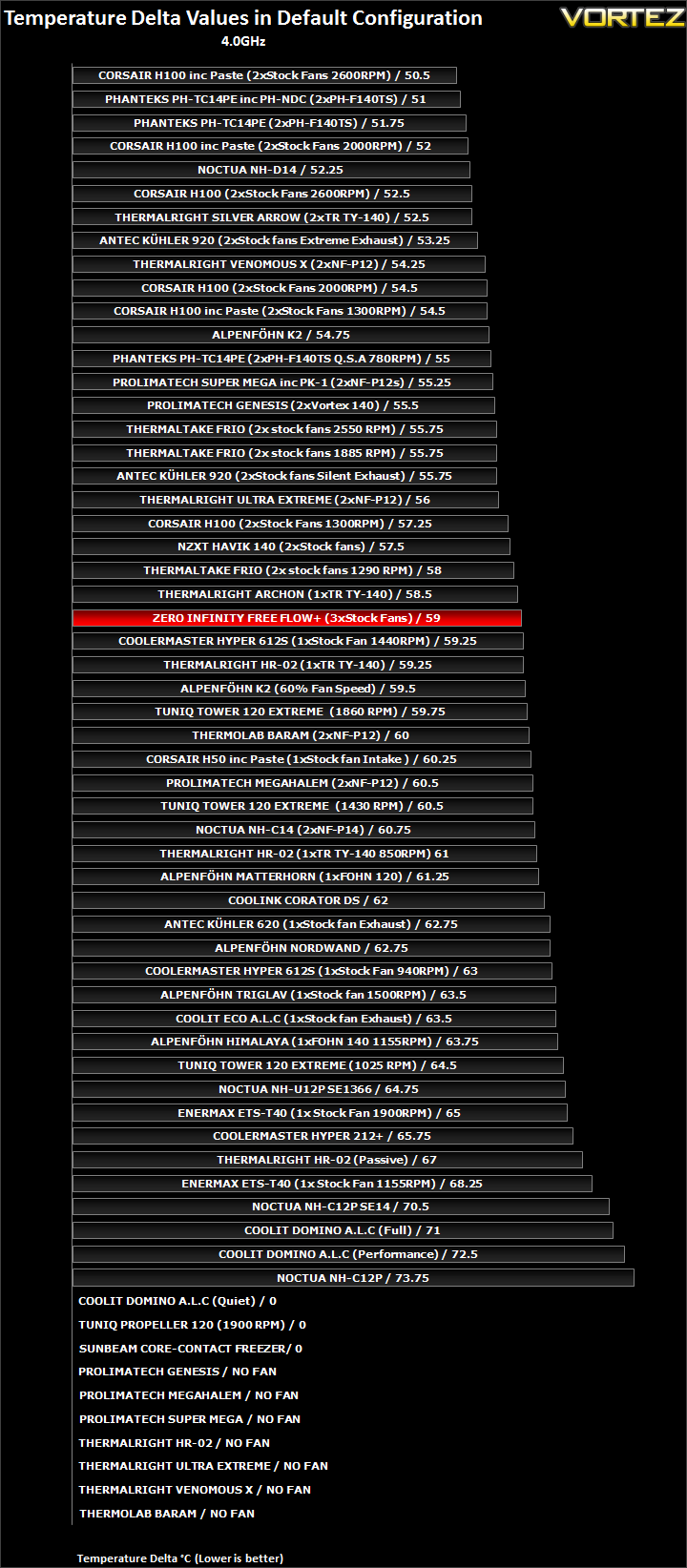
The Free Flow+ ends up in the middle of our table rather than amongst the high end dual tower heatsinks, finding itself between the Thermalright Archon and Cooler Master Hyper 612S, both of which were relying on a single fan only.
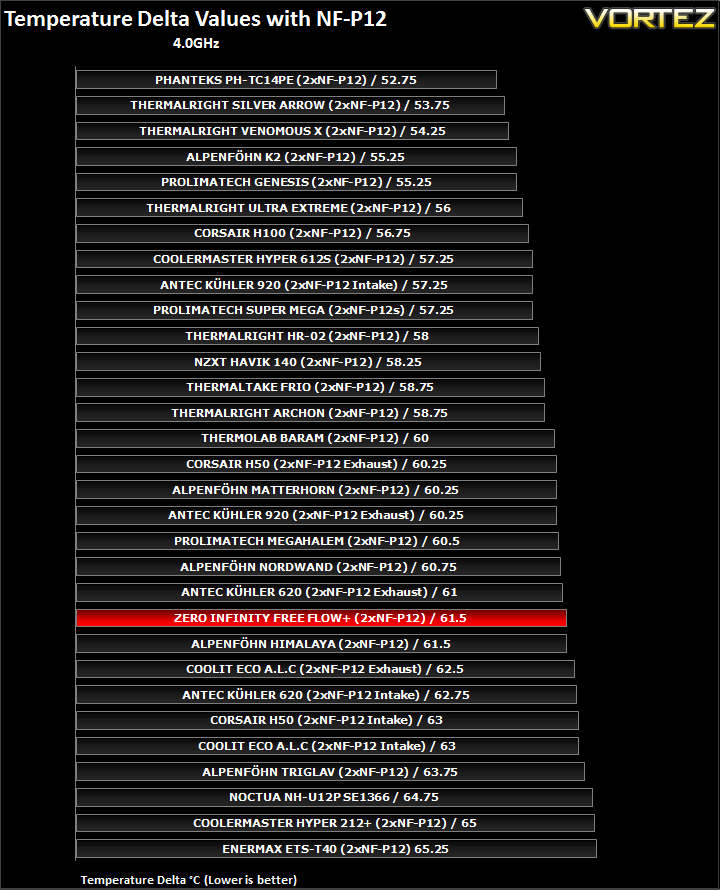
Teaming the Free Flow+ with two Noctua NF-P12s demonstrates its efficiency or lack of in this case, compared to other mid-high end coolers. Even the Antec KUHLER 620 manages to be ahead, albeit by a very small margin.
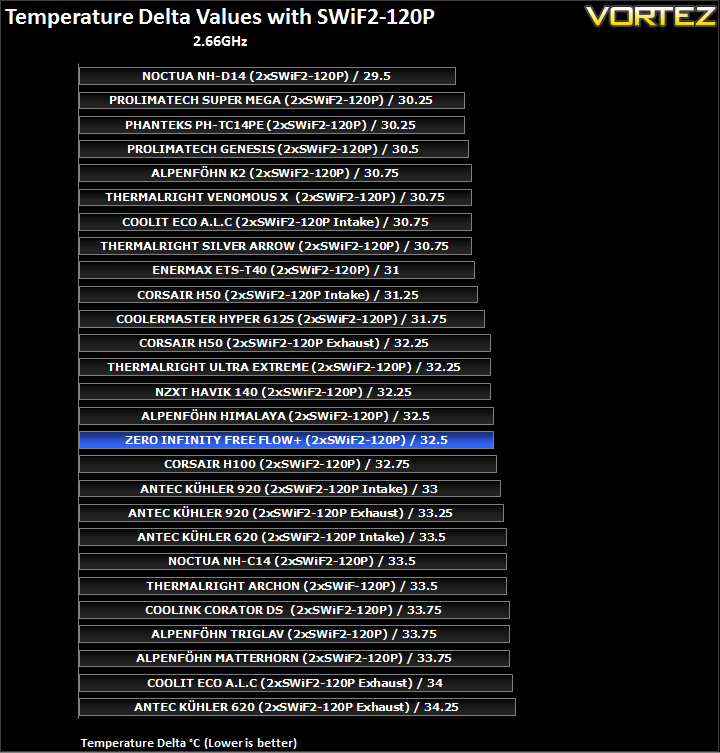
With two higher RPM SWiF2-120Ps, it performs exactly the same as the Coolink Corator DS, a dual tower cooler featuring only four 6mm heat pipes compared to the five 8mm heat pipes on the Free Flow+.
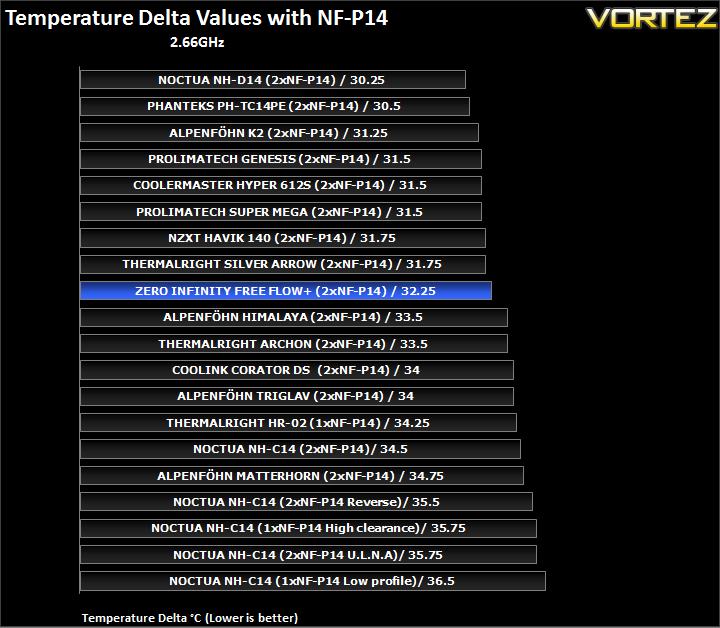
The Free Flow+ fares much better with 140mm, although it is only 0.5C ahead of the Coolink Corator DS. Higher end single tower options still prove more efficient.
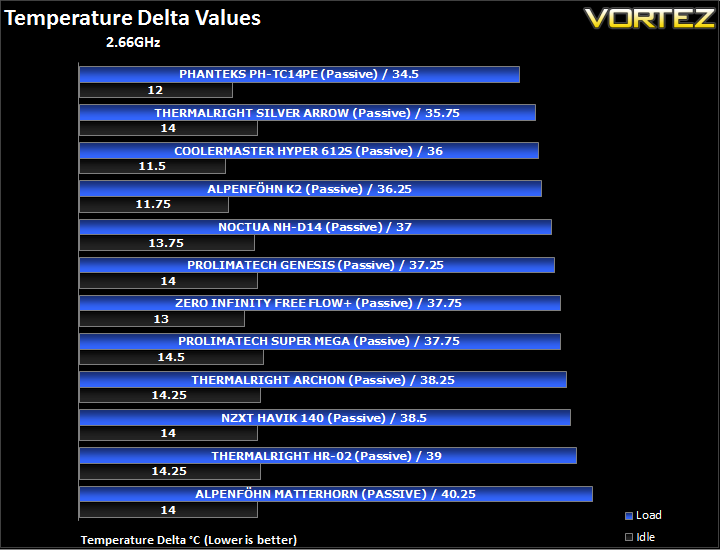
In passive mode, the Free Flow+ falls to the bottom of the pile, only bettering the smaller NZXT Havik.
Other Observations
One aspect of the cooler that I thought should be highlighted is the effect of its weight and mounting mechanism on the motherboard. Generally, heavy high-end coolers tend not to pose any problems on motherboards thanks to excellent mounting kits designed specifically to cater to the heatsinks. As such, I have never experienced any degree of flexing with the likes of the Phanteks PH-TC14PE, Noctua NH-D14, Thermalright Silver Arrow, or the even heavier Alpenföhn K2. In fact, I have always been one to kill any speculation that these coolers can damage motherboards because they don’t. However, Zero Infinity have settled for a mounting kit that is more suitable to mid-range coolers with their Free Flow+. Considering its sheer weight, and the installation quirks I pointed out earlier, it was not surprising that my motherboard experienced minor flexing. Although it has been of no detriment to my motherboard, it proved to impact on the North Bridge temperatures, which as a result of poorer contact with the chipset heatsink increased to unsettling levels. So users have to be very careful when installing the Free Flow+ to not over-tighten the screws and to secure their motherboard firmly to the tray.
Noise
Operating at 1200RPM, the stock Free Flow+ fan are fairly quiet at full speed. Three of them do become audible but this is never intrusive and never loud enough to cause any concerns. A high-end graphics card would easily drown the fan noise. My only complaint with the fans is that getting close to them; you can hear a distinct whirring, higher pitched than that of the Noctua NF-P14 or the Thermalright TY-140. As such, the fan is not of the same calibre as the latter two in acoustics and performance.
Conclusion
So to conclude, like a lot of coolers we have reviewed recently, the Zero Infinity Free Flow+ raises expectation on initial impression but fail to live up to them once put through its paces. Let’s start with the good. Feature wise, the Free Flow+ certainly boasts features to match the best coolers to have come through us. Five 8mm heat pipes, three fans and the most notable dual tower design help make the Free Flow+ appear as a premium cooler. Even if the performance doesn’t quite reflect that, it establishes Zero Infinity as a brand to look out for in the future. If it indicates anything, it’s that Zero Infinity have plenty of room for improvement which if capitalised upon, can lead them to a very future. Coming back to the cooler, performance at stock speed was more than adequate to cool the hot-running i7. The default three-fan configuration did not stray far from even the Thermalright Silver Arrow. Coupled with the other fans however, it failed to match the efficiency of quite a few single tower coolers, trailing behind the likes of the ageing Thermalright Ultra Extreme and the more modern Cooler Master 612S. One observation is that the Free Flow+ favours 140mm fans, which isn’t surprising given the width of the radiators.
The overclocked CPU proved to be very stressful on the Free Flow+. At 4GHz, performance dropped below a lot of other cheaper, more compact alternatives. Considering that the Free Flow+ relies on three 140mm fans, the temperatures it yielded was far below what we expected of it. In terms of efficiency with various fan configurations, it failed to compete against the likes of the Thermalright VX or Prolimatech Super Mega, yet alone the dual tower cooler it was meant to go up against.
To explain the relatively low perform, we have to go back to the design of the cooler. There are many odd decisions Zero Infinity seem to have taken when designing the Free Flow+. First of all, the heat pipes are all concentrated towards the middle of the fin arrays, an area where airflow is limited and preventing heat from dissipating efficiently over a wider surface area. Secondly, due to HDT and the five thick 8mm heat pipes at the base, not all of them can make full contact with the CPU IHS, thus impacting thermal transfer. In our case, the two side heat pipes made very little contact with the i7 990x and noting that most other CPUs are smaller, it begs the question as to why Zero Infinity did not employ a base plate to help distribute heat more effectively to the heat pipes. The last design flaw I’ll point out is the mounting bracket. While the mounting kit works brilliantly with smaller coolers, having previously found little to fault, it proves too awkward to work with when installing the Free Flow+. The size of the heatsink renders the spring loaded screws inaccessible inside a case so adjustments are hard to make without having to remove the motherboard completely. On the same note, the fan wire clips are also a pain to work with.
In the end, the Zero Infinity Free Flow+ has very little to offer over its modern day competitors. Performance, whilst acceptable, isn’t enough to justify its retail price of 69.90 Euros and its size. However, that’s not to say that Zero Infinity should be disregarded. Should they improve on their current design and fix some of the Free Flow’s flaws, there is potential for a remarkable cooler.
+Aesthetics and unique colour scheme
+Very well packaged
+Three bundled 140mm fans
+Low noise
+Support for Intel and AMD sockets (No LGA2011 support as of yet)
Cons:
-Cost
-Size
-Small clearance for tall memory modules
-Installation
-Weight
-Fan wire clips are tedious to install
-Lacking Performance and efficiency against similar sized competitors


