







It may be petite but can the AD11’s outstanding set of features, not out of place on a full-size desktop, charm us? See how it faired inside…

Product on Review: ZOTAC ZBOX nano XS AD11 Plus
Manufacturer & Sponsor: ZOTAC
Street Price: £299
ZOTAC ZBOX’s are tailor-made to provide consumers with small form-factor, low-noise and low power requirement systems. ZBOX’s are available in both barebones – without memory and storage drive – and full systems (denoted as Plus variants) with either AMD, Intel or VIA chipsets for a range of applications. Whilst a common use has been as Home Theatre PCs dedicated to media playback, the increasing capabilities of small form factor systems has seen them propelled to the status of fully fledged general use PCs.
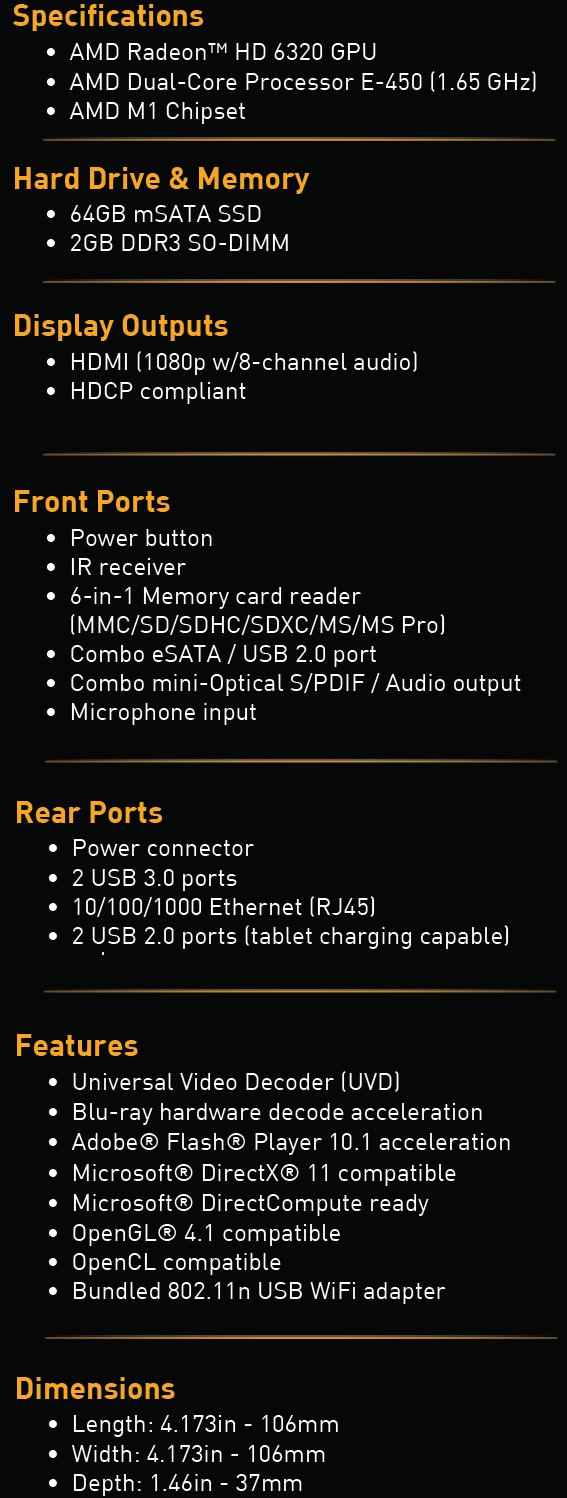
Reviewed today is the brand new ZBOX nano XS AD11 Plus, an evolution of the AD10 sporting a dual-core AMD E-450 APU running at 1.65GHz with HD6320 Graphics and supporting memory speeds of up-to DDR3-1333. The AD11 Plus is also the first of the ZOTAC nano series to include a 64GB SSD as standard, eliminating both HDD access speeds as a system bottleneck and mechanical HDD noise. Further augmenting the Plus package are 2GB DDR3-1333 RAM, WiFi and Infra Red Remote Control… have ZOTAC thought of everything?
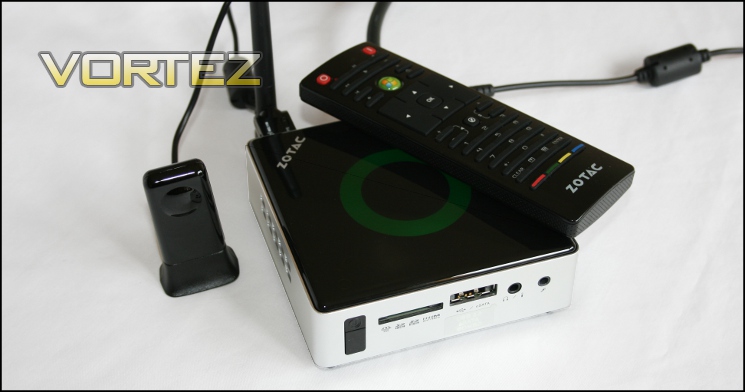
ZOTAC are perhaps best known as an official NVIDIA partner for their GEFORCE range of graphics cards, having recently released the first of the Kepler-based GTX 680 cards now on the market. It’s incorrect however to assume that is all they create; ZOTAC are also a market leaders in both mini-ITX motherboards and mini-PCs, the latter of which is catered to by their ZBOX range.
The ZOTAC Philosophy
“We deliver unrivaled components and systems suitable for all needs and requirements,” says ZOTAC CEO Tony Wong. “Enthusiasts, gamers, students, businesses and corporations… everyone that requires components and systems, we deliver unsurpassed products in all segments with superior performance, reliability and customer service.”
ZOTAC’s core philosophy embodies our commitment and guides our research and development to deliver first-class products that you can rely on.
“We deliver unrivaled components and systems suitable for all needs and requirements,” says ZOTAC CEO Tony Wong. “Enthusiasts, gamers, students, businesses and corporations… everyone that requires components and systems, we deliver unsurpassed products in all segments with superior performance, reliability and customer service.”
ZOTAC’s core philosophy embodies our commitment and guides our research and development to deliver first-class products that you can rely on.
Technical Specifications
Experience a high-definition computing experience with rich graphics and web content with the extra small and pocket able ZOTAC ZBOX nano XS AD11 Plus. An AMD E-450 with Radeon™ HD 6320 graphics processing forms the heart of the ZOTAC ZBOX nano XS AD11 Plus and delivers stunning hardware-accelerated HD video online and offline, outstanding system responsiveness and Microsoft® DirectX® 11 compatibility.
Storage in the ZOTAC ZBOX nano XS AD11 Plus is handled by a 64GB solid-state drive that delivers lightning-fast boot times for an instant-on computing experience. The tiny ZOTAC ZBOX nano XS AD11 Plus packs plenty of expansion capabilities and features with USB 3.0, USB 2.0 and eSATA expansion and an integrated IR receiver with bundled Media Remote to easily take control of the mini-PC from the comfort of a sofa.
Storage in the ZOTAC ZBOX nano XS AD11 Plus is handled by a 64GB solid-state drive that delivers lightning-fast boot times for an instant-on computing experience. The tiny ZOTAC ZBOX nano XS AD11 Plus packs plenty of expansion capabilities and features with USB 3.0, USB 2.0 and eSATA expansion and an integrated IR receiver with bundled Media Remote to easily take control of the mini-PC from the comfort of a sofa.
The backbone of the system is the AMD APU, so it behoves us to briefly introduce the concept to the uninitiated. In essence, the Accelerated Processing Unit (APU) combines the general purpose x86 cores of a CPU and a GPUs’ programmable vector processing engines (i.e. shaders). The result is a balanced package capable of both the strong scalar operation performance of a CPU – useful for an operating system and general usage – and the ability to offload processing to a highly parallel GPU when appropriate.
Though they don’t yet have the capability of high-end discrete GPU and CPU performance, APUs are increasingly seen as suitable for low-power, space-sensitive scenario’s where specialised workloads can be offloaded onto the shader architecture. One such example is that of the Home Theater PC, video decoding being an ideal process which a CPU deals with relatively poorly but a GPU can be programmed to cope with well.
Packaging and Contents
Bold and vibrant, the Nano XS AD11 Plus’ packaging immediately stands out.
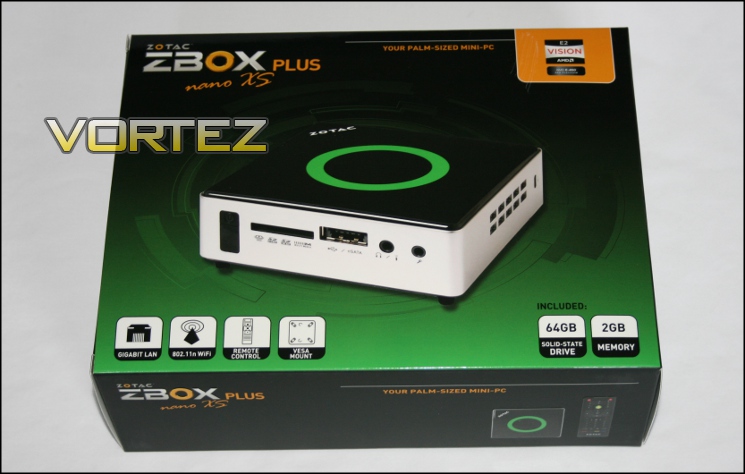
The ZBOX packaging lists the contents and capabilities, including the added benefits of the PLUS version: RAM and SSD Storage. 802.11n Wifi, Gigabit LAN, an IR Remote Control and VESA mount are clearly listed; at a glance the potential user should be able to grasp if additional components are required.
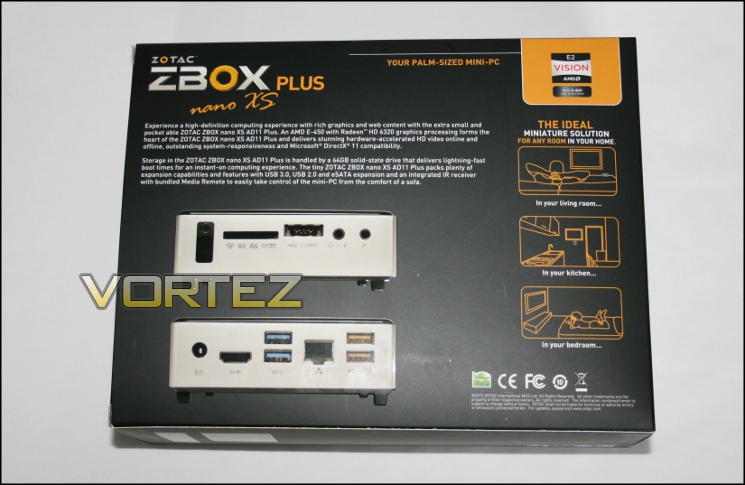
The rear of the box showcases images of system connectivity and I/O, technical specifications for which are on the right-hand edge. Once again all the pertinent information is displayed clearly and concisely. All in all ZOTAC gets a 10 out of 10 – very clear and well laid out with minimal room for confusion.
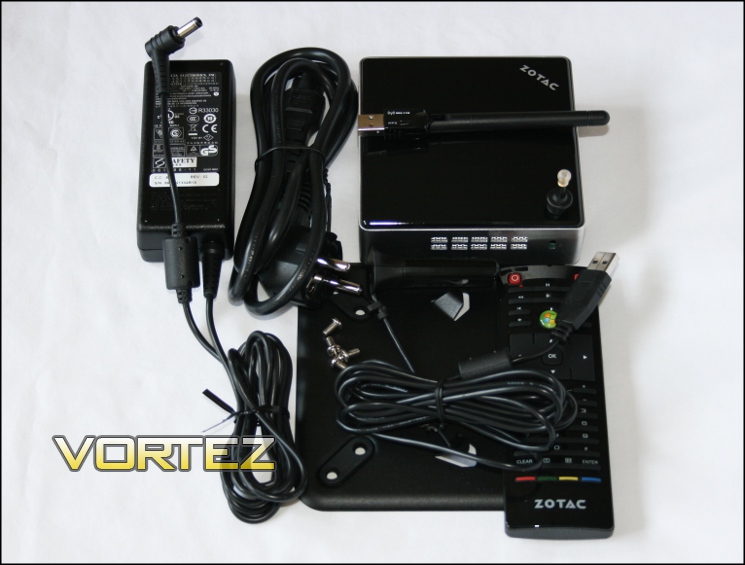
Included in the Nano XS AD11 pack is the following hardware:
The AD11 unit,
3-pin ‘Clover leaf’ power lead with region-specific plug,
External PSU with DC-out,
802.11n USB WiFi Adapter /w aerial,
Optical mini-SPDIF to SPDIF Adaptor for audio-out combo port,
ZOTAC branded IR remote /w 2*CR2032 button batteries,
USB IR Adapter for IR remote,
100mm x 100mm / 75mm x 75mm VESA mount /w 4 screws
3-pin ‘Clover leaf’ power lead with region-specific plug,
External PSU with DC-out,
802.11n USB WiFi Adapter /w aerial,
Optical mini-SPDIF to SPDIF Adaptor for audio-out combo port,
ZOTAC branded IR remote /w 2*CR2032 button batteries,
USB IR Adapter for IR remote,
100mm x 100mm / 75mm x 75mm VESA mount /w 4 screws
Note that it does not include an HDMI cable, which would need to be sourced elsewhere.
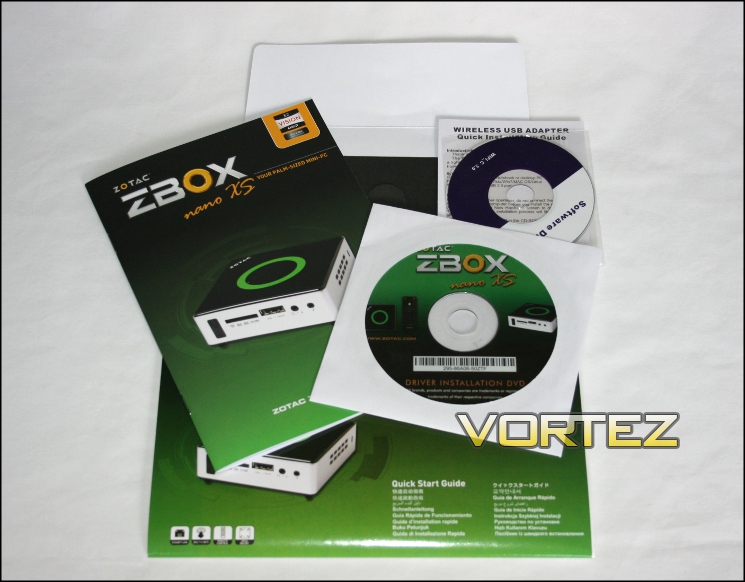
Documentation is generally as you would expect: a detailed 24 page English user manual for setting up the AD11 including a walkthrough of the BIOS; Chipset and Wireless Network Adapter driver CD’s; and as a nice bonus a full-colour multi-lingual installation guide poster. You should also find a warranty information card too.
A Closer Look
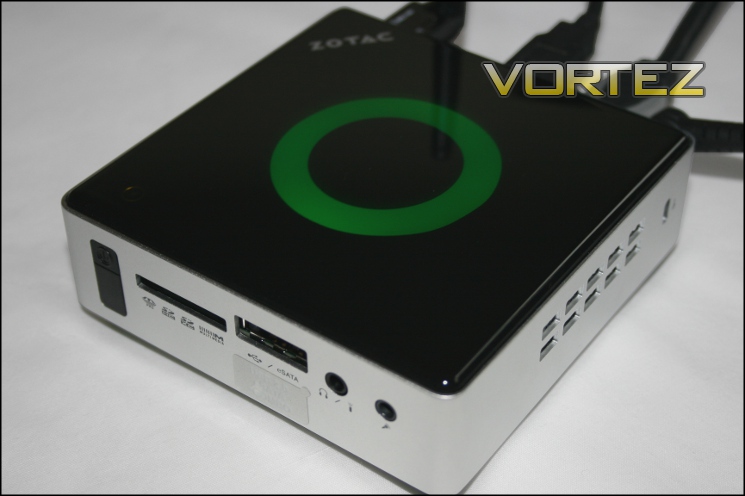
The AD11 is a very attractive mini-PC, taking advantage of the now classic brushed metal and gloss black finish seen on consumer-level electronics. Though the VESA mount allows it to be hidden away, there will be no shame associated with leaving it front and centre for all to see.
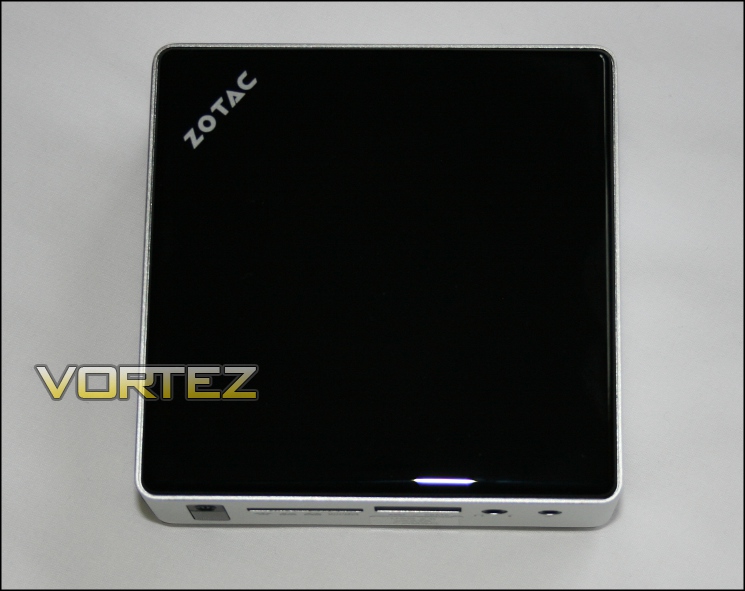
The overall footprint of the AD11’s housing is a tiny 106mm x 106mm x 35mm (LxWxH). To put it in context: that is narrower than the diameter of a DVD and not quite as tall as a Nintendo Wii.
The left and right sides of the AD11’s enclosure are unremarkable save for ventilation holes and a Kensington lock. The left side is the ventilation exhaust, the right an intake; the relatively narrow ventilation holes speak to the fact that it’s designed for low-TDP operation.
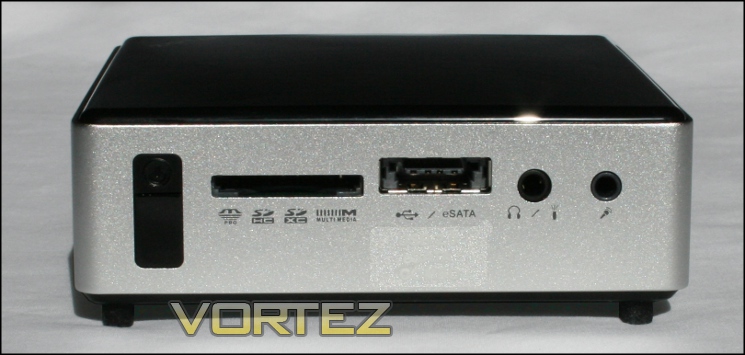
Front connectivity is fairly standard. The left-most vertical black bar makes up the power-on button and built-in IR sensor for the supplied remote control, and then from left to right there are the 6-in-one SD card slot, USB2.0/eSATA combo port, headphone/mini-Optical SPDIF combo port and finally the microphone port.
The front is clearly designed for easy access to the sensor, headphone port and removable storage; plenty of thought has obviously gone into this arrangement.
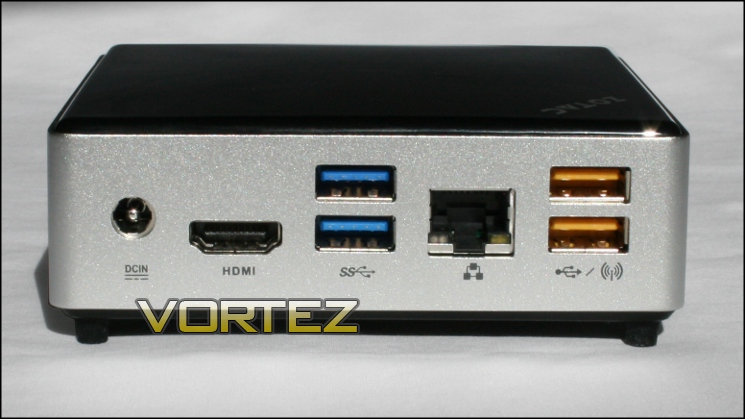
The rear sees ports which you would expect to be permanently or semi-permanently plugged in, namely DC power in, HDMI, 2* USB 3.0, Wired LAN and 2* USB 2.0. Labelling clearly recommends that one of the two USB 2.0 ports are used for the included Wireless LAN adapter.
Both the yellow USB ports double as high-amperage ‘Super-Charge’ ports, allowing fast charging of compatible devices such as tablets, smartphones or similar. Fast-charging is implemented by a third-party chip from Fintek and is a Windows-only feature, requiring drivers that are on the included driver CD.
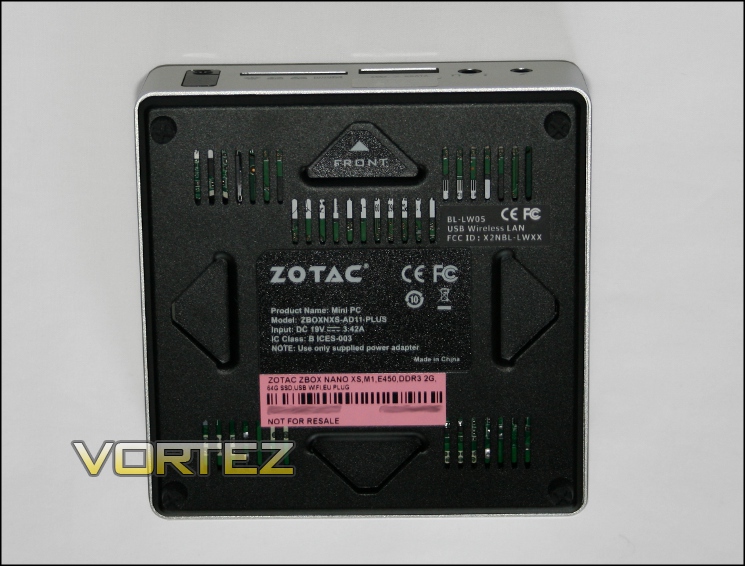
Lastly, we come to the chassis floor, where product model/serial numbers and certification stamps can be found. In the four corners rubber feet serve to dampen vibration (and hence noise), which is a nice feature whether mounted on the rear of a TV or just sitting on the shelf of a TV stand. The four chevrons allow the mounting of AD11 to the VESA mounting plate as detailed below.
The overall impression of the ZBOX nano XS AD11 is that it exudes quality and has no hint of fragility. It’s also surprisingly light, no doubt chiefly down to the lack of weighty HDD seen in most other mini-PC’s with larger form factors.
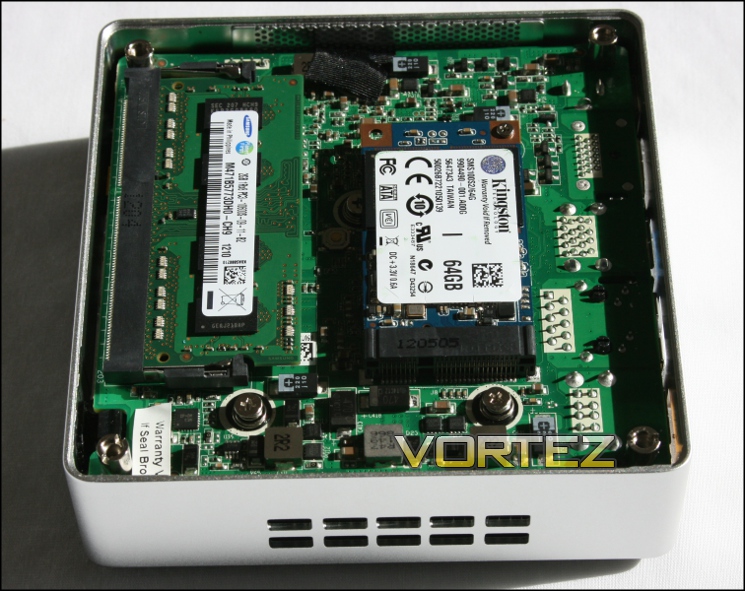
Unscrewing the feet allows access to the AD11’s internals. Getting at the APU would be a difficult task, but installing or swapping out mSATA SSD’s and memory is trivial. The AD11 PLUS has a 2GB SODIMM of DDR3-1333 RAM installed, but the M1 Chipset can accept up to 4GB of the same type in its single slot. AD11’s internal storage capabilities by contrast are only limited to the capacity of SSD possible in the mSATA size standard. The 64GB SATA II Kingston drive included is an ideal compromise of capacity vs cost, and unlike mechanical HDDs is totally silent.
Accessory Spotlight
802.11n Wireless USB Adapter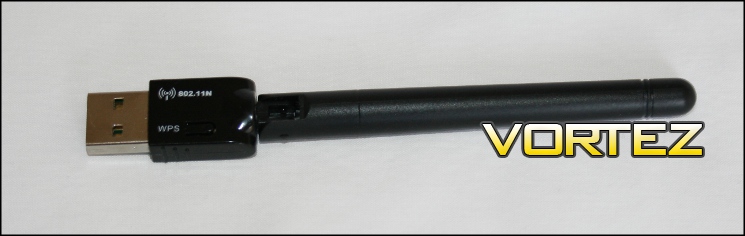
The bundled wireless adapter is a Realtek RLT8188CU operating at 802.11n, up-to 150Mbps. The antenna is articulated, allowing it to point upwards whether the AD11 is sitting on a desk or mounted behind a monitor.
Drivers for the Wireless Receiver are provided, but if possible you’ll want to download the latest drivers from the internet. The driver installation application cannot be directly run from the CD, it instead requires copying to a local drive. Connection to a wireless network is as simple as the push of a button if the router supports Wi-Fi Protected Setup, otherwise the usual rigmarole of inputting your passkey is the procedure to follow. The RealTek software allows the creation of wireless profiles for different networks, including storing passkeys, sidestepping some of the weaknesses of Windows’ default behaviour.
If streaming video over a network LAN is generally faster and more reliable, however 11n is usually sufficient for internet streaming and non-extreme bitrate high definition video.
IR Remote and USB Sensor
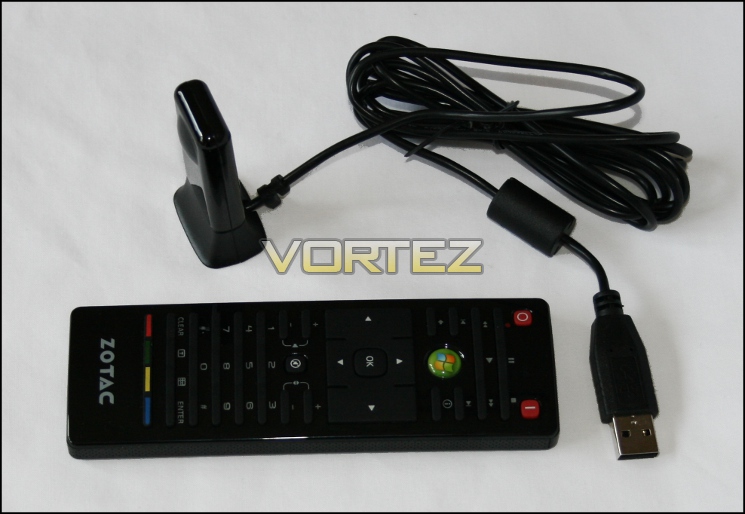
The AD11 comes with a ZOTAC branded remote control and additional USB sensor for situations where the sensor on the ZBOX chassis is obscured. The remote is powered by two CR2032 ‘button’ batteries which are included with the AD11 PLUS bundle.
Thin remotes are often poor quality and bundled as an afterthought in many media players, but ZOTAC definitely buck the trend here. The remotes’ range and responsiveness are both excellent: button presses are accurately registered even as far as 8 meters from the sensor (the limit our space would allow), and buttons themselves are tactile and work well. Furthermore, if using the external IR receiver the internal sensor can be disabled in BIOS.
Getting Started
BIOS Overview And OS Installation
As with many barebones and pre-built Nettop-class systems, the AD11 requires the installation of an OS, typically either Windows or some variant or Linux. HTPCs often utilise XBMC, an OS specifically designed for media playback on large-screen flat panel displays and supporting a wide range of hardware and video codecs. It’s important when budgeting for a system that the cost of an OS this is factored in, along with at least temporary use of a keyboard or mouse for configuration purposes. To inform your decision-making it should be noted that some functionality of the AD11 is limited to a Windows OS only when controlled by 3rd party chips.
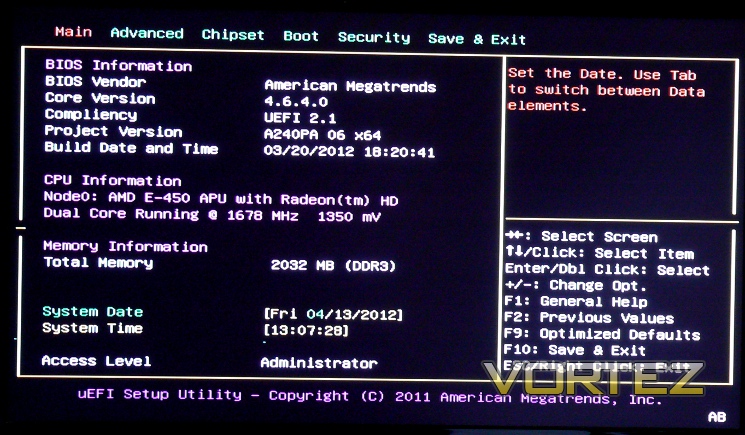
The ZOTAC BIOS is fairly basic compared to the plethora of switches and settings available to a desktop PC, but features a number of handy tweaking options which are outlined in the User Manual. The ability to turn off illumination on the top ring in particular is a very welcome addition for a home cinema. USB charging whilst in Sleep mode is also controlled via the BIOS on a per-port basis, and is likely something you’ll want to set-up ahead of time. Overall the BIOS colour-scheme may not be the most pleasing on the eye but the available options are solid, so count the fact that you won’t be spending much time in BIOS as a mixed-blessing. We should also note that although the BIOS does support a legacy USB mouse, we found using one to be imprecise.
Before installing the OS, ensure that the mSATA configuration is set to ACHI in BIOS. The AD11 BIOS default is IDE, which will tend to impair SSD performance. Changing this setting once Windows is installed can be problematic, so best to do it at the first opportunity.
The most straightforward processes for installing an OS onto the AD11 is through the use of an external DVD drive and OS installation CD connected via USB or eSATA. Booting from a USB thumb drive with pre-loaded OS is another option, but requires slightly more expertise and preparation time to set-up. Due to a hiccup with booting from USB we installed Windows 7 through an external DVD drive connected via eSATA, proving at least in our eyes the value of including an eSATA port. With that said, boot priority could be an awful lot clearer in BIOS and is our first major criticism of the AD11.
Whilst the AD11 does not come with an OS pre-installed, ZOTAC have stated that in co-operation with the developers they will be releasing a version of XBMC which has been verified compatible with the specific hardware inside the AD11. If your sole use for the AD11 is as a HTPC, or are comfortable with setting up a dual-OS system, this version of XBMC should be high on your list of interests.
VESA Mounting
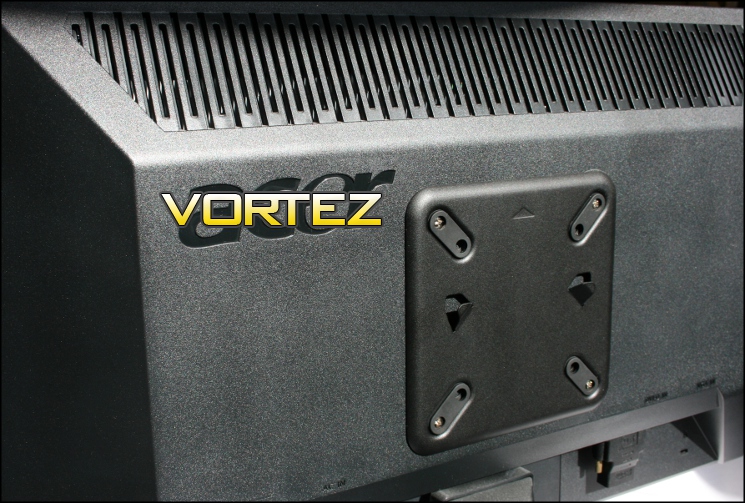
As noted, the packaging includes a 75mm x 75mm / 100mm x 100mm VESA mount plate for the rear of LCD Monitors and TV’s or a variety of other wall fixings currently on the market. It’s well worth noting that adapter kits for larger VESA standards exist and would probably be suitable.
Mounting the Nano XS is extremely simple: just a case of mounting the plate to the rear of the LCD panel and then slotting the chassis into the two raised chevrons. Although the Nano can be mounted in any orientation it’s typically best to do so with exhaust vents ‘up’ for more optimal heat exhaust. The rubber case feet and screw grommets on the plate should reduce the likelihood of any noise from the Nano resonating through the monitor as a whole.
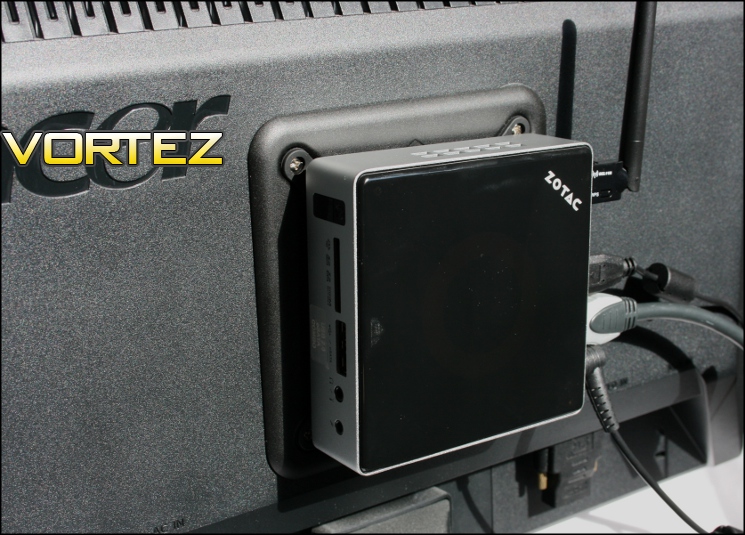
With an OS installed and the AD11 hooked up to a monitor and peripherals, it’s time to begin testing.
Testing Methodology and CPU-Z/GPU-Z
We based the testing of the AD11 on what we felt to be its intended usage pattern: 1080p HD media playback via local, network and internet streaming and basic office workload tasks. Whilst systems with similar specs have been known to have limited gaming capability, the AD11’s limited HDD size and low amount of RAM make it impractical for 3D gaming except in older titles such as Quake 3 etc.
Also important for most end-users are noise figures at idle and load, as well as qualitative analysis of the ‘type’ of noise. HTPCs are intended to be as near to silent as possible, so assessing how loud the AD11 is will be crucial.
Test System:
Hardware
ZOTAC ZBOX nano XS AD11 Plus
– CPU: AMD E-450 APU
– GFX: AMD HD 6320
– RAM: 2GB Samsung DDR3-1333 SO-DIMM
– Storage: 64GB SSD (performance specs below)
– Network: Realtek PCIe Gigabit LAN (10/100/1000)
Monitor: Generic 20” 1080p LCD
– CPU: AMD E-450 APU
– GFX: AMD HD 6320
– RAM: 2GB Samsung DDR3-1333 SO-DIMM
– Storage: 64GB SSD (performance specs below)
– Network: Realtek PCIe Gigabit LAN (10/100/1000)
Monitor: Generic 20” 1080p LCD
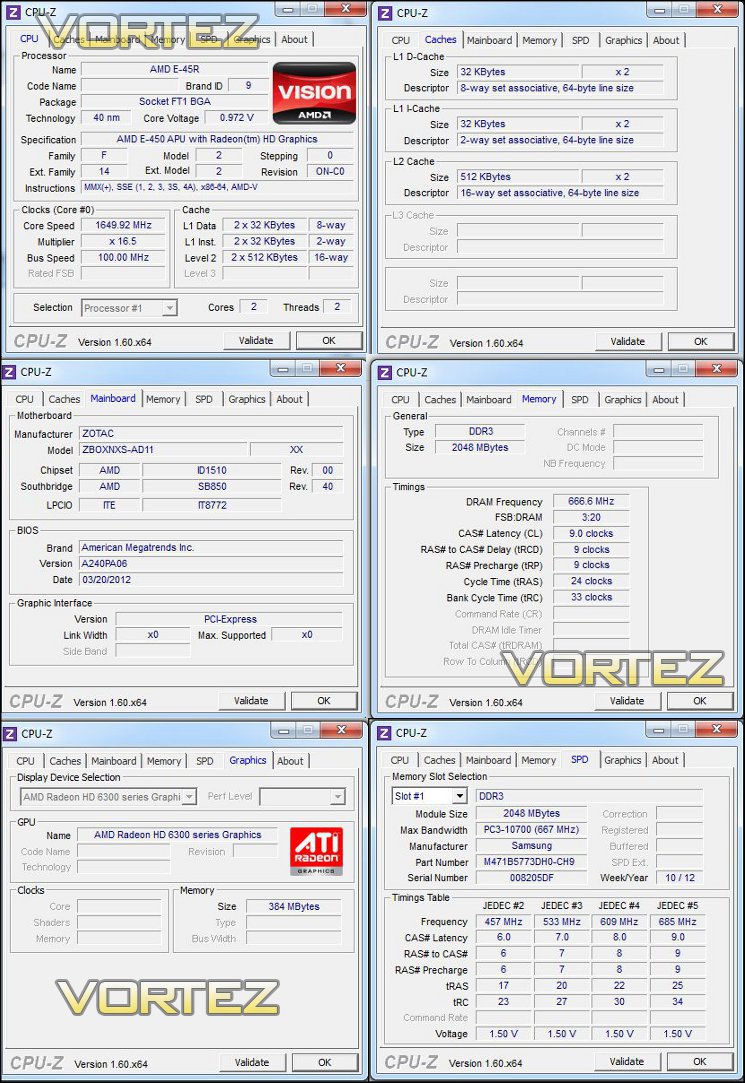
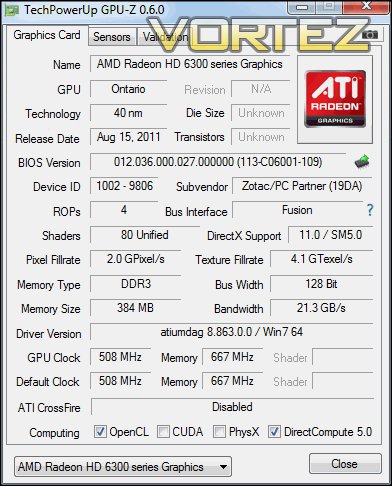
Software
Windows 7 Home Premium
Google Chrome
Adobe Flash 11.2
XBMC 11.0 – Eden Media Player
Open Office Suite
GIMP Image Editor
CPU-Z
GPU-Z
Speedfan 4.46
Google Chrome
Adobe Flash 11.2
XBMC 11.0 – Eden Media Player
Open Office Suite
GIMP Image Editor
CPU-Z
GPU-Z
Speedfan 4.46
SSD Performance Figures
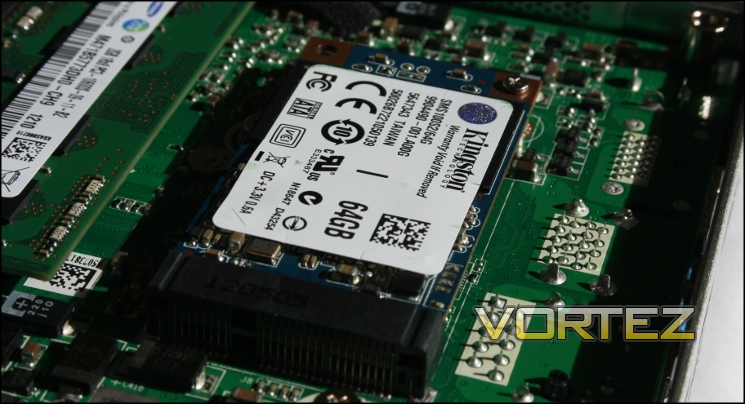
The SSD is listed as a Kingston SMS100S264G and rated at SATAII speeds in ZOTAC promotional material. Rather than a standard SATA interface and 2.5” form factor, the AD11’s space requirements demand the use of the mSATA interface and no drive casing. These drives will steadily become more familiar with the adoption of Z77 motherboards, many of which include a mSATA slot for use with Intel Rapid Storage Technology, but for now is a rarity outside of Ultrabooks and other sealed units.
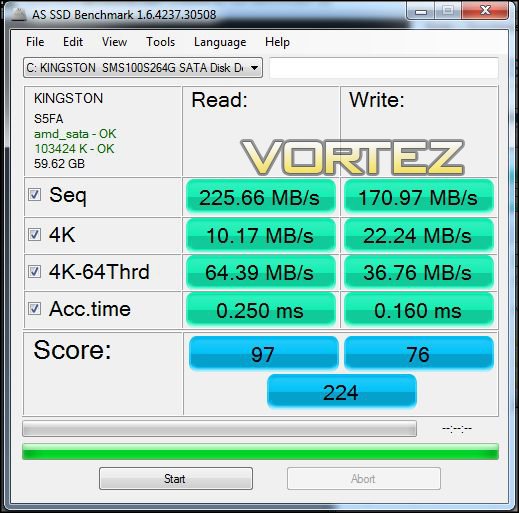
The sequential read/write values shown are very solid for a drive which has probably been chosen with an eye towards cost. Performance will smoke any mechanical HDD in a similar form factor and be entirely silent. Though a compromise is obviously made with capacity, if you utilised networked HDDs and LAN for storage of the majority of your data the relatively small 64GB ceases to be an issue.
Windows 7 load times:
Power on to Windows fully loaded – 32 seconds*.
Power on from Sleep to Windows fully loaded – 2 seconds (near instantaneous)
Power on from Sleep to Windows fully loaded – 2 seconds (near instantaneous)
*Includes 7 seconds for POST and handover to the boot device
In operation the system as a whole is extremely zippy, with application load times that would blitz similarly dual-core laptop with similar specifications save a mechanical HDD. The benefits of an SSD for high-performance systems have been known and remarked upon for the last few years, but general usage of the AD11 showed the difference an SSD makes to even modestly configured PCs.
Streamed Video Performance
Streamed video playback is a crucial for the AD11 to justify it’s billing as both a Home Theatre PC and mini-PC. The AMD E-450 APU is certainly capable of decoding high definition video, but it does depend on website embedded players accessing this functionality. Even if the site does not allow hardware decoding, it’s useful to know how well the AD11 copes with high definition video and if a bottlekneck is obvious when using software decoding for this content.
CPU and GPU load levels were extracted through the use of Windows Task Manager and GPU-Z, each of which generates real-time load percentages for the respective processors.
Youtube HD
Youtube now uses h.264 encoded video for high definition streaming, which should be compatible with the E-450’s GPU. Note that Firefox’s implementation of streamed video will only use software decoding by default, hence the use of Google’s Chrome browser in our tests. The relatively high bit-rate of action movie trailers make them ideal samples to test both whether hardware acceleration is used and whether the hardware can keep up with typical bit-rates.
Test Video 1: The Dark Knight Trailer 1 (1080p h.264)
Resolution – Approx. Video Bit Rate* – Playback Quality
Original: 10.5 Mbits/sec : Choppy
1080p: 3.5 Mbits/s : Smooth
720p: 2.0 Mbits/s : Smooth
Original: 10.5 Mbits/sec : Choppy
1080p: 3.5 Mbits/s : Smooth
720p: 2.0 Mbits/s : Smooth
CPU load level for the ‘Original’ version peaked at 95%, indicating that the browser was not using the GPU to decode the video. During playback of 1080p and 720p video CPU utilisation didn’t exceed 27%, whilst GPU peaked at 49%.
Test Video 2: Avatar Trailer (1080p H.264)
Resolution – Approx. Video Bit Rate* – Playback Quality
1080p: 3.5 Mbits/s : Smooth
720p: 2Mbits/s : Smooth
1080p: 3.5 Mbits/s : Smooth
720p: 2Mbits/s : Smooth
No ‘Original’ resolution option was available , but playback of 1080p and 720p video in full screen mode was good with load on the CPU not exceeding 28% and GPU averaging 52%, peaking at 56. Video 1 and 2 tests both indicate that Youtube in Chrome is making full use of the GPU acceleration to display videos rendered in Youtube’s default HD form, resulting in a good outcome from this video source. ‘Original’ resolutions by contrast don’t utilise hardware acceleration, even if the file itself was originally encoded in h.264.
BBC iPlayer
BBC iPlayer streams are h.264-encoded video, playback is via Adobe Flash Player. HD Streams are ‘at least’ 1280*720 resolution (720p), and are encoded with a bit-rate of 3.2Mbps video and 192kbps audio**.
Test Video 3: BBCHD Edition of Horizon, “The Hunt For AI”
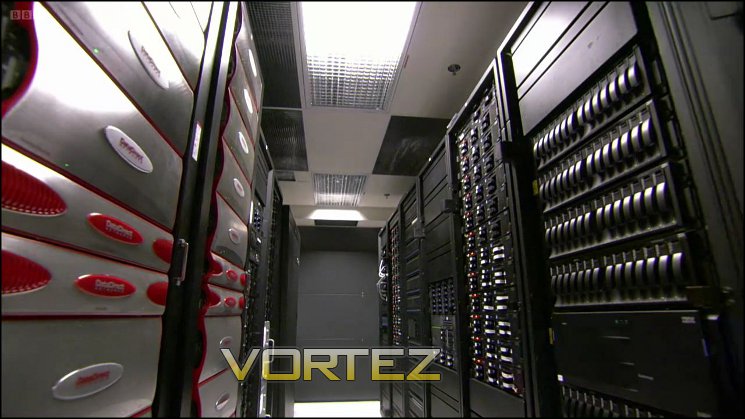
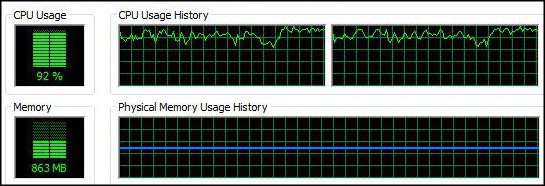
Playback was choppy with some frames being lost, a stark contrast with the Youtube results. Deeper investigation uncovered CPU load levels peaking at >90%, yet GPU loads were only reaching ~7%. We would expect loads nearer 20% CPU / 25% GPU were the video being decoded by the GPU rather than bottlenecking on the CPU.
—
The results indicate that in essence streaming high definition video may be something of a non-starter if hardware acceleration isn’t enabled either in the embedded player or website end, as has been the case recently with the Netflix implementation of Microsoft Silverlight 5 player and BBC iPlayer in our tests. Without being able to take advantage of the GPU, the CPU cores of the E-450 don’t have enough combined power, bottlenecking the decoding process. Enthusiast forums would certainly be able to help uncover the route cause of a streaming video website’s poor performance on a low-power system, and may even be able to suggest tweaks to browser configuration and in so doing improve overall performance.
* Source: Approx bit rates noted here.
** Source: http://iplayerhelp.external.bbc.co.uk/help/playing_tv_progs/watch_hd
Locally Stored Video Performance
AMD recommends DIVX for High Definition media playback on AMD-Fusion APU’s, but the on-board GPU is also supported by XBMC, an open-source application specifically designed for media playback on HTPC’s using all hardware resources.
Standard Definition
Video 1: High Fidelity Clip

MPEG-4 (DivX) encoded 720*404 DVD, 1.793 Mbps
The file played smoothly, utilising GPU acceleration as expected with CPU utilisation peaking at 19%.
Video 2: The 3rd Man Clip

XviD (h.263) encoded 720*540 DVD, 1.789 Mbps
The file played without issue, utilising GPU acceleration as expected with CPU utilisation peaking at 21%. Indications from the first two tests are that Standard Definition video may be played without difficulty on the AD11, which whilst a safe assumption to make should still be checked..
High Definition
Video 3: Amos Ocean DivX Plus Sample .MKV
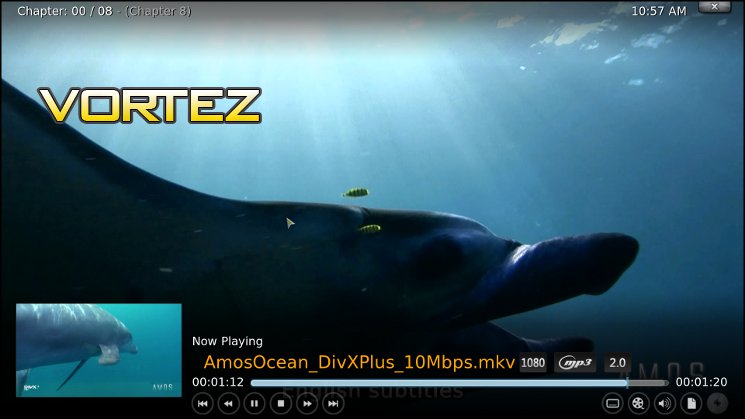
1920*1080 (1080p), 10 Mbps h.264 video, 128kbps MP3-encoded audio.
Playback appeared to be slightly stuttery in a few parts, however comparing the file to playback on a high performance desktop PC indicated that it was identical in performance. CPU Utilisation peaked at 27%, GPU at 56% in places.
Video 4: The Bourne Ultimatum – Trailer

1920*816 (1080p), MPEG-4 h.264 encoded video, 7.43 Mbps, 96kbps audio.
Playback was smooth throughout and there were no audio sync issues. CPU utilisation did not exceed 26%, and GPU load reached 46% during the 2.5 minute clip.
Video 5: Section of FRAPSED Games footage.
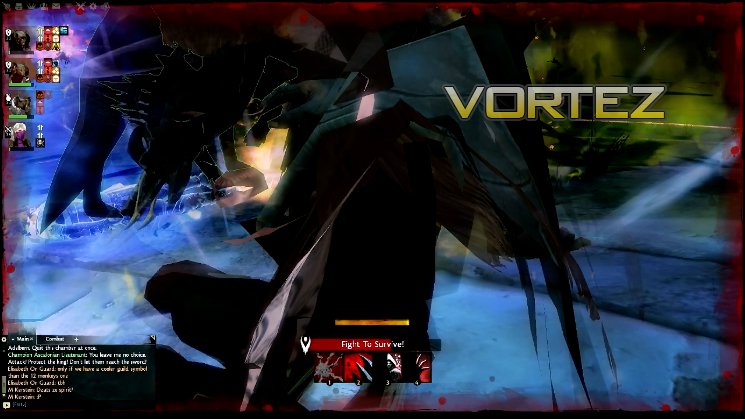
1920*1080 (1080p), MPEG-4 h.264 encoded video, 8.5 Mbps, 128kbps audio.
Playback was smooth throughout and there were no audio sync issues. CPU utilisation reached 24%, and GPU load reached 52% during the 5min play section.
NOTE:
When updated with the latest AMD-Fusion drivers the E-450 APU is capable of bitstreaming HD audio to external receivers over HDMI using the XBMC player. If not bitstreaming the AD11 is capable of uncompressed stereo output over Line-out, compressed multi-channel output via optical out, or digital audio out via HDMI. Specialist forums can help you to configure your system and enable this functionality.
Temperature and Noise
SpeedFan by Almico monitors temperatures and fan RPM sensors for a wide range of CPUs, GPUs and mainboards. SpeedFan 4.46 detected four sensors on the AD11: Generic Temperature, GPU Temp, CPU Temp and Fan Speed for the system’s single fan. In testing we extracted results during three different scenarios representing different usage patterns.
Idle
Our idle readings were taken 10 minutes after Windows completed loading, and represents the expected minimum temperatures and fan speeds for the AD11 prior to use as a media player. Ideally the system should be whisper quiet when idling for periods before entering Sleep state (i.e. suspend to RAM/HDD).
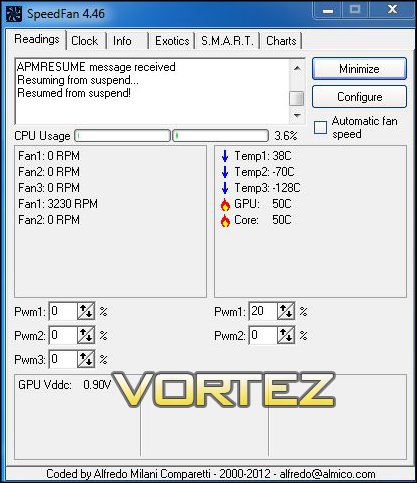
During Video Playback
Video playback readings were taken following 1hr playback of high definition video, and represented expected temperatures, fan speeds and corresponding noise levels during playback of moderately demanding hardware accelerated video.
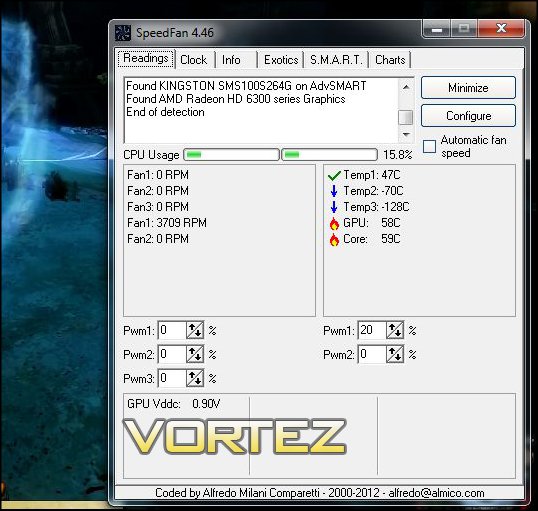
The GPU reaches 60C, CPU 61C and HDD 48C, under a consistent CPU load of ~20%. Fan speed at this temperature and load level was 3750RPM +/- 5%.
Extended On Time Playback
In our final scenario the AD11 was used as a general PC for 6 hours without being allowed to power down, and then video playback was initiated. After 30 mins temperature and fan speeds were recorded. The principle here is to represent extended-duration use of the AD11 as a workstation/home PC, rather than HTPC or Media Player, and to be a fairer test than simply loading the cores with a stress test applications such as Prime95.
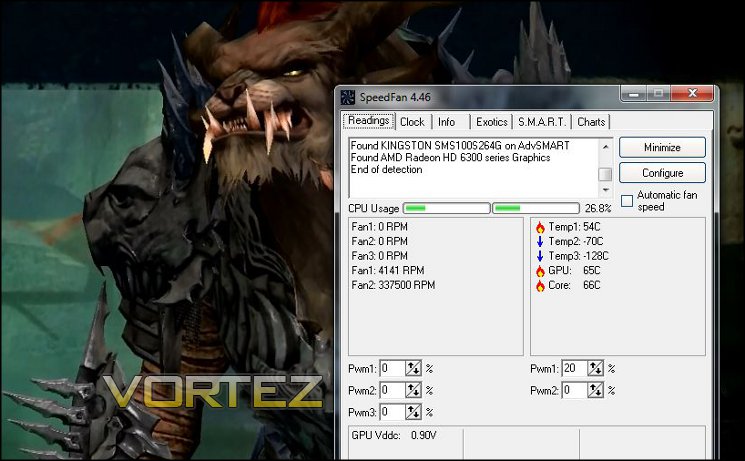
As you can see, even though CPU load was relatively low at only 25%, temperatures for CPU and GPU had reached the mid-60’s, causing the fan to run at 4.2k RPM.
—
Though we were hoping for near-silent operation, the result was sadly not the case. At a registered CPU/GPU core temperature of 65C during our ‘Extended Use’ scenario the system fan would ramp to over 4.2k RPM, generating noise which was both clearly audible over video and a middling frequency. Even at the relatively moderate 60C experienced during HD video playback fan noise at 3.75k RPM was persistent and noticeable, though acceptable if video volume is set at a sensible level.
If the AD11 was used purely as a Media Player then our issues with noise would be relatively minor; however for use as a PC, mounted as suggested onto the back of a monitor, the impact on a user experience is quite different. Operating the AD11 for long durations – for example web browsing, photo editing, some non-hardware accelerated video and the like – results in relatively high temperatures (60C+) and hence fan speeds. At this level noise pitch and tone changes frequently as CPU load changes resulting in, when combined with how much closer you’re sitting than an HTPC scenario, a much more distracting experience which can’t be drowned out by ambient sound.
It should be noted that testing was performed in a Windows 7 environment, where even under ideal conditions CPU load will be higher than it needs to be just to decode video. We weren’t able to try the system with ZOTAC’s XBMC implementation, but if it were able to keep the device under relatively low load temperatures fan speed and hence noise would almost certainly remain under control.
Conclusion
It’s very hard not to love ZOTAC’s ZBOX nano XS AD11. A tiny footprint coupled with high quality components and impressive feature set – including mSATA SSD, USB 3.0 and HD Audio/Video – add up to a formidable product that is hard to beat within the form factor constraints. It won’t look out of place in any front room either thanks to the brushed-metal finish and gentle illumination.
As you would expect from this proven platform video playback was smooth and audio quality was high where the HD6320 graphics of the E-450 APU can be taken advantage of, adding up to a good HTPC package. The inclusion of bit-streamed audio over HDMI, supported by AMD’s E-450 APU, will be of key interest to enthusiasts with external AVRs. On the other hand a lack of CPU horsepower puts software decoding of HD video beyond the reach of the AD11, impacting on web streaming performance especially. Consequently poorly formed or supported video which requires software decoding, such as 10-bit encoded h.264 used by a few but growing number of sources, is a problem that AMD, Webmasters and Media Player developers will need to keep pace with by swift integration of iterative driver improvements into software.
As a general use PC the AD11 works far better than your average Nettop or Netbook, thanks largely to the inclusions of a fast SSD rather over a mechanical HDD. The typical Windows 7 installation of 21GB still leaves over 35GB for a wide range of applications, or just more video. Though you won’t be playing the very latest FPS or RPG, indie titles with very modest requirements and older titles should be playable at low resolutions. Note however that memory constraints on the system are high – the 2GB is shared between the system and GPU, limiting you to ~1.6GB rather than the 4GB + 512MB Video RAM you’d see on a low-end gaming desktop PC – and will limit the system performance even with an SSD.
ZOTAC’s attention to detail is striking. From options to disable case lighting in BIOS, tablet fast-charging under Windows and having the foresight of providing an HTPC OS built for and verified on the AD11 available as a free download, there seems to be very little that hasn’t been thought of. Also pleasing to note is that the IR Remote/Sensor package, often the weak link of bundled home media devices, is robust and responsive and works seamlessly with both Windows Media Center and XBMC. The lack of a keyboard and mouse is felt only upon initial system configuration and when performing standard ‘PC tasks’, allowing the end-user to choose peripherals they are comfortable with and keeping the overall price down.
The chief issue we had with the AD11 was not one of performance or feature set, but rather noise. The claim of ‘near silent operation’ didn’t really pan out during playback even when CPU loads were relatively low, and certainly not during use as a desktop PC. That’s not to say that fan noise is a deal-breaker, anything but – for an HTPC set-up in a living room the AD11’s fan noise isn’t too problematic, indeed as long as CPU loads stay at or below the 25% mark the it is barely noticeable above typical video volume. We would not however recommend it as a study or bedroom PC – variable CPU load levels increase noise and make it all the more distracting at ~1m distances from AD11 to ear. The ability to set-up fan profiles, keeping noise levels relatively stable if not whisper quiet, would be a welcome addition.
Finally we come to the price of £299, placing the AD11 Plus towards the higher-end of the market for mini-PC they begin to compete with self-assembled near-silent desktop PC’s. However the long list of features of the AD11 PLUS, especially an SSD which would retail for a hefty chunk of change itself, make it an excellent option if you can take advantage of all it has to offer and value space and aesthetics at a premium.
The balance of performance, price and features is strong and the form factor they have shrunk this fully-fledged PC down to is outstanding. Unfortunately as much as we would love to we cannot quite give the ZOTAC ZBOX nano XS AD11 PLUS an overall Gold award as noise is too sensitive an issue for savvy HTPC and audio enthusiasts. With that said, bundled accessories in the form of a great IR remote and 802.11n WiFi round out a package well worth both a very high Silver and Creative Awards.
Pros
+ Tiny 100mm x 100mm footprint
+ Hardware accelerated h.264 playback
+ Extensive feature set
+ Bundled accessories
+ Highly responsive for general PC use
+ Free XBMC OS
+ 2 Year Warranty in the EU
Cons
– Fan noise under load or following extended use
– Patchy website support for hardware h.264
– Awkward OS installation
+ Tiny 100mm x 100mm footprint
+ Hardware accelerated h.264 playback
+ Extensive feature set
+ Bundled accessories
+ Highly responsive for general PC use
+ Free XBMC OS
+ 2 Year Warranty in the EU
Cons
– Fan noise under load or following extended use
– Patchy website support for hardware h.264
– Awkward OS installation

Click here for an explanation of our awards at Vortez.net.


