







Func Industries return with their new gaming mouse which features 512KB onboard memory, 5670DPI sensor, Omron switches and much more besides.

Product On Review: MS-3 Gaming Mouse
Manufacturer and Sponsor: Func
Street Price: £59.99 inc. V.A.T.
Enthusiasts and newcomers alike may be new to the Func brand, but it would be a mistake to assume that they are new to the marketplace. Established in 1999, the Californian company have cut their teeth on mousing surfaces to some considerable success, and recently revamped their line with the Func Surface 1030XL. We reviewed the new Surface, a dual-sided mousemat designed for both Teflon and Ceramic-booted mice, and found it to be an interesting design which is perhaps a little ahead of its time given the relative rarity of mice with ceramic feet (or others with similar properties vs. traditional Teflon).
About Func
We redefined the gaming experience. It’s time to make history once again.
Func will once again redefine the gaming experience with cutting edge products to make history for a second time. In 2012, Func decided it was time to revamp the look and feel of the brand and give it a fresh image. But bringing Func back to you is so much more than cosmetic changes, it’s about enhancing your gaming experience in a more meaningful way. We want to make a difference in performance, just like we did back in the day, and we want to do it in an honest and trustworthy way.
What looks simple and obvious to the untrained eye is, to us, a complex challenge. The term “ergonomics” is very commonly used today. Did you know that we spent more than 100 hours studying the human hand and how the mouse body can be improved? Not to mention the hours spent on testing the perfect placement of the buttons. Did you know that we have tested more than 200 different surface materials in search of the perfect tracking conditions?
There are no shortcuts in this business and functionality kicks in where simplicity doesn’t make any sense. We believe that your performance (besides your personal skills and training) can only be enhanced by the usability of the functions and not simply by a bunch of fancy gimmicks marketed as revolutionary product development. They make you buy it but it doesn’t give you any advantage at all.
Func will once again redefine the gaming experience with cutting edge products to make history for a second time. In 2012, Func decided it was time to revamp the look and feel of the brand and give it a fresh image. But bringing Func back to you is so much more than cosmetic changes, it’s about enhancing your gaming experience in a more meaningful way. We want to make a difference in performance, just like we did back in the day, and we want to do it in an honest and trustworthy way.
What looks simple and obvious to the untrained eye is, to us, a complex challenge. The term “ergonomics” is very commonly used today. Did you know that we spent more than 100 hours studying the human hand and how the mouse body can be improved? Not to mention the hours spent on testing the perfect placement of the buttons. Did you know that we have tested more than 200 different surface materials in search of the perfect tracking conditions?
There are no shortcuts in this business and functionality kicks in where simplicity doesn’t make any sense. We believe that your performance (besides your personal skills and training) can only be enhanced by the usability of the functions and not simply by a bunch of fancy gimmicks marketed as revolutionary product development. They make you buy it but it doesn’t give you any advantage at all.
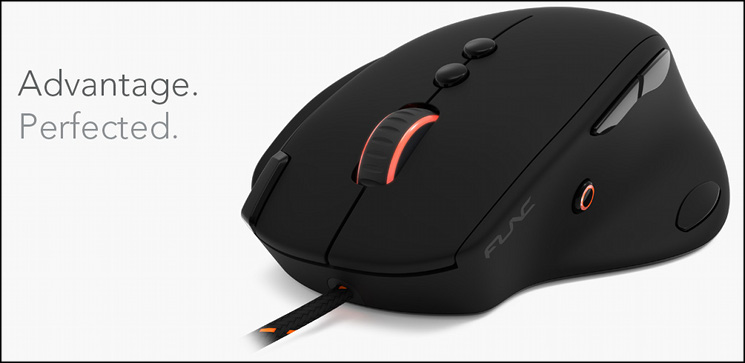
Departing from their comfort zone, Func are now entering the hardware market with the MS-3, their first mouse which has been designed primarily for gaming. Ten independent assignable buttons and three profiles with 512KB of onboard memory place it above the curve in functionality offerings for the user, whilst the 5670DPI laser sensor should keep your cursor on the straight and narrow. Throughout, OMRON switch technology will keep button presses consistent and reliable long into the mouse’s lifetime.
About The MS-3
Made with the solely purpose of creating an advantage over your opponents, Func MS-3 sticks out from the rest with its unique, performance driven line-up of interesting features. The unprecedented possibilities of customization and extensive macro settings allow it to fit any game style. The ergonomic design is the result of many development hours and studies of the human hand in order to give you the solid grip that never takes your eyes of the screen. All buttons are carefully been placed to minimize the reaction time. Ladies and gentlemen, this is advantage. Perfected.
Features And Specifications
Features
Ergonomically Designed Grip Intelligence(TM)
The MS-3 is ergonomically designed to minimise hand strain and stress in order to allow you to keep your eye focussed on the screen and not on your grip.
Built to last with only the best components available
This mouse is built to last with only high-end components paired up with a two year warranty.
Customisable LED-light system with profile indication
Apply any of the 16.8 million colours individually or simply turn the LEDs off. The LED system can be used as a profile indicator or simply match up your mouse with other peripherals on your desk.
Unique T+4(TM) thumbzone button placement for more accurate gameplay
When you find yourself in a critical play movement, the importance of easily accessible buttons and an optimised Thumbzone is crucial to avoid miss-clicks.
Advanced macro editor records up to 20 actions live
The macro editor handles real-time recordings and is able to save up to 10 commands in one macro and a total of 60 macros; reachable from any profile.
The MS-3 is ergonomically designed to minimise hand strain and stress in order to allow you to keep your eye focussed on the screen and not on your grip.
Built to last with only the best components available
This mouse is built to last with only high-end components paired up with a two year warranty.
Customisable LED-light system with profile indication
Apply any of the 16.8 million colours individually or simply turn the LEDs off. The LED system can be used as a profile indicator or simply match up your mouse with other peripherals on your desk.
Unique T+4(TM) thumbzone button placement for more accurate gameplay
When you find yourself in a critical play movement, the importance of easily accessible buttons and an optimised Thumbzone is crucial to avoid miss-clicks.
Advanced macro editor records up to 20 actions live
The macro editor handles real-time recordings and is able to save up to 10 commands in one macro and a total of 60 macros; reachable from any profile.
Technical Specs.
MCU/Processor: WT6573
Switches: Omron
Sensor: Avago UGS 9500
Memory: Onboard, 512 kB
Resolution: 90-5670 DPI
Frames per second: 12 000
Tracking speed: 5.1 m/sec (150 ips)
Max Acceleration: 30 g
Image processing: 10.6 megapixels/sec
Report rate: Adjustable, up to 1000Hz
Lift-off distance: Adjustable
Upgradable firmware: Yes
Connection: USB. Goldplated (2 m braided cable)
Dimensions: 126.92 x 100.69 x 42.38mm / 4.99 x 3.97 x 1.69in
Net. weight: 127g / 0.28lbs.
Switches: Omron
Sensor: Avago UGS 9500
Memory: Onboard, 512 kB
Resolution: 90-5670 DPI
Frames per second: 12 000
Tracking speed: 5.1 m/sec (150 ips)
Max Acceleration: 30 g
Image processing: 10.6 megapixels/sec
Report rate: Adjustable, up to 1000Hz
Lift-off distance: Adjustable
Upgradable firmware: Yes
Connection: USB. Goldplated (2 m braided cable)
Dimensions: 126.92 x 100.69 x 42.38mm / 4.99 x 3.97 x 1.69in
Net. weight: 127g / 0.28lbs.
System Requirements
Windows® 2000 / XP / Vista / 7 / 8
Available USB port
10 MB free space on hard drive
Available USB port
10 MB free space on hard drive
Packaging and First Look
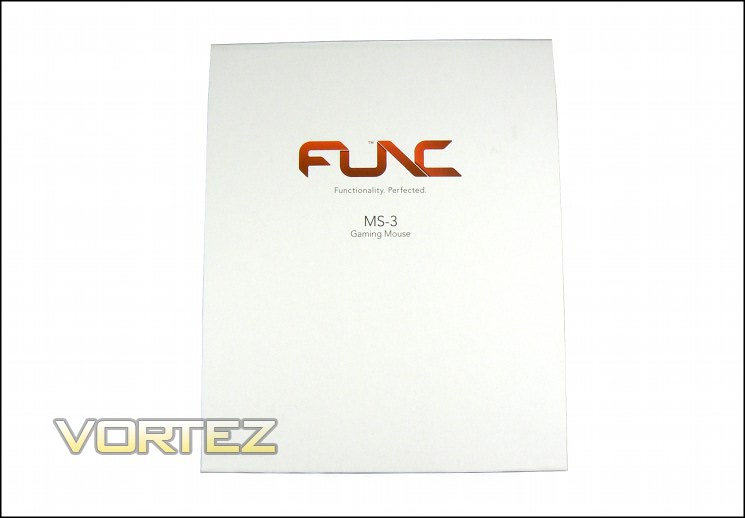
White and orange seems to be Func’s brand colours – both the MS-3 and Surface 1030XL we reviewed previously feature the same all-white finish rarely seen from peripheral manufacturers. Constructed of solid card, the mouse should remain well protected and secured in transit (though perhaps not in quite the lap of luxury afforded to the Surface 1030XL). Apart from the logo and product name the front is bare, with not even a solitary feature list to blemish the façade.
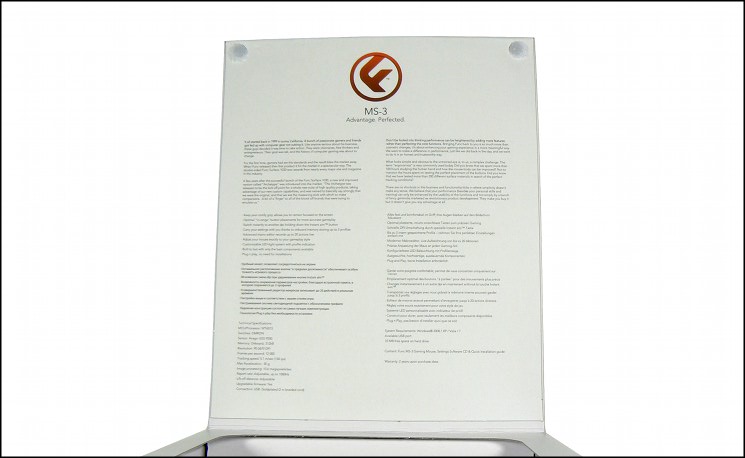
The front lifts off to reveal the mouse and specifications panel, although you may want to break out a pair of spectacles to read all that text. What the front lacks this flap makes up for in spades, describing both Func as a company and the inspiration behind the MS-3 mouse. Complementing this is a simple nine-point feature list in four languages, with English tech. specs. also included. You may need a new prescription to read it, but almost all the information you could want is listed there.
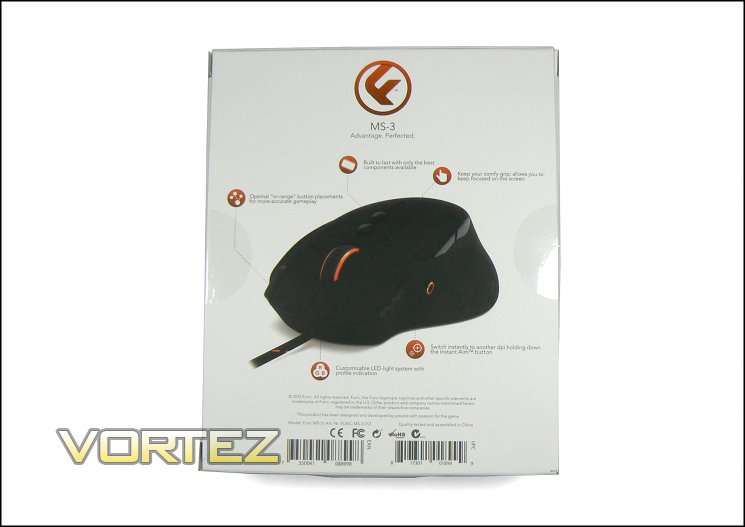
The rear of the package features an angled look at the mouse indicating key features and the two zones with LED illumination accents. The strong theme of orange through the packaging makes it seems that orange is the only option for the LED’s, bit in fact the lighting is capable of any colour within the RGB space.
The product features Func deem to be the most important are lighting, optimised button placements, high quality components, ergonomic comfort grip and InstantAim(TM) button. This selection seems fair, though we should note that they don’t make a huge deal of the OMRON switches – a lesser known technology amongst the layman but one which has proved its worth in the past.
The packing is minimalist, though of good quality that thanks chiefly to its colour will stand out on shelves.
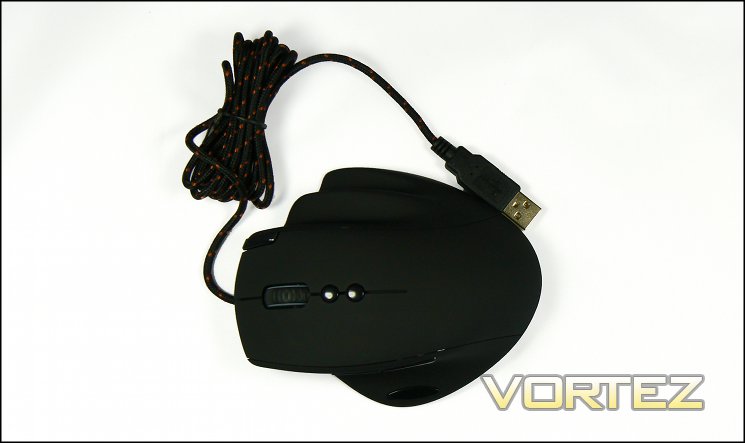
Here is our first look at the MS-3. Retail packs will also include a driver CD and quick-start guide which weren’t included with our review sample. Not to worry however, even without the installation CD the full driver software suite is downloadable direct from Func.net as a stand-alone installer.
A Closer Look
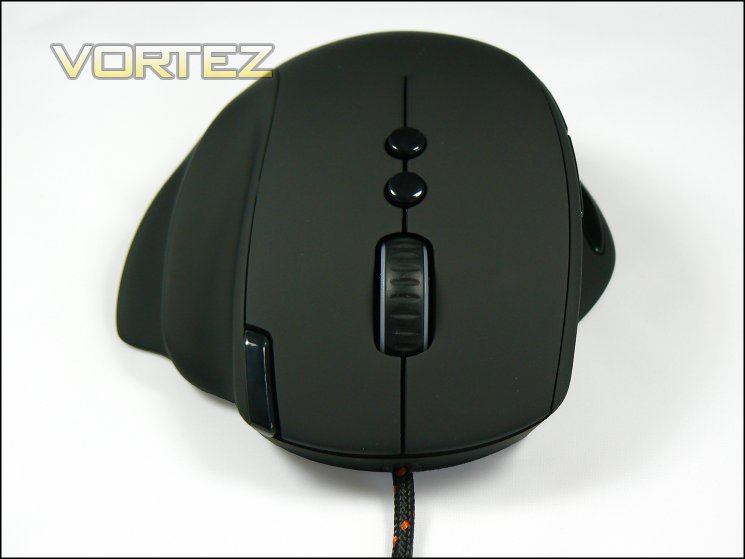
At first glance the MS-3 appears superficially similar to a number of mice already on the market, each of which feature a shape heavily influenced by ergonomics. However upon closer examination it’s clear that the implementation is much more exaggerated in that regard, including more significant support for the ring and little finger in conjunction with a more contoured thumb rest than is normal. The mouse shell is coated with a matte black rubberised textured finish which should stick to the hand quite well in operation.
The top of the mouse reveals a layout which is a departure from other gaming mice. The normal portions are the wheel, two main buttons and auxuilary buttons below the wheel. Normally these buttons are dedicated to DPI/Profile adjustment, but as we will see in the software analysis they are fully bindable to macros and windows hotkeys.
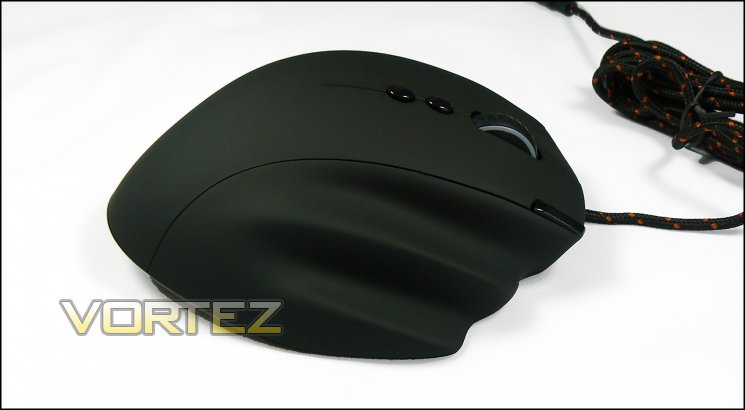
The major oddity is the button on the top-right of the right-mouse-button. The standard implementation is as a profile switch: press once, then again in succession to advance to the next profile; as with all the MS-3 buttons however this is customisable. The active profile can be identified by the colour scheme you’ve chosen (see: Lighting Customisation), whilst active DPI setting is identified by a three LEDs on the shoulder of the mouse near the thumb buttons.
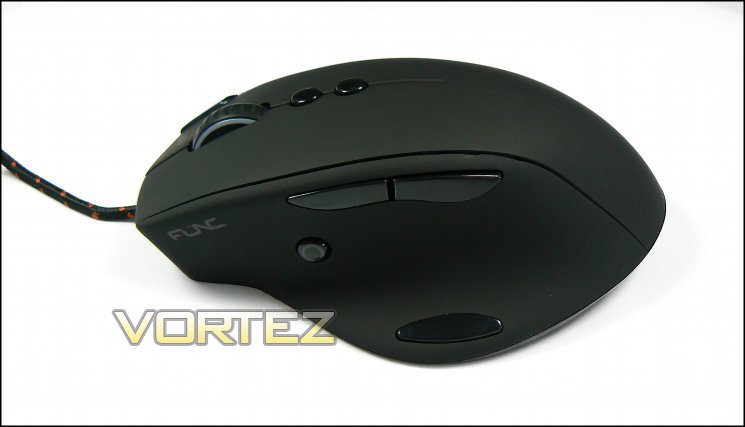
The left side of the MS-3 highlights further adaptations Func have made to the MS-3 to place it ahead of the competition. The standard thumb buttons located on the shoulder are quite distinct, though strictly speaking a slight looseness in the vertical plane means they can’t quite be called excellent. On the other hand actuation is immediate, which we find to be very important for gameplay where reaction time is key. By choosing Omron switches Func should see a mouse which retains button press consistency in the long-term.
Adding to two thumb buttons on the shoulder of the mouse are buttons on the edge of the thumb rest andthe vertical. The latter is stylised by Func as an InstantAim(TM) button, designed to enable a low DPI mode for sniping in FPS games but can also be bound to any macro or keystroke through software. Actuation of the Instant Aim button is almost immediate, though a switch which continues to give thereafter won’t be to everyone’s taste. By the same token, the button on the thumb rest is more general use, again able to be bound to a variety of macros or keystrokes and should be particularly useful for MMO gamers. This button is quite stiff and much more suited to less common actions as the amount of force needed to push it can destabilise the mouse if also moving at the same time.
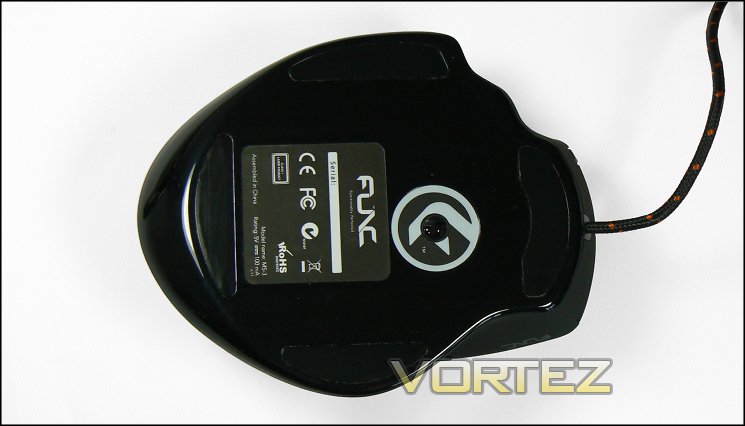
There’s not much of great significance on the underside of the MS-3: four large teflon pads should do a fair job of keeping the mouse sliding, although this does represent a little more surface area presented to the mousing surface than is typical on a gaming mouse. The sensor is located a little higher on the base than is usual, with plenty of area devoted to the QA label (where you can also find the serial number).
Connector & Cable
The MS-3 utilises a standard gold plated USB 2.0 connector and braided cable which together should retain connection durability in the long-term. Func have engineered the USB connection to be capable of up-to 1000Hz polling for those eager to shave off every last millisecond from their reaction times, with the default being 500Hz.
Func’s MS-3 draws you in as little design tweaks are revealed to provide a more powerful overall experience, especially with regards to the additional thumb buttons. It also feels quite large in the hand – deceptively so – which may render it a little unwieldy for high level FPS gamers. On the other hand, gamers with large hands should appreciate it’s size, if not the finger grooves on the right which are a little tight. You’re probably looking at Claw grip styles being optimal for the MS-3, with palm grips being strictly okay. Fingertip style grips, with the palm wresting on the mousing surface, are less suitable due to how far forward the InstantAim button is.
Lighting Customisation
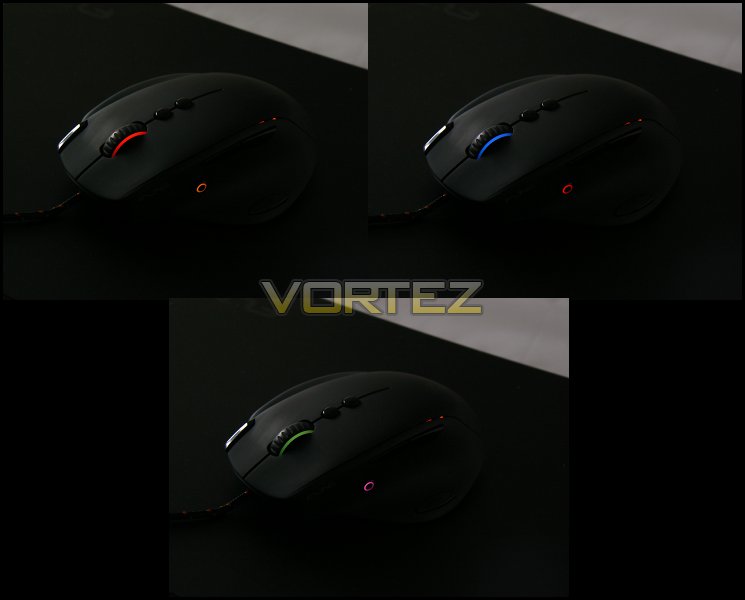
Three of the MS-3’s thousands of colour options for accent lighting
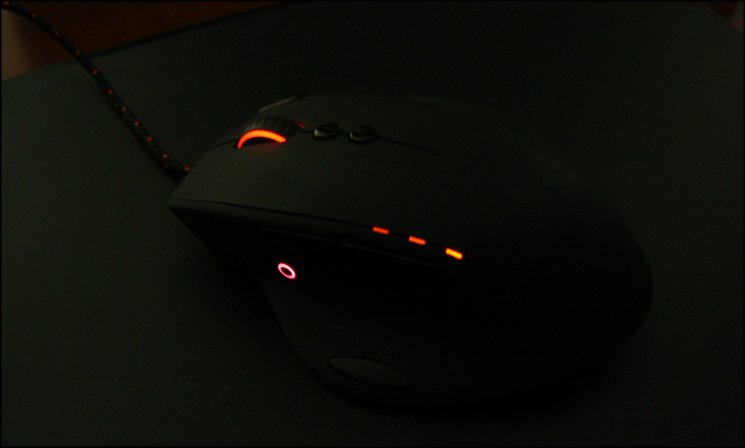
The Func MS-3 features three lighting zones, two of which are customisable through the software suite: the Mouse Wheel, InstantAim Button and DPI Step Indicator. It’s much more of an accent lighting effect than the almost garish designs of other mice, and complements the matte black finish of the MS-3 very nicely.
Colour options for the LEDs are surprisingly extensive, some of the most extensive we have seen on any mouse in fact. The Mouse Wheel and Instant Aim button LEDs are independently assignable to different colours, with Brightness and Saturation – the latter determining how pale a colour is – also being adjustable and having an easily discernible effect. Each lighting zone can also be set to a pulse effect, swiftly brightening and dimming in tern.
This level of control complements the lighting’s accent nature. In mice with much more extensive illumination it would almost certainly become far too difficult to create a consistent effect due to the difficulty of calibrating LEDs in an array to have identical characteristics, whereas the small lightbar-esq effects work very well and are relatively easy to get even.
There is a third lighting zone – the DPI indicator. In fact these are three LEDs which indicate the current DPI pre-set level (which can be adjusted in software to be between 90 and 5400 DPI). When the Profile cycle switch is pressed (default to button 8 above the right-mouse-button) these LEDs turn white, after which further presses cycle through the three available profiles, the number of illuminated LEDs indicated the currently selected profile. No input after 2 secs turns off this profile cycle mode.
We find the lighting to be subtle, but effective. Thanks to Func’s design both profile and DPI level identification can be performed at a glance, whilst the amount of lighting won’t cause any distraction during use. As customisation goes it’s not as extensive as the efforts of many other manufacturers, but does have functional value and charm of its own.
Software
Retail samples of the MS-3 should come with a version of the full software suite. In order to take advantage of the latest advances it’s generally best to download the latest version from the manufacturer website. We used the release version in our testing, but in the future the more current iteration can be found here.
From the start we would have to say that the MS-3 software is one of clearest and well appointed we have seen from a peripheral manufacturer. The layout is logical, text clear, and functionality logically apportioned to specific panels. This is helped by Func not being afraid to use a large window for the software, keeping it uncluttered and enabling text which you don’t need a high strength magnifying glass to read.
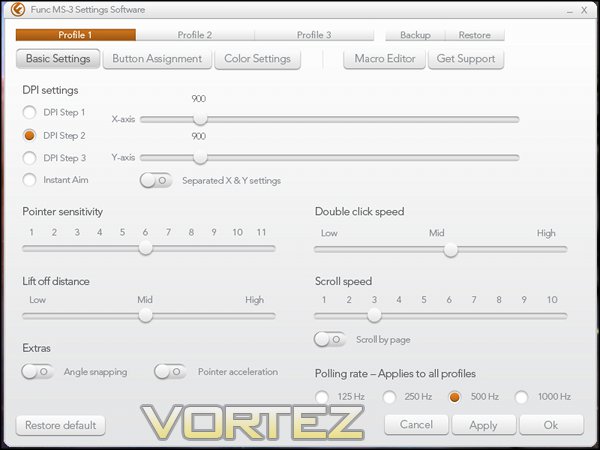
The MS-3’s software doesn’t feature a ‘landing pane’ so to speak, it instead throws you right in to the mouse settings panel. Here you can see that settings are made on a ‘per-profile’ basis, profile selection being made through one of three buttons at the top. Three profiles is a little stingy by comparison to many current gaming mice which can feature five or more, but for the majority will be more than adequate. Profile’s backup to a text file with a default ‘.map’ extension, which can then be used to overwrite an existing profile through the ‘Restore’ command.
From the layout we can see that settings, button assignments and colour options are per-profile rather than fixed across all profiles. As a consequence identifying the active profile is as simple as glancing at the mouse’s current colouring, and each profile can be easily tailored to a specific game or other software application.
The MS-3 includes three DPI level Steps (i.e. presets) which can be configured between 90 and 5670 DPI and independently for x- and y-axes. DPI variation is in steps of 90 and seem appropriate, although will obviously be more of a constraint at low DPI than high. Below the DPS sliders is the Instant Aim DPI setting which defines the DPI level override when the InstantAim button is pushed; this is independent of the other three DPI Steps, not the case for many competitors.
Further advanced settings are also adjusted on this first page:
Pointer Sensitivity:- changes the mapping of DPI to pointer movement on-screen. The higher the sensitivity, the more your cursor will move on-screen per inch on the pad.
Lift-off Distance:- defines how high the mouse needs to be lifted before the mouse no longer senses the mat. Keep low in gaming to allow mouse swift repositioning without moving unintended input.
Scroll speed:- how far one notch on the scroll wheel scrolls a window or text. Default setting is a little slow for a mouse which doesn’t have a free-flow wheel, so upping this may be a good additional control to use.
Double-Click Speed:- defines how quickly you need to click twice in succession for it to be registered as a double-click. We’ve criticised other manufacturers for not including this in their software suits, so it’s nice to see Func add it to theirs.
Pointer Acceleration:- makes moving across large screen real-estate quicker, at the expense of accuracy. Generally should be off, especially when gaming.
Angle Snapping:- artificially straightens cursor movement along the horizontal or vertical if it appears to be straight. Generally a matter of personal taste, but should be off.
Polling Rate:- broadly speaking, the response time to any mouse input. More typically valuable for keyboards.
Lift-off Distance:- defines how high the mouse needs to be lifted before the mouse no longer senses the mat. Keep low in gaming to allow mouse swift repositioning without moving unintended input.
Scroll speed:- how far one notch on the scroll wheel scrolls a window or text. Default setting is a little slow for a mouse which doesn’t have a free-flow wheel, so upping this may be a good additional control to use.
Double-Click Speed:- defines how quickly you need to click twice in succession for it to be registered as a double-click. We’ve criticised other manufacturers for not including this in their software suits, so it’s nice to see Func add it to theirs.
Pointer Acceleration:- makes moving across large screen real-estate quicker, at the expense of accuracy. Generally should be off, especially when gaming.
Angle Snapping:- artificially straightens cursor movement along the horizontal or vertical if it appears to be straight. Generally a matter of personal taste, but should be off.
Polling Rate:- broadly speaking, the response time to any mouse input. More typically valuable for keyboards.
Finally, you are also able to restore the mouse to default settings from this page. It prompts to ask whether you wish to reset only the selected profile every profile too. Pretty well thought out then.
Button Assignment
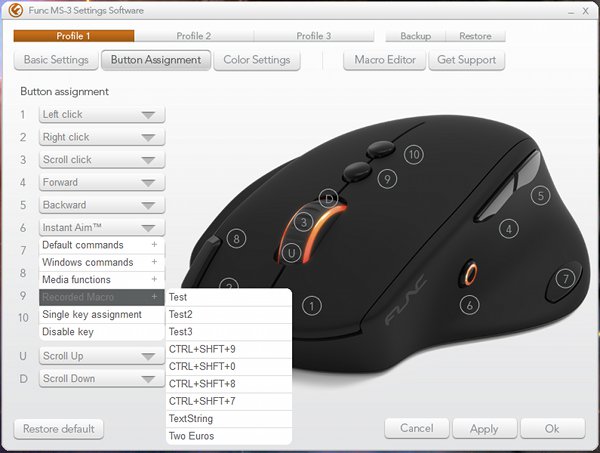
The Button Assignment pane is once again elegant in its simplicity. Dominating on the right is an image of the MS-3, indicating and labelling each programmable button or action. Four different sets of commands are possible per button on a per-profile basis, allowing substantial flexibility when combined with the more than usual number of accessible options. These command sets are:
Default Commands:- A selection of standard mouse commands e.g. Left Click, Forward, Backward etc. Also includes DPI/profile adjustment and mouse-specific InstantAim function. N.B. Software safeguards require at least one button bound to Left Click.
Windows Commands:- Set of standard Windows commands such as Copy, Paste, Find, Save etc. Useful for productivity.
Media Functions:- Functions used in common Windows-compatible media players e.g. Play/Pause/Mute etc.
Macro inc Single Key:- see below
Disable:- Turn off the button entirely
Windows Commands:- Set of standard Windows commands such as Copy, Paste, Find, Save etc. Useful for productivity.
Media Functions:- Functions used in common Windows-compatible media players e.g. Play/Pause/Mute etc.
Macro inc Single Key:- see below
Disable:- Turn off the button entirely
Colour Settings
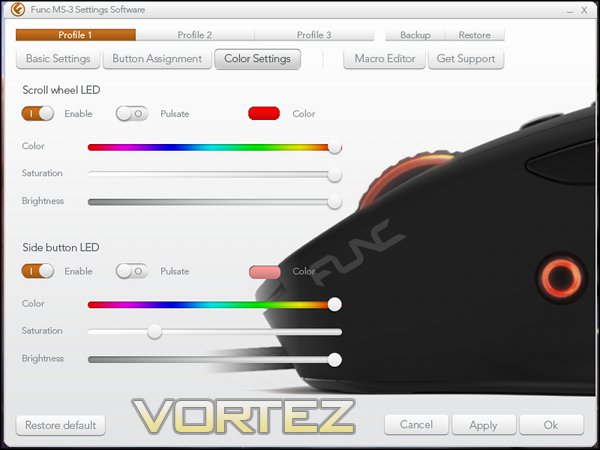
As explained earlier the MS-3’s software can in theory map one of up to 16 million different colours to either lighting zone, although in reality the software configuration limits the LED to one of 180,000 colours. The colour is viewable as a preview, which takes account of both Hue and Saturation Level chosen. Three hundred and sixty Hue and Five Saturation levels are available, with higher saturation levels corresponding to deeper colour reproduction. Brightness (1-100) defines how dim the LED will be, which has less of an impact on colour itself.
In addition to static illumination the software also allows a pulsating effect from the options, as well as the option of disabling the LED entirely. There’s no facility to cycle through colours automatically, which could be a pleasant additional effect for future iterations.
Macro Editor
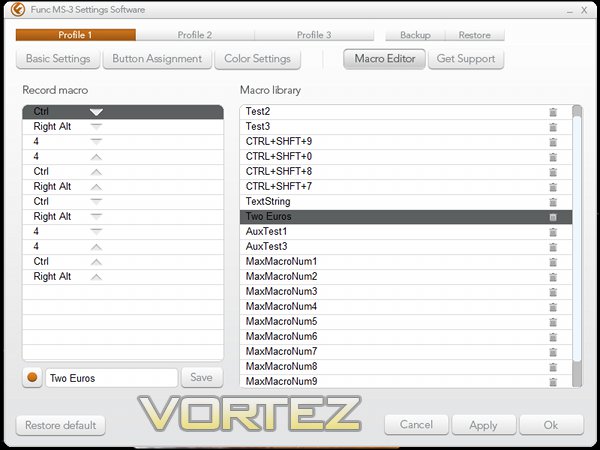
The Macro Editor is accessed by clicking the corresponding button in the MS-3 settings software, and reveals a fairly simplistic pane which on the right lists the stored macros and on the left the inputs for that macro. Each macro can be up to 20 keystrokes long (defined as one press and release per stroke); however whilst literature states that up-to sixty macros can be stored in on-board memory we found that any macros created beyond the 15th were not processed when selected in button assignment, with button instead returning to default behaviour. We should note that there is no warning, in the user guide or software, making you aware of this restriction.
Recording a macro is easy – simply enter a name for the macro in the text box provided, and then press the Record button to the left. The software will then record every keystroke make until either the button is pressed again or 20 keystrokes are recorded. In order to store the macro for later use you will then need to click Save. Unlike competitor software, time delay information is not recorded and selective edits cannot be made; upon a mistake the entire macro must be re-recorded.
It’s also quite easy to overwrite a previously stored macro through simple user error, which makes the fact that there’s no automated process for backing them up somewhat disappointing. Macros are by default stored as .ini files (parsed as plain text) in ‘C:\%USERPROFILE%\AppData\Roaming\MS3\Macros’.
That’s about it for the software. In many respects it’s a little bare bones by modern standards, but does provide all essential functionality packaged in an easy to use UI. Sure, certain features are lacking, most notable in the Macro Editor and restriction to three profiles, but at its core remains well rounded and an excellent release version as these suits go. One final addition which could be implemented with relative ease is a look-up for new versions of the software, something which is currently quite difficult as the suite does not include a version number.
Performance
In testing we paired the MS-3 with two different mousing surfaces: Func’s own Surface 1030XL, and a more traditional fabric mat with rubber backing. Although the latter are far more common, the former should also allow us to assess if the large base surface area of the MS-3 makes a difference to drag. Our review of the Surface 1030XL can be found here, but to bring you up to speed we’ll mention that it’s essentially a dual-sided mat with frame which provides either a smooth surface for Teflon feet or harder acrylic surface for ceramic feet.
General Performance
The four Teflon feet of the MS-3 allow very smooth mousing over the Surface 1030XL’s smooth effect surface, and manufacturing precision results in a mouse which doesn’t wobble when on a flat, hard surface. As suspected, and no doubt augmented a little by the ample 127g weight, the larger than normal surface area presented to the mat does result in slightly more drag than usual when paired with a fabric mat, though not as much as we had feared. In this respect gaming which tends to promote small hand gestures will we well suited to the MS-3, whereas FPS-type games will tend to want a suitably slippery mousing surface which is rigidly backed, such as the aluminium offerings currently on the market.
With respect to the overall housing, the MS-3’s rubberised matte black finish is grippy and tends to whisk sweat away from the palm quickly. However it will attract dirt both on the surface and the grooves, necessitating frequent and liberal cleaning to keep it spick-and-span. At a portly 127g – more than some mice with customisable weights – and with quite large housing it naturally feels like a mouse designed for hands on the large side of the Bell curve. Ergonomic finger rests on the right cradle the pinkie and ring fingers, but their slightly indented shape makes it uncomfortable in long gaming sessions if fingers are wide.
Button presses are something of a mixed bag on the MS-3. The main four are excellent, especially the shoulder buttons which actuate almost immediately from only a little pressure and don’t have much movement distance following that. The feel of the InstantAim button is a little different – actuating immediately but able to be pushed right back into the housing rather than having a back-stop. The final thumb button (fourth for those counting at home) is quite stiff, and in order to keep control over your mouse pointer can only really be pressed when the mouse is stationary. None of these factors impinge on the MS-3 as a mouse for the office environment however, with the 15 macro’s and range of bindable keys having the potential to markedly improve productivity.
Users who make extensive use of spreadsheets – or significantly more user-defined macros – will see the difference these buttons can make when bound to applicable macros. For an office environment, or streaming with a sensitive microphone the MS-3 will be fine choice.
Gaming Performance
The MS-3 begins to shine in gaming; its ergonomic shape and button layout is logical and consistent with market norms as they pertain to the standard button set, far reducing the learning curve after picking up the mouse for the first time. Of course left-handed gamers who are unable to use such a right-hand biased mouse will feel a little put out – the MS-3 isn’t the sort of mouse you can cludge to work with your left hand.
The shoulder buttons feel proud and clearly differentiated, aiding precision a little compared to some others on the market right now. As is often the case DPI switch buttons are a little difficult to reach with claw and palm grips, but those aside button positions are within reach to most users. Learning to make use of the button just off the left mouse button does take a little while, and changing profile on the fly is a little clunky because of that, but being able to rebind to any other function is exceptional.
Once again the Japanese Omron switches are a surprising highlight; each button press is precise and satisfying, with no rocking of the button in the housing except the shoulder buttons in a amount so minuscule amount it barely bears mentioning.
Current DPI is represented by the three LEDs on the side, enabling at-a-glance assessment of current DPI, with similar results for Profiles presupposing you know which lighting scheme corresponds to which. That is often overlooked by manufacturers, and so we shouldn’t overlook it here.
FPS Gaming – Team Fortress 2
FPS gamers will probably see the MS-3 as slightly less suitable by virtue of having greater drag on fabric mousepads than much of the competition, though the instant aim functionality more than makes up for this. Alternatively if you choose a hard surface mat – aluminium, smooth plastic, plastic treated fabric etc – movement over the mousing surface will be much smoother at the expense of cushioning for the hand (depending on your grip). Whichever solution you choose the mouse will tend to be very good, but perhaps not allow you to zip over a surface quick as freely as more smaller and more lightweight mice.
Setting up hotkeys for FPS functions is a trivial matter, allowing alt-fire and similar actions to be bound to one of the four thumb buttons or additional middle-finger button. The stiffness in the wheel can make cycling through weapons more of a chore than it should be, although may will preach setting up distinct hotkeys for each weapon anyway. By the same token the wheel is fairly precise – you shouldn’t have difficulty selecting the right item in a weapon list, even if the stiffness makes getting there a chore.
Only three gaming profiles may be an issue for some with very wide taste in games. Furthermore, from a hardware standpoint at no point did we feel that ‘only’ 5670DPI wasn’t enough: the sensor performed very well with no skipping or other problematic movement dynamics. A singular word of caution would be over reliance on the thumb button over the thumb rest – it tends to require too much force to actuate in the middle of a firefight, reducing accuracy.
RPG/RTS Gaming – Torchlight 2 & Starcraft 2
MMO/RPG gamers should feel particularly at home with the MS-3. It’s a standard 5-button design for the most part, but includes two additional buttons which can be bound to a plethora of keyboard commands. With only 15 macros to able to be created and recognised by the mouse with the current version of the software you may need to be a little more streamlined in your choice of macros than would be on certain competitor mice.
Adding three more buttons to your fingertips over a standard gaming mouse, even buttons which could be a little unwieldy upon first use, should be of great value to RPG gamers who thrive on this expanded functionality. The individual idiosyncrasies of the buttons are swiftly swept aside by the glory of options, allowing you to have access to much more of your available toolset than would otherwise be the case. Once again OMRON switches will come into their own as in-service lifetime increases in the notoriously click-heavy hack’n’slash genre.
For RTS gamers precision will be valued above almost any other feature, and we certainly found the MS-3 to be a precise tool. The only slight niggle may be the size and weight, and should necessitate trying the mouse for a couple of weeks before committing to it entirely.
All in all the MS-3 is a very good all-rounder for gaming and productivity in general.
Conclusion
If we’re honest we were not wowed by the Surface 1030XL, and so approached this review with some trepidation. At first glance the MS-3 appeared to be a simple re-badge of one of the hundreds of generics already around, but the reality is very different.
We found that the MS-3’s layout and plethora of configurable buttons made it an very intriguing proposition for MMO and vanilla RPGs whilst not being quite as well suited to FPS due to higher than normal drag. Even with this proviso the MS-3 is a creditable FPS mouse, not least due to the InstantAim functionality which is an excellent addition so long as your grip suits the placement.
The InstantAim button itself could be larger, making it a little more accessible to those who use finger-grips or have smaller hands, but that’s a minor gripe. We also appreciate that it’s a rebindable button rather than having a fixed purpose, making the mouse much more flexible for gaming of all genres.
If we had a major disappointment it would be the wheel. Other buttons feel quite responsive, whilst wheel movement was a little stiff and developed a squeak after a couple of weeks of testing; over time however we’ve come to the conclusion that it’s a teething problem which will work itself out with continued use. This aside, the MS-3 displays exceptional build quality.
In terms of software, it’s solid without being exceptional in functionality. The largest oversight is without doubt in the macro system, which doesn’t have the depth of many competitors and failed to live up to the promise of the user guide. A lack of input delay option for each key press is a particular loss, but as the tested software suite was the initial release version this may be an oversight swiftly rectified.
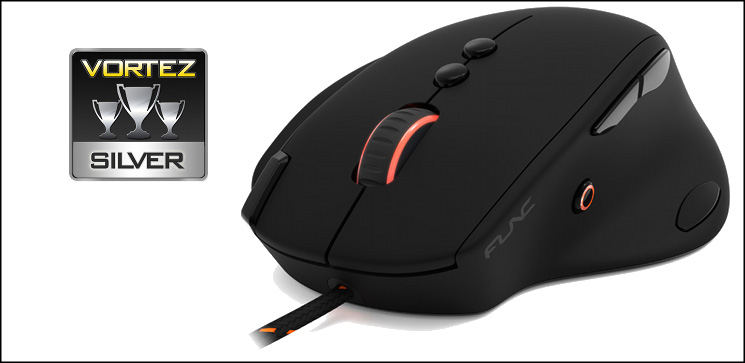
As a final note, the ergonomic shape will be awkward for some. Those with wide diameter fingers will find the right-hand ridges somewhat uncomfortable, whilst those with small hands may consider it to be a little bulky with hard to reach auxiliary button locations. As personal preference is a huge factor being able to try before you buy would be excellent.
Func could have taken the well trodden road of a budget rebranded generic for their début mouse, but they refused to do so. The result is far more than creditable, with a well designed shape and additional functionality very rarely seen. Software – so often a pitfall – is more well put together than many competitors have been able to achieve, though it does suffer from fewer profiles and less powerful macro tool. In summation, the MS-3 deserves its Silver Award and we look forward to seeing what they can come up with next..
Pros
+ At least 8 easily accessible programmable buttons
+ Ergonomic Shape
+ OMRON Switches
+ Three independent profiles
+ LED accent lighting
Cons
– Weak mouse wheel
– Inflexible macro creator
– Limited number of possible macros
– Wide base causes more drag than some alternatives
Tips
= Works best paired with solid base mousemats such as the Func Surface 1030XL
+ At least 8 easily accessible programmable buttons
+ Ergonomic Shape
+ OMRON Switches
+ Three independent profiles
+ LED accent lighting
Cons
– Weak mouse wheel
– Inflexible macro creator
– Limited number of possible macros
– Wide base causes more drag than some alternatives
Tips
= Works best paired with solid base mousemats such as the Func Surface 1030XL

Click here for an explanation of our awards at Vortez.net.


