







The Urban series takes on the silent case sector, we take a look at the first model in this new series, the S21; An entry level mid-tower computer chassis hoping to make an impact.

Product on Review: Urban Series S21
Manufacturer and Sponsor: Thermaltake
Street Price: Approx £50 At time of review)
Thermaltake are well-known for their gamer style of cases, within each of their series the product lines are furnished with flashy cases with mostly rugged appearances. Those in the computer case sector know full well that the demand for silent cases is prevalent and finally, Thermaltake have designed a new series to specifically deal with this trend. Enter the Urban series.
Today we will be taking a look at the entry level offering within the Urban series, namely the S21. S21 is all about affordability and though it may have certain features absent, the price-tag could be the deciding factor regardless. Those who are on a tight budget could be in for a treat today.
Thermaltake on their Urban S21
Urban S21 mainstream mid-tower, one of the members of Thermaltake newest chassis series with simple and elegant aesthetic; designed for users who looks for everything but a flamboyantly appearance.
Technical Specifications
• Case Type Mid Tower
• Dimension 438 x 185 x 497 mm
• (17.2 x 7.3 x 19.6 inch)
• Side Panel Transparent Window
• Color Exterior & Interior : Black
• Cooling System Front (intake) :
• 120 x 120 x 25 mm Turbo fan (1000rpm,16dBA)
• Rear (exhaust) :
• 120 x 120 x 25 mm Turbo fan (1000rpm,16dBA)
• Top (exhaust) : (optional)
• 120 x 120 x 25 mm
• Side (intake) : (optional)
• 120 x 120 x 25 mm
• Bottom (intake) : (optional)
• 120 x 120 x 25 mm
• Material SECC
• Drive Bays
– Accessible : 3 x 5.25’’, 1 x 3.5’’
– Hidden : 5 x 3.5’’ , 2.5’’
• Expansion Slots 7
• Motherboards 9.6” x 9.6” (Micro ATX), 12” x 9.6” (ATX)
• I/O Ports USB 3.0 x 2, HD Audio x 1
• PSU Standard PS2 PSU (optional)
• LCS Upgradable Supports 1/2”、3/8”、1/4” water tube
• Other CPU cooler height limitation: 155mm
• VGA length limitation: 320mm
• Dimension 438 x 185 x 497 mm
• (17.2 x 7.3 x 19.6 inch)
• Side Panel Transparent Window
• Color Exterior & Interior : Black
• Cooling System Front (intake) :
• 120 x 120 x 25 mm Turbo fan (1000rpm,16dBA)
• Rear (exhaust) :
• 120 x 120 x 25 mm Turbo fan (1000rpm,16dBA)
• Top (exhaust) : (optional)
• 120 x 120 x 25 mm
• Side (intake) : (optional)
• 120 x 120 x 25 mm
• Bottom (intake) : (optional)
• 120 x 120 x 25 mm
• Material SECC
• Drive Bays
– Accessible : 3 x 5.25’’, 1 x 3.5’’
– Hidden : 5 x 3.5’’ , 2.5’’
• Expansion Slots 7
• Motherboards 9.6” x 9.6” (Micro ATX), 12” x 9.6” (ATX)
• I/O Ports USB 3.0 x 2, HD Audio x 1
• PSU Standard PS2 PSU (optional)
• LCS Upgradable Supports 1/2”、3/8”、1/4” water tube
• Other CPU cooler height limitation: 155mm
• VGA length limitation: 320mm
Packaging & First Look
S21 is presented in a lively looking box. The case is illustrated on both the front and the back in a rather illusive way whilst the sides detail the technical specifications. Within the box, the case is covered in a clear plastic sheet and held in place via dual polystyrene pillars.
An attractive and eye-catching box
The Urban Series is focussed on delivering toned down aesthetics, bringing a touch of minimalism to the table rather than what we are usually accustomed with from Thermaltake. S21 is a mid-tower with the prominent side panel having a small Perspex window and a perforated mesh section giving mounting placement for a 120/140mm cooling fan. On the reverse, the side panel is convex to give slightly more space for cable management.
A sleek visual appearance
A convex side panel on the alternate side
Exterior
Moving in for a closer look, the front of S21 is smooth – the front panel is in fact a plastic door which has the appearance of being brushed aluminium. This all adds to the simplistic design Thermaltake are keen to demonstrate.
Around the back, there is an opening at the bottom for mounting the PSU and above this seven PCI expansion slot covers with ventilation holes to encourage better airflow inside the case. Thermaltake have also integrated two circular rubber grommets. At the top honeycomb mesh covers the 120mm rear exhaust fan.
The front and back of S21
The front door on S21 opens out to reveal the drive bay covers. Unlike other models in the series, S21 has no insulation foam on the inside of the door but is entirely plastic with dual rubber stoppers. With the door open there are three 5.25” drive bay covers with spring latches for easy removal. There is also a 3.5” cover with a latch just beneath the optical drive bay covers.
In the lower section features a removable cover which acts as a dust filter for the intake cooling fan (120mm). This cover can obviously be removed and cleaned if desired.
Front door with hinge reveals more options
The front panel controls for S21 are split into two different sections – the front side has dual USB 3.0 ports (via internal header) with headphone and microphone jacks whilst the top facing section has a large power button, LED indicator and reset button.
Front panel connectivity with USB 3.0 ports
Further back, at the top of the case, there is a perforated mesh section with a removable dust filter – four pins simply need removing. The distance between the pins indicates a 150mm cooling fan would fit in this space, but Thermaltake state on the website 120mm so there is some slight confusion here.
Perforated mesh with air filter at the top
On the underside, there is a removable filter for the PSU and fan mount – this is only a sheet of thin material though and requires the case to be placed on its side. Also on the underneath are four rubber feet to prevent the case from slipping.
The underside of S21
Interior
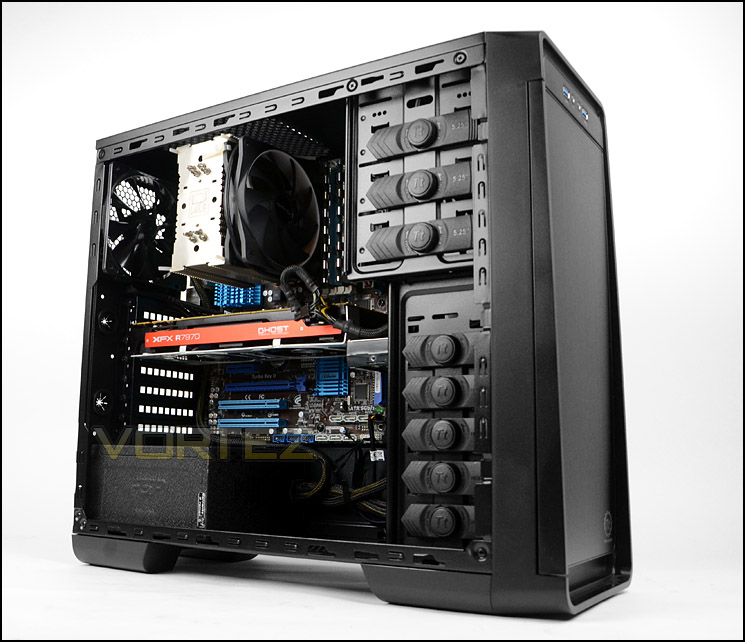
Both side panels on S21 are fixed into place via dual thumb screws. Upon removing we have an overview of the layout inside our case – S21 is able to accommodate ATX and M-ATX form factors and has tool-free devices for installing kit. The inside is powder coated black.
S21 caters for M-ATX and ATX form factors
Black interior with tool-free installation for devices
The PSU are is located at the bottom of S21 and we are pleased to report that Thermaltake have now integrated rubber padding to the floor of this region to help prevent scratching and vibrations.
There is also mounting holes for a 120mm cooling fan – the filter is removable from the underside as per previous page.
Anti-vibration padding for the PSU
Further up, there are seven PCI expansion slot covers – all of these have handy thumbscrews for an efficient method of installing devices. There are also two circular rubber grommets for water cooling or cabling.
Seven PCI expansion slot covers for multi-GPU
On the next page we will continue our look at the inside of S21.
Interior (Continued)
Towards the back of S21 there is a 120mm rear exhaust fan which operates at 1000RPM when powered up. Space is restricted at the top but the 120mm fan can be removed for an all-in-one liquid cooler if desired – it just needs to have a 120mm radiator.
A 120mm rear exhaust fan is positioned at the back of the case
Over on the other side of S21, towards the front, there are three 5.25” drive bays each with a tool-less design mechanism. To install a drive, the dial simply needs to be turned to the open position, the drive inserted and then the dial turned to the lock position.
Underneath the optical section there is a large HDD cage which can entertain five 3.5” HDDs, again via the same method as the optical drive bays. At the bottom there are mounting holes for attaching a 2.5” drive like an SSD. This cage has a 120mm intake cooling fan behind it which operates at 1000RPM.
Optical drive bays have tool-less design mechanisms
Space for five 3.5” drives and one 2.5”
Installation
The installation process with S21 is relatively pain-free except some of the cable management practises can be difficult due to the lack of cut-out at the top of the motherboard tray for CPU power. As a result, the cable has to route across the motherboard. Cable management grommets aren’t present on the motherboard tray either; instead we have clips which allow the cables to be tucked away.
Aside from this, high-end kit can be accommodated within S21.
An overview of ATX system installed
Cable management remains on the frontside
On the next page we will observe the clearance restrictions/limitations within Urban S21.
Clearance – CPU Cooler, GPU, Cable Management
Although our system did fit inside S21, it’s important for us to document the clearance options within the case to identify any limitations.
Installed within S21 is Noctua’s NH-U12P which is 158mm in height, this is the absolute maximum this case can accommodate. Any bigger and the top of the cooler will touch the side panel.
S21 can accommodate CPU coolers up to 158mm in height.
On the graphics card front, there is approximately 12 inches of total clearance – pictured is XFX 7970 DD which is 10.5 inches in length. It’s important to take into account that HDDs will cause interference if they are opposite the card.
High-end graphics cards are supported
Cable management isn’t a particular strength for S21, the clearance between the back of the motherboard tray and side panel is under 1cm.
Clearance behind motherboard tray is under 1cm
Thermal Performance Testing
Placed inside S21 are two cooling fans. A front 120mm intake fan (1000RPM) and a 120mm rear exhaust (1000RPM).
To discover the thermal performance of S21 we will record idle temperatures after 20 minutes from a cold boot. We will then stress the system and temperatures will again be monitored after 30 minutes have elapsed.
For the purpose of accurate analysis the idle and load temperatures for CPU and GPU will be recorded and the range between idle and load will be calculated to determine how efficient cooling is.
NOTE: Ambient temperature is 20C
System Components
CPU AMD Phenom II X6 1055T 2.8GHz
Motherboard ASUS M4A89TD PRO
Graphics NVIDIA GTX 480 (Different from card pictured)
Memory 4GB Mushkin EM3-10666 DDR3
HDD Samsung Spinpoint 500GB SATA-II
PSU FSP AURUM GOLD 650M
Motherboard ASUS M4A89TD PRO
Graphics NVIDIA GTX 480 (Different from card pictured)
Memory 4GB Mushkin EM3-10666 DDR3
HDD Samsung Spinpoint 500GB SATA-II
PSU FSP AURUM GOLD 650M
Noise
We were actually quite pleasantly surprised by the noise levels emitted from S21 during usage. The fans are barely even noticeable when the system is powered up and present no disturbance at all.
Conclusion
We’ve become accustomed to Thermaltake bringing to market a certain class of computer case design. The various series that Thermaltake have within their portfolio target the gamer, but the new Urban series hopes to change all this.
The S21 is the entry level model within the new Urban Series and it brings affordability to the table. There are certainly a number of features which are absent but seen on other models in the series and indeed less space within the entire chassis but for those who are wanting something on a tight budget this case should satisfy their needs.
We found the cooling performance from the two pre-installed 120mm fans to be quite effective in terms of temperature results and the noise levels were reasonably quiet too.
Being an entry level case you can excuse some limitations and there are some that come along with S21, but are they forgivable? Cable management can be a tricky aspect to control within this case due to the lack of grommets and space, and there is only one area to mount the now popular 2.5” SSD. Discarding these features can have a consequence as there are other cases in the same price-range which may steal the limelight. When Urban comes to market it will be price around £50 and we think it represents a good value for money mid-tower solution.
VIDEO REVIEW – VORTEZ TV
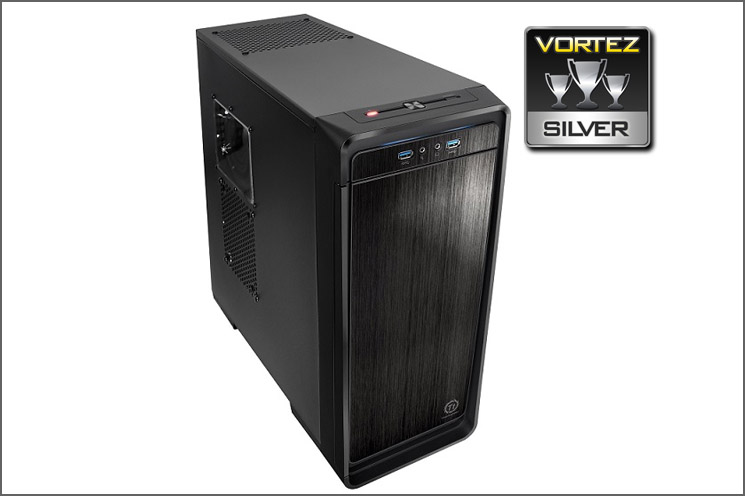
Thermaltake’s new approach with the Urban series is sure to gather plenty of attention. The S21 is a good entry level case for those on a tight budget. S21 just attains our Silver award and we look forward to seeing more of the Urban series.
Pros
+ Simplistic design
+ Affordable
+ Tool-free installation
+ Low-noise fans
Cons
– Poor cable management
– Only one SSD mounting spot
+ Simplistic design
+ Affordable
+ Tool-free installation
+ Low-noise fans
Cons
– Poor cable management
– Only one SSD mounting spot

Click here for an explanation of our awards at Vortez.net.


