







Under the spotlight today is an offering from GIGABYTE, which is on AMDs FM2 platform and sporting an A85x chipset. Is this budget oriented motherboard worth your money?

Product on Review: Gigabyte F2A85XM-HD3
Manufacturer: Gigabyte
Street Price: £58.50 (at time of review)
With a huge range of motherboards to choose from in todays market, there is something for everyone. Once you have decided on your socket then it’s time to pick a brand, but who do you choose from? Well there are a couple of big names that spring to mind but one of the major brands that usually come in the top 3 of peoples lists is GIGABYTE.
Synonymous with quality, GIGABYTE were founded in 1986, and by today’s standards are considered one of the biggest brands on the planet in terms of computing. With a huge range of products stretching from graphics cards all the way to peripherals such as gaming keyboards and mice, their biggest piece of the pie so too speak is their selection of motherboards. Between Intel and AMD, GIGABYTE has a huge range on both sides of the fence. Available in pretty much all form factors, there is something for everybody.
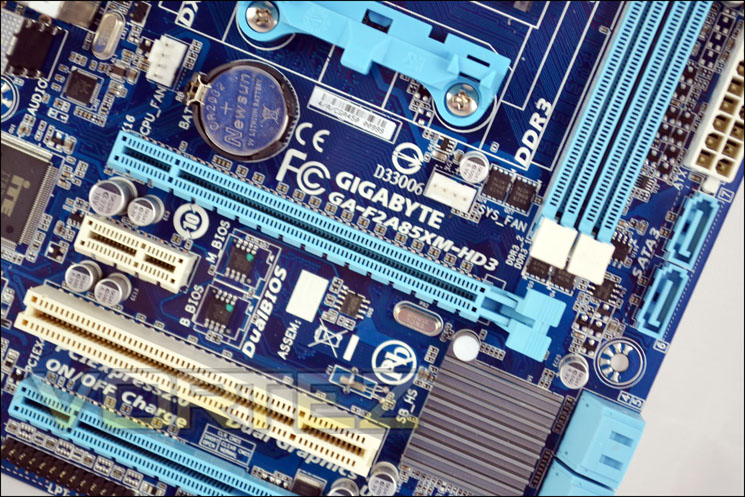
Today we will be taking a look at one from the AMD side, the GIGABYTE F2A85XM-HD3, which is based on the A85x chipset and on the FM2 socket.
GIGABYTE on their FM2 series motherboards
The latest GIGABYTE FM2 series motherboards bring to life the improved performance and feature set of the latest AMD FM2 socket APUs. Packing the latest A85X chipset and supporting the new AMD A10 APUs, GIGABYTE FM2 series motherboards deliver an enhanced visual experience that includes triple digital display support with AMD Eyefinity and impressive DX11® 3D gaming.
Technical Specifications
APU
FM2 Socket:
AMD A series processors
AMD Athlon™ series processors
(Please refer “CPU Support List” for more information.)
Chipset
AMD A85X
Memory
2 x 1.5V DDR3 DIMM sockets supporting up to 64 GB of system memory
* The maximum 64 GB of system memory can be supported using 16 GB (or above) memory modules. GIGABYTE will update the memory support list on the official website when the memory modules are available on the market.
* Due to a Windows 32-bit operating system limitation, when more than 4 GB of physical memory is installed, the actual memory size displayed will be less than the size of the physical memory installed.
Dual channel memory architecture
Support for DDR3 1866/1600/1333/1066 MHz memory modules
Support for AMD Memory Profile (AMP)/ Extreme Memory Profile (XMP) memory modules
“Memory support is dependent on memory module compatibility and system OS”.
(Please refer “Memory Support List” for more information.)
Onboard Graphics
APU:
* To use the onboard graphics ports, you must install an AMD APU with integrated graphics.
1 x D-Sub port
1 x DVI-D port, supporting a maximum resolution of 2560×1600
* Support for 2560×1600 resolution requires both a monitor and cable that support Dual Link DVI.
* The DVI-D port does not support D-Sub connection by adapter.
1 x HDMI port, supporting a maximum resolution of 1920×1200
Audio
Realtek ALC887 codec
High Definition Audio
2/4/5.1/7.1-channel
* To configure 7.1-channel audio, you have to use an HD front panel audio module and enable the multi-channel audio feature through the audio driver.
Support for S/PDIF Out
LAN
Realtek GbE LAN chip (10/100/1000 Mbit)
Expansion Slots
1 x PCI Express x16 slot, running at x16 (PCIEX16)
* For optimum performance, if only one PCI Express graphics card is to be installed, be sure to install it in the PCIEX16 slot.
1 x PCI Express x16 slot, running at x4 (PCIEX4)
1 x PCI Express x1 slot
(All PCI Express slots conform to PCI Express 2.0 standard.)
1 x PCI slot
Multi-Graphics Technology
Support for AMD CrossFire™ technology
Support for AMD Dual Graphics technology
* Only A series APUs support AMD Dual Graphics.
Storage Interface
Chipset:
8 x SATA 6Gb/s connectors supporting up to 8 SATA 6Gb/s devices
Support for RAID 0, RAID 1, RAID 5, RAID 10, and JBOD
USB
Chipset:
Up to 4 USB 3.0/2.0 ports (2 ports on the back panel, 2 ports available through the internal USB header)
Up to 8 USB 2.0/1.1 ports (4 ports on the back panel, 4 ports available through the internal USB header)
Internal I/O Connectors
1 x 24-pin ATX main power connector
1 x 8-pin ATX 12V power connector
8 x SATA 6Gb/s connectors
1 x APU fan header
1 x system fan header
1 x front panel header
1 x front panel audio header
1 x S/PDIF Out header
1 x USB 3.0/2.0 header
2 x USB 2.0/1.1 headers
1 x serial port header
1 x parallel port header
1 x Clear CMOS jumper
1 x chassis intrusion header
Back Panel Connectors
1 x PS/2 keyboard/mouse port
1 x D-Sub port
1 x DVI-D port
1 x HDMI port
2 x USB 3.0/2.0 ports
4 x USB 2.0/1.1 ports
1 x RJ-45 port
3 x audio jacks (Line In/Line Out/Microphone)
I/O Controller
iTE I/O Controller Chip
H/W Monitoring
System voltage detection
APU/System temperature detection
APU/System fan speed detection
APU overheating warning
APU/System fan fail warning
APU/System fan speed control
* Whether the APU/system fan speed control function is supported will depend on the APU/system cooler you install.
BIOS
2 x 64 Mbit flash
Use of licensed AMI EFI BIOS
Support for DualBIOS™
PnP 1.0a, DMI 2.0, SM BIOS 2.6, ACPI 2.0a
Unique Features
Support for @BIOS
Support for Q-Flash
Support for Xpress Install
Support for EasyTune
* Available functions in EasyTune may differ by motherboard model.
Support for Smart Recovery 2
Support for Auto Green
Support for ON/OFF Charge
Support for 3TB+ Unlock
Support for Q-Share
Bundle Software
Norton Internet Security (OEM version)
Operating System
Support for Microsoft® Windows 8/7/Vista/XP
Form Factor
Micro ATX Form Factor; 24.4cm x 17.4cm
FM2 Socket:
AMD A series processors
AMD Athlon™ series processors
(Please refer “CPU Support List” for more information.)
Chipset
AMD A85X
Memory
2 x 1.5V DDR3 DIMM sockets supporting up to 64 GB of system memory
* The maximum 64 GB of system memory can be supported using 16 GB (or above) memory modules. GIGABYTE will update the memory support list on the official website when the memory modules are available on the market.
* Due to a Windows 32-bit operating system limitation, when more than 4 GB of physical memory is installed, the actual memory size displayed will be less than the size of the physical memory installed.
Dual channel memory architecture
Support for DDR3 1866/1600/1333/1066 MHz memory modules
Support for AMD Memory Profile (AMP)/ Extreme Memory Profile (XMP) memory modules
“Memory support is dependent on memory module compatibility and system OS”.
(Please refer “Memory Support List” for more information.)
Onboard Graphics
APU:
* To use the onboard graphics ports, you must install an AMD APU with integrated graphics.
1 x D-Sub port
1 x DVI-D port, supporting a maximum resolution of 2560×1600
* Support for 2560×1600 resolution requires both a monitor and cable that support Dual Link DVI.
* The DVI-D port does not support D-Sub connection by adapter.
1 x HDMI port, supporting a maximum resolution of 1920×1200
Audio
Realtek ALC887 codec
High Definition Audio
2/4/5.1/7.1-channel
* To configure 7.1-channel audio, you have to use an HD front panel audio module and enable the multi-channel audio feature through the audio driver.
Support for S/PDIF Out
LAN
Realtek GbE LAN chip (10/100/1000 Mbit)
Expansion Slots
1 x PCI Express x16 slot, running at x16 (PCIEX16)
* For optimum performance, if only one PCI Express graphics card is to be installed, be sure to install it in the PCIEX16 slot.
1 x PCI Express x16 slot, running at x4 (PCIEX4)
1 x PCI Express x1 slot
(All PCI Express slots conform to PCI Express 2.0 standard.)
1 x PCI slot
Multi-Graphics Technology
Support for AMD CrossFire™ technology
Support for AMD Dual Graphics technology
* Only A series APUs support AMD Dual Graphics.
Storage Interface
Chipset:
8 x SATA 6Gb/s connectors supporting up to 8 SATA 6Gb/s devices
Support for RAID 0, RAID 1, RAID 5, RAID 10, and JBOD
USB
Chipset:
Up to 4 USB 3.0/2.0 ports (2 ports on the back panel, 2 ports available through the internal USB header)
Up to 8 USB 2.0/1.1 ports (4 ports on the back panel, 4 ports available through the internal USB header)
Internal I/O Connectors
1 x 24-pin ATX main power connector
1 x 8-pin ATX 12V power connector
8 x SATA 6Gb/s connectors
1 x APU fan header
1 x system fan header
1 x front panel header
1 x front panel audio header
1 x S/PDIF Out header
1 x USB 3.0/2.0 header
2 x USB 2.0/1.1 headers
1 x serial port header
1 x parallel port header
1 x Clear CMOS jumper
1 x chassis intrusion header
Back Panel Connectors
1 x PS/2 keyboard/mouse port
1 x D-Sub port
1 x DVI-D port
1 x HDMI port
2 x USB 3.0/2.0 ports
4 x USB 2.0/1.1 ports
1 x RJ-45 port
3 x audio jacks (Line In/Line Out/Microphone)
I/O Controller
iTE I/O Controller Chip
H/W Monitoring
System voltage detection
APU/System temperature detection
APU/System fan speed detection
APU overheating warning
APU/System fan fail warning
APU/System fan speed control
* Whether the APU/system fan speed control function is supported will depend on the APU/system cooler you install.
BIOS
2 x 64 Mbit flash
Use of licensed AMI EFI BIOS
Support for DualBIOS™
PnP 1.0a, DMI 2.0, SM BIOS 2.6, ACPI 2.0a
Unique Features
Support for @BIOS
Support for Q-Flash
Support for Xpress Install
Support for EasyTune
* Available functions in EasyTune may differ by motherboard model.
Support for Smart Recovery 2
Support for Auto Green
Support for ON/OFF Charge
Support for 3TB+ Unlock
Support for Q-Share
Bundle Software
Norton Internet Security (OEM version)
Operating System
Support for Microsoft® Windows 8/7/Vista/XP
Form Factor
Micro ATX Form Factor; 24.4cm x 17.4cm
Packaging & First Look
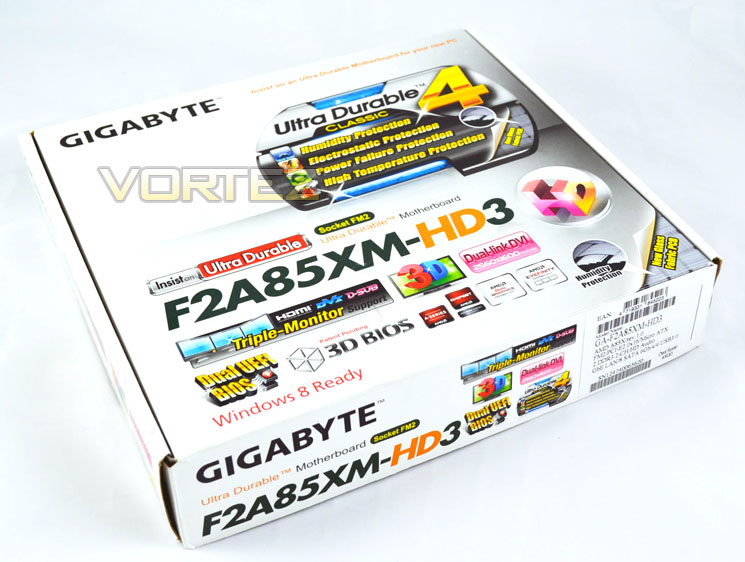
The front of the box is a nice crisp white with the model number and brightly coloured lettering. It states the main features of the board such as the Dual UEFI Bios, the 3D bios, and the AMD logos which state what CPU’s the motherboard supports. The packaging itself is very eye catching.
On the rear it shows an illustration of the F2A85XM-HD3 itself with a detailed diagram of connectivity, ports and expansion slots etc. It also features a detailed specification on the bottom left and is laid out brilliantly.
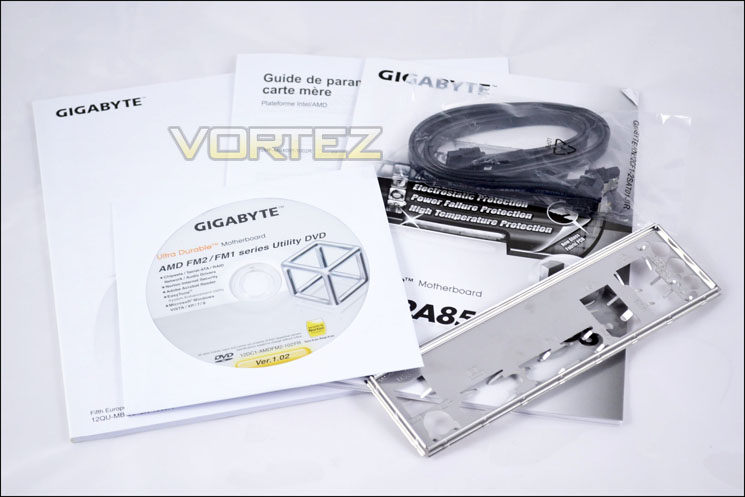
The GIGABYTE F2A85XM-HD3 comes bundled with a manual, warranty information booklet, 2 SATA cables and the usual I/O shield.
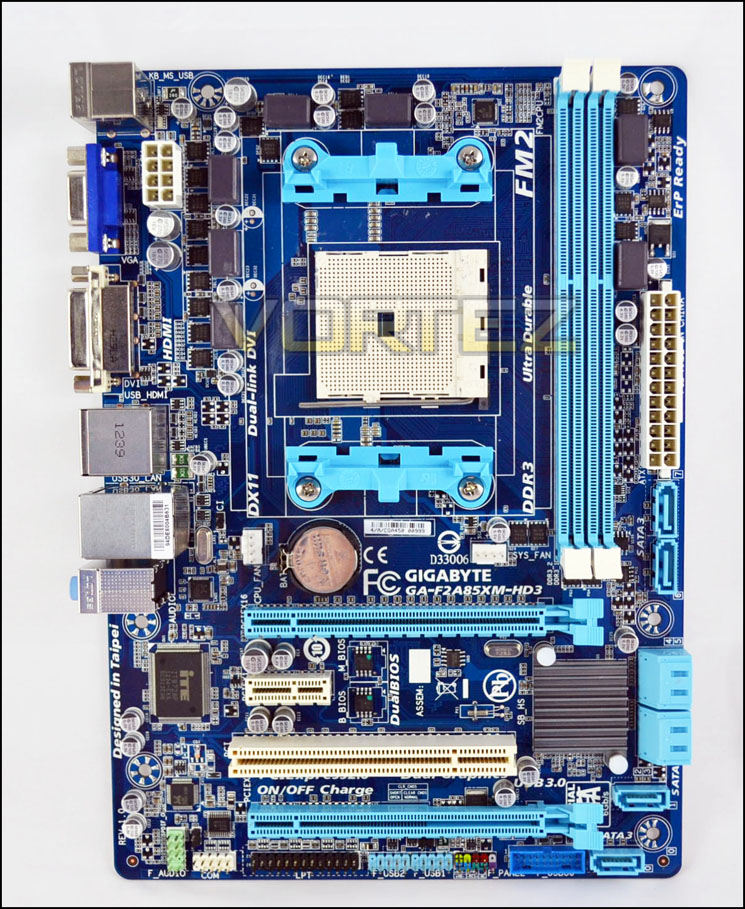
From a quick first look at the F2A85XM-HD3, we see the board itself has a GIGABYTE blue PCB, with usual lighter blue SATA ports, and DIMM slots. The board itself has 8 x SATA3 ports which is fantastic for those who need them for the latest SSDs, which themselves have come down a lot in price over the past 12 months. The SATA3 ports are powered by the A85X chip. Having the options to connect many HDD’s make this perfect for a home media PC, or the basis for a home built NAS box.
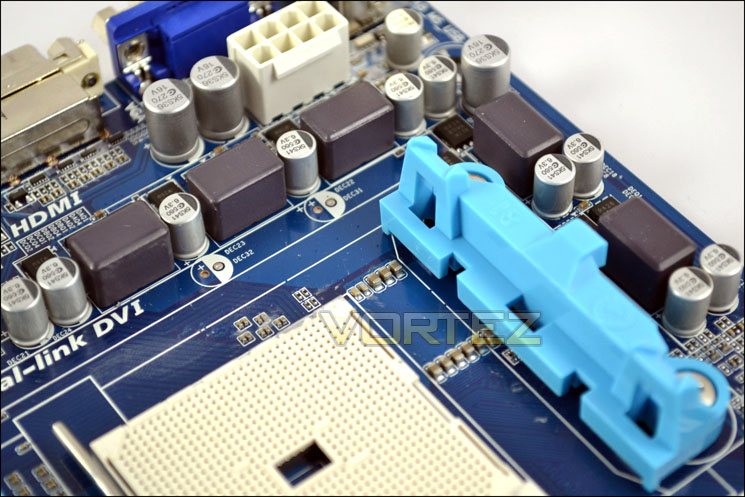
The board has 4+2 power phases, but unfortunately the MOSFETs don’t have heat sinks attached. Also featured on the board are 2 PCI EX x 16 slots which supports for AMD Crossfire in x16/x4 and also support for eyefinity.
Closer Look
Around the CPU socket area which supports AMDs FM2 socket processors, we have the 4+2 power phases, also we can see the 4 x pin 12v power connector to power up the CPU.
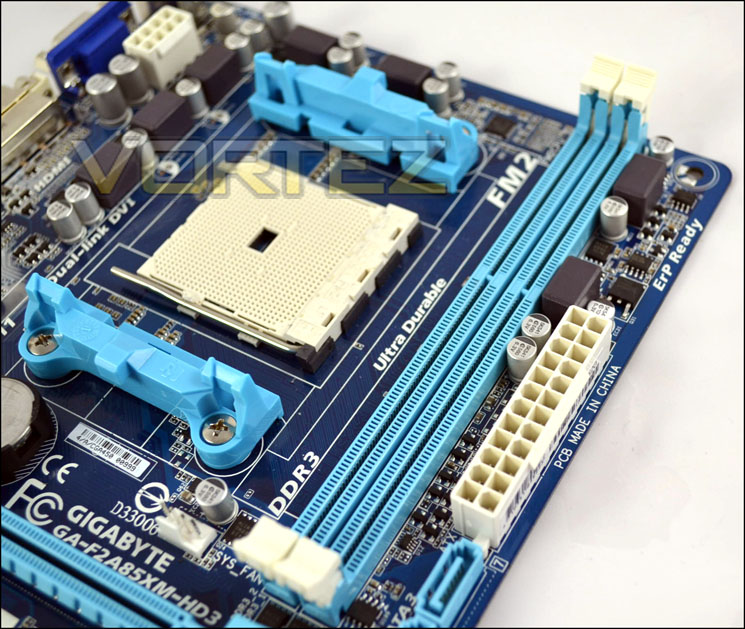
On the other side of the CPU socket we have the 2 x 240pin dimm slots for DDR3 memory which supports up to 1866 + OC speeds. During our tests we hit speeds of 2400MHz which is simply fantastic.
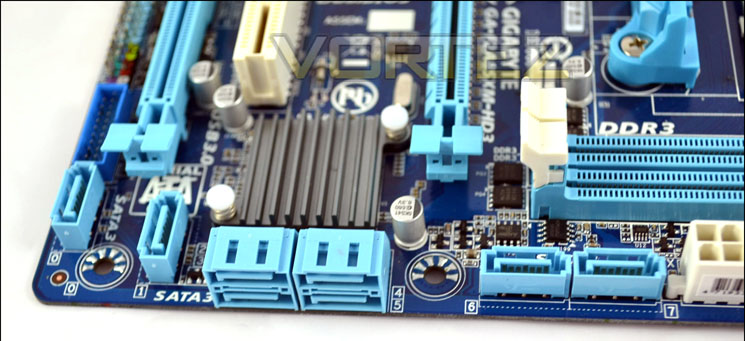
Here we can see the 8xSATA3 ports which is powered by AMDs latest A85x chipset. Just above these we have the southbridge heat sink.
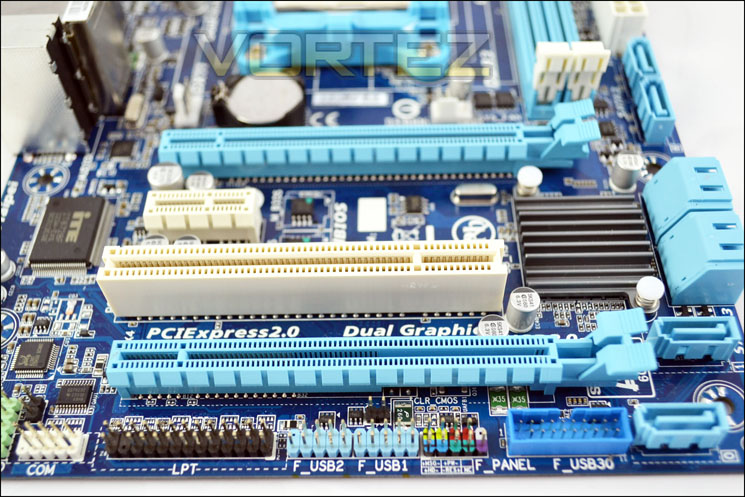
From this angle we can clearly see the board packs 2 x PCI-EX2.0 x 16 slots for graphics cards of which one runs at x4, 1 x PCI-EX x 1 slot and 1 x PCI slot. The board itself supports CrossFire.
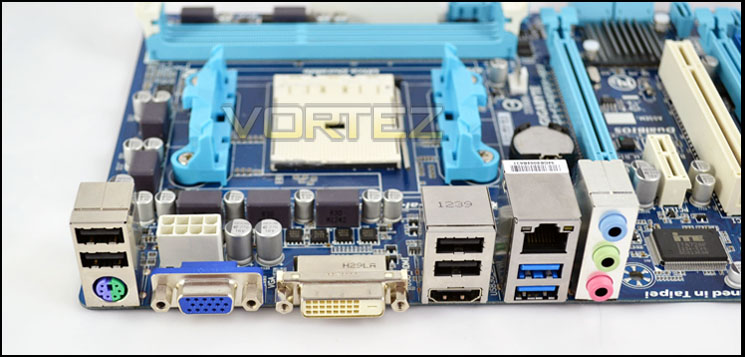
On the I/O section we have 2 x USB 3.0, 4 x USB 2.0, 1 x DVI-D, 1 x HDMI, 1 x RJ-45, 3 audio jacks (Line in/Line out/Microphone), 1 x D-sub port and 1 x PS/2 port for a compatible keyboard or mouse.
BIOS
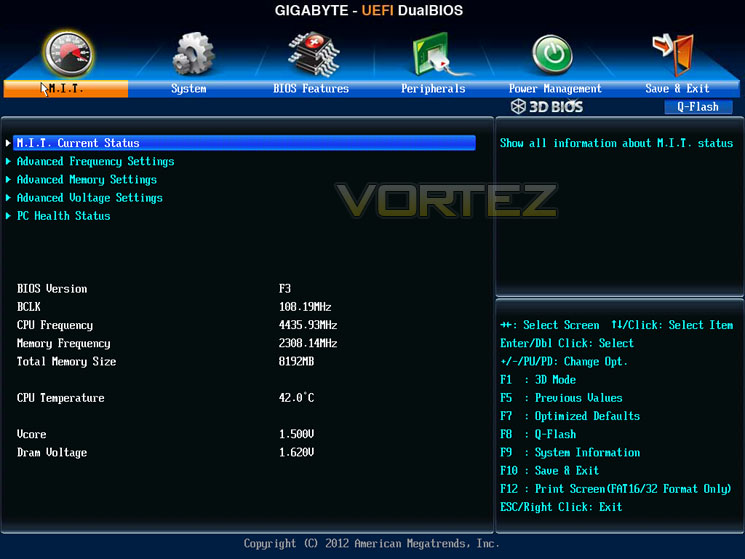
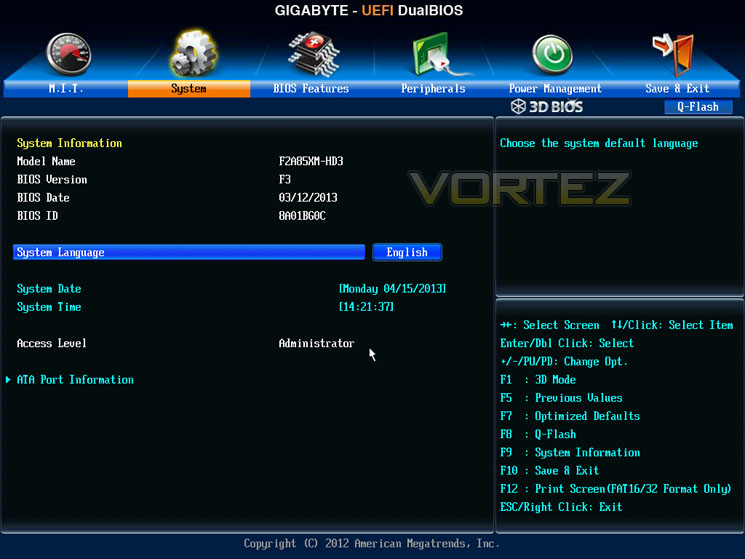
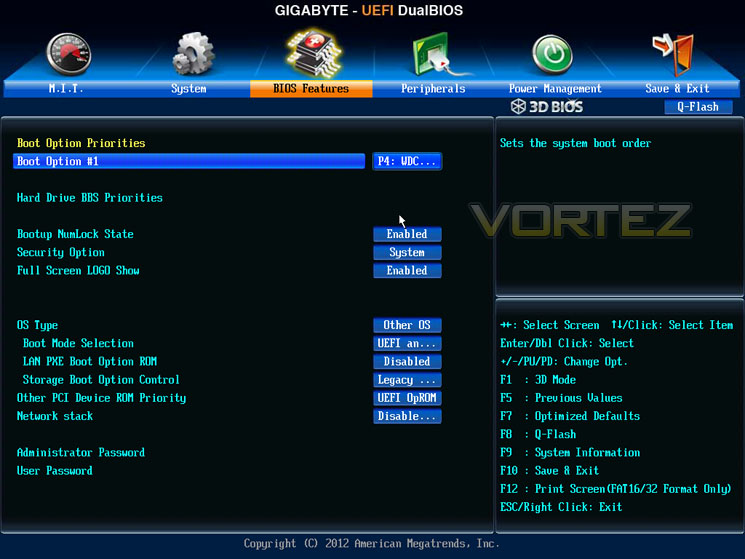
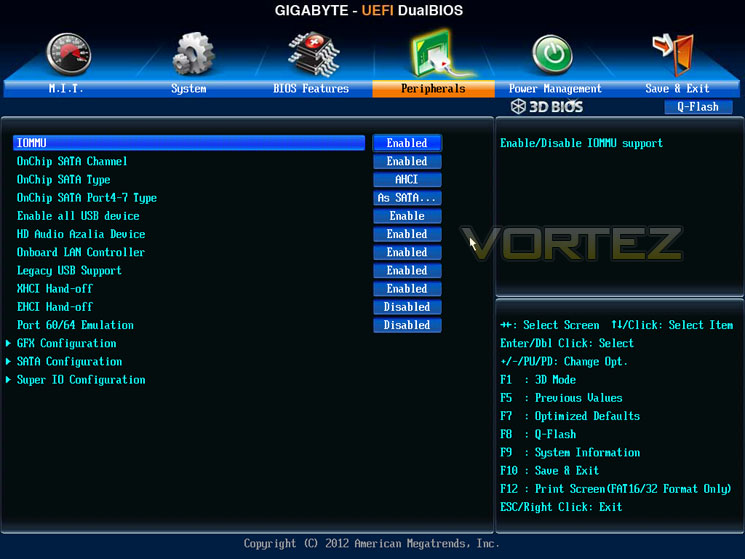
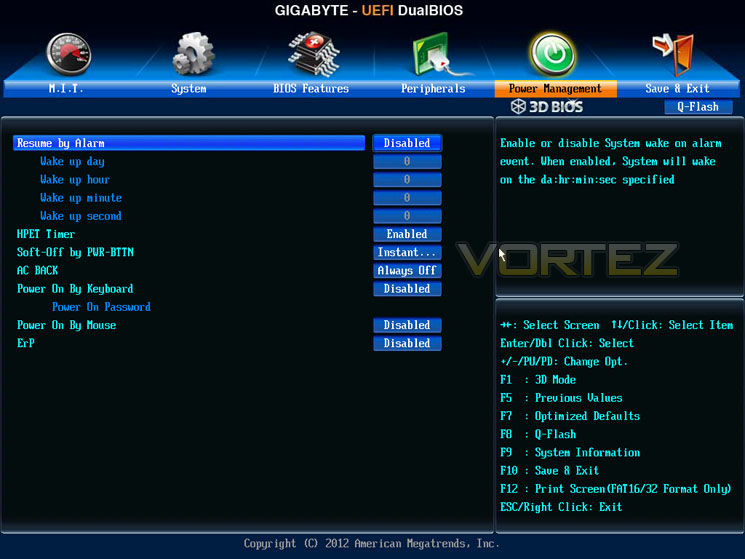
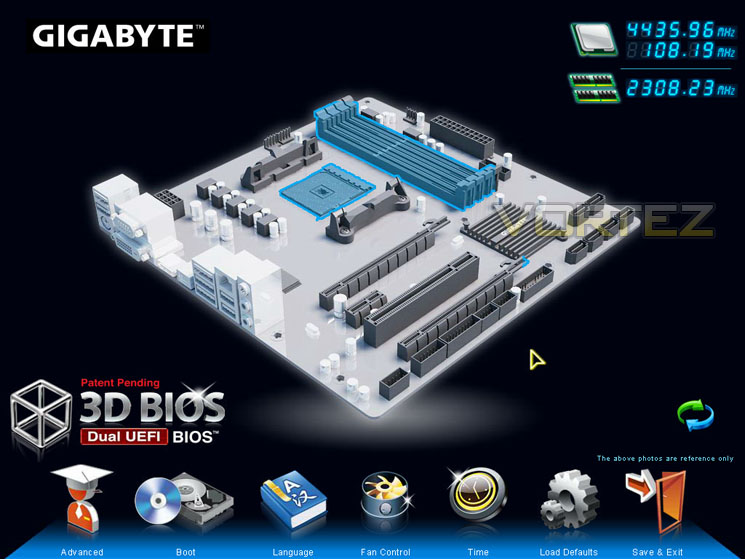
The GIGABYTE F2A85XM-HD3 motherboard has two different BIOS versions, the standard UEFI BIOS and GIGABYTES fantastic 3D BIOS. We found the 3D BIOS to be very easy to use, and with a couple of clicks we were able to find out all the information we needed, also overclocking has never been simpler. Here is a closer look at the BIOS.
Test Setup & Overclocking
A85X Setup
APU – A8-5600K
Motherboard – ASRock FM2A85X-ITX
RAM – Xtreem LV PC3 19200 DDR3 LV 2400
HDD – Western Digital Caviar Blue 320GB 7200RPM SATAII
Power Supply – NZXT Hale82 650W
Cooler – CoolerMaster Hyper 212+
When it came to overclocking, we knew our AMD A8 5600K had the potential to reach our target which is 4.5GHz on the CPU & 950MHz on the GPU core. We gradually increased our overclock on the CPU core in increments of 0.1GHz at a time until we hit our wall which on this board in particular was 4.4GHz with an x44 multiplier.
We then started on the GPU core which we did find a little tougher than expected, it just wouldn’t play ball with us which we were disappointed with, which on other motherboards we had no problems whatsoever. To further enhance the overclock, we started increasing the base clock. We were actually pretty impressed with our 108.15MHz BLCK, which stock is 100MHz.
As we were stress testing to check for stability we got crashes quite often, not from an un-stable overclock but our chip was hitting its thermal limits (around 62c-63c). We inspected the board, re-seated our CPU cooler numerous times but to no avail. The PCB around the socket itself was very hot to touch and we had to increase our fans to their maximum settings to keep the temperatures down. We really do think GIGABYTE should provide heat sinks for the MOSFETs as we feel it’s a vital component on the motherboard when overclocking and not something that should be sacrificed.
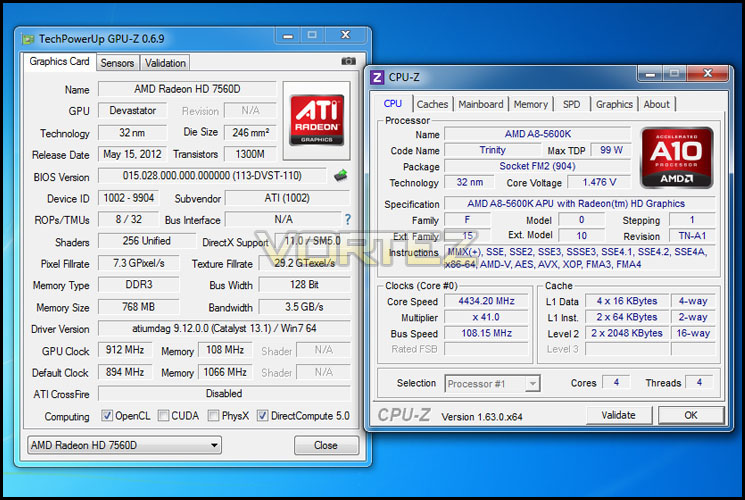
We ended up with a final overclock of 4.434GHz on the CPU and 912MHz on the GPU core.
Power Consumption
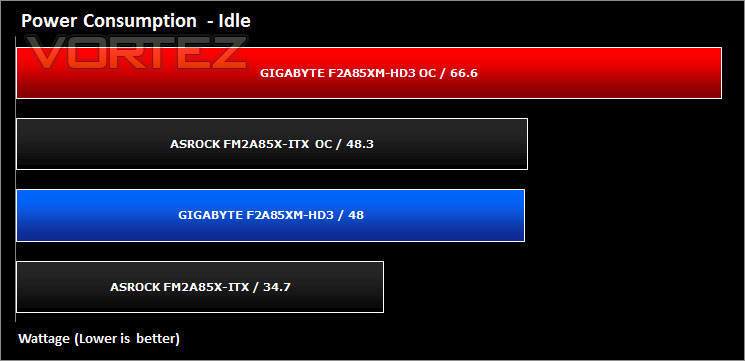
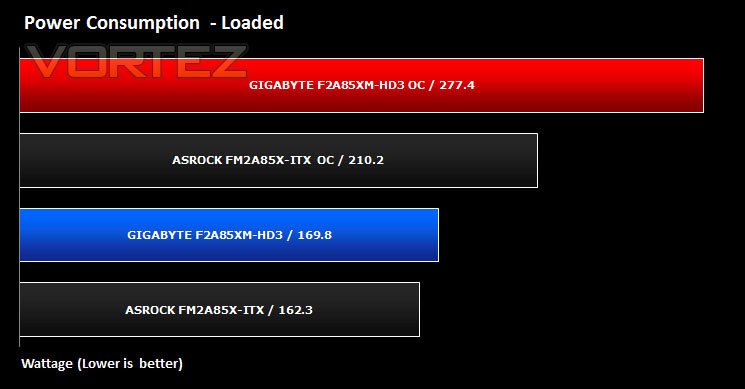
It’s interesting to note the power consumption across all motherboards because energy results can fluctuate between manufacturers due to the features and specifications that are integrated. First of all, for the idle tests the system is cold booted into Windows and no additional applications are executed – the watts are noted on the external energy monitor we use. Then the system is loaded with LinX 0.6.4 and MSI Kombustor simultainiously – watts are again monitored throughout the period of testing and the highest rated watts are then noted down. Below are the results of this energy test.
Synthetic Benchmarks: AIDA64
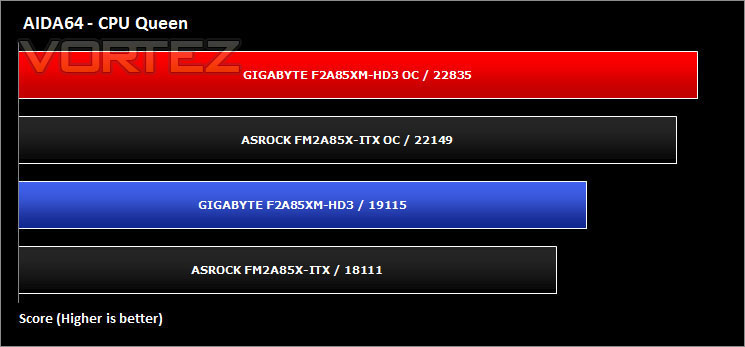
CPU Queen
This simple integer benchmark focuses on the branch prediction capabilities and the misprediction penalties of the CPU. It finds the solutions for the classic “Queens problem” on a 10 by 10 sized chessboard. At the same clock speed theoretically the processor with the shorter pipeline and smaller misprediction penalties will attain higher benchmark scores. For example – with HyperThreading disabled – the Intel Northwood core processors get higher scores than the Intel Prescott core based ones due to the 20-step vs. 31-step long pipeline. The CPU Queen test uses integer MMX, SSE2 and SSSE3 optimizations.
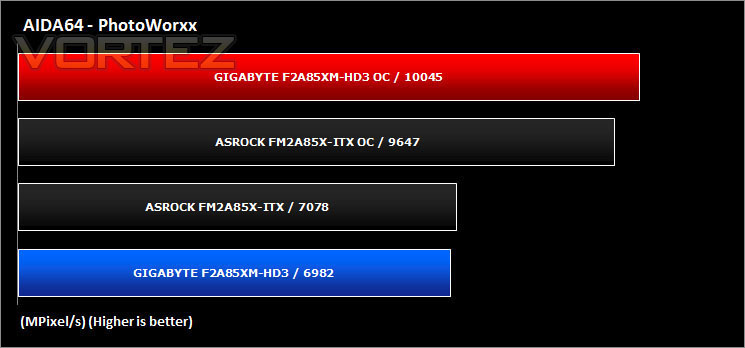
CPU Photoworxx Benchmark
This benchmark stresses the integer arithmetic and multiplication execution units of the CPU and also the memory subsystem. Due to the fact that this test performs high memory read/write traffic, it cannot effectively scale in situations where more than 2 processing threads used. For example, on a 8-way Pentium III Xeon system the 8 processing threads will be “fighting” over the memory, creating a serious bottleneck that would lead to as low scores as a 2-way or 4-way similar processor based system could achieve. CPU PhotoWorxx test uses only the basic x86 instructions, and it is HyperThreading, multi-processor (SMP) and multi-core (CMP) aware.
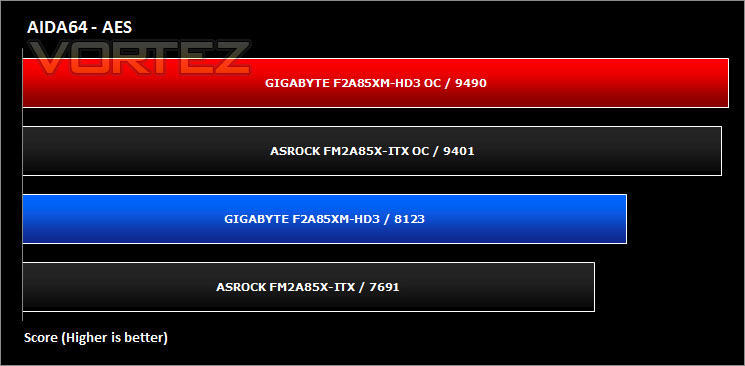
CPU AES Benchmark
This benchmark measures CPU performance using AES (Advanced Encryption Standard) data encryption. In cryptography AES is a symmetric-key encryption standard. AES is used in several compression tools today, like 7z, RAR, WinZip, and also in disk encryption solutions like BitLocker, FileVault (Mac OS X), TrueCrypt.CPU AES test uses only the basic x86 instructions, and it’s hardware accelerated on VIA PadLock Security Engine capable VIA C3, VIA C7, VIA Nano and VIA QuadCore processors; and on Intel AES-NI instruction set extension capable processors. The test is HyperThreading, multi-processor (SMP) and multi-core (CMP) aware.
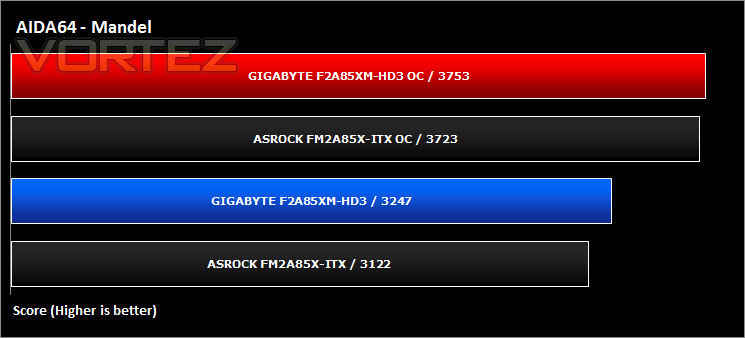
Mandel Benchmark
This benchmark measures the double precision (also known as 64-bit) floating-point performance through the computation of several frames of the popular “Mandelbrot” fractal. The code behind this benchmark method is written in Assembly, and it is extremely optimized for every popular AMD, Intel and VIA processor core variants by utilizing the appropriate x87, SSE2, AVX or FMA4 instruction set extension. FPU Mandel test is HyperThreading, multi-processor (SMP) and multi-core (CMP) aware.
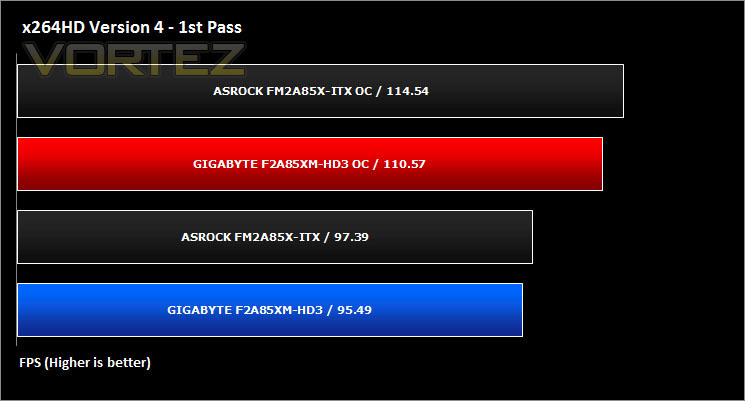
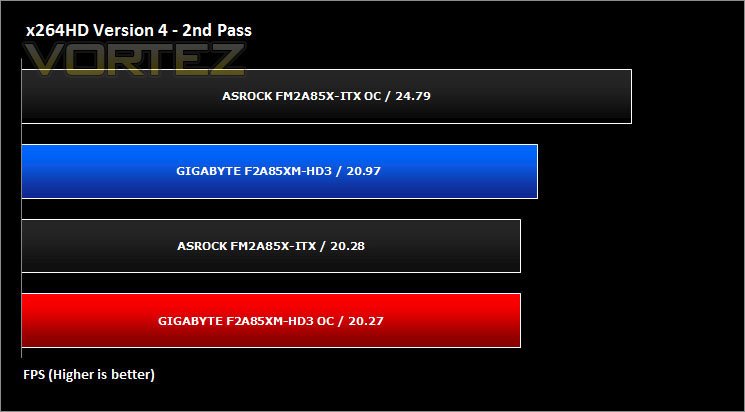
Synthetic Benchmarks: x264 HD
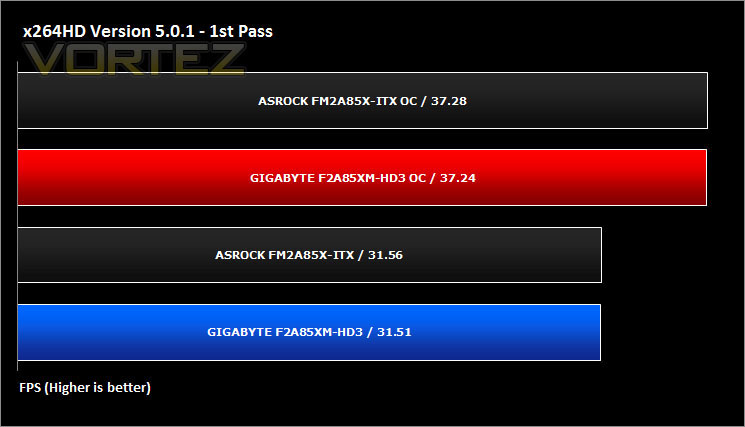
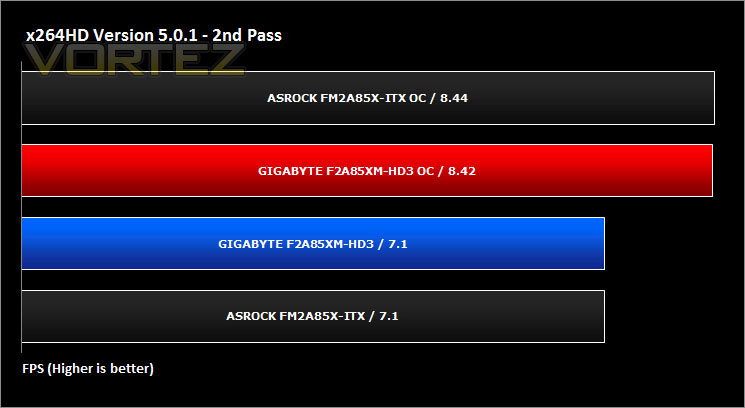
Simply put, this test measures how fast your machine can encode a short, DVD quality MPEG-2 video clip into a high-quality x264 video clip. What’s x264, you ask? It’s more or less the next-generation Xvid/DivX codec. I think it’s ideal for a benchmark because the application (x264.exe) reports fairly accurate compression results (in frames per second) for each pass of the video encoding process, and it uses multi-core processors very efficiently.
Synthetic Benchmarks: Cinebench 11.5
CPU Rendering
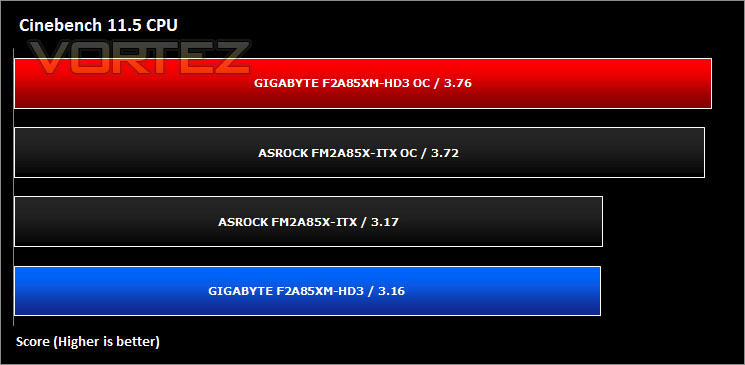
CINEBENCH can measure systems with up to 64 processor threads. This test scene contains approximately 2,000 objects which in turn contain more than 300,000 polygons in total, and uses sharp and blurred reflections, area lights, shadows, procedural shaders, antialiasing, and much more. The result is displayed in points (pts). The higher the number, the faster your processor.
Open GL Graphics Rendering
Synthetic Benchmarks: SiSoftware SANDRA 2012
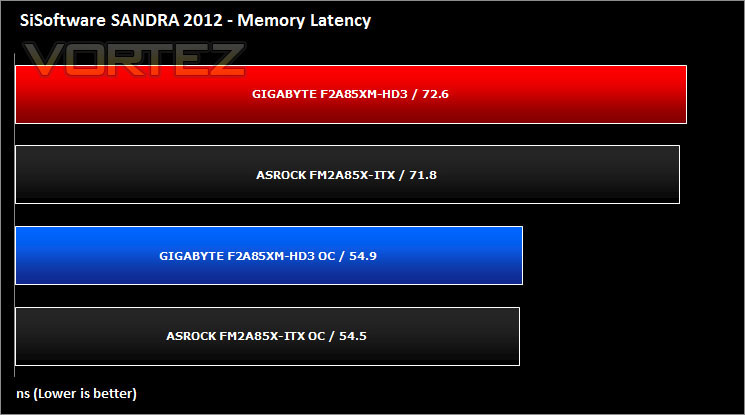
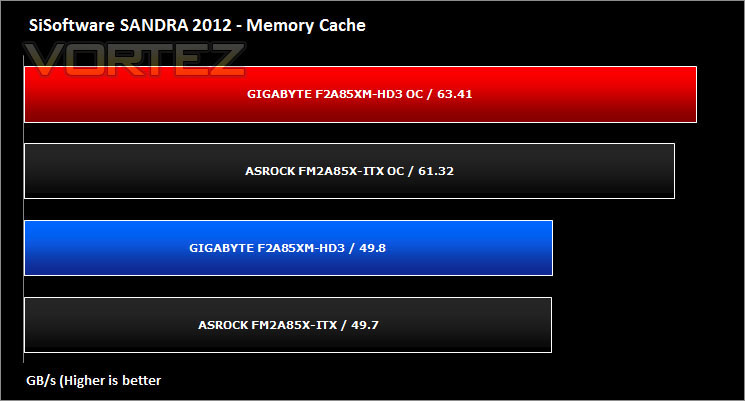
SANDRA isn’t always a benchmark that is included in hardware reviews but I believe it shouldn’t be ignored. SANDRA provides a vigorous package that tests your system in a rather large array of benchmarks. There are many aspects of benchmark that can be executed. We will be considering – CPU and memory tests.
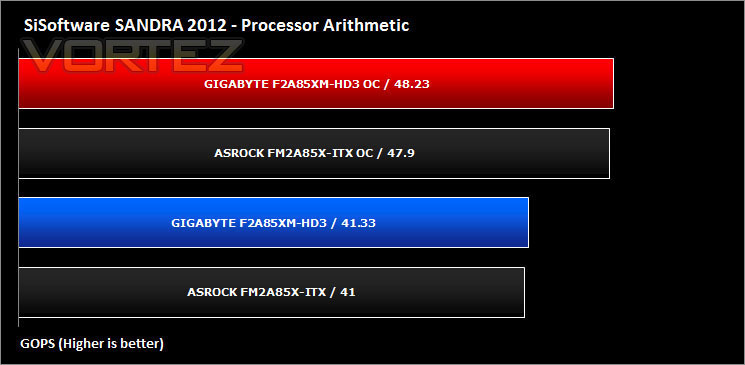
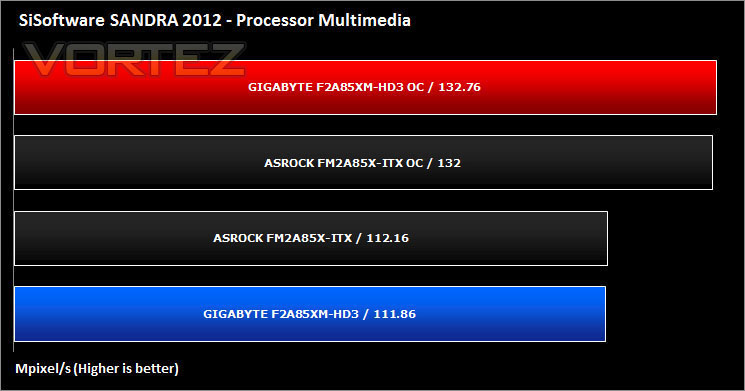
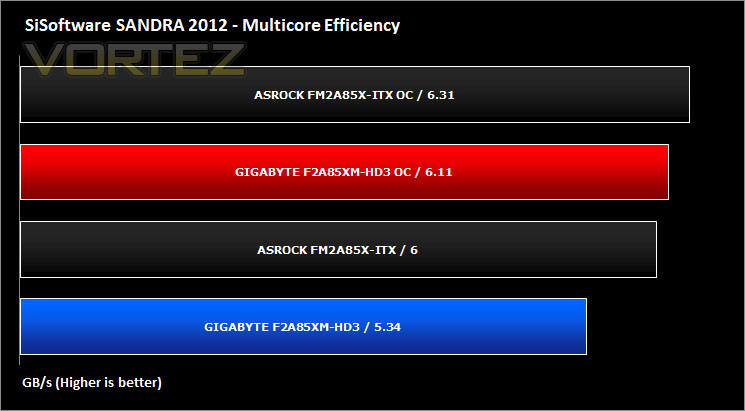
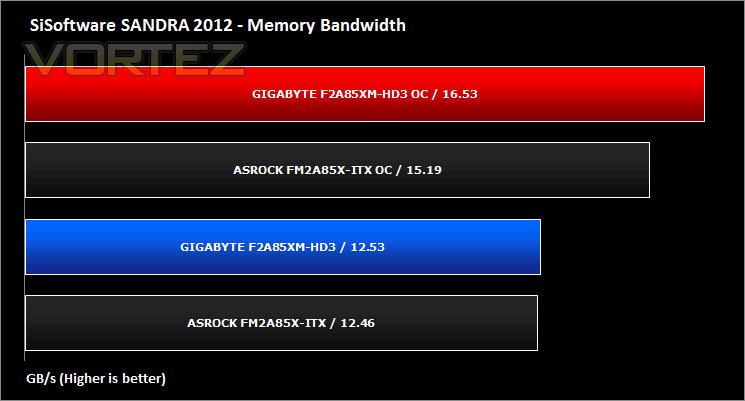
Synthetic Benchmarks: 3DMark 11
3DMark 11
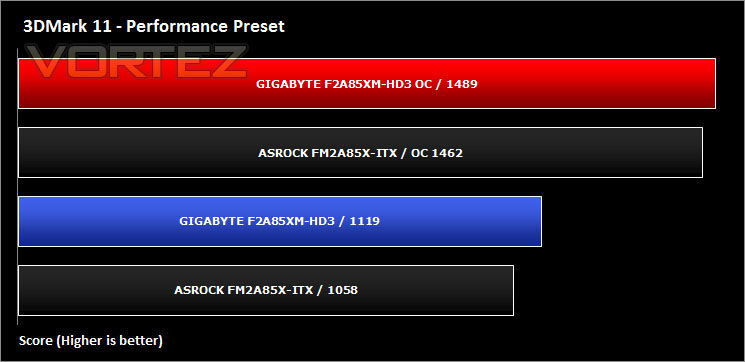
Designed to measure your PC’s gaming performance 3DMark 11 makes extensive use of all the new features in DirectX 11 including tessellation, compute shaders and multi-threading. Trusted by gamers worldwide to give accurate and unbiased results, 3DMark 11 is the best way to consistently and reliably test DirectX 11 under game-like loads.
Synthetic Benchmarks: UNIGINE Heaven 3.0
3D Benchmarks: Unigine Heaven 3.0
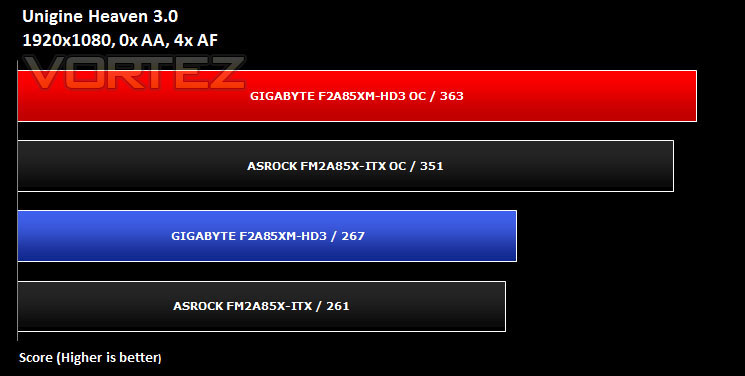
Unigine’s benchmark is to showcase the benefits of DX 11 and the use of tessellation as opposed to normal rendering techniques. The demo has impressive visuals that give an insight into what we can expect from gaming in the future.
Game Benchmarks: BioShock Infinite
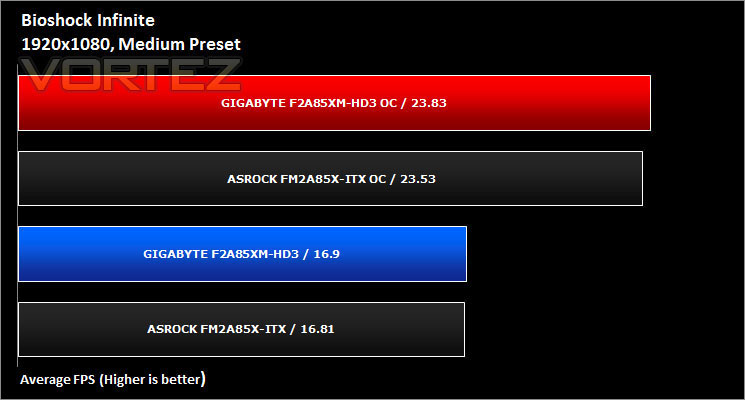
BioShock Infinite
Set in 1912 during the growth of American exceptionalism, BioShock Infinite is a thrid person shooter developed by Irrational games and published by 2K Games. It is the third instalment of the BioShock franchise. the game utilises the Unreal Engine 3, modifying it with their own lighting engine to present a visually stunning experience like no other.
Game Benchmarks: Tomb Raider
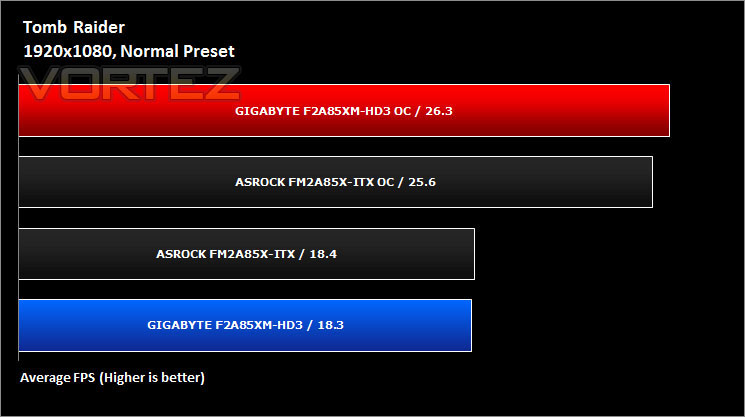
Tomb Raider
Tomb Raider explores the intense and gritty origin story of Lara Croft and her ascent from a frightened young woman to a hardened survivor. Armed only with raw instincts and the ability to push beyond the limits of human endurance, Lara must fight to unravel the dark history of a forgotten island to escape its relentless hold.
Game Benchmarks: Skyrim
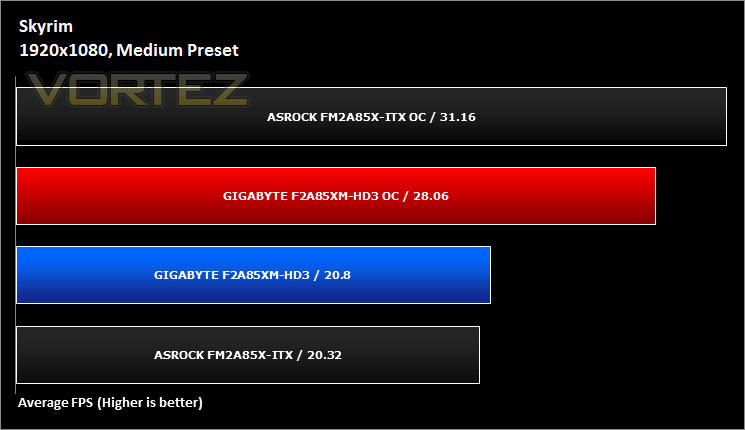
Skyrim
Skyrim is not a direct successor to the very popular Oblivion. Instead it takes place 200 years after the events of Oblivion. The non-linear playing that made the Elder Scrolls such a popular series does however make a return along with the beautiful scenery the encompasses the world of Skyrim.
Game Benchmarks: DiRT Showdown
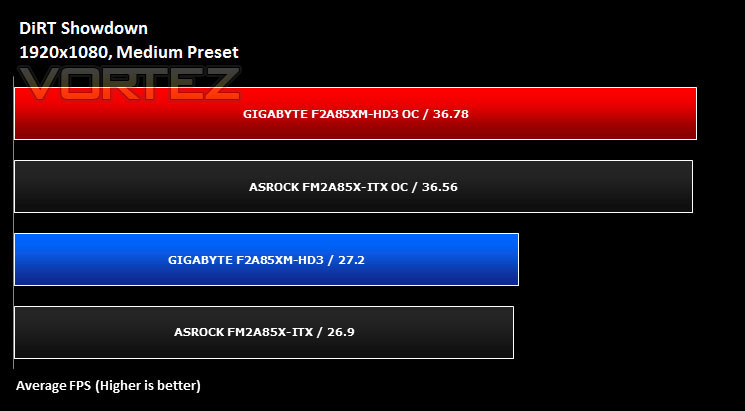
DiRT Showdown
DiRT Showdown is the new arcade racing game from the team that brought you the award-winning DiRT series, uncaged in 2012. Pick up and play controls combine with electrifying events, frenzied crowds and stunning graphics to deliver high octane, dive in and drive thrills from event one. DiRT Showdown comes with phenomenal graphical performance, bone-jarring damage, and social online and split-screen multiplayer as standard. Welcome to DiRT Showdown – a new world of driving delirium.
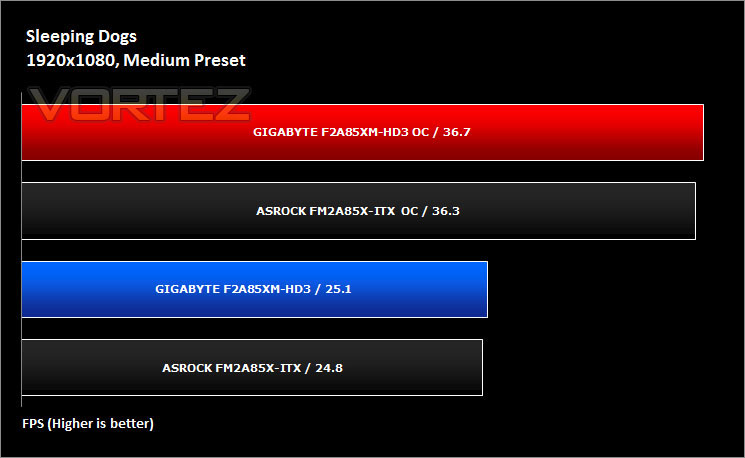
Game Benchmarks: Sleeping Dogs
Sleeping Dogs
Welcome to Hong Kong, a vibrant neon city teeming with life, whose exotic locations and busy streets hide one of the most powerful and dangerous criminal organizations in the world: the Triads. You play the role of Wei Shen, an undercover cop trying to take down the Triads from the inside out. You’ll have to prove yourself worthy as you fight your way up the organization, taking part in brutal criminal activities without blowing your cover. Torn between your loyalty to the badge and a criminal code of honor, you will risk everything as the lines between truth, loyalty and justice become permanently blurred.
Conclusion
When we first received the GIGABYTE F2A85XM-HD3, we were quite excited as we have always found GIGABYTE products to be of a very high standard. With it being a mid-range offering we weren’t expecting the best but we did expect a board of a suitable calibre. Did it live up to our expectations or did it fall short of the standard we are used to seeing from GIGABYTE?
First off the motherboard is Micro-ATX, so while keeping the majority of the features of the ATX form factor boards. This model has plenty of options available such as 8 SATA3 ports, DVI, D-Sub and HDMI. On paper it would seem like the perfect base for a small budget gaming rig and at stock this board is brilliant. The feature we were impressed with was the 3D BIOS, we really wish other brands would take notice of this and implement it as it’s simple, elegant and definitely a lot easier to use for the novice than the regular BIOS.
While we were testing the F2A85XM-HD3 and looking at its overclock potential, we hit a couple of hurdles in obtaining our target. Firstly it wouldn’t boot with x45 multiplier, then it wouldn’t boot with 950MHz on the GPU. Knowing our AMD A8 5600k is capable of this and more we reached the highest overclock we could attain (CPU – 4.434GHz & GPU – 912MHz).
To make matters worse we had lots of overheating problems with this board, whether this is due to the lack of heat sinks on the MOSFETs, a badly designed PCB or even some form of power leakage internally, we did have the fans on our test bench to the maximum to aid with the cooling. To give you an idea of how much cooling we needed, we had 2 x Delta fans (very powerful and high performance) blowing over the CPU socket area to cool the board down. The PCB around the CPU socket was scorching hot and as seen from our power consumption tests, the power the board is using is a lot more than the ASRock FM2A85X-ITX that we recently reviewed. For a platform and with a CPU with such a low rated output we were disappointed in the figures we got from the GIGABYTE F2A85XM-HD3.
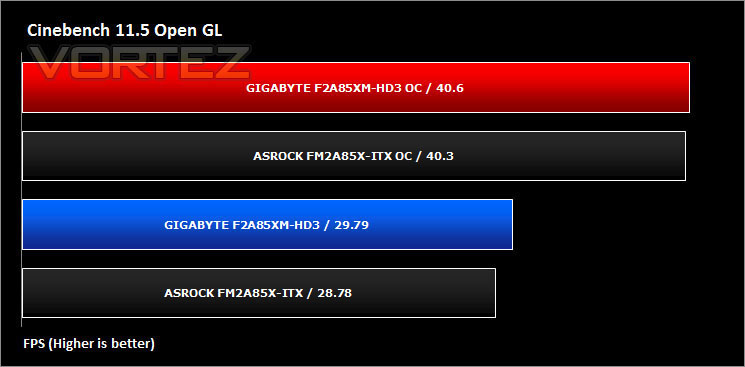
Aside from the thermal problems, during our testing in synthetic benchmarks and in games, we were impressed with the performance. It held its own against the ASRock FM2A85X-ITX pretty well and it really did shine through the tests (when it didn’t crash our test system).
The GIGABYTE F2A85XM-HD3 is priced perfectly in our opinion and for the price you really do get good value for money. If you are looking for a feature packed motherboard to run a home media PC, a small budget gaming rig, or even a small powered PC for general browsing, we would recommend this board. If you are planning on overclocking then make sure you have very good cooling, not just for the CPU but also inside your case.
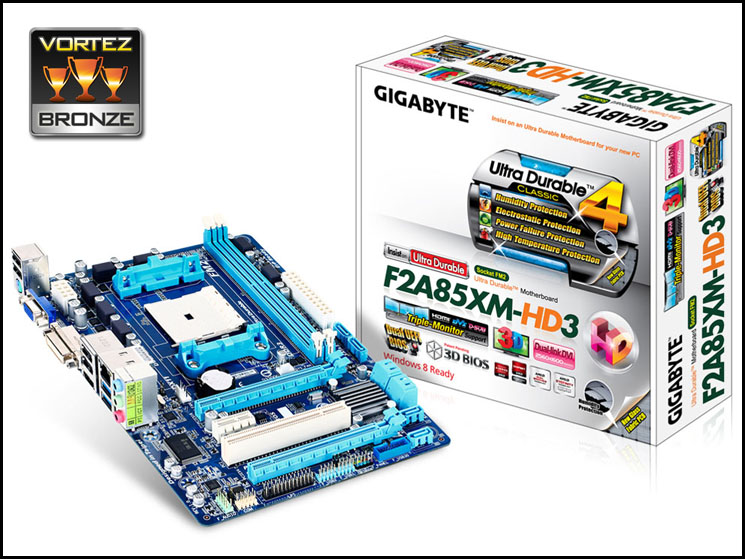
If you are looking for a budget motherboard which has fantastic stock performance then look no further than the GIGABYTE F2A85XM-HD3 motherboard. It has oodles of SATA3 ports, connections for your monitor and has the fantastic 3D BIOS which we really do love. Based on our other results such as thermal performance and power consumption, we felt that the Bronze award we gave the GIGABYTE F2A85XM-HD3 was generous after taking everything into consideration.
Pros
+ 8 SATA3 ports available
+ Great stock performance
+ Price
Cons
– PCB gets really hot during overclocking as we hit our thermal limits too often under load
– No heat sinks on the MOSFETs
– A lot of competition in the same price range
– Power consumption is terrible
+ 8 SATA3 ports available
+ Great stock performance
+ Price
Cons
– PCB gets really hot during overclocking as we hit our thermal limits too often under load
– No heat sinks on the MOSFETs
– A lot of competition in the same price range
– Power consumption is terrible

Click here for an explanation of our awards at Vortez.net.


