







The much awaited SilverStone RV04 is finally here. The 4th installment features an inverted motherboard tray, dual AP181 Air Penetrators and many more features!

Product on Review: Raven 4 (RV04)
Manufacturer and Sponsor: SilverStone
Street Price: £135 (At time of review)
Advocates of SilverStone will know all too well that the Raven Series has been expecting its fourth instalment for some time now. Year after year SilverStone have teased enthusiasts at various trade shows like CES and Computex with sneak previews of this upcoming case and it isn’t until now that we can finally get our hands on what can only be described as “much anticipated”.
The Raven series has had plenty of success, especially with the notorious Raven 2 (RV02) and fans of this range have been keen for something to appear along similar lines. The new Raven 4 adopts similar characteristics to its predecessor but also brings in some interesting new concepts too.
Raven 4 is a full tower chassis with a distinct design, utilising a reversed and inverted motherboard tray. Adorned with two 180mm front intake fans, CPU cooler and graphics card support mechanisms, this new case is set to push the boundaries for computer case design.
The real question is; after such a long wait, can enthusiasts be satisfied with this latest rendition? Let’s find out!
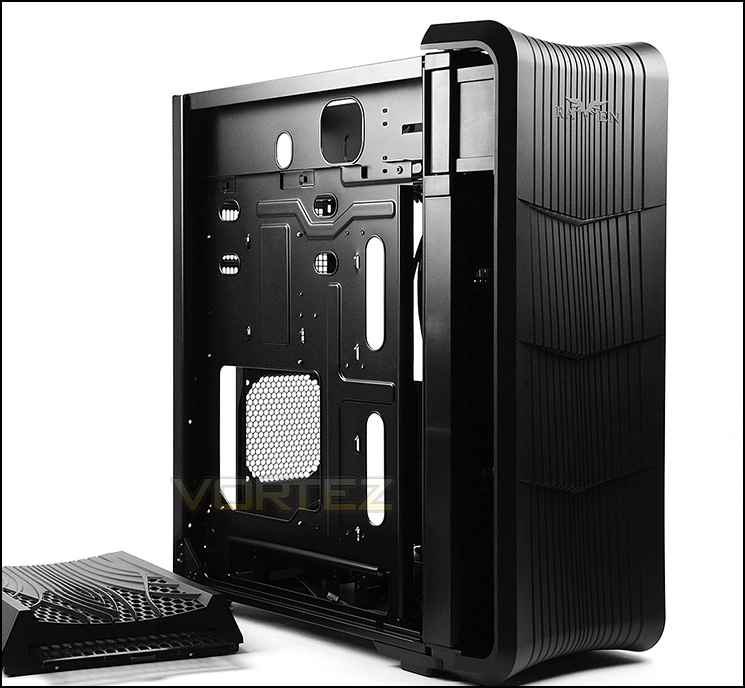
Since its debut in 2008, the RAVEN series has been synonymous with excellent cooling and unconventional designs. For the RAVEN RV04, the engineers were tasked with the goal of producing a design that utilizes a more traditional layout to match the performance of its 90 degree motherboard mounted predecessors. Inspiration was drawn from the highly successful Temjin TJ08-E, a Micro-ATX case with compact dimensions and best in class cooling performance, so the motherboard and the fans in the RV04 are mounted in similar fashion to obtain equally impressive performance in ATX form factor while allowing for excellent cable management.
Technical Specifications
Model No.
SST-RV04B (black)
SST-RV04B-W (black + window)
Material
Reinforced plastic outer shell, steel body
Color
Black
Motherboard
SSI-EEB, SSI-CEB, Extended ATX, ATX, Micro-ATX
Multimedia
Drive Bay External 5.25″ x 2
Internal 3.5″ x 7 (2 hot-swap) , 2.5” x 4
Cooling System
Front 2 x Air Penetrator AP181 180mm intake fan 600/900/1200rpm, 18/25/34dBA
Rear 1 x 120mm fan slot (option)
Expansion Slot
8
Front I/O Port
USB 3.0 x 2
audio x 1
MIC x 1
Power Supply
1 x optional standard PS2(ATX)
Expansion Card
Compatible up to 13.3” long, width restriction-6.69″
Limitation of CPU cooler
165mm
Limitation of PSU
180mm
Net Weight
10.9 kg
Dimension
219mm (W) x 581mm (H) x 497mm (D), 63.2 liters
Extra
Support two Kensington locks
SST-RV04B (black)
SST-RV04B-W (black + window)
Material
Reinforced plastic outer shell, steel body
Color
Black
Motherboard
SSI-EEB, SSI-CEB, Extended ATX, ATX, Micro-ATX
Multimedia
Drive Bay External 5.25″ x 2
Internal 3.5″ x 7 (2 hot-swap) , 2.5” x 4
Cooling System
Front 2 x Air Penetrator AP181 180mm intake fan 600/900/1200rpm, 18/25/34dBA
Rear 1 x 120mm fan slot (option)
Expansion Slot
8
Front I/O Port
USB 3.0 x 2
audio x 1
MIC x 1
Power Supply
1 x optional standard PS2(ATX)
Expansion Card
Compatible up to 13.3” long, width restriction-6.69″
Limitation of CPU cooler
165mm
Limitation of PSU
180mm
Net Weight
10.9 kg
Dimension
219mm (W) x 581mm (H) x 497mm (D), 63.2 liters
Extra
Support two Kensington locks
Packaging & First Look
SilverStone present the Raven 4 in a large, well-designed box. Being a specialist case, the Raven Series has been given special treatment. The front of the box has a depiction of the case and lists the fundamental features that can be expected. The sides have the technical specifications and the back has another depiction of the case but this time the inside with specific areas marked and listed.
Inside the case is covered in a fabric sheet and held in place via dual polystyrene pillars.
The packaging for Raven 4
Each phase of the Raven series introduces a slight variation on the visual design. Raven 4 has its prominent side on the reverse – the complete opposite to common chassis design. This prominent side features a large Perspex window which gives a sneak peek inside the chassis.
The styling leans towards the gamer with its bulky and distinct aesthetics. SilverStone have used a fair bit of plastic to cover the front and top of the case but the side panels are steel and substantially thick.
The prominent side with large Perspex window
Raven 4 in all its glory
Exterior
Moving in for a closer look we first come to the front of Raven 4. The front fascia is plastic, acts as a door and is split into four sections with distinct lines carved in a vertical arrangement. The Raven emblem is found at the top of the case.
Around the back the PSU mounting region is found at the top of the case – the opposite of what you’d expect from a typical computer chassis. Below this there are a series of eight PCI expansion slot covers, each with ventilation and thumbscrews for easy removal. Found at the bottom is a perforated mesh section giving place to an optional 120mm rear exhaust and beside it the rear IO for the motherboard.
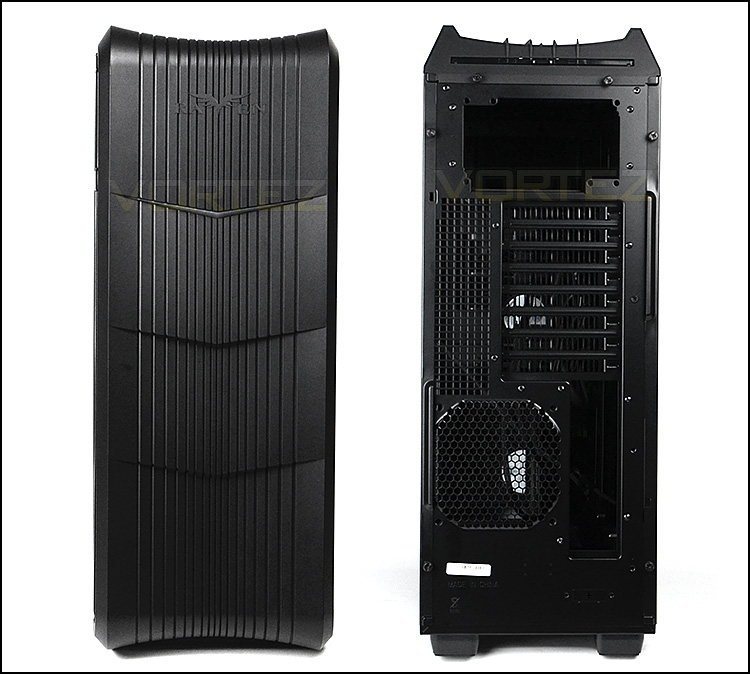
The front and back of Raven 4
With the front fascia on Raven 4 acting as a door this reveals many different features. Due to the front door being quite close to the ground care needs to be taken to avoid asserting too much pressure to the top-side as this can cause the door to collide with the floor. This front door isn’t especially robust and is somewhat flimsy, we’d have liked to see more ground clearance and a sturdy design executed.
Opening this door out reveals a removable dust filter which uses SilverStone’s “HighFlow” Technology. This filter covers two gargantuan, dual 180mm Air Penetrator AP181 intake cooling fans which are solely responsible for airflow within Raven 4. The theory behind using just intake cooling fans is quite simple: intake cooling fans will force strong airflow across the system and even help with dispelling heat from the CPU cooler. SilverStone have opted for only an optional rear exhaust fan to obtain the best noise : performance ratio. These fans also come with a three-switch fan controller which are situated just above where the fans sit – 600/900/1200RPM.
Also in this region are two 5.25” drive bay covers.
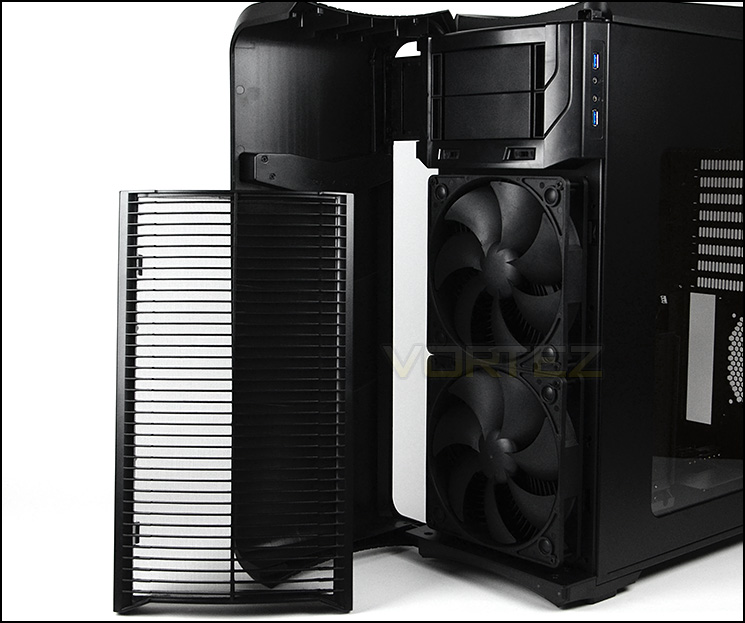
Front door opens to reveal lots of features
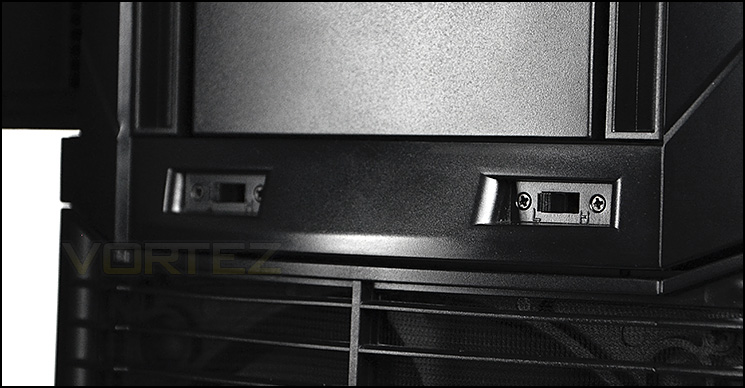
Three speed fan controller for either 180mm cooling fan
The power and reset buttons on the Raven 4 are found on the top-side of the case whilst the front panel connectivity runs vertically along the edge of the front. This area features dual USB 3.0 ports which connect to the motherboard header and headphone/microphone jacks.
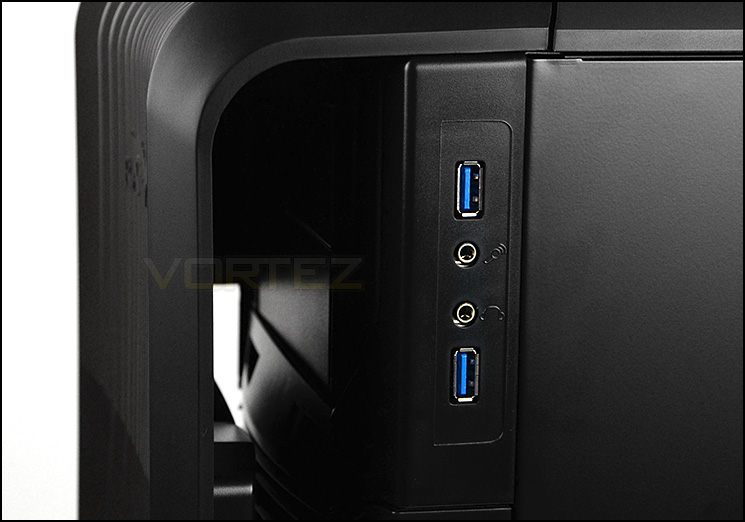
The front panel connectivity sits on the edge
That top panel is again plastic in its construction and has a section of ventilation towards the back – this is to aid the PSU, since this is mounted at the top of the chassis and will have its fan facing this ventilated region. There is a handy dust filter will can be removed from the case whilst it is standing, with a simple pull. This top panel can be removed, but requires both side panels to be detached first because they lock the top panel in place.
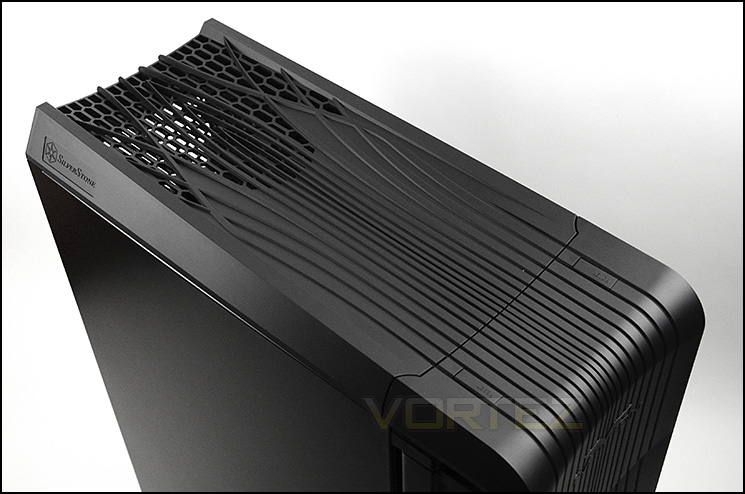
The top panel with ventilation for PSU
Finally the underside of the case has four rubber feet to prevent Raven 4 from slipping on smooth surfaces. There is no need for any ventilation or dust filters at the bottom since the PSU is mounted at the top.
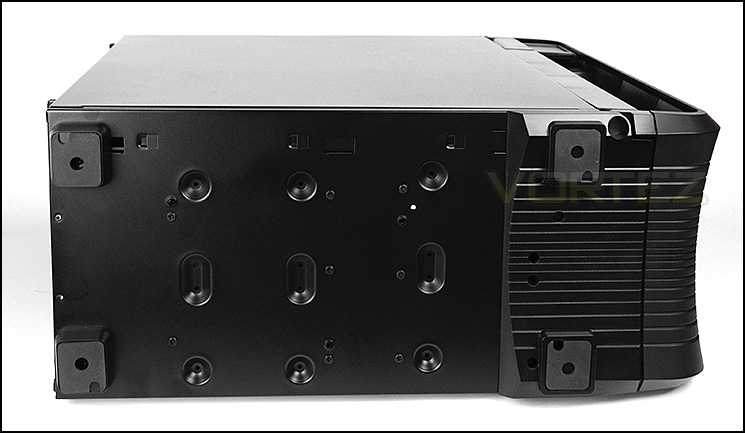
The bottom of Raven 4
Interior
After removing the thumbscrews from the side panels we are able to remove them to reveal the internal layout of Raven 4. It has to be said that these side panels are substantial and rather sturdy.
Casting our eye over the internal layout this is a far cry from the conventional computer case. First of all, the prominent side is found on the reverse and then the motherboard tray has been inverted too. So the CPU will sit at the bottom whilst the graphics card will sit at the top – this will become clear in the next section when we install our test rig inside Raven 4. Incidentally – this motherboard tray is removable.
Inside, E-ATX, ATX and M-ATX motherboards can be installed and there are a multitude of tool-free design methods for installing kit. All of the internals are powder coated black to correspond well with hardware and there are cut-outs on the motherboard tray to help with cable management – though there are sadly no rubber grommets which is an odd omission.
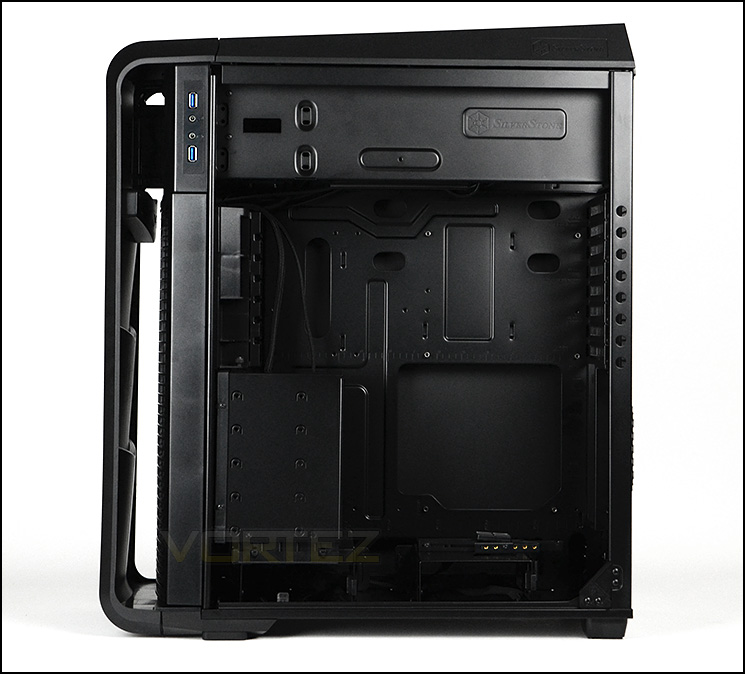
Looking at the internal layout of Raven 4
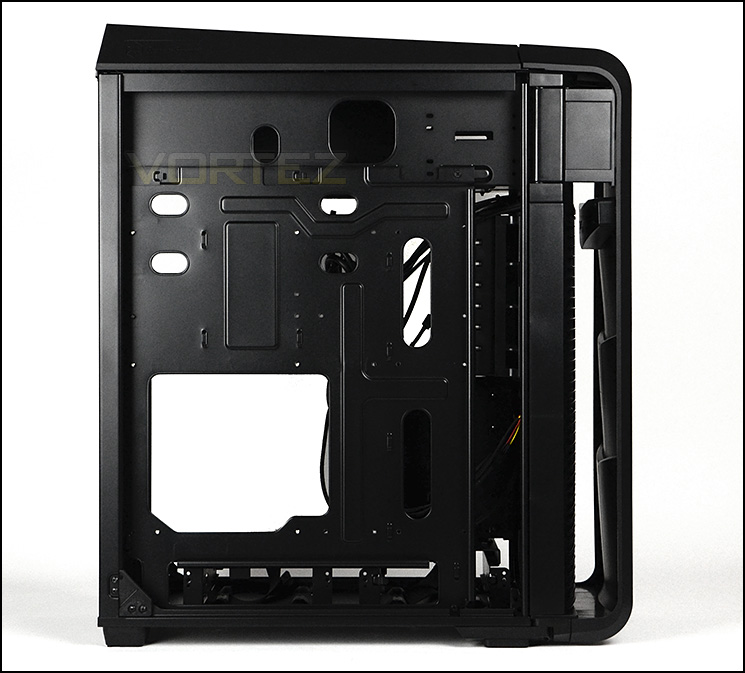
Behind the motherboard tray
We’ll now move in for a closer look at the various aspects of Raven 4 starting with the PSU area. SilverStone have created space at the top of the chassis for the PSU to sit within a shelf. We’re glad that they have included anti-vibration padding. Obviously, to install the PSU the top panel will need to be removed and thankfully this removes without much effort. There is an included dust filter which can be removed and cleaned.
Power supplies of any length but ATX form factor can fit within this case.
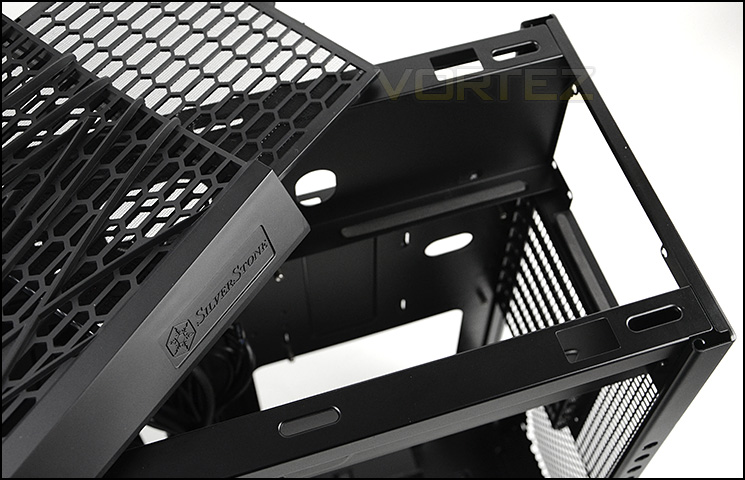
PSU region at the top with dust filter
Below this we have a total of eight PCI expansion slot covers which are ventilated and come with standard screws, not thumbscrews. There is further ventilation to the immediate right too.
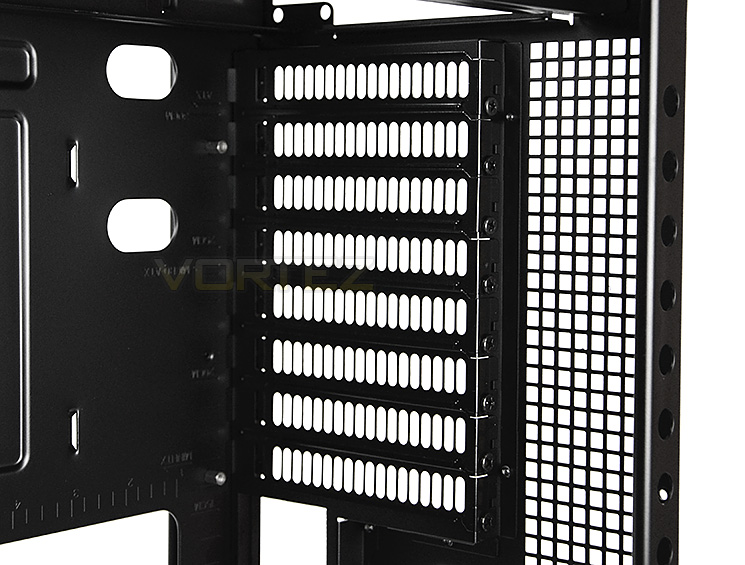
Multi-GPU capable
Interior (Continuned)
Further down on the floor of the chassis resides a single 3.5” HDD cage. This cage is completely tool-less and the drive simply slots into the cage and clicks into place with the latch at the side. SilverStone have also included a fabric strap which helps to pull the HDD back out of the cage once it’s installed. Sitting on the roof of this cage is a CPU cooler support mechanism which helps to relieve heavy CPU coolers from bending etc.
There is also another cage over at the front of the case which features a series of five options for 3.5” drives in the upper section and again another slot for a 3.5” drive via the tool-less method.
In both the lower cages within Raven 4 two 2.5” drive can be installed – there are mounting holes for this.
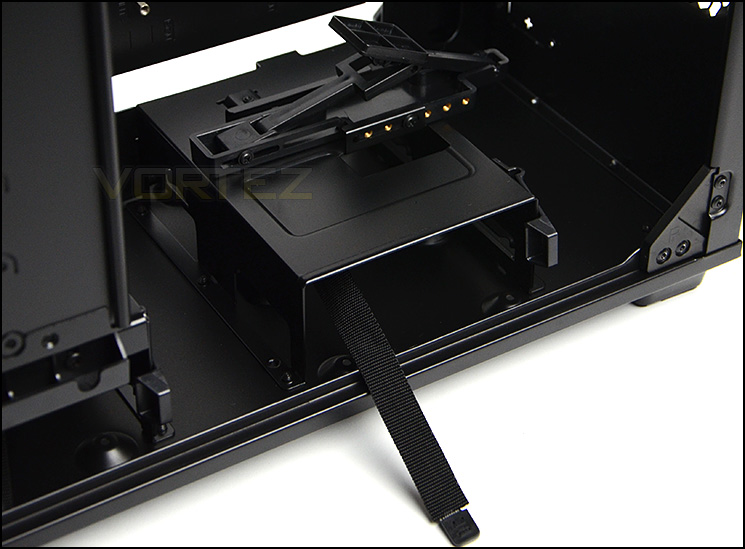
Tool-less installation for HDD
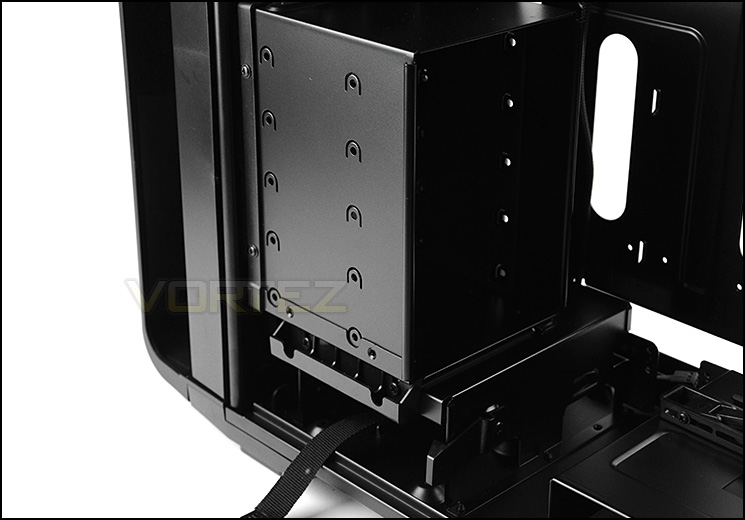
More HDD storage
Finally at the front and towards the top of the case is the optical drive bay which can house two 5.25” drives – standard screws are required for installation, there are no tool-free design mechanisms.
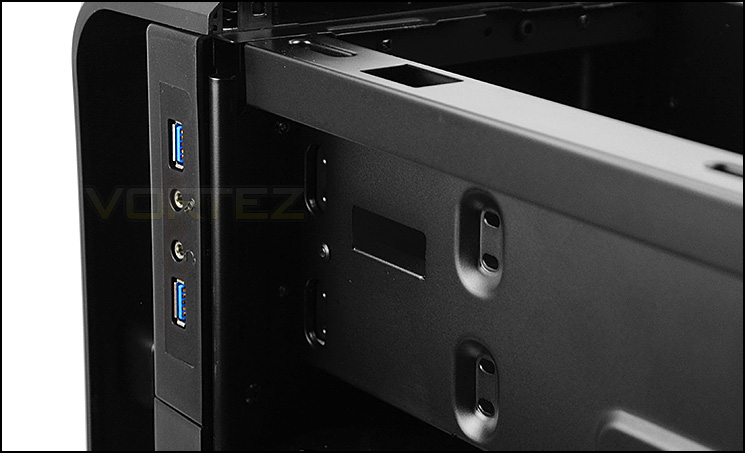
The optical drive bay
Installation
It has to be said that the installation is vastly different from the usual regime since the orientation of the chassis is swapped around. Regardless of this, we found the installation to be trouble-free. Hardware fits inside the chassis without any hassles and it all has plenty of clearance. It’s nice to be able to use such features as the graphics card support and CPU cooler support – they are certainly a bonus.
Cable management is easy to control but the CPU power cable can be quite tight reaching down to the bottom corner.
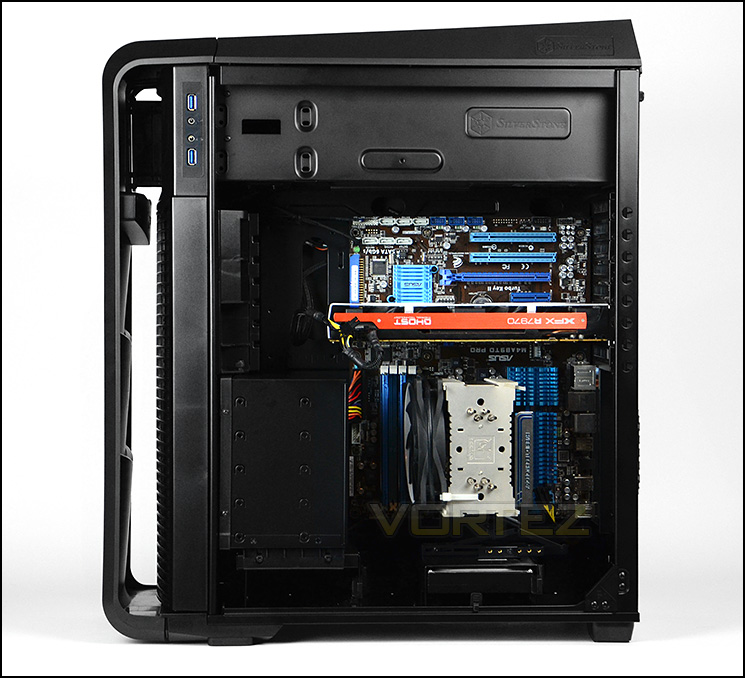
Install complete – did you double take?
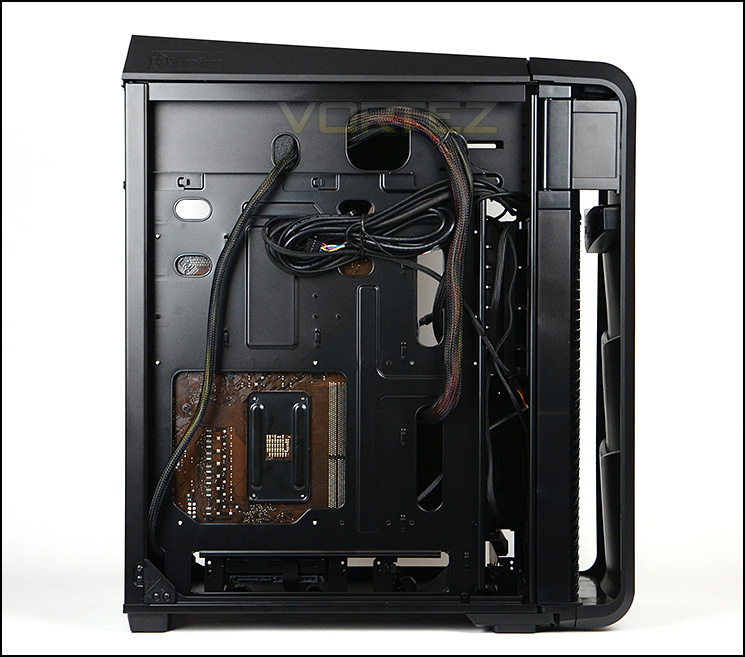
Cable management is a strong-point
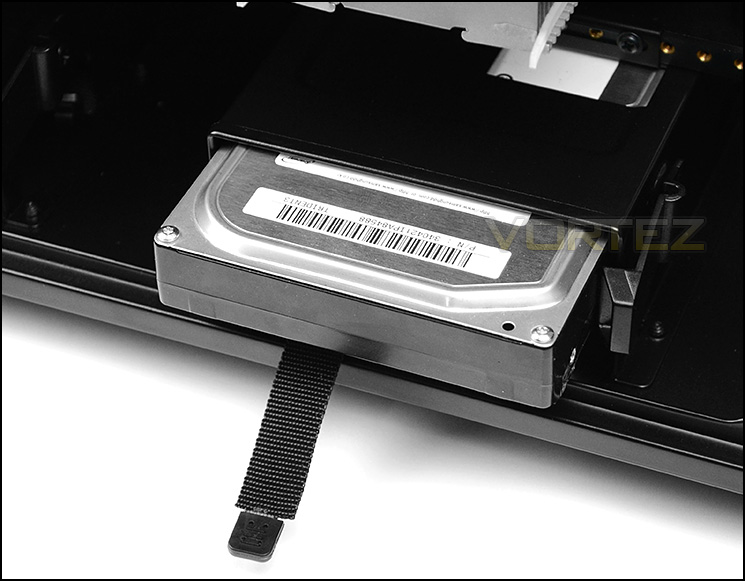
Installing a 3.5” HDD
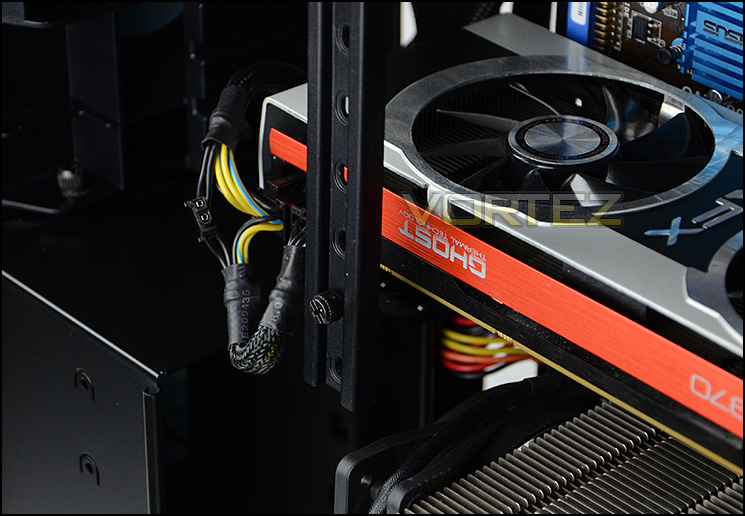
Adjustable GPU support – helping to prevent cards from leaning
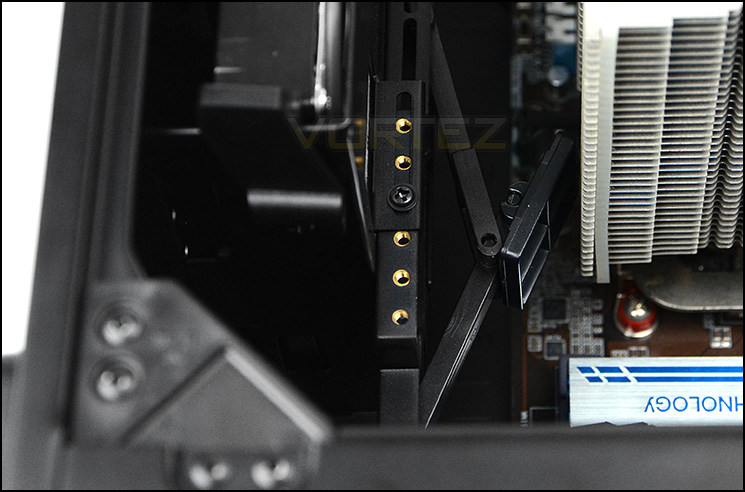
CPU cooler support – helping to take weight off the motherboard
Clearance – CPU Cooler, GPU, WC, Cable Management
Clearance is an important aspect of case design for the enthusiast as it establishes whether key components will be compatible with a chassis or not.
Starting with the CPU cooler clearance we can confidently report that big CPU coolers will fit inside Raven 4 without any obstruction problems. Installed within Raven 4 we have Noctua’s NH-U12P which is 158mm in height. Raven 4 can support coolers which are up to 165mm in height, so the popular options such as Noctua NH-D14 and Alpenfohn K2 and others will fit inside here without a problem.
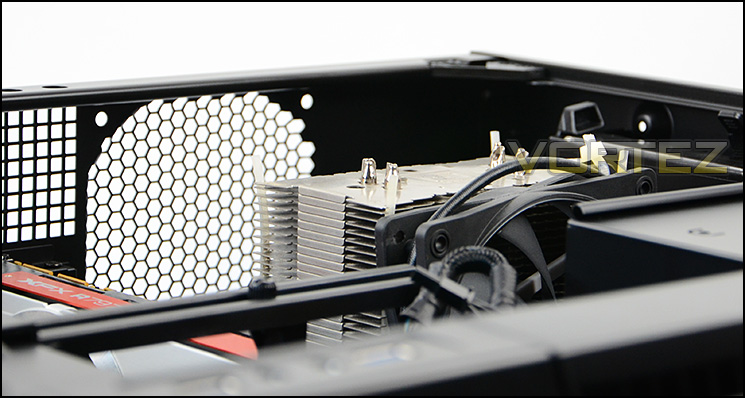
Great CPU cooler clearance
Graphics card clearance is again, very good. For a single card configuration occupying the top PCI-E slot there is unlimited space for anything currently on the market but if you are opting for a dual card configuration then the upper HDD cage will need to be removed.
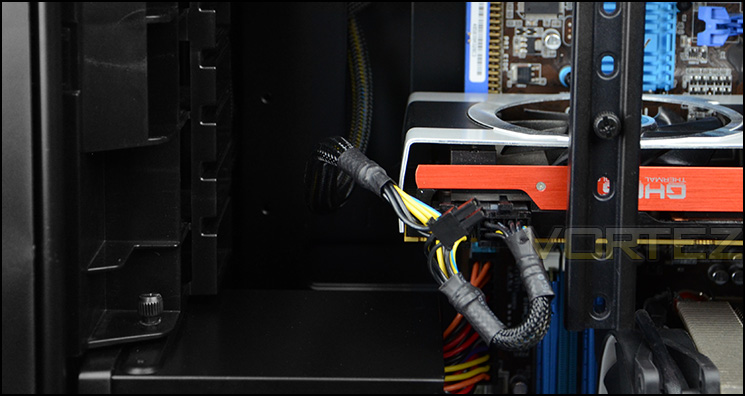
Good support for big graphics cards
In terms of water-cooling support, Raven 4 does have some provision but it isn’t really designed for this purpose. There is obviously space for a 120mm radiator where the rear exhaust would mount. SilverStone have enabled the front cooling fans to be swapped out so that there are mounting spots for 3x120mm which allows radiators to fit but sadly the front HDD cages will have to be removed and be absent and the default airflow will be replaced with airflow from the cooling fans attached to the radiator.
Behind the motherboard tray there is copious amounts of clearance for good cable management practises. Due to tray being on the alternate side and our ruler not having measurements printed on its flipside we had to shoot this upside down! But as you can see, there is roughly 2.5cm of clearance to arrange cables.
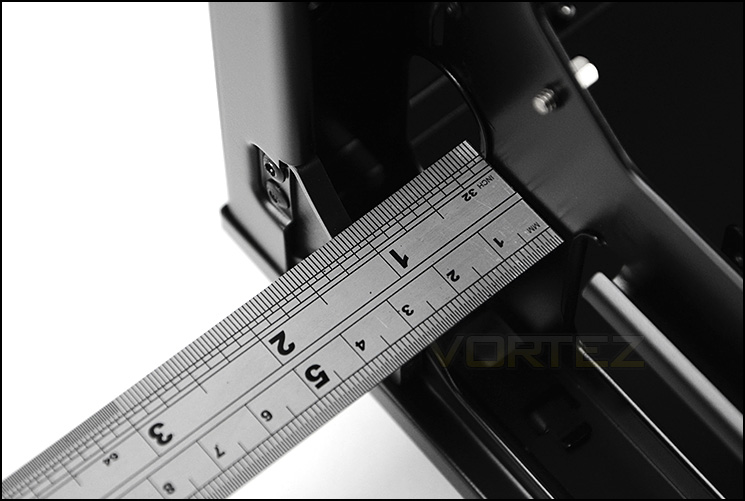
Good clearance for cable management behind the motherboard tray
Thermal Performance Testing
Inside Raven 4 there are just two pre-installed cooling fans positioned in key airflow positions. Raven 4 uses positive airflow and has two large 180mm front intake fans which are responsible for driving airflow across the system. SilverStone are confident that the cooling design which has been implemented will be effective.
To discover the thermal performance of the Raven 4 we will record idle temperatures after 20 minutes from a cold boot. We will then stress the system and temperatures will again be monitored after 30 minutes have elapsed.
For the purpose of accurate analysis the idle and load temperatures for CPU and GPU will be recorded and the range between idle and load will be calculated to determine how efficient cooling is. Fan controller will be set to “high”.
NOTE: Ambient temperature is 20C
System Components
CPU AMD Phenom II X6 1055T 2.8GHz
Motherboard ASUS M4A89TD PRO
Graphics NVIDIA GTX 480 (Different from card pictured)
Memory 4GB Kingston HyperX DDR3
HDD Samsung Spinpoint 500GB SATA-II
PSU FSP AURUM GOLD 650M
Motherboard ASUS M4A89TD PRO
Graphics NVIDIA GTX 480 (Different from card pictured)
Memory 4GB Kingston HyperX DDR3
HDD Samsung Spinpoint 500GB SATA-II
PSU FSP AURUM GOLD 650M
Noise
Thanks to the fan controller Raven 4’s noise levels can be tweaked to certain degree. On low settings the fans aren’t really noticeable but with both 180s running on high we do start to notice the fan noise but it isn’t by any means disruptive compared to other cases and fans we have tested prior to this review.
Conclusion
The Raven 4 has been in production for some time now and fans of the series have been eagerly waiting for its arrival and now that it’s finally here what is the verdict?
It’s clear to see why the Raven series has such a following. The Raven 2 (RV02) has been one of SilverStone’s most notable achievements in case production and Raven 4 is more in keeping with this case though we can’t vouch that its quality is on par. Raven 4 carries with it a unique and distinct design which is synonymous to this product line and we quite like the aesthetics though there is rather a lot of plastic to contend with.
Inside there is plenty of space for high-end hardware and we’re pleased to see that cable management is easy to maintain due to the cut-outs and general clearance space. SilverStone have also included a number of handy features which set this case apart from others. Having a CPU cooler support is a really useful feature since CPU coolers nowadays are getting bigger, and thus heavier. Having a flagship CPU cooler installed within a system can unfortunately put stress on the motherboard and SilverStone’s idea to lighten this burden is brilliant. As is the idea for supporting the graphics card too – these too are getting cumbersome and heavy, often leaning over and putting stress on slots.
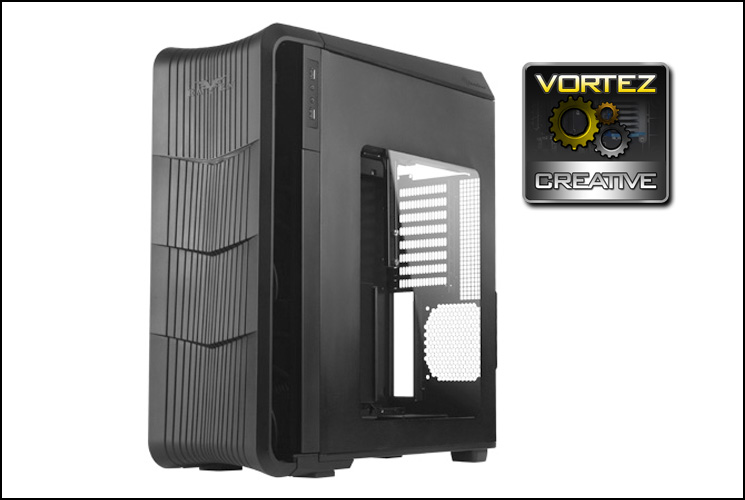
SilverStone tout this case as a premium cooling solution and to this end, it achieves this very classification. We found the Raven 4 to be a superb case for keeping those temperatures low. We also found the noise levels, even on high settings to be tolerable..
Priced at £135 the Raven 4 sits amongst tough competition. Bearing in mind this case has many plastic elements, a door which is rather flimsy and has limitations for water cooling/liquid cooler support, we really feel the price should be on the other side of £100.
VIDEO REVIEW – VORTEZ TV
Raven 4 is certainly a unique case. It challenges how we look at the computer chassis and delivers innovative ideas which are very much welcomed. Due to the out of the box thinking with this case, we are pleased to hand out our “Creative” award.
Pros
+ Unique, distinct design
+ Great cooling potential
+ Fan controller included
+ Brilliant cable management
+ Removable motherboard tray
+ CPU cooler & graphics card supports
+ Handy tool-free HDD installation
Cons
– Very limited options for water cooling and ALCs
– Lots of plastic
– Front door is flimsy
+ Unique, distinct design
+ Great cooling potential
+ Fan controller included
+ Brilliant cable management
+ Removable motherboard tray
+ CPU cooler & graphics card supports
+ Handy tool-free HDD installation
Cons
– Very limited options for water cooling and ALCs
– Lots of plastic
– Front door is flimsy

Click here for an explanation of our awards at Vortez.net.


