







Following the success of the Hermes, can GAMDIAS hit this high-end gaming mouse with 8200dpi laser sensor, on-board profiles and macros out of the park?

Product On Review: Zeus Esports Edition
Manufacturer: GAMDIAS
UK Street Price: £80.99 Inc. V.A.T.
Not too long ago we were significantly impressed by the Hermes, a mechanical keyboard from relative newcomers GAMDIAS which included a variety of design adaptations that are in some cases uncommon and others unique. That peripheral was intended to appeal to the hardcore gamer with a deep interest in taking advantage of mechanical switches whilst also reducing audible noise and impact velocities. In that the Hermes succeeded, in many respects exceeding our expectations from a manufacturer we had heard very little from.
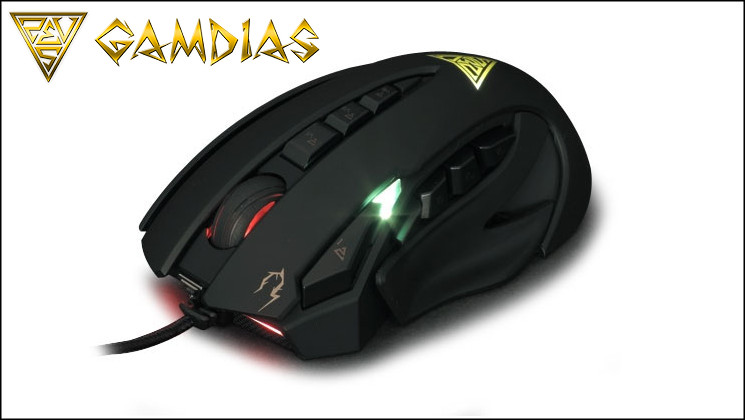
GAMDIAS emphasizes on the fundamentals, complemented with creativity and service.
GAMDIAS Technology was founded 2012,with team of over 100 led by RK HAN. Successfully creating the gaming brand known as GAMDIAS. Our team emphasizes the fundamental need of gamers, integrated with creativity and artistic beauty. Not only do we aim to set the bar for quality and practically, but also to go above and beyond in our designs. Further supplementing our motto: Gaming Art in Motion, we will continue to invest heavily on designs, transcending GAMDIAS products to an artistic pantheon.
Our design team
Our design team consists of a group of passionate gamers with limitless creative ideas. The design teams mission is to highlight the special aspects of each product, just like the distinctive characteristic of the gods in Greek Mythology. Each of our gaming products are designed with an patented special feature; never ceasing to break the limitations of traditional thinking, and revolutionize the pc gaming industry. GAMDIAS aspires to offer its users a gaming experiences unparalleled to its predecessors.
Defining Factor
GAMDIAS will redefine the Electronic Sports (eSports) landscape for gamers worldwide. Backed by international award winning designers (Red Dot), innovative think tanks, and inspirational brand leaders, GAMDIAS will be the next generation of Gaming Gear.
Today we can bring you GAMDIAS’ latest innovation: the Zeus Esports Edition; a mouse designed for gaming at a high level in a wide range of competitive genres. Like the Hermes it contains a number of adaptations to better suit the needs of specialist gamers, but have departed even further from the expected even considering the exotic peripherals released in recent years. The more standard feature are the eleven buttons, nine of which are fully programmable thanks to the roomy 512kb of on-board memory and 32MHz ARM Cortez processor. From there it becomes ever more atypical, including adjustable side panels, profile and DPI lighting, and a huge range of software-based advances.
The ZEUS will however need all of these features to justify its position beyond the £80 price point, and similarly the vanilla variant will need to go far to tempt gamers at £75. Competition in the MMO peripheral market for the past year has been strong and continues to increase, so the ZEUS will need to be something special to stand out from the crowd. It appears to be well equipped to do so, on paper at least.
Features and Technical Specifications
Features:
* Laser sensor up to 8200 DPI for pixel perfect accuracy
* 512KB onboard memory for button and profile assignments
* Selectable polling rate 125 / 250 / 500 / 1000 Hz
* Heavy-duty 11 million click lifecycle
* Customizable profile / DPI / ambiance lighting luminance
* Customize weight with weight tuning system
* Rapid profile switching key
* Military grade braided cable with Gold-plated USB connector
Technical Spec.:
Cable Length:- 2M
Keys:- 11 Keys
Resolution:- up to 8200 DPI
Polling Rate:- 125 / 250 / 500 /1000 Hz
Onboard Memory:- 512KB
Dimension(LxWxH):- 127.14 x 84.46 x 43.2 mm
Tracking Method:- Advanced Gaming Laser Sensor
Switch Lifecycle:- 11 Million
Graphical UI:- Yes (GAMDIAS HERA)
Packaging And First Look
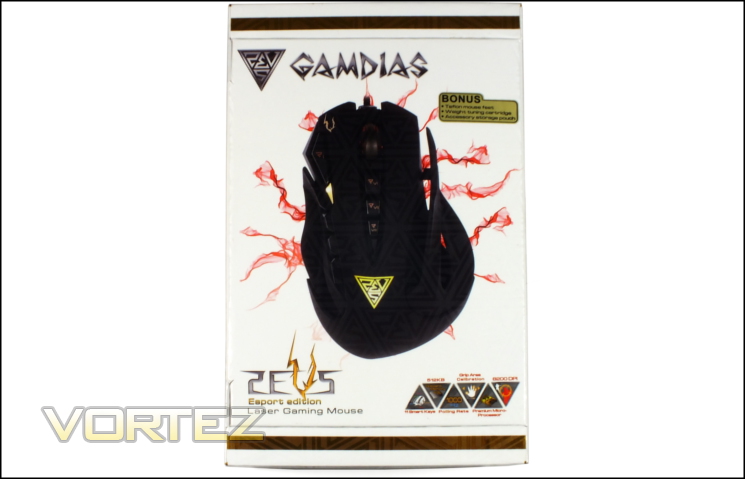
The Zeus ESports Edition by GAMDIAS arrives in a really quite swanky container which miomics the white and gold colour-scheme of the Hermes keyboard we reviewed previously. As one would expect the front displays a top-down shot of the Zeus and not much else except for a small graphic on the bottom-right with six features deemed to be of key importance. The Esport Edition specifically also contains replacement Teflon mouse feet, a weight tuning cartridge and small pouch for storing accessories; these are no included in the vanilla version, and are augmented further in the ‘Professional’ edition.
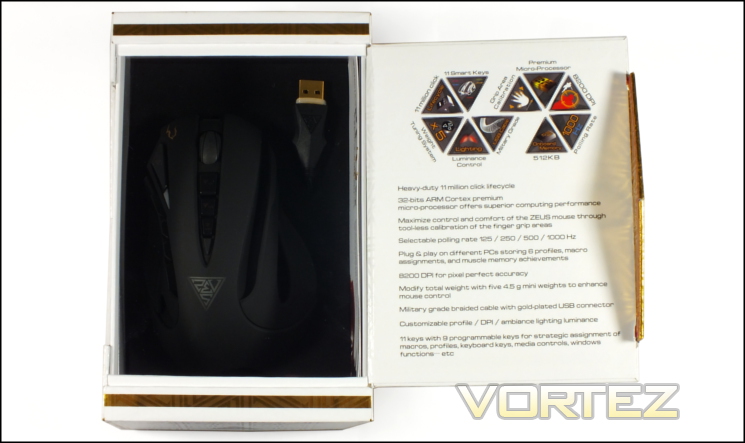
The front opens from the left to reveal the mouse itself on a black felt base. On the inside of the flap are listed a number of core Zeus features worthy of inclusion and going into some depth on. Obviously crucial are the 32bit ARM Cortex processor and 512kb memory for on-board macro storage and processing, but also noteworthy are the 8200dpi sensor, weight customisation, number of programmable buttons and polling rate. As with the Hermes, GAMDIAS summarises them using a series of echelons; ten total, all relevant.
On the left side panel GAMDIAS go into a little more detail regarding the lighting and software-based customisation options. One of the less common features mentioned is the ability to record your own audio for playback on keypress or macro activation, generally reserved for in-game functionality rather than at the driver level. Also noted is the ability to link profile switching in both Zeus mouse and Hermes keyboard, allowing far greater synergy between hardware than many other solutions.
The right side repeats much of the information found on the inner flap, as well as providing a side-on view of the mouse. Unfortunately like the image on the front it’s a little difficult to see clearly thanks to the low contrast and embossing effect all over the exterior packaging, so one should be thankful that there’s a window to the inside. As always, we’d advise checking out the manufacturer website at the very least before buying the mouse.
A small summary of the features is available on the rear in ten different languages, just in case it appears in a region where English isn’t commonly spoken. As one would expect the system requirements are modest – only Windows XP / Vista / 7 / 8, a PC with USB port, and an internet connection are really required. Interestingly the technical specifications are also listed, packing even more information into this already quite densely packed space. There are no surprises, but as many manufacturers are moving away from showing detailed specs on their product packaging it’s nice to see GAMDIAS stick to a more traditional route.
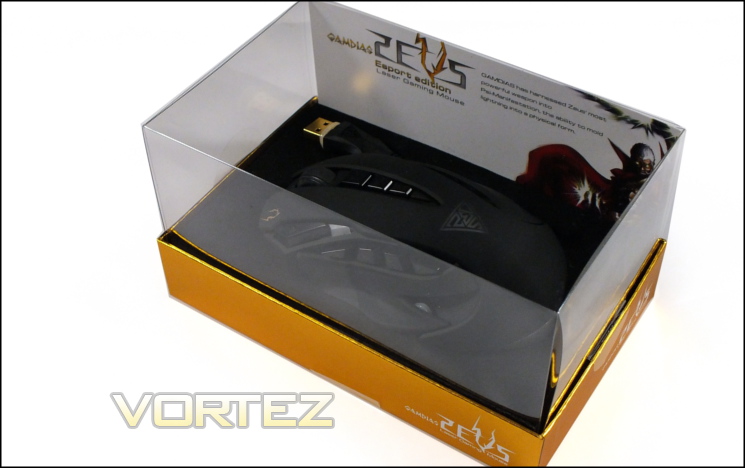
Here you can see the Zeus Esports Edition as if you were using the packaging as a display case. Premium peripheral manufacturers are increasingly doing this as a means for the users to show-off their kit and where necessary transport it securely, and it certainly makes an impact on those who see it. Note that according to the official website the other variants (basic and Professional) have red rather than gold plinths.
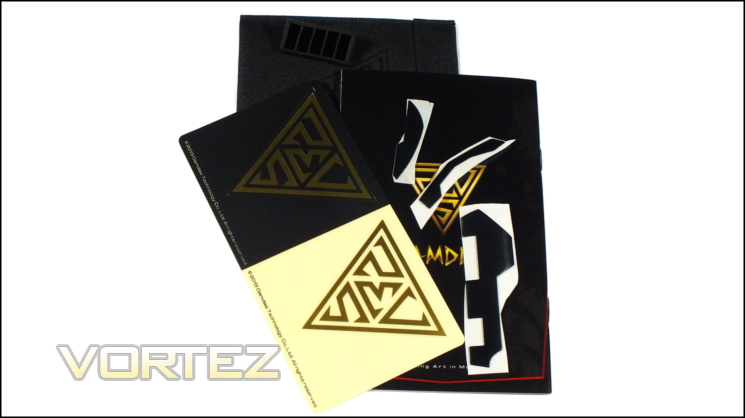
The total Zeus Esports Edition bundle is about as comprehensive as you’re likely to see, with only the Professional Edition appearing to be even more deluxe (based on website pictures). As well as the mouse, user guide, stickers and spare holster for weights a small back to store useful accessories in is included. It’s a nice touch, although not altogether necessary, and perhaps may warrant moving to the cheaper basic version if you want to save a few points.
GAMDIAS’ User Guide for the Zeus takes you through the keys features including side panel adjustment and button locations. Interestingly they make no mention of the LED positions, perhaps leaving you to work that out for yourself.
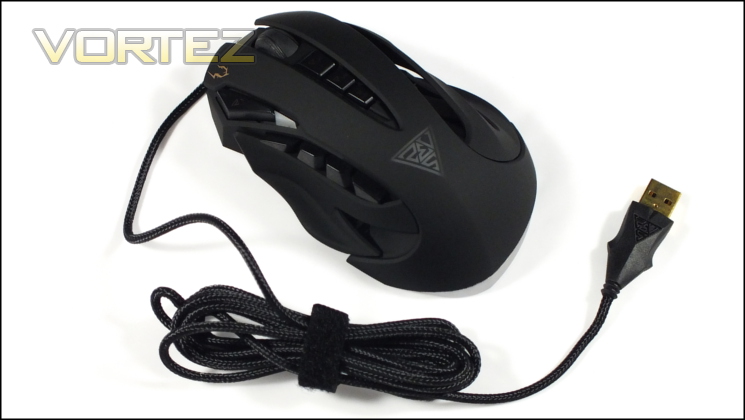
If first impressions are key then GAMDIAS are off to an exceptional start. Well appointed and compact for travelling, the Zeus is a treat to delve into for the first time. But now, to the serious business of a closer look…
A Closer Look
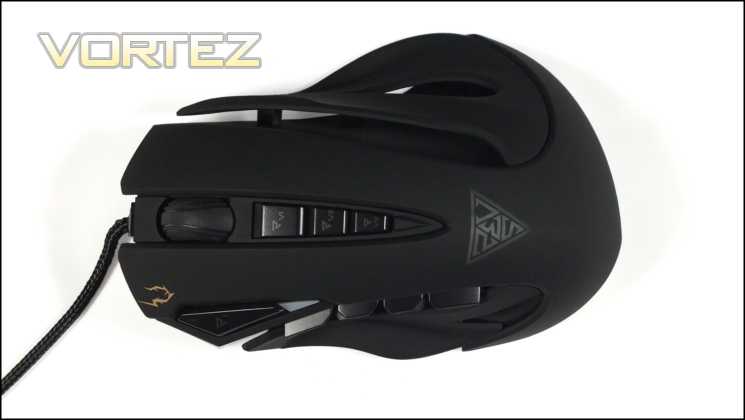
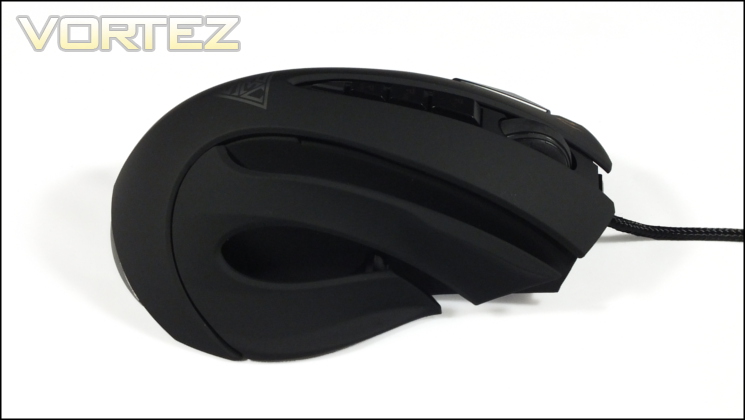
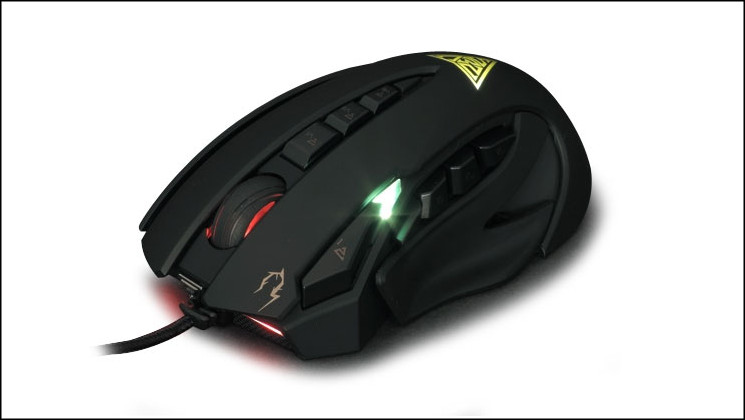
Focusing on the Zeus alone we can see the level of adaptation GAMDIAS have applied to a basic mouse. Rather than one solid shell the mouse has portions cut away, with articulated side panels on either side. The shell isn’t the only uncommon feature immediately visible – the shape has a pronounced arch both length and width-ways, lending it the appearance of being quite tall but with main mouse buttons which fall away rapidly. It’s also distinctly right-handed, not only due to the overall biases in the shape but also the location of the thumb buttons.
With the exception of the buttons the vast majority of the mouse surface is painted in a rubberised finish for a grippy, sweat-resistant result. In the main it’s a matte black, with sections removed specifically for illumination where appropriate. As soft-touch style finishes go it’s quite pleasant and should resist the gradual build-up of grime seen on mice with a smooth plastic surfaces.
At the top-left there is a button which is typically intended for profile switching, whilst an LED just below it is used for displaying the current DPI. The profile buttons’ location means that the left mouse button is relatively narrow, with a right button that almost mirrors it. The curve of the buttons mean that you’re likely to not be pushing directly downwards, and this aspect may be a problem depending on the grip. Main and profile buttons feel firm and with no loss connections or poor overall fitting.
The wheel is a standard two-dimensional (i.e. no tilt) design with additional button. The ratcheting is relatively heavy, though not quite so much as some FPS-specialised mice, which should make it an ideal halfway-house for general gaming. An internal LED reflects the active profile, varying between any of size possible colours.
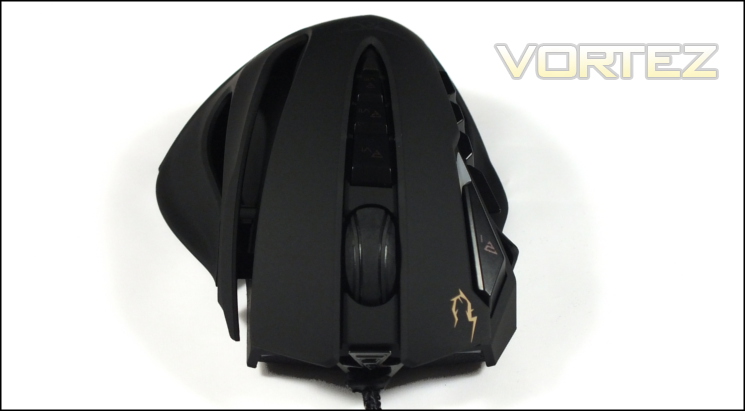
Below the wheel are three additional buttons, typically assigned to DPI switching but can be reassigned to any mouse function or keystroke. They’re firm as have very little movement, but the elongated nature of the mouse and especially main buttons means that utilising two or more will be difficult or impossible depending on your preferred grip type. Generally speakings, using these for less common in-game functions would be wisest. Just below these buttons is an illuminated GAMDIAS logo.
Moving to the sides you’ll see an implementation which is quite out of the ordinary. Four buttons rather than the more common two are on what would typically be called the shoulder of the mouse, whilst the thumb-rest is composed of one of those side panels. The buttons are a little on the spongy side, especially compared to the rest of the mouse where the actuation point is almost immediate; travel maximum distance into the mouse is also further than we would like.
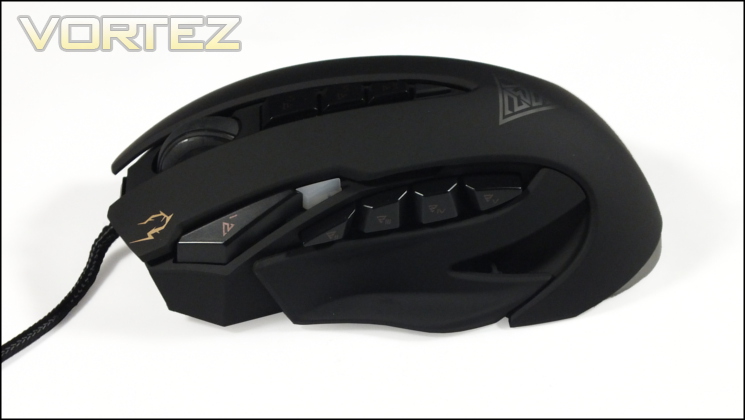
The thumb rest side panel can be adjusted to be further from or tighter to the mouse chassis through utilisation of wheels at the base. It’s not altogether clear how ergonomic this design is, but it’s certainly an intriguing twist on rival designs which accomplish much the same role. Similar adjustments can be made on the right of the mouse, but here two seconds move independently for ring and little finger resting positions.
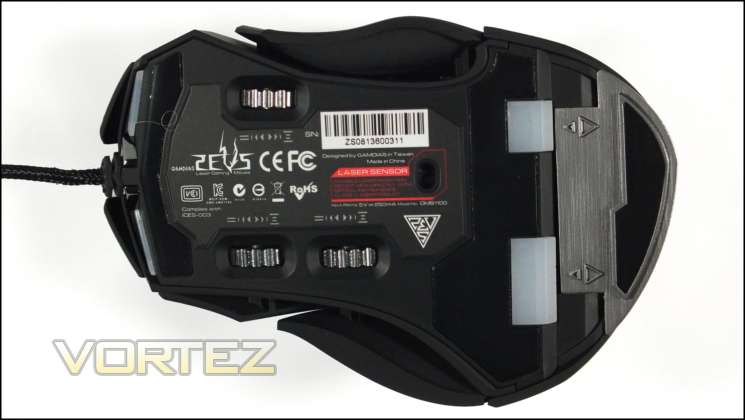
We’re not finished at outlining the visible parts, it’s also worth taking a close look at the base of the Zeus too. Of chief importance are the three Teflon pads which offer a low-friction mousing experience and ensure overall stability if implemented properly (which in this case they have been). The laser is located in its ideal position – central to the base for predictable 1-to-1 mouse positioning.
The sections of three exposed cogs are the adjusters for the thumb and finger rest positions, and are remarkably solid. A little tough to rotate themselves – you may need a tool to get yourself started – could easily become fixed over time purely due to the amount of fibres which tend to be thrown up into the base. The overall footprint therefore is decidedly large and potentially larger still, even if shape on top makes it feel far narrower.
A grey plastic compartment at the rear houses five 4.5g weights. GAMDIAS have done a fair job ensuring that the Teflon pad on this compartment doesn’t interfere with mousing; an attention to detail which at times is sadly lacking in other manufacturers.
Rounding off the base, a label on the mouse base contains EU and international trade certification icons whilst the under-carriage also features two LED light-sources for rear under-base red lighting.
Finally moving to the front we can see a black braided USB cable with substantial plastic and metal reinforcement as it enters the mouse chassis. Either side of this entry-point are two further LEDs which illuminate the front of the mouse and mouse-pad.
So, the Zeus has some aesthetic flair and plenty of customisation options. First impressions are good ones, although the shape will no doubt take some getting used to. GAMDIAS have taken a different approach to ergonomics than other manufacturers and that’s reflected in both height and width as well as button arrangement. It’ll be interesting to see how well it performs.
Lighting and Customisation
As you might expect from just glancing at the Zeus the mouse features a plethora of customisation options both aesthetic and functional.
Lighting
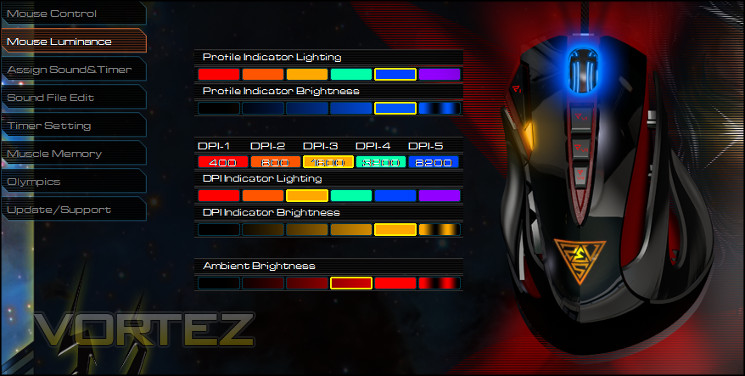
The mouse features four different lighting zones, three of which are configurable in some respects; the only static illumination is that of the gold GAMDIAS logo on the rear of the mouse. Illumination configuration is performed through the Mouse Luminance tab of the Hera software (as of version 0.8.0).
Mouse wheel lighting is of the multi-colour variety and chiefly serves as the active profile indicator. It can be set to one of six different colours and five brightness levels, or set to pulse in that colour if preferred. At present the colour options are fixed, although any colour can be applied to any profile.
Below the profile switch is the DPI indicator, which is a little counter-intuitive. This small array of LEDs is also capable of any one of six colours, five of which can be applied to a specific DPI level. As with the mouse wheel the absolute brightness can be adjusted and set to a breathing effect.
Finally, the Zeus also includes an option to change the brightness properties of the ambient lighting. Although it’s not clear at first glance this corresponds to the red LED lightbars at the base of the mouse and projecting from the front, and are purely for aesthetics.
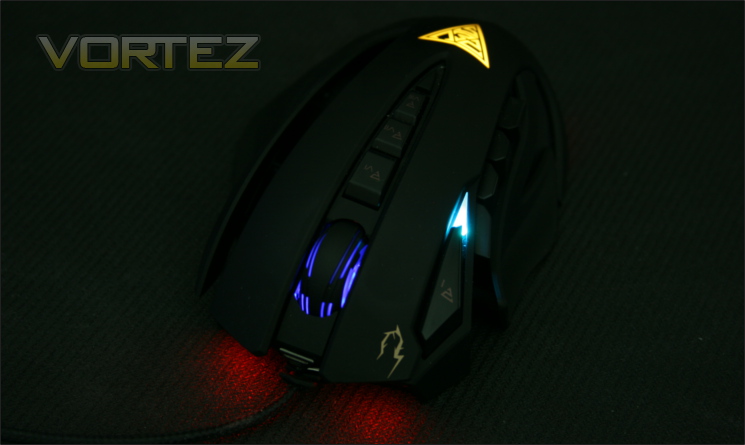
Whilst not as far-reaching as some mice the Zeus’ lighting ticks all the right boxes from a functional perspective. A few more effects and perhaps just more lighting in general may be tempting, but having restraint is not something we can criticise given how ostentatious some designs have become. One possible addition would be to bind the ‘spare’ DPI colour to the activation of the ‘Precision Aim’ dpi mode toggle, but that’s certainly not make or break.
Weight
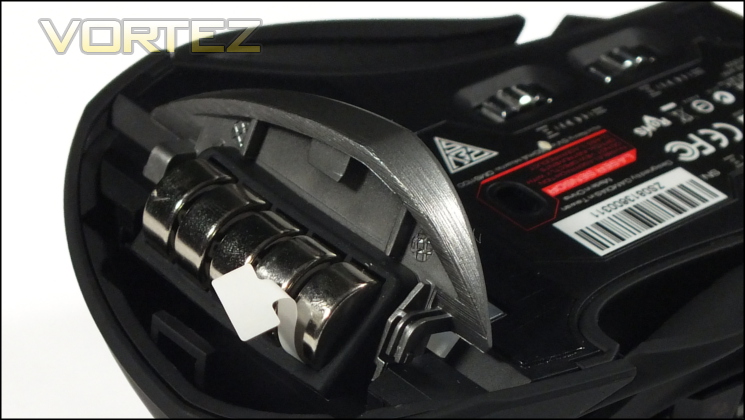
The Zeus is hardly lean but we’re pleased to note that the overall weight can be reduced somewhat. The base has a small grey compartment at the rear which hides a rubber holster for five 4.5g weights, reducing the weight by up to 22.5g (or roughly 15%). This particular customisation is still relatively uncommon, but also generally includes a little more variation in placement to change up the mouse’s overall weight distribution. The Zeus is therefore a little bottom-heavy, which isn’t a huge issue in some titles but can be problematic if you often lift your mouse off the table to re-adjust your position.
Width
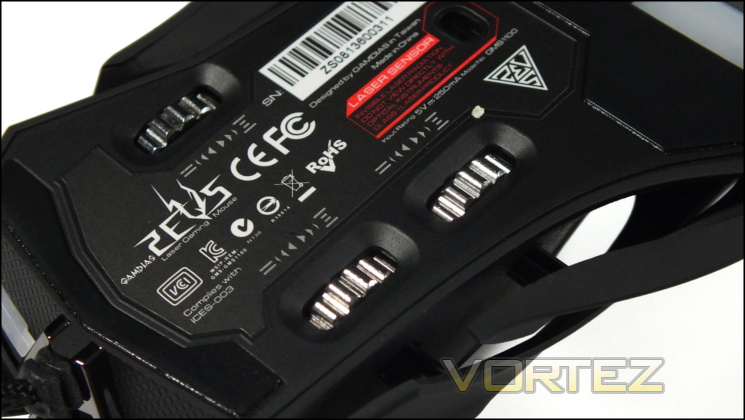
The final avenue for customisation of the Zeus is in the form of finger and thumb support. By rotating specific wheels it’s possible to push out the plastic support elements located on either side of the mouse to provide better resting positions for your thumb, ring finger and little finger.
This form of customisation isn’t unheard of – both MadCatz and Razer have designs which alter the chassis shape in a meaningful way – but GAMDIAS have chosen to concentrate on the width rather than length. Presumably they have sound engineering reasons for this, but no facility to change the length means that grip options remain largely static and the mouse is tall to accommodate the internal components.
We would likely have been equally happy to see only thumb adjustment and a slightly less aggressively curved shape overall, but your personal preferences will dictate how much value you apportion to the feature.
—
GAMDIAS have performed sterling work with the customisation options, particularly in making the lighting relevant in-game.
Software
GAMDIAS have created a single configuration utility to operate with each peripheral in their range. This utility – called Hera – handles key/button assignment, macro creation, profiles and a few other uncommon features which are only sometimes available from other manufacturers. The current iteration is 0.8.0, reflecting the fact that it’s not quite finished, but we found it to be in a polished state sufficient for configuring the main features of the Zeus mouse.
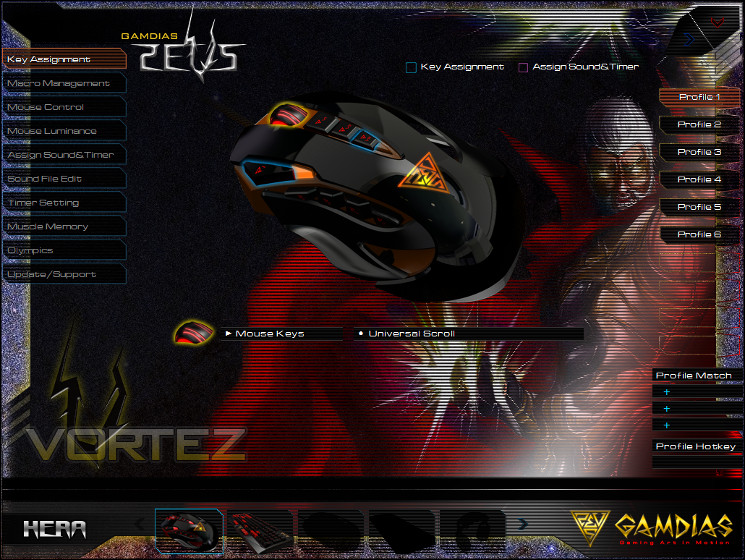
Hera is currently a stand-alone utility that doesn’t have a typical installer and isn’t generally launched on start-up. In order to make full use of the functionality you will need to extract the files from the zip archive and run the executable, whilst some functionality such as OSD of timers and sound playback will not be available without it running. Hera will also check for updates to both software and product firmware, although it will not download and install them automatically.
When first run the application will take around 20 seconds to download all the settings from the mouse and around two seconds every time thereafter. When specific settings are changed the application will prompt you to update the settings resident in the mouse only when the update button is pressed or if the application is minimised/closed. The main Hera window is a translucent white that appears to still have a few rendering issues. It does however look quite sharp and certainly legible on black backgrounds, as shown above.
Menu items are listed on the left and profiles are typically listed on the right; navigation is through simple click-through. The majority of mouse settings are stored on a per-profile basis, with six profiles to choose from. Each profile can be selected manually (through the UI or mouse shortcut), or launched in tandem with the launch of a specific user-selectable application by assigning a ‘Profile Match’. At present there appears to be no way to back up a profile without manually copying and pasting files from the Hera installation directory, but if necessary it’s a pretty trivial process.
Hera does an excellent job of displaying the assignments – i.e. what’s at default, what is bound to a macro and what is bound to a timer or sound effect. Any button bound to a macro will be outlined in light blue, whereas those bound to timers or sounds will have a pink outline. At a glance therefore you can see where something may be incorrect and needs be changed.
As well as displaying all assignments, the Key Assignments option is also where actual assignments are also made. Each button can be bound to a wide array of default functions, Windows shortcuts or macros, allowing for some pretty comprehensive customisations. Macros need to be pre-created in order to be selected, and as you would expect all assignments are on a per-profile basis.
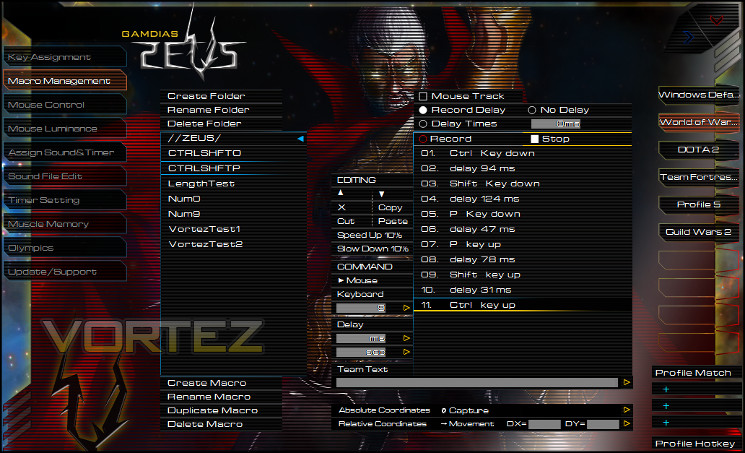
Macro Management is the Hera Macro editing utility, and is easily some of the most in-depth we have seen. Without wishing to go too far down the rabbit-hole in our explanation, it’s possible to record macros, log single keystrokes, edit individual keystrokes (including speeds) and through up an on-screen display of a macro being activated. The directory structure is navigated on the left, and allows for more fine control over the local storage for backup and restoration purposes.
Additionally, as the Zeus is a mouse it can log X,Y co-ordinates for macros which replicate button pushes. That’s pretty niche as uses go, but remains important for some. Macros are assigned to buttons on a per-Profile basis, but stored in a common pool which any profile can draw from. A macro can be at least 160 events (key-up, key-down, delay) and hence at minimum 40 keystrokes long, more than enough for most common applications.
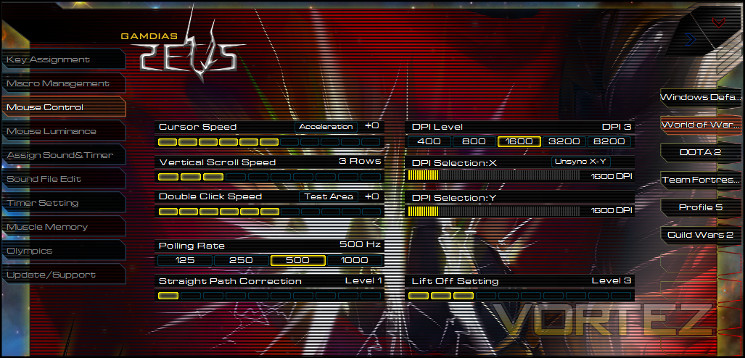
Mouse Control is the window for more general Zeus configuration settings such as DPI, polling rate and scroll speed. Some of the options presented are representations of OS-level values, and in many respects can be left as they are.
There are five DPI levels to choose from, each of which can be set to a DPI (inc. X and Y independent sensitivity) for selection through a mouse button directly or cycled through. Unfortunately there is no way to disable a DPI level such that it is skipped when cycling through the list, and that may make the level selection process a little awkward.
Yet another uncommon option is the ‘Straight Path Correction’ option. It’s possible in firmware for mice to correct a cursor path if it predicts that the motion is intended to represent a continuous and straight movement, a process commonly also referred to as ‘angle snapping’. Some sensors utilise it by default, whereas other manufacturers trumpet the fact that their mouse doesn’t feature it all. The Zeus allows you to set it at different levels, and is the first mouse we have seen that operates in this fashion.
The final configuration setting is one for lift-off distance, an option which has increasingly become more common with laser-sensors. We find it surprisingly useful in gaming simply due to the need for fast and accurate movement, and the weight of the Zeus may make it all the more critical.
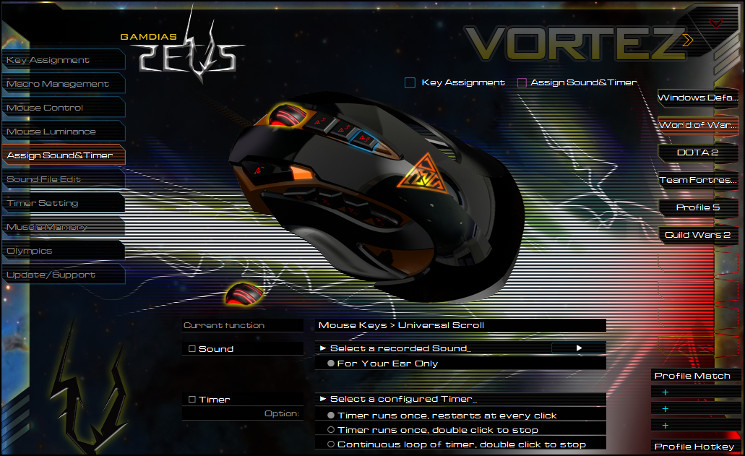
The Assign Sounds and Timer section is pretty useful in its own right. The window allows you to, independent of macros etc., create an on-screen timer following specific button presses. As some added gravy you can even set up a sound to play after the timer has expired, or simply when the button is pressed at all. Each of these could be immensely useful during MMO gameplay to track skill cooldowns or encounter abilities independent of the game engine itself, and GAMDIAS have even added the facility to change where on the screen the timer is located. Custom sounds aren’t quite ready, but are a planned feature for the future.
Before assigning a timer to a key you will need to create it in the Timer Setting window. Creating and setting the timer up is straightforward, and selecting a suitable sound file (or none at all) a trivial matter. At present all timers count down rather than count up, but that’s the most logical use for it anyway.
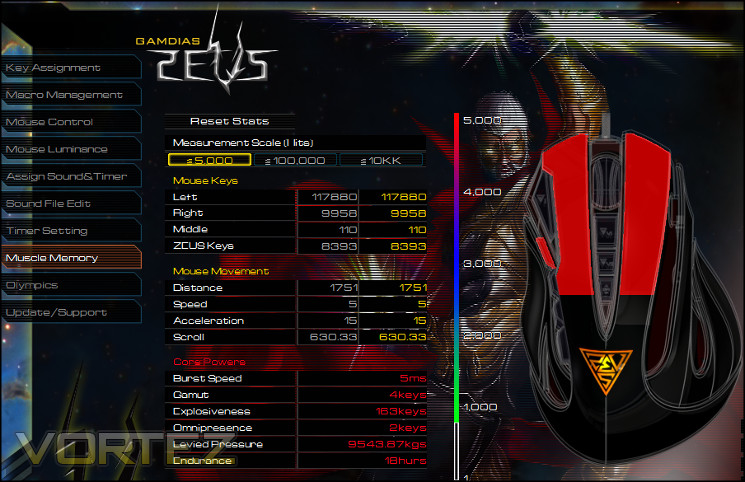
Muscle Memory is the final non-support section of the Hera software for the Zeus, and it tracks a wide range of button push statistics. Eventually these stats could be shared with the wider gaming public – GAMDIAS are touting an as yet unfinished feature called Olympics which may pitch you against other users in a series of key metrics – but for now they show you most commonly used keys and what they call ‘core powers’. Apart from just being of academic interest this tab also may allow you to analyse and more efficiently distribute commands in the games you play, especially if enabled on a per-encounter basis. Specific shortcuts to enable/disable the stat tracking would therefore be quite handy.
In terms of representing the total number of button presses in the colour-coded image, it would be handy to be able to use linear and log-based stats up to a maximum value, rather than relying on the 5k, 100k and 1m click scales.
At the bottom of the window you are able to select each of the GAMDIAS products you’re using and the Hera utility will reconfigure its layout accordingly. Any attached GAMDIAS products are shown as full images, whilst silhouettes represent products not yet associated with the PC.
For software only in release 0.8.0 Hera is pretty accomplished, but it’s not all positive news. Apart from the unfinished sections and rendering issue the software also has a compatibility problem with other applications which prevent the mouse cursor from operating properly. For us this was most pronounced when using GIMP and is the first time we’ve had this specific issue with any peripheral software; we cannot rule out it also occurring with other software we don’t have access to. Exiting Hera fully solved the problem, and thankfully the mouse is perfectly usable without the application running.
Performance
Our time with the GAMDIAS Zeus was a little more extended than we initially intended it to be, primarily due to the novelty of the design and unfamiliarity with the manufacturer. We paired it with a generic large cloth mouse-mat with 3mm rubber backing, a standard type seen on the desks of gamers throughout the land. In theory there should be no issue with using a laser sensor with suck a mat as it’s neither transparent nor highly reflect (the two types most often reported as being a problem for this sensor type).
We combined the Zeus with a basic-level mechanical keyboard, primarily to investigate just how well suited the mouse would be to gaming without the support of other similarly adapted peripherals. Some time was also spent with the GAMDIAS Hermes, but unlike some competitors there is no unique synergy between the two peripherals from the same manufacturer.
General Performance
From the outset it was clear that the 8200 dpi sensor was more than up to the task, at a wide variety of sensitivities. Despite the distinctly used nature of our mat there was no hint of judder or lag in the input, and although at first the new Teflon pads did resist the surface it wasn’t prolonged.
Teflon base aside, the Zeus can quite literally be quite a handful. It’s wide, heavy and tall, all of which adds up to a mouse can can be quite hard to become comfortable with. Although some adjustment is possible we found the process to be quite laborious and of limited value given the inability to change length and height. Those with larger hands should find all grips viable, yet the narrow and downwardly-curved main buttons will be frustrating; the smaller handed will find it similarly unwieldy. Those who hit a sweet-spot will be well supported in the palm and fingers, but may still find certain buttons a little awkward.
Speaking of awkward, the four shoulder buttons can be difficult to differentiate and use effectively. Four-by-n arrays have suffered from this for a while, simply because covering all four buttons whilst having the dexterity in your thumb to both identify the correct button and press it takes some time to build up. It’s not helped by how springy the buttons are – pushing hard on one could quite easily actuate a neighbour; other mice have solved this by using extremely short travel distances, which the Zeus doesn’t favour.
Profile and top-buttons are in the opposite range: quite stiff and with small travel distances. Unfortunately in the case of the profile button – just next to the left mouse button – it makes pressing it quickly quite difficult unless your hands are exceptionally large or your grip is far advanced up the mouse. Having this grip however works against the three buttons below the mouse wheel. All in all therefore the layout is suboptimal, to say the least.
Over the course of the testing period we found that the resting position of the side buttons deformed quite considerably. Main buttons began to double-click or not register, plaguing the mouse with inaccuracy when reliability should have been its hallmark. Furthermore the mouse wheel began to lose consistency and accidental middle-mouse-button clicks became not uncommon. We would not have been worried about these niggles appearing in a mouse 18 months old, but not less than a tenth of that time.
Those concerns aside, for general workflow roles the Zeus was an adequate performer. A broad macro system certainly helped with spreadsheets, and the wheel wasn’t so heavy that it scrolling was ever an issue. It’s certainly heavy, but will weigh in less than a wireless mice with two rechargeable-AA’s would; the feet and sensor accuracy mean that high sensitivities (and low travel distances) are easy to take advantage of.
Gaming Performance
The Zeus is a gaming mouse, but it’s anything but lean and mean. Designed for ESports, eapecially League of Legends and similar DOTA-style titles, its plethora of buttons and stand-alone macro system allows the creation of a bespoke game profile tailored to your playstyle. Thanks to the on-board memory profiles are independent of software, so you can take your mouse with you to a LAN event and use it even on communal PCs.
A relatively large weight and size make the Zeus less well suited to FPS-style titles, although in a pinch we certainly found that it was quite capable of pulling double-duty if necessary. The sensor was accurate and button response times were good in terms of the main set, although we did find the side buttons a little spongy. The inclusion of a ‘Precision Aim’ option to override the DPI setting whilst a button was pressed was excellent, although it would have been ideal if the setting was user-defined rather than being one of six options.
When it came to MMOs the 11 programmable buttons and macro system were always going to be a key selling point. Although more streamlined than most, Guild Wars 2 gameplay was vastly improved by their use, especially with regards to being able to bind multiple profiles for multiple roles. As with the Hermes, the Hera software’s inclusion of a comprehensive Timer system including overlay helped for cooldown tracking, whilst it’s likely that we’ve only scratched the surface of how useful it would be to an advanced user.
We would say that as in general tasks the side buttons continued to be somewhat difficult to use to full effectiveness, such that sticking to three or moving to a two-by-two array may have made more sense.
For gaming the Zeus showed a lot of promise, not least of which in software capabilities and on-board features. Although customisation is always welcome, focusing so much on width adjustment perhaps added more to the size and weight than was really necessary; a less portly Zeus would be easier to get to grips with and adapt to.
—
Had we only taken a couple of weeks to try the Zeus our opinion would be much more positive than it turned out to be. Feature-wise it’s up there with the best the likes of Razer and Logitech have to offer, but it seemed that something had to give. As much potential as it had, the level of deterioration we experienced was more than could be condoned. Whilst the promise is present, the quality needs to be vastly improved before it can stand up to the rigors of hardcore gaming.
Conclusion
Mouse reviews can be a frustrating affair; the simplest approach would be to use it for a short time to determine just how well it lives up to its functional claims, but sometimes testing for a more extended period can uncover issues which would otherwise have been missed. Such was the case with the GAMDIAS Zeus.
If first impressions dominated our judgement then the Zeus would be getting a glowing review. It offers an almost unbelievable level of customisation both aesthetic and functional, and a software suite which is building into something quite versatile compared to the competition. The choice of width adjustment only on the mouse is a little odd – changing the length seems more applicable to catering to the widest range of grips possible – but the mechanism is solid and robust.
It was only following extended use that the cracks began to appear. The left main mouse button began to both double-click and not register clicks, which is a pretty critical flaw for any gaming or office mouse. The main mouse wheel became a lot less fluid in its movement and the middle mouse button began to malfunction, such that scrolling the wheel would sometimes place the cursor would in scroll mode. The resting position of the second shoulder button retreated slightly into the housing, perhaps indicating long-term durability weaknesses in this button set. All in all, not a pretty picture.
Quality issues aside, the contours and layout of the Zeus left something to be desired. The profile selector on the top-left, and the whole of the left mouse button slopes down more than one would expect on a gaming mouse such that the surface you’re pushing on is neither flat nor contoured to your finger. A row of four buttons on the shoulder and three on the top are not very easy to use, and may require far too high a learning curve to ever effectively exploit. Perhaps GAMDIAS would have been better served dispensing with width adjustment on the left and moving to a 2×2 array.
Finally, we come to the price. Variants of the Zeus begin at £76.99, but depending on vendor you could be paying as much as £90 on the eSPORTS edition we reviewed. Although the Zeus has onboard memory and macro processing, one would still be tempted to look at the MMO/MOBA-tailored mice from the likes of Razor, Logitech and Corsair which each have a proven track-record in gaming. Even were all the specific quality issues addresses, the Zeus would still be on the expensive side as such mice go.
Following high hopes after our experience with the GAMDIAS Hermes, the Zeus didn’t like up to our expectations. Multiple quality flaws were apparent after medium-term intensive use, and we felt that the layout didn’t quite mesh with the potential of the 11-button design. Although choc-full of customisation options and gaming features, we cannot give it our recommendation.
+ Extensive customisation options
+ Adapted to MMO and MOBA gaming
+ Promising software suite
+ Very good 8200dpi laser sensor
+ On-board profile and macro system
Cons
+ Awkward button layout
+ Poor shoulder buttons
+ Built quality issues surfaced after extended testing
+ Price
+ Software tool not quite ready for prime time.


