







A new PTZ ready IP camera from Compro for the home or small office, featuring, HD support, WiFi functionality and smartphone/tablet access via C4Home.

Product on Review: TN900RW IP Camera
Manufacturer and Sponsor: Compro
Street Price: $300 USD
Compro have been a key player in the network camera arena since the late 80s, their portfolio is packed with products that both the home and business user can take advantage of. Today we are back again, this time taking a look at the TN900 which was released back in June.
TN900RW is a PTZ ready IP camera which brings with it WiFi functionality and the ability to stream live across the globe to any smartphone or tablet via C4Home.

Compro on their TN900
Compro TN900 camera offers an advanced pan and tilt mechanical design, 720P/HD video with the latest cloud technology and super easy QR code cloud installation, let you install camera and start monitoring from your smartphone or tablet just in seconds. It’s an ideal choice for securing homes, warehouses, restaurants, hotel lobbies, or any locations where there is a need to follow people or objects.
Technical Specifications
CAMERA
Image Sensor
1/3″ progressive scan CMOS sensor
Zoom
10x digital zoom
Pan Range
-170° ~ +170° total of 340 degree
Tilt Range
-10° ~ +90° total of 100 degree
Max Speed
Pan 44°/Sec., Tilt 60°/Sec.
Minimum Illumination
IR Mode: 0 lux with built-in IR LEDs on (12 LEDs in total; effective distance up to 10m)
Color Mode: 1.0 lux
Shutter Time
1/5 ~ 1/16000 sec.
VIDEO
Image Settings
M-JPEG, H.264 (MPEG-4 Part 10)
Resolution & Frame Rate
160×120, 320×240, 640×480, 1280×720
Frame Rate
Up to 30 FPS at 1280×720
Image Settings
Adjustable image size and quality
AGC, AWB, AES
Configurable brightness, contrast, saturation and sharpness
AUDIO
Audio Communication
Two-way audio with built-in microphone and speaker
Audio Compression
G.711 PCM 64Kbit/sec
Audio Input / Output
MIC input / Audio output
NETWORK
Wireless LAN
Bundles Compro 802.11 b/g/n wireless adapter
Security
User name / Password Protection
WEP/WPA/WPA2 encryption (wireless network)
Protocols
TCP/IP, HTTP, UDP, FTP, ICMP, ARP, DHCP, NTP, DDNS, UPnP, RTP, RTSP, RTCP, SMTP, IGMP, 3GPP, IPv4
Ethernet
10/100 Base-T, autosensing, RJ-45
FIRMWARE
Firmware
Support UPnP
Support online firmware update
WEB BROWSER
WebVUer Function
Remotely view camera video, pan/tilt camera and adjust camera settings
2-way audio communication
Capture snapshots
Supported Viewing Devices
PC, laptop, tablet with IE8
iPhone®/iPad, BlackBerry, Android™, WM, PDA, or cell phones with web browser (MJPEG mode)
Mac OS X 10.6 (LiveView in MJPEG mode only)
MOBILE MONITOR
C4Home App
Free mobile applications for iPhone and Android
Smart motion detection and push notification
Private mode and audio alarm
Mobile pan/tilt, digital zoom control and camera preset point setup
Air firmware update
Dropbox cloud storage for event snapshot
SD card playback for event recording
Share video to others
Watch 4 channels at the same screen (Android only, not support iOS)
MJPEG Mode
Viewing of camera image via phone browsers
3GPP Mode
Viewing of camera image via 3G phones (3GPP Streaming)
GENERAL
IR LED
12x IR LED
Video Surveillance
Free bundles ComproView 32-channels video management software
Local Storage
microSD/SDHC card slot (supports local storage of snapshots and video recordings)
Certification
CE, FCC
Operating Condition
0 °C ~ 40 °C(32 °F ~ 104 °F)
Power Supply
DC 5V/2A
Viewing System Requirements
Computer with 2.8GHz Dual-Core processor and 2GB memory or above
Supported Operating Systems: Windows XP SP3, Vista SP1, Windows 7, Max OS 10.6 (Live view in M-JPEG mode only)
Dimensions
105 x 128.6 x 125.5 mm
Image Sensor
1/3″ progressive scan CMOS sensor
Zoom
10x digital zoom
Pan Range
-170° ~ +170° total of 340 degree
Tilt Range
-10° ~ +90° total of 100 degree
Max Speed
Pan 44°/Sec., Tilt 60°/Sec.
Minimum Illumination
IR Mode: 0 lux with built-in IR LEDs on (12 LEDs in total; effective distance up to 10m)
Color Mode: 1.0 lux
Shutter Time
1/5 ~ 1/16000 sec.
VIDEO
Image Settings
M-JPEG, H.264 (MPEG-4 Part 10)
Resolution & Frame Rate
160×120, 320×240, 640×480, 1280×720
Frame Rate
Up to 30 FPS at 1280×720
Image Settings
Adjustable image size and quality
AGC, AWB, AES
Configurable brightness, contrast, saturation and sharpness
AUDIO
Audio Communication
Two-way audio with built-in microphone and speaker
Audio Compression
G.711 PCM 64Kbit/sec
Audio Input / Output
MIC input / Audio output
NETWORK
Wireless LAN
Bundles Compro 802.11 b/g/n wireless adapter
Security
User name / Password Protection
WEP/WPA/WPA2 encryption (wireless network)
Protocols
TCP/IP, HTTP, UDP, FTP, ICMP, ARP, DHCP, NTP, DDNS, UPnP, RTP, RTSP, RTCP, SMTP, IGMP, 3GPP, IPv4
Ethernet
10/100 Base-T, autosensing, RJ-45
FIRMWARE
Firmware
Support UPnP
Support online firmware update
WEB BROWSER
WebVUer Function
Remotely view camera video, pan/tilt camera and adjust camera settings
2-way audio communication
Capture snapshots
Supported Viewing Devices
PC, laptop, tablet with IE8
iPhone®/iPad, BlackBerry, Android™, WM, PDA, or cell phones with web browser (MJPEG mode)
Mac OS X 10.6 (LiveView in MJPEG mode only)
MOBILE MONITOR
C4Home App
Free mobile applications for iPhone and Android
Smart motion detection and push notification
Private mode and audio alarm
Mobile pan/tilt, digital zoom control and camera preset point setup
Air firmware update
Dropbox cloud storage for event snapshot
SD card playback for event recording
Share video to others
Watch 4 channels at the same screen (Android only, not support iOS)
MJPEG Mode
Viewing of camera image via phone browsers
3GPP Mode
Viewing of camera image via 3G phones (3GPP Streaming)
GENERAL
IR LED
12x IR LED
Video Surveillance
Free bundles ComproView 32-channels video management software
Local Storage
microSD/SDHC card slot (supports local storage of snapshots and video recordings)
Certification
CE, FCC
Operating Condition
0 °C ~ 40 °C(32 °F ~ 104 °F)
Power Supply
DC 5V/2A
Viewing System Requirements
Computer with 2.8GHz Dual-Core processor and 2GB memory or above
Supported Operating Systems: Windows XP SP3, Vista SP1, Windows 7, Max OS 10.6 (Live view in M-JPEG mode only)
Dimensions
105 x 128.6 x 125.5 mm
Packaging & Bundle
Much like other Compro products, TN900 is presented in a cardboard box which has a card cover. The packaging is bright and attractive, listing key features on the front and going into more detail on the reverse.
Inside, there is foam padding to protect all of the items inside. Essential components are contained within another cardboard box for even more protection.
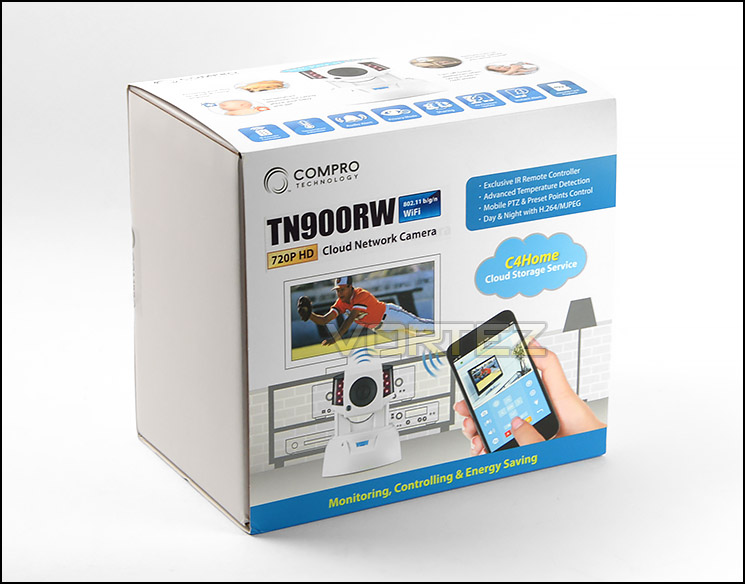
Packaging for TN900RW
Unpacking the accessories, we are left with a number of items which consist of the following:
• TN900RW network camera
• Software CD (contains user’s manual)
• Quick installation guide
• Power adapter
• Wall plate
• Ethernet cable
• Screws for ceiling mounting
• Screw mount
• Camera pads
• USB 802.11n wireless adapter
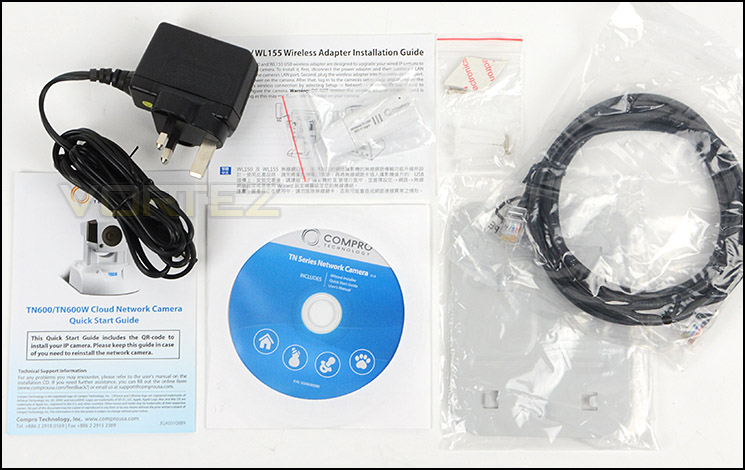
Included items within bundle
Closer Look
TN900RW is quite a sizeable IP camera, measuring 105 x 128.6 x 125.5 mm. Those expecting this camera to be a discreet solution should look elsewhere, TN900RW is bulky and although constructed of plastic the unit feels rather sturdy. This size is needful to accommodate the adept PTZ motor.
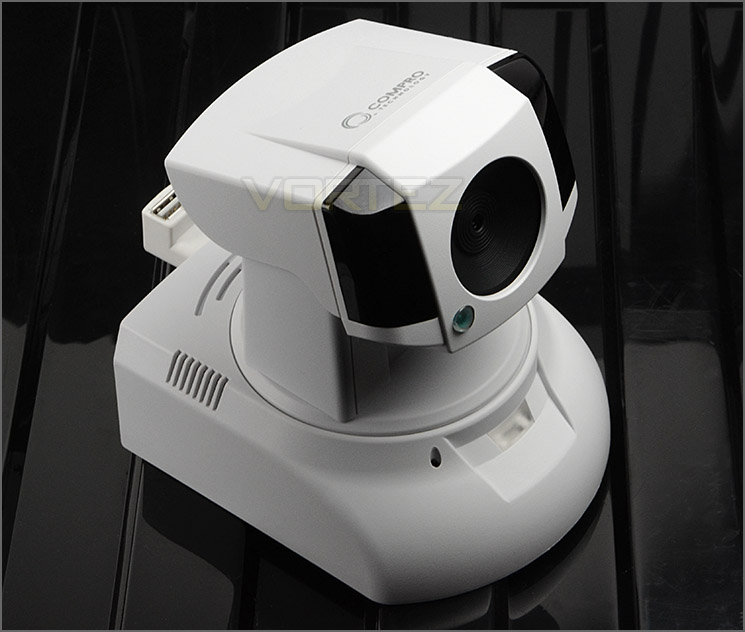
TN900RW is quite a bulky camera
TN900RW uses a 1/3″ progressive scan CMOS sensor which outputs a maximum of 1280×720 and 30FPS. We’re pleased to see that Compro has included HD support with this version and have also packed in 12x Infrared LEDs for night vision functionality of up to 10m.
Our lens also delivers 10x digital zoom and a shutter speed of 1/5 ~ 1/16000 sec.
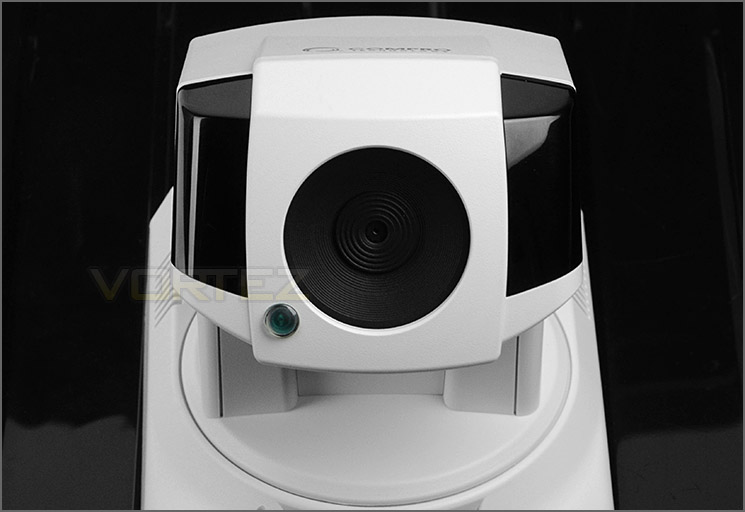
1/3″ progressive scan CMOS sensor and 12 IR LEDs
Having PTZ functionality, TN900RW can pan 340° in a horizontal motion whilst 100° in a vertical movement to give plenty of coverage. Another feature which comes in handy with TN900RW is the two-way audio option, the unit has a speaker system and microphone fitted for this purpose. Compression in this particular regard uses G.711 PCM 64Kbit/sec.
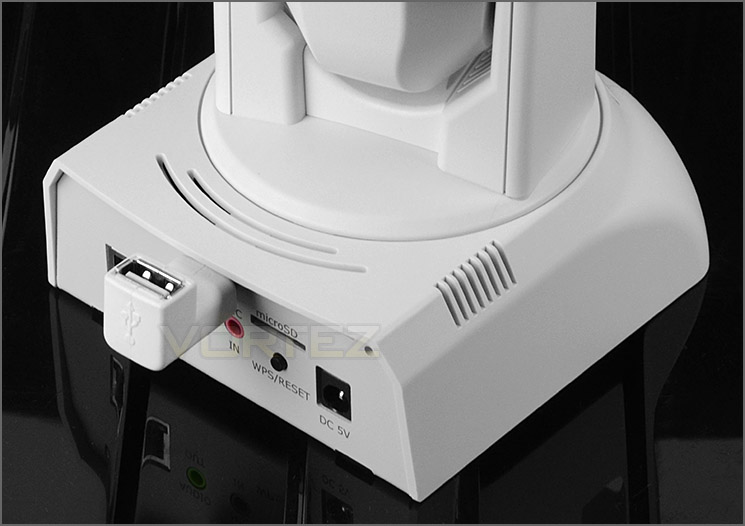
PTZ functionality allowing horizontal and vertical movement
At the back of TN900RW there are an assortment of different ports and options. The following are available:
• LAN port (10/100 Base-T)
• MIC input / Audio output
• USB port for use with USB 802.11n wireless adapter
• WPS and Reset button
• Micro SDHC slot
• DC 5V port
In order to use the camera wirelessly the adapter needs to be plugged into the slot at the back. When plugged in, the wireless adapter flashes erratically – unfortunately this cannot be disabled.
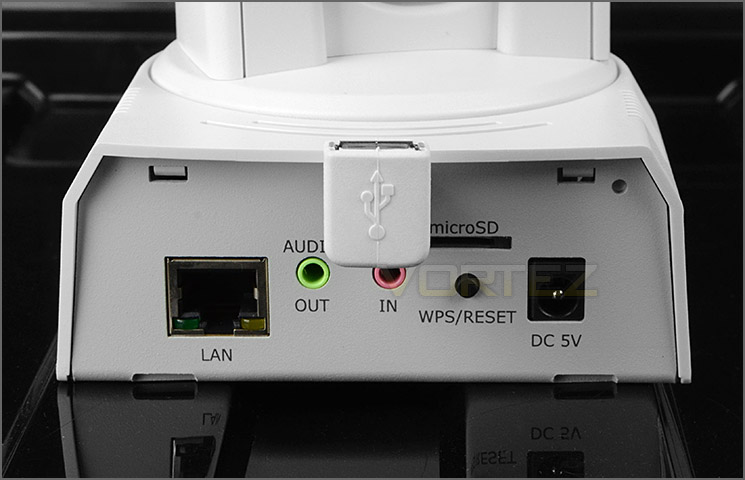
Ports and options at the back
Finally, the underside of TN900RW features a QR code which after a quick scan performs an install and a spec label detailing the serial number and other critical information.
There are four incisions for use with the metal plate which Compro include – this is for mounting purposes and allows the camera to be attached to walls or ceilings.
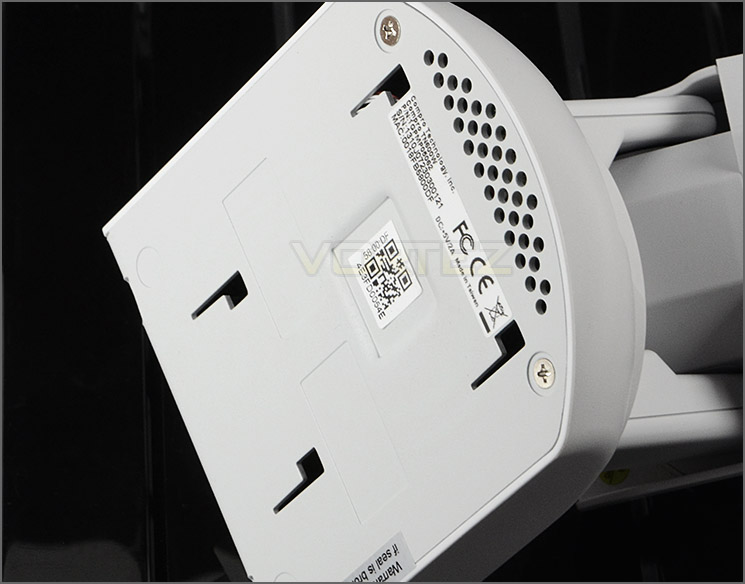
Mounting options underneath
Software UI
iWizard
Initially it’s obligatory to run iWizard off the provided CD that comes accompanied with TN900RW. Loading this application up allows you to locate the camera on your network, in the example below we have used an Ethernet cable to connect TN900 to our network. iWizard also allows you to create a Cloud4Home account and have the camera assigned to an account so that a smartphone can easily access the unit. This software also makes for others to access the camera because it provides the IP address and handles setting these basic connectivity features out without you having to do anything.
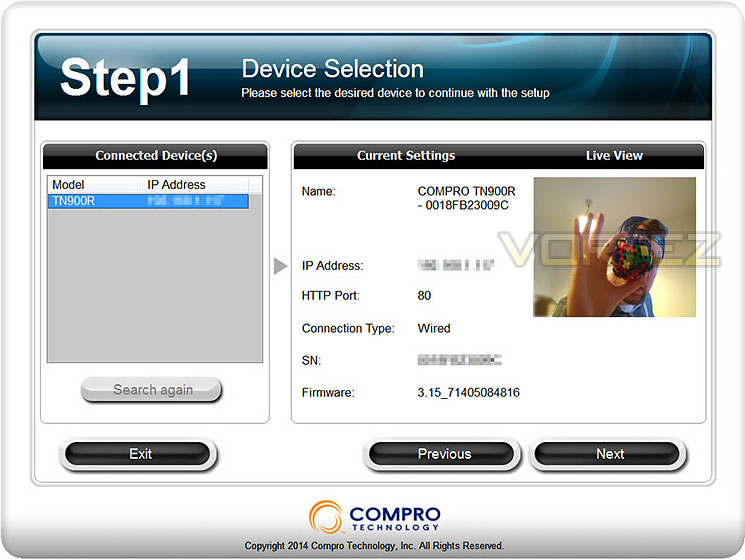
iWizard is used for initial setup
Inbuilt Software Interface
Once iWizard has been used, the camera can then be configured and accessed via its IP address in a web browser. Logging into the software interface gives a plethora of customisation from the framerate, image quality and resolution to the motion detection and recording history. The software is very extensive and also very user-friendly. Users with a basic understanding and needs are catered for and those with a more advanced set of requirements are also entertained too.
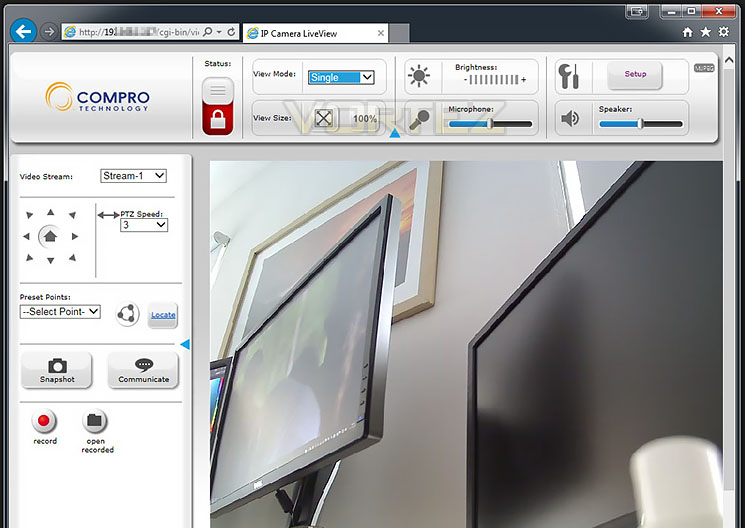
Viewing footage from Live View page
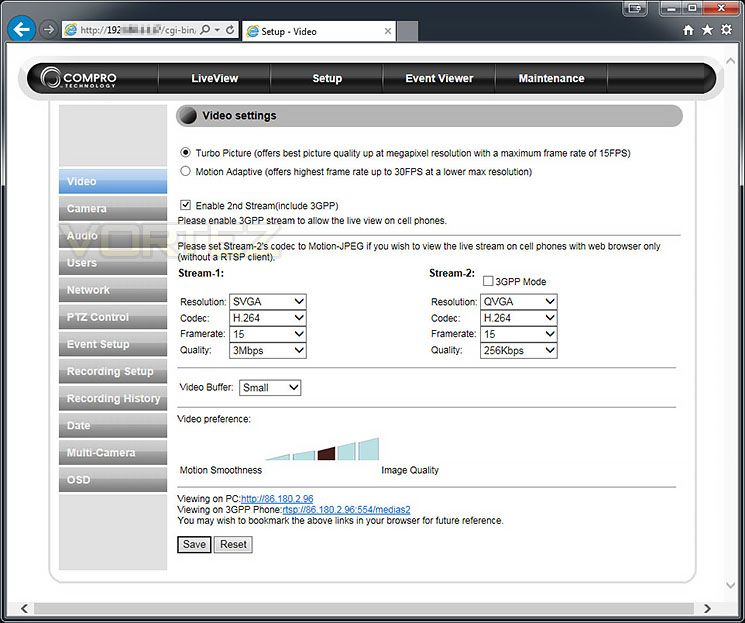
Many options, including advanced camera settings
Remote Control & Temperature Control
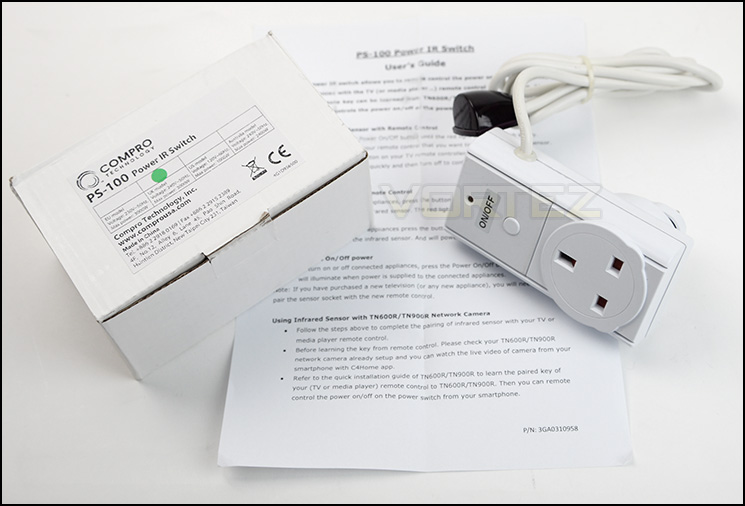
PS-100 extends the infra red capabilities
TN900RW has the added onus of having a built-in IR remote mechanism. This feature allows you to easily control appliances nearby – all they need is IR functionality and you can access them via the camera from anywhere in the world. TN900RW also works in conjunction with the PS-100 Power IR Switch to extend the range of the IR.
This feature isn’t limited to remote control either – temperatures can be obtained from the sensor and notifications can be sent direct to a device such as your mobile phone via the C4Home app.
Having the ability to remotely control certain appliances is very useful because when you’re away from home you can switch on lights, TV, or air conditioning. We’re looking forward to seeing this particular feature implemented on other Compro products as its extremely innovative.
Testing – Smartphone Usage & Image Quality
TN900RW works in collaboration with C4Home. C4Home allows the user to monitor the camera from their smartphone. C4Home can be configured from the iWizard software – this helps to assign settings and enable the camera for use on this platform, the only other thing required is to download the app on a smartphone and input username/password. Below we demoed C4Home on an Android ready smartphone, it was easy to setup and offered great feedback. Furthermore, we were able to speak through the camera by simply pressing the screen and speaking.
(Note: We’ve used the same screen capture from the TN600 review because the application/process is exactly the same).
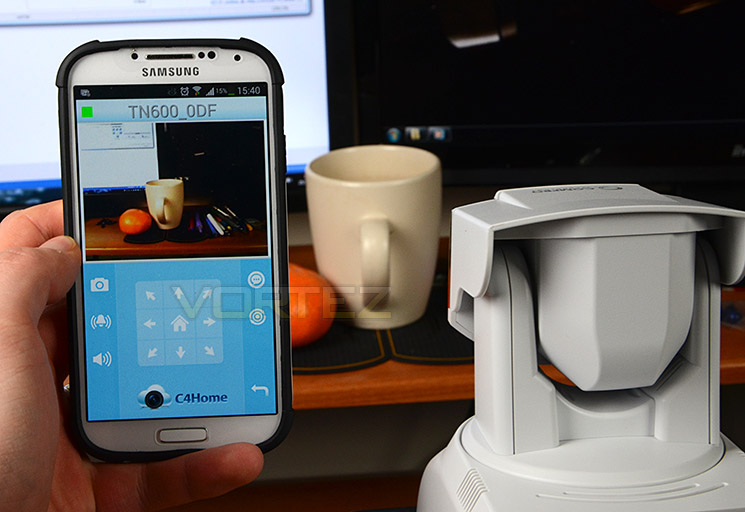
C4Home in action using an Android-ready smartphone
Using iWizard, the port is automatically forwarded for you so that those externally can view the camera. User accounts can be set and given certain permissions to simply monitor or access settings.
TN900RW gives plenty of flexibility for a multitude of different uses; recording footage depends on a micro SD card being present inside the camera. Below, we have uploaded a sample of the camera footage with the following settings: SVGA – 800×600 using H.264 codec which outputs an .avi file. Footage is filmed at best quality 3Mbps and 30 frames per second. Footage is uploaded direct to YouTube without any additional compression. *recording footage direct to computer requires IE – does not work with other browsers*
Although this camera is capable of 720p (1280×720), choosing it within the software suite is problematic – this feature is actually found in the incorrect location. Once 1280×720 is selected, for some unknown reason the focal zoom on the camera increases and the field of view is reduced. Furthermore, rather than night mode being in monochrome (black and white) there is a strong purple tone throughout the footage as per below clip:
Conclusion
We’ve been testing the TN900 for a few weeks now and we have to confess, it’s a mixed bag this time round.
TN900RW is based on a similar design to that of the TN600, the difference being that we now have 720p support in the TN900RW. The unit itself has the same visual appearance, some users might find it quite a bulky design but the build quality is still great.
Having such features as PTZ and WiFi connectivity is very useful and we’re pleased that the software is still iniatuve and easy use. Getting the camera up and running takes very little time, especially since we can configure using the QR code.
Using the camera in SVGA mode which presents us with a resolution of 800×600 provides decent image quality with the settings on their maximum setting. We did encounter some jittering and frame rate loss using our recording (as you can see on the previous page) but the night vision image is actually quite reasonable. The issues arise when we want to use 720p (1280×720) – first of all the actual setting to use this mode is in the wrong location and secondly, selecting this HD mode creates a discoloured image. The footage appears to have a distinct purple tone to it rather than being monochrome for night mode. Furthermore, the focal view of the camera is as though its zoomed in and as a result the field of view is reduced somewhat. All of these problems have been reported to Compro and they are working on resolving them.
We were surprised by the high price of the non-HD TN600 ($180) when we reviewed it and we’re even more surprised at the $300 price tag which TN900RW comes with. The only real benefit to using this camera appears to be the 720p support which, at this stage does not work properly and we of course have the added bonus of the temperature and remote control for appliances nearby but is this enough to encourage a purchase?
TN900RW has some great features and easy to use software but is sadly let down by bugs which prevent you from effectively using 720p mode.
Pros
+ Very easy to use & setup
+ Intuitive software
+ Good build quality
+ Temperature & remote control
+ WiFi functionality
+ Multiple viewing options – smartphone ready
+ PTZ functionality
+ Two-way audio – can speak through camera
+ Microphone is sensitive, picks up even faint sounds
Cons
– Bulky, not discreet
– Can only use Internet Explorer to access
– Buggy software
– 720p HD mode suffers from faults
– Can only record to micro SD
+ Very easy to use & setup
+ Intuitive software
+ Good build quality
+ Temperature & remote control
+ WiFi functionality
+ Multiple viewing options – smartphone ready
+ PTZ functionality
+ Two-way audio – can speak through camera
+ Microphone is sensitive, picks up even faint sounds
Cons
– Bulky, not discreet
– Can only use Internet Explorer to access
– Buggy software
– 720p HD mode suffers from faults
– Can only record to micro SD

Click here for an explanation of our awards at Vortez.net.


