







To accompany our earlier article we take a look at AMD’s latest driver package, featuring performance improvements and Virtual Super Resolution.
This article serves as a companion piece to our previous article Not The End, Merely A New Beginning – AMD Launch Catalyst Omega, which has more general information on AMD Catalyst Omega features.
AMD’s Catalyst driver package has been a mainstay of their graphics program since the good old days of ATI. Through the years it has seen the incorporation of new proprietary technologies – including CrossFire, Eyefinity and most recently Mantle – as well as continual gradual improvements which result in better stability and performance. However in the past week it has briefly broken from its incremental naming scheme to issue a new baseline – the Catalyst Omega Special Edition drivers.
Chock full of new features for the home and gamers, Catalyst Omega will be a new milestone for performance and from which new AMD Catalyst revision are released. Furthermore it incorporates the technologies which could be critically important in the coming months, allowing AMD a head start before new hardware announcements at CES2015.
The name – Catalyst Omega – immediately underscores the importance of the update in a way that a simple number cannot. Whilst ‘Catalyst 14.9.3 beta candidate 3’ sends gamers to sleep (unless it contains a critical fix for their game of the month) Omega turns heads and should have even the mainstream user taking note. Of course, that also means that the new driver package needs to be the most stable released, and AMD are hoping that their crowdsourced priority list for bug fixes will have nailed down major problems before they occur.
More broadly, as we discussed in the earlier article, Catalyst Omega introduces a host of new features, features which will have quite variable impact on day-to-day experiences. Baked-in support for FreeSync, AMD’s means of tapping in to the new VESA Adaptive Sync standard for monitors connected through DisplayPort, is perhaps the most important in the long term. Offering low-latency, tearing-free gaming experiences without relying on V-SYNC and locked 60fps frame rates, FreeSync is set to be a low-cost alternative to NVIDIA G-Sync. Others such as Virtual Super Resolution, video upscaling, and OpenGL 1.2 support will be valued based on the type of user and hardware you have access to, but all should be championed.
AMD Catalyst Omega, In Their Own Words
The latest major release of our drivers are available as a free upgrade for AMD customers. In addition to releasing new versions of the system software at regular intervals, AMD released an AMD Catalyst™ Omega special edition software update that will include enhancements to enrich the user experience.
Why? Today’s hardware and software have become highly interconnected and interdependent dynamically interacting to shape a cohesive computing unit. This symbiotic relationship between hardware and software is vital to the ongoing evolution of future computing devices. New software becomes incorporated into an existing generation of hardware, enabling faster, more capable, and more reliable performance.
The latest major release of our drivers are available as a free upgrade for AMD customers. In addition to releasing new versions of the system software at regular intervals, AMD released an AMD Catalyst™ Omega special edition software update that will include enhancements to enrich the user experience.
Why? Today’s hardware and software have become highly interconnected and interdependent dynamically interacting to shape a cohesive computing unit. This symbiotic relationship between hardware and software is vital to the ongoing evolution of future computing devices. New software becomes incorporated into an existing generation of hardware, enabling faster, more capable, and more reliable performance.
The timing of this release is of course notable. All the major 2014 titles have now been released and in some cases are on to their third or fourth performance/bugfix patch. The large Triple-A market gets a breather, meaning that game-day driver releases won’t be as thick and fast as they have been in the last two months. Rolling in these improvements into a stable baseline to work from lets AMD streamline their own patch development process until the next major release, and prepare for cutting-edge hardware likely to see the light of day for the first time at CES and then a little later at GDC.
Today we’ll be looking at two core aspects of the Catalyst Omega drivers: performance improvements and VSR.
What Is VSR?
AMD’s Virtual Super Resolution (VSR) is a new name for a relatively well established form of anti-aliasing – Super-Sampling. In principle the idea is simple: render a scene in a resolution higher than the monitor’s native, and then down-sample the scene to the native resolution. In theory this provides the best possible anti-aliasing; you’re not relying on complex (and often fallible) edge-detection techniques to discover areas in need of additional sampling or other means to smooth out jaggies, you just simply let your downsampling algorithms do the smoothing for you. Sounds great, right?
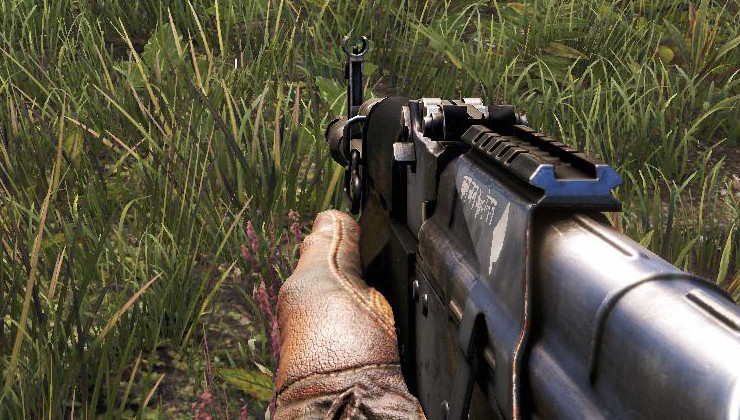
Example of ‘jaggies’ in Far Cry 4 with AA disabled
Unfortunately super-sampling anti-aliasing brings with it one major problem – speed. Rendering a scene at double or four times the resolution is very computationally expensive, and after all necessitated the creation of other anti-aliasing options in the first place. Expecting mainstream GPUs to be capable of this level of performance is simply unrealistic, which is why both NVIDIA and AMD invested resources in developing both open and proprietary anti-aliasing methods which have been incorporated in games engines for years now.
But there has been hope. GPU performance continues to increase apace, and in some cases far surpasses that required to render popular (if not strictly modern) games at far higher resolutions. Knowing this, enthusiasts have continually dabbled with super-sampling unsupported by GPU manufacturers, typically through driver hacks which unlocked the necessary higher resolutions and then downsampled. The spectacular results can be seen with some super-sampled in-game screenshots of games like Skyrim or Crysis 2, but unfortunately game compatibility was often patchy.
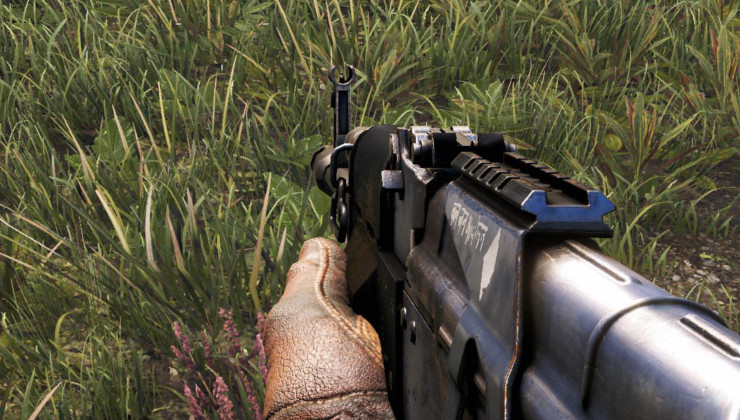
Far Cry 4 with computational AA disabled, VSR @ 3200 x 1800
Thankfully GPU manufacturers are starting to get wise to the untapped potential in their high performance GPUs. Earlier this year NVIDIA implemented Dynamic Super-Resol: Virtual Super Resolution.
In theory VSR and similar techniques offer a number of advantages over situations where their use is not possible. Primarily image quality will be improved, although this will generally be quite subjective. Another benefit is that, by using higher rendering resolutions, you can more accurately assess whether your particular system is capable of supporting a high resolution panel without spending any money up front. Furthermore the technique is broadly independent of the game engine, i.e. rather than needing to incorporate the technique into their game engine it should be supported be default (so long as the title supports the VSR resolution at all).
So, all in all Virtual Super Resolution looks like an excellent inclusion for Catalyst Omega. We’ll see how it performs a little later.
Performance And Feature Testing
There are two aspects of driver performance we need to analyse for this article: in-game performance improvements against previous patches, and the performance impact of gradually higher levels of VSR. The former will allow us to assess whether GPU performance boost are system-wide with Catalyst Omega or game-specific, and the latter gives us some indication of whether VSR is particularly onerous.
We first needed to choose a baseline from which we could compare results. As complicated a process as this might be, it was in fact made easier by historical issues we have his with AMD drivers. Our testing rig (the specs of which are outlined below) suffered from one of the bugs within previous Catalyst packages, where after an install the system would refuse to recognise the presence of a monitor except in safe mode. The one recent driver edition which didn’t exhibit this was the Catalyst 14.9.2beta.
We were apprehensive that Omega would also include the bug, despite it being listed as fixed. Thankfully our fears were unfounded and Catalyst Omega passed the first hurdle, allowing us to install the drivers on the system without a hitch. Along with both packages were the Raptr application, which was nonetheless disabled during benchmarking.
Initial tests looked at the performance difference in a range of games and synthetic benchmarks to assess how well the new drivers had incorporated application-specific improvements and if across the board performance had been unlocked by Catalyst Omega. Subsequent tests analysed AMD Virtual Super Resolution, looking at not only performance but also qualitative impact on the experience.
Test System
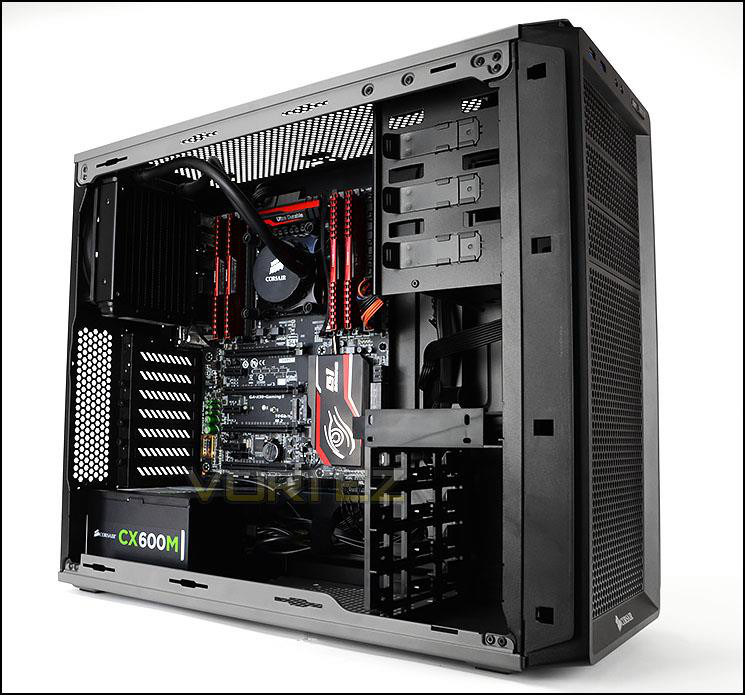
CPU: Intel Core i7-5930K @ 3.5GHz
RAM: 8GB Corsair Vengerance LPX DDR4 (4 x 2GB)
Motherboard: GIGABYTE GA-X99-Gaming 5
Storage: Corsair Force LX 256GB SSD
PSU: Corsair CX600M Modular PSU
GPU: ASUS Radeon R9 290 DirectCU II OC 4GB
OS: Windows 8.1
RAM: 8GB Corsair Vengerance LPX DDR4 (4 x 2GB)
Motherboard: GIGABYTE GA-X99-Gaming 5
Storage: Corsair Force LX 256GB SSD
PSU: Corsair CX600M Modular PSU
GPU: ASUS Radeon R9 290 DirectCU II OC 4GB
OS: Windows 8.1
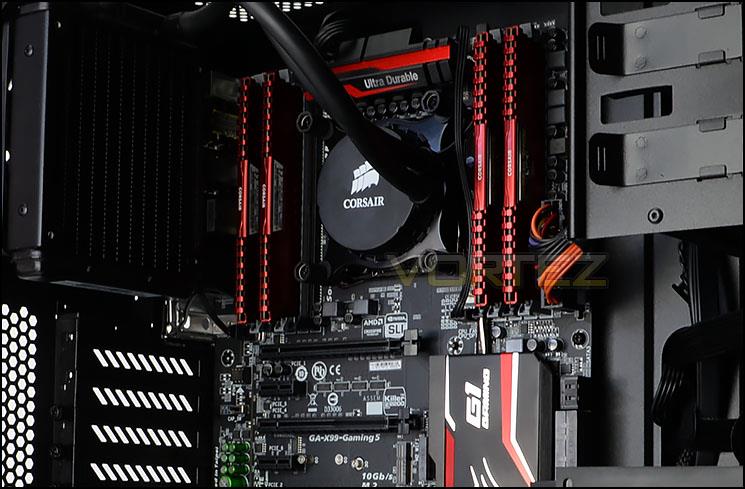
Our test system – featuring the latest Haswell-E technology from Intel, X99 gaming motherboard from GIGABYTE, and additional critical components from Corsair – will allow the AMD GPU to operate unencumbered by some of the usual bottlenecks when gaming. The flip side to this benefit is that the system doesn’t necessarily reflect benefits from reductions in CPU load, which disproportionately favours less muscular CPUs. Furthermore it’s not the sort everyday system which the general populace would have access too. This underlines the fact that the performance figures shown in this article are intended to show relative performance rather than expected performance in mainstream systems.
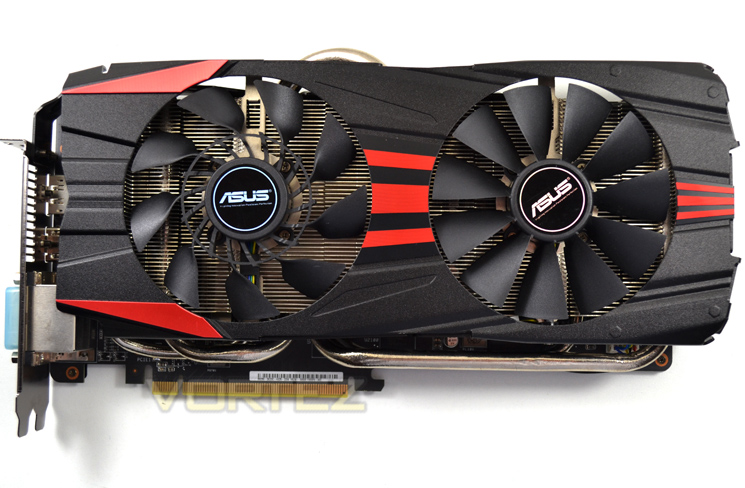
AMD Virtual Super Resolution, the second aspect of Catalyst Omega we want to test, is currently only compatible with the R9 285 and R9 290-series GPUs. The specific card chosen is an excellent example of the R9 290 range, featuring top of the line ASUS non-reference cooling that enables a factory overclock to 1GHz; no further overclocking was performed either on it or the CPU.
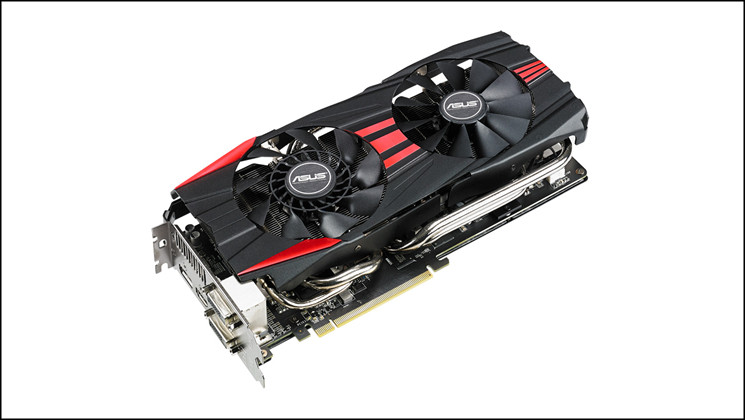
The ASUS Radeon R9 290 DirectCU II OC has 4GB video memory clocked at 5040MHz (GDDR5) and a 512-bit wide memory bus. In essence, only a few GPU models are more capable at high resolution gaming than this card, making it ideal not only for tasting out AMD VSR but also just the sort of card on the cusp of 4K-capable horsepower.
Testing Tools
AMD Catalyst 14.9.2beta
AMD Catalyst Omega
3DMark Firestrike
Cinebench R15
Thief 4
Assassins Creed Unity
Far Cry 4
AMD Catalyst Omega
3DMark Firestrike
Cinebench R15
Thief 4
Assassins Creed Unity
Far Cry 4
The above applications provide us with a modest spread of synthetic and real-world datapoints from which we can assess performance changes for the transition to Catalyst Omega from a recent stable driver release.
Catalyst Omega – Far Cry 4, Assassins Creed Unity & More
Whilst synthetic benchmarking tools and Square Enix’s Thief 4 have canned benchmarks neither Far Cry 4 nor Assassins Creed Unity offer the same luxury. In order to generate repeatable results we navigated to positions in game where reliably repeatable 2-minute snippets of gameplay where possible. Frame per second results were then averaged, providing us with an overall result for that title.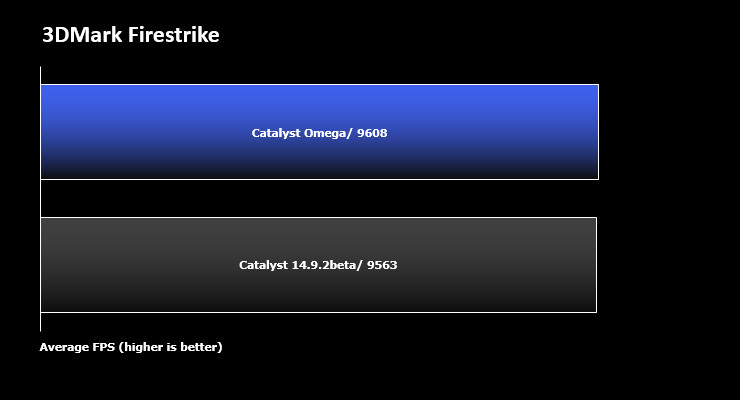
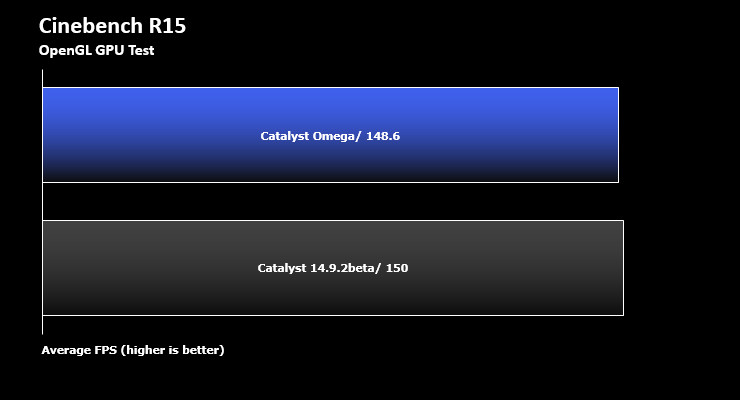
The dual synthetic benchmark results for Cinebench RC15 and 3DMark Firestrike indicate that Catalyst Omega includes performance optimisations similar to 14.9.2beta for these specific applications. That’s to be expected – leaps in general GPU performance for a driver base this mature is unlikely, whilst scenario-specific optimisations are still possible for relatively new or untested conditions.
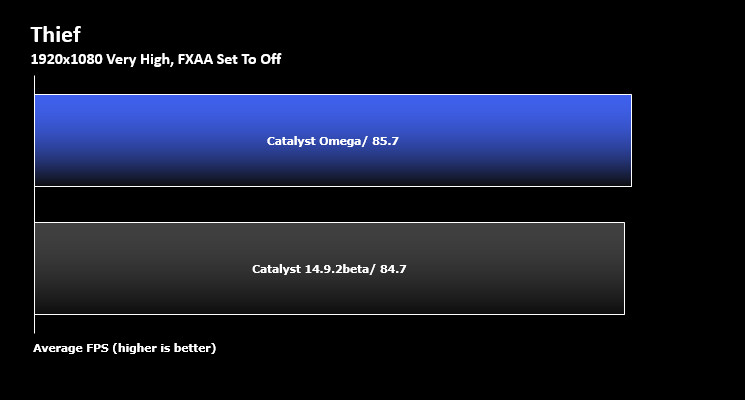
Our Thief 4 benchmark played out roughly as expected – Catalyst Omega’s performance was very close to that of 14.9.2beta.
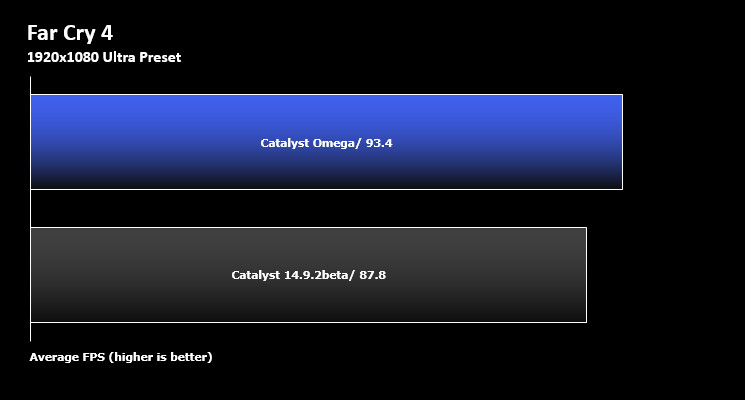
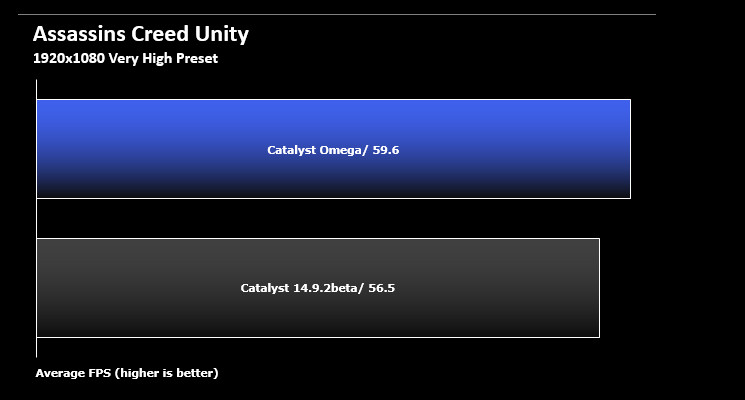
Coupled with Thief 4’s numbers these results speak of something core to modern driver updates – they often don’t provide across the board performance improvements to games, but instead roll in a number of jumps for specific games where rendering can be streamlined whilst not impacting image quality. Take Thief – released in February, the 14.9.2beta driver already incorporates all of the driver-level improvements uncovered over the last ten months; as such, there’s no real step forward in performance for this title. This contrasts well with both Far Cry 4 and Assassin’s Creed Unity, which both saw a hefty >5% improvement due to their post-14.9.2beta release.
So in conclusion, don’t expect miracles from Catalyst Omega unless you’re running on drivers released prior to your game of choice, but equally you shouldn’t expect performance to degrade in the transition.
AMD VSR Walkthrough
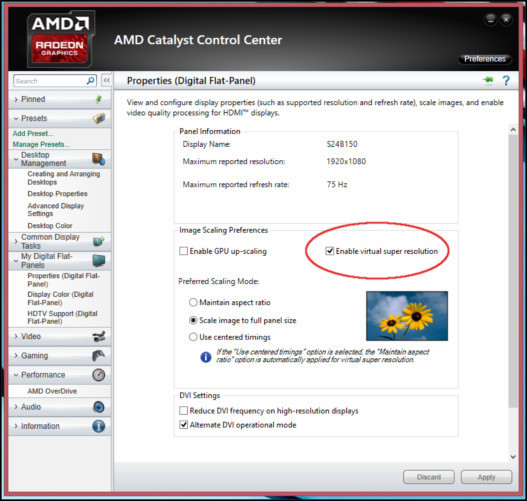
Enabling VSR through Catalyst Control Centre
Virtual Super Resolution is enabled through a simple toggle in the Catalyst Omega advanced options. Switched on, it unlocks additional resolution options in the OS which may also be enabled in games compatible with these higher resolutions. Note however that not all titles (especially older titles) can detect these higher resolutions, making VSR potentially unsuitable in a few circumstances.
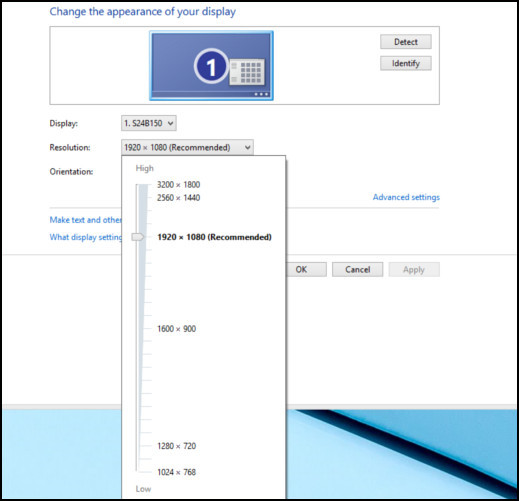
Unlocking additional resolution options
VSR unlocks two resolutions relevant to our needs: 2560 x 1440 (1440p) and 3200 x 1800 (~4K), but we have had reports that other 4K resolutions may sometimes be available that are slightly different from that above. Currently 1440p is the highest resolution which can be viewed as mainstream and generally playable, and is present on a wide variety of gaming monitors recently released 144Hz panels. UltraHD/4K is rarer, although recent prices reductions has seen the up take increase dramatically.
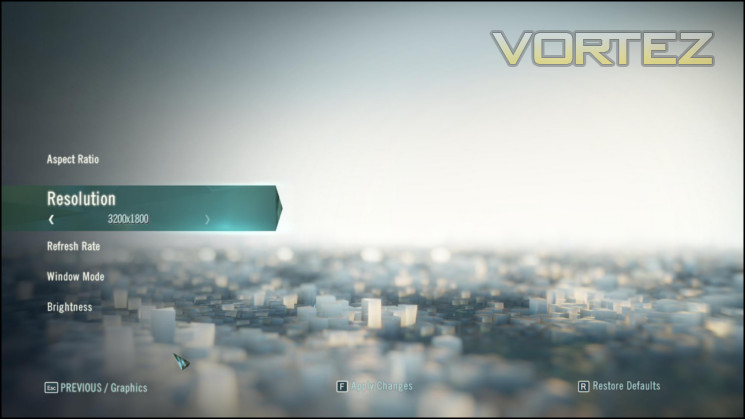
VSR Resolutions are now available in-game
Once enabled and rendering games at these higher resolutions the Catalyst Omega drivers automatically scale the output frame to the monitors native resolution, in our case 1080p. Note that it is possible to also select these resolution options in the OS, scaling your desktop to match. However we found that the results were often didn’t look quite right, and of course desktop icons needed to be scaled to match.
Also worthy of note is the fact that screenshots captured under the effects of VSR will be at VSR resolution, rather than your monitor resolution. Screenshots will therefore need to be scaled or captured through external means to provide direct comparison between VSR and non-VSR configurations.
VSR Performance Cost
During AMD Virtual Super Resolution testing we maintained the quality settings of our previous tests and opted to incrementally change the in-game rendering resolution.
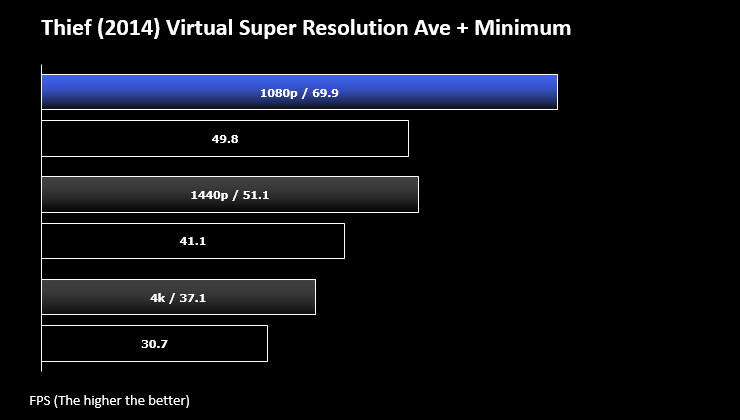
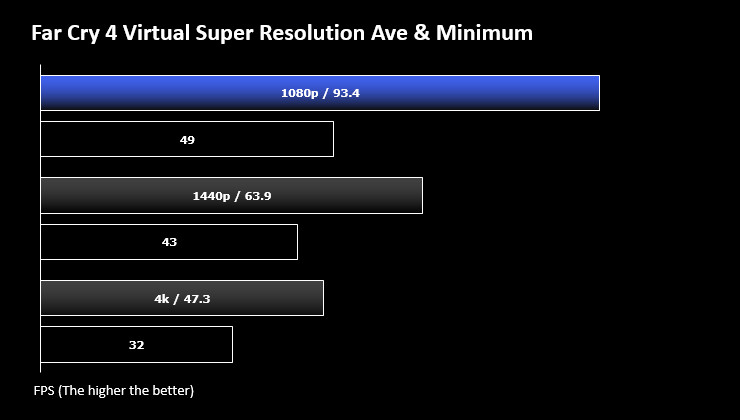
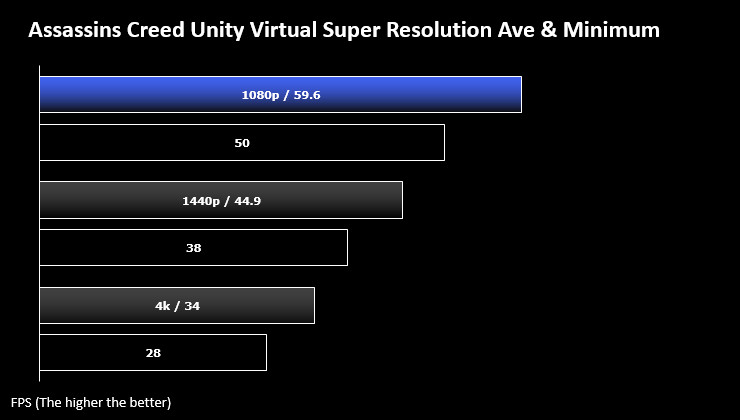
We should admit to being somewhat surprised with the bullish way our ASUS R9 290 Direct stood up to rendering at higher resolutions. Even though the R9 290 is an excellent card, and can be acquired for as little as £235, one doesn’t immediately expect playable 4K scenes using only a single GPU. We should stress however that our testing conditions were chosen for repeatability of conditions rather than complexity. The inclusion of VSR, and the fact that higher resolution rendering doesn’t horrendously tank frame rates to below playable levels, is a big step forward for AMD.
The way that the R9 290 copes with VSR resolutions, even in newer titles, is also very promising for FreeSync. At present reliable frame rates above 30fps, and generally between 40 and 60fps, are the ideal conditions for getting the best out of FreeSync and 1440p on the R9 290 seems to hit just this sweet-spot.
There was a pronounced downside we experienced specifically with Assassins Creed Unity: texture popins. Even given the well-documented problems of notorious console port Assassins Creed Unity, texture pop-in was even more noticable the higher our rendering resolution went; this is despite the 4GB VRAM and 512bit bus of the R9 290. In order to cope with these higher resolutions, whether simulated by super-sampling or output directly to a high resolution panel, development studios will need to improve their processes such that these problems are no longer an issue.
Conclusion – Whole Lot Of Upside
AMD’s Catalyst Omega Special Edition drivers aren’t a huge overhaul of the Catalyst driver package. They don’t have particularly high-impact features, nor a slick new standalone UI to show off. Instead it does what a driver update should: get on with the job of improving the user experience and add quality of life improvements. And in that it succeeds admirably. Naming it ‘Omega’ may seem incongruous with this fact but you have to remember, getting gamers to adopt new drivers is an up-hill battle which needs all the help it can get.
Throughout Catalyst Omega exhibits small but important changes which will aid in the quality of the experience for most users of AMD graphics hardware. Most important in that aspect are the bug-fixes and new video decoding features, purely because there’s not much ‘free performance’ left to be found in AMD’s now mature GCN architecture. Nonetheless AMD have got to grips with their version tracking in order to roll in all the last few month’s improvements to major title releases. It also sets us up for the future by including new technologies such as FreeSync and VSR, whilst broadening support for OpenGL development environments.
As necessary as the Catalyst Omega improvements are creating and deploying them doesn’t get any easier. AMD, in common with every hardware manufacturer, are under continued pressure to have perfect compatibility with new software from day one; however weaknesses in development processes on both sides can lead to poor support and an unsatisfactory experience for all. By creating a new baseline AMD are now set for a strong 2015 where fixes can come more reliably and with wider compatibility, and they can get back to creating great new hardware designs.
As a new baseline AMD’s Catalyst Omega Special Edition drivers will do a very admirable – if not revolutionary – job. They include the most recent performance updates for the latest Triple-A titles, and add new features which will be of tremendous importance to gamers and developers in 2015. Usability-wise, its UI is largely unchanged from previous Catalyst versions, but the fact that it doesn’t look like a major evolutionary jump belies its worth. Download it now.
Pros
+ Improved Game Performance
+ Virtual Super Resolution
+ New Video Decoding Features
+ Welcome bug-fixes to long standing problems.
Cons
– None
+ Improved Game Performance
+ Virtual Super Resolution
+ New Video Decoding Features
+ Welcome bug-fixes to long standing problems.
Cons
– None

Our thanks to Intel, Corsair, GIGABYTE and AMD in providing some of that hardware necessary for this article.


