Adding to their already impressive X99 line-up, GIGABYTE have recently released the GAMING 5P motherboard with upgraded support for 3333MHz DDR4 and a host of new audio and overclocking features…

Product on Review: X99-Gaming 5P
Manufacturer & Sponsor: GIGABYTE
Street Price: £228/$309.99
GIGABYTE recently unveiled their latest addition to their already impressive X99 family of motherboards with the GAMING 5P. The GIGABYTE range is essentially split into three types, the UD (Ultra Durable), the SOC (Overclocking) and the Gaming range, each with varying degrees of performance and features for their given area of expertise. The latter of which we have for review today in the form of the 5P. No cigar for guessing which market the GAMING 5P is directing its attention toward though it does offer much more than gaming prowess! With an upgradeable and high specified audio, a wealth of overclocking features and great aesthetics, the GAMING 5P is setting itself to be the mid-range motherboard of the range and indeed the whole GIGABYTE family.
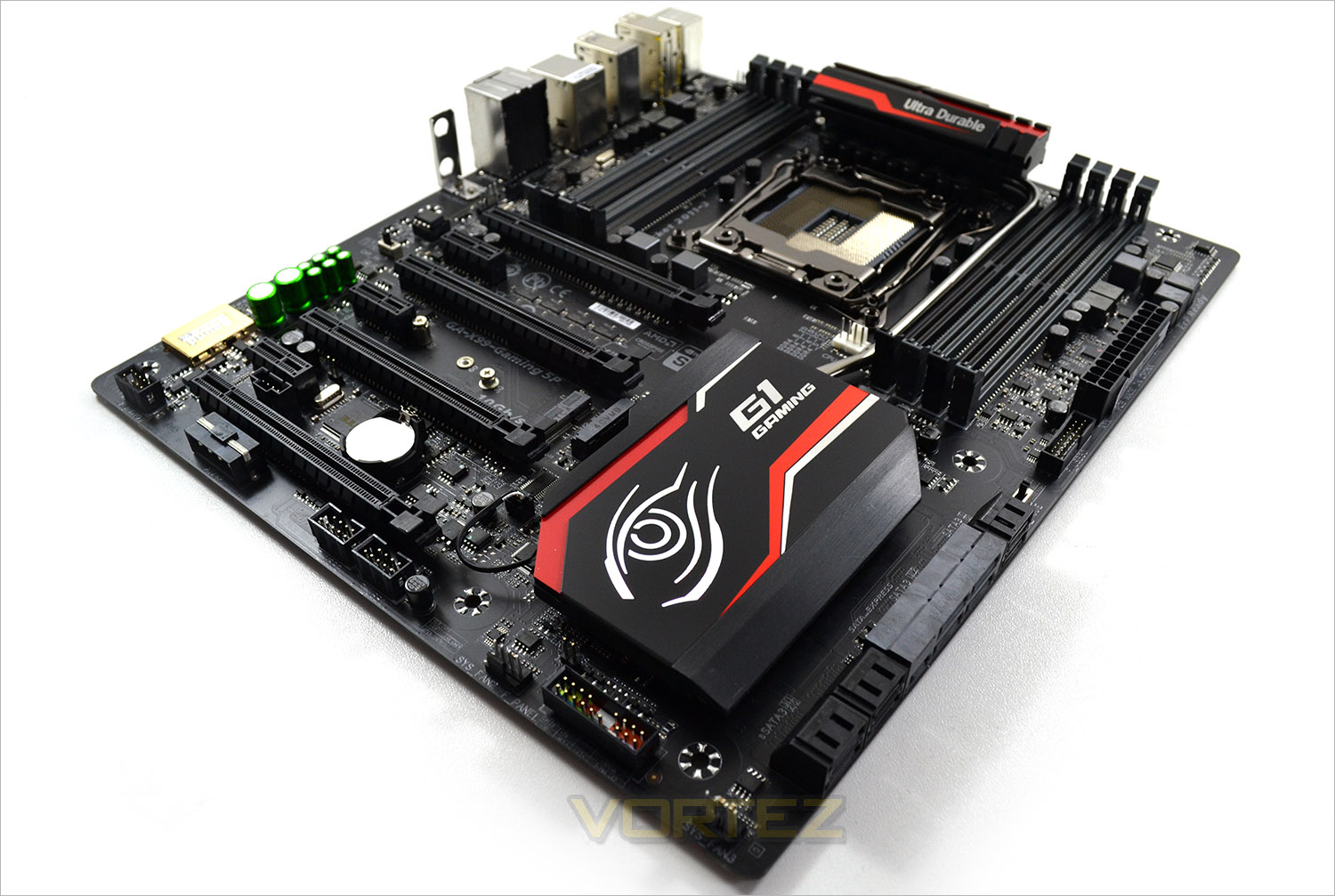
We recently reviewed this motherboards little brother, the mATX GAMING 5 so it will be interesting to see what GIGABYTE have done with the extra real estate available on the full ATX size GAMING 5. Along with the audio improvements, they have incorporated G1 Killer networking, high spec digital power components along with some aesthetic additions that are sure to please those with a windowed case. Obviously, being a gaming motherboard GIGABYTE have included support for 4-way SLI and 4-way Crossfire so you can be assured of ultra gaming performance. The specification of the Gaming 5P then defies the cost because at just £230, it is much cheaper than the range toppers which come in at almost double that.
So on paper, the Gaming 5P appears to tick all the right boxes. Let’s scratch below the impressive surface to see if this motherboard offers true value for money or is simply adding bling to tempt would be gamers to X99…
About GIGABYTE
GIGABYTE was founded in 1986, establishing our uncontested position in continuous technological innovation. By focusing on key technologies and achieving strict quality standards, GIGABYTE has been regarded as an innovative and trusted motherboard leader in the globe. To keep pace in a rapidly changing world, we have offered a comprehensive product line covering Motherboards, Graphics Cards, PC Components, PC Peripherals, Laptops, Slate Devices, Desktop PCs, Network Communications, Servers and Mobile Phones. We are dedicated to building up a full-range digital life, responding promptly and sonorously to consumer needs and desires.
Specification
CPU
Support for Intel® Core™ i7 processors in the LGA2011-3 package
Chipset
Intel® X99 Express Chipset
Memory
8 x DDR4 DIMM sockets supporting up to 128 GB of system memory
* Due to a Windows 32-bit operating system limitation, when more than 4 GB of physical memory is installed, the actual memory size displayed will be less than the size of the physical memory installed.
4 channel memory architecture
Support for DDR4 3333(O.C.) / 3200(O.C.) / 3000(O.C.) / 2800(O.C.) / 2666(O.C.) / 2400(O.C.) / 2133 MHz memory modules
Support for non-ECC memory modules
Support for Extreme Memory Profile (XMP) memory modules
Support for RDIMM 1Rx8/2Rx8/1Rx4/2Rx4 memory modules (operates in non-ECC mode)
Audio
Creative® Sound Core 3D chip
Support for Sound Blaster Recon3Di
TI Burr Brown® OPA2134 operational amplifier
High Definition Audio
2/5.1-channel
Support for S/PDIF Out
LAN
Qualcomm® Atheros Killer E2201 LAN chip (10/100/1000 Mbit)
Expansion Slots
2 x PCI Express x16 slots, running at x16 (PCIE_1/PCIE_2)
* For optimum performance, if only one PCI Express graphics card is to be installed, be sure to install it in the PCIE_1 slot; if you are installing two PCI Express graphics cards, it is recommended that you install them in the PCIE_1 and PCIE_2 slots.
2 x PCI Express x16 slots, running at x8 (PCIE_3/PCIE_4)
* The PCIE_4 slot shares bandwidth with the PCIE_1 slot. When the PCIE_4 slot is populated, the PCIE_1 slot will operate at up to x8 mode.
* When an i7-5820K CPU is installed, the PCIE_2 slot operates at up to x8 mode and the PCIE_3 operates at up to x4 mode.
(All PCI Express x16 slots conform to PCI Express 3.0 standard.)
3 x PCI Express x1 slots
(The PCI Express x1 slots conform to PCI Express 2.0 standard.)
1 x M.2 Socket 1 connector for the wireless communication module (M2_WIFI)
Multi-Graphics Technology
Support for 4-Way/3-Way/2-Way AMD CrossFire™/NVIDIA® SLI™ technology
* The 4-Way NVIDIA® SLI™ configuration is not supported when an i7-5820K CPU is installed. To set up a 3-Way SLI configuration, refer to “1-6 Setting up AMD CrossFire™/NVIDIA® SLI™ Configuration.”
Storage Interface Chipset:
1 x M.2 PCIe connector
(Socket 3, M key, type 2242/2260/2280 SATA & PCIe x2/x1 SSD support)
1 x SATA Express connector
6 x SATA 6Gb/s connectors (SATA3 0~5)
Support for RAID 0, RAID 1, RAID 5, and RAID 10
* Only AHCI mode is supported when an M.2 PCIe SSD or a SATA Express device is installed.
(M2_10G, SATA Express, and SATA3 4/5 connectors can only be used one at a time. The SATA3 4/5 connectors will become unavailable when an M.2 SSD is installed in the M2_10G connector.)
Chipset:
4 x SATA 6Gb/s connectors (sSATA3 0~3), supporting IDE and AHCI modes only
(An operating system installed on the SATA3 0~5 connectors cannot be used on the sSATA3 0~3 connectors.)
USB Chipset:
4 x USB 3.0/2.0 ports (2 ports on the back panel, 2 ports available through the internal USB header)
8 x USB 2.0/1.1 ports (4 ports on the back panel, 4 ports available through the internal USB headers)
Chipset + Renesas® uPD720210 USB 3.0 Hub:
4 x USB 3.0/2.0 ports on the back panel
Internal I/O Connectors
1 x 24-pin ATX main power connectorŠ
1 x 8-pin ATX 12V power connector
1 x PCIe power connector
1 x I/O shield audio LED power connector
1 x heatsink LED power connector
1 x M.2 Socket 3 connector
1 x SATA Express connector
10 x SATA 6Gb/s connectors
1 x CPU fan header
1 x water cooling fan header (CPU_OPT)
3 x system fan headers
1 x front panel header
1 x front panel audio header
1 x USB 3.0/2.0 header
2 x USB 2.0/1.1 headers
1 x Thunderbolt add-in card connectorŠ
1 x Clear CMOS jumper
1 x CPU mode switch
1 x audio gain control switch
Back Panel Connectors
1 x PS/2 keyboard port
1 x PS/2 mouse port
6 x USB 3.0/2.0 ports
4 x USB 2.0/1.1 ports
1 x optical S/PDIF Out connector
1 x RJ-45 port
5 x audio jacks (Center/Subwoofer Speaker Out, Rear Speaker Out, Line In/Mic In, Line Out, Headphone)
2 x Wi-Fi antenna connector holes
I/O Controller
iTE® I/O Controller Chip
H/W Monitoring
System voltage detection
CPU/System/Chipset temperature detection
CPU/CPU OPT/System fan speed detection
CPU/System/Chipset overheating warning
CPU/CPU OPT/System fan fail warning
CPU/CPU OPT/System fan speed control
BIOS
2 x 128 Mbit flash
Use of licensed AMI UEFI BIOS
Support for DualBIOS™
Support for Q-Flash Plus
PnP 1.0a, DMI 2.7, WfM 2.0, SM BIOS 2.7, ACPI 5.0
Unique Features
Support for APP Center
* Available applications in APP Center may differ by motherboard model. Supported functions of each application may also differ depending on motherboard specifications.
@BIOS
Ambient LED
EasyTune
EZ Setup
Fast Boot
Game Controller
Cloud Station
ON/OFF Charge
Smart TimeLock
Smart Recovery 2
System Information Viewer
USB Blocker
V-Tuner
Support for Q-Flash
Support for Smart Switch
Support for Xpress Install
Bundle Software
Norton® Internet Security (OEM version)
Intel® Smart Response Technology
Operating System
Support for Windows 8.1/8/7
Form Factor
E-ATX Form Factor; 30.5cm x 26.4cm
Support for Intel® Core™ i7 processors in the LGA2011-3 package
Chipset
Intel® X99 Express Chipset
Memory
8 x DDR4 DIMM sockets supporting up to 128 GB of system memory
* Due to a Windows 32-bit operating system limitation, when more than 4 GB of physical memory is installed, the actual memory size displayed will be less than the size of the physical memory installed.
4 channel memory architecture
Support for DDR4 3333(O.C.) / 3200(O.C.) / 3000(O.C.) / 2800(O.C.) / 2666(O.C.) / 2400(O.C.) / 2133 MHz memory modules
Support for non-ECC memory modules
Support for Extreme Memory Profile (XMP) memory modules
Support for RDIMM 1Rx8/2Rx8/1Rx4/2Rx4 memory modules (operates in non-ECC mode)
Audio
Creative® Sound Core 3D chip
Support for Sound Blaster Recon3Di
TI Burr Brown® OPA2134 operational amplifier
High Definition Audio
2/5.1-channel
Support for S/PDIF Out
LAN
Qualcomm® Atheros Killer E2201 LAN chip (10/100/1000 Mbit)
Expansion Slots
2 x PCI Express x16 slots, running at x16 (PCIE_1/PCIE_2)
* For optimum performance, if only one PCI Express graphics card is to be installed, be sure to install it in the PCIE_1 slot; if you are installing two PCI Express graphics cards, it is recommended that you install them in the PCIE_1 and PCIE_2 slots.
2 x PCI Express x16 slots, running at x8 (PCIE_3/PCIE_4)
* The PCIE_4 slot shares bandwidth with the PCIE_1 slot. When the PCIE_4 slot is populated, the PCIE_1 slot will operate at up to x8 mode.
* When an i7-5820K CPU is installed, the PCIE_2 slot operates at up to x8 mode and the PCIE_3 operates at up to x4 mode.
(All PCI Express x16 slots conform to PCI Express 3.0 standard.)
3 x PCI Express x1 slots
(The PCI Express x1 slots conform to PCI Express 2.0 standard.)
1 x M.2 Socket 1 connector for the wireless communication module (M2_WIFI)
Multi-Graphics Technology
Support for 4-Way/3-Way/2-Way AMD CrossFire™/NVIDIA® SLI™ technology
* The 4-Way NVIDIA® SLI™ configuration is not supported when an i7-5820K CPU is installed. To set up a 3-Way SLI configuration, refer to “1-6 Setting up AMD CrossFire™/NVIDIA® SLI™ Configuration.”
Storage Interface Chipset:
1 x M.2 PCIe connector
(Socket 3, M key, type 2242/2260/2280 SATA & PCIe x2/x1 SSD support)
1 x SATA Express connector
6 x SATA 6Gb/s connectors (SATA3 0~5)
Support for RAID 0, RAID 1, RAID 5, and RAID 10
* Only AHCI mode is supported when an M.2 PCIe SSD or a SATA Express device is installed.
(M2_10G, SATA Express, and SATA3 4/5 connectors can only be used one at a time. The SATA3 4/5 connectors will become unavailable when an M.2 SSD is installed in the M2_10G connector.)
Chipset:
4 x SATA 6Gb/s connectors (sSATA3 0~3), supporting IDE and AHCI modes only
(An operating system installed on the SATA3 0~5 connectors cannot be used on the sSATA3 0~3 connectors.)
USB Chipset:
4 x USB 3.0/2.0 ports (2 ports on the back panel, 2 ports available through the internal USB header)
8 x USB 2.0/1.1 ports (4 ports on the back panel, 4 ports available through the internal USB headers)
Chipset + Renesas® uPD720210 USB 3.0 Hub:
4 x USB 3.0/2.0 ports on the back panel
Internal I/O Connectors
1 x 24-pin ATX main power connectorŠ
1 x 8-pin ATX 12V power connector
1 x PCIe power connector
1 x I/O shield audio LED power connector
1 x heatsink LED power connector
1 x M.2 Socket 3 connector
1 x SATA Express connector
10 x SATA 6Gb/s connectors
1 x CPU fan header
1 x water cooling fan header (CPU_OPT)
3 x system fan headers
1 x front panel header
1 x front panel audio header
1 x USB 3.0/2.0 header
2 x USB 2.0/1.1 headers
1 x Thunderbolt add-in card connectorŠ
1 x Clear CMOS jumper
1 x CPU mode switch
1 x audio gain control switch
Back Panel Connectors
1 x PS/2 keyboard port
1 x PS/2 mouse port
6 x USB 3.0/2.0 ports
4 x USB 2.0/1.1 ports
1 x optical S/PDIF Out connector
1 x RJ-45 port
5 x audio jacks (Center/Subwoofer Speaker Out, Rear Speaker Out, Line In/Mic In, Line Out, Headphone)
2 x Wi-Fi antenna connector holes
I/O Controller
iTE® I/O Controller Chip
H/W Monitoring
System voltage detection
CPU/System/Chipset temperature detection
CPU/CPU OPT/System fan speed detection
CPU/System/Chipset overheating warning
CPU/CPU OPT/System fan fail warning
CPU/CPU OPT/System fan speed control
BIOS
2 x 128 Mbit flash
Use of licensed AMI UEFI BIOS
Support for DualBIOS™
Support for Q-Flash Plus
PnP 1.0a, DMI 2.7, WfM 2.0, SM BIOS 2.7, ACPI 5.0
Unique Features
Support for APP Center
* Available applications in APP Center may differ by motherboard model. Supported functions of each application may also differ depending on motherboard specifications.
@BIOS
Ambient LED
EasyTune
EZ Setup
Fast Boot
Game Controller
Cloud Station
ON/OFF Charge
Smart TimeLock
Smart Recovery 2
System Information Viewer
USB Blocker
V-Tuner
Support for Q-Flash
Support for Smart Switch
Support for Xpress Install
Bundle Software
Norton® Internet Security (OEM version)
Intel® Smart Response Technology
Operating System
Support for Windows 8.1/8/7
Form Factor
E-ATX Form Factor; 30.5cm x 26.4cm
Features
Support for DDR4 XMP up to 3333MHz
DDR4 memory modules are available at a stock frequency of 2133MHz, but memory vendors encode XMP profiles which can automatically modify the frequency and timings of the supported memory modules to work in par with your CPU. With the X99 Champion Series, GIGABYTE is offering a tested and proven platform that ensures proper compatibility with profiles up to 3333MHz.
Genuine All Digital Power Design
GIGABYTE X99 series motherboards use an all digital CPU power design from International Rectifier® which includes both 4th Generation digital PWM Controllers and industry-leading 3rd Generation PowIRstage® controllers. These 100% digital controllers offer incredible precision in delivering power to the motherboard’s most power-hungry and energy-sensitive components, allowing enthusiasts to get the absolute maximum performance from their new Intel® Core™ i7 Extreme Edition CPUs.
IR Digital PWM & IR PowIRstage® ICs
This new generation of IR® digital power controllers and PowIRstage® ICs feature Isense technology, which provide more precise current sensing accuracy. This helps evenly distribute the thermal loading between the PowerIRstage® ICs, preventing the overheating of each individual PowerIRstage®, resulting in longer lifespan and better reliability.
3-Way / 4-Way Graphics with Premium PCIe x16 Lane Up to *320Gb/s Bandwidth
GIGABYTE X99 motherboards feature a unique PCI Express design that utilizes 100% of all 40 lanes from the CPU when in a 4-Way or 3-Way graphics configuration. Standard designs limit all 4 main PCIe lanes to x8 (64Gb/s) bandwidth, but thanks to the onboard external clock generator combined with the direct connection of one of the x16 lanes to the CPU (switchless design), GIGABYTE X99 motherboards can unlock the full bandwidth available and provide the best graphics bandwidth possible to the user.
Dual M.2 Technology for SSD Drive and WIFI Card
Fast Data Transfer and Advanced WIFI Networking
GIGABYTE X99-Gaming 5P motherboard featuring Dual M.2 technology provides users PCI-Express connectivity for SSD devices and for 11AC WIFI + Bluetooth 4.0 card. Delivering up to 10 Gb/s data transfer speeds, M.2 offers considerably faster storage performance than current mSATA and even SATA Revision 3 (6Gb/s) storage devices. GIGABYTE’s stacked design optimizes the PCB real-estate usage, allowing more components to be efficiently added without compromising any space.
Next Generation SATA Express Connector
GIGABYTE X99 series motherboards feature an onboard SATA Express connector which provides performance far superior to that of current SATA technologies. SATA Express features data transfer rates of up to 10Gb/s, considerably higher than SATA Revision 3 (6Gb/s), which won’t bottleneck faster NAND flash technologies in cutting edge SSDs. SATA Express combines the benefits of PCI-Express and SATA to provide much higher bandwidth, allowing SATA Express based drives to perform at similar speeds as PCI-Express based drives.
GIGABYTE AMP-UP Audio™ Technology
GIGABYTE G1™ Gaming motherboards are equipped with the GIGABYTE exclusive AMP-UP Audio Technology, which provides the industry’s highest level of onboard audio features and technologies. With GIGABYTE AMP-UP Audio, gamers and audiophiles are able to experience crisp, ultra realistic sound effects while gaming, and the richest possible sound experience when listening to their favorite music and movies.
GIGABYTE Direct Audio Route Design
• Shortest route, no wasted trace.
• Less crosstalk & less EMI.
• AMP very close to audio jack for lowest noise.
• Better signal quality and better audio quality.
The shortest route is always the best for audio signals.
The GIGABYTE X99 G1™ Gaming motherboards feature the shortest audio communication paths between each critical component, from chipset to audio jack. This reduces the crosstalk along the way, and the very close proximity of the AMP to the audio jack directly results in lower noise disturbance.
With this high quality audio design, GIGABYTE G1™ Gaming motherboards are able to bring users better signal quality for the absolute best audio experience.
Independent Right and Left Audio Channel PCB Layers
Locating the right and left audio channels on separate PCB layers, GIGABYTE X99 series motherboards are able to eliminate channel crosstalk and maintain the best audio quality.
High End Audio Capacitors
GIGABYTE X99 Gaming motherboard uses the highest quality Nichicon high end audio capacitors. These professional audio capacitors deliver the highest quality sound resolution and sound expansion to create the most realistic sound effects for professional gamers.
Gold Plated Audio Hardware
GIGABYTE G1™ Gaming motherboards pack top quality gold plated audio connectors for improved connectivity and long lasting durability. Gold has superb signal conductivity and will not tarnish over extended periods of use. The Creative Sound Core3D™ processor is also shielded by a gold plated cover which eliminates electrostatic interference.
Killer Networking
NO LAG, JUST FRAG!
Select GIGABYTE X99 series motherboards feature the Killer™ E2200 from Qualcomm Atheros, a high-performance, adaptive gigabit Ethernet controller that offers better online gaming and online media performance compared to standard solutions. The Killer™ E2200 features Advanced Stream Detect technology, which identifies and prioritizes all network traffic to ensure important applications that require high-speed connectivity are prioritized over less important traffic.
All New Heat Sink with LED Design
GIGABYTE X99 series motherboards feature new heat sink designs that offer uncompromisingly efficient cooling on key areas of the motherboard including the PWM area and chipset (PCH). GIGABYTE X99 Series motherboards offer cooling support of the crucial PWM area so even the most aggressive and extreme configurations will be kept well within optimal thermal parameters.
Ambient LED
GIGABYTE X99 motherboards feature LED lighting for the audio guard light path and the back panel LED, providing a cool, custom look to your rig. These lights are now programmable, so you can have them beat to the rhythm of the music you are listening to, or pulse at a soothing pace to create a great atmosphere to enhance the environment of your game, movie or music.
Gold Plating CPU socket
GIGABYTE X99 motherboards come equipped with gold plating for the CPU socket, 4 PCIe slots and over the 8 DIMM slots, which means that enthusiasts can enjoy better connectivity, absolute reliability and longevity for the diverse connectors overtime, without having any concerns about corroded pins and bad contacts.
Long Lifespan Durable Black™ Solid Caps
GIGABYTE X99 series motherboards integrate the absolute best quality solid state capacitors that are rated to perform at maximum efficiency for extended periods, even in extreme performance configurations. This provides peace of mind for end users who want to push their system hard, yet demand absolute reliability and stability. With ultra-low ESR no matter how high the CPU loading, these exclusive capacitors also come in customized jet black, exclusively on GIGABYTE X99 series motherboards.
2x Copper PCB Design(2 oz Copper PCB)
GIGABYTE’s exclusive 2X Copper PCBs design provides sufficient power trace paths between components to handle greater than normal power loads and to remove heat from the critical CPU power delivery area. This is essential to ensure the motherboard is able to handle the increased power loading that is necessary when overclocking.
GIGABYTE Patented DualBIOS™ Design
GIGABYTE DualBIOS™ means that you motherboard has both a ‘Main BIOS’ and a ‘Backup BIOS’, making users protected from BIOS failure due to virus attack, hardware malfunction, improper OC settings or power failure during the update process.
Thunderbolt™ Ready
GIGABYTE X99 brings the expandability needed to make your system the ultimate one with an onboard pin header to accommodate the addition of a GIGABYTE Thunderbolt™ add-in card. The Thunderbolt™ controller can provide bandwidth of up to 20 Gbp/s, compared to a max of 10 Gbp/s on previous generation designs. This allows for incredible data transfer speeds when using high performance storage devices, while also supporting daisy-chaining of up to 12 devices and triple digital display support.
GIGABYTE App Center Including EasyTune™ and Cloud Station™ Utilities
The GIGABYTE APP Center gives you easy access to a wealth of GIGABYTE apps that help you get the most from your GIGABYTE motherboard. Using a simple, unified user interface, GIGABYTE APP Center allows you to easily launch all GIGABYTE apps installed on your system, check related updates online, and download the latest apps, drivers, and BIOS.
DDR4 memory modules are available at a stock frequency of 2133MHz, but memory vendors encode XMP profiles which can automatically modify the frequency and timings of the supported memory modules to work in par with your CPU. With the X99 Champion Series, GIGABYTE is offering a tested and proven platform that ensures proper compatibility with profiles up to 3333MHz.
Genuine All Digital Power Design
GIGABYTE X99 series motherboards use an all digital CPU power design from International Rectifier® which includes both 4th Generation digital PWM Controllers and industry-leading 3rd Generation PowIRstage® controllers. These 100% digital controllers offer incredible precision in delivering power to the motherboard’s most power-hungry and energy-sensitive components, allowing enthusiasts to get the absolute maximum performance from their new Intel® Core™ i7 Extreme Edition CPUs.
IR Digital PWM & IR PowIRstage® ICs
This new generation of IR® digital power controllers and PowIRstage® ICs feature Isense technology, which provide more precise current sensing accuracy. This helps evenly distribute the thermal loading between the PowerIRstage® ICs, preventing the overheating of each individual PowerIRstage®, resulting in longer lifespan and better reliability.
3-Way / 4-Way Graphics with Premium PCIe x16 Lane Up to *320Gb/s Bandwidth
GIGABYTE X99 motherboards feature a unique PCI Express design that utilizes 100% of all 40 lanes from the CPU when in a 4-Way or 3-Way graphics configuration. Standard designs limit all 4 main PCIe lanes to x8 (64Gb/s) bandwidth, but thanks to the onboard external clock generator combined with the direct connection of one of the x16 lanes to the CPU (switchless design), GIGABYTE X99 motherboards can unlock the full bandwidth available and provide the best graphics bandwidth possible to the user.
Dual M.2 Technology for SSD Drive and WIFI Card
Fast Data Transfer and Advanced WIFI Networking
GIGABYTE X99-Gaming 5P motherboard featuring Dual M.2 technology provides users PCI-Express connectivity for SSD devices and for 11AC WIFI + Bluetooth 4.0 card. Delivering up to 10 Gb/s data transfer speeds, M.2 offers considerably faster storage performance than current mSATA and even SATA Revision 3 (6Gb/s) storage devices. GIGABYTE’s stacked design optimizes the PCB real-estate usage, allowing more components to be efficiently added without compromising any space.
Next Generation SATA Express Connector
GIGABYTE X99 series motherboards feature an onboard SATA Express connector which provides performance far superior to that of current SATA technologies. SATA Express features data transfer rates of up to 10Gb/s, considerably higher than SATA Revision 3 (6Gb/s), which won’t bottleneck faster NAND flash technologies in cutting edge SSDs. SATA Express combines the benefits of PCI-Express and SATA to provide much higher bandwidth, allowing SATA Express based drives to perform at similar speeds as PCI-Express based drives.
GIGABYTE AMP-UP Audio™ Technology
GIGABYTE G1™ Gaming motherboards are equipped with the GIGABYTE exclusive AMP-UP Audio Technology, which provides the industry’s highest level of onboard audio features and technologies. With GIGABYTE AMP-UP Audio, gamers and audiophiles are able to experience crisp, ultra realistic sound effects while gaming, and the richest possible sound experience when listening to their favorite music and movies.
GIGABYTE Direct Audio Route Design
• Shortest route, no wasted trace.
• Less crosstalk & less EMI.
• AMP very close to audio jack for lowest noise.
• Better signal quality and better audio quality.
The shortest route is always the best for audio signals.
The GIGABYTE X99 G1™ Gaming motherboards feature the shortest audio communication paths between each critical component, from chipset to audio jack. This reduces the crosstalk along the way, and the very close proximity of the AMP to the audio jack directly results in lower noise disturbance.
With this high quality audio design, GIGABYTE G1™ Gaming motherboards are able to bring users better signal quality for the absolute best audio experience.
Independent Right and Left Audio Channel PCB Layers
Locating the right and left audio channels on separate PCB layers, GIGABYTE X99 series motherboards are able to eliminate channel crosstalk and maintain the best audio quality.
High End Audio Capacitors
GIGABYTE X99 Gaming motherboard uses the highest quality Nichicon high end audio capacitors. These professional audio capacitors deliver the highest quality sound resolution and sound expansion to create the most realistic sound effects for professional gamers.
Gold Plated Audio Hardware
GIGABYTE G1™ Gaming motherboards pack top quality gold plated audio connectors for improved connectivity and long lasting durability. Gold has superb signal conductivity and will not tarnish over extended periods of use. The Creative Sound Core3D™ processor is also shielded by a gold plated cover which eliminates electrostatic interference.
Killer Networking
NO LAG, JUST FRAG!
Select GIGABYTE X99 series motherboards feature the Killer™ E2200 from Qualcomm Atheros, a high-performance, adaptive gigabit Ethernet controller that offers better online gaming and online media performance compared to standard solutions. The Killer™ E2200 features Advanced Stream Detect technology, which identifies and prioritizes all network traffic to ensure important applications that require high-speed connectivity are prioritized over less important traffic.
All New Heat Sink with LED Design
GIGABYTE X99 series motherboards feature new heat sink designs that offer uncompromisingly efficient cooling on key areas of the motherboard including the PWM area and chipset (PCH). GIGABYTE X99 Series motherboards offer cooling support of the crucial PWM area so even the most aggressive and extreme configurations will be kept well within optimal thermal parameters.
Ambient LED
GIGABYTE X99 motherboards feature LED lighting for the audio guard light path and the back panel LED, providing a cool, custom look to your rig. These lights are now programmable, so you can have them beat to the rhythm of the music you are listening to, or pulse at a soothing pace to create a great atmosphere to enhance the environment of your game, movie or music.
Gold Plating CPU socket
GIGABYTE X99 motherboards come equipped with gold plating for the CPU socket, 4 PCIe slots and over the 8 DIMM slots, which means that enthusiasts can enjoy better connectivity, absolute reliability and longevity for the diverse connectors overtime, without having any concerns about corroded pins and bad contacts.
Long Lifespan Durable Black™ Solid Caps
GIGABYTE X99 series motherboards integrate the absolute best quality solid state capacitors that are rated to perform at maximum efficiency for extended periods, even in extreme performance configurations. This provides peace of mind for end users who want to push their system hard, yet demand absolute reliability and stability. With ultra-low ESR no matter how high the CPU loading, these exclusive capacitors also come in customized jet black, exclusively on GIGABYTE X99 series motherboards.
2x Copper PCB Design(2 oz Copper PCB)
GIGABYTE’s exclusive 2X Copper PCBs design provides sufficient power trace paths between components to handle greater than normal power loads and to remove heat from the critical CPU power delivery area. This is essential to ensure the motherboard is able to handle the increased power loading that is necessary when overclocking.
GIGABYTE Patented DualBIOS™ Design
GIGABYTE DualBIOS™ means that you motherboard has both a ‘Main BIOS’ and a ‘Backup BIOS’, making users protected from BIOS failure due to virus attack, hardware malfunction, improper OC settings or power failure during the update process.
Thunderbolt™ Ready
GIGABYTE X99 brings the expandability needed to make your system the ultimate one with an onboard pin header to accommodate the addition of a GIGABYTE Thunderbolt™ add-in card. The Thunderbolt™ controller can provide bandwidth of up to 20 Gbp/s, compared to a max of 10 Gbp/s on previous generation designs. This allows for incredible data transfer speeds when using high performance storage devices, while also supporting daisy-chaining of up to 12 devices and triple digital display support.
GIGABYTE App Center Including EasyTune™ and Cloud Station™ Utilities
The GIGABYTE APP Center gives you easy access to a wealth of GIGABYTE apps that help you get the most from your GIGABYTE motherboard. Using a simple, unified user interface, GIGABYTE APP Center allows you to easily launch all GIGABYTE apps installed on your system, check related updates online, and download the latest apps, drivers, and BIOS.
X99 Chipset Features
First and foremost, Intel’s latest chipset is aimed at the home ‘power’ user, be this performance enthusiast (read overclocker), extreme gamer or indeed for those who require the ultimate media encoding platform. So whatever your vice, Intel have all the bases covered with their latest chipset. This isn’t, of course, to say the Z97 based chipset is poor by comparison (it’s not), but if you want the ultimate – the very best of the best supporting Intel’s 8 core processor (5960X) – then X99 is the only option.
So what’s new with X99?
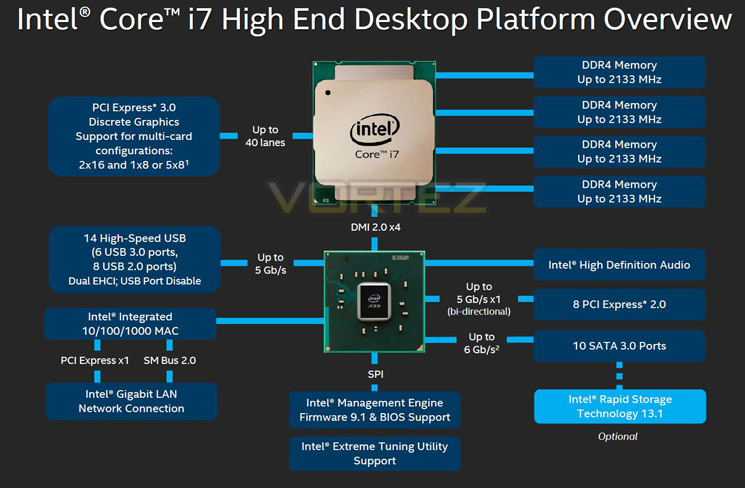
DDR4 Quad Channel Memory
The above block diagram shows us that DDR4 is natively supported. Note that DDR3 is NOT supported (more on this later). While the block diagram shows a rated speed of up to 2133MHz, our test bench happily ran 16GB (4x4GB) Quad channel Corsair Vengeance LPX at 2666MHz. More recently niche 3000MHz and even 3333MHz DDR4 DIMMs are entering the market requiring high voltages and far deeper pocket, but it’s anticipated that eventually 4GHz DIMMs will be the high watermark at retail.
40 x PCI Express (PCIe) Lanes
Depending on CPU choice, the X99 chipset can support up to 40 lanes of PCIe in combinations of 2×16, 1×8 or 5×8. We also expect this figure to increase on some motherboards with the addition of PLX chips given sufficient demand. All of the PCIe lanes are now PCIe 3.0 compliant; while current generation GPU’s rarely saturate PCIe 2.0 it is nice to have that future proofing available, especially for SLI/Crossfire configurations.
USB 3.0
One of the heaviest criticisms of X79 was the lack of natively support USB 3.0 ports, especially when compared to its Z87/97 brethren. We are now happy to report that X99 will support 6 USB 3.0 ports along with 8 USB 2.0 ports. Of course, most motherboard manufacturers will also add the usual ‘aftermarket’ USB 3.0 support from components such as ASMedia and Marvel so transfer speeds of up to 5GB/s and port numbers in the double-digits can theoretically be achieved.
SATA 3.0 And Next Generation Storage
Despite having huge computational benefits, X79 was oft criticised by the lack of high speed SATA 6Gbps ports. This has been rectified with the X99 chipset supporting 10 x SATA 3.0 ports attaining a theoretical speed of 6Gb/s which can be enhanced using the latest Intel Rapid Storage driver to speeds of 10 Gb/s!
SATA of course has its limitations, which is where newer next generation storage technologies come in. First seen in limited quantities on Z87 and more widely on Z97, M.2 and SATA Express technologies unlock transfer speeds far in excess of SATA III. Support for PCIE storage remains sporadic – M.2 is starting to pick up but SATA Express is exceptionally rare – but it’s slowly proving to be a valid alternative to SATA 3 and mSATA. Many X99 motherboards support M.2 X4, which makes use of four PCIE lanes for up to a stunning 32Gbps bandwidth; however few M.2 drives come close to saturating even Gen 1’s ~8Gbps.
We must say that Intel have pulled out all the stops here. Clearly they have taken on board user feedback regarding the deficiencies of X79 by incorporating more modern storage and expansion options. No longer is the Enthusiast flagship the poor I/O brother to Z87/97. Perhaps the biggest draw though is the introduction of DDR4. This will see huge speed gains in almost every aspect of personal computing. With 8x8GB Dimms supported a mammoth 64GB of DDR4 will make the X99 chipset massively future proofed.
We will cover the overclocking capabilities of the new chipset and each motherboard specifically in the overclocking section but this area failed to disappoint too.
Overall, there is little to criticise here. While we would have liked 40 PCIe lanes regardless of CPU, we understand there has to be some compromise to keep costs down for the budget conscious so how many PCIe lanes you have available will be dictated by CPU choice and not the motherboard. The entry level 6 core i7-5820 will have 28 PCIe lanes at a cost of £299 (At the time of release), while the flagship 8 core i7-5960X and 6 core i7-5930K will both have the full blown 40 lanes available. Aside from lanes, cores cache and clockspeed, all of the X99 features will be available regardless of CPU choice and to this end we are grateful. We suspect that future additions to the CPU range will hit the middle ground while the 5960X will receive a speed bump although this is pure speculation at this point.
Which chip would we go for? Obviously if money was no object then the i7-5960X is the way to go, not only does it have the full 40 lanes available but it is a true 8 core (16 threads) CPU. The 5930K would be the obvious choice for the consumer and the CPU that we think will prove most popular due to the balance of speed vs. cost.
Whichever CPU you opt for though, you can be assured that the X99 chipset offers the very best available. It is powerful, feature packed and as you will see, the unrivalled component of choice for enthusiast users.
Packaging & Accessories
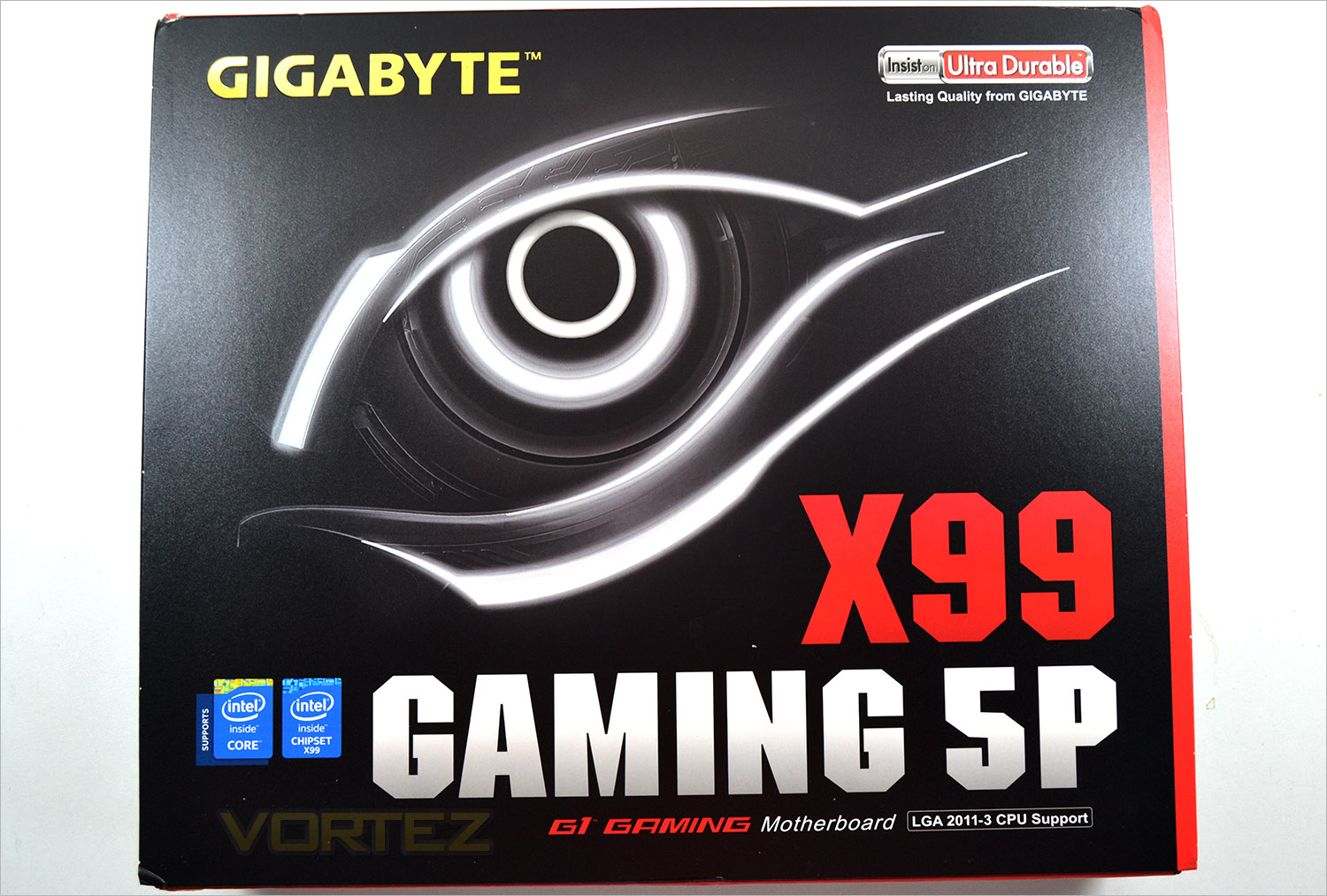
The front of the package features GIGABYTE’s latest design incorporating a bold ‘in-your-face’ font with the ‘eye’ and Ultra Durable Logo. Each motherboard family in the GIGABYTE range features it’s own colour set with the UD having yellow, SOC being Orange and the Gaming with red highlighting.
The box features a flip lid which has a window inside giving us a brief glimpse of the mainboard beneath. (Un)fortunately the motherboard is wrapped in an anti-static bag so it is difficult to see the motherboard but if you are truly concerned with what the motherboard looks like then flipping the box over will appease you.
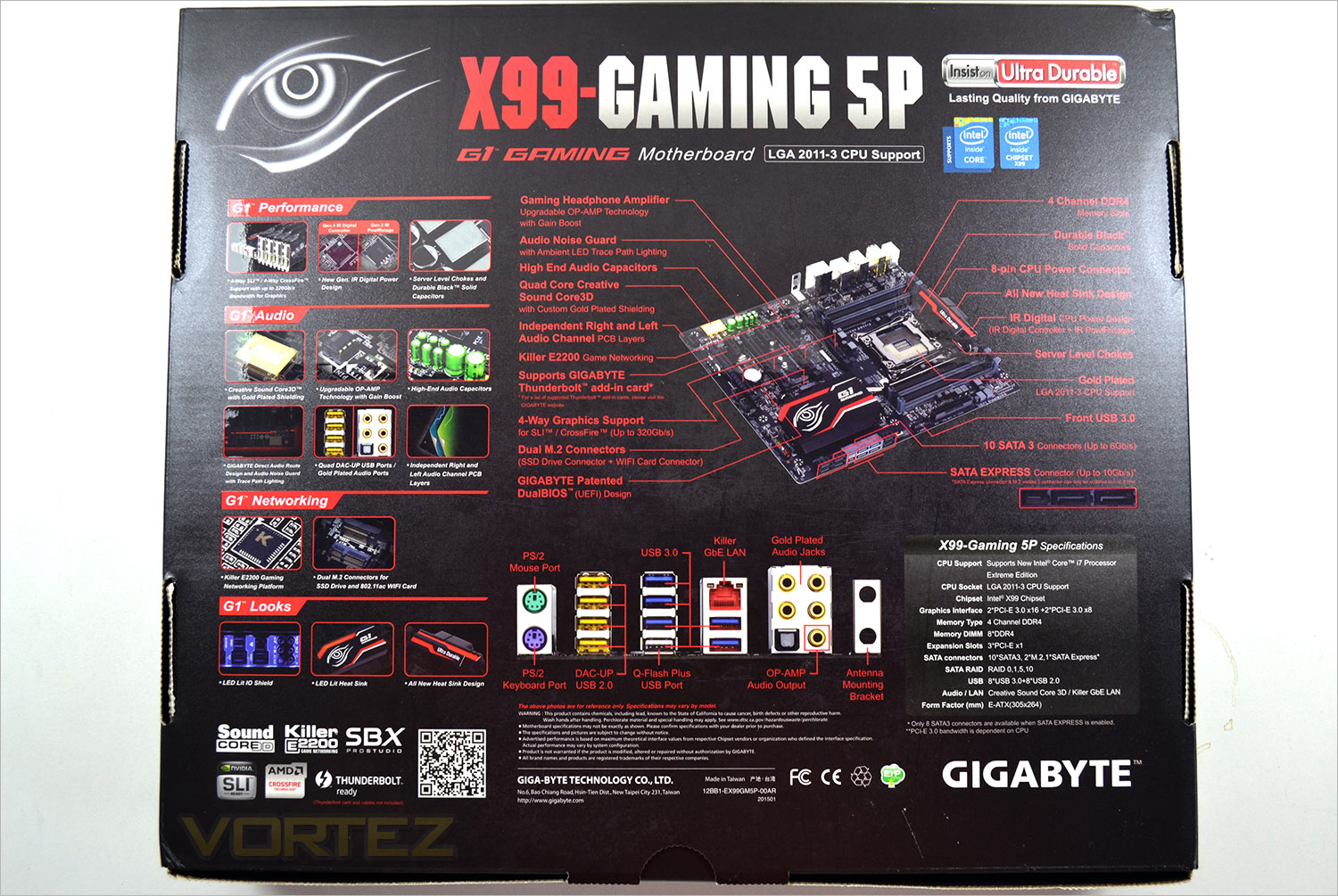
The diagrammatic view of the motherboard gives us an insight to the features. We liked the blown up photos of the components and a brief description telling us what task each performs. There is little information omitted from the back of the packaging that we ourselves would have included so props to GIGABYTE for doing a solid job here.
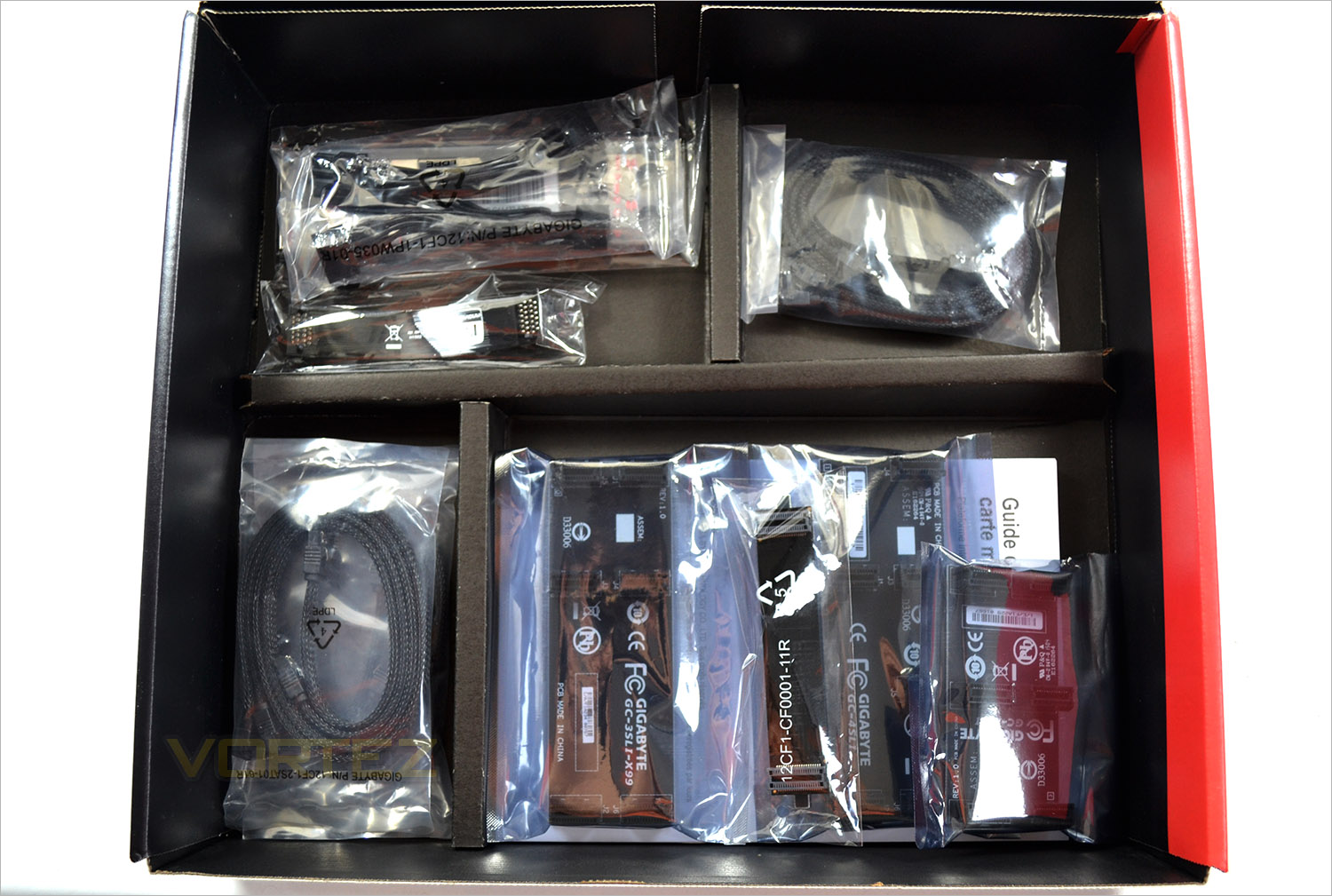
We often find that it is the accessories, not the product itself that often suffers from corner cutting but thankfully we do not witness this here as GIGABYTE have not only given us an inventory to be proud of but the quality is also very good. the illuminated backplate is a God send for those who have there cases hidden away as fumbling in the dark trying to put a cable in the wrong hole can prove disastrous! This is a feature we would like all manufacturers to adopt in gaming motherboards as gamers are perhaps the most likely to switch out peripherals more often than most enthusiasts.
In addition to the back plate we get four (yes 4x) SLI bridges, a crossfire bridge, 6 SATA cables (3x angled), a well written motherboard manual, multilingual installation guide and utility/driver CD. It is worth noting also that the SATA cables are braided black which look very impressive.
First Look
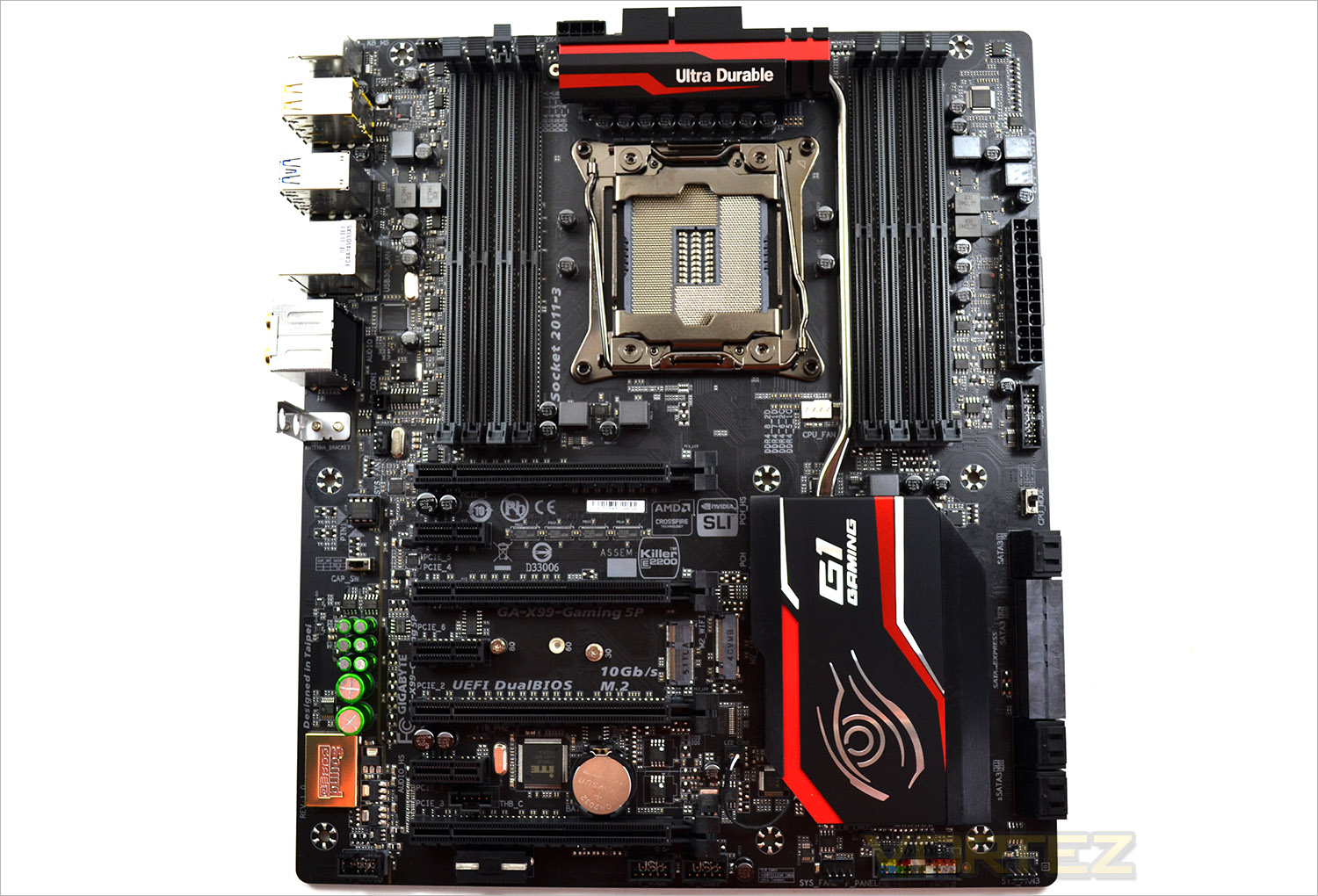
GIGABYTE have clearly been consulting gamers regarding the colour scheme they prefer. Visit any enthusiast forum and the vast majority of PC custom builds feature a red and black theme and this is where the GAMING 5P will complement such builds perfectly. The satin black PCB with matching black sockets looks domineering with flashes of red here and there highlighting what is a great looking motherboard, if somewhat ‘tried and tested’ by PC builders.
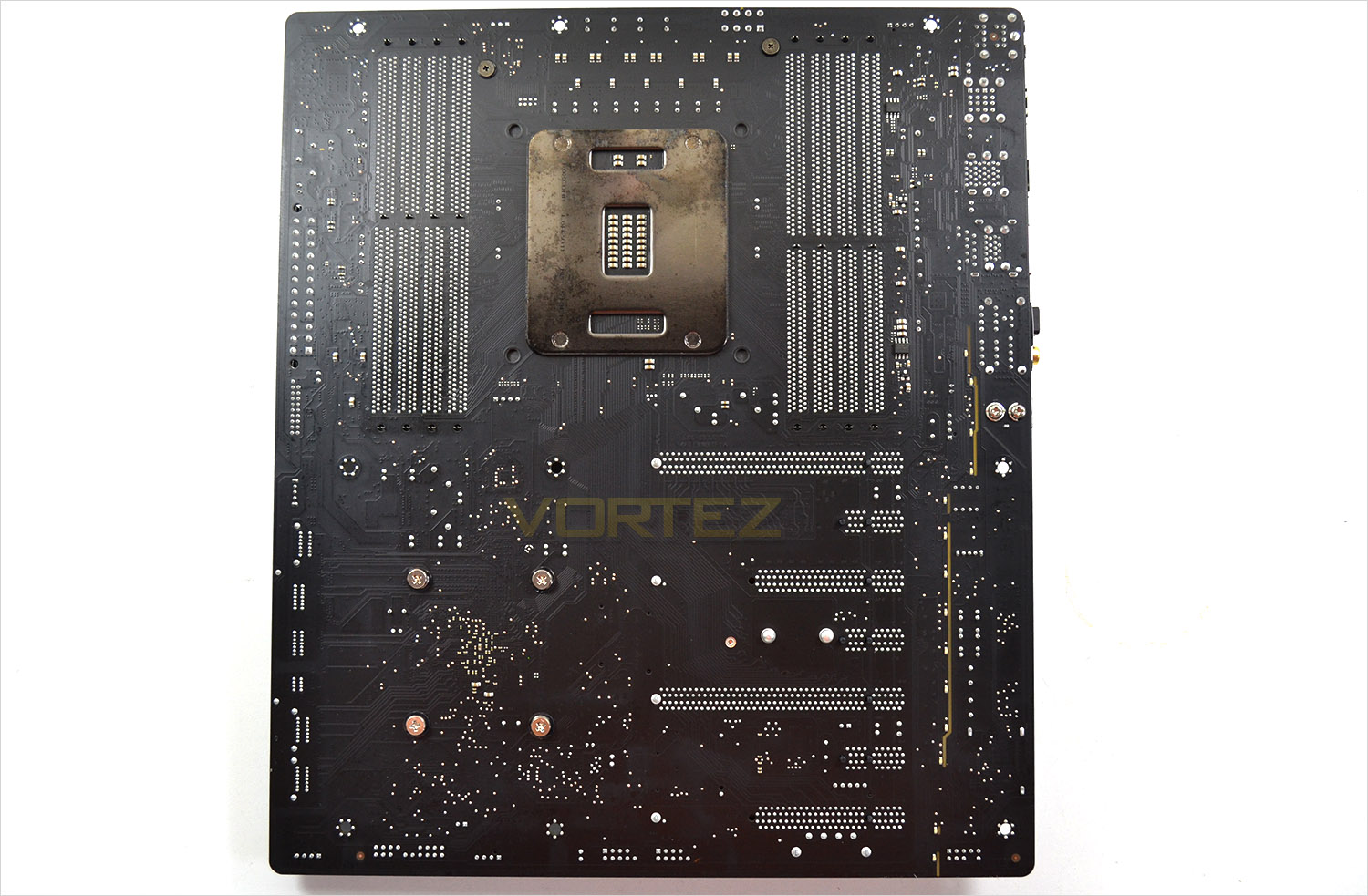
Flipping the board over we find vast amount of unpopulated space which is a good thing for those want to use there own backplates and not the included X99 backplate. We can also see that the LED strip to the right passes all the way through the mainboard to light up the rear of the board when installed which look fantastic in darkness.
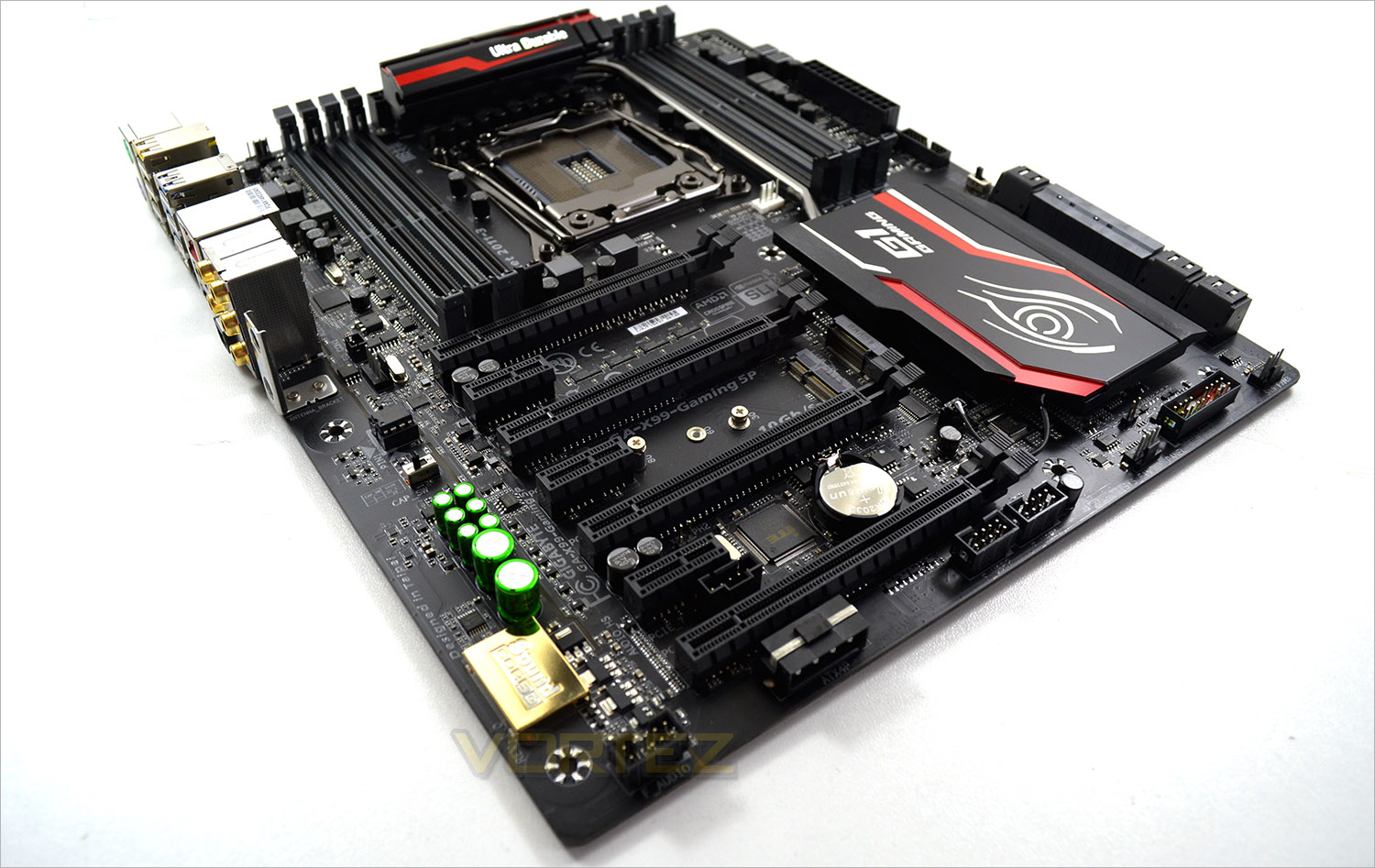
Overall, the motherboard is aesthetically pleasing. While it cannot be described as ground breaking it is sure to please the gaming masses, especially if red and black colour scheme is your thing. Our only criticism of the looks of the main board are the green audio caps which look distinctly out of place here.
Closer Look
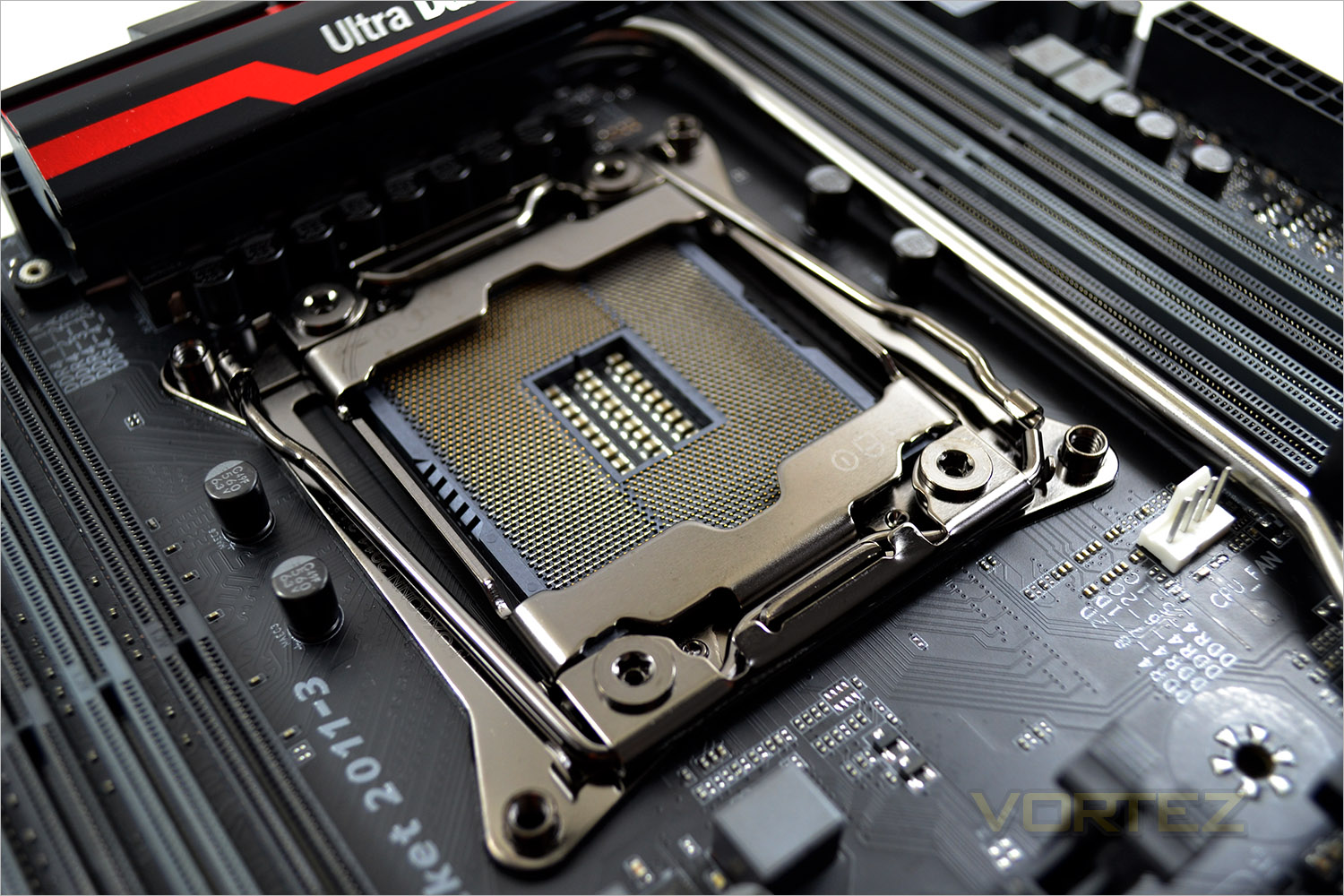
The socket area is a little cramped with the memory sockets situated close to the socket. While this won’t be an issue for those whom are watercooling, those who have oversized CPU heatsinks and tall memory modules may struggle. We also found that the 8 pin CPU power socket was difficult to remove due to the close proximity to the VRM heatsink. A key feature of the Gaming 5P is it’s ability to support high speed (3333Mhz) of DDR4 upto a maximum of 128GB in a quad channel x2 (8 slots) configuration.
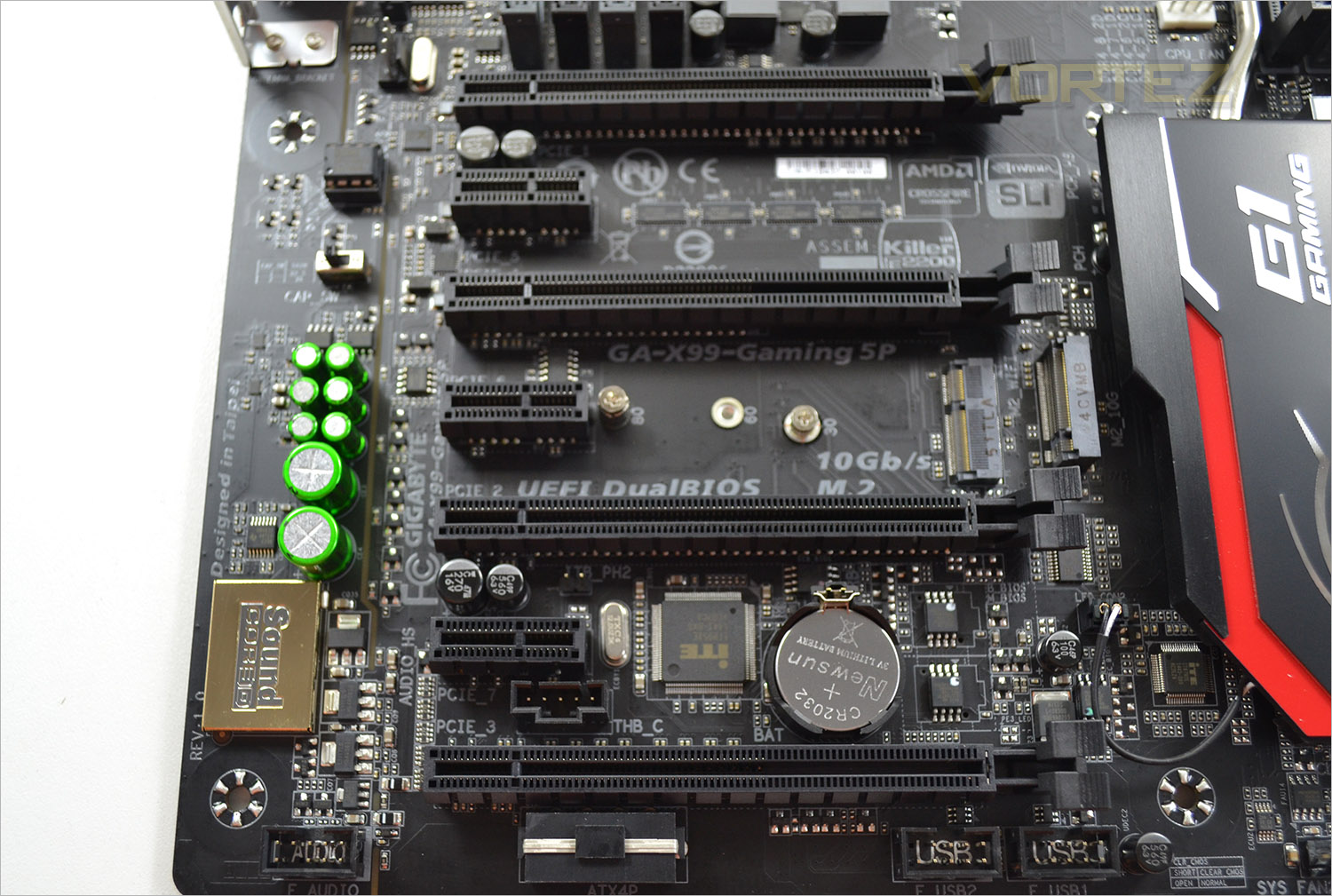
The PCIe area is capable of accommodating four graphics cards with a top to bottom configuration of 16x, 8x, 16x, 8x for slots 1 ,3, 2, 4. So for SLI Crossfire with 2 cards , slots 1 and 2 would give you 16 lanes each, slap in a third or fourth card in slots 3 or 4 and the bandwidth to slots 1 and 2 would be reduced to 8x.
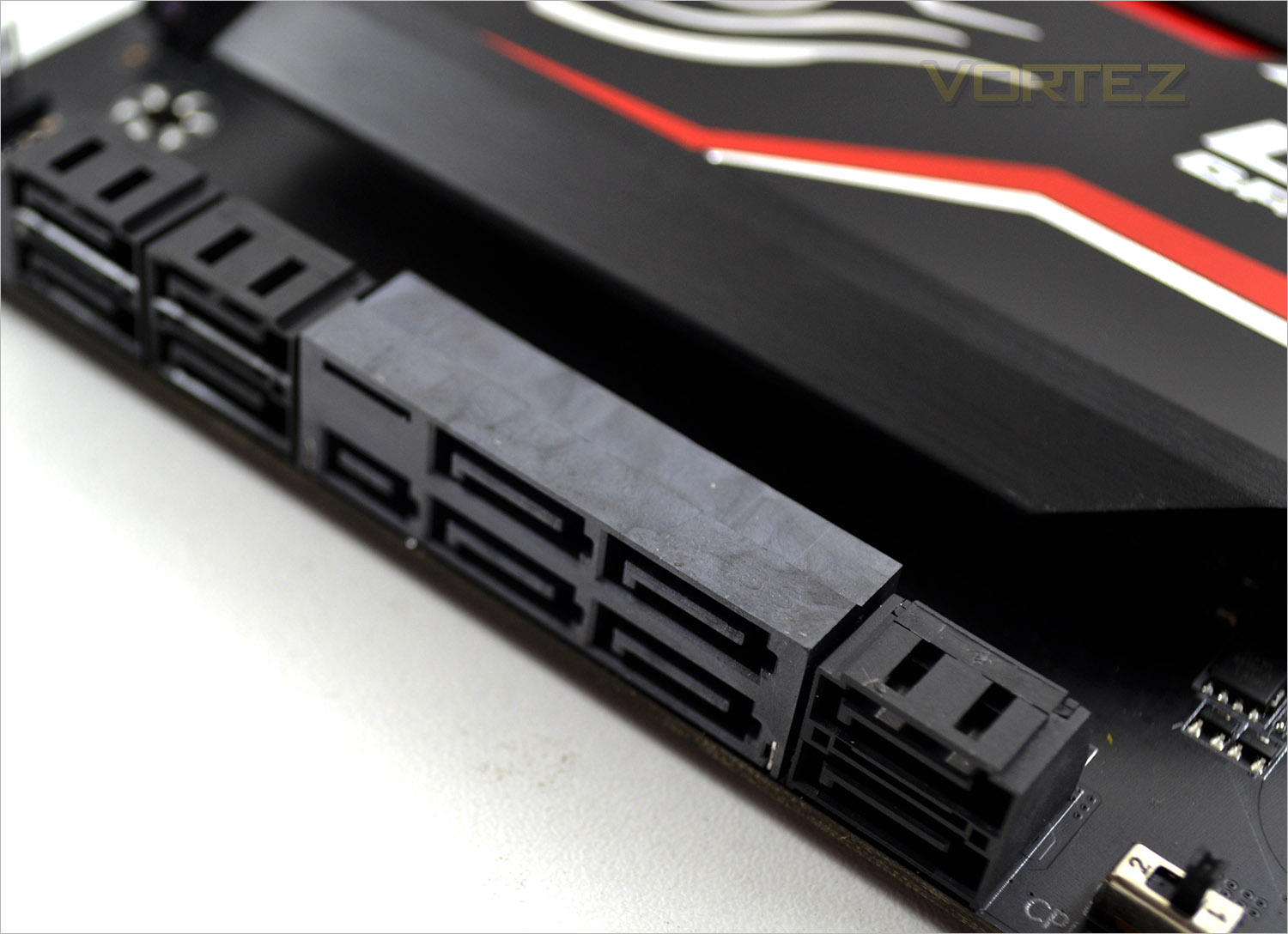
Storage for the Gaming 5P comprises of (grey) a M2_10G SATA Express port which is joined by 4x SATA 3 ports. With the 10G port in use the two adjacent (lowest) SATA 3 ports will not work. In addition to these ports are a further 6 SATA 3 ports making a useable 10 ports (without 10G installed) or 8 ports with.
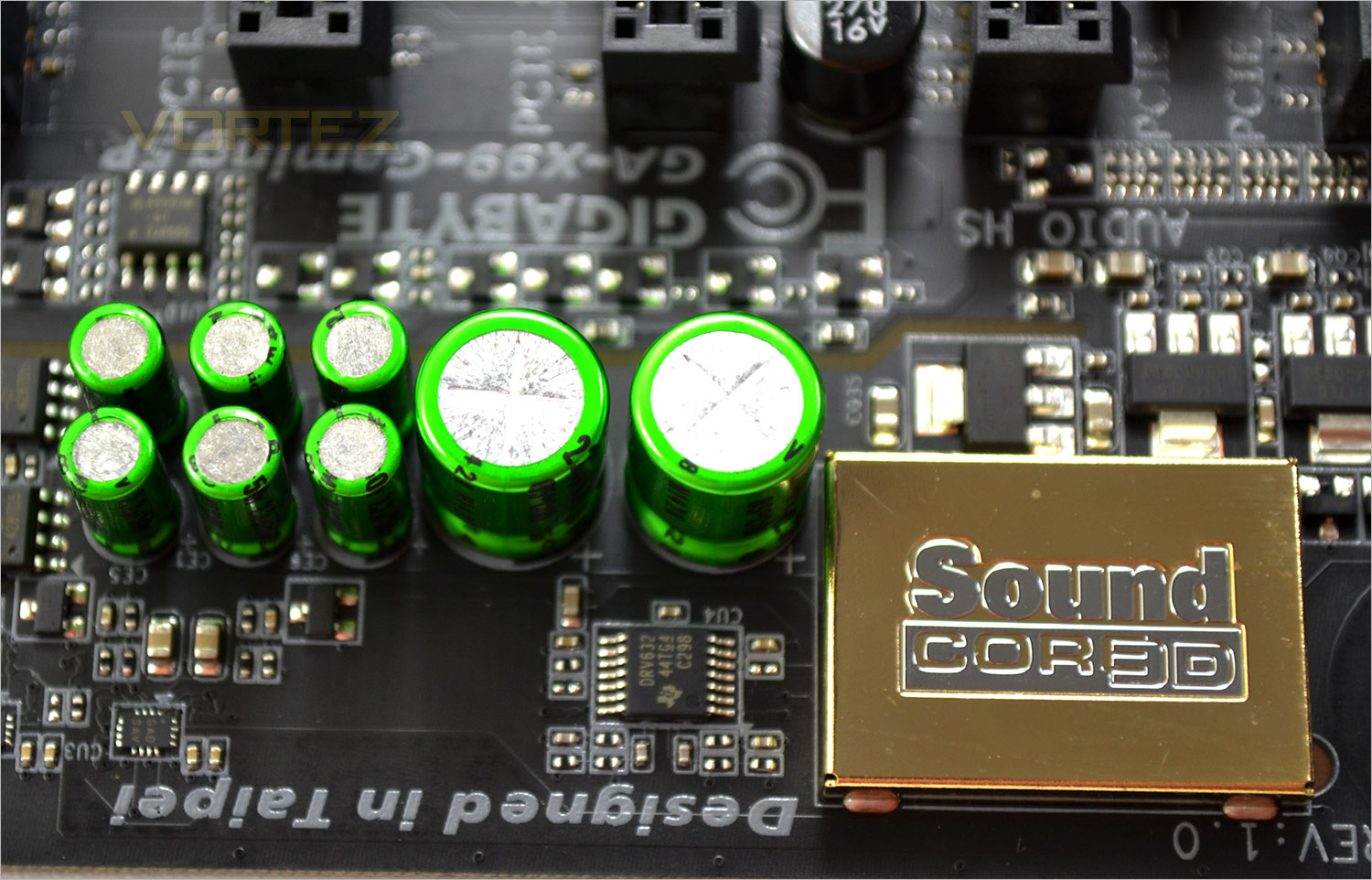
The audio capabilities are a key component of this motherboard and GIGABYTE have ensured it is well specified yet upgradeable should you require it. At the heart of the system is a Creative Core 3D chip which is a quad core processor and this is complimented with Bi-Polarized capacitors. The included OP-AMP is removeable and thus upgradeable should you need to however all but the most stringent of audiophiles will find the audio from this unit more than satisfactory. If that wasn’t enough then you will be pleased to hear (excuse the pun) that the mainboard has twin layers, one for each L/R channel and furthermore a gain boost switch to improve headphone boost (2.5x or 6x).
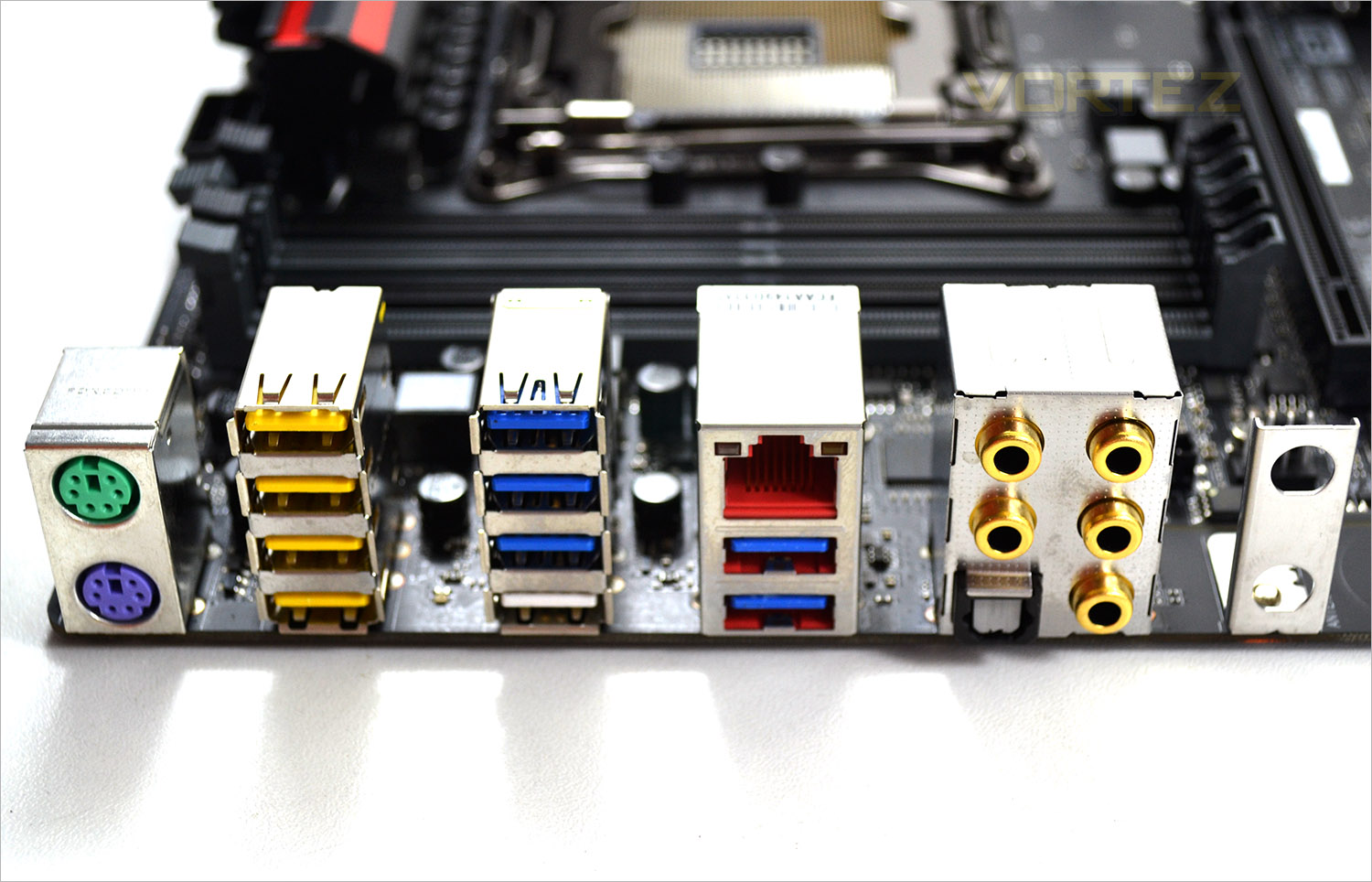
Finally the I/O area includes from left to right: PS/2 Keyboard/Mouse connectors, 4x USB 2.0/1.1 ports, 4x USB 3.0 ports, am RJ-45 port powered by the Killer chip, a further 2 USB 3.0 ports that can be used for Q-Flash. We then have the audio ports and finally a WI-FI antenna bracket.
Detailed Look
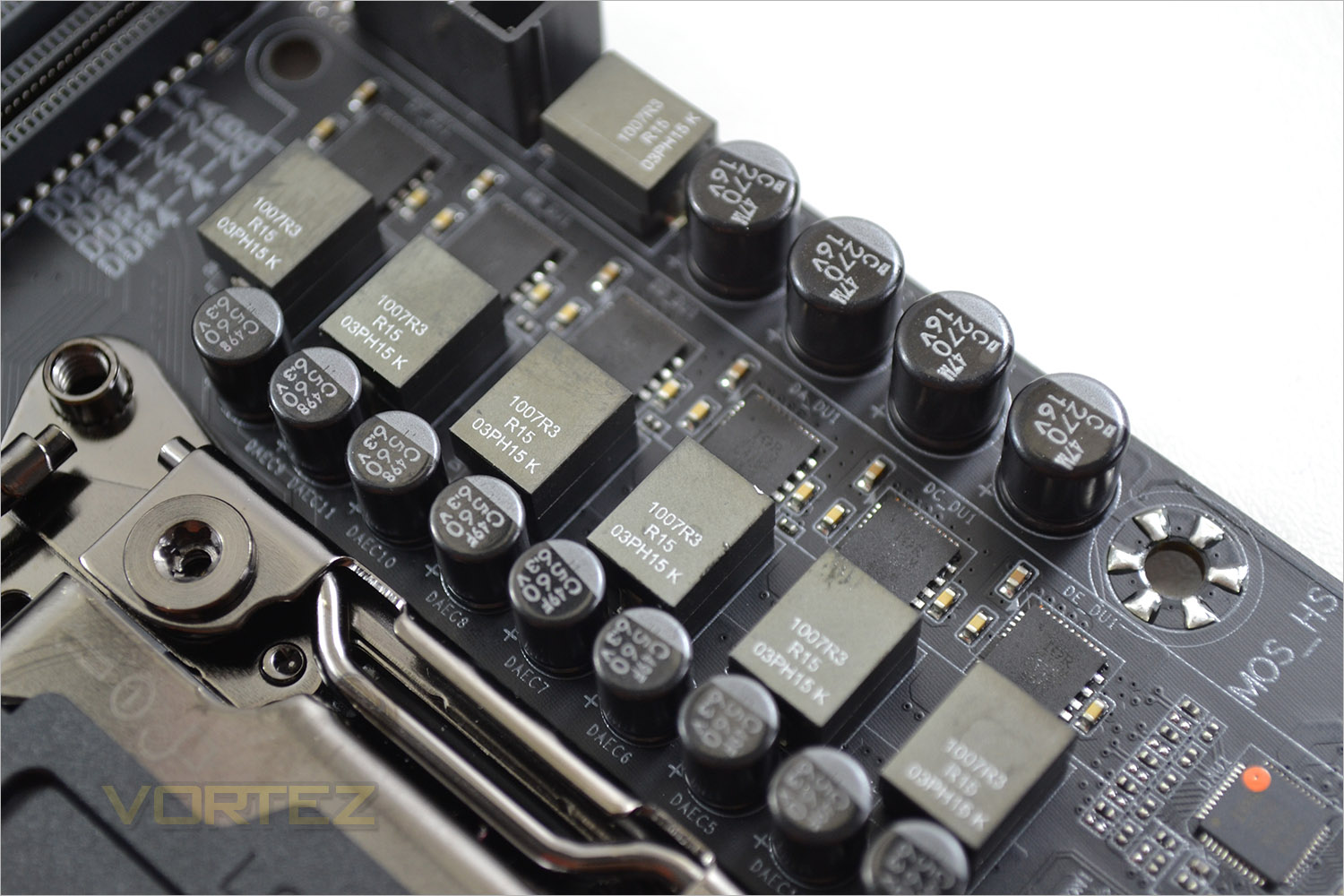
The voltage regulation is controlled by an 6 phase power design for the CPU. The 6 chokes hail from Cooper Bussman which GIGABYTE regard as server grade components. To each side of the memory sockets are further individual power phases (2+2) giving us a 6+2+2 power configuration for this motherboard. Solid capacitors and a 2oz copper layered PCB coupled with the VRM should ensure that the energy you pump to your components will be both efficient, clean and most of all stable.
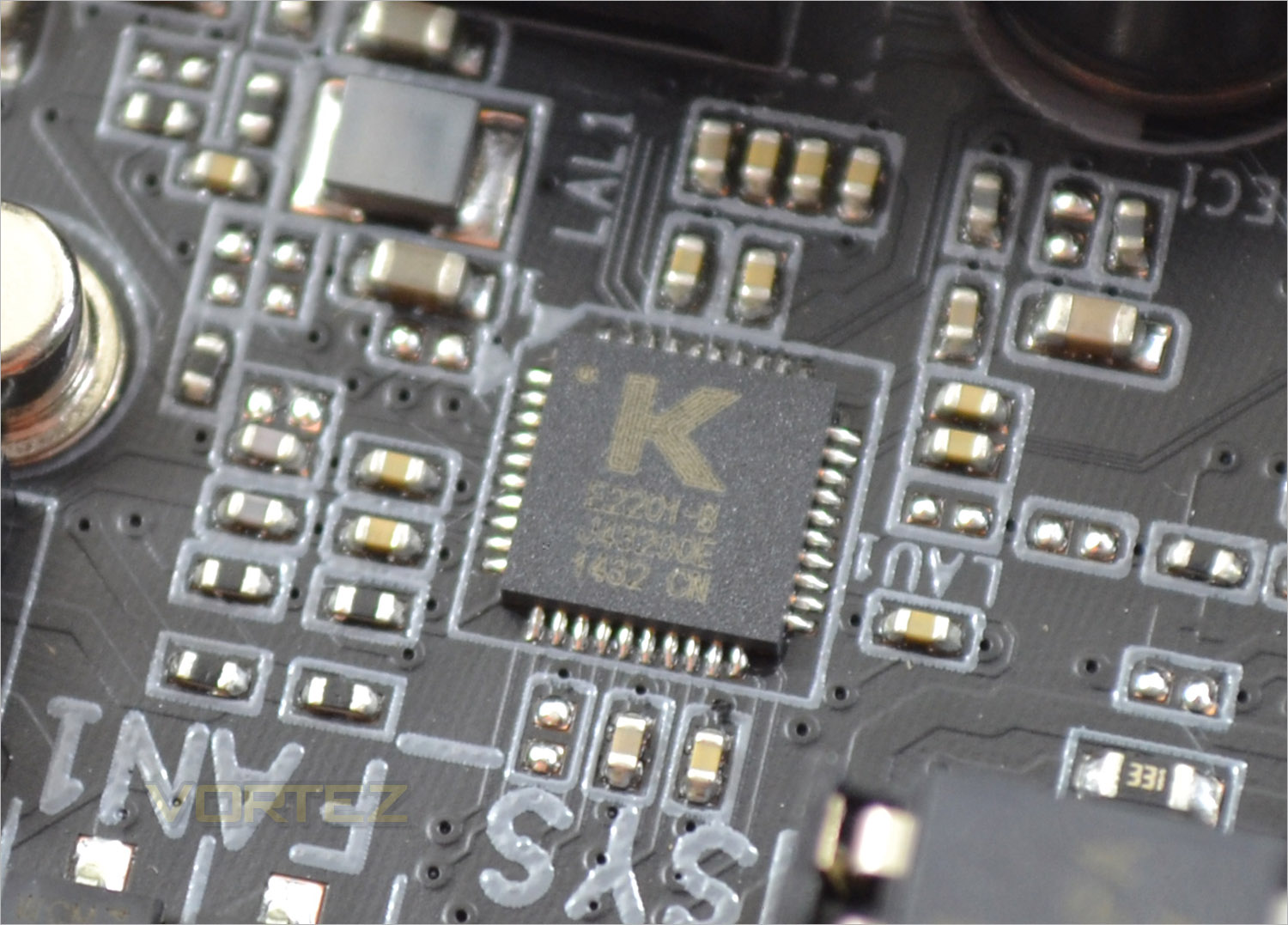
Networking is controlled via the G1 Killer™ E2200 from Qualcomm Atheros. Featuring Advanced Stream Detect technology, the Killer chip should prioritise network traffic. So in effect while you are gaming, your torrents should take a back seat ensuring you don’t lag due to network prioritisation in place.
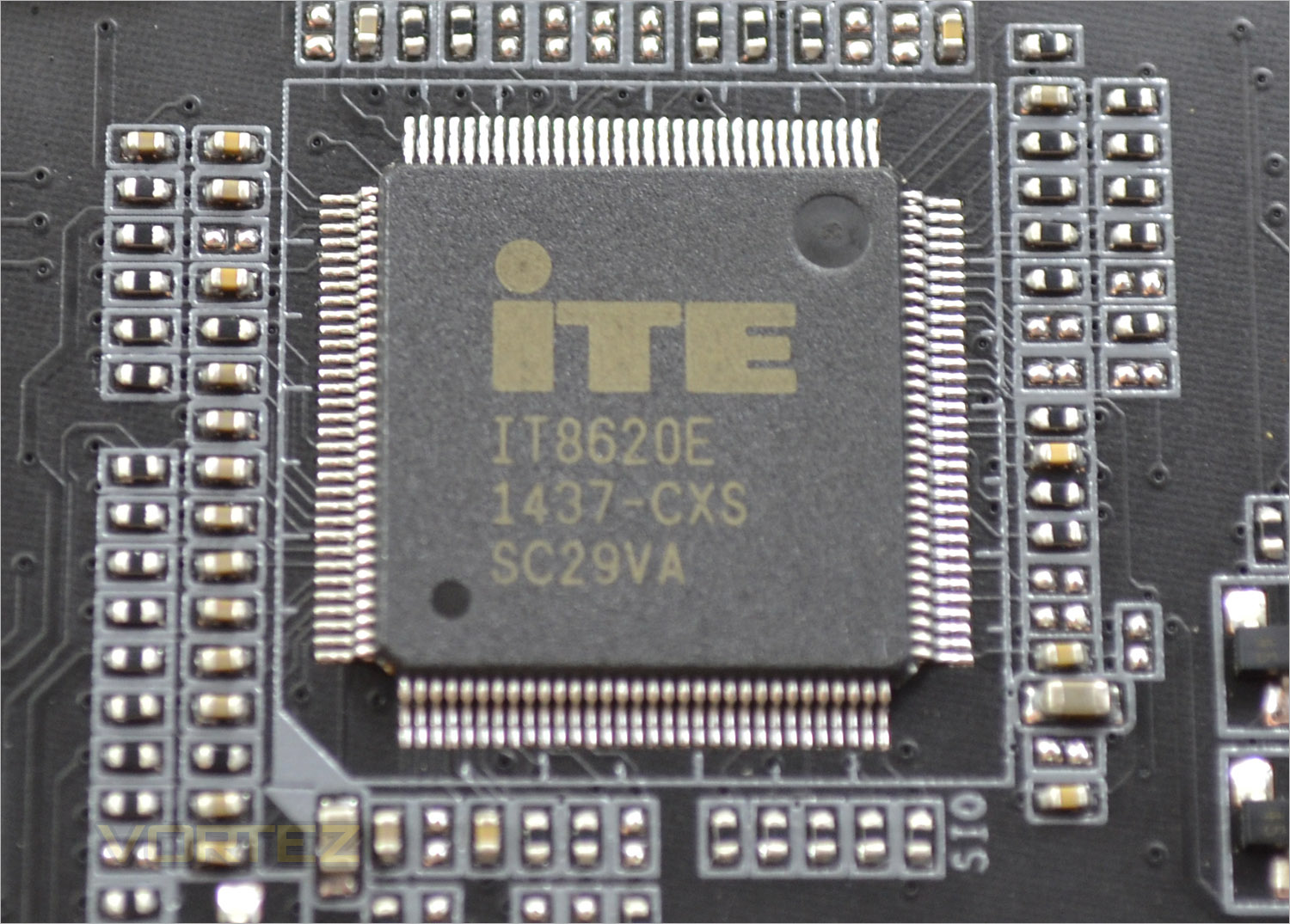
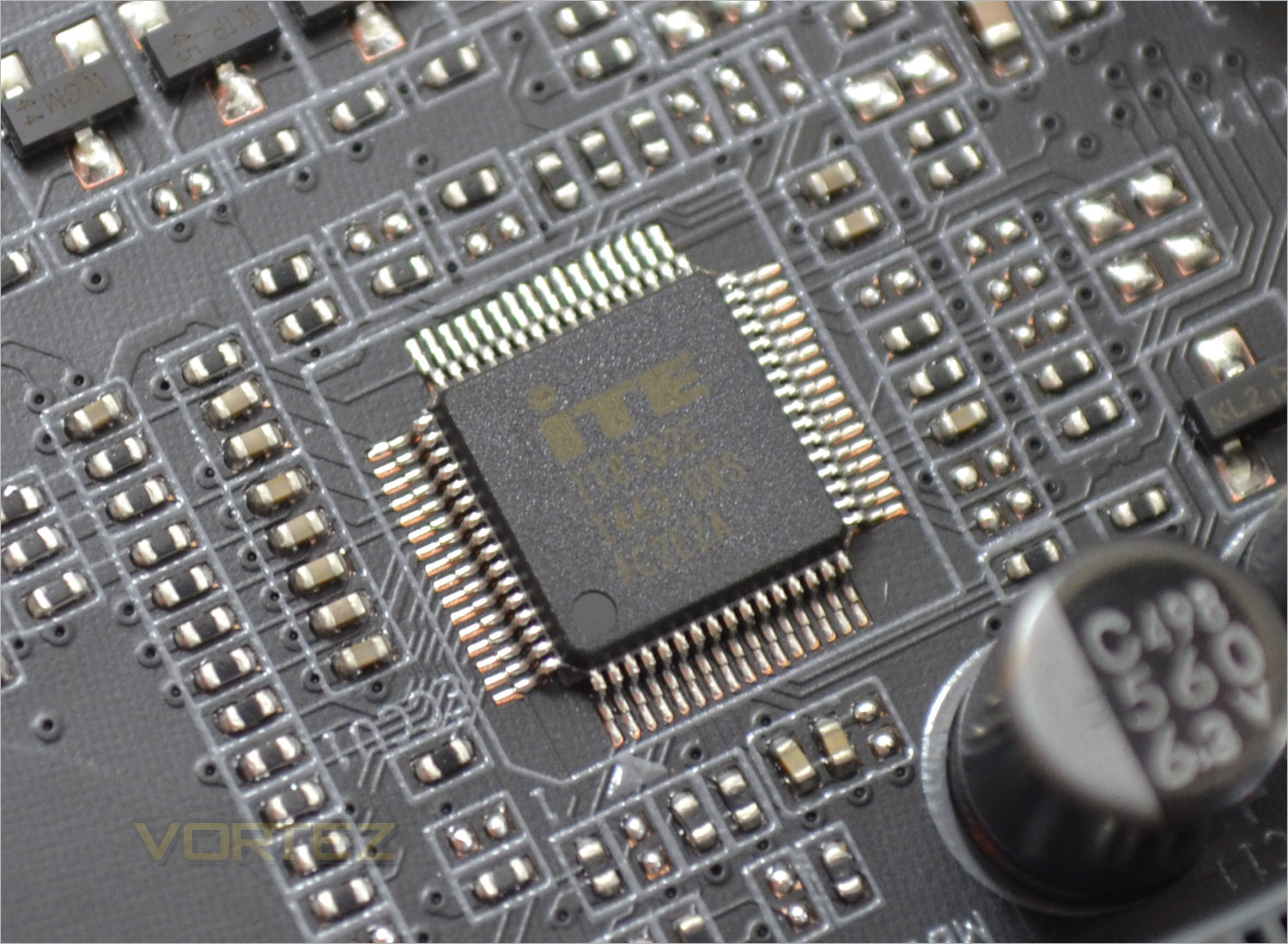
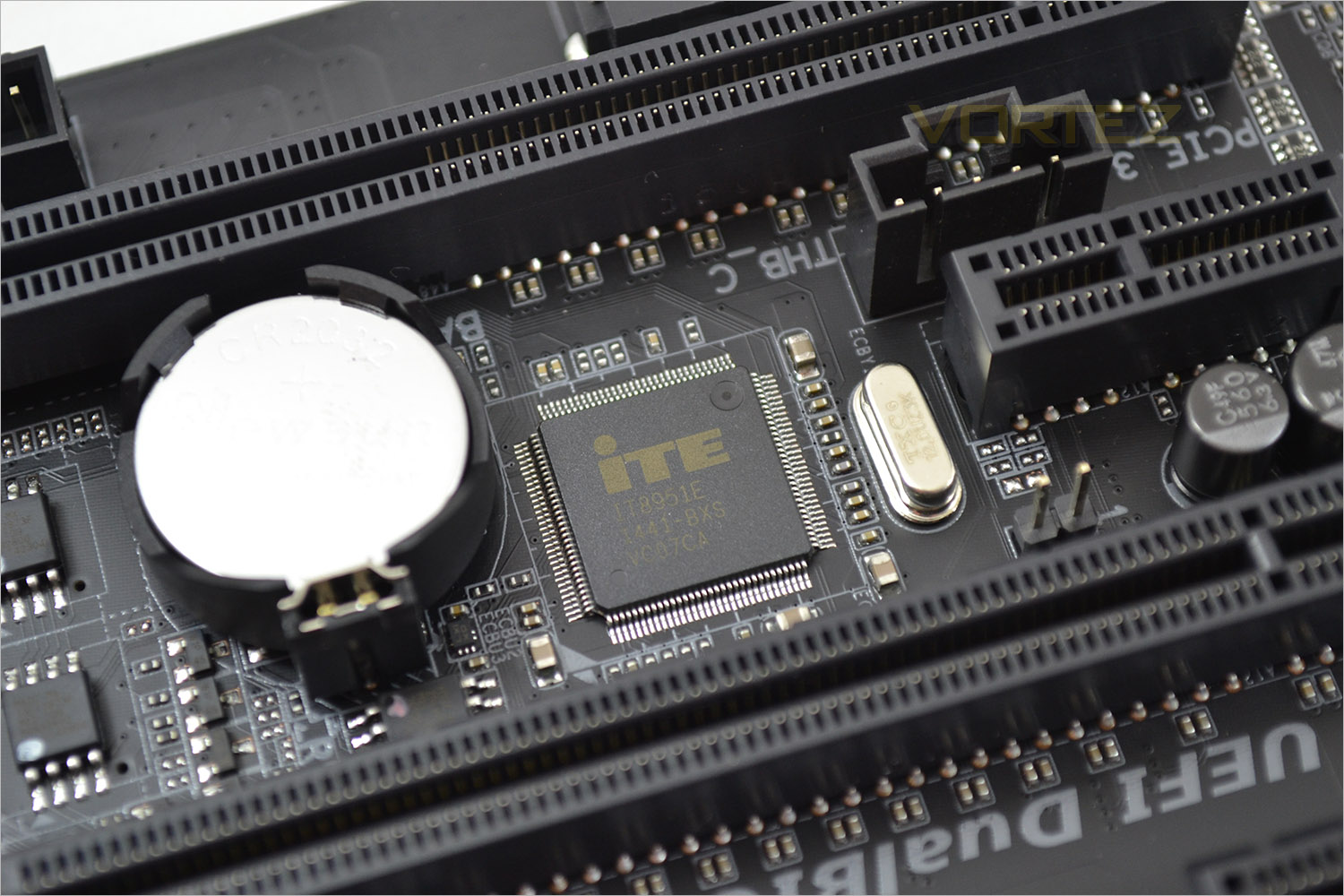
There are a host of ITE chips found on the mainboard which control Super IO, fan speed (all of which are adjustable via the BIOS/Easytune) and the GIGABYTE Q-Flash feature.
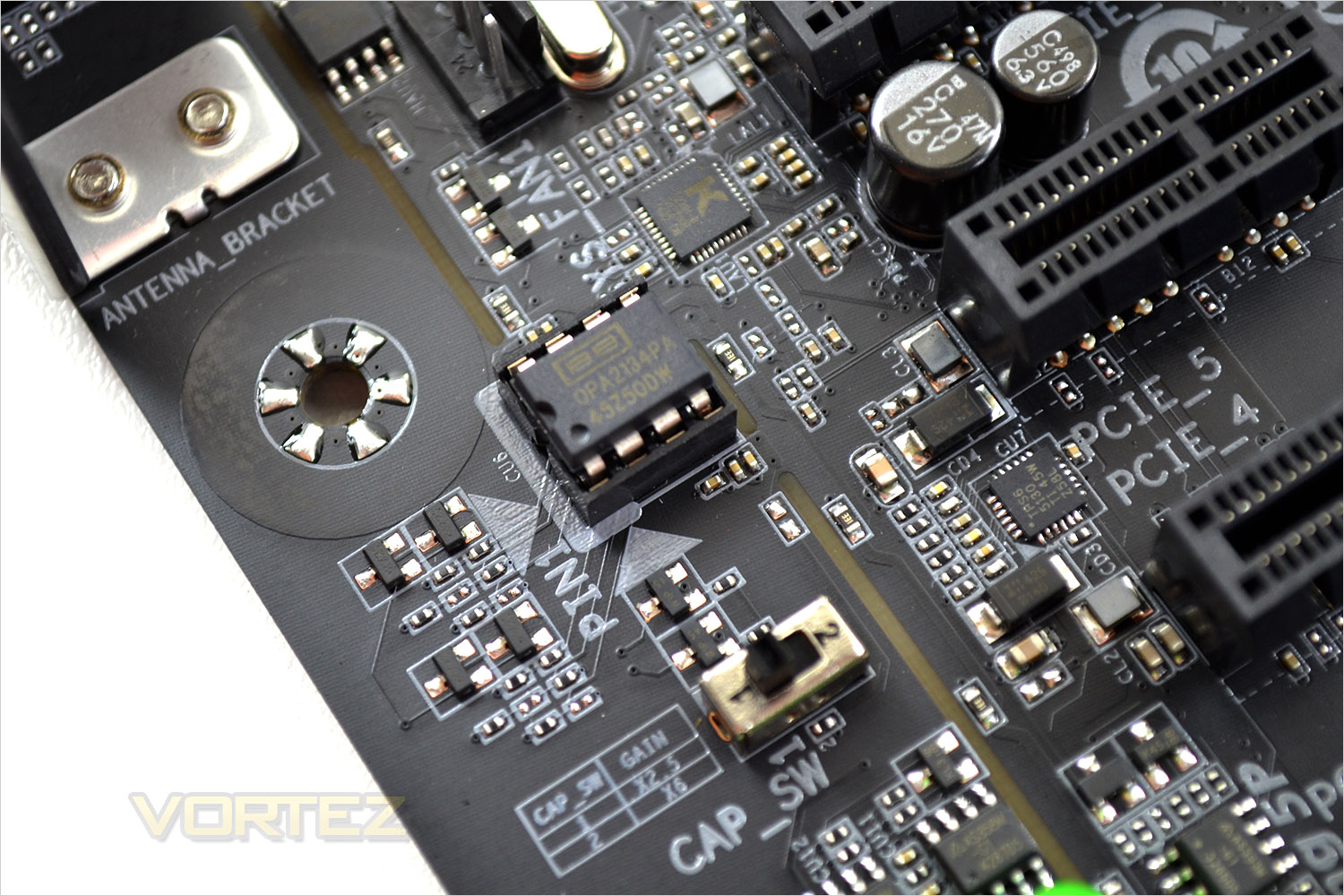
Above is the OP-AMP (removable) along with the gain boost switch.
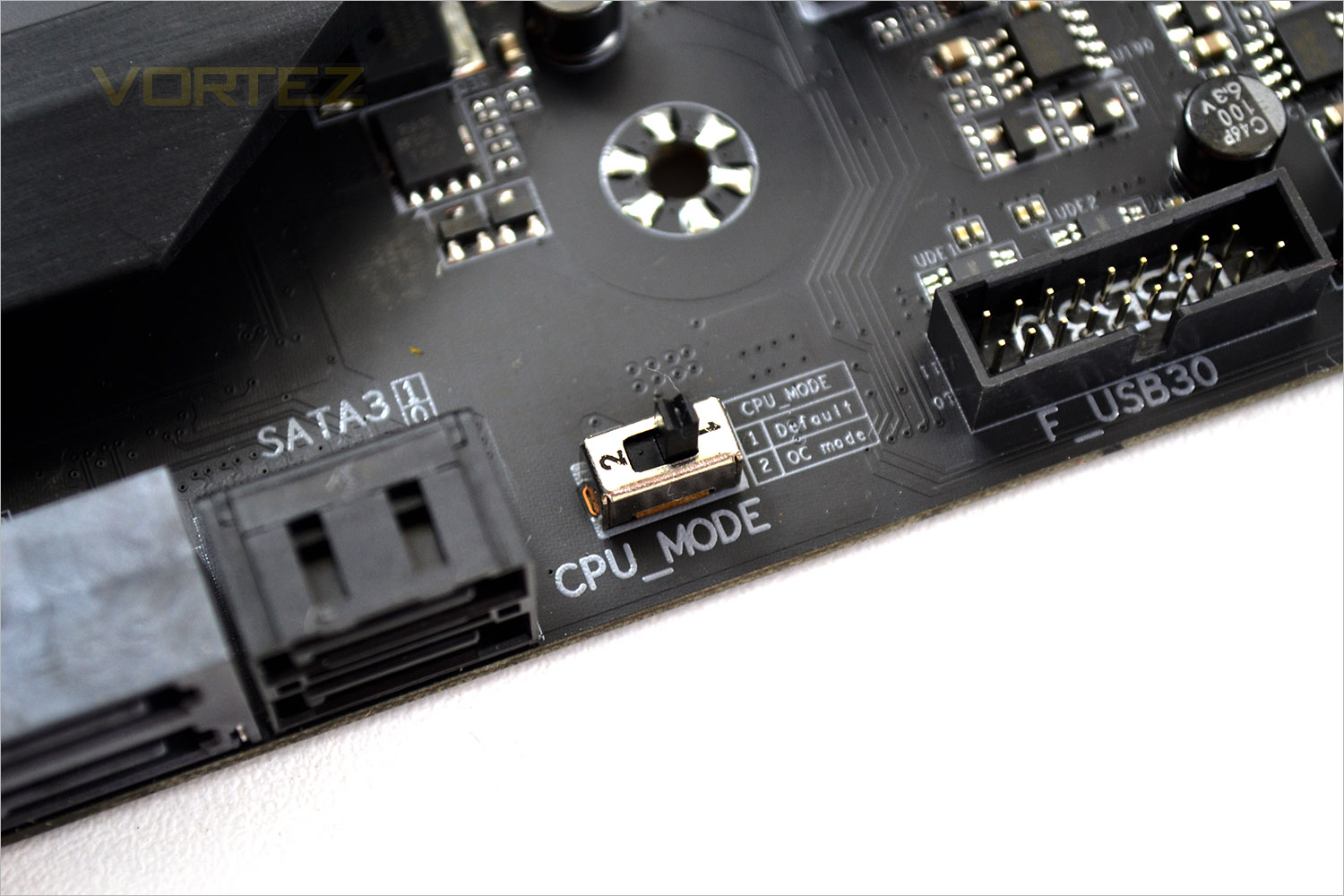
The OC switch is an odd one. While operating in ‘OC’ mode allegedly a few further OC options are unlocked in the BIO but we were damned if we could find any. Regardless, we cannot understand why anyone would need such a switch and why they weren’t automatically included because if you don’t know what a setting does, the simple rule of thumb is don’t touch it!
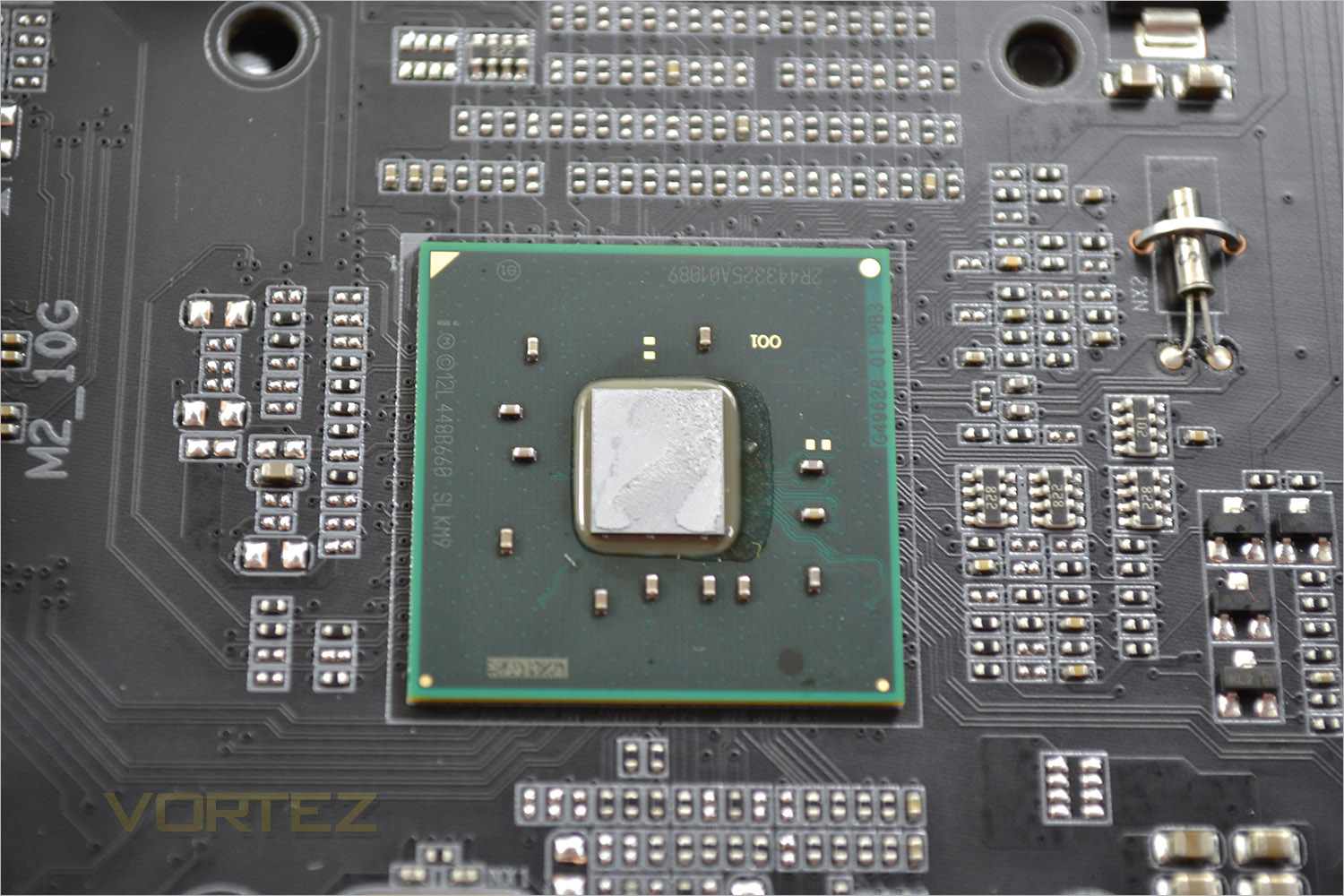
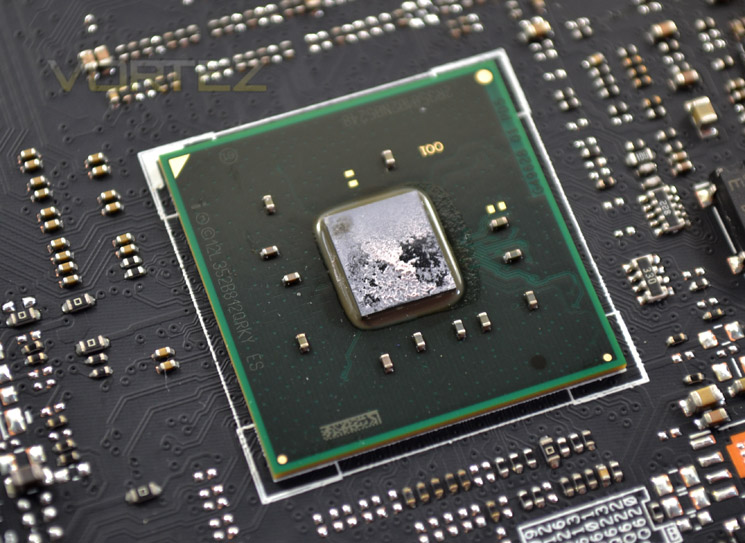
Finally we come to the X99 chipset. Many of the motherboards features are controlled via the Intel processor in conjunction with the CPU but we were pleased that GIGABYTE included higher spec networking and audio capabilities rather than relying on the usual componentry found on more mainstream models showing us that GIGABYTE have thought about their product rather than re-hashing products that already exist. That said, let’s see how this motherboard performs…
Test Setup & Methodology
RAM: 16GB Corsair Vengeance LPX DDR4 @ 2666MHz 16-17-17-35 (CMK16GX4M4A2666C15R)
GPU: NVIDIA GTX 760
Power Supply: Corsair RM1000
Cooler: Corsair H105
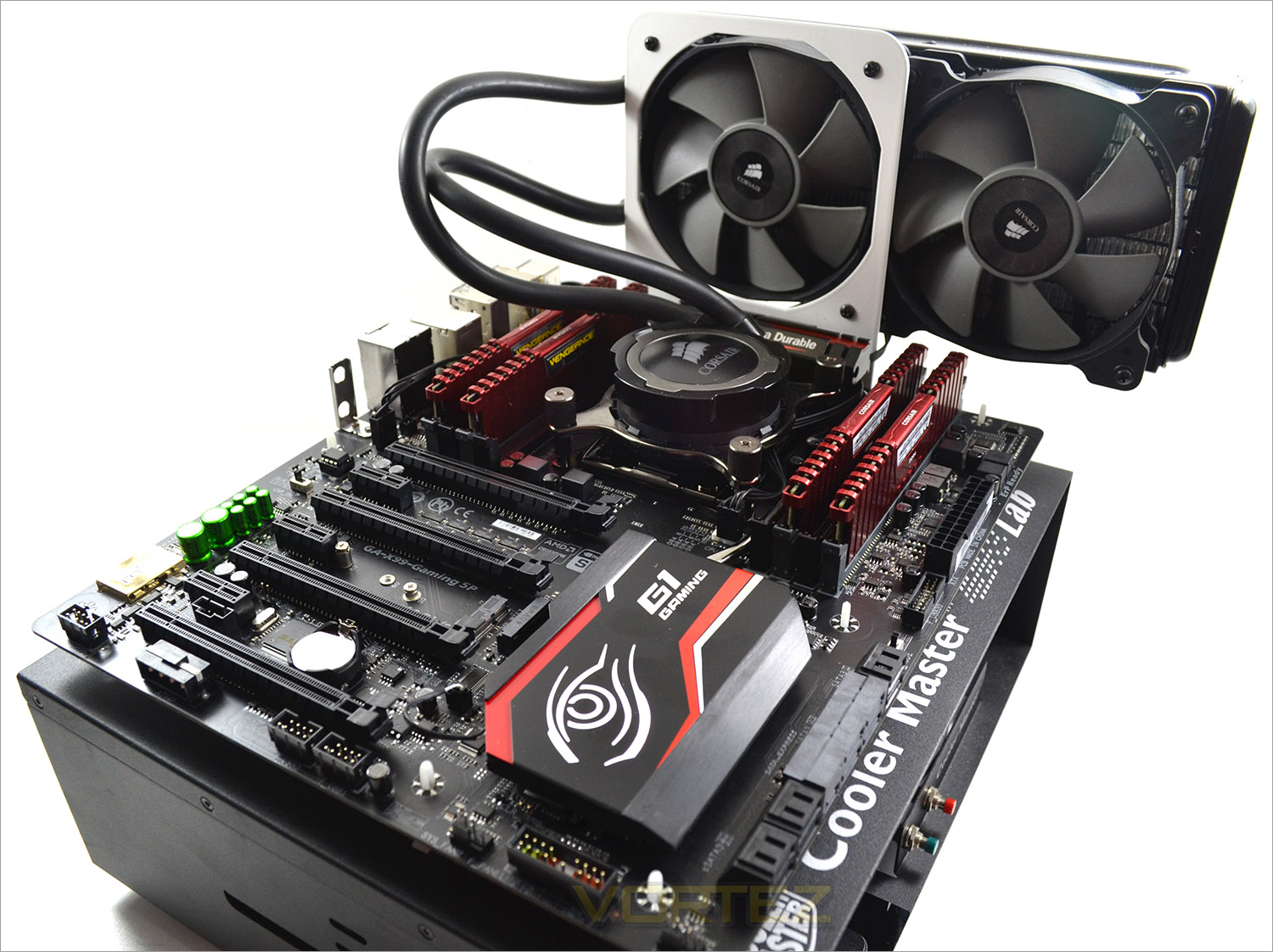
Motherboards
GIGABYTE GA-X99M-Gaming 5
ASROCK X99 WS-E/10G
ASROCK X99 Extreme4
GIGABYTE X99 SOC FORCE
ASUS X99 Deluxe
MSI X99S Gaming 9 AC
GIGABYTE X99 Gaming 5P
GIGABYTE GA-X99M-Gaming 5
ASROCK X99 WS-E/10G
ASROCK X99 Extreme4
GIGABYTE X99 SOC FORCE
ASUS X99 Deluxe
MSI X99S Gaming 9 AC
Benchmarks
AIDA 64 – CPU & Memory/Cache Performance
SiSoft Sandra – Compute & Memory Performance
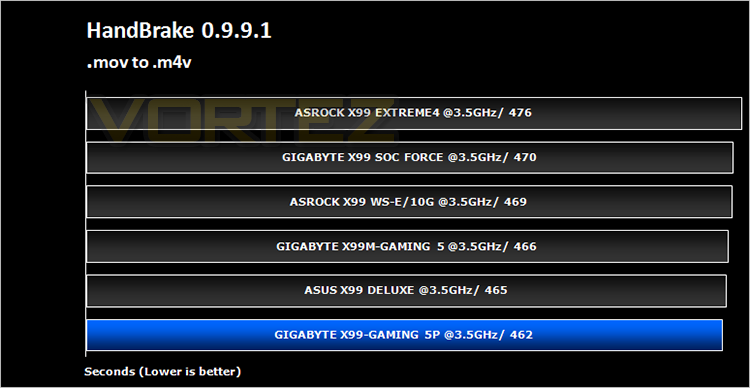
HandBrake – Encoding Performance
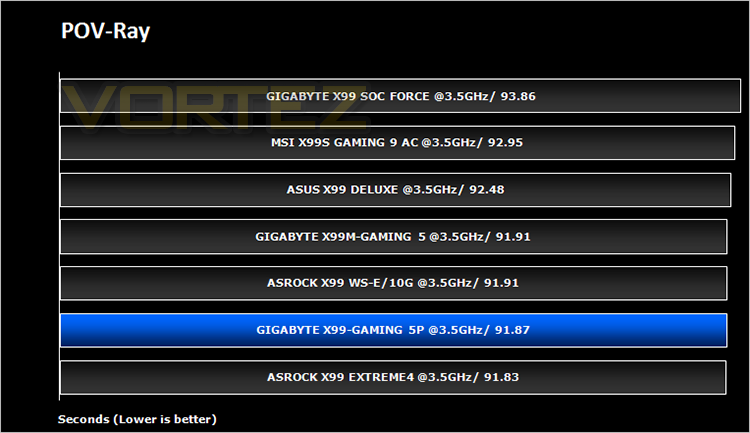
Pov-Ray – 3D Image processing Performance
Cinebench R15 – Image processing Performance
AS SSD SATA Performance
Futuremark 3DMark (Firestrike) – Graphical Performance
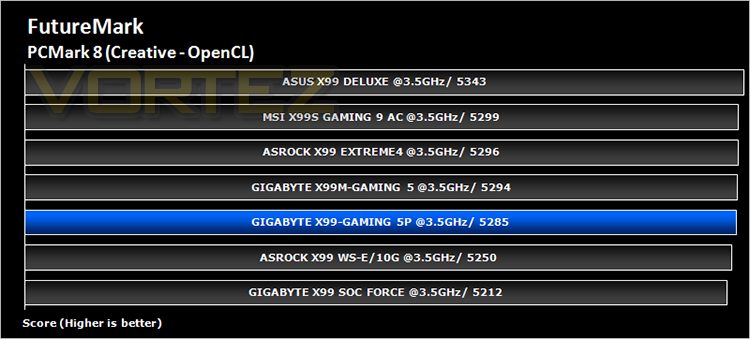
Futuremark PCMark 8 – Overall PC Performance
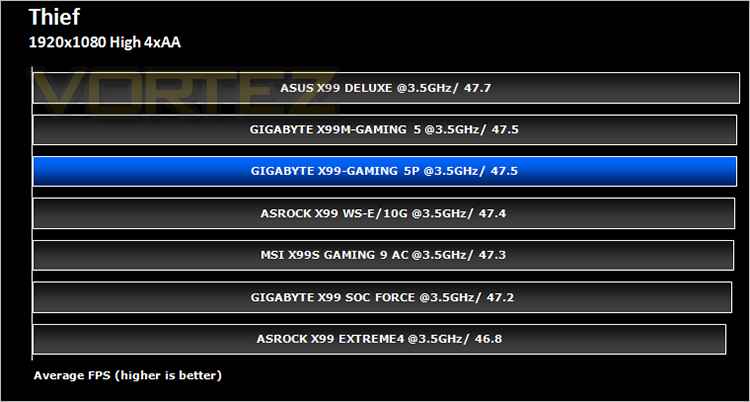
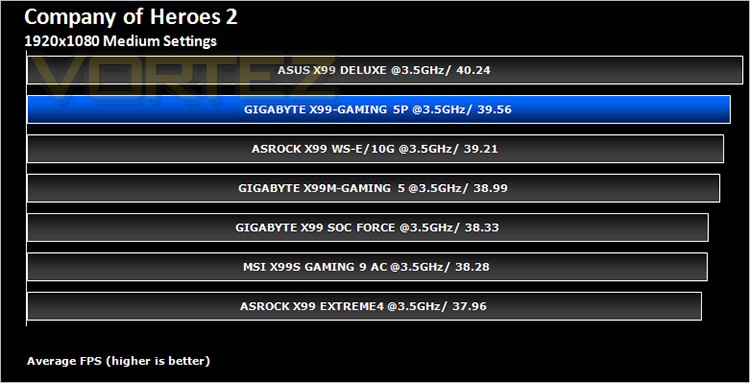
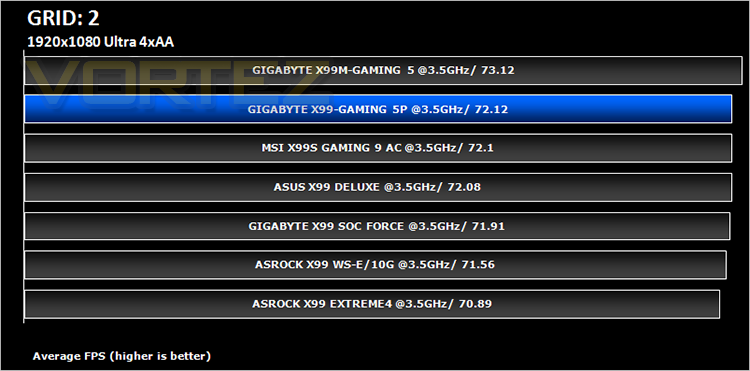
Battlefield 4, THIEF, Company Of Heroes 2 & GRID:2 – Gaming Performance
AIDA 64 – CPU & Memory/Cache Performance
SiSoft Sandra – Compute & Memory Performance
HandBrake – Encoding Performance
Pov-Ray – 3D Image processing Performance
Cinebench R15 – Image processing Performance
AS SSD SATA Performance
Futuremark 3DMark (Firestrike) – Graphical Performance
Futuremark PCMark 8 – Overall PC Performance
Battlefield 4, THIEF, Company Of Heroes 2 & GRID:2 – Gaming Performance
BIOS & Overclocking
BIOSWe pretty much covered the new GIGABYTE BIOS BIOS with the SOC FORCE so we won’t bore you with the details once again as the BIOS for the GA-X99-Gaming 5P is very close to this BIOS but with less overclocking options available. That said there was plenty of options still in there, especially all of the most important ones used for overclocking with a host of voltage adjustments.
We would state that a minor irritation is that it can be a little cumbersome to use the HD variant of the BIOS and that every time the CMOS is reset you will automatically have to go through the language selection and then choose which type of BIOS you prefer, HD, BASIC etc before you even get to the actual system settings.
With the BIOS set to defaults we set about seeing what limits we could attain:
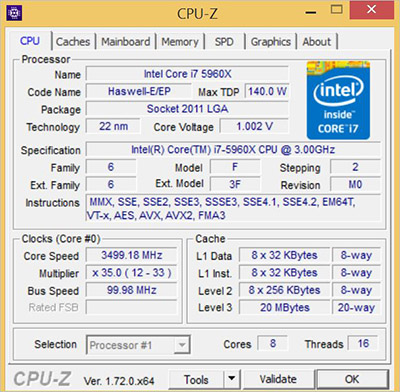
At default, the board posted at 3.5GHz but would throttle back or ‘boost’ dependent on the load conditions along with automatic voltage adjustments to compensate for the increase/decrease in clockspeeds.
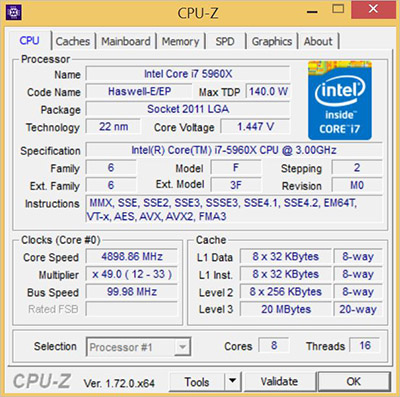
Overclocking the GIGABYTE board was very easy. We managed to reach 4.5GHz simply by disabling the Intel power saving features and inputting the 45 multiplier. We knew this CPU was capable of 4.9GHz so we set about playing with the voltages until we hit the sweet spot. After a few runs of Prime95 and HyperPI we were satisfied that a stable point had been reached and recorded a 4.9GHz overclock which we were more than happy with given the 15 minutes or so it took to get there – much less than many other X99 motherboards we have tested.
Power Consumption
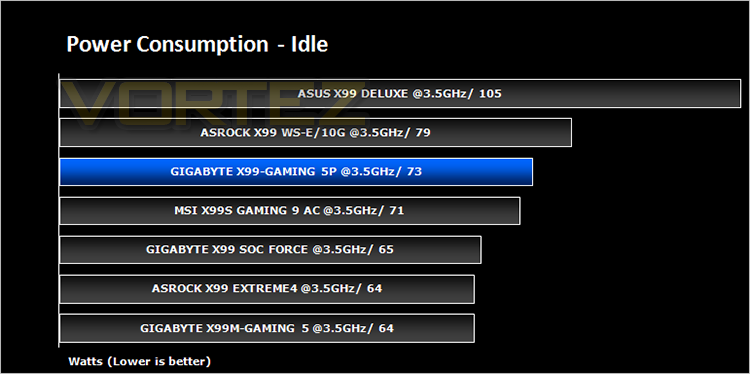
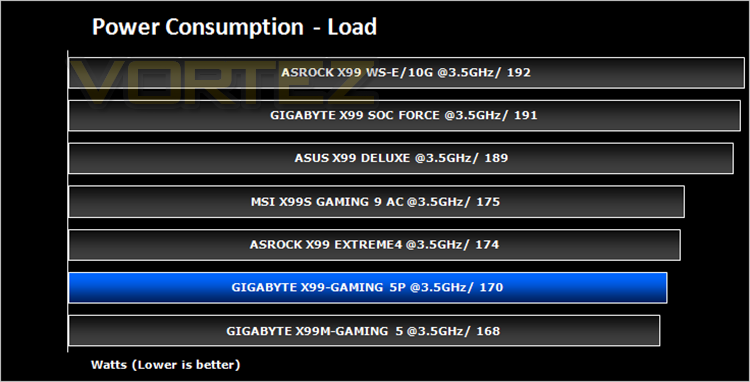
System idle readings were taken by enabling all of the key features on the mainboard and letting the system rest for 10 minutes within a windows environment before taking a reading from the plug to the PSU. To obtain our load results we ran HyperPI (32m) on all cores taking a reading after 5 minutes with all CPU cores loaded to 100%.
AIDA64
This simple integer benchmark focuses on the branch prediction capabilities and the misprediction penalties of the CPU. It finds the solutions for the classic “Queens problem” on a 10 by 10 sized chessboard. At the same clock speed theoretically the processor with the shorter pipeline and smaller misprediction penalties will attain higher benchmark scores. For example — with HyperThreading disabled — the Intel Northwood core processors get higher scores than the Intel Prescott core based ones due to the 20-step vs 31-step long pipeline. CPU Queen test uses integer MMX, SSE2 and SSSE3 optimizations.
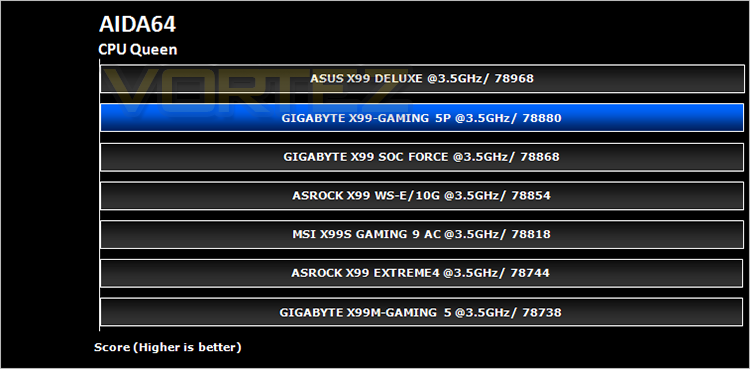
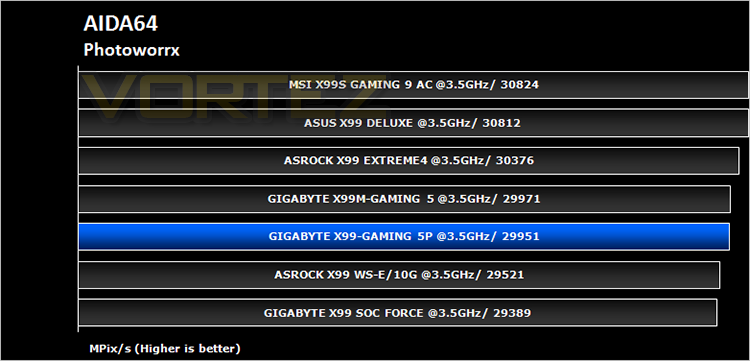
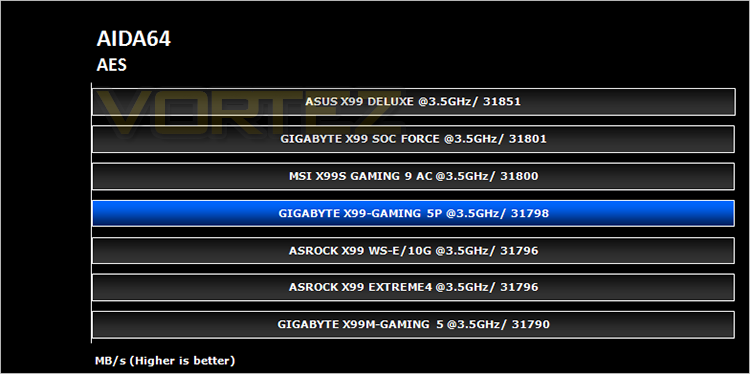
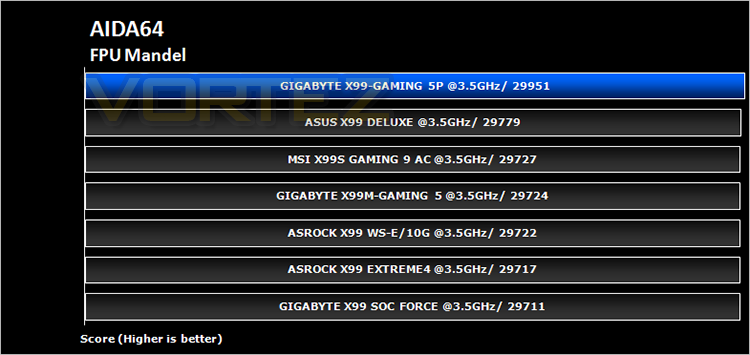
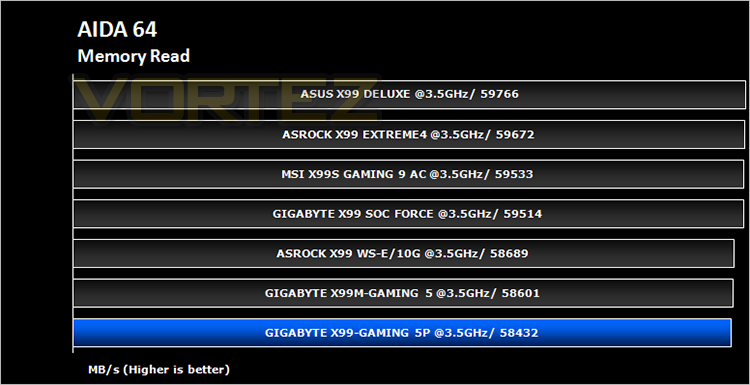
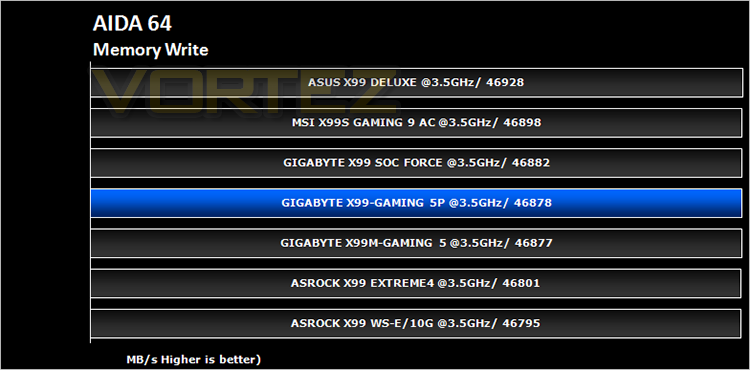
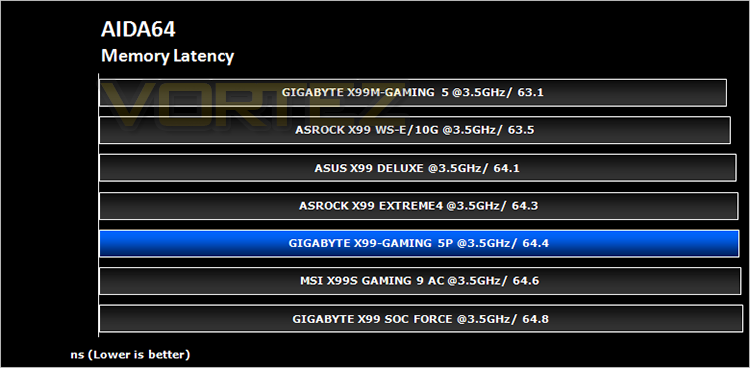
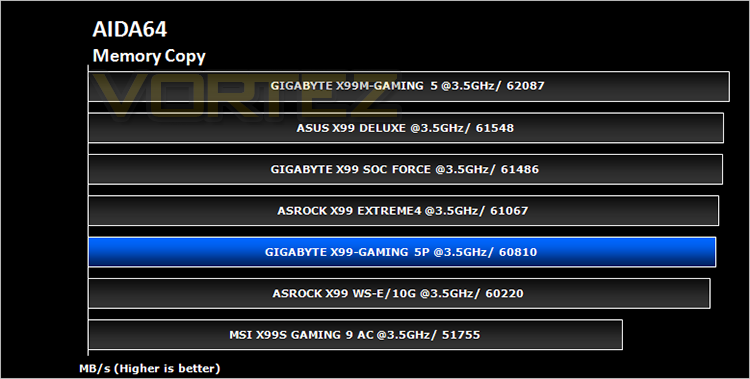
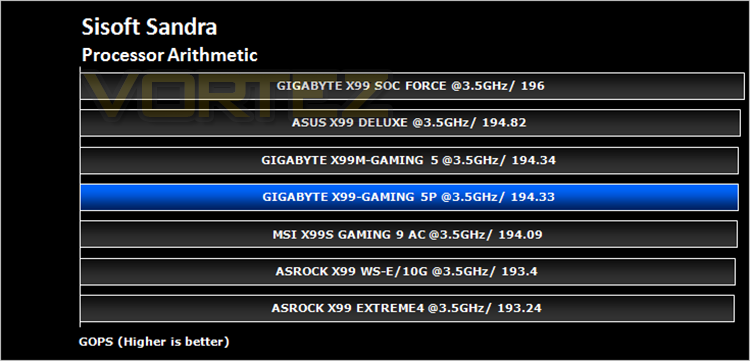
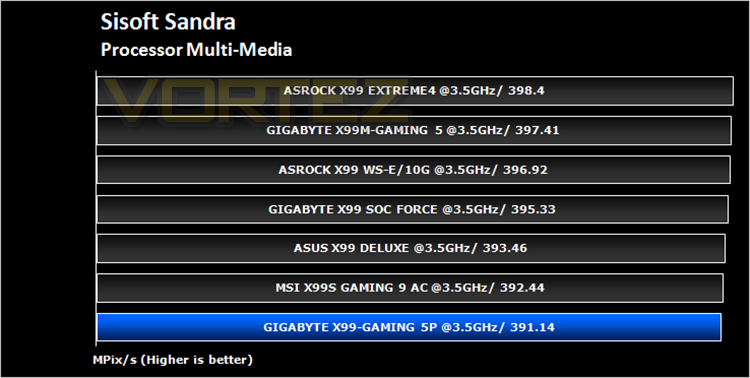
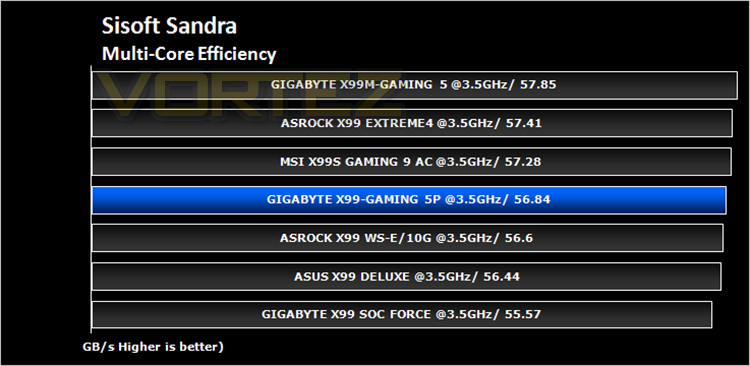
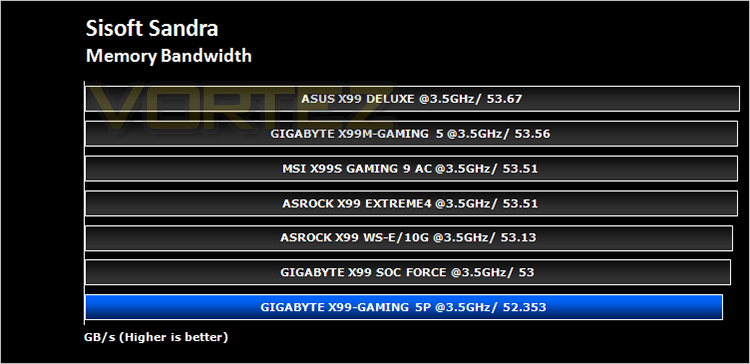
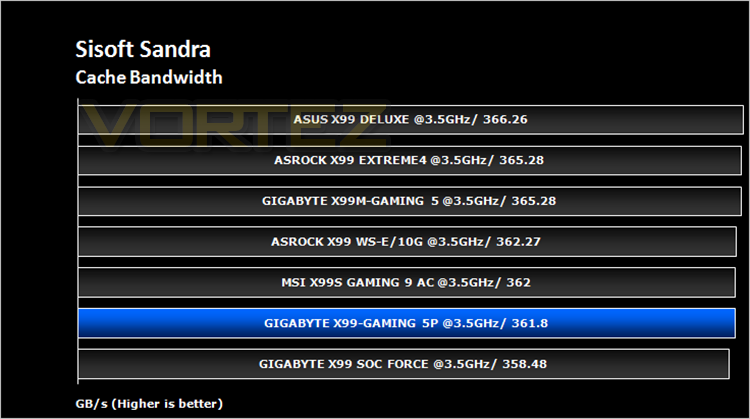
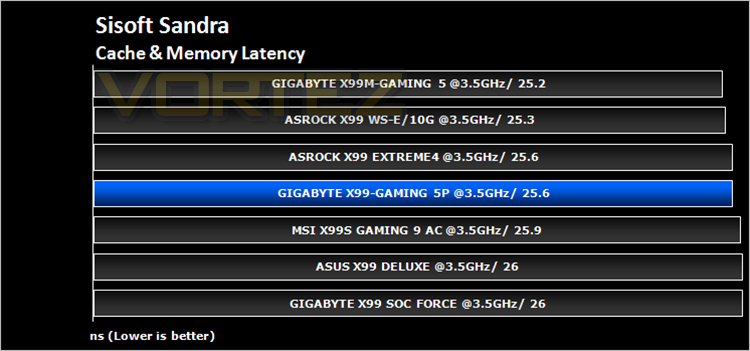
SiSoft Sandra
SANDRA isn’t always a benchmark that is included in hardware reviews but I believe it shouldn’t be ignored. SANDRA provides a vigorous package that tests your system in a rather large array of benchmarks. There are many aspects of benchmark that can be executed. We will be considering – CPU and memory tests.
Cinebench R15
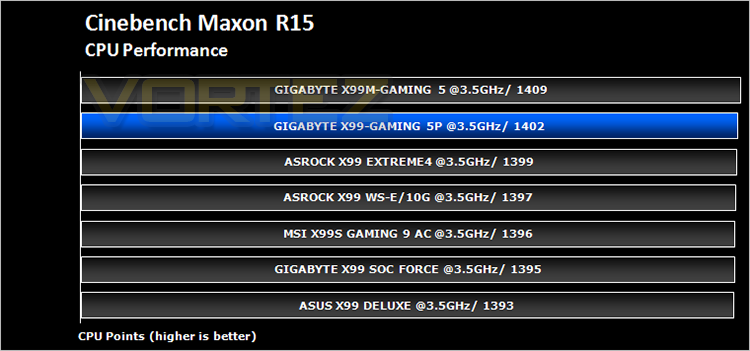
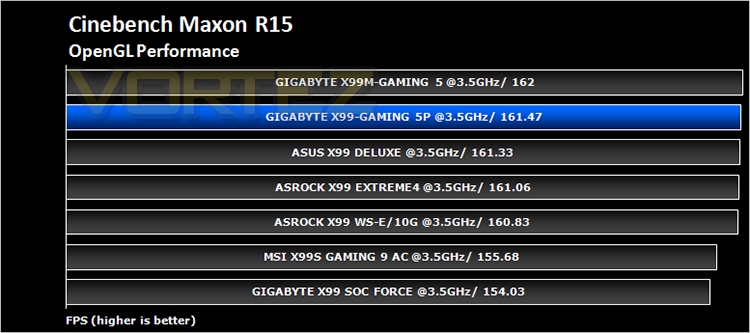
CINEBENCH can measure systems with up to 64 processor threads. This test scene contains approximately 2,000 objects which in turn contain more than 300,000 polygons in total, and uses sharp and blurred reflections, area lights, shadows, procedural shaders, antialiasing, and much more. The result is displayed in points (pts). The higher the number, the faster your processor.
Benchmarks: Pov-Ray
The Persistence of Vision Raytracer, or POV-Ray, is a ray tracing program which generates images from a text-based scene description, and is available for a variety of computer platforms. It was originally based on DKBTrace, written by David Kirk Buck and Aaron A. Collins for the Amiga computers.
Benchmarks: Handbrake
HandBrake is an open source trancoding tool for converting video from nearly any format to a selection of modern, widely supported codecs. Strong multi-threading support tends to favour high core counts and hyperthreading support.
Benchmarks: PCMark 8
PCMark 8 combines performance benchmarking with battery life measurement and includes tests based on popular Adobe and Microsoft applications. Whether you are looking for long battery life, or maximum power, PCMark 8 will help you find the devices that offer the perfect combination of efficiency and performance for your needs. It’s the complete PC performance benchmark for home and business.
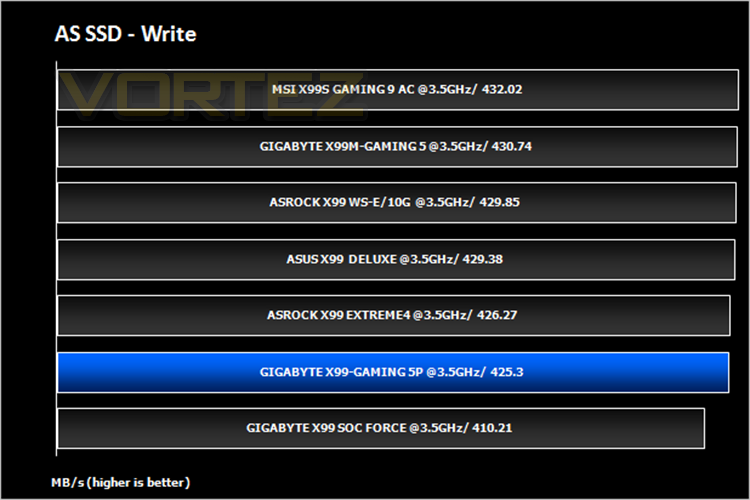
Benchmarks: AS SSD
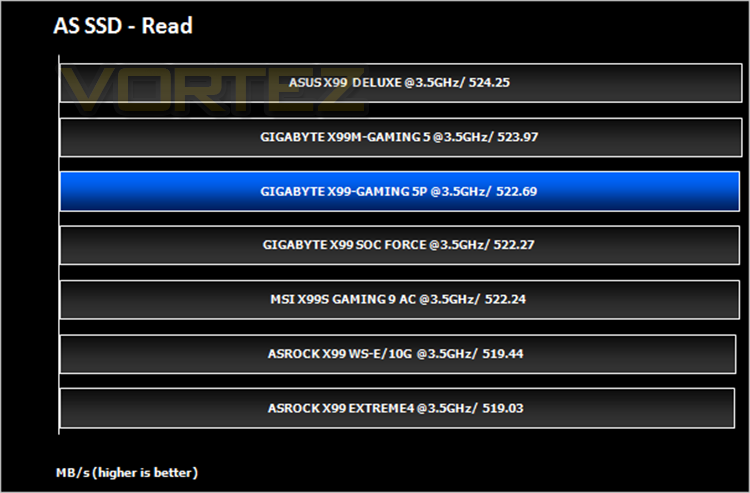
AS SSD Benchmark is a straightforward tool for measuring the speed of your SSD drive.
Simply launch the program, choose your drive, click Start, and it’ll test your SSD’s read and write speed in a variety of ways, delivering a score for each when it’s done. And if that’s not enough, there are also additional file copy and compression-related benchmarks available from the Tools menu. (The author’s support page is German only, but if you need further English explanations then there’s a thread on the program at the OCZ Technology forum.).
Simply launch the program, choose your drive, click Start, and it’ll test your SSD’s read and write speed in a variety of ways, delivering a score for each when it’s done. And if that’s not enough, there are also additional file copy and compression-related benchmarks available from the Tools menu. (The author’s support page is German only, but if you need further English explanations then there’s a thread on the program at the OCZ Technology forum.).
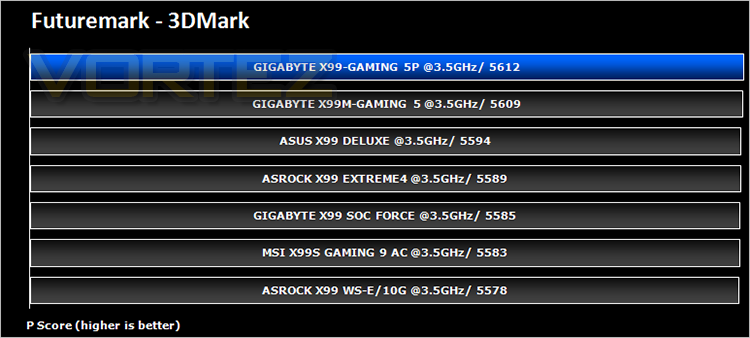
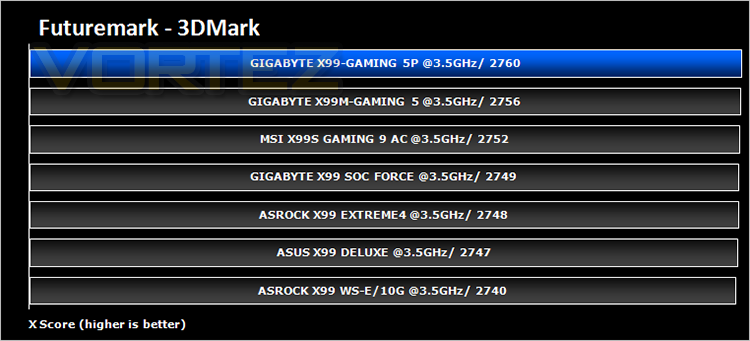
Benchmarks: 3DMark Firestrike
3DMark FireStrike Product PageFire Strike is Futuremark’s new showcase DirectX 11 benchmark designed for high-performance gaming PCs. It is our most ambitious and technical benchmark ever, featuring real-time graphics rendered with detail and complexity far beyond what is found in other benchmarks and games today. Fire Strike will only be available in the Windows editions of 3DMark initially.
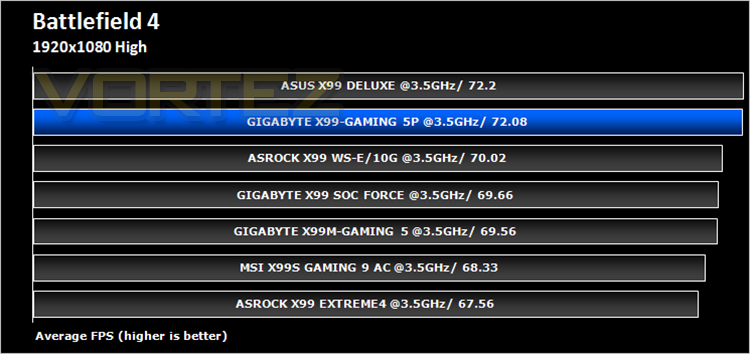
Benchmarks: Battlefield 4, THIEF, Company of Heroes 2, GRID 2
It’s important for us to perform a number of game benchmarks as well as the synthetic tests because gamers will want to know if there are any significant benefits. So here we have a selection of popular gaming titles, critically acclaimed and action-packed.
Conclusion
When we were first asked to take a look at the GIGABYTE X99 Gaming 5P we were hardly what could be described as excited. You see, the thing with X99 is many of the motherboards are just re-hashed examples of themselves encompassing the same features. So reviewing yet another X99 motherboard that on the face of it appeared to be like most others was not a task that filled us with breathtaking anticipation. Even when it arrived, the box is so-so and even the aesthetics of the main board with its now very common (albeit still smart) red and black colour scheme is good but nothing to write home about. Performance too was average, nothing brilliant yet nothing disastrous. So then you would be forgiven for thinking, as were we, that this motherboard is just another run-of-the-mill outings designed for nothing other than to saturate and already drenched X99 motherboard list. To be fair for the most part you would be right.
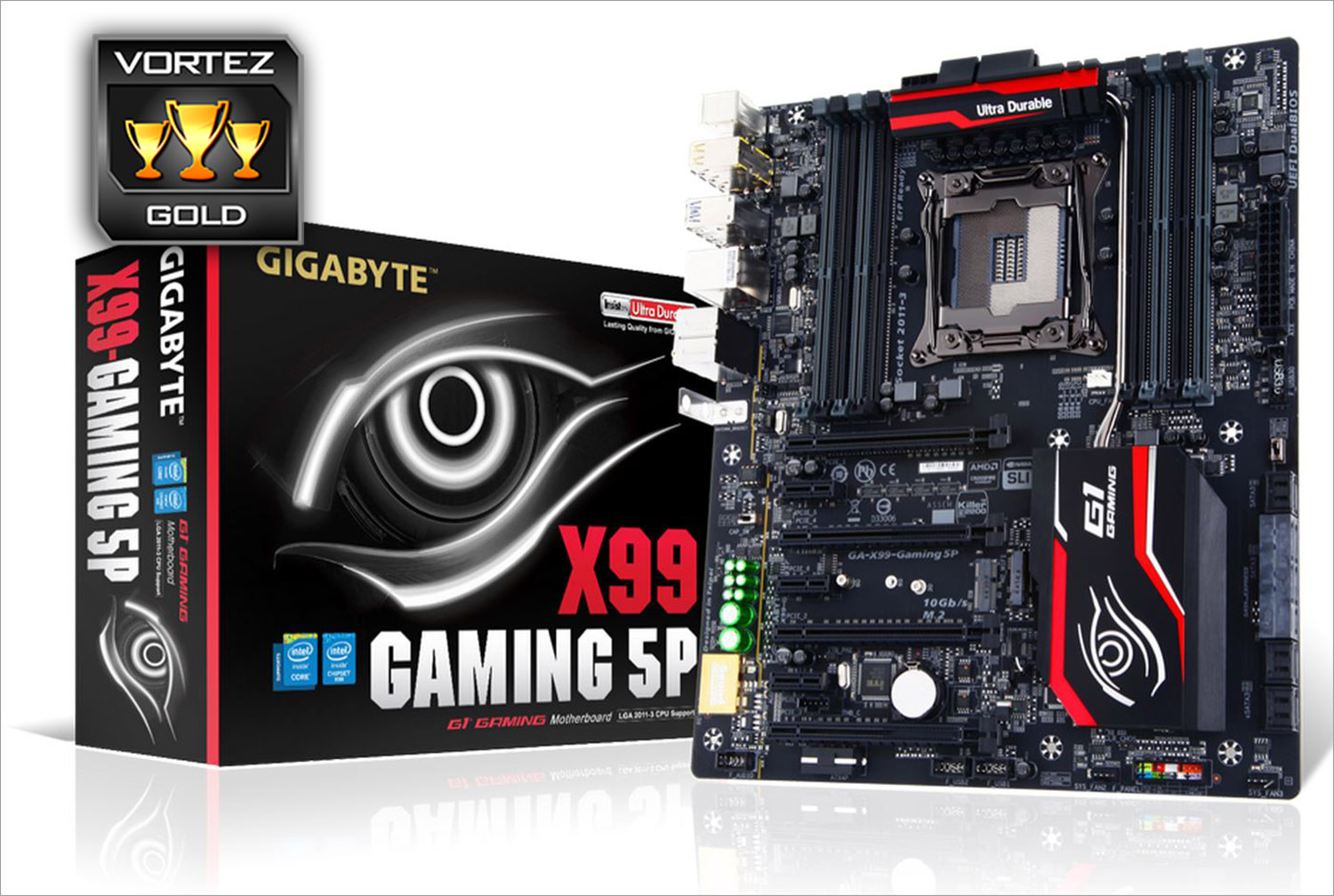
What the GIGABYTE does though is give us a motherboard that is polished. While the BIOS does have some niggling pauses while navigating it is a small criticism for a product that does everything else very well and knowing how often GIGABYTE update thier BIOS these minor issues will be ironed out in no time. So then, the GIGABYTE X99 GAMING 5P gets our GOLD award because it’s a well thought out and designed motherboard that has everything you would want from a mid/high end product; a perfectly balanced component between cost, performance and well, bling. All gamers like the shiny things in life of course. If it lights up, looks imposing while most importantly doing the job on-screen then it ticks all the boxes and that is what this motherboard pretty much does throughout, ticks all the right boxes, offering a range of features while making few sacrifices to bring you a product that is sure to satisfy whether you are a Gamer, overclocker or simply looking for a powerful foundation to your next PC upgrade.
A great balance between performance, features and cost. The GIGABYTE X99 GAMING-5P satisfies on all levels.
Pros
+ Excellent audio capabilities
+ Great all round performance
+ Good Gaming features
+ Good Overclocking potential
+ DDR4 3333MHz supported
Cons
– Reduction to 8x in TRI card formation may put some off
– BIOS ‘clunky’ to use at times
– No Debug LED
+ Excellent audio capabilities
+ Great all round performance
+ Good Gaming features
+ Good Overclocking potential
+ DDR4 3333MHz supported
Cons
– Reduction to 8x in TRI card formation may put some off
– BIOS ‘clunky’ to use at times
– No Debug LED

Click here for an explanation of our awards at Vortez.net.