The AM3+ platform gets a 2016 makeover courtesy of ASUS. Based on the 970 chipset, it features customisable LED lighting, USB 3.1 and support for NVIDIA SLI.

Product on Review: ASUS 970 PRO GAMING/ AURA
Manufacturer & Sponsor: ASUS
Street Price: £100 GBP / $119 USD
ASUS need no introduction, but the AM3+ platform may require a memory refresh for our younger readers. The AM3 platform was released way back in 2009 as AMD started to ship their Phenom II CPUs with a DDR2/3 memory controller. Come 2011 AMD were ready to release their Bulldozer based CPUs with the natural progression to the AM3+ socket. This socket was very similar to the AM3 socket, so much so that motherboards with good enough power regulation could support AM3+ CPUs with a BIOS update… give or take a refreshed CPU here or there, this is where the high end AMD platform, still, currently remains.
Though it is too early to say of the future, there has been interesting news from AMD about their plans and it would seem that the AM4 platform is on its way, unifying both APU and CPU platforms into one, along with interesting news about future CPU/APUs.
Back on topic, here we find another example of ASUS creating for the sake of creating, and never to let their product line lag too far behind, the 970 PRO GAMING/ AURA, is part of the AURA series that features customisable RGB LED lighting. 2015 seems like a prelude to 2016 in regards to RGB lighting and this is the first glimpse of that glorious spectral delight shining down on AMD. ASUS didn’t stop there, they have added 2x USB 3.1 ports, having twice the standard bandwidth of USB 3.0 and geared this motherboard towards enthusiast gamers by including support for AMD’s CrossFireX and NVIDIA’s SLI.
It would be easy to question why ASUS chose to go with the 970 chipset and not the 990FX, but this is arguably a very smart move as it provides the majority of the features that the 990FX does, yet will make the final price significantly cheaper, making it more attractive on a platform that wouldn’t look out of place as an extra on The Walking Dead.
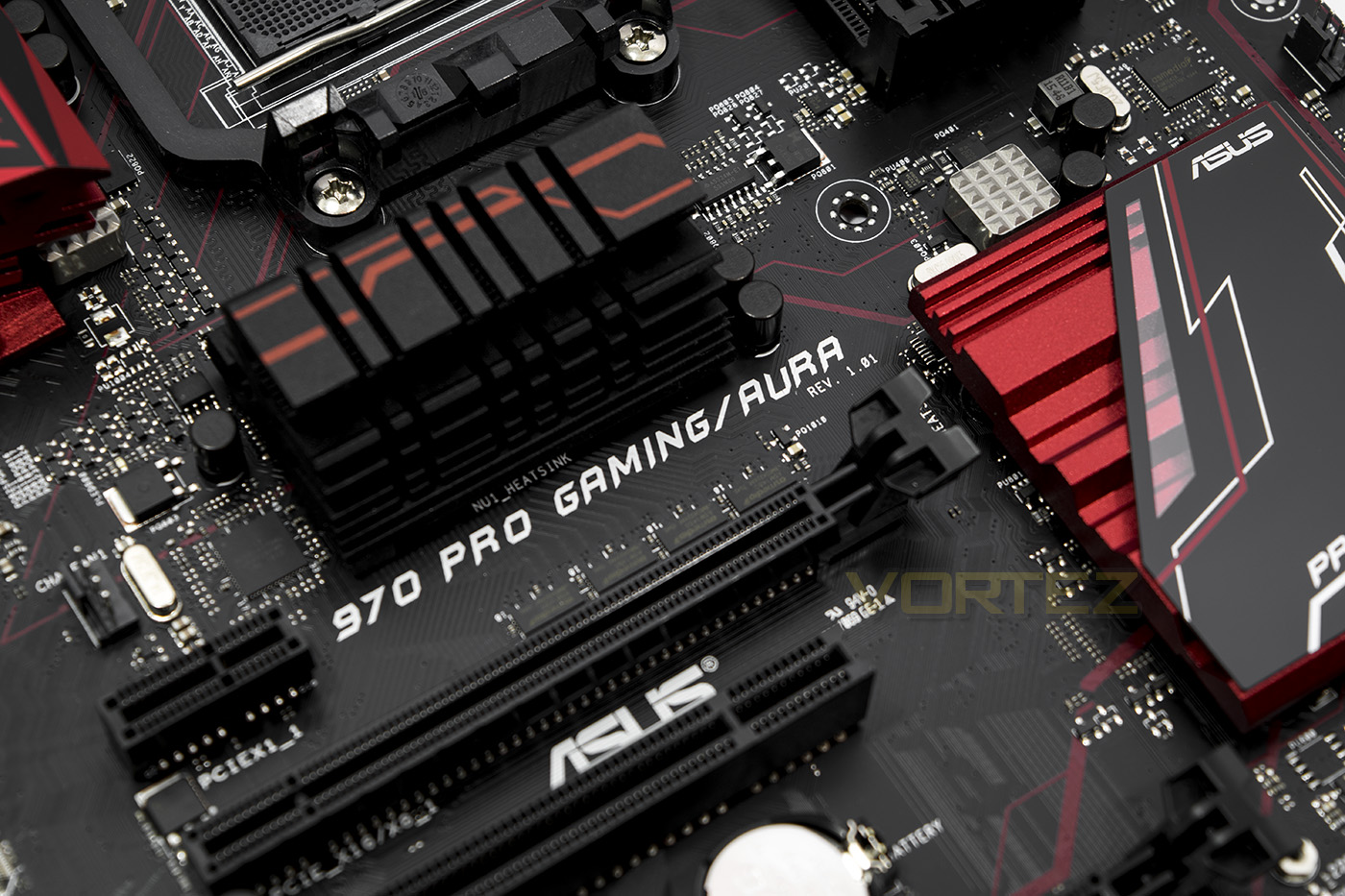
ASUS on their 970 PRO GAMING/ AURA/b]
970 Pro Gaming/Aura is built for play, shaped by professional gamers and tested for gaming perfection — strong enough storm through the industry’s most punishing labs workouts. We engineer and test for the finest quality, longevity, performance, stability and compatibility. Our world-class engineers are themselves avid gamers, and combine their own passion with the skills and demands of some of the planet’s best players to create innovative gaming features everyone will crave. With 970 Pro Gaming/Aura you do more than just play — you’ll experience gaming on the edge of reality.
Technical Specifications
CPU
Build in AMD AM3+ FX™/Phenom™ II/Athlon™ II/Sempron™ 100 Series Processors
Supports AM3+ 32 nm CPU
Supports CPU up to 125 W
AMD Cool ‘n’ Quiet™ Technology
Chipset
Build in AMD 970/SB950
Memory
4 x DIMM, Max. 32GB, DDR3 2133(O.C.)/1866/1600/1333/1066 MHz Non-ECC, Un-buffered Memory *
Dual Channel Memory Architecture
System Bus
Up to 4.8 GT/s HyperTransport™ 3
Multi-GPU Support
Supports NVIDIA® Quad-GPU SLI™ Technology
Supports AMD Quad-GPU CrossFireX™ Technology
Expansion Slots
2 x PCIe 2.0 x16 (x16 or dual x8)
2 x PCIe 2.0 x1
2 x PCI
Storage
AMD SB950 controller :
6 x SATA 6Gb/s port(s), black,
Support Raid 0, 1, 5, 10
1 x M.2 Socket 3, , with M Key, type 2242/2260/2280 storage devices support (PCIE 2.0 x4)
LAN
Intel® I211-AT, 1 x Gigabit LAN Controller(s), GameFirst technology
Anti-surge LANGuard
Audio
SupremeFX 8-Channel High Definition Audio CODEC
– Supports : Jack-detection, Multi-streaming, Front Panel MIC Jack-retasking
– High quality 115 dB SNR stereo playback output
Audio Feature :
– SupremeFX Shielding™ Technology
– Optical S/PDIF out port(s) at back panel
– Sonic Radar II
USB Ports
ASMedia® USB 3.1 controller : 2 x USB 3.1 port(s) (2 at back panel, , Type-A)
ASMedia® USB 3.0 controller : 2 x USB 3.0 port(s) (2 at mid-board)
AMD SB950 controller : 14 x USB 2.0 port(s) (8 at back panel, , 6 at mid-board)
Special Features
Gamer’s Guardian:
– ESD Guards on LAN, Audio, KBMS and USB3.0/2.0 ports
– DRAM Overcurrent Protection
– Stainless Steel Back I/O
– DIGI+ VRM
ASUS Exclusive Features :
– AI Suite 3
– Ai Charger+
– USB 3.1 Boost
– Disk Unlocker
ASUS Quiet Thermal Solution :
– ASUS Fan Xpert 2
ASUS EZ DIY :
– ASUS O.C. Tuner
– ASUS CrashFree BIOS 3
– ASUS EZ Flash 2
– ASUS UEFI BIOS EZ Mode
– Push Notice
ASUS Q-Design :
– ASUS Q-Shield
– ASUS Q-LED (CPU, DRAM, VGA, Boot Device LED)
– ASUS Q-Slot
– ASUS Q-DIMM
Media Streamer
RAMCache
AURA: RGB Lighting Control
Operating System Support
Windows® 10 , 64bit
Windows® 8.1 , 64bit
Windows® 7 , 32bit/64bit
Back I/O Ports
1 x PS/2 keyboard/mouse combo port(s)
1 x LAN (RJ45) port(s)
2 x USB 3.1 (red)Type-A
8 x USB 2.0
1 x Optical S/PDIF out
6 x Audio jack(s)
Internal I/O Ports
1 x ReTry jumper
1 x Safe Boot jumper
1 x USB 3.0 connector(s) support(s) additional 2 USB 3.0 port(s) (19-pin)
3 x USB 2.0 connector(s) support(s) additional 6 USB 2.0 port(s)
1 x M.2 Socket 3 for M Key, type 2242/2260/2280 devices
1 x TPM header
1 x COM port(s) connector(s)
6 x SATA 6Gb/s connector(s)
1 x CPU Fan connector(s) (1 x 4 -pin)
1 x CPU OPT Fan connector(s) (1 x 4 -pin)
3 x Chassis Fan connector(s) (3 x 4 -pin)
1 x 24-pin EATX Power connector(s)
1 x 8-pin ATX 12V Power connector(s)
1 x Front panel audio connector(s) (AAFP)
1 x System panel(s)
1 x Clear CMOS jumper(s)
1 x Water Pump header (4-pin)
1 x Slow Mode jumper(s)
Accessories
User’s manual
I/O Shield
2 x SATA 6Gb/s cable(s)
1 x M.2 Screw Package
1 x pack of cable tie
1 x Supporting DVD
1 x SLI bridge(s)
1 x 12 in 1 Cable Label (s)
BIOS
64 Mb Flash ROM, UEFI BIOS, PnP, DMI2.0, WfM2.0, SM BIOS 2.7, ACPI 2.0a, Multi-language BIOS, ASUS EZ Flash 2, F12 PrintScreen, F3 Shortcut Function and ASUS DRAM SPD (Serial Presence Detect) memory information
Manageability
WfM 2.0, DMI 2.0, WOL by PME, WOR by PME, PXE
Support Disc
Drivers
ASUS Utilities
EZ Update
Anti-virus software (OEM version)
Form Factor
ATX Form Factor
12 inch x 9.6 inch ( 30.5 cm x 24.4 cm )
Build in AMD AM3+ FX™/Phenom™ II/Athlon™ II/Sempron™ 100 Series Processors
Supports AM3+ 32 nm CPU
Supports CPU up to 125 W
AMD Cool ‘n’ Quiet™ Technology
Chipset
Build in AMD 970/SB950
Memory
4 x DIMM, Max. 32GB, DDR3 2133(O.C.)/1866/1600/1333/1066 MHz Non-ECC, Un-buffered Memory *
Dual Channel Memory Architecture
System Bus
Up to 4.8 GT/s HyperTransport™ 3
Multi-GPU Support
Supports NVIDIA® Quad-GPU SLI™ Technology
Supports AMD Quad-GPU CrossFireX™ Technology
Expansion Slots
2 x PCIe 2.0 x16 (x16 or dual x8)
2 x PCIe 2.0 x1
2 x PCI
Storage
AMD SB950 controller :
6 x SATA 6Gb/s port(s), black,
Support Raid 0, 1, 5, 10
1 x M.2 Socket 3, , with M Key, type 2242/2260/2280 storage devices support (PCIE 2.0 x4)
LAN
Intel® I211-AT, 1 x Gigabit LAN Controller(s), GameFirst technology
Anti-surge LANGuard
Audio
SupremeFX 8-Channel High Definition Audio CODEC
– Supports : Jack-detection, Multi-streaming, Front Panel MIC Jack-retasking
– High quality 115 dB SNR stereo playback output
Audio Feature :
– SupremeFX Shielding™ Technology
– Optical S/PDIF out port(s) at back panel
– Sonic Radar II
USB Ports
ASMedia® USB 3.1 controller : 2 x USB 3.1 port(s) (2 at back panel, , Type-A)
ASMedia® USB 3.0 controller : 2 x USB 3.0 port(s) (2 at mid-board)
AMD SB950 controller : 14 x USB 2.0 port(s) (8 at back panel, , 6 at mid-board)
Special Features
Gamer’s Guardian:
– ESD Guards on LAN, Audio, KBMS and USB3.0/2.0 ports
– DRAM Overcurrent Protection
– Stainless Steel Back I/O
– DIGI+ VRM
ASUS Exclusive Features :
– AI Suite 3
– Ai Charger+
– USB 3.1 Boost
– Disk Unlocker
ASUS Quiet Thermal Solution :
– ASUS Fan Xpert 2
ASUS EZ DIY :
– ASUS O.C. Tuner
– ASUS CrashFree BIOS 3
– ASUS EZ Flash 2
– ASUS UEFI BIOS EZ Mode
– Push Notice
ASUS Q-Design :
– ASUS Q-Shield
– ASUS Q-LED (CPU, DRAM, VGA, Boot Device LED)
– ASUS Q-Slot
– ASUS Q-DIMM
Media Streamer
RAMCache
AURA: RGB Lighting Control
Operating System Support
Windows® 10 , 64bit
Windows® 8.1 , 64bit
Windows® 7 , 32bit/64bit
Back I/O Ports
1 x PS/2 keyboard/mouse combo port(s)
1 x LAN (RJ45) port(s)
2 x USB 3.1 (red)Type-A
8 x USB 2.0
1 x Optical S/PDIF out
6 x Audio jack(s)
Internal I/O Ports
1 x ReTry jumper
1 x Safe Boot jumper
1 x USB 3.0 connector(s) support(s) additional 2 USB 3.0 port(s) (19-pin)
3 x USB 2.0 connector(s) support(s) additional 6 USB 2.0 port(s)
1 x M.2 Socket 3 for M Key, type 2242/2260/2280 devices
1 x TPM header
1 x COM port(s) connector(s)
6 x SATA 6Gb/s connector(s)
1 x CPU Fan connector(s) (1 x 4 -pin)
1 x CPU OPT Fan connector(s) (1 x 4 -pin)
3 x Chassis Fan connector(s) (3 x 4 -pin)
1 x 24-pin EATX Power connector(s)
1 x 8-pin ATX 12V Power connector(s)
1 x Front panel audio connector(s) (AAFP)
1 x System panel(s)
1 x Clear CMOS jumper(s)
1 x Water Pump header (4-pin)
1 x Slow Mode jumper(s)
Accessories
User’s manual
I/O Shield
2 x SATA 6Gb/s cable(s)
1 x M.2 Screw Package
1 x pack of cable tie
1 x Supporting DVD
1 x SLI bridge(s)
1 x 12 in 1 Cable Label (s)
BIOS
64 Mb Flash ROM, UEFI BIOS, PnP, DMI2.0, WfM2.0, SM BIOS 2.7, ACPI 2.0a, Multi-language BIOS, ASUS EZ Flash 2, F12 PrintScreen, F3 Shortcut Function and ASUS DRAM SPD (Serial Presence Detect) memory information
Manageability
WfM 2.0, DMI 2.0, WOL by PME, WOR by PME, PXE
Support Disc
Drivers
ASUS Utilities
EZ Update
Anti-virus software (OEM version)
Form Factor
ATX Form Factor
12 inch x 9.6 inch ( 30.5 cm x 24.4 cm )
Unboxing & Closer Look
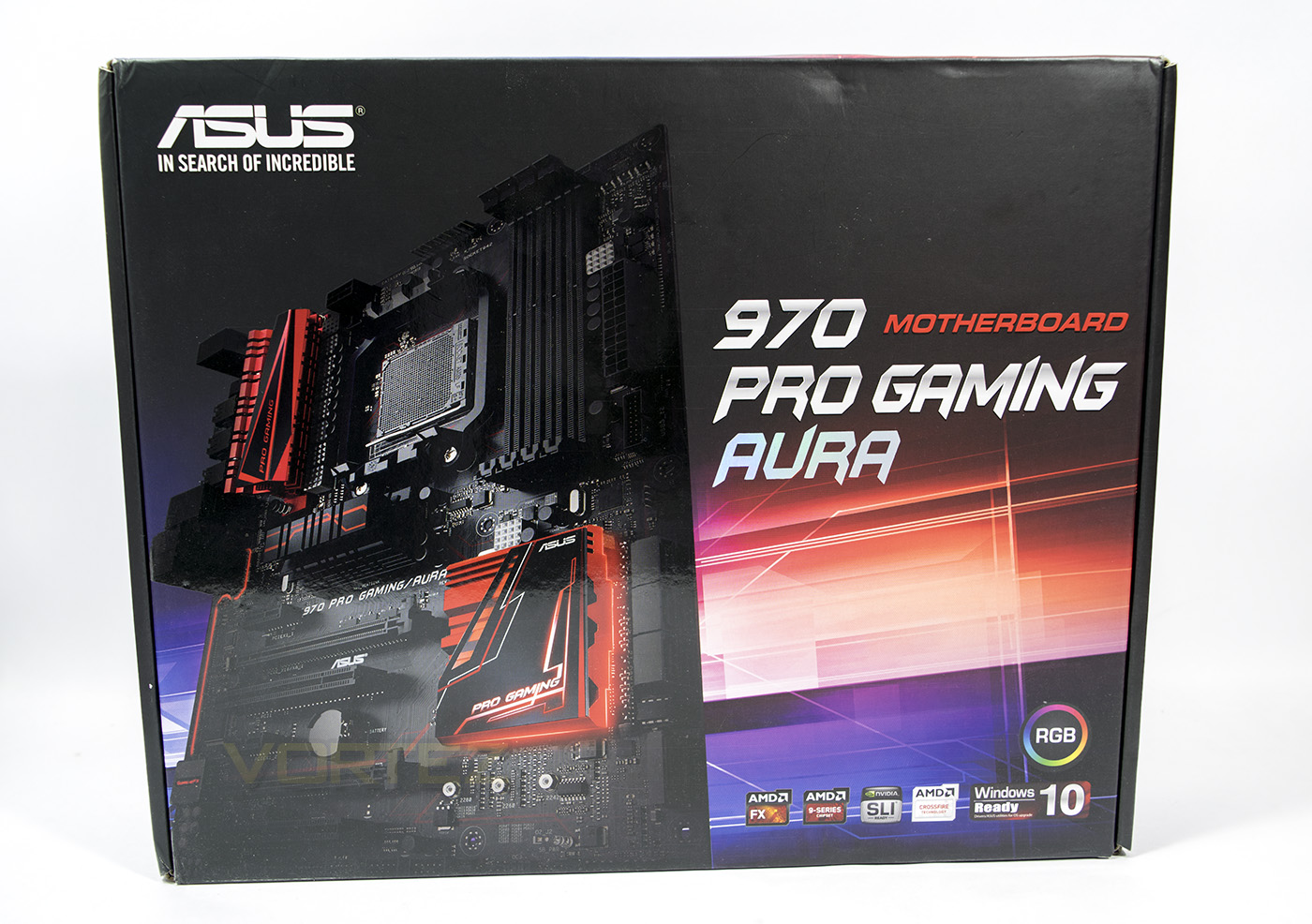
Colourful design on the packaging, yet still seems fairly understated. Platform and compatibility information seen at the bottom, as well as a clear indicator displaying that this product features RGB LEDs.
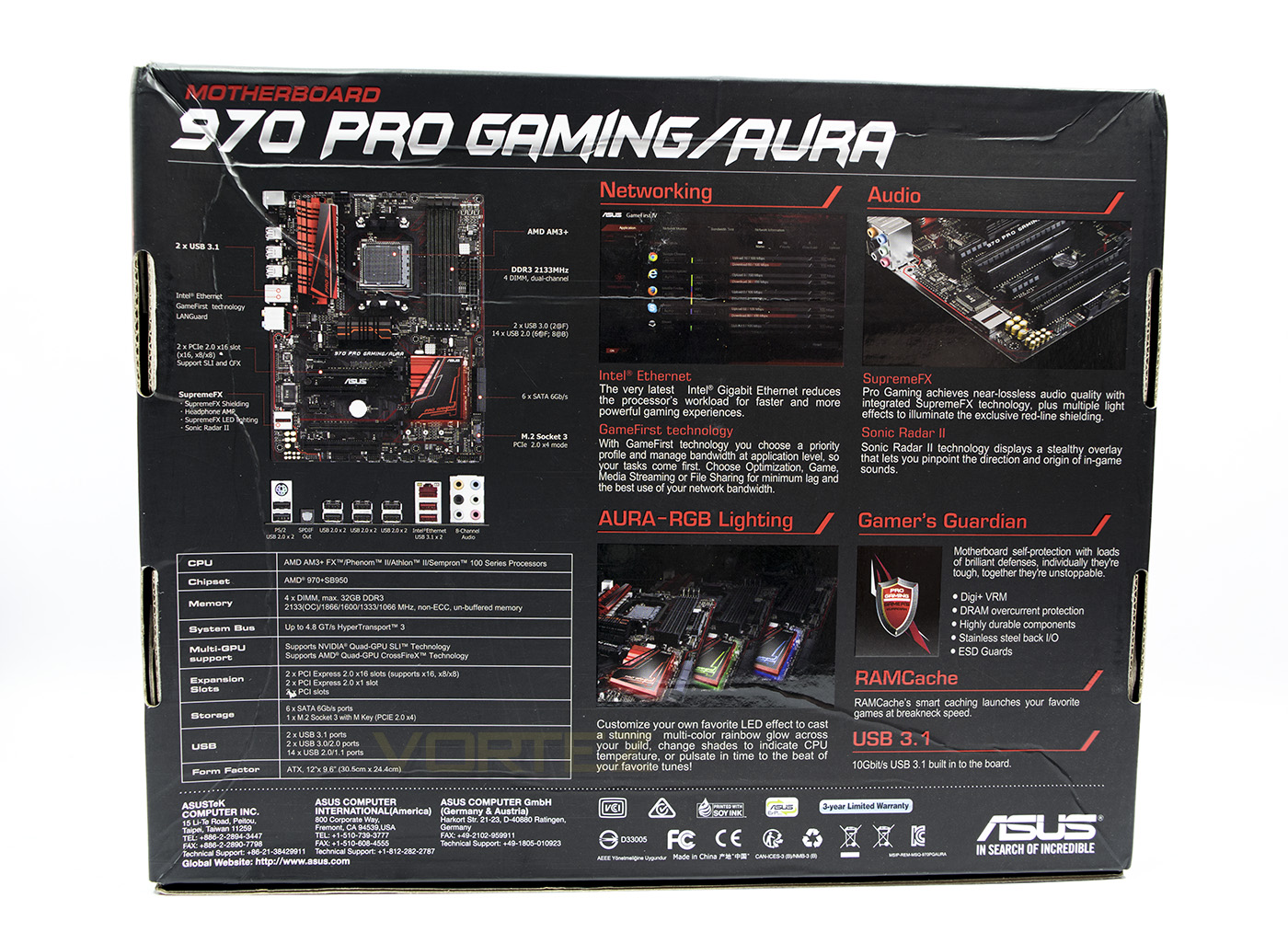
The reverse side scratches the surface of gamer relevant features.
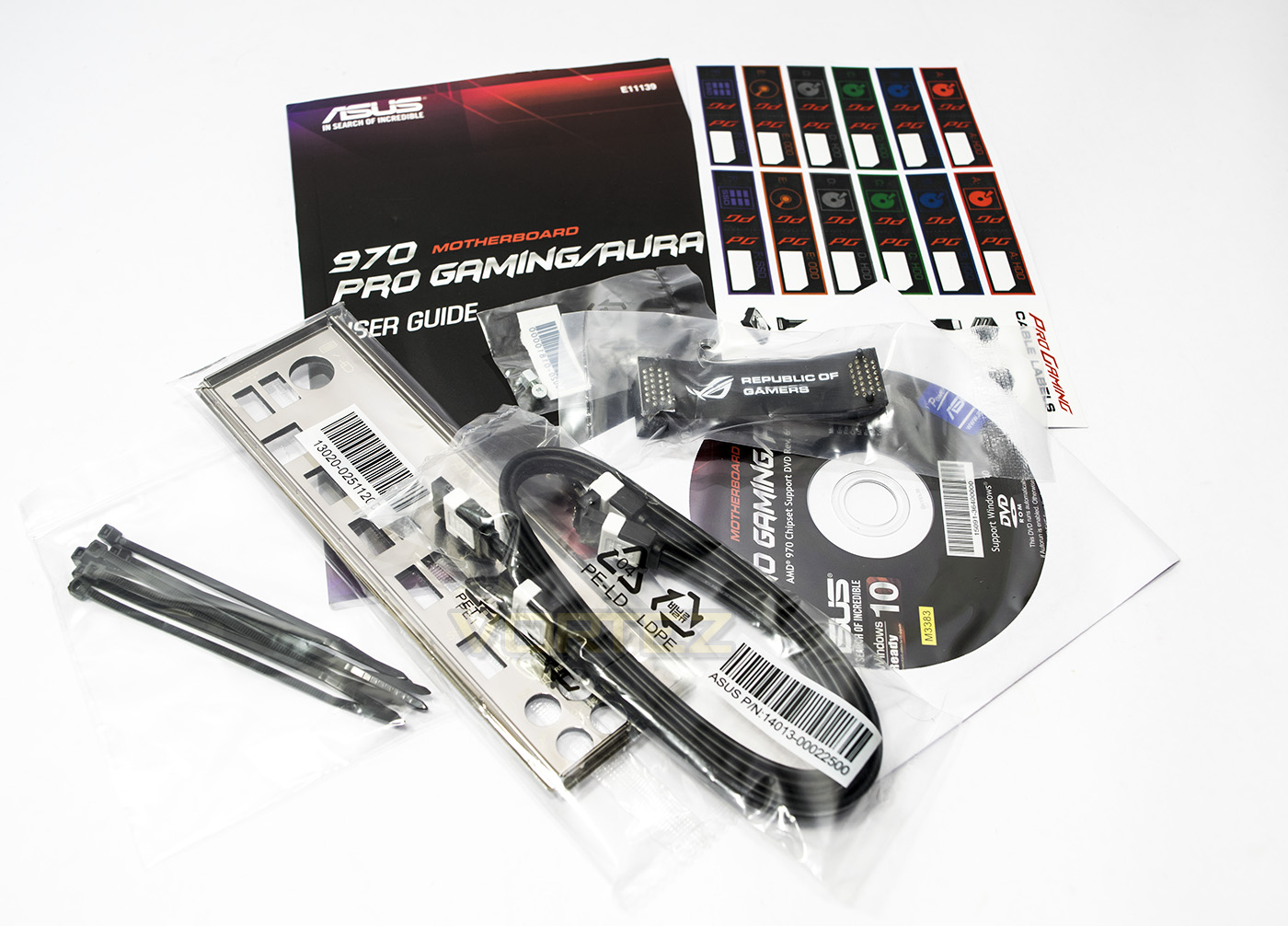
The fact that this board supports SLI is an added bonus, and so ASUS have included a ROG SLI bridge too.
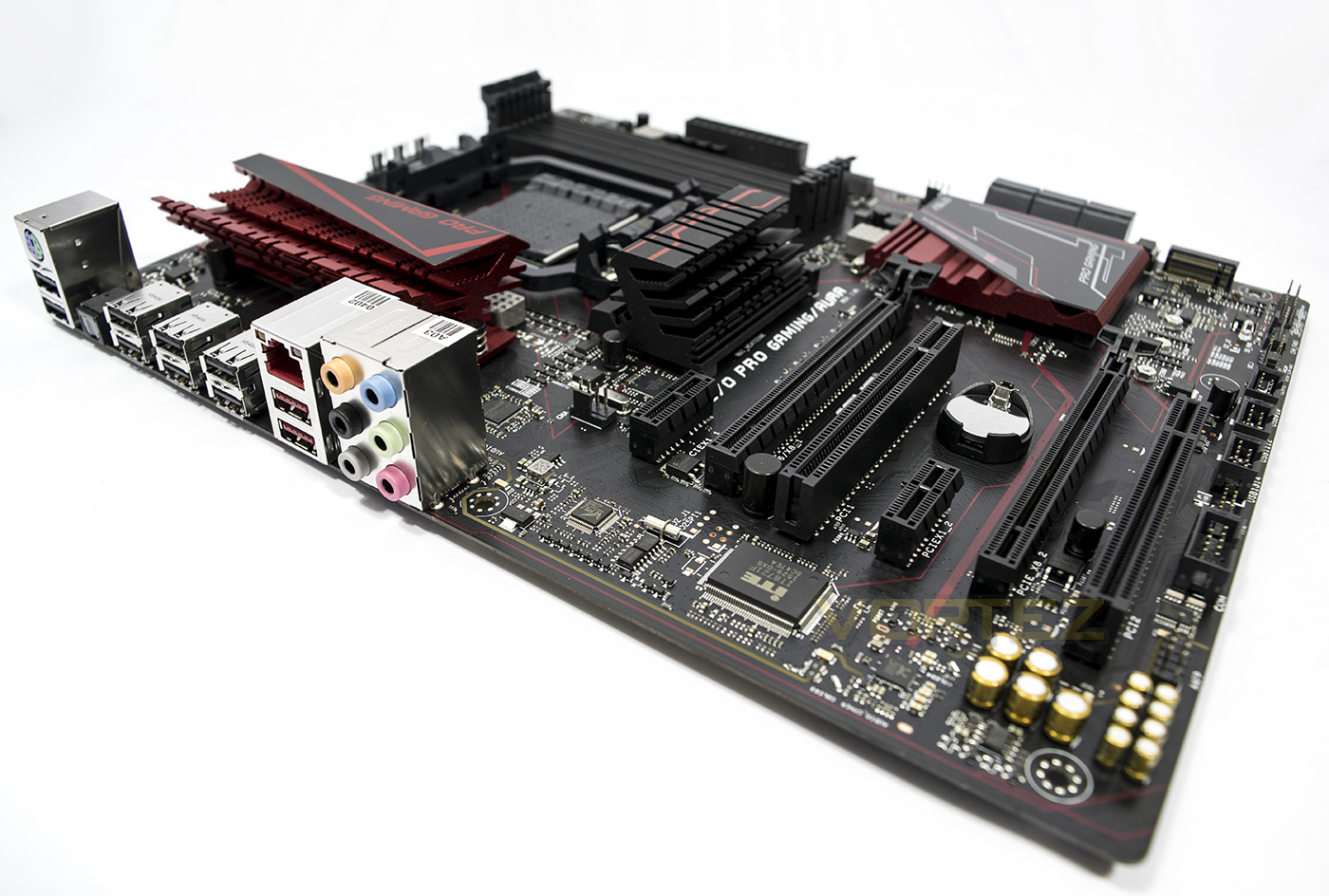
The ASUS 970 PRO GAMING/ AURA
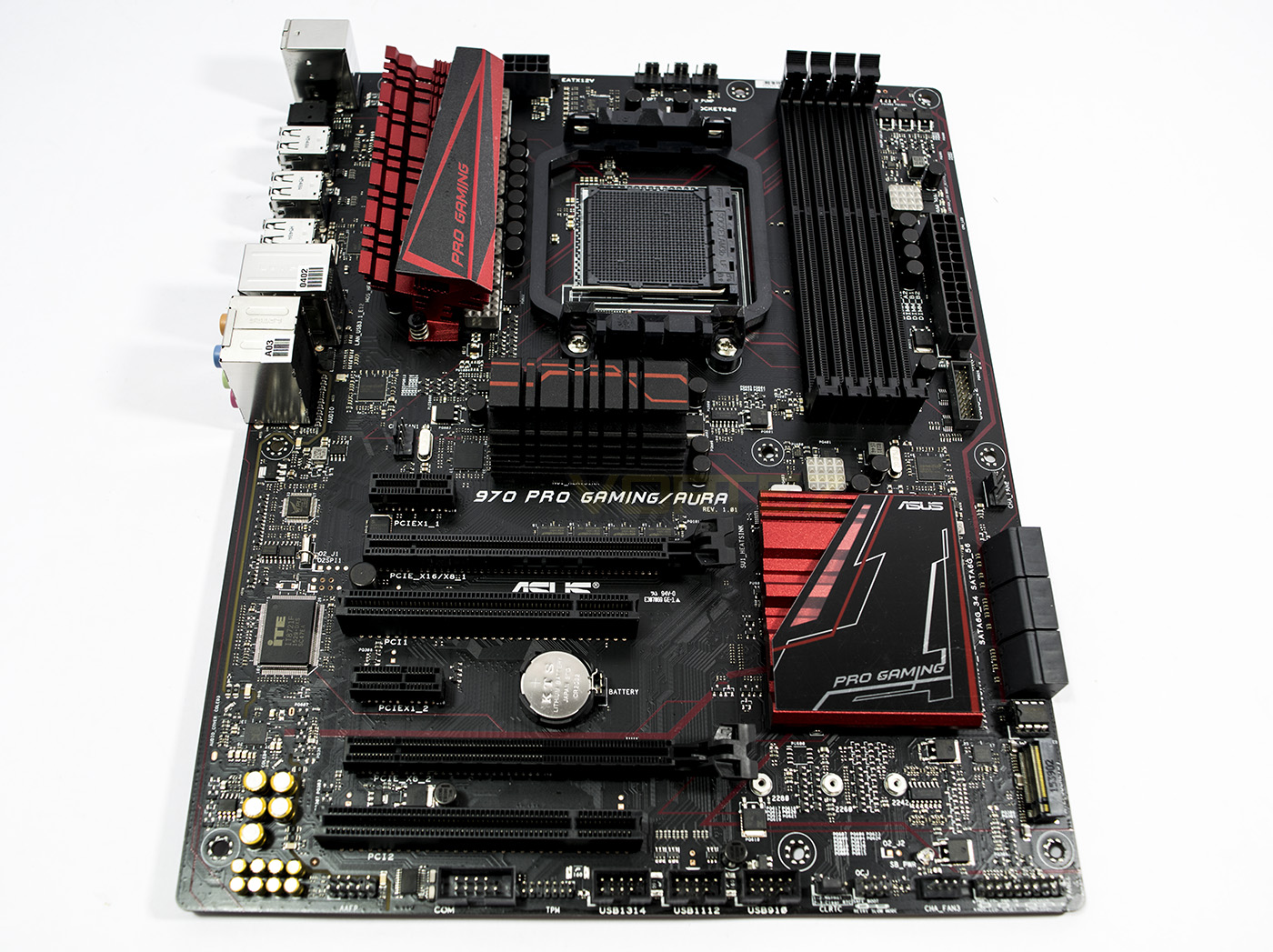
Making use of that space, we get a selection of PCI, PCIe connectivity as well as an M2 port.
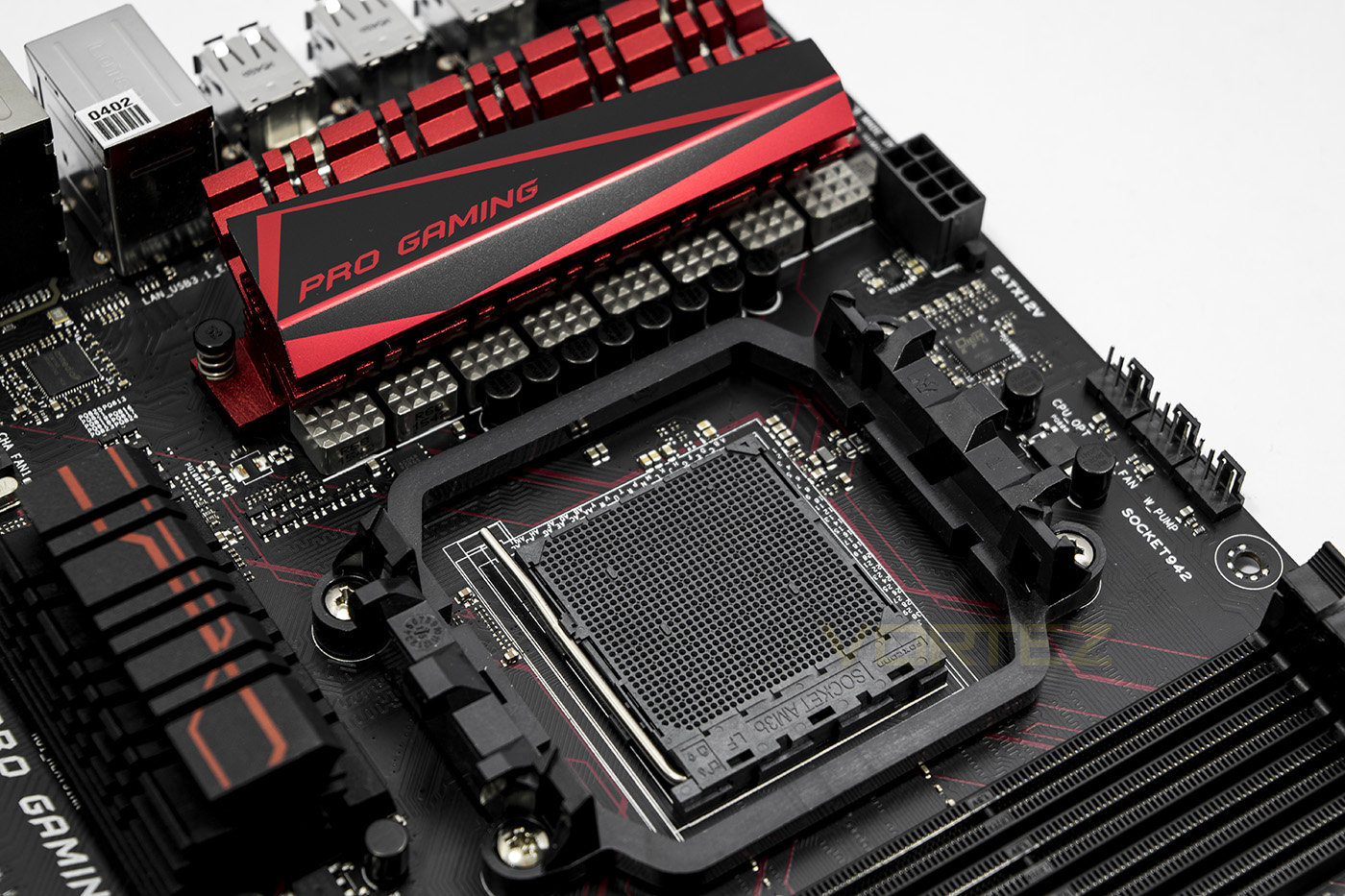
The CPU is fed power by an 8 phase design, above the socket you can see 3x 4pin fan headsets, of which there are a total of 6.
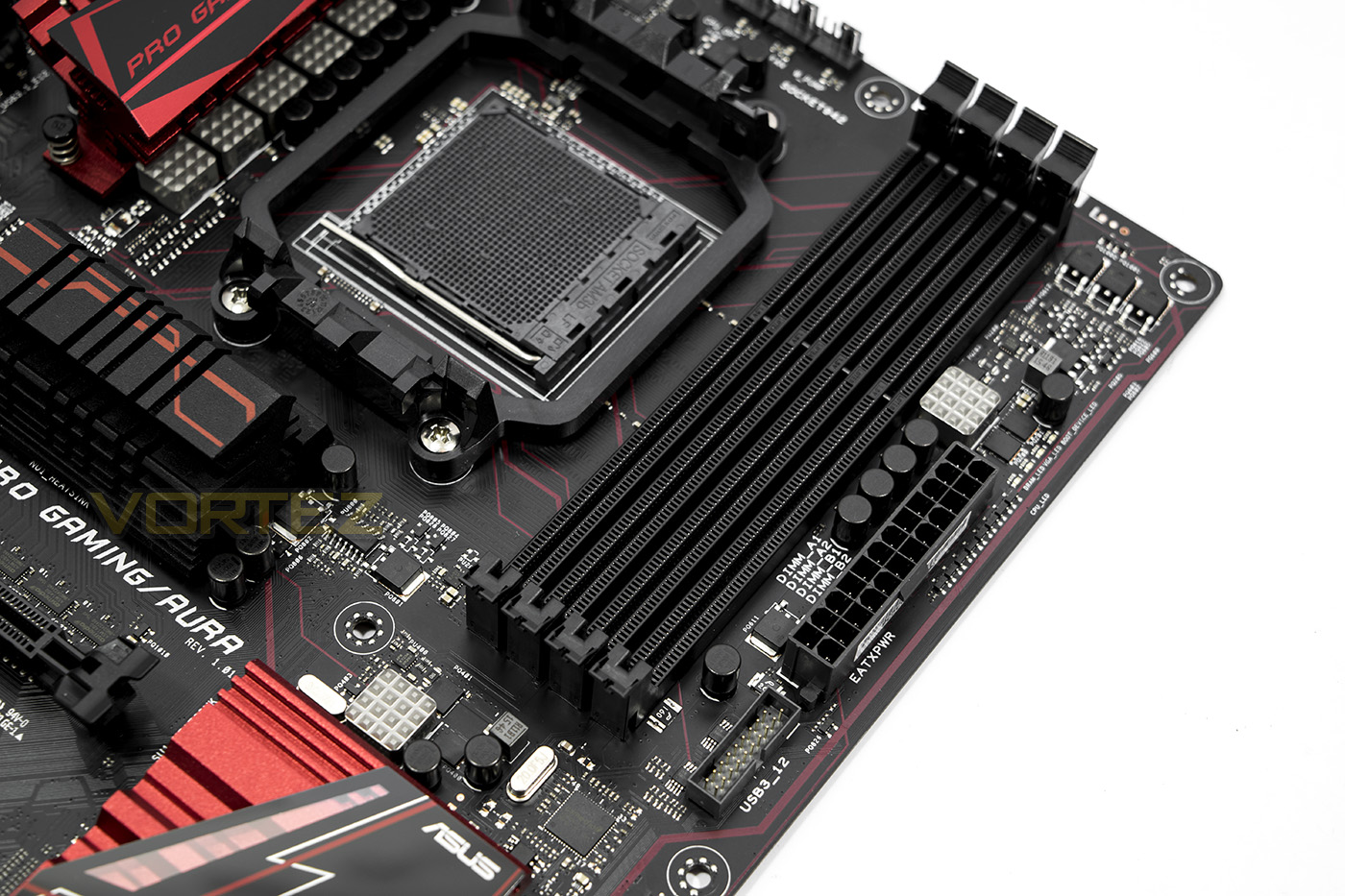
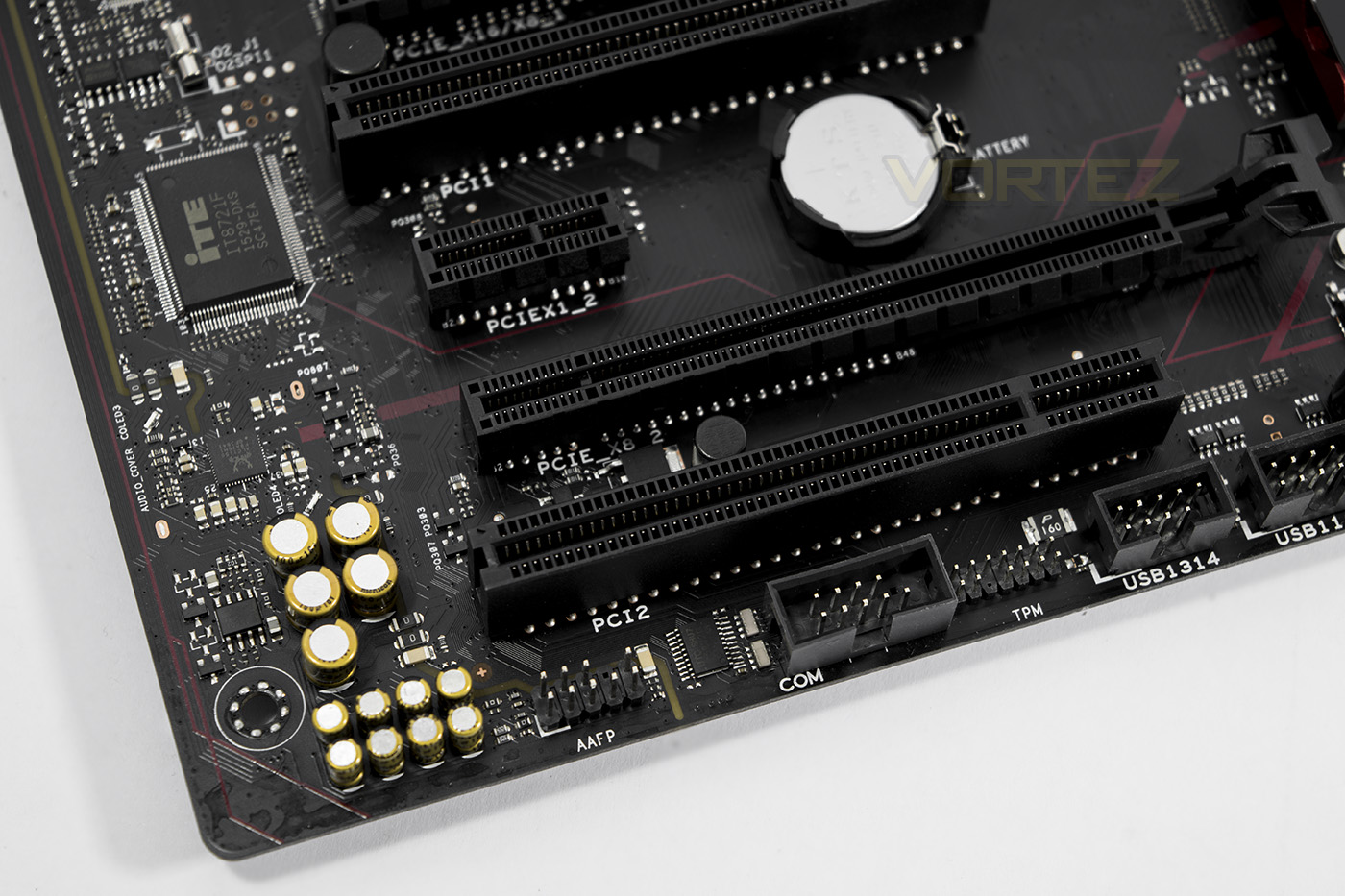
We see some interesting audio capacitors supporting the ALC1150 codec which provides a 115dB SNR.
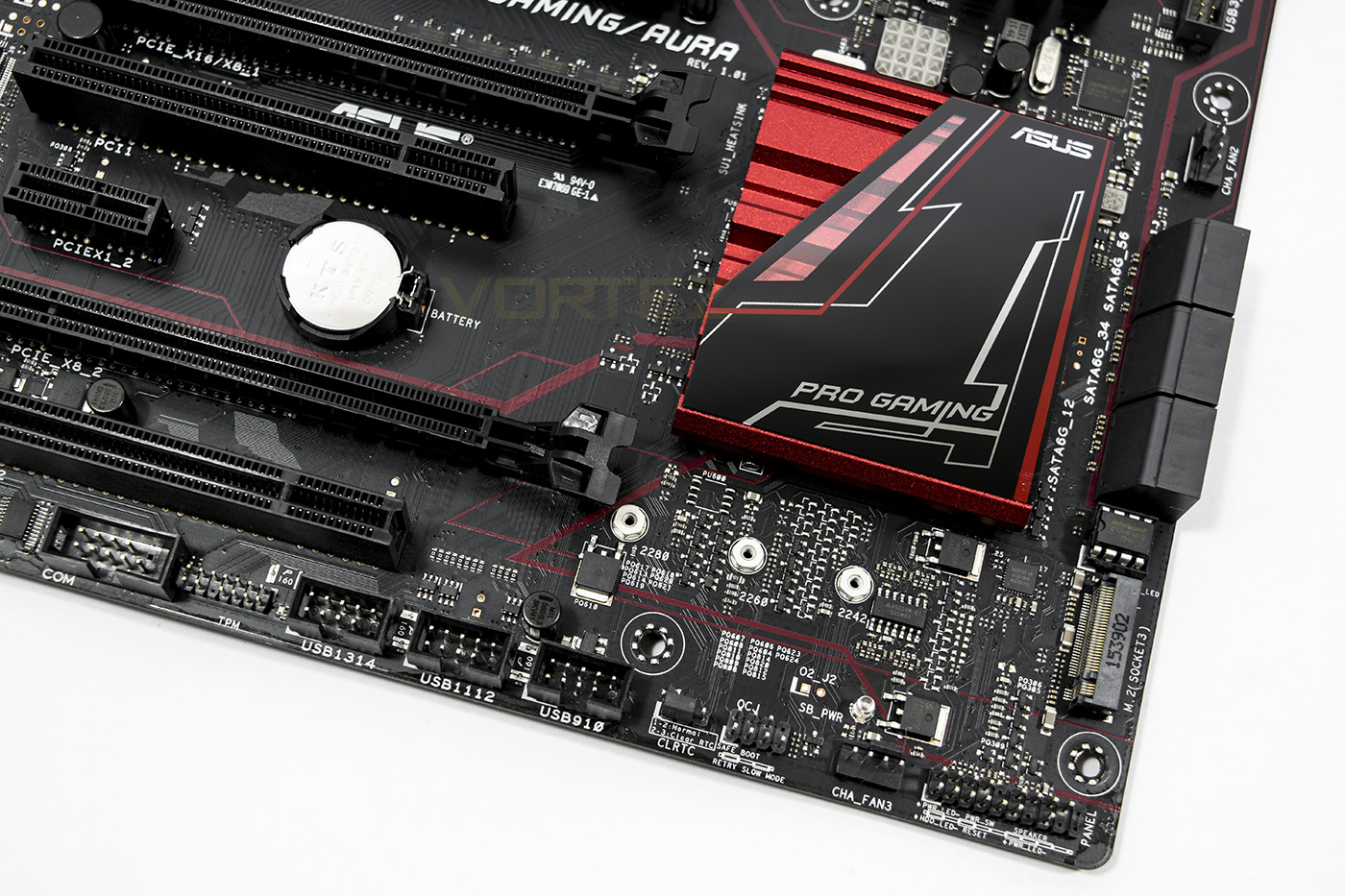
Plenty of extra USB headers for expansion if needed.
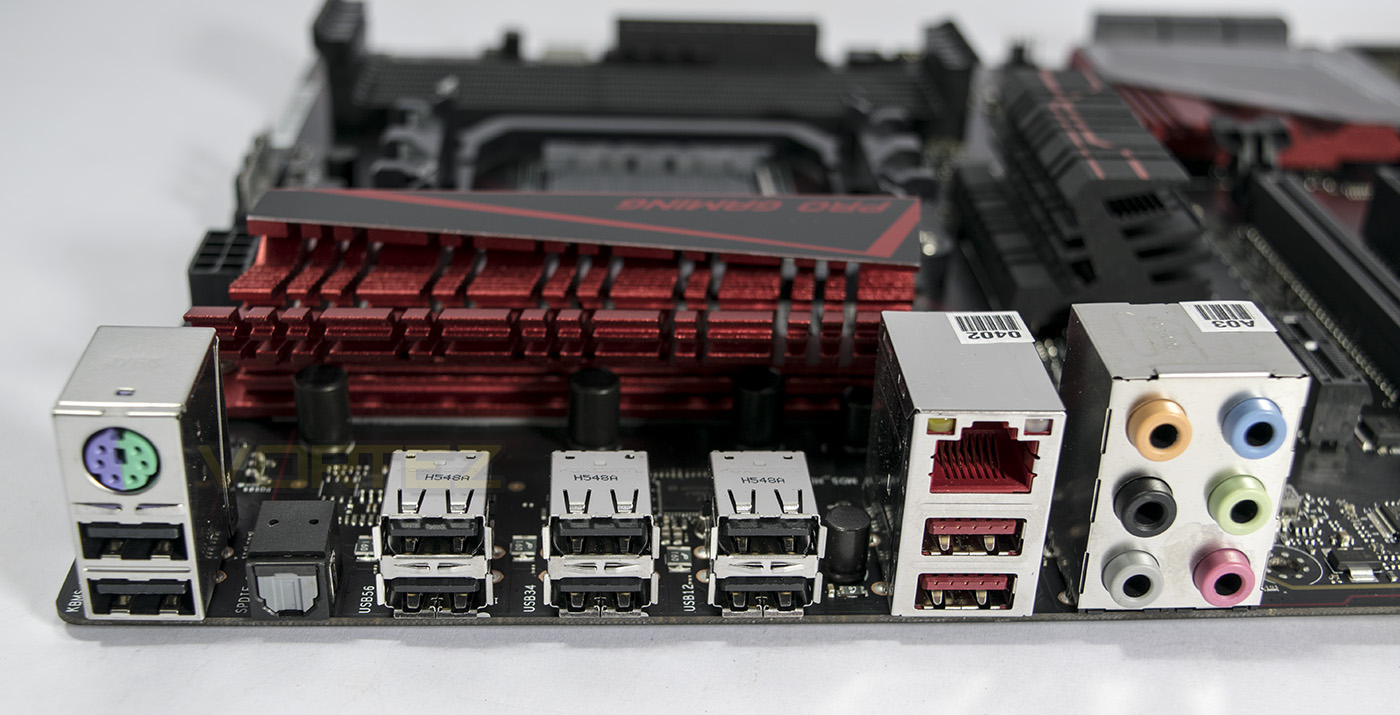
Rear IO includes a universal PS2, 8xUSB 2.0, 2x USB 3.1 (Red type A), an Optical S/PDIF, 1x LAN port and 6x audio jacks.
BIOS Tour
Software & Lighting
The motherboard comes with an easy to use AURA app that allows you to customise the RGB LED lighting with various effects including breathing, static, colour cycle, audio sensitive and CPU temperature sensor. You can also turn it off if you are that way inclined. The CPU temperature sensor mode is surprisingly awesome, ranging from green-yellow-red representing cool to hot, this is a feature I believe will capture the attention of many enthusiasts.
The colours are solid, sensitive, and accurate, showing high quality RGB LEDs used. The white looks white, green looks green and every colour between is well captured. Directly looking at the LEDs you can see the combination colours used to make the desired hue, however when it is inside your case, it is unlikely you will see such a detail.
Test Setup, Methodology & Overclocking
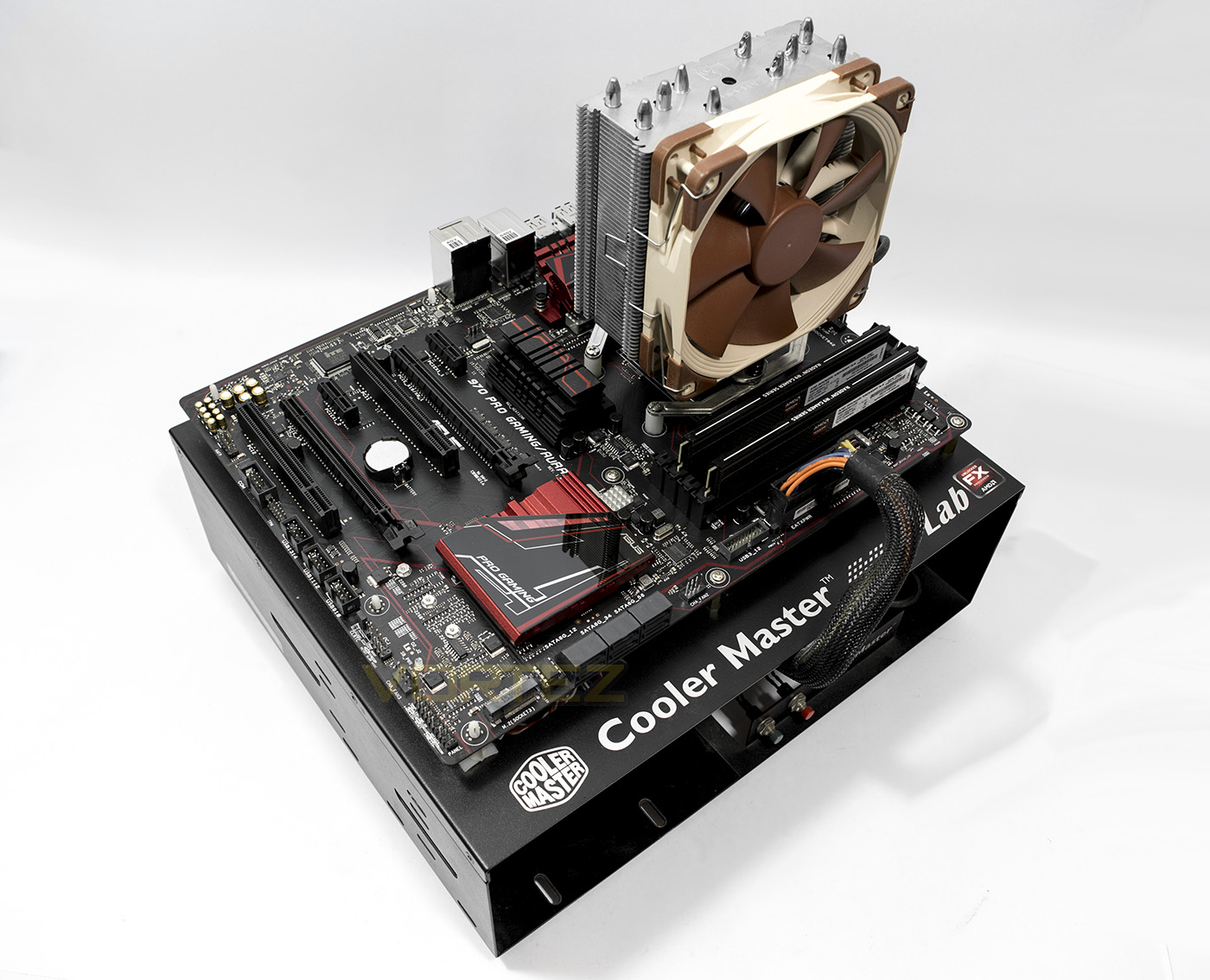
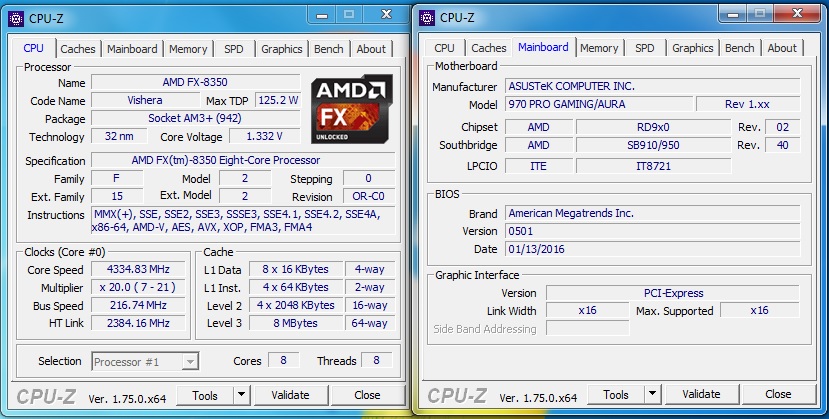
Test SetupCPU AMD FX-8350
Cooling Noctua NH-U12S
Motherboard ASUS 970 PRO GAMING/ AURA
Memory AMD RADEON 2x 8GB DDR3 2400MHz
Graphics GIGABYTE AMD R9 280X
Storage HYPERX 3K 240GB
PSU NZXT HALE 650W
Benchmarks
Cinebench R15 – CPU/OpenGL Score
x264 HD 4.0 – 1st and 2nd pass encoding
SiSoftware SANDRA 2014 – CPU & Memory benchmarks
AIDA64 – CPU benchmarks
PCMark 8 – Home Suite
3DMark FireStrike – DX11 3D Benchmark
Games – Tomb Raider, THIEF
Other Software
CPU Specification Monitoring: CPU-Z
Overclocking
From experience with this particular chip, we know that we can achieve a bench stable 4.7GHz with good cooling, but with the modest Noctua NH-U12S, and a mere 650W PSU, driving such a power hungry CPU would be a little crazy, so to make it a little more interesting we used the motherboards OC Tuner as supplied by ASUS to see what it will reach. Hey presto, after a restart we get an easy 4.35GHz stable overclock which is a nice bump, but nothing extreme.
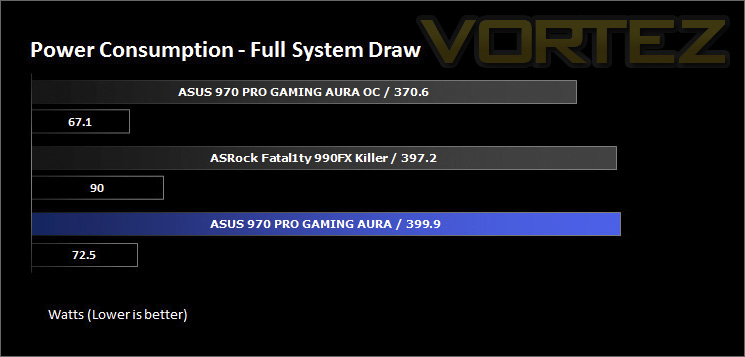
Benchmarks: Power Consumption
It’s interesting to note the power consumption across all motherboards. Energy results can fluctuate between manufacturers and chipsets due to the features and specifications that are integrated. First of all, for the idle tests the system is cold booted into Windows and no additional applications are executed – the watts are noted on the external energy monitor we use and then the system is loaded with 3DMark FireStrike – watts are again monitored for the duration of the test and the highest rated wattage result is then noted down. Below are the results of this energy test.
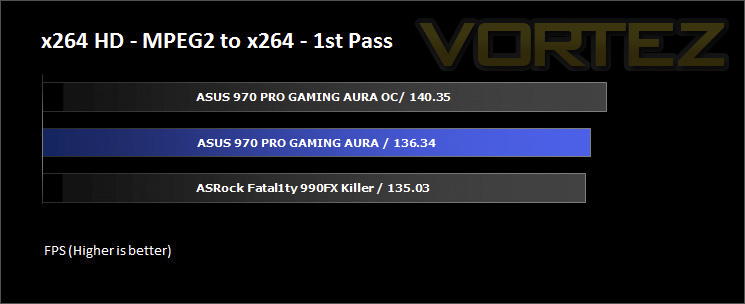
Benchmarks: X264 HD
Simply put, this test measures how fast your machine can encode a short, DVD quality MPEG-2 video clip into a high-quality x264 video clip. What’s x264, you ask? It’s more or less the next-generation Xvid/DivX codec. I think it’s ideal for a benchmark because the application (x264.exe) reports fairly accurate compression results (in frames per second) for each pass of the video encoding process, and it uses multi-core processors very efficiently.
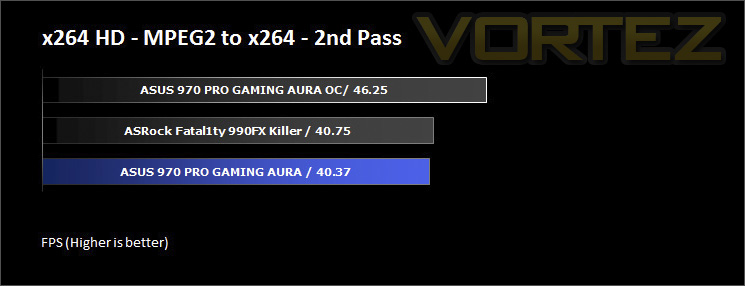
Benchmarks: AIDA64
AIDA64 Product Page
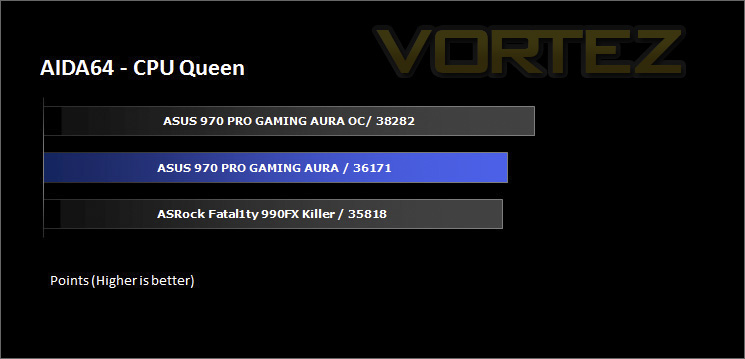
This simple integer benchmark focuses on the branch prediction capabilities and the misprediction penalties of the CPU. It finds the solutions for the classic “Queens problem” on a 10 by 10 sized chessboard. At the same clock speed theoretically the processor with the shorter pipeline and smaller misprediction penalties will attain higher benchmark scores. For example — with HyperThreading disabled — the Intel Northwood core processors get higher scores than the Intel Prescott core based ones due to the 20-step vs 31-step long pipeline. CPU Queen test uses integer MMX, SSE2 and SSSE3 optimizations.
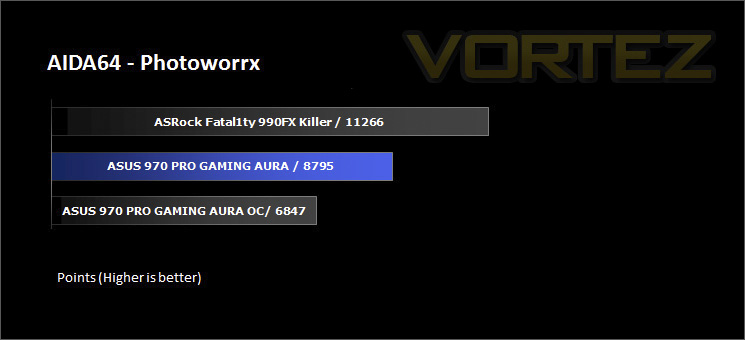
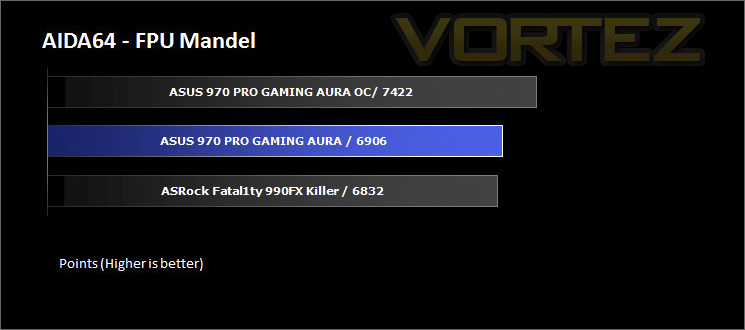
There are some interesting inconsistencies, but these could be due to AIDA not recognising the motherboard, or various changes in the HT speed (2400Hz 970 vs 2600Hz vs 990FX)
Benchmarks: Cinebench R15
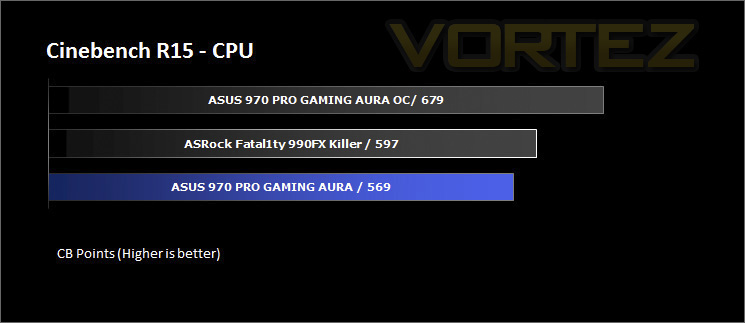
CINEBENCH is a real-world cross platform test suite that evaluates your computer’s performance capabilities. CINEBENCH is based on MAXON’s award-winning animation software CINEMA 4D, which is used extensively by studios and production houses worldwide for 3D content creation. MAXON software has been used in blockbuster movies such as Iron Man 3, Oblivion, Life of Pi or Prometheus and many more.
Benchmarks: SiSoftware SANDRA
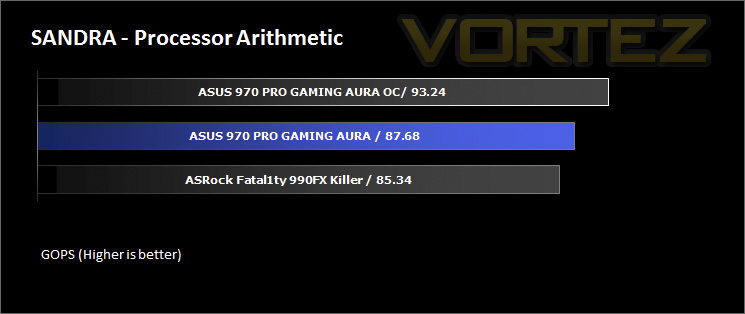
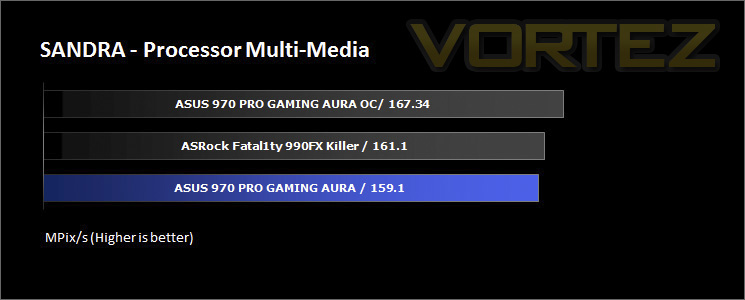
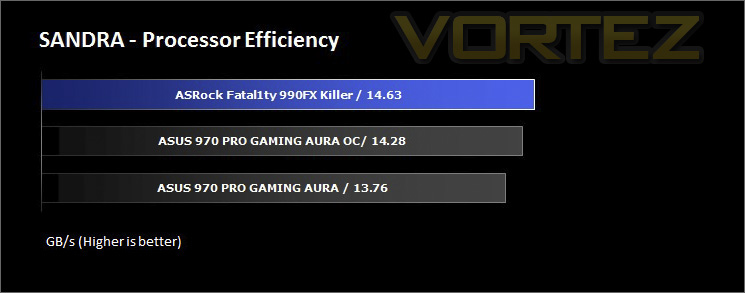
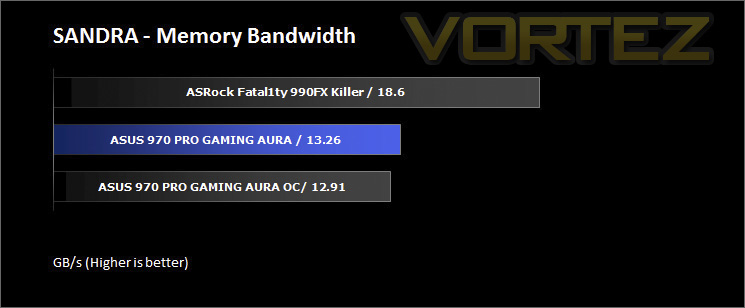
SANDRA isn’t always a benchmark that is included in hardware reviews but I believe it shouldn’t be ignored. SANDRA provides a vigorous package that tests your system in a rather large array of benchmarks. There are many aspects of benchmark that can be executed. We will be considering – CPU and memory tests.
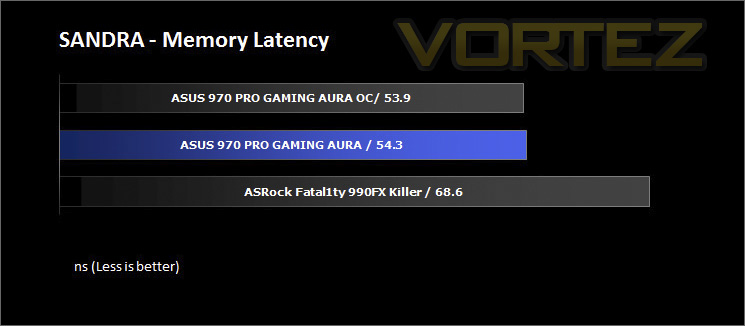
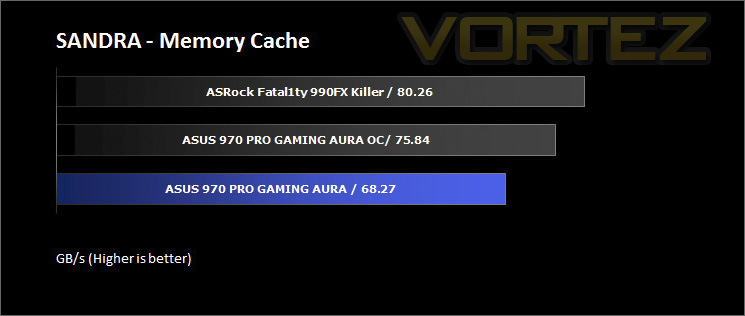
Benchmarks: 3DMark
3DMark FireStrike Product Page
Fire Strike is our new showcase DirectX 11 benchmark designed for high-performance gaming PCs. It is our most ambitious and technical benchmark ever, featuring real-time graphics rendered with detail and complexity far beyond what is found in other benchmarks and games today. Fire Strike will only be available in the Windows editions of 3DMark initially.
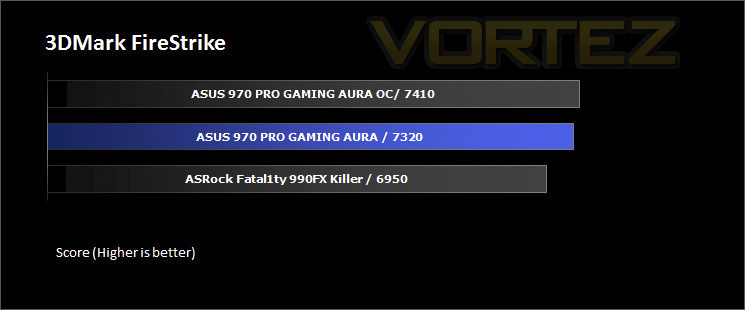
Benchmarks: PCMark 8
PCMark 8 combines performance benchmarking with battery life measurement and includes tests based on popular Adobe and Microsoft applications. Whether you are looking for long battery life, or maximum power, PCMark 8 will help you find the devices that offer the perfect combination of efficiency and performance for your needs. It’s the complete PC performance benchmark for home and business.
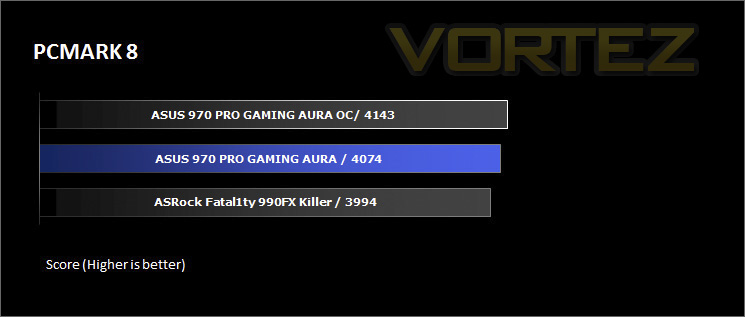
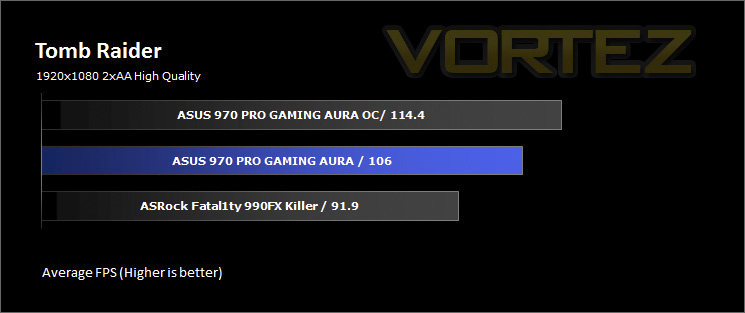
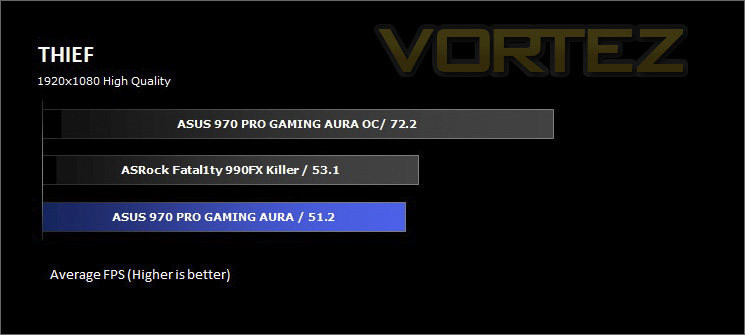
Benchmarks: Tomb Raider & THIEF
It’s important for us to perform a number of game benchmarks as well as the synthetic tests because gamers will want to know if there are any significant benefits. So here we have two popular and recent gaming titles which feature a dedicated benchmark tool within them to display results.
Conclusion
In testing, the 970/Aura showed some strengths against the 990FX motherboard, yet also showed its weaknesses in regards to memory bandwidth aided by the higher default HT clock speed on the 990FX chipset. Earlier we discussed the positive side of ASUS choosing to use the 970 chipset over the 990FX, and considering the price, performance and overall package, ASUS have done a fantastic job rejuvenating this platform, either as a ‘last hurrah’ or as a prelude of things to come. For now, any gamers already on the AM3+ platform, or anyone snagging a bargain FX chip and plan on using it for a capable gaming system, will love the gamer specific features of this motherboard.
There are few real downsides, most of which are inherent to the AM3+ platform itself, such as the power draw and absolute performance, though sticking to things we can consider, there are some things that might annoy some. Such as, why bother having RGB LEDs around a logo, when everywhere else has RED LEDs? It would have been nice to see a more neutral colour scheme on the motherboard itself with full RGB LEDs everywhere else, but I guess this is something for the future. Another consideration is, that it does lack the extreme over-the-top design that has gamers yearning as seen with the 990FX motherboards, on top of that, there are certain parts of the motherboard that get incredibly hot due to the undersized heatsinks, then again, this is arguably a platform issue rather than a design issue, so these considerations are merely oversights.
Generally speaking, motherboards made by ASUS come with a fantastic list of rich features and intelligent design considerations and this motherboard is no exception. The build quality is top notch and features various ESD (electrostatic discharge) protections, giving a much needed peace of mind. So if you are investing in the AM3+ platform for a modest gaming system, the ASUS 970 PRO GAMING/ AURA should be your number one consideration in regards to sensible pricing and performance.
The ASUS 970 PRO GAMING/ AURA packs in all the best of the AM3+ platform into a sensible, and competent motherboard, and then there is the bonus of shiny RGB LEDs!
Pros
+ High-quality components
+ Easy to use BIOS
+ Customisable RGB LED lighting
+ Has 2x USB 3.1 ports
+ Features a M2 slot
+ Supports CrossFireX and SLI
+ Solid performance
Cons
– Not RGB lighting throughout
+ High-quality components
+ Easy to use BIOS
+ Customisable RGB LED lighting
+ Has 2x USB 3.1 ports
+ Features a M2 slot
+ Supports CrossFireX and SLI
+ Solid performance
Cons
– Not RGB lighting throughout
Click here for an explanation of our awards at Vortez.net.