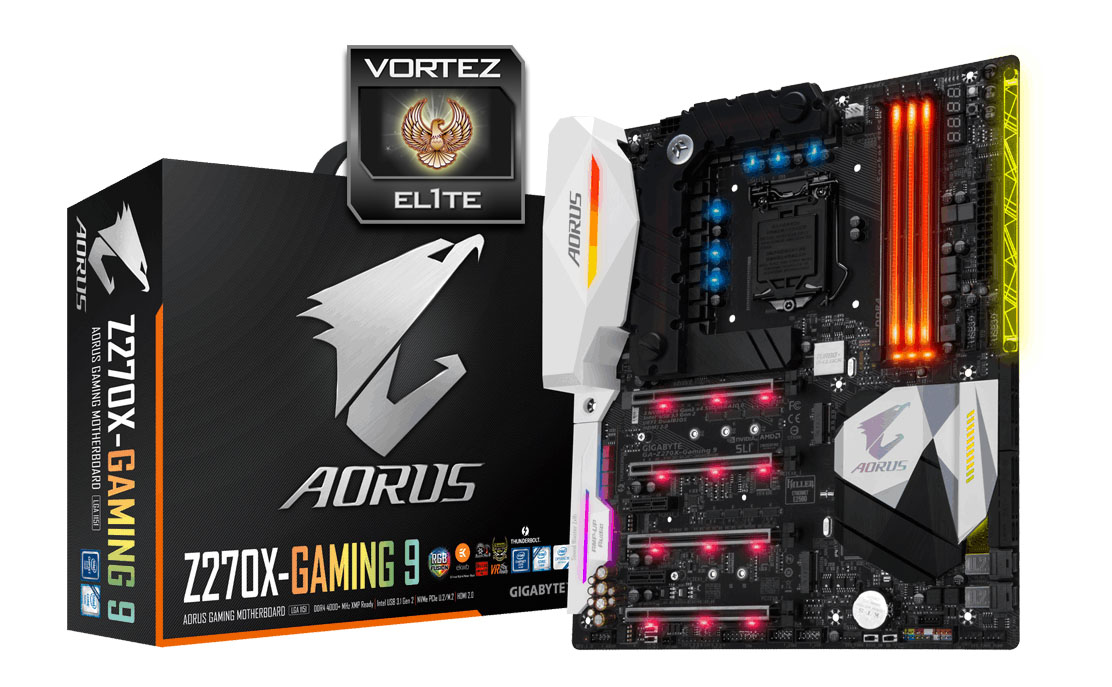
Looking for the ultimate of Intel Z270 motherboards? We take a look at GIGABYTE’s flagship AORUS motherboard; the Z270X-Gaming 9 which features EKWB hybrid water cooling.

Product on Review: AORUS Z270X-Gaming 9
Manufacturer & Sponsor: GIGABYTE
Street Price: £450-500 GBP / $500 USD
This week’s release of Intel’s new Z270 chipset and Kaby Lake processors has no doubt been a whirlwind for all those concerned. Of the motherboard partners supplying the Z270 chipset, each brand has delivered up at least 10 models – proving how popular demand has become in the performance/enthusiast segment.
The competition is fierce and today we turn to a motherboard which seeks to step out and proclaim itself as the best of the best. Many will now be aware that GIGABYTE’s AORUS series is the company’s performance range – representing the finest they have to offer. In the spotlight today is the Z270X-Gaming 9 – the flagship model which boasts a catalogue of premium characteristics including: EKWB Hybrid water cooling, dual x16 mode with PLX chip, support for up to 4000MHz DDR4 and Quad-SLI/CrossfireX support.
Is this the very best Z270 motherboard that money can buy?
GIGABYTE on AORUS
GIGABYTE shares the same passion for gaming with all types of gamers. Therefore, we have extended the premium gaming brand – AORUS, the pinnacle of our hardware excellence, to provide a full spectrum of innovative gaming products that deliver the ultimate performance and exemplifies the PC’s capability for bringing gamers unprecedented delights. We will continue to participate in global gaming events, connecting with the community and actively listening to gamers’ desires in order to create marvellous products that are focused on gamers’ needs. AORUS is a team of gamers in the PC industry, looking to side with gamers in their quest for gaming, to challenge the limits, and become legendary.
Technical Specifications
Below are the technical specifications concerning the Z270X-Gaming 9:
CPU
• Supports 7th Gen Intel® Core™ i3/i5/i7 processors, and Intel® Pentium® and Celeron® processors for Socket LGA1151
Chipset
• Intel® Z270 Chipset
Main Memory
• 4 x DDR4 memory slots, support up to 64GB
– Supports DDR4 Up to 4000MHz
• Dual channel memory architecture
• Supports ECC, un-buffered memory
– ECC UDIMM memory (non-ECC mode)
• Supports Intel® Extreme Memory Profile (XMP)
Slots
• 4 x PCIe 3.0 x16 slots (Modes: 16, 8, 16,
• 2 x PCIe 3.0 x1 slots
Onboard Graphics
• 1 x HDMI™ port, support a maximum resolution of 4096×2160@24Hz, 2560×1600@60Hz
• 1 x Displayport™ port, support a maximum resolution of 4096×2160@60Hz, 2560×1600@60Hz
Multi-GPU
• Supports 4-Way AMD® CrossFire™ Technology
• Supports 4-Way NVIDIA® SLI™ Technology
Storage
• Intel® Z270 Chipset
• 8 x SATA 6Gb/s ports
• 3 x SATA Express
• 2 x U.2 slots
• 2 x M.2 slots (Supports Intel Optane Memory – 7th Gen Processor required)
RAID
• Intel® Z270 Chipset
– Supports RAID 0, RAID1, RAID 5 and RAID 10 for SATA storage devices
Audio
• Creative Sound Core3D Chip
– 7.1-Channel High Definition Audio
– Supports S/PDIF output
LAN
• 2 x Killer E2500 Gigabit LAN controller
WiFi
• Killer Wireless AC 1535
• Wireless 802.11 a/b/g/n/ac 2.4/5GHz dual-band with Bluetooth 4.1
Back Panel I/O Ports
– 1 x PS/2 keyboard/ mouse port
– 2 x MMCX antenna connectors (2T2R)
– 1 x HDMI
– 1 x Displayport
– 1 x Thunderbolt 3 (USB 3.1 Type-C Gen2)
– 1 x USB 3.1 Gen2 Type A
– 5 x USB 3.1 Gen1 Type A
– 2 x Gigabit LAN (Killer E2550)
– 1 x Audio ports with Optical Out
Dimension
• 30.5cm x 26.4cm
• E-ATX Form Factor
• Supports 7th Gen Intel® Core™ i3/i5/i7 processors, and Intel® Pentium® and Celeron® processors for Socket LGA1151
Chipset
• Intel® Z270 Chipset
Main Memory
• 4 x DDR4 memory slots, support up to 64GB
– Supports DDR4 Up to 4000MHz
• Dual channel memory architecture
• Supports ECC, un-buffered memory
– ECC UDIMM memory (non-ECC mode)
• Supports Intel® Extreme Memory Profile (XMP)
Slots
• 4 x PCIe 3.0 x16 slots (Modes: 16, 8, 16,
• 2 x PCIe 3.0 x1 slots
Onboard Graphics
• 1 x HDMI™ port, support a maximum resolution of 4096×2160@24Hz, 2560×1600@60Hz
• 1 x Displayport™ port, support a maximum resolution of 4096×2160@60Hz, 2560×1600@60Hz
Multi-GPU
• Supports 4-Way AMD® CrossFire™ Technology
• Supports 4-Way NVIDIA® SLI™ Technology
Storage
• Intel® Z270 Chipset
• 8 x SATA 6Gb/s ports
• 3 x SATA Express
• 2 x U.2 slots
• 2 x M.2 slots (Supports Intel Optane Memory – 7th Gen Processor required)
RAID
• Intel® Z270 Chipset
– Supports RAID 0, RAID1, RAID 5 and RAID 10 for SATA storage devices
Audio
• Creative Sound Core3D Chip
– 7.1-Channel High Definition Audio
– Supports S/PDIF output
LAN
• 2 x Killer E2500 Gigabit LAN controller
WiFi
• Killer Wireless AC 1535
• Wireless 802.11 a/b/g/n/ac 2.4/5GHz dual-band with Bluetooth 4.1
Back Panel I/O Ports
– 1 x PS/2 keyboard/ mouse port
– 2 x MMCX antenna connectors (2T2R)
– 1 x HDMI
– 1 x Displayport
– 1 x Thunderbolt 3 (USB 3.1 Type-C Gen2)
– 1 x USB 3.1 Gen2 Type A
– 5 x USB 3.1 Gen1 Type A
– 2 x Gigabit LAN (Killer E2550)
– 1 x Audio ports with Optical Out
Dimension
• 30.5cm x 26.4cm
• E-ATX Form Factor
Packaging, Bundle & First Look
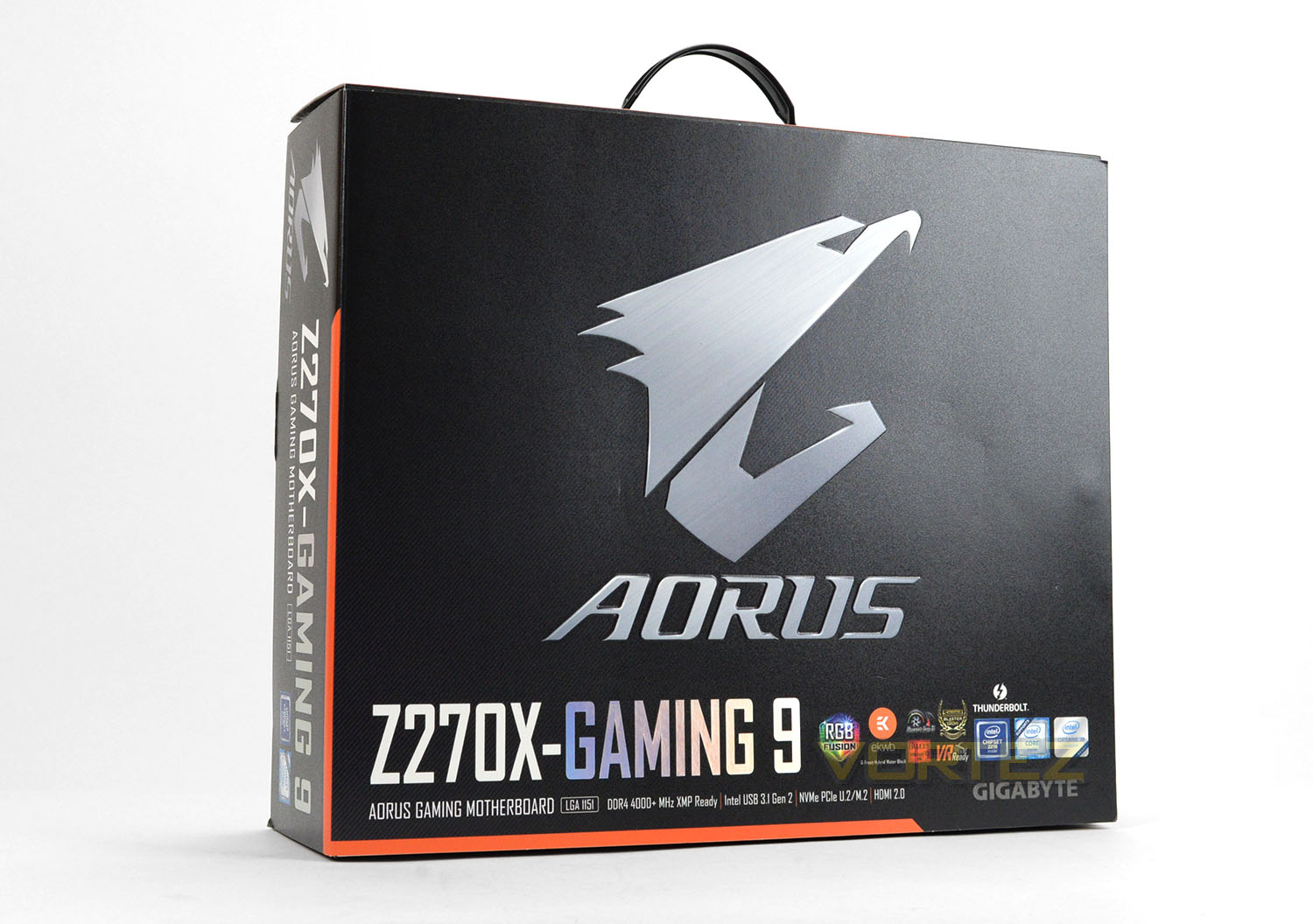
Along with a new motherboard division comes fresh packaging with AORUS branding. The front of the box lists all of the included standards and features a flip-lid giving a preview of the motherboard inside.
On the reverse, a detailed breakdown of the features can be seen along with the technical specifications. The motherboard arrives well-padded in a foam tray and inside an anti-static bag.
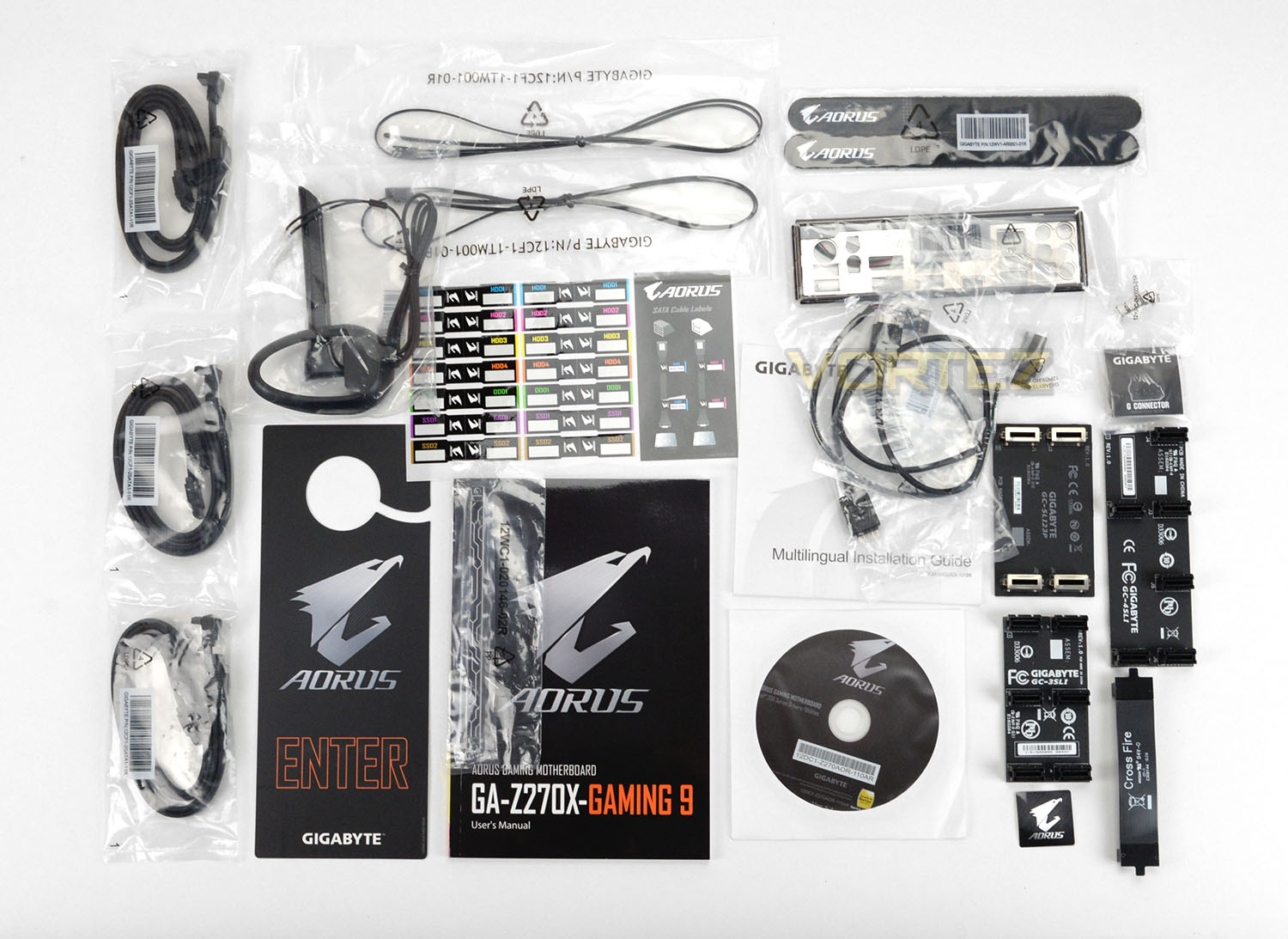
Inside the box there are an extensive list of bundled accessories since we are dealing with the flagship AORUS model here. So, included we have the following:
• Software CD
• User’s Manual
• Quick Installation Guide
• Six SATA cables
• I/O Shield
• One Wi-Fi antenna
• One Wi-Fi antenna retention cover
• One GC-SLI23P SLI bridge connector
• One 3-Way SLI bridge connector
• One 4-Way SLI bridge connector
• One 2-Way CrossFire bridge connector
• Two RGB (RGBW) LED strip extension cables
• One Accent Lighting LED Strip
• Two thermistor cables
• One G Connector
• Two Velcro Cable Ties
• One pack of back I/O dust covers
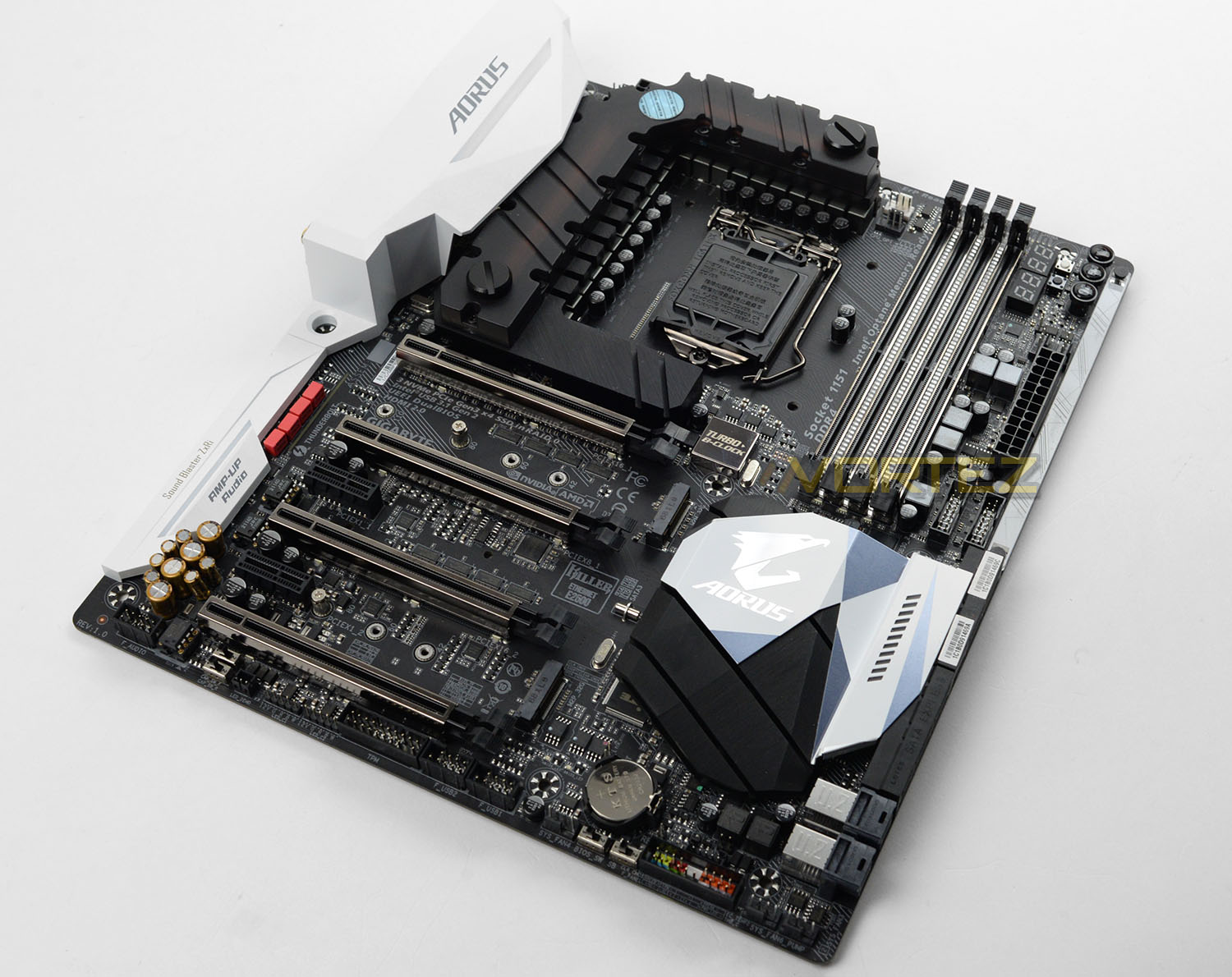
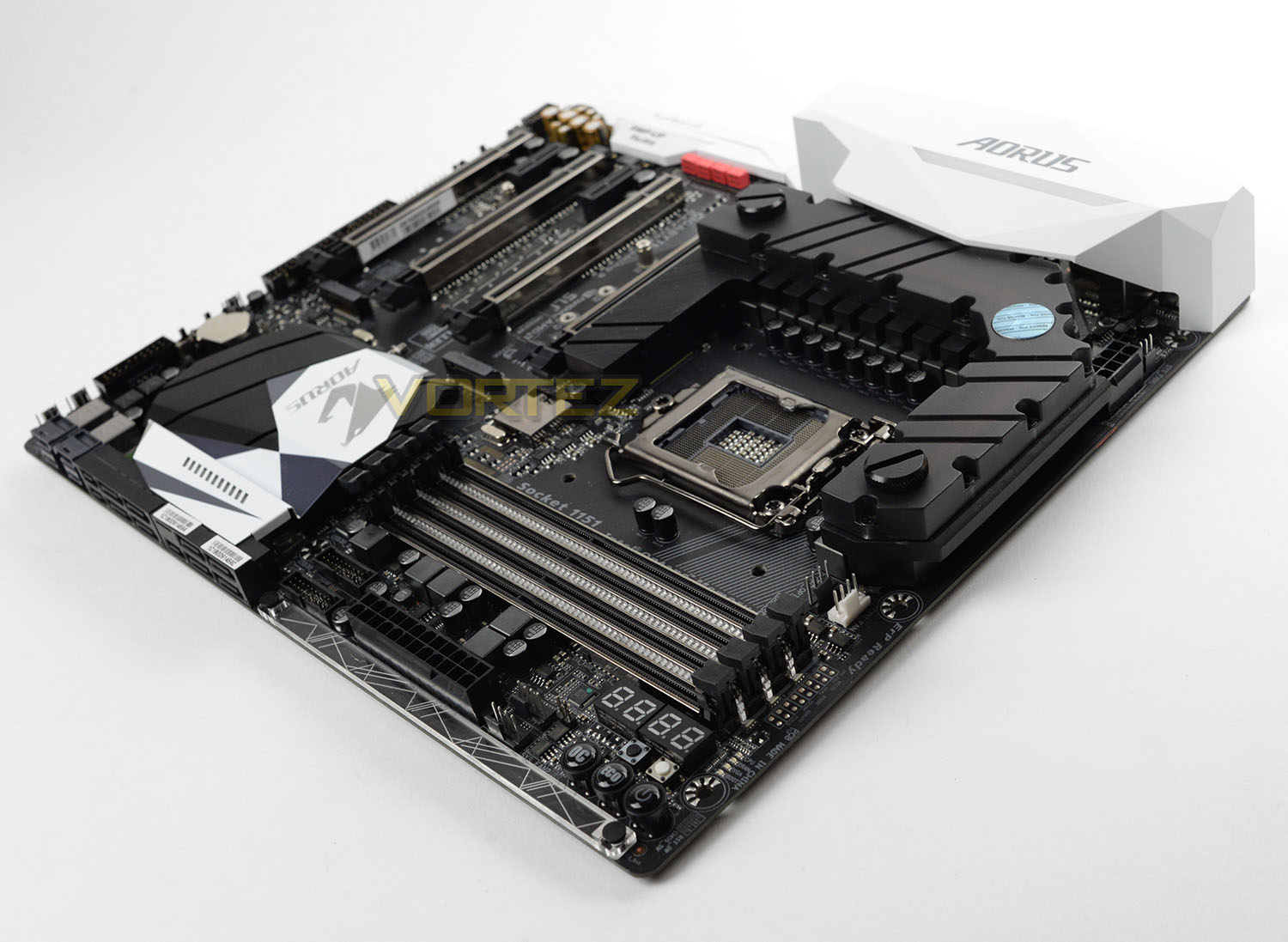
Unpacking the Gaming 9 from its packaging we’re met by a rather sleek looking motherboard and the same aesthetics as found on the Z270X-Gaming 7. Across the board we have black, silver and white being used and there is RGB lighting to allow users to customise the overall theme of the system. GIGABYTE has done a great job on the design of this board and it will pair up with other components very well.
Gaming 9 is slightly larger than a standard motherboard and arrives in the E-ATX form factor measuring: 30.5cm x 26.4cm.
Closer Look
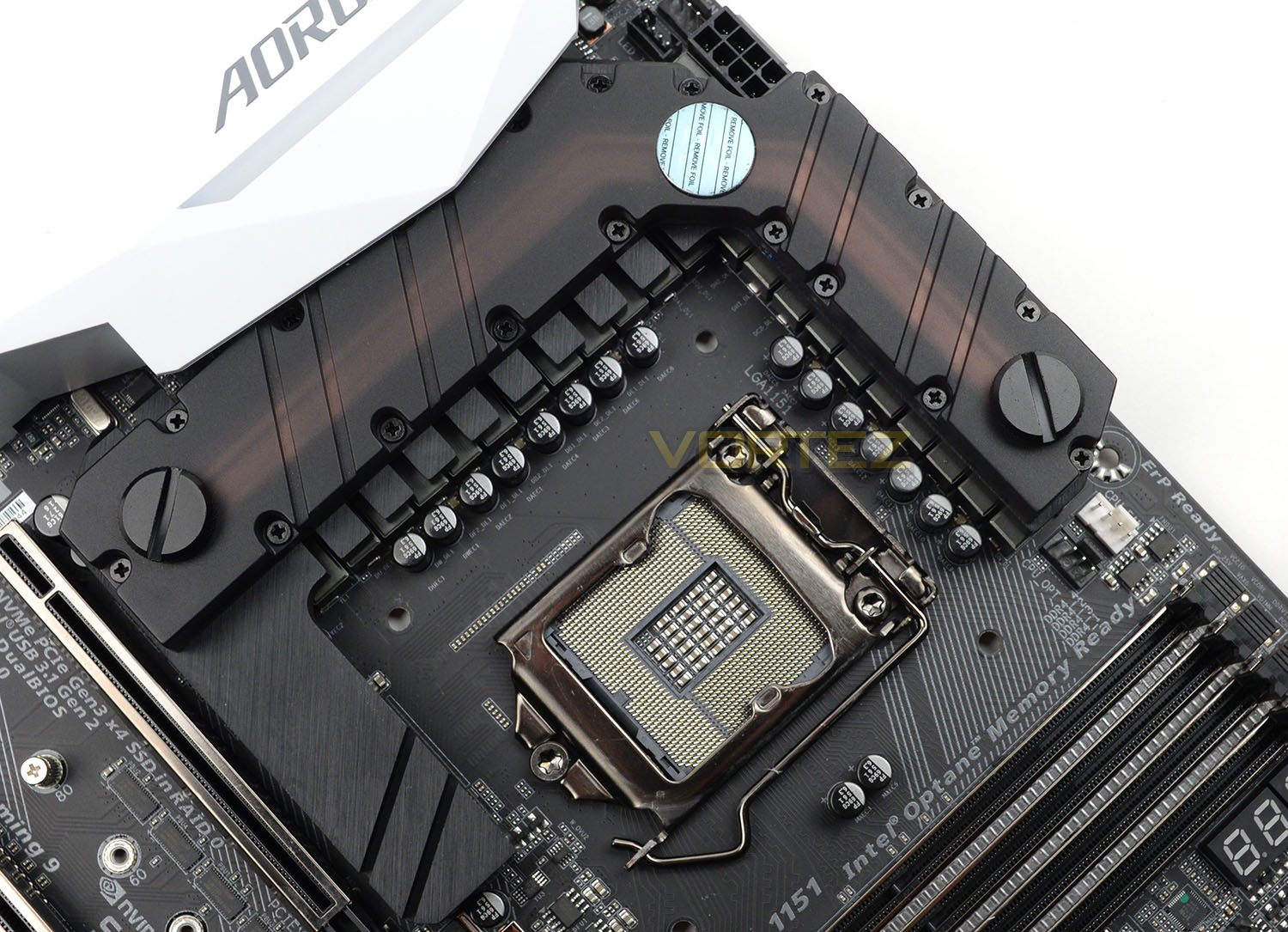
Since this is a 200-series motherboard, Gaming 9 supports the latest Intel 7th Generation of Core Processors codenamed Kaby Lake. The socket is LGA 1151 and therefore is also compatible with Skylake too. The socket here benefits from 15 microinch thick gold plating for better contact – something which we see GIGABYTE employing on most of their boards.
Unlike other AORUS boards, the Gaming 9 has a rather special cooling system around the CPU VRMs. GIGABYTE has teamed up with EK Water Blocks to supply a hybrid water block solution with G1.4” threaded fittings. This water block combines aluminium and copper and even if you aren’t planning to use water cooling – by its nature, this design will offer great thermal cooling compared to other heatsinks.
Around the socket, we have long-life black solid CAPs for reliability and stability and a 22-digital phase power design which is astounding – such a feature should aid with the ability to take performance to an extreme level. Later on, in this review we’ll see how our Gaming 9 copes when we overclock the 7700K.
On the top-edge of the board we have an 8-pin CPU power socket.
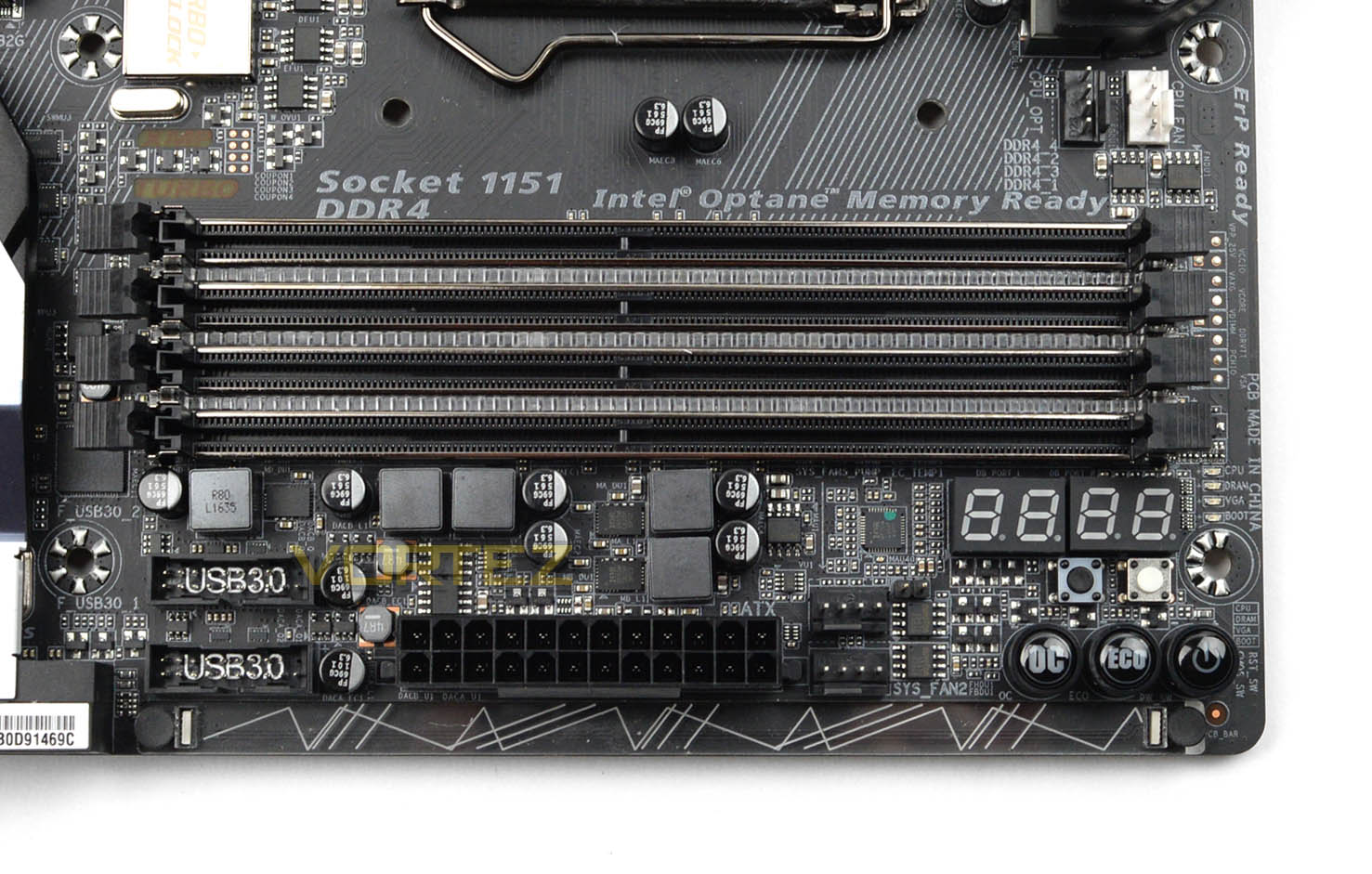
Moving on to the memory, we have four slots for dual channel DDR4 and there is support for up to 64GB and 4000MHz kits. Not many boards are able to sustain 4000MHz DDR4 but this one is able to. The memory slots are also reinforced with steel and feature LEDs in between each slot – marrying up with the RGB lighting system on our Gaming 9. There’s also a swappable plastic overlay running down the edge which utilises LEDs too, designs can be swapped out to personalise the board.
Around the memory we also have a large number of additional features, some of which are for advanced users. We have the following:
• Voltage read points – for use with a multimeter
• LED Debug – for diagnostics on POST
• Diagnostic LEDs – quick diagnosis of malfunction of CPU, VRAM, VGA or HDD.
• Reset CMOS button
• Reset button
• Power button
• ECO button – energy saving mode
• OC button – overclocks CPU to predefined overclock
GIGABYTE also includes two USB 3.0 headers on this motherboard, both of which are immediately next to the 24-pin ATX connection.
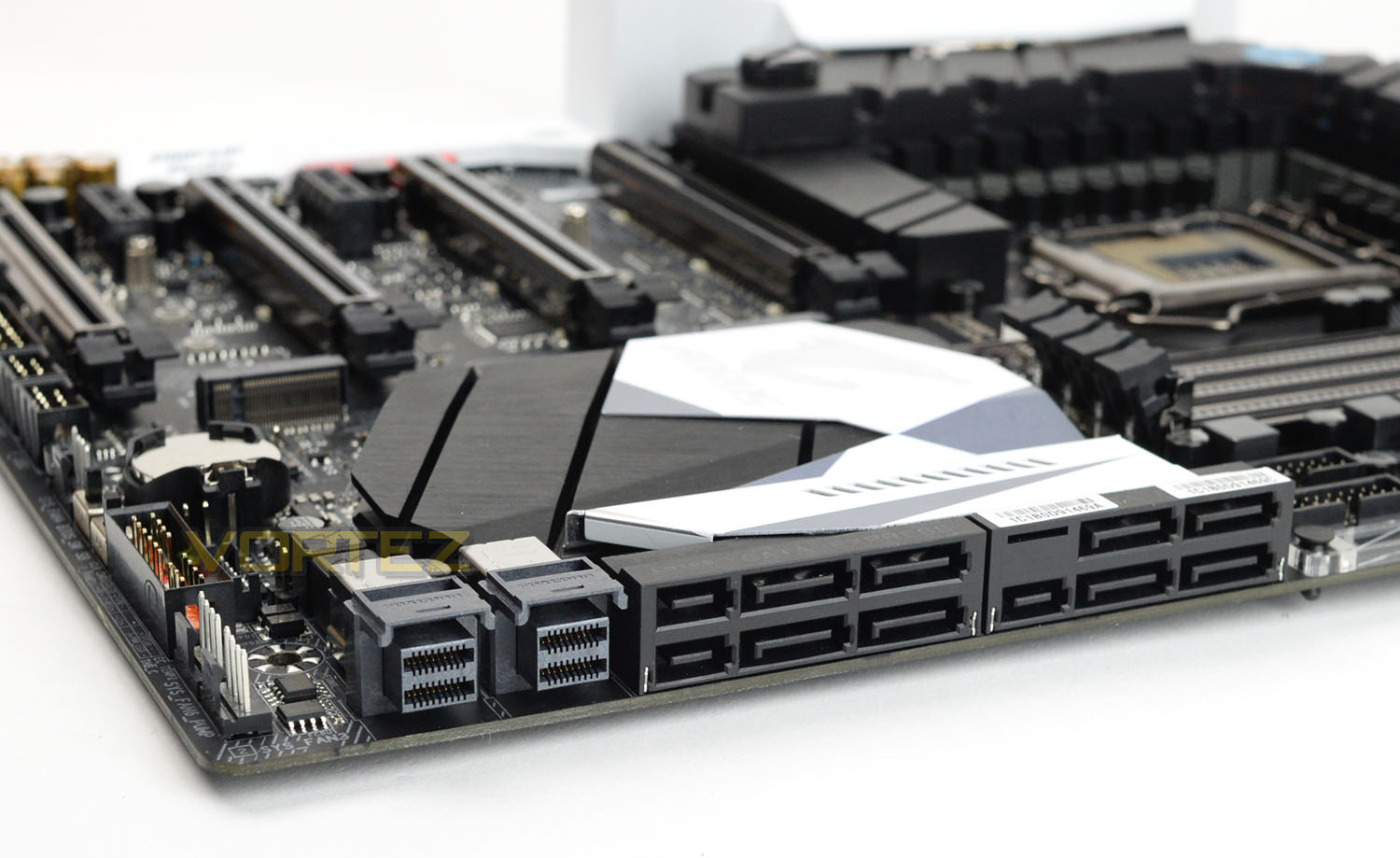
Strong is a particular strong-point for Gaming 9 as this board features a large number of different standards to use. Included we have:
• 3x SATA Express slots
• 6x SATA 3 (6GB/s) ports
• 2x U.2 ports
• 2x M.2 (PCIe 3.0 x4 with Intel Optane Memory support)
So, quite a multitude of storage options to choose from – giving plenty of flexibility. Although SATA Express doesn’t appear to have gathered any momentum, at least we have the choice to use the SATA ports for SATA-based SSDs regardless.
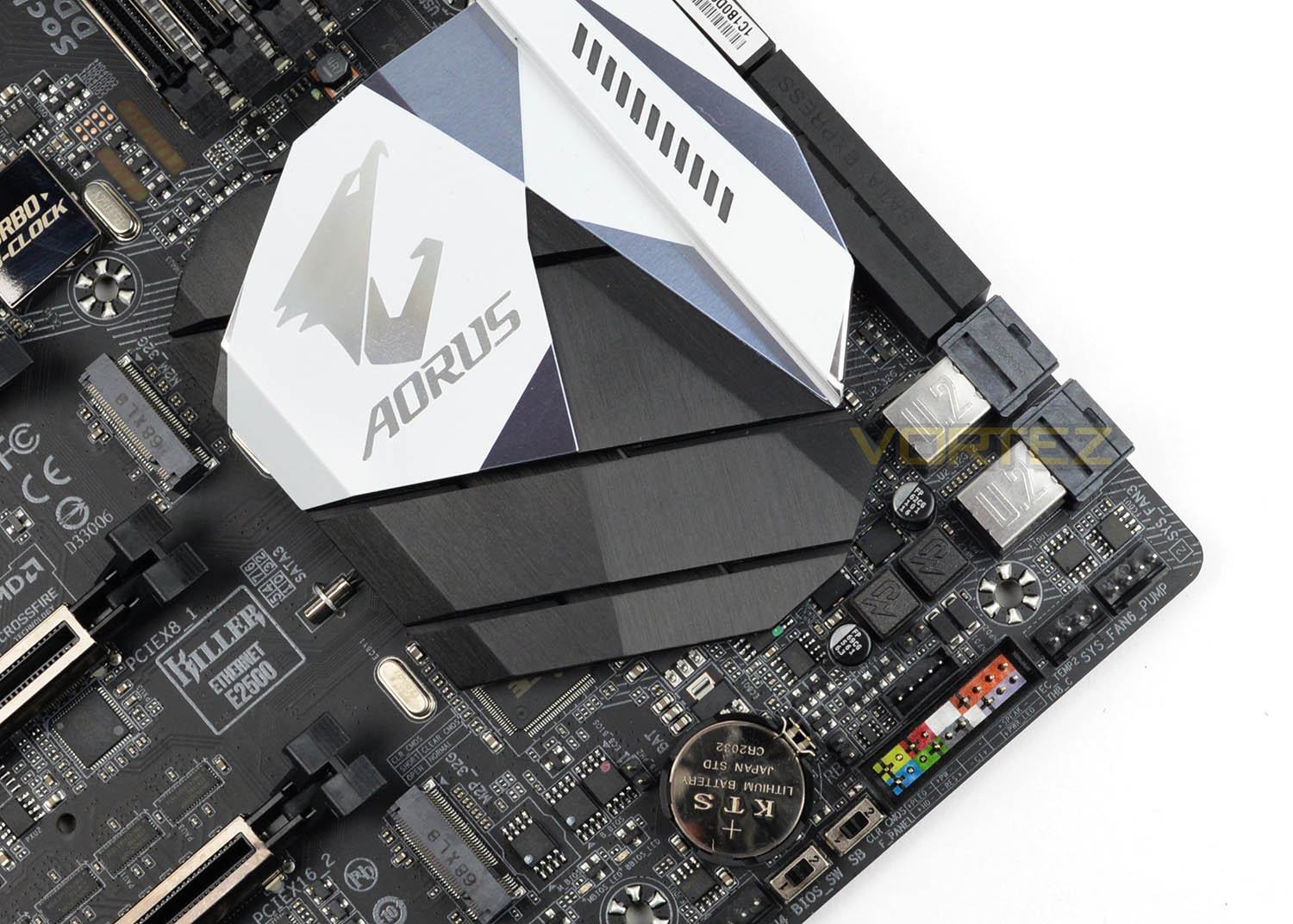
Behind all the storage ports we have a substantial heatsink sitting on top of the Intel Z270 chip. This heatsink has a laser etched AORUS logo and coordinates very well with the rest of the motherboard.
At the bottom of the board (just in shot) are two switches which concern the BIOS. There is a switch to enable dual-BIOS and the other switch allows you to switch between each BIOS.
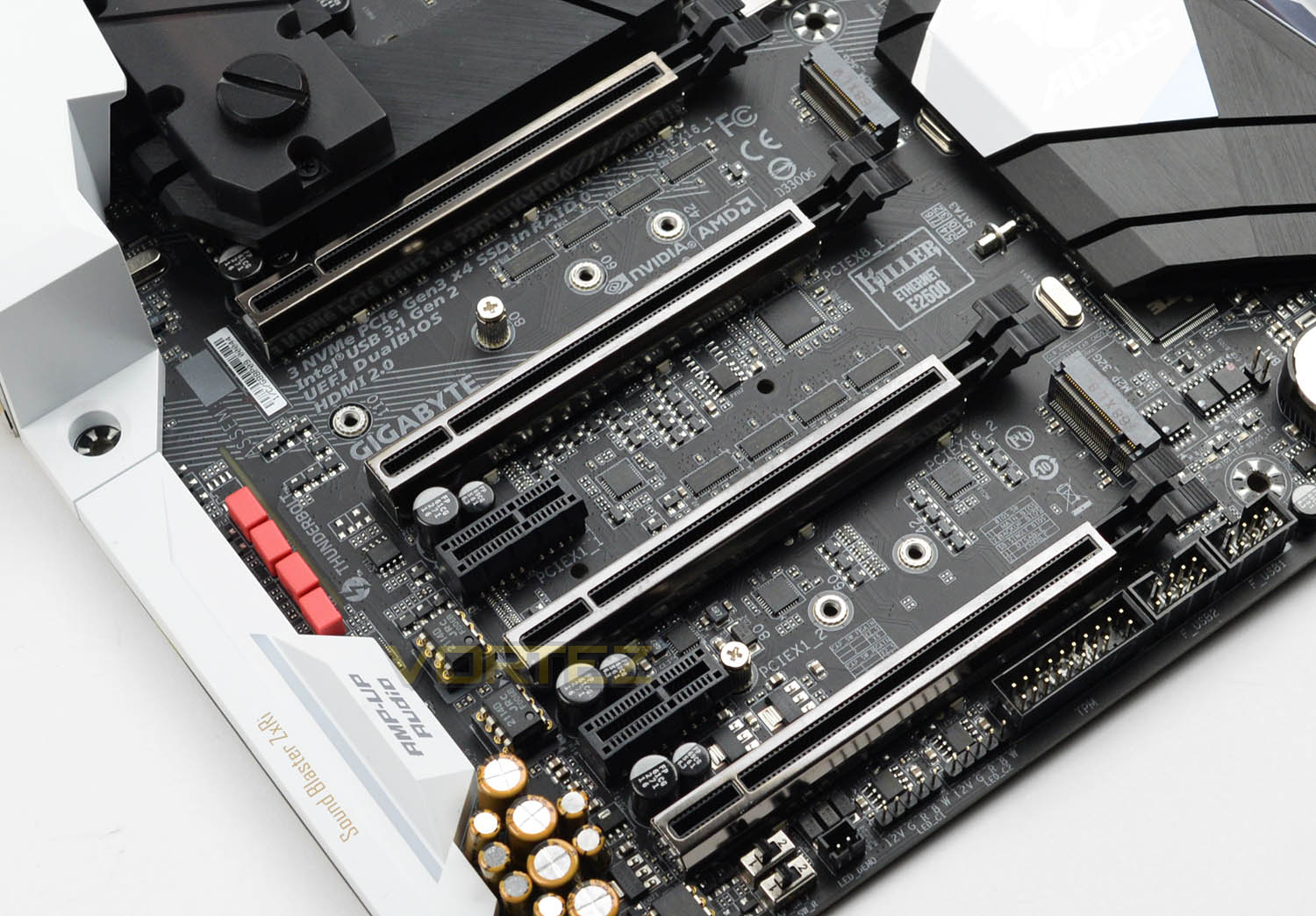
Turning our attention to the technicalities of the PCI Express we are once again, faced with an assortment of options here. Available there is:
• 4x PCI Express 3.0 X16
• 2x PCI Express 3.0 X1
The modes for each of the PCI Express X16s are: x16, x8, x16, x8. So, GIGABYTE has used a PLX chip and have wired the third slot to run x16. Having four slots for graphics cards means that we have NVIDIA Quad-SLI and AMD Quad-CrossFireX support. In the accessories bundle, there are multi-GPU bridges provided including a Quad-SLI bridge.
GIGABYTE has also added steel reinforcement to the X16 slots for longevity and there are RGB LEDs which contribute to the lighting system. Along the bottom edge of the board GIGABYTE has added an RGBW pin header to allow LED strips to be added to your system – all of which can be controlled using the RGB Fusion software.
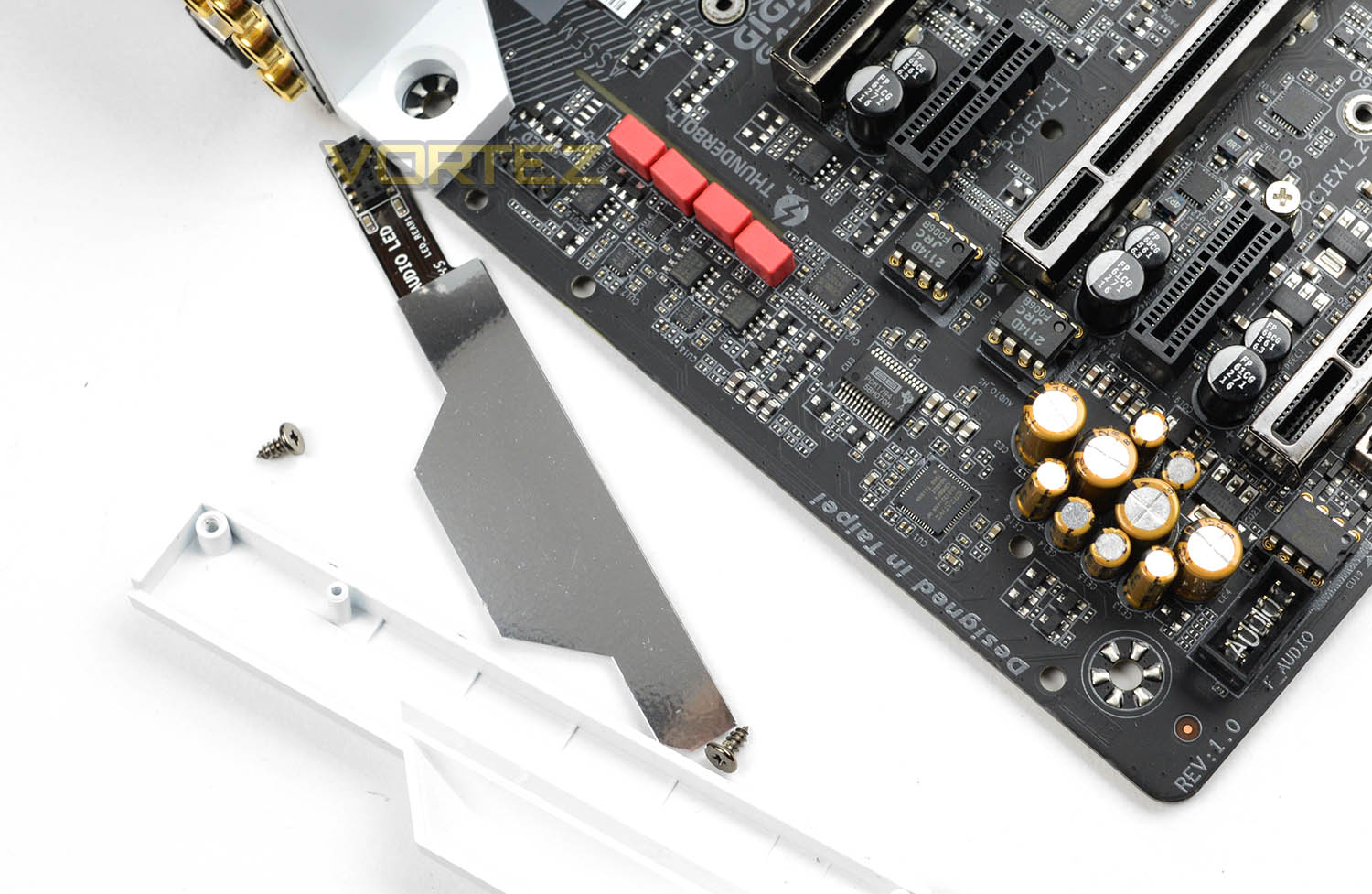
GIGABYTE has opted for a partnership with Creative for their audio solution; which isn’t a bad idea at all. Creative are well-known for their high-quality audio products. So, at the heart of the audio is the Creative Sound Core3D which is a quad-core audio processor. Along with this audio chip we also have premium Nichicon gold solid CAPs and WIMI FKP2 audio caps (red) – these component are found in high-end Hi-Fi systems.
Compared to the Gaming 7, this Gaming 9 has extras in the audio department including three upgradable OP-AMPs – two are for the left and right channels and the other is for the audio jack on the front panel.
All of the audio components are isolated and the tracer line has been given a touch of the RGB lighting – which you probably knew by now!
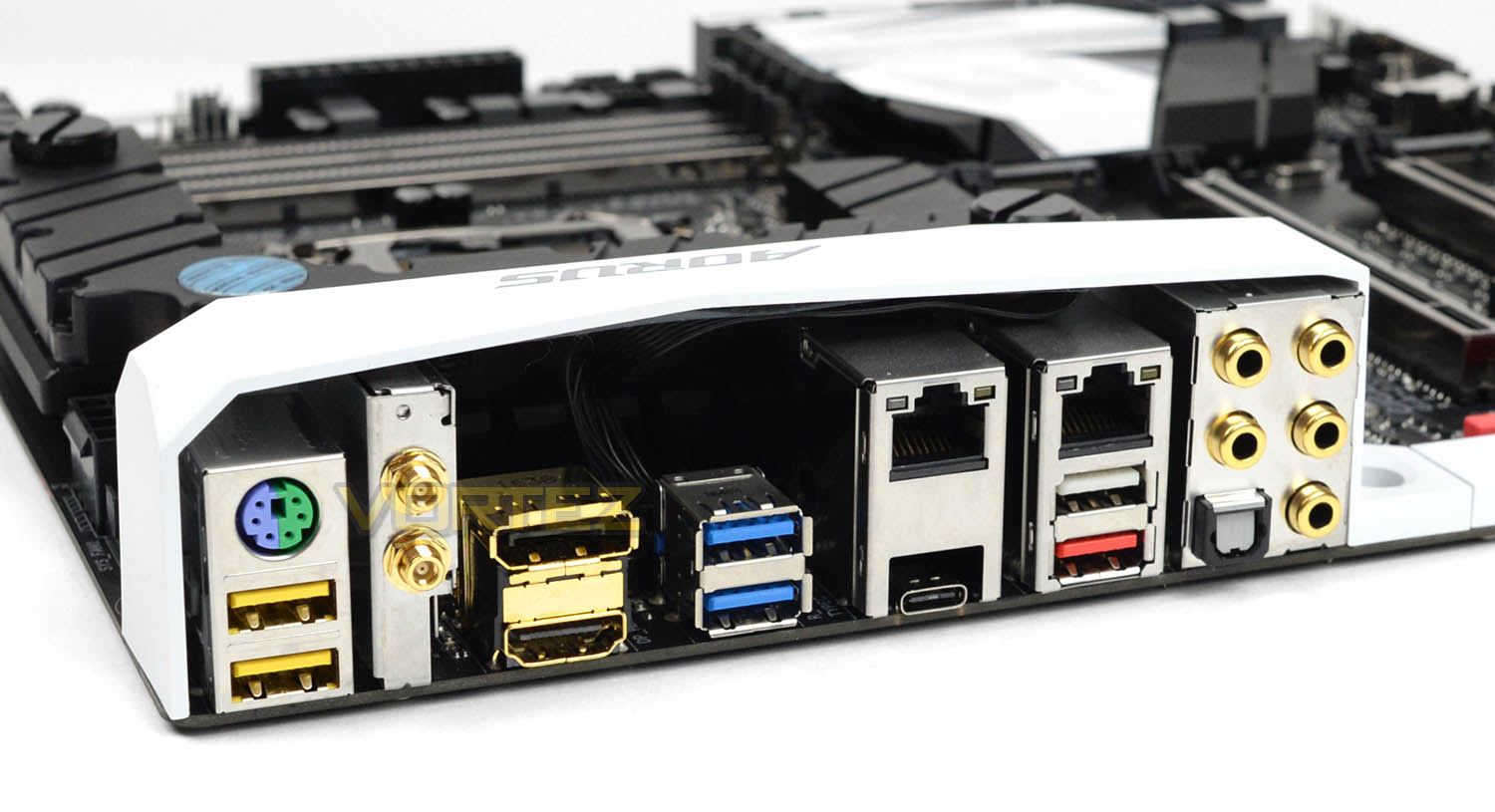
Lastly, we arrive at the rear IO section of Gaming 9 and this serves up a nice selection of ports which include:
• PS2 Keyboard/Mouse
• 2x USB 2.0 ports (DAC-UP – 2x less noise)
• 2x WiFi outlets
• Gold plated HDMI 2.0 + Displayport
• 2x USB 3.1 Gen1 ports
• 2x Gigabit LAN (Via Killer E2500)
• 1x Thunderbolt 3 port – USB 3.1 Gen2 Type C
• 2x USB 3.1 Gen2 ports
• Gold plated audio ports with optical out
GIGABYTE has added value to this back panel by supplying us with HDMI 2.0 – many brands are supplying these ports using the older version of HDMI, thus missing out on advanced support for 4K@60Hz. Another thing to note is the inclusion of Thunderbolt 3 which arrives in the form of USB 3.1 Gen2 Type C which is capable of up to 40GB/s – the ability to daisy-chain up to 6 devices is possible with this standard too.
Having two Gigabit LAN ports may not be a requirement for everyone but it’s interesting to see that GIGABYTE has moved away from using an Intel controller and instead gone with Killer E2500 for both ports. This latest standard for the Killer Series allows you to prioritise traffic for specific tasks like videos streaming and gaming, helping to reduce any lag at those critical times.
Test Setup & Overclocking
Test Setup
CPU Intel Core i7-7700K
Cooling Corsair H100i GTX
Motherboard GIGABYTE AORUS Z270X-Gaming 9
Memory 16GB Corsair Vengeance LPX 3000MHz
Graphics GIGABYTE GTX 1080 G1 Gaming
Storage Corsair Force LX 512GB
PSU Corsair HX1050 80 Plus Gold Certified PSU
Cooling Corsair H100i GTX
Motherboard GIGABYTE AORUS Z270X-Gaming 9
Memory 16GB Corsair Vengeance LPX 3000MHz
Graphics GIGABYTE GTX 1080 G1 Gaming
Storage Corsair Force LX 512GB
PSU Corsair HX1050 80 Plus Gold Certified PSU
Monitor AOC U2879VF
Capture Device Epiphan AV.iO 4K
Benchmarks
Cinebench R15 – CPU/OpenGL Score
x264 HD 4.0 – 1st and 2nd pass encoding
SiSoftware SANDRA – CPU & Memory benchmarks
POV-RAY – CPU benchmarks
TrueCrypt – CPU benchmarks
AIDA64 – CPU benchmarks & Memory
PCMark 8 – Home Suite & Photoshop
3DMark FireStrike – 3D Benchmark
Games – Civilization IV & Total War: WARHAMMER
x264 HD 4.0 – 1st and 2nd pass encoding
SiSoftware SANDRA – CPU & Memory benchmarks
POV-RAY – CPU benchmarks
TrueCrypt – CPU benchmarks
AIDA64 – CPU benchmarks & Memory
PCMark 8 – Home Suite & Photoshop
3DMark FireStrike – 3D Benchmark
Games – Civilization IV & Total War: WARHAMMER
Other Software
Temperature Analysis: Real Temp
Stress Testing Software: AIDA64 Stability Test
CPU Specification Monitoring: CPU-Z
Stress Testing Software: AIDA64 Stability Test
CPU Specification Monitoring: CPU-Z
Overclocking
Like previous generations, the Intel Core i7-7700K (Kabylake) is unlocked and also has flexible attributes in terms of the BCLK and ratio/multiplier. This makes the job of overclocking much easier.
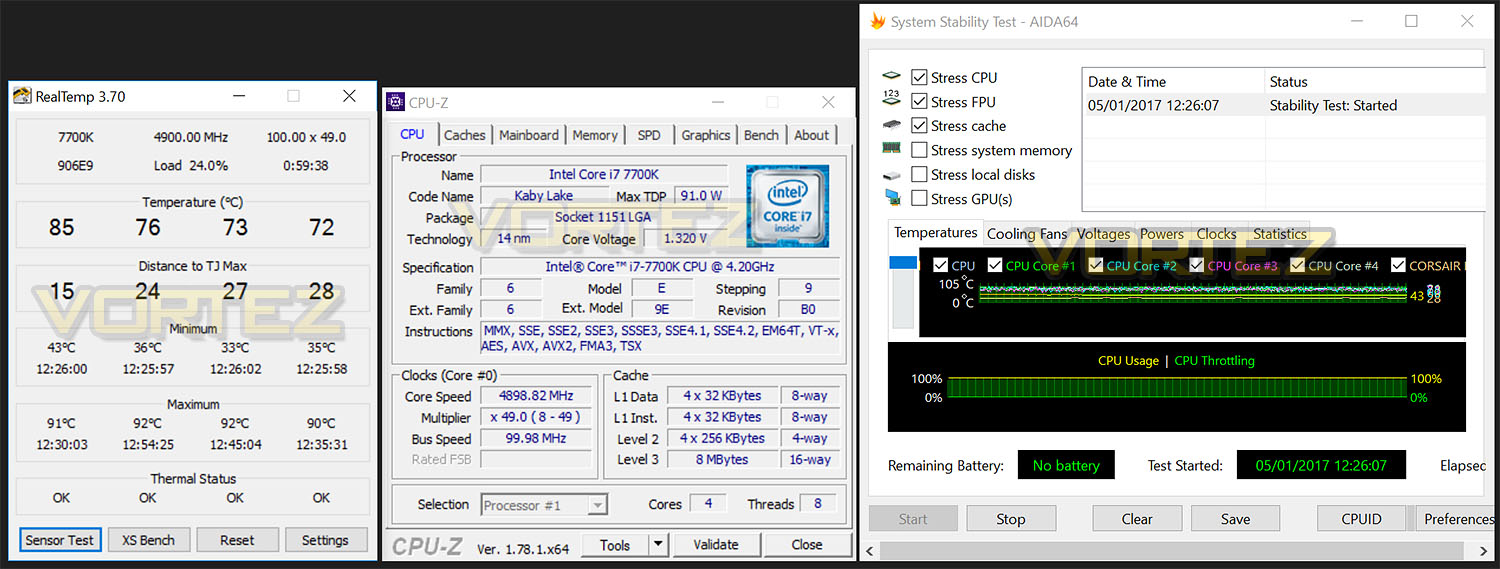
Our current milestone is 4.9GHz with the Intel Core i7-7700K – our Gaming 9 managed to achieve this result (which is expected from such a high-calibre offering with a 22-phase design). To achieve 4.9GHz we used 1.3v – any higher resulted in temperatures soaring to 100C. This obviously meant that 5GHz was out of the question since the clock speed is higher and we required more voltage and this was already hitting the ceiling. Nevertheless this is a decent result the CPU in our possession which currently has a maximum of 4.9GHz anyway!
Benchmarks: Power Consumption
It’s interesting to note the power consumption across all motherboards. Although they are using the Z270 chipset, energy results can fluctuate between manufacturers due to the features and specifications that are integrated. First of all, for the idle tests the system is cold booted into Windows and no additional applications are executed – the watts are noted on the external energy monitor we use and then the system is loaded with 3DMark FireStrike – watts are again monitored for the duration of the test and the highest rated wattage result is then noted down. Below are the results of this energy test.
Benchmarks: Cinebench R15
CINEBENCH is a real-world cross platform test suite that evaluates your computer’s performance capabilities. CINEBENCH is based on MAXON’s award-winning animation software CINEMA 4D, which is used extensively by studios and production houses worldwide for 3D content creation. MAXON software has been used in blockbuster movies such as Iron Man 3, Oblivion, Life of Pi or Prometheus and many more.
Benchmarks: X264 HD
Simply put, this test measures how fast your machine can encode a short, DVD quality MPEG-2 video clip into a high-quality x264 video clip. What’s x264, you ask? It’s more or less the next-generation Xvid/DivX codec. I think it’s ideal for a benchmark because the application (x264.exe) reports fairly accurate compression results (in frames per second) for each pass of the video encoding process, and it uses multi-core processors very efficiently.
Benchmarks: SiSoftware SANDRA
SANDRA isn’t always a benchmark that is included in hardware reviews but we believe it shouldn’t be ignored. SANDRA provides a vigorous package that tests your system in a rather large array of benchmarks. There are many aspects of benchmark that can be executed. We will be considering – CPU and memory tests.
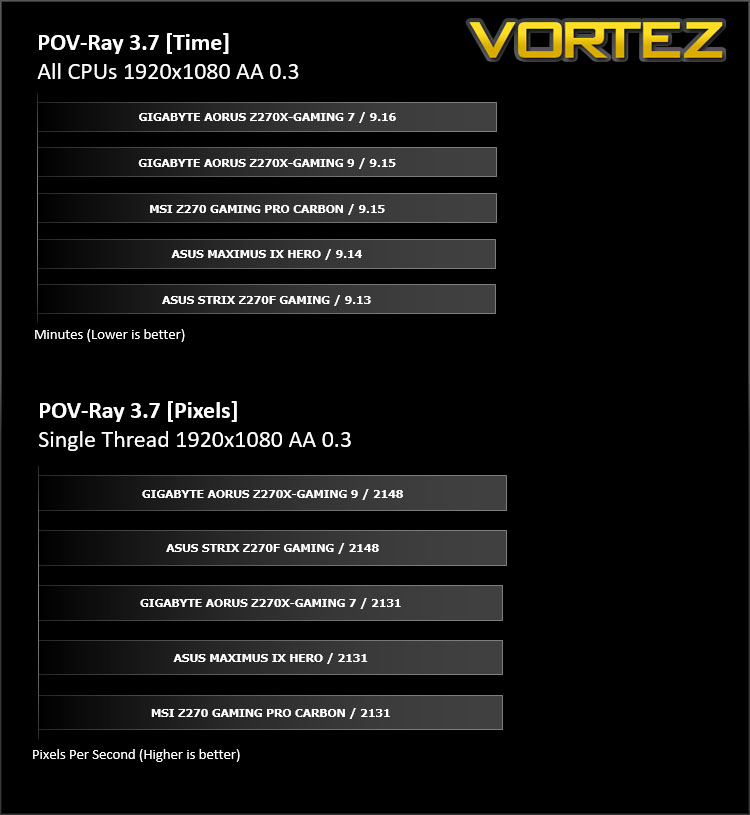
Benchmarks: POV-RAY
Persistence of Vision Raytracer’s PovRay is a free and open source 3D animator application with versions for computers with different operating systems.
This product allows users to build their custom 3D worlds with excellent quality despite their computer’s hardware. It has adjustable options for levels of radiance, refraction, and reflection. Calculation time may vary depending on the computer model, but PovRay can adapt to many computer builds, and is supported by the open source community.
This product allows users to build their custom 3D worlds with excellent quality despite their computer’s hardware. It has adjustable options for levels of radiance, refraction, and reflection. Calculation time may vary depending on the computer model, but PovRay can adapt to many computer builds, and is supported by the open source community.
Benchmarks: TrueCrypt
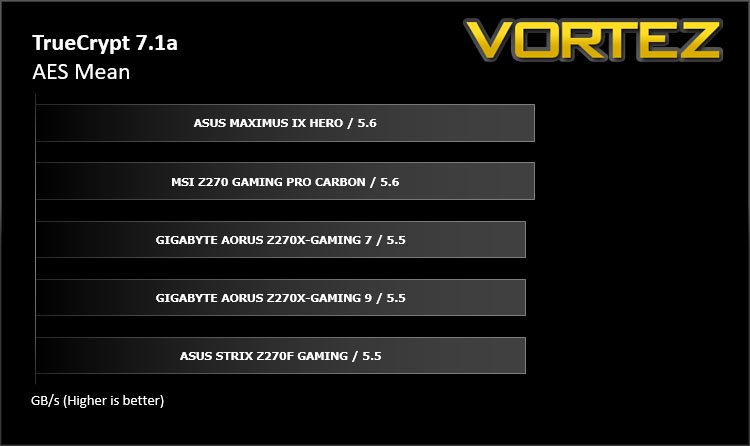
TrueCrypt is a discontinued source-available freeware utility used for on-the-fly encryption (OTFE). It can create a virtual encrypted disk within a file or encrypt a partition or (under Microsoft Windows except Windows 8 with GPT) the entire storage device (pre-boot authentication).
Benchmarks: AIDA64
AIDA64 Product PageThis simple integer benchmark focuses on the branch prediction capabilities and the misprediction penalties of the CPU. It finds the solutions for the classic “Queens problem” on a 10 by 10 sized chessboard. At the same clock speed theoretically the processor with the shorter pipeline and smaller misprediction penalties will attain higher benchmark scores. For example — with HyperThreading disabled — the Intel Northwood core processors get higher scores than the Intel Prescott core based ones due to the 20-step vs 31-step long pipeline. CPU Queen test uses integer MMX, SSE2 and SSSE3 optimizations.
Benchmarks: PCMark 8
PCMark 8 combines performance benchmarking with battery life measurement and includes tests based on popular Adobe and Microsoft applications. Whether you are looking for long battery life, or maximum power, PCMark 8 will help you find the devices that offer the perfect combination of efficiency and performance for your needs. It’s the complete PC performance benchmark for home and business.
Benchmarks: PCMark 8 Photoshop
The PCMark 8 Applications benchmark measures system performance using popular applications from the Adobe Creative Suite and Microsoft Office. You can choose which tests to run based on the applications installed on your system. Each test automatically steps through a series of actions such as opening, editing and saving a file. The results are used to calculate the PCMark 8 Applications scores for the system.
Benchmarks: 3DMark
3DMark FireStrike Product PageFire Strike is our new showcase DirectX 11 benchmark designed for high-performance gaming PCs. It is our most ambitious and technical benchmark ever, featuring real-time graphics rendered with detail and complexity far beyond what is found in other benchmarks and games today. Fire Strike will only be available in the Windows editions of 3DMark initially.
Benchmarks: Civilization IV & Total War: WARHAMMER
It’s important for us to perform a number of game benchmarks as well as the synthetic tests because gamers will want to know if there are any significant benefits. So here we have two recent gaming titles which are heavily CPU-based. For this test we remove the graphics card and rely on the integrated graphics from the Core i7-7700K.
Conclusion
With Intel Z270 now in full swing, by now it’s fairly obvious what to expect from this new chipset. Entering the foray today is the very best… of the best. AORUS is GIGABYTE’s premium series and this Gaming 9 is the finest that AORUS has to offer.
Being a flagship product means we expect no compromises and there is no denying how feature-rich our Z270X-Gaming 9 is. Those wanting to squeeze the absolute maximum from Intel Kaby Lake will be well advised to consider this motherboard as it has all the performance-based overclocking features you could really wish for. The EKWB Hybrid water cooling support is a nice touch for overclockers wanting to marry the board up to a water cooling configuration, EKWB has a solid reputation in the world of water cooling so we’re assured of a quality product. Bearing a 22-phase design is testament to the calibre of this motherboard and once again will emphasise Gaming 9’s capabilities for overclocking but including such a feature as well as the PLX chip for dual x16 mode pushes the cost right up and as such this board doesn’t come cheap.
The assortment of features aren’t restricted to just the socket and overclocking – there are four different storage standards supported on Gaming 9 and this includes dual-M.2 which will come in handy for users wanting super-fast transfer rates from NVMe. GIGABYTE are keen to get behind Thunderbolt 3 and they’ve provided support for this standard courtesy of the USB 3.1 Gen2 Type C port on the back panel – Thunderbolt 3 is capable of up to 40GB/s which is astounding!
Gone are the days when a dedicated sound card was an essential piece of kit to factor into a new system build; Gaming 9 boasts a strong audio solution by way of Creative’s Sound Core3D. Creative are another brand who have a solid reputation for offering premium audio solutions and the catalogue of components included for sound are superb, even offering triple OP-AMPs.
Although we didn’t demonstrate the RGB LEDs on Gaming 9, they are exactly the same configuration which have been employed on the Gaming 7 – across the board there are numerous zones which are all manageable via RGB Fusion software. Anyone wanting to know how this looks should check out our video of the Z270X-Gaming 7.
A premium motherboard unfortunately arrives with a premium price-tag and Gaming 9 will cost £450-500 in the UK and $500 in the US. As we mentioned earlier, the implementation of the 22-phase power and such features dual x16 mode for the graphics card means that a PLX chip is required – all of which push the price up. Choosing this board over the Gaming 7 will boil down to those advanced features which point towards overclockers and individuals who have the objective to break records and push the limit of their hardware.
The AORUS Z270X-Gaming 9 is laden with features which will satisfy performance hungry enthusiasts. If you demand the very best, look no further!
Pros
+ Attractive design
+ Well-equipped with lighting – LEDs everywhere!
+ Excellent performance
+ Great for overclocking
+ Features hybrid water cooling support
+ Steel reinforced slots
+ PLX chip – dual x16 mode
+ Quad-SLI/CrossfireX support
+ Advanced overclocking features
+ Thunderbolt 3 included
+ Plenty of fan headers
+ Features dual-M.2
+ Premium Creative audio
Cons
– Steep price
– Heavy
– Top M.2 covered by GPU in top X16 slot
+ Attractive design
+ Well-equipped with lighting – LEDs everywhere!
+ Excellent performance
+ Great for overclocking
+ Features hybrid water cooling support
+ Steel reinforced slots
+ PLX chip – dual x16 mode
+ Quad-SLI/CrossfireX support
+ Advanced overclocking features
+ Thunderbolt 3 included
+ Plenty of fan headers
+ Features dual-M.2
+ Premium Creative audio
Cons
– Steep price
– Heavy
– Top M.2 covered by GPU in top X16 slot
Click here for an explanation of our awards at Vortez.net.