Corsair move into the production of prebuilt gaming systems with the ONE Pro Compact Gaming PC. Can this mini powerhouse tick all the boxes for gamers and enthusiasts?

Product on Review: ONE PRO Compact Gaming PC
Manufacturer & Sponsor: Corsair
Street Price: UK: 2199.99 US: 2200.99
It isn’t unusual for brands to branch out into other categories nowadays in a bid to present consumers with a primary go-to manufacturer for all their needs. Corsair, who started out producing memory back in 1994 has been a prime example of a company which has diversified and expanded into markets which are lucrative and highly competitive. While many will know Corsair for their memory, SSDs and coolers, in recent times they’ve also gone down many other avenues too such as peripherals, but today we have a product which fuses all of their expertise together to form their very first gaming PC.
In what could be regarded as a pillar of power, the ONE Pro is one of many prebuilt computer systems by Corsair which sits at the top of the pack. This compact PC is based on the Mini-ITX form factor and bears a strong lineup of features such as Intel’s Core i7-7700K, 16GB DDR4 and the GTX 1080.
However, this is no ordinary prebuilt system – Corsair has liquid cooled the CPU and GPU with their renowned Hydro Series closed loop systems and engineered a unique layout to achieve one of the most condensed configurations we’ve seen.
Is this a mini powerhouse? Let’s find out!
Corsair on their ONE
Finally, a system with no compromises. Meet CORSAIR ONE, the all-new PC from the designers and builders at CORSAIR.
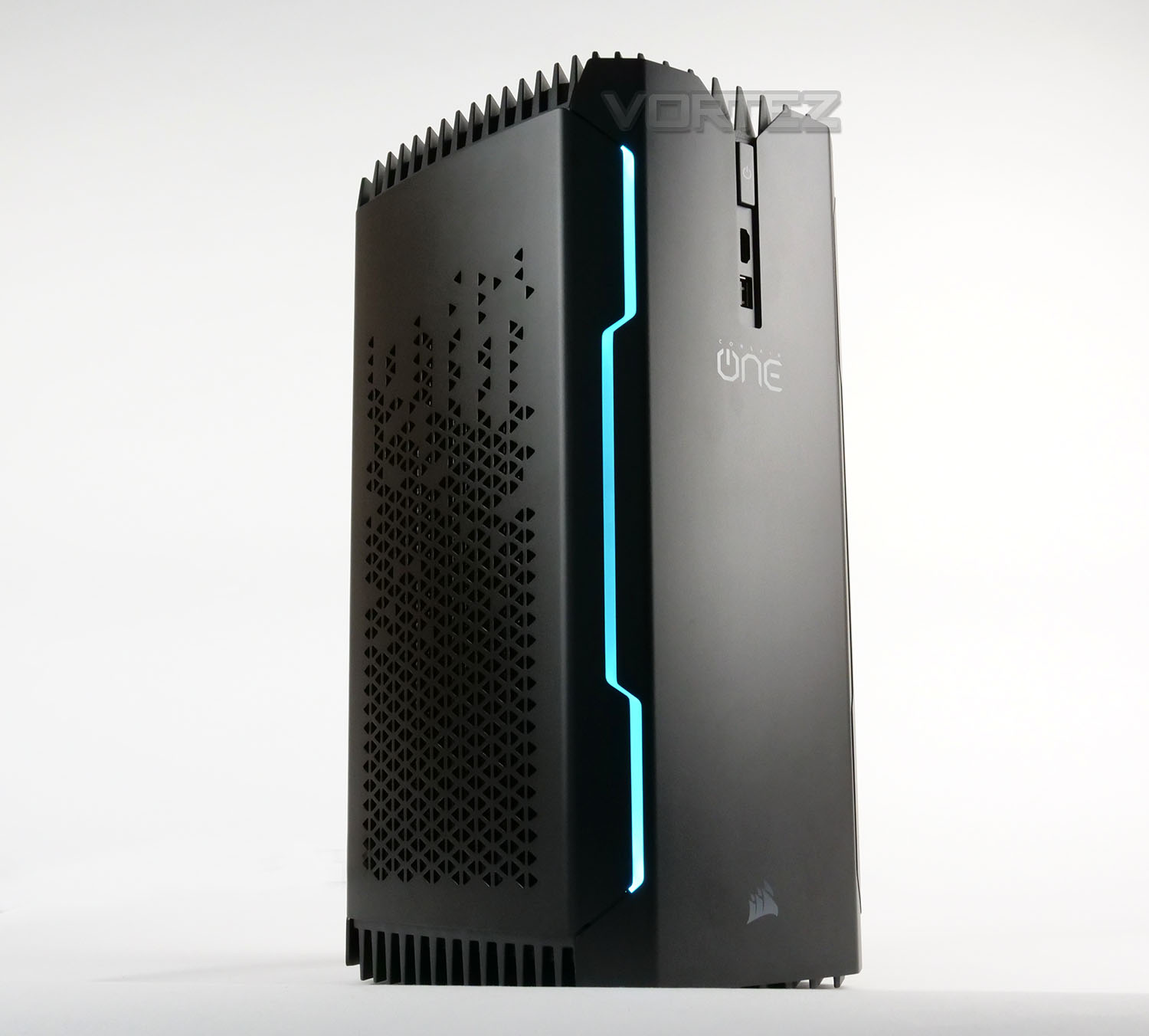
The sleek, aircraft-grade aluminum chassis is built with painstaking attention to detail, and extremely resistant to surface wear – Protecting the beautiful finish for years to come.
The sleek, aircraft-grade aluminum chassis is built with painstaking attention to detail, and extremely resistant to surface wear – Protecting the beautiful finish for years to come.
Technical Specifications
Below are the technical specifications surrounding Corsair’s ONE Pro.
Packaging

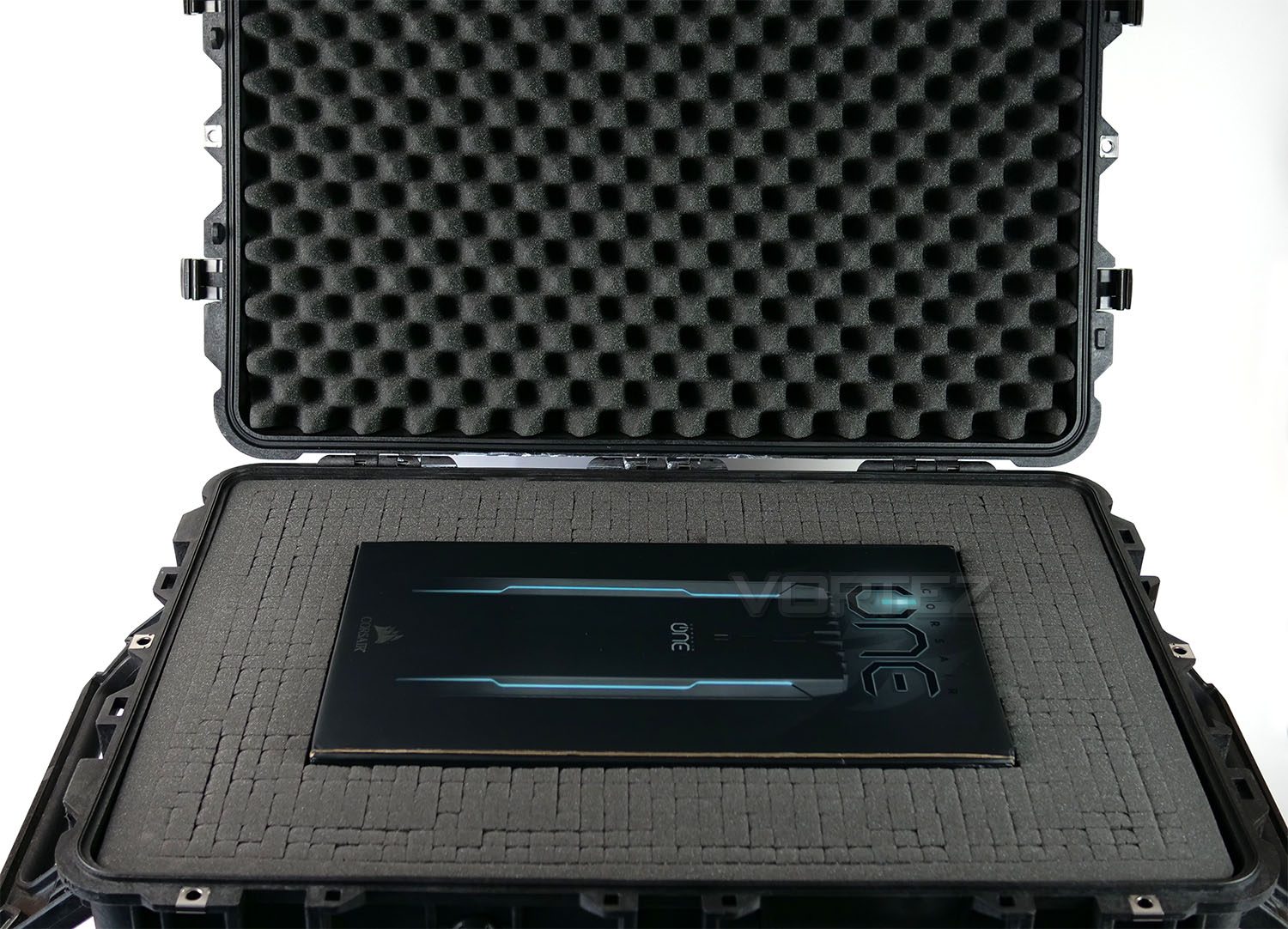
When our ONE Pro sample arrived, we were astounded by the packaging method to which Corsair used. Arriving in a Genuine Pelican case; this may appear overkill given the system inside is Mini-ITX and rather small. However, Corsair wanted to ensure the system would be adequately protected while en route. Unfortunately, this monolithic packaging isn’t available for customers – only press, which may or may not come as a disappointment.
Inside, the Pelican case there is a small cardboard box which ONE Pro sits within – inside this box there is foam padding to ensure a safe delivery.
Over the page we’ll unveil Corsair ONE Pro and check out the hardware specifications.
Closer Look
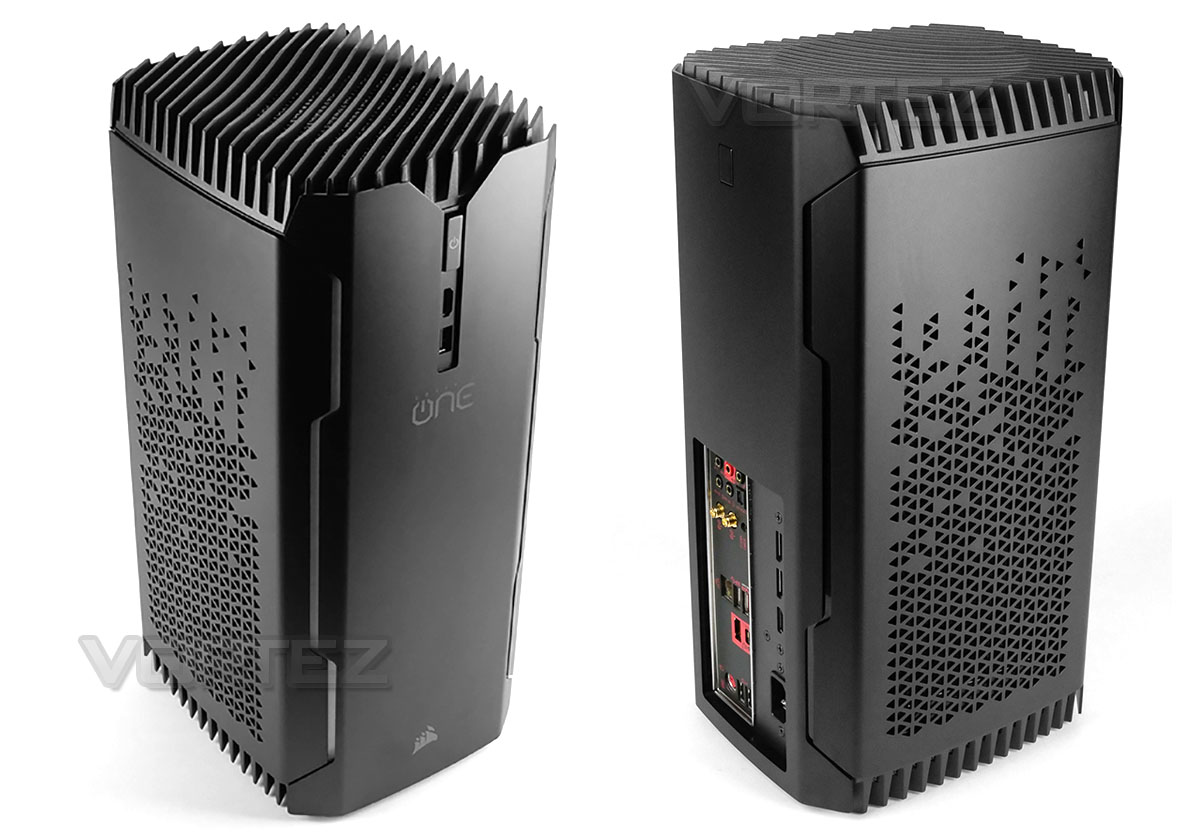
Unveiling ONE Pro from its packaging we’re met by a compact and sleek computer chassis which takes on the form of a tower design. This enclosure is reminiscent of SilverStone’s Fortress FT03 Mini – boasting attractive styling and athletics that will pair up very well with other office equipment.
The top of the chassis is heavily ventilated and bears a large 140mm cooling fan underneath. This fan is responsible for flushing out heat generated from the internal components. There are also triangular perforations on the sides for the radiators which are attached to the sides (used for the GPU/CPU cooling).
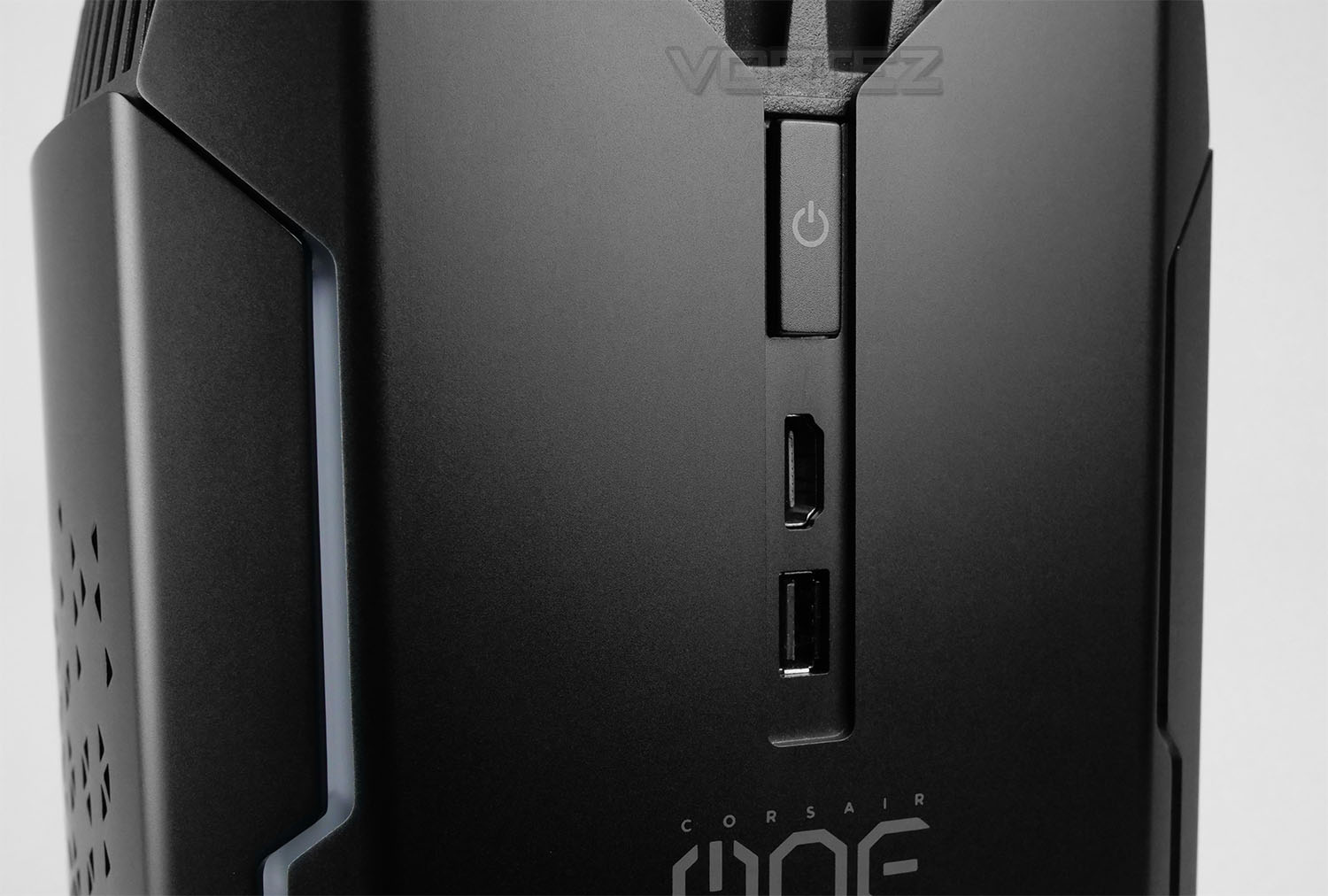
Located at the front of ONE Pro there is a vertically aligned power button and some easy to access ports. This useful functionality allows us to connect up a VR headset which usually requires USB and HDMI. Other systems will rely on your routing the cables around the back of the case, so this is certainly an efficient method and one which we really like.
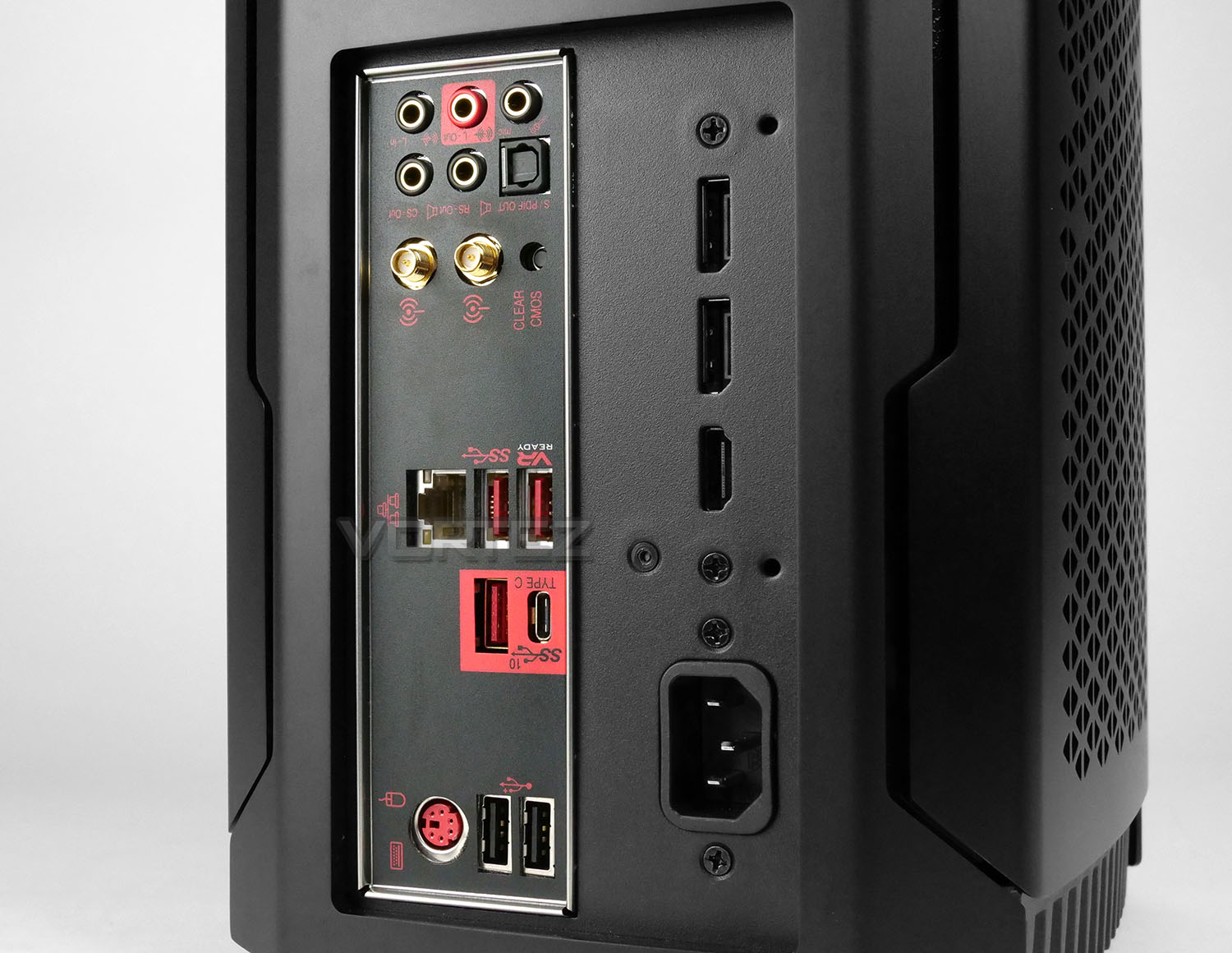
Around the back of ONE Pro there are an assortment of different ports to use – all courtesy of the motherboard and graphics card.
These ports are ordered in a slightly different way to what we’d usually see for a conventional computer system. Up at the top there are audio jacks including S/DIF out. Below this there are two antennas for the 802.11ac wireless and a clear CMOS button (should you need to restore default settings).
In the lower section there are 2x USB 3.1 Gen 1 ports, 2x USB 3.1 Gen 2 ports (One type A and one Type C) and a PS2 keyboard/mouse combo port with dual USB 2.0.
Over to the right-side there are two Displayport 1.4s and a single HDMI 2.0 port – as well as the power socket. These video outs are an extension of the ports found on the GTX 1080 inside, Corsair has had to modify with an extension adapter for this unique vertical configuration. The mere fact they’ve managed to do this is rather creative!
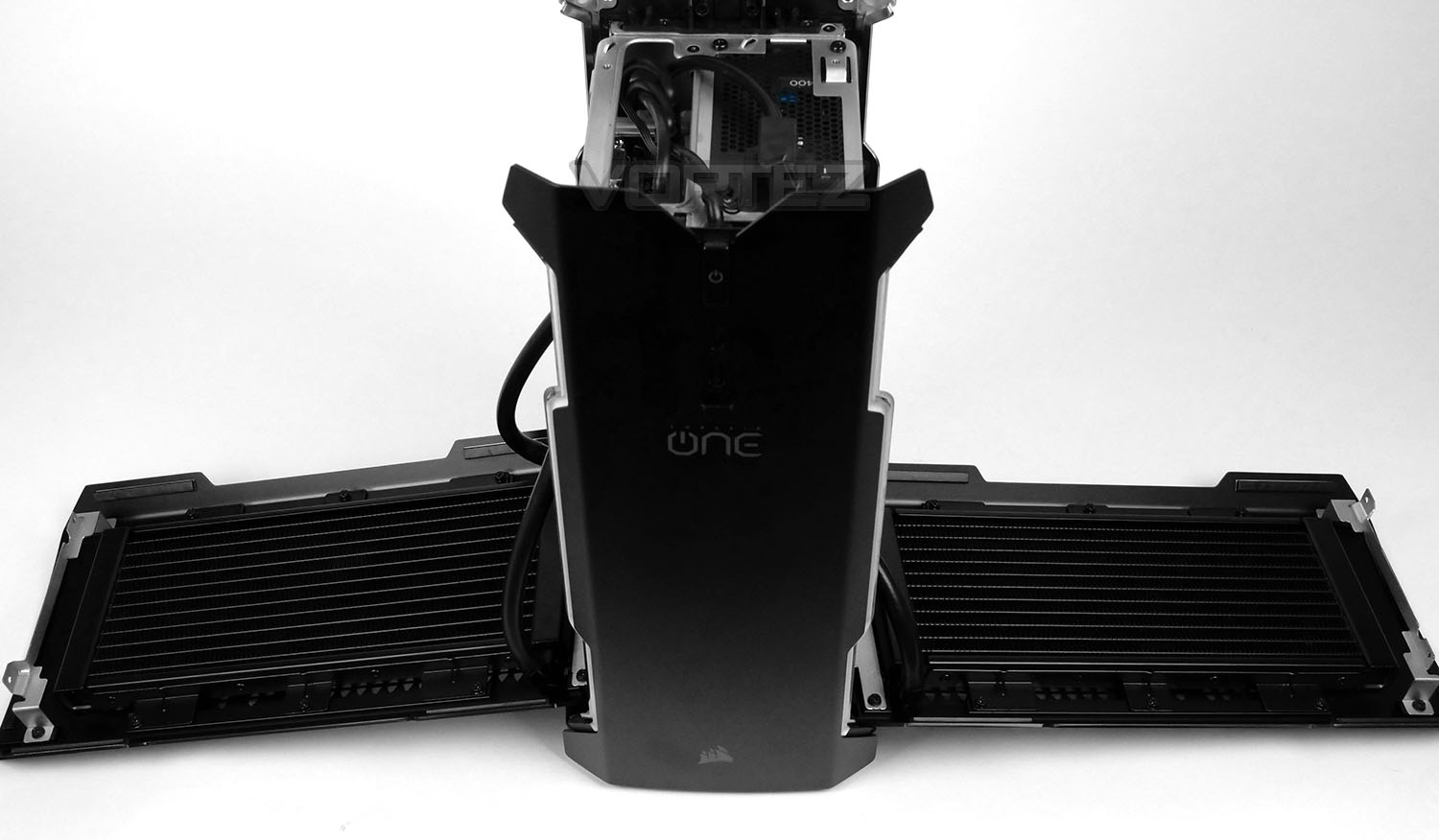
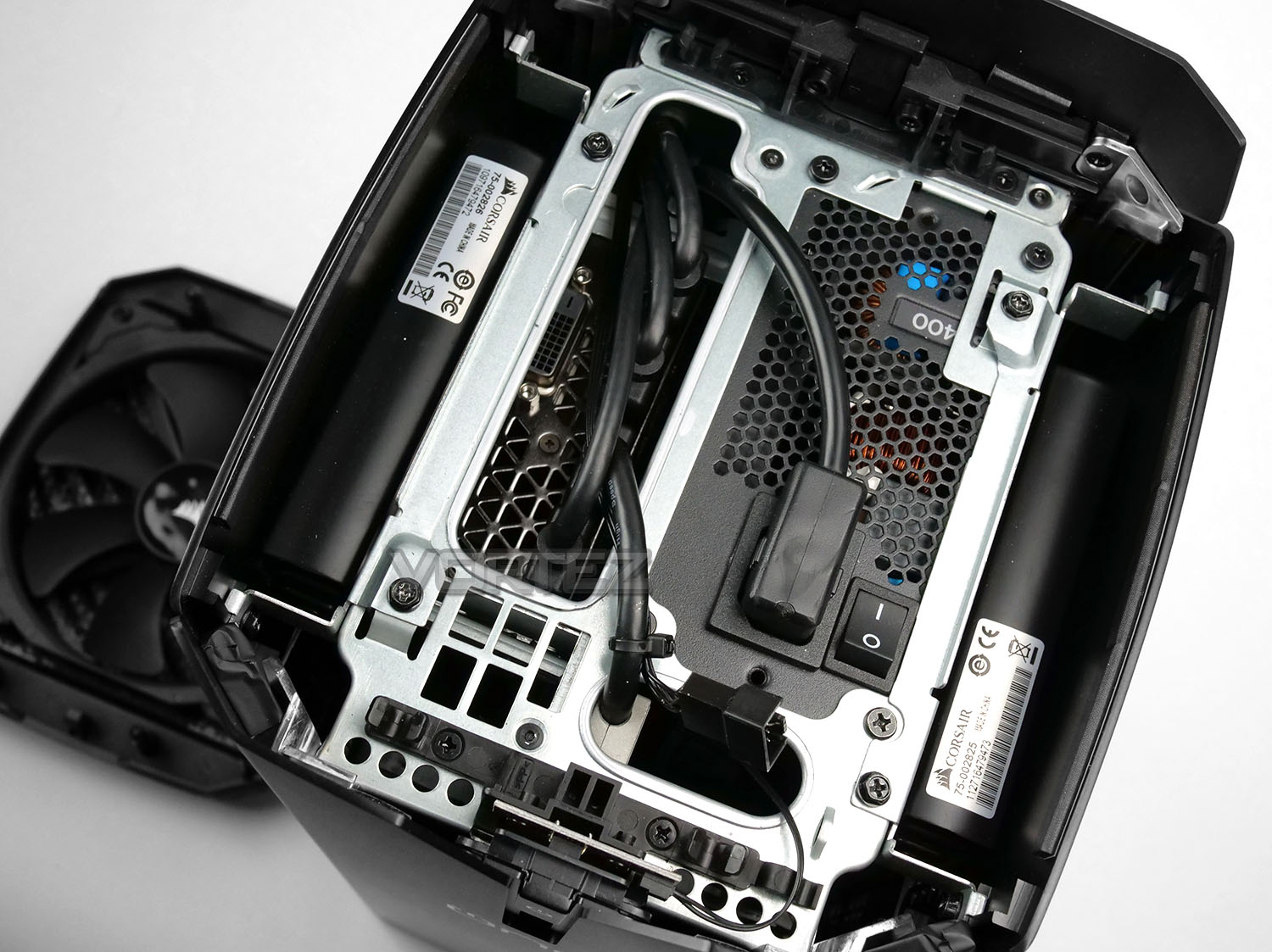
In order to open up the system, it’s necessary to detach the top grill and remove some screws from the side panels. Once removed, the sides will lift away from the chassis, revealing two 240mm radiators attached to the inside.
From a top view we can see that Corsair has attached the PSU in the upper section and that an extension kit has been used here too. The rear panel on the graphics card can just about be seen in the picture above.
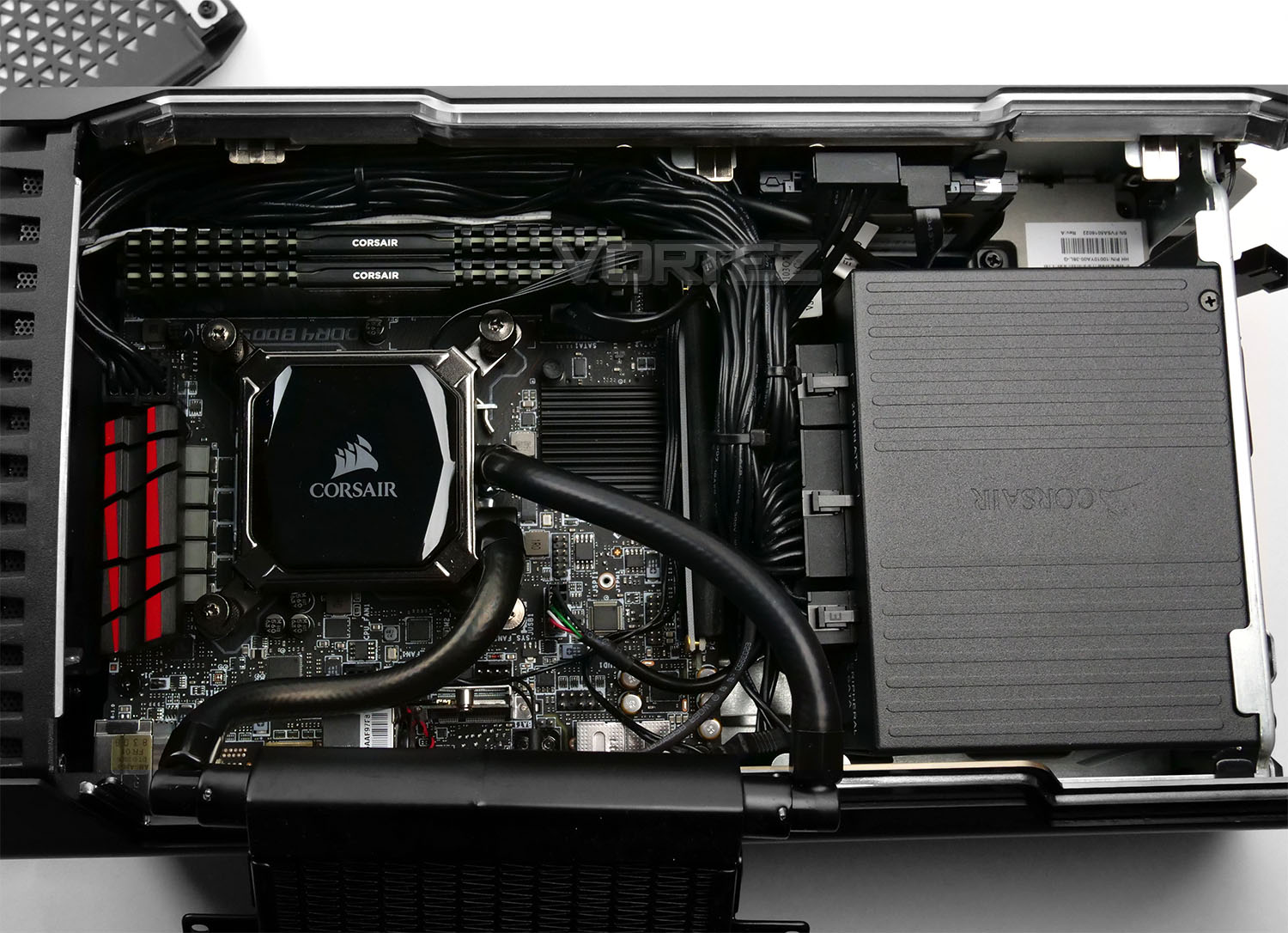
Moving inside for a closer look at the components used, on the main side we have a Mini-ITX motherboard which comes courtesy of MSI – this is the Z270I Growler, as far as we’re aware this motherboard isn’t listed/released on MSI’s website. Seated on that board is the Intel Core i7-7700K – based on Kaby Lake architecture – This is a quad-core processor running at 4.2GHz and turbo boosting to 4.5GHz. Corsair are using their own closed loop liquid solution for the CPU cooler, which oddly enough lacks the fans attached to the radiator – relying entirely on convection.
Now for the memory and storage Corsair are able to use their own parts due to their expertise in these fields. So, we therefore have 16GB of Vengeance LPX DDR4 which operates at 3000MHz, while the storage is taken care of via a 960GB Force LE SATA-based SSD. Holding the SSD up against the other components in this system creates a bit of a disappointment because SATA-based SSDs hit a barrier at the 500-550MB/s mark, with Intel Kabylake/Z270 offering M.2 NVMe support, it’d have been a worthwhile consideration for Corsair to bolster the storage capabilities to match the rest of the system too.
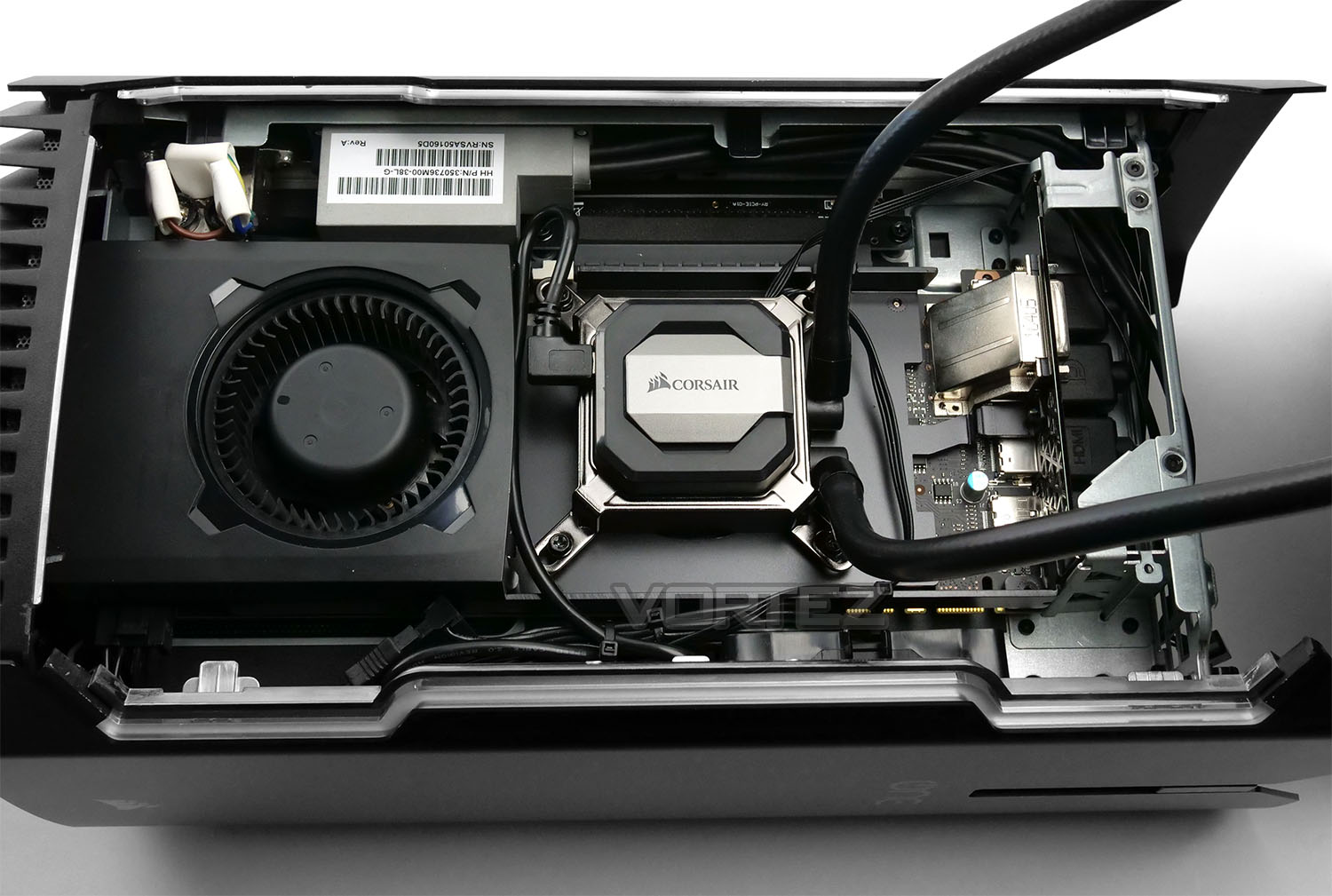
Moving round to the alternate side, we’re met by the graphics card. Corsair are using NVIDIA’s GTX 1080 which is a solid performer in the 10-series lineup. Rather than allowing the card to use its own noisy and inefficient cooler, Corsair has also treated the GPU to the delight of the Hydro Series also. So the GTX 1080 is liquid cooled by a secondary closed loop – again lacking those cooling fans on the radiator. The temperatures for both the CPU and GPU are on the next page and they aren’t too bad at all.
While the entire configuration here is very compact and carefully constructed, this highlights to us that performing an upgrade would be a rather daunting task. There is very little space to move and cables can be seen running along every backplate.
Benchmarks: Temperatures
For our first benchmark test we observe the max. CPU/GPU temperatures of the system while allowing Unigine Heaven 4.0 to run on a 30 minute loop. To report back on the temperatures we use RealTemp and GPU-Z which provide the peak figures.
Benchmarks: Boot Time & Power Consumption
In this test we observe how fast the boot into Windows 10 is by using a digital stopwatch. Power Consumption is another important observation, for this we analyse the peak wattage figure from the wall while the system is fully loaded.
Benchmarks: Cinebench R15 & x264 HD
CINEBENCH can measure systems with up to 64 processor threads. This test scene contains approximately 2,000 objects which in turn contain more than 300,000 polygons in total, and uses sharp and blurred reflections, area lights, shadows, procedural shaders, antialiasing, and much more. The result is displayed in points (pts). The higher the number, the faster your processor is.
Benchmarks: PCMark 8
PCMark 8 combines performance benchmarking with battery life measurement and includes tests based on popular Adobe and Microsoft applications. Whether you are looking for long battery life, or maximum power, PCMark 8 will help you find the devices that offer the perfect combination of efficiency and performance for your needs. It’s the complete PC performance benchmark for home and business.
Benchmarks: 3DMark TimeSpy & Heaven 4.0
Time Spy is a DirectX 12 benchmark test for gaming PCs running Windows 10. With its pure DirectX 12 engine, built from the ground up to support new API features like asynchronous compute, explicit multi-adapter, and multi-threading, Time Spy is the ideal benchmark for testing the DirectX 12 performance of the latest graphics cards.
Benchmarks: TW: WARHAMMER, For Honor, BF1, DOOM
The ONE Pro uses the GTX 1080 for graphics delivery, in this section we test the latest gaming titles to see how effective the 3D capabilities are. We report on the average framerate using FRAPS or in-game benchmark tool.
Conclusion
Corsair has moved into varying fields over the years and the portfolio has expanded to cover a huge array of hardware aside from their staple products such as memory, SSDs and coolers. So all of the ingredients are there for a full system and it’s been long overdue, but today we’ve seen the fruits of Corsair’s labour in the form of a small form factor system.
Of course building a system like this yourself would be great fun (and a good challenge) but attaining the same level of compatibility is likely to be quite out of reach. Corsair has crammed into the tiny Mini-ITX chassis a build which is at full capacity with custom modifications to cater for awkward fitment. So, ONE Pro is Ideal for gamers who want something compact, without having the fuss of building it themselves – avoiding the pitfalls which building such a tight computer system presents.
Inside ONE Pro, the configuration is laden with high-performance kit from Intel’s latest Core i7-7700K to the resilient GTX 1080. The specification is able to deliver up some impressive performance regardless of the scenario to which the system is being used in. However, we were somewhat disappointed to see just a single storage drive inside ONE Pro and while it is of the SSD variant, Corsair has chosen to use a SATA-based unit which has a 500-550MB/s bottleneck. This isn’t a huge deal but given the asking price and that M.2 NVMe is supported by the chipset, we’d have liked to see a PCI Express-based storage drive instead – worthy of the “Pro” moniker.
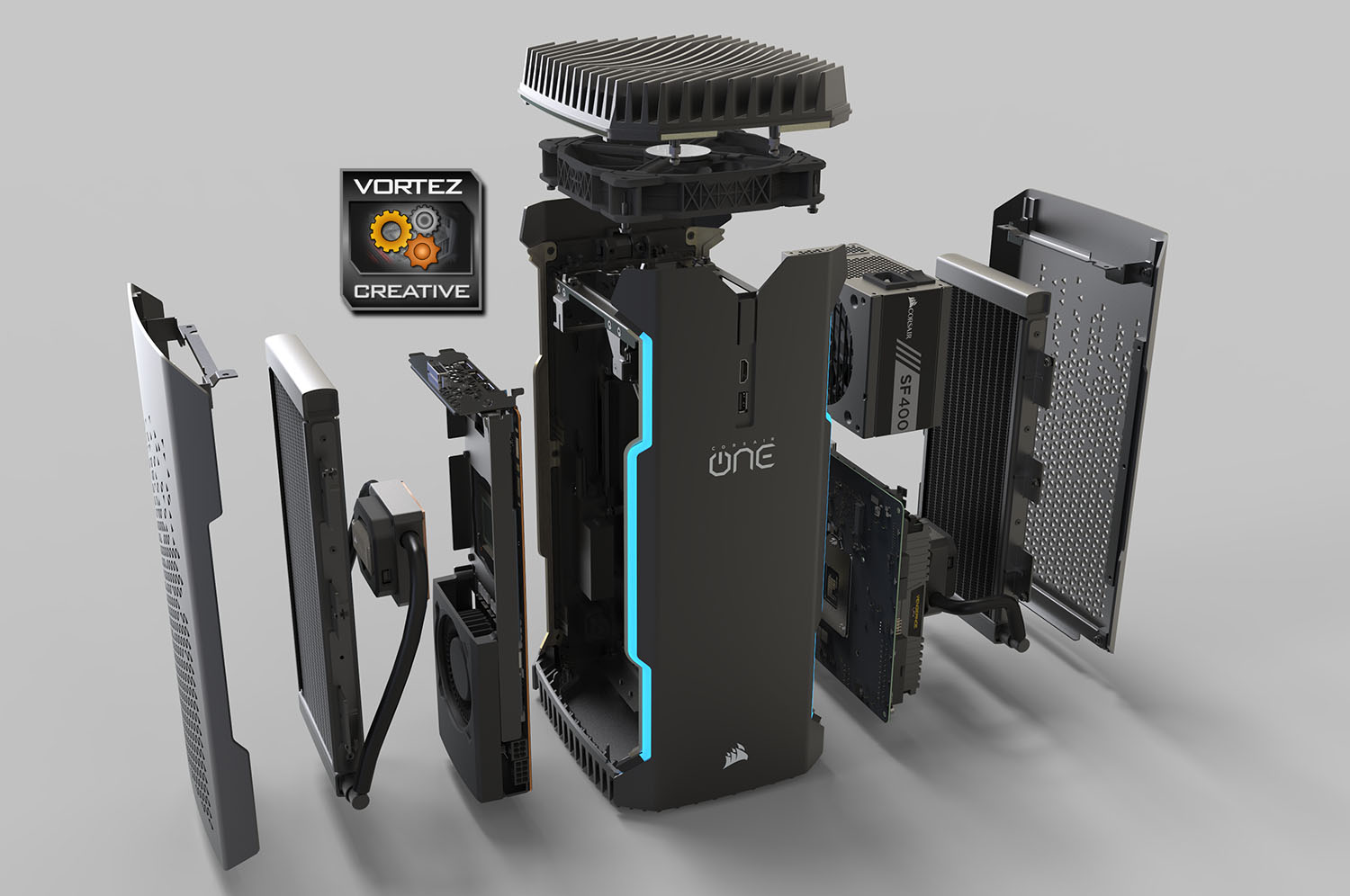
Throughout our testing we found ONE Pro to be both quiet and cool – the two attributes which are often difficult to attain simultaneously. The cooling design with fanless radiators and just a single cooling fan at the top clearly works well and Corsair are to be commended for this achievement.
ONE Pro arrives with the price-tag of £2199.99 in the UK and £2200.99 in the US – making it unequivocally more expensive than a DIY construction. However, (as we’ve already mentioned), this is a unique form factor and building an equivalent configuration would be no mean feat. There is also the added bonus of dealing with just one entity should any parts fail – whereas a custom build would require you to liaise with individual manufacturers regarding replacements.
ONE Pro is the next natural step for Corsair; their expertise in many varying fields has led to the creation of this impressive, unique and innovative SFF PC.
Pros
+ Small and stylish
+ Lightweight
+ Very well-designed
+ High-performance parts included
+ Offers excellent performance
+ Useful VR ports
+ Quiet and cool operation
+ Features USB 3.1 Gen2
Cons
– Expensive
– Tricky to perform upgrades
– Just two ports on the front
– Just one storage drive which is also SATA-based
+ Small and stylish
+ Lightweight
+ Very well-designed
+ High-performance parts included
+ Offers excellent performance
+ Useful VR ports
+ Quiet and cool operation
+ Features USB 3.1 Gen2
Cons
– Expensive
– Tricky to perform upgrades
– Just two ports on the front
– Just one storage drive which is also SATA-based
Click here for an explanation of our awards at Vortez.net.