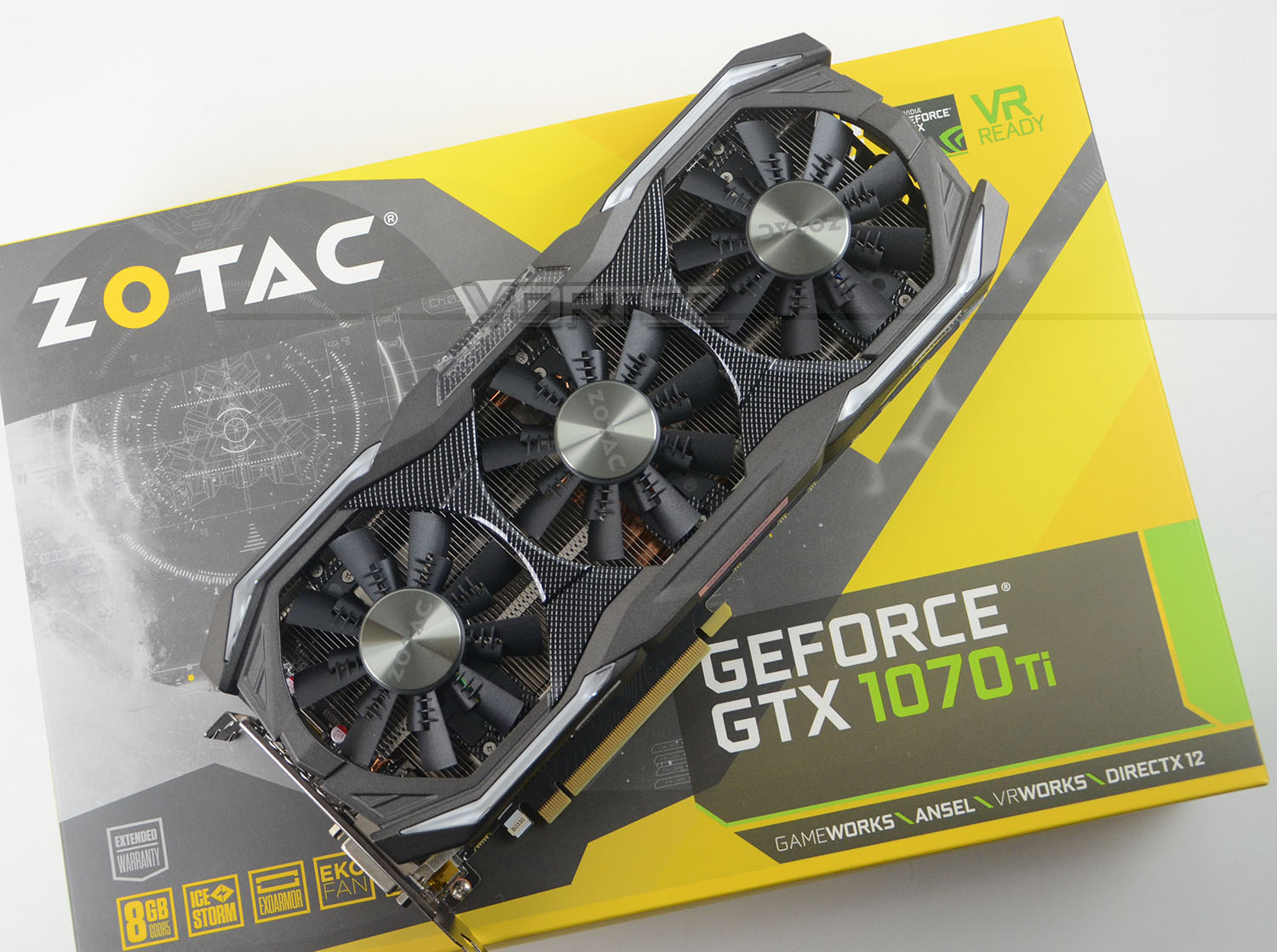
The final blow to AMD Vega is here. Under the guise of ZOTAC’s renowned AMP Extreme (ZT-P10710B-10P), can the GTX 1070 Ti find a suitable spot in the GTX 10 Series lineup?

Product on Review: GTX 1070 Ti AMP Extreme
Manufacturer & Sponsor: ZOTAC
Street Price: £499 GBP / $500 USD
The appearance of another Pascal-based graphics card came as a quite a shock and surprise last month. In the GTX 1070 Ti revelation it was crystal clear that NVIDIA had their sights set on total victory over AMD Vega. While Vega56 and Vega64 struggled to gain any traction against the might of the GTX 10 series, this final hurrah from NVIDIA is certain to deliver the final blow.
One astounding and yet understandable attribute about all forthcoming GTX 1070 Ti graphics cards is a certain limitation placed on all partners by NVIDIA, preventing them from applying any such factory overclock to the GPU or memory clock speeds. Astounding, because this renders all GTX 1070 Tis on par which each other in terms of performance and yet understandable because allowing out of the box overclocked performance on this new GPU will have a detrimental effect on current GTX 1080 sales.
Today we turn to ZOTAC for a detailed look at their new GTX 1070 Ti AMP Extreme. While this graphics card may not hold the usually dramatic factory overclock that we typically expect, it does deliver a triple fan configuration by way of IceStorm – offering both cool and quiet operation and ZOTAC does have a nifty little trick up their sleeve… available as a download for users of the GTX 1070 Ti AMP Extreme, ZOTAC has created a custom profile which can be easily installed, allowing gamers to transform their stock settings to the monstrous clock speeds which the AMP Extreme is renowned for.
ZOTAC on their GTX 1070 Ti AMP Extreme
The most advanced gaming GPU ever created. Powered by NVIDIA Pascal™ architecture, the ZOTAC GeForce GTX 1070 Ti Series is the world’s most advanced gaming GPU ever created. It strives for the excellence in power, speed, cooling, noise, gaming, and size with no compromise on performance.
Technical Specifications
Below are the technical specifications surrounding GTX 1070 Ti AMP Extreme, supplied directly by ZOTAC:
GPU
GeForce® GTX 1070 Ti
CUDA cores
2432
Video Memory
8GB GDDR5
Memory Bus
256-bit
Engine Clock
Base: 1607 MHz
Boost: 1683 MHz
Memory Clock
8 Gbps
PCI Express
3.0
Display Outputs
3x DisplayPort 1.4
1x HDMI 2.0b
1x DL-DVI
Recommended Power Supply
500W
DirectX
12 API feature level 12_1
OpenGL
4.5
Cooling
Triple Fan – Ice Storm
Slot Size
2.5 slots
Supported OS
Windows 10 / 8 / 7
Card Length
325mm x 148mm x 56.6mm
Accessories
2 x Mesh Wrapped Dual 6-pin to 8-pin PCIe adapter
Driver Disk
User Manual
GeForce® GTX 1070 Ti
CUDA cores
2432
Video Memory
8GB GDDR5
Memory Bus
256-bit
Engine Clock
Base: 1607 MHz
Boost: 1683 MHz
Memory Clock
8 Gbps
PCI Express
3.0
Display Outputs
3x DisplayPort 1.4
1x HDMI 2.0b
1x DL-DVI
Recommended Power Supply
500W
DirectX
12 API feature level 12_1
OpenGL
4.5
Cooling
Triple Fan – Ice Storm
Slot Size
2.5 slots
Supported OS
Windows 10 / 8 / 7
Card Length
325mm x 148mm x 56.6mm
Accessories
2 x Mesh Wrapped Dual 6-pin to 8-pin PCIe adapter
Driver Disk
User Manual
Detailed Look & Video Review
For this review we’ve produced a video review over on our YouTube channel which details all of the included features, and takes a close look at the PCB/cooling solution along with the addition of some gaming benchmarks. Please check out our video review or hit play on the video below:
Test Setup & Methodology
How we test graphics cards
Testing a graphics card is an extremely lengthy process. We sometimes see reviews where a graphics card has been tested using out of date equipment, out of date games and even out of date drivers. While the latter can be excused due to the sheer amount of driver updates making a thorough review impossible we will however notify the reader when we have used a different driver to the normal for example a pre-release driver. For the most part however we will always use the same hardware and latest drivers so this does certainly need to be taken into consideration when viewing our testing results. Each game and benchmark is tested times with the lowest and highest scores omitted out of the 5 results and the average then taken from the three remaining to give us our final result for each resolution and setting used.
Hardware
Taking Intel’s High-End Desktop platform, our hardware utilises the Intel X99 chipset. Combined with this we use the Intel Core i7-5960X Extreme Edition processor clocked to a realistic and achievable 4GHz to ensure we have no CPU bottlenecks. With 16GB (4x4GB) of DDR4 at 2666MHz and a 750GB SSD there should be minimal paging so the benchmarks we run today will hopefully give a true reflection of the graphics card’s performance.
High End Graphics Cards on test:
ZOTAC GTX 1070 Ti AMP Extreme
NVIDIA GTX 1080 Ti
NVIDIA GTX 1080
PowerColor RED DEVIL Golden Sample RX 580
ASUS STRIX GTX 1070
PowerColor RED DEVIL RX 470
NVIDIA GTX 1060
NVIDIA GTX 980
NVIDIA GTX 970
AMD Radeon RX 480
XFX R9 FURY
AMD Radeon R9 390X
Special thanks go to Epiphan, Intel, Corsair, MSI and AOC for providing the extreme spec components used for our test bench:
Motherboard: MSI X99A Workstation
CPU: Intel Core i7-5960X Extreme Edition @ 4GHz
RAM – 16GB (4x4GB) Corsair LPX Vengeance (Red) DDR3 @ 2666MHz 16-17-17-35 C1
Power Supply – CORSAIR HX1050
Hard Drive – Samsung 840 EVO 750GB
Cooler – CORSAIR Hydro Series™ H105 240mm Extreme Performance Liquid CPU Cooler
Monitor – AOC 28″ 4K U2879VF
Capture Card – Epiphan AV.io 4K
CPU: Intel Core i7-5960X Extreme Edition @ 4GHz
RAM – 16GB (4x4GB) Corsair LPX Vengeance (Red) DDR3 @ 2666MHz 16-17-17-35 C1
Power Supply – CORSAIR HX1050
Hard Drive – Samsung 840 EVO 750GB
Cooler – CORSAIR Hydro Series™ H105 240mm Extreme Performance Liquid CPU Cooler
Monitor – AOC 28″ 4K U2879VF
Capture Card – Epiphan AV.io 4K
Benchmarks
If you are a regular reader of our reviews you will know we like to test the latest hardware with the latest games and benchmarks on the market. Here are the games we’ve chosen:
DOOM (OpenGL 4.5 & Vulkan)
Total War: Warhammer
Rise of the Tomb Raider
HITMAN
DiRT Rally
Total War: Warhammer
Rise of the Tomb Raider
HITMAN
DiRT Rally
To capture framerates we use a combination of in-game benchmark tools, FRAPS and PresentMon.
We also take into consideration the benchmarkers out there so have included three of the more popular synthetic benchmarks available:
Unigine: Valley
Unigine: Heaven 4
Futuremark 3DMark Firestrike
Futuremark 3DMark Time Spy
Unigine: Heaven 4
Futuremark 3DMark Firestrike
Futuremark 3DMark Time Spy
Let’s see how today’s graphics card performed…
Power, Temperatures, Acoustics
To test for power consumption, we take a measurement from the plug socket. It is important to note that the figures below represent total system power use and not just the GPU. The CPU was always in a fixed state (4GHz overclock) so did not affect the additional power load when the GPU was placed under 100% load using Heaven 4.0 which was ran for 20 minutes at which point a load reading was taken. Idle readings were taken 5 minutes after system boot to ensure any background services and applications had loaded.
Temperature
To test temperatures we measured idle temperatures after booting windows, letting all applications finish loading and ran a few benchmarks. Once the benchmarks were complete we left the card to reach a cooling plateau where we then took the idle temperatures. For the load tests we set Heaven 4.0 running continuously for ~30 minutes recorded the peak/maximum GPU temperature.
Acoustics
Coming soon…
Overclocking
To overclock the GTX 1070 Ti AMP Extreme, we applied the custom profile supplied by the ZOTAC website and then nudged the frequencies beyond what ZOTAC provide. All of this was achieved by using ZOTAC’s own FireStorm software which allows you to tweak frequencies and power limits.
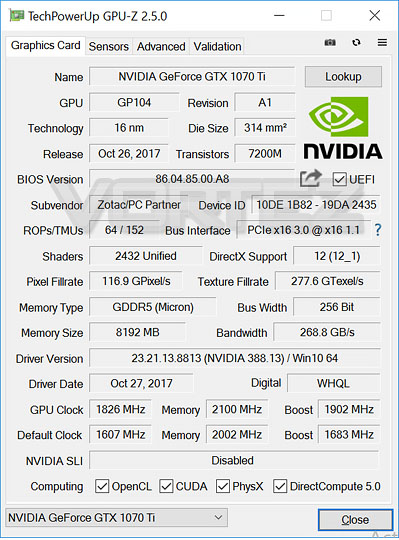
Our best overclock saw us shift the GPU clock speed up from 1607MHz to 1826MHz – supplying a boost of 1902MHz which translates to a 13% increase. In the memory department we were able to apply 100MHz which isn’t too shabby at all.
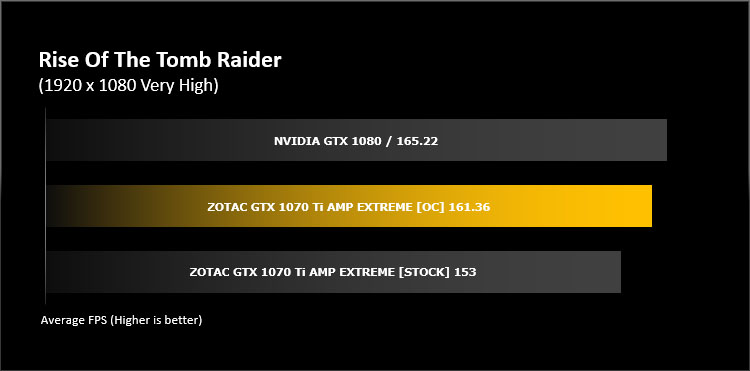
By adjusting the clock speeds we were able to edge closer to the performance of a GTX 1080 and below you can clearly see the advantage to overclocking this graphics card. Having such a proficient cooler attached would be a total waste if gamers leave the card at its NVIDIA reference settings.
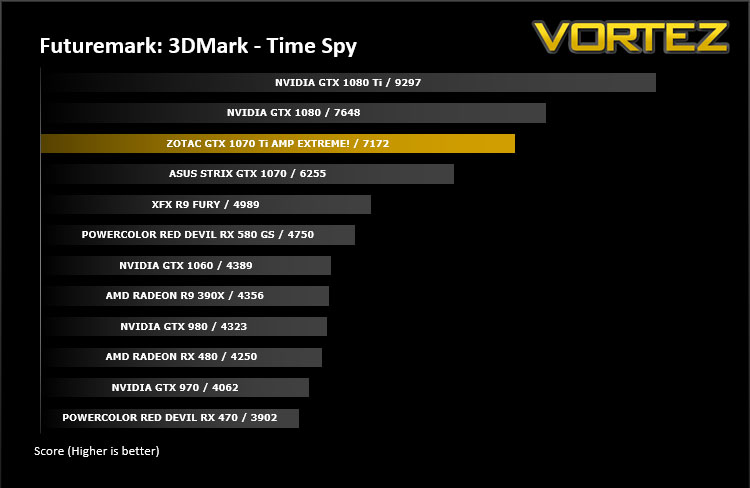
DX12: 3DMark Time Spy
With its pure DirectX 12 engine, which supports new API features like asynchronous compute, explicit multi-adapter, and multi-threading, 3DMark Time Spy is the ideal benchmark for testing the DirectX 12 performance of the latest graphics cards.
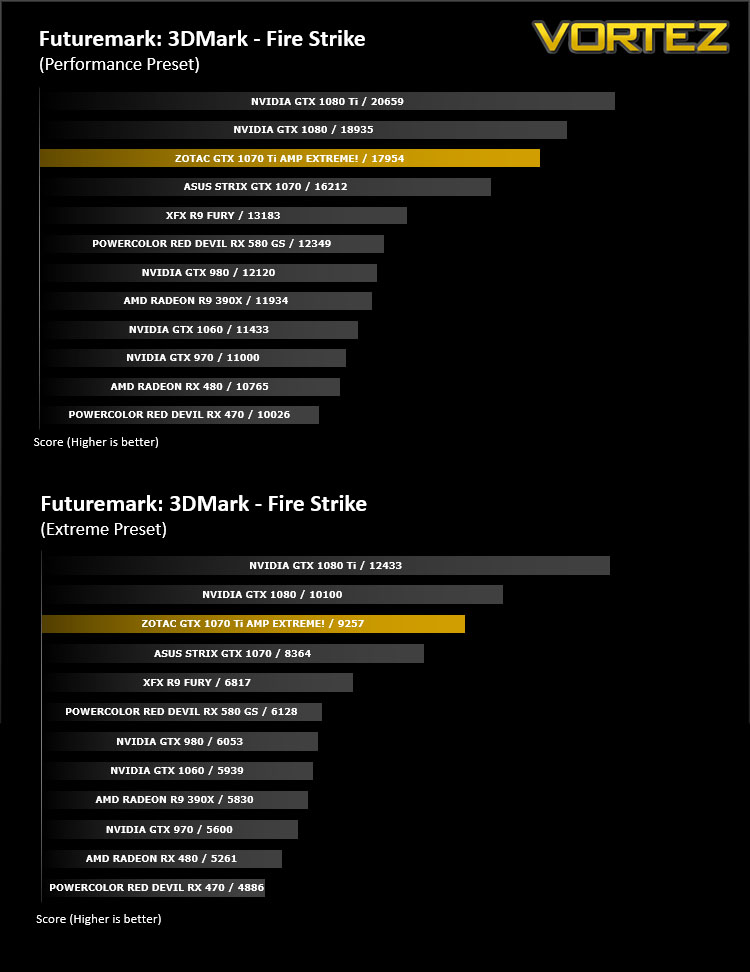
DX11: 3DMark FireStrike
Fire Strike is the new showcase DirectX 11 benchmark designed for high-performance gaming PCs. It is Futuremark’s most ambitious and technical benchmark ever, featuring real-time graphics rendered with detail and complexity far beyond what is found in other benchmarks and games today.
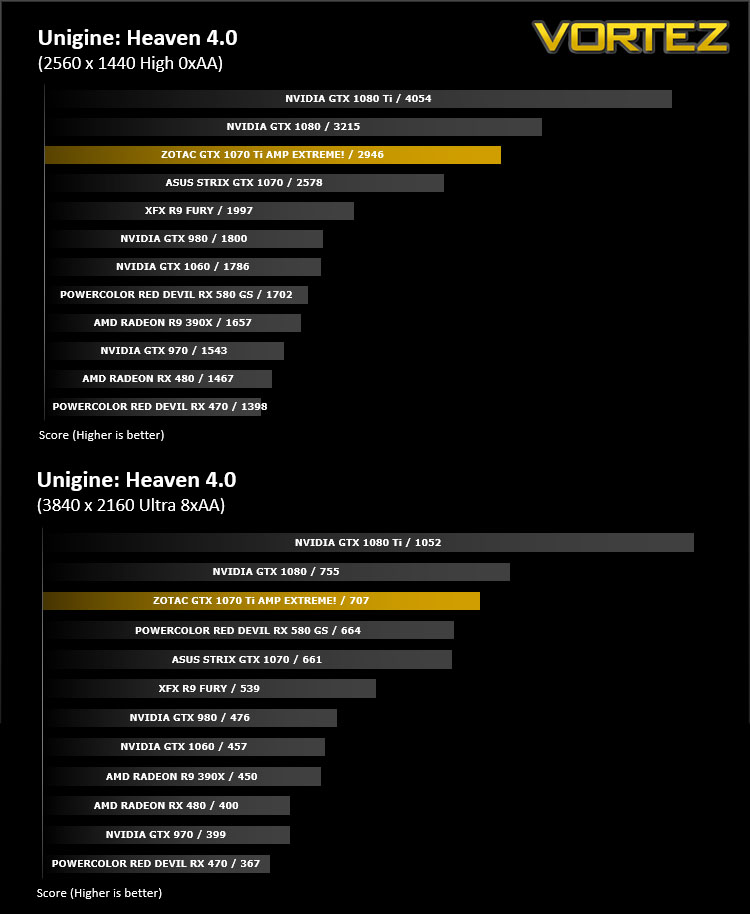
DX11: Unigine Heaven 4.0
Heaven Benchmark with its current version 4.0 is a GPU-intensive benchmark that hammers graphics cards to the limits. This powerful tool can be effectively used to determine the stability of a GPU under extremely stressful conditions, as well as check the cooling system’s potential under maximum heat output. It provides completely unbiased results and generates true in-game rendering workloads across all platforms.
DX11: Unigine Valley
Valley Benchmark is a new GPU stress-testing tool from the developers of the very popular and highly acclaimed Heaven Benchmark. The forest-covered valley surrounded by vast mountains amazes with its scale from a bird’s-eye view and is extremely detailed down to every leaf and flower petal. This non-synthetic benchmark powered by the state-of-the art UNIGINE Engine showcases a comprehensive set of cutting-edge graphics technologies with a dynamic environment and fully interactive modes available to the end user.
DX12: DOOM OpenGL 4.5
By default DOOM utilises an OpenGL 4.5 renderer, and is one of relatively few Windows PC titles to not use DirectX 12. It tests how well NVIDIA and AMD’s GPUs deal with a less mainstream approach, especially in regards to driver optimisations, and like all of id titles stretches graphics quality to the limit.
DX12: DOOM Vulkan
id have also released an optional Vulkan rendering path for DOOM. This API is a development of AMD’s Mantle low level which has been taken on board by the Kronos Group for implementation as the next generation of Open graphics APIs. Like DirectX 12 Vulkan is capable of Asynchronous Compute in specific configurations.
DX12: Total War: WARHAMMER
Total War: WARHAMMER is a pseudo Real-Time Strategy title which leverages DirectX 12 to render huge numbers of complex units on screen at any one time.
DX12: Rise of the Tomb Raider
Square Enix’s Rise of the Tomb Raider is the sequel to 2013’s Tomb Raider reboot. An enormously challenging title graphically, the developers also released an optional DirectX 12 render path for Windows 10 users. Although it has undergone a number of iterations this rendering pathway notably doesn’t currently utilise the full capabilities of DirectX 12.
DX12: HITMAN
Yet another DirectX 12 title, 2016’s Hitman from Square Enix and developer IO Interactive has a more robust DirectX 12 implementation than Rise of the Tomb Raider. We’ve tested at a full range of resultions, from 1080p through to 4K, which provides a look at the impact of GPU speed and memory utilisation.
DX11: DiRT Rally
Overall Performance
Here we take a look at the overall performance of the graphics card. This figure is determined by finding the average FPS across all of the settings used in a particular benchmark(game) to give us an overall value.
Value For Money
We make a simple calculation for this set of results. For each game we add all of the resulting FPS totals together and then divide by the four sets to give us an overall performance figure. While the figures alone do not give you an accurate picture of how the card will perform in any given scenario, they do tell you, when averaged, which GPU is the more capable across all of the benchmarks and settings tested.
Conclusion
Regarded as NVIDIA’s last hurrah under the Pascal Architecture, the GTX 1070 Ti has been carefully designed as not to affect GTX 1080 sales. The aim of this card is to completely silence AMD with the recent release of Vega.
Sadly, in our comparison we weren’t able to feature RX Vega graphics cards due to the appalling sampling availability. The mere fact that some manufacturers have failed to design custom designs using AMD Vega or have even side-stepped this generation altogether is an indicator of the reality of the situation.
Under the guise of ZOTAC’s renowned AMP Extreme, the GTX 1070 Ti has absolutely no problems keeping cool and quiet. In fact, the GPU remained around 50 degrees under load – making it one of the most impressive thermal results we’ve had. Of course, the GPU and memory on all GTX 1070 Ti’s are restricted to stock settings by NVIDIA, so ZOTAC are unable to give it their usual treatment. Throughout the generations, we’ve seen the AMP Extreme offer some of the biggest overclocks imaginable so this is unfortunate – though ZOTAC are not to be held responsible. NVIDIA are basically protecting their higher-end SKU and actually, ZOTAC do provide a download for users to apply what would be the “AMP Extreme” clock speeds to the card, via their FireStorm software. So it isn’t all bad news.
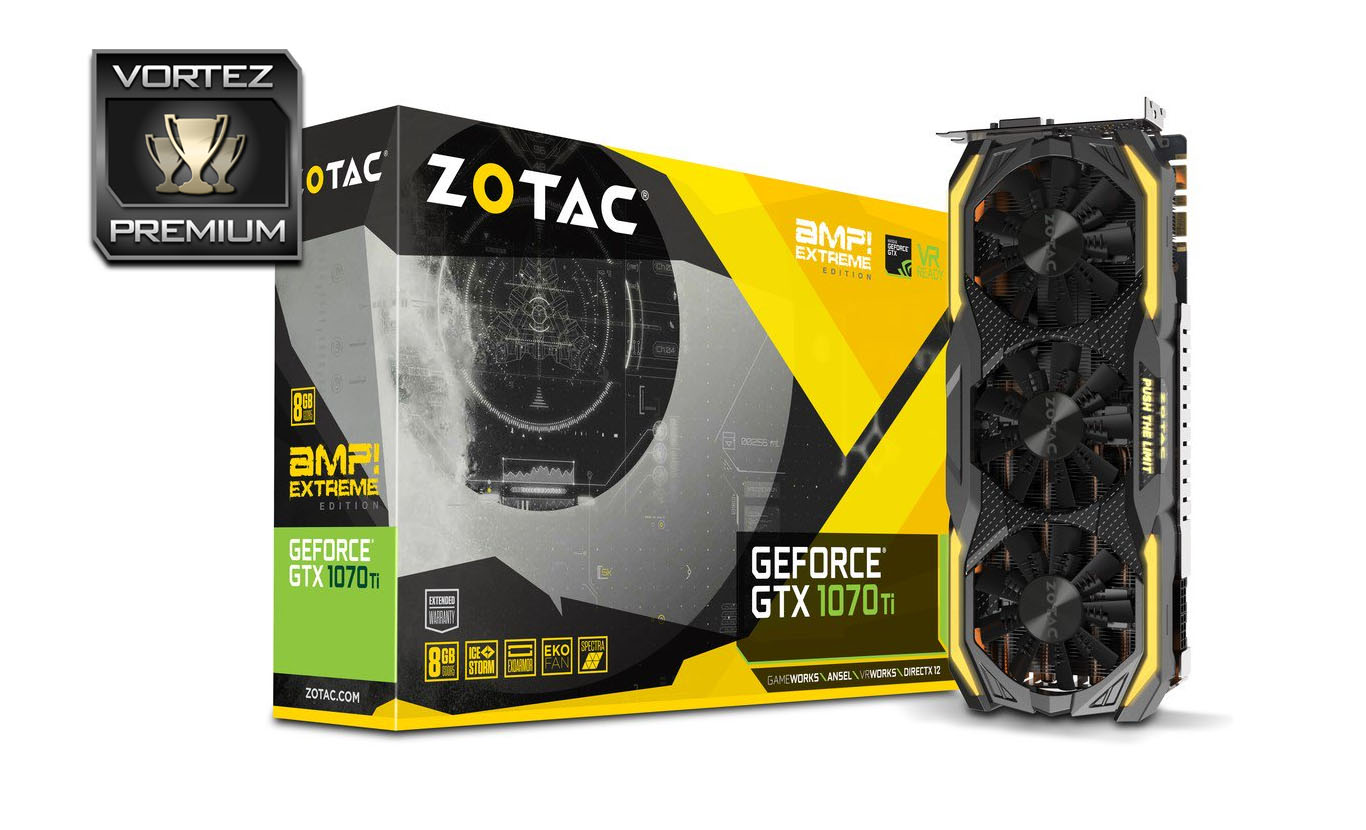
The obvious weakness with GTX 1070 Ti AMP Extreme is the sheer size and weight of this unit. It is among one of the biggest and heaviest graphics cards we’ve handled. If you’re seriously considering this graphics card, you will need to make sure you have a computer chassis which will allow the 325mm length and occupation of two and half slots.
With no factory overclock permitted by NVIDIA the performance results among all GTX 1070 Ti’s will remain the same, regardless of the manufacturer. As can be seen on the preceding pages, this graphics card slots between the GTX 1070 and GTX 1080 as expected – applying the “AMP Extreme” overclock supplied on ZOTAC’s website nudges the performance up somewhat closer to that of the reference GTX 1080 as showcased in our video review below.
At a cost of £499 GBP / $499 USD, the GTX 1070 Ti AMP Extreme is an excellent choice for those wanting to hone in on GTX 1080 performance for less. This ZOTAC offering also comes with 5-years warranty peace of mind (registration required) – others are only offering up to 2 years.
NVIDIA may have restricted partners applying factory overclocks to the GTX 1070 Ti, but ZOTAC has overcome this limitation via a downloadable custom profile, allowing gamers to tap into the delights AMP Extreme clock speeds!
Pros
+ Attractive design
+ Solid construction
+ Excellent performance
+ Keeps GPU cool
+ Operated quietly
+ ZOTAC provide OC file/settings
+ Can be manually overclocked easily
+ 5-year warranty
Cons
– No factory overclock permitted by NVIDIA
– Huge in size
– Substantial in weight
+ Attractive design
+ Solid construction
+ Excellent performance
+ Keeps GPU cool
+ Operated quietly
+ ZOTAC provide OC file/settings
+ Can be manually overclocked easily
+ 5-year warranty
Cons
– No factory overclock permitted by NVIDIA
– Huge in size
– Substantial in weight
Click here for an explanation of our awards at Vortez.net.
Stay connected with Vortez social media pages: