Armed with the new Intel B360 Express chipset, the B360 AORUS Gaming 3 WiFi motherboard brings Intel 8th Generation support for less. Want the basics and a few extra bells and whistles?

Product on Review: B360 AORUS Gaming 3 WiFi
Manufacturer & Sponsor: GIGABYTE
Street Price: £100 GBP – $100 USD – $199 AUD
The Intel 300-Series platform made its first appearance towards the end of last year. The Intel Z370 chipset is of course reserved for enthusiasts and gamers who want access to the full-range of features including the ability to overclock Intel K-Series CPUs.
Following on from the success of Intel Z370, today Intel unveils the H370, B360 and H310 chipsets; all of which focus on mainstream users who do not require all of the features Z370 brings, nor the heavier price-tag. The new chipsets are designed to appeal to system builders wanting a better value for money experience when pairing up with a non-K Intel Coffee Lake CPU such as the Intel Core i7-8700, Core i5-8400 or Core i3-8100.
Today we’ll be turning to GIGABYTE for a look at their B360 AORUS Gaming 3 WiFi. This motherboard is designed to support Intel’s 8th Generation Processors and will offer coverage of the basic Coffee Lake features with the bonus of elements such as 802.11ac.

GIGABYTE on AORUS
GIGABYTE shares the same passion for gaming with all types of gamers. Therefore, we have extended the premium gaming brand – AORUS, the pinnacle of our hardware excellence, to provide a full spectrum of innovative gaming products that deliver the ultimate performance and exemplifies the PC’s capability for bringing gamers unprecedented delights. We will continue to participate in global gaming events, connecting with the community and actively listening to gamers’ desires in order to create marvellous products that are focused on gamers’ needs. AORUS is a team of gamers in the PC industry, looking to side with gamers in their quest for gaming, to challenge the limits, and become legendary.
Intel B360 Chipset Overview
One of the fundamental things about Intel B360 when we consider a comparison against Intel Z370 is the lack of overclocking support (even with a K-SKU processor).
Below is a comparison table between B360 and Z370. Other things to note is that for storage, B360 doesn’t support RAID configurations. There are also less CPU PCI-E lanes available and less USB ports.
Packaging & First Look
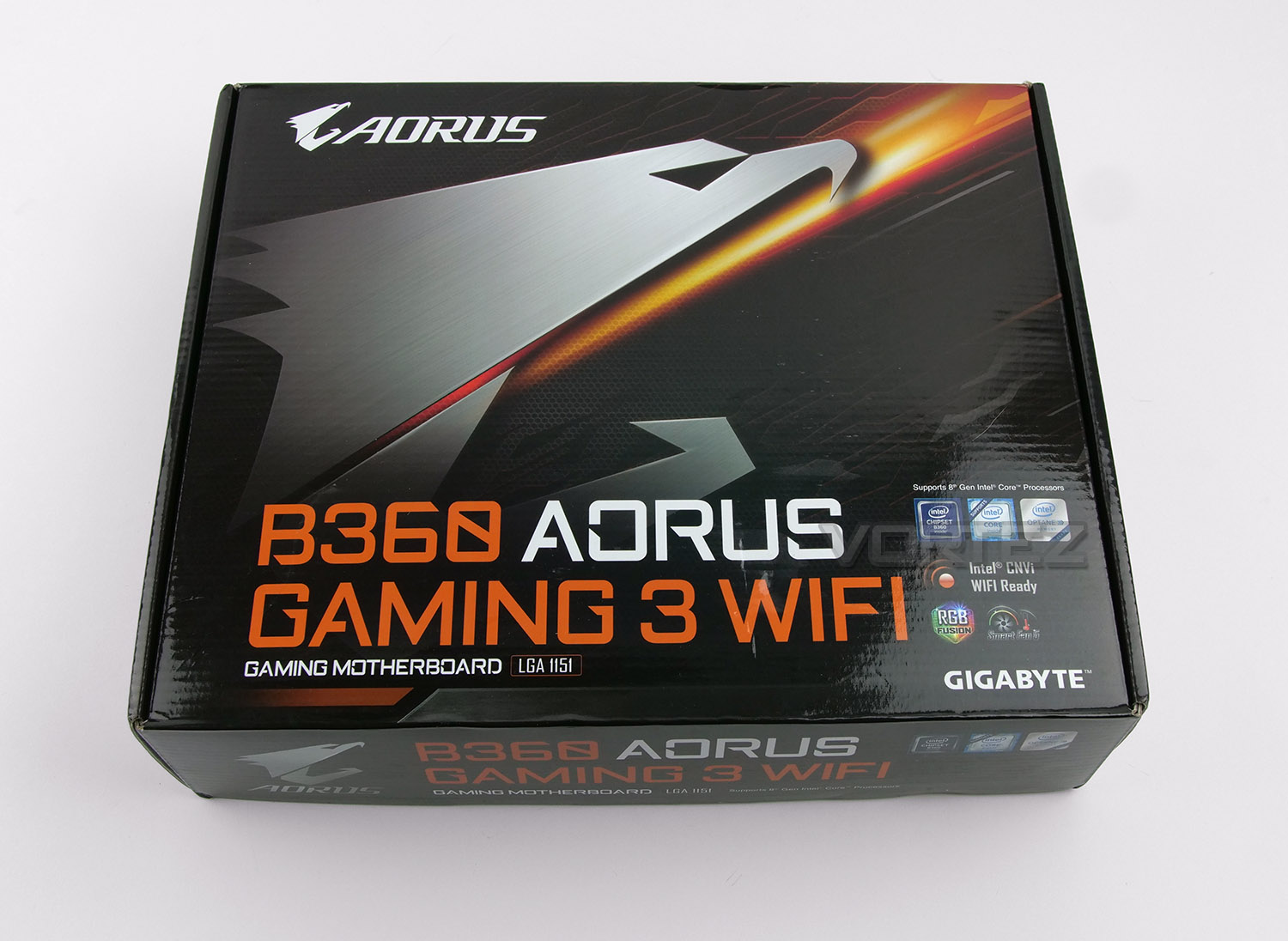
The packaging for Gaming 3 will be familiar to those who’ve encountered an AORUS-based motherboard already. The box is bright, attractive and lists all of the features on the reverse.
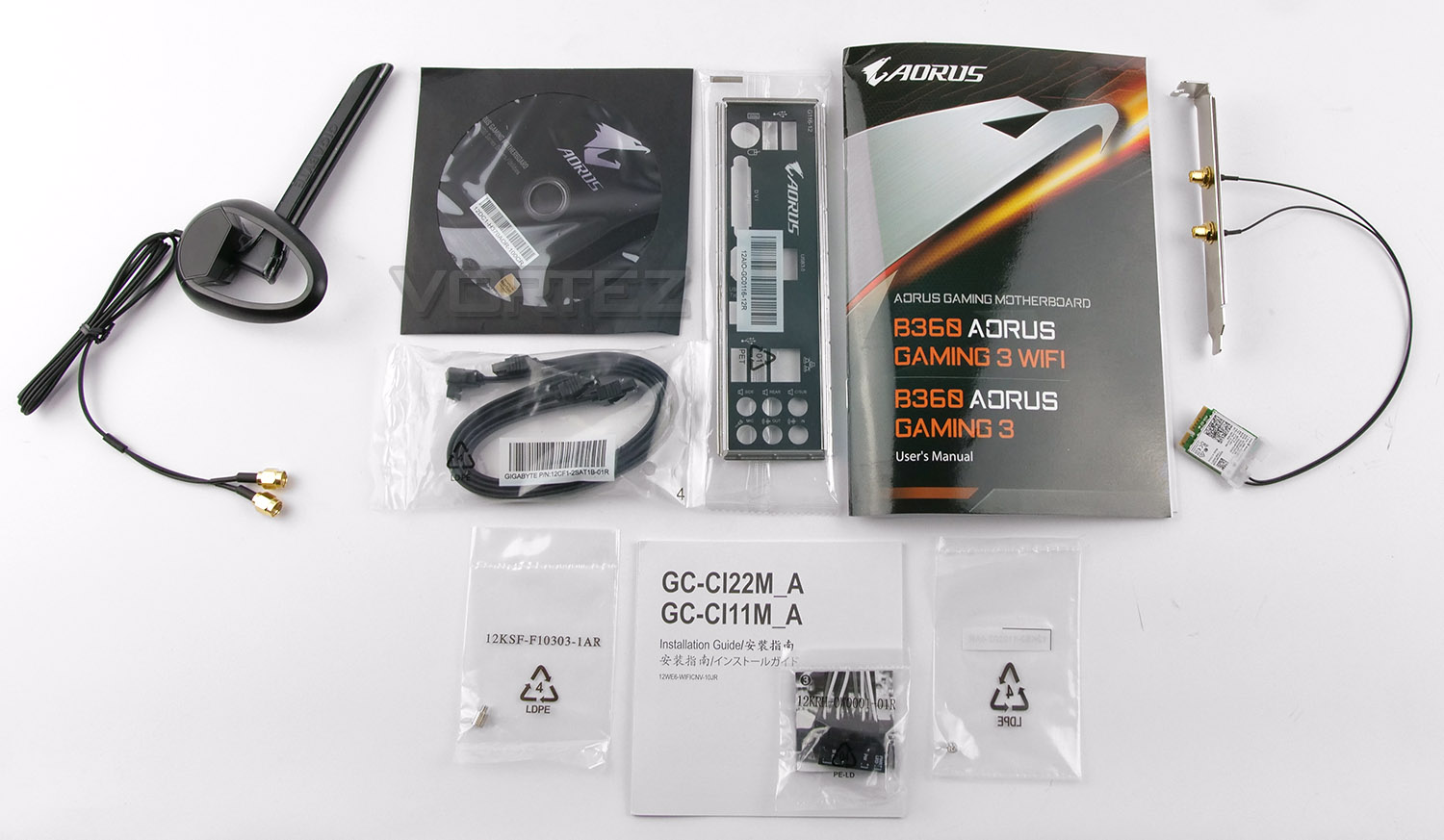
Opening the box up we have just a few items included within the bundle. These include the following: User manual, install guide, rear IO shield, two SATA cables, 802.11ac M.2 card, wireless antenna, driver CD, G-Connect adapter and screws.
The wireless adapter GIGABYTE is using with this motherboard is the Intel 9560NGW M.2 Mini Card. The PCI bracket to which this card is attached pairs up with the antenna which is magnetic – this can be placed in a more accessible location due to the lengthy cable and of course offers dual band 802.11ac 1.73Gbps bandwidth (and support for Bluetooth 5).
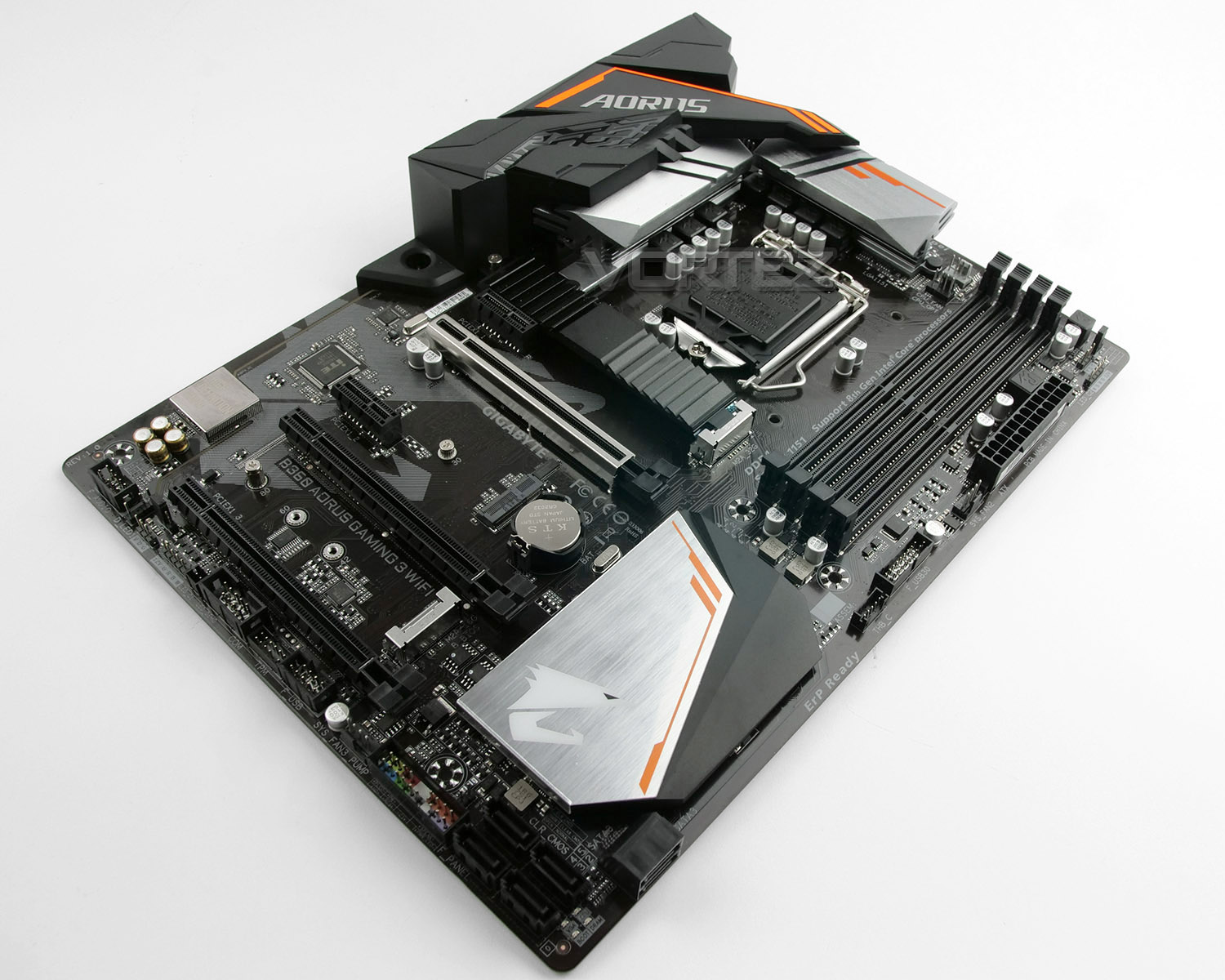
Unveiling the Gaming 3, we’re met by an aggressively styled motherboard which carries across some of the styling found on GIGABYTE’s graphics card range. This design is obviously tailored to the gamer and we have black ports, lanes and slots with a dark brown PCB. There is nothing particularly odd about the layout except to note less SATA ports and that the form factor while being ATX is the thinner variant at 22.5cm – meaning the outer-right edge will not have any standoff screws underneath. Care should be taken when pressing in that 24-pin ATX cable.
Over the page we’ll explore the Gaming 3’s features in more detail.
Closer Look
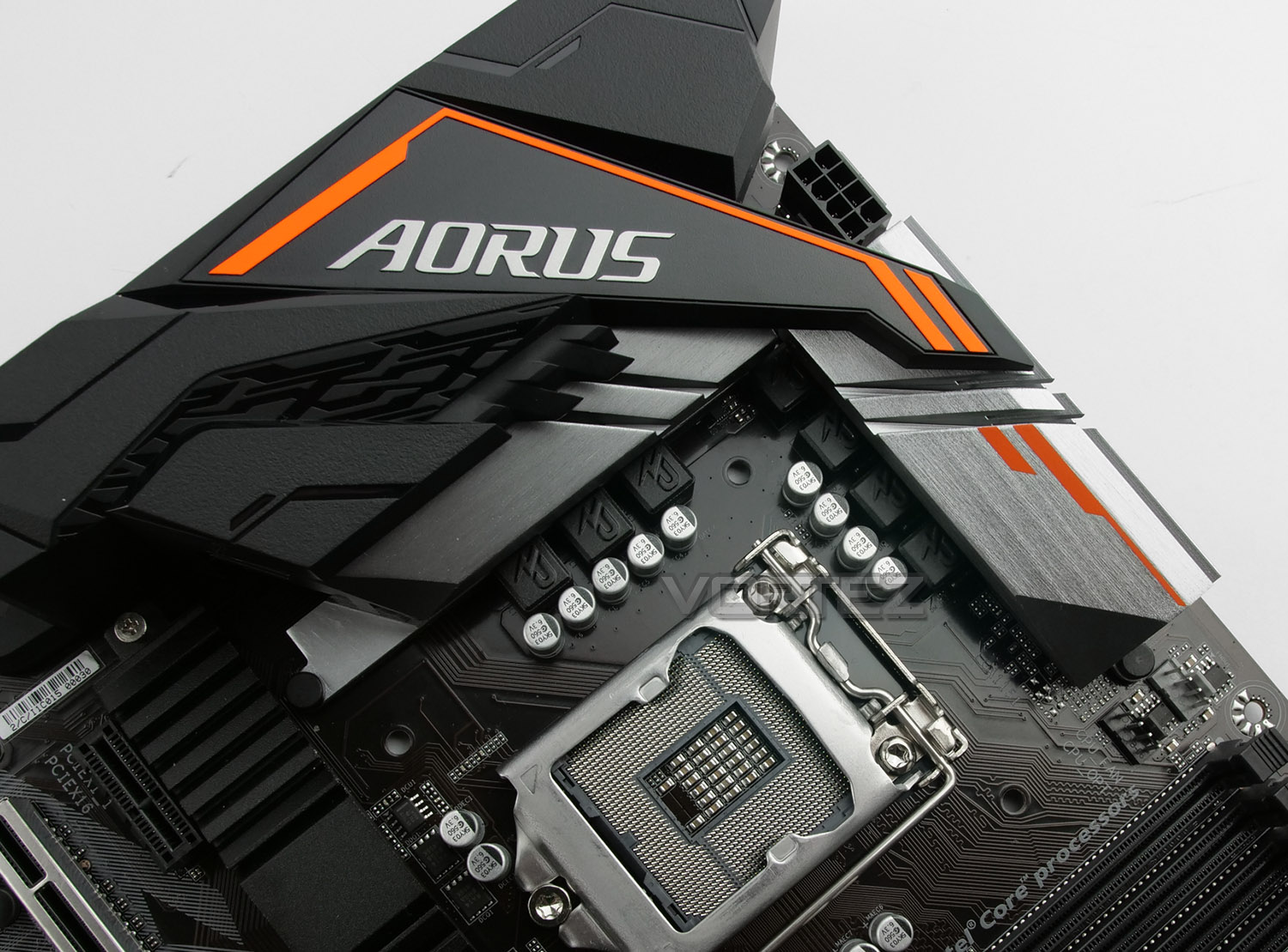
Being designed to work with Intel’s 8th Generation Processors, Gaming 3 uses socket LGA 1151. This socket is surrounded by two large heatsinks – both are independent and not joined. Gaming 3 utilizes a 8+2 digital phase design and CPU power consists of an 8-pin socket.
GIGABYTE has included two CPU fan headers near the socket and on the bottom-edge there is a header designated for the water pump. Ideally, we’d have liked to see the water pump header located towards the top of the board rather than at the bottom.
There are a total of five headers (included these three).
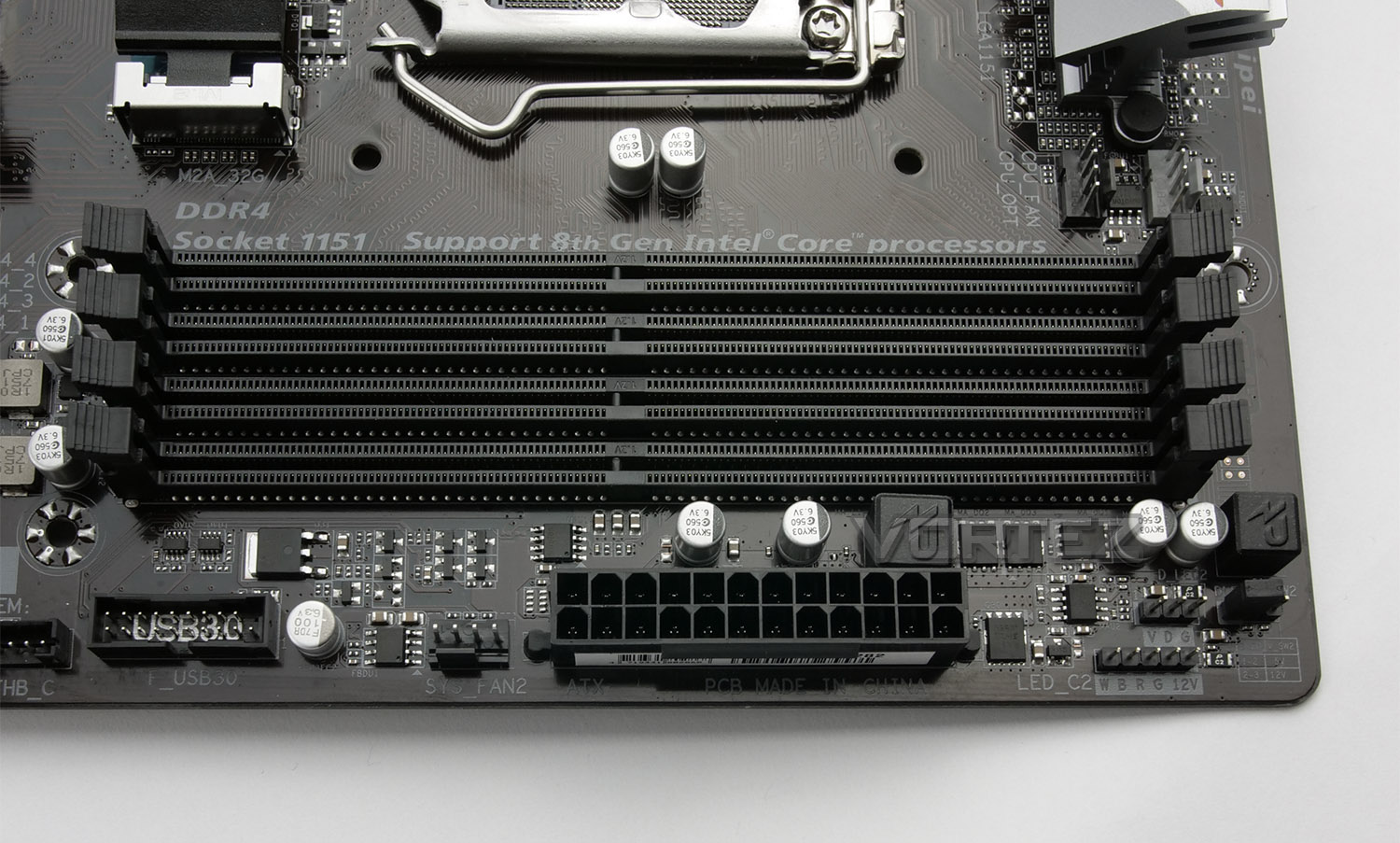
Memory support arrives in the form of dual-channel DDR4 – up to 64GB and DDR4 2666/2400/2133MHz. Also located in this region we have a 12v RGB header for use with lighting strips to make fully use of RGB fusion and there is a single USB 3.0 header immediately next to the 24-pin ATX.
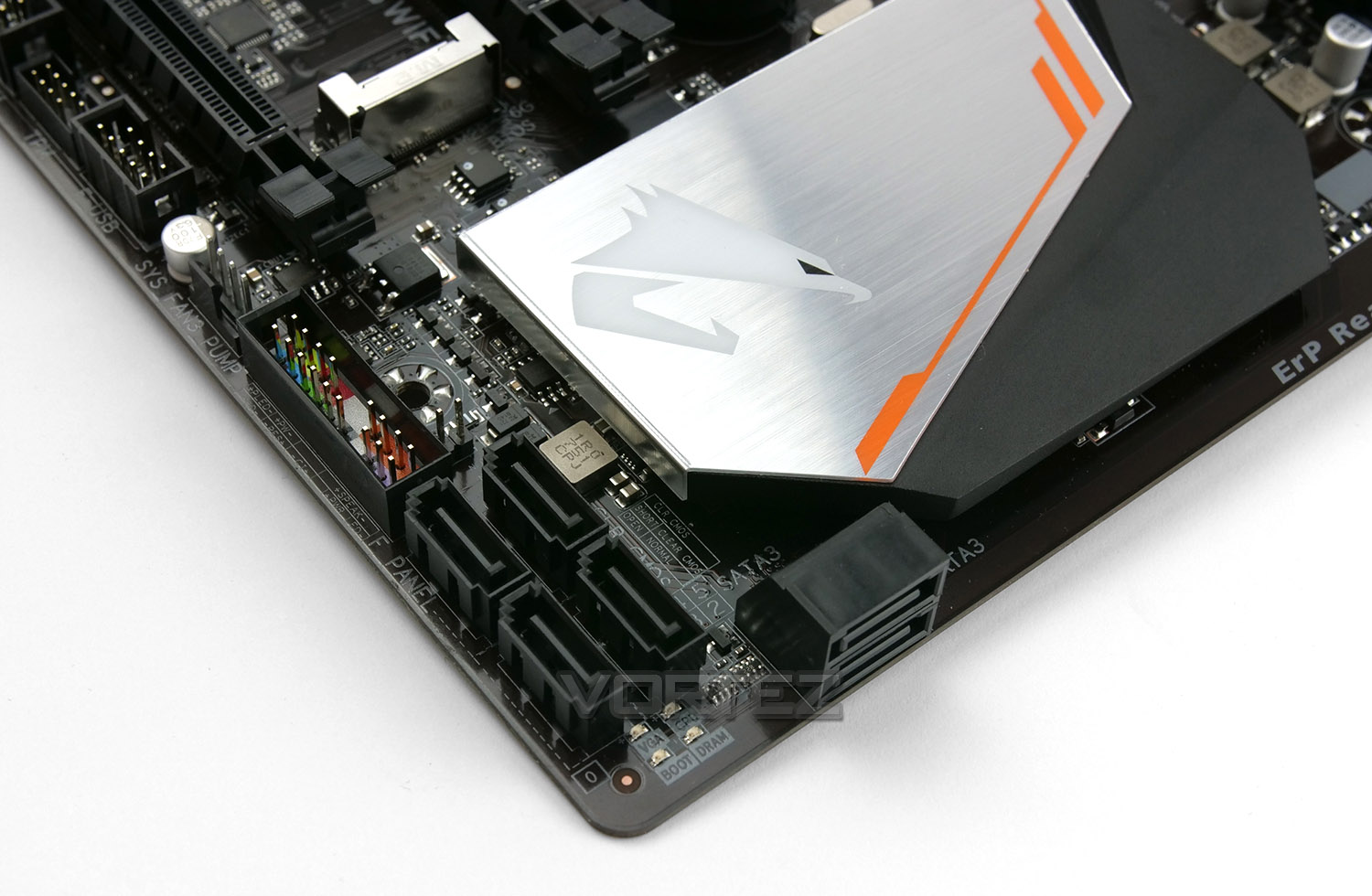
In terms of storage, Gaming 3 supplies us with six SATA 3 (6GB/s) ports – two are right angled and the other four are top-facing. It’s also worth noting that in this bottom corner, GIGABYTE has included a diagnostic LED panel which identifies any problems during the boot process with CPU, DRAM, BOOT (device) or VGA. These handy features are useful if you run into any problems.
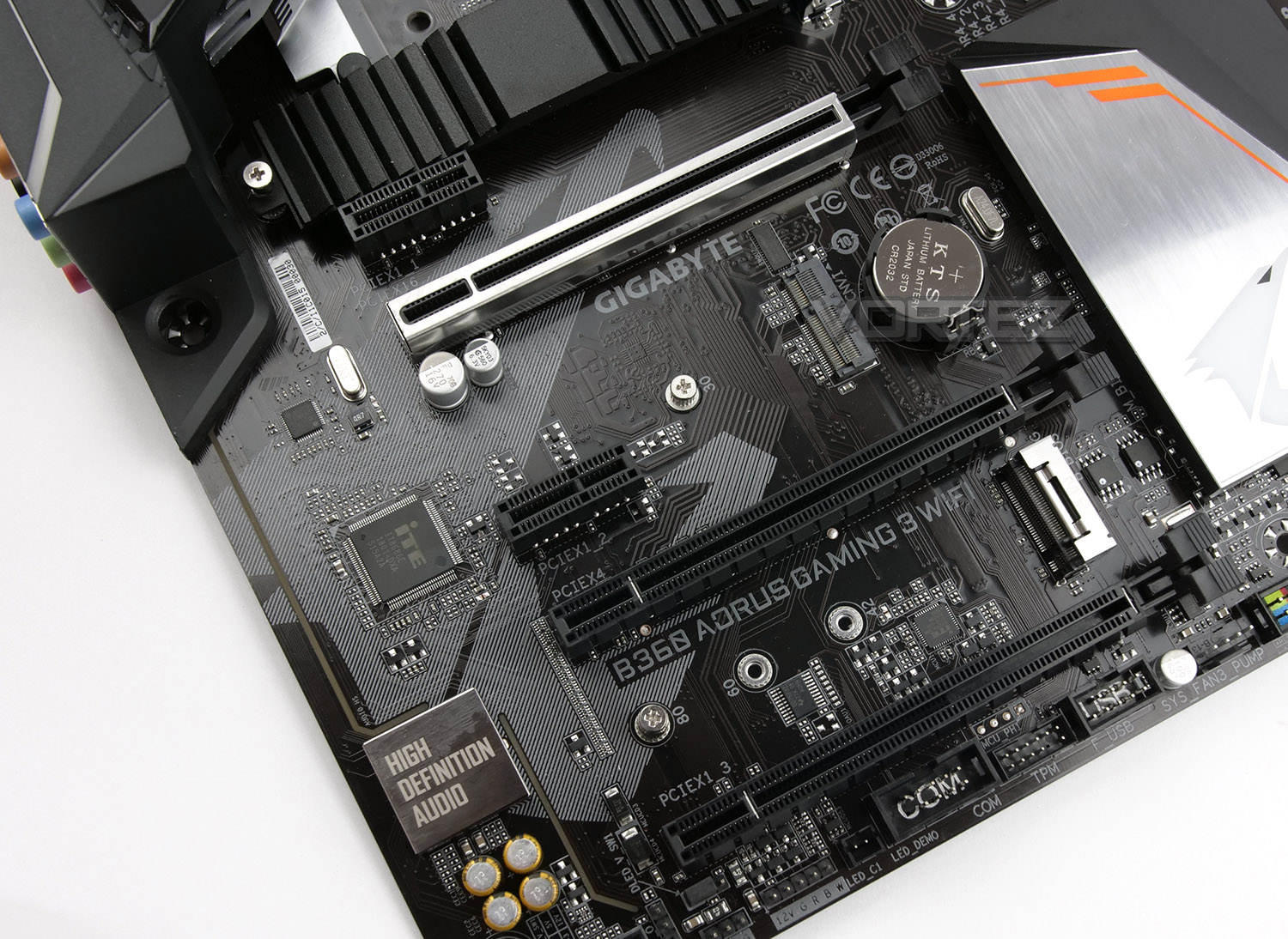
For a mainstream motherboard we still get a decent selection of PCI Express slots. There are:
• 3x PCI Express 3.0 X16 (Modes – 16, 4, 1)
• 2x PCI Express 3.0 X1
As we’ve seen on previous GIGABYTE motherboards, the upper X16 slot has been reinforced with steel to provide some extra support.
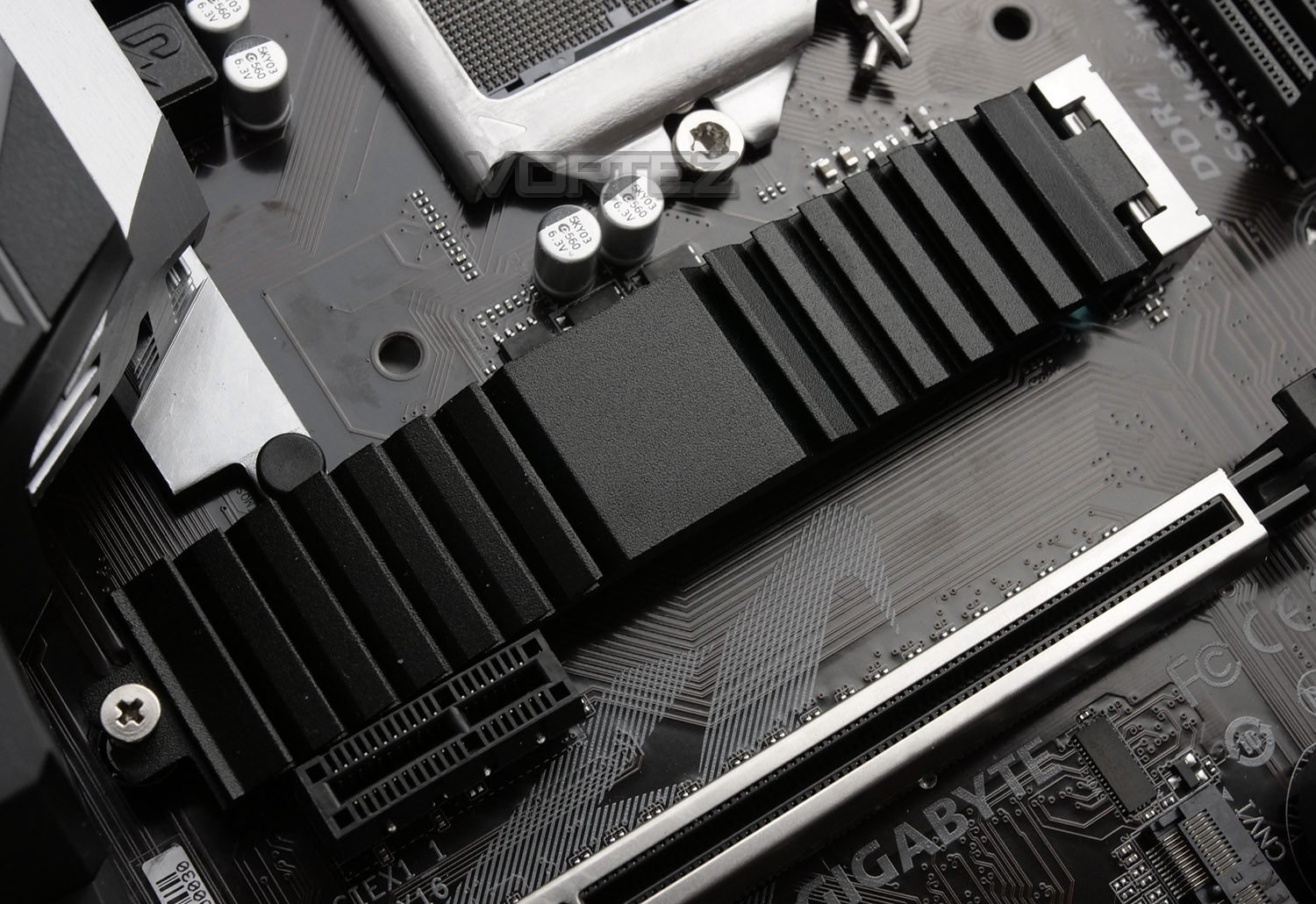
Among the PCI Express we have two M.2 slots as well as the M.2 (CNVi) slot for use with the WiFi module. The M.2 SSD slots support PCI Express Gen3 and Intel Optane Memory. The upper slot features a detachable heatsink with thermal strip – this can be applied to the top-side of the SSD to reduce temperatures.
Along the bottom of Gaming 3 we have another 12v RGB header and the audio components are found towards the bottom-left edge. The audio centres on the Realtec ALC 892 codec. All of the audio components are separated to avoid electrical interference and GIGABYTE also includes “High-end audio CAPs”.
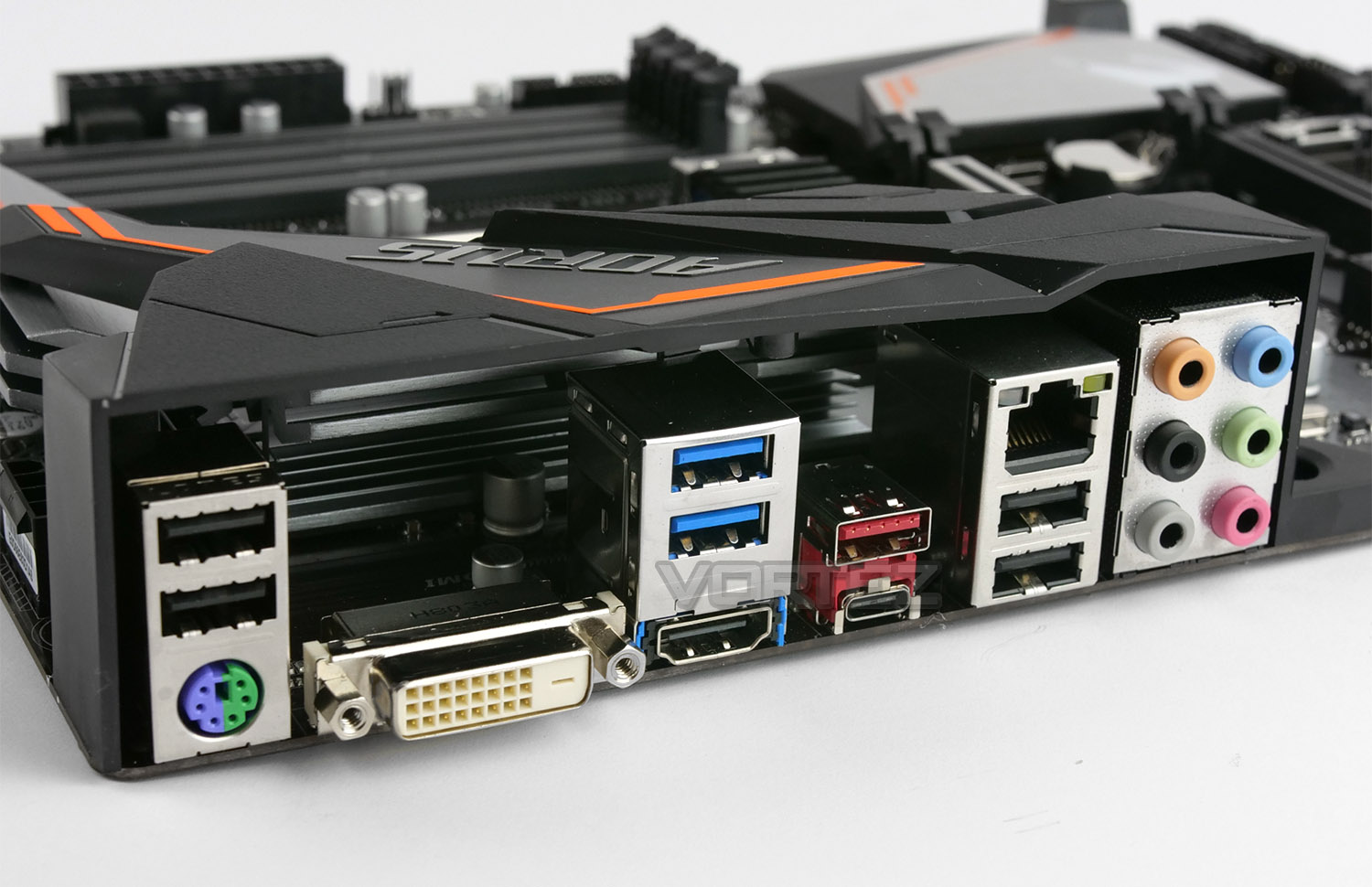
Casting an eye over the back panel, there are quite an assortment of options to choose from for connectivity. Available here we have:
2x USB 2.0 ports
1x PS2 Keyboard/Mouse combo port
1x DVI-D port
2x USB 3.1 Gen1 ports
1x HDMI port
1x USB 3.1 Gen2 (Type C and Type A) ports
1x Gigabit LAN via Intel i219V
2x USB 2.0 ports
6x Audio jacks
So, plenty to use – we even see some legacy support for DVI, something which most brands have now moved on from in favour of DP/HDMI. There are also a few too many USB 2.0 ports instead of USB 3.1.
Video: BIOS Tour
To demonstrate the options and navigation across the GBT BIOS, we’ve captured usage with the Epiphan AV.iO 4K. To view the video simply click on this link or click on the video below:
Test Setup & Methodology
Test Setup
CPU Intel Core i7-8700K
Cooling Corsair H150i Pro RGB
Motherboard GIGABYTE B360 AORUS Gaming 3 WiFi
Memory 16GB Corsair Vengeance LPX 3000MHz
Graphics AMD RX 480
Storage OCZ Vector 180 240GB SSD
PSU Corsair HX1000 80 Plus Platinum Certified PSU
Monitor AOC U2879VF
Capture Device Epiphan AV.iO 4K
Cooling Corsair H150i Pro RGB
Motherboard GIGABYTE B360 AORUS Gaming 3 WiFi
Memory 16GB Corsair Vengeance LPX 3000MHz
Graphics AMD RX 480
Storage OCZ Vector 180 240GB SSD
PSU Corsair HX1000 80 Plus Platinum Certified PSU
Monitor AOC U2879VF
Capture Device Epiphan AV.iO 4K
Benchmarks
Cinebench R15 – CPU/OpenGL Score
x264 HD 4.0 – 1st and 2nd pass encoding
SiSoftware SANDRA – CPU & Memory benchmarks
POV-RAY – CPU benchmarks
TrueCrypt – CPU benchmarks
AIDA64 – CPU benchmarks & Memory
PCMark 8 – Home Suite & Photoshop
3DMark FireStrike – 3D Benchmark
Games – Civilization IV & Total War: WARHAMMER
x264 HD 4.0 – 1st and 2nd pass encoding
SiSoftware SANDRA – CPU & Memory benchmarks
POV-RAY – CPU benchmarks
TrueCrypt – CPU benchmarks
AIDA64 – CPU benchmarks & Memory
PCMark 8 – Home Suite & Photoshop
3DMark FireStrike – 3D Benchmark
Games – Civilization IV & Total War: WARHAMMER
Other Software
Temperature Analysis: Real Temp
Stress Testing Software: AIDA64 Stability Test
CPU Specification Monitoring: CPU-Z
Stress Testing Software: AIDA64 Stability Test
CPU Specification Monitoring: CPU-Z
Overclocking
Since the Intel B360 Express chipset isn’t designed for overclocking this section is omitted from our review.
Benchmarks: Power Consumption
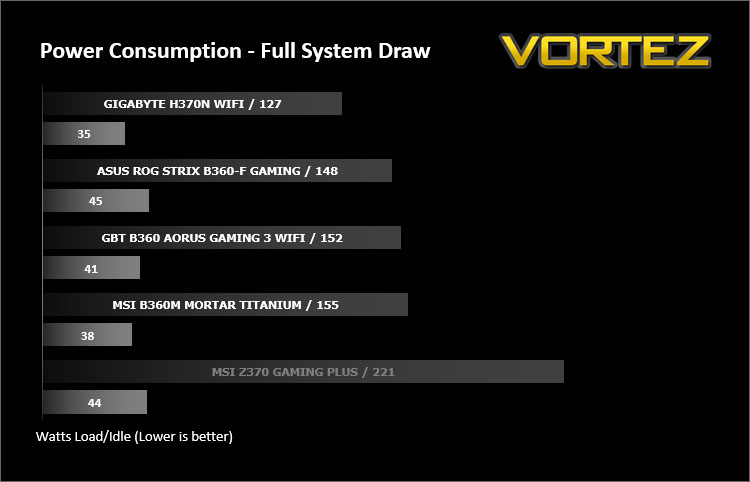
It’s interesting to note the power consumption across all motherboards. Although they are using the Z370/B360 chipset, energy results can fluctuate between manufacturers due to the features and specifications that are integrated. First of all, for the idle tests the system is cold booted into Windows and no additional applications are executed – the watts are noted on the external energy monitor we use and then the system is loaded with 3DMark FireStrike – watts are again monitored for the duration of the test and the highest rated wattage result is then noted down. Below are the results of this energy test.
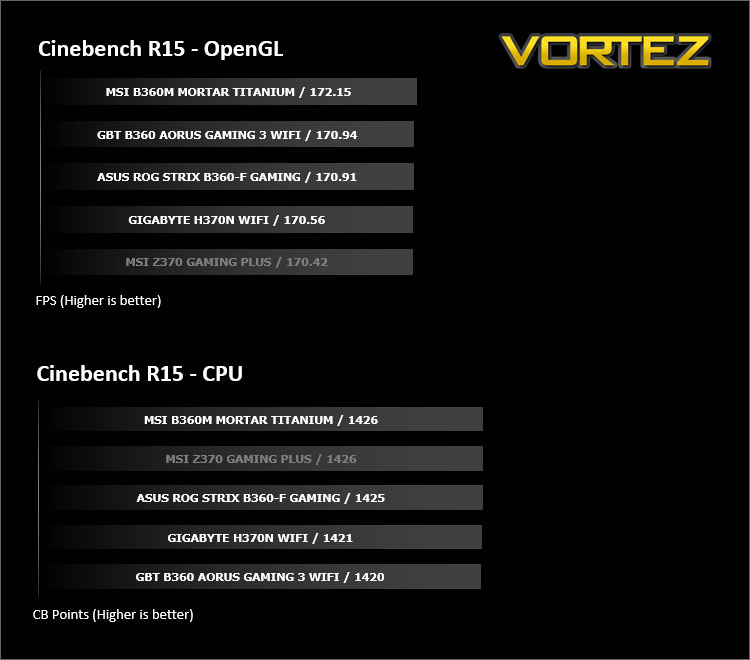
Benchmarks: Cinebench R15
CINEBENCH is a real-world cross platform test suite that evaluates your computer’s performance capabilities. CINEBENCH is based on MAXON’s award-winning animation software CINEMA 4D, which is used extensively by studios and production houses worldwide for 3D content creation. MAXON software has been used in blockbuster movies such as Iron Man 3, Oblivion, Life of Pi or Prometheus and many more.
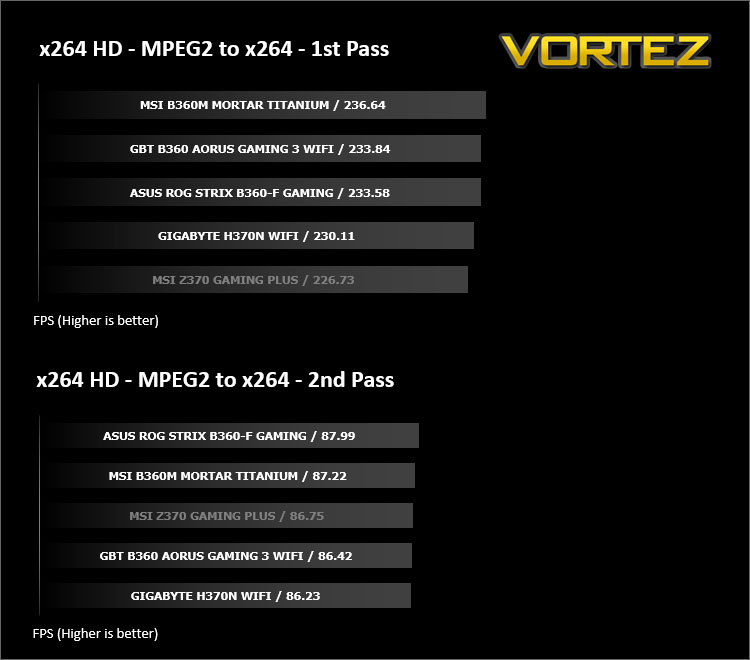
Benchmarks: X264 HD
Simply put, this test measures how fast your machine can encode a short, DVD quality MPEG-2 video clip into a high-quality x264 video clip. What’s x264, you ask? It’s more or less the next-generation Xvid/DivX codec. I think it’s ideal for a benchmark because the application (x264.exe) reports fairly accurate compression results (in frames per second) for each pass of the video encoding process, and it uses multi-core processors very efficiently.
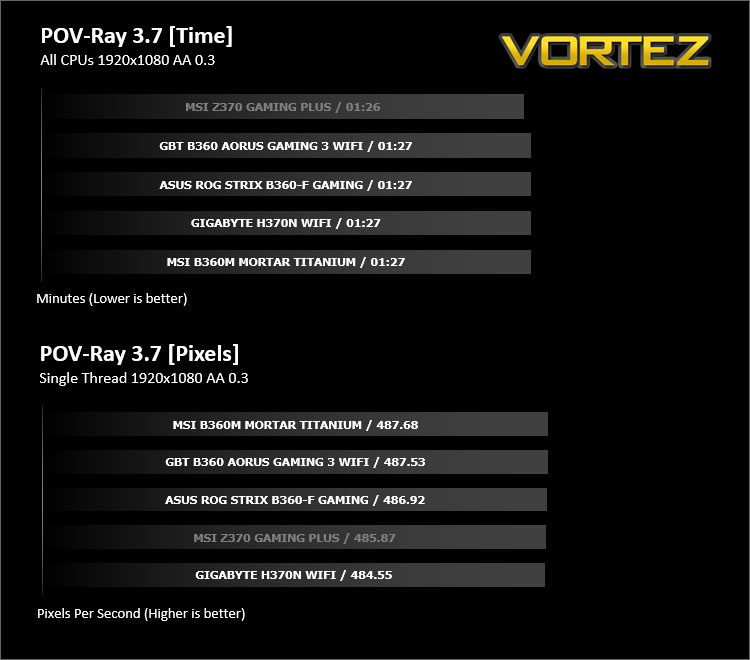
Benchmarks: POV-RAY
Persistence of Vision Raytracer’s PovRay is a free and open source 3D animator application with versions for computers with different operating systems.
This product allows users to build their custom 3D worlds with excellent quality despite their computer’s hardware. It has adjustable options for levels of radiance, refraction, and reflection. Calculation time may vary depending on the computer model, but PovRay can adapt to many computer builds, and is supported by the open source community.
This product allows users to build their custom 3D worlds with excellent quality despite their computer’s hardware. It has adjustable options for levels of radiance, refraction, and reflection. Calculation time may vary depending on the computer model, but PovRay can adapt to many computer builds, and is supported by the open source community.
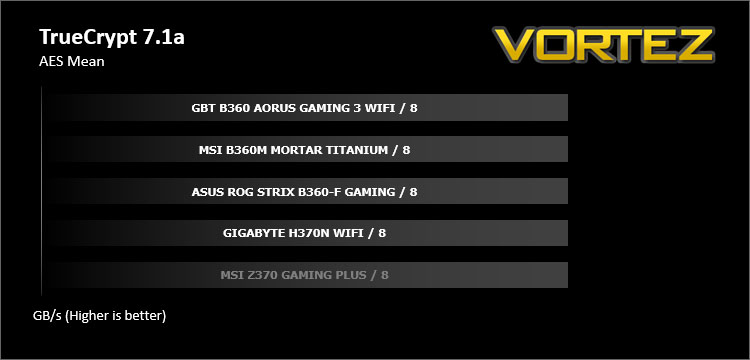
Benchmarks: TrueCrypt
TrueCrypt is a discontinued source-available freeware utility used for on-the-fly encryption (OTFE). It can create a virtual encrypted disk within a file or encrypt a partition or (under Microsoft Windows except Windows 8 with GPT) the entire storage device (pre-boot authentication).
Benchmarks: AIDA64
AIDA64 Product PageThis simple integer benchmark focuses on the branch prediction capabilities and the misprediction penalties of the CPU. It finds the solutions for the classic “Queens problem” on a 10 by 10 sized chessboard. At the same clock speed theoretically the processor with the shorter pipeline and smaller misprediction penalties will attain higher benchmark scores. For example — with HyperThreading disabled — the Intel Northwood core processors get higher scores than the Intel Prescott core based ones due to the 20-step vs 31-step long pipeline. CPU Queen test uses integer MMX, SSE2 and SSSE3 optimizations.
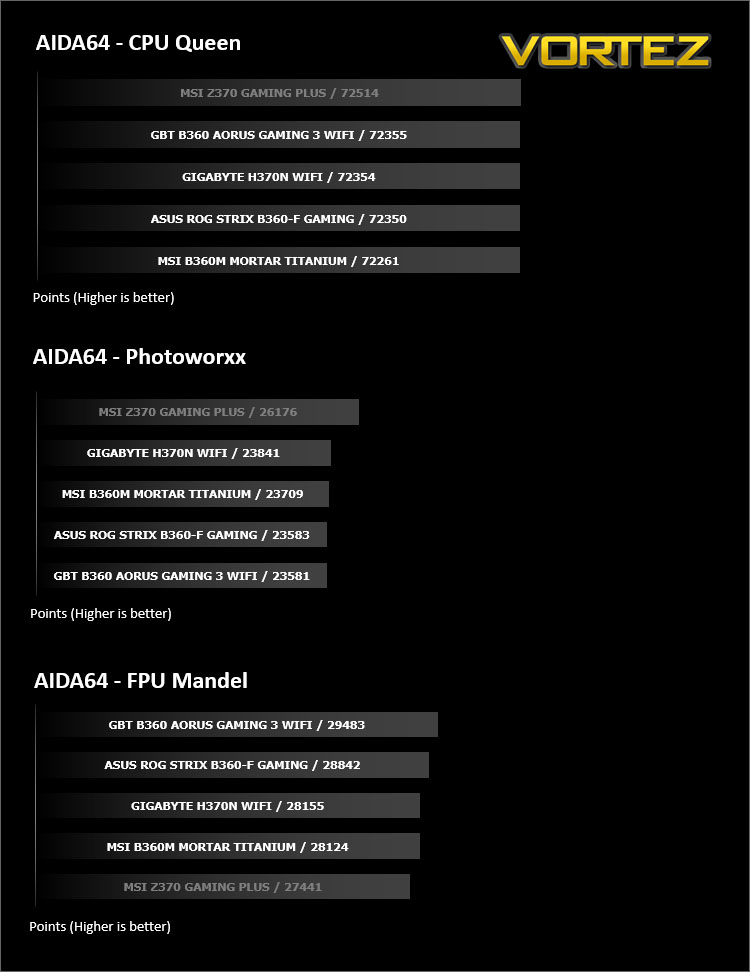
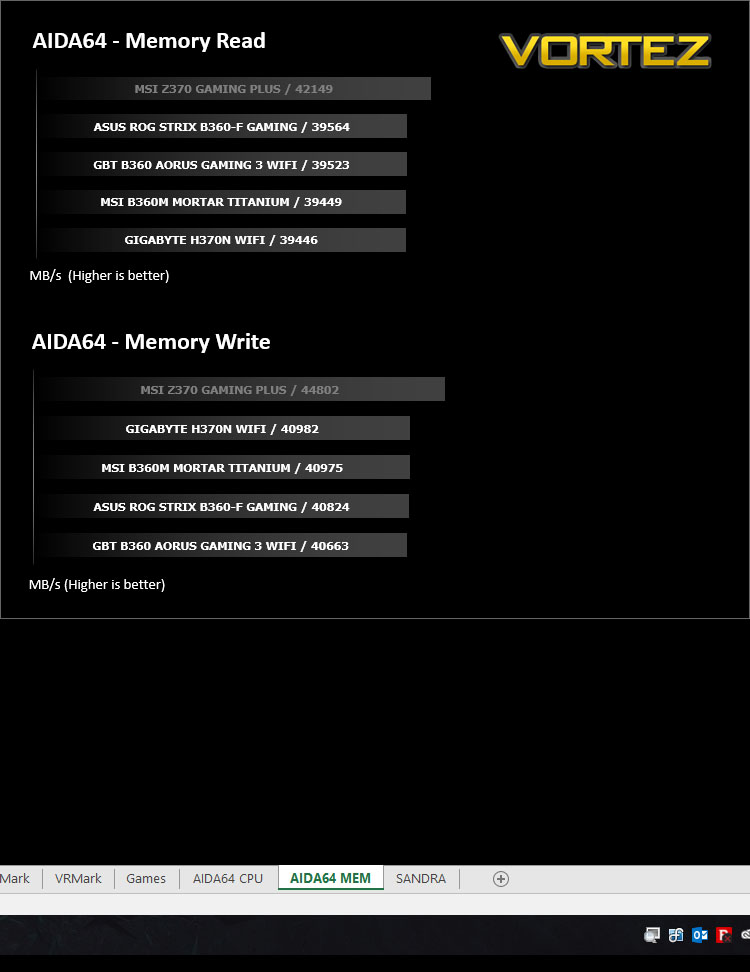
Benchmarks: SiSoftware SANDRA
SANDRA isn’t always a benchmark that is included in hardware reviews but I believe it shouldn’t be ignored. SANDRA provides a vigorous package that tests your system in a rather large array of benchmarks. There are many aspects of benchmark that can be executed. We will be considering – CPU and memory tests.
Benchmarks: PCMark 8 & PCMark 10
PCMark 8 combines performance benchmarking with battery life measurement and includes tests based on popular Adobe and Microsoft applications. Whether you are looking for long battery life, or maximum power, PCMark 8 will help you find the devices that offer the perfect combination of efficiency and performance for your needs. It’s the complete PC performance benchmark for home and business.
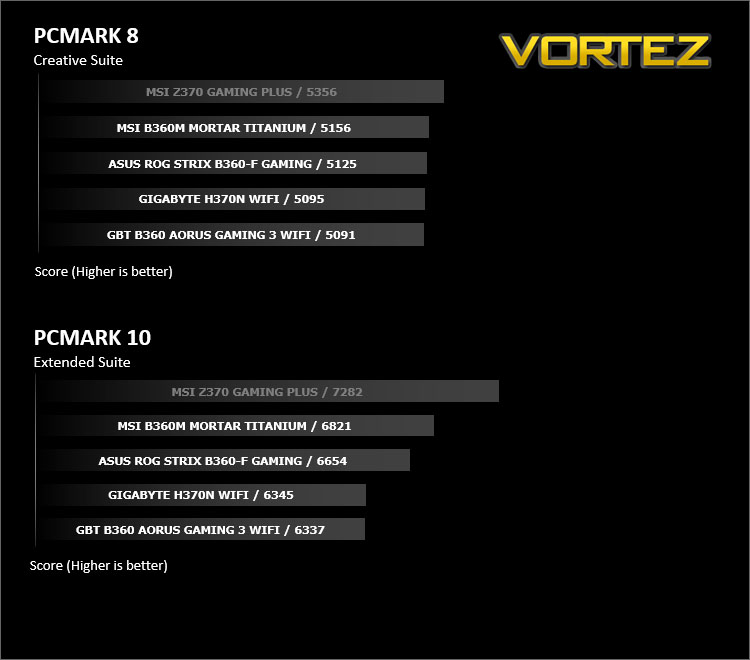
Benchmarks: PCMark 8 Photoshop
The PCMark 8 Applications benchmark measures system performance using popular applications from the Adobe Creative Suite and Microsoft Office. You can choose which tests to run based on the applications installed on your system. Each test automatically steps through a series of actions such as opening, editing and saving a file. The results are used to calculate the PCMark 8 Applications scores for the system.
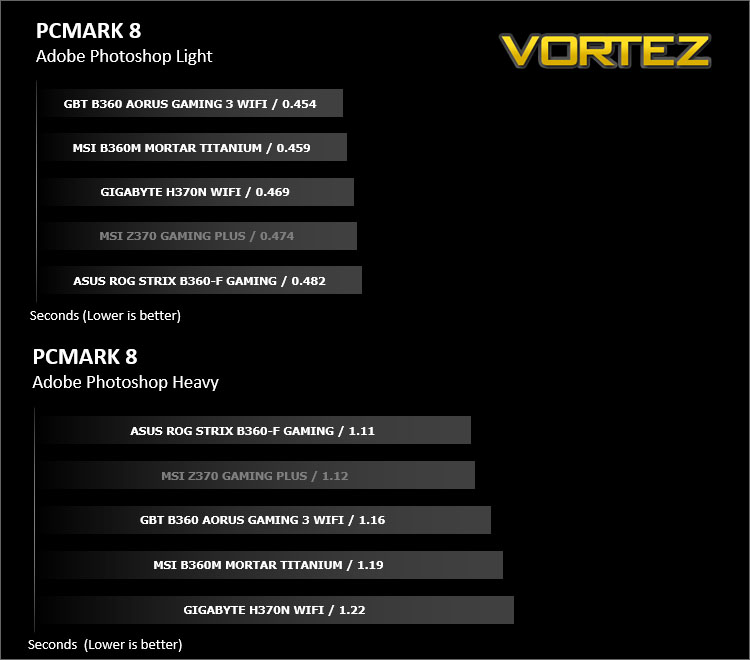
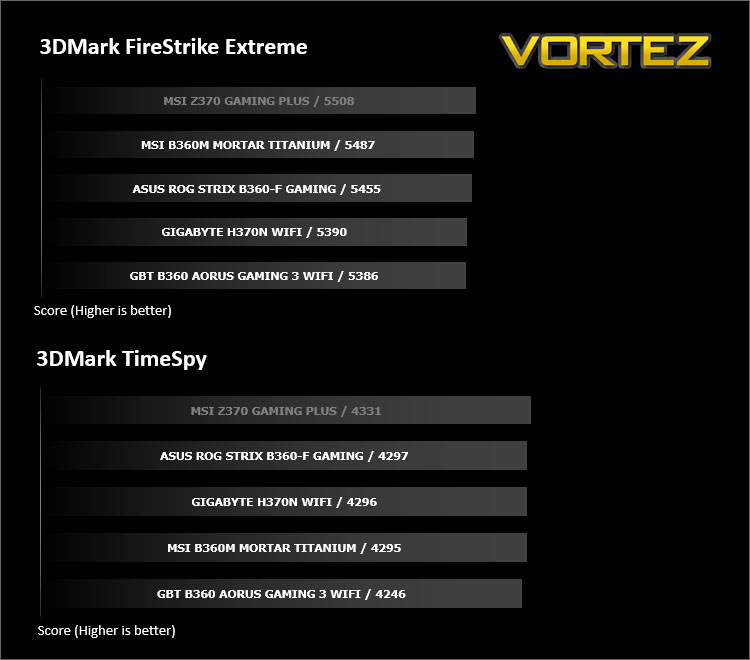
Benchmarks: 3DMark FireStrike & TimeSpy
3DMark FireStrike Product PageFire Strike is our new showcase DirectX 11 benchmark designed for high-performance gaming PCs. It is our most ambitious and technical benchmark ever, featuring real-time graphics rendered with detail and complexity far beyond what is found in other benchmarks and games today. Fire Strike will only be available in the Windows editions of 3DMark initially.
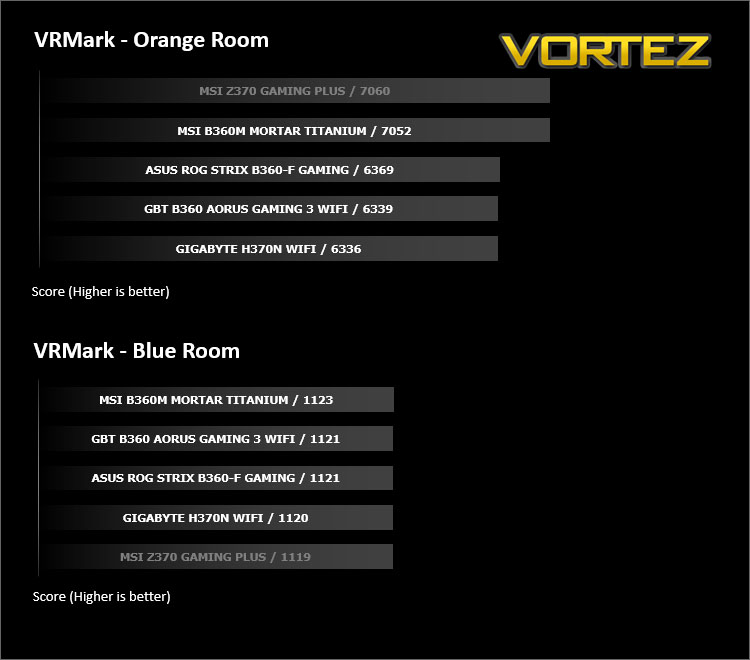
Benchmarks: VRMark
VRMark Product PageThe performance requirements for VR games are much higher than for typical PC games. So if you’re thinking about buying an HTC Vive or an Oculus Rift, wouldn’t you like to know that your PC is ready for VR?
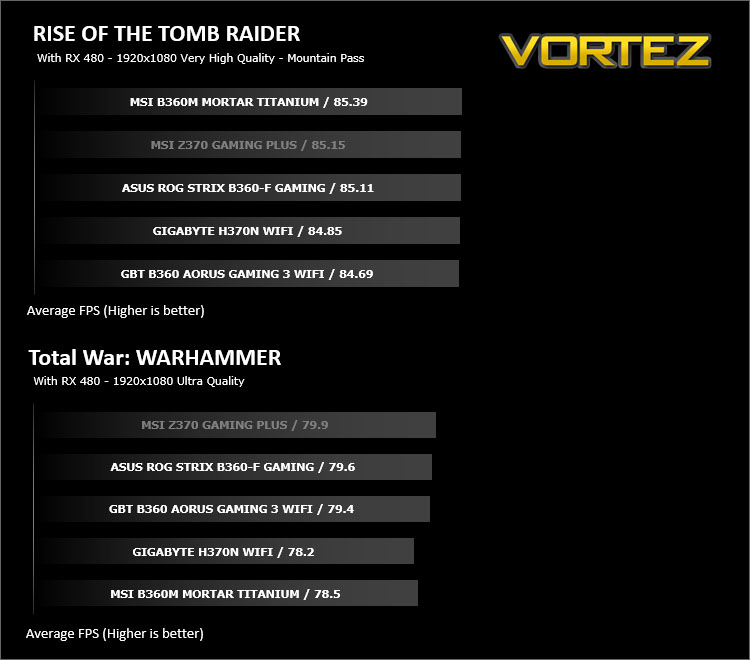
Benchmarks: ROT Tomb Raider & Total War: WARHAMMER
It’s important for us to perform a number of game benchmarks as well as the synthetic tests because gamers will want to know if there are any significant benefits. So here we have two recent gaming titles.
Conclusion
Adding the value oriented Intel B360 Express chipset some six months after the unveiling of Intel Coffee Lake is rather puzzling – especially given the fact that certain component market prices have inflated recently.
However, adding this new chipset to the lineup will be welcome news for those not needing every conceivable feature that Z370 brings to the table and let’s be honest, for many users the average motherboard and its feature list is probably overkill.
In the GIGABYTE B360 AORUS Gaming 3 WiFi we have a decidedly impressive motherboard which will pair up nicely with a non-K variant of the Core i7, Core i5, Core i3. All of the essentials are covered whether we’re looking at SATA storage, dual M.2, PCI Express 3.0 or USB 3.1. Although, one attribute we did expect to see omitted or even less of, was USB 2.0 which comes in the form of four ports on the rear IO panel. By now, even on lower-end boards we expect to see USB 2.0 phased out in favour of USB 3.0/3.1.
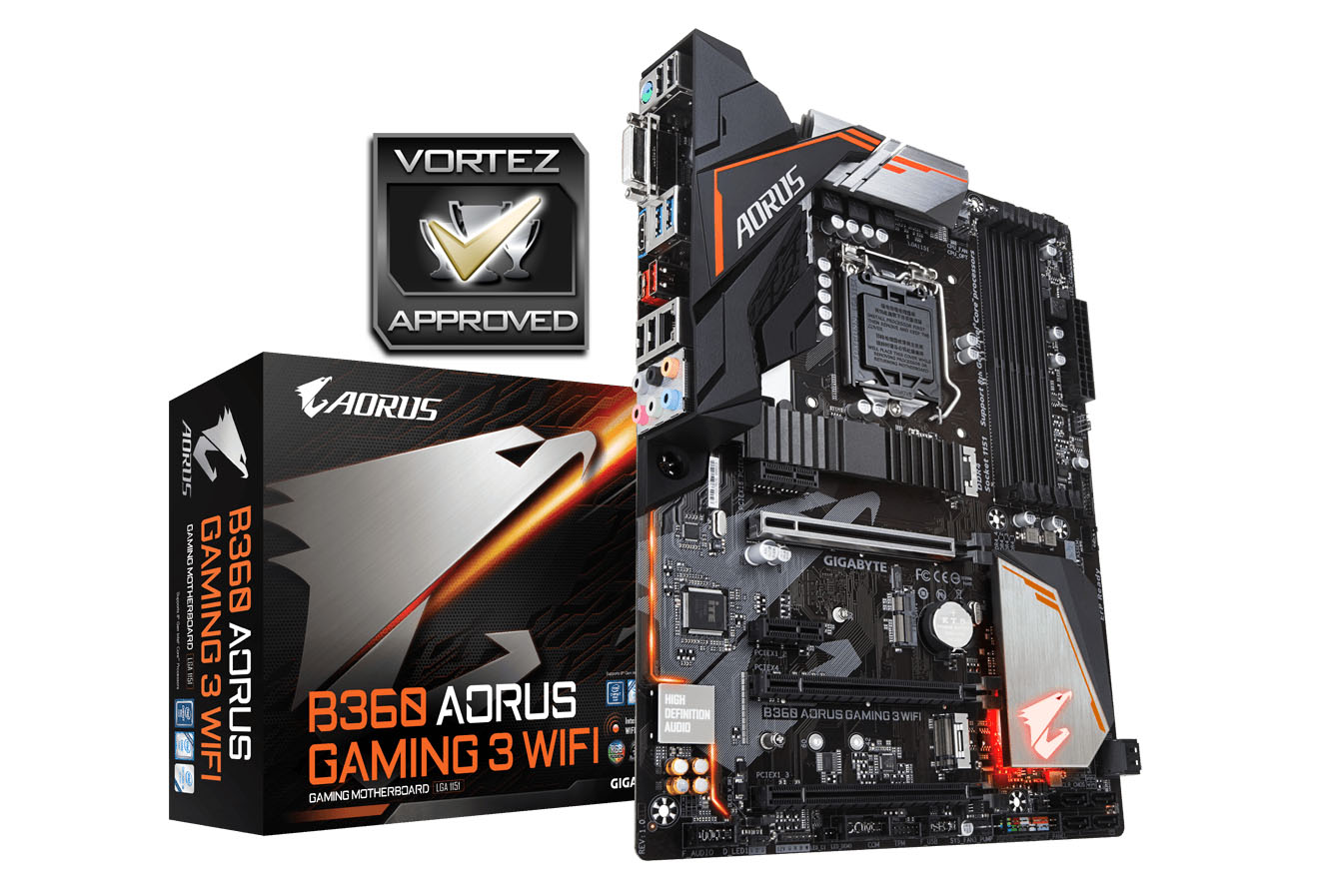
As far as the visual appearance goes, Gaming 3 ticks all of the boxes. It brings a level of aggressive styling which gamers tend to desire without being too gaudy. There is also the option to modify the integrated lighting via the BIOS and add in RGB strips to your computer chassis via the two onboard 12v RGB headers.
Overclocking is obviously ruled out for this chipset classification (being reserved for the Z series), so we aren’t able to analyse how well this motherboard tackles a modification to the performance in that regard. However, we were impressed to see solid performance by Gaming 3, when compared to a Z370 motherboard using the same CPU.
At the moment we have no indication of pricing on the Gaming 3 WiFi but expect it to sit at around £100 GBP, $100 USD, $100 AUD. GIGABYTE offer a 2 year warranty with this board.
Looking to save some cash but still want all the features that come with an Intel 8th Generation Processor? The Gaming 3 WiFi is a great option and is worthy of the short list.
Pros
+ Pleasing to the eye
+ Offers 802.11ac WiFi functionality
+ Offers great performance
+ Features twin M.2 slots
+ Good audio solution
+ Feature-packed BIOS
Cons
– No USB 3.1 header
– Still using USB 2.0 ports
+ Pleasing to the eye
+ Offers 802.11ac WiFi functionality
+ Offers great performance
+ Features twin M.2 slots
+ Good audio solution
+ Feature-packed BIOS
Cons
– No USB 3.1 header
– Still using USB 2.0 ports
Click here for an explanation of our awards at Vortez.net.
Stay connected with the Vortez Social Media pages: