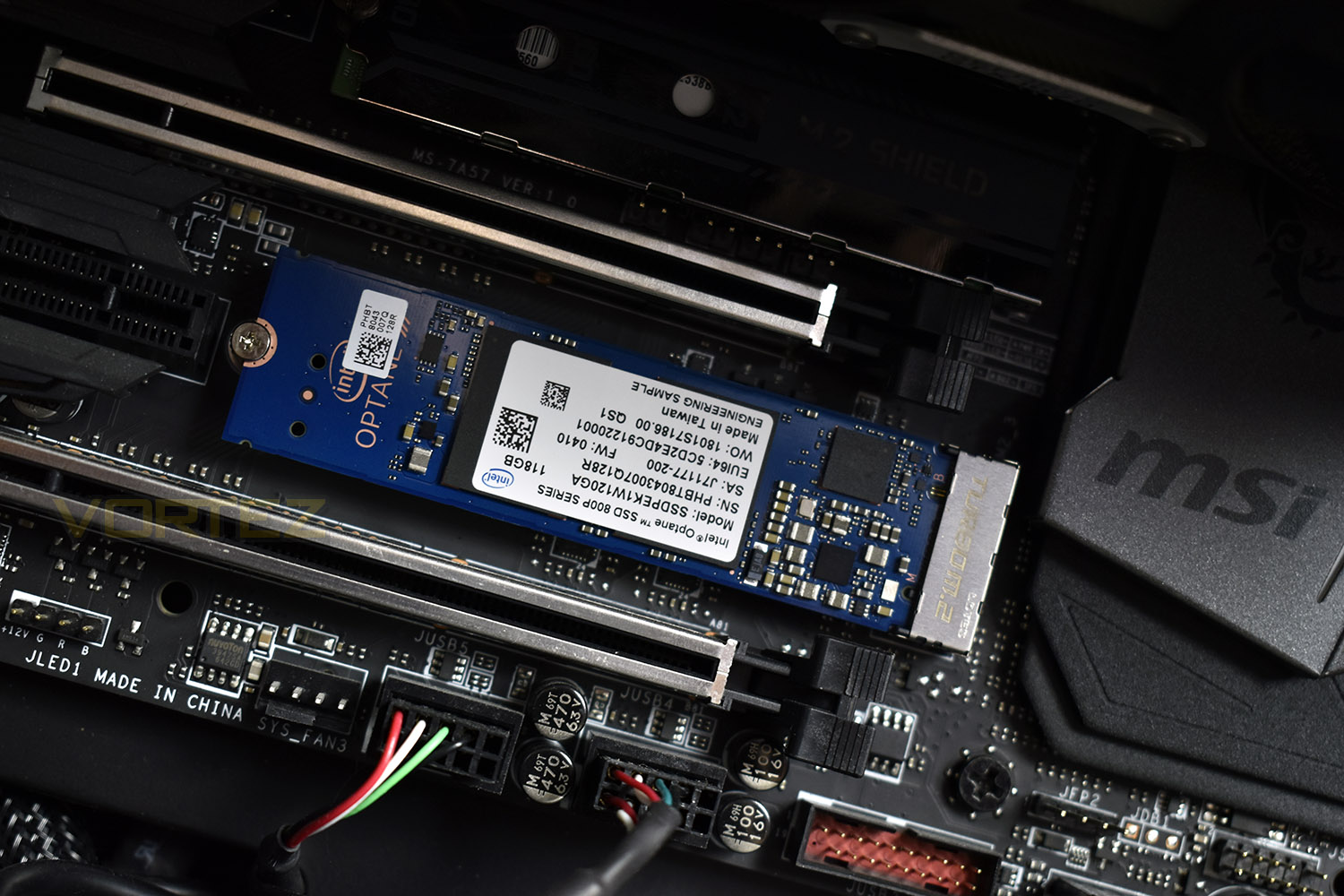
Intel tackle the SSD market from an entirely different angle with the Intel Optane SSD 800p, with 58GB and 118GB capacities and offering blistering fast random access speeds.

Product on Review: Intel Optane SSD 800p
Manufacturer: Intel
Street Price: Exact pricing TBA
Intel first launched their Optane range of storage solutions around a year ago, utilising the 3D XPoint memory within a typical consumer product for the first time; these drives arrived with capacities of 16GB and 32GB, with the main usage scenario being a cache drive for much larger spinning drives.
Today we look at the Optane 800p, first mentioned at the start of March, available in 58GB and 118GB with improved speeds to boot; aimed as stand-alone boot drives, with enough room for a Windows 10 install and some essential applications.
Unlike almost every other NVMe solution on the market currently, the Optane 800p uses 3D XPoint memory, instead of 3D NAND. The main advantages of Intel’s 3D XPoint are that latency is hugely reduced compared to NAND, and density is increased by stacking the cells within the memory chips.
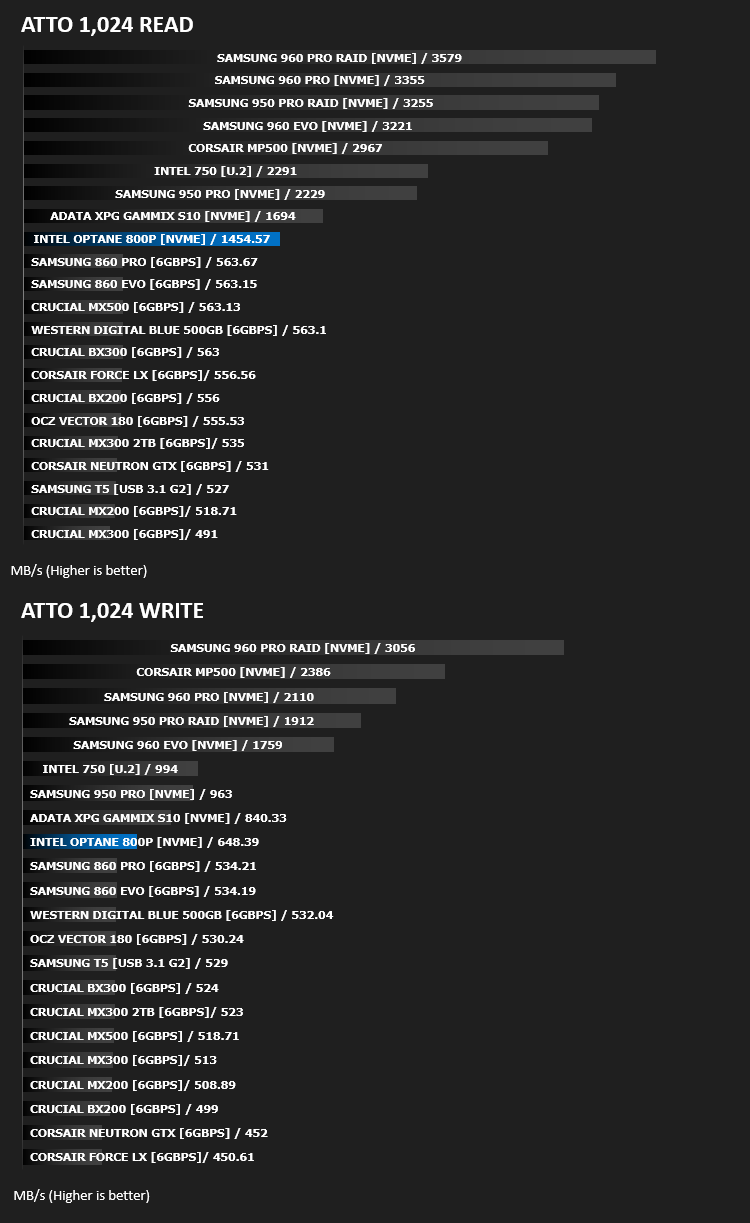
Absolute throughput isn’t a strong suit of the 800p, offering read and write speeds of 1450MB/s and 640MB/s. Compare that to Samsung’s fastest drive, the 960 Pro which pushes out 3500MB/s and 2100MB/s, the gains have to be made elsewhere – Intel seemingly have targeted a much more balanced SSD, aiming for quicker access instead of overall bandwidth.
The biggest hurdle Intel will face in marketing the 800p series of Optane SSDs is price. Currently, NVMe solutions from other manufacturers can be found at around the 2.5GB/£1 mark; compare that to Intel’s 0.8GB/£1 on the 118GB model and the difference is as clear as day.
Not only is price an issue, the small capacities are also a problem – gone are the days of 64GB SSDs, with 128GB seemingly not too far behind; so do 58GB and 118GB SSDs make sense in today’s market? Certainly, there will be some frugal users who can take full advantage of a small SSD, but why wouldn’t you spend that same money on something two, or even three times the capacity at the same price? Let’s have a look at some figures and work this out.
Intel on the Optane SSD 800p:
From system acceleration and fast caching to storage and memory expansion, new possibilities and insights are here. We’re driving fundamental change in computer architecture for consumers, business, and data centers around the world.
Technical Specifications
Technical Specifications
Essentials
Code Name: Brighton Beach
Capacity: 118 GB
Launch Date: Q1’18
Lithography Type: 3D XPoint(TM)
Performance
Sequential Read (up to): 1450 MB/s
Sequential Write (up to): 640 MB/s
Random Read (8GB Span) (up to): 250000 IOPS
Random Read (100% Span): 250000
Random Write (8GB Span) (up to): 145000 IOPS
Random Write (100% Span): 145000
Latency – Read: 7 µs
Latency – Write: 18 µs
Power – Active: 3.75W
Power – Idle: L1.2 : 8mW
Reliability
Vibration – Operating 2.17 GRMS (5-700 Hz)
Vibration – Non-Operating 3.13 GRMS (5-800 Hz)
Shock (Operating and Non-Operating) 1000 G/0.5msec
Endurance Rating (Lifetime Writes) 365 TBW
Mean Time Between Failures (MTBF) 1.6 Million Hrs
Uncorrectable Bit Error Rate (UBER) < 1 sector per 10^15 bits read
Warranty Period 5
Essentials
Code Name: Brighton Beach
Capacity: 118 GB
Launch Date: Q1’18
Lithography Type: 3D XPoint(TM)
Performance
Sequential Read (up to): 1450 MB/s
Sequential Write (up to): 640 MB/s
Random Read (8GB Span) (up to): 250000 IOPS
Random Read (100% Span): 250000
Random Write (8GB Span) (up to): 145000 IOPS
Random Write (100% Span): 145000
Latency – Read: 7 µs
Latency – Write: 18 µs
Power – Active: 3.75W
Power – Idle: L1.2 : 8mW
Reliability
Vibration – Operating 2.17 GRMS (5-700 Hz)
Vibration – Non-Operating 3.13 GRMS (5-800 Hz)
Shock (Operating and Non-Operating) 1000 G/0.5msec
Endurance Rating (Lifetime Writes) 365 TBW
Mean Time Between Failures (MTBF) 1.6 Million Hrs
Uncorrectable Bit Error Rate (UBER) < 1 sector per 10^15 bits read
Warranty Period 5
Packaging, Bundle & Closer Look
The Optane 800p packaging is reminiscent of the colour scheme used on previous generations of Intel Core processors, specifically the Skylake and Kaby Lake boxes, using the bright green and blue colours blended together. The front features the bare minimum of information.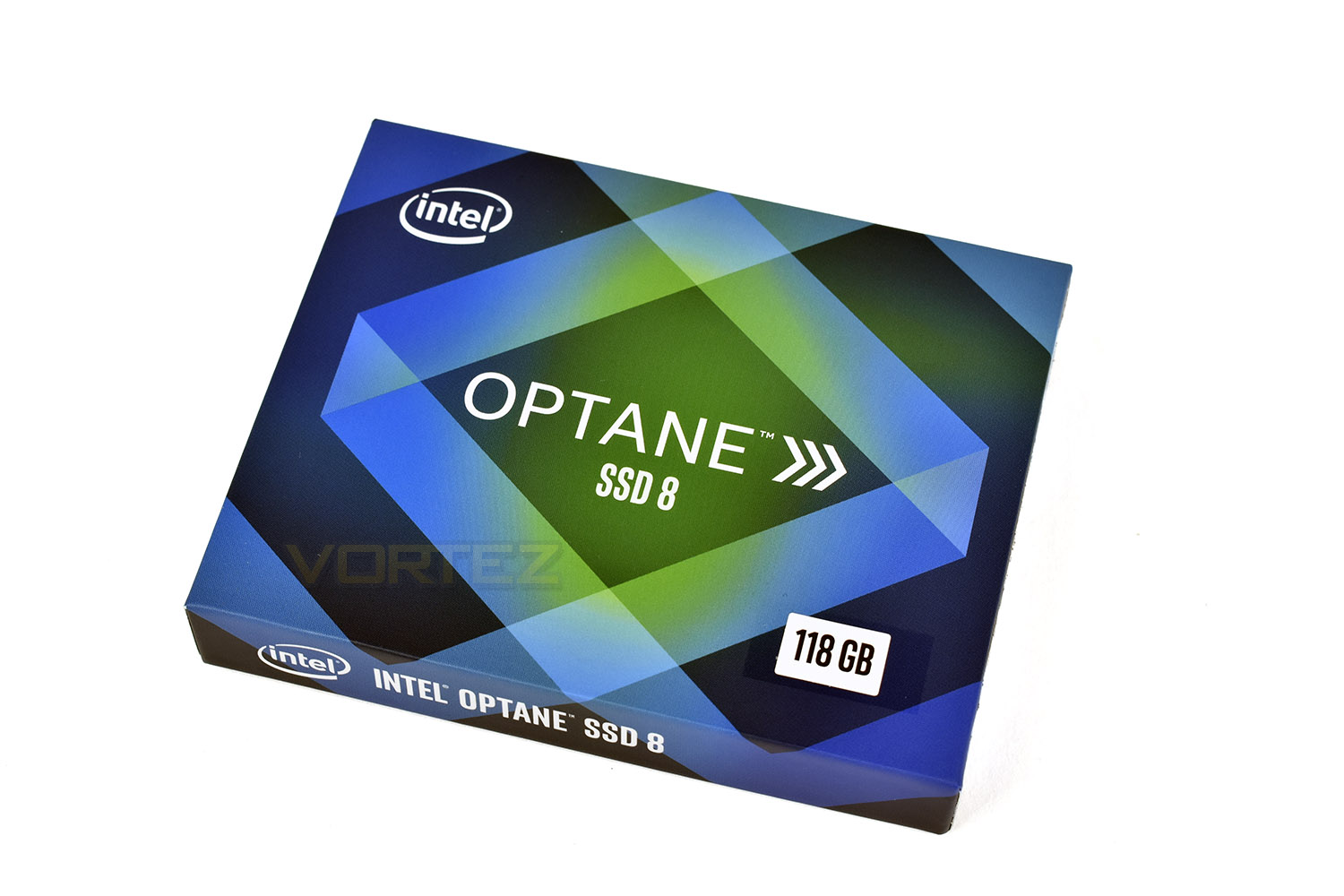
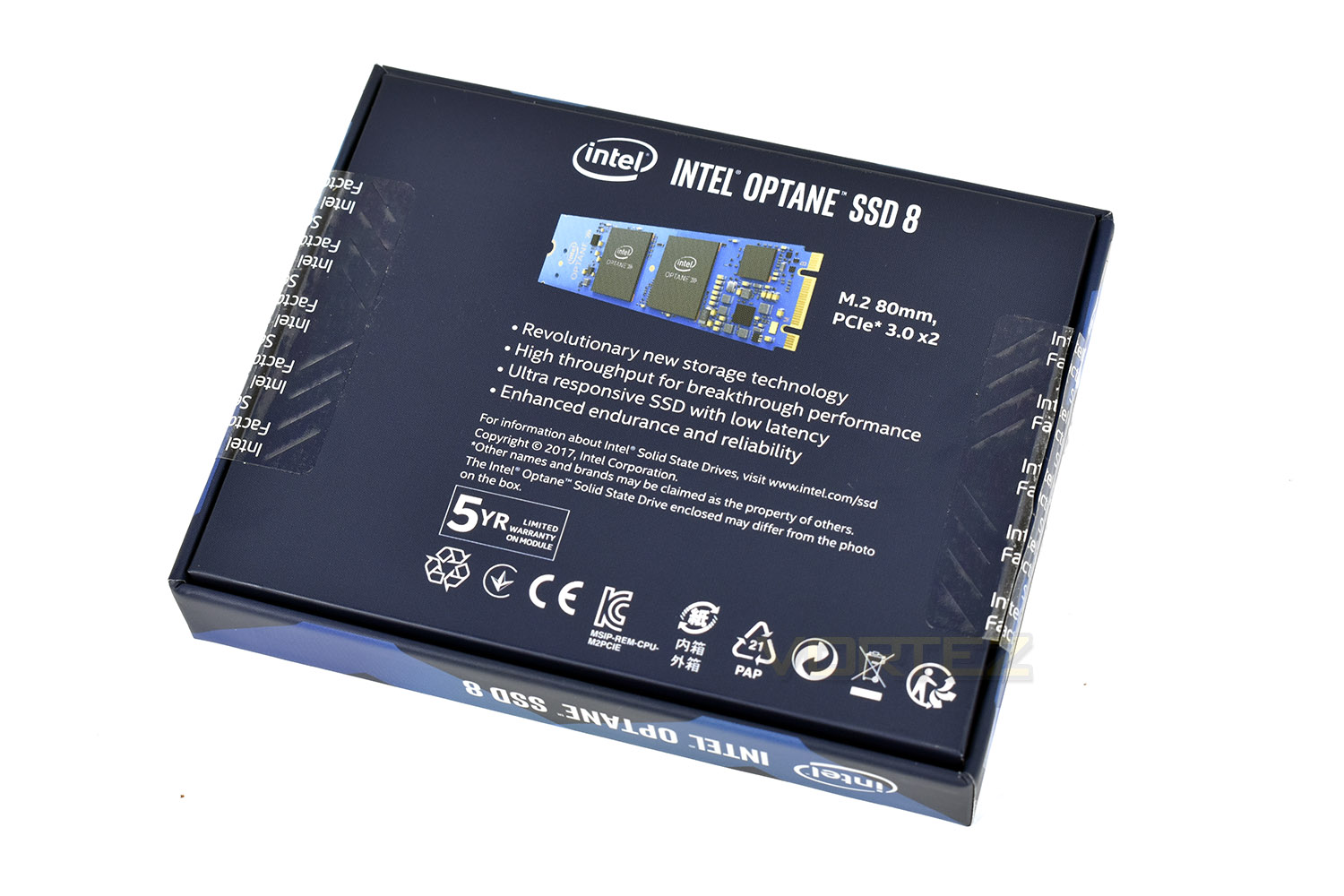
Clearly aimed at tech enthusiasts, who will likely have already researched the product, the rear of the packaging isn’t packed with info either.
Inside the box, the M.2 drive is held securely inside a thin plastic sleeve. Under a cardboard insert is a small documentation booklet.
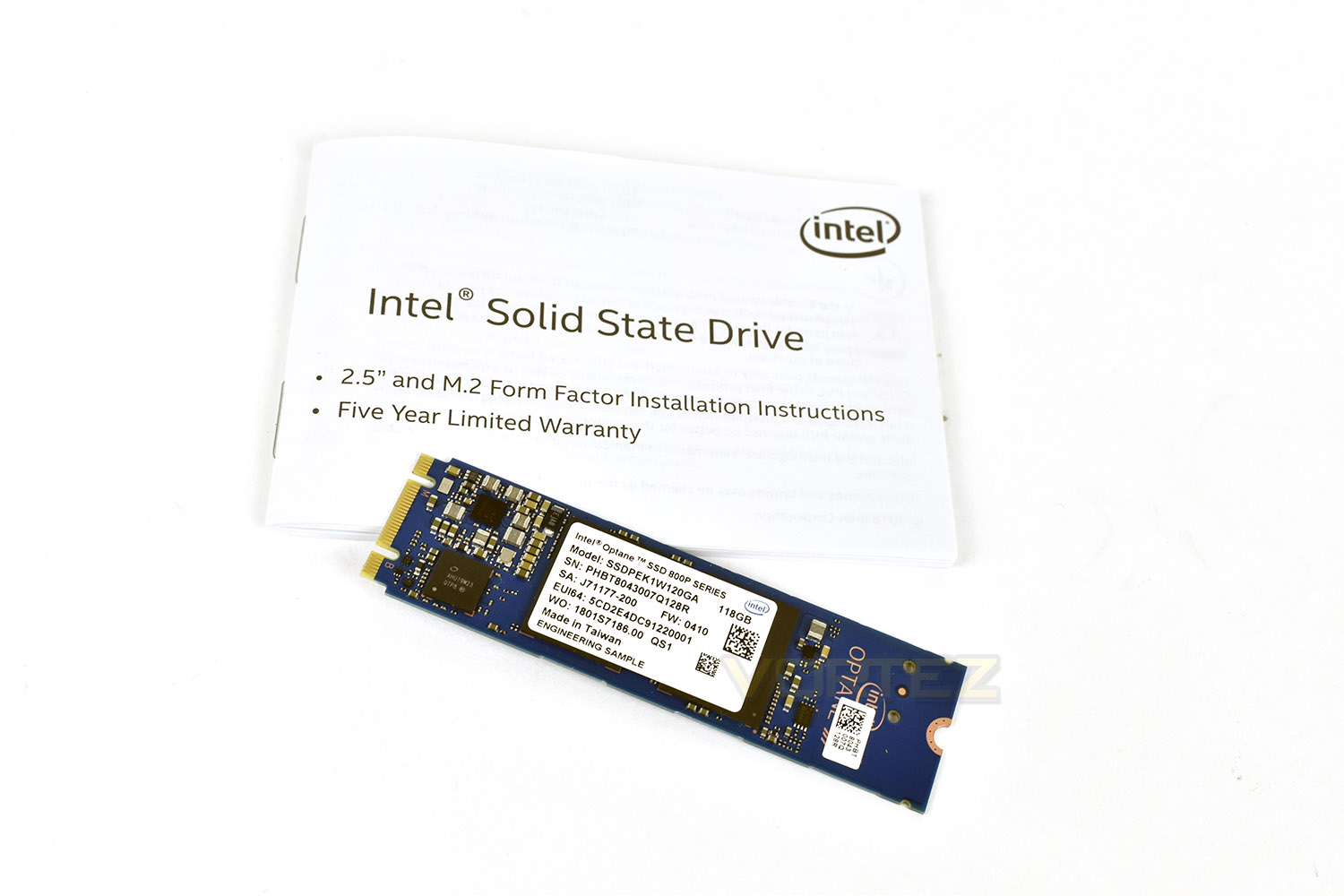
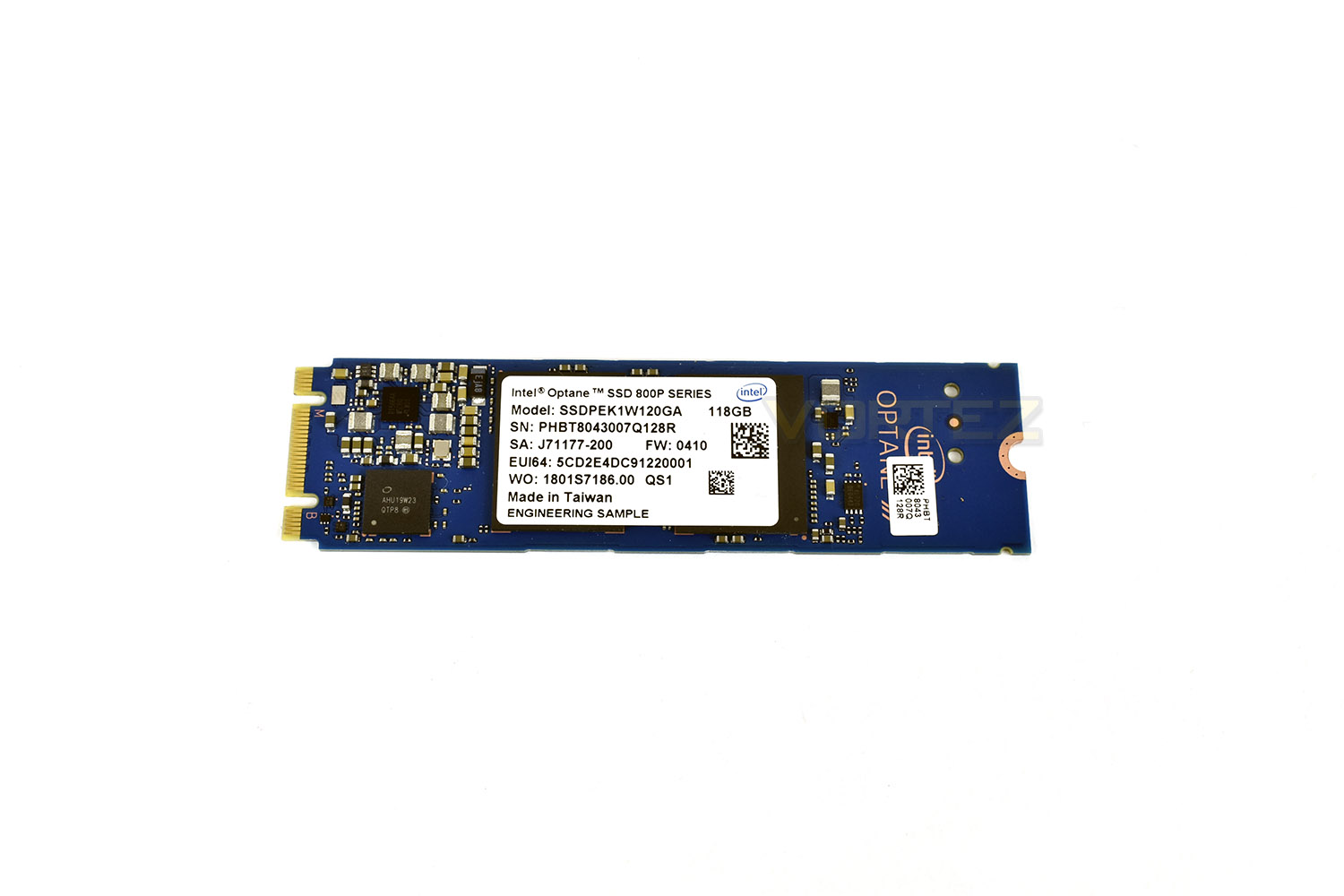
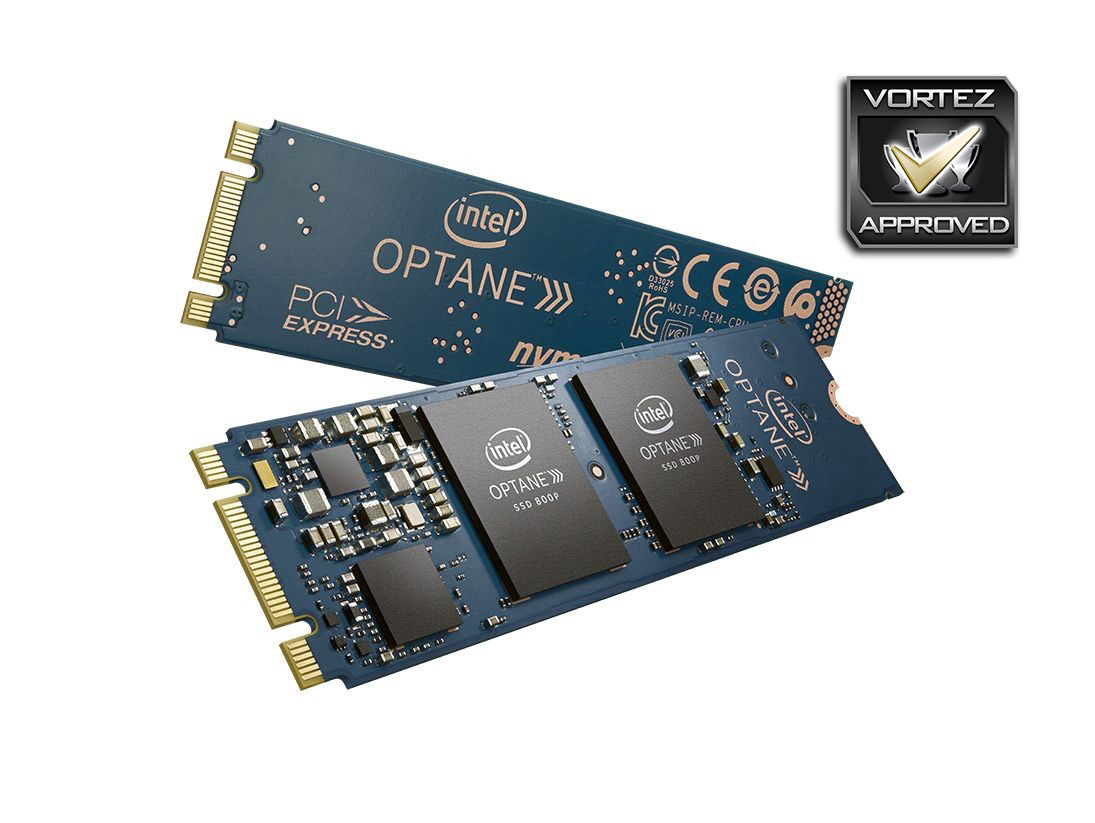
The Intel Optane 800p SSD conforms to the M.2 2280 standard, being 22mm side and 80mm long. The drive is orientated from left to right, though most M.2 slots face the other direction – the result is going to be an upside down label on your drive; if you suffer from mild OCD, this may annoy you to breaking point.
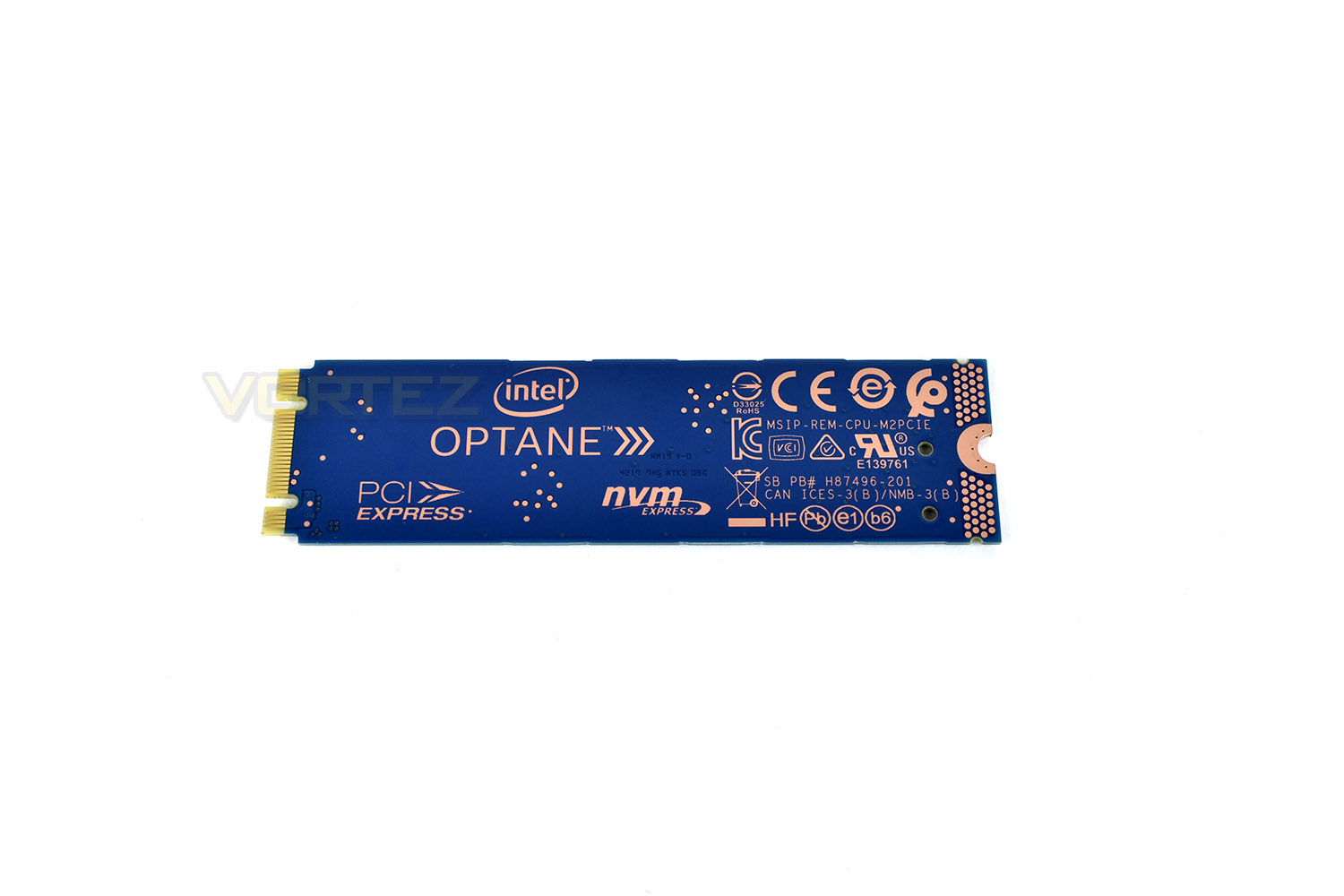
The rear side of the drive doesn’t feature any components but is printed with all of the safety and technology specification information you could need.
Test Setup & Methodology
Our test system is formatted and a fresh version of Windows is installed with just drives in place – no additional applications. Windows is then updated to the latest release and the drivers are installed.Included in the list of benchmarks are the following applications:
Benchmarks
Anvil Pro
AS SSD
ATTO Disk Benchmark v2.46
Futuremark PCMark 8
AIDA64
AS SSD
ATTO Disk Benchmark v2.46
Futuremark PCMark 8
AIDA64
Test system
CPU: Intel Core i7 7700K
Motherboard: MSI Z270 Gaming M7
Graphics: EVGA GTX 1070 SC
Memory: 16GB CORSAIR Vengeance LPX 3200MHz DDR4
SAMSUNG SM961 256GB NVMe
Intel Optane SSD 800p 118GB
PSU: BeQuiet Straight Power 11 650W
OS: Microsoft Windows 10 Pro 64-Bit
Monitor: ASUS ROG PG279Q
Motherboard: MSI Z270 Gaming M7
Graphics: EVGA GTX 1070 SC
Memory: 16GB CORSAIR Vengeance LPX 3200MHz DDR4
SAMSUNG SM961 256GB NVMe
Intel Optane SSD 800p 118GB
PSU: BeQuiet Straight Power 11 650W
OS: Microsoft Windows 10 Pro 64-Bit
Monitor: ASUS ROG PG279Q
Benchmarks: Anvil Pro
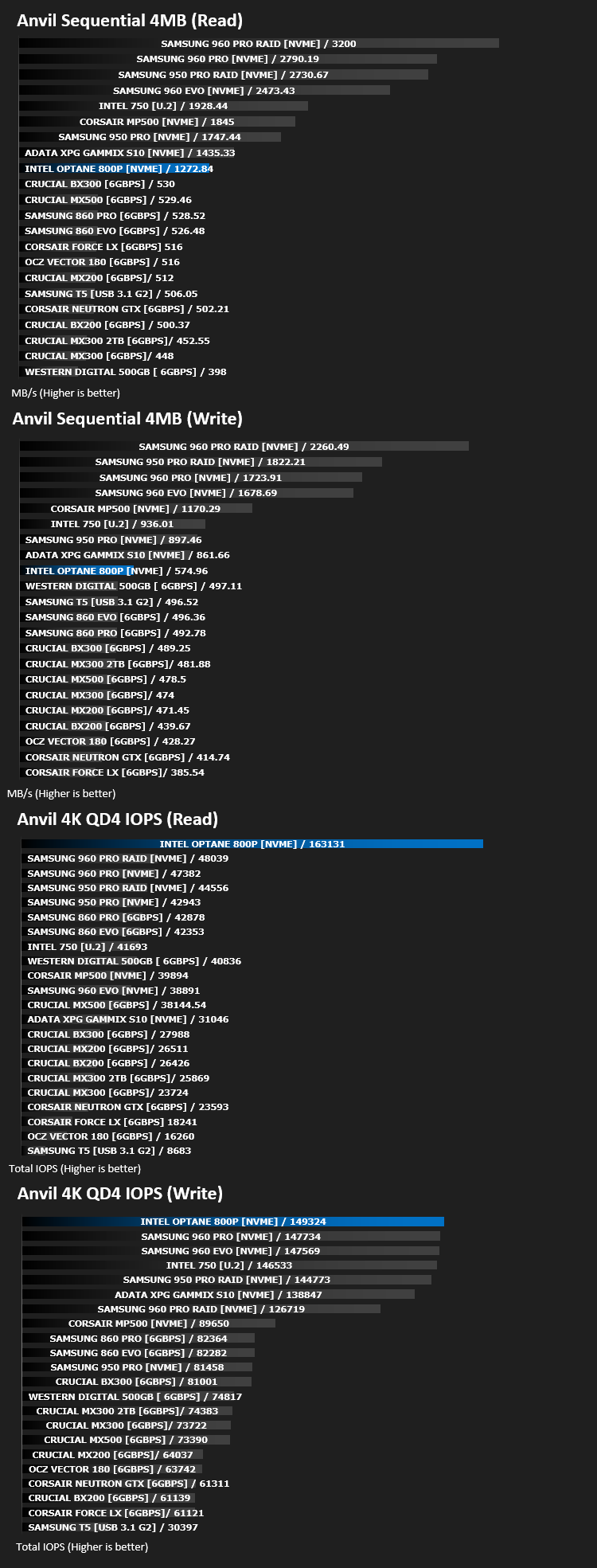
Anvil Pro from Anvil Storage utilities is one of the most popular storage benchmarking utilities today thanks to the large suit of tests available. You can test pretty much anything from Read/write Speed to IOPs with many variables to tweak allowing you to get either a single or host of results to compare with other likeminded enthusiasts. In our test we ran the standard suite 5 times, subtracting both the highest and lowest scores and determined the final result from the average of the remaining three results.
Benchmarks: AS SSD
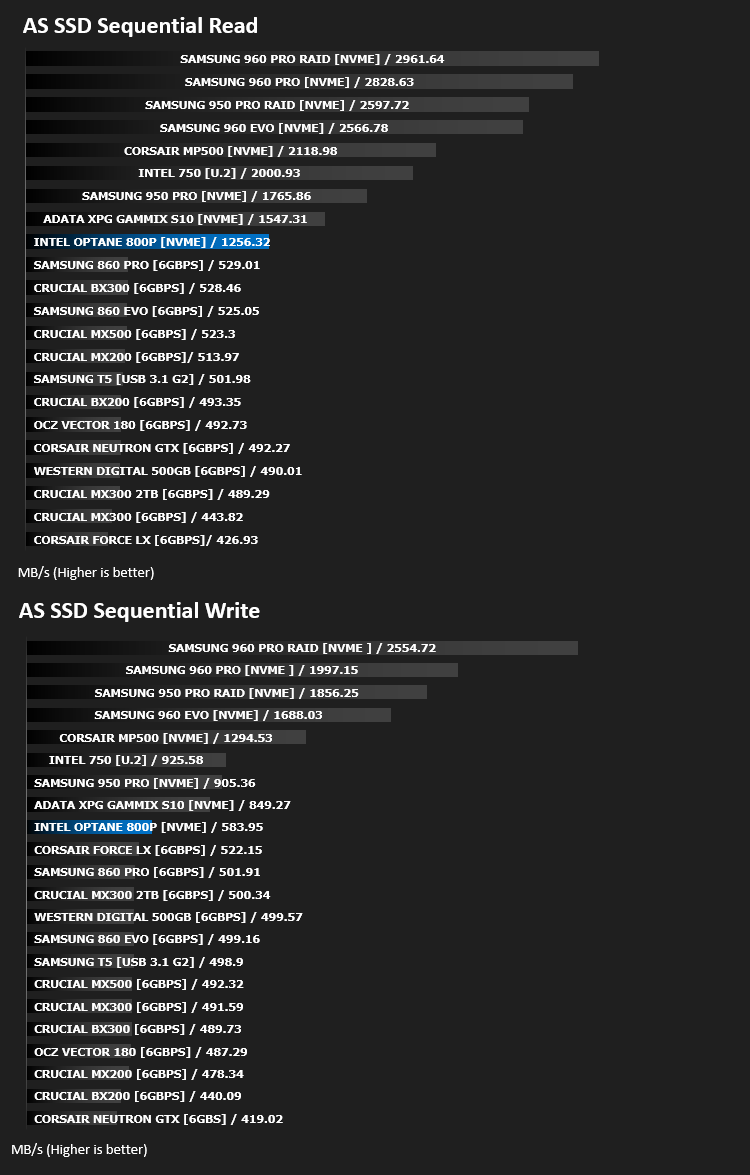
AS SSD Benchmark is a straightforward tool for measuring the speed of your SSD drive.
Simply launch the program, choose your drive, click Start, and it’ll test your SSD’s read and write speed in a variety of ways, delivering a score for each when it’s done. And if that’s not enough, there are also additional file copy and compression-related benchmarks available from the Tools menu. (The author’s support page is German only, but if you need further English explanations then there’s a thread on the program at the OCZ Technology forum.).
Simply launch the program, choose your drive, click Start, and it’ll test your SSD’s read and write speed in a variety of ways, delivering a score for each when it’s done. And if that’s not enough, there are also additional file copy and compression-related benchmarks available from the Tools menu. (The author’s support page is German only, but if you need further English explanations then there’s a thread on the program at the OCZ Technology forum.).
Benchmarks: ATTO
The ATTO Disk Benchmark performance measurement tool is compatible with Microsoft Windows. Measure your storage systems performance with various transfer sizes and test lengths for reads and writes. Several options are available to customize your performance measurement including queue depth, overlapped I/O and even a comparison mode with the option to run continuously. Use ATTO Disk Benchmark to test any manufacturers RAID controllers, storage controllers, host adapters, hard drives and SSD drives and notice that ATTO products will consistently provide the highest level of performance to your storage.
Benchmarks: AIDA64
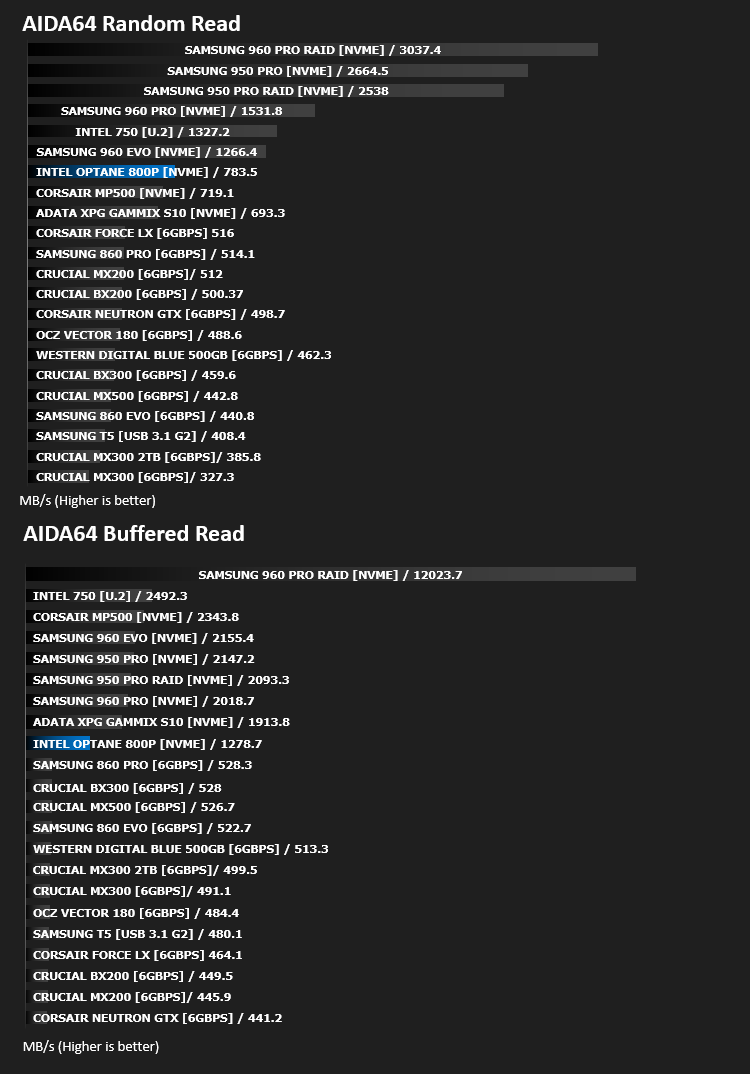
With this module, we can measure the performance of the PC’s storage devices, including (S)ATA or SCSI hard disk drives, RAID arrays, optical drives, solid-state drives (SSD), USB drives and memory cards. It also allows us to perform write tests, which helps us detect fake products and errors on the devices. In order to attain reliable benchmark results we have to make sure to close all background applications.
Benchmarks: PCMark 8
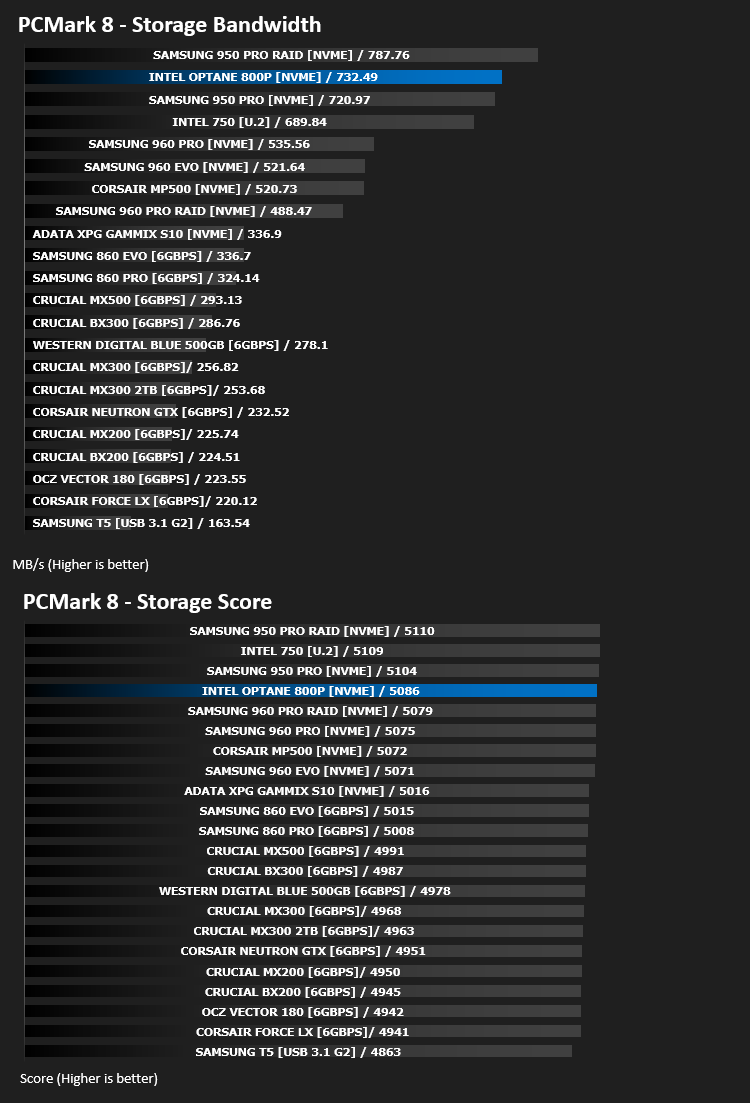
We use the Futuremark PCMark 8 utility to measure storage via Photoshop performance under both light and heavy loading conditions. Accelerated (open CL) is used to perform this test. The test is measured in seconds to complete.
Conclusion
Comparing these drives to the previous generation storage accelerators, the Optane 800p offers insanely fast everyday performance, in an actual, useable way. Drives from other manufacturers offer huge read and write numbers but very few programs will ever reach anywhere near those quoted numbers outside of benchmarking software. The Optane 800p hammered the competition in IOPS tests, such as Anvil’s 4K QD4 IOPS tests. In PCMark8, the Intel’s bandwidth result was only narrowly beaten by a Samsung 950 PRO RAID0 NVMe setup.The capacities of 58GB and 118GB are a huge improvement over the 16GB and 32GB, but they’re still not really enough for any AAA title games, even without an OS installed. However, if you plan to use this drive in a laptop or desktop PC primarily for Windows 10, Office and some other productivity applications, the size and random access speeds will certainly boost your workflow.
The price for the drives is certainly of concern, arriving at around £140 and £90 for the 118GB and 58GB respectively. Certainly, it’s possible to get much more capacity for the same cost, but you won’t receive the same levels of real-world useable performance as you would from the Intel 800p.
We’ve yet to mention any kind of endurance figures – Intel claims the drive can live with 200GB/day for 5 years; that’s 1.7 drive writes a day for the 118GB or 3.5 for the 58GB – more than you’re ever likely to use.
All in all, we’re incredibly impressed by the speed of Intel’s 3D X-Point memory, especially in terms of actual usability in daily tasks.
If your use case fits the bill and you require a rapid storage drive for devices such as a work laptop or media PC with masses of spinning storage, the Intel will speed up your everyday tasks, without doubt.
Pros
+ Real-world fast
+ 5-year warranty
+ 365TBW (200GB/day)
+ Blisteringly fast access speeds
+ Low latency
Neutral
+- Small capacities
Cons
– Price
+ Real-world fast
+ 5-year warranty
+ 365TBW (200GB/day)
+ Blisteringly fast access speeds
+ Low latency
Neutral
+- Small capacities
Cons
– Price
Click here for an explanation of our awards at Vortez.net.
Stay connected with the Vortez Social Media pages:
Join in with the discussions on Discord