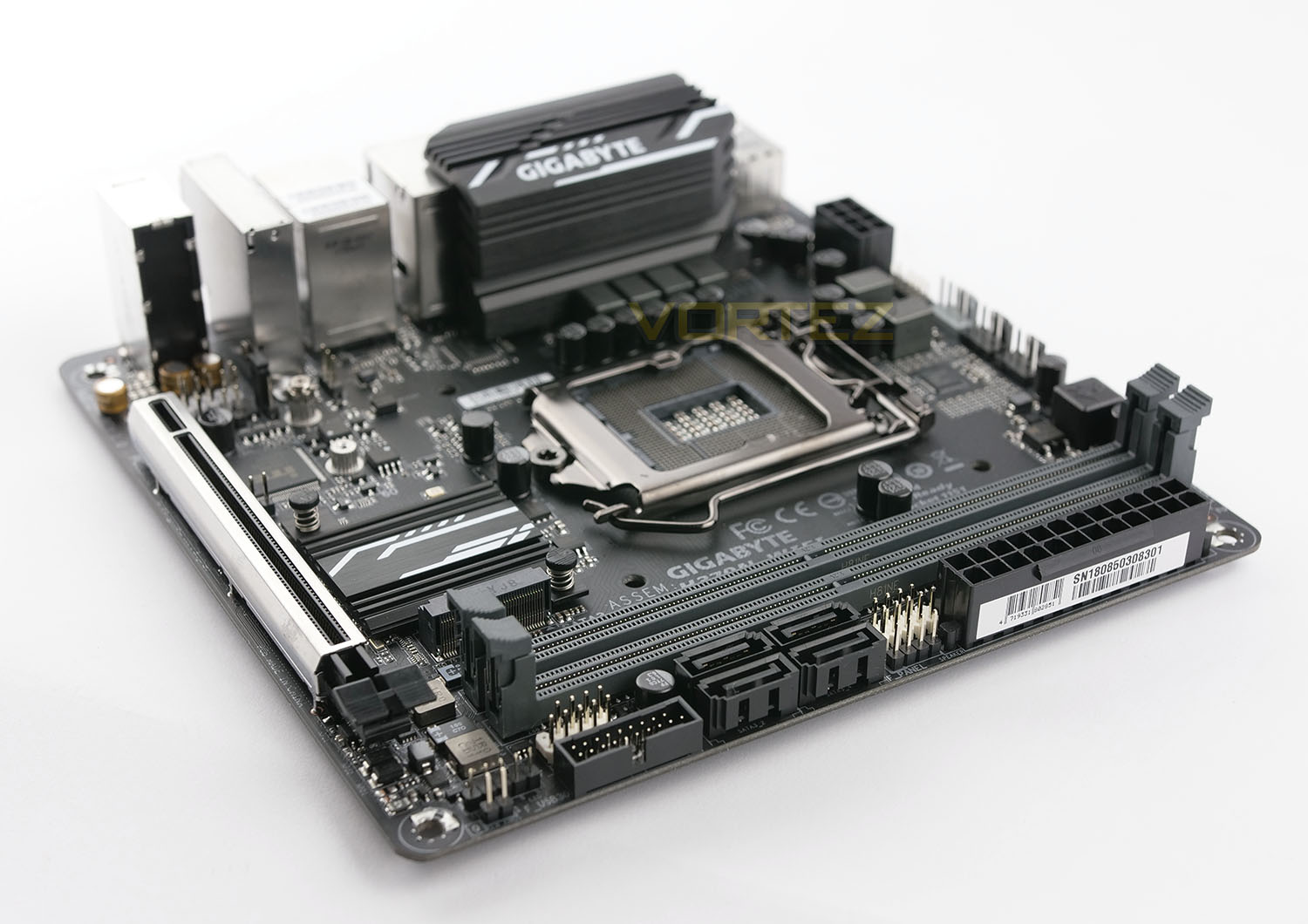
Wanting to build a mini-powerhouse based on Intel Coffee Lake but while saving a bit of cash? GIGABYTE’s H370N WIFI is a Mini-ITX motherboard designed for SFF and hosting a plethora of great features.

Product on Review: H370N WIFI
Manufacturer & Sponsor: GIGABYTE
Street Price: £100 GBP – $129 USD – $229 AUD
In our coverage of this week’s release of new Intel B360/H370 Express chipset we’ve taken a look at various B360 options for pairing up with Intel’s 8th Generation Processors, but today we move away from B360 for a look at a H370 motherboard from GIGABYTE.
Under observation we have the GIGABYTE H370N WiFi – a Mini-ITX motherboard offering WiFi functionality via 802.11ac. This could be the ideal foundation for building a mini-powerhouse without having to spend the extra cash that Intel Z370 demands.
About GIGABYTE
Founded in 1986, GIGABYTE is committed to providing top-notch solutions that “upgrade your life”. We are regarded as a pioneer in innovation with groundbreaking excitements such as Ultra Durable™ — a revolutionary technology that redefines the industry, WINDFORCE™ — exclusive heat dissipation design that builds for extreme performance, G1™ Gaming series—the perfect solutions for gamers and enthusiasts, P series — a powerful gaming laptop less than an inch thick, and BRIX series—a versatile mini-PC in the palm of your hand. GIGABYTE has continuously brought unique new ways of digital world and created marvelous products that empower you with meaningful and charming experiences.
Intel H370 Chipset Overview
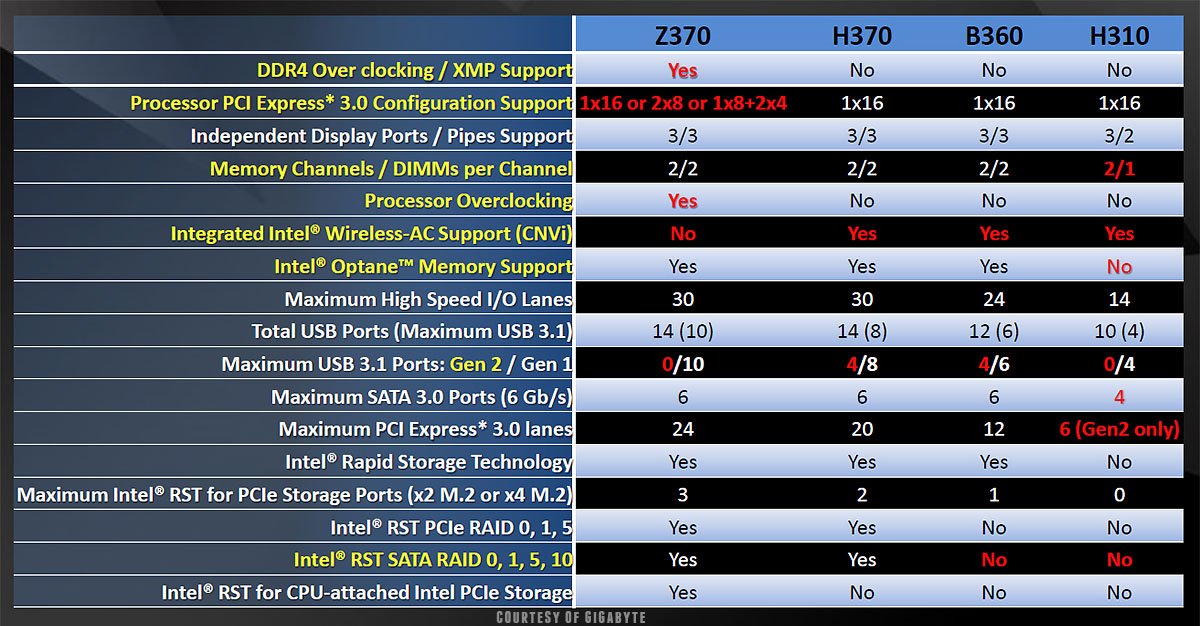
One of the fundamental things about Intel B360/H370 when we consider a comparison against Intel Z370 is the lack of overclocking support (even with a K-SKU processor).
Below is a comparison table between B360, H370 and Z370. Other things to note is that for storage, B360 doesn’t support RAID configurations but H370 does. There are also far less CPU PCI-E lanes available with B360 as well as less USB ports. See the comparison table below, courtesy of GIGABYTE.
Packaging & First Look
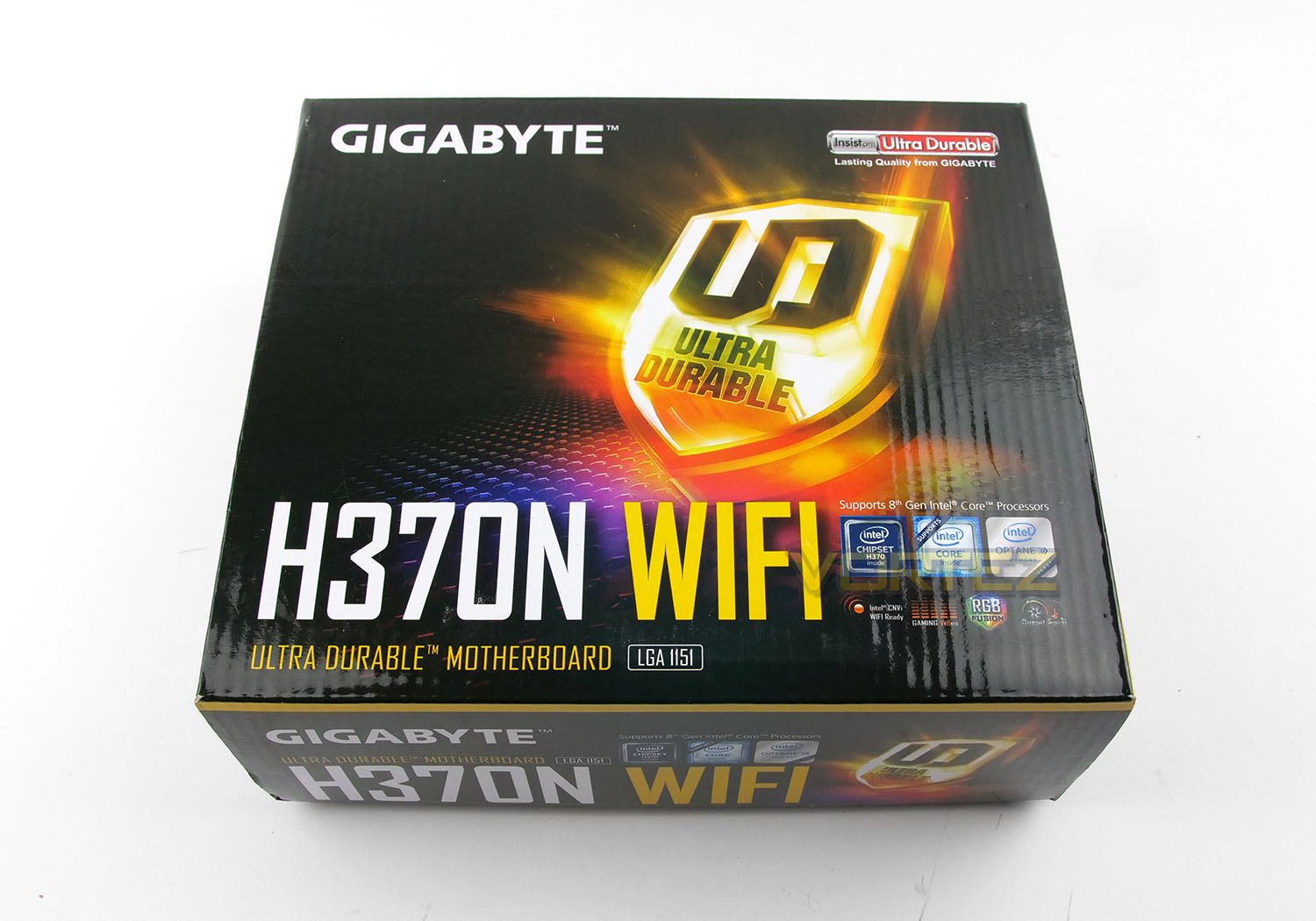
H370N arrives in a square box which indicates that we are indeed dealing with a SFF motherboard – as always with GIGABYTE, packaging is good quality and attractive. The front gives away very little while on the reverse there is a breakdown of all the features.
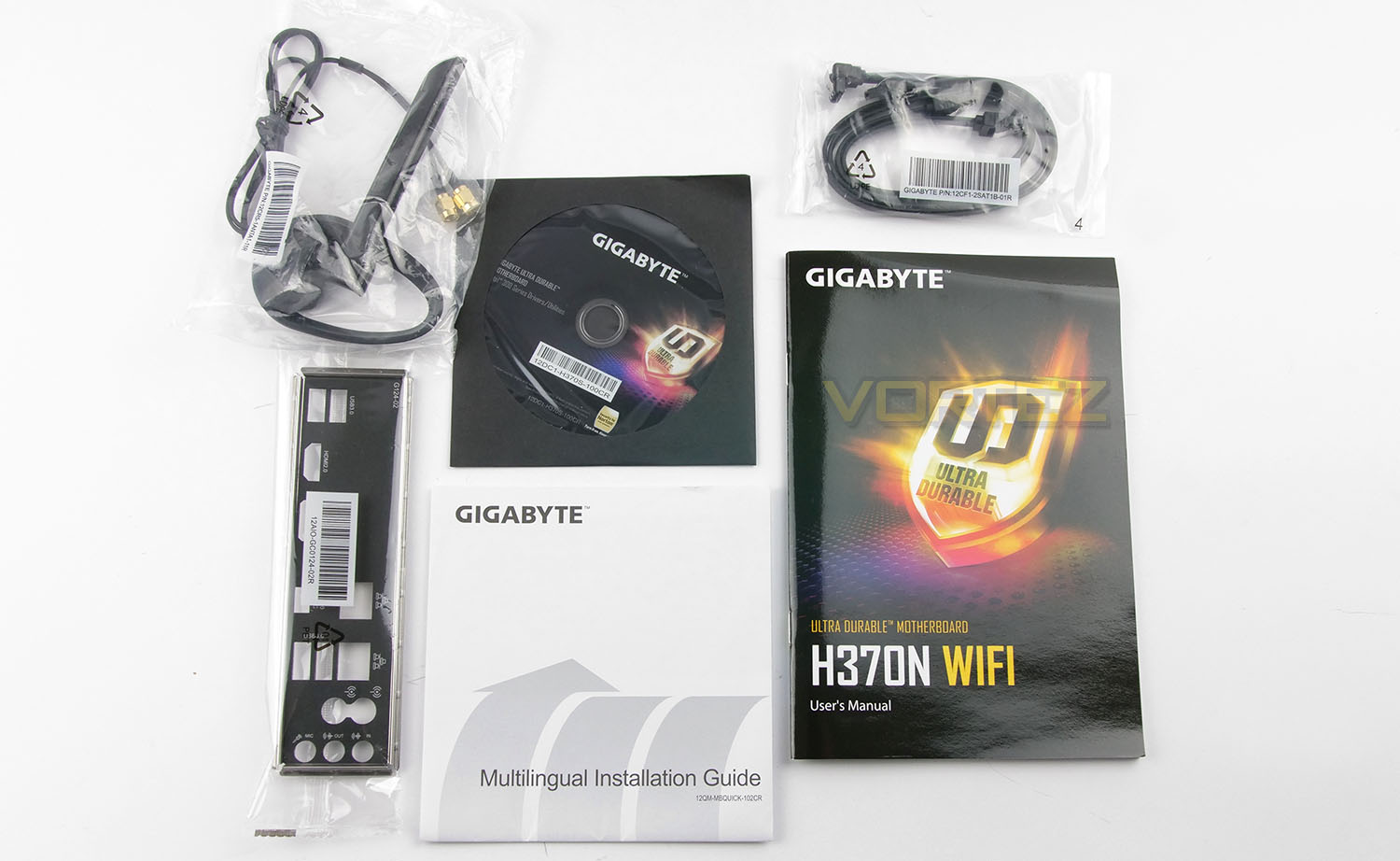
Opening the box up, there are only a few accessories included in the bundle. GIGABYTE include: User manual, multilingual install guide, rear IO shield, two SATA cables, driver CD, and WiFi antennas.
The WiFi antennas connect up with the Intel 11ac 2×2 AC 9560 module. (CNVi 802.11ac Wave2 2T2R WIFI).
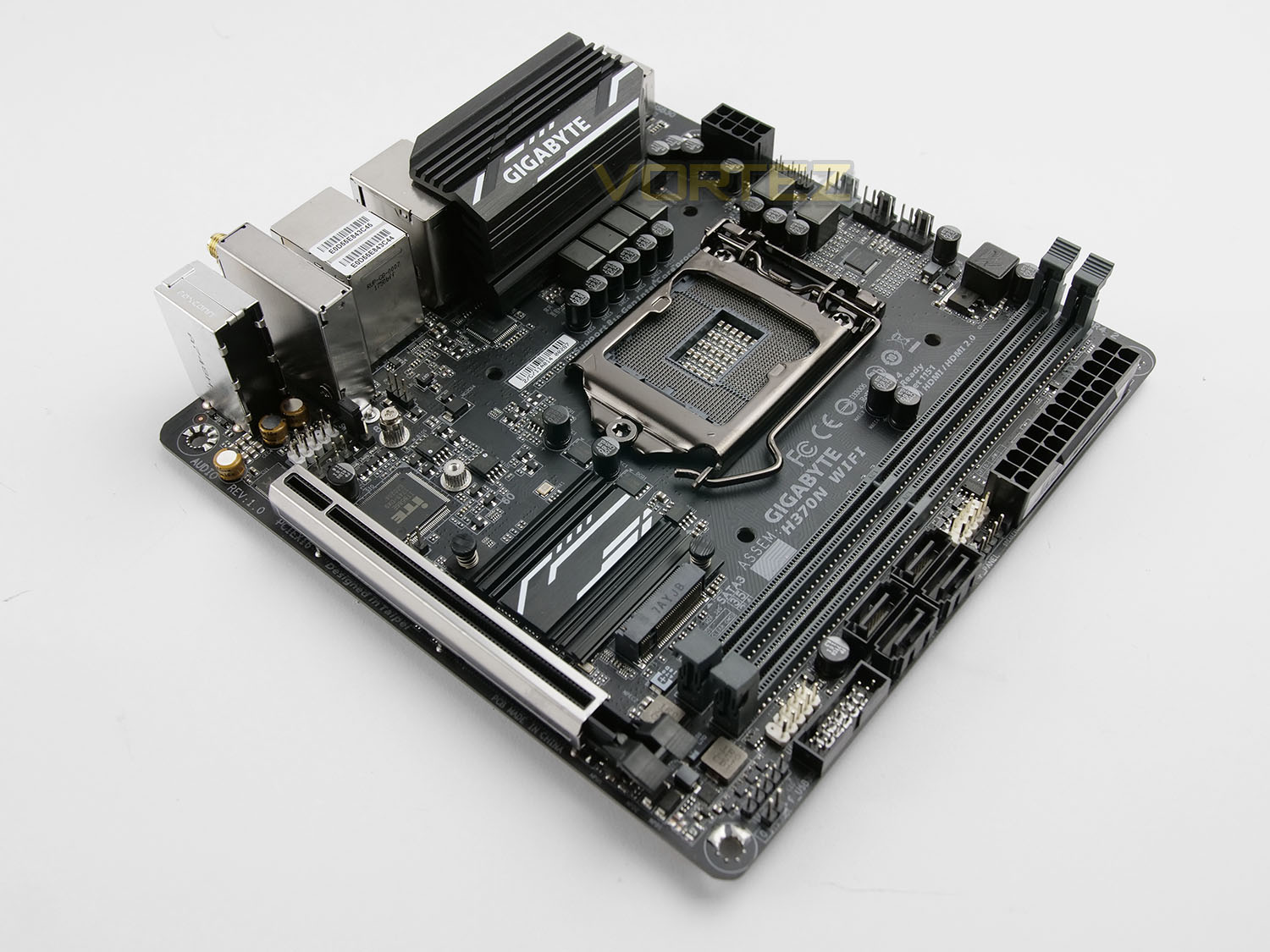
Taking a first look at H370N, the size jumps out straight away. Even though this motherboard is small, it still hosts a good assortment of features.
From a visual point of view the design and style is nothing new. GIGABYTE has taken a simple route with this board and have kept things monochrome with a matt black PCB and black ports, slots and lanes.
H370N is Mini-ITX and as such measures: 17cm x 17cm with four mounting holes.
Over the page we’ll explore H370N WiFi’s features in more detail.
Closer Look
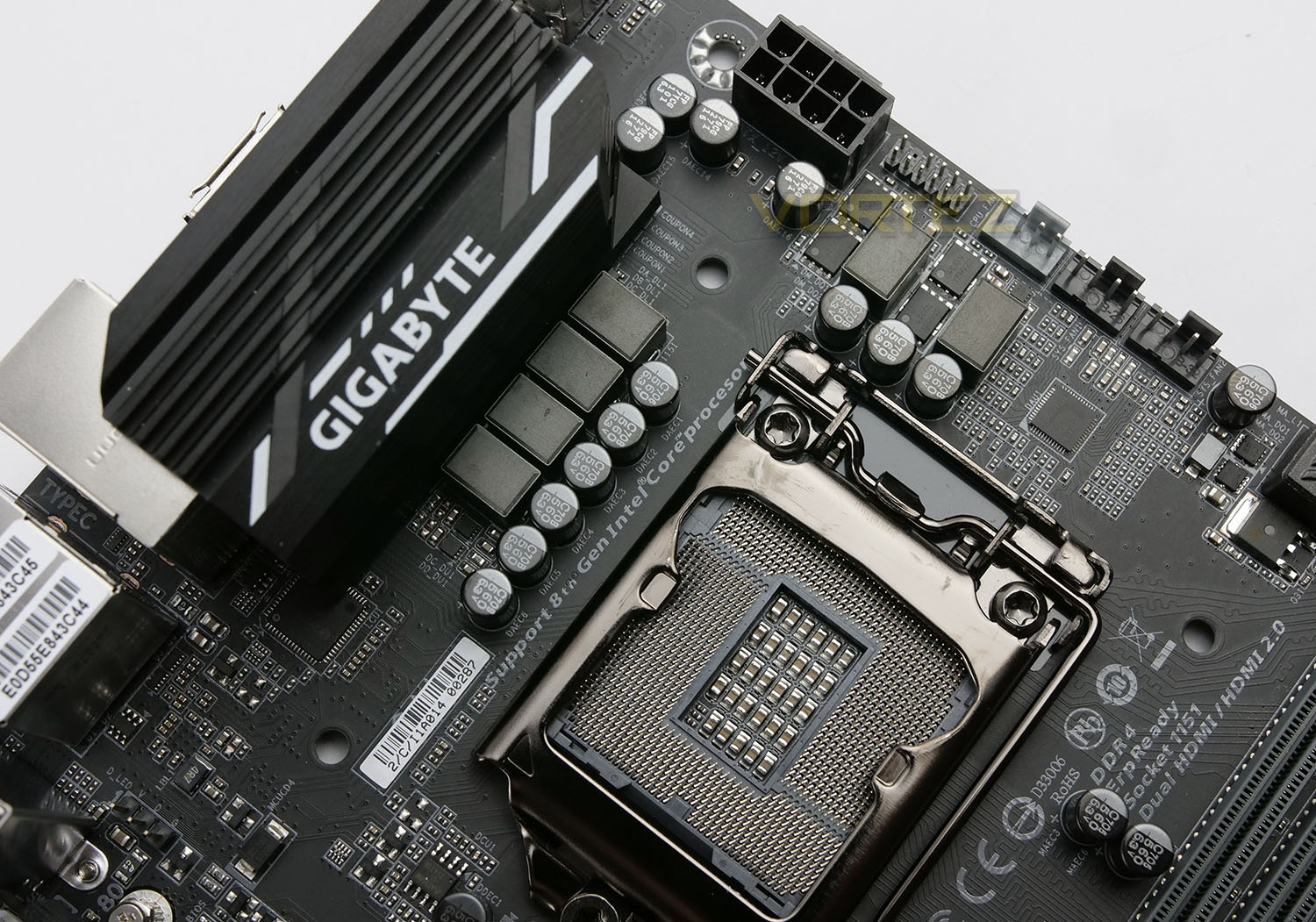
As with all motherboard using the H370 chipset, the H370N is designed to work with Intel’s 8th Generation Processor and therefore uses socket LGA 1151. Unlike other solutions, this board features only a single heatsink over the VRMs and takes advantage of fewer digital phase – 6+1. On the upper-edge we have a single 8-pin connector for CPU power. Dotted around the board there are black solid CAPs for extended durability.
All three fan headers on this motherboard sit at the top and they include a designated header for CPU fan. This is obviously much fewer than we’d get on a full fat ATX solution and since we don’t receive an adapter for expanding the headers on the board, we are left with just two headers once the CPU fan is used up.
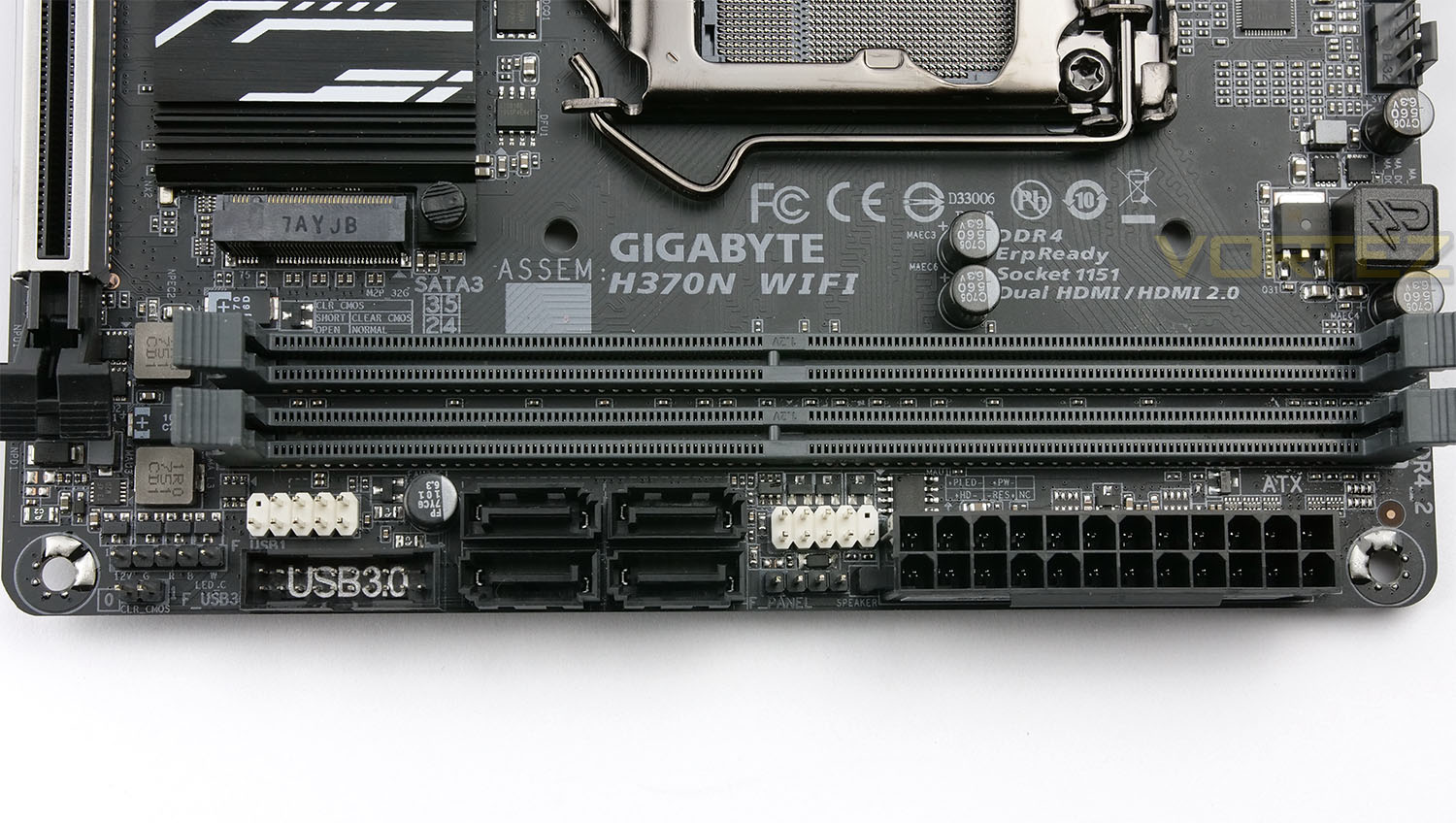
Memory support arrives in the form of dual-channel DDR4 but just two DIMM slots – up to 32GB and DDR4 2666/2400/2133MHz.
The memory slots have been given some reinforcement via steel covers.
Also located in this area we have USB 2.0, USB 3.0 headers and four SATA 3 (6GB/s) ports. This should be more than sufficient for most users who opt for SATA-based SSD or mechanical storage.
GIGABYTE has included a single RGBW header for lighting strips and to make use of RGB Fusion software.
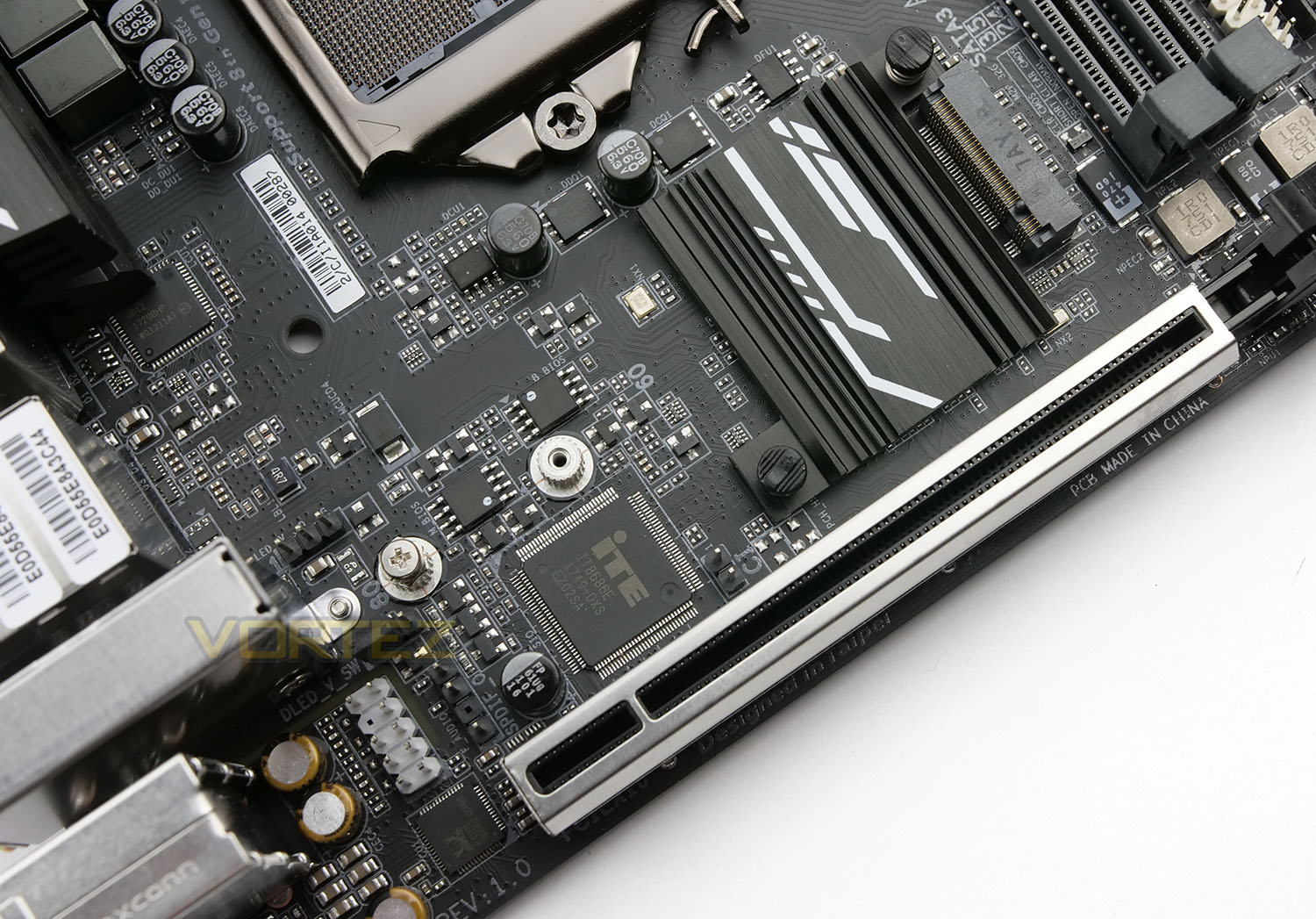
Size is an obvious limitation for H370N and therefore we have just a single PCI Express slot which is wired for 16 lanes. GIGABYTE has given this the “Ultra Durable” treatment to enhance the experience for larger, heavier graphics cards.
The H370 Express chipset sits underneath a small heatsink which oddly enough sits in the pathway of an M.2 slot – this doesn’t appear to be a sensible idea, given that M.2 SSDs are known to generate heat and rely on optimal case airflow. This M.2 slot supports NVMe technology and Intel Optane Memory.
In the bottom-left of the motherboard, there is a condense arrangement of audio CAPs which are isolated with a tracer line to prevent electrical interference. The beating heart of the audio solution is Realtec ALC1220.
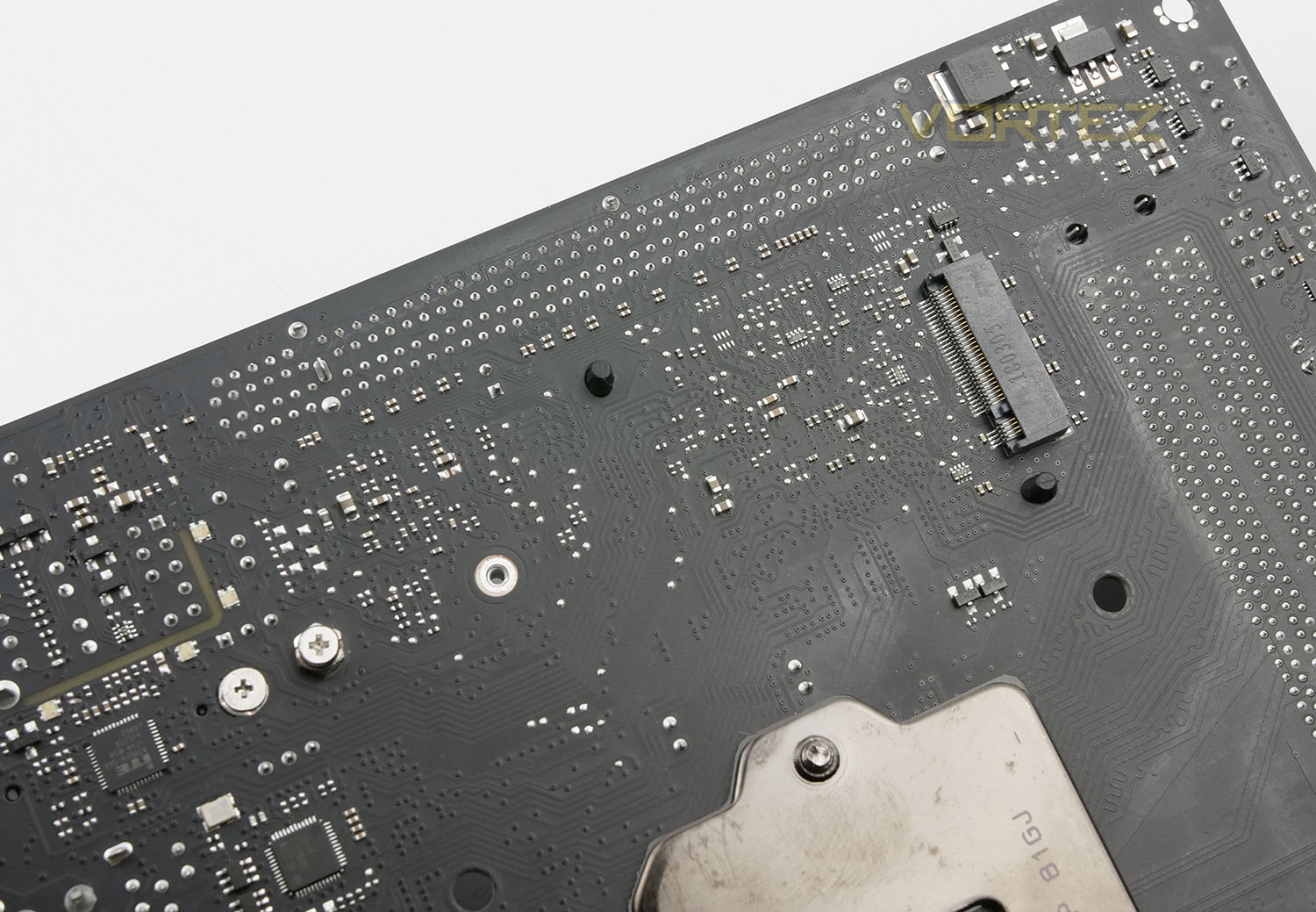
In a completely new design concept, we see GIGABYTE has utilised space on the reverse of the motherboard to accommodate a secondary M.2 slot.
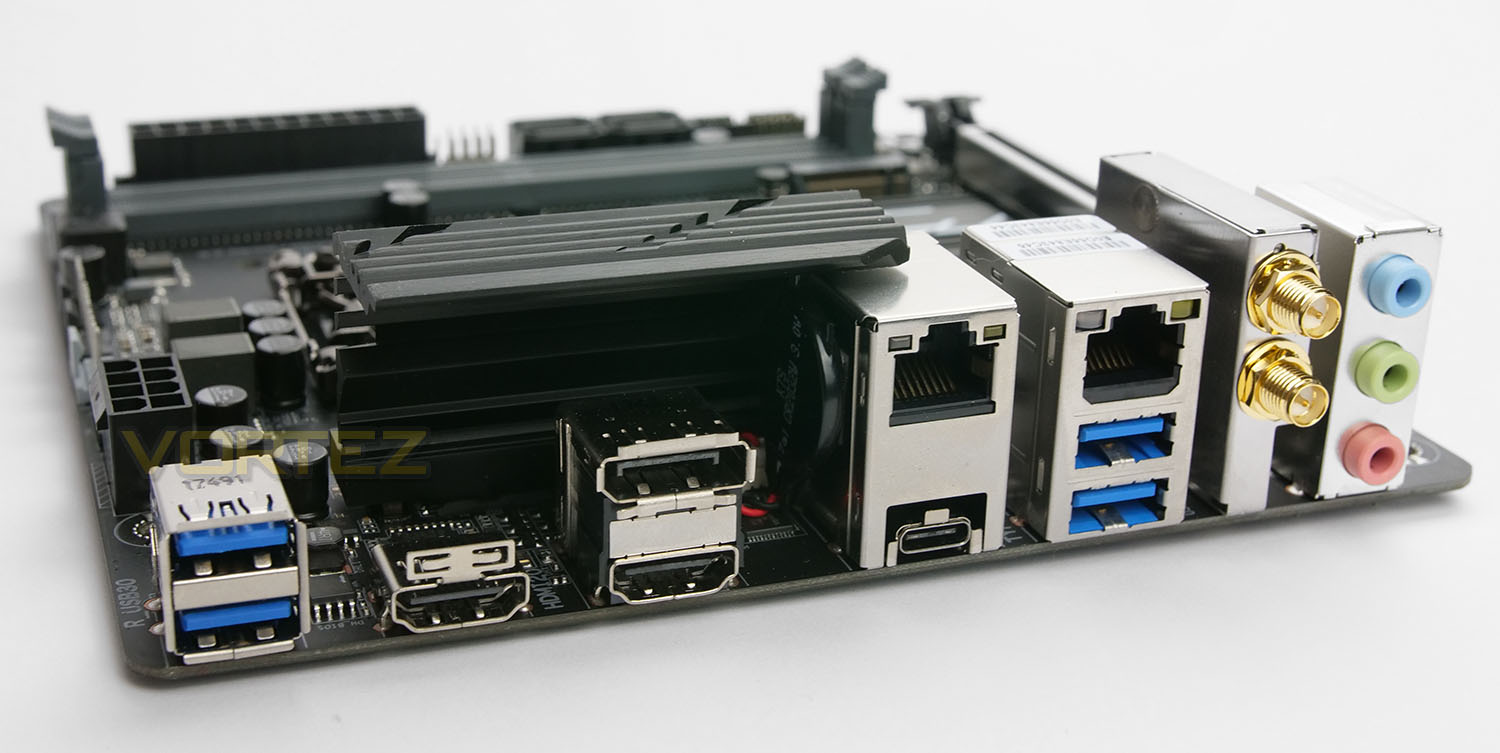
Casting an eye over the back panel, there are quite an assortment of options to choose from for connectivity. Available here we have:
2x USB 3.0 ports
2x HDMI 2.0 ports
1x DisplayPort 1.4
2x Gigabit LAN via Intel i219-V + i211 controller
1x USB 3.1 Gen2 Type C port
2x USB 3.0 ports
2x WiFi Antennas
3x Audio jacks
We’re glad to see GIGABYTE omitting USB 2.0 in favour of USB 3.0 on this motherboard – something which has been avoided on many B360 models. This back panels supplies plenty of network, video out and USB functionality.
Test Setup & Methodology
Test Setup
CPU Intel Core i7-8700K
Cooling Corsair H150i Pro RGB
Motherboard GIGABYTE H370N WiFi
Memory 16GB Corsair Vengeance LPX 3000MHz
Graphics AMD RX 480
Storage OCZ Vector 180 240GB SSD
PSU Corsair HX1000 80 Plus Platinum Certified PSU
Monitor AOC U2879VF
Capture Device Epiphan AV.iO 4K
Cooling Corsair H150i Pro RGB
Motherboard GIGABYTE H370N WiFi
Memory 16GB Corsair Vengeance LPX 3000MHz
Graphics AMD RX 480
Storage OCZ Vector 180 240GB SSD
PSU Corsair HX1000 80 Plus Platinum Certified PSU
Monitor AOC U2879VF
Capture Device Epiphan AV.iO 4K
Benchmarks
Cinebench R15 – CPU/OpenGL Score
x264 HD 4.0 – 1st and 2nd pass encoding
SiSoftware SANDRA – CPU & Memory benchmarks
POV-RAY – CPU benchmarks
TrueCrypt – CPU benchmarks
AIDA64 – CPU benchmarks & Memory
PCMark 8 – Home Suite & Photoshop
3DMark FireStrike – 3D Benchmark
Games – Civilization IV & Total War: WARHAMMER
x264 HD 4.0 – 1st and 2nd pass encoding
SiSoftware SANDRA – CPU & Memory benchmarks
POV-RAY – CPU benchmarks
TrueCrypt – CPU benchmarks
AIDA64 – CPU benchmarks & Memory
PCMark 8 – Home Suite & Photoshop
3DMark FireStrike – 3D Benchmark
Games – Civilization IV & Total War: WARHAMMER
Other Software
Temperature Analysis: Real Temp
Stress Testing Software: AIDA64 Stability Test
CPU Specification Monitoring: CPU-Z
Stress Testing Software: AIDA64 Stability Test
CPU Specification Monitoring: CPU-Z
Overclocking
Since the Intel H370 Express chipset isn’t designed for overclocking this section is omitted from our review.
Benchmarks: Power Consumption
It’s interesting to note the power consumption across all motherboards. Although they are using the Z370/B360 chipset, energy results can fluctuate between manufacturers due to the features and specifications that are integrated. First of all, for the idle tests the system is cold booted into Windows and no additional applications are executed – the watts are noted on the external energy monitor we use and then the system is loaded with 3DMark FireStrike – watts are again monitored for the duration of the test and the highest rated wattage result is then noted down. Below are the results of this energy test.
Benchmarks: Cinebench R15
CINEBENCH is a real-world cross platform test suite that evaluates your computer’s performance capabilities. CINEBENCH is based on MAXON’s award-winning animation software CINEMA 4D, which is used extensively by studios and production houses worldwide for 3D content creation. MAXON software has been used in blockbuster movies such as Iron Man 3, Oblivion, Life of Pi or Prometheus and many more.
Benchmarks: X264 HD
Simply put, this test measures how fast your machine can encode a short, DVD quality MPEG-2 video clip into a high-quality x264 video clip. What’s x264, you ask? It’s more or less the next-generation Xvid/DivX codec. I think it’s ideal for a benchmark because the application (x264.exe) reports fairly accurate compression results (in frames per second) for each pass of the video encoding process, and it uses multi-core processors very efficiently.
Benchmarks: POV-RAY
Persistence of Vision Raytracer’s PovRay is a free and open source 3D animator application with versions for computers with different operating systems.
This product allows users to build their custom 3D worlds with excellent quality despite their computer’s hardware. It has adjustable options for levels of radiance, refraction, and reflection. Calculation time may vary depending on the computer model, but PovRay can adapt to many computer builds, and is supported by the open source community.
This product allows users to build their custom 3D worlds with excellent quality despite their computer’s hardware. It has adjustable options for levels of radiance, refraction, and reflection. Calculation time may vary depending on the computer model, but PovRay can adapt to many computer builds, and is supported by the open source community.
Benchmarks: TrueCrypt
TrueCrypt is a discontinued source-available freeware utility used for on-the-fly encryption (OTFE). It can create a virtual encrypted disk within a file or encrypt a partition or (under Microsoft Windows except Windows 8 with GPT) the entire storage device (pre-boot authentication).
Benchmarks: AIDA64
AIDA64 Product PageThis simple integer benchmark focuses on the branch prediction capabilities and the misprediction penalties of the CPU. It finds the solutions for the classic “Queens problem” on a 10 by 10 sized chessboard. At the same clock speed theoretically the processor with the shorter pipeline and smaller misprediction penalties will attain higher benchmark scores. For example — with HyperThreading disabled — the Intel Northwood core processors get higher scores than the Intel Prescott core based ones due to the 20-step vs 31-step long pipeline. CPU Queen test uses integer MMX, SSE2 and SSSE3 optimizations.
Benchmarks: SiSoftware SANDRA
SANDRA isn’t always a benchmark that is included in hardware reviews but I believe it shouldn’t be ignored. SANDRA provides a vigorous package that tests your system in a rather large array of benchmarks. There are many aspects of benchmark that can be executed. We will be considering – CPU and memory tests.
Benchmarks: PCMark 8 & PCMark 10
PCMark 8 combines performance benchmarking with battery life measurement and includes tests based on popular Adobe and Microsoft applications. Whether you are looking for long battery life, or maximum power, PCMark 8 will help you find the devices that offer the perfect combination of efficiency and performance for your needs. It’s the complete PC performance benchmark for home and business.
Benchmarks: PCMark 8 Photoshop
The PCMark 8 Applications benchmark measures system performance using popular applications from the Adobe Creative Suite and Microsoft Office. You can choose which tests to run based on the applications installed on your system. Each test automatically steps through a series of actions such as opening, editing and saving a file. The results are used to calculate the PCMark 8 Applications scores for the system.
Benchmarks: 3DMark FireStrike & TimeSpy
3DMark FireStrike Product PageFire Strike is our new showcase DirectX 11 benchmark designed for high-performance gaming PCs. It is our most ambitious and technical benchmark ever, featuring real-time graphics rendered with detail and complexity far beyond what is found in other benchmarks and games today. Fire Strike will only be available in the Windows editions of 3DMark initially.
Benchmarks: VRMark
VRMark Product PageThe performance requirements for VR games are much higher than for typical PC games. So if you’re thinking about buying an HTC Vive or an Oculus Rift, wouldn’t you like to know that your PC is ready for VR?
Benchmarks: ROT Tomb Raider & Total War: WARHAMMER
It’s important for us to perform a number of game benchmarks as well as the synthetic tests because gamers will want to know if there are any significant benefits. So here we have two recent gaming titles.
Conclusion
It seems like a long time coming but now that Intel’s mainstream/value motherboards are here for Coffee Lake, users who have no requirement to overclock, demand less features and want to save some money finally have some options to choose from.
With the H370N WIFI, GIGABYTE confirms to us how compact you can go with Intel’s 8th Generation. There is no doubt that system builders will be drawn to this motherboard for its ability to bring the benefits of Coffee Lake to a small form factor environment.
As far as styling goes, this motherboard is easy on the eye with a subtle but appealing design which should marry up with other hardware – though once you do attach a cooler and graphics card, there will be very little to see of the board! The layout and design of H370N WIFI is decent in some regards and not so in others. GIGABYTE has definitely crammed in plenty of features but there are only three fan headers (including the CPU fan), just four USB ports on the rear panel and the top-facing M.2 slot sees an installed drive sit over the top of the chipset heatsink, which isn’t ideal.
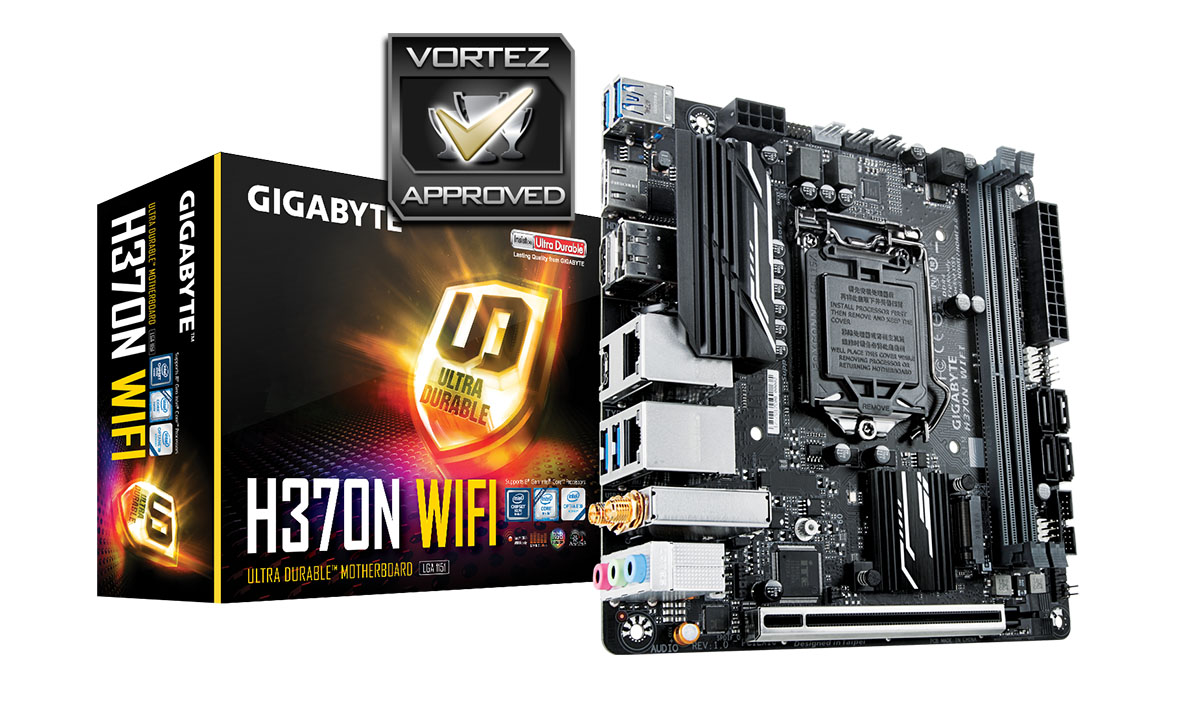
However, there are plenty of things to like about H370N WIFI. Though we do only get four USB ports, GIGABYTE has ditched USB 2.0. Network connectivity comes in the form of dual Gigabit LAN as well as Intel CNVi Wave 2 – 802.11ac. Plus there are also a generous selection of video outs for those using integrated graphics – twin HDMI and a single DisplayPort.
Performance is restricted to just stock CPU frequencies since we cannot overclock with the H370 chipset but we’re happy to report some solid results in the range of tests we ran. H370N WIFI had no problems keeping up with the rest of the motherboards we’ve tested and it managed to keep energy levels at their lowest compared to other offerings.
H370N WIFI can be purchased for £100 GBP – $129 USD – $229 AUD, which is around 10-20% cheaper than many of the Z370 Mini-ITX boards currently available. At this price it makes it a good purchase those on a tighter budget.
If SFF is the order of the day and overclocking isn’t a requirement then the GIGABYTE H370N WIFI is a great choice!
Pros
+ Pleasing to the eye
+ Packs in plenty of features
+ Twin M.2 on Mini-ITX
+ Audio solution is good
+ Good network features inc. 802.11ac
+ Dual-BIOS
Cons
– Only three fan headers
– Only four USB ports
– M.2 drive sits on top of H370 heatsink
+ Pleasing to the eye
+ Packs in plenty of features
+ Twin M.2 on Mini-ITX
+ Audio solution is good
+ Good network features inc. 802.11ac
+ Dual-BIOS
Cons
– Only three fan headers
– Only four USB ports
– M.2 drive sits on top of H370 heatsink
Click here for an explanation of our awards at Vortez.net.
Stay connected with the Vortez Social Media pages: