60GHz WiFi, a fancy chassis, multiple antennas and a gaming-themed operating system which promises lower pings; the Nighthawk XR700 offers plenty for the hardcore gamer.

Product on Review: Netgear XR700
Manufacturer: Netgear
Street Price: GBP £449.99 / USD $449.99 / AU $739.00
August last year saw us looking at the Netgear Nighthawk XR500 Gaming Router, while it impressed us, the large pricetag and the lack of some basic features as well as shockingly bad build quality did leave a bit of a bad taste. Now, 6 months on, we’re testing the Netgear Nighthawk XR700, the evolution of the previous router with many new features.
Improvements over the previous model include a quad core processor clocked at 1.7GHz, 512MB of flash memory and 1GB of RAM, which is roughly double of the XR500 in all three measures. There’s also a stronger, and larger chassis, more colourful design and chunkier antennas.
However, while the aesthetic differences, as well as improvements to processing ability, might seem well and good, the true improvements lie within the introduction of 60GHz 802.11ad WiFi, offering speeds up to 7200Mbps through wireless transmissions. Furthermore, Netgear have upped the number of Gigabit ports from 4 to 6 and included a seventh 10Gig port for users requiring incredibly fast file transfers (A compatible SFP+ module or DAC is required and isn’t included).
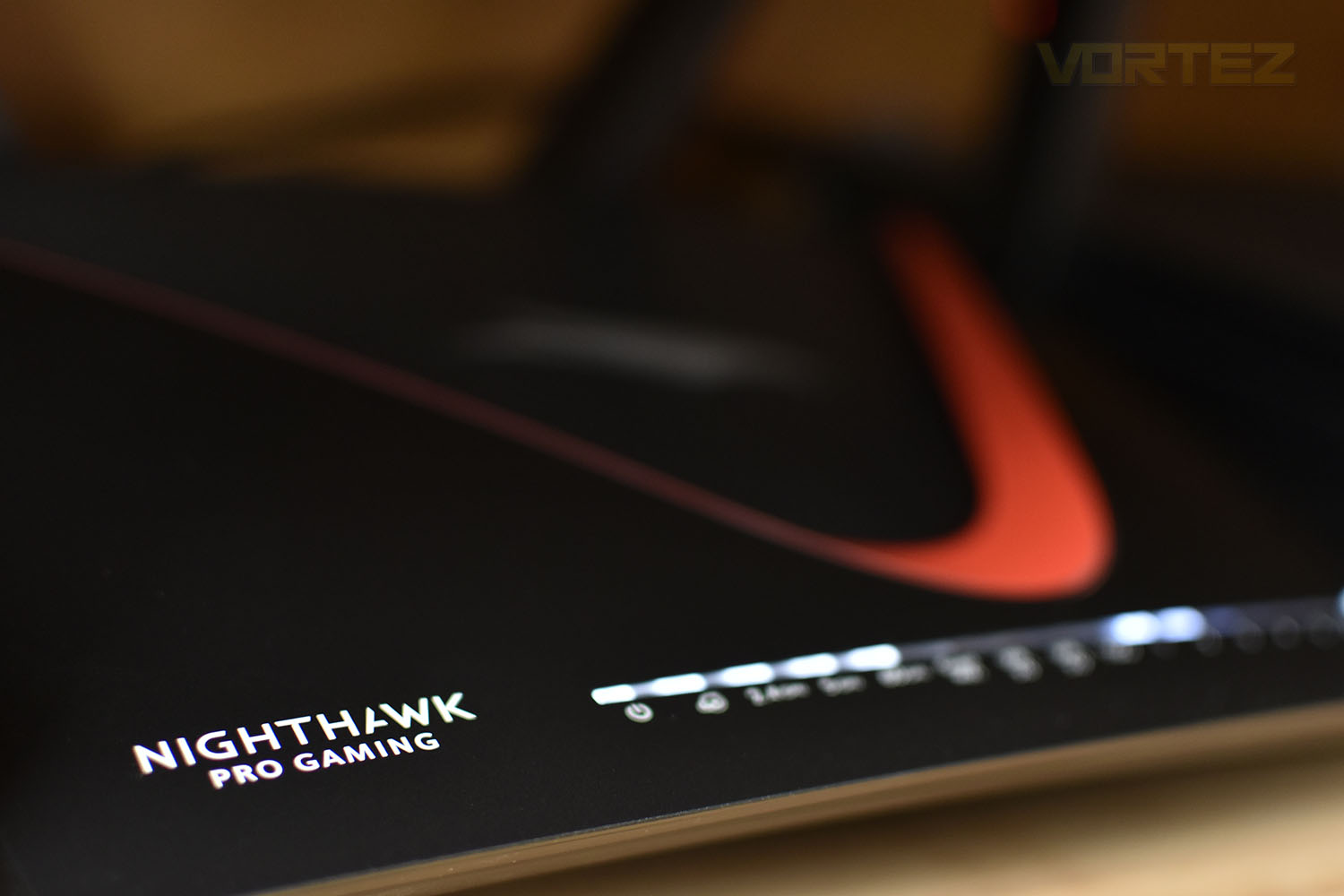
Netgear’s DumaOS was introduced with the XR500 and continues into the XR700, the software allows users control over QoS settings and Geo-Filterin to maintain low pings and high bandwidth to the devices that matter.
Finally, the price, which also gets a decent bump over the previous model, at £450 in the UK ($450 in the US and $730 in Oz), you certainly need to have a genuine need for such speed and control over your network, or are the headline improvements enough to warrant such a rise in price? Let’s find out.
Netgear on the XR500:
Technical Specifications
• XR700 Nighthawk Pro Gaming Router
• Ethernet cable
• Quick start guide
• Power adapter
Physical Specifications
• Dimensions: 12.7 x 9.6 x 2.5 in
(321.9 x 243.7 x 64.5 mm)
• Weight: 4.11lb (1865g)
Standards
• Two (2) USB 3.0 ports
• IEEE® 802.11 b/g/n 2.4GHz + 256 QAM support
• IEEE® 802.11 a/n/ac 5.0GHz
• Seven (7) 10/100/1000Mbps—(1 WAN &
6 LAN) Gigabit Ethernet ports
Technical Specifications
• AD7200 WiFi
– Band 1: 800Mbps @2.4GHz — 256QAM
– Band 2: 1733Mbps @5GHz — 256QAM
– Band 3: 4600Mbps @60GHz — SC
• Powerful Quad-Core 1.7GHz processor
• Memory: 512MB NAND Flash and 1GB DDR3 SDRAM
• Enhanced Active Antennas with high powered amplifiers
• Explicit Beamforming for 2.4 & 5GHz bands
• Seven (7) 10/100/1000Mbps Gigabit Ethernet ports
– 1 WAN & 6 LAN
– Dual Gigabit Ethernet Port Aggregation
• 10G LAN SFP+ port connection for low-latency LAN gaming parties
• Two (2) USB 3.0 ports
• IPv6 Support (Internet Protocol Version 6)
• On/Off LED light switch
Key Features
• Gaming Dashboard—Customizable view of real-time bandwidth utilization by device, ping, etc.
• Geo-Filter—Control your lag by limiting distance to game servers or other players
• Network Monitor—Check bandwidthhogging devices and identify what causes lag
• Quad Stream & 160MHz for faster speeds
• Quality of Service—Prioritize gaming devices and allocate bandwidth by device
• Beamforming+ for more reliable connections
• ReadySHARE® USB to share your USB hard drive & printer
• ReadySHARE® Vault—PC software for automatic backup to USB hard drive connected to the router
• 10 Gigabit SFP+ Port—Connect to NETGEAR SX10 gaming switch for lower latency wired gaming, or use for up to 10Gig Internet connectivity. Requires compatible SFP+ module or DAC (not included)
• Plex Media Server—All your movie, TV show, music, video, and photo collections at your fingertips. Anywhere you go, on the devices you love
• Nighthawk App—The Nighthawk App makes it easy to set up your router and get more out of your WiFi
• Amazon Cloud Backup
• MU-MIMO—Simultaneous streaming of data for up to three devices
System Requirements
• Microsoft® Windows 7, 8, 10, Vista®, XP®, 2000, Mac OS®, UNIX®, or Linux®
• Microsoft® Internet Explorer® 11 or higher, Microsoft Edge, Google Chrome™ 55 or higher, Firefox® 45 or higher, Safari® 10 or higher
Security
• VPN support—secure remote access
• Standards-based WiFi Security
(802.11i, 128-bit AES encryption with PSK)
• Double firewall protection (SPI and NAT)
• Denial-of-service (DoS) attack prevention
Support
• 90-day complimentary technical support following purchase from a NETGEAR authorized reseller.
• Join the NETGEAR Community Forum. Visit http://community.netgear.com
Warranty
• www.netgear.com/warranty/
• Extend your warranty & technical support within 90 days of product purchase [US only]. Visit: prosupport.netgear.com/home
Packaging & Bundle
A red and black theme has been carried forwards from the XR500, giving the packaging a definitive gaming style. The image of the router on the front is a little misleading when compared to the actual device, though the box is an indication of how large the XR700 is.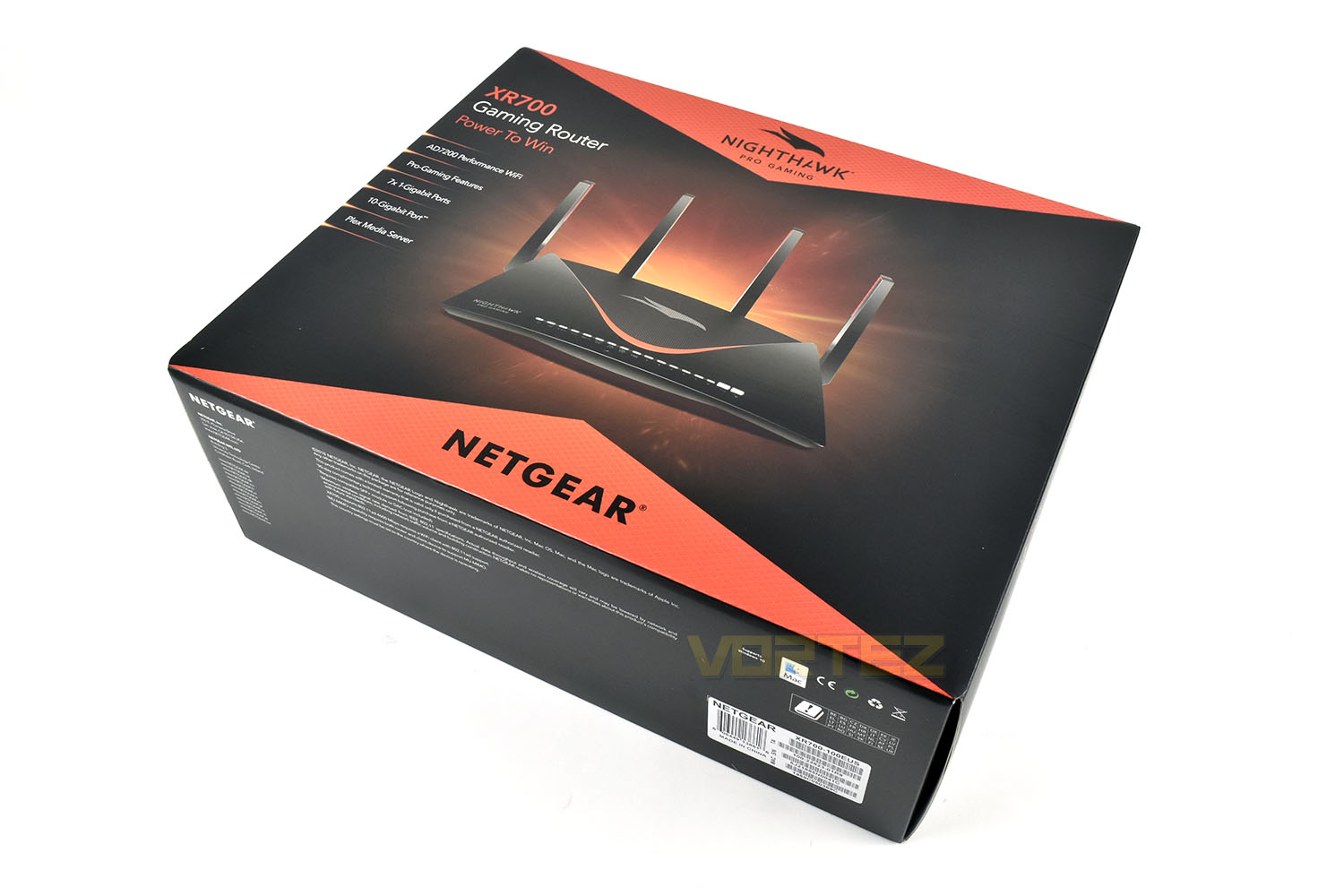
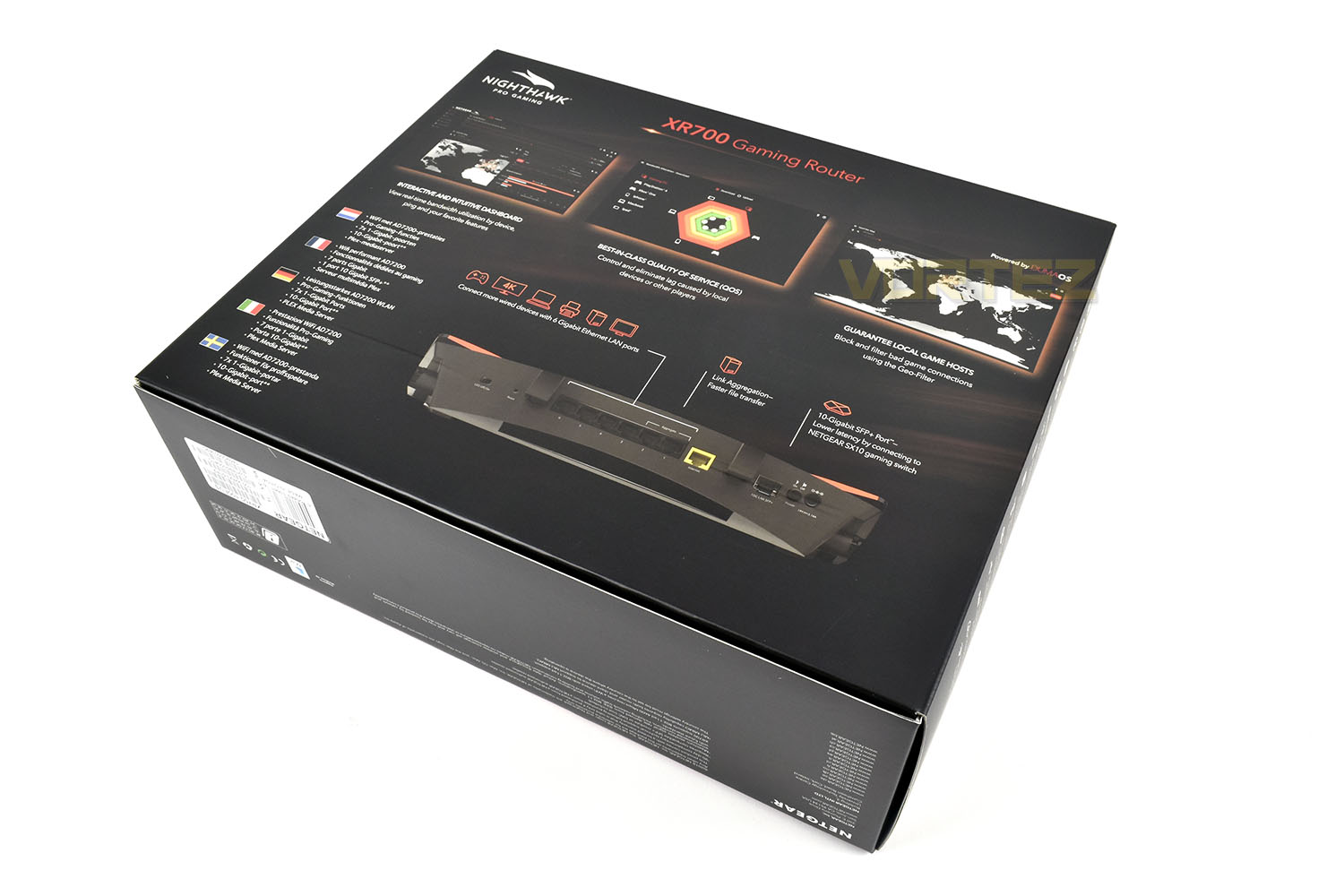
The rear of the box gives some information on the software as well as a picture of the inputs and outputs on the rear.
Lifting the lid, we get our first glimpse of the XR700 in all its glory. First impressions were “wow, that’s huge!”. Packaging is good though, using cardboard instead of plastic or foam, helping to increase the packaging’s recyclability.
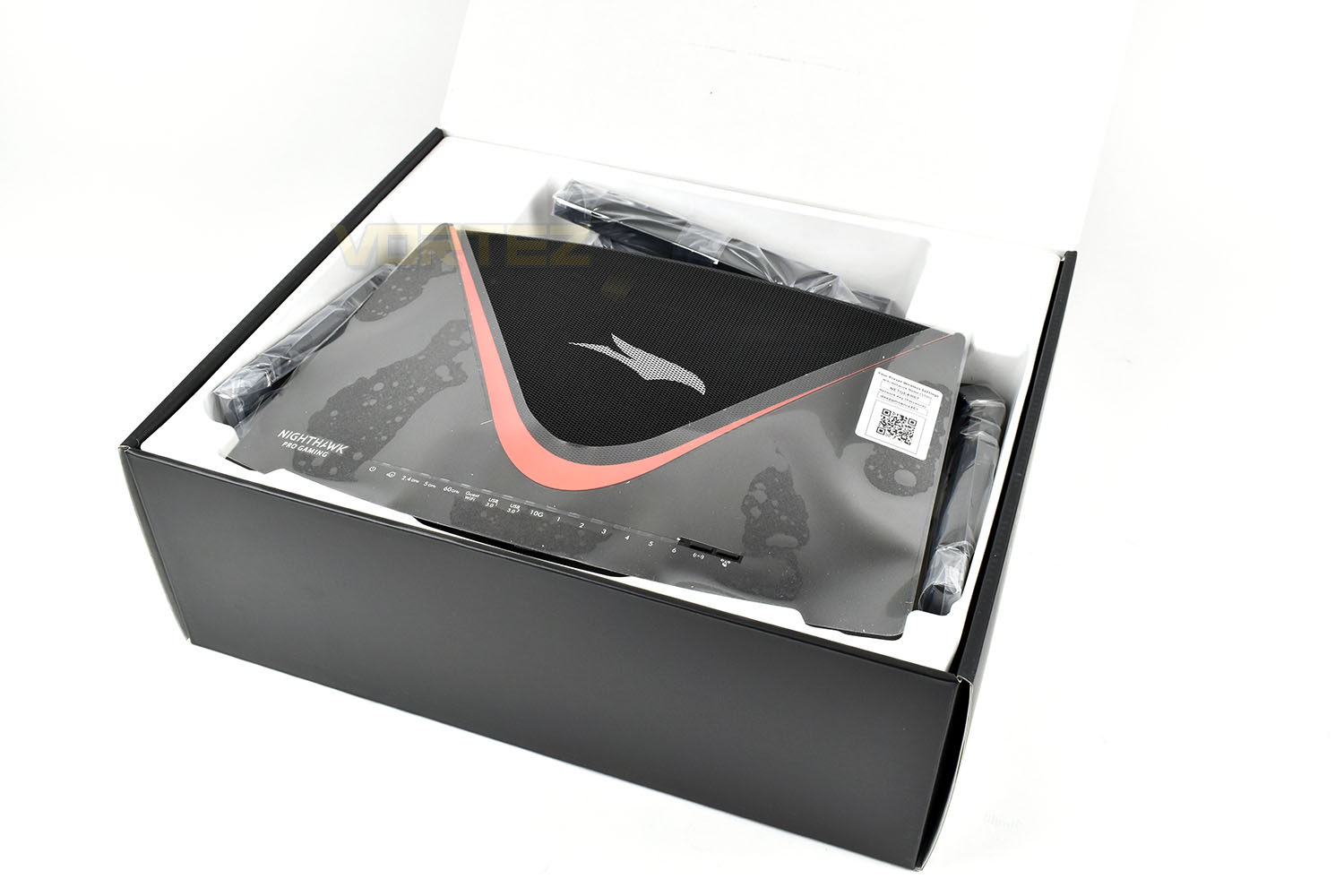
Alongside the XR700 is a whole bundle of documentation related to setting the device up, updating firmware, warranty information and certification. There’s also a US/UK power adaptor where you use the relevant insert. Finally, there’s a flat ethernet cable to get you up and running.
Closer Look
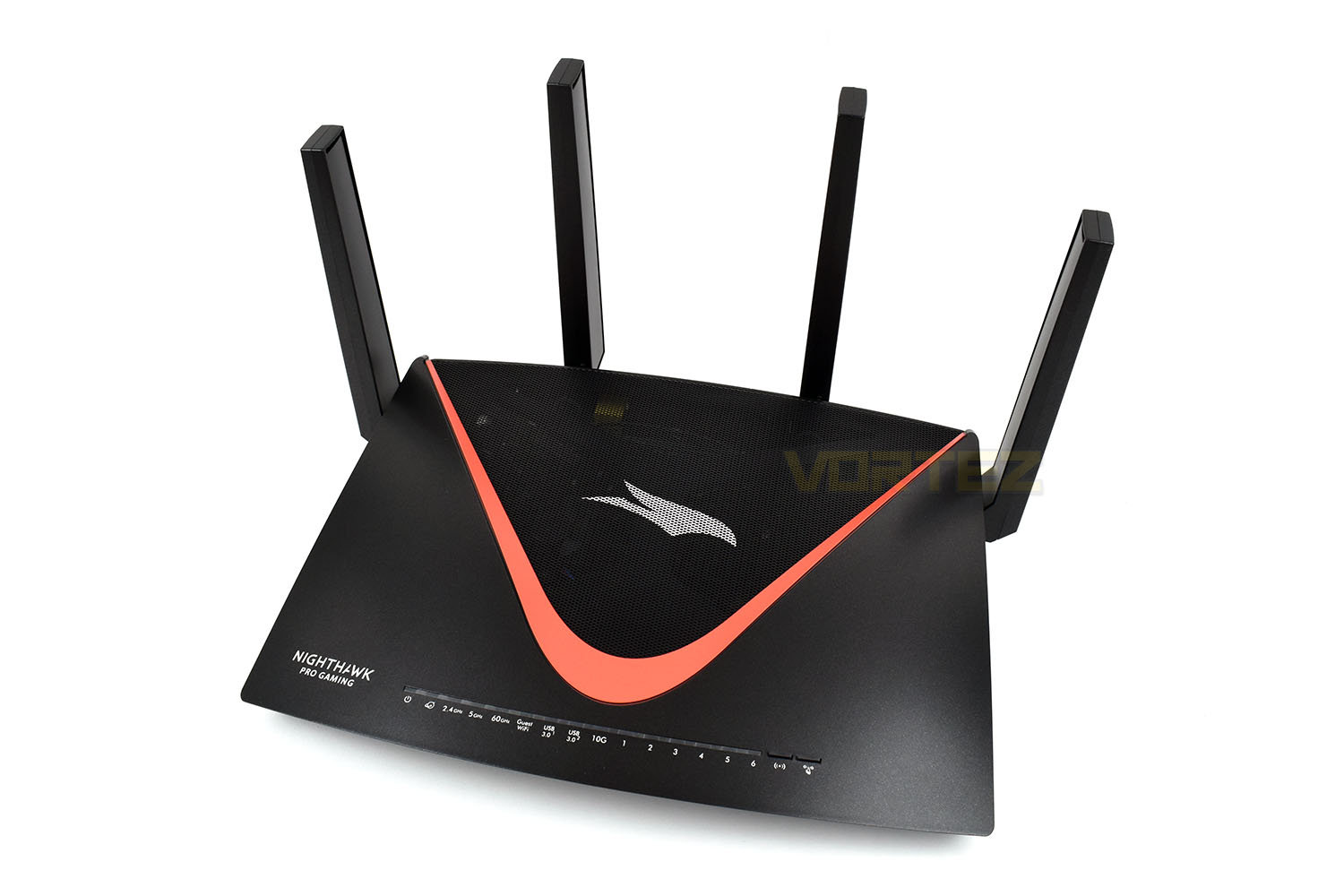
Removing the plastic protective cover, it’s refreshing to find that the WiFi credentials sticker is not stuck to the body of the router and is instead part of the easily removeable plastic; last year we had no end of trouble fully removing the sticker from the matte plastic body.Compared to the XR500, the Lamborghini-style body has been completely dismissed, going for a much more flowing and colourful design with a swooping red section and smooth plastic body.
It’s difficult to not notice the thickness of each antenna at this point, compared to the thinner profile of the XR500. Netgear have done this to improve the reception of signals from mobile devices. While Netgear can boost the signal power more and more with each new generation of routers, picking up a weak signal from a mobile phone that’s too far away can still be a huge limiting factor to overall WiFi speed; to combat this they’ve moved the WiFi amplifiers into the antenna themselves instead of being found as part of the motherboard in the body of the router. This move decreases signal losses during the transmission from antenna to motherboard.
Due to Netgear using these Enhanced Active Antennas, they’re not removeable as they are on most router models.
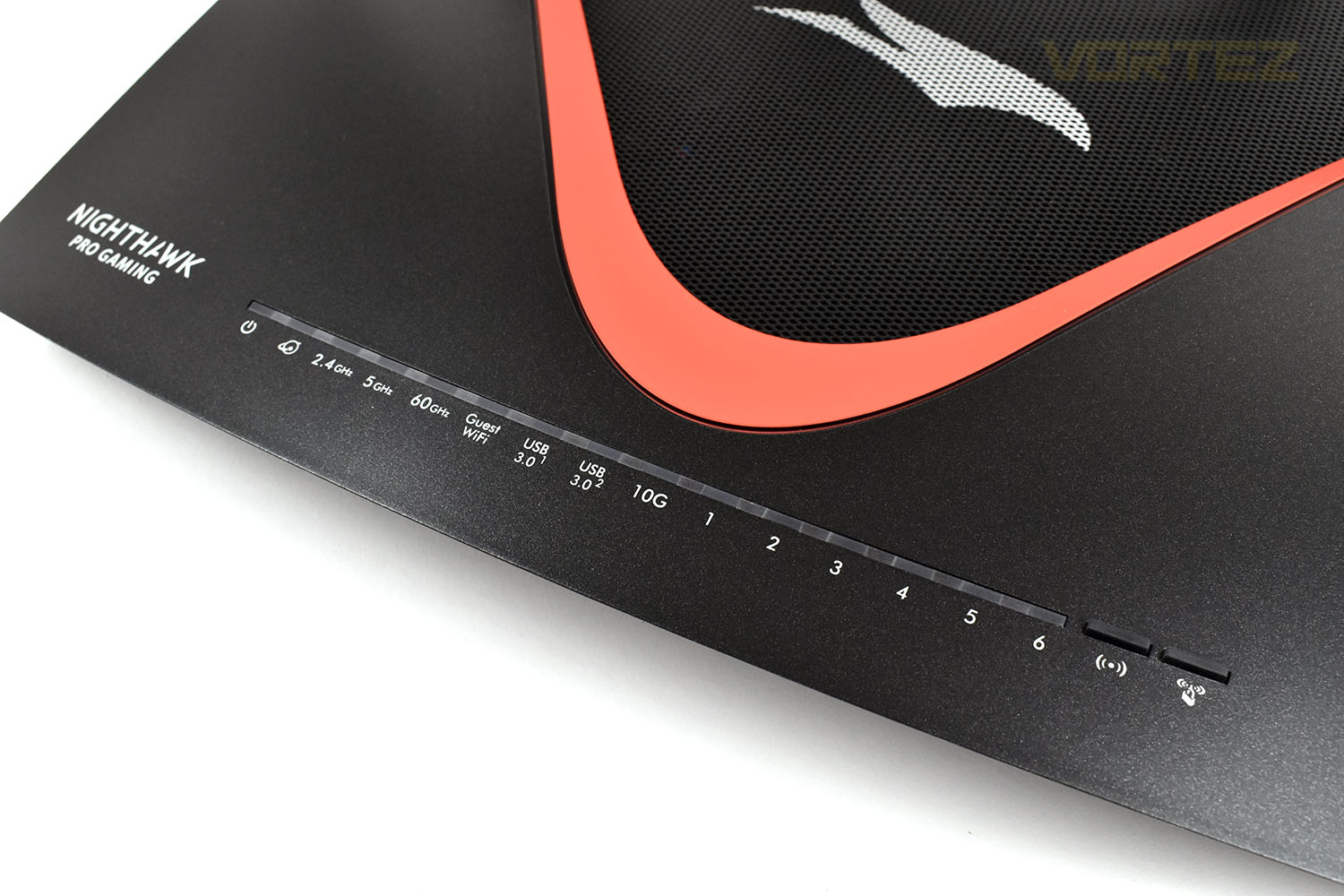
Along the front is a mass of white LEDs indicating just about everything you could need to know. These can be toggled on or off, however. Handy if you’re placing the router under your television or somewhere that flashing lights could lead to irritation.
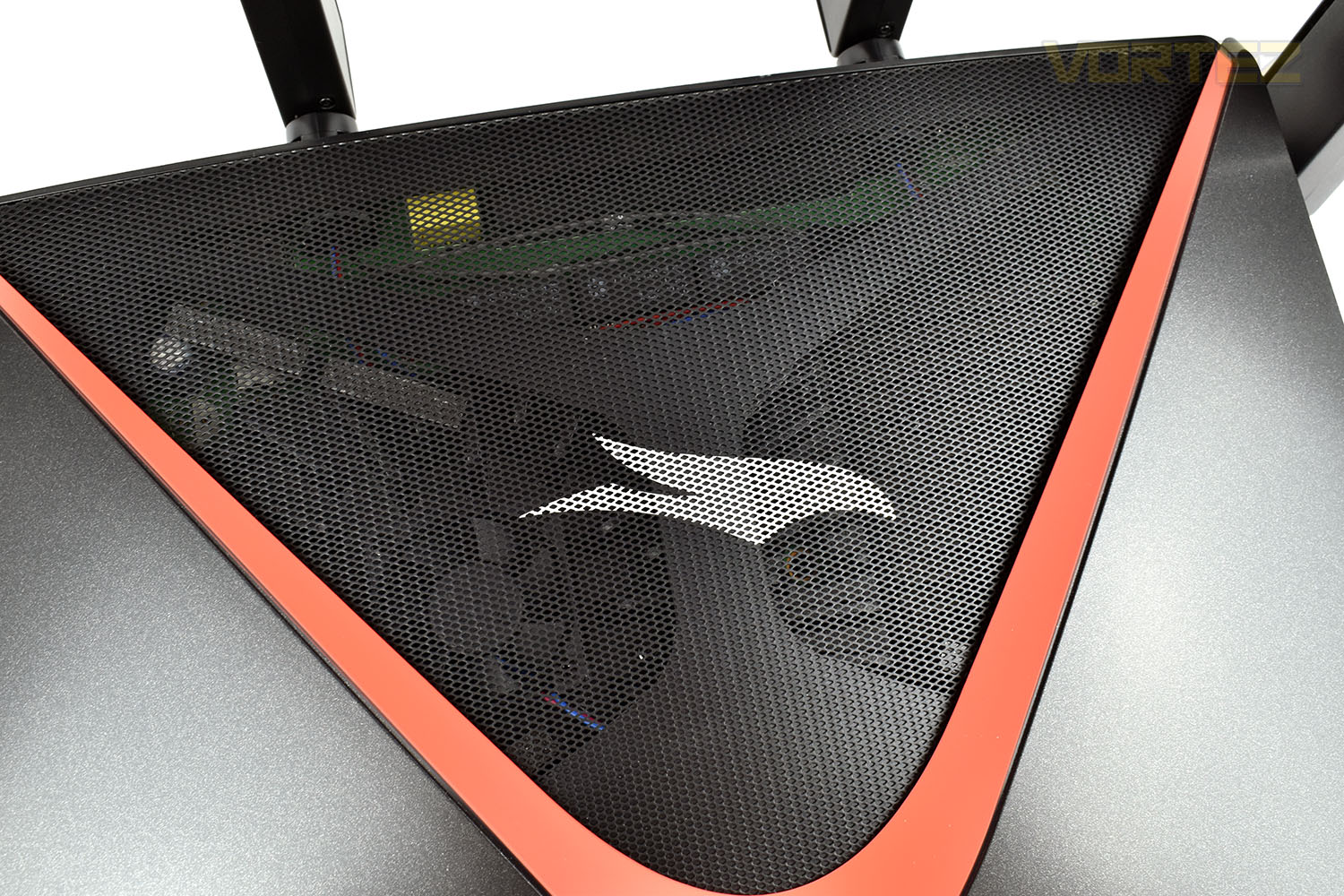
Behind that meshed section is all of the powerful circuitry, including a small 40mm fan to help keep components cool.
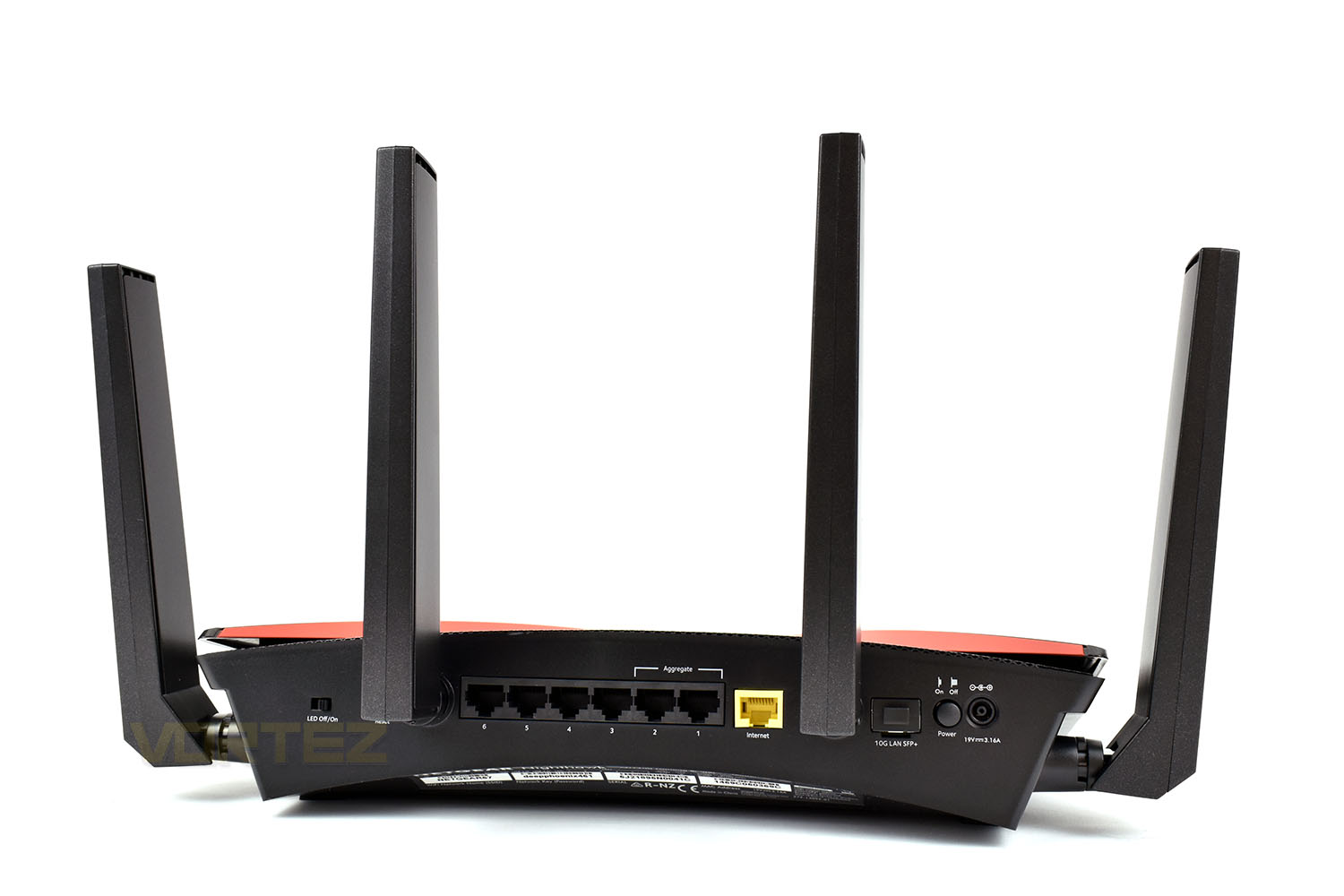
Moving our eyes round to the rear of the XR700, starting from the left, we have an LED off/on toggle, controlling the row of LEDs on the front of the router. There’s then a bank of six Gigabit ports, two of which can be aggregated for a theoretical 2Gbps connection to supported devices. There’s then a seventh Gigabit port for connecting to your modem, made obvious by the yellow colour. After the third antenna is the 10Gigabit connection, which requires an SFP+ module, available separately. Finally, the power connection and on/off switch.
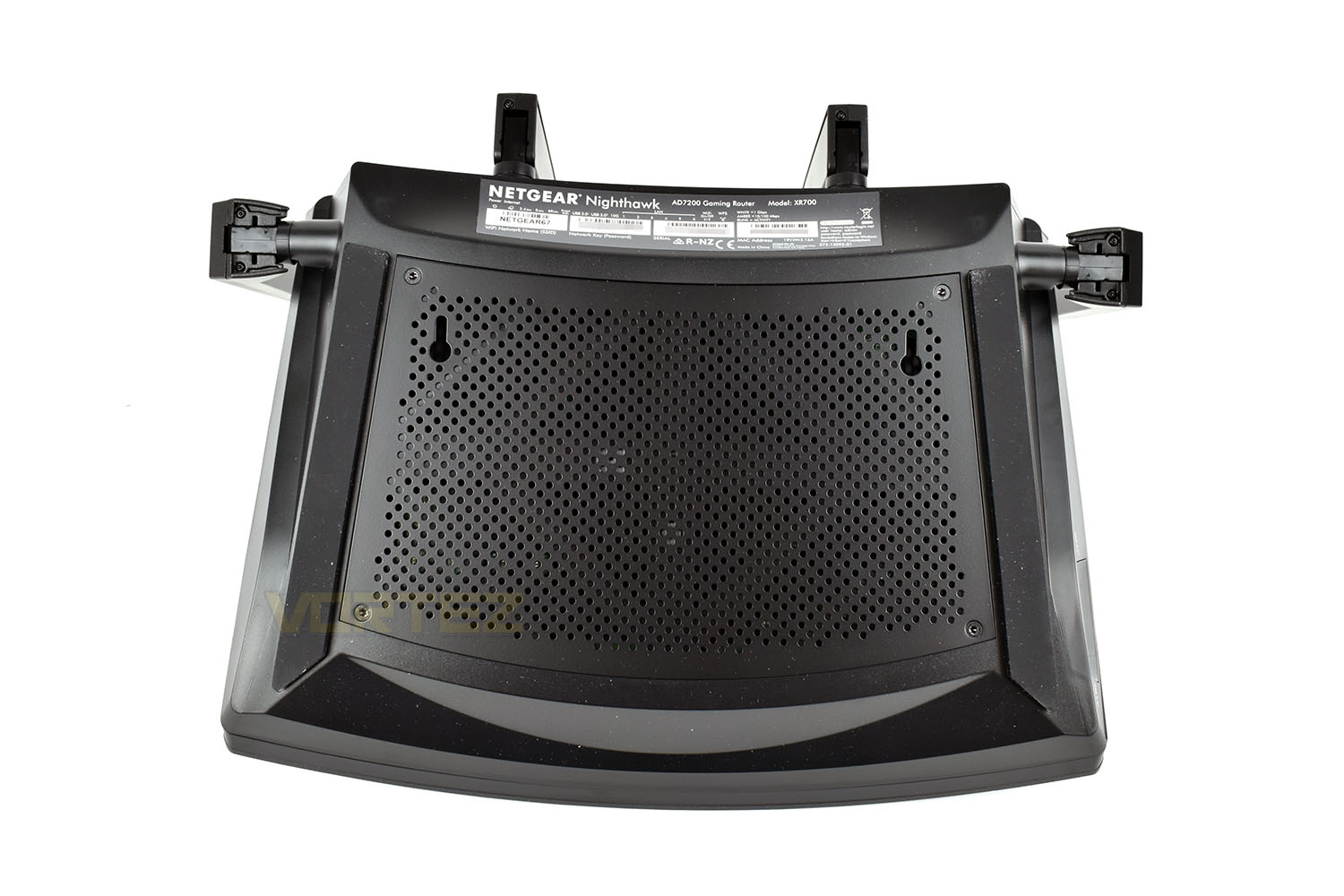
Last, but not least, we flip the router over and look at the base. Running along the right and left are two thick rubber feet; between those feet is a large perforated metal section to provide more fresh air to the components inside, working in tandem with the meshed section on the top.
The upside-down keyhole slots have been added since the XR500, allowing the router to be mounted on a wall or flat surface, or even up high in a large building to make best use of those substantial antennas. No mounting hardware has been included though, which is a bit tight considering the £450 asking price.
Test Setup & Methodology
Testing a router of any kind, especially the wireless performance, can be regarded as somewhat of a minefield. Fluctuations due to overheads and other nearby devices can drastically effect performance from one minute to the next, therefore we kindly ask that you regard the results here in as a rough guide and they likely won’t mirror your personal experience exactly. However, having said that, we do attempt to reduce the amount of interference in anyway possible, such as shutting off any devices not currently being used and limiting the host and client PC to the core applications only.
Our wireless tests are performed via a series of file transfers from a host PC to a client PC. The host PC uses a Killer E2500 Gigabit controller and the files are contained on a Samsung 970 EVO NVMe drive, helping to prevent any file-access bottlenecks. Our client PC utilises an Intel Wireless-AC 9560 network card for wireless communication, capable of both 2.4GHz and 5.0GHz transmission; while relying on a Realtek Gigabit ethernet adaptor for wired transfers. The client PC also uses a Samsung 970 EVO, again, reducing the chance of storage bottlenecks.
Wireless tests are performed at two different locations within a 2 bedroom house, to more accurately reflect a real world scenario. The first location is around 3 metres from the router, in the same room, to represent a user browsing the internet in their living room where their router is also located. The second location is at the far corner of the property, roughly 12 metres away, and through three walls. We position the router underneath a TV, between a TV set top box and a games console.
Wired performance is measured by plugging both the host PC and client PC into the router.
To test two different use cases, we obtained a copy of Bastion from the Steam servers, this game is 1.23GB in size, containing 1,203 files within 35 folders. The second usage scenario is a 1GB .bin file, downloaded from Speed.Hetzner. The file is exactly 1024MB and can be repeatedly transferred incredibly quickly, to measure the theoretical top speed of the router.
We provide our results as an average transfer speed in Mbps (Megabits per second, divide this result by 8 for MB/s).
Each test is conducted three times with an average result then deduced from those.
Software GUI & Performance
SoftwareWe tested the DumaOS back with the XR500 and found it to be incredibly useful but lacked any customisation or themes. Unfortunately, we’ve been unable to find any additional apps or themes but the base software offers plenty to get you set up.
Here’s a short video of the XR700’s DumaOS.
Performance
We test both the WiFi and ethernet performance of the router below, at both 2.4GHz and 5.0GHz on the WiFi tests. Please check the Test Setup & Methodology page for details.
Bastion
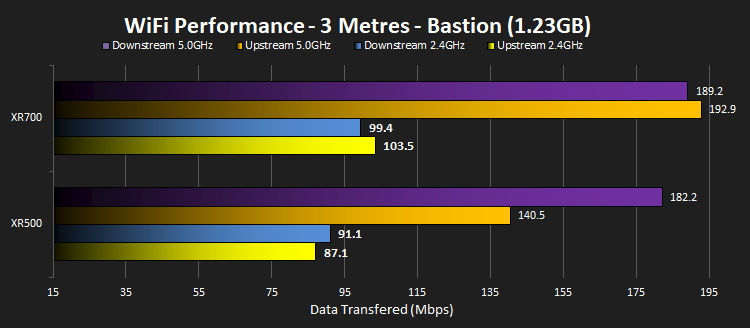
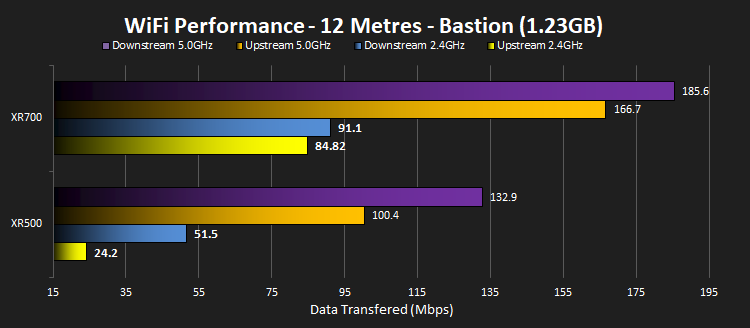
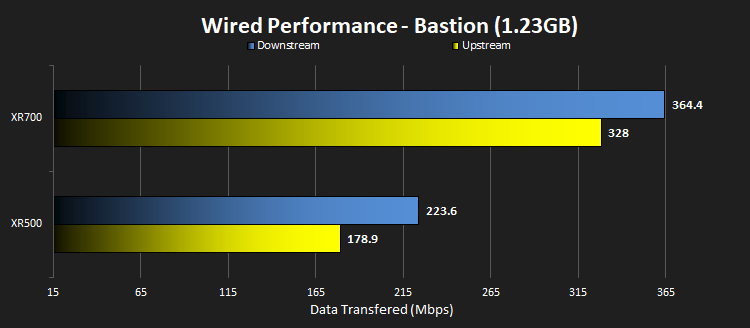
These tests are designed to be particularly hard work to transfer, comprising of many small files. The router still handles them very well.
.BIN
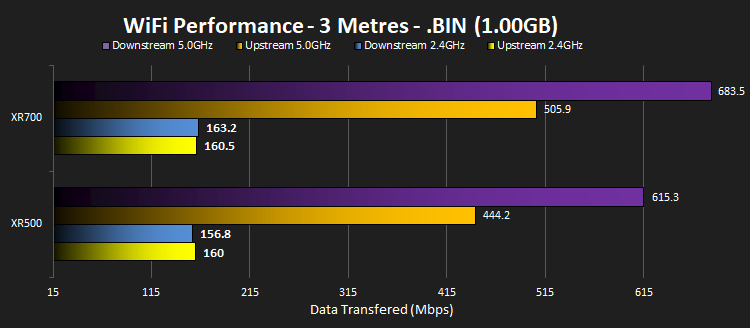
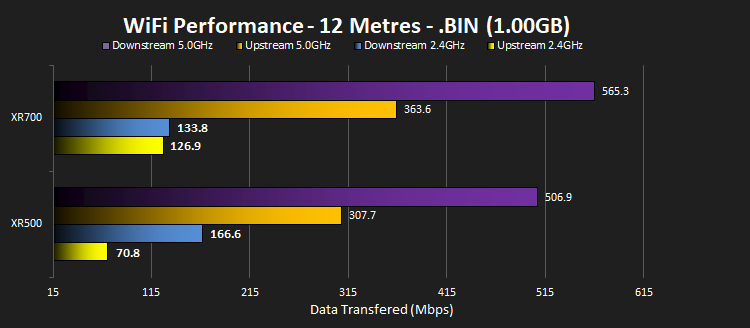
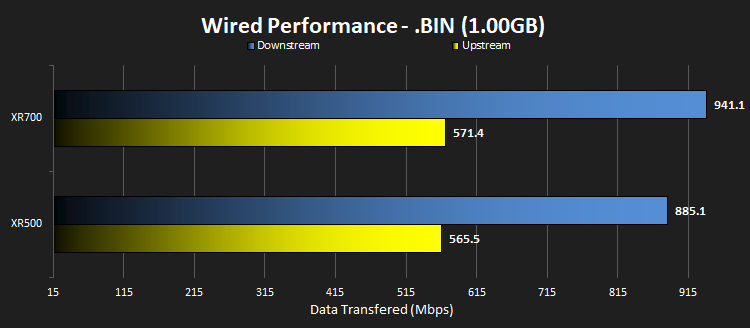
These tests, conversely to the Bastian transfer, is to test the theoretical maximum that the network is capable of. We see some incredibly fast transfers, far above what would reasonably be required in a home environment.
Conclusion
After testing out the DumaOS settings and throwing some files through it, it’s evident from the graphs that Netgear have improved over the XR500, considerably so in terms of speed at a distance, with our 12M graphs, through three reasonably solid walls, showing speeds way in excess of its predecessor, mainly so in terms of uploads. The upload speeds, as promised by Netgear in the marketing, can likely be attributed to the signal amplifiers being moved to the antennas, helping with reception from devices with weak wireless performance.The chassis also sees a large change, moving away from the Lamborghini-esque style and going to something much curvier and better suited to a hallway table or beside the living room TV; all the while, it keeps a gaming style that would not see it out of place alongside your pride and joy battlestation.
The initial setup, following the included guide, was as easy as they come. The XR700 detected the settings from our modem automatically, ran a speed test to detect the bandwidth, with perfect results, then ran us through a short setup process to ensure everything is operational. The process was easy with the XR500 but even easier with the XR700.
Something which really bugged us about the previous Nighthawk was the sticker on top of the matte-plastic chassis. We’ve been using that router since the review back in August and after several attempts, using solvents and sticky-stuff-remover, it still won’t completely budge. Netgear have now moved the information onto the bottom of the router instead of a pesky sticker, but, ideally, we’d like to see a removeable card which can be handed to friends or easily moved around for better access.
Netgear have kindly added mounting brackets to the bottom of the router, allowing you to place it wherever you fancy; this is a feature we thought was missing from the XR500 so it’s nice to see they’ve listened and added it to this model, though some mounting hardware wouldn’t have gone unappreciated.
Now, moving onto the negatives, of which there are a couple of big ones. First off, we saw Netgear advertising this to be used with their Netgear SX10 switch, which boasts 10Gig ethernet connections. However, to actually make use of the 10Gig connection, you’re required to spend roughly another £300-£400 on an SFP+ module; SFP+ is enterprise-level equipment that generally doesn’t filter down to consumer devices such as the home-router. Really, we expected to see one or two 10Gig ethernet ports, just like on the SX10, to enable out-of-the-box functionality. The second big issue we have is the inclusion of 802.11ad wireless connectivity; some may argue that the router’s pricetag dictates that it must utilise 802.11ad for users seeking the fastest WiFi possible, but the fact remains that it’s only useable within the room that your router is located, is available on very few devices and, as a new and expensive feature, will add considerably to the cost of the router, which itself is trying to justify.
Finally, the price. The Nighthawk XR500 arrived on the shelves at £249, an already costly outlay, but it offered improved performance and gamer-orientated features within the DumaOS; now, with the XR700, Netgear are asking £449. That’s a serious amount of money to ask for consumer-level network hardware. Our bottom line would be, if you will make use of the SFP+ 10Gig port (with the extra £300-£400 hardware) and the 802.11ad would be used, then it’s an excellent piece of kit, but for the performance gains at 2.4GHz and 5.0GHz, we’d have to recommend you saved £200 and bought the excellent XR500.
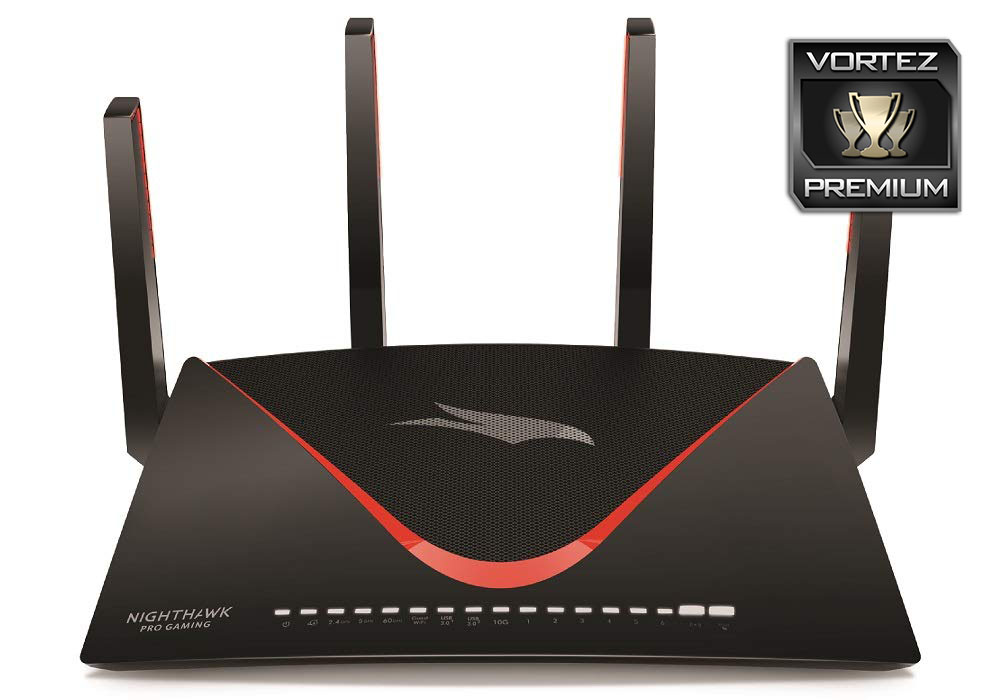
The Nighthawk XR700 beats out its predecessor in all of our tests, but you best be making use of the high-end features to make sense of such a purchase.
+ Much improved long-range wireless speed
+ Excellent all-round performance
+ Great looking chassis
+ Easy to set up
+ Mounting brackets added
Neutral
+- 802.11ad gives a very limited advantage
+- Costly but gives features that could warrant the price
Cons
– 10Gig requires costly extras
Click here for an explanation of our awards at Vortez.net.
Stay connected with the Vortez Social Media pages:
Join in with the discussions on Discord