A stable internet connection that’s capable of handling multiple devices is almost as necessary as food and water in a lot of homes, so investing into something that can improve on your ISP-provided router can be seen as a solid purchase. How does the D-Link EXO AC2600 fair? Let’s find out.

Product on Review: D-Link EXO AC2600 Wi-Fi Router
Manufacturer: D-Link
Street Price: GBP £79.98 / USD $89.95 / AUS $ 129.95
D-Link have a long history of providing high-spec networking hardware without the eye-watering price tag. Today we look at the D-Link EXO AC2600 (DIR-882) boasting WiFi speeds up to 2600Mbps and full Gigabit connectivity.
For years now, routers have offered 802.11ac connectivity, requiring manufacturers to invent new methods of increasing speeds. D-Link have included several of those technologies in the EXO AC2600, including dual-band WiFi for simultaneous streams on the 2.4GHz and 5.0GHz frequencies, MU-MIMO to ensure multiple users all receive the fastest possible speeds, Advanced AV SmartBeam to track devices and adjust signals accordingly for enhanced speed and range.
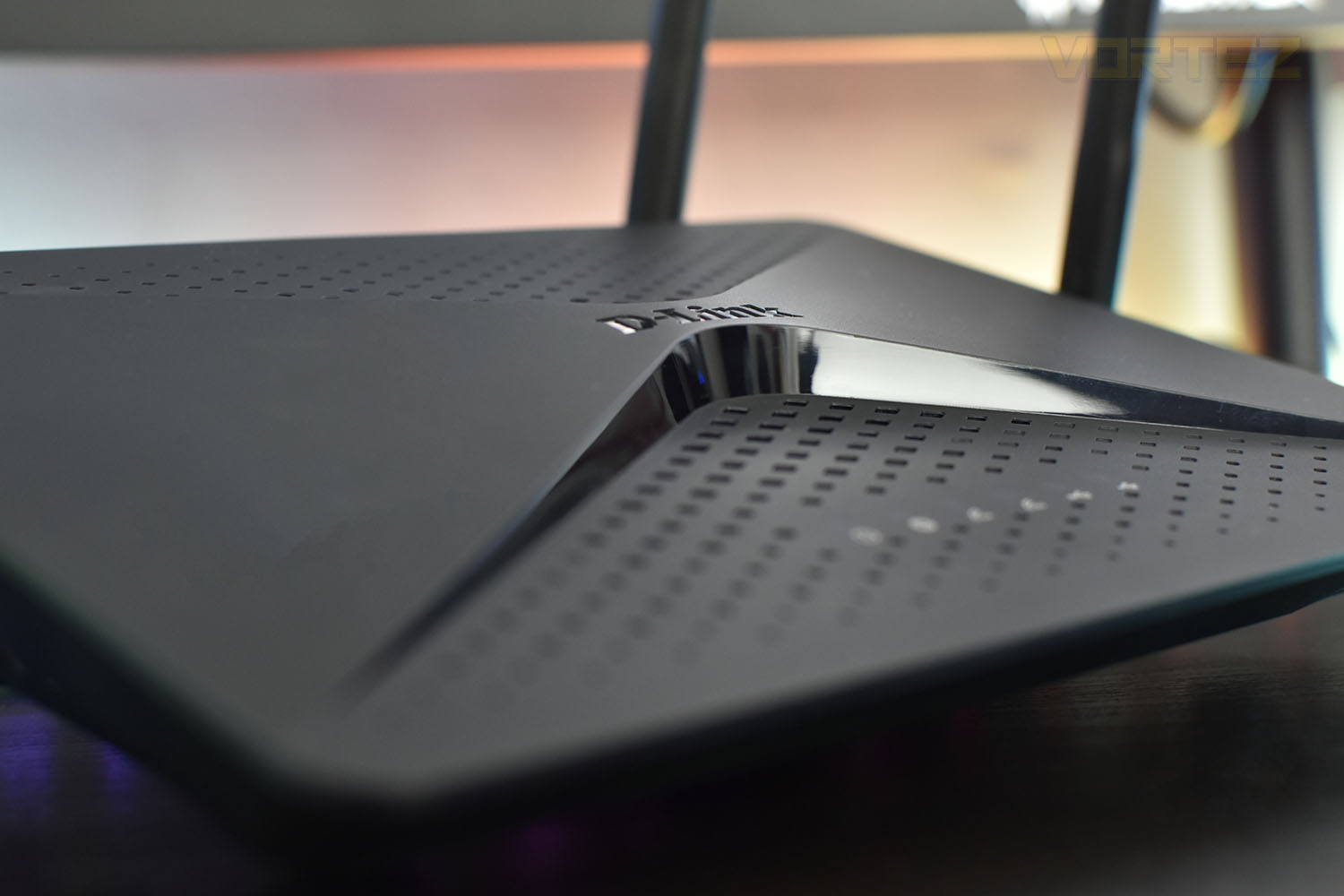
Inside the EXO AC2600 is a powerful Broadcom BCM4709C0 1.5GHz dual core processor to boost both wireless and wired performance as well as QoS to prioritise gaming or streaming traffic and DLNA support for media players, TVs and game consoles. The router also features a USB 2.0 and USB 3.0 port for media sharing on your network.
To further aid the handling of all of that data, D-Link have furnished the EXO AC2600 with 256MB of RAM and 128MB of flash storage.
Currently priced at £79.98 in the UK, the AC2600, on the surface at least, offers incredible performance when compared to much more expensive options. Let’s take a look at ease-of-setup and outright speed in our tests.
D-Link on the XR500:
Technical Specifications
General
Device Interfaces
• IEEE 802.11 ac/n/g/b/a wireless LAN
• 10/100/1000 Gigabit Ethernet WAN port
• Four 10/100/1000 Gigabit Ethernet LAN ports
• One Super Speed USB 3.0 port and one USB 2.0 port
LEDs
• Power
• Internet
• 2.4 GHz WLAN
• 5 GHz WLAN
• Super Speed USB 3.0
• USB 2.0
Antenna Type
• Four external antennas
Data Signal Rate
• 2.4 GHz
• Up to 800 Mbps1
• 5 GHz
• Up to 1,733 Mbps1
Standards
• IEEE 802.11ac
• IEEE 802.11n
• IEEE 802.11g
• IEEE 802.3ab
• IEEE 802.11b
• IEEE 802.11a
• IEEE 802.11d
• IEEE 802.3u
Minimum Requirements
• Internet Explorer 10, Firefox 28.0, Chrome 28.0, Safari 6.0, or other Java-enabled browser
• Cable/DSL modem or other Internet Service Provider equipment with Ethernet port
Functionality
Security
• WPA & WPA2 (Wi-Fi Protected Access)
• WPS (Wi-Fi Protected Setup)
Advanced Features
• Web setup wizard
• File sharing through
• DLNA media server
• SAMBA
• FTP server
• QoS (Quality of Service)
• DMZ (De-militarised Zone)
• Quick VPN
• Firewall – Network Address Translation (NAT)
• Guest Zone
• IPv6-Ready
Physical
Dimensions
• 258.8 x 184.1 x 45.5 mm (10.1 x 7.2 x 1.8 inches)
Weight
• 565 grams (1.25 pounds)
Power Adaptor
• Input: 100 to 240 V AC, 50/60 Hz
• Output: 12 V, 2.5 A
Temperature
• Operating: 0 to 40 °C (32 to 104 °F)
• Storage: -20 to 65 °C (-4 to 149 °F)
Humidity
• Operating: 10% to 90% non-condensing
• Storage: 5% to 95% non-condensing
Certifications
• FCC
• CE 2
• C-Tick
• S Mark (UL60950)
• Wi-Fi Certified
• WPS Setup
• IPv6
Packaging & Bundle
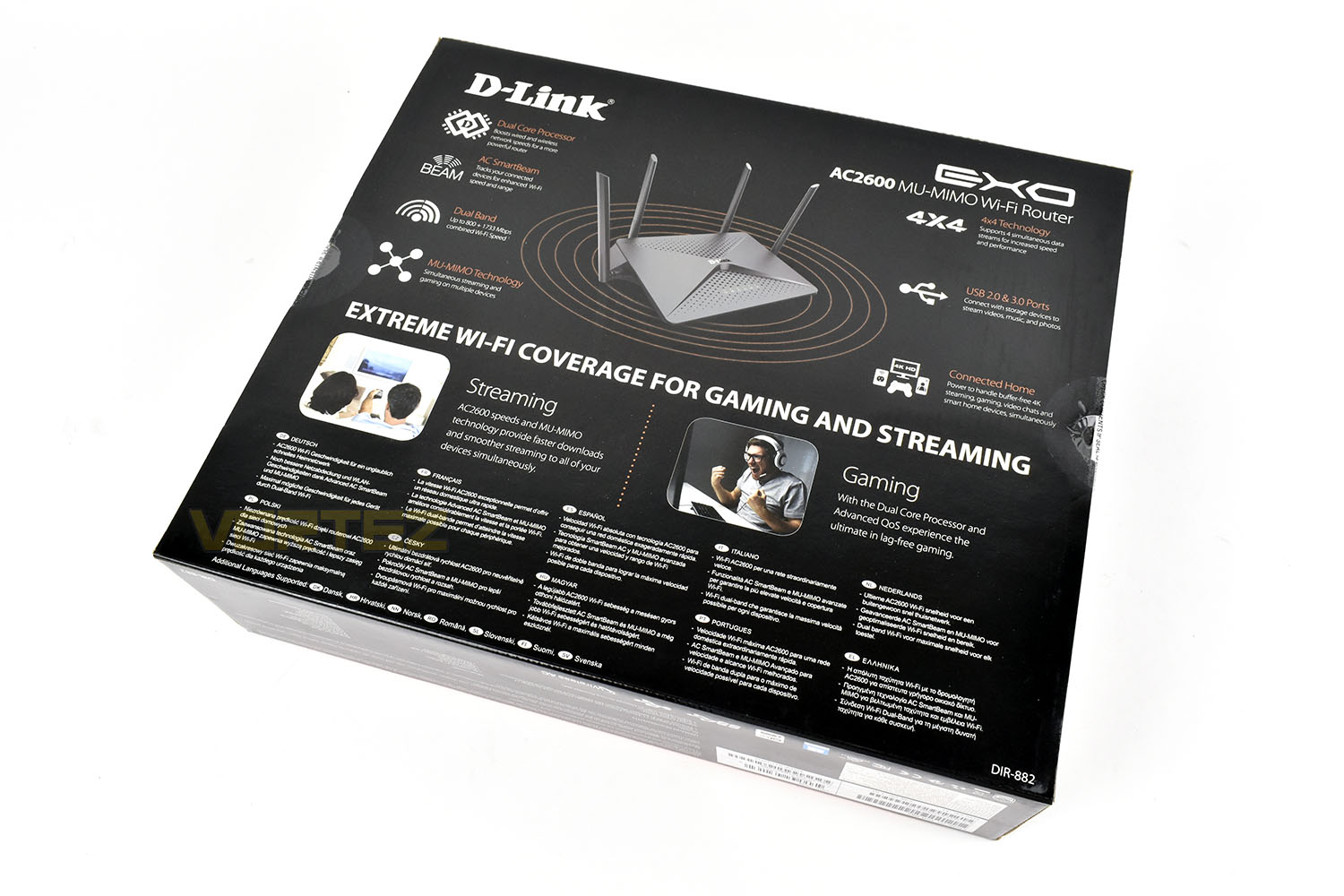
Throwing away the typical blue styling that D-Link typically employ, the black and orange definitely catches the eye that bit more, especially for a higher-end market where gamers and those who consume high-resolution content will be the target audience.The front gives a small amount of information and a clear picture of the device.
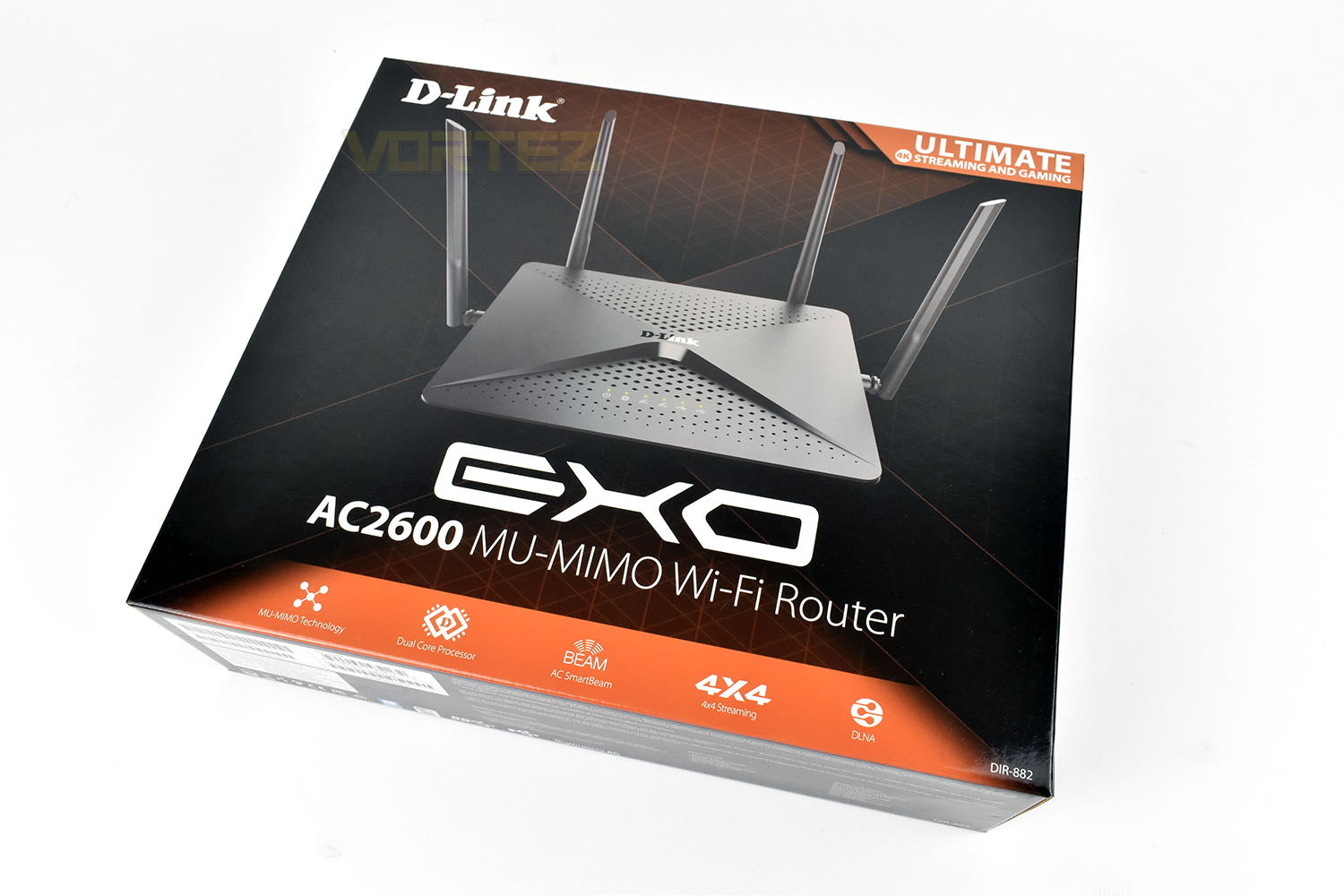
Flipping the box over we see a brief description of each feature as well as illustrations, though the gaming picture is a little too enthusiastic if you ask us!
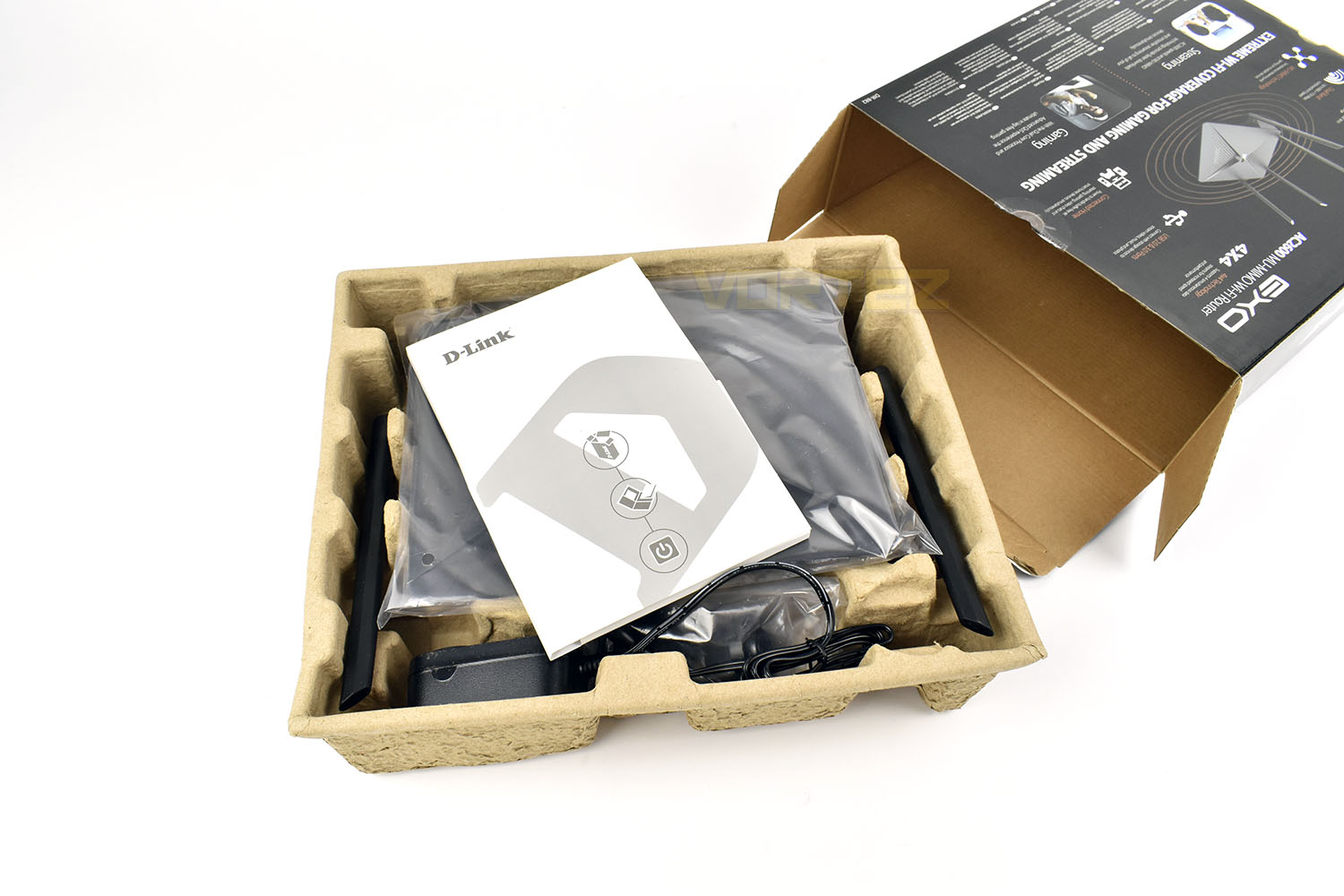
Aside from the plastic cover on the router, D-Link have chosen to use an all-cardboard packaging. We fully support a move towards using cardboard instead of plastics; anything to help improve a company’s environmental footprint can only be a good thing.
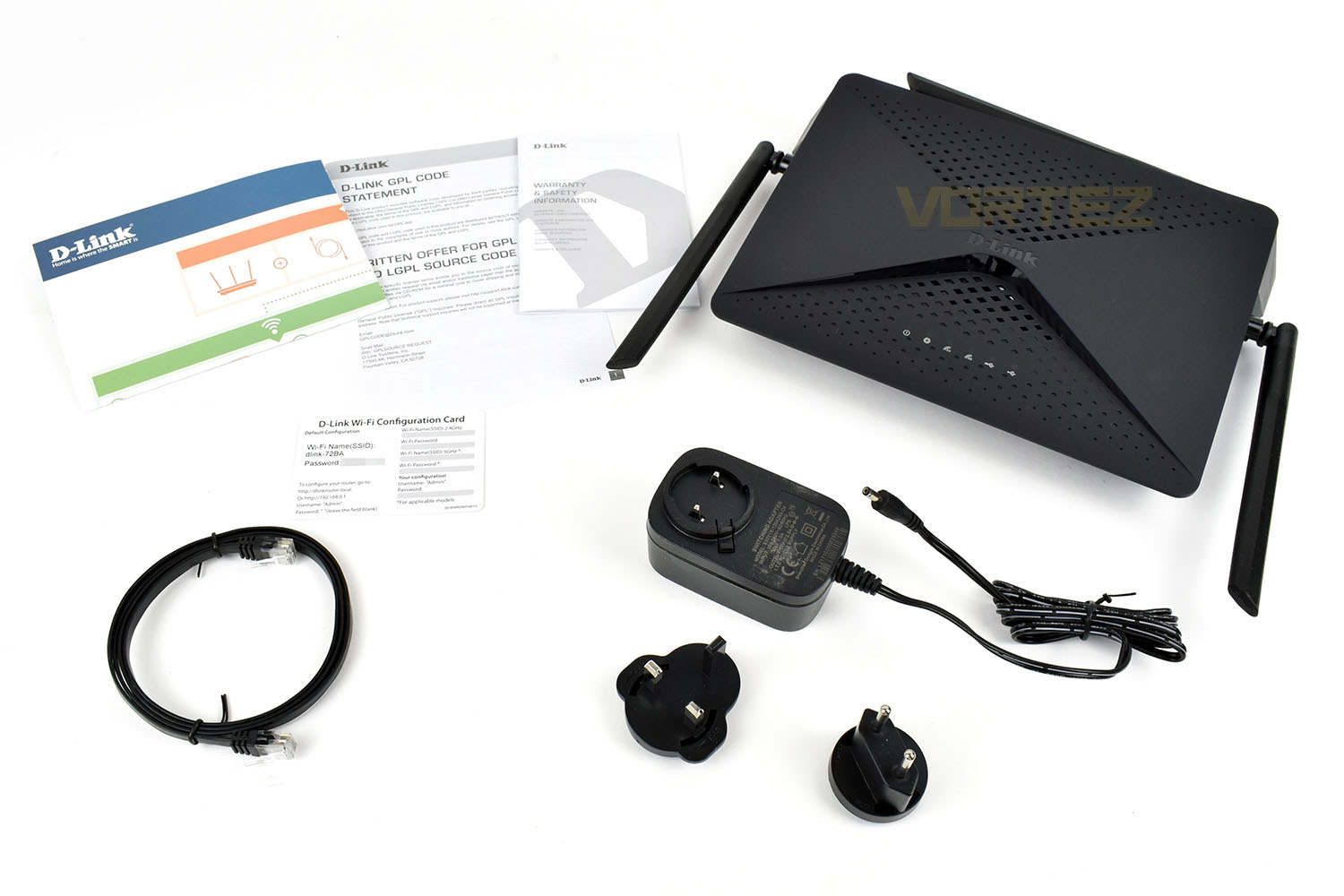
Bundled with the router is an EU/UK plug adaptor, a 1.5M ethernet cable, an installation guide, warranty information and a handy WiFi configuration card with the default username and password printed on.
Closer Look
Unboxing the router is a simple affair, with the antennas pre-attached. Each antenna measures 175mm in length so the router won’t sit under most TV cabinets unless the shelves are particularly well-spaced. The unit itself packs very little weight, around 500g, and feels like it’s made from cheap, thin plastic; at this price point it’s difficult to ask too much, especially if the performance is reasonable, but its to be considered.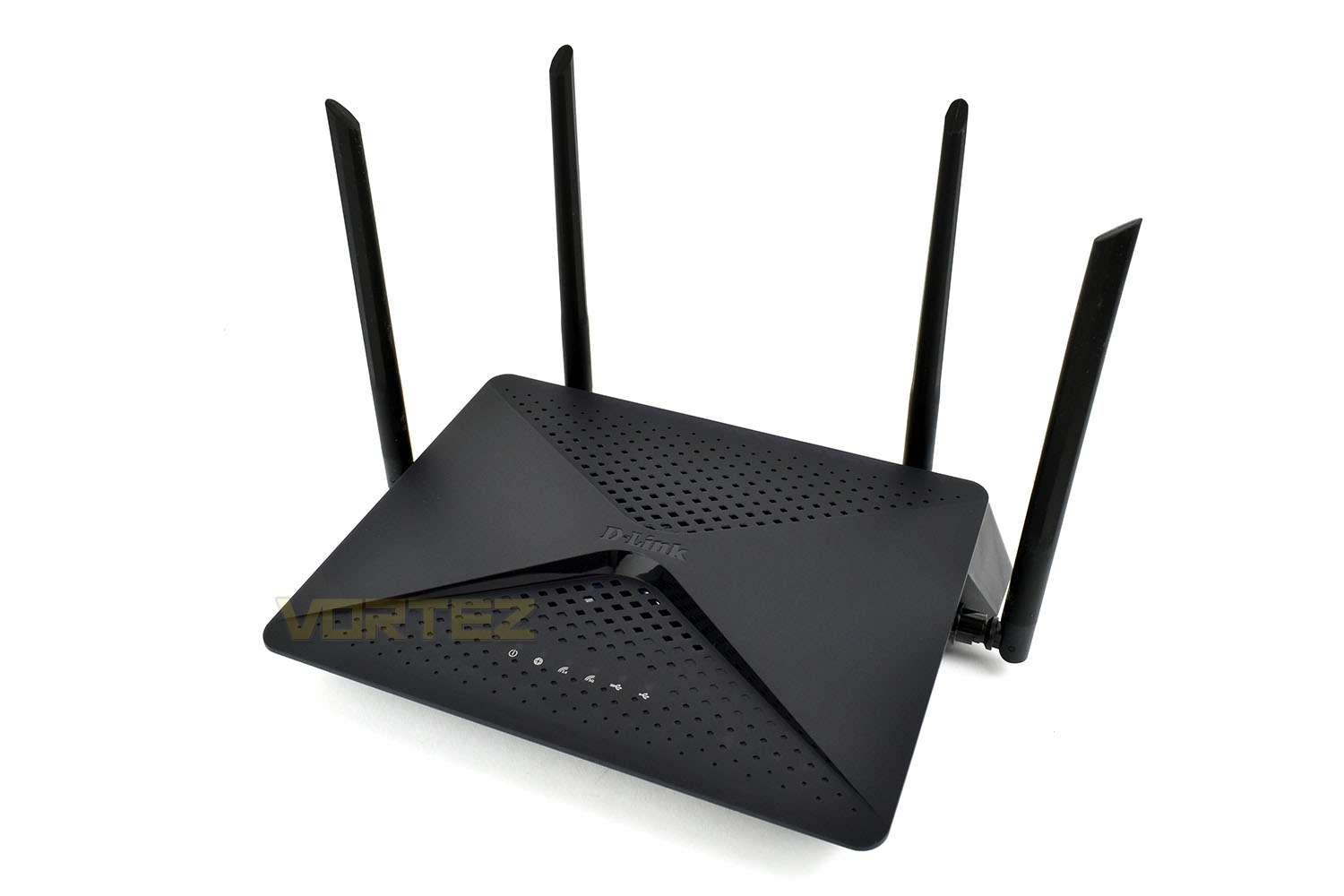
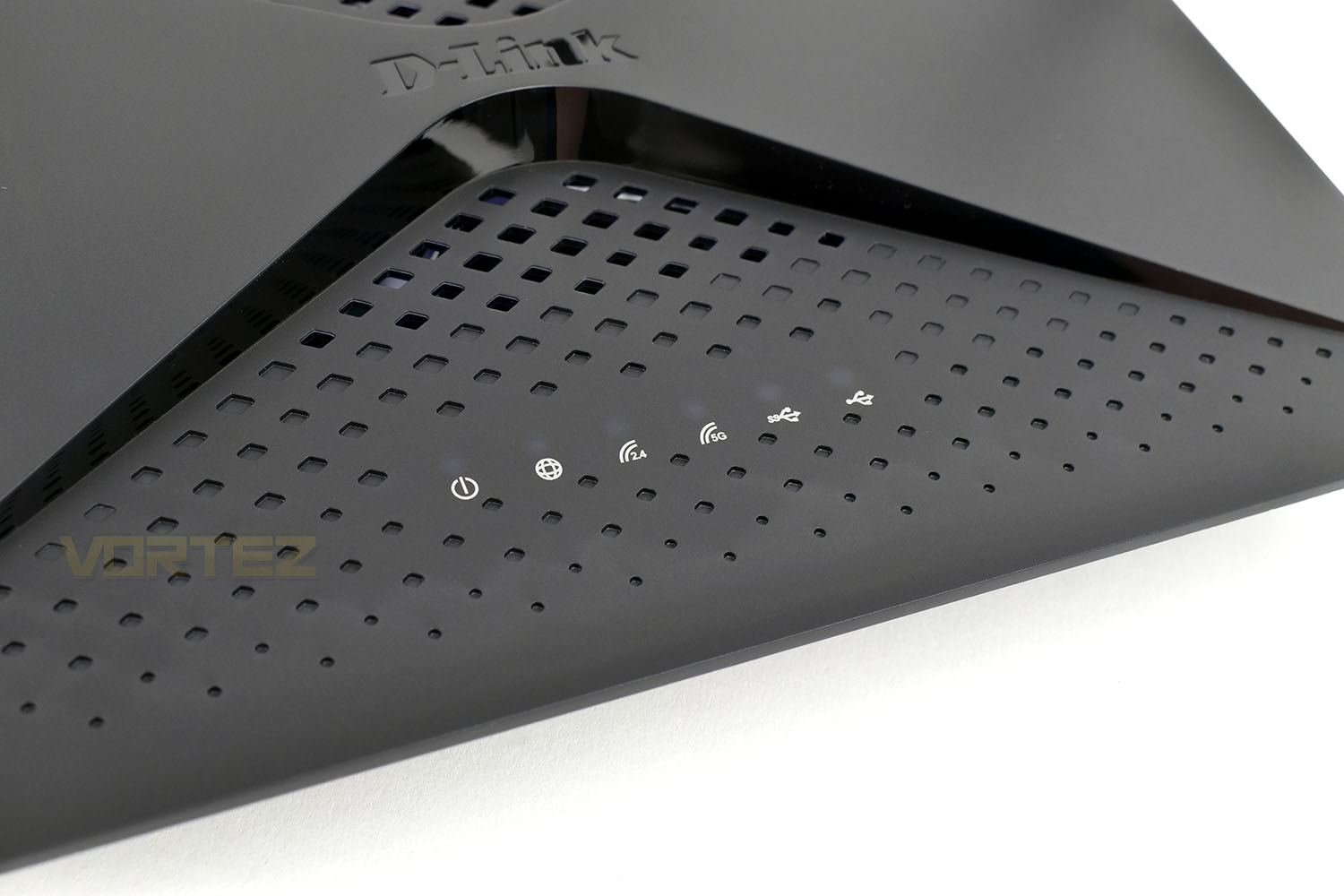
The top of the router is perforated to help keep the CPU and equipment inside cool. Along the front are six LEDs, which you can faintly see above each white logo in the image. Power, internet, 2.4GHz, 5.0GHz, USB 3.1 and USB 2.0.
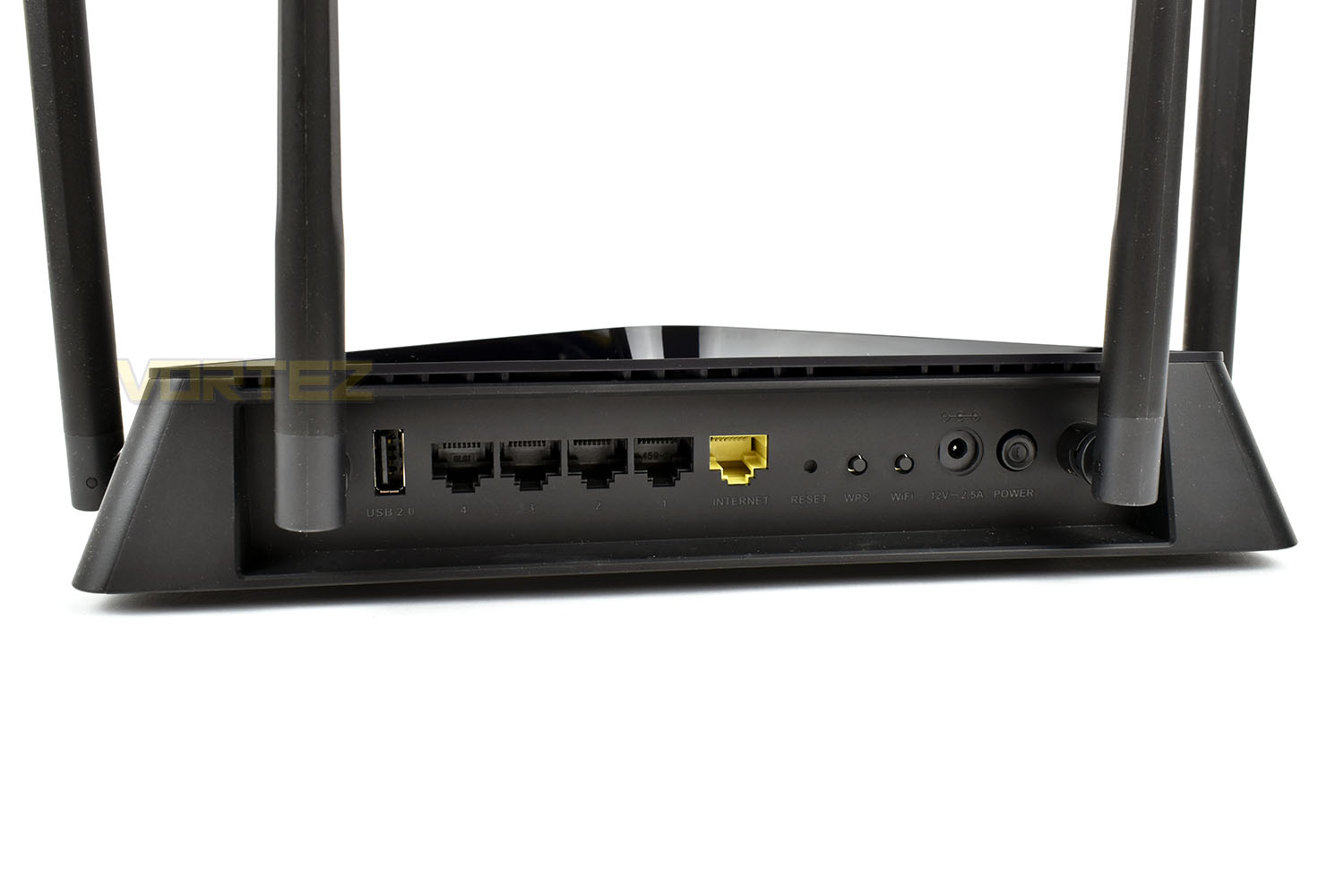
Around the back, starting on the left we have a USB 2.0 port, and then reverse-ordered Gigabit-LAN ports with the fifth yellow port for connecting to your ISPs modem. There’s then a reset toggle for when things go awry or you get locked out of the device, a WPS toggle for easy connectivity, a WiFi switch if you don’t wish to use the wireless functionality at all (or to get the kids to sleep if they won’t put their tablets down). Finally, a power connection and switch.
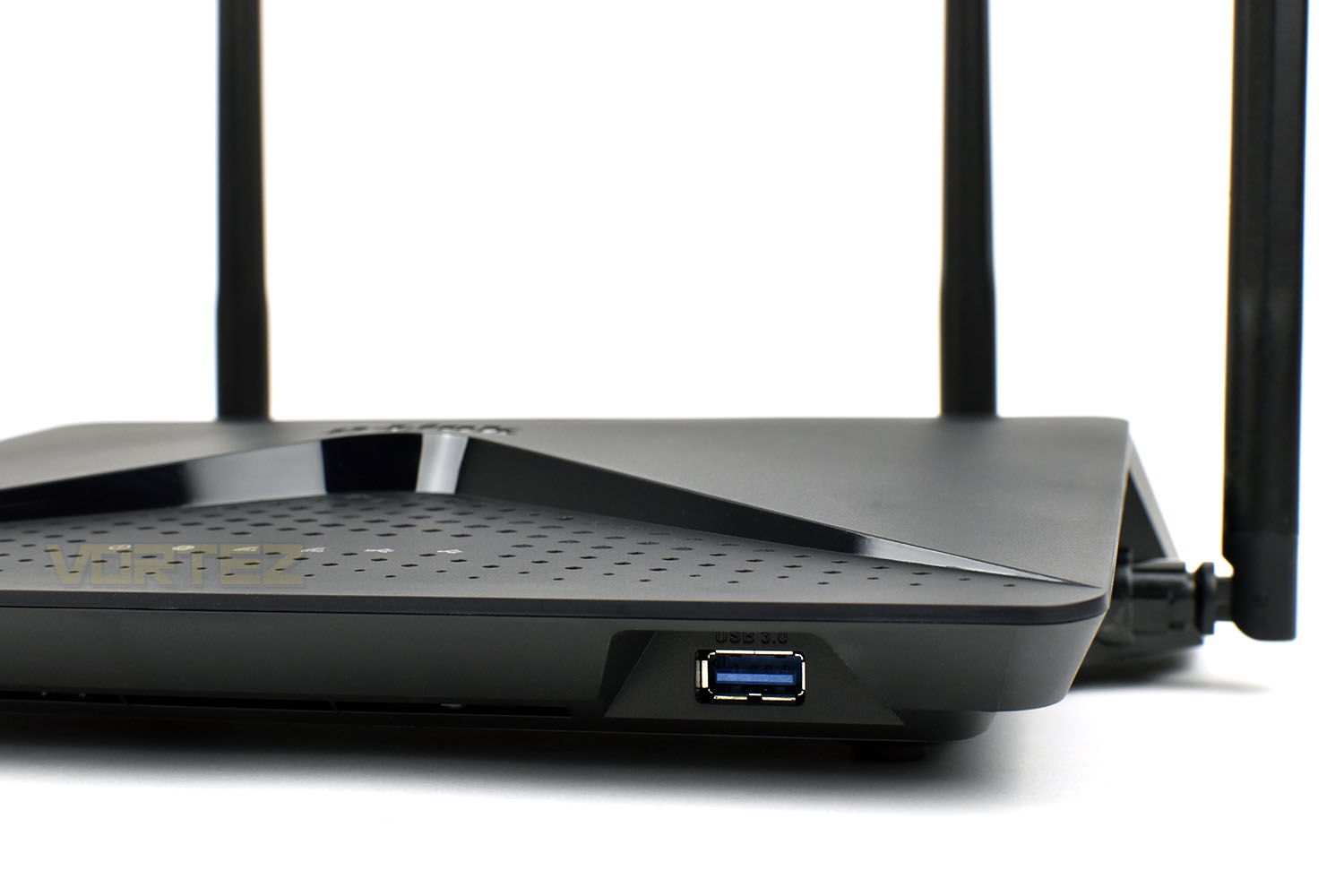
The USB 3.0 is hidden under a lip on the front of the EXO AC2600. If you wish to have something permanently attached to the router, such as an HDD full of files, then this solution won’t be the most attractive but it’s a handy feature to have non-the-less.
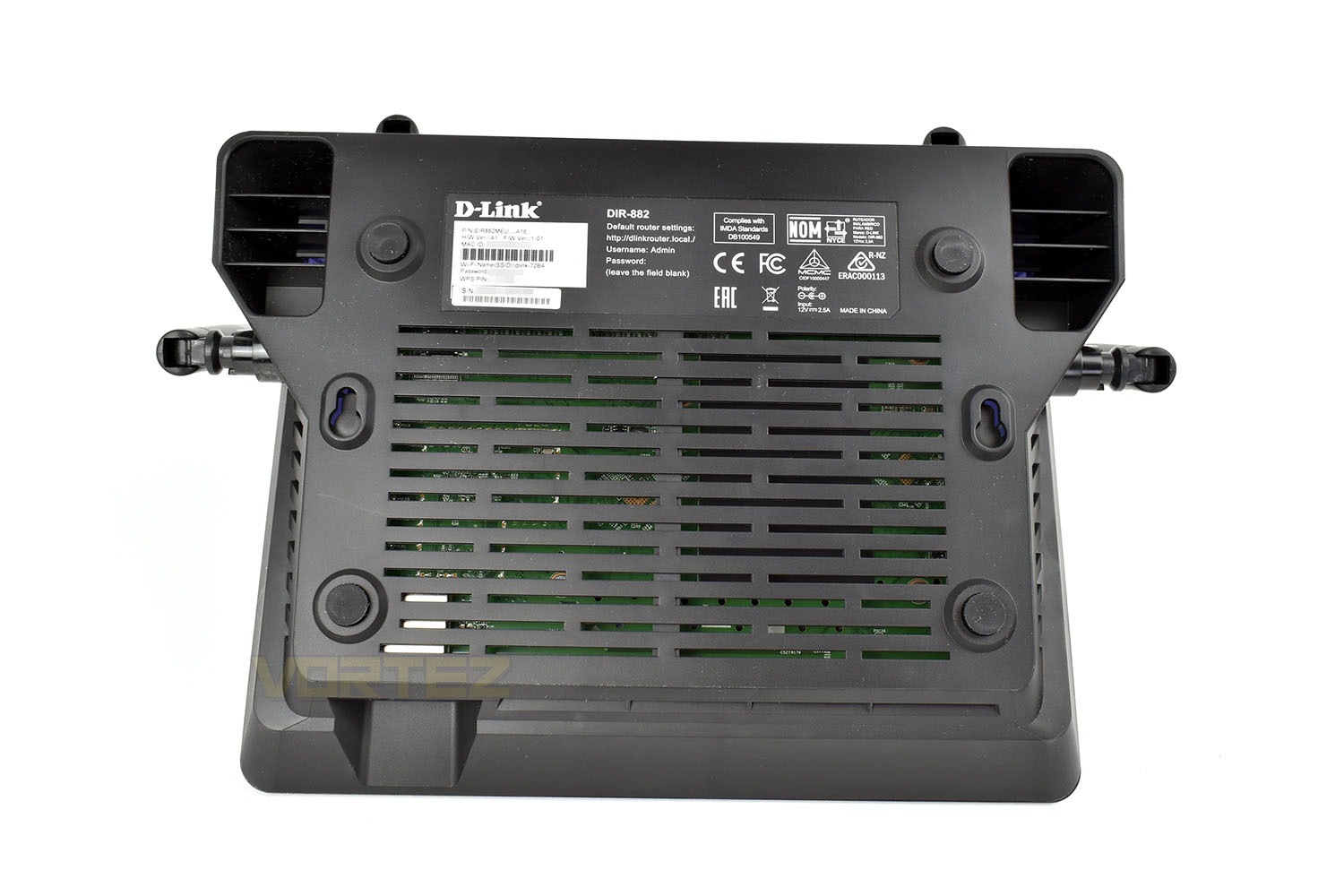
Last up, a look at the bottom. There are large vented regions to prevent overheating if the router is in heavy demand from multiple users and four rubber feet. We also find a pair of keyhole fixings for mounting the router high up on a wall, out of the way. No mounting hardware has been included though.
Test Setup & Methodology
Testing a router of any kind, especially the wireless performance, can be regarded as somewhat of a minefield. Fluctuations due to overheads and other nearby devices can drastically effect performance from one minute to the next, therefore we kindly ask that you regard the results here in as a rough guide and they likely won’t mirror your personal experience exactly. However, having said that, we do attempt to reduce the amount of interference in anyway possible, such as shutting off any devices not currently being used and limiting the host and client PC to the core applications only.
Our wireless tests are performed via a series of file transfers from a host PC to a client PC. The host PC uses a Killer E2500 Gigabit controller and the files are contained on a Samsung 970 EVO NVMe drive, helping to prevent any file-access bottlenecks. Our client PC utilises an Intel Wireless-AC 9560 network card for wireless communication, capable of both 2.4GHz and 5.0GHz transmission; while relying on a Realtek Gigabit ethernet adaptor for wired transfers. The client PC also uses a Samsung 970 EVO, again, reducing the chance of storage bottlenecks.
Wireless tests are performed at two different locations within a 2 bedroom house, to more accurately reflect a real world scenario. The first location is around 3 metres from the router, in the same room, to represent a user browsing the internet in their living room where their router is also located. The second location is at the far corner of the property, roughly 12 metres away, and through three walls. We position the router underneath a TV, between a TV set top box and a games console.
Wired performance is measured by plugging both the host PC and client PC into the router.
To test two different use cases, we obtained a copy of Bastion from the Steam servers, this game is 1.23GB in size, containing 1,203 files within 35 folders. The second usage scenario is a 1GB .bin file, downloaded from Speed.Hetzner. The file is exactly 1024MB and can be repeatedly transferred incredibly quickly, to measure the theoretical top speed of the router.
We provide our results as an average transfer speed in Mbps (Megabits per second, divide this result by 8 for MB/s).
Each test is conducted three times with an average result then deduced from those.
Software GUI & Performance
SoftwareThe initial setup of the device was super simple taking no more than five minutes, excluding the time taken to upgrade the firmware three times. First stepping up to 1.04, then 1.06 then finally 1.11. All in all, we estimate it took around twenty minutes.
Below is a short video showing the various features within the router. It’s not the most complete in-router software we’ve used but it offers plenty for most users, it’s also incredibly snappy to use which is a big bonus.
Performance
We test both the WiFi and ethernet performance of the router below, at both 2.4GHz and 5.0GHz on the WiFi tests. Please check the Test Setup & Methodology page for details.
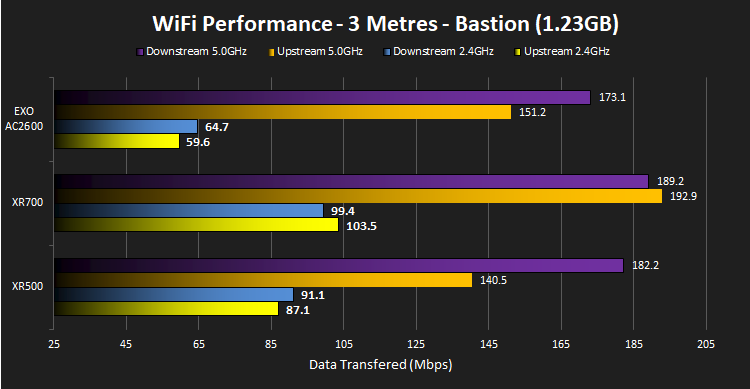
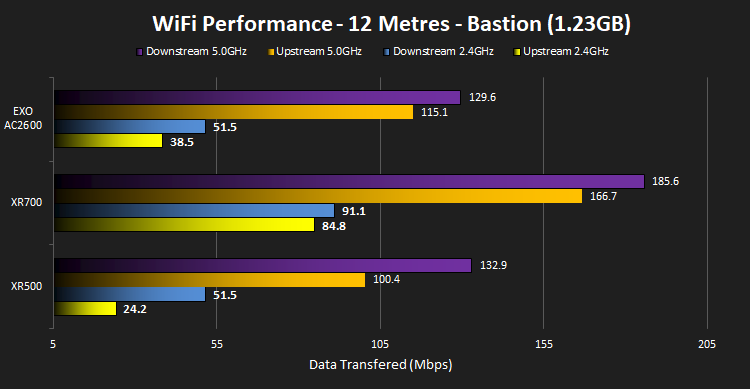
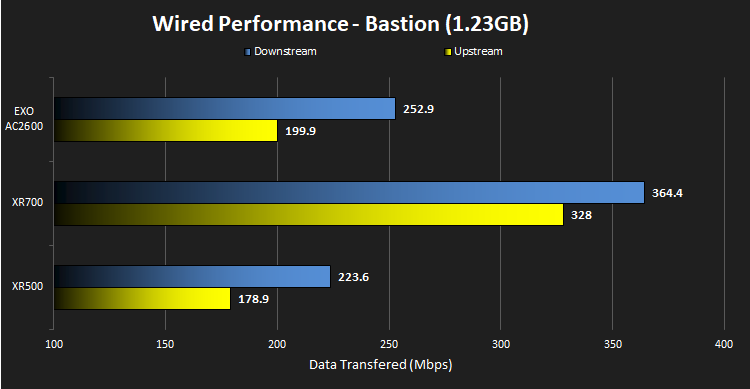
These tests are designed to be particularly hard work to transfer, comprising of many small files. The router still handles them very well.
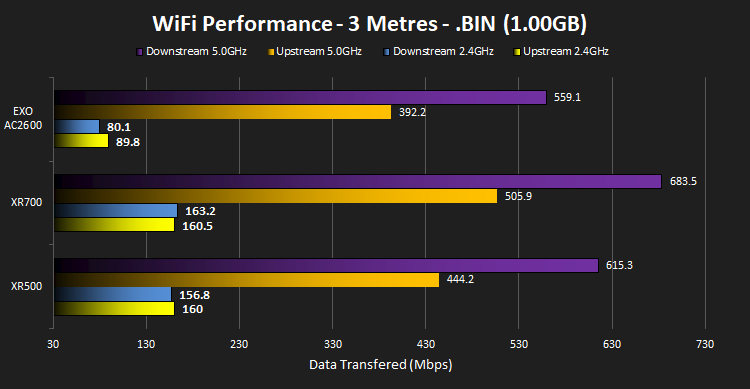
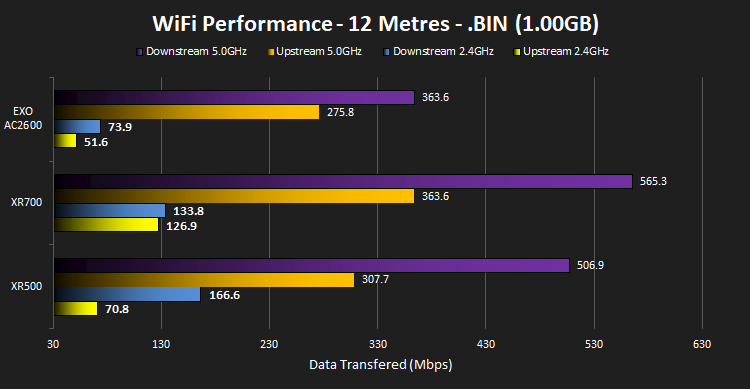
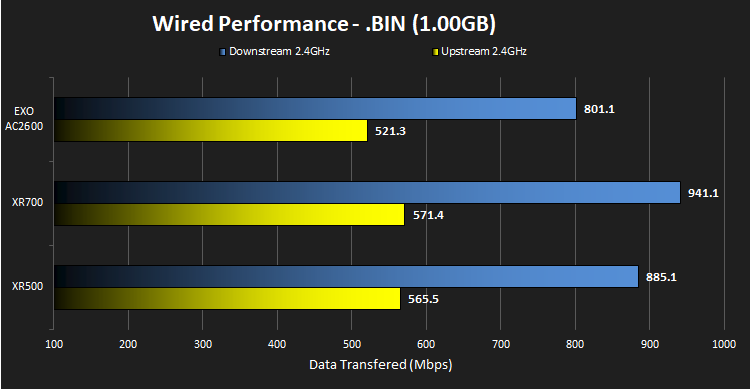
These tests, conversely to the Bastian transfer, are to test the theoretical maximum that the network is capable of. We see some incredibly fast transfers, far above what would reasonably be required in a home environment.
Conclusion
The D-Link EXO AC2600 (DIR-882) is an interesting router with solid performance, a classy yet understated chassis and an attractive price tag.Certainly, there’s cheaper routers on the market, and there’s also faster ways to move files around, but the D-Link DIR-882 finds an excellent balance between the two. Our test graphs are a little unfair at the moment, and we aim to pad them out over the coming months, but the D-Link holds its own against two vastly more expensive options. As you can expect, absolute throughput has to suffer somewhat, especially when being compared to something 5x the cost, but to be within 10-20% of the Netgear XR700 in most tests is remarkable.
The chassis looks great, it’s neat and tidy and easy to tuck away, providing you can fit the tall antennas in. However, looks aren’t everything, and while handling the device, the construction felt light and flimsy. While this is very unlikely to cause any problems due to the fact that most routers are set up next to their modem and then very rarely touched again, it would still be nice if it felt a little more well-made.
Setting up the router was a doddle, taking around 20 minutes including the firmware upgrades. There was no jargon thrown in, instead using plain English and doing all the hard work for you. While adjusting settings in the router, we met a painful 25 second wait for every change. While we’re sure this has been implemented for a reason, 25 seconds seems like an eternity when you’re wanting to do something as simple as change an SSID or password. Overall, however, the software is snappy and easy to use, though it does lack some more in-depth features.
Thanks to the MU-MIMO (Multi-user, multiple input, multiple output) and AC SmartBeam technology, the router performed remarkably well; we’d be happy to recommend this for multiple user households.
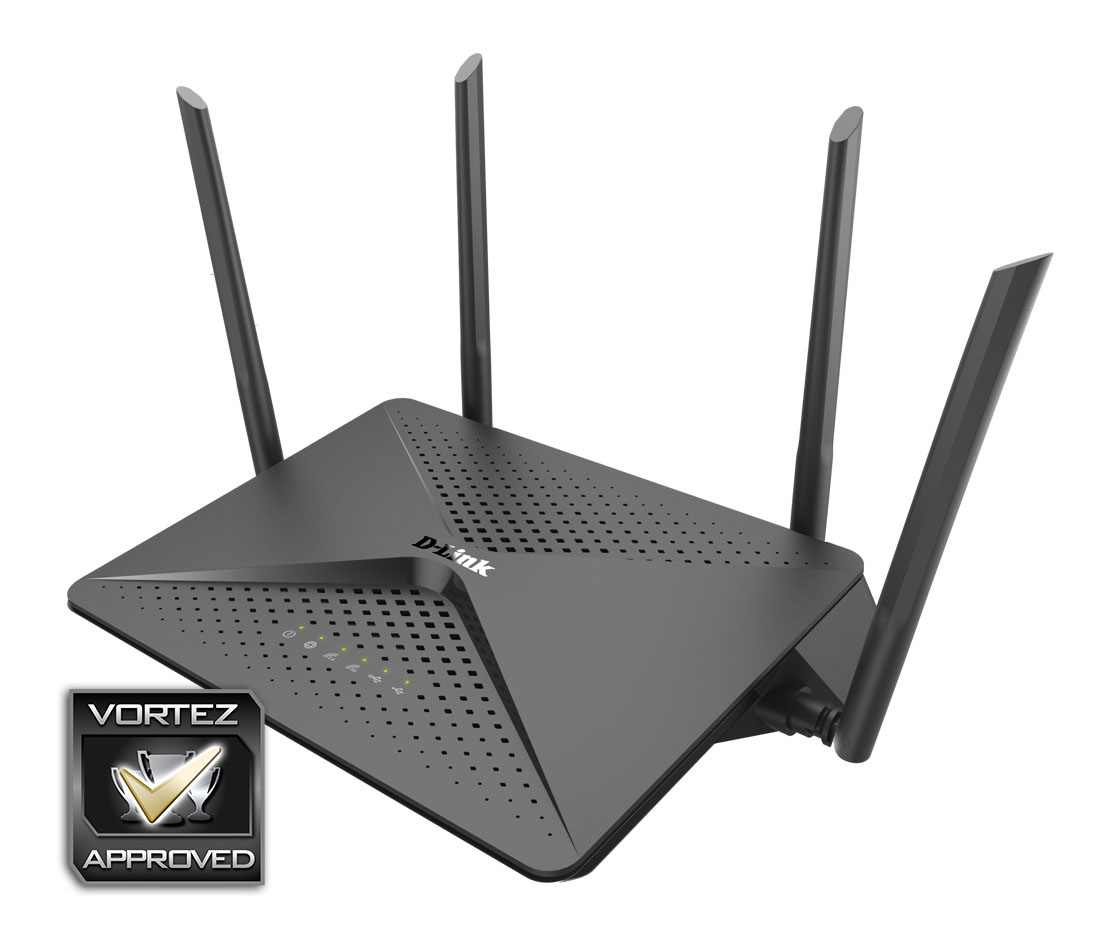
The D-Link DIR-882 provides a solid WiFi platform at a competitive price; if your family demands stability and speed but you don’t want to spend the Earth, choose this one; it will almost undoubtedly be better than the ISP-provided router.
+ Great price
+ Quick and stable performance
+ Chassis isn’t in-your-face
+ Has USB ports for media sharing
+ Intuitive and easy to setup software
Neutral
+- Feels a little cheap and flimsy
+- Antennas can’t be swapped
Cons
– Customising settings can take a while
Click here for an explanation of our awards at Vortez.net.
Stay connected with the Vortez Social Media pages:
Join in with the discussions on Discord