NVMe storage has become big business in the last couple of years, with larger capacity drives becoming more affordable. Today we can introduce you to the Kingston KC2000, the latest from the storage giant.

Product on Review: Kingston KC2000 NVMe
Manufacturer: Kingston
Street Price:
250GB: GBP £68.16 / USD $76.49
500GB: GBP £118.68 / USD $131.98
1000GB: GBP £208.92 / USD $234.82
2000GB: GBP £425.88 / USD $437.07
Kingston have been around in the PC sector since the early days, first appearing in 1987 to produce the highest quality memory modules available. Since then they’ve diversified into the gaming market with the HyperX brand as well as manufacturing USB flash drives, SATA and NVMe based SSDs and much more.
Today we look at their latest and greatest M.2 NVMe drive, available in capacities ranging from 250GB to 2TB with read and write speeds topping 3200MB/s and 2200MB/s respectively. Those speeds are attainable while also utilising first-class security through encryption technologies. Read and write IOPS are clocked at up to 350,000 and 275,000 respectively, on the 1TB offering.
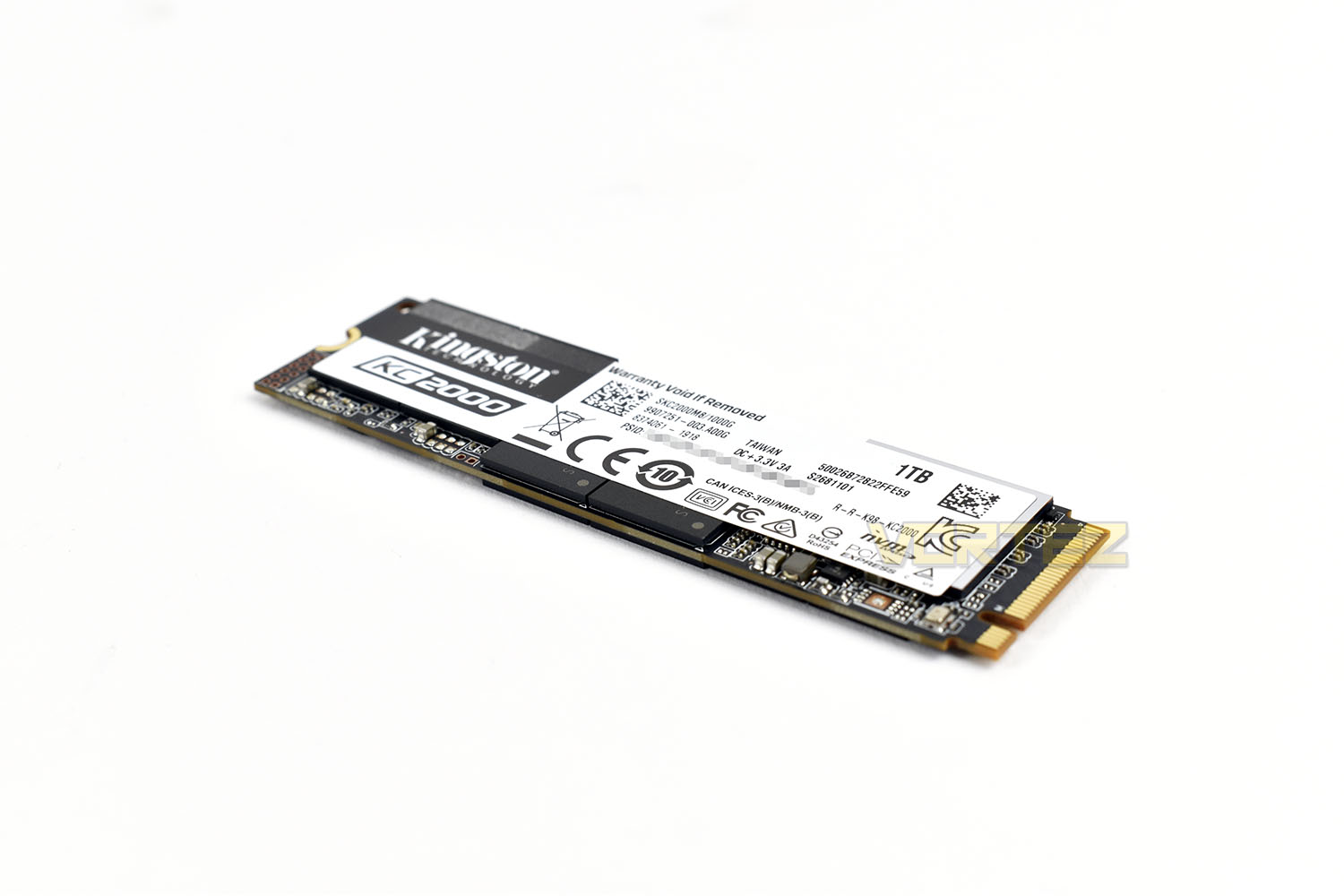
Allowing the combination of both speed and security is Toshiba’s brand new 9-Layer 3D TLC NAND and Silicon Motion’s most up to date controller, the SM 2262EN which all operates on the PCI-E 3.0 x4 NVMe interface.
Ensuring your drive lasts, Kingston have you covered by a 5-year warranty and offer TBW (Terabytes of wear) ratings from 150GB on the 250GB drive right through to 1200TBW on the 2TB model.
Pricing on the model is listed at the top of the introduction, so we won’t clutter this paragraph by repeating that, but with the market being full of competing drives at multiple different price points, the Kingston will have to perform well to find its own space. Let’s put it through some tests and see where it stacks up at the other end.
Kingston on the KC2000 NVMe:
Kingston’s KC2000 NVMe PCIe SSD delivers powerful performance using the latest Gen 3.0 x 4 controller and 96-layer 3D TLC NAND. With read/write speeds of up to 3,200/2,200MB/s1, KC2000 delivers outstanding endurance and improves the workflow in desktop, workstation and high-performance computing (HPC) systems. The compact M.2 design gives greater flexibility, increasing storage but also saving space. Available in capacities from 250GB–2TB to meet your system’s needs.
Technical Specifications
Form factor:
M.2 2280
Interface:
NVMe™ PCIe Gen 3.0 x 4 Lanes
Capacities:
250GB, 500GB, 1TB, 2TB
Controller:
SMI 2262EN
NAND:
96-layer 3D TLC
Encrypted:
AES 256-bit Encryption
Sequential Read/Write:
250GB – up to 3,000/1,100MB/s
500GB – up to 3,000/2,000MB/s
1TB – up to 3,200/2,200MB/s
2TB – up to 3,200/2,200MB/s
Random 4K Read/Write:
250GB – up to 350,000/200,000 IOPS
500GB – up to 350,000/250,000 IOPS
1TB – up to 350,000/275,000 IOPS
2TB – up to 250,000/250,000 IOPS
Total Bytes Written (TBW):
250GB – 150TBW
500GB – 300TBW
1TB – 600TBW
2TB – 1.2PBW
Power Consumption:
0.003W Idle / 0.2W Avg / 2.1W (MAX) Read / 7W (MAX) Write
Storage Temperature:
-40°C~85°C
Operating temperature:
0°C~70°C
Dimensions:
80mm x 22mm x 3.5mm
Weight:
250GB – 8g
500GB – 10g
1TB – 10g
2TB – 11g
Vibration Operating:
2.17G Peak (7-800Hz)
Vibration Non-operating:
20G Peak (20-1000Hz)
MTBF:
2,000,000
Warranty/support:
Limited 5-year warranty with free technical support
M.2 2280
Interface:
NVMe™ PCIe Gen 3.0 x 4 Lanes
Capacities:
250GB, 500GB, 1TB, 2TB
Controller:
SMI 2262EN
NAND:
96-layer 3D TLC
Encrypted:
AES 256-bit Encryption
Sequential Read/Write:
250GB – up to 3,000/1,100MB/s
500GB – up to 3,000/2,000MB/s
1TB – up to 3,200/2,200MB/s
2TB – up to 3,200/2,200MB/s
Random 4K Read/Write:
250GB – up to 350,000/200,000 IOPS
500GB – up to 350,000/250,000 IOPS
1TB – up to 350,000/275,000 IOPS
2TB – up to 250,000/250,000 IOPS
Total Bytes Written (TBW):
250GB – 150TBW
500GB – 300TBW
1TB – 600TBW
2TB – 1.2PBW
Power Consumption:
0.003W Idle / 0.2W Avg / 2.1W (MAX) Read / 7W (MAX) Write
Storage Temperature:
-40°C~85°C
Operating temperature:
0°C~70°C
Dimensions:
80mm x 22mm x 3.5mm
Weight:
250GB – 8g
500GB – 10g
1TB – 10g
2TB – 11g
Vibration Operating:
2.17G Peak (7-800Hz)
Vibration Non-operating:
20G Peak (20-1000Hz)
MTBF:
2,000,000
Warranty/support:
Limited 5-year warranty with free technical support
Packaging, Bundle & Closer Look
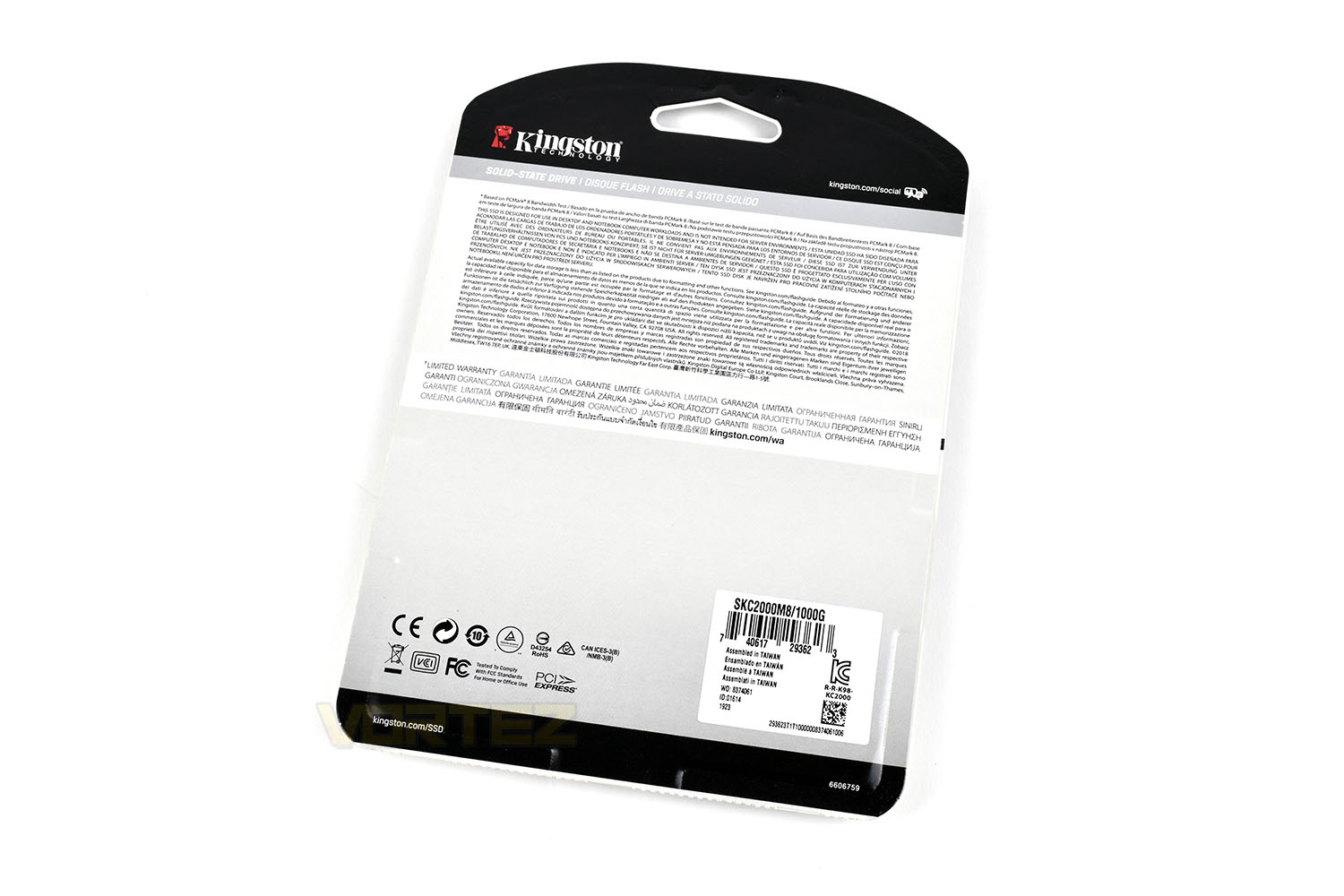
The Kingston KC2000 arrives in a non-reusable cardboard sleeve with a plastic window holding the SSD in place. Within the clear plastic section on the front is a 2.5” drive-sized black plastic place holder, keeping the much smaller NVMe drive held in place. There’s definitely a more environmentally conscious way of coming to the same level of protection, it must be said.The front clearly states the capacity and gives a very rough guide as to the speed of the device.
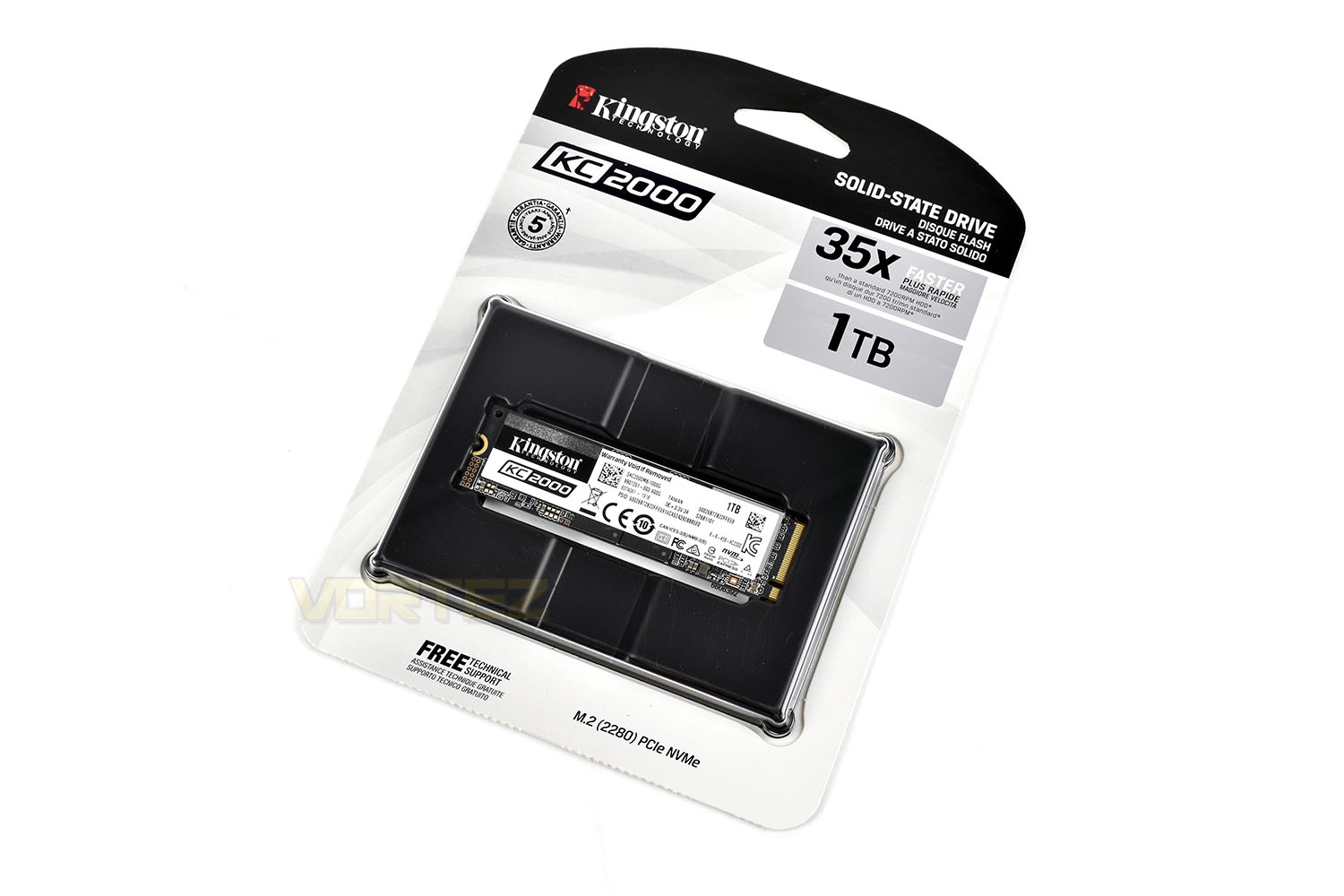
The rear doesn’t give much more information on the drive, making the peg-style packaging a little redundant if you can’t just pick the drive up off the shelf in your local PC hardware store and be made aware of the specifications. That might seem a little old-fashioned with the vast majority of people now buying online, it does still happen.
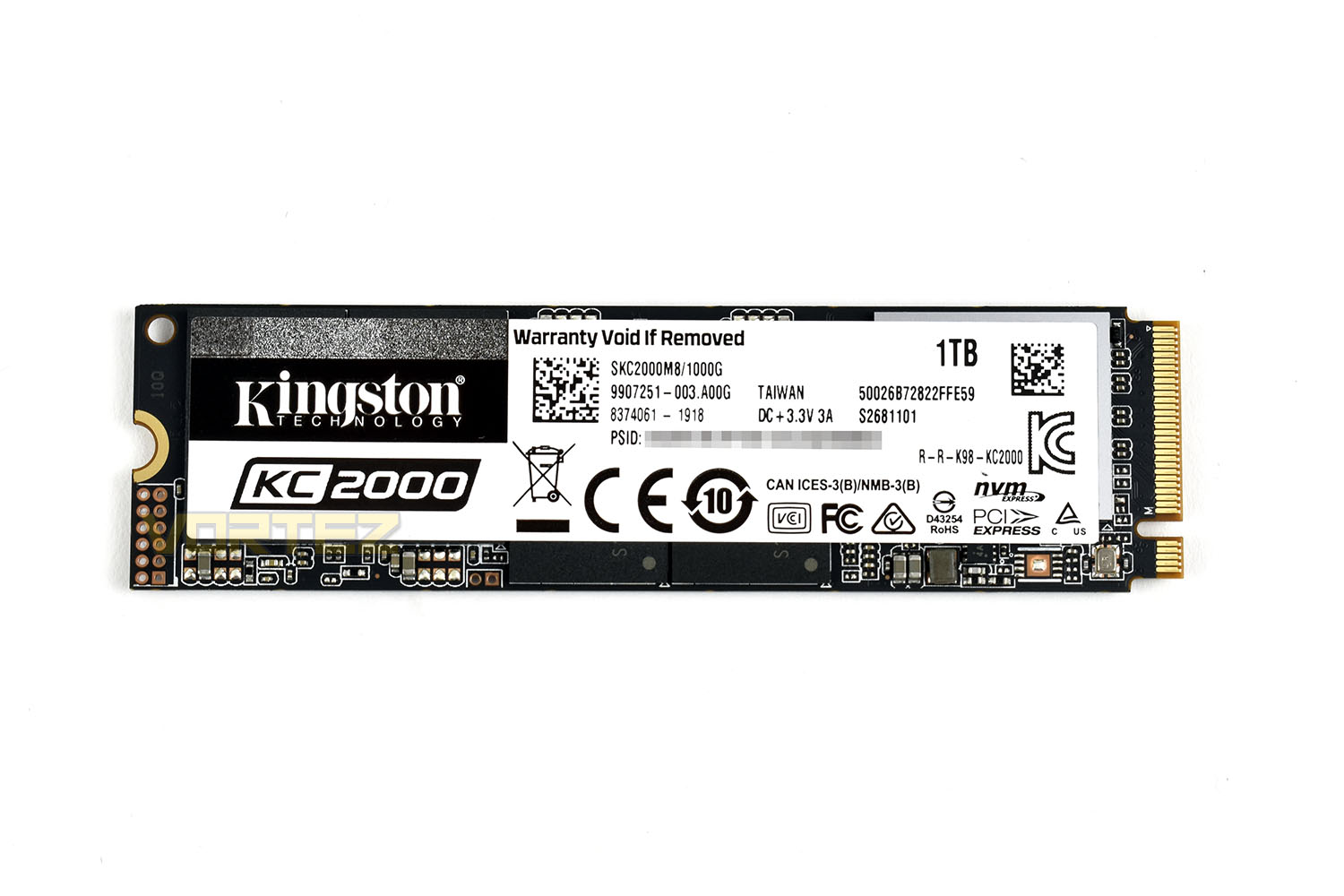
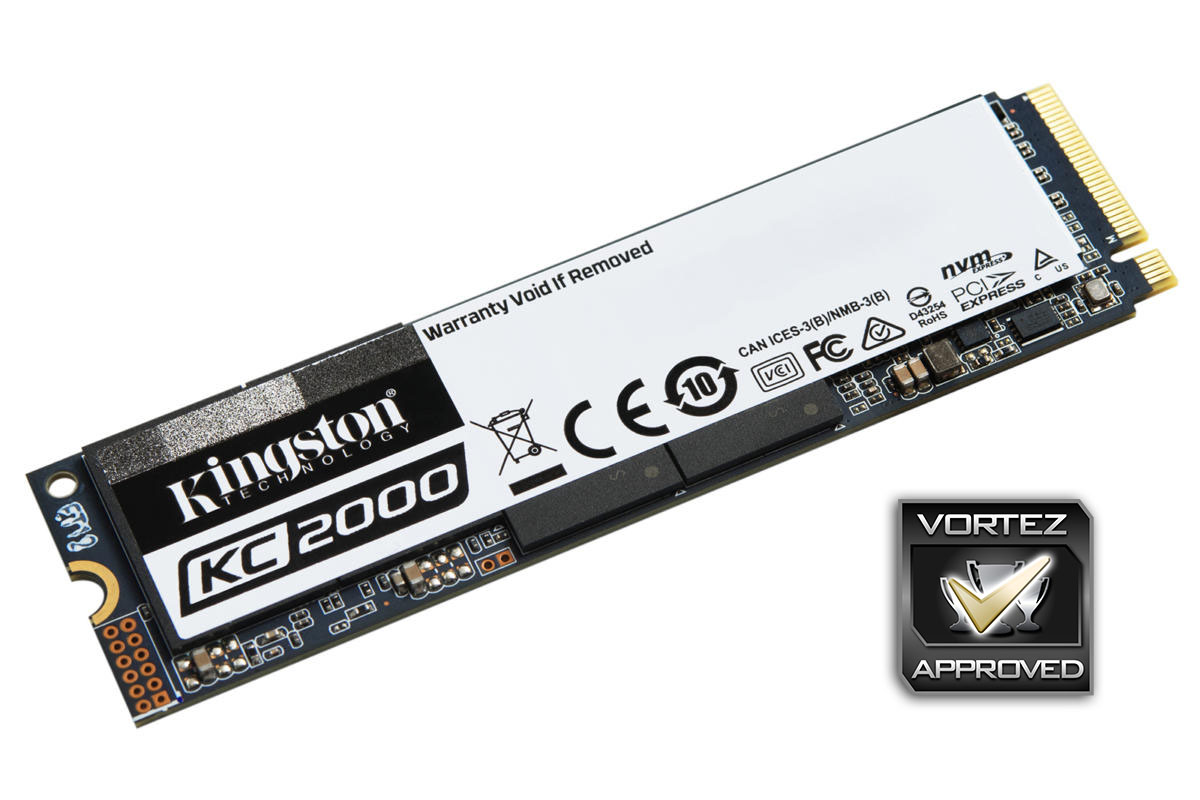
The front of the drive is dominated by a large, and quite frankly, ugly sticker. This covers a quartet of memory chips and the SMI 2262EN controller and cannot be removed for warranty purposes.
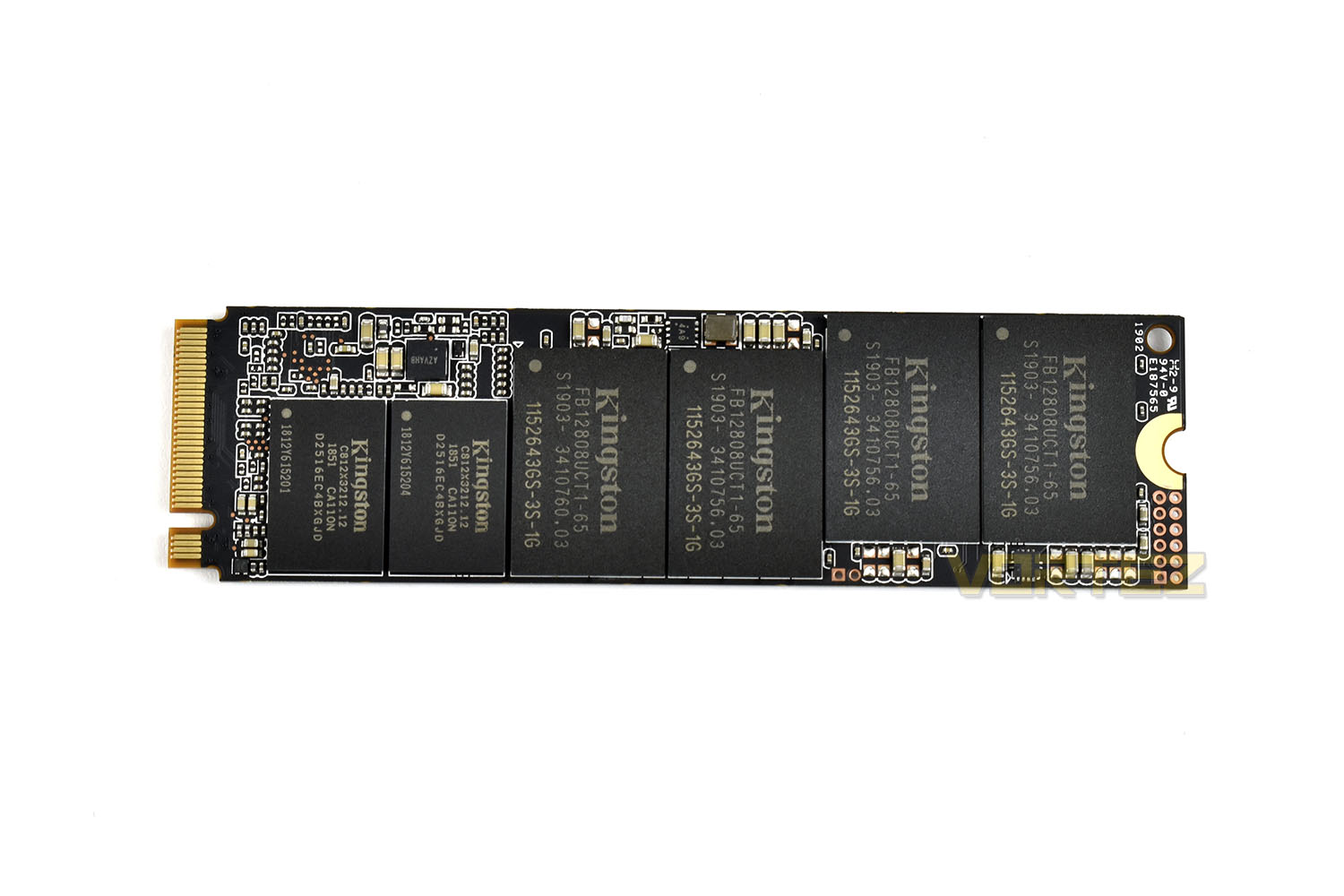
The rear of the drive is also populated with more memory chips. Providing your case isn’t restricted in terms of airflow, this shouldn’t be a problem, particularly with most of the drive’s heat output typically coming from the controller, but it’s something to bear in mind.
Test Setup & Methodology
Our test system is formatted and a fresh version of Windows is installed with just drives in place – no additional applications. Windows is then updated to the latest release and the drivers are installed.Included in the list of benchmarks are the following applications:
Benchmarks
Anvil Pro
AS SSD
ATTO Disk Benchmark v2.46
Futuremark PCMark 8
AIDA64
AS SSD
ATTO Disk Benchmark v2.46
Futuremark PCMark 8
AIDA64
Test system
CPU: Intel Core i7 7700K
Motherboard: MSI Z270 Gaming M7
Graphics: EVGA GTX 1070 SC
Memory: 16GB CORSAIR Vengeance LPX 3200MHz DDR4
Kingston KC2000
PSU: BeQuiet Straight Power 11 650W
OS: Microsoft Windows 10 Pro 64-Bit
Monitor: ASUS ROG PG279Q
Motherboard: MSI Z270 Gaming M7
Graphics: EVGA GTX 1070 SC
Memory: 16GB CORSAIR Vengeance LPX 3200MHz DDR4
Kingston KC2000
PSU: BeQuiet Straight Power 11 650W
OS: Microsoft Windows 10 Pro 64-Bit
Monitor: ASUS ROG PG279Q
Benchmarks: Anvil Pro
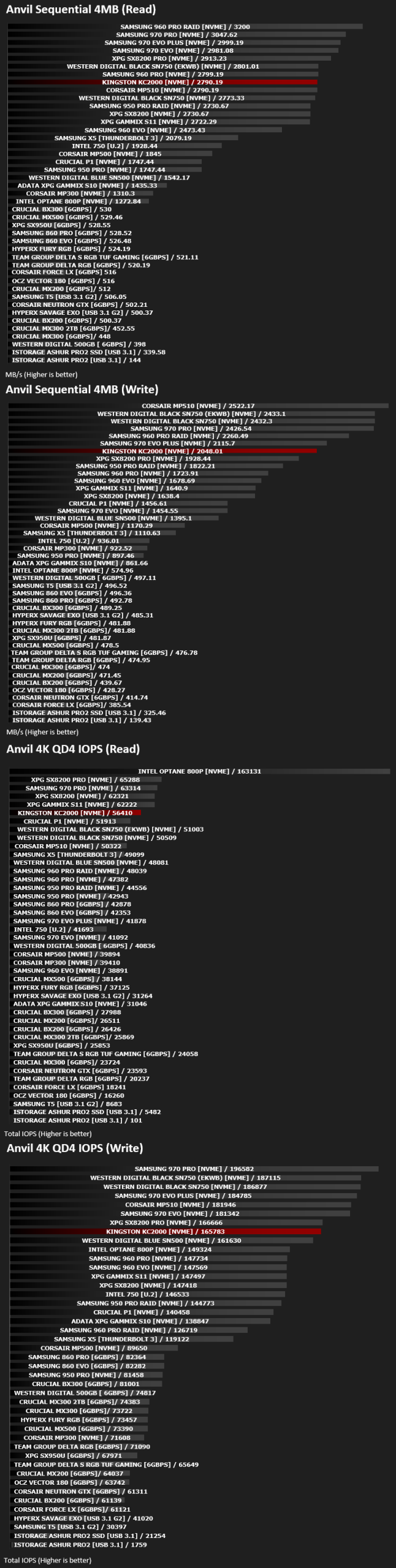
Anvil Pro from Anvil Storage utilities is one of the most popular storage benchmarking utilities today thanks to the large suit of tests available. You can test pretty much anything from Read/write Speed to IOPs with many variables to tweak allowing you to get either a single or host of results to compare with other likeminded enthusiasts. In our test we ran the standard suite 5 times, subtracting both the highest and lowest scores and determined the final result from the average of the remaining three results.
Benchmarks: AS SSD
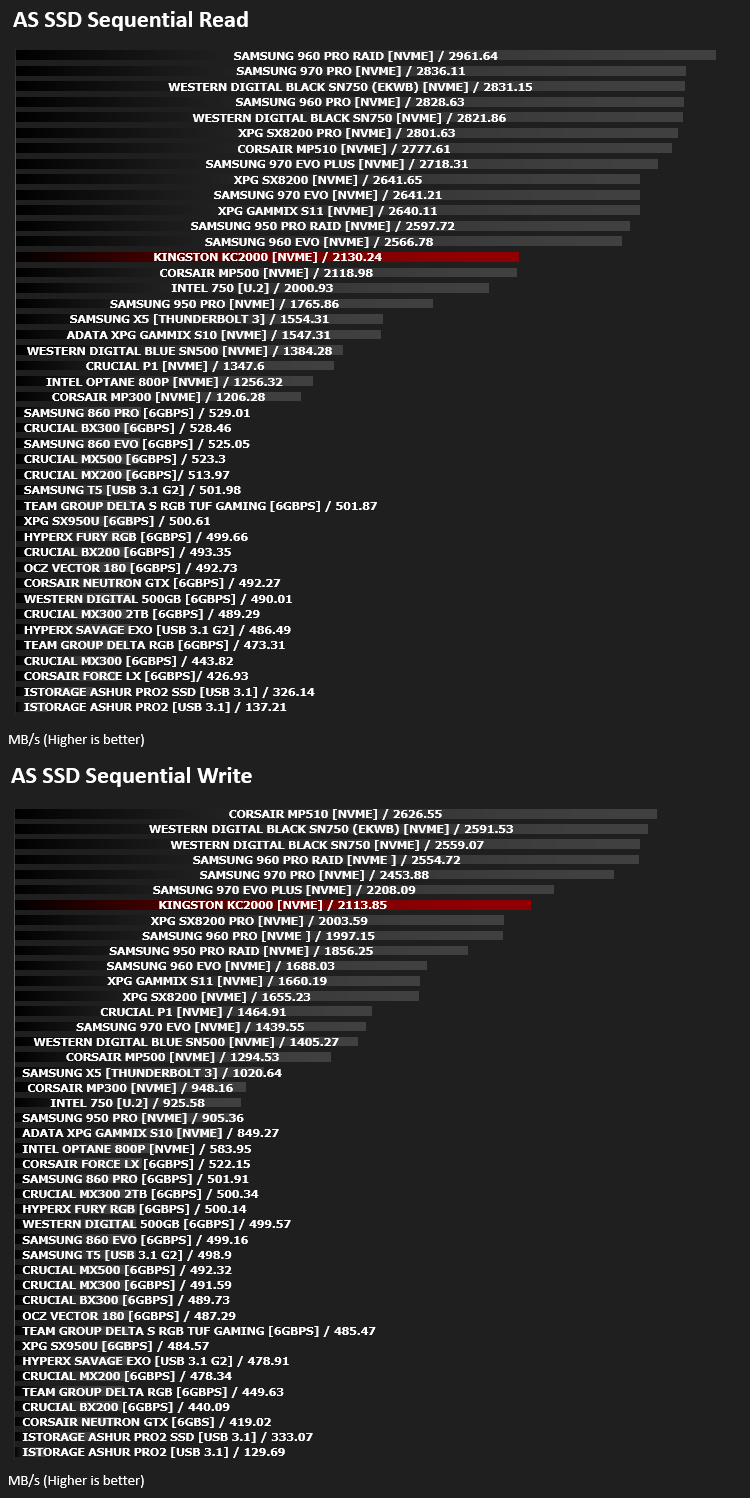
AS SSD Benchmark is a straightforward tool for measuring the speed of your SSD drive.
Simply launch the program, choose your drive, click Start, and it’ll test your SSD’s read and write speed in a variety of ways, delivering a score for each when it’s done. And if that’s not enough, there are also additional file copy and compression-related benchmarks available from the Tools menu. (The author’s support page is German only, but if you need further English explanations then there’s a thread on the program at the OCZ Technology forum.).
Simply launch the program, choose your drive, click Start, and it’ll test your SSD’s read and write speed in a variety of ways, delivering a score for each when it’s done. And if that’s not enough, there are also additional file copy and compression-related benchmarks available from the Tools menu. (The author’s support page is German only, but if you need further English explanations then there’s a thread on the program at the OCZ Technology forum.).
Benchmarks: ATTO
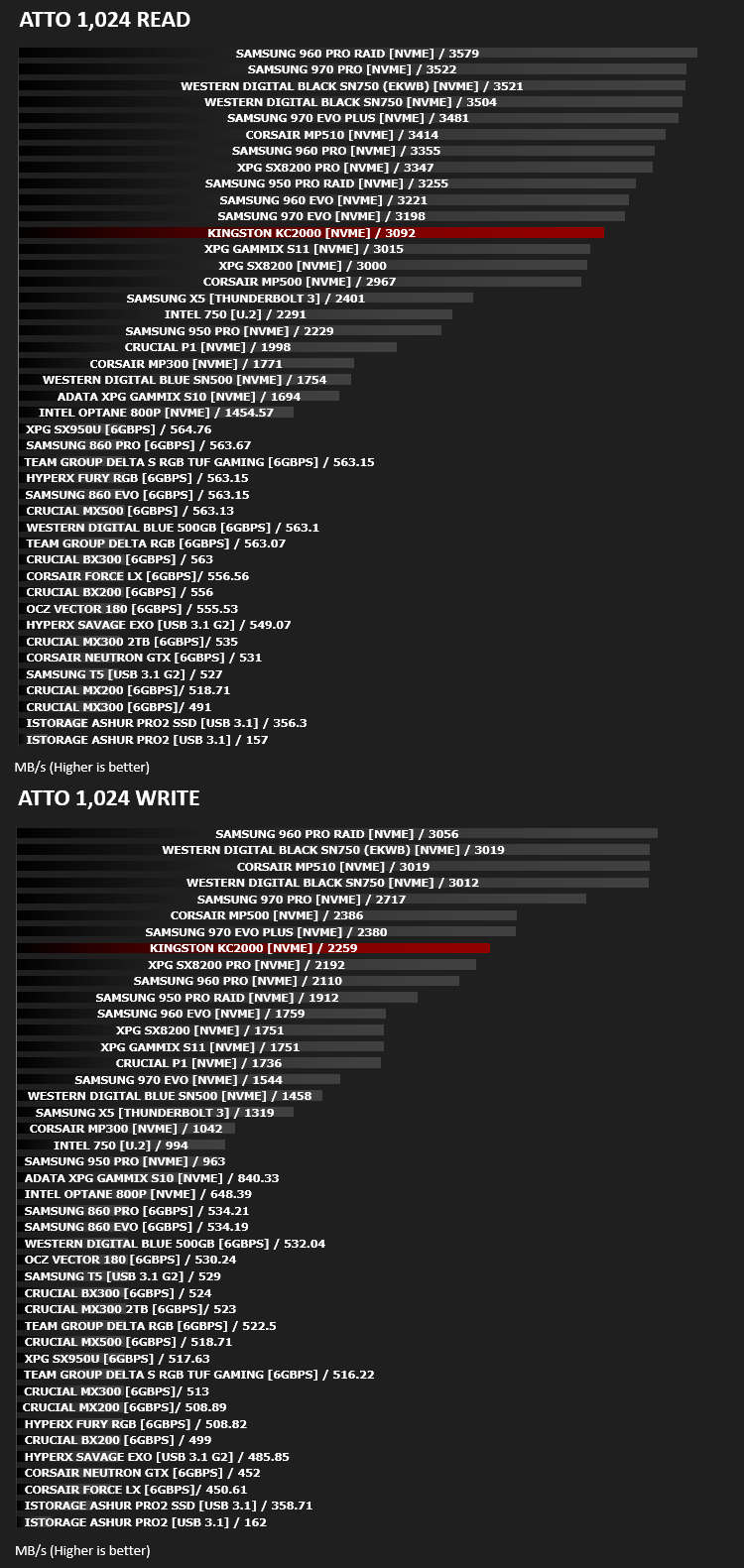
The ATTO Disk Benchmark performance measurement tool is compatible with Microsoft Windows. Measure your storage systems performance with various transfer sizes and test lengths for reads and writes. Several options are available to customize your performance measurement including queue depth, overlapped I/O and even a comparison mode with the option to run continuously. Use ATTO Disk Benchmark to test any manufacturers RAID controllers, storage controllers, host adapters, hard drives and SSD drives and notice that ATTO products will consistently provide the highest level of performance to your storage.
Benchmarks: AIDA64
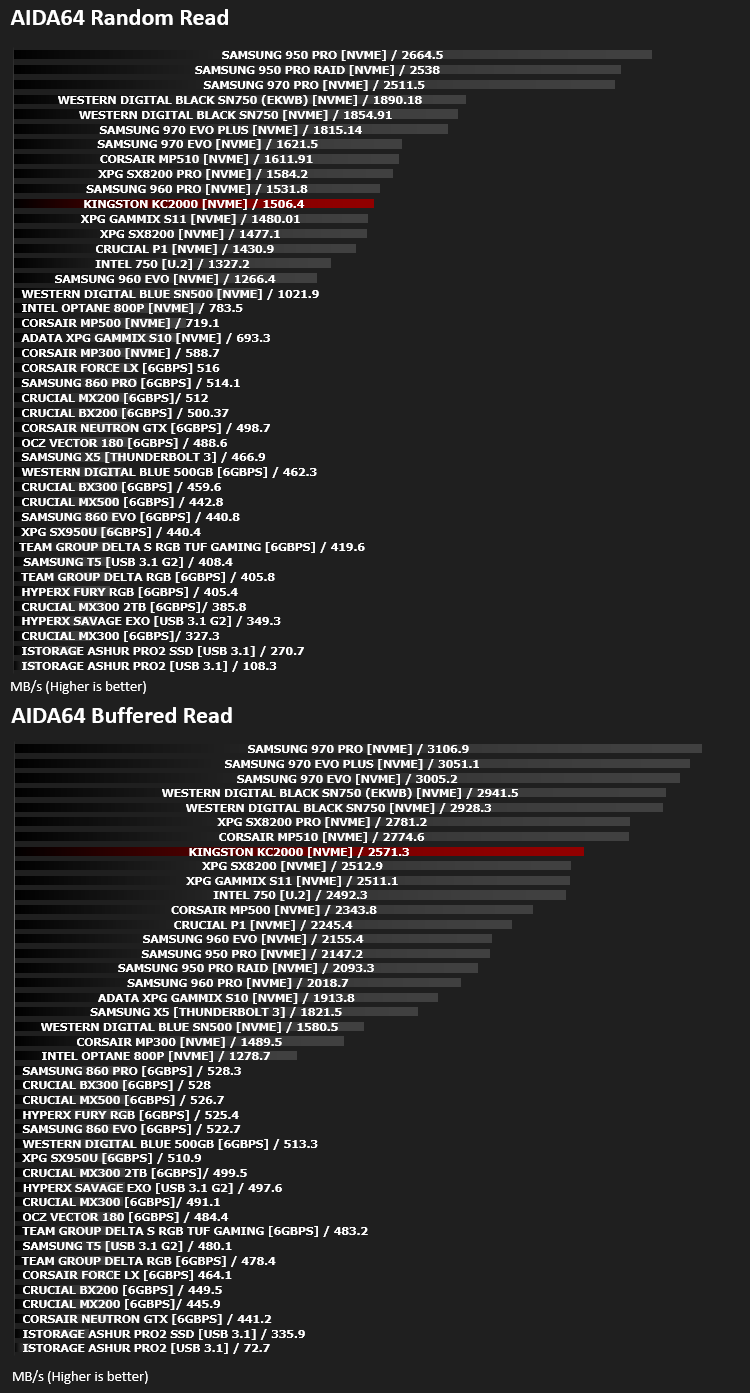
With this module, we can measure the performance of the PC’s storage devices, including (S)ATA or SCSI hard disk drives, RAID arrays, optical drives, solid-state drives (SSD), USB drives and memory cards. It also allows us to perform write tests, which helps us detect fake products and errors on the devices. In order to attain reliable benchmark results we have to make sure to close all background applications.
Benchmarks: PCMark 8
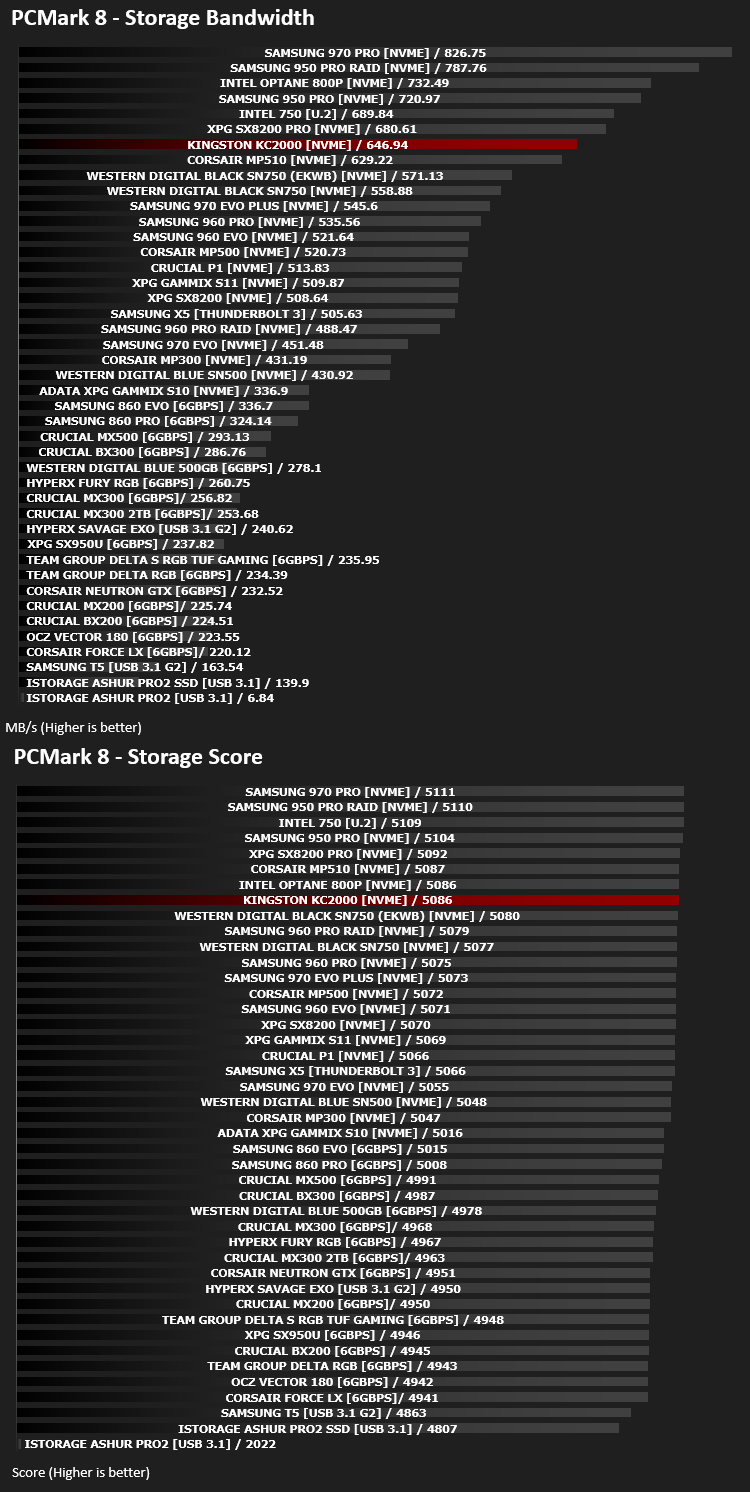
We use the Futuremark PCMark 8 utility to measure storage via Photoshop performance under both light and heavy loading conditions. Accelerated (open CL) is used to perform this test. The test is measured in seconds to complete.
Conclusion
Focussing on the graphs, the performance often doesn’t quite live up to the quoted speeds in Kingston’s own specifications, which is a shame, particularly so considering previous showings of the SM 2262EN controller, particularly on the XPG SX8200 Pro. However, what makes things worse is the SX8200’s use of 64-Layer NAND flash compared to the newer and much denser 96-Layer on the Kingston KC2000. The newer modules should present faster read and write speeds but for some reason, they don’t materialise.Having said that, don’t write off the Kingston drive just yet, as it does offer a full security suite, utilising TCG Opal 2.0, AES 256-bit and eDrive for faster and more advanced security solutions. Plus, it’s not exactly a slouch in the SSD sector, obviously, pricing will be key.
For the enthusiast sector, where appearance can sometimes count for more than outright performance, Kingston’s choice to brand the front of the drive with an ugly white sticker seems an odd choice. Warranty information could easily be moved to a sticker on the rear of the drive leaving the front clear for a much more appealing alternative.
Moving onto pricing, this is where the Kingston could absolutely make up ground against a tough roster but it quite frankly fails. For the same price, the Western Digital Black SN750 or the Samsung 970 EVO Plus can be found, with the same capacity options, giving improved performance and, as subjective a topic as it is, a more aesthetically appealing drive. You don’t forfeit any warranty length either.
Kingston have all of the ingredients required to make an appealing SSD option for the PC enthusiast, but the price needs to come down somewhat first.
Pros
+ Decent performance
+ Good TBW rating (in line with others)
+ 5-year warranty
+ Free technical support
Cons
– Faster drives available for the same, or less money
– Ugly white sticker across the front
– Doesn’t seem to fully utilise the SM 2262EN controller
+ Decent performance
+ Good TBW rating (in line with others)
+ 5-year warranty
+ Free technical support
Cons
– Faster drives available for the same, or less money
– Ugly white sticker across the front
– Doesn’t seem to fully utilise the SM 2262EN controller
Click here for an explanation of our awards at Vortez.net.
Stay connected with the Vortez Social Media pages:
Join in with the discussions on Discord