GIGABYTE have cemented their position as a premium offering within the PC market in recent years, so how does the X570 AORUS MASTER stack up against others? Let’s find out.

Product on Review: GIGABYTE X570 AORUS MASTER
Manufacturer: GIGABYTE
Street Price: £379.99 / $399.99
Which CPU launch would be complete without GIGABYTE unleashing their AORUS brand upon it? Today we look at the GIGABYTE X570 AORUS MASTER, a high-end solution offering the ultimate support for the latest AMD 3rd Gen. CPUs.
The X570 AORUS MASTER is certainly up to the task at hand, starting with a trio of heatsink-equipped PCI-E 4.0 M.2 slots, as well as the same count of PCI-E 16x expansion slots, all featuring an ultra-durable PCI-E Armour. Alongside that is an extensive on-board audio solution, 2.5G + 1G LAN, WiFi 6 and support for the latest USB 3.2 Gen. 2 standards.
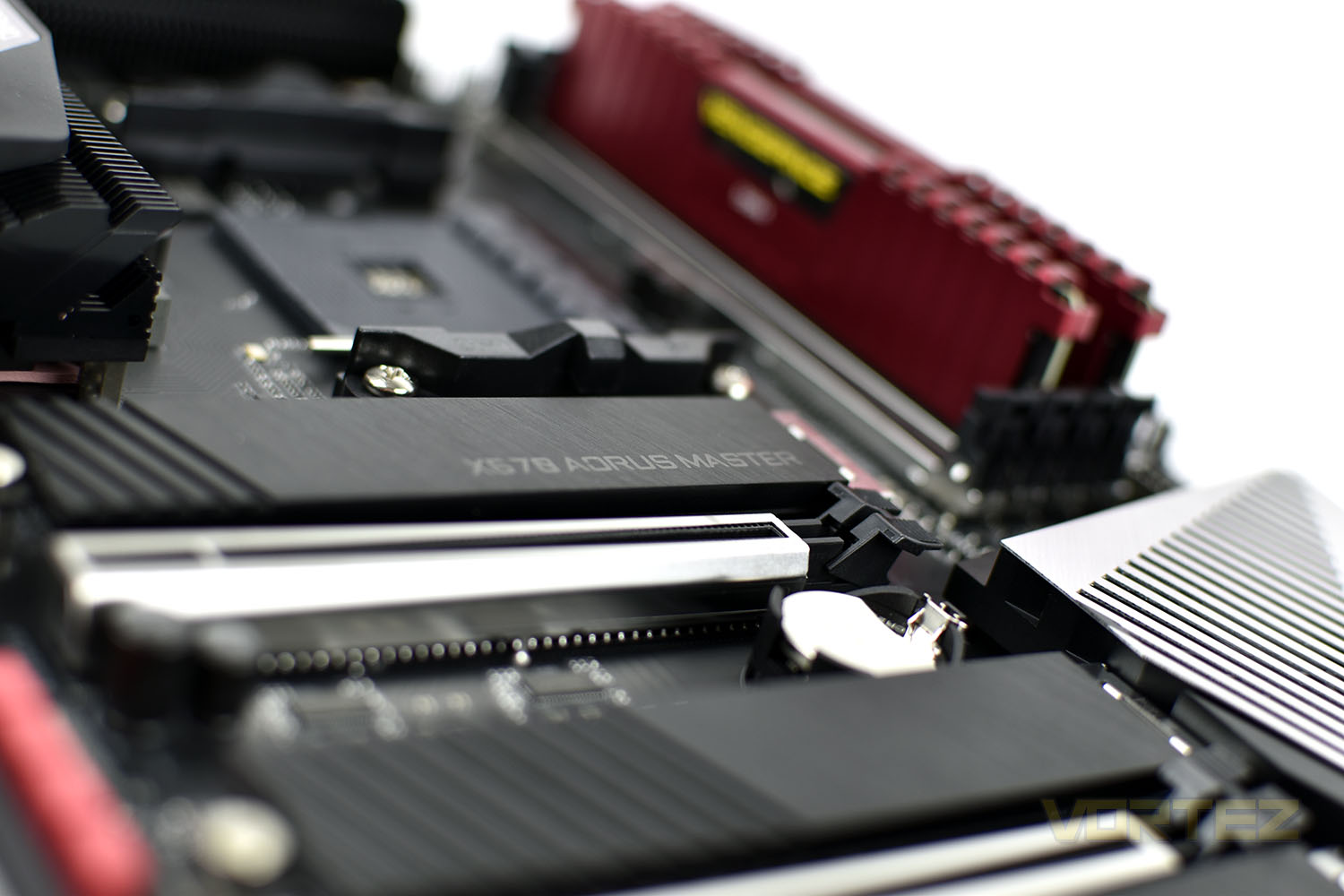
Remaining relatively subtle, RGB lighting is strategically placed and isn’t just bundled into every component possible; you’ll only find it on the rear IO cover and the above the audio chipset.
Launching in the UK at £380 and the US at $400, the X570 certainly comes with a price premium but Gigabyte seem to have adorned the motherboard with plenty of goodies to help satisfy that asking price. How does it perform against some stiff competition? Let’s have a look.
GIGABYTE on the X570 AORUS MASTER:
Technical Specifications
AMD Socket AM4, support for: 3rd Generation AMD Ryzen™ processors/ 2nd Generation AMD Ryzen™ processors/ 2nd Generation AMD Ryzen™ with Radeon™ Vega Graphics processors/ AMD Ryzen™ with Radeon™ Vega Graphics processors
(Please refer “CPU Support List” for more information.)
Chipset
AMD X570
Memory
3rd Generation AMD Ryzen™ processors:
Support for DDR4 4400(O.C.) / 4300(O.C.) / 4266(O.C.) / 4133(O.C.) / 4000(O.C.) / 3866(O.C.) / 3800(O.C.) / 3733(O.C.) / 3600(O.C.) / 3466(O.C.) / 3400(O.C.) / 3333(O.C.) / 3300(O.C.) / 3200 / 2933 / 2667 / 2400 / 2133 MHz memory modules
2nd Generation AMD Ryzen™ processors/2nd Generation AMD Ryzen™ with Radeon™ Vega Graphics processors/AMD Ryzen™ with Radeon™ Vega Graphics processors:
Support for DDR4 3600(O.C.) / 3400(O.C.) / 3333(O.C.) / 3200(O.C.) / 2933 / 2667 / 2400 / 2133 MHz memory modules
4 x DDR4 DIMM sockets supporting up to 128 GB (32 GB single DIMM capacity) of system memory
Dual channel memory architecture
Support for ECC Un-buffered DIMM 1Rx8/2Rx8 memory modules
Support for non-ECC Un-buffered DIMM 1Rx8/2Rx8/1Rx16 memory modules
Support for Extreme Memory Profile (XMP) memory modules
(Please refer “Memory Support List” for more information.)
Audio
Realtek® ALC1220-VB codec
* The front panel line out jack supports DSD audio.
ESS SABRE9118 DAC chip
High Definition Audio
2/4/5.1/7.1-channel
Support for S/PDIF Out
LAN
1 x Intel® GbE LAN chip (10/100/1000 Mbit) (LAN1)
1 x Realtek® 2.5GbE LAN chip (10/100/1000/2500 Mbit) (LAN2)
Wireless Communication module
Wi-Fi 802.11a/b/g/n/ac/ax, supporting 2.4/5 GHz Dual-Band
BLUETOOTH 5.0
Support for 11ax 160MHz wireless standard and up to 2.4 Gbps data rate
* Actual data rate may vary depending on environment and equipment.
Expansion Slots
Integrated in the CPU (PCIEX16/PCIEX8):
3rd Generation AMD Ryzen™ processors:
1 x PCI Express x16 slot, supporting PCIe 4.0 and running at x16 (PCIEX16)
1 x PCI Express x16 slot, supporting PCIe 4.0 and running at x8 (PCIEX8)
2nd Generation AMD Ryzen™ processors:
1 x PCI Express x16 slot, supporting PCIe 3.0 and running at x16 (PCIEX16)
1 x PCI Express x16 slot, supporting PCIe 3.0 and running at x8 (PCIEX8)
* For optimum performance, if only one PCI Express graphics card is to be installed, be sure to install it in the PCIEX16 slot.
* The PCIEX8 slot shares bandwidth with the PCIEX16 slot. When using the 3rd Generation AMD Ryzen™ processors/2nd Generation AMD Ryzen™ processors, the PCIEX16 slot operates at up to x8 mode.
2nd Generation AMD Ryzen™ with Radeon™ Vega Graphics processors/AMD Ryzen™ with Radeon™ Vega Graphics processors:
1 x PCI Express x16 slot, supporting PCIe 3.0 and running at x8 (PCIEX16)
Integrated in the Chipset (PCIEX4/PCIEX1):
1 x PCI Express x16 slot, supporting PCIe 4.0*/3.0 and running at x4 (PCIEX4)
* For 3rd Generation AMD Ryzen™ processors only.
1 x PCI Express x1 slot, supporting PCIe 4.0*/3.0
* For 3rd Generation AMD Ryzen™ processors only.
Multi-Graphics Technology
Support for NVIDIA® Quad-GPU SLI™ and 2-Way NVIDIA® SLI™ technologies
Support for AMD Quad-GPU CrossFire™ and 2-Way AMD CrossFire™ technologies
For 3rd Generation AMD Ryzen™ processors/2nd Generation AMD Ryzen™ processors only.
Storage Interface
Integrated in the CPU (M2A_SOCKET):
3rd Generation AMD Ryzen™ processors:
1 x M.2 connector (Socket 3, M key, type 2242/2260/2280/22110 SATA and PCIe 4.0 x4/x2 SSD support)
2nd Generation AMD Ryzen™ processors/2nd Generation AMD Ryzen™ with Radeon™ Vega Graphics processors/AMD Ryzen™ with Radeon™ Vega Graphics processors:
1 x M.2 connector (Socket 3, M key, type 2242/2260/2280/22110 SATA and PCIe 3.0 x4/x2 SSD support)
Integrated in the Chipset (M2B_SOCKET/M2C_SOCKET):
1 x M.2 connector (Socket 3, M key, type 2242/2260/2280/22110 SATA and PCIe 4.0*/3.0 x4/x2 SSD support) (M2B_SOCKET)
* For 3rd Generation AMD Ryzen™ processors only.
1 x M.2 connector (Socket 3, M key, type 2242/2260/2280 SATA and PCIe 4.0*/3.0 x4/x2 SSD support) (M2C_SOCKET)
* For 3rd Generation AMD Ryzen™ processors only.
6 x SATA 6Gb/s connectors
Support for RAID 0, RAID 1, and RAID 10
* Refer to “1-9 Internal Connectors,” for the installation notices for the M.2 and SATA connectors.
USB
Integrated in the CPU:
2 x USB 3.2 Gen 2*/Gen 1 Type-A ports (red) on the back panel
* For 3rd Generation AMD Ryzen™ processors only.
2 x USB 3.2 Gen 1 ports on the back panel
Integrated in the Chipset:
1 x USB Type-C™ port with USB 3.2 Gen 2 support, available through the internal USB header
1 x USB Type-C™ port on the back panel, with USB 3.2 Gen 2 support
1 x USB 3.2 Gen 2 Type-A port (red) on the back panel
4 x USB 3.2 Gen 1 ports available through the internal USB headers
Chipset+USB 2.0 Hub:
8 x USB 2.0/1.1 ports (4 ports on the back panel, 4 ports available through the internal USB headers)
Internal I/O Connectors
1 x 24-pin ATX main power connector
2 x 8-pin ATX 12V power connectors
1 x CPU fan header
1 x water cooling CPU fan header
3 x system fan headers
2 x system fan/water cooling pump headers
2 x addressable LED strip headers
2 x RGB LED strip headers
3 x M.2 Socket 3 connectors
6 x SATA 6Gb/s connectors
1 x front panel header
1 x front panel audio header
1 x USB Type-C™ port, with USB 3.2 Gen 2 support
2 x USB 3.2 Gen 1 headers
2 x USB 2.0/1.1 headers
1 x noise detection header
1 x Trusted Platform Module (TPM) header (2×6 pin, for the GC-TPM2.0_S module only)
2 x temperature sensor headers
1 x power button
1 x reset button
2 x BIOS switches
1 x Clear CMOS jumper
Voltage Measurement Points
Back Panel Connectors
1 x Q-Flash Plus button
1 x Clear CMOS button
2 x SMA antenna connectors (2T2R)
1 x USB Type-C™ port, with USB 3.2 Gen 2 support
2 x USB 3.2 Gen 2*/Gen 1 Type-A ports (red)
* For 3rd Generation AMD Ryzen™ processors only.
1 x USB 3.2 Gen 2 Type-A port (red)
2 x USB 3.2 Gen 1 ports
4 x USB 2.0/1.1 ports
2 x RJ-45 ports
1 x optical S/PDIF Out connector
5 x audio jacks
I/O Controller
iTE® I/O Controller Chip
H/W Monitoring
Voltage detection
Temperature detection
Fan speed detection
Water cooling flow rate detection
Overheating warning
Fan fail warning
Fan speed control
* Whether the fan (pump) speed control function is supported will depend on the fan (pump) you install.
Noise detection
BIOS
2 x 128 Mbit flash
Use of licensed AMI UEFI BIOS
Support for DualBIOS™
PnP 1.0a, DMI 2.7, WfM 2.0, SM BIOS 2.7, ACPI 5.0
Unique Features
Support for APP Center
* Available applications in APP Center may vary by motherboard model. Supported functions of each application may also vary depending on motherboard specifications.
@BIOS
AutoGreen
Cloud Station
EasyTune
Fast Boot
Game Boost
RGB Fusion
Smart Backup
Smart Keyboard
Smart Survey
System Information Viewer
USB Blocker
USB TurboCharger
Support for Q-Flash Plus
Support for Q-Flash
Support for Xpress Install
Bundled Software
Norton® Internet Security (OEM version)
cFosSpeed
XSplit Gamecaster + Broadcaster (12 months license)
Operating System
Support for Windows 10 64-bit
Form Factor
ATX Form Factor; 30.5cm x 24.4cm
X570 Overview
X570 – A Brief Aside
Launching alongside Ryzen 3000-series CPUs is the new X570 motherboard range. Manufactured by AMD’s extensive array of partners including industry mainstays ASRock, ASUS, GIGABYTE and MSI, X570 motherboards are the most feature complete of those available on day one.
First generation Ryzen launched with single-figure motherboard support across all manufacturers, and the second generation was only a little better. Third generation Ryzen marks a sea-change in attitudes and model variety. Dozens of X570 variants are planned across all partners, including some exceptionally high-end designs such as the £777.77 MSI X570 God Like or limited edition ASRock X570 Aqua.
In addition to all the features you expect on premium motherboards, including a plethora of IO options, storage flexibility, networking, audio and RGB lighting systems, the motherboard (specifically the chipset) will also offer up to 16 PCIe 4.0 lanes for connected components (NVMe storage etc.) which don’t require direct connection to the CPU (as in the case of discrete graphics).
The most notable pre-launch commonality has been the inclusion of a chipset/FCH fan, reflecting the increased demands these components are put under in this generation. Some motherboard manufacturers have dealt with it well, whereas others have regressed to small high-speed fans without a means of RPM control – manual or automatic. For all their bluster and high-end features, such glaring flaws will tend to rule them out of contention for approval given the pricing is far from budget.
Indeed, these motherboards are all pitched at a far higher price than the X470 series you might think they replace. That’s justified through the exclusive features – highest among them being exclusive out-the-box PCIe 4.0 support – and is excused as B450 and X470 models will continue to be sold for the time being. However, their positioning makes the next-generation Ryzen platform as a whole a little more expensive an upgrade than many would have thought just a few months ago.
Furthermore, these motherboards have limited support (i.e. typically none) for first generation Ryzen CPUs and 2000-series APUs (based on Zen rather than Zen+ architecture). As a result they may not be suitable for piecemeal upgrades. By the same token, they appear to have extremely robust power delivery systems even compared to their X470 counterparts, potentially making them excellent overclocking candidates for the higher 12 and 16-core count 3000-series processors.
Nonetheless, the vast ecosystem of X570 motherboards should mean that, if your budget is flexible enough, you’ll find exactly what you need for your use case.
Packaging & Bundle
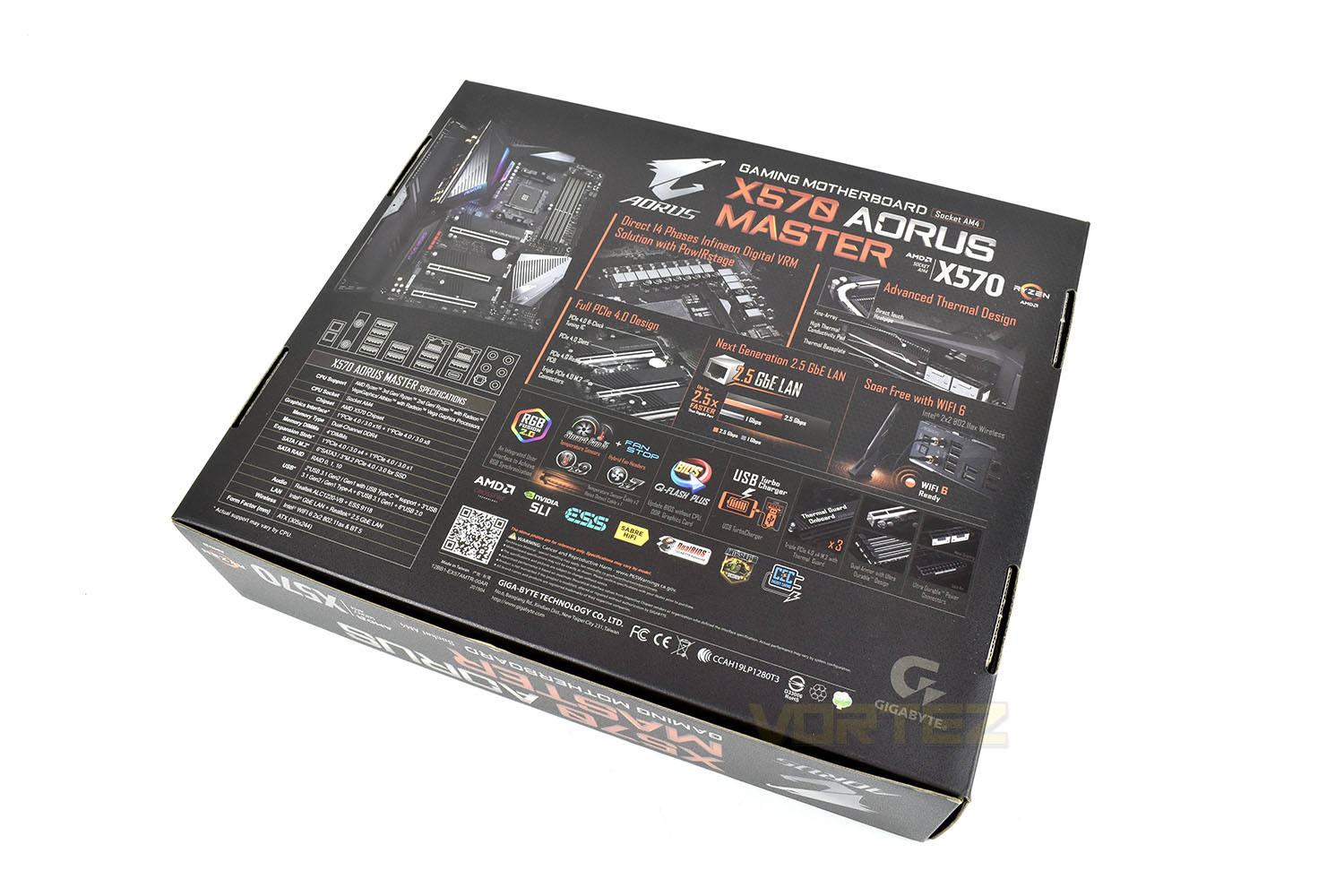
As is typically the case, the packaging’s overall appearance is dominated by the AORUS falcon and the black and orange colour scheme. The box displays particular accolades such as being PCI-E 4.0 ready, Socket AM4 and AMD X570 chipset and being WiFi 6 ready.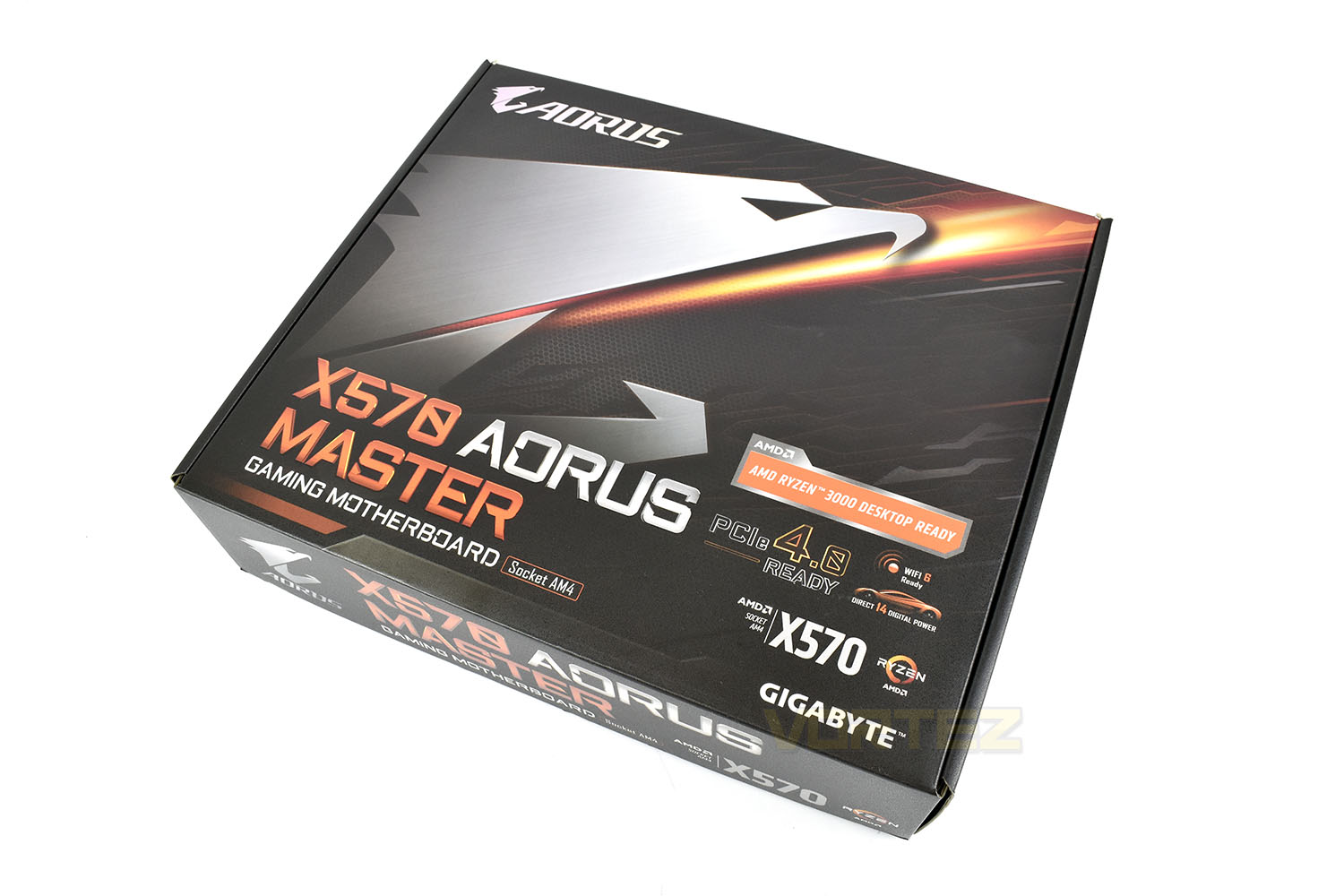
Turning the box on its front, we get our first glimpse at the appearance of the motherboard in the top-left. Alongside the board image is a specifications table and annotated images to show the main features that you can expect from the AORUS MASTER.
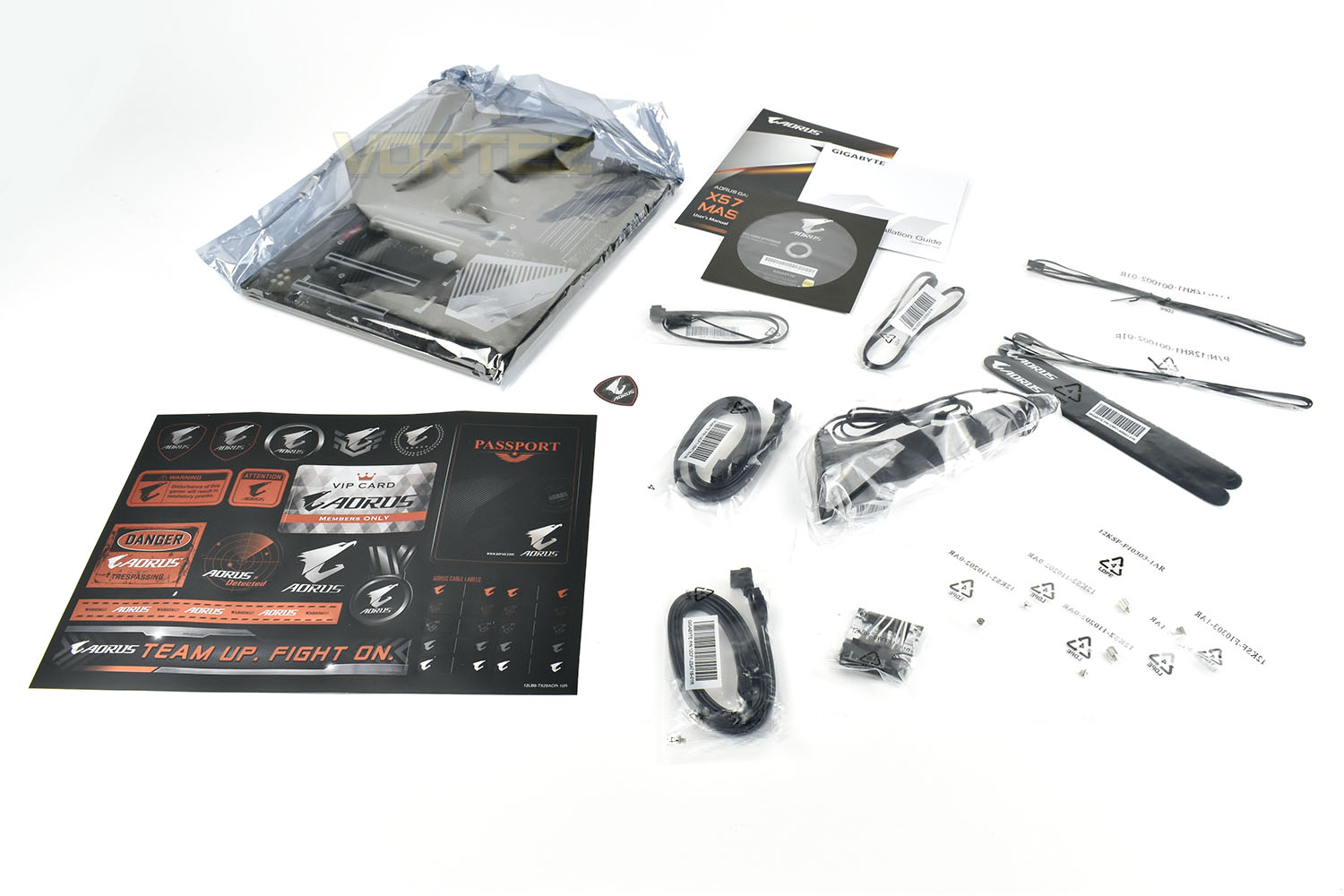
Also included within the box with the obvious motherboard is an A4 sheet of glossy stickers, a software CD, instruction manual, four SATA cables, RGB extension cables, a pair of Velcro cable tidies, a WiFi 6 antenna and M.2 standoffs and screws. As well as that, you also get GIGABYTE’s G-Connector, helping make the front panel connection dilemma that bit easier.
Closer Look
The X570 AORUS MASTER presents itself with a relatively modest design, lacking any of the hugely extensive heatsinks that we’ve seen from other brands, instead deciding to use individual M.2 heatsinks, FCH heatsink + fan and VRM cooling. The silver metal works well with the black components. We also like the random red audio caps.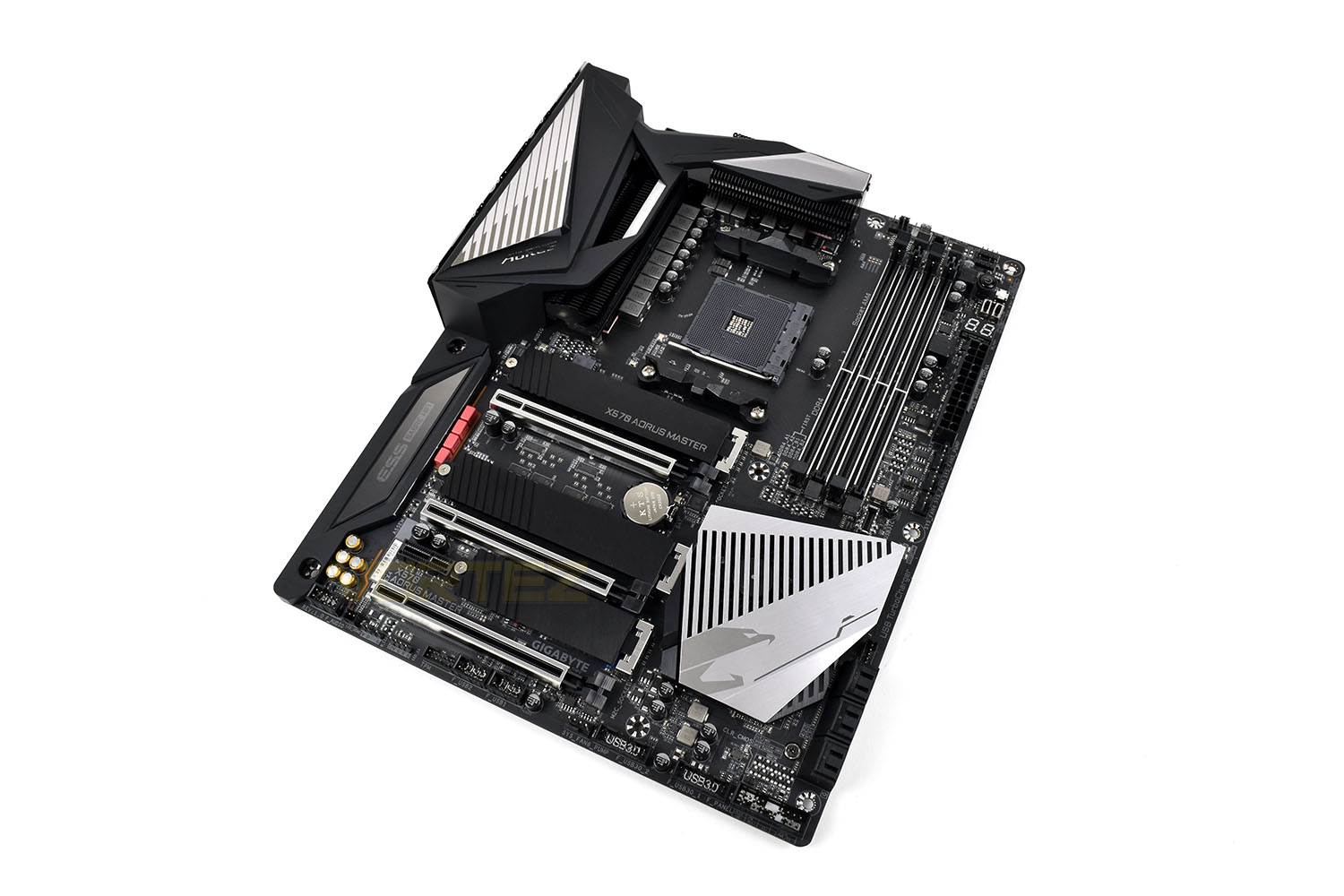
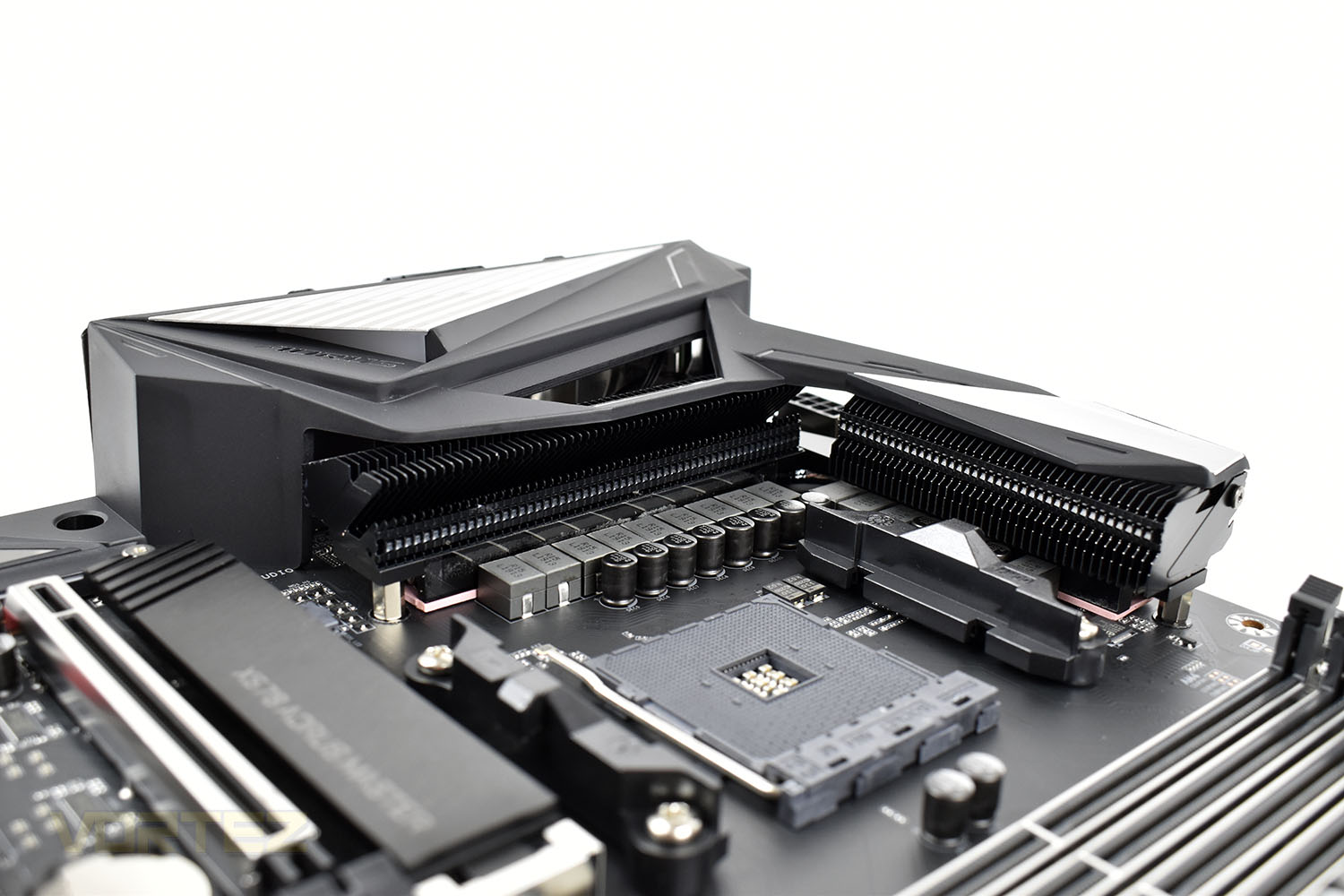
Around the AM4 socket are a pair of individual VRM heatsinks a heatpipe between them. They’re directly attached to the 14-phase PowIRstage digital VRMs via a pink thermal interface pad.
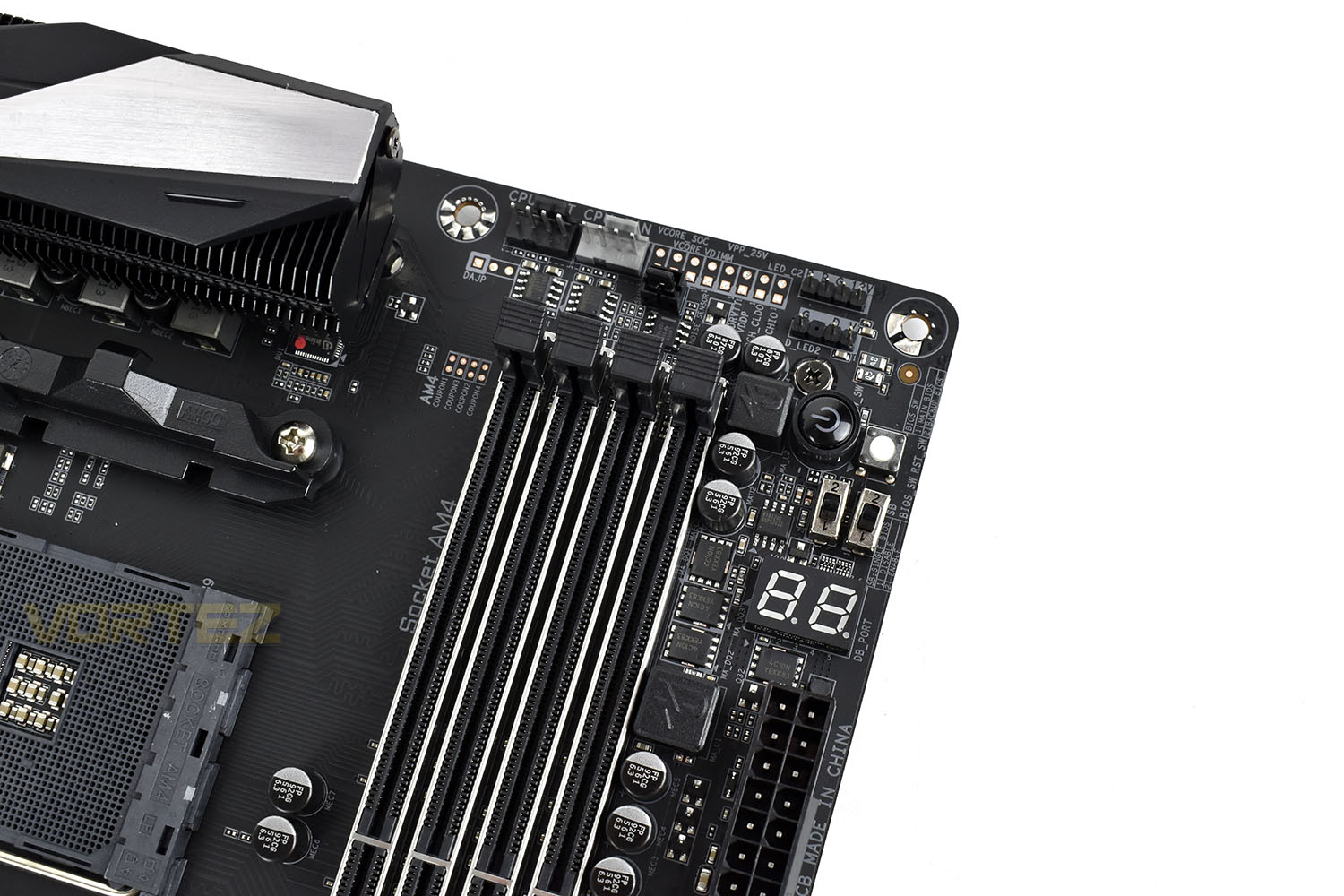
To the right of the socket are four DDR4 DIMM slots which can be occupied with up to 128GB of memory with frequencies up to 4400MHz supported. GIGABYTE’s Memory Armour is employed here with the aim to prevent plate bending, distortion or twisting which reducing ESD interference for better memory performance.
Above the DIMM slots are a pair of 4-pin PWM with one designed for the additional demands of a water pump. There’s also a trio of 4-pin PWM fans immediately next to the 24-pin power connection.
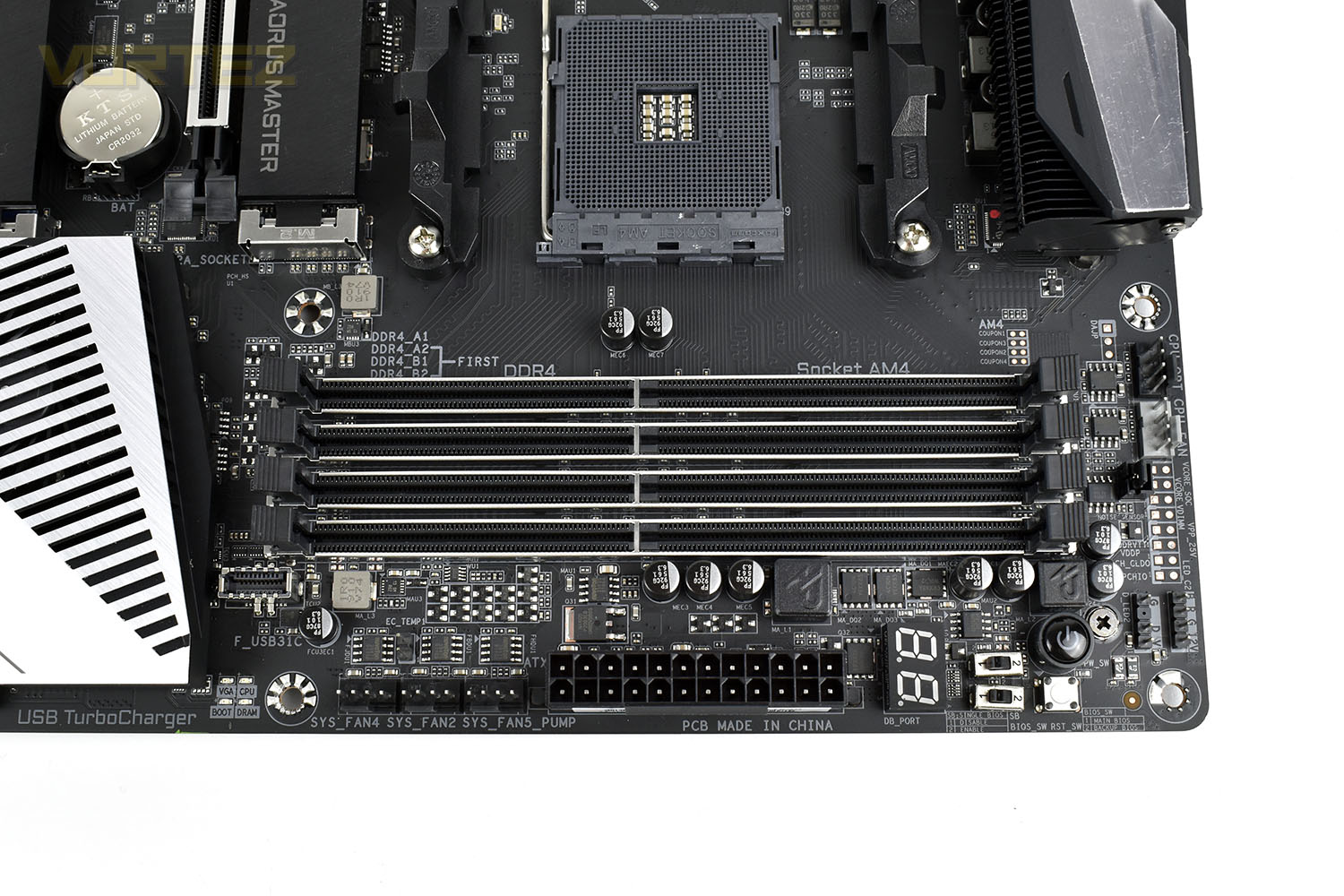
Rounding out the corner is a set of BIOS switches, a seven-segment display for fault codes and power and reset switches.
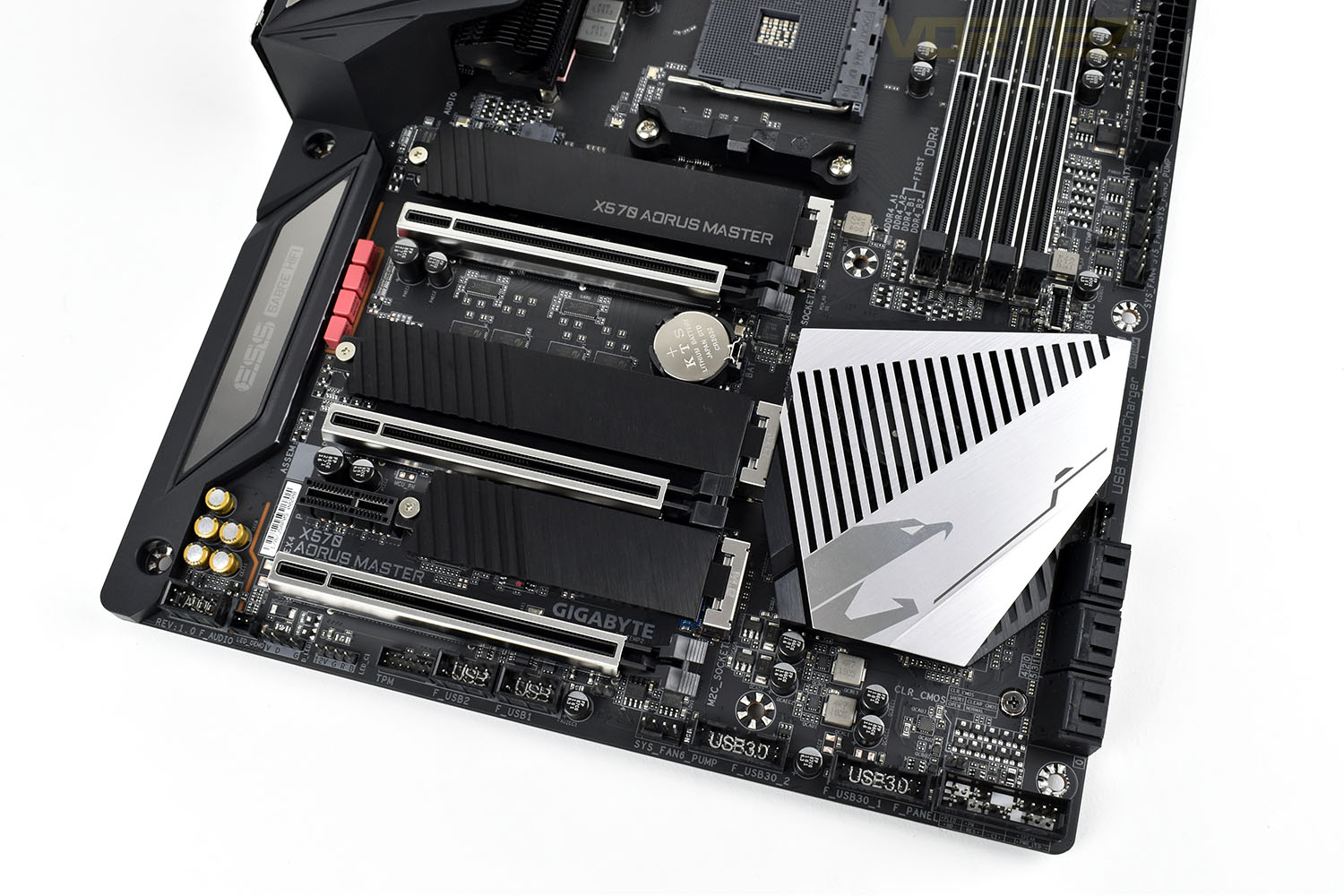
In terms of PCI-E support, you get a trio of x16 ports, running in x16, x8 and x4, and a single PCI-E x1 slot. The three PCI-E x16 slots are steel-armoured, much like the DIMMs, to help prevent heavy GPUs from shearing off the motherboard when being transported as well as decreasing signal interference from nearby components.
Under the AORUS falcon is a fan and heatsink to keep the X570 chipset cool and stable, this fan runs constantly, unlike some other boards we’ve tested, but is on a curve so it will only ramp up when demand is high.
Finally, the three M.2 NVMe slots all have their own heatsink in place, but they can be removed easily if your SSD has its own cooling solution that you’d rather use. The top two slots can house SSDs up to 110mm in length and the third is limited to 80mm.
Closer Look (Continued)
Removing the M.2 heatsinks, you can see the simplicity of removing them altogether if your SSD has a pre-installed heatsink.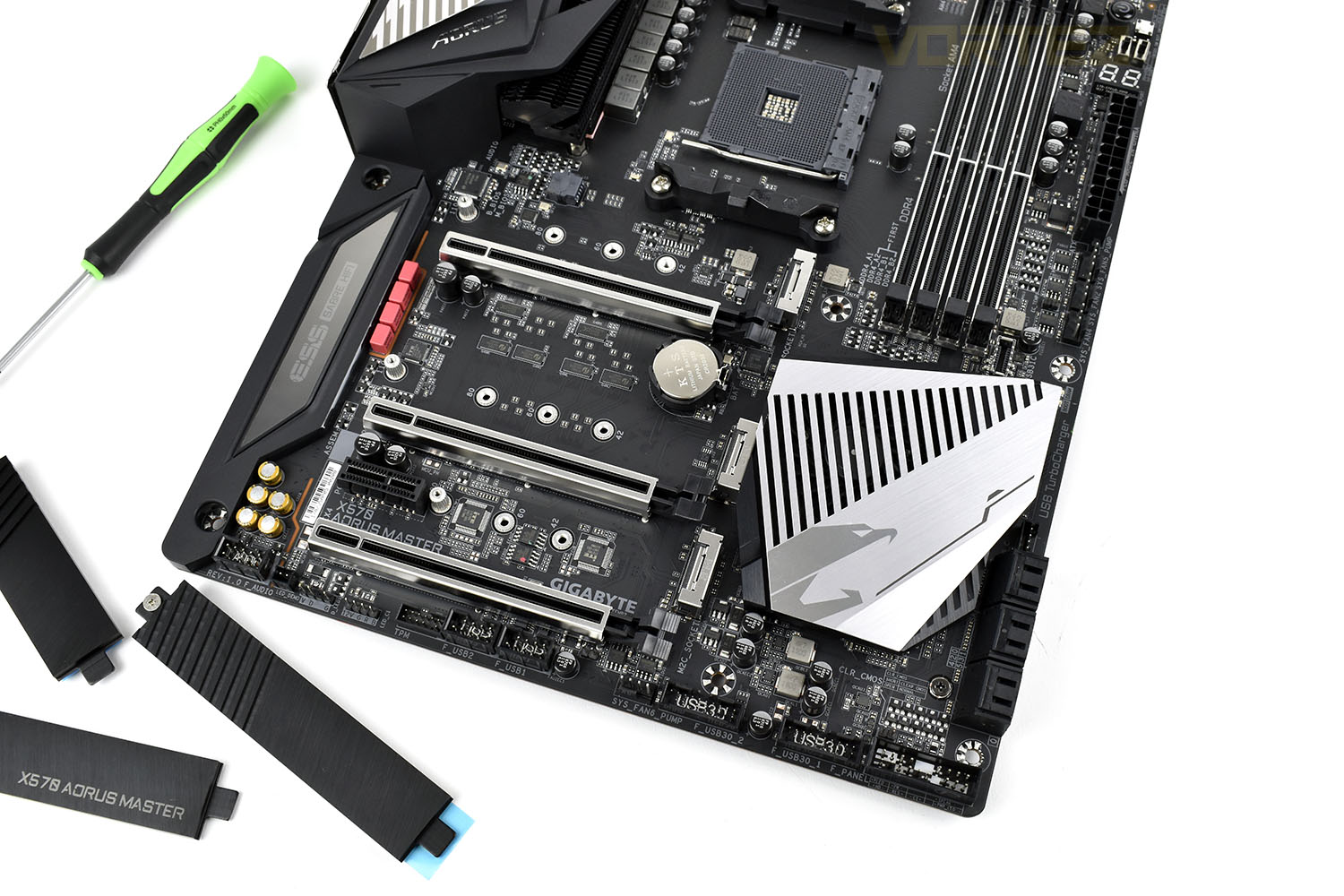
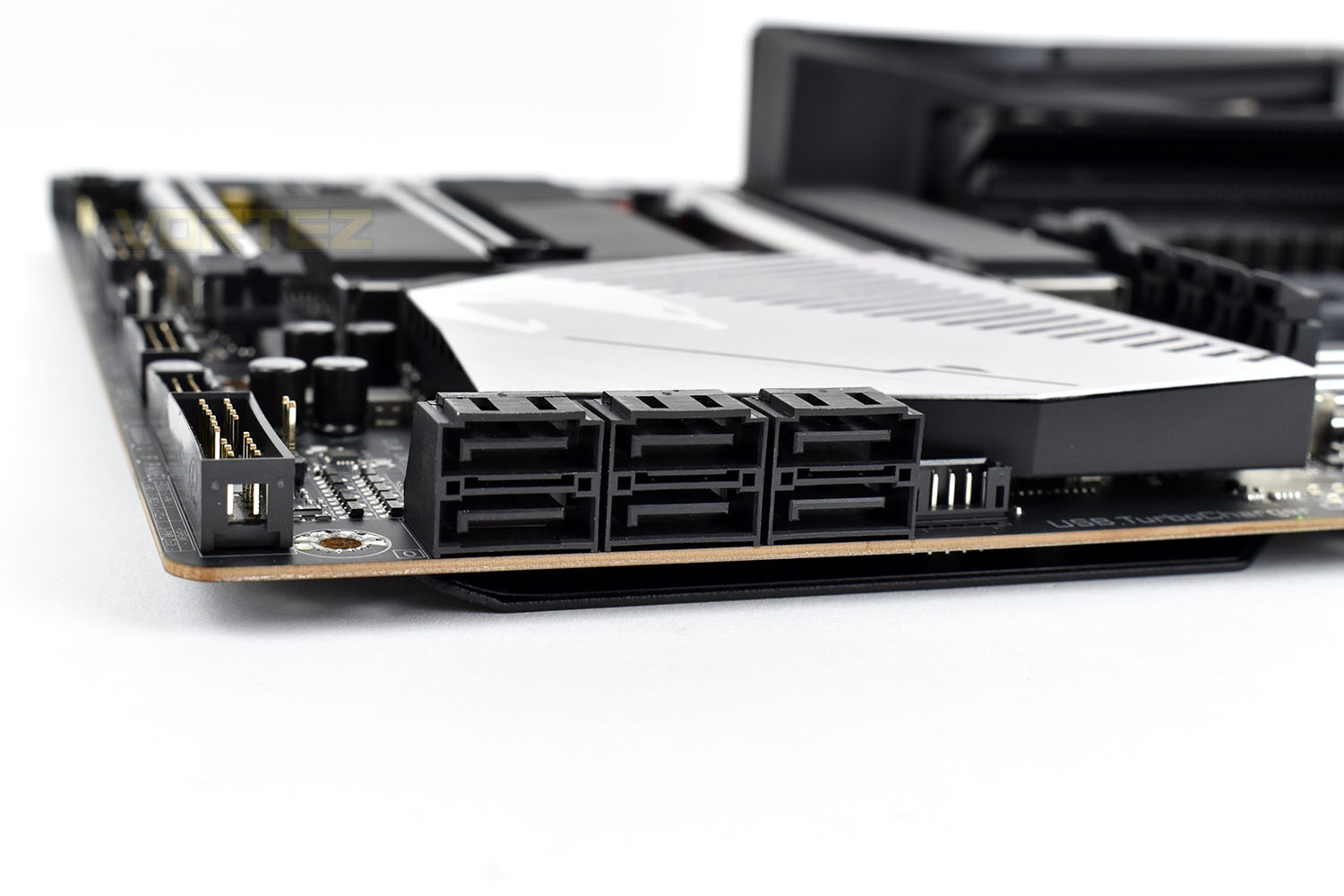
Bolstering storage support is 6x SATA 3.0 ports at 90° to the motherboard for better cable management.
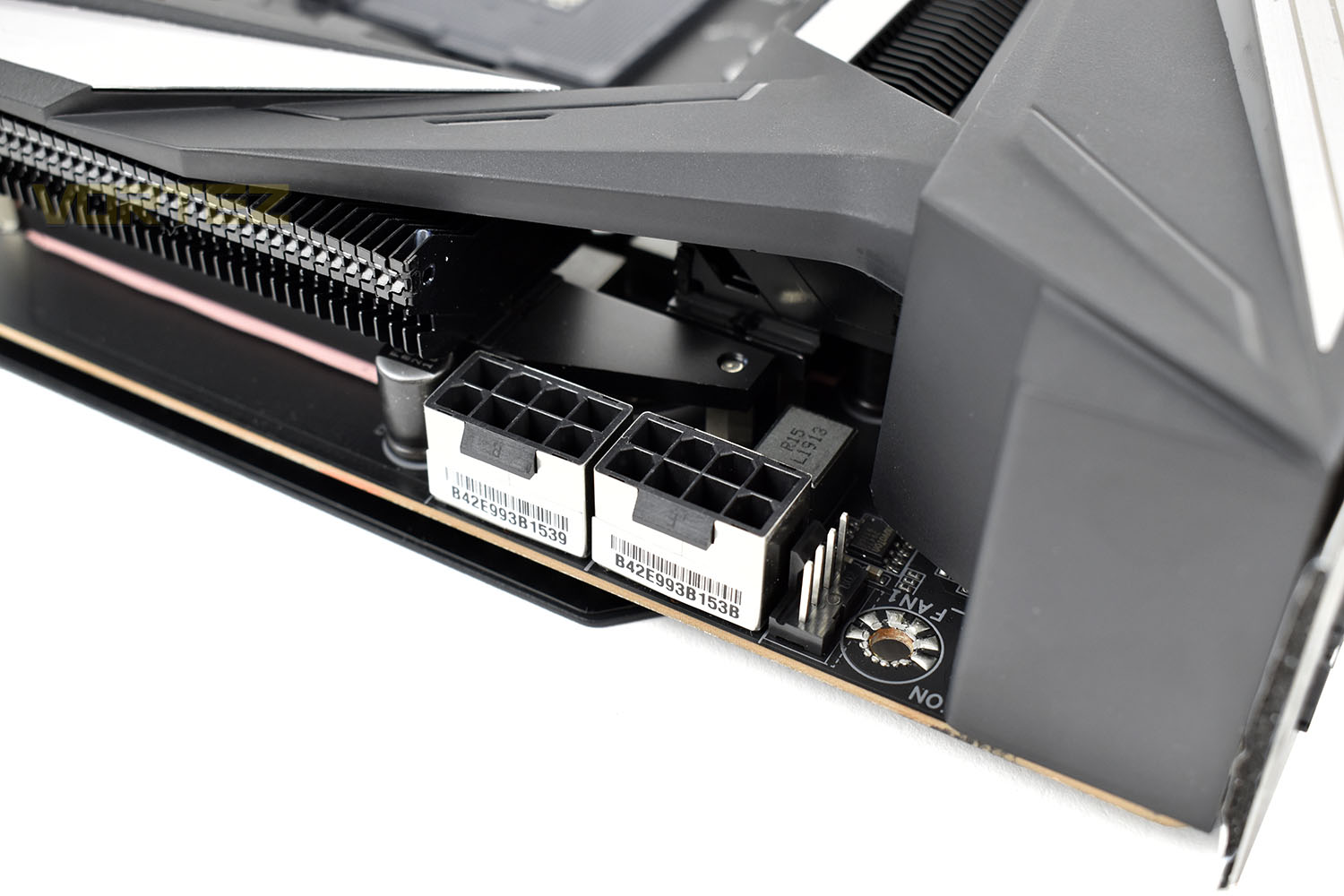
Moving back up to the CPU socket, power is supplied through two shielded 8-pin EPS power connectors. Only one of these must be populated for full functionality, with the additional connection only required for extreme overclocking.
Gigabyte have also managed to squeeze in another 4-pin PMW fan connection; this one might be very handy for keeping cables tidy and out of sight.
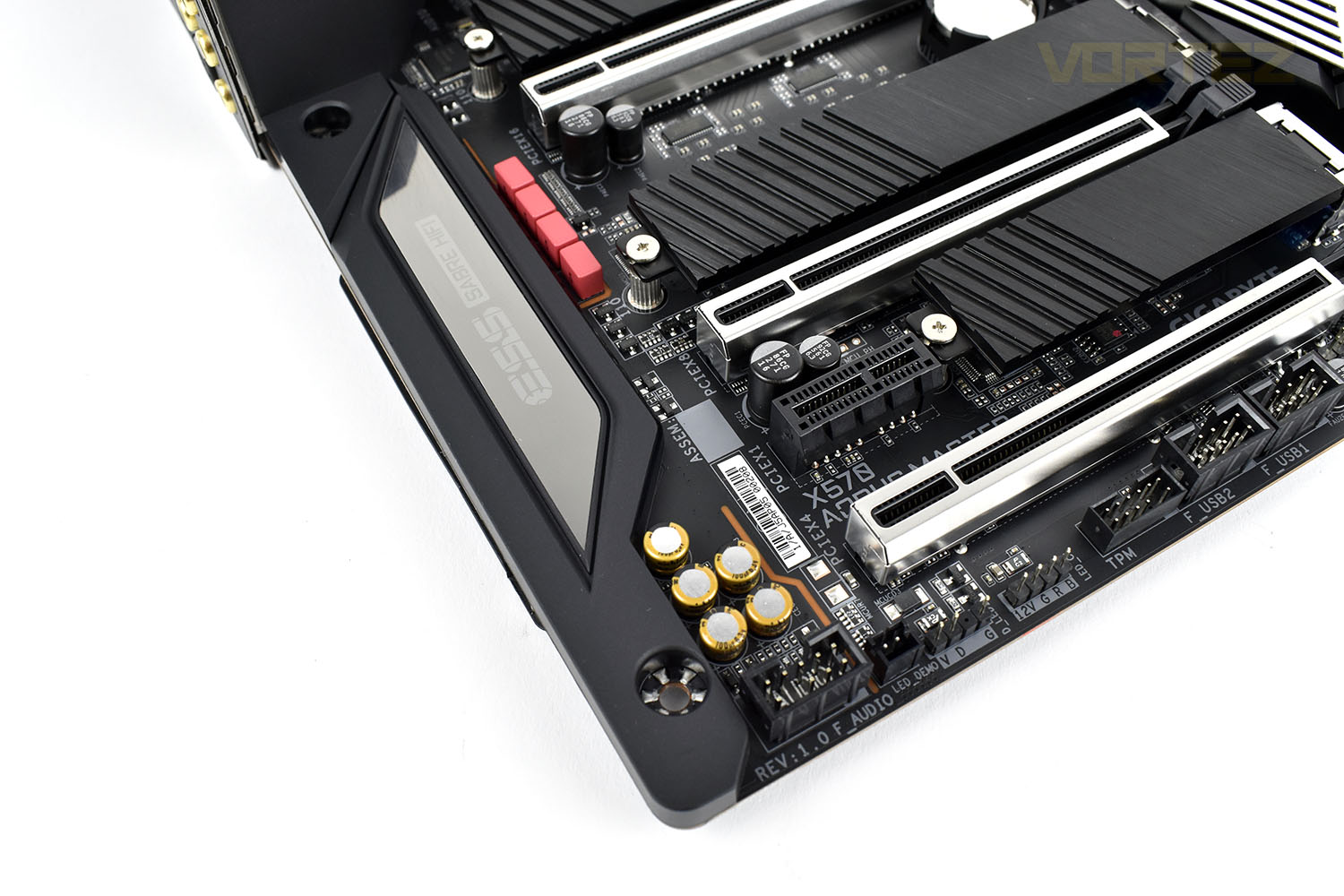
Partially hidden under the plastic shroud are the audio components, along with the red capped WIMA and gold Nichicon Fine Gold capacitors. High-fidelity audio is provided through the ESS SABRE Reference DAC ES9118 that supports up to 125dB SNR.
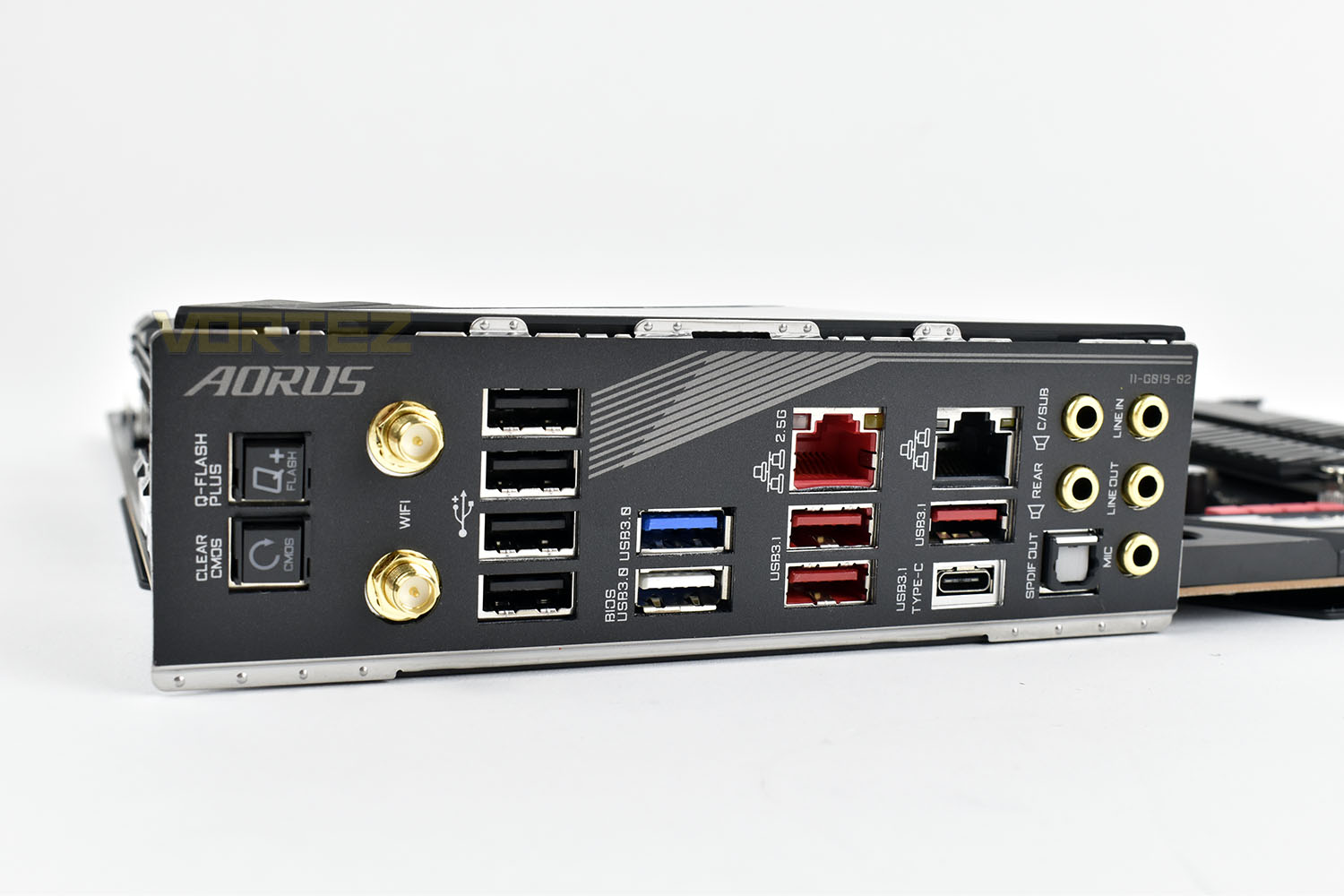
Last up is the rear IO. It goes without saying how important this area is for the function of any motherboard. Here we find a clear CMOS button that will reset your motherboard to factory defaults in the event of a failed overclock or other problems that can occur. Next to that is a Q-Flash Plus, this allows you to flash the BIOS of the X570 AORUS MASTER without the need for a CPU, GPU or RAM.
In terms of connectivity, the following is included:
2 x SMA antenna connectors (2T2R)
1 x USB Type-C™ port, with USB 3.2 Gen 2 support
2 x USB 3.2 Gen 2/Gen 1 Type-A ports (red)
1 x USB 3.2 Gen 2 Type-A port (red)
2 x USB 3.2 Gen 1 ports
4 x USB 2.0/1.1 ports
2 x RJ-45 ports
1 x Optical S/PDIF Out connector
5 x Audio jacks
Test Setup & Software
Test SetupCooling Noctua NH-U12S-SE-AM4
Motherboard GIGABYTE X570 AORUS MASTER
Memory 16GB Corsair Vengeance LPX 3200MHz @ 3000MHz @ 15-17-17-38-58
Graphics AMD Radeon RX 480 8GB
Storage Corsair Force LE 480GB
PSU Corsair RM750X 80 Plus Gold Certified PSU
Benchmarks
x264 HD 4.0 – 1st and 2nd pass encoding
SiSoftware SANDRA – CPU & Memory benchmarks
POV-RAY – CPU benchmarks
TrueCrypt – CPU benchmarks
AIDA64 – CPU benchmarks & Memory
PCMark 8 – Home Suite & Photoshop
3DMark FireStrike – 3D Benchmark
Games – Rise of the Tomb Raider & Total War: WARHAMMER
Other Software
Stress Testing Software: AIDA64 Stability Test
CPU Specification Monitoring: CPU-Z
Performance Monitoring: MSI Afterburner
Benchmarks: Power Consumption
Ray Tracing Performance – POV-Ray 3.7
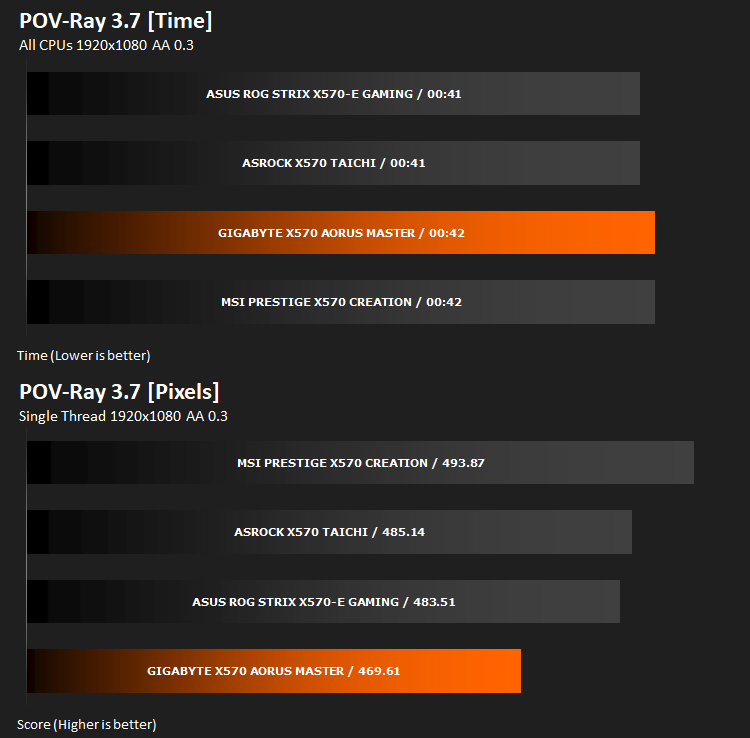
This product allows users to build their custom 3D worlds with excellent quality despite their computer’s hardware. It has adjustable options for levels of radiance, refraction, and reflection. Calculation time may vary depending on the computer model, but PovRay can adapt to many computer builds, and is supported by the open source community.
AES Encryption Performance – TrueCrypt 7.1a
Encoding Performance – x264 HD
Processing Features Performance – AIDA64
AIDA64 Product Page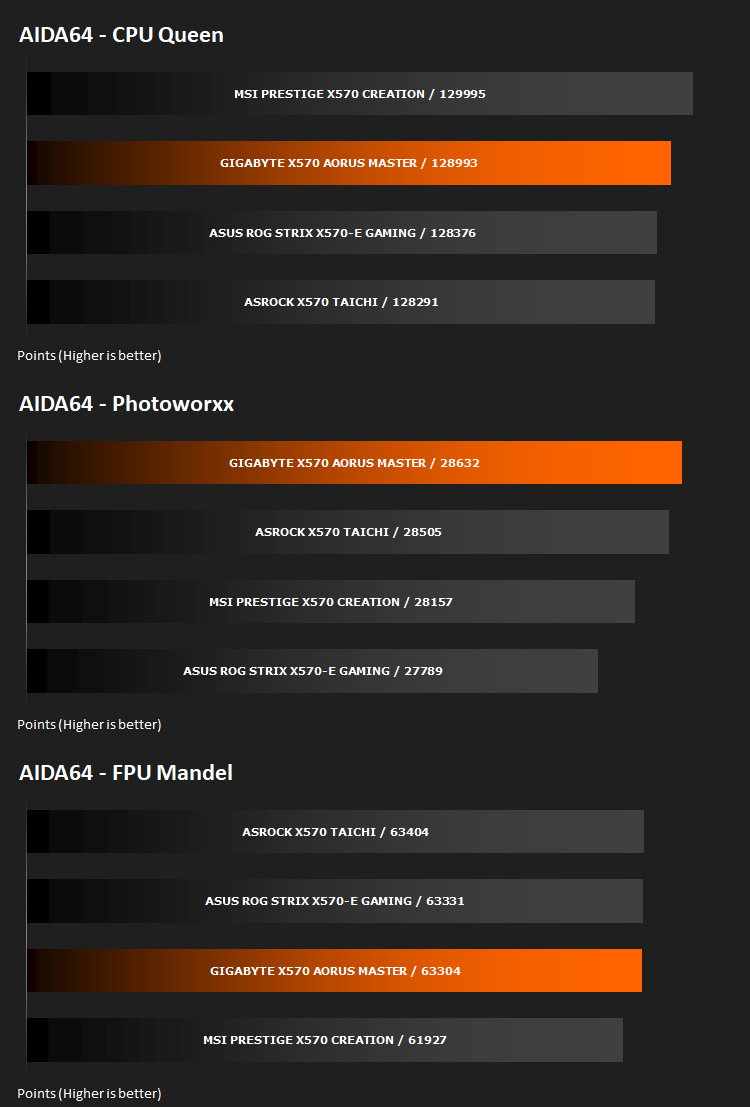
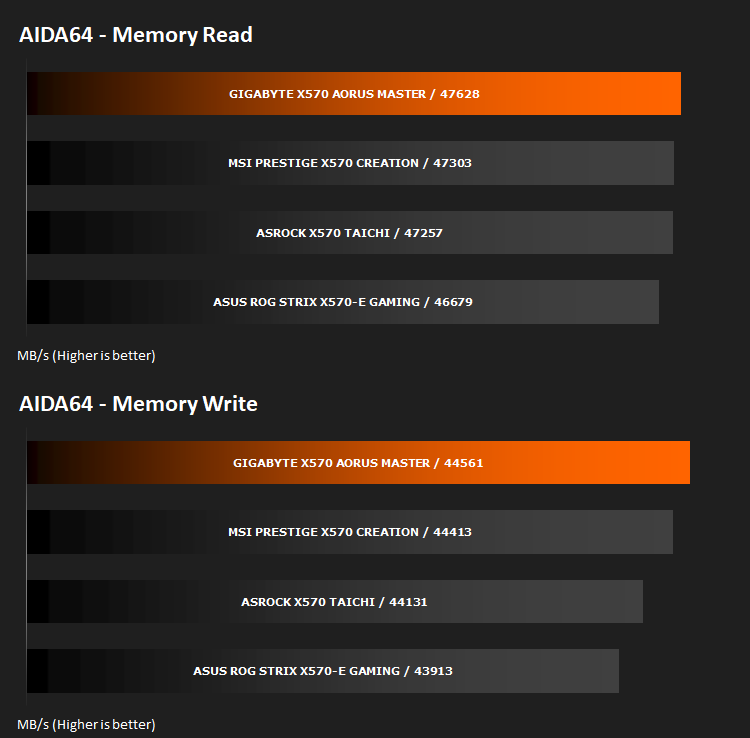
Memory Transfer Performance – AIDA64
AIDA64 Product PageThe Memory Latency benchmark measures the typical delay when the CPU reads data from system memory. Memory latency time means the penalty measured from the issuing of the read command until the data arrives to the integer registers of the CPU.
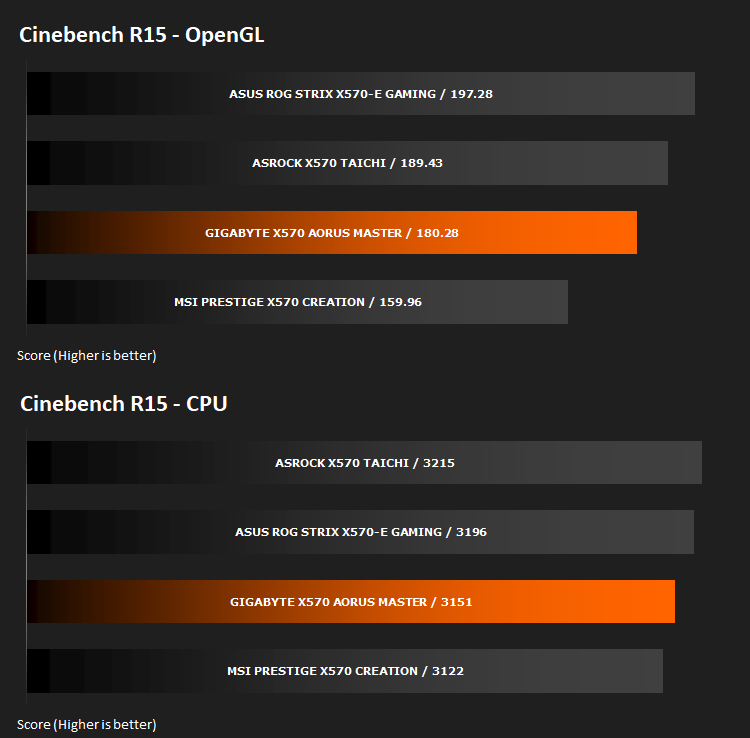
Processing Power Performance – Cinebench R15
Bandwidth Performance – SiSoftware SANDRA
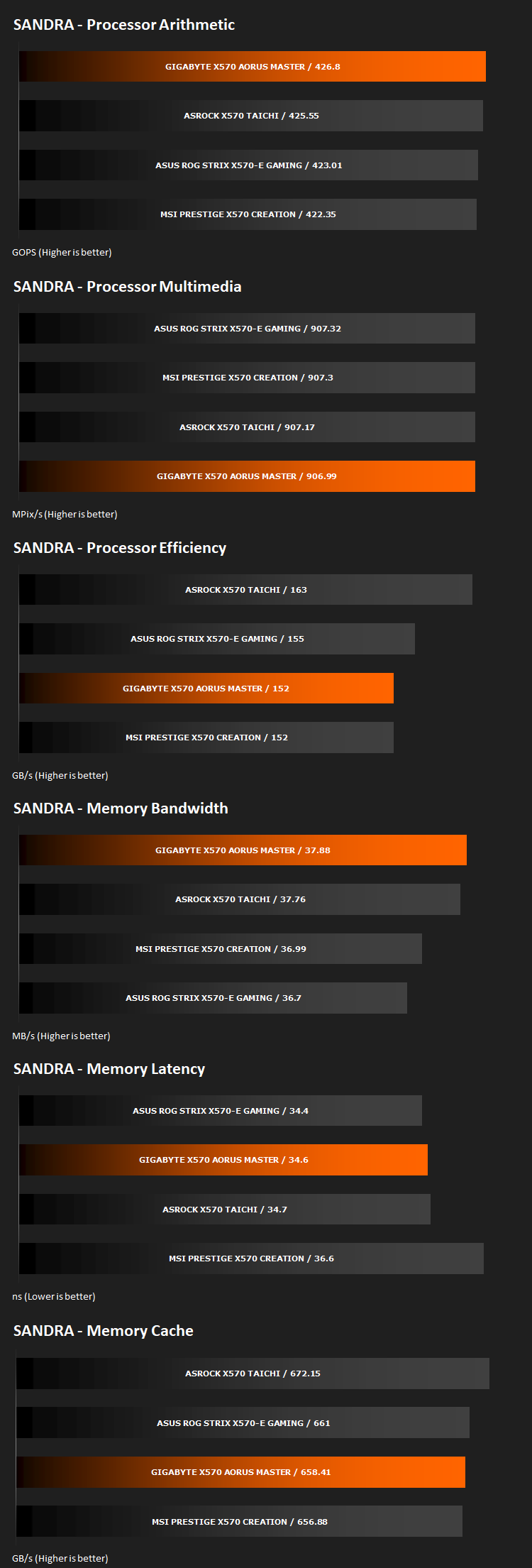
Image Editing Performance – PCMark 8 Photoshop
PCMark 8 Product Page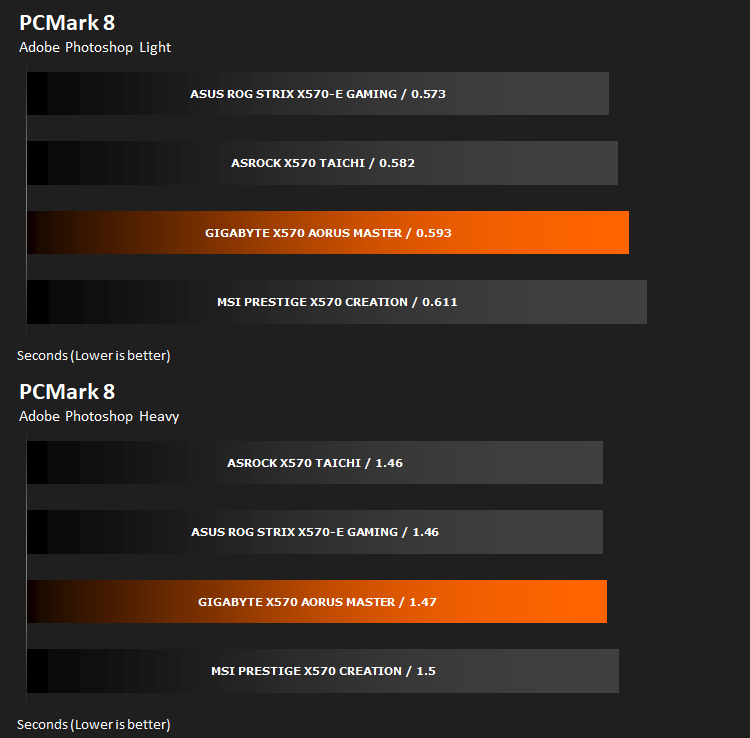
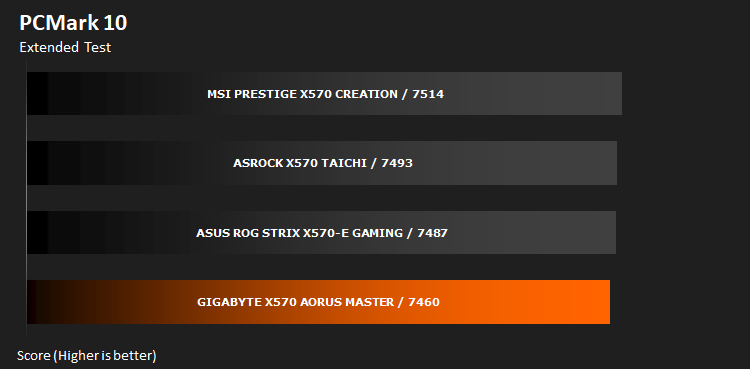
Overall System Performance – PCMark 10
PCMark 10 features a comprehensive set of tests that cover the wide variety of tasks performed in the modern workplace. With a range of performance tests, custom run options, and the new Battery Life Profile, PCMark 10 is the complete PC benchmark for the modern office.
VR Performance – VRMark
VRMark Product Page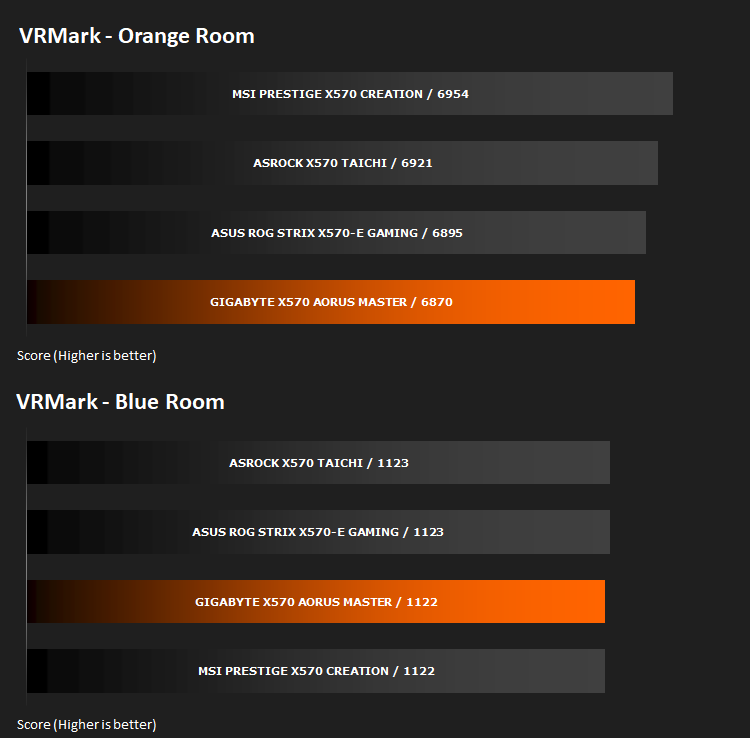
3D Performance – 3DMark
3DMark FireStrike Product Page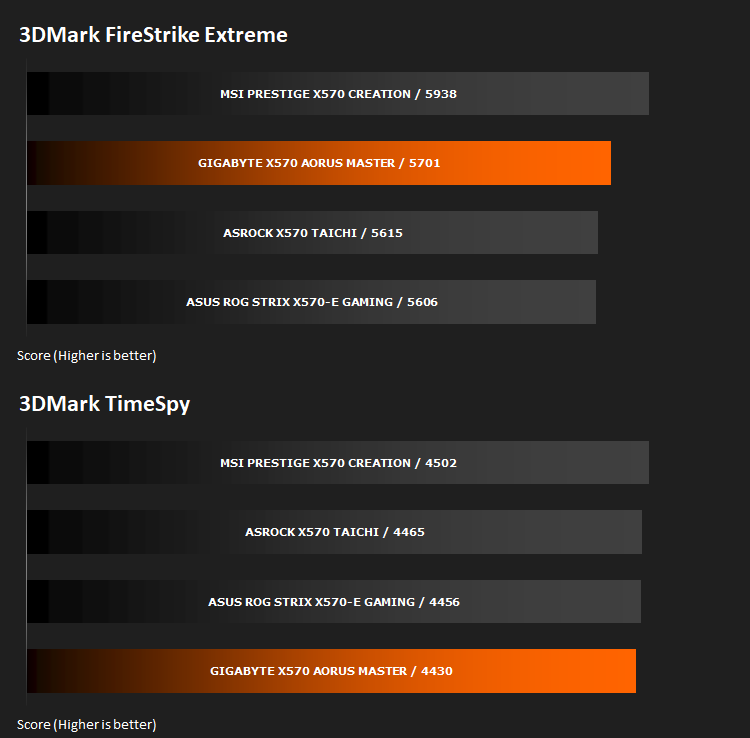
Gaming Performance – Rise of the Tomb Raider & Total War: WARHAMMER

Conclusion
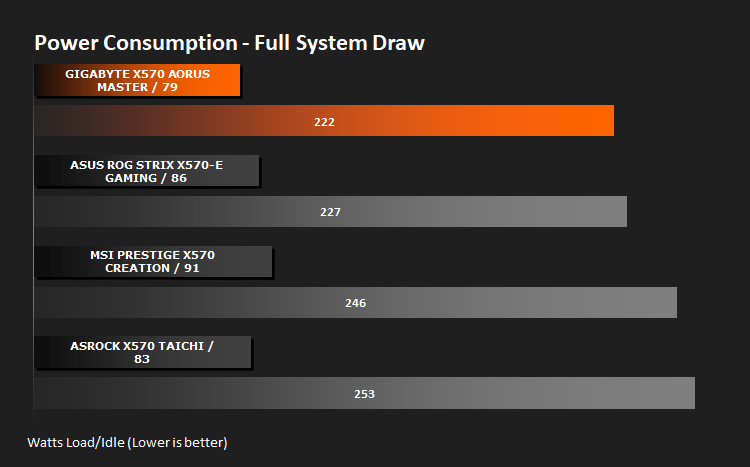
If we begin by focussing on the aesthetics of the motherboard, this one is arguably one of the best looking on the market at the moment. That is pretty typical of the AORUS brand, but even more so this time around. The silver and black contrast against each other well while the very small amount of colour on the audio capacitors keeps things interesting. RGB lighting is subtle and customisable across the entire board.Performance, considering the board’s £379/$399 pricing, had to at least be competitive with other options. We found in our graphs that performance varied, as they always do, but a particular strong-suit for the X570 AORUS MASTER was memory bandwidth and latency. The differences are rarely huge between same-chipset motherboard reviews and this is another instance of that, but small differences can sometimes add up. Further to that, we saw the lowest idle and load power draw across the platform which definitely adds up over time.
The inclusion of three full length x16 PCI-E 4.0 expansion slots along with three M.2 NVMe connections (with their removeable heatsink) is great and offers the user plenty of availability for incredibly fast storage options, especially if you plan to adopt the latest NVMe 4.0 standard with read and write speeds way in excess of what is currently available. However, the single PCI-E 1.0 slot could definitely do with a friend, two would be better.
If we’re to find flaws, with us being critical of the £379/$399 price tag, to include USB 2.0 on the rear IO strikes us as a poor choice. We’re now in an age of most devices supporting USB 3.1 as a minimum (or USB 3.2 if you prefer the new naming scheme) and 2.0 just won’t cut it for more demanding tasks, particularly if you expect the motherboard to be futureproofed.
Another issue we noticed, that isn’t ideal for a couple of reasons, was the FCH fan running 100% of the time while the system is booted. This is a problem because it creates unnecessary noise if your case isn’t well soundproofed or you aim for a silent system, and further to that, these smaller fans typically have a shorter lifespan than their larger counterparts. Running it constantly is reducing the lifespan considerably and we suspect finding a replacement would not be easy.
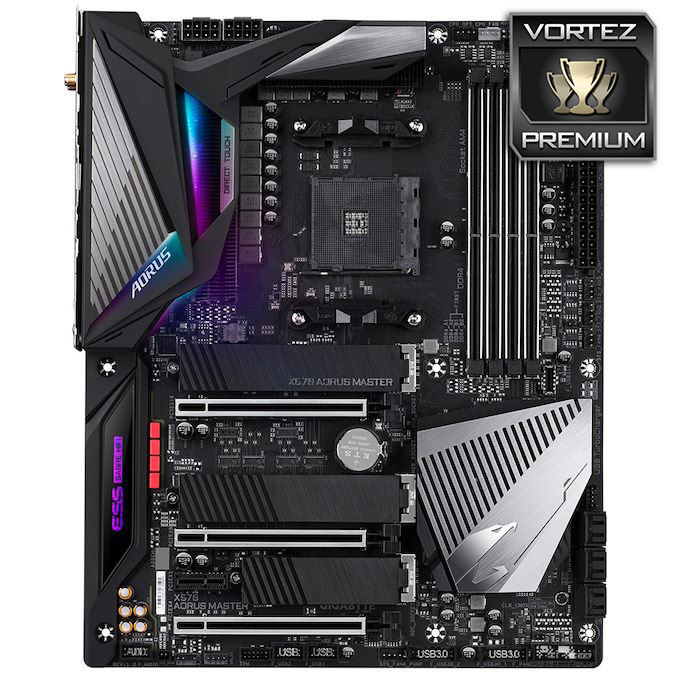
If appearance matters but you can’t sacrifice key features like ample M.2 slots or powerful audio, the X570 AORUS MASTER is definitely worth considering.
+ Very aesthetically pleasing design
+ Good power efficiency
+ 3x NVMe slots
+ Easily removeable M.2 heatsinks
+ Great memory performance
+ Impressive onboard audio solution
Cons
– Still using USB 2.0 on the rear IO
– FCH fan doesn’t turn off fully
Click here for an explanation of our awards at Vortez.net.
Stay connected with the Vortez Social Media pages:
Join in with the discussions on Discord