Bulking out the upper portion of ASRock’s X570 offerings, the X570 Taichi offers plenty for the enthusiast in possession of a Ryzen 3000-series processor.

Product on Review: ASRock X570 Taichi
Manufacturer: ASRock
Street Price: £338.99 / $349.99
ASRock have been specialising in the development and manufacturing of motherboards since 2002 and have gone on to be a big player within an incredibly competitive market segment. They produce motherboards for both AMD and Intel and today we’ll focus on a high-end solution featuring the latest AMD X570 chipset.
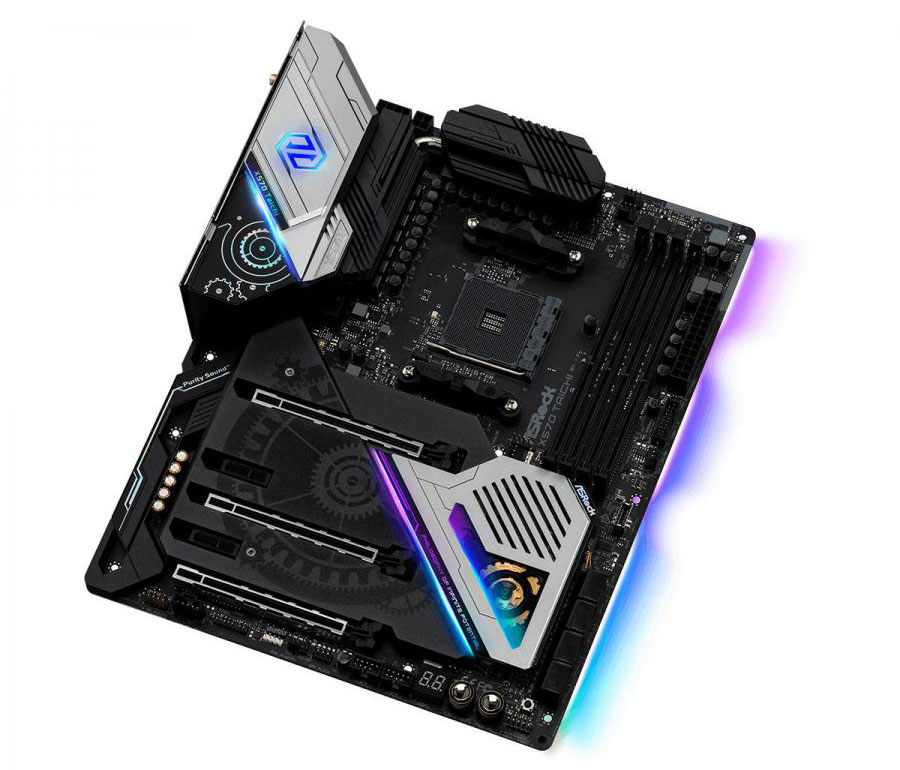
The ASRock X570 Taichi is the latest in a line of premium motherboards that ASRock produce, offering a surfeit of features and performance. As you might have already heard, perhaps the biggest inclusion with the new X570 chipset is the long-awaiting PCI-E 4.0 specification, offering double the bandwidth, and full backwards compatibility, of the previous generation.
Along with PCI-E 4.0, the board houses up to 3x NVMe 4.0 SSD drives, features an extensive power phrase and VRM cooling solution, eight SATA 3.0 ports and plenty of RGB lighting to give your system some flair.
The X570 chipset has been developed in tandem with the latest AMD Ryzen 3000-series CPUs which brings with it other platform improvements such as the introduction of the latest USB 3.2 standard.
Priced at just under £340 in the UK and $350 in the US, the ASRock X570 Taichi stands upon a middle ground in terms of pricing so how does it compare to others in a fierce sector? Let’s find out.
ASRock on the X570 Taichi:
Technical Specifications
ASRock USB 3.2 Gen2
– ASRock Front Panel Type C USB 3.2 Gen2 Header (10 Gb/s)
– ASRock USB 3.2 Gen2 Type-A Port (10 Gb/s)
– ASRock USB 3.2 Gen2 Type-C Port (10 Gb/s)
ASRock Super Alloy
– XXL Aluminum Alloy Heatsink
– Premium 60A Power Choke
– 50A Dr.MOS
– Premium Memory Alloy Choke (Reduces 70% core loss compared to iron powder choke)
– Combo Caps (Nichicon 12K Black Caps)
– Nichicon 12K Black Caps (100% Japan made high quality conductive polymer capacitors)
– I/O Armor
– Matte Black PCB
– High Density Glass Fabric PCB
– 2oz Copper PCB Intel® 802.11ax WiFi
ASRock Steel Slots
ASRock Full Coverage M.2 Heatsink
ASRock Hyper M.2 (PCIe Gen4x4 & SATA3)
ASRock Ultra USB Power
ASRock Full Spike Protection (for all USB, Audio, LAN Ports)
ASRock Live Update & APP Shop
CPU
– Supports AMD AM4 socket Ryzen™ 2000 and 3000 series processors
– Intersil Digital PWM
– 14 Power Phase design
– Capable of providing extra 300W for CPU
– Supports ASRock Hyper BCLK Engine II
Chipset
– AMD Premium X570
Memory
– Dual Channel DDR4 Memory Technology
– 4 x DDR4 DIMM Slots
– AMD Ryzen series CPUs (Matisse) support DDR4 4666+(OC) / 4400(OC) / 4300(OC) / 4266(OC) / 4200(OC) / 4133(OC) / 4000(OC) / 3866(OC) / 3800(OC) / 3733(OC) / 3600(OC) / 3466(OC) / 3200 / 2933 / 2667 / 2400 / 2133 ECC & non-ECC, un-buffered memory*
– AMD Ryzen series CPUs (Pinnacle Ridge) support DDR4 3600+(OC) / 3466(OC) / 3200(OC) / 2933 / 2667 / 2400 / 2133 ECC & non-ECC, un-buffered memory*
– AMD Ryzen series CPUs (Picasso) support DDR4 3466+(OC) / 3200(OC) / 2933 / 2667 / 2400 / 2133 non-ECC, un-buffered memory*
– Max. capacity of system memory: 128GB**
– 15μ Gold Contact in DIMM Slots
*For Ryzen Series CPUs (Picasso), ECC is only supported with PRO CPUs.
SR: Single rank DIMM, 1Rx4 or 1Rx8 on DIMM module label x=1 or 2
DR: Dual rank DIMM, 2Rx4 or 2Rx8 on DIMM module label
**Due to the operating system limitation, the actual memory size may be less than 4GB for the reservation for system usage under Windows® 32-bit OS. For Windows® 64-bit OS with 64-bit CPU, there is no such limitation.
BIOS
– 256Mb AMI UEFI Legal BIOS with GUI support
– Supports “Plug and Play”
– ACPI 5.1 compliance wake up events
– Supports jumperfree
– SMBIOS 2.3 support
– CPU, VCORE_NB, DRAM, VPPM, PCH 1.05V, +1.8V, VDDP, Voltage Multi-adjustment
Graphics
– Integrated AMD Radeon™ Vega Series Graphics in Ryzen Series APU*
– DirectX 12, Pixel Shader 5.0
– Shared memory default 2GB. Max Shared memory supports up to 16GB.* The Max shared memory 16GB requires 32GB system memory installed.
– Supports HDMI 2.0 with max. resolution up to 4K x 2K (4096×2160) @ 60Hz
– Supports Auto Lip Sync, Deep Color (12bpc), xvYCC and HBR (High Bit Rate Audio) with HDMI 2.0 Ports (Compliant HDMI monitor is required)
– Supports HDR (High Dynamic Range) with HDMI 2.0
– Supports HDCP 2.2 with HDMI 2.0 Port
– Supports 4K Ultra HD (UHD) playback with HDMI 2.0 Port
– Supports Microsoft® PlayReady
*Actual support may vary by CPU
Audio
– 7.1 CH HD Audio with Content Protection (Realtek ALC1220 Audio Codec)
– Premium Blu-ray Audio support
– Supports Surge Protection
– Supports Purity Sound™ 4
– Nichicon Fine Gold Series Audio Caps
– NE5532 Premium Headset Amplifier for Front Panel Audio Connector (Supports up to 600 Ohm headsets)
– Pure Power-In
– Direct Drive Technology
– PCB isolate shielding
– Impedance Sensing on Rear Out port
– Individual PCB Layers for R/L Audio Channel
– Gold Audio Jacks
– 15μ Gold Audio Connector
– Supports DTS Connect
LAN
– Gigabit LAN 10/100/1000 Mb/s
– GigaLAN Intel® I211AT
– Supports Wake-On-LAN
– Supports Lightning/ESD Protection
– Supports Energy Efficient Ethernet 802.3az
– Supports PXE
Wireless LAN
– Intel® 802.11ax WiFi Module
– Supports IEEE 802.11a/b/g/n/ax
– Supports Dual-Band (2.4/5 GHz)
– Supports high speed wireless connections up to 2.4Gbps
– 2 antennas to support 2 (Transmit) x 2 (Receive) diversity technology
– Supports Bluetooth 5.0 + High speed class II
– Supports MU-MIMO
Slots
AMD Ryzen series CPUs (Matisse)
– 3 x PCI Express 4.0 x16 Slots (PCIE1/PCIE3/PCIE5: single at x16 (PCIE1); dual at x8 (PCIE1) / x8 (PCIE3); triple at x8 (PCIE1) / x8 (PCIE3) / x4 (PCIE5))*
AMD Ryzen series CPUs (Pinnacle Ridge)
– 3 x PCI Express x16 Slots (PCIE1/PCIE3/PCIE5: single at Gen3x16 (PCIE1); dual at Gen3x8 (PCIE1) / Gen3x8 (PCIE3); triple at Gen3x8 (PCIE1) / Gen3x8 (PCIE3) / Gen4x4 (PCIE5))*
AMD Ryzen series CPUs (Raven Ridge) (Picasso)
– 1 x PCI Express 3.0 x16 Slot (single at x8 (PCIE1))*
– 1 x PCI Express 4.0 x16 Slot (single at x4 (PCIE5))*
– 2 x PCI Express 4.0 x1 Slots
– Supports AMD Quad CrossFireX™, 3-Way CrossFireX™ and CrossFireX™
– Supports NVIDIA® Quad SLI™ and SLI™**
– Supports NVIDIA® NVLink™ with dual NVIDIA® GeForce RTX series graphics cards**
– 1 x Vertical M.2 Socket (Key E) with the bundled WiFi-802.11ax module (on the rear I/O)
– 15μ Gold Contact in VGA PCIe Slot (PCIE1)
*Supports NVMe SSD as boot disks
**NVIDIA® NVLink™ Bridge does not come with the package. Please purchase it from NVIDIA® if necessary.
This feature is only supported with Ryzen Series CPUs (Pinnacle Ridge).
Storage
– 8 x SATA3 6.0 Gb/s Connectors, support RAID (RAID 0, RAID 1 and RAID 10), NCQ, AHCI and Hot Plug
– 1 x Hyper M.2 Socket (M2_1), supports M Key type 2242/2260/2280 M.2 SATA3 6.0 Gb/s module and M.2 PCI Express module up to Gen4x4 (64 Gb/s) (with Matisse) or Gen3x4 (32 Gb/s) (with Pinnacle Ridge and Picasso)*
– 1 x Hyper M.2 Socket (M2_2), supports M Key type 2260/2280 M.2 PCI Express module up to Gen4x4 (64 Gb/s)*
– 1 x Hyper M.2 Socket (M2_3), supports M Key type 2230/2242/2260/2280/22110 M.2 SATA3 6.0 Gb/s module and M.2 PCI Express module up to Gen4x4 (64 Gb/s)*
*If M2_3 is occupied, PCIE5 slot will be disabled
Supports NVMe SSD as boot disks
Supports ASRock U.2 Kit
Connector
– 1 x SPI TPM Header
– 1 x Power LED and Speaker Header
– 1 x AMD Fan LED Header*
– 1 x RGB LED Header**
– 1 x Addressable LED Header***
– 1 x CPU Fan Connector (4-pin)****
– 1 x CPU/Water Pump Fan Connector (4-pin) (Smart Fan Speed Control)*****
– 4 x Chassis/Water Pump Fan Connectors (4-pin) (Smart Fan Speed Control)******
– 1 x 24 pin ATX Power Connector (Hi-Density Power Connector)
– 1 x 8 pin 12V Power Connector (Hi-Density Power Connector)
– 1 x 4 pin 12V Power Connector (Hi-Density Power Connector)
– 1 x Front Panel Audio Connector (15μ Gold Audio Connector)
– 1 x AMD LED Fan USB Header
– 1 x Thunderbolt™ AIC Connector (5-pin) (Supports ASRock Thunderbolt™ AIC Card only)
– 2 x USB 2.0 Headers (Support 4 USB 2.0 ports) (Supports ESD Protection)
– 1 x USB 3.2 Gen1 Header (Supports 2 USB 3.2 Gen1 ports) (Supports ESD Protection)
– 1 x Front Panel Type C USB 3.2 Gen2 Header (Supports ESD Protection)
– 1 x Dr. Debug with LED
– 1 x Power Button with LED
– 1 x Reset Button with LED
– 1 x Clear CMOS Button
*The AMD Fan LED Header supports LED strips of maximum load of 3A (36W) and length up to 2.5M.
**Supports in total up to 12V/3A, 36W LED Strip
***Supports in total up to 5V/3A, 15W LED Strip
****The CPU Fan Connector supports the CPU fan of maximum 1A (12W) fan power.
*****The CPU/Water Pump Fan supports the water cooler fan of maximum 2A (24W) fan power.
*****The Chassis/Water Pump Fan supports the water cooler fan of maximum 2A (24W) fan power.
CPU_FAN2/WP, CHA_FAN1/WP, CHA_FAN2/WP and CHA_FAN3/WP can auto detect if 3-pin or 4-pin fan is in use.
Rear Panel I/O
– 2 x Antenna Ports
– 1 x PS/2 Mouse/Keyboard Port
– 1 x HDMI Port
– 1 x Optical SPDIF Out Port
– 1 x USB 3.2 Gen2 Type-A Port (10 Gb/s) (Supports ESD Protection)
– 1 x USB 3.2 Gen2 Type-C Port (10 Gb/s) (Supports ESD Protection)
– 6 x USB 3.2 Gen1 Ports (Supports ESD Protection)*
– 1 x RJ-45 LAN Port with LED (ACT/LINK LED and SPEED LED)
– 1 x Clear CMOS Button
– 1 x BIOS Flashback Button
– HD Audio Jacks: Rear Speaker / Central / Bass / Line in / Front Speaker / Microphone (Gold Audio Jacks)
*Ultra USB Power is supported on USB3_5_6 ports.
ACPI wake-up function is not supported on USB3_5_6ports.
Software and UEFI
Software
– ASRock Polychrome SYNC
– ASRock XFast LAN
UEFI
– ASRock Full HD UEFI
– ASRock Instant Flash
– ASRock Easy RAID Installer
*These utilities can be downloaded from ASRock Live Update & APP Shop.
Support CD
– Drivers, Utilities, AntiVirus Software (Trial Version), Google Chrome Browser and Toolbar
Accessories
– Quick Installation Guide, Support CD
– 4 x SATA Data Cables
– 1 x ASRock SLI_HB_Bridge_2S Card
– 1 x ASRock WiFi 2.4/5 GHz Antenna
– 1 x ASRock Screwdriver
– 3 x Screws for M.2 Sockets
– 3 x Standoffs for M.2 Sockets
Hardware Monitor
– Temperature Sensing: CPU, CPU/Water Pump, Chassis, Chassis/Water Pump Fans
– Fan Tachometer: CPU, CPU/Water Pump, Chassis, Chassis/Water Pump Fans
– Quiet Fan (Auto adjust chassis fan speed by CPU temperature): CPU, CPU/Water Pump, Chassis, Chassis/Water Pump Fans
– Fan Multi-Speed Control: CPU, CPU/Water Pump, Chassis, Chassis/Water Pump Fans
– Voltage monitoring: +12V, +5V, +3.3V, CPU Vcore, VCORE_NB, DRAM, PCH 1.05V, +1.8V, VDDP
Form Factor
– ATX Form Factor: 12.0-in x 9.6-in, 30.5 cm x 24.4 cm
– 2oz Copper PCB
OS
– Microsoft® Windows® 10 64-bit
Certifications
– FCC, CE
– ErP/EuP ready (ErP/EuP ready power supply is required)
X570 Overview
X570 – A Brief Aside
Launching alongside Ryzen 3000-series CPUs is the new X570 motherboard range. Manufactured by AMD’s extensive array of partners including industry mainstays ASRock, ASUS, GIGABYTE and MSI, X570 motherboards are the most feature complete of those available on day one.
First generation Ryzen launched with single-figure motherboard support across all manufacturers, and the second generation was only a little better. Third generation Ryzen marks a sea-change in attitudes and model variety. Dozens of X570 variants are planned across all partners, including some exceptionally high-end designs such as the £777.77 MSI X570 God Like or limited edition ASRock X570 Aqua.
In addition to all the features you expect on premium motherboards, including a plethora of IO options, storage flexibility, networking, audio and RGB lighting systems, the motherboard (specifically the chipset) will also offer up to 16 PCIe 4.0 lanes for connected components (NVMe storage etc.) which don’t require direct connection to the CPU (as in the case of discrete graphics).
The most notable pre-launch commonality has been the inclusion of a chipset/FCH fan, reflecting the increased demands these components are put under in this generation. Some motherboard manufacturers have dealt with it well, whereas others have regressed to small high-speed fans without a means of RPM control – manual or automatic. For all their bluster and high-end features, such glaring flaws will tend to rule them out of contention for approval given the pricing is far from budget.
Indeed, these motherboards are all pitched at a far higher price than the X470 series you might think they replace. That’s justified through the exclusive features – highest among them being exclusive out-the-box PCIe 4.0 support – and is excused as B450 and X470 models will continue to be sold for the time being. However, their positioning makes the next-generation Ryzen platform as a whole a little more expensive an upgrade than many would have thought just a few months ago.
Furthermore, these motherboards have limited support (i.e. typically none) for first generation Ryzen CPUs and 2000-series APUs (based on Zen rather than Zen+ architecture). As a result they may not be suitable for piecemeal upgrades. By the same token, they appear to have extremely robust power delivery systems even compared to their X470 counterparts, potentially making them excellent overclocking candidates for the higher 12 and 16-core count 3000-series processors.
Nonetheless, the vast ecosystem of X570 motherboards should mean that, if your budget is flexible enough, you’ll find exactly what you need for your use case.
Packaging & Bundle
The packaging is bulky and uses very thick cardboard to protect the motherboard as best as it can. The front of the box is covered by cogs and gears giving it an industrial look while the brushed steel and RGB edging brings it right back into the 21st century. It’s an odd mash up but ASRock rocks it.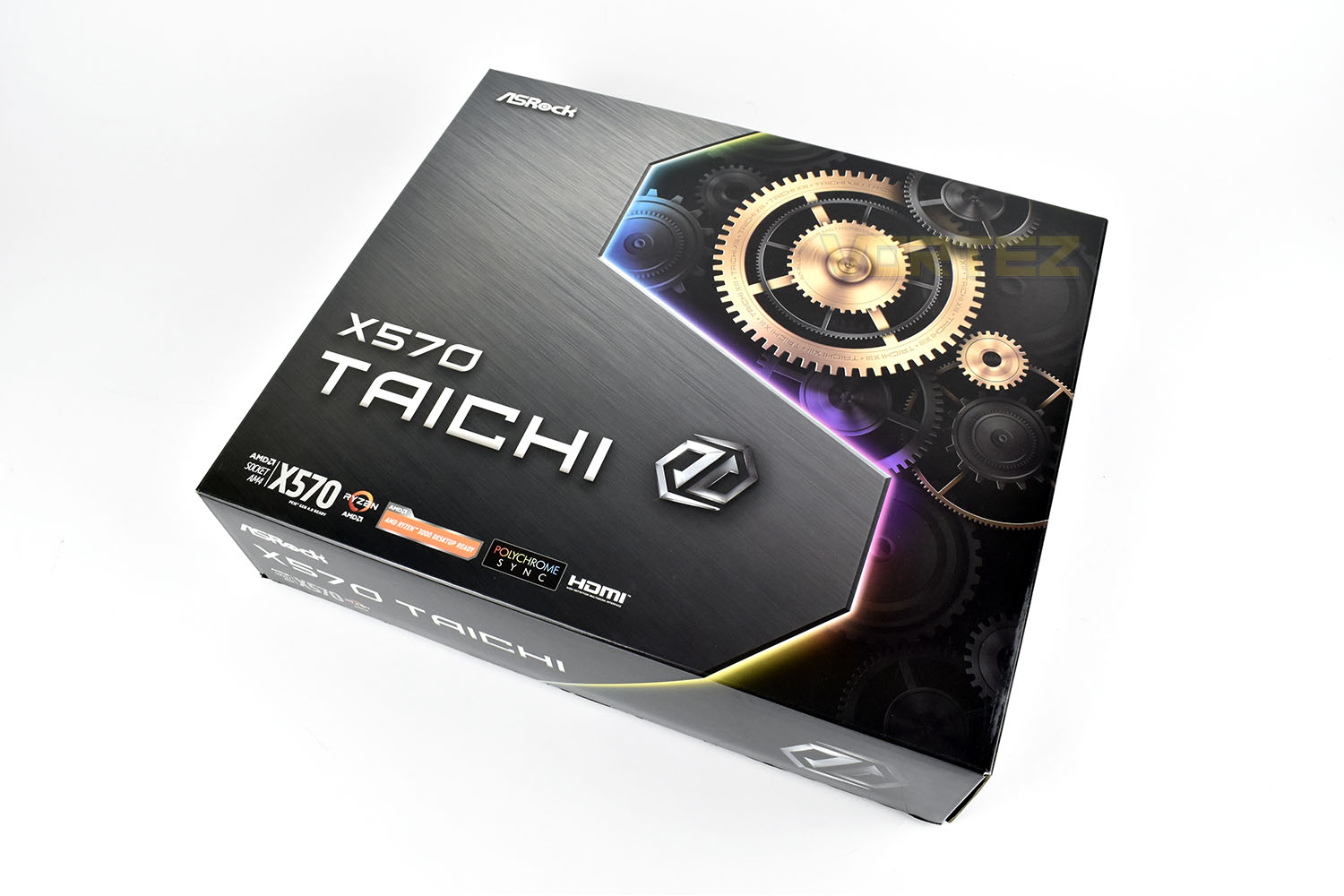
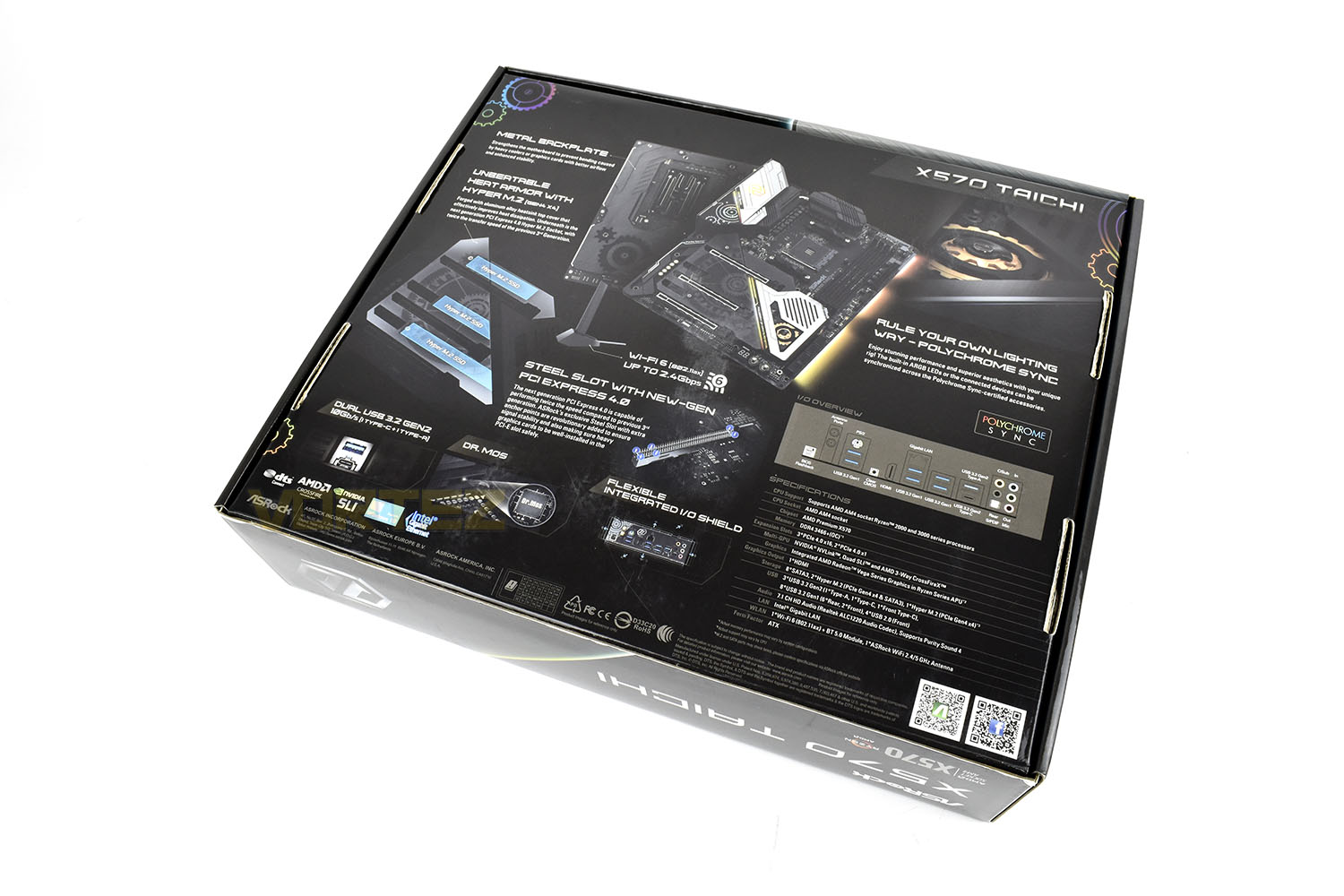
On the reverse there are several images of the Taichi as well as full specifications and a detailed look at the rear IO.
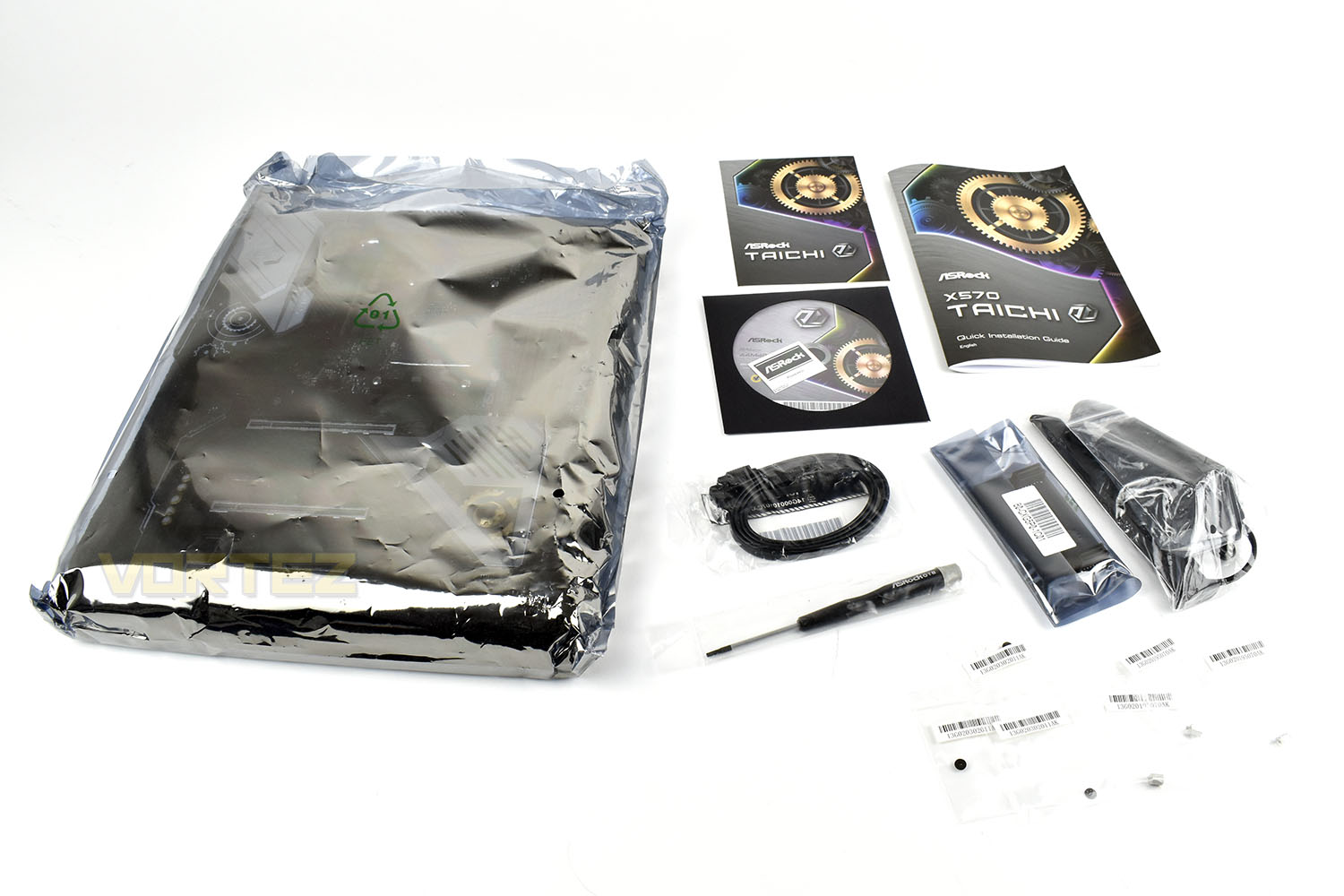
Included with the X570 Taichi is an installation/instruction guide, a software CD with an enclosed metallic case sticker, an SLI bridge, WiFi 6 antenna, M.2 stand offs for all three of the available slots and a twin pack of SATA cables.
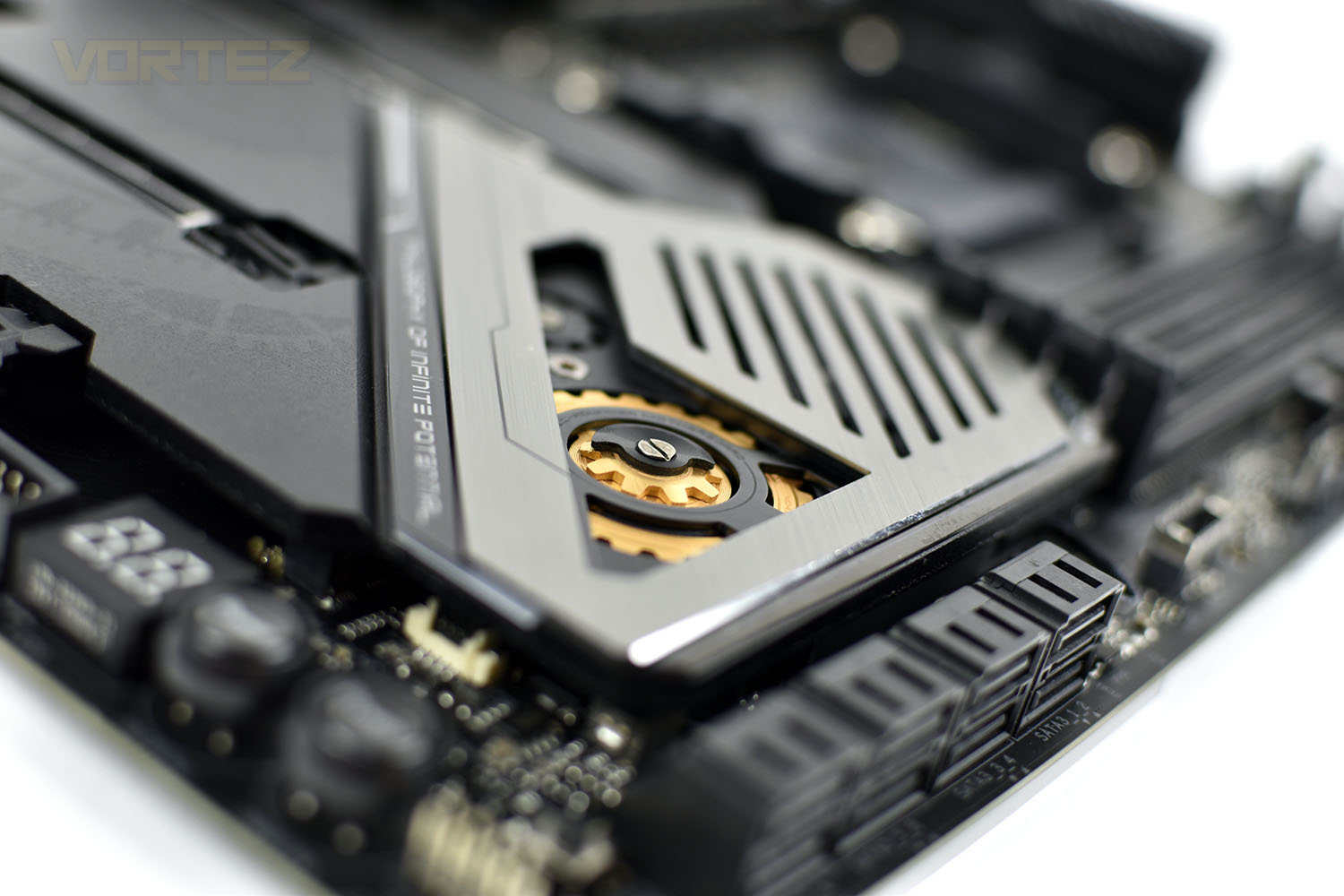
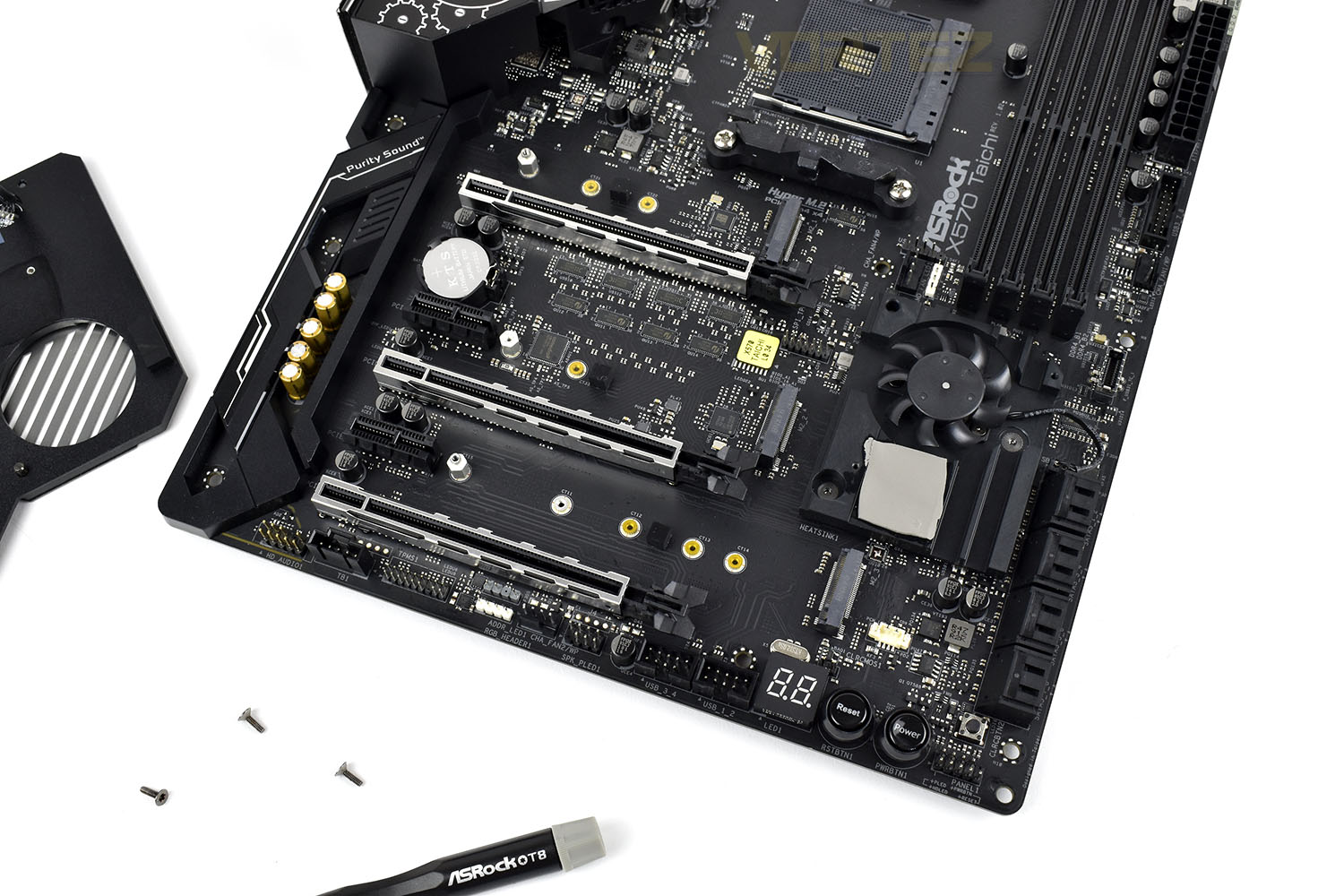
Unusually they’ve also included a T8 Torx screwdriver, this is used to remove the M.2 and FCH heatsink on the lower portion of the motherboard.
Closer Look
As we’ve seen on previous generations of Taichi motherboards from ASRock, the cogs and gears form the basis of the styling across the entire platform, mixing modern with industrial. It’s certainly unique.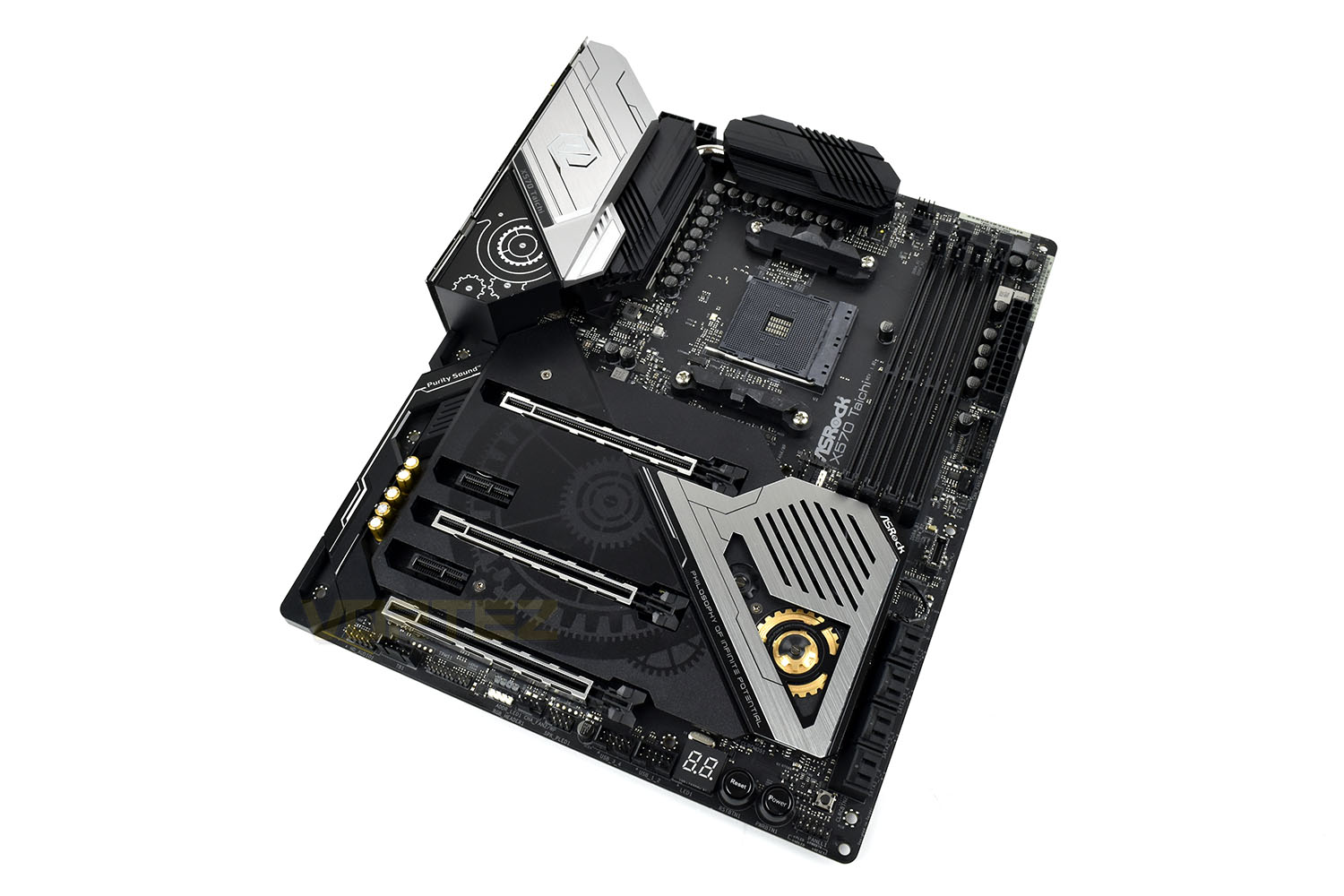
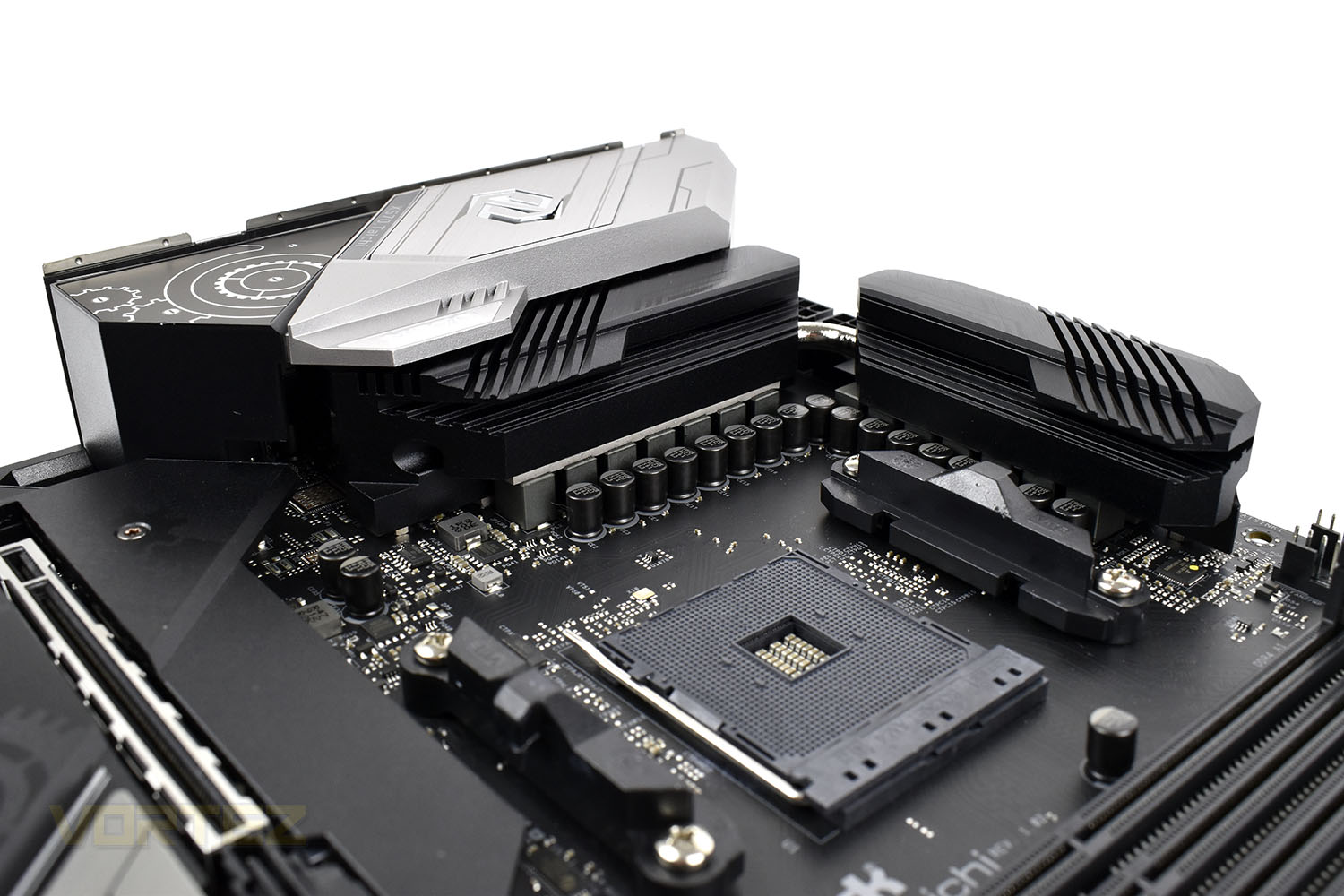
The AM4 socket is provided with a 14 power phase design that is bolstered by Dr. MOS power stage solutions for up to 50A continuous current for each phase, giving improved thermals and superior performance.
Keeping the VRMs cool are a pair of interlinked AAL Aluminium Alloy heatsinks, joined together by a substantial heatpipe.
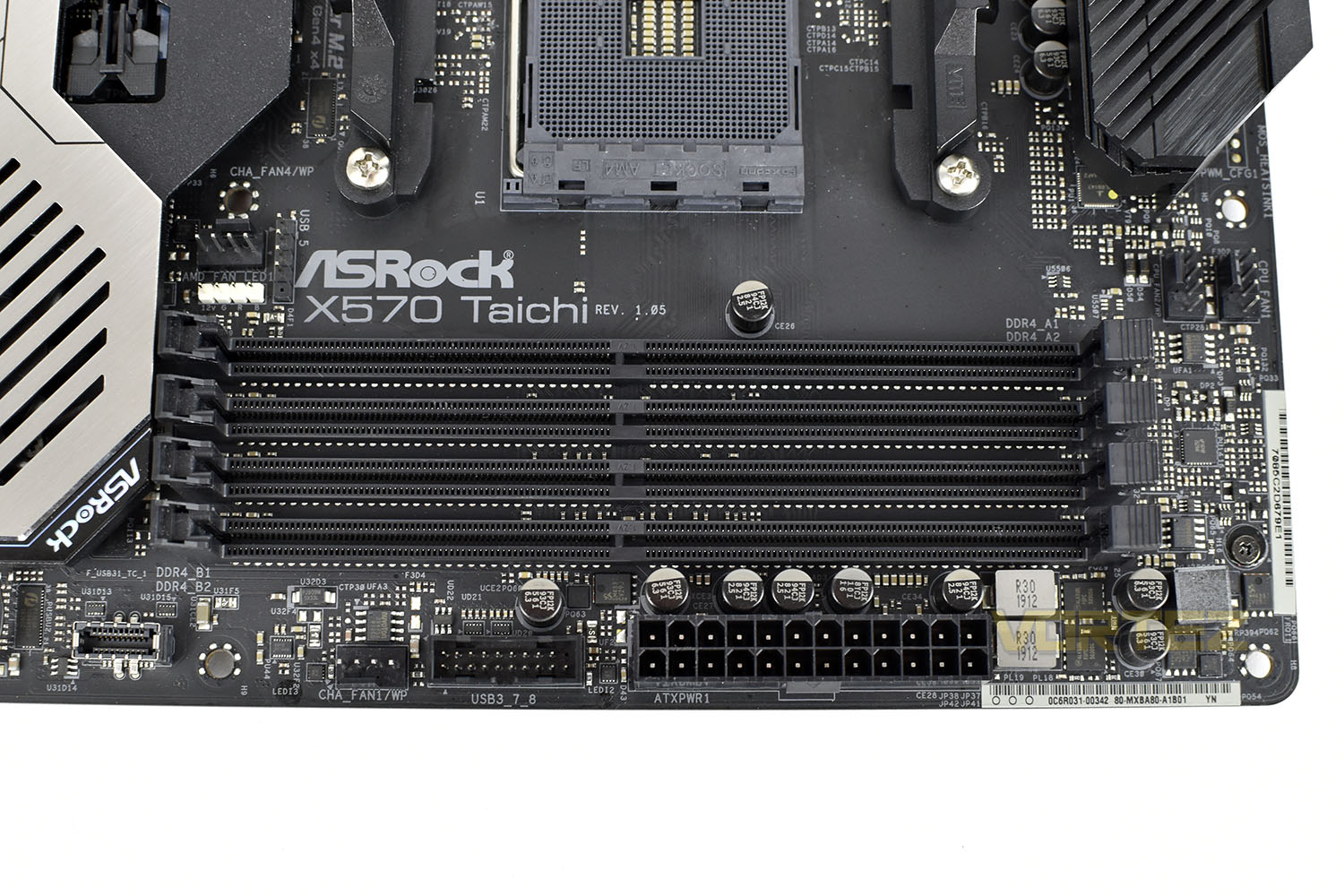
Supporting memory speeds up to 4666MHz and capacities of 128GB, the four DIMM slots are backed by a Premium Memory Alloy Choke with a highly magnetic and heat resistant design for better stability to provide reliable power to the memory modules.
Just above the DIMM slots are a pair of 4-pin PWM fan connections and to the right of the memory slots is the 24-pin power connection, a front USB 3.0 header, another 4-pin PWM fan connection and a front USB 3.2 Gen. 2 jack.
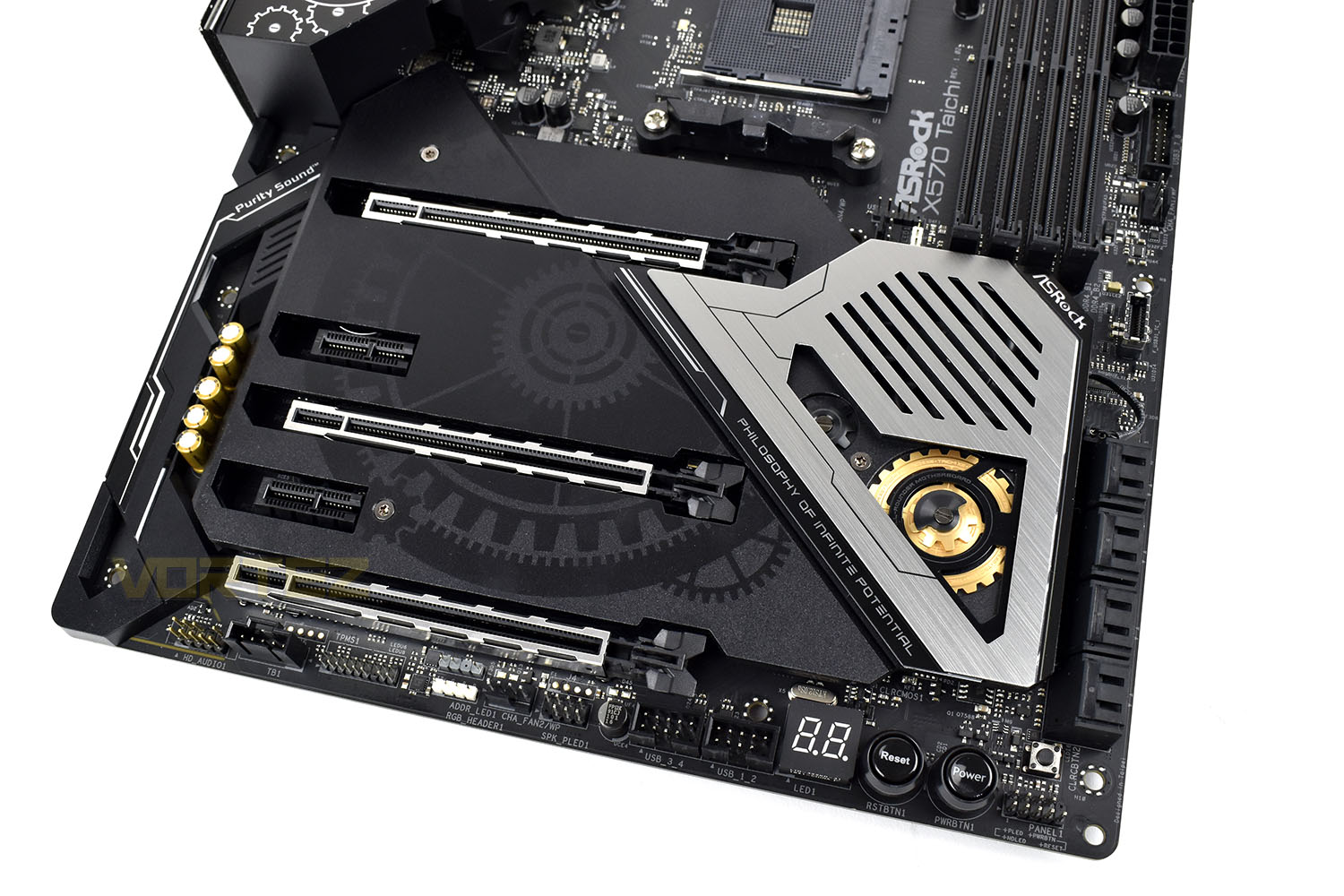
Moving to the bottom of the board, the M.2 and FCH heatsink is all one piece, helping to distribute and dissipate heat as evenly as possible, however to install one M.2 SSD, you need to remove the entire piece. This is what the T8 Torx screw is for.
On the bottom edge of the board is a power and reset switch and a seven-segment display for POST codes.
Removing the heatsink we reveal a trio of M.2 NVMe 4.0 slots, two of which are capable of hosting an 80mm drive and the third up to 110mm. It’s worth pointing out here that populating the third NVMe slot will disable the bottom PCI-E x16 slot.
Closer Look (Continued)
Above the AM4 CPU socket, behind the VRM cooling is an 8+4 CPU power arrangement. This isn’t the beefiest power input option that we’ve seen but definitely enough to classify this is an enthusiast overclocking option.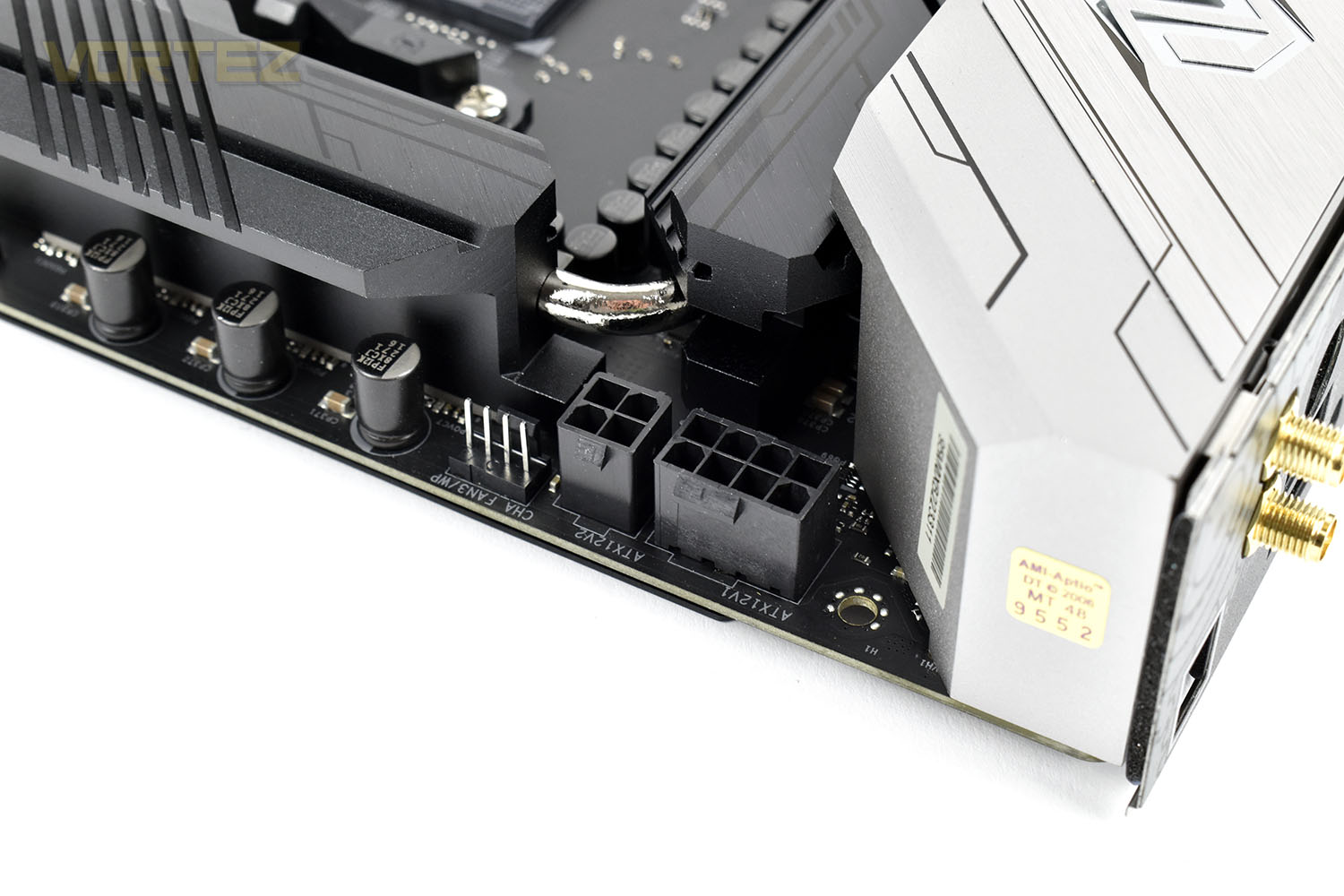
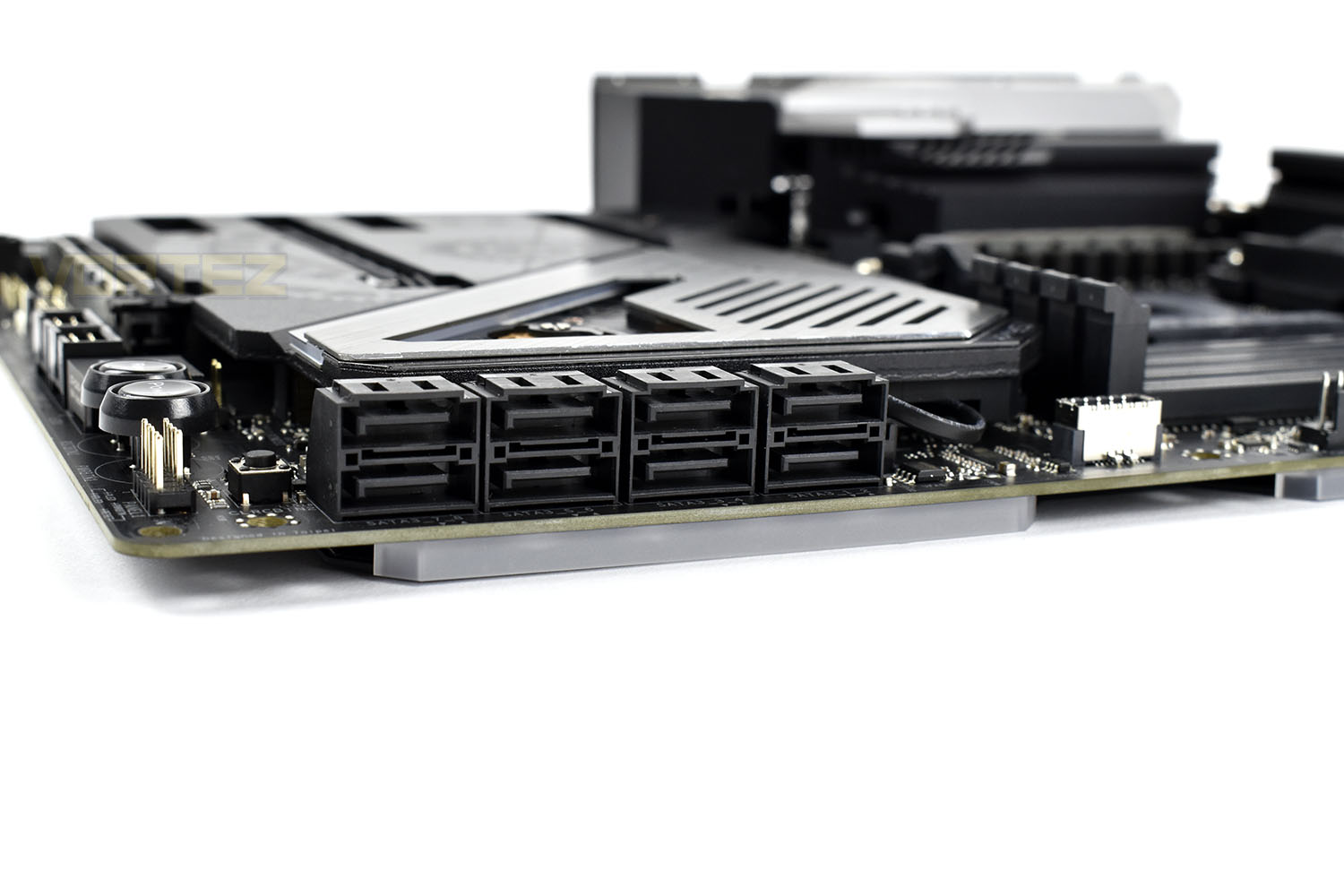
If three M.2 NVMe slots wasn’t enough, ASRock have also slapped on eight SATA 3.0 ports, all 90° to the motherboard. Storage support certainly isn’t at a premium with this offering.
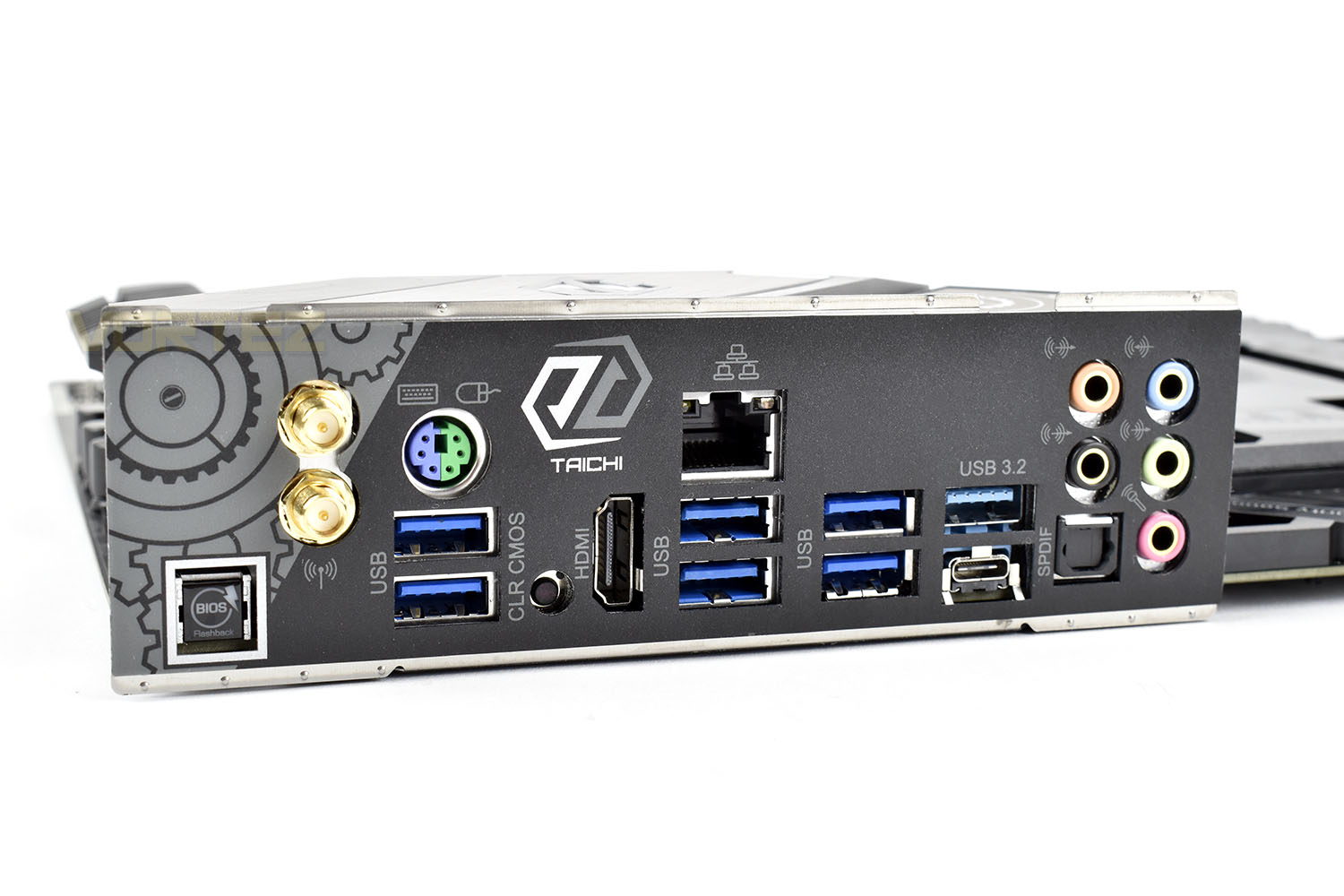
Moving to the rear IO, the backplate is pre-attached to the motherboard. ASRock have placed a BIOS Flashback button here, this is used to flash the BIOS to the latest version without a need for a CPU, RAM or a GPU.
Additionally, the small black button, directly next to the HDMI port, is a handy CMOS-clear button which somewhat negates the necessity to remove the BIOS battery that is hidden away under the large PCI-E heatsink.
Connectivity is decent with the following included:
WiFi 6 antenna connections
PS/2 keyboard/mouse port
2x USB 3.2 Gen. 1
HDMI 2.0
1Gig Ethernet
4x USB 3.2 Gen. 1
1x USB 3.2 Gen. 2 (Type-A)
1x USB 3.2 Gen. 2 (Type-C)
SPDIF optical out
7.1 audio out
Test Setup & Software
Test SetupCooling Noctua NH-U12S-SE-AM4
Motherboard ASRock X570 Taichi
Memory 16GB Corsair Vengeance LPX 3200MHz @ 3000MHz @ 15-17-17-38-58
Graphics AMD Radeon RX 480 8GB
Storage Corsair Force LE 480GB
PSU Corsair RM750X 80 Plus Gold Certified PSU
Benchmarks
x264 HD 4.0 – 1st and 2nd pass encoding
SiSoftware SANDRA – CPU & Memory benchmarks
POV-RAY – CPU benchmarks
TrueCrypt – CPU benchmarks
AIDA64 – CPU benchmarks & Memory
PCMark 8 – Home Suite & Photoshop
3DMark FireStrike – 3D Benchmark
Games – Rise of the Tomb Raider & Total War: WARHAMMER
Other Software
Stress Testing Software: AIDA64 Stability Test
CPU Specification Monitoring: CPU-Z
Performance Monitoring: MSI Afterburner
Benchmarks: Power Consumption
Ray Tracing Performance – POV-Ray 3.7
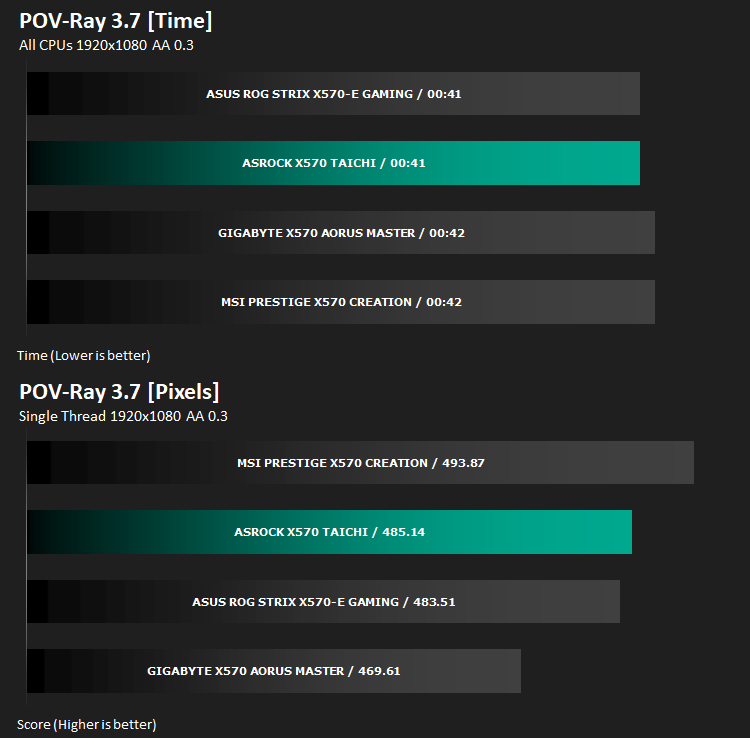
This product allows users to build their custom 3D worlds with excellent quality despite their computer’s hardware. It has adjustable options for levels of radiance, refraction, and reflection. Calculation time may vary depending on the computer model, but PovRay can adapt to many computer builds, and is supported by the open source community.
AES Encryption Performance – TrueCrypt 7.1a
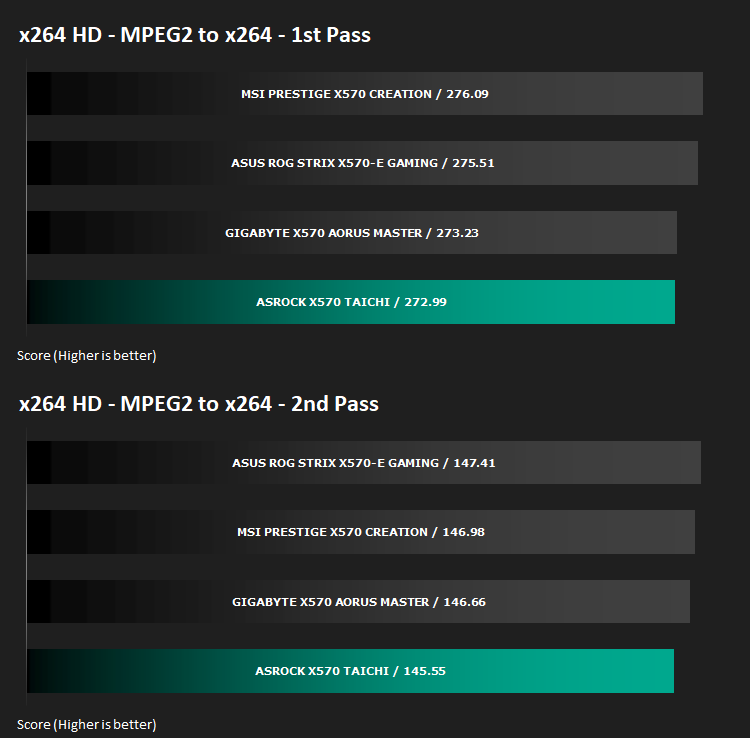
Encoding Performance – x264 HD
Processing Features Performance – AIDA64
AIDA64 Product Page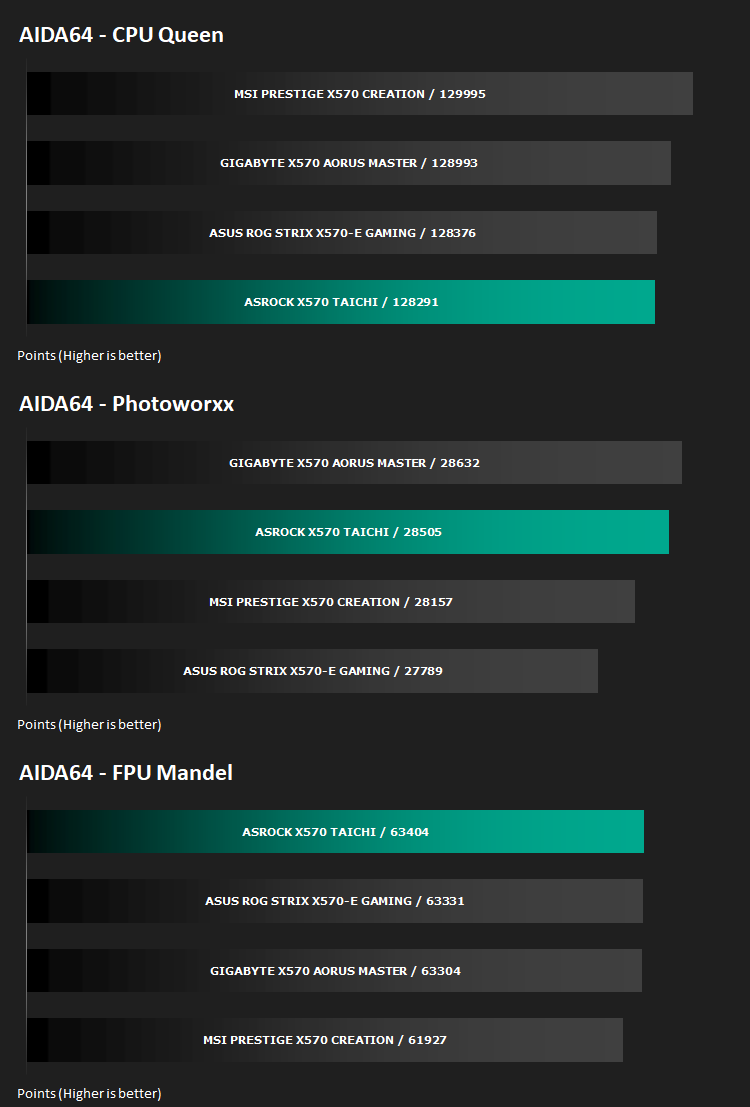
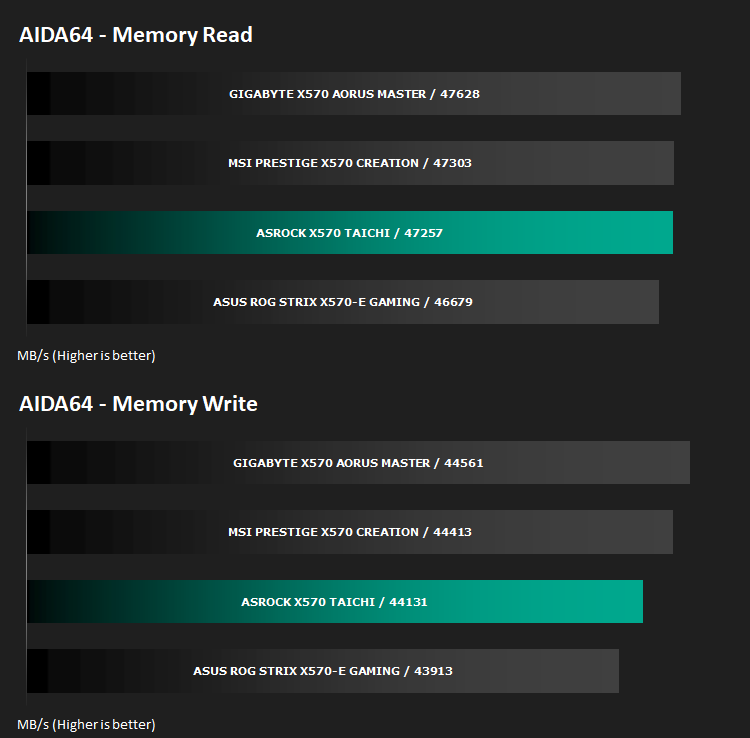
Memory Transfer Performance – AIDA64
AIDA64 Product PageThe Memory Latency benchmark measures the typical delay when the CPU reads data from system memory. Memory latency time means the penalty measured from the issuing of the read command until the data arrives to the integer registers of the CPU.
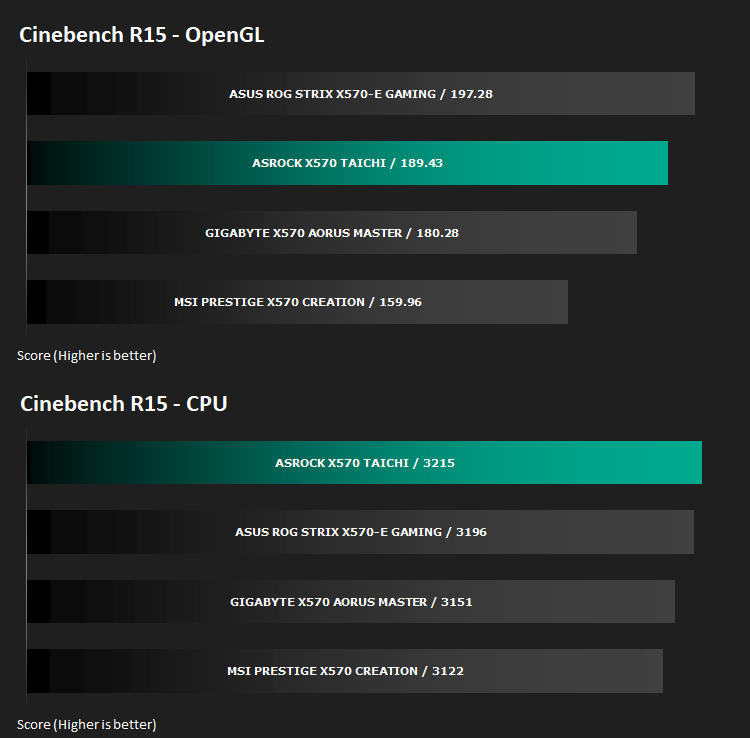
Processing Power Performance – Cinebench R15
Bandwidth Performance – SiSoftware SANDRA
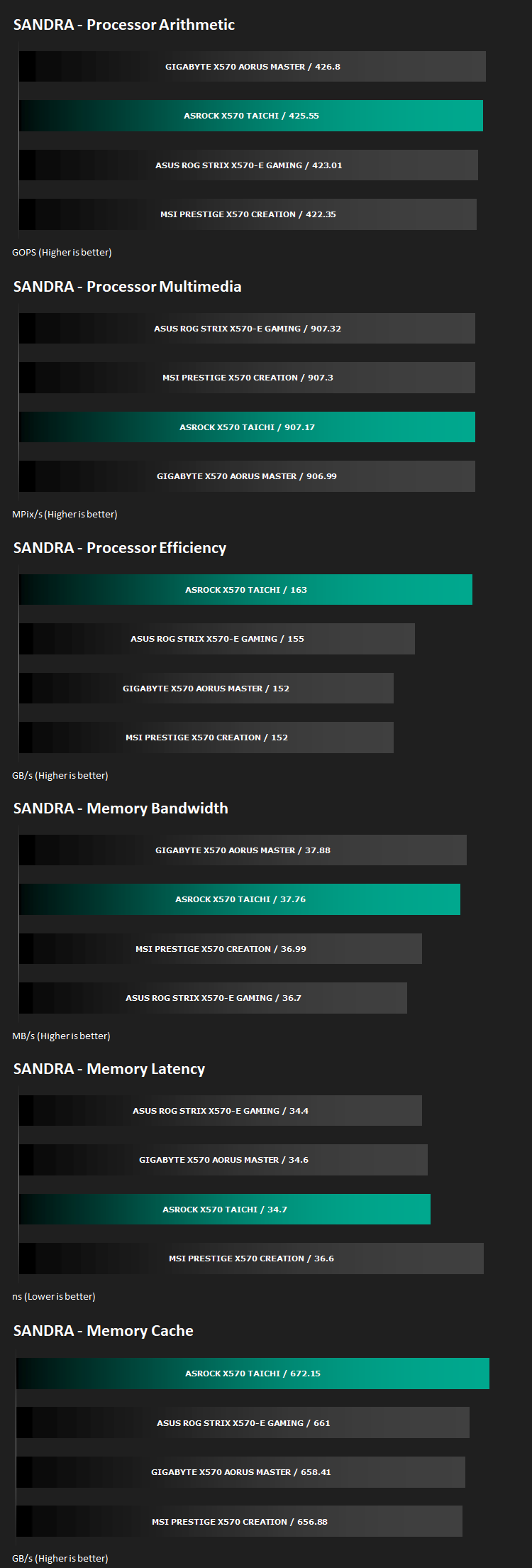
Image Editing Performance – PCMark 8 Photoshop
PCMark 8 Product Page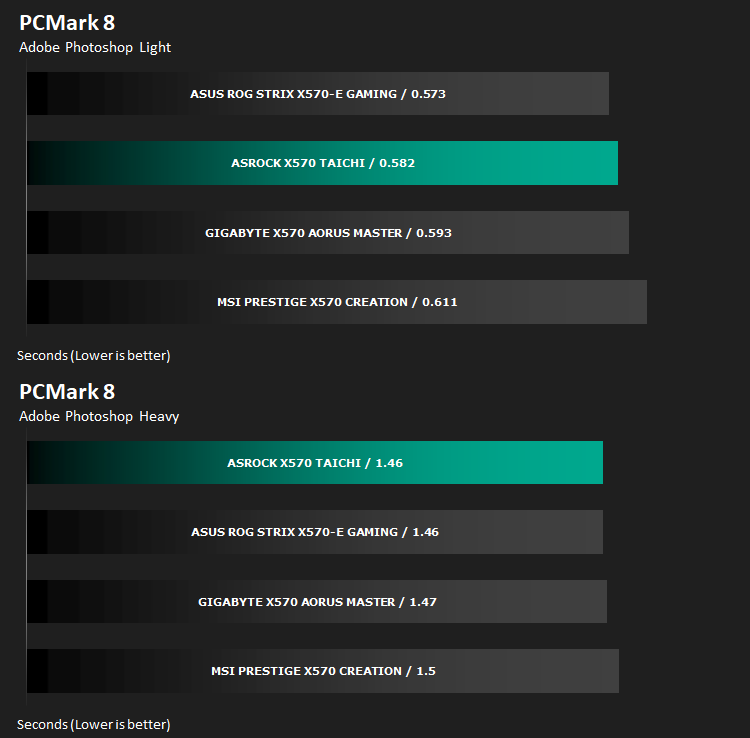
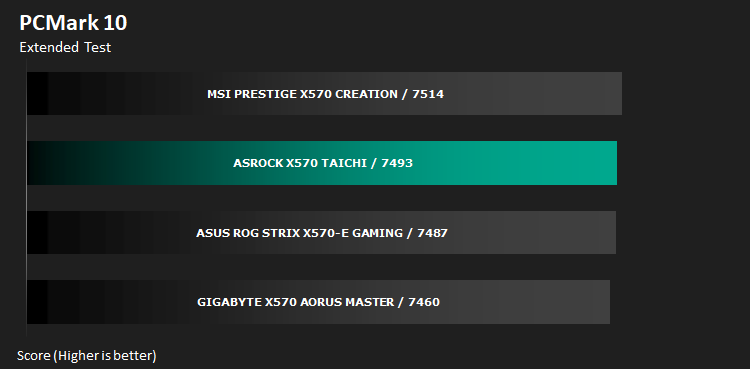
Overall System Performance – PCMark 10
PCMark 10 features a comprehensive set of tests that cover the wide variety of tasks performed in the modern workplace. With a range of performance tests, custom run options, and the new Battery Life Profile, PCMark 10 is the complete PC benchmark for the modern office.
VR Performance – VRMark
VRMark Product Page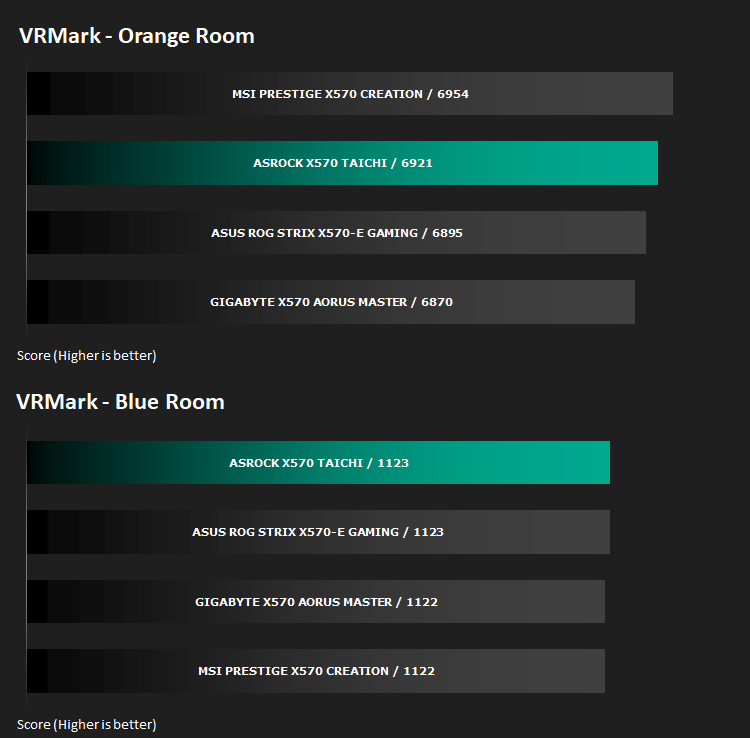
3D Performance – 3DMark
3DMark FireStrike Product Page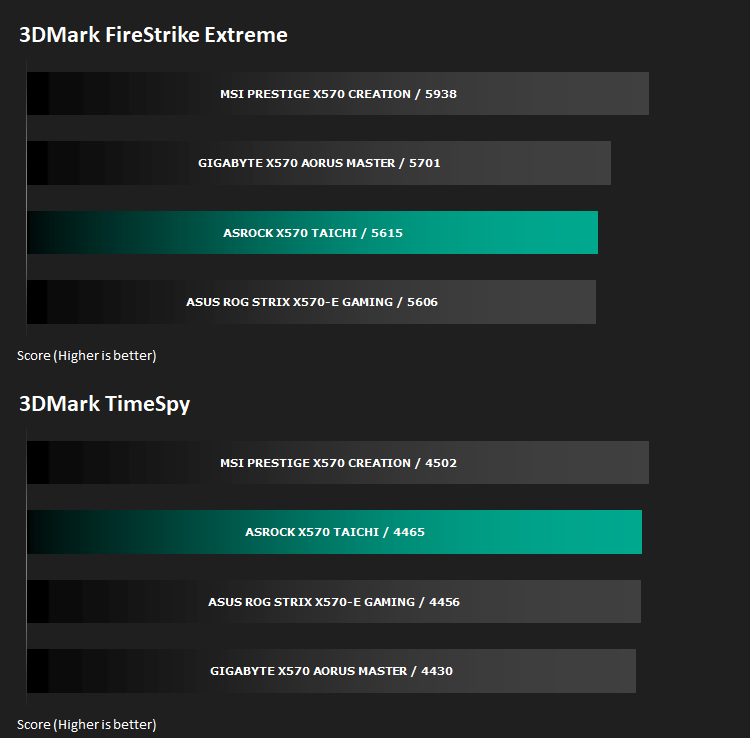
Gaming Performance – Rise of the Tomb Raider & Total War: WARHAMMER

Conclusion
Aesthetics are entirely subjective but we don’t really appreciate the unique style adorned across the motherboard. The extensive RGB lighting is nice and all, but contrasting that against an industrial style with the cogs on the FCH, just isn’t our ‘cup of tea’ at all. However, that is purely personal and your opinion will likely differ. That being said, this is, by a long way, the best looking Taichi board yet, so there is that.Performance is rarely chart topping, but it’s quite often in second place, with first place in our graphs chopping and changing between different manufactures. So, while it’s not the best motherboard we’ve tested, it’s definitely one of the most consistent of the bunch. And there’s no test in which it struggles noticeably, always putting in a decent performance.
Connectivity is good on the rear IO, with a decent selection of USB 3.2 Gen. 1 + Gen. 2 ports and the clear CMOS button is handy considering the awkward removal of the PCI-E heatsink to get to the battery, but something we’ve seen on other offerings at the same price point is a multi-gig ethernet connection which the X570 Taichi lacks.
The large heatspreader surrounding the PCI-E slots is large and cumbersome but should do a reasonable job of dissipating heat away from power-hungry NVMe 4.0 drives. However, it’s awkward to remove and requires a T8 screwdriver that they’ve included, but if that somehow goes missing, you may be out of luck. Secondly, the FCH fan, responsible for keeping the chipset cool is fixed at 100% RPM; it’s not particularly loud but the noise is piercing and after several hours of running the motherboard during our tests, we couldn’t wait to finish up and move onto the next product. Until ASRock fix that in their firmware/BIOS updates, we can’t recommend the motherboard unless your case is incredibly soundproof or you don’t mind fan noise.
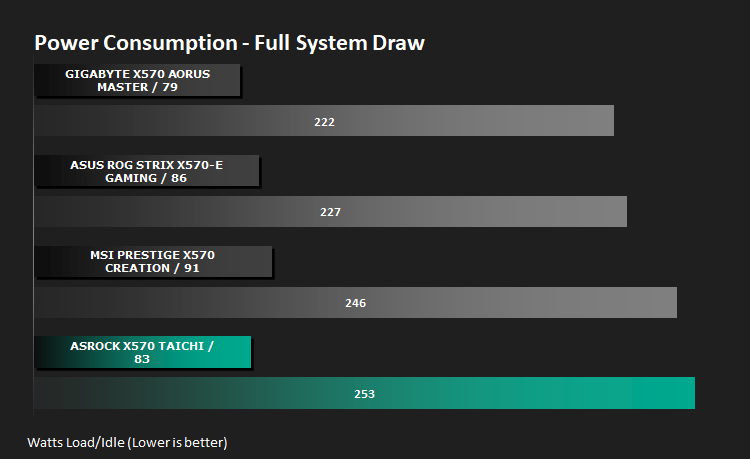
As we’ve found during our testing of the X570 chipset, it’s not particularly energy efficient compared to the X470 chipset, but ASRock seems to lose out the most on this front. Idle draw is around average but at load, it’s 7W higher than anything else and over 30W higher than the GIGABYTE
The ASRock X570 Taichi is a premium offering from a high-end motherboard manufacturer but the long and short of it is, it falls a little before the mark. The FCH fan is also terrible and must be addressed by ASRock.
+ Better looking than previous Taichi boards, if you’re into the style
+ Consistently good performance
+ Plenty of storage options (3x NVMe + 8x SATA)
Cons
– FCH fan is very annoying
– Poor power management
– Only 1-Gigabit ethernet
– Awkward heatsink removal to install/change M.2 SSDs
Click here for an explanation of our awards at Vortez.net.
Stay connected with the Vortez Social Media pages:
Join in with the discussions on Discord