Small media centres, console-sized gaming machines or compact home servers all require a tiny backbone, which is where the X570 Phantom Gaming-ITX/TB3 can come in handy, with its incredibly frugal footprint.

Product on Review: ASRock X570 Phantom Gaming-ITX/TB3
Manufacturer: ASRock
Street Price: GBP £239.99 / USD $259.99 / AUS $439.99
AMD’s 3000-series Ryzen processors are well established now, providing excellent performance at a relatively affordable price point, and with that launch came the supporting X570 chipset. While most users will opt for a fairly standard ATX form factor, there’s always a need for high-performance Micro ATX and even ITX. That’s where the ASRock X570 Phantom Gaming-ITX/TB3 comes in.
ASRock certainly haven’t held back with the X570 chipset with over 10 models available on launch day, catering to a multitude of budget levels, all the way from flagship offers like the X570 Taichi down to something more affordable like the X570M Pro4.
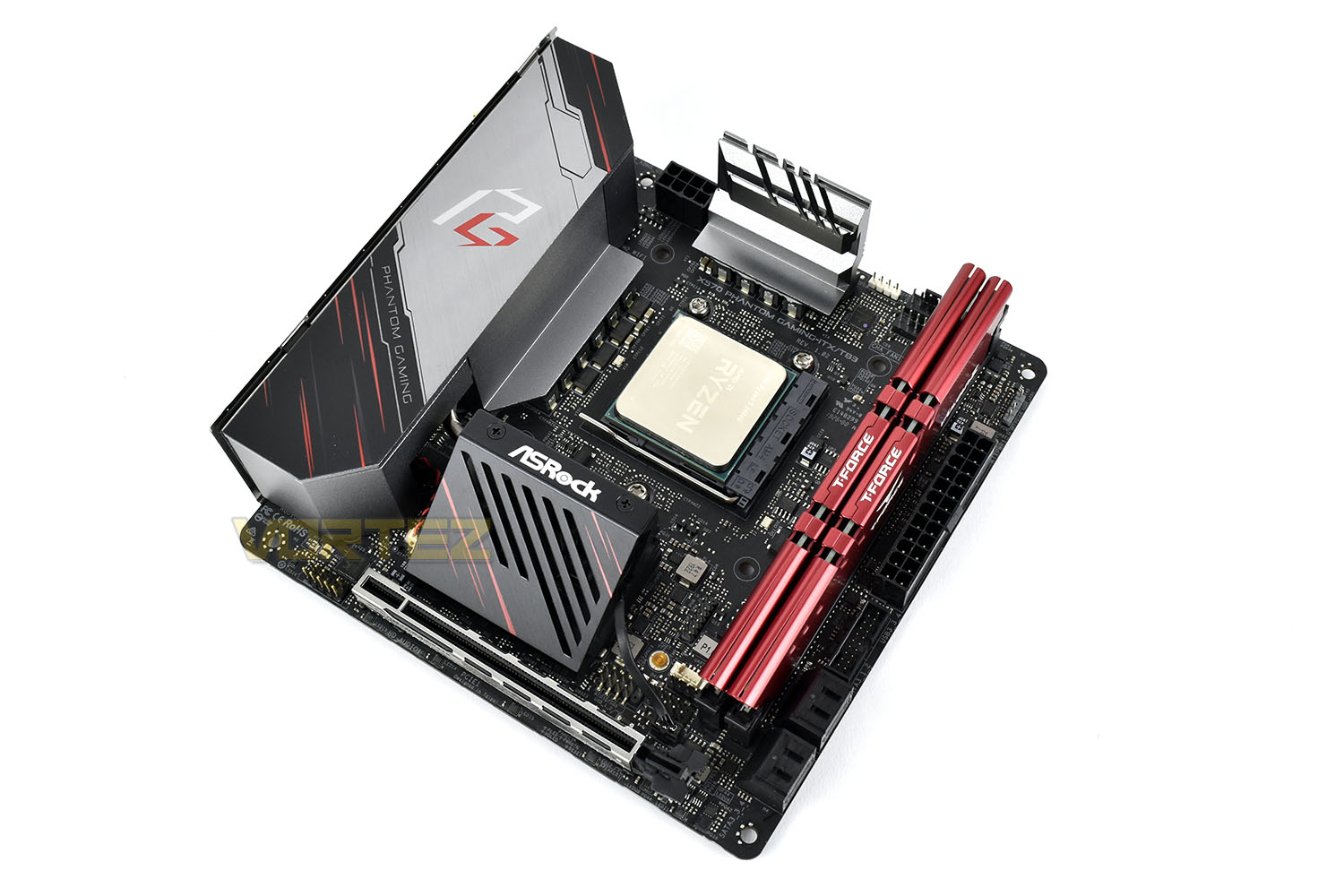
Measuring in at only 170mm x 170mm, the ITX form factor poses many challenges for manufacturers who need to squeeze in many features, however, ASRock really seem to have raised the bar this time around. As the name might suggest, Thunderbolt 3 is included, something that we’ve not yet seen on the X570 chipset, nor many motherboards at all for that matter, WiFi AX (6) support, an extensive 10-phase VRM, DisplayPort and HDMI and a PCI-E 4.0 enabled M.2 port for ultra fast storage.
All of that comes at a price, but less than you might expect, £240 in the UK, $260 in the US and $440 in Australia. If the performance is reasonable then we don’t see that being a problem for those who need the ITX form factor, especially considering the already higher-than-usual pricing structure of the X570 chipset.
ASRock on the X570 Phantom Gaming-ITX/TB3s Power Phase:
Featuring sturdy components and completely smooth power delivery to the CPU. Plus, it offers unmatched overclocking capabilities and enhanced performance with the lowest temperature for advanced gamers as well.
Technical Specifications
Gaming Armor
Power
– Hi-Density Power Connectors (24 pin and 8 pin)
Memory
– 15μ Gold Contact in DIMM Slots
VGA Card
– 15μ Gold Contact in VGA PCIe Slot (PCIE1)
Internet
– Intel® LAN
Cooling
– 2oz Copper PCB
Audio
– Creative Sound Blaster™ Cinema 5
Unique Feature
ASRock USB 3.2 Gen2
– ASRock USB 3.2 Gen2 Type-A Port (10 Gb/s)
– ASRock Thunderbolt™ 3 Type C USB 3.2 Gen2 Port (40Gb/s for Thunderbolt™ protocol; 10 Gb/s for USB3.2 protocol)
ASRock Super Alloy
– Premium 60A Power Choke
– 60A Dr.MOS
– Nichicon 12K Black Caps (100% Japan made high quality conductive polymer capacitors)
– I/O Armor
– Matte Black PCB
– High Density Glass Fabric PCB
– 2oz Copper PCB
Intel® 802.11ax WiFi
ASRock Steel Slot Gen4
ASRock Hyper M.2 (PCIe Gen4x4)
ASRock Full Spike Protection (for all USB, Audio, LAN Ports)
ASRock Live Update & APP Shop
CPU
– Supports AMD AM4 socket Ryzen™ 2000 and 3000 series processors
– Supports Intel® LGA 115x mounting hole and Cooler
– Digi Power design
– 10 Power Phase design
Chipset
– AMD X570
Memory
– Dual Channel DDR4 Memory Technology
– 2 x DDR4 DIMM Slots
– AMD Ryzen series CPUs (Matisse) support DDR4 4533+(OC) / 4400(OC) / 4300(OC) / 4266(OC) / 4200(OC) / 4133(OC) / 3466(OC) / 3200/2933/2667/2400/2133 ECC & non-ECC, un-buffered memory*
– AMD Ryzen series CPUs (Pinnacle Ridge) support DDR4 3600+(OC) / 3466(OC) / 3200(OC) / 2933/2667/2400/2133 ECC & non-ECC, un-buffered memory*
– AMD Ryzen series CPUs (Picasso) support DDR4 3466+(OC) / 3200(OC) / 2933/2667/2400/2133 non-ECC, un-buffered memory*
– Max. capacity of system memory: 64GB**
– 15μ Gold Contact in DIMM Slots
BIOS
– 256Mb AMI UEFI Legal BIOS with GUI support
– Supports “Plug and Play”
– ACPI 5.1 compliance wake up events
– Supports jumperfree
– SMBIOS 2.3 support
– CPU, CPU VDDCR_SOC, DRAM, VPPM, PREM VDD_CLDO, PERM VDDCR_SOC, +1.8V, VDDP Voltage Multi-adjustment
Graphics
– Integrated AMD Radeon™ Vega Series Graphics in Ryzen Series APU*
– DirectX 12, Pixel Shader 5.0
– Shared memory default 2GB. Max Shared memory supports up to 16GB.**
– Supports HDMI 2.0 with max. resolution up to 4K x 2K (4096×2160) @ 60Hz
– Supports DisplayPort 1.4 Input with max. resolution up to 4K x 2K (4096×2160) @ 60Hz***
– Supports Auto Lip Sync, Deep Color (12bpc), xvYCC and HBR (High Bit Rate Audio) with HDMI 2.0 Port (Compliant HDMI monitor is required)
– Supports HDR (High Dynamic Range) with HDMI 2.0
– Supports HDCP 2.2 with HDMI 2.0 and DisplayPort 1.4 Ports
– Supports 4K Ultra HD (UHD) playback with HDMI 2.0 and DisplayPort 1.4 Ports
*Actual support may vary by CPU
**The Max shared memory 16GB requires 32GB system memory installed.
***DisplayPort 1.4 Input is used to connect a Type-C Monitor.
Audio
– 7.1 CH HD Audio with Content Protection (Realtek ALC1220 Audio Codec)
– Premium Blu-ray Audio support
– Supports Surge Protection
– Nichicon Fine Gold Series Audio Caps
– Pure Power-In
– Direct Drive Technology
– PCB Isolate Shielding
– Impedance Sensing on Rear Out port
– Individual PCB Layers for R/L Audio Channel
– Gold Audio Jacks
– 15μ Gold Audio Connector
– Supports Creative Sound Blaster™ Cinema 5
LAN
– Gigabit LAN 10/100/1000 Mb/s
– GigaLAN Intel® I211AT
– Supports Wake-On-LAN
– Supports Lightning/ESD Protection
– Supports Energy Efficient Ethernet 802.3az
– Supports PXE
Wireless LAN
– Intel® 802.11ax WiFi Module
– Supports IEEE 802.11a/b/g/n/ax
– Supports Dual-Band (2.4/5 GHz)
– Supports WiFi6 802.11ax (2.4Gbps)
– 2 antennas to support 2 (Transmit) x 2 (Receive) diversity technology
– Supports Bluetooth 5.0 + High speed class II
– Supports MU-MIMO
Slots
AMD Ryzen series CPUs (Matisse)
– 1 x PCI Express 4.0 x16 Slot (PCIE1: x16 mode)*
AMD Ryzen series CPUs (Pinnacle Ridge)
– 1 x PCI Express 3.0 x16 Slot (PCIE1: x16 mode)*
AMD Ryzen series CPUs (Picasso)
– 1 x PCI Express 3.0 x16 Slot (PCIE1: x8 mode)*
– 1 x Vertical M.2 Socket (Key E) with the bundled WiFi-802.11ax module (on the rear I/O)
– 15μ Gold Contact in VGA PCIe Slot (PCIE1)
*Supports PCIe riser cards to extend one x16 slot to two x8 slots if you install AMD Ryzen series CPUs
Supports NVMe SSD as boot disks
Storage
– 4 x SATA3 6.0 Gb/s Connectors, support RAID (RAID 0, RAID 1 and RAID 10), NCQ, AHCI and Hot Plug
– 1 x Hyper M.2 Socket, supports M Key type 2280 M.2 PCI Express module up to Gen4x4 (64 Gb/s) (with Matisse) or Gen3x4 (32 Gb/s) (with Pinnacle Ridge and Picasso)*
*Supports NVMe SSD as boot disks
Connector
– 1 x SPI TPM Header
– 1 x RGB LED Header*
– 1 x Addressable LED Header**
– 1 x CPU Fan Connector (4-pin)***
– 1 x CPU/Water Pump Fan Connector (4-pin) (Smart Fan Speed Control)****
– 1 x Chassis/Water Pump Fan Connector (4-pin) (Smart Fan Speed Control)*****
– 1 x 24 pin ATX Power Connector (Hi-Density Power Connector)
– 1 x 8 pin 12V Power Connector (Hi-Density Power Connector)
– 1 x Front Panel Audio Connector (15μ Gold Audio Connector)
– 1 x USB 2.0 Header (Supports 2 USB 2.0 ports) (Supports ESD Protection)
– 1 x USB 3.2 Gen1 Header (Supports 2 USB 3.2 Gen1 ports) (Supports ESD Protection)
*Supports in total up to 12V/3A, 36W LED Strip
**Supports in total up to 5V/3A, 15W LED Strip
***The CPU Fan Connector supports the CPU fan of maximum 1A (12W) fan power.
****The CPU/Water Pump Fan supports the water cooler fan of maximum 2A (24W) fan power.
*****The Chassis/Water Pump Fan supports the water cooler fan of maximum 2A (24W) fan power.
CPU_FAN1/WP, CPU_FAN2/WP and CHA_FAN1/WP can auto detect if 3-pin or 4-pin fan is in use.
Rear Panel I/O
– 2 x Antenna Ports (on I/O Panel Shield)
– 1 x PS/2 Mouse/Keyboard Port
– 1 x HDMI Port
– 1 x DisplayPort 1.4 Input
– 1 x Optical SPDIF Out Port
– 1 x USB 3.2 Gen2 Thunderbolt™ 3 Type-C Port (40Gb/s for Thunderbolt™ protocol; 10 Gb/s for USB3.2 protocol) (Supports ESD Protection)
– 2 x USB 3.2 Gen2 Type-A Ports (Supports ESD Protection)
– 2 x USB 3.2 Gen1 Ports (Supports ESD Protection)
– 1 x RJ-45 LAN Port with LED (ACT/LINK LED and SPEED LED)
– 1 x Clear CMOS Button
– HD Audio Jacks: Rear Speaker / Central / Bass / Line in / Front Speaker / Microphone (Gold Audio Jacks)
Software and UEFI
Software
– ASRock Phantom Gaming Tuning
– ASRock Polychrome SYNC
– ASRock Key Master
– ASRock XFast LAN
UEFI
– ASRock Full HD UEFI
– ASRock Instant Flash
*These utilities can be downloaded from ASRock Live Update & APP Shop.
Support CD
– Drivers, Utilities, AntiVirus Software (Trial Version), Google Chrome Browser and Toolbar
Accessories
– Quick Installation Guide, Support CD
– 2 x SATA Data Cables
– 1 x ASRock WiFi 2.4/5 GHz Antenna
– 1 x Screw for M.2 Socket
Hardware Monitor
– Temperature Sensing: CPU/Water Pump, Chassis/Water Pump Fans
– Fan Tachometer: CPU/Water Pump, Chassis/Water Pump Fans
– Quiet Fan (Auto adjust chassis fan speed by CPU temperature): CPU/Water Pump, Chassis/Water Pump Fans
– Fan Multi-Speed Control: CPU/Water Pump, Chassis/Water Pump Fans
– Voltage monitoring: +12V, +5V, +3.3V, CPU Vcore, CPU VDDCR_SOC, DRAM, VPPM, PREM VDDCR_SOC, +1.8V, VDDP
Form Factor
– Mini-ITX Form Factor: 6.7-in x 6.7-in, 17.0 cm x 17.0 cm
– 2oz Copper PCB
OS
– Microsoft® Windows® 10 64-bit
Certifications
– FCC, CE
– ErP/EuP ready (ErP/EuP ready power supply is required)
Power
– Hi-Density Power Connectors (24 pin and 8 pin)
Memory
– 15μ Gold Contact in DIMM Slots
VGA Card
– 15μ Gold Contact in VGA PCIe Slot (PCIE1)
Internet
– Intel® LAN
Cooling
– 2oz Copper PCB
Audio
– Creative Sound Blaster™ Cinema 5
Unique Feature
ASRock USB 3.2 Gen2
– ASRock USB 3.2 Gen2 Type-A Port (10 Gb/s)
– ASRock Thunderbolt™ 3 Type C USB 3.2 Gen2 Port (40Gb/s for Thunderbolt™ protocol; 10 Gb/s for USB3.2 protocol)
ASRock Super Alloy
– Premium 60A Power Choke
– 60A Dr.MOS
– Nichicon 12K Black Caps (100% Japan made high quality conductive polymer capacitors)
– I/O Armor
– Matte Black PCB
– High Density Glass Fabric PCB
– 2oz Copper PCB
Intel® 802.11ax WiFi
ASRock Steel Slot Gen4
ASRock Hyper M.2 (PCIe Gen4x4)
ASRock Full Spike Protection (for all USB, Audio, LAN Ports)
ASRock Live Update & APP Shop
CPU
– Supports AMD AM4 socket Ryzen™ 2000 and 3000 series processors
– Supports Intel® LGA 115x mounting hole and Cooler
– Digi Power design
– 10 Power Phase design
Chipset
– AMD X570
Memory
– Dual Channel DDR4 Memory Technology
– 2 x DDR4 DIMM Slots
– AMD Ryzen series CPUs (Matisse) support DDR4 4533+(OC) / 4400(OC) / 4300(OC) / 4266(OC) / 4200(OC) / 4133(OC) / 3466(OC) / 3200/2933/2667/2400/2133 ECC & non-ECC, un-buffered memory*
– AMD Ryzen series CPUs (Pinnacle Ridge) support DDR4 3600+(OC) / 3466(OC) / 3200(OC) / 2933/2667/2400/2133 ECC & non-ECC, un-buffered memory*
– AMD Ryzen series CPUs (Picasso) support DDR4 3466+(OC) / 3200(OC) / 2933/2667/2400/2133 non-ECC, un-buffered memory*
– Max. capacity of system memory: 64GB**
– 15μ Gold Contact in DIMM Slots
BIOS
– 256Mb AMI UEFI Legal BIOS with GUI support
– Supports “Plug and Play”
– ACPI 5.1 compliance wake up events
– Supports jumperfree
– SMBIOS 2.3 support
– CPU, CPU VDDCR_SOC, DRAM, VPPM, PREM VDD_CLDO, PERM VDDCR_SOC, +1.8V, VDDP Voltage Multi-adjustment
Graphics
– Integrated AMD Radeon™ Vega Series Graphics in Ryzen Series APU*
– DirectX 12, Pixel Shader 5.0
– Shared memory default 2GB. Max Shared memory supports up to 16GB.**
– Supports HDMI 2.0 with max. resolution up to 4K x 2K (4096×2160) @ 60Hz
– Supports DisplayPort 1.4 Input with max. resolution up to 4K x 2K (4096×2160) @ 60Hz***
– Supports Auto Lip Sync, Deep Color (12bpc), xvYCC and HBR (High Bit Rate Audio) with HDMI 2.0 Port (Compliant HDMI monitor is required)
– Supports HDR (High Dynamic Range) with HDMI 2.0
– Supports HDCP 2.2 with HDMI 2.0 and DisplayPort 1.4 Ports
– Supports 4K Ultra HD (UHD) playback with HDMI 2.0 and DisplayPort 1.4 Ports
*Actual support may vary by CPU
**The Max shared memory 16GB requires 32GB system memory installed.
***DisplayPort 1.4 Input is used to connect a Type-C Monitor.
Audio
– 7.1 CH HD Audio with Content Protection (Realtek ALC1220 Audio Codec)
– Premium Blu-ray Audio support
– Supports Surge Protection
– Nichicon Fine Gold Series Audio Caps
– Pure Power-In
– Direct Drive Technology
– PCB Isolate Shielding
– Impedance Sensing on Rear Out port
– Individual PCB Layers for R/L Audio Channel
– Gold Audio Jacks
– 15μ Gold Audio Connector
– Supports Creative Sound Blaster™ Cinema 5
LAN
– Gigabit LAN 10/100/1000 Mb/s
– GigaLAN Intel® I211AT
– Supports Wake-On-LAN
– Supports Lightning/ESD Protection
– Supports Energy Efficient Ethernet 802.3az
– Supports PXE
Wireless LAN
– Intel® 802.11ax WiFi Module
– Supports IEEE 802.11a/b/g/n/ax
– Supports Dual-Band (2.4/5 GHz)
– Supports WiFi6 802.11ax (2.4Gbps)
– 2 antennas to support 2 (Transmit) x 2 (Receive) diversity technology
– Supports Bluetooth 5.0 + High speed class II
– Supports MU-MIMO
Slots
AMD Ryzen series CPUs (Matisse)
– 1 x PCI Express 4.0 x16 Slot (PCIE1: x16 mode)*
AMD Ryzen series CPUs (Pinnacle Ridge)
– 1 x PCI Express 3.0 x16 Slot (PCIE1: x16 mode)*
AMD Ryzen series CPUs (Picasso)
– 1 x PCI Express 3.0 x16 Slot (PCIE1: x8 mode)*
– 1 x Vertical M.2 Socket (Key E) with the bundled WiFi-802.11ax module (on the rear I/O)
– 15μ Gold Contact in VGA PCIe Slot (PCIE1)
*Supports PCIe riser cards to extend one x16 slot to two x8 slots if you install AMD Ryzen series CPUs
Supports NVMe SSD as boot disks
Storage
– 4 x SATA3 6.0 Gb/s Connectors, support RAID (RAID 0, RAID 1 and RAID 10), NCQ, AHCI and Hot Plug
– 1 x Hyper M.2 Socket, supports M Key type 2280 M.2 PCI Express module up to Gen4x4 (64 Gb/s) (with Matisse) or Gen3x4 (32 Gb/s) (with Pinnacle Ridge and Picasso)*
*Supports NVMe SSD as boot disks
Connector
– 1 x SPI TPM Header
– 1 x RGB LED Header*
– 1 x Addressable LED Header**
– 1 x CPU Fan Connector (4-pin)***
– 1 x CPU/Water Pump Fan Connector (4-pin) (Smart Fan Speed Control)****
– 1 x Chassis/Water Pump Fan Connector (4-pin) (Smart Fan Speed Control)*****
– 1 x 24 pin ATX Power Connector (Hi-Density Power Connector)
– 1 x 8 pin 12V Power Connector (Hi-Density Power Connector)
– 1 x Front Panel Audio Connector (15μ Gold Audio Connector)
– 1 x USB 2.0 Header (Supports 2 USB 2.0 ports) (Supports ESD Protection)
– 1 x USB 3.2 Gen1 Header (Supports 2 USB 3.2 Gen1 ports) (Supports ESD Protection)
*Supports in total up to 12V/3A, 36W LED Strip
**Supports in total up to 5V/3A, 15W LED Strip
***The CPU Fan Connector supports the CPU fan of maximum 1A (12W) fan power.
****The CPU/Water Pump Fan supports the water cooler fan of maximum 2A (24W) fan power.
*****The Chassis/Water Pump Fan supports the water cooler fan of maximum 2A (24W) fan power.
CPU_FAN1/WP, CPU_FAN2/WP and CHA_FAN1/WP can auto detect if 3-pin or 4-pin fan is in use.
Rear Panel I/O
– 2 x Antenna Ports (on I/O Panel Shield)
– 1 x PS/2 Mouse/Keyboard Port
– 1 x HDMI Port
– 1 x DisplayPort 1.4 Input
– 1 x Optical SPDIF Out Port
– 1 x USB 3.2 Gen2 Thunderbolt™ 3 Type-C Port (40Gb/s for Thunderbolt™ protocol; 10 Gb/s for USB3.2 protocol) (Supports ESD Protection)
– 2 x USB 3.2 Gen2 Type-A Ports (Supports ESD Protection)
– 2 x USB 3.2 Gen1 Ports (Supports ESD Protection)
– 1 x RJ-45 LAN Port with LED (ACT/LINK LED and SPEED LED)
– 1 x Clear CMOS Button
– HD Audio Jacks: Rear Speaker / Central / Bass / Line in / Front Speaker / Microphone (Gold Audio Jacks)
Software and UEFI
Software
– ASRock Phantom Gaming Tuning
– ASRock Polychrome SYNC
– ASRock Key Master
– ASRock XFast LAN
UEFI
– ASRock Full HD UEFI
– ASRock Instant Flash
*These utilities can be downloaded from ASRock Live Update & APP Shop.
Support CD
– Drivers, Utilities, AntiVirus Software (Trial Version), Google Chrome Browser and Toolbar
Accessories
– Quick Installation Guide, Support CD
– 2 x SATA Data Cables
– 1 x ASRock WiFi 2.4/5 GHz Antenna
– 1 x Screw for M.2 Socket
Hardware Monitor
– Temperature Sensing: CPU/Water Pump, Chassis/Water Pump Fans
– Fan Tachometer: CPU/Water Pump, Chassis/Water Pump Fans
– Quiet Fan (Auto adjust chassis fan speed by CPU temperature): CPU/Water Pump, Chassis/Water Pump Fans
– Fan Multi-Speed Control: CPU/Water Pump, Chassis/Water Pump Fans
– Voltage monitoring: +12V, +5V, +3.3V, CPU Vcore, CPU VDDCR_SOC, DRAM, VPPM, PREM VDDCR_SOC, +1.8V, VDDP
Form Factor
– Mini-ITX Form Factor: 6.7-in x 6.7-in, 17.0 cm x 17.0 cm
– 2oz Copper PCB
OS
– Microsoft® Windows® 10 64-bit
Certifications
– FCC, CE
– ErP/EuP ready (ErP/EuP ready power supply is required)
Packaging & Bundle
Obviously, due to the lack of any size, the box can be much smaller than your typical ATX formats, but just as much information is placed on the front with the Ryzen 3000 logo and X570 chipsets both being displayed cleared.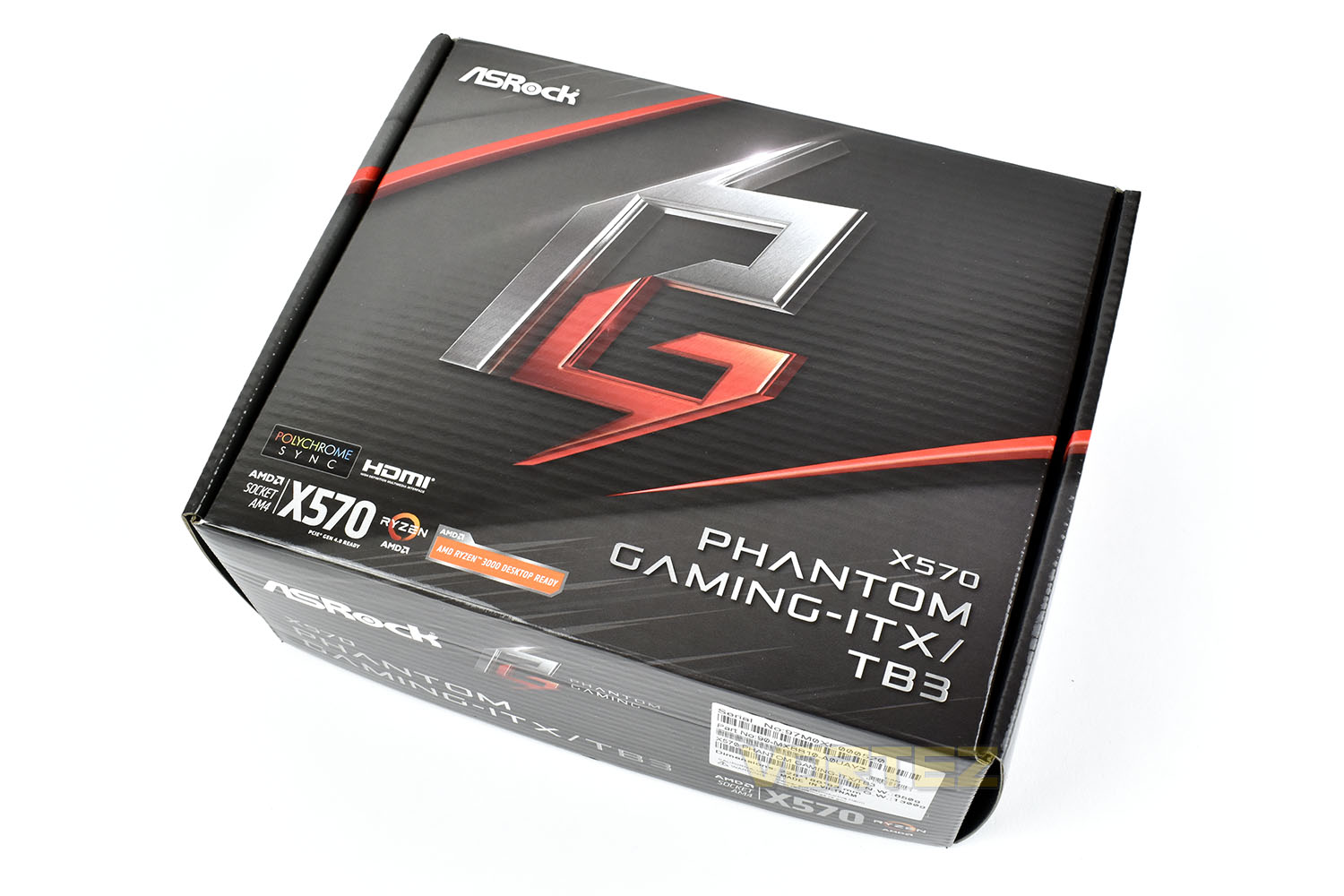
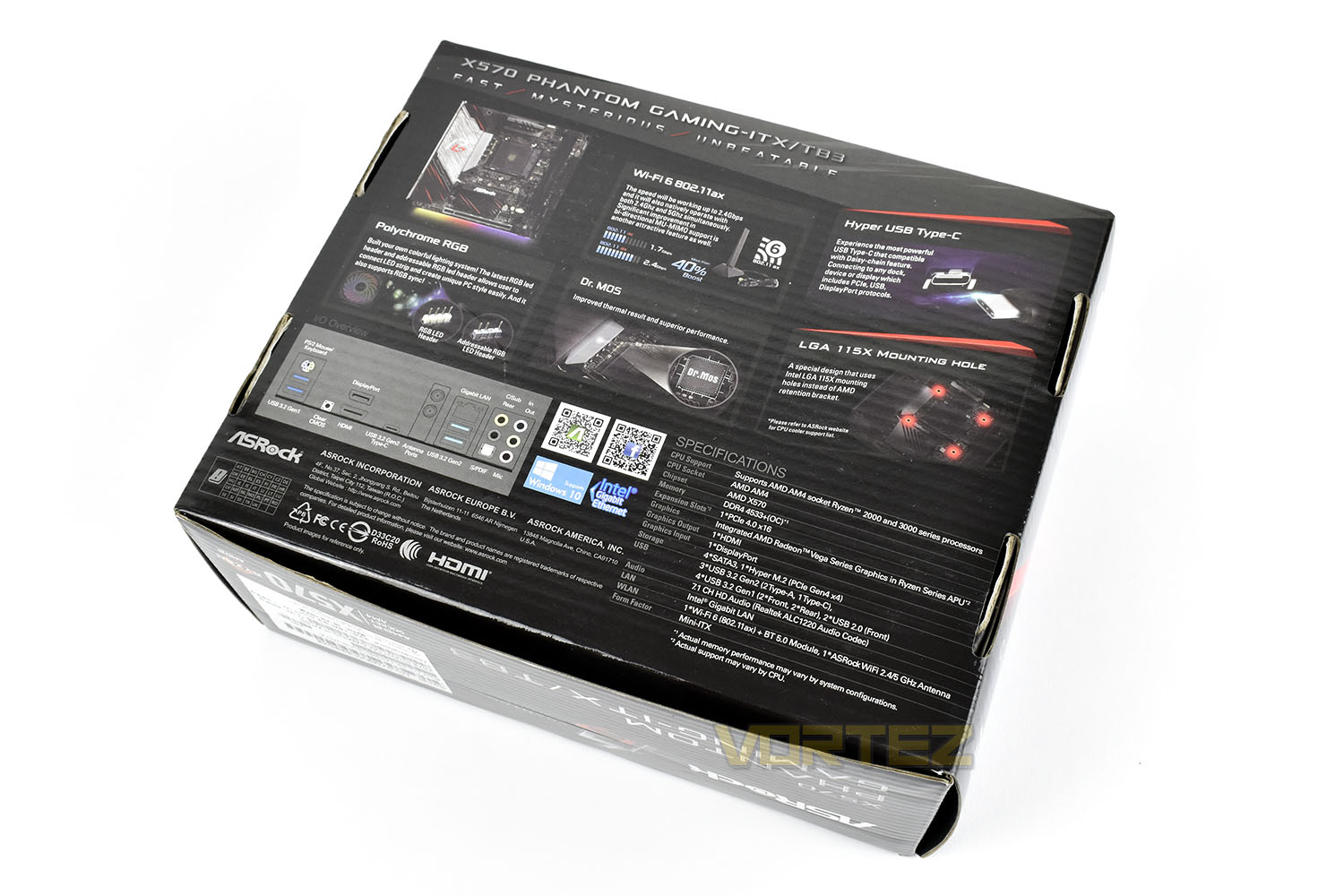
Flipping the box over, the specifications, rear IO and key features are highlighted concisely and clearly. Just what we like to see from the packaging.
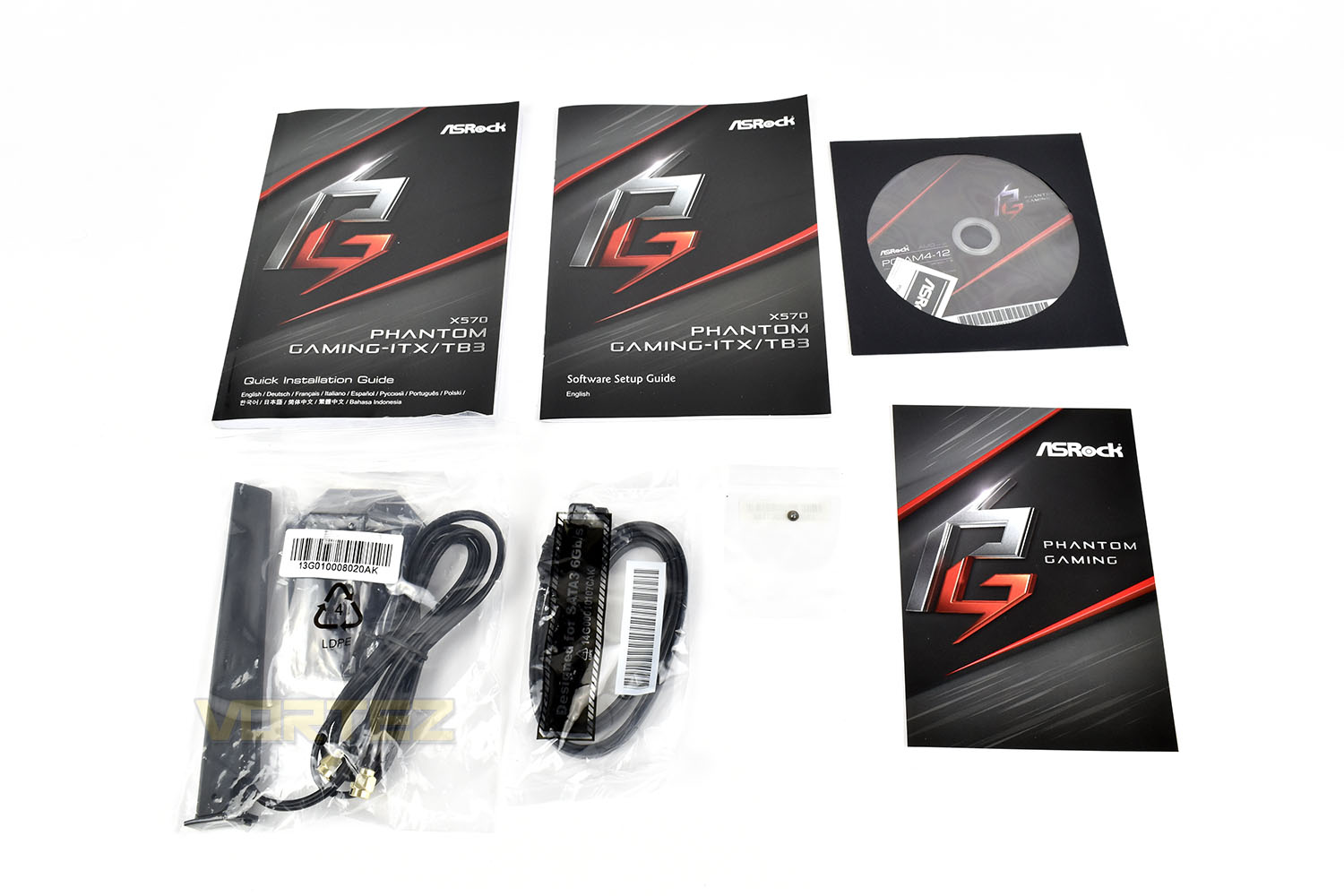
Bundled with the X570 Phantom Gaming-ITX/TB3 is a pair of installation guides, a software CD (with a metallic case sticker inside), an M.2 screw, pair of SATA cables and a WiFi antenna for the rear IO.
Closer Look
Conforming to the Mini-ITX form factor, the board measures in at a tiny 170mm x 170mm, only just covering the upper-left 4 screw holes of the standard ATX size. The black and red theme is synonymous with ASRock’s Phantom Gaming range.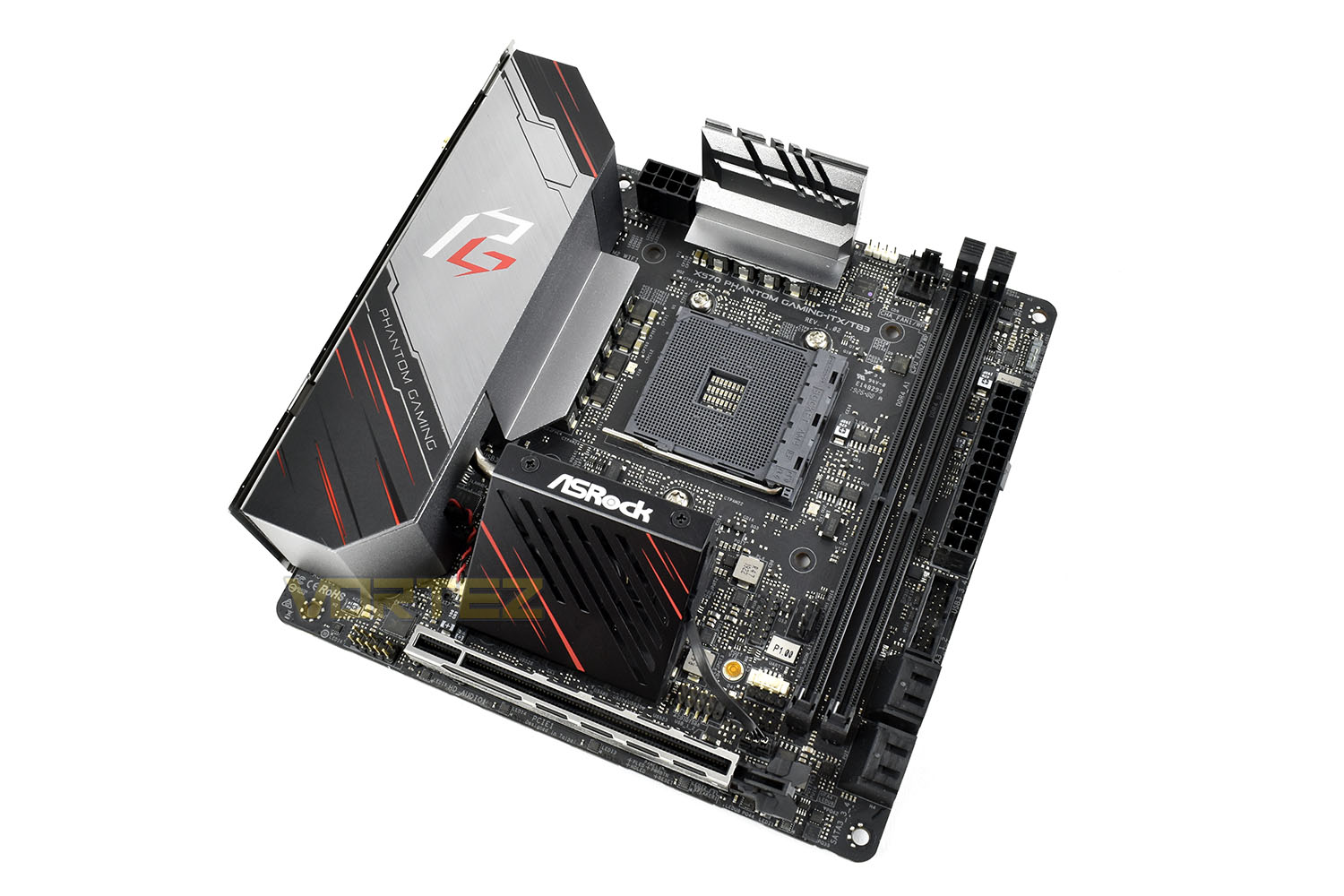
Utilising the X570 chipset, the board obviously needs an AM4 CPU socket to support all of AMD’s Ryzen 2000 and 3000 series CPUs, but one pretty major difference is apparent here. ASRock have decided to use the Intel LGA 115x mounting system for CPU coolers which renders the AMD Wraith coolers useless, if you planned to use one of those with your new processor. Having said that, anyone using an aftermarket cooler shouldn’t be hugely affected as the cooler will come with an Intel LGA 115x mounting system anyway.
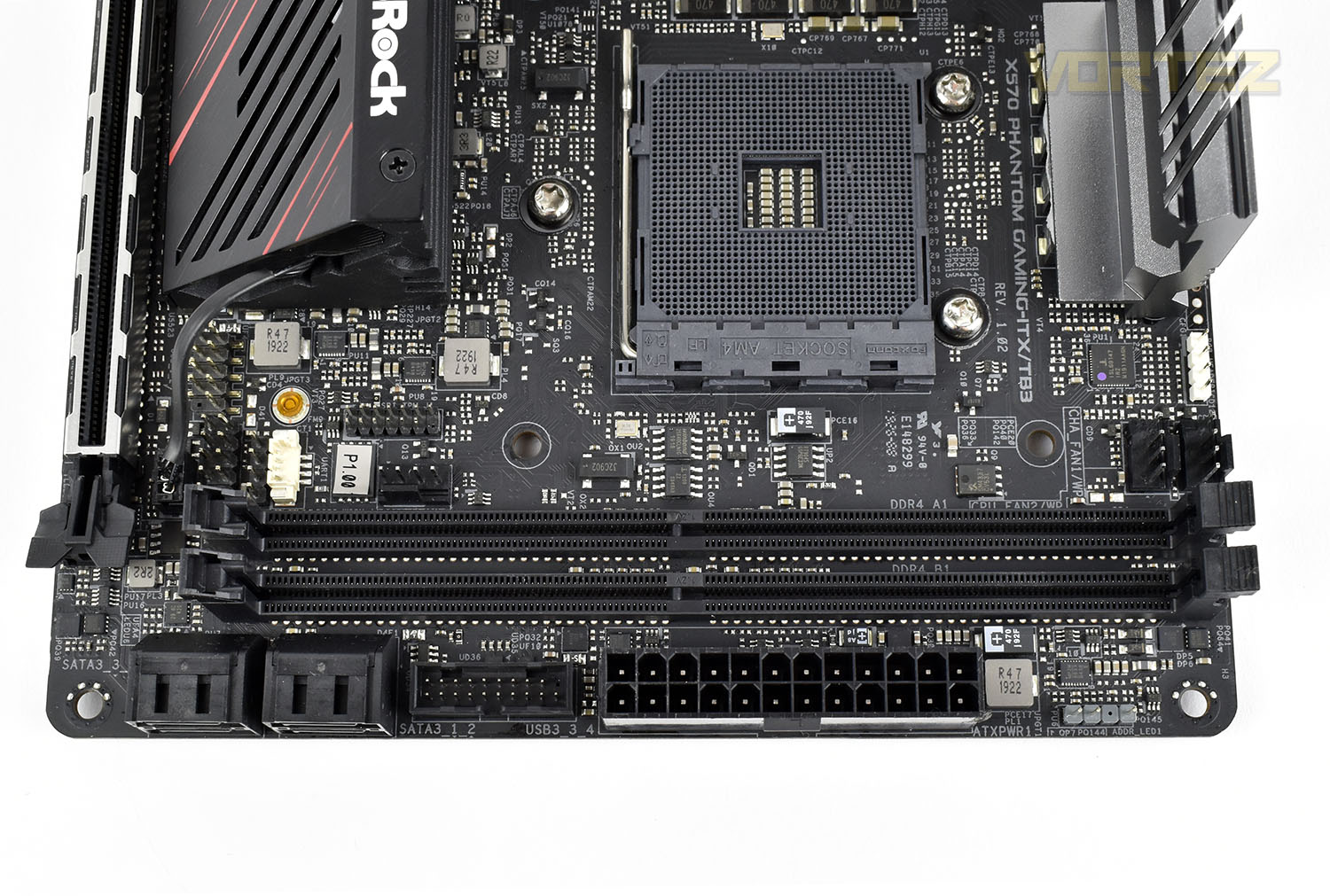
ASRock have also done what they can about keeping cool the 10-Phase VRM through the tall heatsinks above and to the right of the AM4 socket, these are still much smaller than solutions we’ve seen on larger boards so heat issues might crop up here if you plan to use some of the heavier CPU solutions like the 3900X or 3950X.
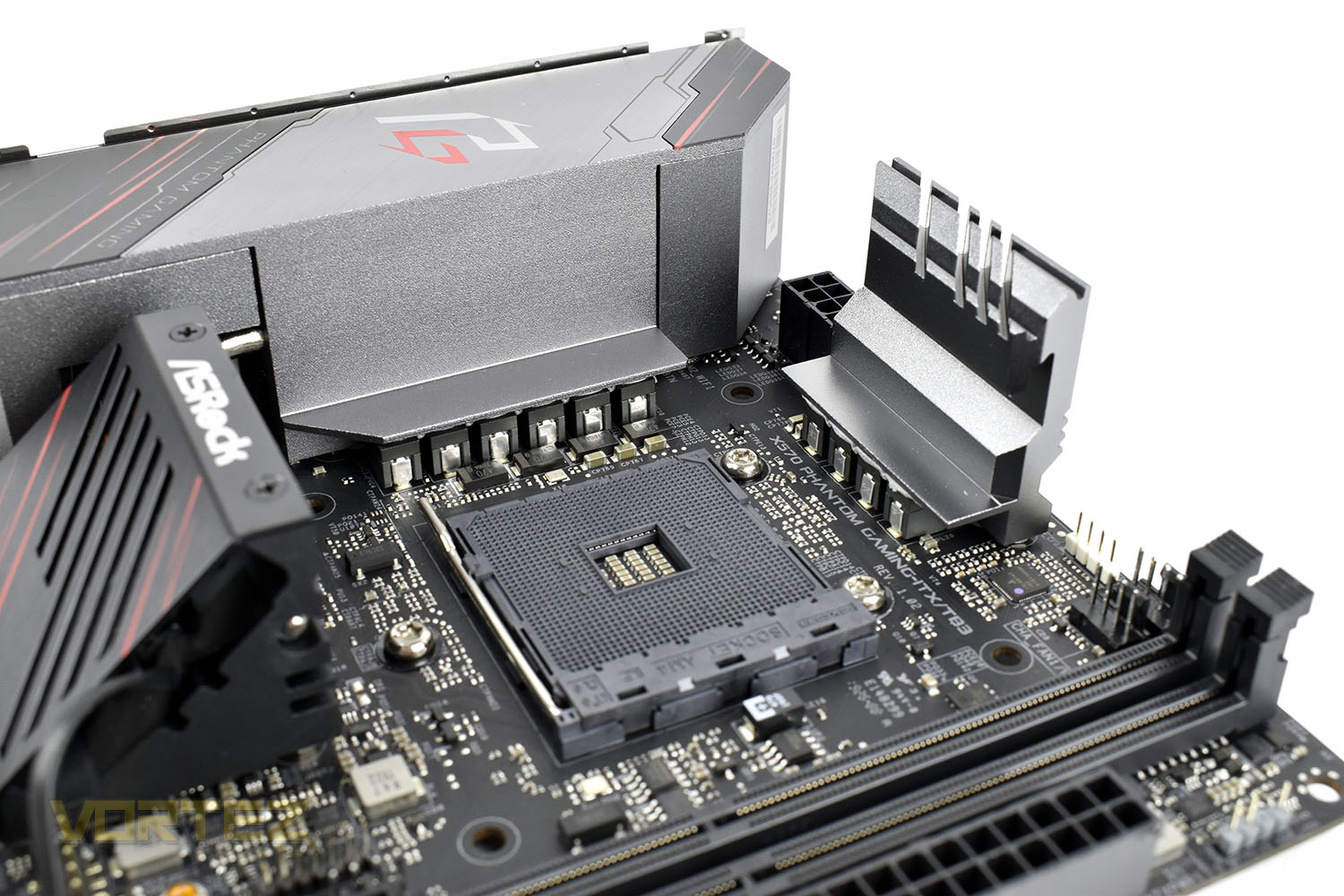
Despite only having two DIMM slots, the Phantom Gaming board still utilises dual-channel DRAM but you’re limited to only 64GB, though that will likely be ample for the needs of such a small system.
Three 4-pin PWM fan headers are just above the DIMM slots with the 24-pin power and a front USB 3.0 header underneath. For storage, there’s four 90° SATA 3.0 ports.
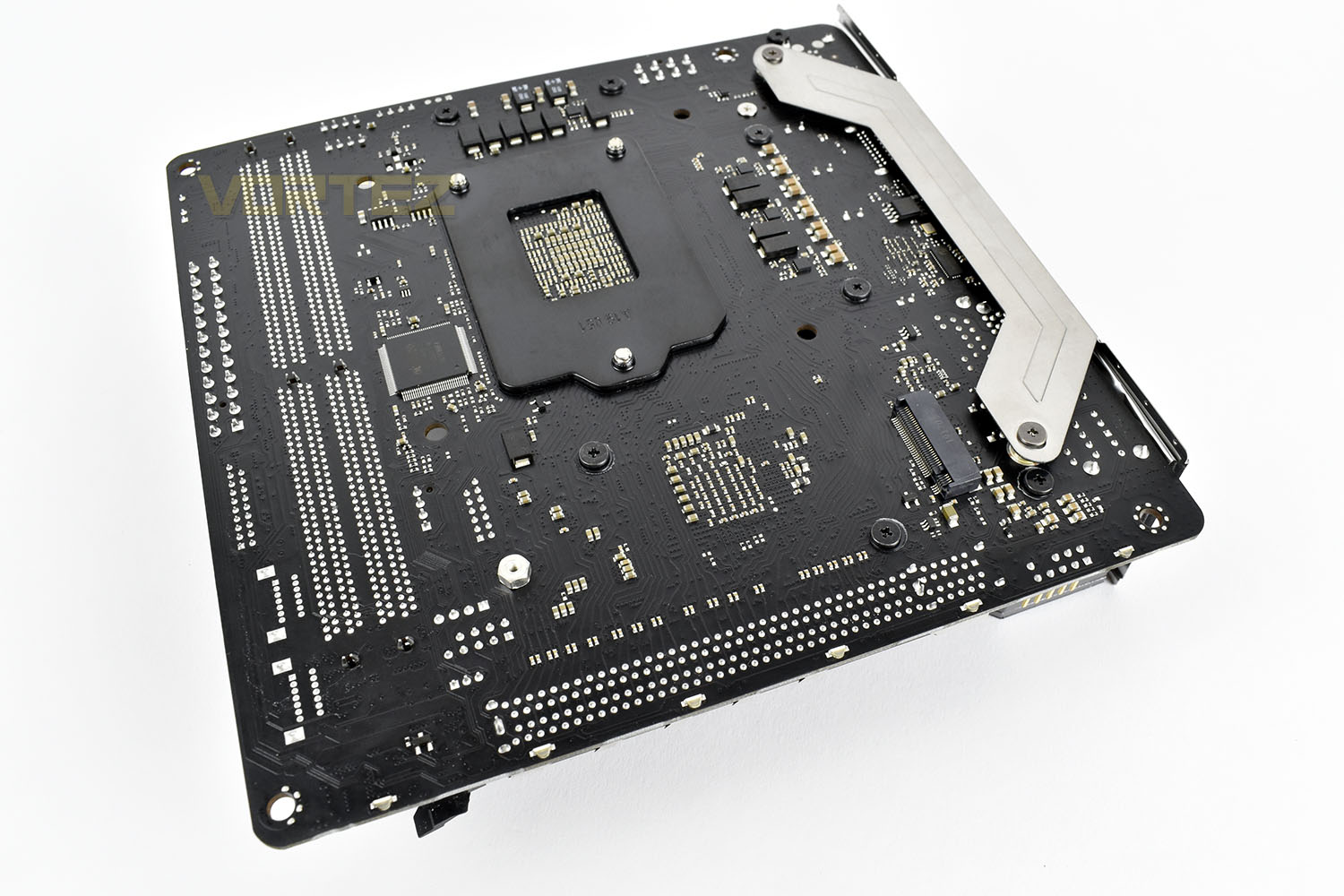
We don’t usually show the backside of a motherboard in our reviews because there’s usually not much going on here but due to board space being at a premium, ASRock have placed the M.2 NVMe port on the back. This only supports NVMe ports and won’t work with the M.2 SATA SSDs and due to the placement, it might pose some problems for SSDs that arrive with any kind of heatsink, speaking of which, the SSD is unlikely to receive much, if any at all, airflow around here so overheating and throttling performance might become a problem.
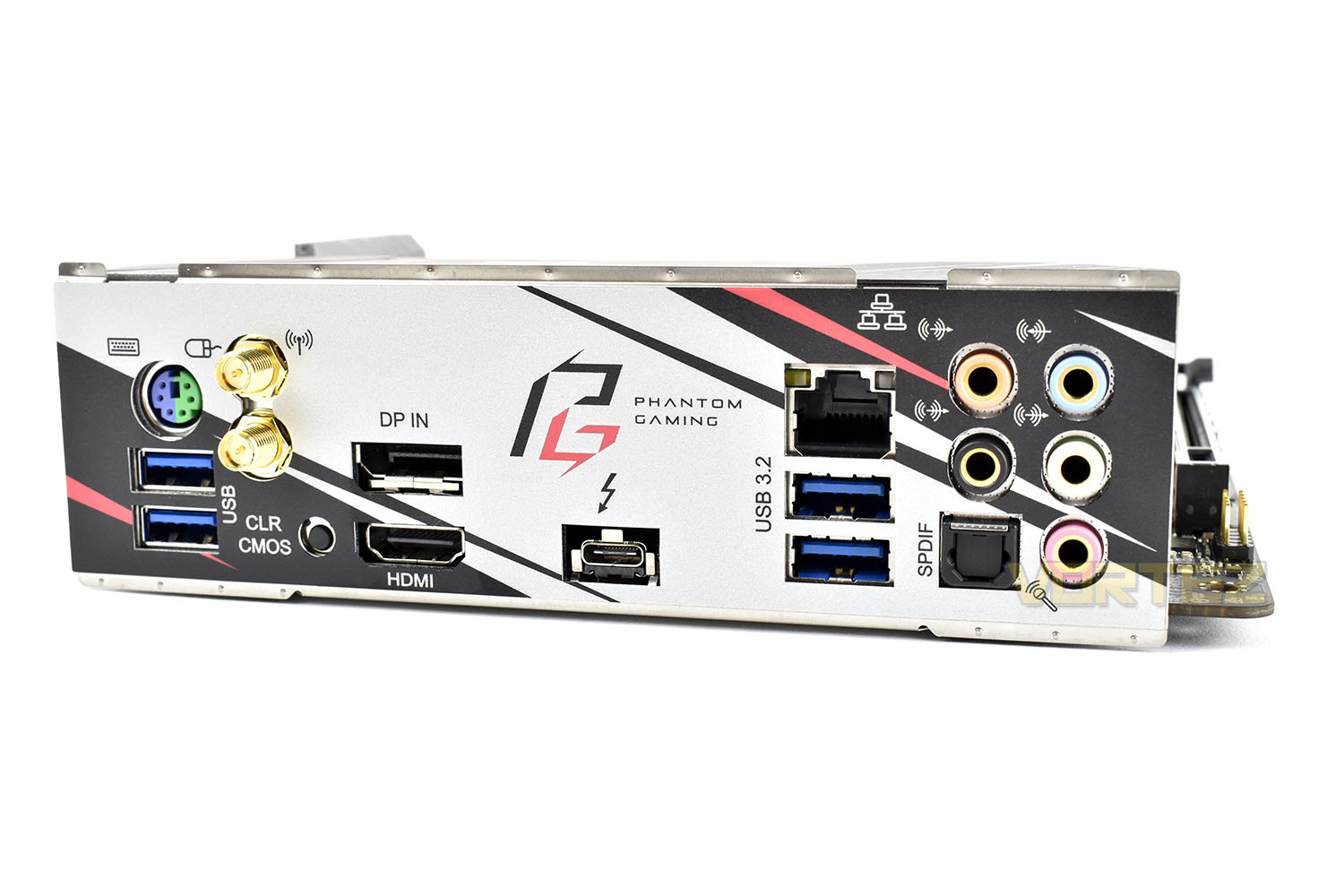
The rear IO shield is attached to the motherboard to prevent you forgetting to install it and on here we get the following, from left to right:
1x PS/2 keyboard/mouse port
2x USB 3.2 Gen. 1
2x WiFi AX 6 antenna connections
1x DisplayPort
1x HDMI
1x Thunderbolt 3 (Type-C)
1x Gigabit RJ45
2x USB 3.2 Gen. 2
5x 3.5mm audio ports
1x SPDIF
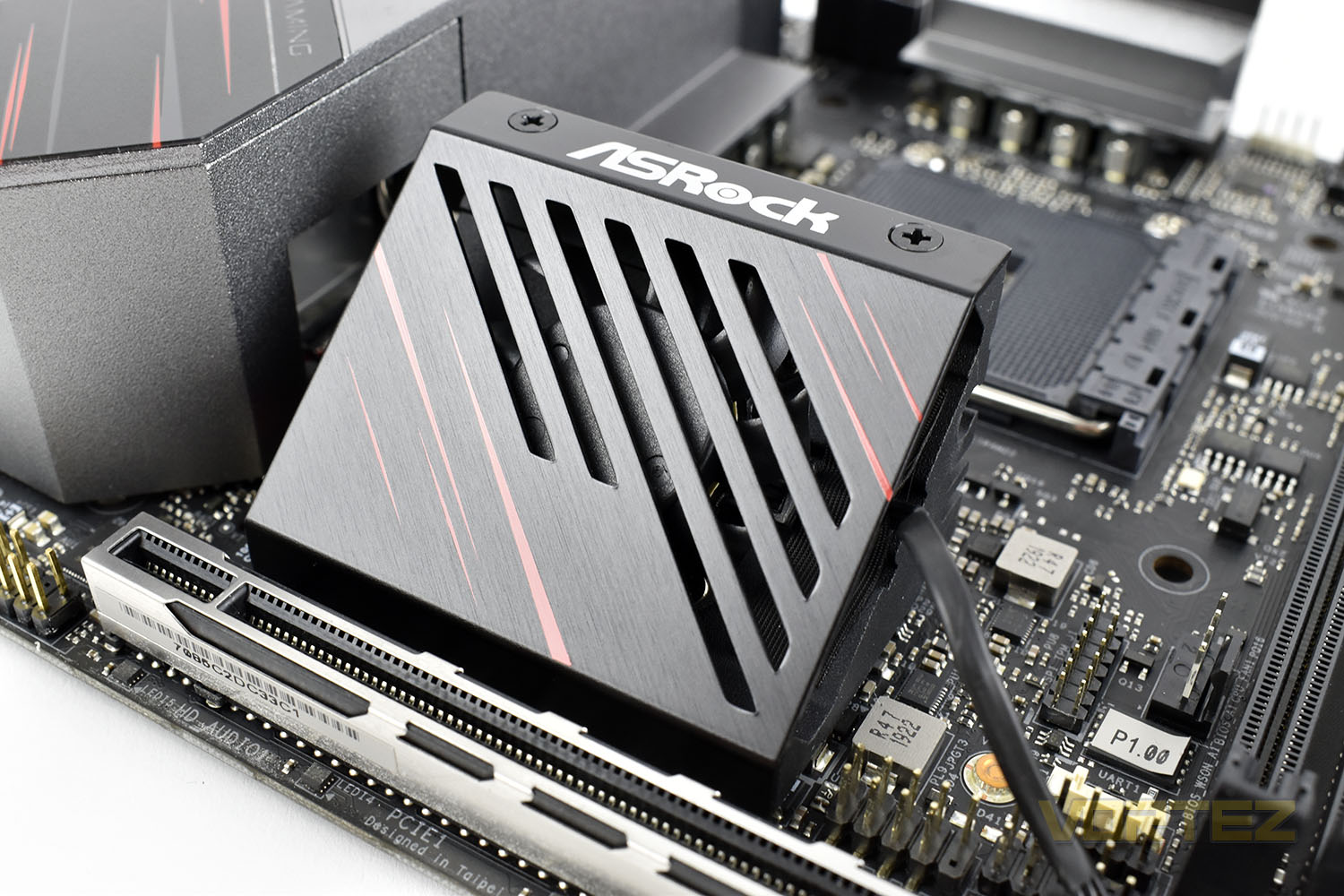
Finally, the chipset is actively cooled by a 40mm fan mounted at a 45° angle. This heatsink is directly connected to the rear IO cooling by a heatpipe for more effective cooling of the VRMs.
BIOS
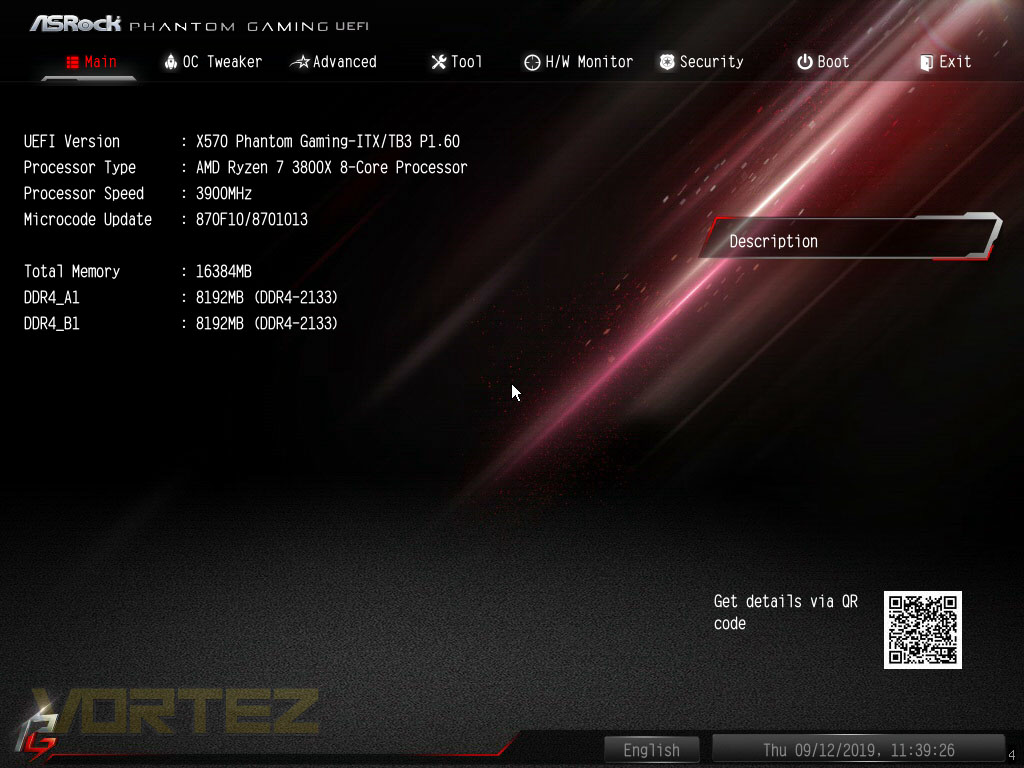
In other ASRock reviews of late, we’ve seen the BIOS feature an easy and an advanced mode but with the Phantom Gaming, they seem to go straight to Advanced. If you’re buying a motherboard of this calibre, you probably don’t need the easy mode anyway.The landing screen feels a little empty but it’s a good place to start.
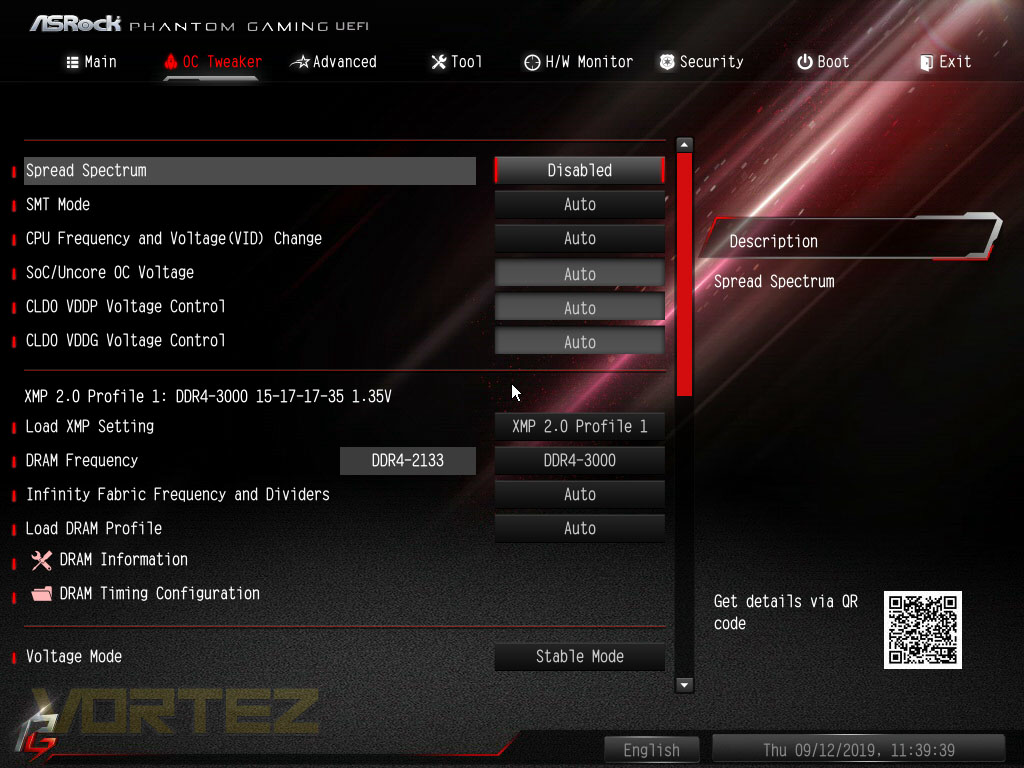
Moving to OC Tweaker, you can overclock your CPU, adjust voltages or enable the XMP profile for your memory.
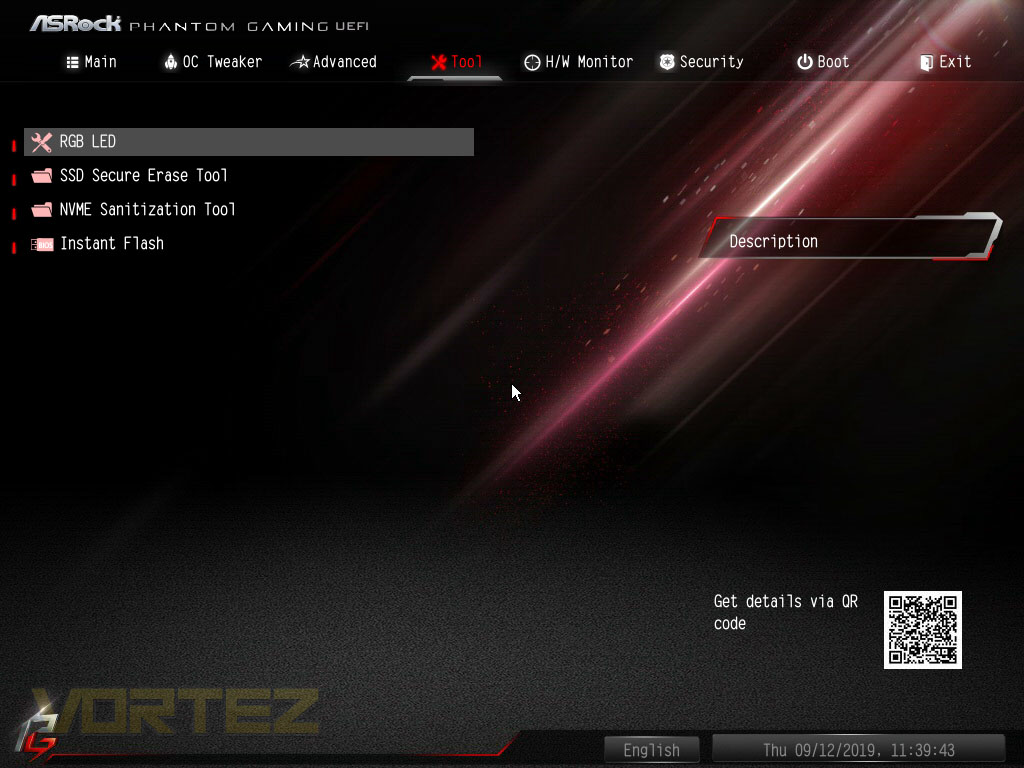
In the tools tab you’re able to adjust RGB lighting settings, delete information from SSDs and do BIOS updates if you prefer to do them from within the BIOS itself.
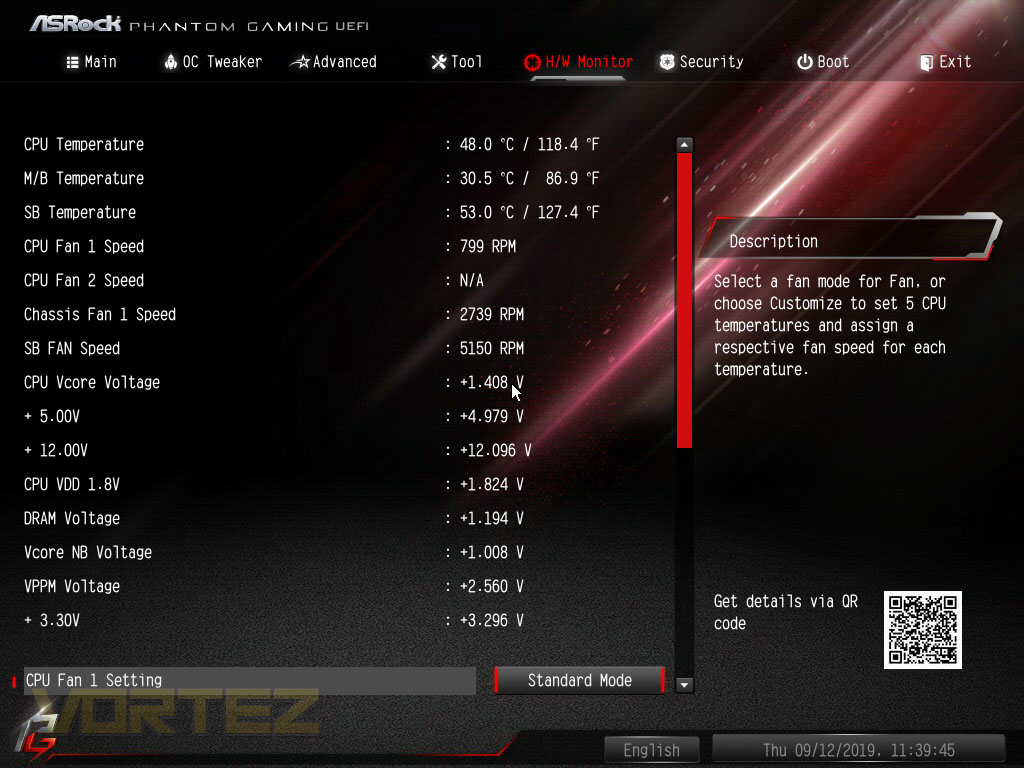
There’s also the Hardware Monitor tab, giving fan speed information, temperatures and whatnot. Usually, some of this information is included in a section on the right hand side of each page but ASRock have also removed that with the Easy Mode.
Test Setup & Software
BIOS Version Tested: 1.70 – 17/09/2019Test Setup
CPU AMD Ryzen 7 3800X
Cooling Corsair” onclick=”window.open(this.href);return false;”>https://www.vortez.net/articles_pages/corsair_h150i_pro_rgb_review,1.html]Corsair H150i Pro RGB – Balanced Profile
Motherboard
Memory 16GB Corsair Vengeance LPX 3200MHz @ 3000MHz @ 15-17-17-38-58
Graphics AMD Radeon RX 480 8GB
Storage Corsair Force LE 480GB
PSU Corsair RM750X 80 Plus Gold Certified PSU
Cooling Corsair” onclick=”window.open(this.href);return false;”>https://www.vortez.net/articles_pages/corsair_h150i_pro_rgb_review,1.html]Corsair H150i Pro RGB – Balanced Profile
Motherboard
Memory 16GB Corsair Vengeance LPX 3200MHz @ 3000MHz @ 15-17-17-38-58
Graphics AMD Radeon RX 480 8GB
Storage Corsair Force LE 480GB
PSU Corsair RM750X 80 Plus Gold Certified PSU
Benchmarks
Cinebench R20 – CPU Score
SiSoftware SANDRA – CPU & Memory benchmarks
POV-RAY – CPU benchmarks
TrueCrypt – CPU benchmarks
AIDA64 – CPU benchmarks & Memory
PCMark 8 Photoshop
PC” onclick=”window.open(this.href);return false;”>https://benchmarks.ul.com/pcmark10]PC Mark 10 Extended Test
3DMark – FireStrike Extreme & TimeSpy
Games – Rise of the Tomb Raider & Total War: WARHAMMER
SiSoftware SANDRA – CPU & Memory benchmarks
POV-RAY – CPU benchmarks
TrueCrypt – CPU benchmarks
AIDA64 – CPU benchmarks & Memory
PCMark 8 Photoshop
PC” onclick=”window.open(this.href);return false;”>https://benchmarks.ul.com/pcmark10]PC Mark 10 Extended Test
3DMark – FireStrike Extreme & TimeSpy
Games – Rise of the Tomb Raider & Total War: WARHAMMER
Other Software
Temperature Analysis: Aida64 & Ryzen Master
Stress Testing Software: AIDA64 Stability Test
CPU Specification Monitoring: CPU-Z
Performance Monitoring: MSI Afterburner
Stress Testing Software: AIDA64 Stability Test
CPU Specification Monitoring: CPU-Z
Performance Monitoring: MSI Afterburner
Benchmarks: Power Consumption
It’s interesting to note the power consumption across all motherboards. Although they are using the X570 chipset, energy results can fluctuate between manufacturers due to the features and specifications that are integrated. First of all, for the idle tests the system is cold booted into Windows and no additional applications are executed – the watts are noted on the external energy monitor we use and then the system is loaded with 3DMark FireStrike – watts are again monitored for the duration of the test and the highest rated wattage result is then noted down. Below are the results of this energy test.
Ray Tracing Performance – POV-Ray 3.7
Persistence of Vision Raytracer’s PovRay is a free and open source 3D animator application with versions for computers with different operating systems.
This product allows users to build their custom 3D worlds with excellent quality despite their computer’s hardware. It has adjustable options for levels of radiance, refraction, and reflection. Calculation time may vary depending on the computer model, but PovRay can adapt to many computer builds, and is supported by the open source community.
This product allows users to build their custom 3D worlds with excellent quality despite their computer’s hardware. It has adjustable options for levels of radiance, refraction, and reflection. Calculation time may vary depending on the computer model, but PovRay can adapt to many computer builds, and is supported by the open source community.
AES Encryption Performance – TrueCrypt 7.1a
TrueCrypt is a discontinued source-available freeware utility used for on-the-fly encryption (OTFE). It can create a virtual encrypted disk within a file or encrypt a partition or (under Microsoft Windows except Windows 8 with GPT) the entire storage device (pre-boot authentication).
Processing Features Performance – AIDA64
AIDA64 Product PageThis simple integer benchmark focuses on the branch prediction capabilities and the misprediction penalties of the CPU. It finds the solutions for the classic “Queens problem” on a 10 by 10 sized chessboard. At the same clock speed theoretically the processor with the shorter pipeline and smaller misprediction penalties will attain higher benchmark scores. For example — with HyperThreading disabled — the Intel Northwood core processors get higher scores than the Intel Prescott core based ones due to the 20-step vs 31-step long pipeline. CPU Queen test uses integer MMX, SSE2 and SSSE3 optimizations.
Memory Transfer Performance – AIDA64
AIDA64 Product PageMemory bandwidth benchmarks (Memory Read, Memory Write, Memory Copy) measure the maximum achiveable memory data transfer bandwidth. The code behind these benchmark methods are written in Assembly and they are extremely optimized for every popular AMD, Intel and VIA processor core variants by utilizing the appropriate x86/x64, x87, MMX, MMX+, 3DNow!, SSE, SSE2, SSE4.1, AVX, and AVX2 instruction set extension.
The Memory Latency benchmark measures the typical delay when the CPU reads data from system memory. Memory latency time means the penalty measured from the issuing of the read command until the data arrives to the integer registers of the CPU.
The Memory Latency benchmark measures the typical delay when the CPU reads data from system memory. Memory latency time means the penalty measured from the issuing of the read command until the data arrives to the integer registers of the CPU.
Processing Power Performance – Cinebench R20
Cinebench is a real-world cross-platform test suite that evaluates your computer’s hardware capabilities. Improvements to Cinebench Release 20 reflect the overall advancements to CPU and rendering technology in recent years, providing a more accurate measurement of Cinema 4D’s ability to take advantage of multiple CPU cores and modern processor features available to the average user.
Bandwidth Performance – SiSoftware SANDRA
SANDRA isn’t always a benchmark that is included in hardware reviews but I believe it shouldn’t be ignored. SANDRA provides a vigorous package that tests your system in a rather large array of benchmarks. There are many aspects of benchmark that can be executed. We will be considering – CPU and memory tests.
Image Editing Performance – PCMark 8 Photoshop
PCMark 8 Product Page Developed in partnership with Benchmark Development Program members Acer, AMD, Condusiv Technologies, Dell, HGST, HP, Intel, Microsoft, NVIDIA, Samsung, SanDisk, Seagate and Western Digital, PCMark 8 is the latest version in FutureMark’s popular series of PC benchmarking tools. Improving on previous releases, PCMark 8 includes new tests using popular applications from Adobe and Microsoft.
Overall System Performance – PCMark 10
PCMark 10 is the latest version in our series of industry standard PC benchmarks. Updated for Windows 10 with new and improved workloads, PCMark 10 is also faster and easier to use.
PCMark 10 features a comprehensive set of tests that cover the wide variety of tasks performed in the modern workplace. With a range of performance tests, custom run options, and the new Battery Life Profile, PCMark 10 is the complete PC benchmark for the modern office.
PCMark 10 features a comprehensive set of tests that cover the wide variety of tasks performed in the modern workplace. With a range of performance tests, custom run options, and the new Battery Life Profile, PCMark 10 is the complete PC benchmark for the modern office.
VR Performance – VRMark
VRMark Product PageVRMark includes two VR benchmark tests that run on your monitor, no headset required, or on a connected HMD. At the end of each test, you’ll see whether your PC is VR ready, and if not, how far it falls short.
3D Performance – 3DMark
3DMark FireStrike Product PageFire Strike is our new showcase DirectX 11 benchmark designed for high-performance gaming PCs. It is our most ambitious and technical benchmark ever, featuring real-time graphics rendered with detail and complexity far beyond what is found in other benchmarks and games today. Fire Strike will only be available in the Windows editions of 3DMark initially.
Gaming Performance – Rise of the Tomb Raider & Total War: WARHAMMER
It’s important for us to perform a number of game benchmarks as well as the synthetic tests because gamers will want to know if there are any significant benefits. So here we have two recent gaming titles.
Conclusion
While the standard ATX form factor can often impress with literally thousands of components spread out across a relatively small board, offering incredible performance, but when you see that same chipset and processor squeezed into something less than half the size, you can’t help but be amazed. ASRock have done an especially good job with the Phantom Gaming ITX and we’ll go on to explain why.In terms of outright performance, the results blend into the rest without an issue, proving that ASRock haven’t had to sacrifice anything to shrink everything into the Mini-ITX form factor. Having said that, we did notice that the VRM cooling around the CPU socket got quite hot during our extensive testing so ensuring you have some case airflow will be advantageous.
The Thunderbolt 3 port on the rear IO is rare on any motherboard, particularly one at this price point which will definitely be a key selling feature against the one competing Mini-ITX motherboard from Gigabyte. Features like the WiFi 6 AX, integrated rear IO shield and an extensive VRM design will certainly increase the attraction further.
Now if we’re to find a criticism with the motherboard, there’s only really two that we can think of.
the first being the Intel LGA 115x mounting system. ASRock have clearly ran into space constraints and been forced to ditch the larger AM4 mounting system in favour of a larger VRM heatsink arrangement. We found that our Corsair H150i Pro RGB was difficult to install and resulted in the mounting bracket having to bend considerably to accommodate the taller Ryzen processor against the usual height of an Intel CPU; there’s also the problem of the AMD Wraith cooler only arriving with an AM4 mount, for obvious reasons, so that becomes useless, necessitating the purchase of a third party cooler.
The other issue is the rear-mounted M.2 slot, this poses a real problem for cooling with little to no airflow around the back of the motherboard, and you’ll definitely have to ditch any attached heatsink. Throttling issues might also rear their ugly head under sustained loads.
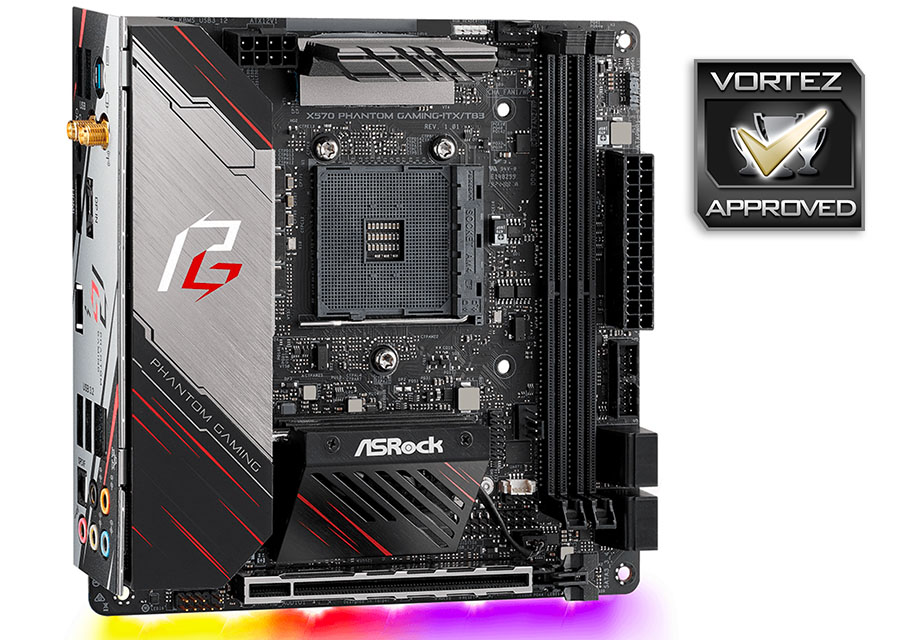
If you need a small but powerful X570 system, the ASRock X570 Phantom Gaming ITX/TB3 presents a compelling case, particularly with the Thunderbolt 3 inclusion.
Pros
+ Keeps up with the big boys
+ Great design
+ Decent VRM power supply
+ Thunderbolt 3 included
+ WiFi 6 AX included
+ Integrated rear IO shield
Cons
– Doesn’t use the AM4 cooler mounting system
– Rear mounted M.2 will pose issues
– You can’t use the AMD Wraith cooler
+ Keeps up with the big boys
+ Great design
+ Decent VRM power supply
+ Thunderbolt 3 included
+ WiFi 6 AX included
+ Integrated rear IO shield
Cons
– Doesn’t use the AM4 cooler mounting system
– Rear mounted M.2 will pose issues
– You can’t use the AMD Wraith cooler
Click here for an explanation of our awards at Vortez.net.
Stay connected with the Vortez Social Media pages:
Join in with the discussions on Discord