We take a look at ASRock’s latest AMD B550 motherboard – the Phantom Gaming Velocita. This board is packed with features, but is it worth the price-tag?

Product on Review: B550 PG Velocita
Manufacturer: ASRock
Street Price: GBP £220| USD $219 | AUD $400
For those contemplating a move to AMD and their increasingly popular Ryzen family of desktop processors, the B550 chipset is an interesting route to take. Users can still take full advantage of PCIe 4.0 for the NVMe storage and GPU configuration without having to spend the extra cash that a motherboard bearing the X570 chipset demands. Even though X570 does offer great bandwidth options, the B550 chipset, for a vast majority of users will be more than sufficient.
Today, we’ll be exploring a new motherboard from ASRock – the B550 Phantom Gaming Velocita. This model is touted as a high-end offering, with features that you won’t likely see on cheaper boards.
The notion behind the B550 chipset is to save cash, but is Velocita worth spending more on, compared to close rivals?
ASRock on Velocita
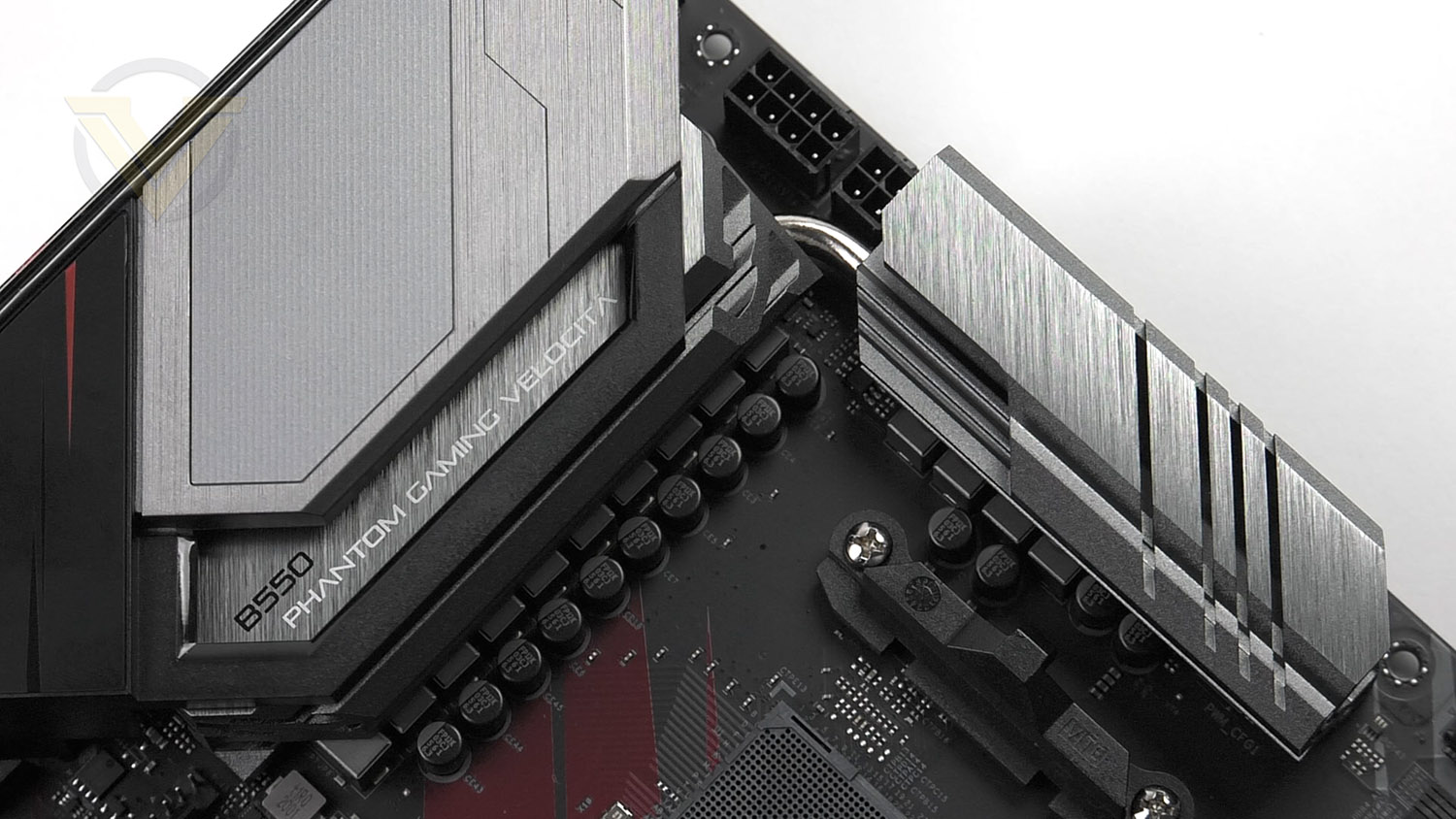
PG Velocita is a brand new high end product line under the Phantom Gaming family, the PG Velocita motherboard series packed full with uncompromised performance as well as relentless appearance. “Velocità” is Italian for “Velocity”, destined to give a fast and unbeatable gaming experience to the gamers!
Technical Specifications
Below are the technical specifications concerning the B550 PG Velocita:
Processor
– Supports 3rd Gen AMD AM4 Ryzen™ / future AMD Ryzen™ Processors*
– Digi Power design
– 14 Power Phase design
Chipset
AMD B550 Chipset
Memory
4x DDR4 memory slots, support up to 128GB
Supports: 2133-4733+ MHz (OC)
Supports Dual-Channel mode
Supports non-ECC mode, un-buffered memory
Expansion Slots
1x PCIe 4.0 x16 Slot (x16 Mode)
1x PCIe 3.0x 16 slots (x4 Mode)
2x PCIe x1 slots
Multi-GPU
Supports 2-Way AMD® CrossFire™ Technology
Storage
– 6 x SATA3 6.0 Gb/s Connectors, support RAID (RAID 0, RAID 1 and RAID 10), NCQ, AHCI and Hot Plug*
– 1 x Hyper M.2 Socket (M2_1), supports M Key type 2230/2242/2260/2280 M.2 PCI Express module up to Gen4x4 (64 Gb/s) (with Matisse) or Gen3x4 (32 Gb/s)**
– 1 x M.2 Socket (M2_2), supports M Key type 2230/2242/2260/2280/22110 M.2 SATA3 6.0 Gb/s module and M.2 PCI Express module up to Gen3 x2 (16 Gb/s)**
USB
Rear USB Port ( Total 8 )
– 1 x USB 3.2 Gen2 Type-A Port (10 Gb/s)
– 1 x USB 3.2 Gen2 Type-C Port (10 Gb/s)
– 2 x USB 3.2 Gen1 Type-A Ports
– 4 x USB 2 Ports
Front USB Port ( Total 9 )
1 x USB 3.2 Gen 2 front panel header
2 x USB 3.2 Gen 1 front panel header
2 x USB 2.0 front panel headers
Audio
– 7.1 CH HD Audio with Content Protection (Realtek ALC1200 Audio Codec)
– Premium Blu-ray Audio support
– Supports Surge Protection
– 110dB SNR DAC with Differential Amplifier
– PCB Isolate Shielding
– Individual PCB Layers for R/L Audio Channel
– Gold Audio Jacks
– Nahimic Audio
LAN
1x 2.5 Gigabit LAN (Dragon RTL8125BG)
WiFi & Bluetooth
M.2 WiFi Socket – Key E
Internal connectors
– 1 x SPI TPM Header
– 1 x Power LED and Speaker Header
– 2 x RGB LED Headers*
– 2 x Addressable LED Headers**
– 1 x CPU Fan Connector (4-pin)***
– 1 x CPU/Water Pump Fan Connector (4-pin) (Smart Fan Speed Control)
– 5 x Chassis/Water Pump Fan Connectors (4-pin) (Smart Fan Speed Control)
– 1 x 24 pin ATX Power Connector (Hi-Density Power Connector)
– 1 x 8 pin 12V Power Connector (Hi-Density Power Connector)
– 1 x 4 pin 12V Power Connector (Hi-Density Power Connector)
– 1 x Front Panel Audio Connector (15μ Gold Audio Connector)
– 2 x USB 2.0 Headers (Support 4 USB 2.0 ports) (Supports ESD Protection)
– 1 x USB 3.2 Gen1 Header (Supports 2 USB 3.2 Gen1 ports) (Supports ESD Protection)
– 1 x Front Panel Type C USB 3.2 Gen2 Header (Supports ESD Protection)
– 1 x Dr. Debug with LED
– 1 x Power Button with LED
Dimensions
12 in. x 9.6 in. (30.5 cm x 24.4 cm)
ATX Form Factor
– Supports 3rd Gen AMD AM4 Ryzen™ / future AMD Ryzen™ Processors*
– Digi Power design
– 14 Power Phase design
Chipset
AMD B550 Chipset
Memory
4x DDR4 memory slots, support up to 128GB
Supports: 2133-4733+ MHz (OC)
Supports Dual-Channel mode
Supports non-ECC mode, un-buffered memory
Expansion Slots
1x PCIe 4.0 x16 Slot (x16 Mode)
1x PCIe 3.0x 16 slots (x4 Mode)
2x PCIe x1 slots
Multi-GPU
Supports 2-Way AMD® CrossFire™ Technology
Storage
– 6 x SATA3 6.0 Gb/s Connectors, support RAID (RAID 0, RAID 1 and RAID 10), NCQ, AHCI and Hot Plug*
– 1 x Hyper M.2 Socket (M2_1), supports M Key type 2230/2242/2260/2280 M.2 PCI Express module up to Gen4x4 (64 Gb/s) (with Matisse) or Gen3x4 (32 Gb/s)**
– 1 x M.2 Socket (M2_2), supports M Key type 2230/2242/2260/2280/22110 M.2 SATA3 6.0 Gb/s module and M.2 PCI Express module up to Gen3 x2 (16 Gb/s)**
USB
Rear USB Port ( Total 8 )
– 1 x USB 3.2 Gen2 Type-A Port (10 Gb/s)
– 1 x USB 3.2 Gen2 Type-C Port (10 Gb/s)
– 2 x USB 3.2 Gen1 Type-A Ports
– 4 x USB 2 Ports
Front USB Port ( Total 9 )
1 x USB 3.2 Gen 2 front panel header
2 x USB 3.2 Gen 1 front panel header
2 x USB 2.0 front panel headers
Audio
– 7.1 CH HD Audio with Content Protection (Realtek ALC1200 Audio Codec)
– Premium Blu-ray Audio support
– Supports Surge Protection
– 110dB SNR DAC with Differential Amplifier
– PCB Isolate Shielding
– Individual PCB Layers for R/L Audio Channel
– Gold Audio Jacks
– Nahimic Audio
LAN
1x 2.5 Gigabit LAN (Dragon RTL8125BG)
WiFi & Bluetooth
M.2 WiFi Socket – Key E
Internal connectors
– 1 x SPI TPM Header
– 1 x Power LED and Speaker Header
– 2 x RGB LED Headers*
– 2 x Addressable LED Headers**
– 1 x CPU Fan Connector (4-pin)***
– 1 x CPU/Water Pump Fan Connector (4-pin) (Smart Fan Speed Control)
– 5 x Chassis/Water Pump Fan Connectors (4-pin) (Smart Fan Speed Control)
– 1 x 24 pin ATX Power Connector (Hi-Density Power Connector)
– 1 x 8 pin 12V Power Connector (Hi-Density Power Connector)
– 1 x 4 pin 12V Power Connector (Hi-Density Power Connector)
– 1 x Front Panel Audio Connector (15μ Gold Audio Connector)
– 2 x USB 2.0 Headers (Support 4 USB 2.0 ports) (Supports ESD Protection)
– 1 x USB 3.2 Gen1 Header (Supports 2 USB 3.2 Gen1 ports) (Supports ESD Protection)
– 1 x Front Panel Type C USB 3.2 Gen2 Header (Supports ESD Protection)
– 1 x Dr. Debug with LED
– 1 x Power Button with LED
Dimensions
12 in. x 9.6 in. (30.5 cm x 24.4 cm)
ATX Form Factor
Video: Unboxing – Overview – Review
For this motherboard review we’ve produced a video which provides you with the unboxing experience, a highly detailed overview of the board revealing all the features with a verdict. Check out the video review here or watch below:
Test Setup & Methodology
Notes: We’ve revamped our benchmark regime by removing a number of tests which reveal little, to no difference between each motherboard model. Gaming performance is one such area which has been removed due to the inability for each motherboard to offer any advantage over another. Instead, we have focussed on meaningful/tangible analysis which examines the VRM/chipset design, and the storage performance which will be far more informative to the end user.
TEST SETUP
CPU AMD Ryzen 5 3600XCooling: Corsair Hydro Series H150i
Motherboard: ASRock B550 PG Velocita
Memory: 16GB Corsair Vengeance LPX 3000MHz
Graphics: AMD Radeon RX 480
Storage: Intel S3500 128GB SATA SSD + Samsung 960 Pro 512GB PCIe 3.0 SSD
PSU: Corsair HX1050 80 Plus Gold Certified PSU
Monitor: AOC U2879VF
BENCHMARKS
PCMark 10 – Overall Extended ScoreSiSoftware SANDRA – SATA/PCIe Storage Tests
SiSoftware SANDRA – Processor Image Processing
OTHER SOFTWARE
Temperature Analysis: HWMonitorStress Testing Software: AIDA64 Stability Test
CPU Specification Monitoring: CPU-Z
Benchmarks: Power Consumption
In this first test we analyse the power efficiency from the wall for each motherboard (Minus the GPU). While each model uses the same chipset/platform, energy results can fluctuate between manufacturers due to the features and specifications that are integrated. First of all, for the idle tests the system is cold booted into Windows and no additional applications are executed – wattage is noted on the external energy monitor we use and then we open Aida64 stability test and execute a stress test, noting the highest reading on the monitor. Below are the results of this energy test.
Benchmarks: VRM & Chipset Cooling
Each motherboard manufacturer designs their board with a unique set of heatsinks to cover key areas like the VRM/mosfets and the chipset itself. In these test we use HWMonitor to identify the minimum values for VRM and chipset and then we load up Aida64 stability test again and perform a 20 minute run, recording the maximum value for both attributes.
Benchmarks: PCMark 10
PCMark 10 features a comprehensive set of tests that cover the wide variety of tasks performed in the modern workplace. With a range of performance tests, custom run options, and the new Battery Life Profile, PCMark 10 is the complete PC benchmark for the modern office.
Benchmarks: SATA Performance
In order to ascertain the SATA performance for our motherboards we use SiSoftware SANDRA and the File System Bandwidth performance test. This allows us to obtain the sequential read/write transfer rates for the drive being tested – Intel S3500 128GB SSD.
Benchmarks: PCIe M.2 Performance
In order to ascertain the PCIe M.2 performance for our motherboards we use SiSoftware SANDRA and the File System Bandwidth performance test. This allows us to obtain the sequential read/write transfer rates for the drive being tested – Samsung 960 Pro 512GB.
Benchmarks: CPU Image Processing
AIDA64 Product Page
In our last test we observe the Image Processing performance from the CPU attached to the motherboard. For this we use SiSoftware SANDRA and the benchmark specifically designed for measuring the common algorithms associated with processing imagery.
Conclusion
Opting for an AMD B550 motherboard over the more expensive X570 lineup will undoubtedly be on the radar for those on a tighter budget, but does the PG Velocita breach X570 territory with its price-tag?
ASRock market the Velocita range as being part of their high-end category of models and we can definitely see why they’ve characterised it in that way. There are premium features present and this board does tap into some great performance but the omission of a WiFi module, numerous USB 2.0 ports and just two USB 3.2 Gen2 on the back panel does leave something to be desired. Had Velocita included WiFi out of the box and ditched the USB 2.0 in favour of more USB 3.2 we’d understand the lofty price-tag of GBP £220| USD $219 | AUD $400.
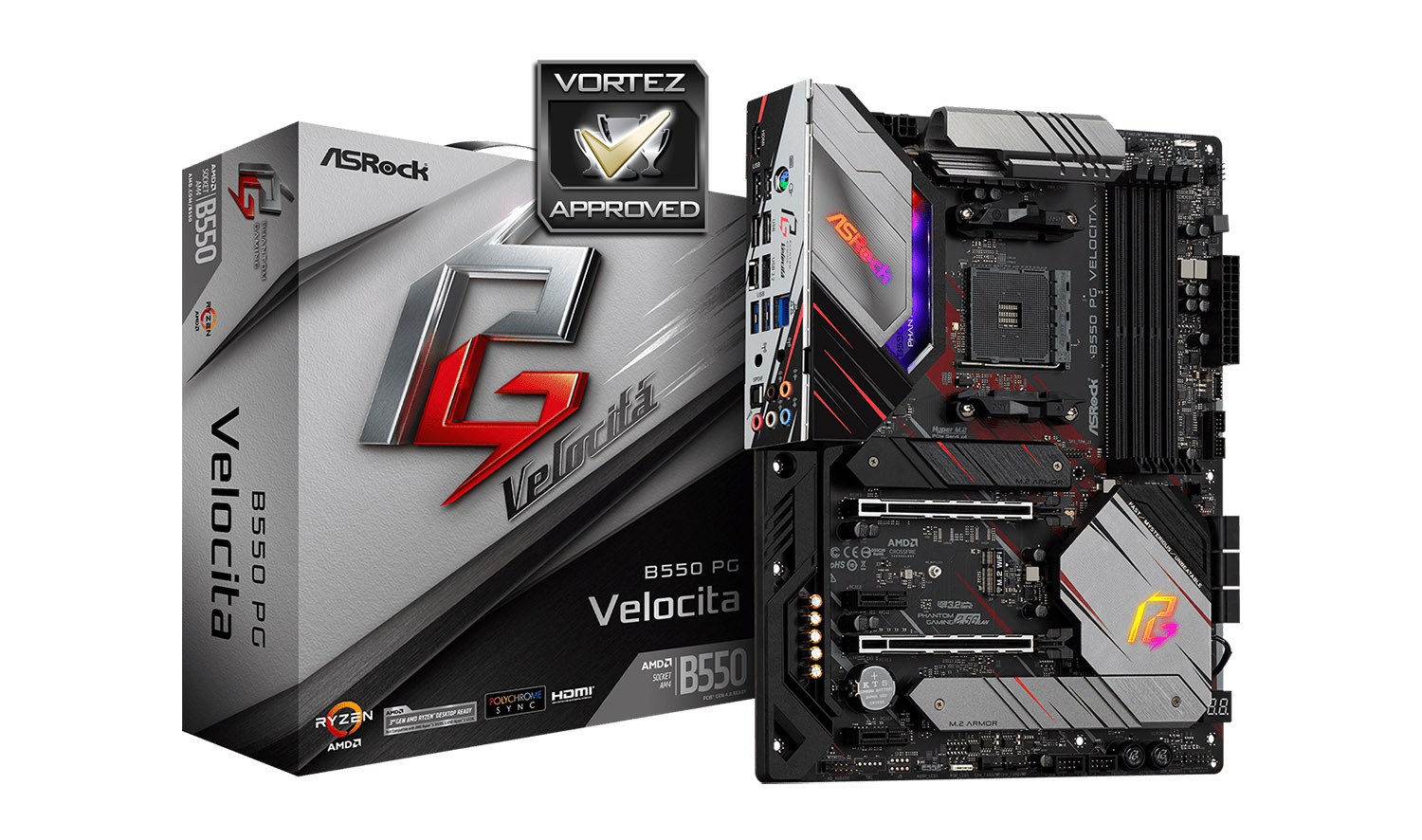
Styling on any motherboard is highly subjective but we feel that ASRock has done a sterling job with the aesthetics. It has a nice blend of soft, neutral tones with a lick of red and has a premium touch. Other hardware of a similar theme will coordinate very well and won’t look out of place.
Those who come to invest in a B550 motherboard will understand the compromise in the PCIe department and with Velocita we get ample slots as well as storage allocation. The storage itself is well balanced, providing sufficient SATA and PCI-Express driven M.2 slots.
Velocita performed very well in our benchmark suite and showed no noticeable signs of being inferior to other models which are in a similar league. In fact this board offered us some surprising figures in the storage performance, pushing further ahead in terms of throughput transfer rates.
Velocita is a more than capable B550 motherboard which is armed with useful features… but this comes at quite a cost!
Pros
+ Pleasant visual appearance
+ Performs very well
+ Offers USB 3.2 Gen1 and Gen2 front panel connectivity
+ Good layout for multi-GPU
+ A total of 7 fan headers
+ M.2 slots feature thermal cooling
+ Great audio package
Cons
– Expensive
– Wasted back panel space with USB 2.0
– Touted as a high-end board but no WiFi included
+ Pleasant visual appearance
+ Performs very well
+ Offers USB 3.2 Gen1 and Gen2 front panel connectivity
+ Good layout for multi-GPU
+ A total of 7 fan headers
+ M.2 slots feature thermal cooling
+ Great audio package
Cons
– Expensive
– Wasted back panel space with USB 2.0
– Touted as a high-end board but no WiFi included
Click here for an explanation of our awards at Vortez.net.
Stay connected with Vortez social media pages: