Configured to come in under £1200 and powered by an Intel Rocket Lake CPU and NVIDIA RTX 30-series graphics, can Cyberpower PC’s newest system base bring value back to the PC Gaming market?

Product Name: Infinity X115 GT
Manufacturer: Cyberpower PC
MSRP (as configured): £1,183.20 inc. V.A.T.
Times continue to be tough for the nascent enthusiast wishing to venture into the glorious world of PC gaming. Component shortages have been ongoing throughout 2021, particularly in the arena of graphics cards, pushing prices higher and delaying the entrance of many into the PC Gaming community through DIY assembly. Others have relied on pairing older hardware with new, with mixed results. It’s a state of affairs that’s all-but untenable, but there is another route.
Throughout the shortages System Integrators have been a reliable way to assemble a PC with all modern components. While not unaffected by price inflation, they have at least guided newcomers through the process, and in a timely fashion brought each item together in a whole that’s more than the sum of its parts.
With colleges and universities now returning to in-person lectures and schools being back in session, it’s past time we saw exactly what it takes to get on the ladder today. Enter Cyberpower PC with the Infinity X115 GT, a system catering to the gaming mainstream while offering a framework that the user can build on as their passion for the pastime evolves.
The Infinity X115 GT is a system with Intel’s 11th Gen. Rocket Lake platform at its heart. Its standard configuration features a Core i5-11400 CPU and MSI B560M motherboard, which in combination is a great place to start for a flexible system oriented towards both gaming and your studies. They’re joined by 16GB of CORSAIR DDR4-3200MHz memory and an Intel 1TB 670p NVMe SSD, two other components that, while not flashy, are fast workhorse options. Then we get to the GPU, rarely an uncontroversial selection.
Cyberpower PC opted to equip an NVIDIA GeForce RTX 3060 as the default GPU for this system, a card that even now has a premium price despite its position as the entry-point into NVIDIA’s RTX ecosystem. Retail channels have priced the card from £429 despite NVIDIA’s launch MSRP of £299, with some partner models hitting well over £600. This will have significant ramifications on the price and overall value of the Infinity X115 GT specification, but more on that later.
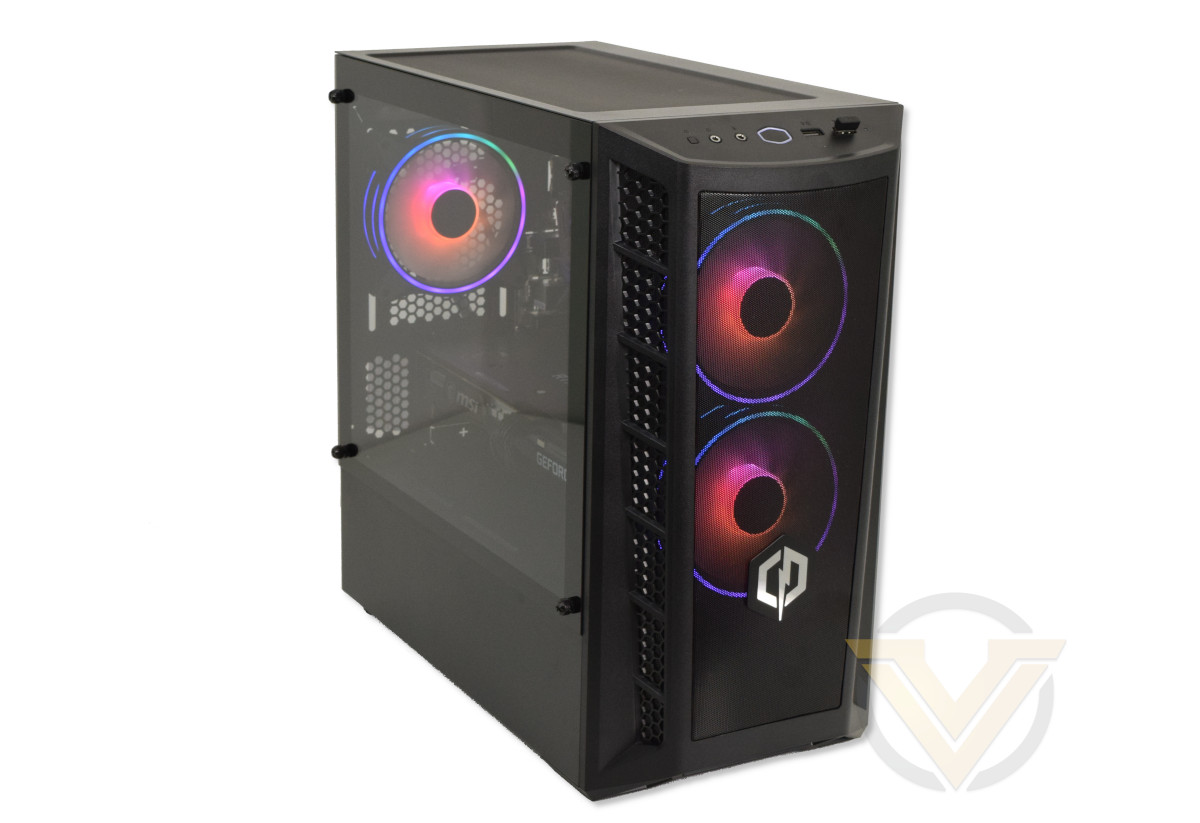
Bringing it all together are Cooler Master’s MasterBox MB311L case and MWE 650 Gold power supply. The former adds a touch of gaming aesthetic to proceedings, including RGB LED illumination, while the latter should be a reliable fully-modular PSU that has plenty of headway for a system with the selected components.
Of course the entire system is configurable above and beyond these selections, so if you need more oomph then it’s well within the scope of the System Configurator to select it. What’s important about the components selected however is the price.
The entire system, including delivery and warranty, is available for £1183.20 inc VAT. That’s considerably below the symbolic watershed point of £1500, and below the £1200 mark that has become one of these strange psychological barriers to entry when not wanting to ‘break the bank’. If we want the recent popularity of PC Gaming to continue and even grow then it’s systems like these that will be the bread-and-butter of the SI market going forward, but only if such a system represents an effective and desirable solution.
About Cyberpower PC
Originally founded in the United States, Cyberpower Inc is one of the leading brands in the competitive US computer market. With vast global backing from leading technology brands such as Intel, AMD, Nvidia, Asus and Microsoft etc, we aim to deliver the most up to date hardware for your needs at wholesale prices, and bring the well renowned name of Cyberpower Inc to the UK. With vision, commitment and determination we can manufacture a vast range of custom built PC systems to suit the needs of any individual or company. Our PC systems are built with utmost care and attention as we strive towards making this not just our profession, but our obsession.
Technical Specifications
Processor: Intel Core i5-11400
– Intel 11th Gen ‘Rocket Lake’ CPU
– Socket LGA1200
– 6 Cores, 12 Threads
– Turbo up to 4.4GHz
– 65W TDP
Graphics Card: MSI GeForce RTX 3060 VENTUS 3X 12G OC*
– NVIDIA Ampere Architecture
– 3584 CUDA Cores
– Core Clocks up to 1807 MHz (Boost)
– 12GB GDDR6 VRAM @ 15Gbps
– PCIe 4.0
– Triple-fan cooling solution
Motherboard: MSI B560M PRO
– LGA1200
– MATX Form Factor
– Supports PCIe 4.0
Memory: 16GB CORSAIR Vengeance LPX 3200MHz (2 x 8GB)
Storage: Intel 1TB 670p NVMe SSD
– QLC NAND SSD
– Read/Write Speeds of 3500 / 2500MB/s respectively
Chassis: Cooler Master MasterBox MB311L
– External dimensions: 435.5 x 217.5 x 410mm (LxWxH)
PSU: Cooler Master MWE 650
– Fully Modular design
CPU Cooler: Intel Retail CPU Cooler
Additional:
Wireless Wi-Fi 802.11ac Dual Band (2.4 GHz & 5GHz) PCI-E Adapter & Dual Antennas
Windows 10 HOME 64-bit
– Intel 11th Gen ‘Rocket Lake’ CPU
– Socket LGA1200
– 6 Cores, 12 Threads
– Turbo up to 4.4GHz
– 65W TDP
Graphics Card: MSI GeForce RTX 3060 VENTUS 3X 12G OC*
– NVIDIA Ampere Architecture
– 3584 CUDA Cores
– Core Clocks up to 1807 MHz (Boost)
– 12GB GDDR6 VRAM @ 15Gbps
– PCIe 4.0
– Triple-fan cooling solution
Motherboard: MSI B560M PRO
– LGA1200
– MATX Form Factor
– Supports PCIe 4.0
Memory: 16GB CORSAIR Vengeance LPX 3200MHz (2 x 8GB)
Storage: Intel 1TB 670p NVMe SSD
– QLC NAND SSD
– Read/Write Speeds of 3500 / 2500MB/s respectively
Chassis: Cooler Master MasterBox MB311L
– External dimensions: 435.5 x 217.5 x 410mm (LxWxH)
PSU: Cooler Master MWE 650
– Fully Modular design
CPU Cooler: Intel Retail CPU Cooler
Additional:
Wireless Wi-Fi 802.11ac Dual Band (2.4 GHz & 5GHz) PCI-E Adapter & Dual Antennas
Windows 10 HOME 64-bit
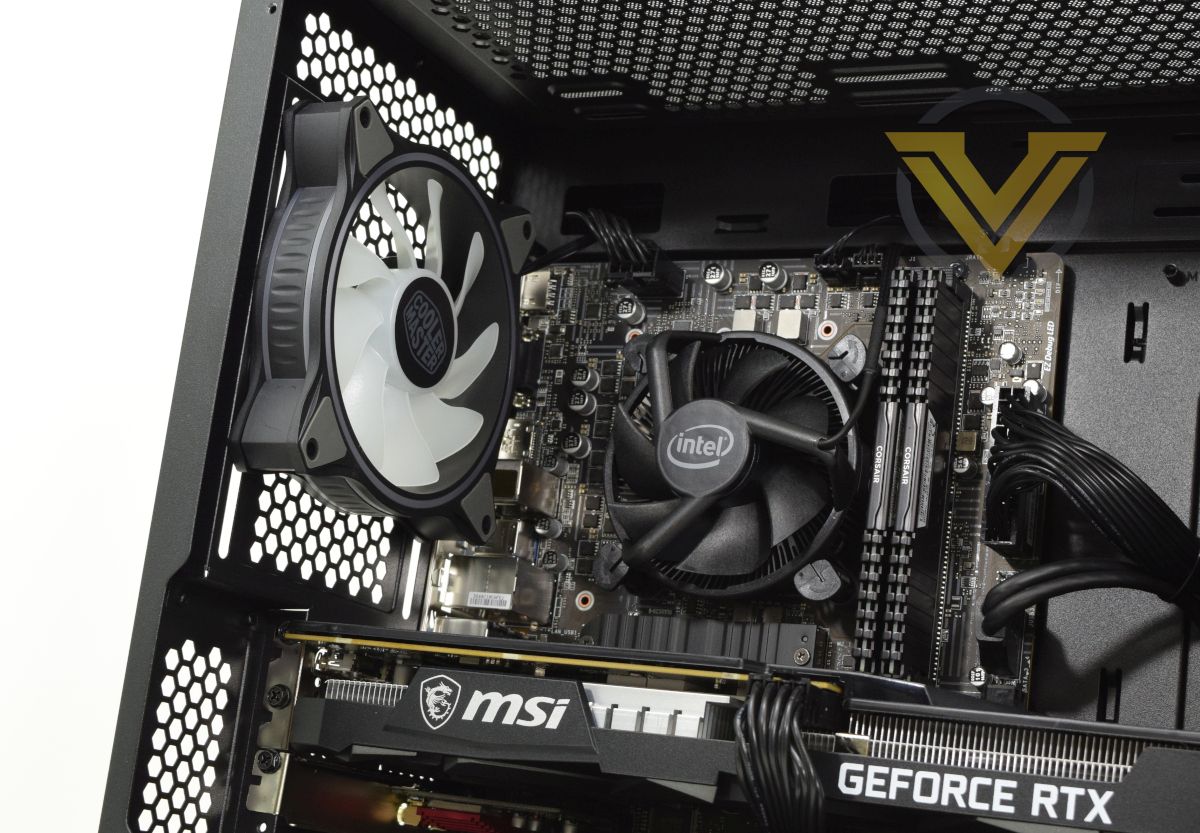
Intel’s Core i5-11400 is one of their latest processor lines based on the 14nm Rocket Lake architecture. Originally released earlier this year, the Rocket Lake architecture improved instructions per clock (IPC) greatly over 10th Generation Comet Lake processors, rivalling AMD’s Zen 3 desktop architecture while also offering integrated graphics for a well-rounded stack of CPUs catering to budget and enthusiasts segments alike.
The i5-11400 is effectively an entry-level gaming processor consisting of six physical cores with Hyprethreading for support for 12 discrete threads. It clocks up to 4.4GHz from a base of 2.6GHz within a configurable TDP envelope between 65W and 125W, but doesn’t support explicit overclocking. While not ideal for the demands of gaming while streaming, the six-core processor will be more than suitable for today’s range of lightly threaded game engines that still prioritise raw clock speed over huge core counts.
Feeding data to the CPU is 16GB of CORSAIR Vengeance LPX DDR4 memory clocking in at 3200 MT/s. Intel CPUs don’t scale with DRAM frequency quite as strongly as AMD’s Ryzen platform but Rocket Lake does still benefit from faster memory speeds, particularly up to 3600MHz. Hitting 3200MHz is generally a good compromise between performance and price but we wouldn’t be against nudging up to 3600MHz at just £12 more (or £25 if you go for the RGB option).
The tested configuration incorporates the stock Intel cooler, which in and of itself will be sufficient for the processor’s needs. Sufficiency doesn’t tell the whole story however – thanks to a relatively small heat sink the single 90mm fan will ramp up aggressively as processor load increases, generating not just more noise but also noise that will oscillate up and down in frequency as load changes over time.
Each of the components is installed on an MSI B560M PRO motherboard. While it does feature a black PCB in a single nod to aesthetics, the B560M PRO is an extremely basic mATX implementation of the B560 chipset. There are no extraneous heatsinks (saving for the M.2 drive heatspreader), only two DIMM slots, USB 3.0 limitation and no USB Type-C support, the latter of which is likely to be the largest long-term concern. That said, there is a wrinkle here.
The only options listed on the X15 GT’s Configurator page are the MSI B560M-A PRO and B560M PRO VDH. The B560M-A PRO is very similar to the B560M-PRO, with the exception that it does not have a Displayport mounted to the rear I/O (which has implications for troubleshooting if you only have a Displayport monitor), while the PRO-VDH model includes many of the features not present on either. At £5 more the PRO-VDH seems like a no-brainer.
Note that ATX motherboards are also selectable through the Infinity X115 GT configurator but would also require the selection of a compatible case.
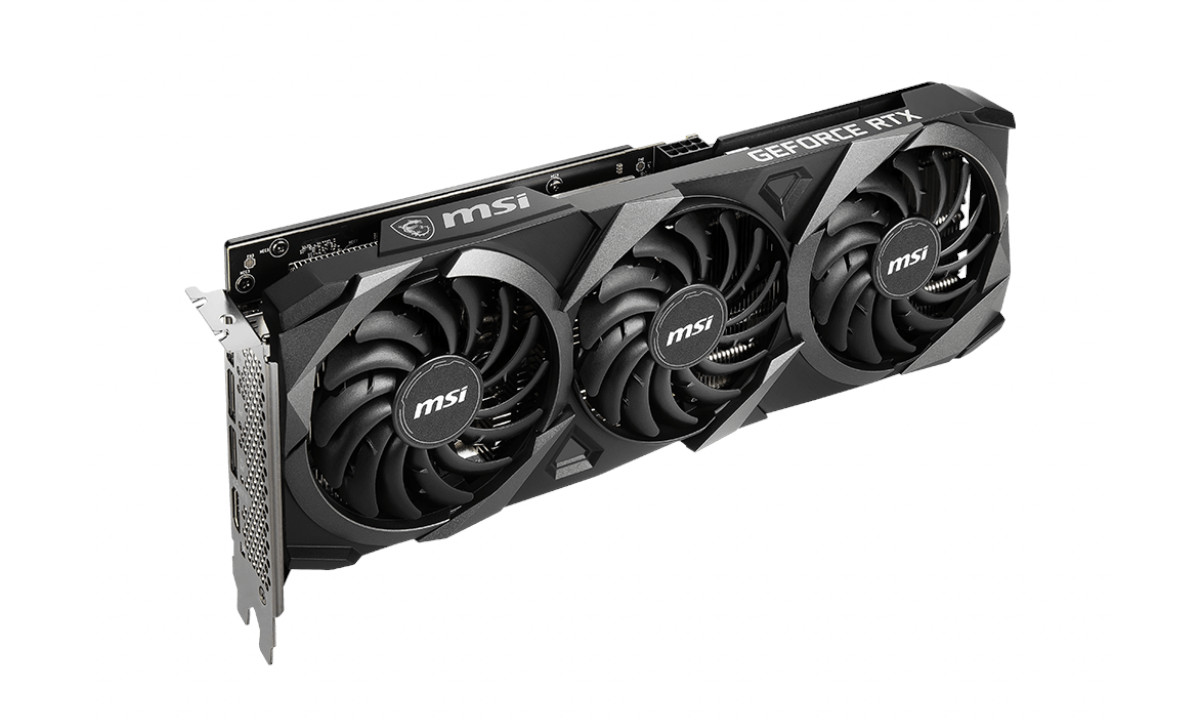
NVIDIA’s GeForce RTX 3060 is the green team’s entry point into RTX gaming and serves as the first rung on the ladder up the RTX 30-series stack. It’s therefore capable of hardware-accelerated ray tracing and AI-accelerated upscaling through NVIDIA’s DLSS technology, potentially pushing a given system to gaming at 1440p resolutions (although 1080p is more appropriate for this system configuration). Not all RTX 3060’s are created equal however.
The review system is equipped with MSI’s GeForce RTX 3060 VENTUS 3X 12G OC, a triple-fan variant with factory overclock to 1807MHz from 1777MHz (Boost). While the actual performance variance between different RTX 3060 SKUs hasn’t been shown to be particularly significant, the cooling headroom offered by a triple-fan design does equate to modestly higher Boost clocks over extended gaming sessions and a more pleasant noise profile.
NVIDIA recommend at minimum a 550W PSU for the RTX 3060, so Cooler Master’s MWE 650 more than has it covered. This 80+ Gold rated PSU is fully modular, making piecemeal component upgrades significantly easier and also tidier to make. Cooler Master are also on the more reliable tiers of PSU manufacturers so you can be fairly confident in it long-term.
Although the system is capable of supporting PCI 4.0 components, the default configuration calls for Intel’s 670p NVMe SSD. This QLC NAND SSD supports four PCIe 3.0 lanes through an M.2 interface with speeds up to 3500MB/s read and 2500MB/s write, performance far in excess of conventional SATA SSDs and mechanical HDDs. This is a sweet spot for systems that need to be responsive, particularly when gaming at high frame rates, but not requiring the excesses available through a PCIe 4.0 interface.
Finally, the case used is Cooler Master’s Masterbox MB311L. This mATX enclosure is compact as desktop towers go but more than large enough to house all the components in the system configured above. A tempered glass window means you’ll want to ensure that the internals are in good order, and in service to that there’s plenty of space behind the motherboard tray and PSU shroud. The PSU itself is accessible after removing the right-hand side panel. Its long dimensions mean that even the oversized MSI RTX 3060 Ventus X3 can easily be accommodated with room to spare, and in theory the case can support radiators up to 240mm in the roof and 280mm in the front. Additional storage options include two 2.5mm SSD mounting points on the back of the motherboard tray and two 3.5mm bays within the PSU shroud, which should be plenty for a system of this calibre.
Value
Intel Core i5-11400:- £169.99
MSI B560M-A PRO:- £89.99
16GB Corsair DDR4 Vengeance LPX Black 3200MHz:- £59.99
Cooler Master MWE 650 Gold:- £79.99
1TB Intel 670p NVMe SSD:- £137.81 *
Cooler Master MasterBox MB311L:- N/A **
MSI GeForce RTX 3060 Ventus 3X 12G OC:- £629.99
Wireless Wi-Fi 802.11ac Dual Band (2.4 GHz & 5GHz) PCI-E Adapter & Dual Antennas:- £21.49
Microsoft Windows 10 Home:- £92.42
Total:- £1281.67 inc. V.A.T.
MSI B560M-A PRO:- £89.99
16GB Corsair DDR4 Vengeance LPX Black 3200MHz:- £59.99
Cooler Master MWE 650 Gold:- £79.99
1TB Intel 670p NVMe SSD:- £137.81 *
Cooler Master MasterBox MB311L:- N/A **
MSI GeForce RTX 3060 Ventus 3X 12G OC:- £629.99
Wireless Wi-Fi 802.11ac Dual Band (2.4 GHz & 5GHz) PCI-E Adapter & Dual Antennas:- £21.49
Microsoft Windows 10 Home:- £92.42
Total:- £1281.67 inc. V.A.T.
Okay, so there’s quite a lot to unpack here beyond the final total, but at first glance the Infinity X115 GT appears to be excellent value for money. Cyberpower PC priced the system approximately as configured at £1183.20 inc. V.A.T., almost £100 less than that of the individual components at retail even without including the MasterBox MB311L (which is unavailable to consumers through retail channels in the UK). Taking the nearest analog of the latter, the almost identical MB320L, you would add another £55 to the total and mark the system at a saving of over £150. There’s more to this however.
The 1TB Intel 670p is also generally unavailable at UK retail, with only one Amazon.co.uk reseller listed. Similarly specced QLC NAND drives are significantly cheaper, including the Samsung 1TB 980 (£113.99) and WD Black SN750 (£115.99). Realistically, we can probably shave £25 off the SSD selection.
By far the most problematic aspect of the system is however the graphics card. MSI’s RTX 3060 Ventus 3X is a tough one to acquire and commands a premium, but you can’t actually spec the card out in the X115 GT’s Configurator. Instead it seems like pot luck which one GeForce RTX 3060; although you hope it’s a good one, Cyberpower PC don’t seem to guarantee that unless you explicitly choose the MSI RTX 3060 Gaming X Trio 12GB for an extra £110. Every other card option however (i.e. RTX 3060 Ti, 3070 etc.) is a specific model and SKU however.
We understand that the throughput of this popular card and sometimes inconsistent supply make guaranteeing a model difficult, but with so much variability in the street price (as low as £469.99 for an entry-level ASUS RTX 3060 at one UK retailer, from a supposed MSRP of £299.99) it would be awful to be stuck with a poorer design simply because the ordering system wasn’t transparent enough.
Nonetheless, assuming a more modest SSD (£115) and RTX 3060 variant (£570), you still come in considerably above £1183.20. And that’s before you factor in Cyberpower PC’s assembly, testing, shipping and warranty costs, not to mention a third Cooler Master ARGB fan thrown in for good measure. Certainly sounds like good value to us if the process of putting together your PC fills you with dread rather than glee.
As far as obvious upgrades go, one or two immediately jump out. Moving from the stock Intel cooler to even the most basic aftermarket model (air or water) would likely make for a more pleasant day-to-day noise level. The B560M PRO VDH for £5 more brings with it USB 3.1 ports and better cooling for more long-term reliability. And if you really wanted to stretch things significantly there’s also the option of the NVIDIA Founder’s Edition RTX 3060 Ti for £92+V.A.T. more, guaranteeing a better performing card even if the price is considerably higher than the almost mythical MSRP of £369.
—
There’s one more aspect of the configuration process we’d like to bring up here. The reviewed system is the Infinity X115 GT, but there exists a non-GT version more prominently advertised on Cyberpower’s website. It has a different default configuration (which we don’t take issue with) but there is one glaring difference between the two: the price for upgrading from an i5-11400 to an i5-11600K.
For the Infinity X115 the price is £75, roughly in line with the difference in MSRP between the two chips; the X115 GT configurator however demands an eye-watering £167, £92 more than its sibling system. There’s no clear reason for this difference and would mean that the potential customer is being stung by a huge mark-up should they make the unwise decision to improve the processor of their X115 GT.
The vagaries of wholesale purchasing being what they are, it’s possible that the X115 GT is taking advantage of preferential subsidies available with the i5-11400 when bundled in a particular hardware configuration. But if that’s the case then removing the CPU upgrade option and gently referring customers to the X115 configurator instead might have been a more consumer-friendly approach.
Packaging and Bundle
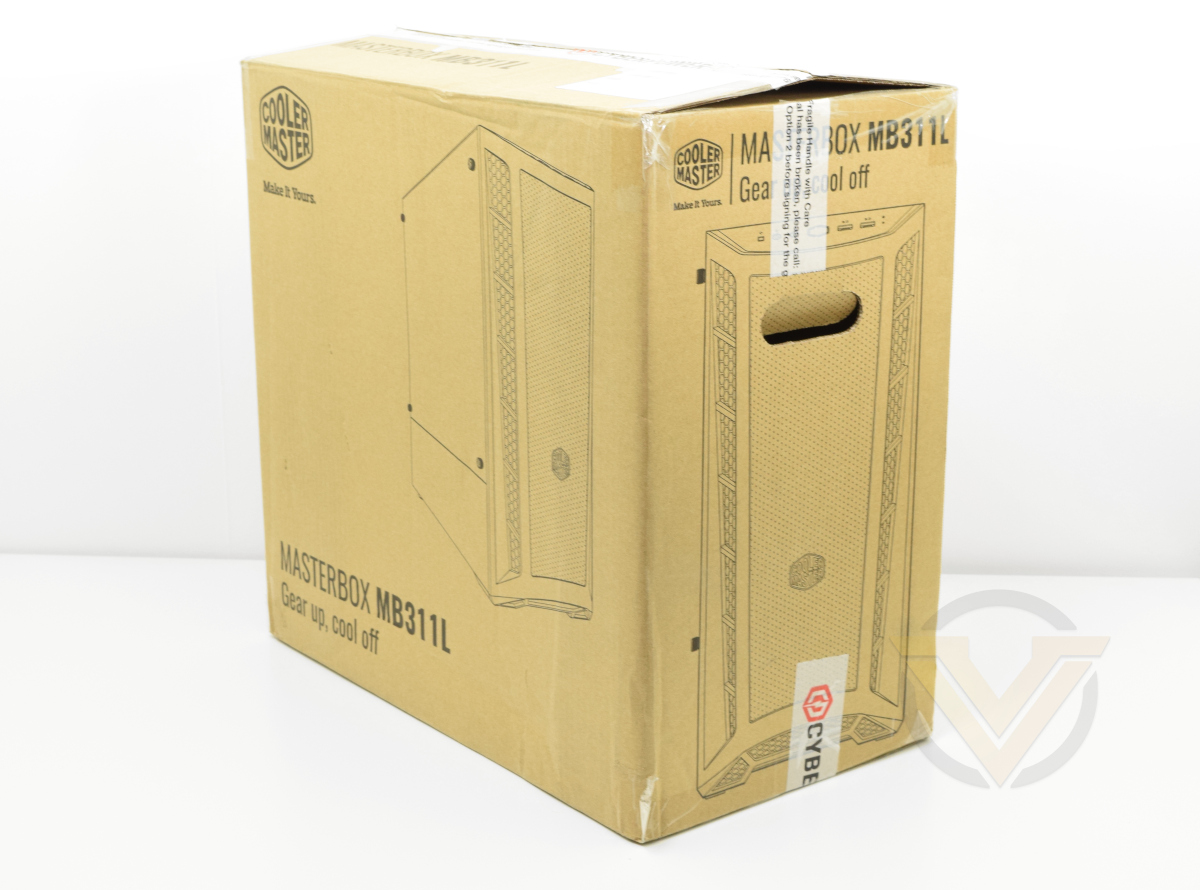
Cyberpower PC shipped the Infinity X115 GT review unit within the packaging of the Cooler Master MB311L chassis, but you can probably expect it to be shipped double-boxed to retail customers based on previous experience with their systems. The system is protected in transit by styrofoam bracing and a plastic Cyberpower-branded shroud over the system as a whole. It won’t be enough to mitigate against negligence on behalf of the courier, but should be plenty for more reliable delivery companies.
In this instance the Infinity X115 GT arrived without any issues or exterior damage.
Within the tower itself Cyberpower – like many other SI’s – utilise an expandable foam to ensure that components and some accessories are held securely in place during transit. It’s a neat concept that adapts easily to the different shapes, sizes and internal configurations any system might have, but it’s also unique to that system and will fit no other. It’s sensible to retain both this and the exterior packaging for some time after delivery just in case a problem arises which warrants the system being returned.
Prior to first boot all internal connectors and components should be checked just in case they became dislodged or were disconnected prior to shipping.
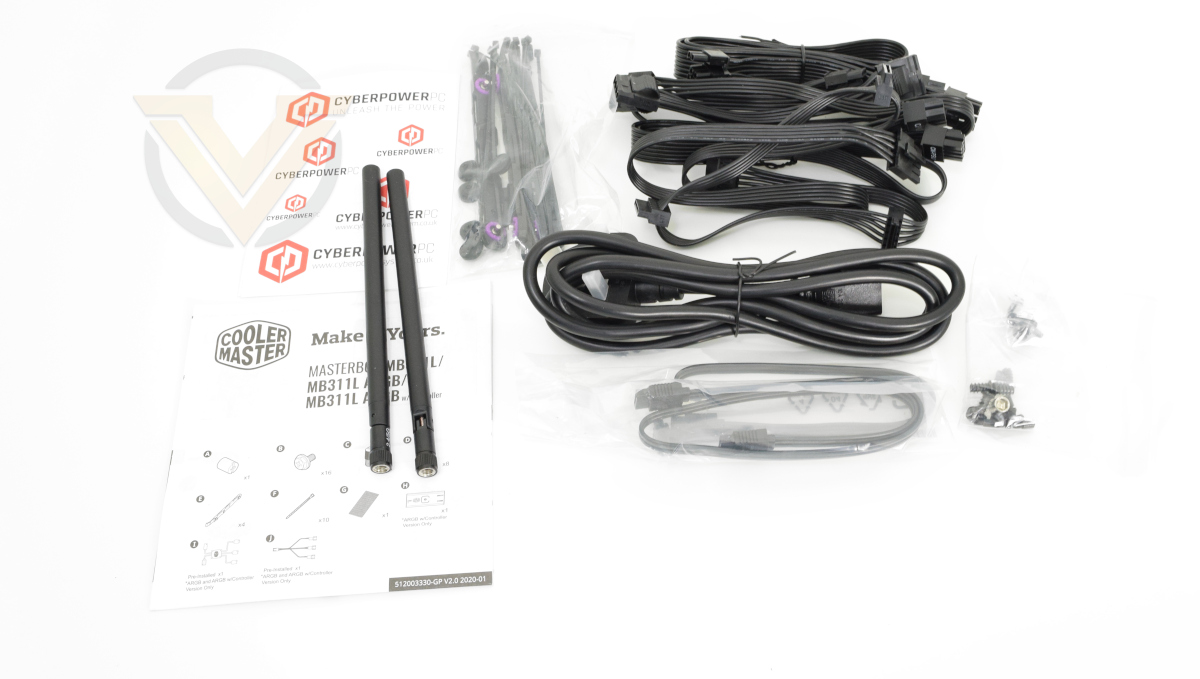
The Infinity X115 GT as specced is bundled with a few accessories that would normally arrive as part of the retail bundle of some of the individual components. Notable among them are two antenna for the wireless network card, a set of power cables for the MWE 650 Gold PSU, a 3-pin UK kettle lead, some zip ties, a SATA cable, and allsorted screws. In other words, plenty to get you started and add a HDD from a legacy system if required.
One absent component is an RGB remote control that we’ve seen on some other Cyberpower PC systems. The Infinity X115 GT operates internal RGB lighting through the MSI Mystic Light scheme integrated into the motherboard.
First Look
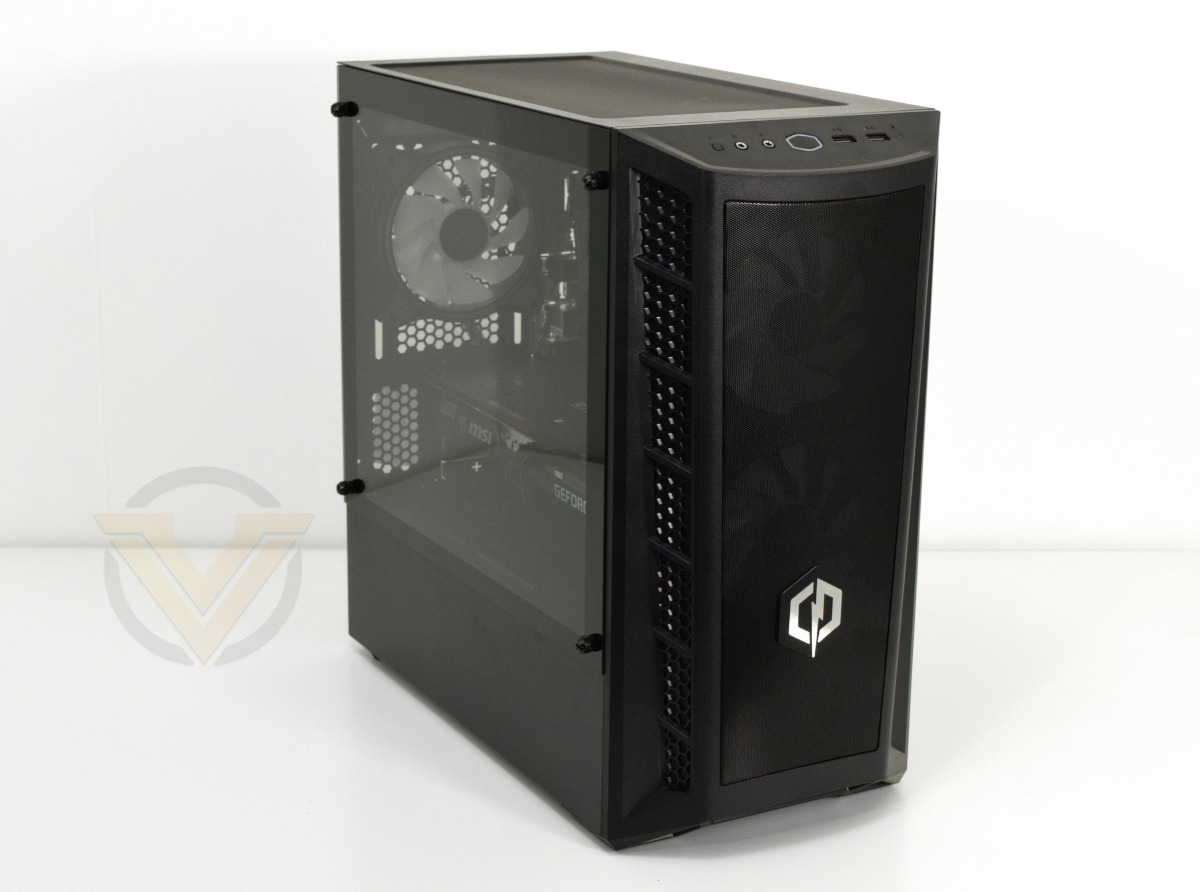
The difference between the Cooler Master MB311L and the CORSAIR iCUE 4000X that housed the Cyberpower ICUE Infinity we reviewed earlier this year couldn’t be more stark. Sharp edges and tempered glass exterior gives way to some curves, mesh panelling, and a slightly narrower view of its internals.
The system’s overall aesthetic certainly leans towards the ‘gamer’ end of the spectrum rather than the 4000X’s more refined look, particularly when the lighting is enabled, but not outrageously so. And of course other cases are available through the Configurator page if desired.
Due to the MB311L the system dimensions are relatively squat at just 41cm tall, and its reduced size may compared to some ATX mid-towers may make it a better fit for smaller rooms, particularly university halls and rented accommodation.
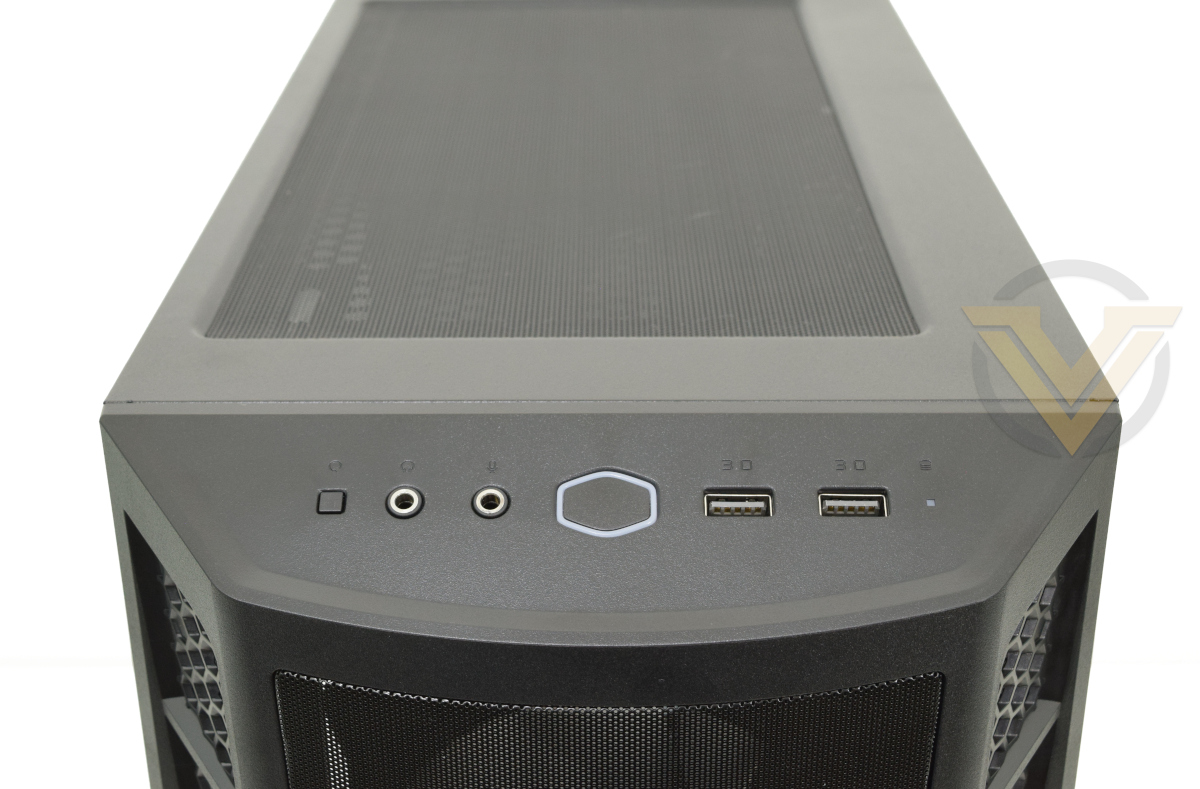
The front panel is entirely mesh, keeping the air intake unobstructed for the two hungry 120mm fans and helping with overall system cooling. Front panel I/O is located at the top on an angled section of plastic and consists of (from left to right) reset button, headphone jack, mic jack, illuminated power button, two USB 3.0 ports and an HDD activity LED. There’s no USB Type-C connector (not all that surprising given the cost of the case), but that aside it covers all the right bases.
A mesh panel forms the roof behind this area, and it’s covered by a removable mesh dust filter which is a nice touch. You should be able to install two 120mm fans here or a 240mm radiator, but internal components (particularly motherboard VRM heatsinks) could easily foul on rad. and/or fans.
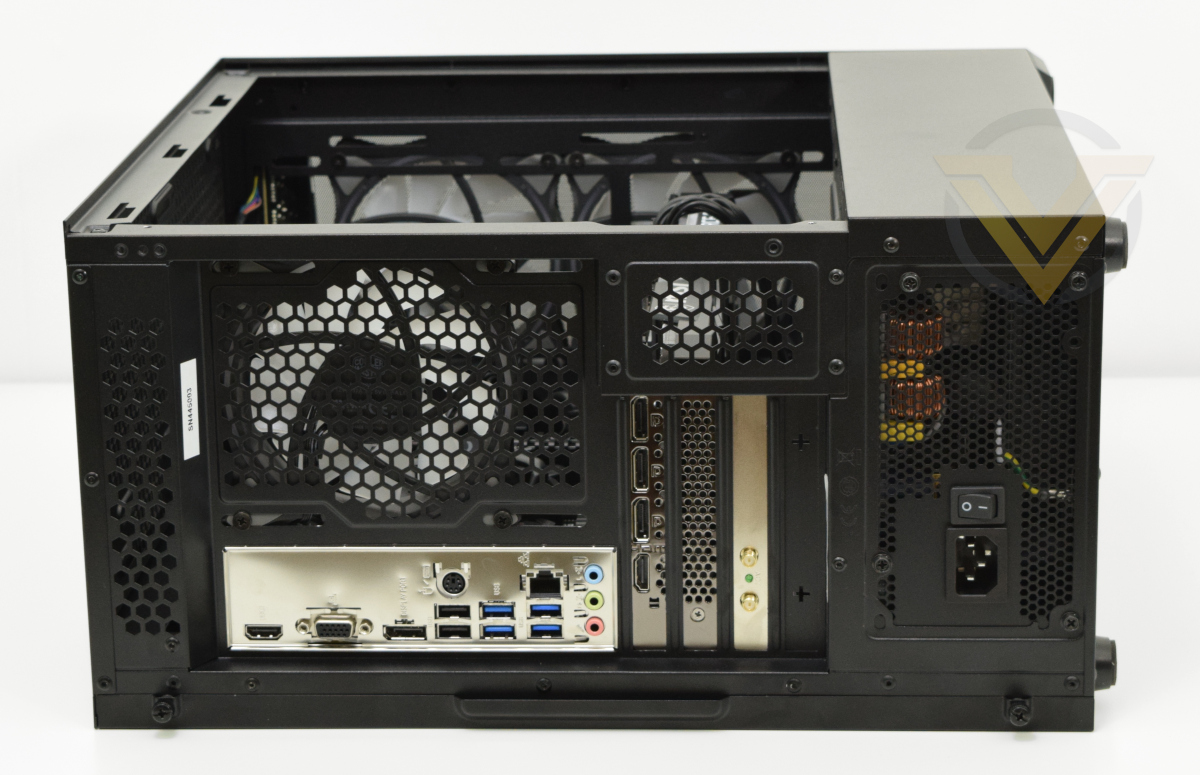
The rear I/O is similarly limited in scope. Motherboard I/O includes the usual complement of USB ports (2 x 2.0 and 4 x 3.0), a PS2 combo port for keyboard or mouse, Gigabit Ethernet, audio and video (Displayport, VGA and HDMI). There is however no USB 3.1 or Type-C connector on either this model or the B560M-A PRO. Moving the I/O for keyboard and mouse that far down the panel also will be a little frustrating if you don’t have easy access and want to swap peripherals out.
MSI’s RTX 3060-series cards have a plethora of ports on the rear, in this instance one HDMI and three full-size display ports for multi-panel setups. Below this PCI slot is a perforated panel for GPU ventilation, and below that the wireless network card’s bracket with aerial attachment points. One PCI slot is free, but installing anything there will be difficult due to the punch-out slot cover which might risk the motherboard.
The PSU is in standard orientation at the bottom of the case.
Closer Look
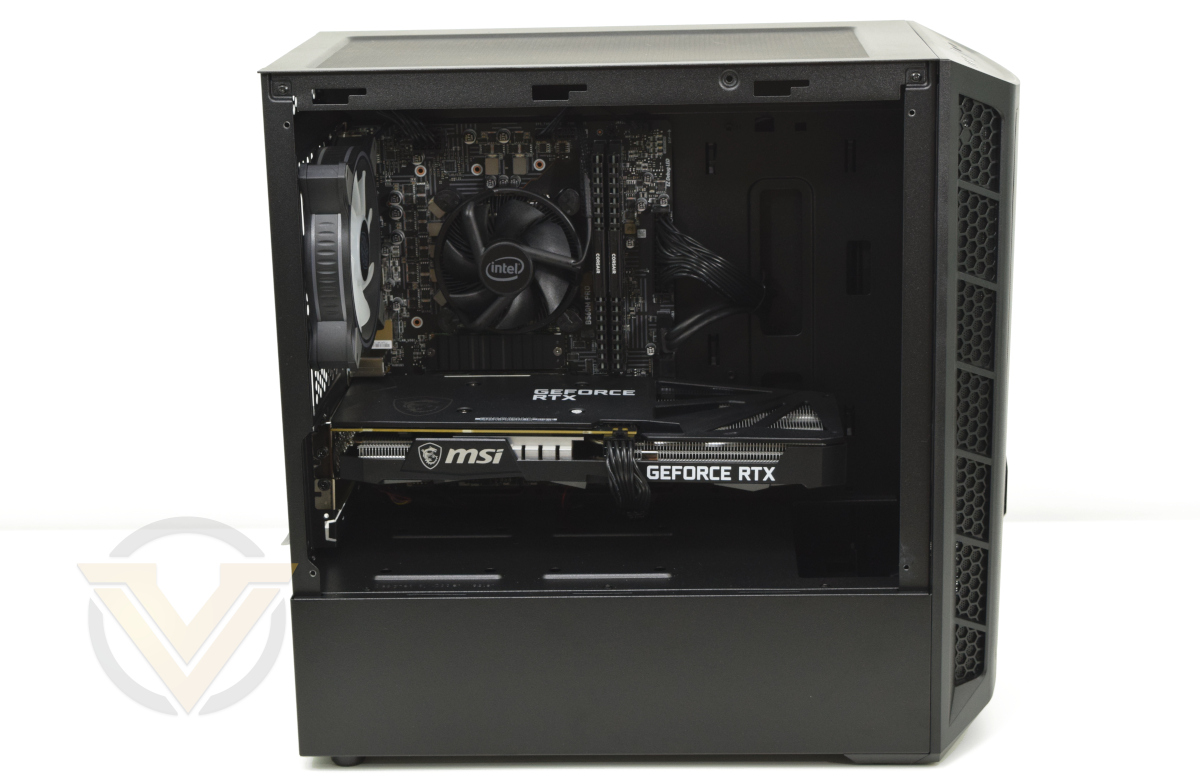
Removing the tempered glass panel exposes the Infinity X115 GT’s internals to the world, and it looks exceptionally orderly in fairness. Not only are the 24-pin and USB 3.0 header cables neatly tucked away, the fan cables and even the 8-pin PCI-Express connector are as discreet as possible. Cyberpower continues to impress with their attention to detail on assembly.
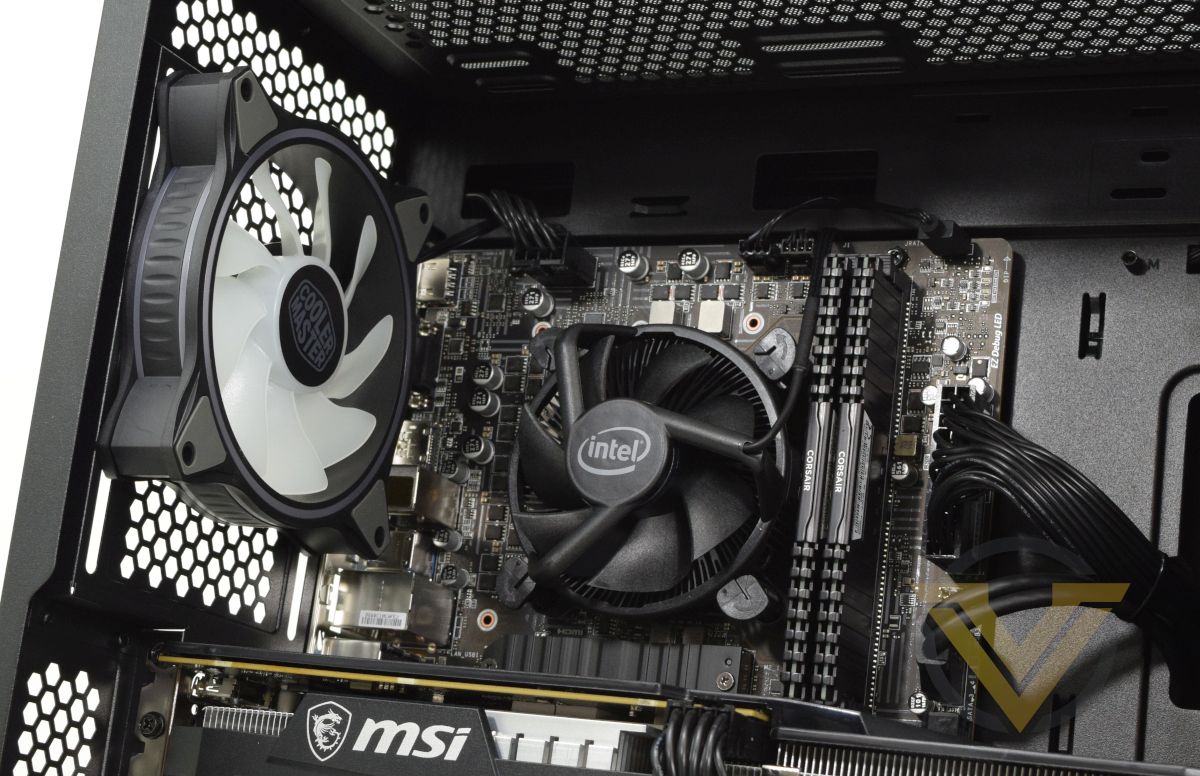
This tighter shot shows the roof and zone immediately surrounding the CPU. Again the cables are neatly pinned away, and there’s room in the roof for a slim 240mm radiator and fans. Just a shame that the CPU cooler is so plain, but as you’ll see swapping it out wouldn’t pose too much of a problem.
Pre-installed in the rear 120mm position is one of the three included Cooler Master MF120 HALO ARGB fans.
The M.2 SSD is covered by a heatspreader which is stuck to the drive with adhesive. Having that heatspreader installed is certainly opportune in this case as the Intel 670p has a green rather than black PCB, but replacing it without damaging the drive will be tricky.
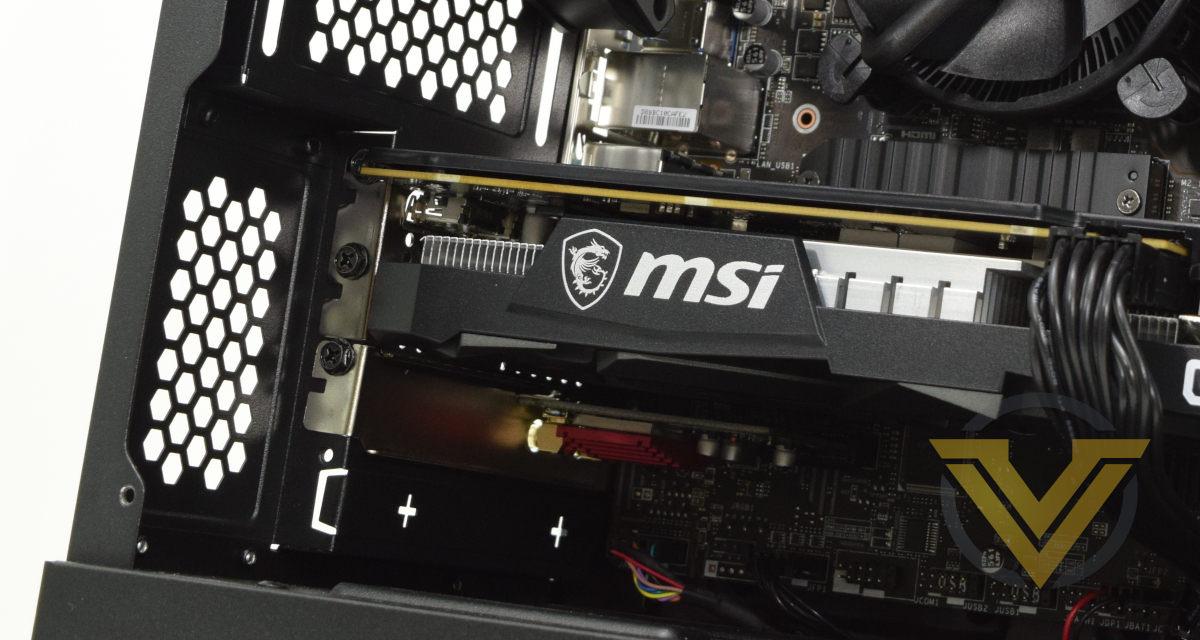
Tucked away below the GPU is a compact wireless network card, occupying the second single-lane PCIe slot. The first single-lane slot is obscured by the GPU cooler on the B560M PRO (and would be on the B560M-A PRO), but both are shifted down one on the B560M PRO VDH; as a result this configuration doesn’t have any additional options for PCIe expandability, but one equipped with the more costly motherboard would.
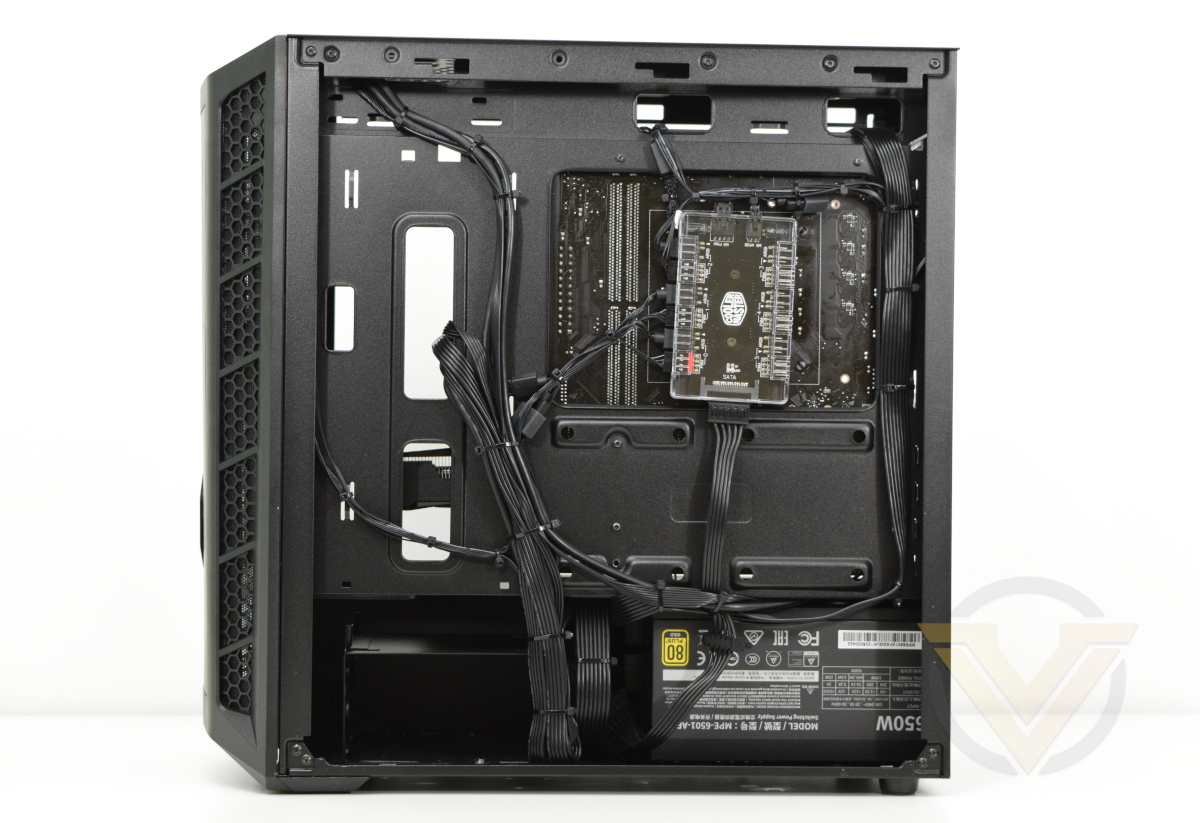
A peek behind the motherboard tray with the side panel removed lets Cyberpower gloat over their tidy cable management once again. It makes the best of the few cable tie standoffs available on the tray and ensures that adding to the cabling won’t necessitate undoing all of their hard work.
This also exposes the large motherboard tray cut-out that will make swapping out the CPU cooler pretty trivial. No need to remove the motherboard, just get the cooler back-plate in place and you should be golden. Credit to Cooler Master for that design tweak which doesn’t also impact the rigidity of the case itself.
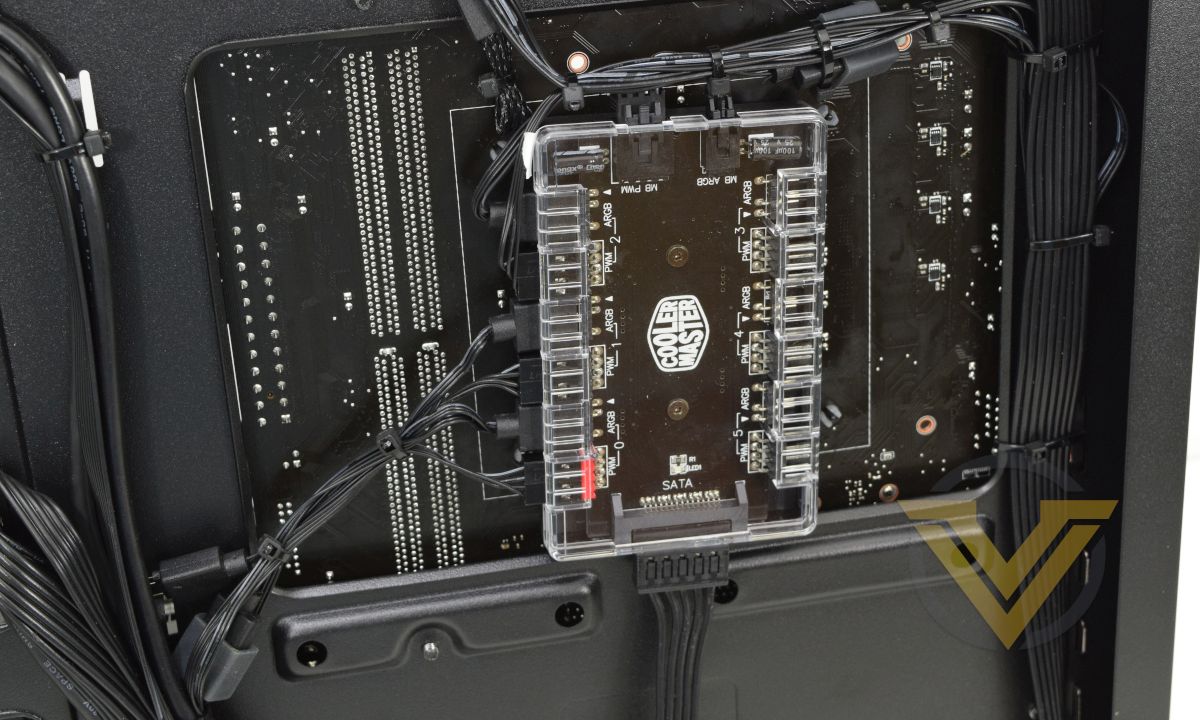
The Cooler Master fan hub is powered by a SATA power connector and can accommodate up to six 4-pin 12V PWM fans with separate ARGB pinout. The ARGB and PWM control is set by single motherboard PWM and ARGB headers; the controller handles passing the signalling off to each connected fan, but does also mean that each fan will have an identical lighting pattern.
At the bottom next to the PSU is a small drive cage for two HDDs that’s also removable if using a radiator in the front.
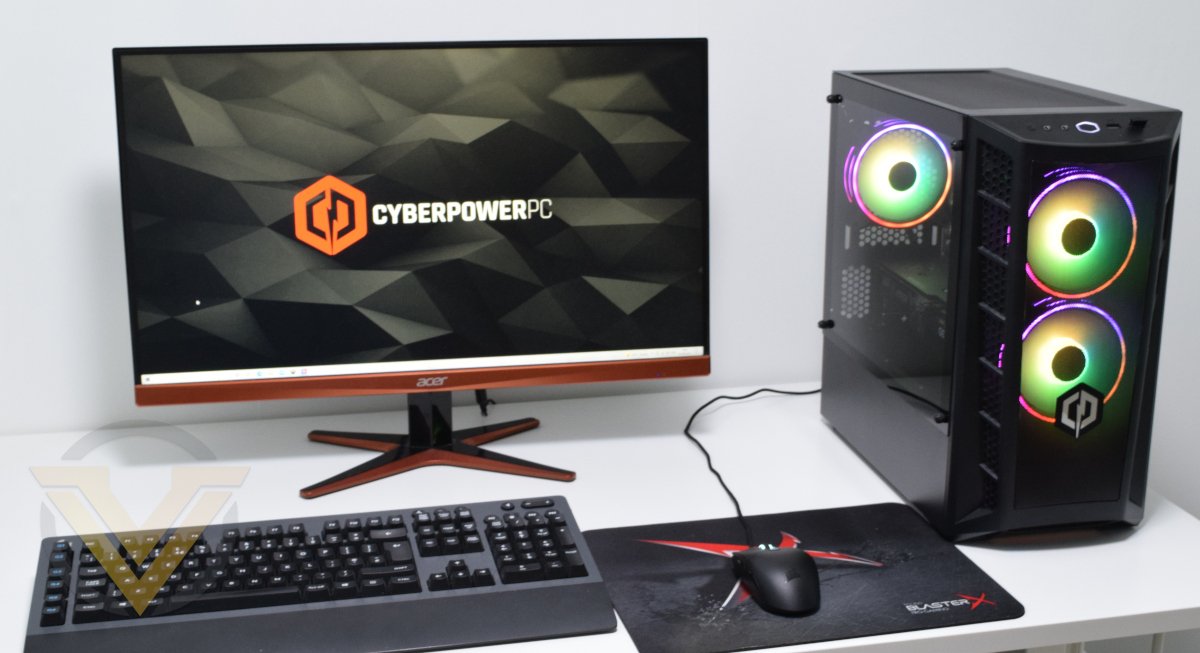
In operation, and the lighting scheme set to a rainbow effect rather than the default colour scheme, this is the sort of result you can expect. The lighting is well balanced with two in the front and one in the rear, while the mesh front panel also cuts out a lot of the glare from the fan LEDs; it can be an excellent complement to the rest of an illuminated setup, but might not be the centrepiece some more fully equipped desktops could be.
Other than these three fans there is no internal illumination in the Infinity X115 GT, not even the graphics card. That means it’s also a blank canvas to add you own, or keep as-is if preferred.
Benchmarks: Temperatures, Power Draw & Boot Time
In our first test we observe the max. CPU/GPU temperatures of the system while allowing Unigine Heaven 4.0 to run on a 30-minute loop with default system fan profile. Idle temperatures were read 10 minutes later, indicating how well the system exhausted latent heat. To report back on the temperatures we used Core Temp readings and GPU-Z.
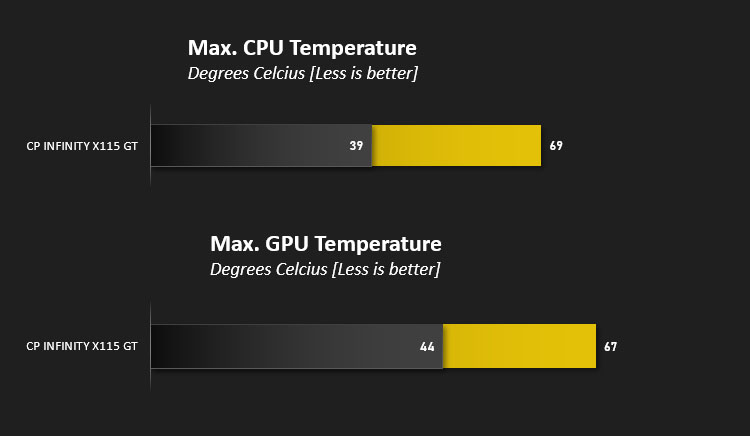
At 69C the peak temp recorded on the Core i5-11400 is not high, but it tells only half the story. The Intel cooler worked overtime to limit the CPU to this temp, ramping up the fan close to 2000 RPM which made it clearly audible over other system fans. The i7-10700K, a larger and more power-hungry CPU, peaked out at 63C in our Cyberpower ICUE Infinity system testing with only a modest increase in noise, showing the performance gap between Intel retail and CORSAIR’s 240mm AIO solution.
Idle temps of 39C were a little lower than those for the i7-10700K, likely driven in part by far better air flow available through the MB311L case.
GPU Temps for the RTX 3060 Ventus 3X OC were a little high at 67C under load and 44C at idle, but the card was extremely quiet. In this particular instance we don’t object to slightly higher temps when the trade-off is very low noise levels.

System peak power draw was assessed under long game loads, and we found it to be surprisingly high. A peak of 301W at the wall might have been an aberration as long-term load draw averages hovered around the 272W mark, sitting just under the ICUE Infinity as expected. Idle draw of 61.2W remains low, but is a little higher than the older system potentially due to fewer power saving features on the MSI B560M PRO motherboard.

Intel’s Windows Boot Time continues to be exceptionally good. The Infinity X115 GT went from cold boot to desktop in just 12.3 seconds and easily outpaced most AMD Ryzen systems we’ve tested.
Benchmarks: Cinebench R20, R23 & 7-Zip
Maxon’s Cinebench is a real-world cross-platform test suite that evaluates your computer’s hardware capabilities. Improvements to Cinebench Release 20 reflected the overall advancements to CPU and rendering technology in recent years, providing a more accurate measurement of Cinema 4D’s ability to take advantage of multiple CPU cores and modern processor features available to the average user.
In October 2020 Maxon launched Cinebench R23. This release formulated an updated test that defined a notational runtime of 10 minutes for both single and multicore tests, minimising the impact of initial performance spikes caused by a high Turbo/Boost clock at the start. The scores generated are not directly comparable to the R20 results, but we’ve included them here for reference.
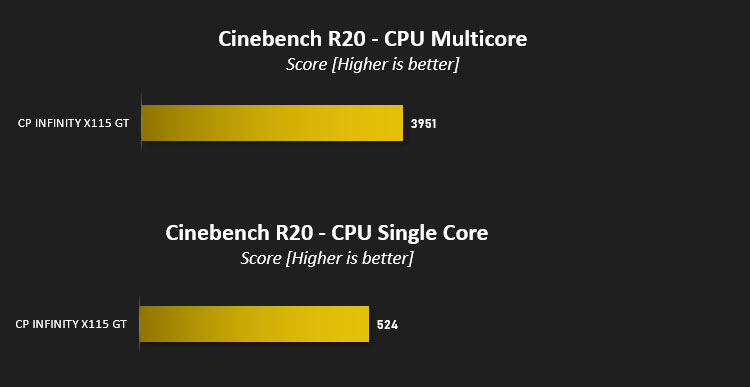
Here we can see the strength of Intel’s Rocket Lake architecture. Despite only hitting a maximum Turbo of 4.4 GHz the i5-11400 easily eclipses the single core score of 477 attained by the i7-10770K that clocks up to 5.1GHz. It falls back in multi-core score chiefly due to having two fewer cores; a multiplier of x7.54 still means it scales better than linearly with cores.
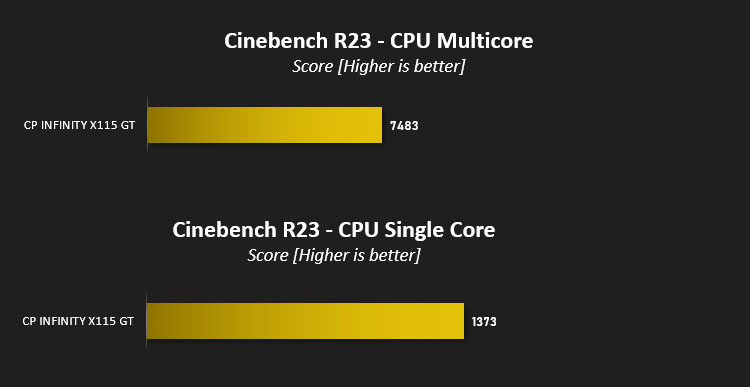
Cinebench R23 scores relay a similar tale, although reaching a single-core score of 1373 was a little higher than anticipated. Multi-core scores in the 7400 range were far more in line with expectations, and once again couldn’t quite match the i7-10700K’s eight cores combined.
—
7-Zip is open-source software which unpacks compressed (zipped) files. It also features a benchmark which measures your systems ability to unpack files, typically stressing CPU and memory performance.
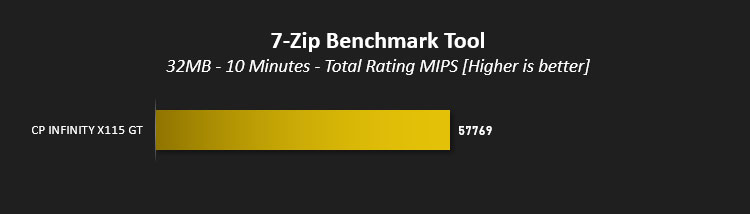
The multi-core results for 7zip aren’t abnormal considering the Cinebench R20 and R23 results. This highly threaded benchmark trailed performance levels achieved by the 10700K, and is significantly down on the high water mark reach of 92035 posted by an earlier Ryzen 7 5800X system test. That said, for a 6-core CPU the results remain impressive.
Benchmarks: PCMark 10, Unigine Heaven & 3D Mark
PCMark 10 by UL combines performance benchmarking with battery life measurement where applicable and includes tests based on popular Adobe and Microsoft applications. Whether you are looking for long battery life, or maximum power, PCMark 10 will help you find the devices that offer the perfect combination of efficiency and performance for your needs. It’s the complete PC performance benchmark for home and business.

A PCMark 10 score of 6726 inches towards that of the ICUE Infinity, which posted a combined result of 6956. Both trail a more pricey Ryzen 7 5800X-powered system, but the Infinity X115 GT comes at a fraction of the cost of either.
—
3DMark Time Spy by UL is a DirectX 12 benchmark test for gaming PCs running Windows 10. With its pure DirectX 12 engine, built from the ground up to support new API features like asynchronous compute, explicit multi-adapter, and multi-threading, Time Spy is the ideal benchmark for testing the DirectX 12 performance of the latest graphics cards.

The system posted a Time Spy combined result of 8453, with CPU and GPU scores of 7501 and 8647 respectively. That’s within touching distance of the ICUE Infinity system, which was able to reach 8702 with an RTX 3060 alongside its i7-10700K.
—
Unigine’s Heaven 4.0 utility is a performance and stability test for PC hardware: video card, power supply, cooling system. Check your rig in stock and overclocking modes with real-life load! Also includes interactive experience in a beautiful, detailed environment.
While relying on a DirectX 11 API renderer rather than more modern DX12 framework, Heaven 4.0 and DX11 performance is still a relevant metric today.

We’ve maintained Unigine Heaven 4.0 benchmarking at 1440p, with 8x AA and Tesselation set to moderate as a means of straightforward comparison to the ICUE Infinity and Ultra 7 RTX Elite before it. The score attained does to a certain extent show the RTX 3060’s good rasterisation potential, while the low threading on this ageing benchmark allows the higher single-core performance of the i5-11400 to eke out at small lead over the ICUE Infinity.
Benchmarks: Gaming (1080p)
If NVIDIA’s GeForce RTX 3060 Ti straddles the line between 1080p144Hz and 1440p60Hz gaming, the RTX 3060 is firmly entrenched in the former when it comes to the most modern titles. We have therefore chosen to test at this resolution with high image quality settings to assess what informed owners of the system can expect from the hardware configuration.
Mordor: Shadow of War
The oldest of our titles, Mordor: Shadow of War is still an exceptionally attractive game that utilises the DirectX 11 API. The Infinity X115 GT should easily be able to handle the title at 1080p Ultra settings.
Shadow of the Tomb Raider
The second sequel to the rebooted Tomb Raider franchise, Shadow of the Tomb Raider was also one of the first titles to incorporate NVIDIA RTX ray traced shadows and DLSS. We’ll be testing with RTX on today without the benefit of DLSS’s 720p upscaling mode.
Horizon Zero Dawn
This game was new to PC in August 2020 and already has a reputation for taxing GPU hardware. It doesn’t feature ray tracing, but nonetheless has some of the most stunning scenes ever rendered in games. We’ve used the Ultimate preset at 1080p here, but Favoured also offers a visual feast with markedly higher performance.
Control
Critically acclaimed on release, Control is the title which made most comprehensive use of NVIDIA RTX prior to Cyberpunk 2077’s release in Holiday 2020. Shadows, lighting and reflections all make use of this advanced rendering standard, helping the transition from mundane world to its nightmarish reflection. We opted for the 1080p Highest settings preset with RTX features enabled including the default recommended level of DLSS: a rendering resolution of 1280×720.
Tests were performed with NVIDIA’s GeForce Game Ready 471.68 WHQL Driver.
The oldest of our titles, Mordor: Shadow of War is still an exceptionally attractive game that utilises the DirectX 11 API. The Infinity X115 GT should easily be able to handle the title at 1080p Ultra settings.
Shadow of the Tomb Raider
The second sequel to the rebooted Tomb Raider franchise, Shadow of the Tomb Raider was also one of the first titles to incorporate NVIDIA RTX ray traced shadows and DLSS. We’ll be testing with RTX on today without the benefit of DLSS’s 720p upscaling mode.
Horizon Zero Dawn
This game was new to PC in August 2020 and already has a reputation for taxing GPU hardware. It doesn’t feature ray tracing, but nonetheless has some of the most stunning scenes ever rendered in games. We’ve used the Ultimate preset at 1080p here, but Favoured also offers a visual feast with markedly higher performance.
Control
Critically acclaimed on release, Control is the title which made most comprehensive use of NVIDIA RTX prior to Cyberpunk 2077’s release in Holiday 2020. Shadows, lighting and reflections all make use of this advanced rendering standard, helping the transition from mundane world to its nightmarish reflection. We opted for the 1080p Highest settings preset with RTX features enabled including the default recommended level of DLSS: a rendering resolution of 1280×720.
Tests were performed with NVIDIA’s GeForce Game Ready 471.68 WHQL Driver.
Like its predecessor, the Infinity X115 GT handled Mordor: Shadow of War with aplomb at 1080p Ultra, easily pushing beyond the 100fps barrier in average frame rate. It’s nice to see a system so well equipped to deal with sensible resolution and image quality settings. While its relevancy as a gaming benchmark might be falling with this generation, it still underscores the value of frame syncing technologies such as G-SYNC and Freesync in smoothing out the gaming experience even when average frame rates are high.
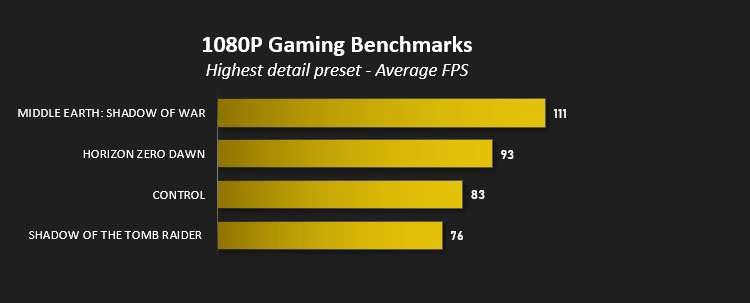
As expected, performance levels in Shadow of the Tomb Raider were similar to those of the ICUE Infinity in three tested criteria: with RTX On with SMAAx4 anti-aliasing, RTX Off, and RTX On with TXAA anti-aliasing. In fact it exceeded the older system in all three metrics in both Average and Minimum frame rates, hitting 57/35fps with RTX On and SMAAx4, 85/68 with RTX Off and 76/52fps (ave/min) with TXAA and RTX On. Pretty good given the price disparity.
Horizon Zero Dawn was a similar story. Ultimate 1080p results hit 93 fps average with a commensurate improvement in minimums to 59fps, while Favoured frame rates hit an excellent 112 fps with a minimum of 56. The per-core performance of the i5-11400 stands it in good stead against Intel’s older generation of chips in gaming, even if that advantage isn’t reflected in all synthetic benchmarks.
Finally we come to Control. Once again the performance ever so slightly one-upped that of the ICUE Infinity, pushing average frame rates to 78fps when RTX was disabled. Enabling RTX ray tracing at the High preset pushed it down to 48fps, matching the ICUE Infinity frame for frame.
Enabling DLSS at a rendering resolution of 720p did make up for the shortfall experience when ray tracing is enabled, pushing frame rates to a much more healthy 83fps.
So, what did we learn from this exercise? Well for one 1080p gaming appears to be the Infinity X115 GT’s sweet-spot, generally hitting frame rates between 60 and 100fps at high image quality settings; 1440p would necessitate lower image quality or a compromised experience frequently dropping below 60fps on modern titles. Furthermore, the money saved with the Infinity X115 GT over buying some components separately could be put towards a FreeSync or G-SYNC Compatible 144Hz 1080p display.
At the end of the day, the >£500 price disparity between ICUE Infinity and Infinity X115 GT shows how speccing a system out for aesthetics can severely hinder price/performance metrics, but equally that more staid component choices can still mean an excellent gaming system if expectations are realistic.
Conclusion
Throughout this review we’ve compared the Cyberpower PC Infinity X115 GT with the most recently reviewed system, the Cyberpower PC ICUE Infinity, and that comparison has often turned out poorly for the latter. But there’s method to this madness – the ICUE Infinity has parts chosen primarily for their looks, whereas the Infinity X115 GT is much more utilitarian when it comes to non-core components. That’s plainly observable by looking at promotional images, but it’s the greater than £500 price differential that’s far more striking.
We should take into account that the prior review was made when inflation in the PC component market was still at its heights, whereas things have calmed down as a whole since then. It’s therefore gratifying to see that when compared with street pricing the Infinity X115 GT was once again excellent value for money, even if some caveats remain.
More than that, however, the components appear to be remarkably well balanced, even more so than the ICUE Infinity. Intel’s i5-11400 is a great match for NVIDIA’s RTX 3060, both operating with the required performance envelope for 1080p gaming from 60 to 144fps, with no overhead left on the table. Six cores seems like all you need for now, from both Intel and AMD’s front-line desktop architectures.
We have some reservations over specific choices nonetheless, most notably the CPU cooler. Yes, a Hyper 212 or AIO liquid cooler would have pushed it over the psychological £1200, but as it stands we’d find it well worth the cost and would be our primary post-purchase upgrade. That’s not a performance demand, but one borne purely out of making the noise levels much more comfortable without having to don headsets. Relying on MSI’s Mystic Light app to control the ARGB fan lighting is also fine, but the software features and responsiveness are not nearly on the same level as CORSAIR’s iCUE or Razer Chroma. That might be a little harsh though upon reflection.
The Cooler Master MasterBox MB311L is an admirable selection: a good mATX case with pleasant lighting via the bundled ARGB fans and scope for some important upgrades. Most importantly however, build quality appears to be spot on, and a mesh front will stabilize system temperatures even when the end-user is something of a cooling novice. There are lots of other options available through Cyberpower’s Configurator but we can’t fault this one being the default.
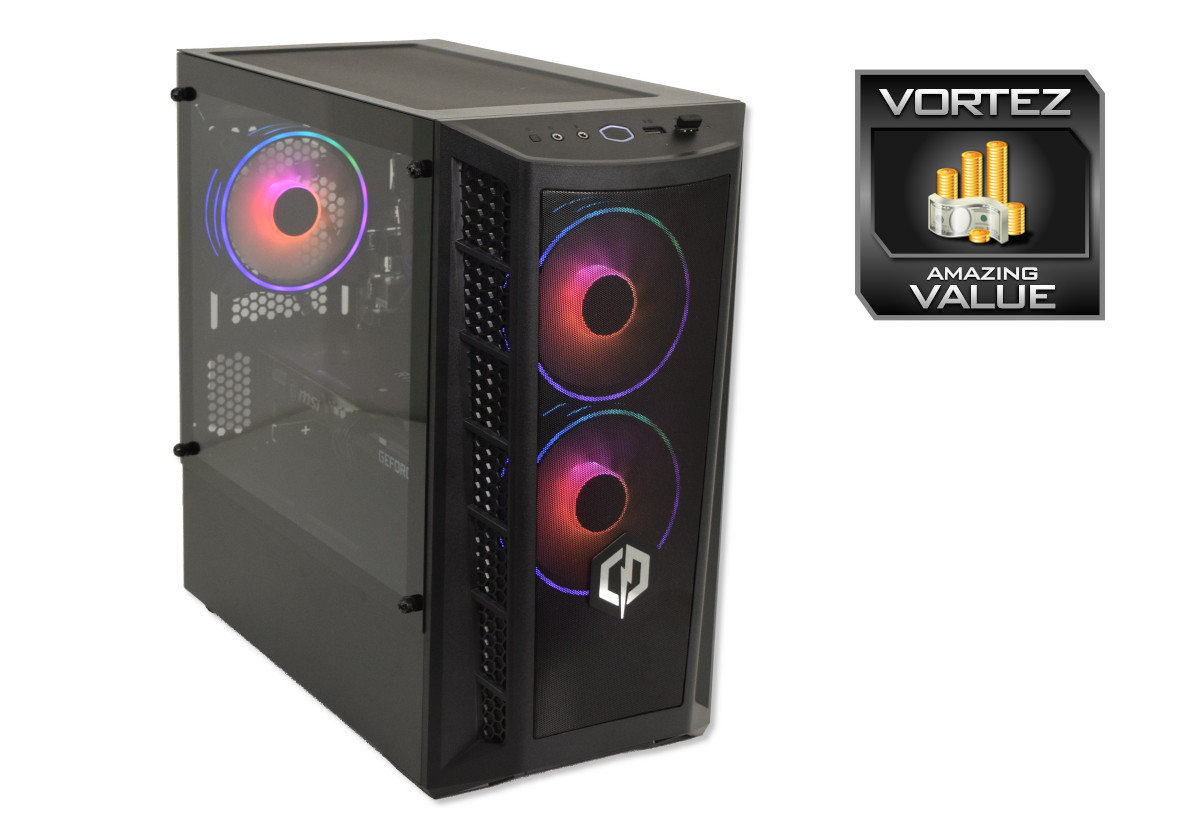
Perhaps the only reservation we might have (given the GPU market as it stands) is how well this system can serve as a baseline to then upgrade. We mentioned cooling could do with some attention and most 240mm AIOs should indeed be compatible; no further PCIe cards or M.2 storage can be installed, but there’s scope for SATA SSDs and mechanical drives; the CPU can’t be overclocked, but higher performing SKUs such as the i5-11600K can be installed, as can a slightly higher performance graphics card with both serving as in-place upgrades. It’s not perfect, but we’d be shocked if it doesn’t outlive at least the first couple of years of college in one form or another.
No, if we have any criticism, it lies chiefly at the feet of Cyberpower PC’s own System Configurator tool. Offering no indication of the expected model of GeForce RTX 3060 prior to purchase unless you pay a premium doesn’t feel good as a consumer, and the huge price disparity in CPU upgrade cost between the Infinity X115 and X115 GT seems like either an error or cynical mark-up for a heavily reviewed system. We’re sure there are good reasons that have justified these approaches but there must be a better, more consumer-friendly way to deal with it.
But that’s not the fault of the PC, which as specced can be with you within seven working days.
Cyberpower PC’s Infinity X115 GT is a return to form in a market still ravaged by inflated GPU costs and spotty availability. As reviewed, it has a well balanced set of components and just a hint of aesthetic pizazz without biasing in that direction, helping cash-strapped students get the most out of the budget. Best suited for modern 1080p gaming at high frame rates, it will excel for the near future even if no individual component sets the imagination ablaze with its possibilities. Just do yourself a favour and upgrade that CPU cooler, okay?
Pros
+ Well-rounded component selection
+ Great 1080p gaming
+ Solid productivity metrics
+ Responsive OS environment thanks to the NVMe SSD and 3200MHz memory
+ Some aesthetic charm without going overboard.
Cons
– Intel Retail (flower) CPU cooler
– GPU remains the lion’s share of the cost
– No scope for overclocking
+ Well-rounded component selection
+ Great 1080p gaming
+ Solid productivity metrics
+ Responsive OS environment thanks to the NVMe SSD and 3200MHz memory
+ Some aesthetic charm without going overboard.
Cons
– Intel Retail (flower) CPU cooler
– GPU remains the lion’s share of the cost
– No scope for overclocking
Click here for an explanation of our awards at Vortez.net.
Stay connected with the Vortez Social Media pages:
Join in with the discussions on Discord