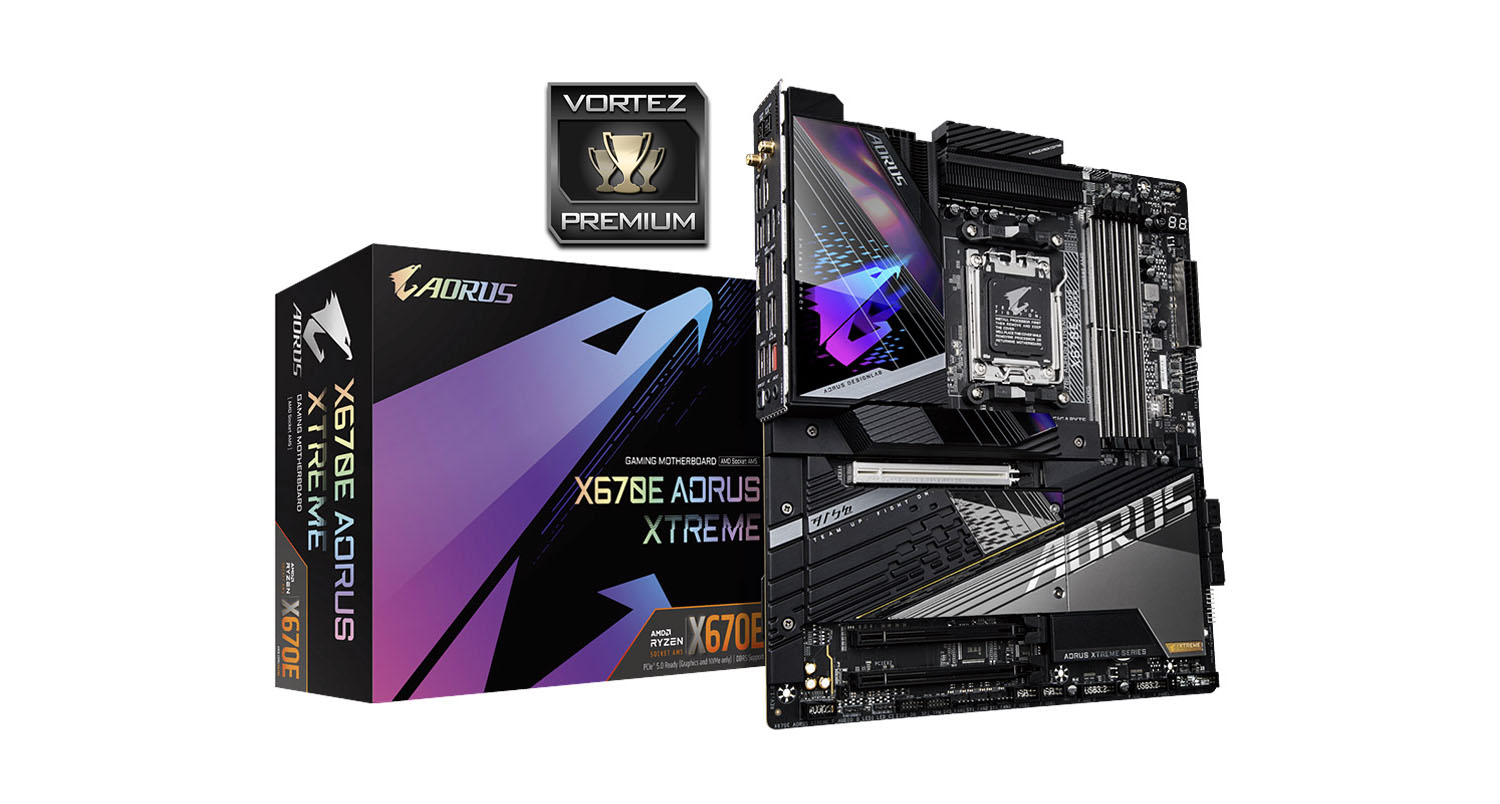
Ready to sample what the upper echelons of AMD 670E has to offer? We take a look at the high-end XTREME motherboard from the team at AORUS.

Product on Review: X670E AORUS XTREME
Manufacturer: AORUS
Street Price: GBP £720 | USD $700 | AUD $1000
GIGABYTE are an immense presence in the PC sector and veteran partner of AMD, joining them through thick and thin as they release products for a wide range of markets and applications. Included among them is the humble – and oftentimes not so humble – motherboard, so it’s no surprise to see a return for the Taiwanese manufacturers with the brand new 600-series platform for Ryzen 7000-series CPUs. And in this instance they’re kicking it up a notch as part of their AORUS gaming branding while hitting all the notes of a flagship launch.
The X670E AORUS XTREME is by any definition a ‘halo’ product. If the ASRock X670E Steel Legend we reviewed recently is part of the ‘entry-level’ tier of X670E motherboards then GIGABYTE’s AORUS XTREME model sits very much at the other end of the spectrum. A UK street price of £719.99 places it in a rarefied premium tier, requiring it to live up to some pretty high expectations.
As a X670E motherboard the X670E AORUS XTREME utilises the new AM5 socket for AMD’s Ryzen 7000-series processors, supporting the full array of premium chipset features including PCIe 5.0 signalling for both compatible GPUs and M.2 NVMe SSDs. With 18+2+2-phase power, it’s designed to feed even the 16-core/32-thread Ryzen 9 7950X at heavily overclocked speeds as well as overclocked dual-channel DDR5 memory. An eight copper layer PCB should ensure enough electrical isolation for stability at high performance levels, and X670E’s dual-chipset design will offer a veritable buffet of I/O options on front and rear panels.
GIGABYTE aims to set this model apart through a series of compelling proprietary additions that mostly fit into two categories: thermals and aesthetics.
Keeping toasty power stages cool is a big part of the XTREME design and that’s accomplished through the use of two huge fin stacks connected by a thick 8mm diameter heatpipe. Covers on both fin stacks channel air through the design, and an aluminium backplate with ‘NanoCarbon’ surface treatment helps to spread the heat generated on the rear side across a wide surface area. The main M.2 slot features their Thermal Guard III cooling – a pre-installed heatsink to cool the latest high performance PCIe 5.0 drives.
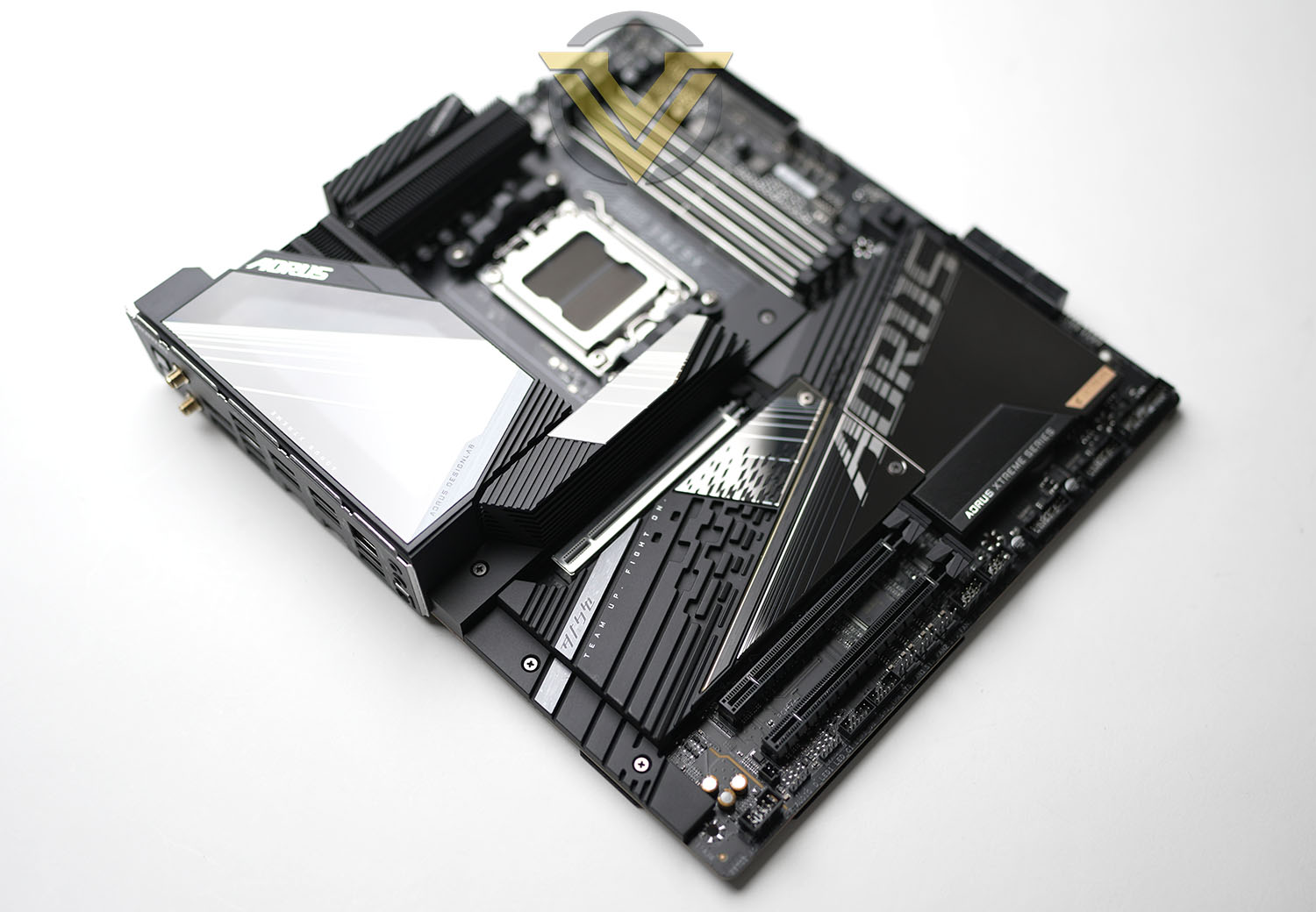
An oversized cover on the I/O zone, complete with illuminated AORUS logo, is a major centrepiece that’s then augmented by a wide coverage chipset and M.2 storage fascia that sits over the majority of the board. This logo section features addressable RGB LEDs with a selection of baked-in lighting effects that can complement an overall lighting scheme, managed in a unified manner thanks to included RGB lighting headers and their RGB Fusion software control technology.
Other compelling features on this ‘board include 10Gb/s Ethernet (still relatively rare on even high-end designs), high-end DTS:X audio with bundled USB DAC, front and rear USB 3.2 20Gbps, and Q-Flash Plus for flashing BIOS updates over USB without an installed CPU.
So, is that sufficient for a true next-generation platform? Before you make up your mind, let’s go into a little more depth.
Closer Look
First things first, let’s talk about the motherboard’s form factor. It’s an EATX layout, which as a definition is a little imprecise; in this instance the board size (30.5cm x 26.9cm H x W) extends beyond ATX in both horizontal and vertical dimensions, which you should take into account when pairing it with a suitable chassis. Compact chassis that technically support EATX motherboard may have cable routing issues or be otherwise cramped for space.
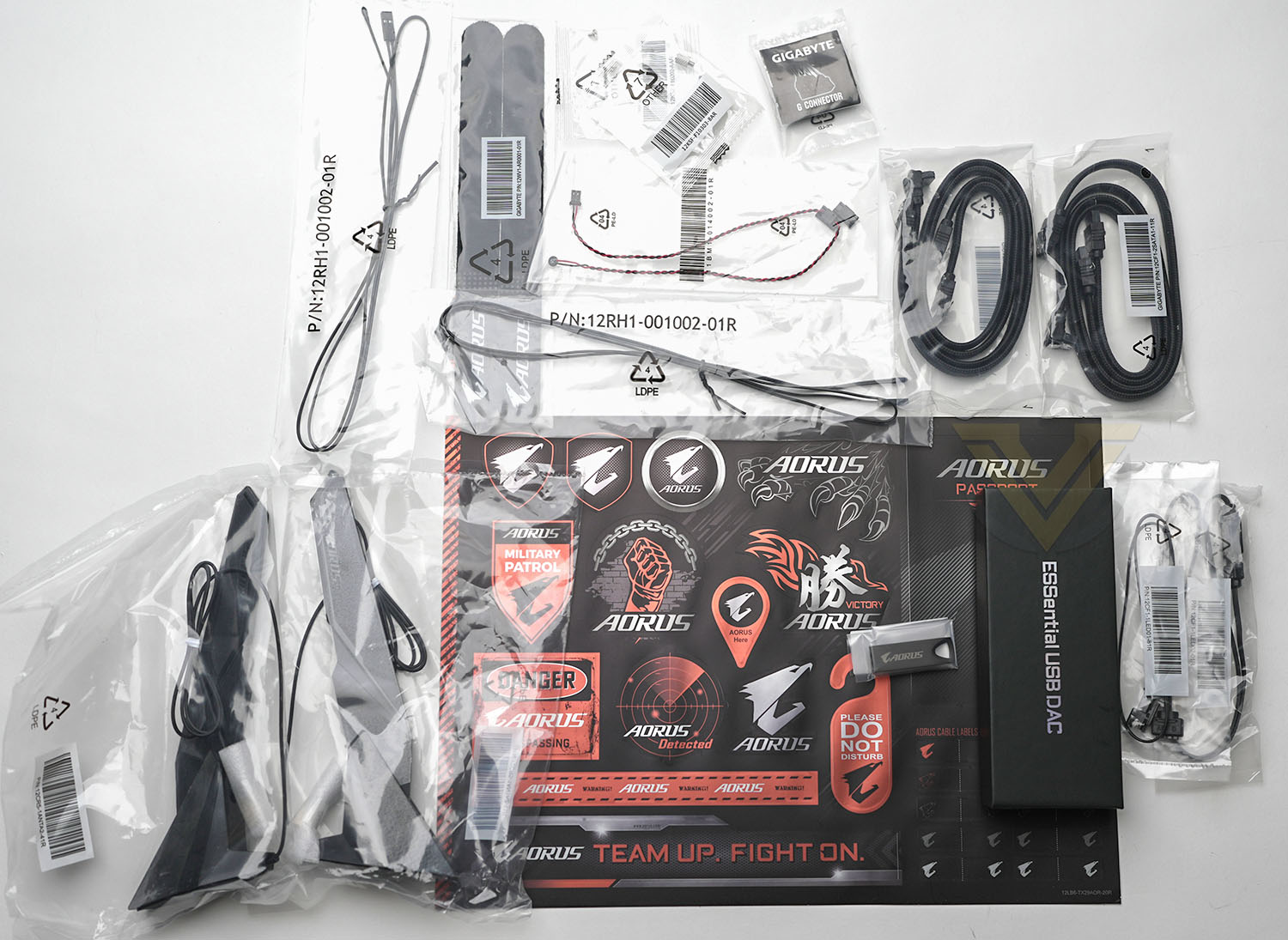
As a premium approach to the X670E solution the AORUS XTREME unsurprisingly arrives with a nice selection of accessories, including:
– ESSential USB DAC
An RGB Extension Cable
AORUS USB thumb drive with drivers pre-loaded
Q Connector for front panel (PWR, Reset etc.)
M.2 Screws
Four Braided Sata Cables
WiFi 6E Aerials
Thermal Probe (Thermister) Cables
Velcro Cables Ties
An RGB Extension Cable
AORUS USB thumb drive with drivers pre-loaded
Q Connector for front panel (PWR, Reset etc.)
M.2 Screws
Four Braided Sata Cables
WiFi 6E Aerials
Thermal Probe (Thermister) Cables
Velcro Cables Ties
The USB DAC in particular will add quite a bit of value to the bundle but even items as simple as the Q Connector – designed to make connecting front panel switches to the motherboard as painless as possible – add an aura of quality to the package.
A majority black colour scheme, interrupted only by a few white highlights and some AORUS branding, make the XTREME something of a blank canvas upon which you can impart your own personalised touches through customisable LED lighting. Lighting can be linked and controlled through their proprietary RGB Fusion implementation, or a unified control system compatible with this standard.
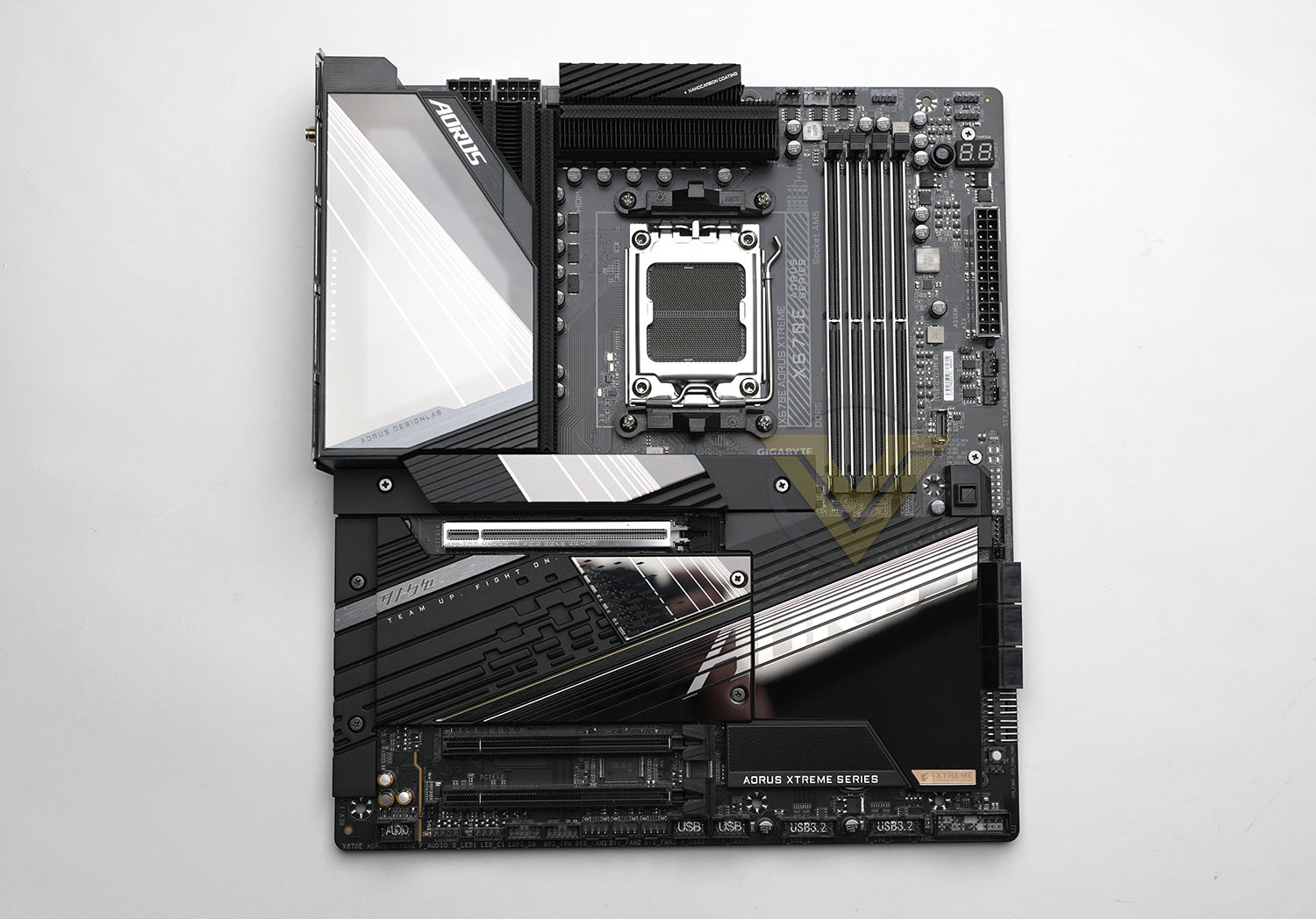
A large ‘thermal shield’ covers almost the entirety of the back of the motherboard. It acts as a heatspreaders for hotter components mounted to the rear of the board as well as the PCB in general, whilst also adding rigidity. The aluminium has a ‘NanoCarbon’ coating which should help to dissipate heat despite the lack of air flow over the surface.
The motherboard’s AM5 socket supports the whole range of Ryzen 7000-series CPUs including those as-yet unreleased. Once again however we should remind readers that the pins in LGA sockets are fragile, so the CPU installation process should be handled with utmost care. Older AM4 coolers which utilise the clip retainer system should be compatible with the new AM5 socket but other styles may not be supported. Check with the cooler manufacturer prior to installation; some manufacturers also offer upgrade kits to those who need it.
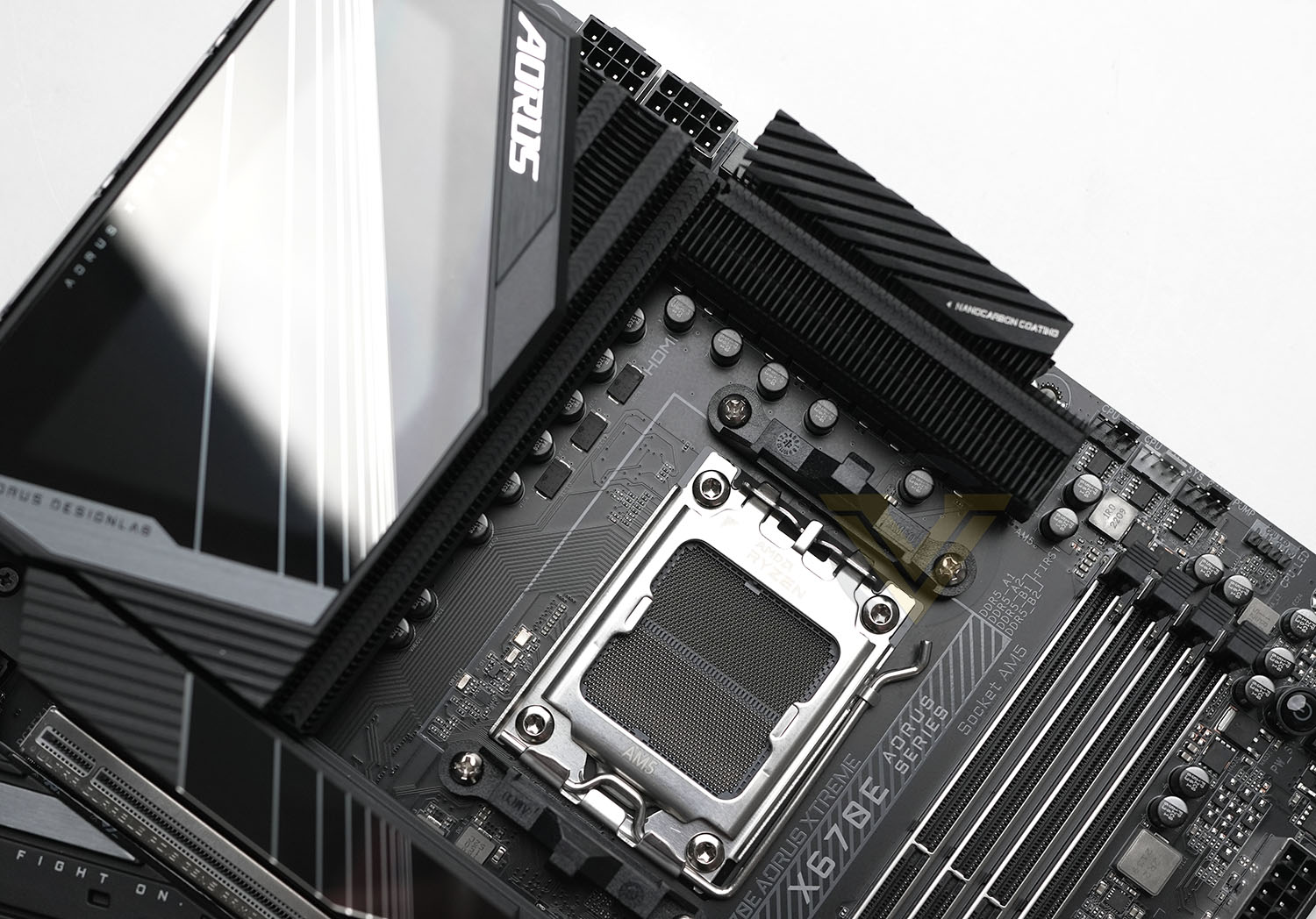
Two 8-pin 12V connectors feed the CPU plenty of power for standard and overclocked configurations, but they are ideally located for easy cable routing. Bordering them below and to the right are the tall VRM heatsink assemblies which may require a certain amount of air flow to operate efficiently. Clearance could be an issue for some wide twin-tower CPU coolers.
Further along the top edge and from left to right there are a trio of PWM fan headers (of a total of 10), three RGB headers, an on-board power switch, and debug LED panel (which is always a welcome troubleshooting addition). The DDR5 DIMM slots have been reinforced to offer greater rigidity, with A2 and B2 as the recommended install location for 2-DIMM configurations and thus giving the most leeway for larger heatsinks.
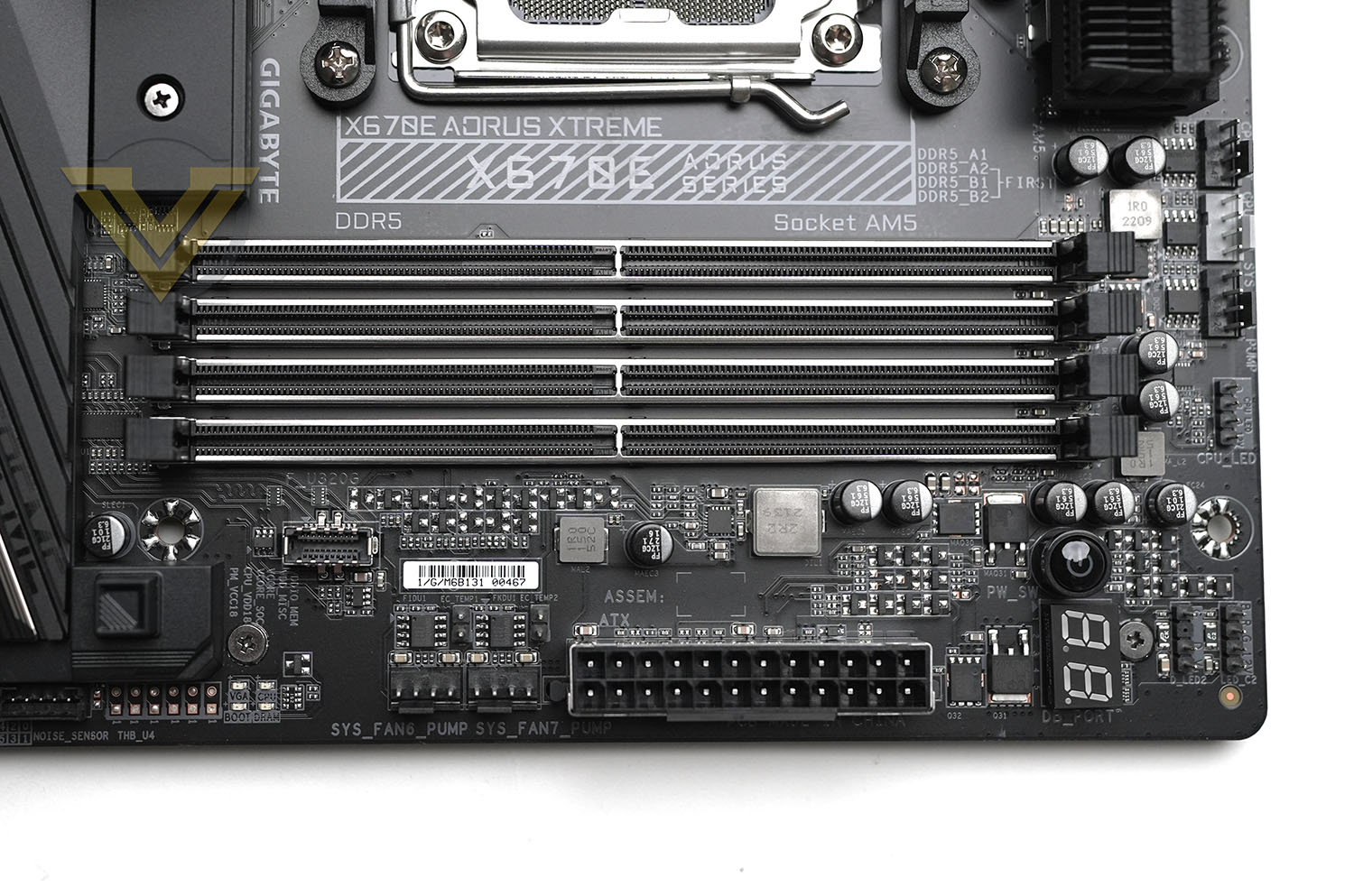
Down the right side are the 24-pin power connector, two further fan headers and a pair of two-pin thermal probe headers, USB 3.2 20Gbps front panel header, CPU/VGA/DRAM/BOOT indicator LEDs, Thunderbolt/USB4 header (for an upcoming optional add-in card), another sensor header, six SATA ports at right-angles to the motherboard, two more fan headers also at right-angles, and a reset switch. That’s a lot going on, and will require some pretty accomplished cable management to make it look even remotely tidy.
The inclusion of so many troubleshooting and on-board control options shows how aligned the X670E XTREME is with high-end overclocking. These are not options found on a typical gaming board in today’s market.
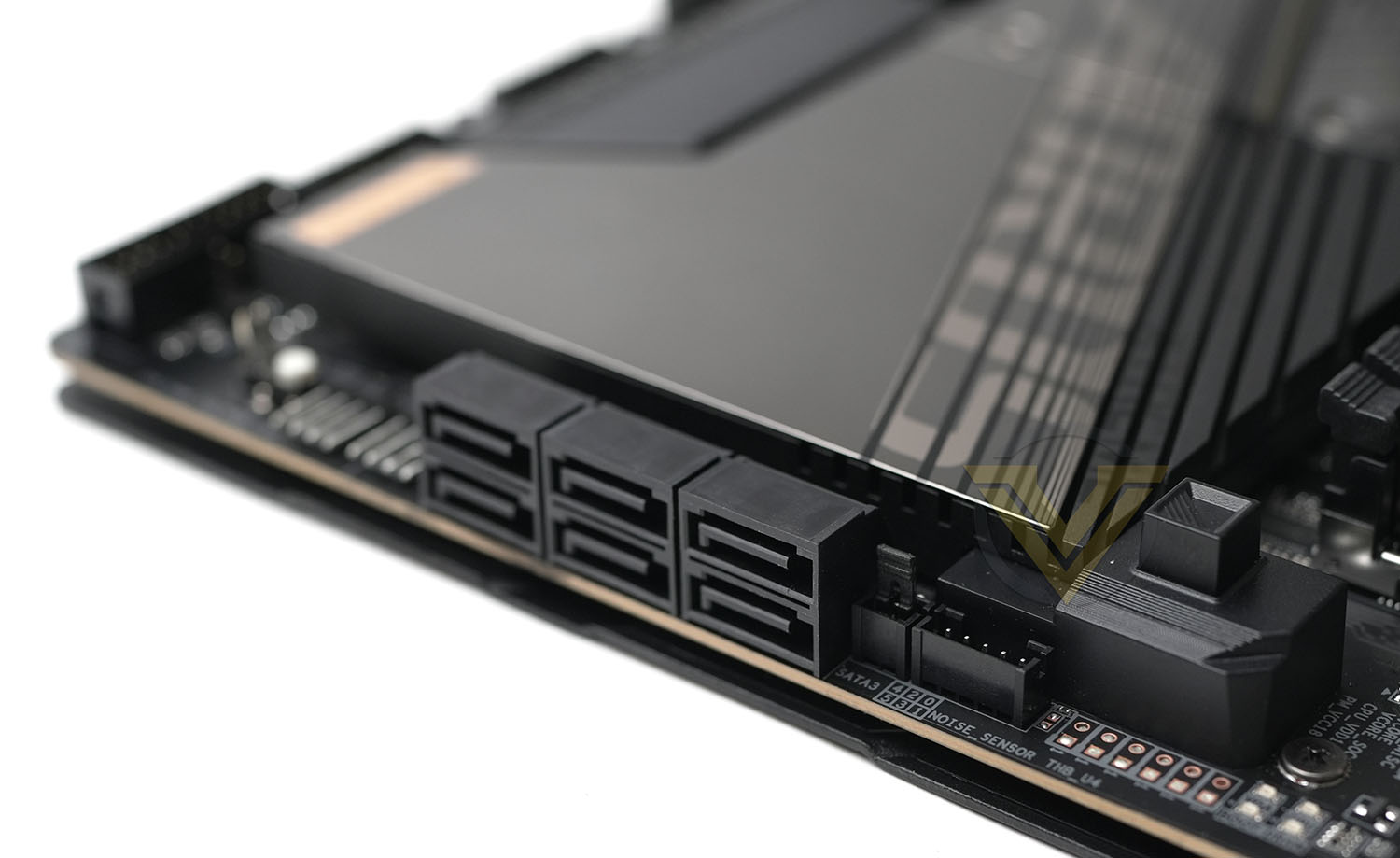
Directly below the CPU socket is an M.2 slot compatible with the new wider 25110 form factor as well as the older long 22110 standard, the former of which will be more common among PCIe 5.0 drives. This slow benefits from the augmented Thermal Guard III cooling (a heatsink on top of the slot’s heatspreader), and so is most suited for the highest performance SSDs. Next is the PCIe x16 slot, supporting PCI-Express 5.0 and GIGABYTE’s quick-release EZ-Latch Plus feature that makes removing a GPU more straightforward. Below this are three more PCIe 5.0 M.2 22110/2280 slots for yet more storage, bringing the total number of supported PCIe 5.0 drives to four when two or even one is more typical for X670E.
Each drive slot is located under a heatspreader; thermal pads are affixed both under the heatspreader and between drive and motherboard PCB for optimum cooling for even dual-sided M.2 SSDs.
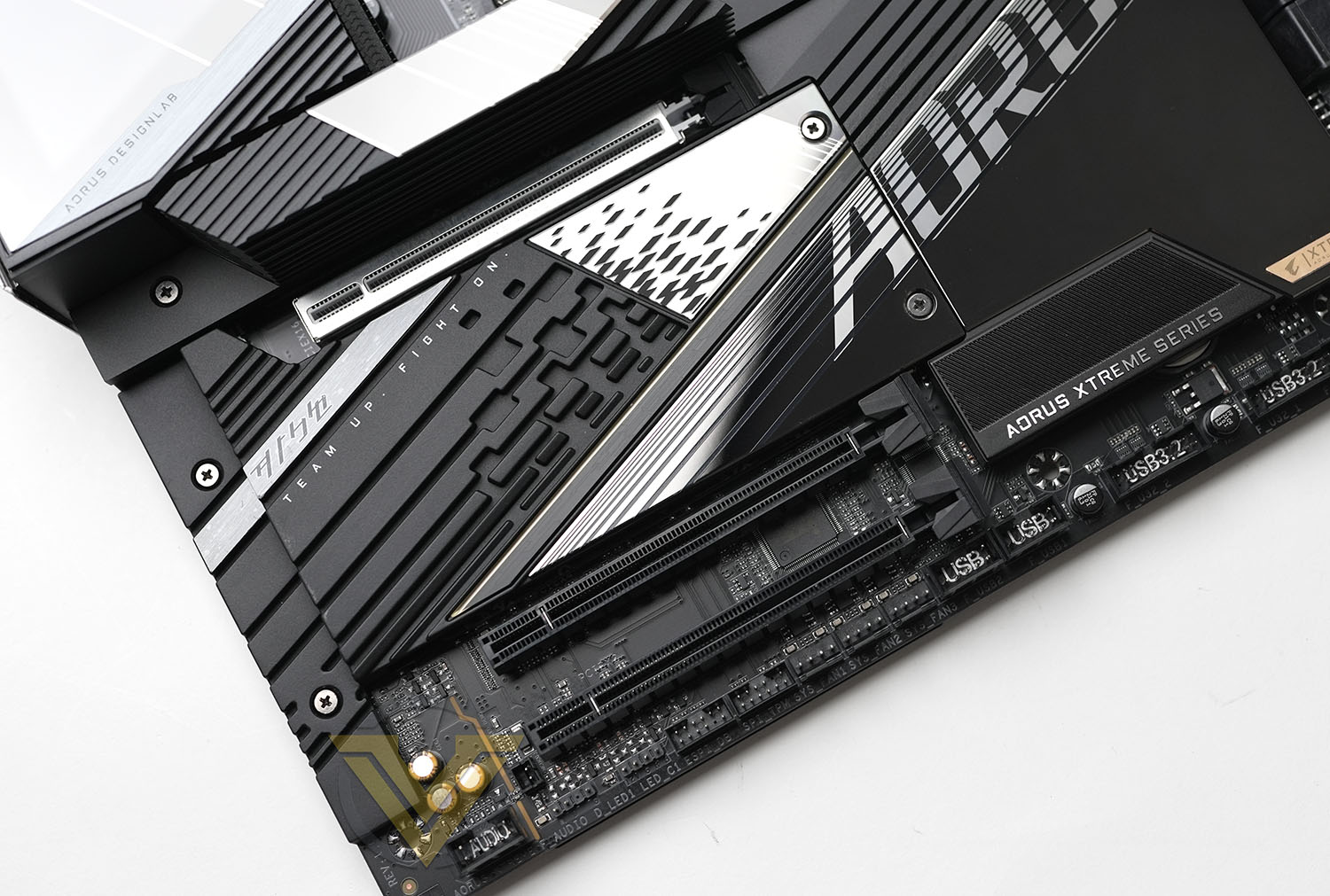
The two PCIe x16 slots at the bottom of the board are wired for x4 and x2 lane operation respectively, but remain well away from the top-most slot to improve compatibility with today’s super-thick graphics cards. Note that this board does not support dual-GPU configurations.
Aligned along the bottom edge are more fan, front panel, USB 2.0 and USB 3 headers as well as the PWR/RST/LED connectors for front panel switches. The only other notable inclusions are a couple more LED headers for RGB lighting extensions. Tucked away on the near side are the on-board audio components, isolated from other components as much as possible for cleaner audio reproduction.
A great aspect of this layout is the plethora of routing options for fans and front panel I/O, something that is often sorely lacking on cheaper motherboards. This will allow for cleaner builds where the configuration demands that most or all of the headers are utilised, particularly in cases that complement all of the header locations.
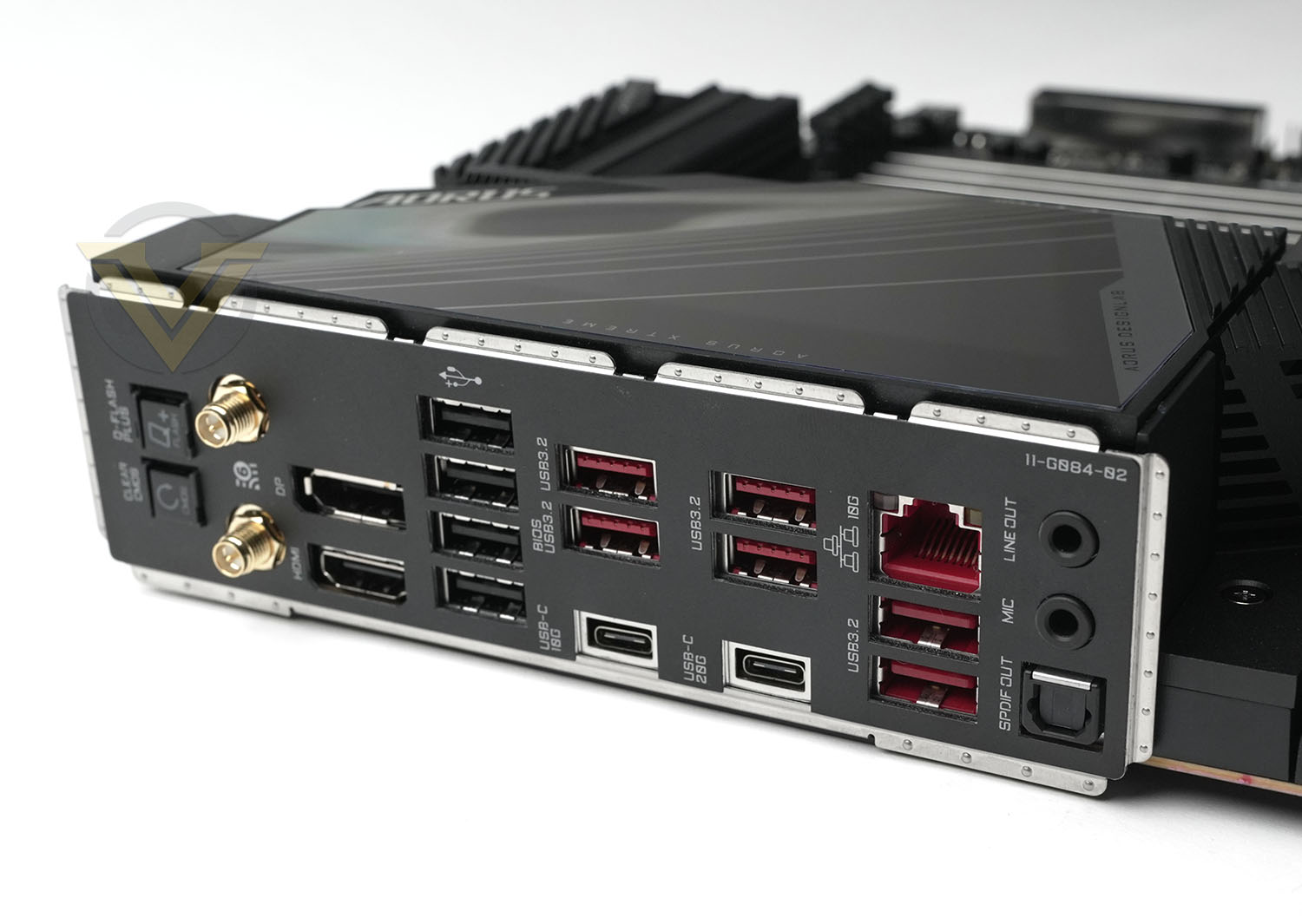
As with all X670E motherboards, the XTREME features a wide selection of I/O from both chipset and the CPU SOC:
– Clear CMOS and Q-Flash PLUS buttons,
WiFi 6E (802.11ax) aerial sockets,
Displayport and HDMI for on-board VGA
4x USB 2.0 (Black Ports)
USB 3.2 Gen 1 Type-C (10Gbps) port and two USB 3.2
USB 3.2 Gen 2 Type-C (20Gbps) port and two USB 3.2
10GbE Port and two USB 3.2
SPDIF Out, Mic In and Line Out
WiFi 6E (802.11ax) aerial sockets,
Displayport and HDMI for on-board VGA
4x USB 2.0 (Black Ports)
USB 3.2 Gen 1 Type-C (10Gbps) port and two USB 3.2
USB 3.2 Gen 2 Type-C (20Gbps) port and two USB 3.2
10GbE Port and two USB 3.2
SPDIF Out, Mic In and Line Out
One feature this design does lack is dual-LAN support, something that’s been a mainstay of high-end motherboards for some years. That’s mitigated somewhat by 10GbE and now standard WiFi 6E, but it could be a frustration for a subset of potential buyers.
Overall the AORUS X670E XTREME is exceptionally well put together, with thoughtful layout design that puts control in the hands of the end-user rather than the whims of the engineer. Troubleshooting features will be welcomed by all but particularly those overclocking on the bleeding edge of the platform’s capabilities, while RGB support and aesthetics tweaks are appropriate for any user with an eye towards their systems attractiveness.
If we have a concern it’s the left-hand VRM cooling heatsink, that doesn’t allow air to freely circulate through the fin stack due to the LED cover and solid I/O shield. It shouldn’t be a problem because of the heatpipe through to the upper heatsink, but it’s an odd design choice where otherwise so much has been set aside for keeping thermals under control.
Test Setup & Methodology
Notes: We’ve revamped our benchmark regime by removing a number of tests which reveal little, to no difference between each motherboard model. Gaming performance is one such area which has been removed due to the inability for each motherboard to offer any advantage over another. Instead, we have focussed on meaningful/tangible analysis which examines the VRM/chipset design, and the storage performance which will be far more informative to the end user.
TEST SETUP
CPU AMD Ryzen 9 7950XCooling: Corsair Hydro Series H110i
Memory: 32GB Kingston FURY 5200 MHz
Storage: Crucial MX300 SATA SSD + Kingston KC2500 PCIe 3.0 SSD
PSU: Corsair HX1050 80 Plus Gold Certified PSU
Monitor: AOC U2879VF
BENCHMARKS
PCMark 10 – Overall Extended ScoreSiSoftware SANDRA – SATA/PCIe Storage Tests
SiSoftware SANDRA – Processor Image Processing
OTHER SOFTWARE
Temperature Analysis: HWMonitorStress Testing Software: AIDA64 Stability Test
CPU Specification Monitoring: CPU-Z
Benchmarks: Power Consumption
In this first test we analyse the power efficiency from the wall for each motherboard (Minus the GPU). While each model uses the same chipset/platform, energy results can fluctuate between manufacturers due to the features and specifications that are integrated. First of all, for the idle tests the system is cold booted into Windows and no additional applications are executed – wattage is noted on the external energy monitor we use and then we open Aida64 stability test and execute a stress test, noting the highest reading on the monitor. Below are the results of this energy test.
Benchmarks: VRM Cooling
Each motherboard manufacturer designs their board with a unique set of heatsinks to cover key areas like the VRM/mosfets and the chipset itself. We load up Aida64 stability test again and perform a 20 minute run, recording the maximum value for both attributes.
Benchmarks: PCMark 10
PCMark 10 features a comprehensive set of tests that cover the wide variety of tasks performed in the modern workplace. With a range of performance tests, custom run options, and the new Battery Life Profile, PCMark 10 is the complete PC benchmark for the modern office.
Benchmarks: SATA Performance
In order to ascertain the SATA performance for our motherboards we use SiSoftware SANDRA and the File System Bandwidth performance test. This allows us to obtain the sequential read/write transfer rates for the drive being tested – Crucial MX300 SSD.
Benchmarks: PCIe M.2 Performance
In order to ascertain the PCIe M.2 performance for our motherboards we use SiSoftware SANDRA and the File System Bandwidth performance test. This allows us to obtain the sequential read/write transfer rates for the drive being tested – Kingston KC2500.
Benchmarks: CPU Image Processing
In our last test we observe the Image Processing performance from the CPU attached to the motherboard. For this we use SiSoftware SANDRA and the benchmark specifically designed for measuring the common algorithms associated with processing imagery.
Conclusion
We started our look at AMD’s X670E platform at the ~£330 entry point, but now we’re switching gears to the top of the stack with GIGABYTE’s top-end model thus far. So the question is, just what does £400 more get you in this hugely wide field that has more competitors every month.
In terms of features it’s certainly starting strong. There’s an awful lot here for enthusiast overclockers and gamers alike, but with more of a bias towards the former compared to strictly ‘gaming’ designs. That said, key aspects such as the logical layout and connectivity options will suit anyone, while one never knows when troubleshooting aids will be valuable. Hopefully never, but still…
It should also be said that while a £330 entry-point to a platform is pricey, a £700 flagship hasn’t been unheard of in prior generations. GIGABYTE and their competitors have all dabbled in designs at this price point, particularly in the now defunct HEDT market, so the price likely has less of a sting for those already accustomed to designs this expensive.
Two features that aren’t altogether common among X670E designs are 10GbE ethernet and support for up-to four PCIe 5.0 NVMe M.2 SSDs. Typically 2.5GbE and two PCIe 5.0 slots are what you’ll see in X670E models, so some users will undoubtedly be on board for this particular offering.
In terms of benchmarks, performance is strong across the board. Only in the SiSoft Sandra File System bandwidth test write result does the X670E XTREME fall a little short, potentially due to signalling issues caused by supporting four M.2 slots at PCIe 5.0 speeds. This is something that might be cleared up through further BIOS revisions however, and shouldn’t markedly affect an end-user’s actual experience.
VRM temperatures are good despite our reservations over the heatsink, but it should be noted that power draw is high at load. In fact, at 345W it’s the highest of the X670E boards we’ve tested thus far but isn’t reflected in better benchmark scores.
In terms of more qualitative observations, the X670E XTREME’s build quality is excellent, and makes actually using the motherboard for more than one install a really pleasant experience despite its size. The addition of panelling that adds rigidity helps whether you’re installing in a case or on a test bench, and makes it much less hassle to replace components such as the cooler. Oh, and all motherboard manufacturers should add something like GIGABYTE’s EZ Latch to their designs now that high-end GPUs are becoming unwieldy. It just makes sense.
Closing things out, the included accessory collection is great without being exceptional, and lighting options are comprehensive if you’re adding aftermarket RGB but a little underwhelming out of the box if that’s something you value.
We should also note that EK Waterblocks have a design for a socket AM5 waterblock specifically for this motherboard on pre-order at the time of writing, which will be critically important for water cooling enthusiasts.
GIGABYTE’s AORUS X670E XTREME is a premium motherboard that lives up to its billing, offering advanced features that overclocking enthusiasts and gamers would both value. Build quality is impressive, performance is very good, and general user satisfaction should be extremely high if they’re lucky enough to own this model. The core reservation is of course price, but if you’re in the market for a flagship £700 to support high-end overclocking on the latest AMD Ryzen processors then this design has to be near the top of your short lists.
Pros
+ Build Quality
+ Support for up to four PCIe 5.0 M.2 drives
+ Rigid design
+ Solid VRM and M.2 cooling
+ 18+2+2 phase power delivery
+ EZ Latch for main PCIe x16 slot
+ Thoughtful header layout
+ Plenty of RGB support
Cons
– Price
– High power draw under load
+ Build Quality
+ Support for up to four PCIe 5.0 M.2 drives
+ Rigid design
+ Solid VRM and M.2 cooling
+ 18+2+2 phase power delivery
+ EZ Latch for main PCIe x16 slot
+ Thoughtful header layout
+ Plenty of RGB support
Cons
– Price
– High power draw under load