Looking to upgrade to the new AMD 7000 Series CPUs? We take a look at the new AORUS X670E MASTER.

Product on Review: X670E AORUS MASTER
Manufacturer: AORUS
Street Price: GBP £509 | USD $568 | AUD $829
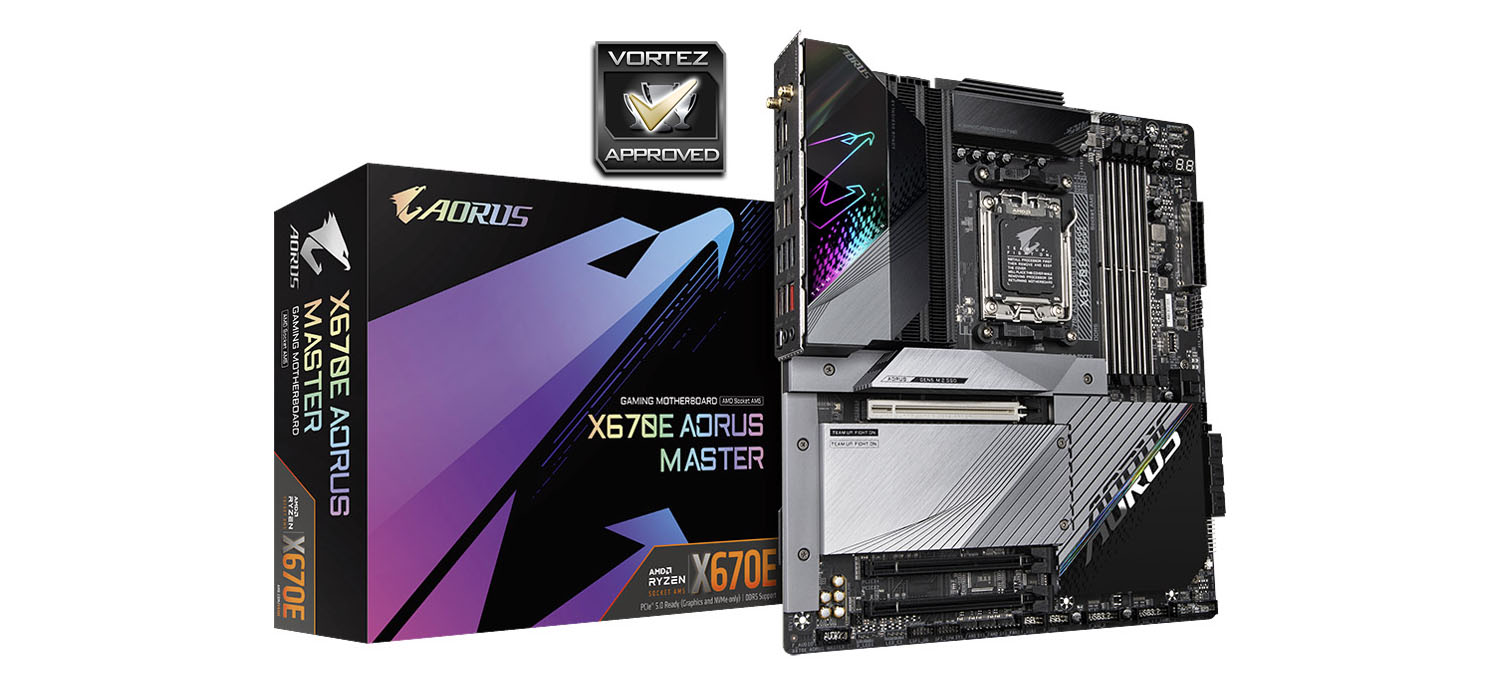
On the heels of our first review of a mid-tier X670E motherboard, we bring you a major competitor to just that board at a near identical price point. GIGABYTE’s X670E AORUS MASTER is the junior sibling of the X670E AORUS XTREME, a flagship design we looked at earlier in this round of X670E reviews, which aims to capitalise on the excellent base features of the chipset while incorporating the premium features that make most sense in this segment. It’s a difficult job, but one that the Taiwanese company absolutely have the skills to accomplish.
AMD’s 600-series motherboards launched in Q4 2022 to support the release of their brand new Ryzen 7000-series CPUs. The series introduced a new socket (AM5, their first in the mainstream desktop market to utilise a LGA design), PCIe 5.0 graphics and storage, DDR5 memory, and X670E’s startling dual-chipset topology that will handle the copious I/O options possible on the platform. Early adopters of a more cost-conscious persuasion may look at the less well appointed B650 and X670 motherboards, but X670E (itself dubbed X670 Extreme) is for those who would brook few compromises.
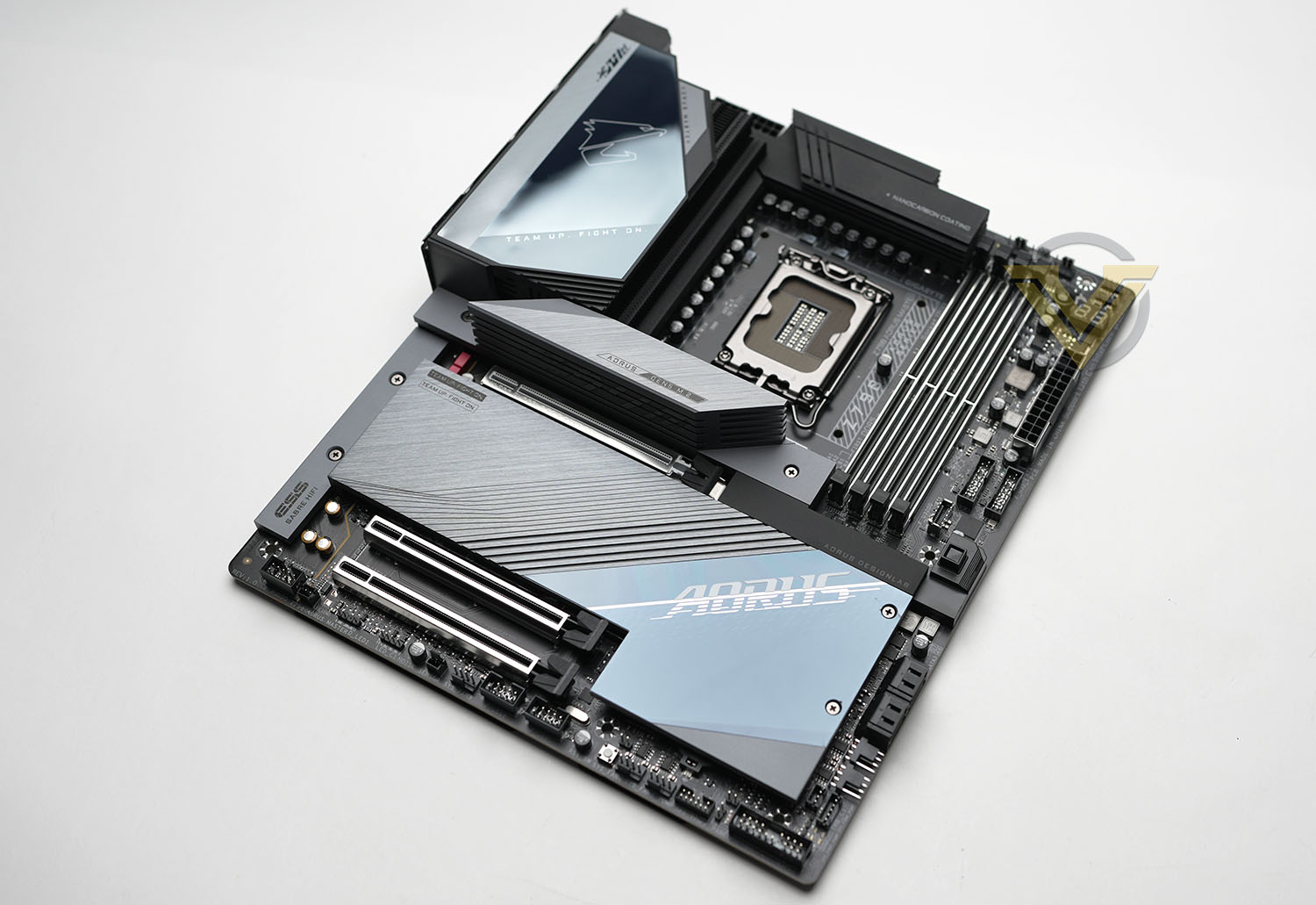
The X670E AORUS MASTER holds fast to the core of X670E’s feature set, without quite extending to the capabilities of the X670E AORUS XTREME. WiFi 6E, Dual PCIe 5.0 NVMe M.2 slots, a single PCIe 5.0 x16 slot, one USB 3.2 Gen2x2 port offering bandwidth of up to 20Gbps, 16+2+2 phase power and a supporting round of PCIe 4.0 expansion slots and M.2 storage are all excellent building blocks, but they won’t be uncommon amongst the board’s competitors. This is where proprietary features come in.
GIGABYTE have taken what they learned in designing the AORUS XTREME and filtered that down into the MASTER where relevant. Features like a reinforced PCIe 5.0 x16 slot to handle heavy RTX 40-series discrete graphics cards, and a similar approach to M.2 and DDR5 DIMM slot design that improves (by large or small amounts) signal integrity and component durability long-term. Or the PCIe EZ Latch Plus system, a technology which means you don’t need to fiddle around sensitive on-board components to unlatch the graphics card. Small increments taken individually, but as a totality adding up to more than the sum of its parts. Or so GIGABYTE hope.
The price, however, will for many be the potential buyer’s true sticking-point. X670E is an expensive chipset which is reflected in the premium being asked of every member of the rang. The X670E AORUS MASTER, like MSI’s CARBON WiFi 6E equivalent, is a pricey approx. $500/AUD$830 despite technically being a mid-tier design. Even as the Ryzen 7000-series has fallen in price in recent weeks – the top-end Ryzen 7950 is priced below $550 at the time of writing – X670E motherboards have proved stubborn. The question will be if need all of these features, plus significant overclocking support and thermal performance to match, to make the most out of your future system.
Let’s take a closer look at what the X670E AORUS MASTER has to offer.
Closer Look
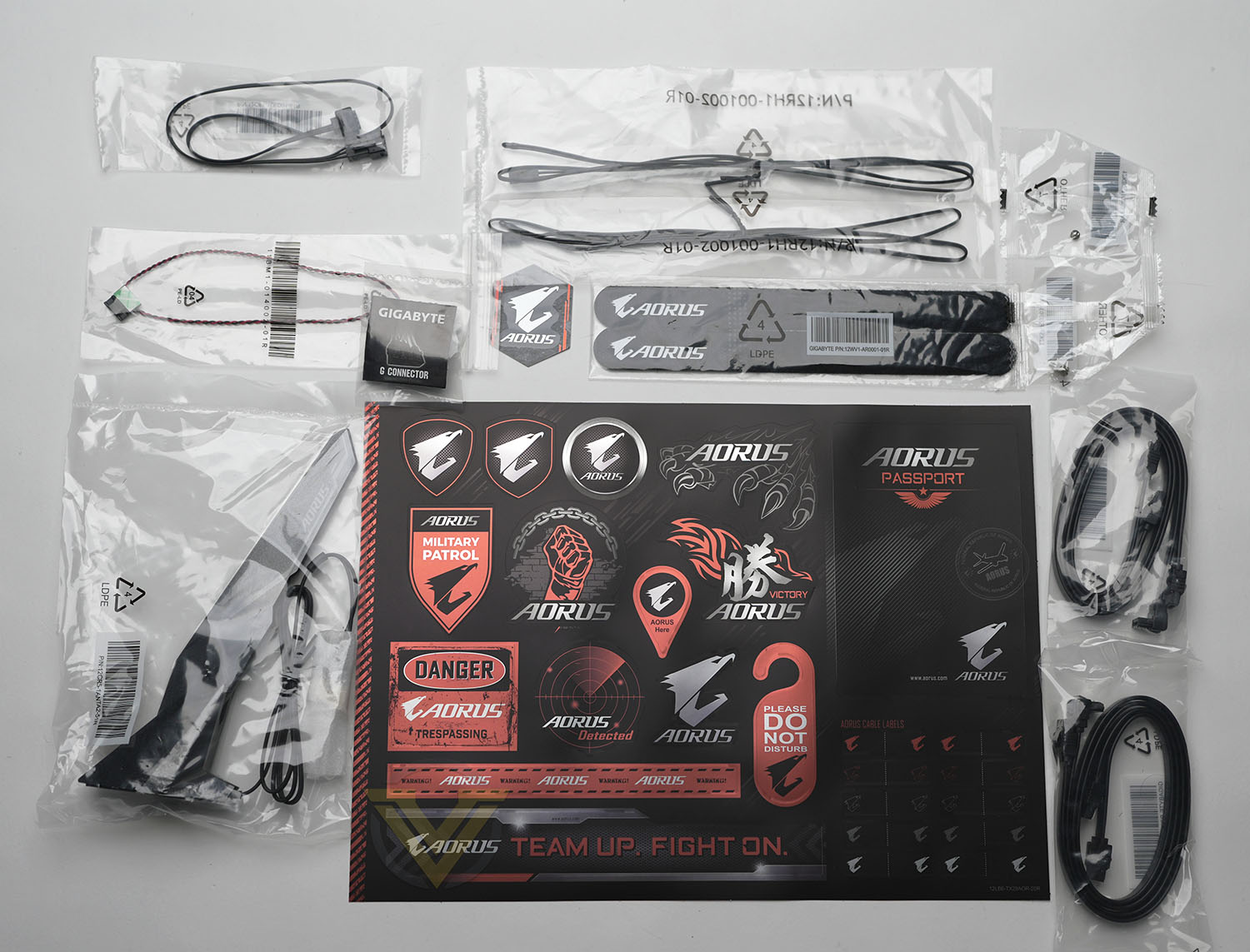
GIGABYTE’s X670E AORUS MASTER sits within the somewhat ill-defined EATX form factor, measuring an extended 29.5cm wide and 30.5cm tall. That’ll make it a squeeze within common mid-tower chassis that boast ‘EATX Motherboard Support,’ potentially including misaligned cable routing holes, and so will require some research into which case is fully compatible. It should however pose few problems for larger Full Tower enclosures.
The ‘board arrives bundled with the following accessories:
– WiFi 6E Antenna
– Four SATA III cables
– One RGB LED strip extension cable
– Two Thermistor cables
– Two Velcro Cable Ties
– A G Connector
– and one M.2 screw/standoff
– Four SATA III cables
– One RGB LED strip extension cable
– Two Thermistor cables
– Two Velcro Cable Ties
– A G Connector
– and one M.2 screw/standoff
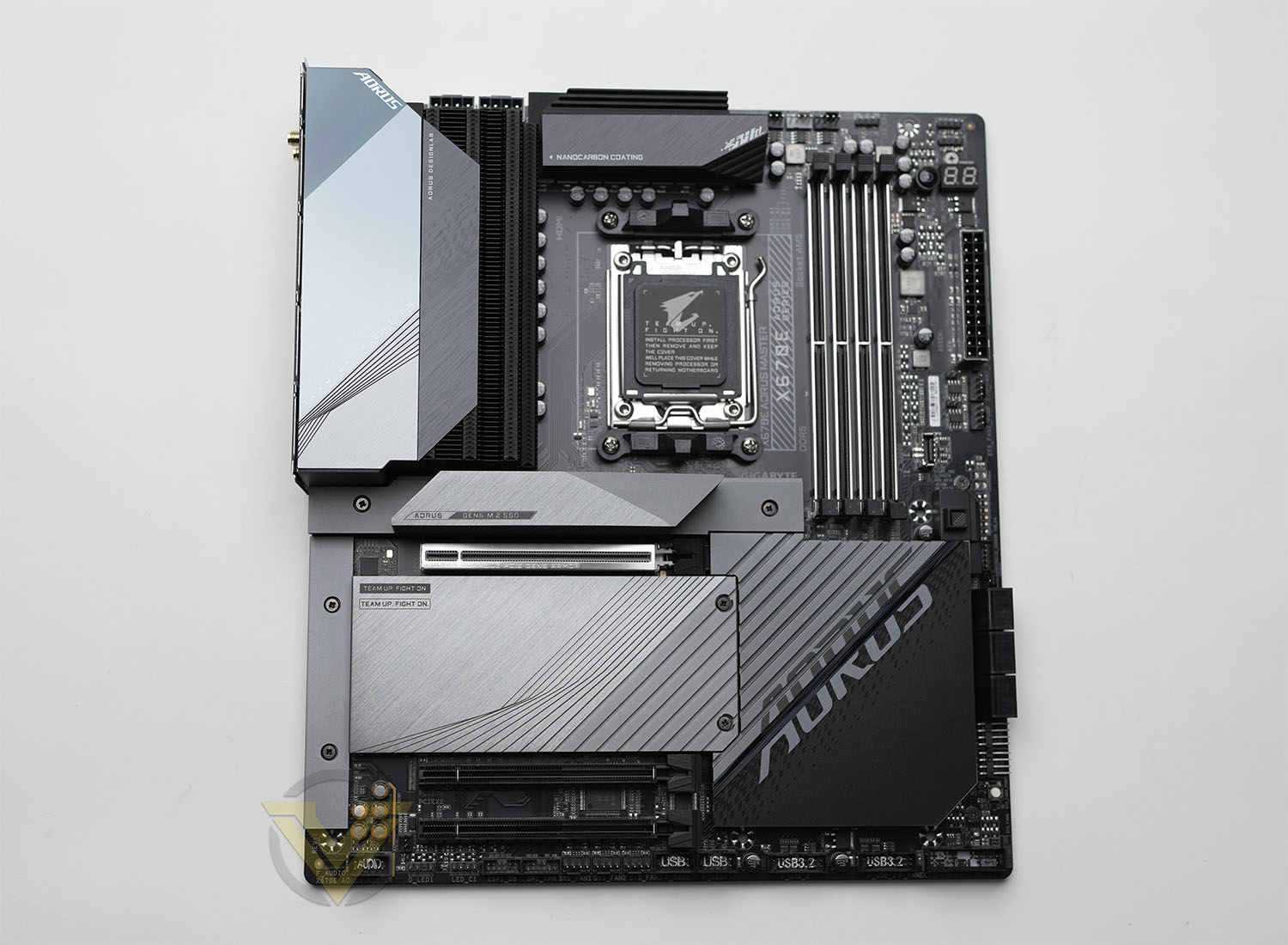
The biggest surprise here is the pair of thermistor cables, probes for monitoring surface temperatures of locations where a sensor isn’t typically placed. The G Connector – used to more easily corral the front panel PWR/RST switch and LED leeds – is always a welcome addition in GIGABYTE’s bundles and it’s disappointing when other manufacturers don’t offer similar concessions at these price points. One minor disappointment is that the SATA cables are not braided, but that’s not massively important.
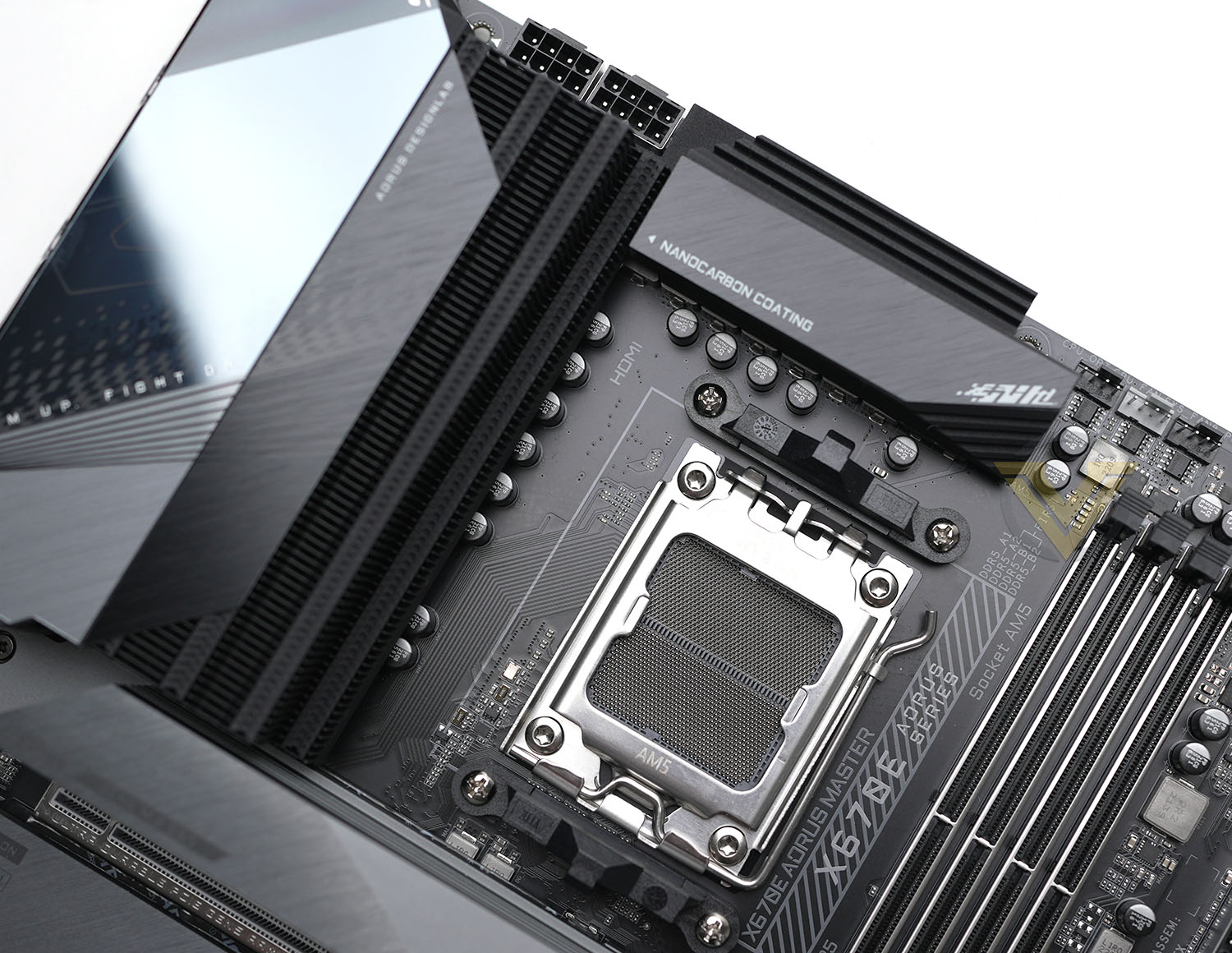
Where the AORUS XTREME went for a all-black aesthetic, the MASTER model has far more significant silver highlights throughout the chipset/M.2 storage heatspreaders and I/O cover. That makes for a bolder look and slightly more industrial look – particularly with clearly visible silvered screw heads – but isn’t one that’s clearly ugly or garish. Those who want to put their own stamp on the design can choose to remove the larger storage heatspreaders and instead rely on standard cooling offered by storage retail kits. LED lighting is supported through headers (3x RGB and 2x ARGB) and the illuminated AORUS logo.
The motherboard’s AM5 socket supports the whole range of Ryzen 7000-series CPUs, although the recently announced X3D models will likely require an UEFI BIOS update. Older AM4 coolers which utilise the clip retainer system should be compatible with the new AM5 socket, but other styles may not be supported. Check with the cooler manufacturer prior to installation; some manufacturers also offer upgrade kits to those who need it.
Twin 8-pin 12v connectors feed power direct to the CPU for both conventional and overclocked performance modes, an aspect of the design that will limit your selection of compatible PSUs. Directly below and to the right are two large heatsink fin arrays, cooling the 16+2+2 power stage design. These fins utilise the same ‘NANOCARBON’ coating as the XTREME cooling solutions, which GIGABYTE claims helps with heat dissipation. Air is channelled through these heatsinks, but the orientation of fins on the left-most heatsink may cause heat to be trapped behind the I/O shield, potentially increasing temperatures.
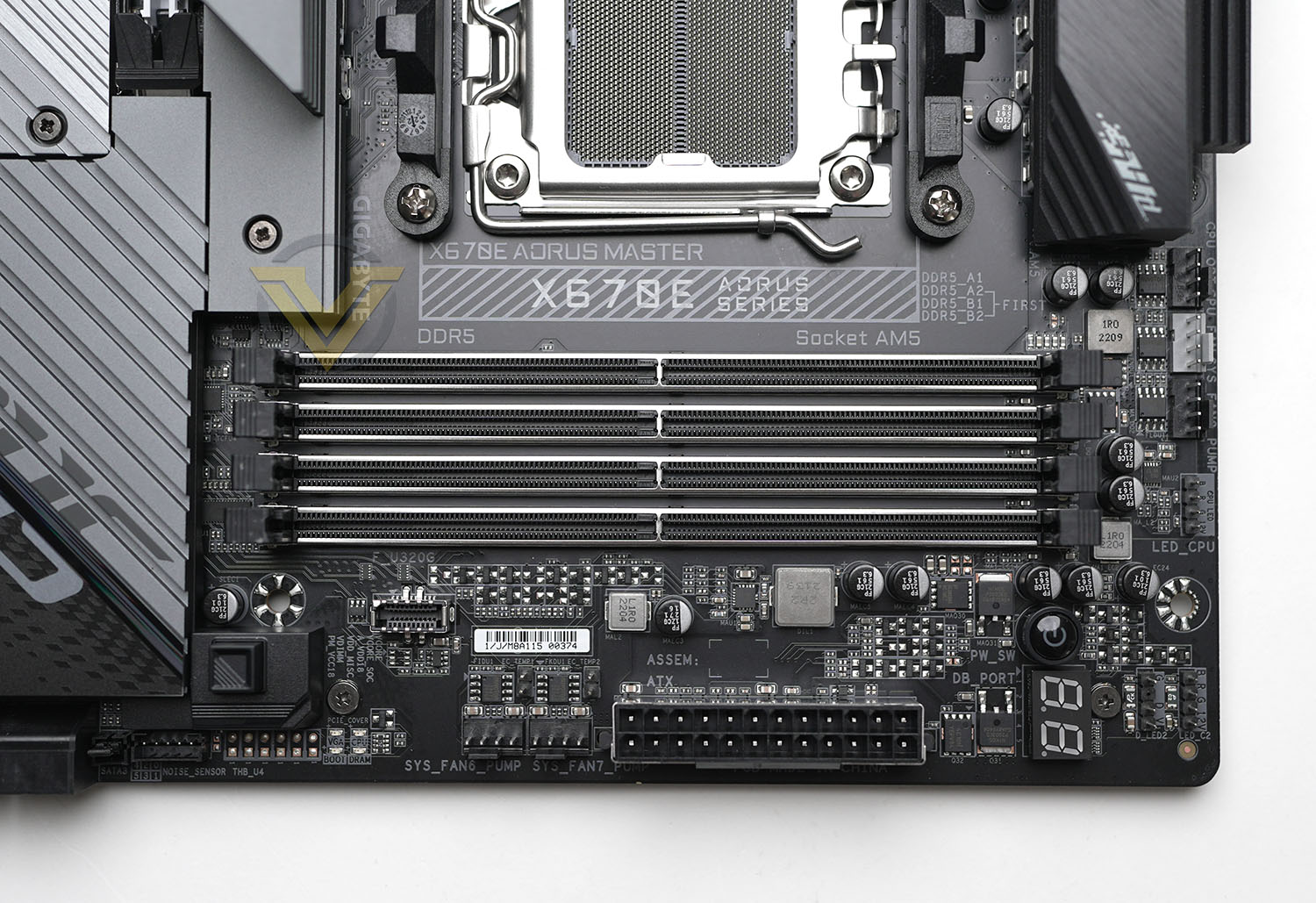
Further along the top edge are three PWM fan headers followed by three RGB LED headers – two standard 4-pin RGB and one 3-pin ARGB. Just below these headers is a power-on switch and two-digit troubleshooting code display for test-bench operation and boot problem diagnosis.
The line-up along the right-hand edge is crammed with more headers including the 24-pin ATX connector, two 4-pin fan headers, USB-C front panel header, thunderbolt/USB4 header, right-angled SATA ports and a pair of right-angled fan headers. Just below the USB-C header is a 4-LED POST sequence indicator LED – another troubleshooting tool – and a reset switch is positioned below the latter of the two fan headers.
Two additions with more than a nod towards overclocking are a modification to the reset switch and the series of voltage measurement points located between the 24-pin ATX and SATA connectors. The reset switch can serve as a multi-function key which can be programmed to boot directly to BIOS, boot with safe config. settings, or simply turn RGB lighting on/off.
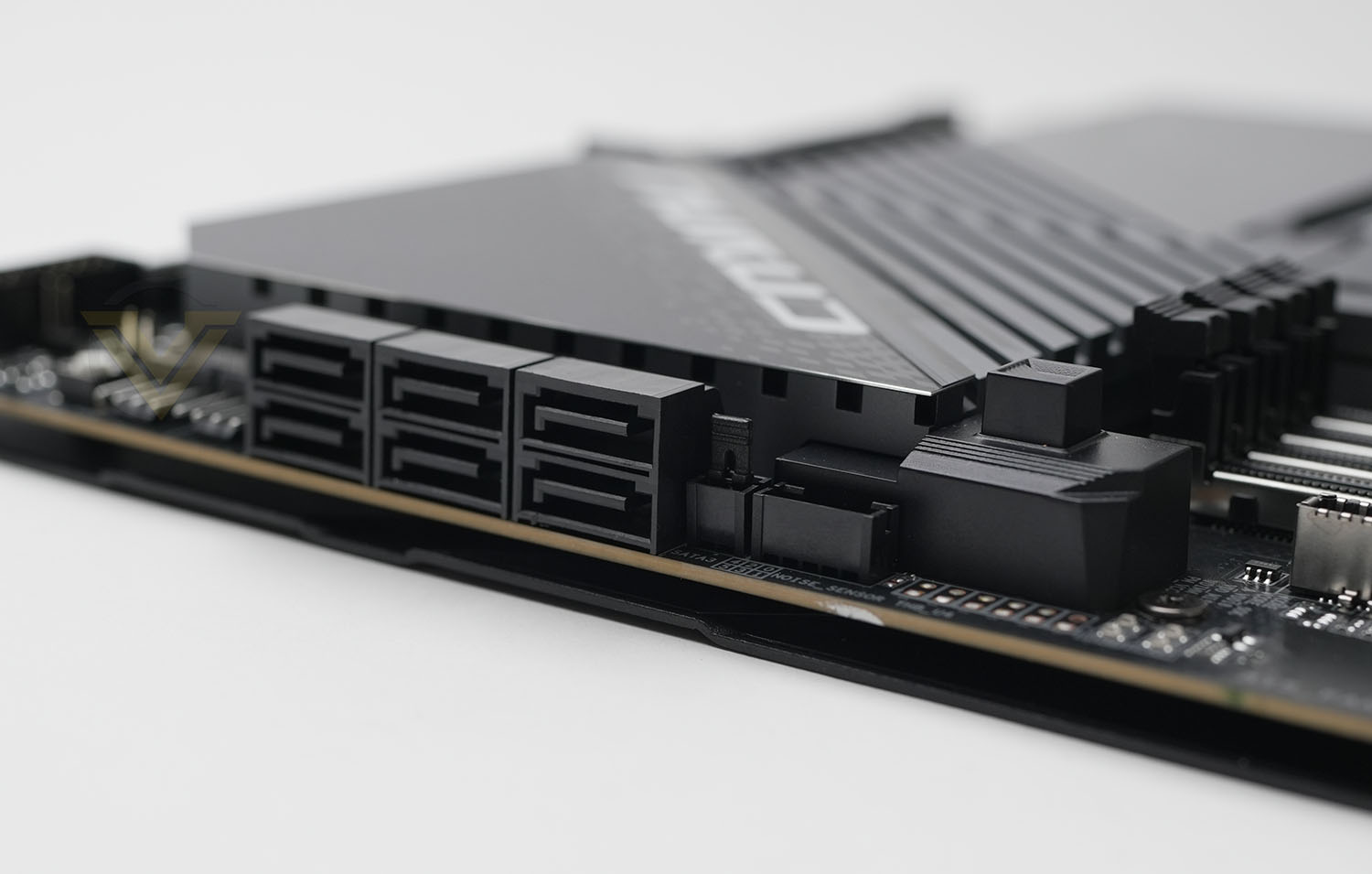
This selection of features really shows how the AORUS MASTER is caught between two worlds: the high-end overclocking arena complete with discrete temperature and voltage sensors, multiple troubleshooting aids and aspects that suit test bench operation; and the standard desktop model, with (some) right-angled ports for easy cable management.
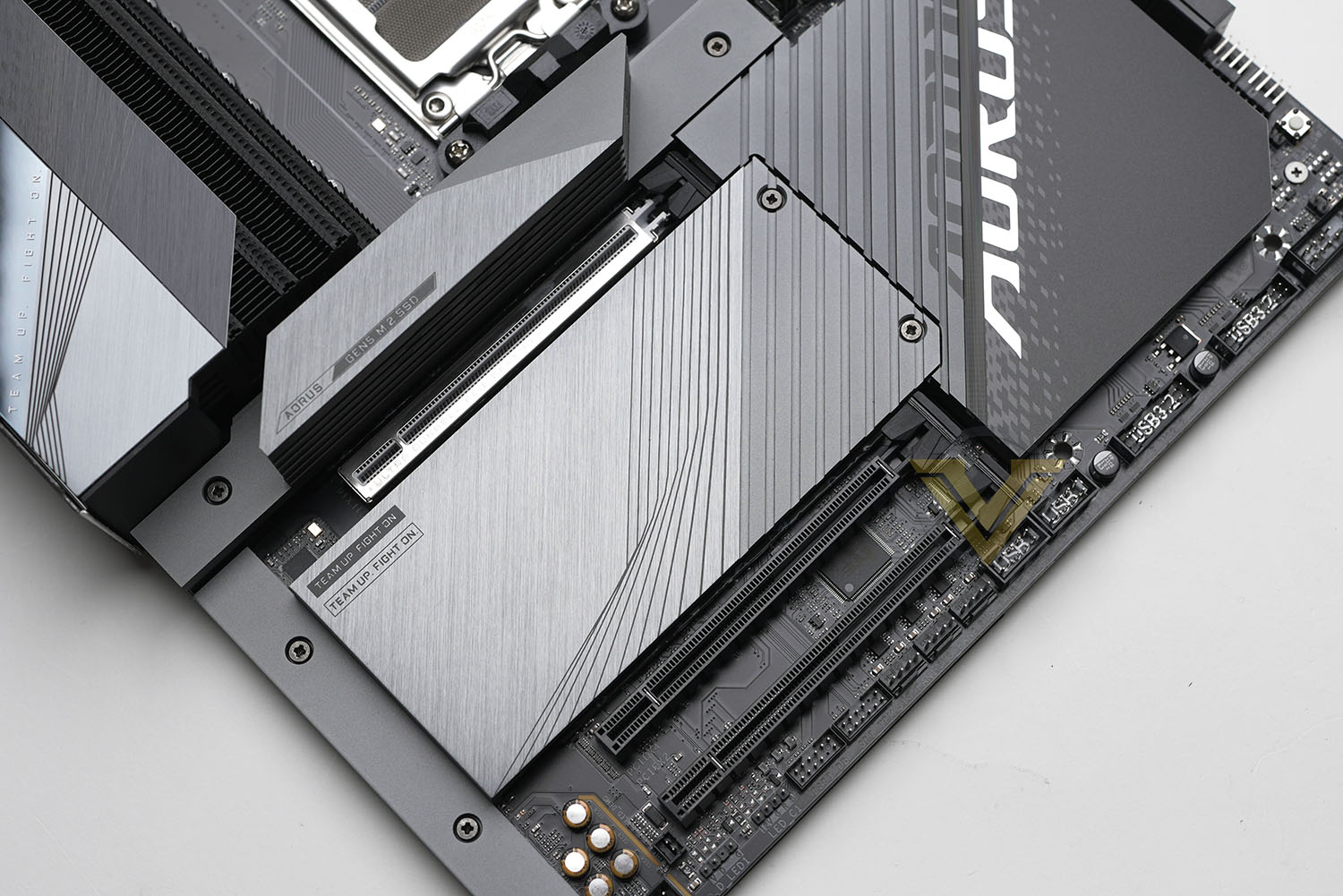
Directly below the CPU socket is an M.2 slot compatible with the new wider 25110 form factor as well as the older long 22110 standard, the former of which will be more common among PCIe 5.0 drives. This slow benefits from the augmented Thermal Guard III cooling (a heatsink on top of the slot’s heatspreader), and so is most suited for the highest performance SSDs. Next is the PCIe x16 slot, supporting PCI-Express 5.0 and GIGABYTE’s quick-release EZ-Latch Plus feature that makes removing a GPU more straightforward. Below this is one more PCIe 5.0 M.2 22110/2280 slot followed by two PCIe 4 M.2 22110/2280 slots, bringing the total number of supported PCIe 5.0 drives to two and the total amount of M.2 storage spaces to four (which is typical for X670E).
Each drive slot is located under a heatspreader; thermal pads are affixed both under the heatspreader and between drive and motherboard PCB for optimum cooling for even dual-sided M.2 SSDs. AORUS MASTER supports GIGABYTE’s M.2 EZ Latch Plus design that utilises a spring-loaded clip rather than screw to install drives. Installation isn’t totally toolless however as a screwdriver is still required to remove the ‘board’s heatspreaders.
The two PCIe x16 slots at the bottom of the board are wired for PCIe 4.0 x4 and PCIe 3.0 x2 lane operation respectively, but remain well away from the top-most slot to improve compatibility with today’s super-thick graphics cards. The PCIEx2 slot shares bandwidth with SATA3/4 ports; installing a card in this slot will disable these ports. Dual-GPU configurations are not supported by this motherboard.
Aligned along the bottom edge are more PWM fan, front panel, USB 2.0 and USB 3 headers as well as the PWR/RST/LED connectors for front panel switches. The only other notable inclusions are a couple more LED headers for RGB lighting extensions (one 4-pin, one ARGB 3-pin). Tucked away on the near side are the on-board audio components, isolated from other components as much as possible for cleaner audio reproduction.
As with all X670E motherboards, the AORUS MASTER features a wide selection of I/O from both chipset and the CPU SOC:
– Q-Flash PLUS button,
WiFi 6E (802.11ax) antenna sockets,
Displayport and HDMI for on-board VGA
2x USB 2.0 (Black Ports)
2x USB 3.2 Gen2 Type-A (Red Ports), the lower of which supports GIGABYTE’s Q-Flash Plus functionality
USB 3.2 Gen 2 Type-C (10Gbps) port also supporting Displayport signalling
USB 3.2 Gen 2×2 Type-C (20Gbps) port
4x USB 3.2 Gen 1 (AKA USB 3.1 / 5Gbps, Blue Ports)
2.5GbE Port and two USB 3.2 Gen 2 Type-A (Red Ports)
SPDIF Out, Mic In and Line Out
WiFi 6E (802.11ax) antenna sockets,
Displayport and HDMI for on-board VGA
2x USB 2.0 (Black Ports)
2x USB 3.2 Gen2 Type-A (Red Ports), the lower of which supports GIGABYTE’s Q-Flash Plus functionality
USB 3.2 Gen 2 Type-C (10Gbps) port also supporting Displayport signalling
USB 3.2 Gen 2×2 Type-C (20Gbps) port
4x USB 3.2 Gen 1 (AKA USB 3.1 / 5Gbps, Blue Ports)
2.5GbE Port and two USB 3.2 Gen 2 Type-A (Red Ports)
SPDIF Out, Mic In and Line Out
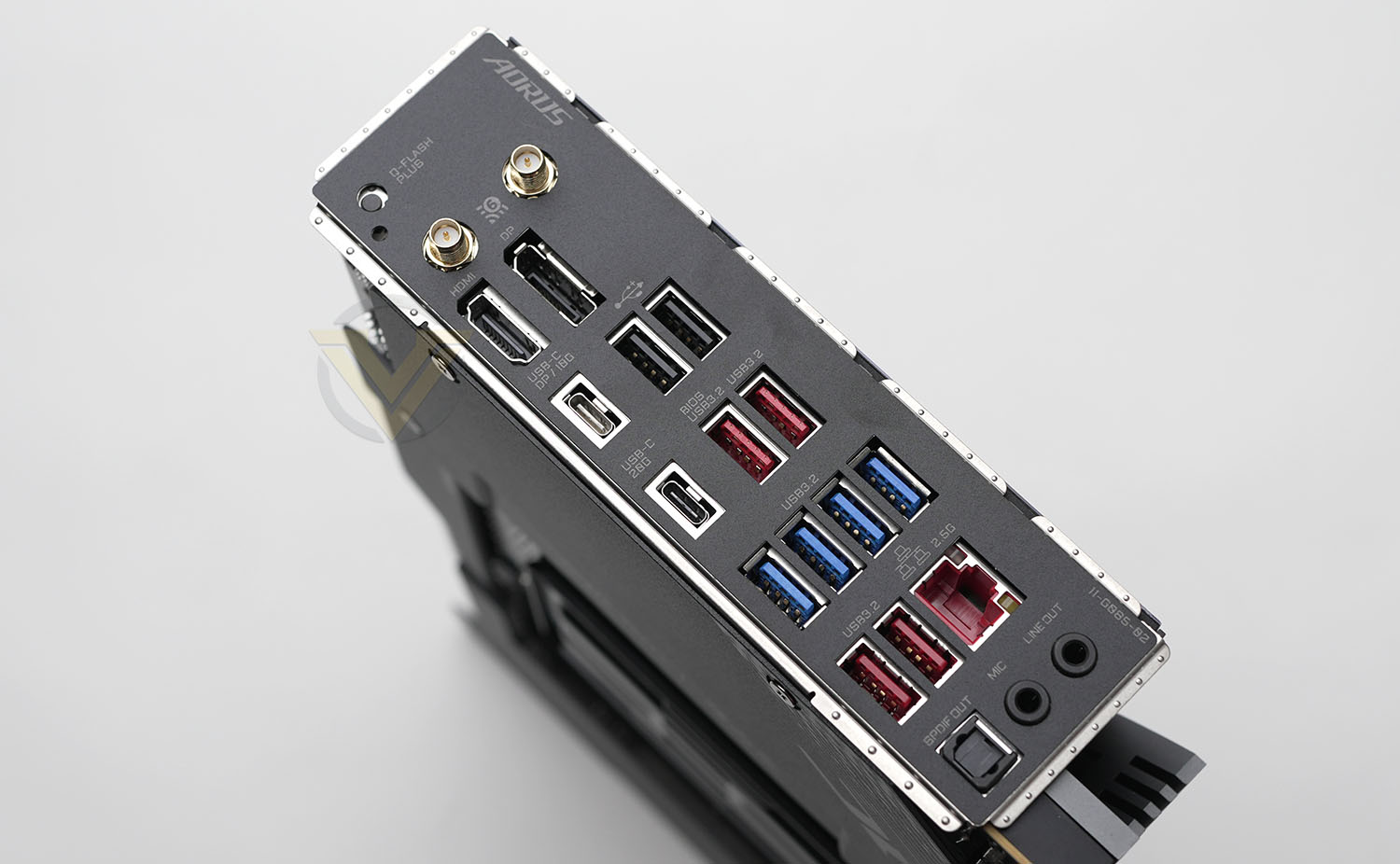
There are only a few subtle differences between the I/O capabilities of the AORUS Master and XTREME, but the most significant is the inclusion of 2.5GbE LAN port rather than the higher bandwidth 10GbE. The MASTER model also doesn’t feature a Clear CMOS button on the rear, but that’s always been one of the more marginal inclusions on any high end rear panel. All in all, the motherboard has comprehensive I/O well aligned to mainstream/enthusiast consumer requirements, without encroaching on the premium market served by the AORUS XTREME design.
The motherboard also serves as an excellent example of the awful state of USB 3.x naming standards. That’s no fault of GIGABYTE, but bears mentioning here.
Our overall impressions of the AORUS MASTER are very positive. It has a logical layout that will help both consumers assembling their system and overclockers looking for features that help squeeze more out of their system, while not forgetting that in the vast majority of instances this motherboard will be installed inside an actual case. There’s no glaring weakness here, although some might prefer a more none-descript aesthetic as seen on the AORUS XTREME.
Purely on features, there’s absolutely a step up from the MASTER to XTREME models, but not quite as much as you might expect. The XTREME version certainly takes better advantage of X670E’s dual-chipset design (particularly greater PCIe 5.0 M.2 storage provision), but these and model-specific additions (such as 10GbE LAN) only serve to differentiate the two rather than undermine one or the other. That’s good product segmentation from GIGABYTE, even if it occurs at a higher price than many consumers will be able to stomach.
Test Setup & Methodology
Notes: We’ve revamped our benchmark regime by removing a number of tests which reveal little, to no difference between each motherboard model. Gaming performance is one such area which has been removed due to the inability for each motherboard to offer any advantage over another. Instead, we have focussed on meaningful/tangible analysis which examines the VRM/chipset design, and the storage performance which will be far more informative to the end user.
TEST SETUP
CPU AMD Ryzen 9 7950XCooling: Corsair Hydro Series H110i
Memory: 32GB Kingston FURY 5200 MHz
Storage: Crucial MX300 SATA SSD + Kingston KC2500 PCIe 3.0 SSD
PSU: Corsair HX1050 80 Plus Gold Certified PSU
Monitor: AOC U2879VF
BENCHMARKS
PCMark 10 – Overall Extended ScoreSiSoftware SANDRA – SATA/PCIe Storage Tests
SiSoftware SANDRA – Processor Image Processing
OTHER SOFTWARE
Temperature Analysis: HWMonitorStress Testing Software: AIDA64 Stability Test
CPU Specification Monitoring: CPU-Z
Benchmarks: Power Consumption
In this first test we analyse the power efficiency from the wall for each motherboard (Minus the GPU). While each model uses the same chipset/platform, energy results can fluctuate between manufacturers due to the features and specifications that are integrated. First of all, for the idle tests the system is cold booted into Windows and no additional applications are executed – wattage is noted on the external energy monitor we use and then we open Aida64 stability test and execute a stress test, noting the highest reading on the monitor. Below are the results of this energy test.
Benchmarks: VRM Cooling
Each motherboard manufacturer designs their board with a unique set of heatsinks to cover key areas like the VRM/mosfets and the chipset itself. We load up Aida64 stability test again and perform a 20 minute run, recording the maximum value for both attributes.
Benchmarks: PCMark 10
PCMark 10 features a comprehensive set of tests that cover the wide variety of tasks performed in the modern workplace. With a range of performance tests, custom run options, and the new Battery Life Profile, PCMark 10 is the complete PC benchmark for the modern office.
Benchmarks: SATA Performance
In order to ascertain the SATA performance for our motherboards we use SiSoftware SANDRA and the File System Bandwidth performance test. This allows us to obtain the sequential read/write transfer rates for the drive being tested – Crucial MX300 SSD.
Benchmarks: PCIe M.2 Performance
In order to ascertain the PCIe M.2 performance for our motherboards we use SiSoftware SANDRA and the File System Bandwidth performance test. This allows us to obtain the sequential read/write transfer rates for the drive being tested – Kingston KC2500.
Benchmarks: CPU Image Processing
In our last test we observe the Image Processing performance from the CPU attached to the motherboard. For this we use SiSoftware SANDRA and the benchmark specifically designed for measuring the common algorithms associated with processing imagery.
Conclusion
AMD’s CPU pricing is becoming more competitive by the day and they’ve just announced a new range of X3D models based on Zen4 with 3D V-Cache, but motherboard pricing remains stubbornly stable. With overall platform costs declining but ‘boards still coming in with hefty increases over the previous generation, how does the $500/AU$830/£510 X670E AORUS MASTER stack up against its competition?
Of the X670E motherboards we’ve reviewed thus far, this model is most comparable to MSI’s similarly priced X670E Carbon WiFi, another $500 design with most of the trappings of AMD’s flagship chipset. On paper the power delivery is slightly weaker with two fewer main power phases, but broadly the feature sets of the two motherboards are close to identical. There are meaningful differences in board layout, particularly the positioning of the PCIe 5.0 x16 slot and hence the Carbon WiFi’s greater restrictions for GPU cooler thickness if users wish to have ancillary PCIe x4 slots populated, but long-term perhaps the biggest gulf is in AORUS’s documented support for the new wider M.2 SSD standard.
The same cannot be said for performance however, where benchmarks indicated that the AORUS model is the weaker of the two. The AUROS MASTER suffers from some perplexingly poor SATA file system bandwidth scores, and likely as a result poorer PC Mark 10 overall scores, but by the same token it also achieves slightly lower power consumption results. VRM cooling under load doesn’t appear to be an issue, but idle figures are higher than typical for both this and the AORUS XTREME, reflecting reservations we have over the heatsinks.
That being said, at this point these disparities aren’t quite enough to push us towards the CARBON WIFI and away from the AORUS MASTER as most of our important work would be performed on M.2 storage (where both are neck-a-neck) and VRM temperatures under load being a more significant concern long-term. If anything, our overall adoption of GIGABYTE or MSI’s RGB lighting system (RGB Fusion and Mystic Light respectively), valuation of MSI’s reinforced PCIe slots, or GIGABYTE’s EZ Latch Plus for graphics cards will have the most impact. And to be honest, if we were installing and removing GPUs frequently (through sequential tests for instance) the latter would hold a lot of weight.
Aesthetically, each will appeal to different audiences. MSI could have scored a home run by toning down many of the embellishments on their motherboard’s heatspreaders, but GIGABYTE’s heavy silver accents won’t do it any favours for some portion of the enthusiast market.
More generally, the AORUS Master reinforces the separation between $500 and $750 X670E boards. The latter are far more feature complete, but raw performance is broadly the same under conventional settings (some strange exceptions notwithstanding). High-end overclocking is beyond the scope of this review, but typically your CPU cooling solution and the silicon lottery plays a greater role than expected disparities between the Master and Xtreme AORUS models (for instance) until you hit the bleeding edge.
The AORUS MASTER is another strong member of a widening X670E range that challenges other models in its price bracket without compromising the advantages of more expensive designs. It holds plenty of promise to gamers and perhaps even more to those for whom CPU overclocking is a strong factor in their purchase. That being said, preference for niche proprietary features or even aesthetics may be the deciding factor in opting for this over a similarly priced competitor.
Pros
Build Quality
Solid VRM and M.2 cooling
16+2+2 phase power delivery
EZ Latch Plus for main PCIe x16 and M.2 slots
Thoughtful header layout
Plenty of RGB support
Cons
Price
Poor SATA bandwidth
Build Quality
Solid VRM and M.2 cooling
16+2+2 phase power delivery
EZ Latch Plus for main PCIe x16 and M.2 slots
Thoughtful header layout
Plenty of RGB support
Cons
Price
Poor SATA bandwidth
Click here for an explanation of our awards at Vortez.net.
Stay connected with the Vortez Social Media pages:
Join in with the discussions on Discord