In the spotlight today is a brand new AMD motherboard donning the X870E chipset. The X870E Taichi Lite is at the top of the mid-range, should it be considered for AMD 9000 Series?

Product On Review: X870E Taichi Lite
Manufacturer: ASRock
MSRP:
– US: $399 excl Tax.
– AUS: ~$580 excl Tax (TBC)
– UK: ~£360 inc. V.A.T. (TBC)
Editor: Tim Harmer
AMD are back scarcely six weeks after the Ryzen 9000-series launch, this time presenting the 800-series motherboards in partnership with major component manufacturers. Starting with a selection of high performance X870E designs and eventually extending down to mainstream and affordable product segments, the 800-series will be a broad top-to-bottom replacement for the 600-series companion for Ryzen 7000-series processors.
The 800-series continues AMD’s commitment to the AM5 platform, offering compatibility not only with ‘Zen 5’ Ryzen 9000-series processors but also 8000-series APUs and ‘Zen 4’ 7000-series chips. AM5 is expected to be a fixture in the market until at least 2027, indicating that these new designs will be compatible with processors launched as much as three years from now. That’s in stark contrast to Intel, who will be sunsetting LGA1700 later this year after just two discrete processor architectural generations.
X870E is the high-end desktop chipset for the range and takes many of its cues from its predecessor. It utilises a dual-controller solution for its chipset to layer on additional I/O capabilities compared to the single-controller X870 and B850, and thus is tailored for those who demand more peripheral support and PCI-Express lanes.
The chipset has full PCIe 5.0 support for x16 and x8/x8 modes on the GPU alongside a single PCIe Gen5 x4 M.2 NVMe slot. Additional peripheral support is offered through PCIe 4.0 lanes, typically through a plethora of M.2 NVMe storage and additional integrated I/O.
Clear improvements over X670E include improved memory support up to DDR5-8200 (OC), two USB4 40 Gbps ports, and more comprehensive CPU overclocking toolkit that augments PBO.
800-series motherboards are also some of the first to support WiFi 7 networking as standard. This allows the combination of multiple 2.4GHz, 5GHz and 6GHz bands into continuous data streams for higher realised bandwidth and better management of IoT environments.
The model we’re looking at in this review is one of seven ASRock X870/X870E launch models. The ASRock X870E Taichi Lite is an upper-mid rather than the true high-end member of the 800-series, retailing for around $400 at time of writing. This ‘Lite’ variant of the Tachi is, like the 600-series variant before it, quite distinct from its senior partner in look but not necessarily capabilities, and is still a model that’s designed for pushing the platform hard.
This EATX form factor design is equipped with generous 24+2+1-phase power delivery, an oversized VRM cooler, oversized chipset cooler, four M.2 slots (one of which supports PCIe Gen5) and two USB4 Type-C ports. In terms of functionality therefore, it’s certainly no slouch.
ASRock-specific additions include so-called ‘Lightning Gaming’ USB ports, ‘Ultra USB Power’ USB ports, a quick-release M.2 port and extended form factor to make room for all that on-board storage. Audio is provided by an ES9219 SABRE DAC with WIMA Audio capacitors and supported by technical knowhow from Nahimic Audio. And of course it all supports ASRock’s own PolyChrome Sync lighting system through multiple RGB headers throughout the board.
Competition will be fierce between the X870E boards launching today and the coming months. While the X870E Taichi Lite is relatively well positioned from a price perspective – many models will launch well in excess of $450 – it still needs to prove its mettle as a value-added and reliable spine for a high-performance system. So with that in mind, lets take a closer look.
Technical Specifications & Features
Form Factor
– EATX Form Factor: 12.0-in x 10.5-in, 30.5 cm x 26.7 cm
– 8 Layer PCB
– 2oz Copper PCB
CPUU
– Supports AMD Socket AM5 Ryzen™ 9000, 8000 and 7000 Series Processors*
– Supports ASRock Hyper BCLK Engine
* The availability of expansion slots may vary by CPU. Please refer to PCIe/M.2 Bandwidth
Chipset: – AMD X870E
Memory:
– Dual Channel DDR5 Memory Technology
– 4 x DDR5 DIMM Slots (256GB Max.)
– Supports DDR5 ECC/non-ECC, un-buffered memory up to 8200+(OC)*
– Supports Extreme Memory Profile (XMP) and EXTended Profiles for Overclocking (EXPO)
Display:
– 1 x HDMI 2.1 TMDS/FRL 8G Compatible, supports HDR, HDCP 2.3 and max. resolution up to 4K 120Hz
– 2 x USB4, support HDCP 2.3 and max. resolution up to 8K 30Hz
Audio
– 5.1 CH HD Audio with Content Protection (Realtek ALC4082 Audio Codec)
– WIMA Audio Capacitors (For Rear Outputs)
– ESS SABRE9219 DAC for Rear Panel Audio (130dB SNR)
– Individual PCB Layers for R/L Audio Channel
– Direct Drive Technology on Front headphone port (Supports up to 600 Ohm headsets)
LAN
– 5 Gigabit LAN 10/100/1000/2500/5000 Mb/s
– Realtek RTL8126
Wireless LAN
– 802.11be 2×2 Wi-Fi 7 Module
– Supports IEEE 802.11a/b/g/n/ac/ax/axe/be
– Supports 2.4GHz/5GHz/6GHz* frequency band
– Supports 160MHz channel bandwidth with 6GHz* frequency band
– 1 antenna to support 2 (Transmit) x 2 (Receive) diversity technology
– Supports Bluetooth 5.4
– Supports MU-MIMO
Expansion Slots
CPU:
– 2 x PCIe 5.0 x16 Slots (PCIE1 and PCIE2), support x16 or x8/x8 modes*
Chipset:
– 1 x Vertical M.2 Socket (Key E), supports type 2230 WiFi/BT PCIe WiFi module
– Supports AMD CrossFire™
Storage
CPU:
– 1 x Blazing M.2 Socket (M2_1, Key M), supports type 2280 PCIe Gen5x4 (128 Gb/s) mode*
Chipset:
– 1 x Hyper M.2 Socket (M2_2, Key M), supports type 2280 PCIe Gen4x4 (64 Gb/s) mode*
– 1 x Hyper M.2 Socket (M2_3, Key M), supports type 2280 PCIe Gen4x4 (64 Gb/s) mode*
– 1 x Hyper M.2 Socket (M2_4, Key M), supports type 2280 PCIe Gen4x4 (64 Gb/s) mode*
– 6 x SATA3 6.0 Gb/s Connectors
USB
CPU:
– 2 x USB4 Type-C (Rear)
– 2 x USB 3.2 Gen2 Type-A (Rear)
Chipset:
– 1 x USB 3.2 Gen2x2 Type-C (Front)
– 3 x USB 3.2 Gen2 Type-A (Rear)
– 7 x USB 3.2 Gen1 Type-A (3 Rear, 4 Front)
– 6 x USB 2.0 (2 Rear, 4 Front)
Connector
– 3 x Thermistor Cable Headers
– 1 x Power LED and Speaker Header
– 1 x RGB LED Header*
– 3 x Addressable LED Headers**
– 2 x CPU Fan Connector (4-pin) (Smart Fan Speed Control)***
– 4 x Chassis Fan Connectors (4-pin) (Smart Fan Speed Control)***
– 1 x AIO Pump Fan Connector (4-pin) (Smart Fan Speed Control)***
– 1 x Water Pump Fan Connector (4-pin) (Smart Fan Speed Control)***
– 1 x 24 pin ATX Power Connector (Hi-Density Power Connector)
– 2 x 8 pin 12V Power Connectors (Hi-Density Power Connector)
– 1 x Front Panel Audio Connector (15μ Gold Audio Connector)
– 2 x USB 2.0 Headers (Support 4 USB 2.0 ports)
– 2 x USB 3.2 Gen1 Headers (Support 4 USB 3.2 Gen1 ports)
– 1 x Front Panel Type C USB 3.2 Gen2x2 Header (20 Gb/s)
– 1 x Dr. Debug with LED
– 1 x Power Button with LED
– 1 x Reset Button with LED
* Supports in total up to 12V/3A, 36W LED Strip
** Support in total up to 5V/3A, 15W LED Strip
Rear Panel I/O
– 2 x Antenna Ports
– 1 x HDMI Port
– 1 x Optical SPDIF Out Port
– 2 x USB4 Type-C Ports (40 Gb/s)*
– 5 x USB 3.2 Gen2 Type-A Ports (10 Gb/s) (USB32_12 are Lightning Gaming Ports.)
– 3 x USB 3.2 Gen1 Type-A Ports (USB32_34 supports Ultra USB Power.)
– 2 x USB 2.0 Ports
– 1 x RJ-45 LAN Port
– 1 x Clear CMOS Button
– 1 x BIOS Flashback Button
– 1 x Line Out Jack (Gold Audio Jack)
– 1 x Microphone Input Jack (Gold Audio Jack)
Software and UEFI
Software:
– ASRock Motherboard Utility (A-Tuning)
– ASRock Polychrome SYNC
– ASRock XFast LAN
UEFI:
– ASRock EZ Mode
– ASRock Full HD UEFI
– ASRock Auto Driver Installer
– ASRock Instant Flash
Accessories
– 4 x SATA Data Cables
– 1 x ASRock WiFi 2.4/5/6 GHz Antenna
– 1 x ARGB Splitter Cable
– 3 x Thermistor Cables
NB: * Only the CPU’s embedded graphics can be displayed through USB4 ports.
If you want to display to a Type-C monitor, please use AM5 Ryzen™ 9000, 8000 and 7000 processors with embedded graphics.
* All USB ports support ESD Protection
– EATX Form Factor: 12.0-in x 10.5-in, 30.5 cm x 26.7 cm
– 8 Layer PCB
– 2oz Copper PCB
CPUU
– Supports AMD Socket AM5 Ryzen™ 9000, 8000 and 7000 Series Processors*
– Supports ASRock Hyper BCLK Engine
* The availability of expansion slots may vary by CPU. Please refer to PCIe/M.2 Bandwidth
Chipset: – AMD X870E
Memory:
– Dual Channel DDR5 Memory Technology
– 4 x DDR5 DIMM Slots (256GB Max.)
– Supports DDR5 ECC/non-ECC, un-buffered memory up to 8200+(OC)*
– Supports Extreme Memory Profile (XMP) and EXTended Profiles for Overclocking (EXPO)
Display:
– 1 x HDMI 2.1 TMDS/FRL 8G Compatible, supports HDR, HDCP 2.3 and max. resolution up to 4K 120Hz
– 2 x USB4, support HDCP 2.3 and max. resolution up to 8K 30Hz
Audio
– 5.1 CH HD Audio with Content Protection (Realtek ALC4082 Audio Codec)
– WIMA Audio Capacitors (For Rear Outputs)
– ESS SABRE9219 DAC for Rear Panel Audio (130dB SNR)
– Individual PCB Layers for R/L Audio Channel
– Direct Drive Technology on Front headphone port (Supports up to 600 Ohm headsets)
LAN
– 5 Gigabit LAN 10/100/1000/2500/5000 Mb/s
– Realtek RTL8126
Wireless LAN
– 802.11be 2×2 Wi-Fi 7 Module
– Supports IEEE 802.11a/b/g/n/ac/ax/axe/be
– Supports 2.4GHz/5GHz/6GHz* frequency band
– Supports 160MHz channel bandwidth with 6GHz* frequency band
– 1 antenna to support 2 (Transmit) x 2 (Receive) diversity technology
– Supports Bluetooth 5.4
– Supports MU-MIMO
Expansion Slots
CPU:
– 2 x PCIe 5.0 x16 Slots (PCIE1 and PCIE2), support x16 or x8/x8 modes*
Chipset:
– 1 x Vertical M.2 Socket (Key E), supports type 2230 WiFi/BT PCIe WiFi module
– Supports AMD CrossFire™
Storage
CPU:
– 1 x Blazing M.2 Socket (M2_1, Key M), supports type 2280 PCIe Gen5x4 (128 Gb/s) mode*
Chipset:
– 1 x Hyper M.2 Socket (M2_2, Key M), supports type 2280 PCIe Gen4x4 (64 Gb/s) mode*
– 1 x Hyper M.2 Socket (M2_3, Key M), supports type 2280 PCIe Gen4x4 (64 Gb/s) mode*
– 1 x Hyper M.2 Socket (M2_4, Key M), supports type 2280 PCIe Gen4x4 (64 Gb/s) mode*
– 6 x SATA3 6.0 Gb/s Connectors
USB
CPU:
– 2 x USB4 Type-C (Rear)
– 2 x USB 3.2 Gen2 Type-A (Rear)
Chipset:
– 1 x USB 3.2 Gen2x2 Type-C (Front)
– 3 x USB 3.2 Gen2 Type-A (Rear)
– 7 x USB 3.2 Gen1 Type-A (3 Rear, 4 Front)
– 6 x USB 2.0 (2 Rear, 4 Front)
Connector
– 3 x Thermistor Cable Headers
– 1 x Power LED and Speaker Header
– 1 x RGB LED Header*
– 3 x Addressable LED Headers**
– 2 x CPU Fan Connector (4-pin) (Smart Fan Speed Control)***
– 4 x Chassis Fan Connectors (4-pin) (Smart Fan Speed Control)***
– 1 x AIO Pump Fan Connector (4-pin) (Smart Fan Speed Control)***
– 1 x Water Pump Fan Connector (4-pin) (Smart Fan Speed Control)***
– 1 x 24 pin ATX Power Connector (Hi-Density Power Connector)
– 2 x 8 pin 12V Power Connectors (Hi-Density Power Connector)
– 1 x Front Panel Audio Connector (15μ Gold Audio Connector)
– 2 x USB 2.0 Headers (Support 4 USB 2.0 ports)
– 2 x USB 3.2 Gen1 Headers (Support 4 USB 3.2 Gen1 ports)
– 1 x Front Panel Type C USB 3.2 Gen2x2 Header (20 Gb/s)
– 1 x Dr. Debug with LED
– 1 x Power Button with LED
– 1 x Reset Button with LED
* Supports in total up to 12V/3A, 36W LED Strip
** Support in total up to 5V/3A, 15W LED Strip
Rear Panel I/O
– 2 x Antenna Ports
– 1 x HDMI Port
– 1 x Optical SPDIF Out Port
– 2 x USB4 Type-C Ports (40 Gb/s)*
– 5 x USB 3.2 Gen2 Type-A Ports (10 Gb/s) (USB32_12 are Lightning Gaming Ports.)
– 3 x USB 3.2 Gen1 Type-A Ports (USB32_34 supports Ultra USB Power.)
– 2 x USB 2.0 Ports
– 1 x RJ-45 LAN Port
– 1 x Clear CMOS Button
– 1 x BIOS Flashback Button
– 1 x Line Out Jack (Gold Audio Jack)
– 1 x Microphone Input Jack (Gold Audio Jack)
Software and UEFI
Software:
– ASRock Motherboard Utility (A-Tuning)
– ASRock Polychrome SYNC
– ASRock XFast LAN
UEFI:
– ASRock EZ Mode
– ASRock Full HD UEFI
– ASRock Auto Driver Installer
– ASRock Instant Flash
Accessories
– 4 x SATA Data Cables
– 1 x ASRock WiFi 2.4/5/6 GHz Antenna
– 1 x ARGB Splitter Cable
– 3 x Thermistor Cables
NB: * Only the CPU’s embedded graphics can be displayed through USB4 ports.
If you want to display to a Type-C monitor, please use AM5 Ryzen™ 9000, 8000 and 7000 processors with embedded graphics.
* All USB ports support ESD Protection
Packaging and Accessories
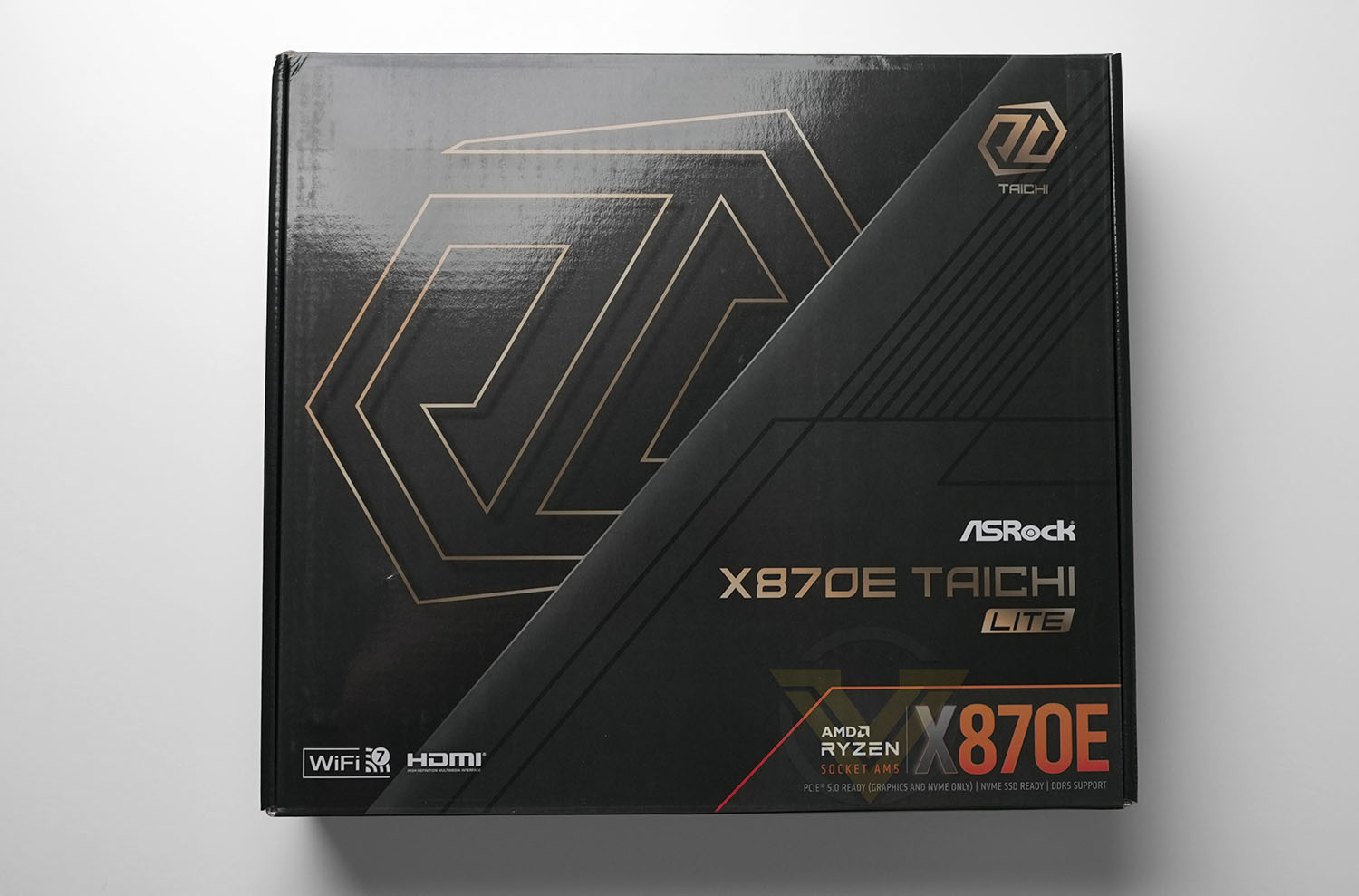
There’s not a whole lot to see when it comes to the packaging of ASRock’s X870E Taichi Lite. Perhaps the most notable aspects are statements of support for WiFi 7, HDMI output (with supported CPU), PCIe 5.0 for graphics and storage, and DDR5 memory. It’s fairly nondescript, befitting the ‘lite’ moniker.
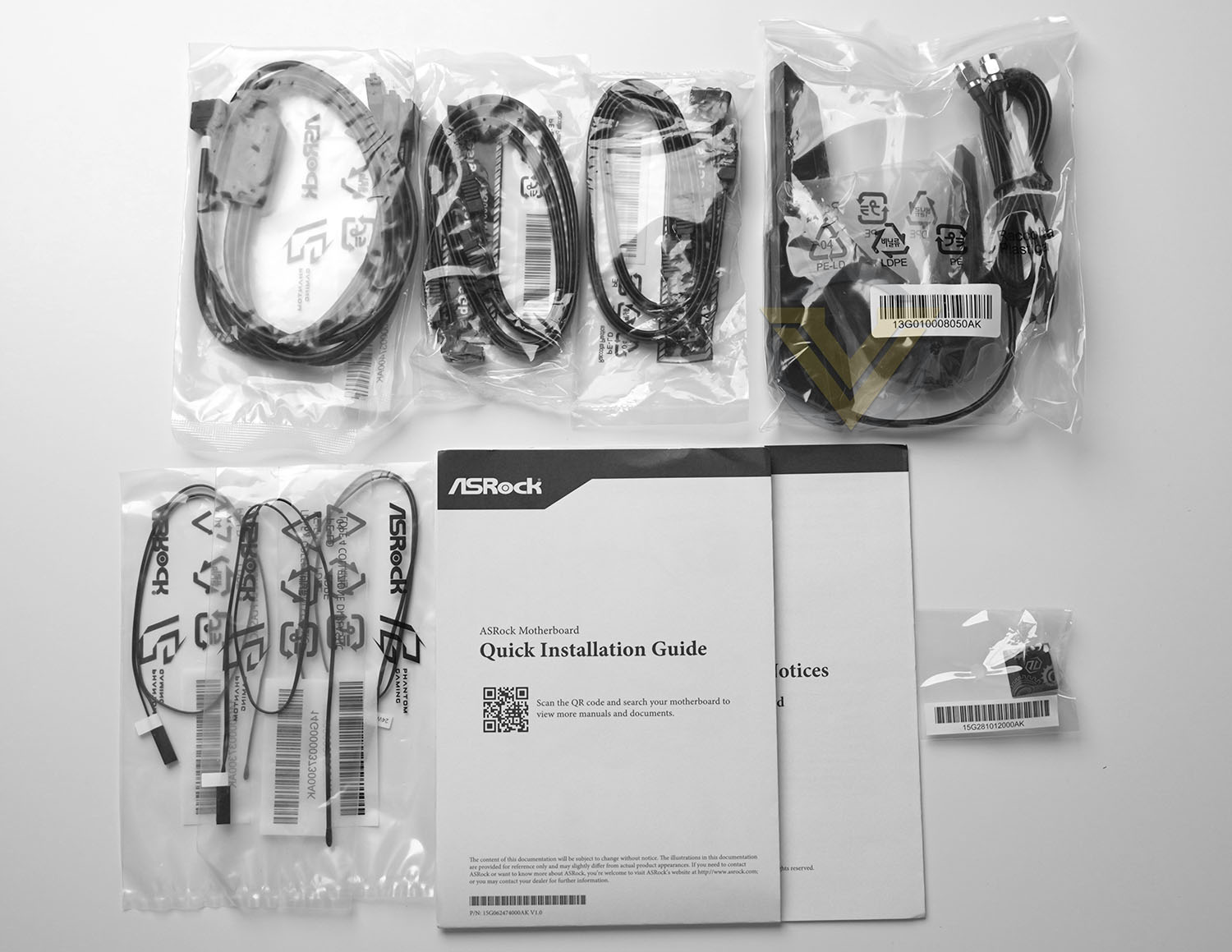
That being said, ASRock push the boat out a little more when it comes to the shipped accessories. They include:
– 4 x SATA Data Cables
– 1 x ASRock WiFi 2.4/5/6 GHz Antenna
– 1 x ARGB Splitter Cable
– 3 x Thermistor Cables
– Taichi Keycap
– 1 x ASRock WiFi 2.4/5/6 GHz Antenna
– 1 x ARGB Splitter Cable
– 3 x Thermistor Cables
– Taichi Keycap
It’s a little more than the bare necessities – thermistor cables for measuring spot temps across the motherboard are a nice inclusion if you’re intending to push a system hard – and all parts can be put to good use.
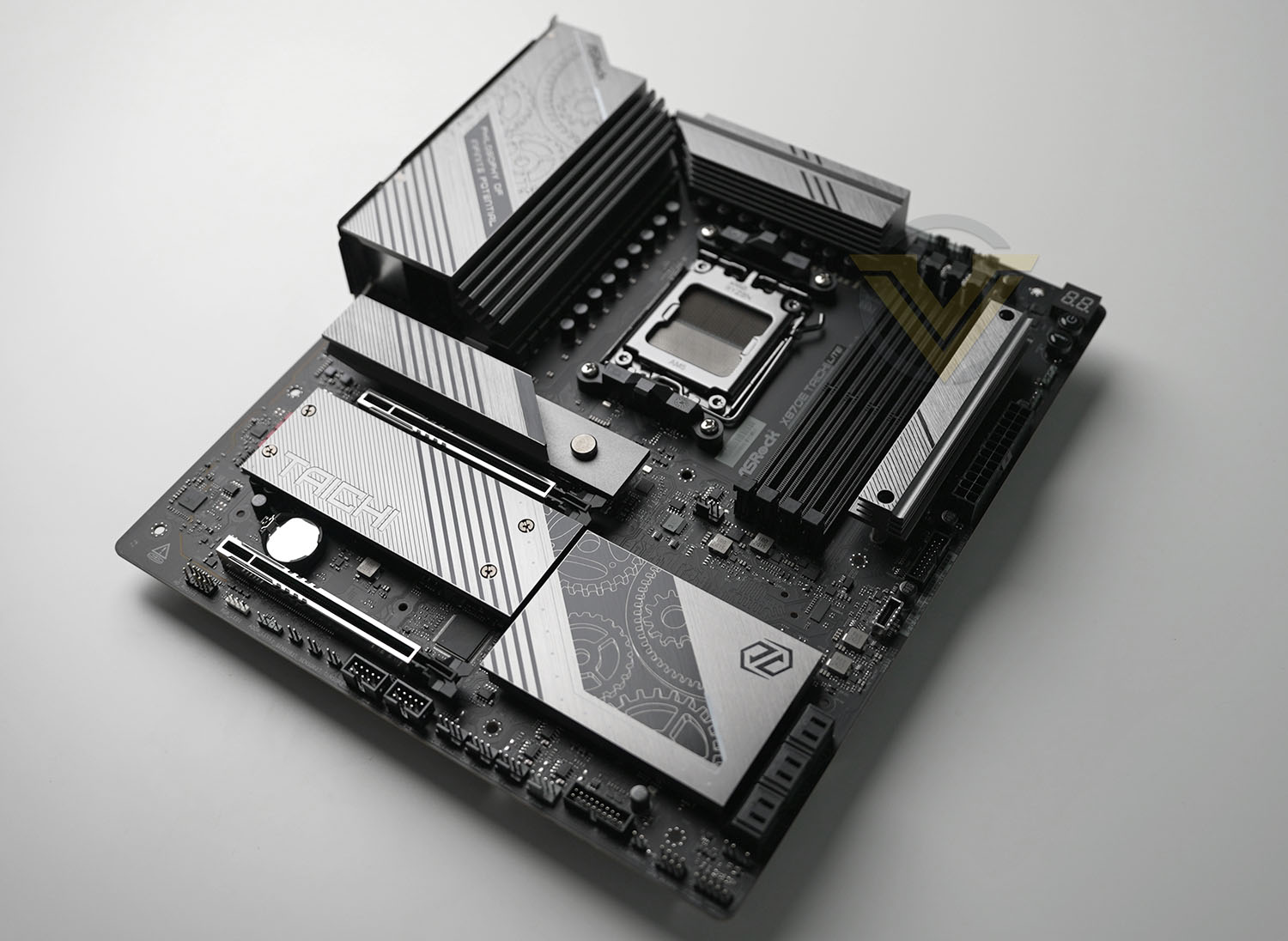
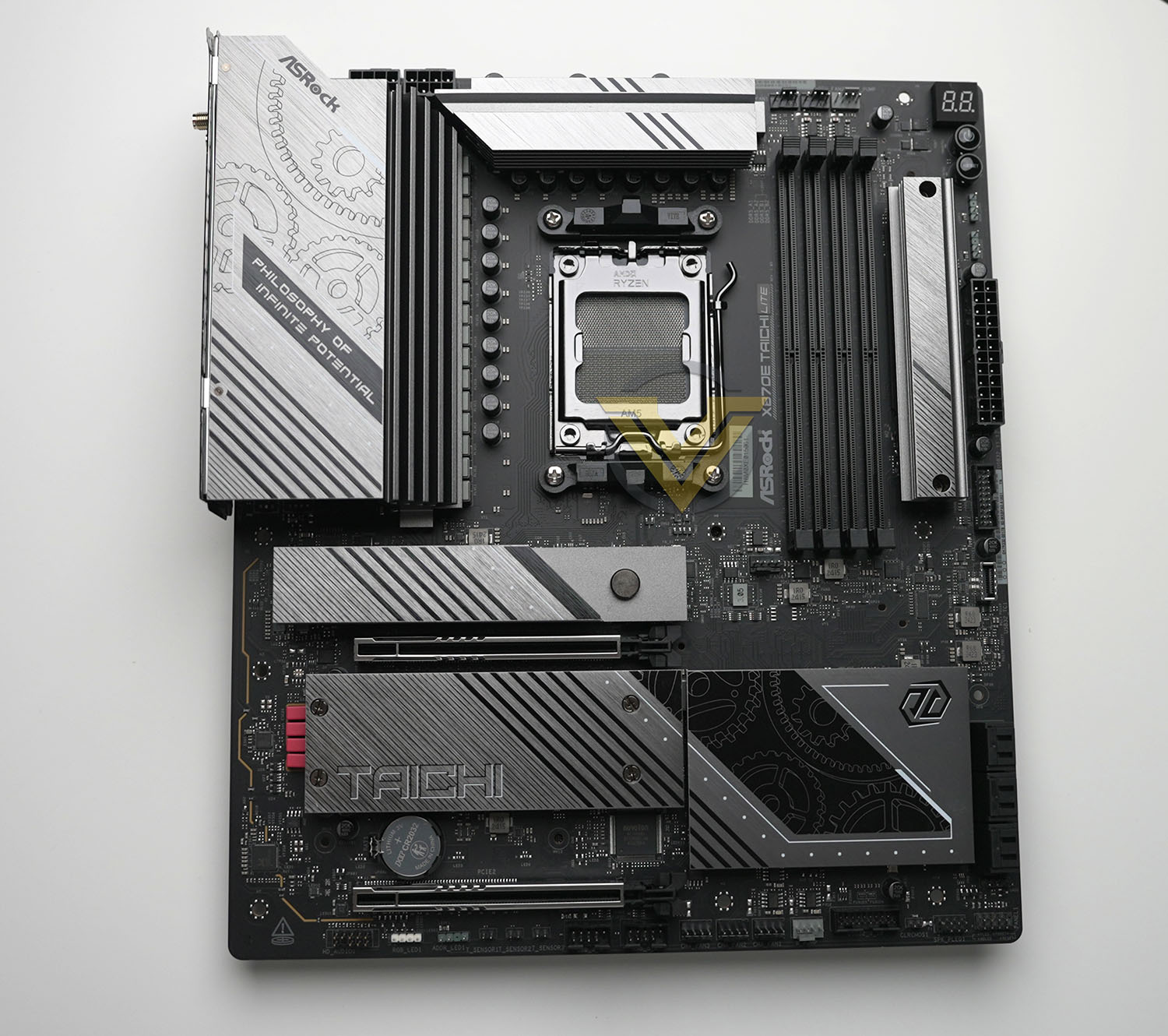
This is our first sight of the X870E Taichi Lite. It’s an EATX motherboard sitting in a 30.5 cm x 26.7 cm footprint which is a little wider than standard ATX dimensions. While a large number of ostensibly ATX cases will be able to support it, the extra wide may mean it overhangs cable management holes in the motherboard tray or, in very compact cases, HDD and Optical Drive cages. Consult case compatibility charts to judge whether it’ll fit in your enclosure of choice.
The motherboard is a curious beast aesthetically. It retains the ‘cog/gear’ theme of previous Tachi designs but eschewed an all-black finish in favour of brushed metal heatspreaders across the VRM, M.2 slots and chipset cooler. As a consequence, it will pick up any chassis lighting you choose which may or may not suit your preferred colour theme.
If we’re honest we could happily live without the motto emblazoned across the IO shield cover, but apart from that it’s a fairly attractive design overall.
The layout of X870E motherboards is a little different from prior generations and so well worth doing through in more detail.
Closer Look
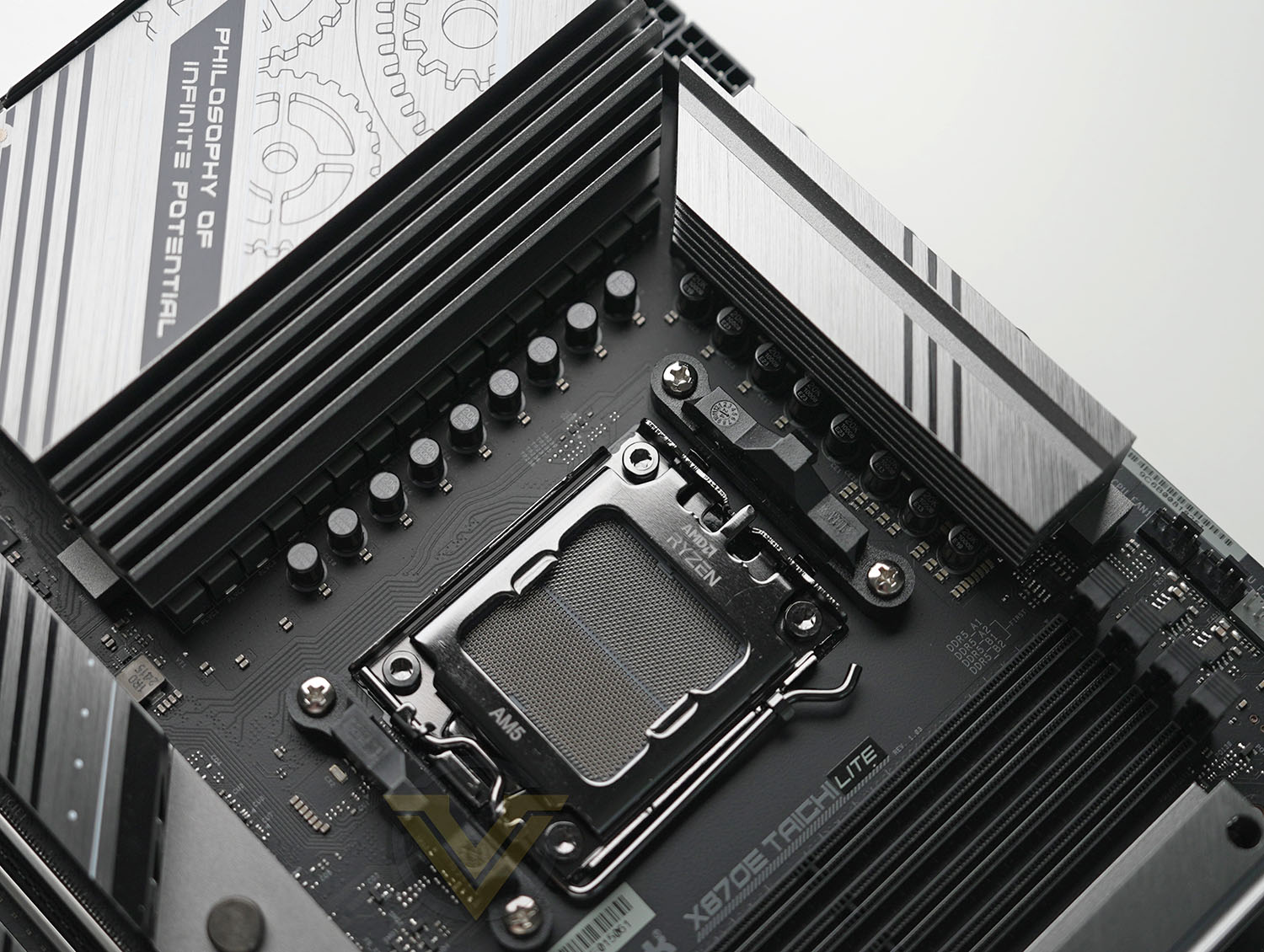
The socket area is cleanly laid out, benefitting from this being a 2nd generation AM5 motherboard. This design supports two 12V EPS 8-pin connectors for supplementary power to the CPU, which can be helpful for the larger 12 and 16-core Ryzen processors in particular. Combined with the ample 24+2+1-phase power delivery and aided with large VRM heatsinks, it should be able to handle heavily overclocked 9000-series processors so long as there is sufficient air flow around the socket area.
This design has one 4-pin PWM fan header to the bottom-right of the socket that’s intended for AIO CPU coolers. Three additional headers to the top-right are for, in order: CPU Fan, CPU Fan and Chassis Fan. The latter two, as well as the AIO header, are 3A/36W connectors suitable for water pumps or a trio of daisy-chained fans; the initial CPU Fan header is only rated for 1A operation.
Moving along the top edge we come to a DrDebug LED display (which as the name suggests helps to debug or troubleshoot the boot process thanks to two-digit error codes), a ‘board mounted power button, and a reset button. These can be invaluable for pushing the system hard on a test bench, helping you to find its limits while other components are easily accessible.
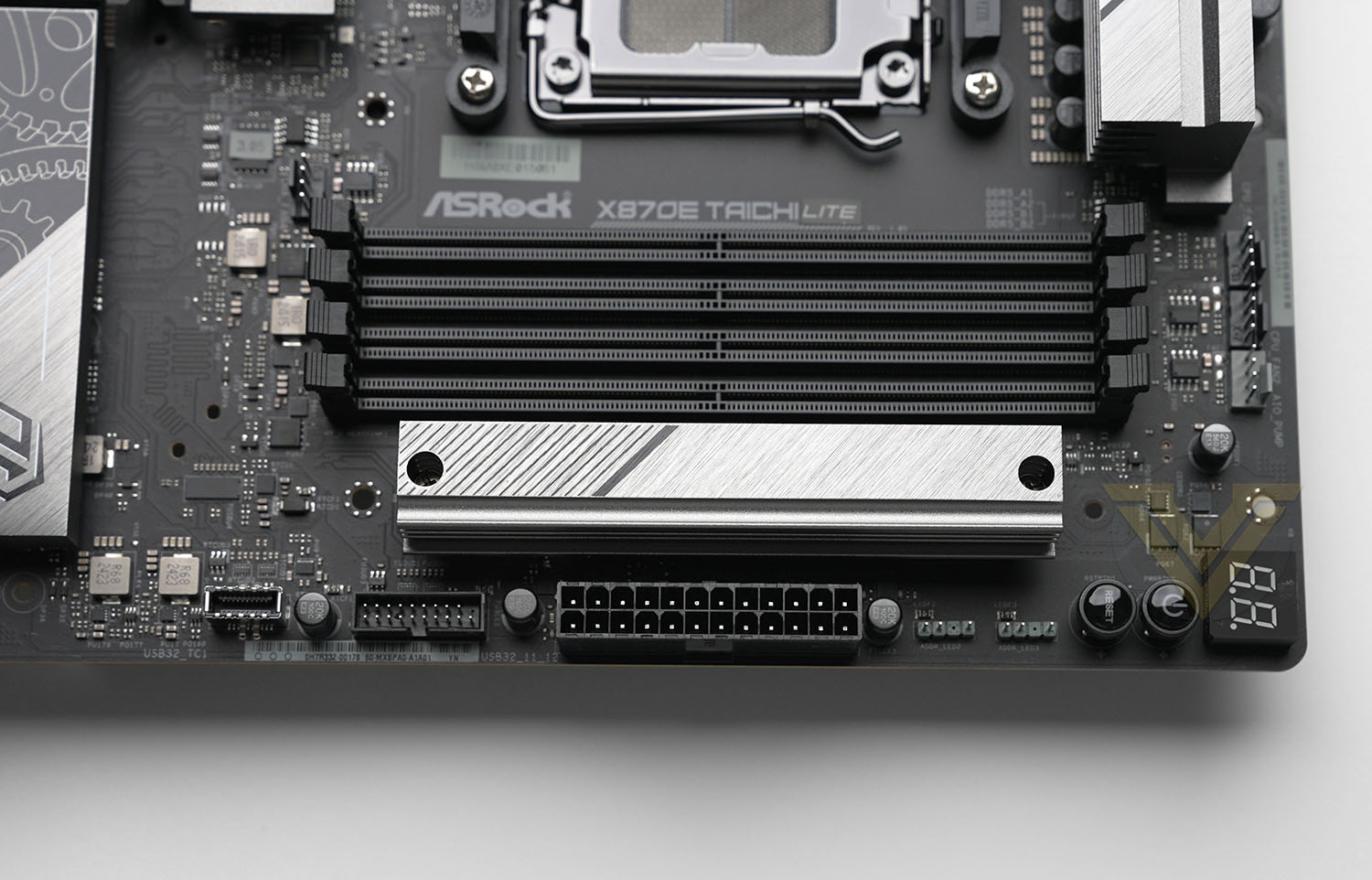
Past the bank of four DDR5 DIMM slots is a M.2 slot supporting the 2280 form factor. This slot is wired for PCIe Gen4x4 operation, and is probably the one that will experience the least obstructed air flow and incidental heat for adjacent components.
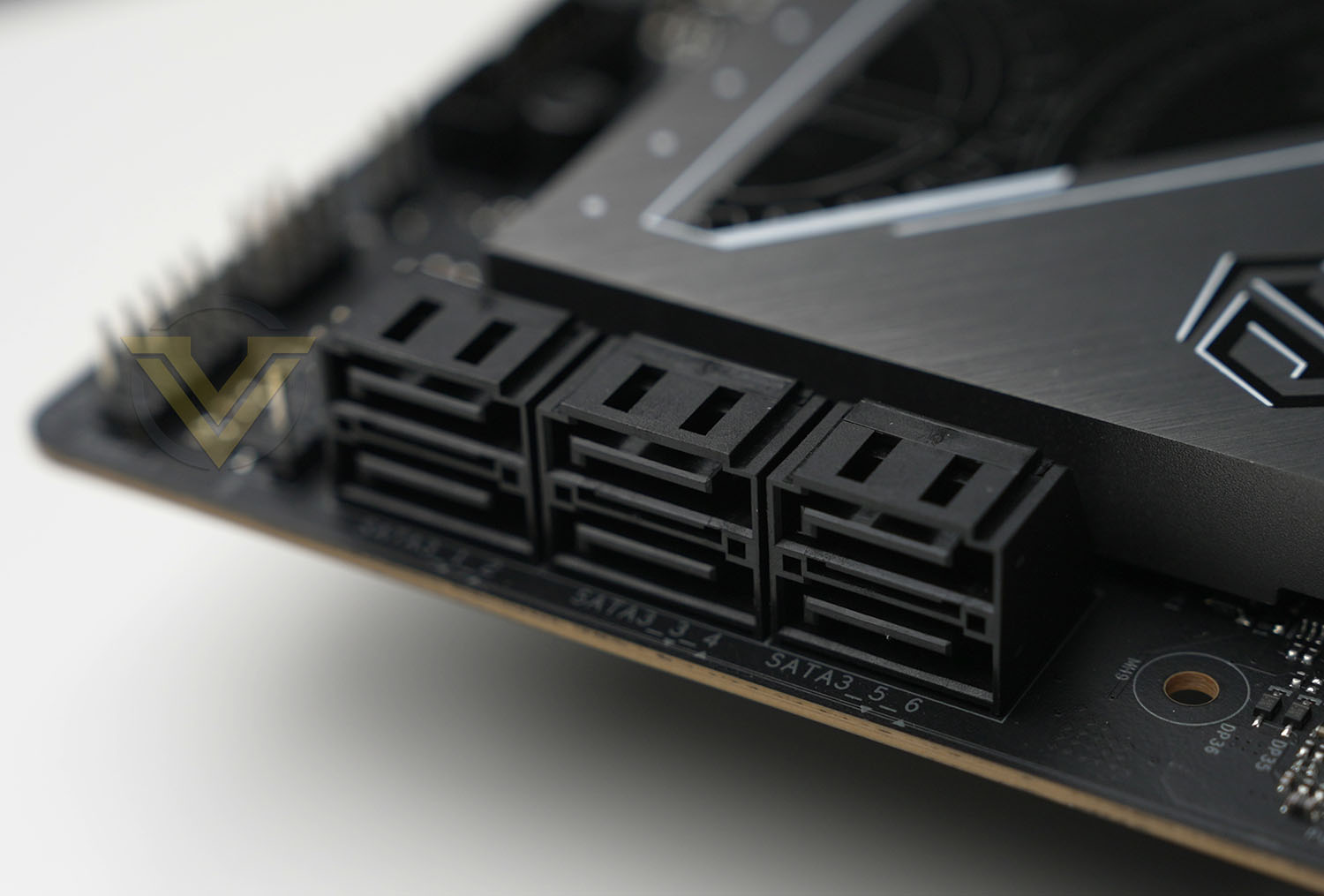
Beyond this slot and below the power and reset switches are two 3-pin ARGB headers, then the 24-pin ATX power connector, USB 3.1 front panel header, USB Type C header, and a bank of six SATA III 6Gbps connectors. The SATA ports are mounted parallel to the motherboard, helping with cable management.
The USB Type-C Header supports USB 3.2 Gen2x2 signalling up to 20Gbps.
The large heatspreader to the bottom-right of the motherboard covers both chipset controllers present on the X870E design and so you’d expect it to become quite toasty operating at peak throughput.
Running down the bottom edge from right to left is the System Panel header, Speaker header, USB 3 header, four 4-pin PWM fan headers (one of which supports 3A/36W operation for a water cooling pump), two USB 2.0 headers, three 2-pin thermal probe/thermistor headers, 3-pin ARGB header, 4-Pin RGB header and Front Panel Audio header. That’s a lot packed into a very short space, potentially requiring some adroit cable management if all are connected. Thankfully the most conventionally awkward to connect, the Audio header, is about as conveniently located as you’ll see on a modern motherboard.
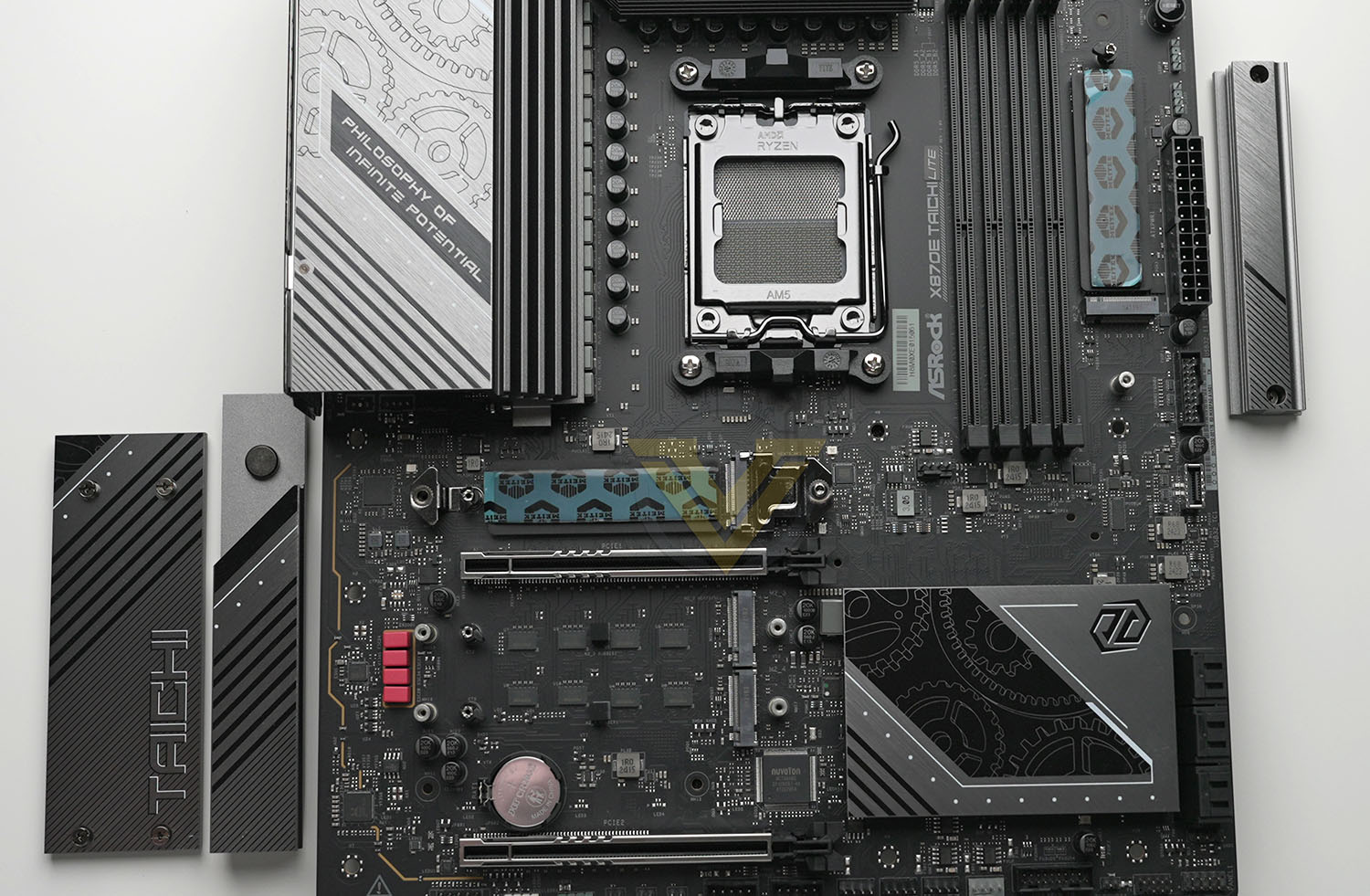
Here’s a look at the board with M.2 slot covers removed. As well as the one in the top-right there are three slots that sandwich the PCI X16 slot. The topmost of these three support PCIe Gen 5×4 operation, the bottom two PCIe Gen4. Note that only two slots have thermal pads on the underside of the slot of additional cooling, making them particularly suitable for high-speed and double-sided M.2 SSDs.
The primary M.2 drive slot incorporates a quick-release system for both the slot cover and the drive itself, making installation and replacement toolless.
We should also note that the PCIe slots, which can operate in x8/x8 mode with PCIe 5.0 signalling, have been stiffened with reinforcing metal classing. That being said, we recommend a GPU stand of some sort to prop up particularly heavy graphics cards.
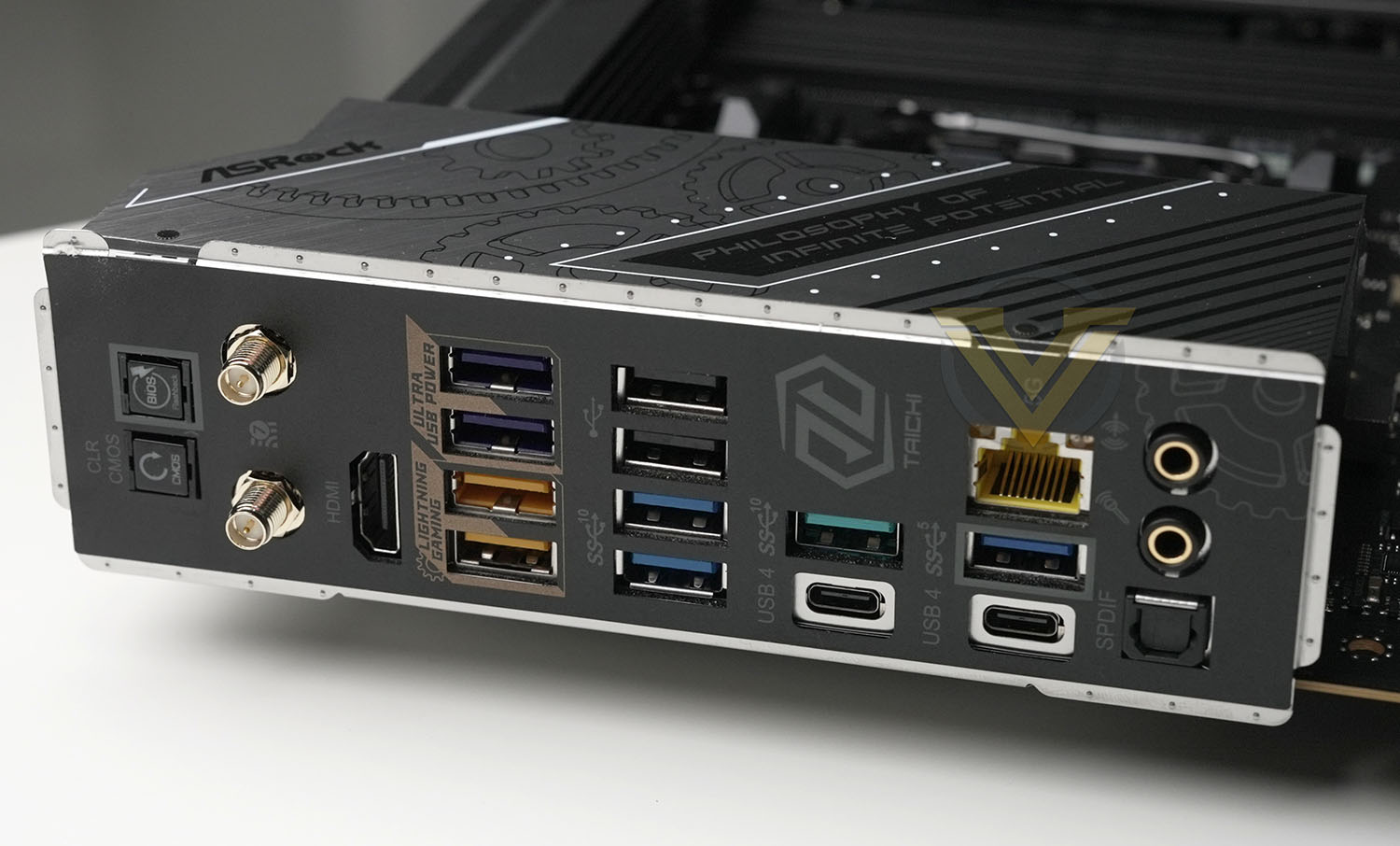
Breaking down the rear IO is pretty straightforward. The X870E Taichi Lite features, in order from left to right:
– CLR CMOS and BIOS Flashback buttons,
– WiFi 7 (2.4GHz, 5GHz & 6GHz) antenna ports,
– HDMI port,
– 2 x USB 3.2 Gen 2 (Yellow, 10Gbps) & 2 x USB 3.2 Gen 1 (5Gbps, Blue) ports,
– 2 x USB 3.2 Gen 2 (L. Blue, 10Gbps) & 2 x USB 2.0 ports,
– USB4 Type-C & USB 3.2 Gen 2 ports,
– USB5 Type-C & USB 3.2 Gen 1 & RJ45 5Gbps LAN ports,
– Optical SPDIF Out & Line Out Jack & Mic In Jack.
– WiFi 7 (2.4GHz, 5GHz & 6GHz) antenna ports,
– HDMI port,
– 2 x USB 3.2 Gen 2 (Yellow, 10Gbps) & 2 x USB 3.2 Gen 1 (5Gbps, Blue) ports,
– 2 x USB 3.2 Gen 2 (L. Blue, 10Gbps) & 2 x USB 2.0 ports,
– USB4 Type-C & USB 3.2 Gen 2 ports,
– USB5 Type-C & USB 3.2 Gen 1 & RJ45 5Gbps LAN ports,
– Optical SPDIF Out & Line Out Jack & Mic In Jack.
ASRock designate the two yellow USB 3.2 ports as ‘Lightning Gaming’ connections for your keyboard and mouse as they route through separate controller hubs, theoretically resulting in lower jitter and latency. The two blue ports stacked above them are designated ‘Ultra USB Power’ and supply 5V downstepped from the PSU +12V rail. They should offer more 5V stability under a strong charging load.
So features-wise there are no major surprises in the X870E Taichi Lite. Some might be a touch disappointed in the lack of a 10Gbps LAN port, and we’ve also started to see easy unlatching functionality for the main PCI-Express slot start to creep into mid-to-high-tier models from other manufacturers that hasn’t quite reached this SKU.
All in all, the motherboard seems like a well thought out design for enthusiasts and overclockers who don’t have a need for grand aesthetic flair but wouldn’t mind the option should it present itself. While it doesn’t appear to do much to differentiate itself from its X870E competitors, nor does it let the side down by presenting any glaring omissions.
Test Setup & Methodology
Notes: We’ve revamped our benchmark regime by removing a number of tests which reveal little, to no difference between each motherboard model. Gaming performance is one such area which has been removed due to the inability for each motherboard to offer any advantage over another. Instead, we have focussed on meaningful/tangible analysis which examines the VRM/chipset design, and the storage performance which will be far more informative to the end user.
TEST SETUP
CPU AMD Ryzen 9 9900XCooling: Corsair Hydro Series H110i
Memory: 32GB Kingston FURY Renegade 7600 MHz
Storage: XPGX950 SATA SSD + Silicon Power XPower XS70
PSU: Corsair HX1050 80 Plus Gold Certified PSU
Monitor: AOC U2879VF
BENCHMARKS
PCMark 10 – Overall Extended ScoreSiSoftware SANDRA – SATA/PCIe Storage Tests
SiSoftware SANDRA – Overall System Score
OTHER SOFTWARE
Temperature Analysis: HWMonitorStress Testing Software: AIDA64 Stability Test
CPU Specification Monitoring: CPU-Z
Benchmarks: Power Consumption
In this first test we analyse the power efficiency from the wall for each motherboard (Minus the GPU). While each model uses the same chipset/platform, energy results can fluctuate between manufacturers due to the features and specifications that are integrated. First of all, for the idle tests the system is cold booted into Windows and no additional applications are executed – wattage is noted on the external energy monitor we use and then we open Aida64 stability test and execute a stress test, noting the highest reading on the monitor. Below are the results of this energy test.
Benchmarks: VRM & PCH Cooling
Each motherboard manufacturer designs their board with a unique set of heatsinks to cover key areas like the VRM/mosfets and the chipset itself. We load up Aida64 stability test again and perform a 20 minute run, recording the maximum value for both attributes.
Benchmarks: PCMark 10
PCMark 10 features a comprehensive set of tests that cover the wide variety of tasks performed in the modern workplace. With a range of performance tests, custom run options, and the new Battery Life Profile, PCMark 10 is the complete PC benchmark for the modern office.
Benchmarks: SATA Performance
In order to ascertain the SATA performance for our motherboards we use SiSoftware SANDRA and the File System Bandwidth performance test. This allows us to obtain the sequential read/write transfer rates for the drive being tested – Crucial MX300 SSD.
Benchmarks: PCIe M.2 Performance
In order to ascertain the PCIe M.2 performance for our motherboards we use SiSoftware SANDRA and the File System Bandwidth performance test. This allows us to obtain the sequential read/write transfer rates for the drive being tested – Kingston KC2500.
Benchmarks: Overall Computer Score
In our last test we observe the Overall Computer Score supplied by SANDRA. This test is exhaustive, and is specifically designed for measuring a comprehensive score for the system, measured in kPT.
Conclusion
It’s still very early days for AMD’s new 800-series motherboards, and also early days in terms of our time with them. There’s still plenty to tease out from this new platform, despite being broadly based on the 600-series, with many benefits and pitfalls still to be uncovered. These are our conclusions from pre-release testing with the also new Ryzen 9900X.
Much like the B650E Taichi Lite before it, the X870E Taichi Lite offers a wide range of tweaks aimed at overclocking, but placing the SKU in the X870E lineup makes it much more price competitive among its peers. An MSRP of $399 won’t be the cheapest X870E board, but it will also be far from the most expensive.
Hefty 24-phase power delivery, on-board diagnostic tools and slightly oversized VRM cooling will all be key draws for enthusiasts approaching the platform with a view to pushing their Ryzen 9000-series or 7000-series chips to the limit. Each is somewhat lacking on other X870/E designs launching today, particularly at this price point. That being said, stability problems will mean that they won’t be able to jump in with both feet in week one; it might be best to hold off for a couple of BIOS revisions and observe how the platform evolves over time.
Overall performance was fine. PCIe storage read rates were in upper bound outliers, while overall compute scores were a little low. The idiosyncrasies present in each of the X800-series results speak to the potential teething issues present in every new platform.
Water and premium cooling afficionados will be happy to see the inclusion of several 3A/38W 4-pin fan headers throughout the board, each in very logical locations for cable routing. They take just a little bit of the guess-work out of pump placement and fan daisy-chaining, unlike some other models.
In common with the majority of modern motherboards, building in the Taichi Lite is easy. However, we would have liked to have seen a PCI-E x16 slot unlatching system that’s starting to crop up more widely on competing brand designs. This motherboard is aimed at the segment least likely to leave a system in a static configuration, so making it easier to remove heavy graphics cards would surely be a small but significant boon.
The board’s simple brushed metal/silvered heatsink aesthetics were appealing but we should be honest and mention that their cog motif is not our favourite. An appearance with even fewer embellishments would be almost unique in today’s motherboard landscape, but that uniqueness itself would have value. Still, these preferences are very subjective, and the silvered effect will certainly make any lighting scheme you choose ‘pop’.
So, we come to the final question: does this motherboard’s performance and feature-set justify the X870/E’s existence and price premium over X670E designs. On balance, right now, probably not.
There simply aren’t enough peripherals that can leverage the improved I/O present on X870E, and WiFi 7’s adoption rate is exceptionally slow due to its cost. The 800-series (and Intel’s counterparts) are priming the market for their inclusion but it remains to be seen if there’s any value to being an early adopter. If you feel it would be more advantageous in the long run to save $100 and opt for a legacy X670E board, waiting out the platform until it matures, you might not really lose out. Still, you’re unlikely to find one that caters to overclockers quite as much as this.
ASRock’s X870E Taichi Lite is a glimpse at what a concentrated mainstream overclocking board could look like. A motherboard for enthusiast overclockers to consider as it matures through BIOS updates and hardware revisions, but might be a little undercooked at present.
Pros
+ Mainstream overclocking specialist
+ Supports USB4 and WiFi 7
+ PCIe 5.0 x8/x8 mode capabilities
Cons
– Marginal value over 600-series counterparts
+ Mainstream overclocking specialist
+ Supports USB4 and WiFi 7
+ PCIe 5.0 x8/x8 mode capabilities
Cons
– Marginal value over 600-series counterparts
Click here for an explanation of our awards at Vortez.net.
Stay connected with the Vortez Social Media pages:
Join in with the discussions on Discord