In our AMD X870E chipset motherboard coverage, its the turn of MSI to show their hand, by way of the MPG X870E CARBON WIFI. Is it worth an investment?

Product on Review: MPG X870E CARBON WIFI
Manufacturer: MSI
MSRP:
– US: $499 excl Tax.
– AUS: $919 AUD
– UK: ~£450 inc. V.A.T. (TBC)
Editor: Tim Harmer
AMD are back scarcely six weeks after the Ryzen 9000-series launch, this time presenting the 800-series motherboards in partnership with major component manufacturers. Starting with a selection of high performance X870E designs and eventually extending down to mainstream and affordable product segments, the 800-series will be a broad top-to-bottom replacement for the 600-series going into 2025.
The 800-series continues AMD’s commitment to the AM5 platform, offering compatibility not only with ‘Zen 5’ Ryzen 9000-series processors but also 8000-series APUs and ‘Zen 4’ 7000-series chips. AM5 is expected to be a fixture in the market until at least 2027, indicating that these new designs will be compatible with processors launched as much as three years from now. That’s in stark contrast to Intel, who will be sunsetting LGA1700 later this year after just two discrete processor architectural generations.
X870E is the high-end desktop chipset for the range and takes many of its cues from its predecessor. It utilises a dual-controller solution for its chipset to layer on additional I/O capabilities compared to the single-controller X870 and B850, and thus is tailored for those who demand more peripheral support and PCI-Express lanes.
The chipset has full PCIe 5.0 support for x16 and x8/x8 modes on the GPU alongside a single PCIe Gen5 x4 M.2 NVMe slot. Additional peripheral support is offered through the chipset’s general purpose PCIe lanes, typically through a plethora of M.2 NVMe storage and additional integrated I/O.
Clear improvements over X670E include improved memory support up to DDR5-8200 (OC), two USB4 40 Gbps ports as standard rather than an optional extra, and a more comprehensive CPU overclocking toolkit that augments software-based overclocking.
800-series motherboards are also some of the first to support WiFi 7 networking as standard. This allows the combination of multiple 2.4GHz, 5GHz and 6GHz bands into continuous data streams for higher realised bandwidth and better management of IoT environments.
In this review we’re looking at MSI’s MPG X870E CARBON WIFI, a high tier ATX continuation of the very well regarded CARBON range that mixes sleek aesthetic appeal and high performance gaming without necessarily being the choice of the enthusiast overclocker. Usability is very much the watch-word, with deft touches that should make living with the platform a very ‘EZ’ experience deep into its lifespan and after plenty of other hardware upgrades.
The design features 18+2+1 phase power delivery for high-end up-to 16-core CPUs, but isn’t quite so over-engineered as ‘boards that prioritise overclocking. Plenty of the front of the board is covered with heatspreaders for both the toasty VRMs and less demanding storage and chipset components.
Quick-release PCIe and M.2 slots emphasis the board’s ease of use, steel-reinforced PCIe slots drive home its long-term durability, dual LAN ports are a nod to the design’s versatility, and the four USB Type-C ports (two of which are USB4) show interested parties that it’s a forward-looking design.
To improve overall system stability when drawing power from the motherboard’s 12V rail, MSI have integrated an auxiliary 8-Pin PCIe power input into the motherboard. That’s not a common addition, particularly on boards that don’t support multi-GPU configurations, and likely is a nod to very high performance (i.e. RTX 4090/5090-tier) GPUs and heavy additional load through multiple fans and water cooling pumps.
WiFi 7 is of course supported, and so will Bluetooth 5.4 once the Windows 11 24H2 update rolls around in the very near future. Audio is also a big part of MSI’s implementation; with MSI Audio Boost 5 the CARBON utilises a Realtek ALC4080 audio processor and high performance capacitors to generate clean 32-Bit/384 kHz playback.
At an MSRP of $500 we’re creeping into premium territory and those are certainly some premium features. However, competition will squeeze this design from both sides, so it’ll have its work cut out staying ahead from the rest. Let’s see if it can by taking a deeper dive.
Technical Specifications & Features
Form Factor:- ATX (305mm x 244mm)
Chipset:- AMD X870E
CPU:- Supports AMD Ryzen™ 9000/ 8000/ 7000 Series Desktop Processors
Socket:- AM5
Memory:
– 4x DDR5 UDIMM, Max. Memory Capacity 256GB
– up-to DDR5 8400+(OC)/ 5600(JEDEC)/ 5400(JEDEC) MT/s
– DIMM slots have double-sided latches.
– Onboard Graphics:
– 1x HDMI port (HDMI 2.1 support)
– 2x Type-C DisplayPort via USB4
*Available only on processors featuring integrated graphics. Graphics specifications may vary depending on the CPU installed.
Slot:- 3x PCI-E x16 slot
– PCI_E1 Gen PCIe 5.0 supports up to x16 (From CPU)
– PCI_E2 Gen PCIe 5.0 supports up to x4 (From CPU)
– PCI_E3 Gen PCIe 4.0 supports up to x4 (From Chipset)
Audio:
– Realtek® ALC4080 Codec
– 7.1-Channel USB High-Performance Audio
– Supports up to 32-Bit/384 kHz playback on front panel
– Supports S/PDIF output
Storage[/b:- 4x M.2
– M.2_1 (From CPU) supports up to PCIe 5.0 x4 , 2280/2260 devices
– M.2_2 (From CPU) supports up to PCIe 5.0 x4 , 2280/2260 devices
– M.2_3 (From Chipset) supports up to PCIe 4.0 x4 , 22110/2280 devices
– M.2_4 (From Chipset) supports up to PCIe 4.0 x4 , 2280/2260 devices
– 4x SATA 6G
RAID
– Supports RAID 0, RAID 1 and Raid 10 for SATA storage devices
– Supports RAID 0, RAID 1 and Raid 10* for M.2 NVMe storage devices
* RAID 10 for M.2 NVMe storage devices is only supported by AMD Ryzen™ 9000/7000 series CPU.
USB:
– 4x USB 2.0 (Front)
– 4x USB 5Gbps Type A (Front)
– 9x USB 10Gbps Type A (Rear)
– 2x USB 10Gbps Type C (Rear)
– 1x USB 20Gbps Type C (Front)
– 2x USB 40Gbps Type C (Rear)
LAN
– 1x Realtek® 8126 5G LAN
– 1x Realtek® 8125 2.5G LAN
Internal IO
– 1x Power Connector(ATX_PWR)
– 2x Power Connector(CPU_PWR)
– 1x Power Connector(PCIE_PWR 8pin)
– 1x CPU Fan
– 1x Combo Fan (Pump_Sys Fan)
– 5x System Fan
– 1x EZ Conn-header (JAF_2)
– 2x Front Panel (JFP)
– 1x Chassis Intrusion (JCI)
– 1x Front Audio (JAUD)
– 1x Thermal Sensor connectors(T_SEN)
– 3x Addressable V2 RGB LED connector (JARGB_V2)
– 1x RGB LED connector(JRGB)
– 4x USB 2.0 ports
– 4x USB 5Gbps Type A ports
– 1x USB 20Gbps Type C ports
WIRELESS LAN & BLUETOOTH:
– Wi-Fi 7 (802.11be) Solution
– The Wireless module is pre-installed in the M.2 (Key-E) slot
– Supports MU-MIMO TX/RX, 2.4GHz/ 5GHz/ 6GHz* (320MHz) up to 5.8Gbps
– Supports 802.11 a/ b/ g/ n/ ac/ ax/ be
– Supports Bluetooth® 5.4**, MLO, 4KQAM
* 6GHz band support may depend on every country’s regulations and Wi-Fi 7 will be ready in Windows 11 version 24H2.
** The Bluetooth version may be updated, please refer to the Wi-Fi chipset vendor’s website for details. Bluetooth 5.4 will be ready in Windows 11 version 24H2.
LED FEATURE
– 4x EZ Debug LED
– 1x EZ Digit Debug LED
– 1x EZ LED Control switch
Chipset:- AMD X870E
CPU:- Supports AMD Ryzen™ 9000/ 8000/ 7000 Series Desktop Processors
Socket:- AM5
Memory:
– 4x DDR5 UDIMM, Max. Memory Capacity 256GB
– up-to DDR5 8400+(OC)/ 5600(JEDEC)/ 5400(JEDEC) MT/s
– DIMM slots have double-sided latches.
– Onboard Graphics:
– 1x HDMI port (HDMI 2.1 support)
– 2x Type-C DisplayPort via USB4
*Available only on processors featuring integrated graphics. Graphics specifications may vary depending on the CPU installed.
Slot:- 3x PCI-E x16 slot
– PCI_E1 Gen PCIe 5.0 supports up to x16 (From CPU)
– PCI_E2 Gen PCIe 5.0 supports up to x4 (From CPU)
– PCI_E3 Gen PCIe 4.0 supports up to x4 (From Chipset)
Audio:
– Realtek® ALC4080 Codec
– 7.1-Channel USB High-Performance Audio
– Supports up to 32-Bit/384 kHz playback on front panel
– Supports S/PDIF output
Storage[/b:- 4x M.2
– M.2_1 (From CPU) supports up to PCIe 5.0 x4 , 2280/2260 devices
– M.2_2 (From CPU) supports up to PCIe 5.0 x4 , 2280/2260 devices
– M.2_3 (From Chipset) supports up to PCIe 4.0 x4 , 22110/2280 devices
– M.2_4 (From Chipset) supports up to PCIe 4.0 x4 , 2280/2260 devices
– 4x SATA 6G
RAID
– Supports RAID 0, RAID 1 and Raid 10 for SATA storage devices
– Supports RAID 0, RAID 1 and Raid 10* for M.2 NVMe storage devices
* RAID 10 for M.2 NVMe storage devices is only supported by AMD Ryzen™ 9000/7000 series CPU.
USB:
– 4x USB 2.0 (Front)
– 4x USB 5Gbps Type A (Front)
– 9x USB 10Gbps Type A (Rear)
– 2x USB 10Gbps Type C (Rear)
– 1x USB 20Gbps Type C (Front)
– 2x USB 40Gbps Type C (Rear)
LAN
– 1x Realtek® 8126 5G LAN
– 1x Realtek® 8125 2.5G LAN
Internal IO
– 1x Power Connector(ATX_PWR)
– 2x Power Connector(CPU_PWR)
– 1x Power Connector(PCIE_PWR 8pin)
– 1x CPU Fan
– 1x Combo Fan (Pump_Sys Fan)
– 5x System Fan
– 1x EZ Conn-header (JAF_2)
– 2x Front Panel (JFP)
– 1x Chassis Intrusion (JCI)
– 1x Front Audio (JAUD)
– 1x Thermal Sensor connectors(T_SEN)
– 3x Addressable V2 RGB LED connector (JARGB_V2)
– 1x RGB LED connector(JRGB)
– 4x USB 2.0 ports
– 4x USB 5Gbps Type A ports
– 1x USB 20Gbps Type C ports
WIRELESS LAN & BLUETOOTH:
– Wi-Fi 7 (802.11be) Solution
– The Wireless module is pre-installed in the M.2 (Key-E) slot
– Supports MU-MIMO TX/RX, 2.4GHz/ 5GHz/ 6GHz* (320MHz) up to 5.8Gbps
– Supports 802.11 a/ b/ g/ n/ ac/ ax/ be
– Supports Bluetooth® 5.4**, MLO, 4KQAM
* 6GHz band support may depend on every country’s regulations and Wi-Fi 7 will be ready in Windows 11 version 24H2.
** The Bluetooth version may be updated, please refer to the Wi-Fi chipset vendor’s website for details. Bluetooth 5.4 will be ready in Windows 11 version 24H2.
LED FEATURE
– 4x EZ Debug LED
– 1x EZ Digit Debug LED
– 1x EZ LED Control switch
Ryzen 9000 Series Processors max. supported overclocking frequency:
– 1DPC (DIMMs Per Channel), 1R (Single Rank) – Max speed up to 8400+ MT/s
– 1DPC, 2R (Double Rank) – Max speed up to 6400+ MT/s
– 2DPC, 1R – Max speed up to 6400+ MT/s
– 2DPC, 2R – Max speed up to 4800+ MT/s
– 1DPC, 2R (Double Rank) – Max speed up to 6400+ MT/s
– 2DPC, 1R – Max speed up to 6400+ MT/s
– 2DPC, 2R – Max speed up to 4800+ MT/s
On the MPS X870E CARBON WIFI, PCIe lanes off-CPU are shared across the first and second PCIe slots and second M.2 slot (labelled PCI_E1, PCI_E2 and M.2_2 respectively). They operate in PCIe 5.0 x16/x0/x0 or x8/x4/x4 modes with Ryzen 7000 & 9000 CPUs installed.
AMD Ryzen 8000-series APUs offer fewer PCIe lanes off-CPU, each of which are limited to PCIe 4.0 signalling. Operation is significantly more limited with these processors installed, and both PCI_E2 and M2_2 are disabled.
AMD 800-series At-A-Glance
AMD’s 800-series is divided into four distinct chipsets for different market segments and use cases. It’s not as obtuse as the 600-series but there are still nuances to account for, thus ensuring that a system isn’t needlessly overspecced.
Members of the 800-series are built around the AM5 socket platform and support Ryzen 7000 and 9000 CPUs as well as 8000-series APUs. PCIe 5.0 lane allocation and supplementary I/O are the main delineating factors between the four 800-series chipsets.
X870E is the full-fat configuration that utilises two Platform Controller Hubs (PCHs) in concert for the platform ‘chipset’. It offers up-to 16 PCIe 5.0 lanes for the GPU (or, optionally, a 2×8 mode), four for the primary M.2 slot, and the final four reserved for the communication link between CPU and chipset. From the chipset an additional 20 general purpose PCIe lanes are available, putting the total (off-CPU + off-chipset) to 44.
X870 ‘non-E’ meanwhile still offers the same config PCIe 5.0 options for GPU and primary M.2, but with only one PCH far fewer PCIe lanes are offered off-chipset.
As a dual-PCH chipset, X870E has the full gamut of platform I/O capabilities including two USB4 40Gbps ports, USB 3.2 Gen2x2 ports and as many as 8 SATA ports. The single-PCH X870 has only half available, which nonetheless will still be plenty for most users.
So, X870 if you really want PCIe 5.0 graphics and NVMe SSD support, X870E if you also want additional I/O options at a higher price. All X870 and X870E-series motherboards should support WiFi 7 (802.11be) as standard too.
B850 motherboards will be available later and take the platform capabilities down a step. PCIe 5.0 graphics are now optional but PCIe Gen5 NVMe SSD support is still assured. The exact makeup of advanced I/O is yet to be confirmed but we hope that both USB4 and WiFi 7 are regularly present on these designs.
There is no ‘E’ variant of the B850, eliminating a repeat of the somewhat muddled 600-series lineup caused by the presence of the B650E. That also means there will be no ‘affordable’ 800-series variants with the full range of I/O options for those who don’t need PCIe 5.0 GPU support.
B840 meanwhile is a cut-down budget board analogous to the older A-series design with support for only PCIe 3.0 graphics and NVMe SSD. It should generally be avoided except in very specific circumstances and will typically be a chipset exploited by OEMs and cheap System Integrator options.
We would be remiss to not mention that the old Curve Optimiser tool, which allowed Ryzen 7000-series processors to undervolt the CPU in a manner that was PMFW/PBO aware, has been depreciated. Instead, the 9000-series CPUs have access to a ‘Curve Shaper’ tool on 800-series motherboards to assign voltage margins in up-to 15 different frequency-temperature bands, allowing for finer control for voltage adjustment in bands that are stable and usable. Curve Shaper tables apply across all cores, and can also be shifted as a group by Curve Optimiser.
Packaging and Accessories
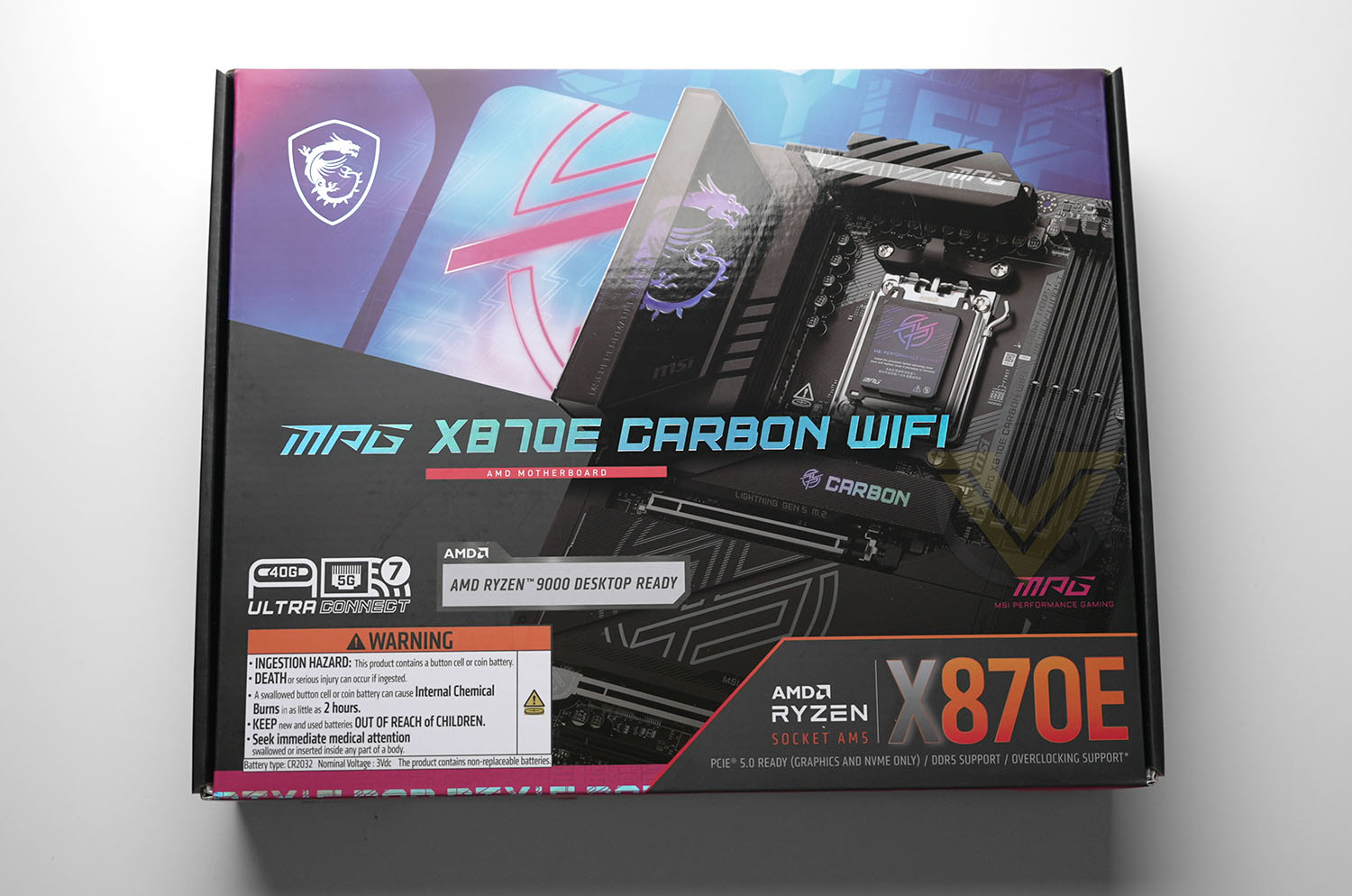
Blues and purples are the chosen colour-scheme for the MSI MPG X870E CARBON WIFI’s packaging and promotional material, and why not? They certainly go well with today’s tech. landscape – particularly as AI marketing trends continue to evoke Cyberpunk aesthetics so strongly – and it certainly gives the packaging a striking look at first glance. Remember however, you’re not locked into these colours; the motherboard is predominantly black with customisable RGB LEDs after all.
Present on the packaging are the board’s chief features: Ryzen 9000-series CPU readiness, USB4, WiFi 7 and 5Gbps wired networking, and of course the X870E chipset itself. The only blemish is the large warning label for the board’s button battery but that is a necessary regulatory evil.
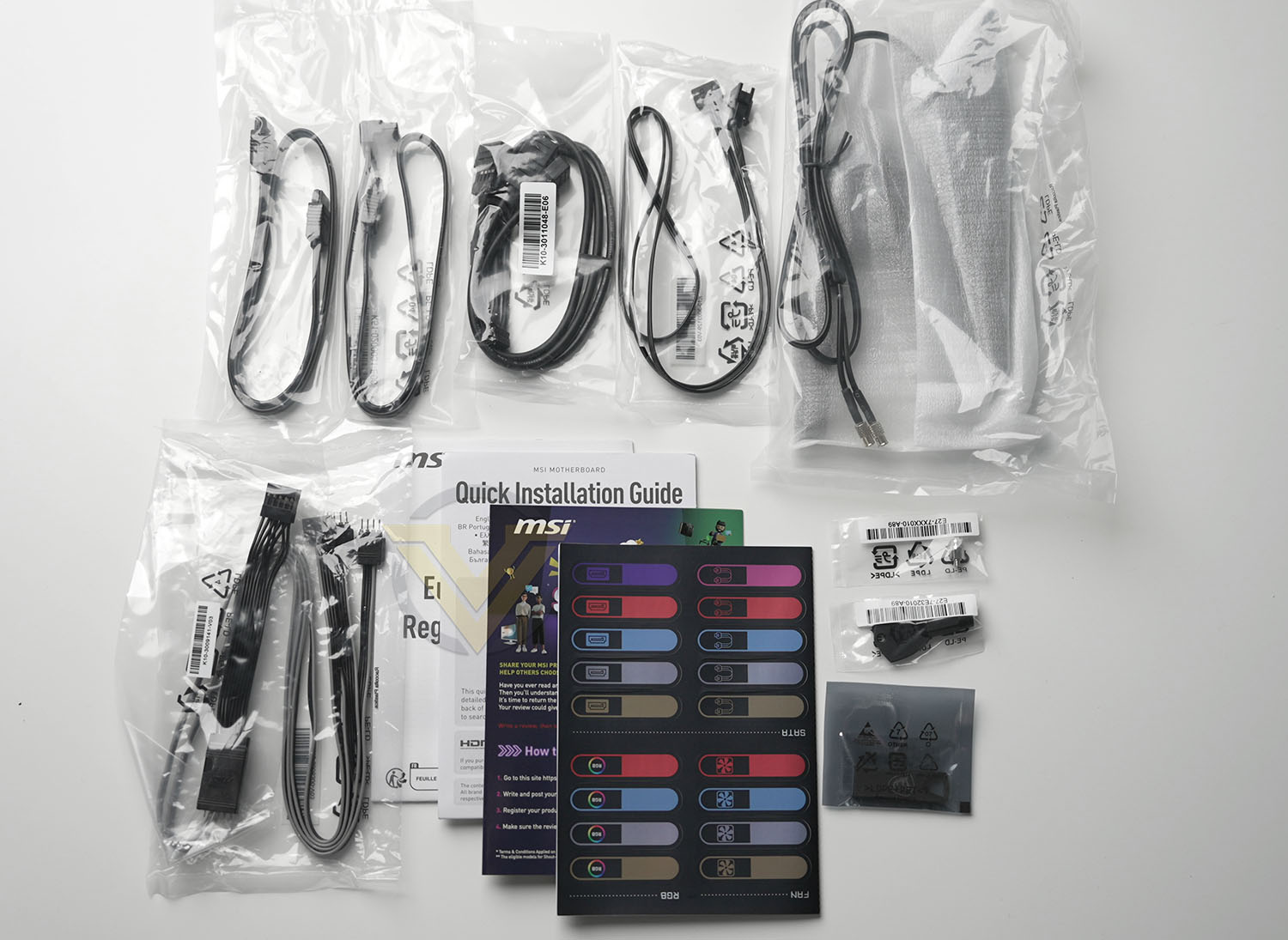
MSI are a little more generous with accessories in their CARBON series than some other manufacturers. Owners can look forward to:
– 2x SATA 6Gb/s cables
– 1x 1 to 2 RGB extension cable
– 1x ARGB extension cable
– 1x 1 to 3 EZ Conn-Cable (V2)
– 1x EZ Front panel cable
– 1x EZ Wi-Fi Antenna
– 1x Cable sticker
– 1x EZ M.2 Clip II
– 1x EZ M.2 Clip II Remover
– USB drive
– 1x 1 to 2 RGB extension cable
– 1x ARGB extension cable
– 1x 1 to 3 EZ Conn-Cable (V2)
– 1x EZ Front panel cable
– 1x EZ Wi-Fi Antenna
– 1x Cable sticker
– 1x EZ M.2 Clip II
– 1x EZ M.2 Clip II Remover
– USB drive
The accessories are primed to make the platform as user-friendly as possible, either through cleaner cable management or streamlining connectivity. The longevity of MSI’s EZ-Conn connector and cable standard – which unifies fan, RGB and USB signalling into one proprietary header – remains to be seen, but it’s a novel solution to the birds nest of cables cooling and lighting tends to lead to.
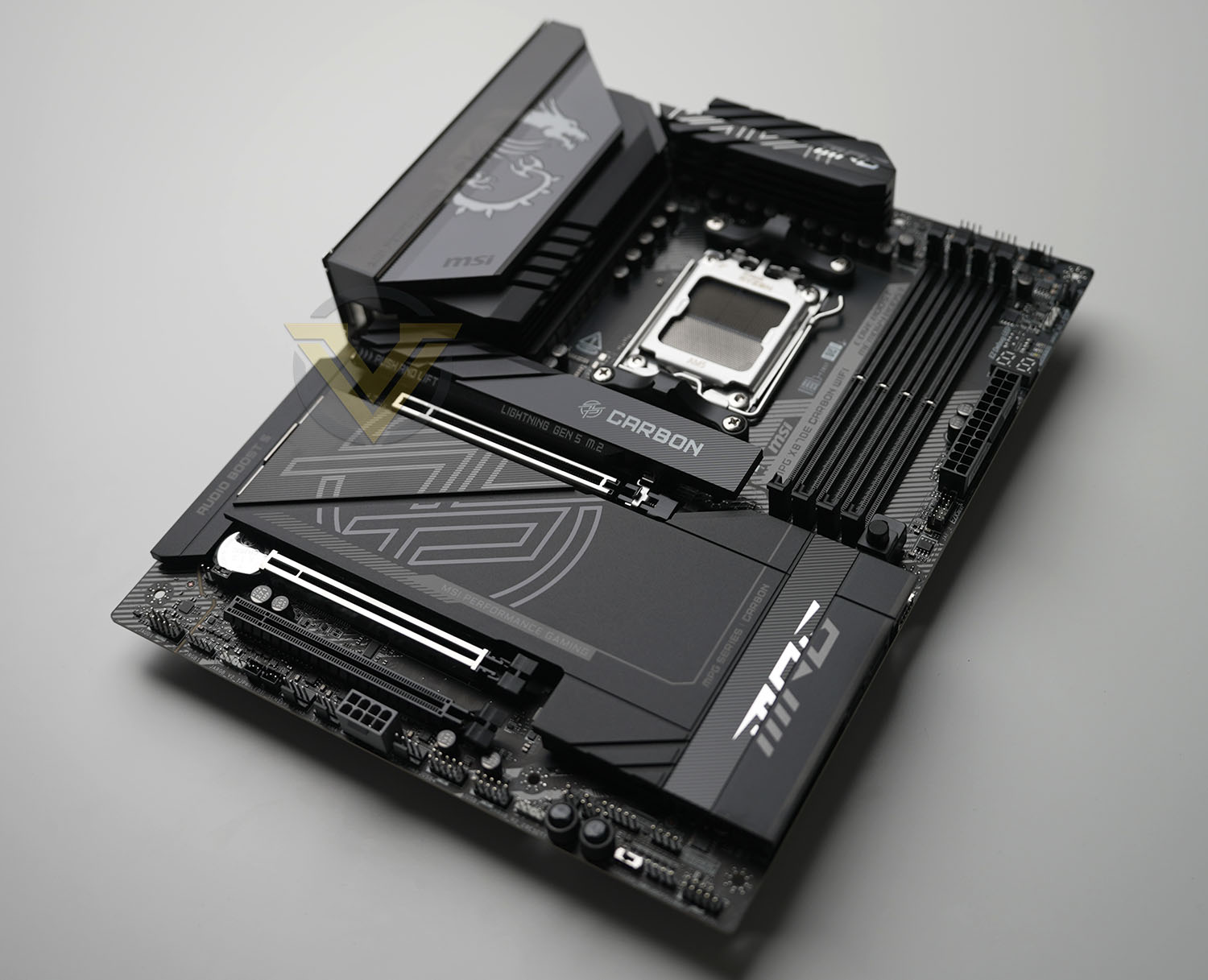
This is our first look at the MPG X870E CARBON WIFI. Sharp lines and a majority black colour-scheme are the order of the day here. A significant proportion of its footprint are flat matte black heatspreaders or VRM heatsinks, giving the board a smooth and uncluttered appearance despite its extensive feature-set. The motherboard is equipped with four M.2 slots and three PCI-Express slots despite its ATX form factor, which should offer some interesting configurations that wouldn’t impact PCIe 5.0 signalling in the way that it does one some other X870E SKUs.
A straightforward ATX footprint should mean that the motherboard is compatible with almost every ATX PC case on the market. None of the connectors appear out of place at first glance and there should be no compatibility issues with the plethora of AM5 coolers on the market.
Our only reservation is perhaps the amount of MSI/MPG branding prominently featured across the board. They’ve gone to a lot of trouble in creating a relatively clean design that would be complimented by plain black heatspreaders and heatsinks, but that is a very subjective stance. It’s still an attractive design with plenty of customisation options either way.
Closer Look
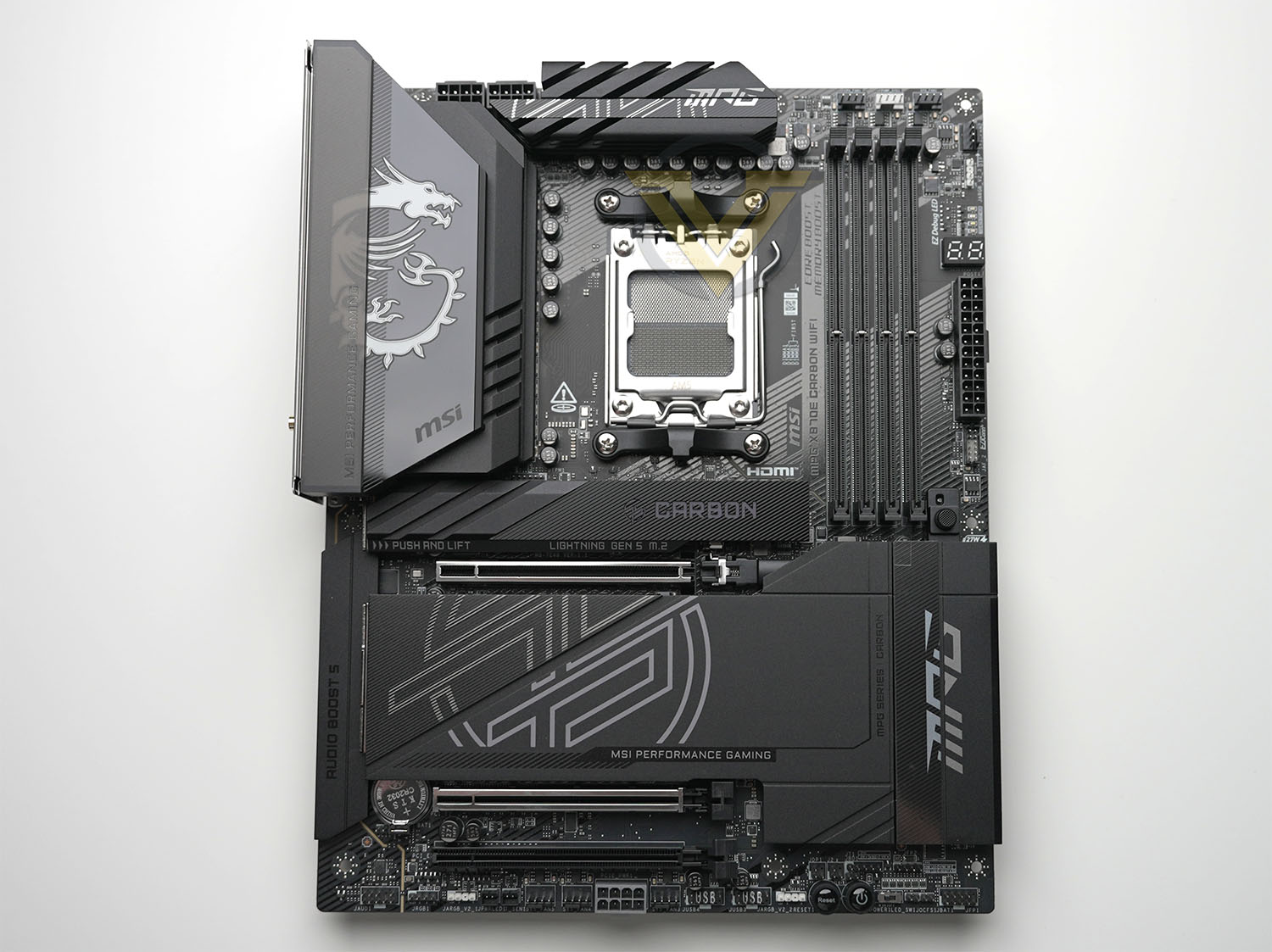
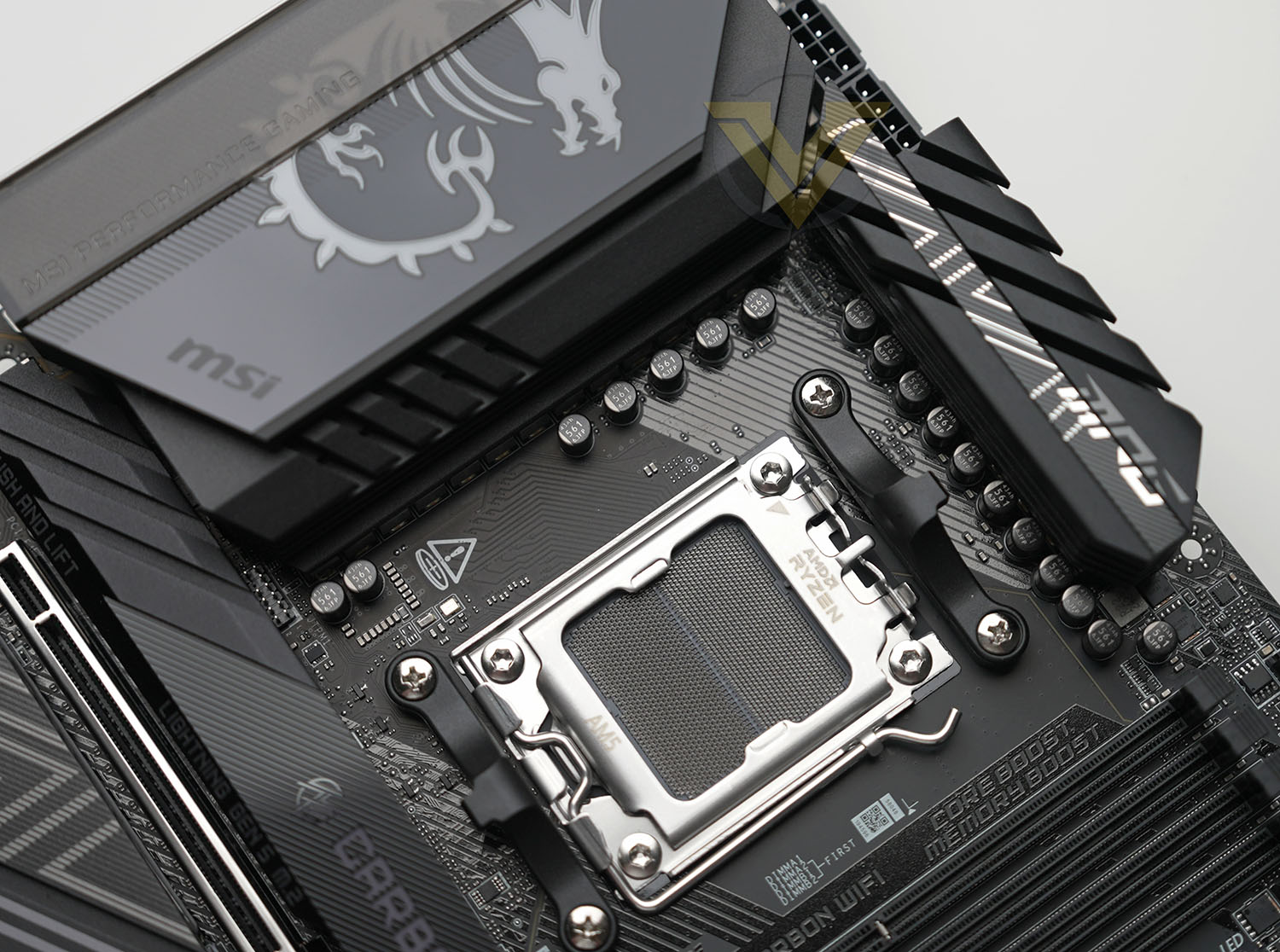
A clear zone around the AM5 socket is the fruits of lessons learned from the last generation, and as such clearance for larger air coolers shouldn’t be an issue. Two 8-pin EPS 12V connectors in the top-right and 18-phase (18+2+1) power circuitry supply power direct to the CPU while a pair of thick heatsinks help to cool VRMs that will become very hot under the heaviest loads. Without active cooling the heatsinks would benefit from incidental air flow inside the chassis.
Alongside the top edge and above the four DIMM slots are three 4-pin PWM fans, joined by a fourth just around the corner. These are designated for CPU, Water Pump, System Fan1 and System Fan2, and they appear to be standard 12V/1A (12W) headers. They’re ideally located for cable management so shouldn’t pose much of a problem for even novice PC builders.
Continuing down the right edge we find a 3-pin 5V ARGB connector, EZ Debug LEDs to show simplified POST status, EZ Digi-Debug 2-digit LED for boot troubleshooting codes, 24-pin ATX power connector and EZ Conn-Header V2. The latter utilises the supplied 1 to 3 EZ Conn v3 cable to split out 4-pin PWM fan signalling, 3-pin 5V ARGB signalling and a USB 2.0 header to connect these devices behind the motherboard tray for cleaner cable management.
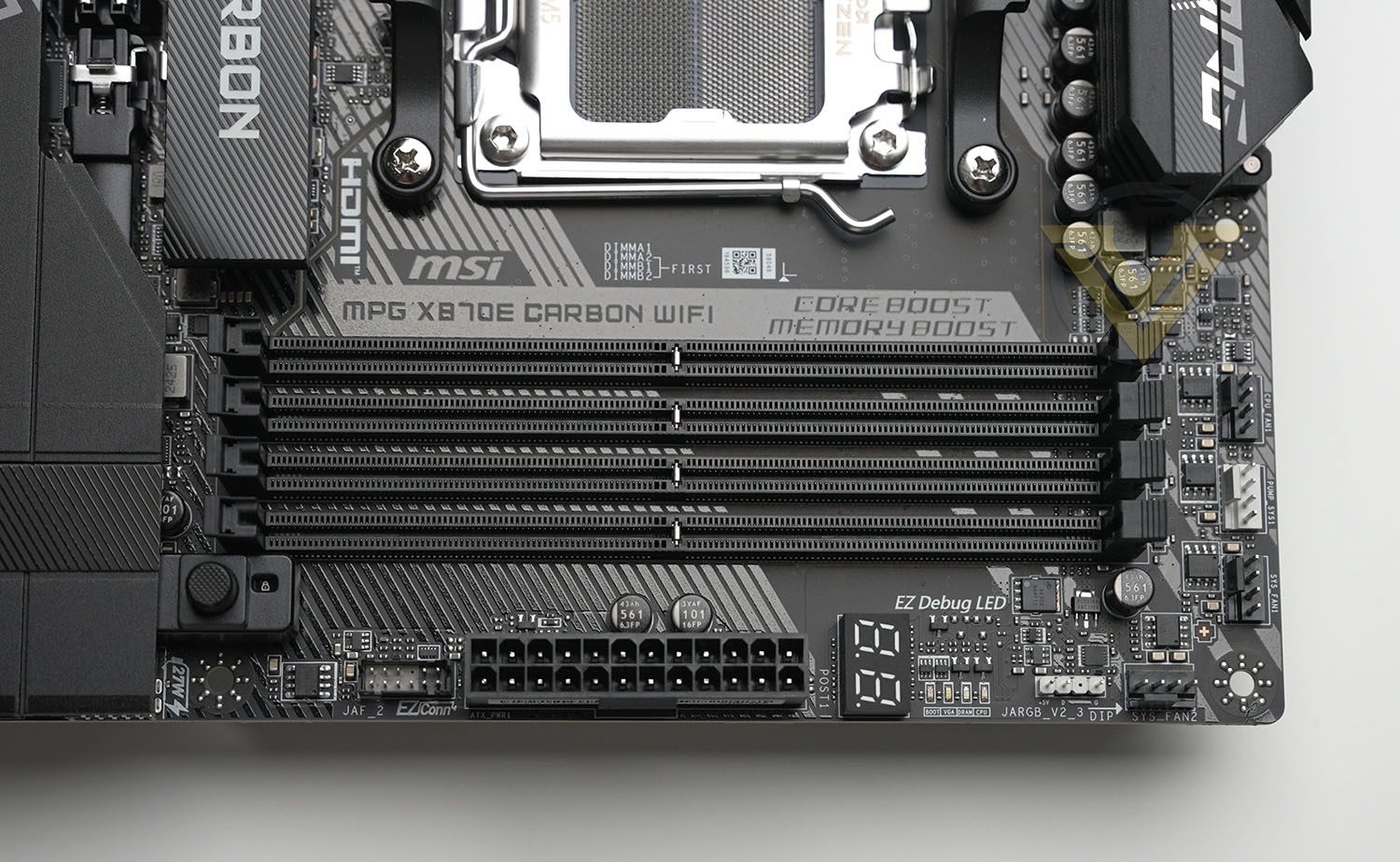
Note that some of the latest MSI CPU and system cooling hardware can interface with the EZ Conn-Header V2 natively.
Just to the left is the EZ PCIe Release button. Pressing this unlatches the card in the primary PCIe slot by pulling back a retention clip.
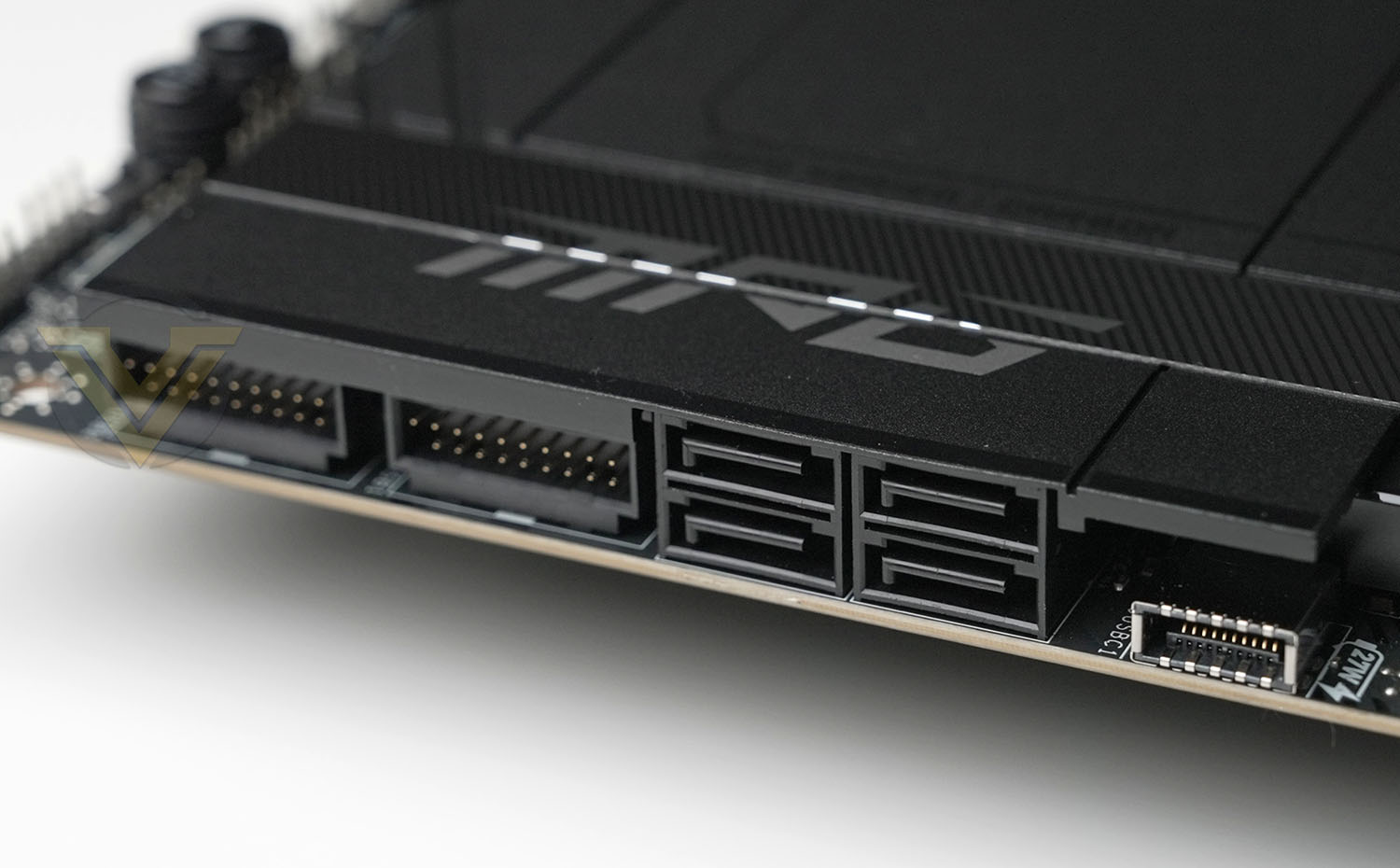
Mounted parallel to the motherboard are a further set of ports next to the PCH heatspreader. They are A USB Type C header for USB 3.2 Gen2x2 (20Gbps) connectivity, a bank of four SATA 3 ports, and two USB 3.2 Gen1 (5Gbps) headers. That’s a lot of I/O packed into a small area but by orienting this way cable management will be more straightforward.
Running along the bottom edge, from right to left, begins with the Front Panel header. You can plug front panel cables into this header directly or use the included EZ Front Panel Cable. This cable plugs into the header and breaks out individual header for each panel function, i.e. Power SW, Power LED, Reset SW etc. Hooking up your case front panel is therefore much easier and cleaner.
Next up is the Clear CMOS Jumper alongside which is a Safe Boot Jumper that will, when bridged, boot the system with default setting and lower CPU PCIe mode. Alongside them is a switch that will disable all LEDs on the motherboard, followed by surface-mounted Power and Reset switches for troubleshooting and use when installed on a test bench. A 3-pin 5V ARGB header and two USB 2.0 headers are next, then a 4-pin PWM system fan headers, the supplementary 8–pin PCIe power connector, and two more 4-pin PWM headers.
Rounding off this edge are a Temperature Sensor/Thermistor header, LED Power Connector (used for retail showcases without CPU installation), the final 3-pin 5V ARGB header, a 4-pin 12V RGB header, and last but not least a front panel audio header.
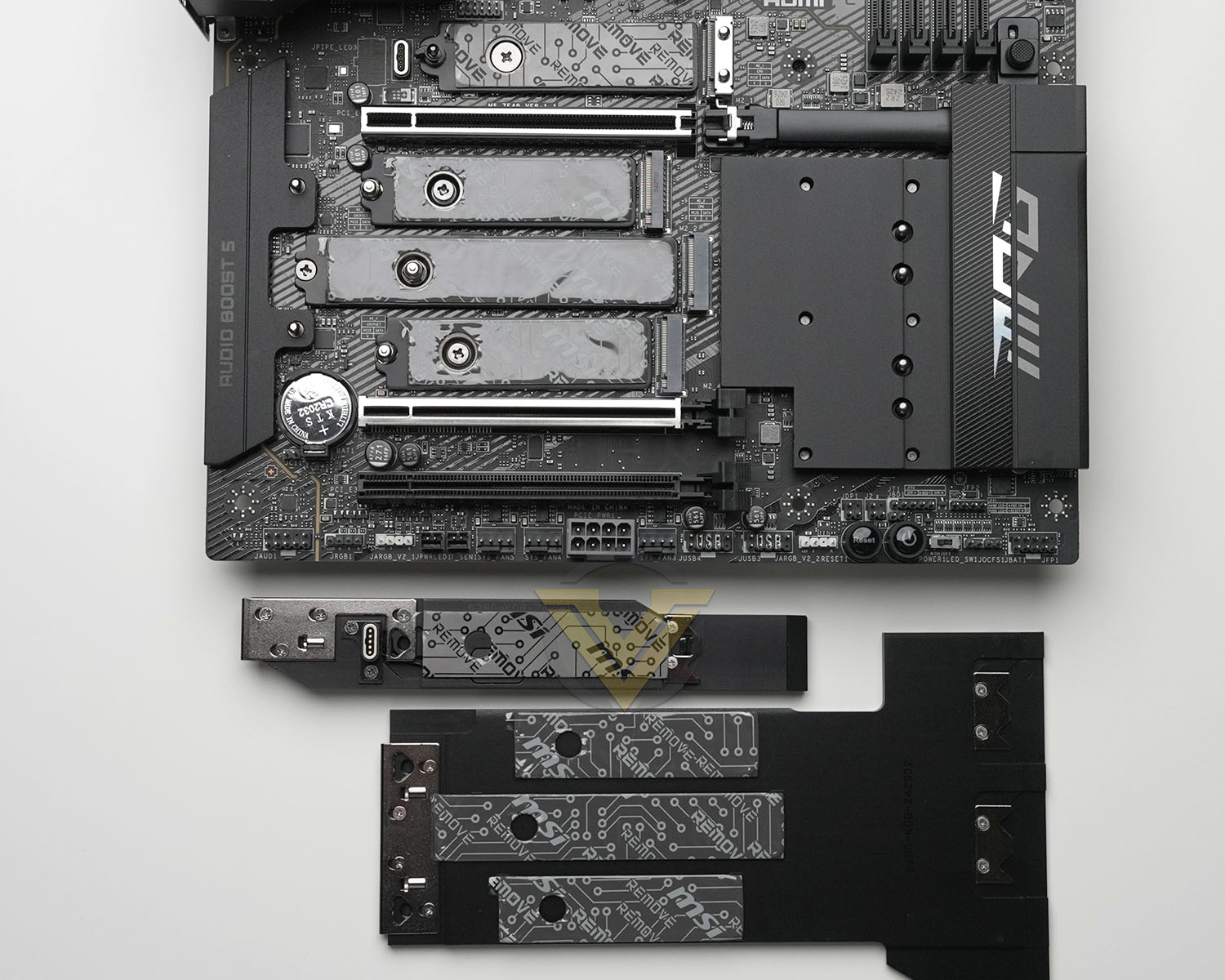
Turning our attention to the PCIe slot area, the M.2 slot at the top supports PCIe Gen5x4 signalling for NVMe SSDs in the 2280 or 2260 form factor. It, like the other three slots, has a metal heatspreader with thermal pad to aid in cooling the hot double-sided high-performance drives. This slot also features MSI’s EZ Clip II retention mechanism and toolless removal of the M.2 Shield Frozr heatspreading cover.
Below this is the PCI-Express 5.0 x16 slot with all sixteen lanes enabled. It has been reinforced to better support heavier GPUs but a supplementary brace may be sensible for the largest of cards.
Next is the bank of three M.2 slots, the topmost of which supports PCIe Gen5x4 signalling that’s shared with the first and second PCIe slots. Populating this slot, labelled M.2_2, will cause the primary PCIe slot to operate in x8 mode. The other two drives support PCIe Gen4x4 off the chipset PCH, and the middle drive can accommodate long 22110 form factor M.2 drives.
The second PCIe slot is wired for x4 operation and shares PCI-Express 5.0 signalling with the primary slot and M.2_2. Populating this slot will cause the primary PCIe slot to operate in x8 mode.
The third PCIe slot supports four PCIe 4.0 lanes off the chipset, and would be ideal for single slot expansion cards. MSI have also covered most of the Audio components with a metal cover, matching the aesthetics of the rest of the motherboard. While unlikely to shield it further from electrical noise, it certainly cleans up this typically untidy zone.
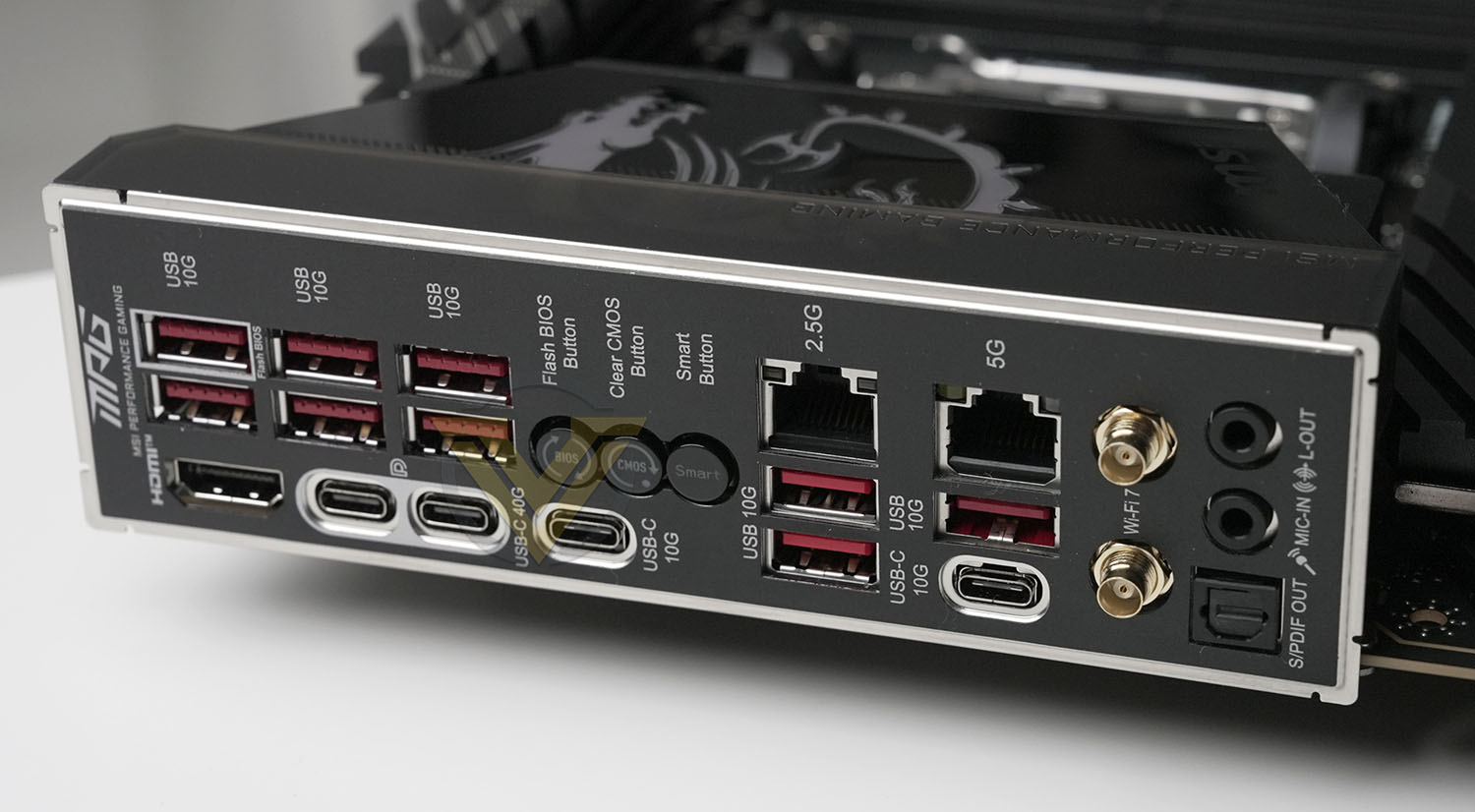
MSI pre-install the I/O shield, removing a whole lot of aggravation from installation into a case. The rear I/O provided is as follows:
– 2x USB 10Gbps Type A ports (From X870E Chipset, includes Flash BIOS port)
– 4x USB 10Gbps Type A ports (From RTS5420 controller hub)
– 1x HDMI port
– 2x USB4 40Gbps Type-C ports (From ASMedia ASM4242 USB4 controller)
– 1x USB 10Gbps Type C port (From CPU)
– 1x Clear CMOS Button
– 1x Flash BIOS Button
– 1x Smart Button
– 1x 2.5G LAN (RJ45) port
– 2x USB 10Gbps Type A ports (From X870E Chipset)
– 1x 5G LAN (RJ45) port
– 1x USB 10Gbps Type C port (From X870E Chipset)
– 1x USB 10Gbps Type A port (From CPU)
– 2x Wi-Fi antenna connectors
– 2x audio jacks (Mic In, Line Out)
– 1x Optical S/PDIF Out connector
– 4x USB 10Gbps Type A ports (From RTS5420 controller hub)
– 1x HDMI port
– 2x USB4 40Gbps Type-C ports (From ASMedia ASM4242 USB4 controller)
– 1x USB 10Gbps Type C port (From CPU)
– 1x Clear CMOS Button
– 1x Flash BIOS Button
– 1x Smart Button
– 1x 2.5G LAN (RJ45) port
– 2x USB 10Gbps Type A ports (From X870E Chipset)
– 1x 5G LAN (RJ45) port
– 1x USB 10Gbps Type C port (From X870E Chipset)
– 1x USB 10Gbps Type A port (From CPU)
– 2x Wi-Fi antenna connectors
– 2x audio jacks (Mic In, Line Out)
– 1x Optical S/PDIF Out connector
We’ll call out dual wired LAN capabilities here. It may not be a 10Gbps port, but the ability to utilise 5Gbps and 2.5Gbps links simultaneously adds wired networking flexibility that’s increasingly uncommon thanks to the rise of on-board WiFi 6 support. Something for niche users only perhaps, but still very welcome.
Smart Button
There are 4 functions for the smart button which can be changed through the UEFI BIOS.
Reset (default) – press the smart button to reset the system.
Mystic Light on/ off – press the smart button to turn on/ off all the onboard LEDs. The Mystic Light on/ off function mode is unavailable when the LED_SW1 (EZ LED Control) switch turns OFF.
Safe Boot – press and hold the smart button while simultaneously starting the system to enter Safe Boot mode. This will boot the system with default settings and lower the PCIe mode associated with the CPU.
Turbo Fan – pressing the smart button synchronises the fan speed of all fans. The fan speed can be synchronised to full speed or default speed.
Mystic Light on/ off – press the smart button to turn on/ off all the onboard LEDs. The Mystic Light on/ off function mode is unavailable when the LED_SW1 (EZ LED Control) switch turns OFF.
Safe Boot – press and hold the smart button while simultaneously starting the system to enter Safe Boot mode. This will boot the system with default settings and lower the PCIe mode associated with the CPU.
Turbo Fan – pressing the smart button synchronises the fan speed of all fans. The fan speed can be synchronised to full speed or default speed.
This overview of the platform’s features showcases the user-first approach MSI have taken. The X870E CARBON WIFI is feature-rich for enthusiasts and designed to make operating it as simple as possible despite spending most of its time locked away in a PC case. I/O is ample for all but the most demanding of use cases, and only in power delivery does it fall short versus some competitors. Even here, it’s perfectly well positioned for gaming, productivity and general-purpose use with all of AMD’s Ryzen 9000-series.
Test Setup & Methodology
Notes: We’ve revamped our benchmark regime by removing a number of tests which reveal little, to no difference between each motherboard model. Gaming performance is one such area which has been removed due to the inability for each motherboard to offer any advantage over another. Instead, we have focussed on meaningful/tangible analysis which examines the VRM/chipset design, and the storage performance which will be far more informative to the end user.
TEST SETUP
CPU AMD Ryzen 9 9900XCooling: Corsair Hydro Series H110i
Memory: 32GB Kingston FURY Renegade 7600 MHz
Storage: XPGX950 SATA SSD + Silicon Power XPower XS70
PSU: Corsair HX1050 80 Plus Gold Certified PSU
Monitor: AOC U2879VF
BENCHMARKS
PCMark 10 – Overall Extended ScoreSiSoftware SANDRA – SATA/PCIe Storage Tests
SiSoftware SANDRA – Overall System Score
OTHER SOFTWARE
Temperature Analysis: HWMonitorStress Testing Software: AIDA64 Stability Test
CPU Specification Monitoring: CPU-Z
Benchmarks: Power Consumption
In this first test we analyse the power efficiency from the wall for each motherboard (Minus the GPU). While each model uses the same chipset/platform, energy results can fluctuate between manufacturers due to the features and specifications that are integrated. First of all, for the idle tests the system is cold booted into Windows and no additional applications are executed – wattage is noted on the external energy monitor we use and then we open Aida64 stability test and execute a stress test, noting the highest reading on the monitor. Below are the results of this energy test.
Benchmarks: VRM & PCH Cooling
Each motherboard manufacturer designs their board with a unique set of heatsinks to cover key areas like the VRM/mosfets and the chipset itself. We load up Aida64 stability test again and perform a 20 minute run, recording the maximum value for both attributes.
Benchmarks: PCMark 10
PCMark 10 features a comprehensive set of tests that cover the wide variety of tasks performed in the modern workplace. With a range of performance tests, custom run options, and the new Battery Life Profile, PCMark 10 is the complete PC benchmark for the modern office.
Benchmarks: SATA Performance
In order to ascertain the SATA performance for our motherboards we use SiSoftware SANDRA and the File System Bandwidth performance test. This allows us to obtain the sequential read/write transfer rates for the drive being tested – Crucial MX300 SSD.
Benchmarks: PCIe M.2 Performance
In order to ascertain the PCIe M.2 performance for our motherboards we use SiSoftware SANDRA and the File System Bandwidth performance test. This allows us to obtain the sequential read/write transfer rates for the drive being tested – Kingston KC2500.
Benchmarks: Overall Computer Score
In our last test we observe the Overall Computer Score supplied by SANDRA. This test is exhaustive, and is specifically designed for measuring a comprehensive score for the system, measured in kPT.
Conclusion
AMD’s X870 series – comprising both X870 and X870E motherboards – launches into multiple price tiers this week and the MSI MPG X870E CARBON WIFI’s segment is perhaps the most difficult to articulate. It’s not a high-end overclocker, and it’s certainly not an affordable gaming design. Mainstream might cover it, were it not for the $500 price tag. Perhaps ‘feature-rich content creation’ is the most appropriate, even if it does have a gaming flavour to it.
The great strength of MSI’s design is its usability. You’re not worried about form factor, there are toolless installation & removal options for both M.2 drive and GPU, you can enjoy a plethora of I/O options, and lighting customisation as the cherry on top. The premium touches can be appreciated by PC building novices and enthusiasts alike, which is really the hallmark of a customer-focussed approach.
Typically, you might expect benchmark results to take a back-seat, but that doesn’t appear to be the case here. All the X870/E designs tested thus far (with reviews for two coming soon) are nip and tuck, with results generally separated by margins of error. So, for stock operation (which is the majority of use-cases within this segment) the CARBON WIFI performs adequately well.
We wouldn’t denigrate the overclocking capabilities of this SKU, but it’s clear that this wasn’t MSI’s focus. An 18-phase power delivery system is not exceptional for X870E, likely making it good for a modest processor/RAM overclock but not intended to take a CPU to the ragged edge. We’d be most happy for operation within standard PBO rules, particularly for the 16-core CPU models.
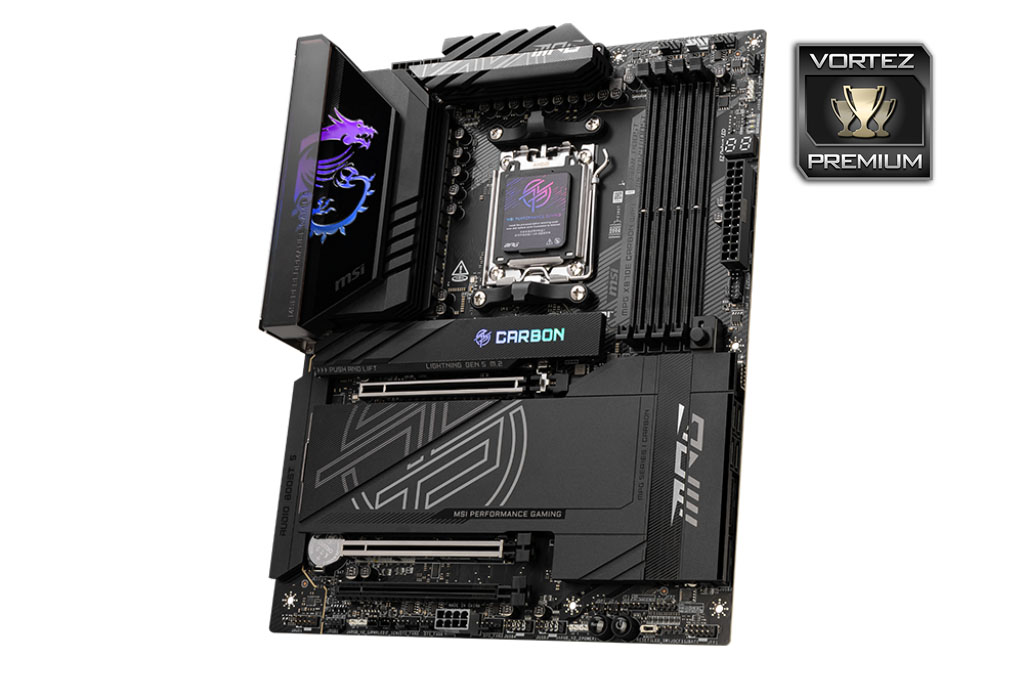
MSI’s EZ series of range-exclusive features are a mixed bag in general. The EZ PCIe Release for instance is simple but effective and we’re happy to see it included across the entirety of MSI’s 800-series. EZ Clip II is a nice toolless aid for the primary M.2 slot. The EZ Front panel header just makes life so much easier, particularly if your PC assembly space isn’t ideal. The EZ Conn header though, a proprietary unified pin-out for fan, RGB and USB? Let’s just say that it’s not really a selling point unless you’re also invested in MSI’s AIO cooling range.
Aesthetically, the motherboard is attractive though once again MSI could still learn that ‘less is more’ when it comes to showcase components. Toning down the branding and heatsink highlights while letting users gain more from personal lighting customisation would have been an interesting approach in this price band. We do however like the addition of a discrete LED on/off switch for those times when you’re getting into a long session at the keyboard and could do without the distraction.
We also welcome the return of two-digit LED debug displays to motherboards in this class and hope they extend down to more affordable segments and chipsets. No platform is safe from troubleshooting and so any help you can give to the consumer should be positively received.
Can we recommend the MPG X870E CARBON WIFI? Yes, with qualifications.
If the additional I/O options afforded by the dual-chipset ‘E’ X870s are a factor, i.e. you’ll reasonably expect to utilise the additional USB4, USB 3.2 and SATA ports as well as the supplementary PCIe x4 off-chipset slot, they absolutely should be considered.
That being said, 600-series motherboards remain competitive if the additional platform functionality isn’t a factor in your use case. In effect, if USB4 and WiFi 7 aren’t features you’ll tap into, and an otherwise comparable 600-series ‘board is significantly cheaper, it’s fair to opt for the older model.
Otherwise, the MPG X870E CARBON WIFI is a very competent option for content creators and gamers with pretty deep pockets.
There’s a lot to like about MSI’s MPG X870E CARBON WIFI. While we wince at the $500 price tag, it has to be a great starting point for productive content creators and gamers who can leverage the full range of features that AMD’s X870E chipset and MSI’s proprietary know-how can offer.
Pros
+ Exceptional feature list
+ ‘EZ’ adaptations actually make installation and long-term use easier
+ Great I/O capabilities
+ up-to two PCIe Gen 5 M.2 NVMe slots
+ dual-LAN and WiFi 7 networking support
Cons
– Steep price
– No x8 operation mode on the 2nd PCIe slot
+ Exceptional feature list
+ ‘EZ’ adaptations actually make installation and long-term use easier
+ Great I/O capabilities
+ up-to two PCIe Gen 5 M.2 NVMe slots
+ dual-LAN and WiFi 7 networking support
Cons
– Steep price
– No x8 operation mode on the 2nd PCIe slot
Click here for an explanation of our awards at Vortez.net.
Stay connected with the Vortez Social Media pages:
Join in with the discussions on Discord