AMD’s X870 chipset arrives as X870’s slimmed down sibling, but can it hold a candle to the full-fat flagship when GIGABYTE’s at the helm?

Product on Review: X870 AORUS ELITE WIFI7
Manufacturer: GIGABYTE
Street Price:
– US: $289.99 excl. Tax
– UK: £269.99 inc. V.A.T.
– AUS: AUD$599 inc. Tax
Introduction
AMD’s X870 and X870E-series motherboards are now firmly ensconced at retailer as the primary partner for their latest Ryzen 9000-series CPUs, and the diversity in their lineup is finally clear. Starting with a selection of high performance designs and eventually extending down to mainstream and affordable product segments, the X870/E-series will be a broad top-to-bottom replacement for the X670-series beginning from as low as $200 and reaching the heights of truly premium design pricing going into 2025.
AMD’s B850 and B840 designs – mainstream and budget chipsets for AM5 motherboards – are scheduled for a later date and will fully round out the 800-series. Each will down-step the platform’s capabilities, typically through a reduction in available I/O and PCIe Lanes.
The 800-series continues AMD’s commitment to the AM5 platform, offering compatibility not only with ‘Zen 5’ Ryzen 9000-series processors but also 8000-series APUs and ‘Zen 4’ 7000-series chips. AM5 is expected to be a fixture in the market until at least 2027, indicating that these new designs will be compatible with processors launched at least three years from now. That’s in stark contrast to Intel, who will be sunsetting LGA1700 later this year after just two discrete processor architectural generations.
X870 is a more price-conscious performance desktop chipset, taking cues from both X870E and its 600-series predecessor. It utilises a single-controller solution rather than the dual-PCH of X870E, restricting its I/O capabilities but not PCI-Express lane performance. It’s tailored to those with conventional rather than exceptional peripheral and storage needs as a result.
The chipset has full PCIe 5.0 support for x16 and x8/x8 modes on the GPU alongside a single PCIe Gen5 x4 M.2 NVMe slot. Additional peripheral support is offered through the chipset’s general purpose PCIe lanes, typically through a plethora of M.2 NVMe storage and additional integrated I/O. In terms of sheer quantity, X870 motherboards support half the number of USB and SATA ports compared to X870E but are otherwise quite similar.
Clear improvements over X670 include improved memory support up to DDR5-8200 (OC) (GIGABYTE claim DDR5-8000(OC) support in the first BIOS revisions), a USB4 40 Gbps port as standard rather than an optional extra, and a more comprehensive CPU overclocking toolkit that augments software-based overclocking.
800-series motherboards are also some of the first to support WiFi 7 networking as standard. This allows the combination of multiple 2.4GHz, 5GHz and 6GHz bands into continuous data streams for higher realised bandwidth and better management of IoT environments.
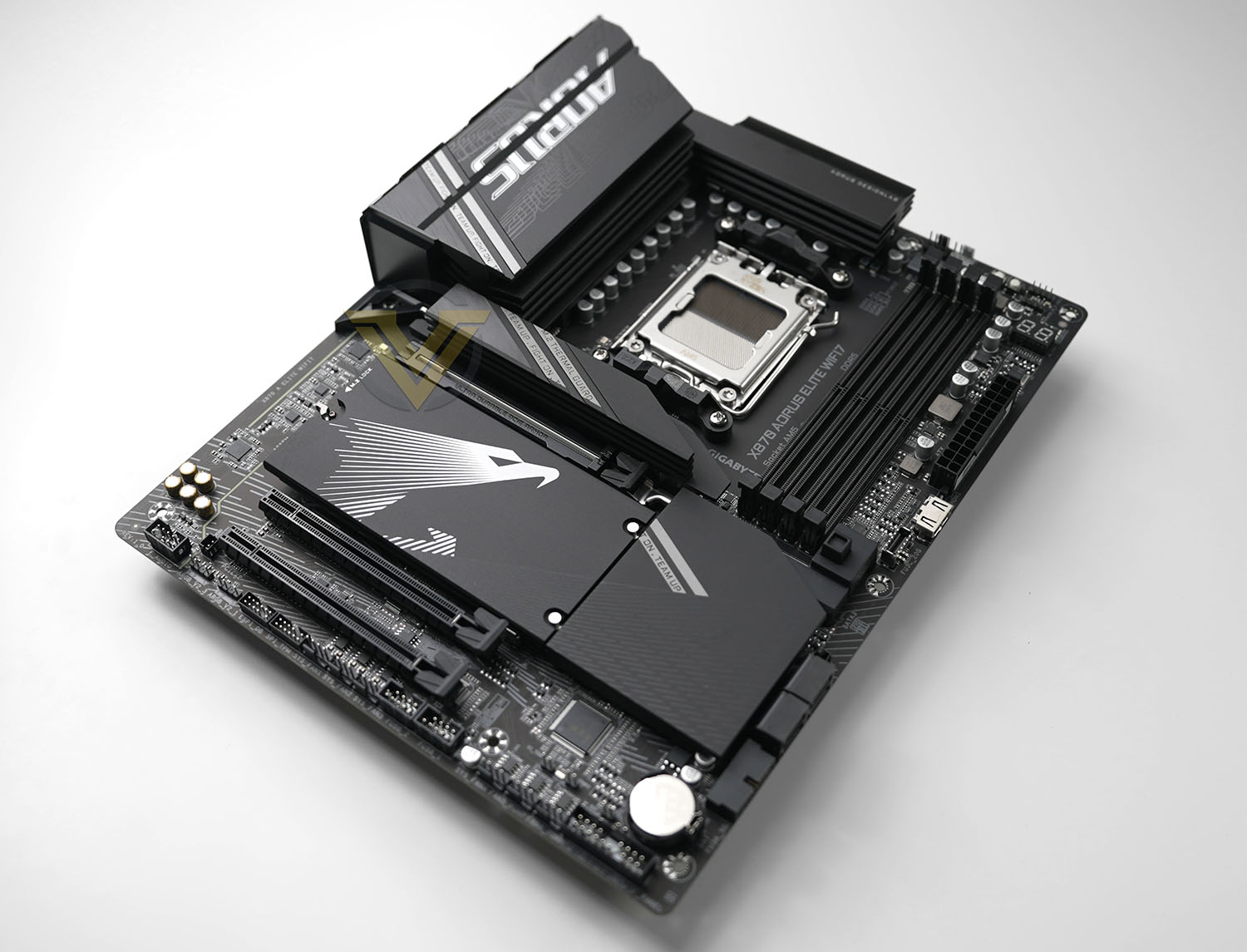
Today we’re reviewing GIGABYTE’s X870 AORUS ELITE WIFI7, their thus-far highest tier X870 motherboard and upper-echelon member of the wider X870 ecosystem. This attractive continuation of the ELITE class of motherboards adheres to the ATX form factor standard and is aimed firmly at gaming enthusiasts rather than hardcore overclockers or those with a need for significant peripheral provision.
The design features a relatively modest 16+2+2 DigiPhase power delivery system – plenty for CPUs operating within reference spec – and wide heatsink/heatspreader coverage for surface-mounted components. Aesthetically it’s one of the most restrained 800-series models thus far, helping it operate as more of a blank canvas for light-based customisation than its competitors.
In common with a few other manufacturers, GIGABYTE equipped the X870 AORUS ELITE with usability features for easy installation and post-purchase system upgrades. They’ve lept on the ‘EZ’ moniker to denote them, and this model includes Wifi EZ-Plug for antenna installation, EZ Latch to help with GPU/M.2 removal, and EZ Debug to aid troubleshooting.
Both WiFi 7 and Bluetooth 5.4 technologies are integrated into this model, the latter requiring Windows 11 24H2 for OS-level support. Audio is provided by Realtek ALC1220 Codec and audiophile grade capacitors. GIGABYTE’s proprietary RGB Fusion 2.0 LED lighting system controls the minimal on-board LED illumination and those supplied through the four additional RGB LED headers.
An additional feature which we believe is currently unique to GIGABYTE is an internal HDMI display-output header. While its use is flexible, GIGABYTE envision that it would be used by an internal screen (not included) that would display real-time sensor readouts.
This is our first look at X870 and we’re eager to see what the platform can offer. At $289.99 it’s certainly towards the high end of X870 models but nowhere near the $400+ premium tier currently occupied by some ASUS ROG Strix designs. That being said, there are also cheaper X870E models; they might not be as well-appointed as the AORUS ELITE but the added I/O might take USB peripheral provision from a tight squeeze to a generous allotment, even if it doesn’t look quite as attractive.
Technical Specifications
Socket:- AMD Socket AM5
CPU Support:- AMD Ryzen™ 9000/8000/7000 Series Processors
Chipset:- AMD X870
Form Factor:- ATX
Dimensions:- 30.5cm x 24.4cm
Memory:
– Support for up-to DDR5 8000(OC) / 5200 (JEDEC) MT/s memory modules
– 4 x DDR5 DIMM sockets supporting up to 256 GB (64 GB single DIMM capacity) of system memory
– Dual channel memory architecture
– Support for non-ECC Un-buffered DIMM 1Rx8/2Rx8/1Rx16 memory modules
– Support for AMD EXtended Profiles for Overclocking (AMD EXPO™) and Extreme Memory Profile (XMP) memory modules
Onboard Graphics:
Integrated Graphics Processor with AMD Radeon Graphics support+ASMedia USB4 Controller:
– 2 x USB4 USB Type-C ports, supporting USB4 and DisplayPort video outputs and a maximum resolution of 3840×2160@240 Hz (DP 1.4 & HDR)
Integrated Graphics Processor with AMD Radeon™ Graphics support:
– 1 x HDMI port, supporting a maximum resolution of 4096×2160@60 Hz
* Support for HDMI 2.1 version, HDCP 2.3, and HDR.
** Support native HDMI 2.1 TMDS compatible ports.
– 1 x front HDMI port, supporting a maximum resolution of 1920×1080@30 Hz
Audio:
– Realtek® ALC1220 CODEC
– High Definition Audio; 2/4/5.1/7.1-channel (software controlled)
– Support for S/PDIF Out
Networking
– Realtek® 2.5GbE LAN chip (2.5 Gbps/1 Gbps/100 Mbps)
Wireless Communication module
MediaTek Wi-Fi 7 MT7925 (PCB rev. 1.0):
– WIFI a, b, g, n, ac, ax, supporting 2.4/5/6 GHz carrier frequency bands
– BLUETOOTH 5.4
– Support for 802.11be (WiFi 7) 160MHz wireless standard
Realtek® Wi-Fi 7 RTL8922AE (PCB rev. 1.1):
– WIFI a, b, g, n, ac, ax, supporting 2.4/5/6 GHz carrier frequency bands
– BLUETOOTH 5.4
– Support for 802.11be (WiFi 7) 160MHz wireless standard
Expansion Slots
Off-CPU:
– 1 x PCI Express x16 slot (PCIEX16), integrated in the CPU:
– AMD Ryzen™ 9000/7000 Series Processors support PCIe 5.0 x16 mode
Chipset:
– 1 x PCI Express x16 slot, supporting PCIe 4.0 and running at x4 (PCIEX4)
– 1 x PCI Express x16 slot, supporting PCIe 3.0 and running at x2 (PCIEX2)
Storage Interface
– 1 x M.2 connector (M2A_CPU), integrated in the CPU, supporting Socket 3, M key, type 25110/22110/2580/2280 SSDs:
– 2 x M.2 connectors (M2B_CPU, M2C_CPU), integrated in the CPU, supporting Socket 3, M key, type 22110/2280 SSDs:
– 1 x M.2 connector (M2D_SB), integrated in the Chipset, supporting Socket 3, M key, type 22110/2280 PCIe 4.0 x4/x2 SSDs
– 4 x SATA 6Gb/s connectors RAID 0, RAID 1, RAID 5 (9000-series only), and RAID 10 support for NVMe SSD storage devices
USB:
– 2 x USB4 USB Type-C ports on the back panel
– 4 x USB 3.2 Gen 1 ports on the back panel
– 4 x USB 2.0/1.1 ports on the back panel
– 1 x USB Type-C port with USB 3.2 Gen 2×2 support, available through the internal USB header
– 2 x USB 3.2 Gen 2 Type-A ports (red) on the back panel
– 2 x USB 3.2 Gen 1 ports available through the internal USB header
– 4 x USB 2.0/1.1 ports available through the internal USB headers
Internal I/O Connectors:
– 1 x 24-pin ATX main power connector
– 2 x 8-pin ATX 12V power connectors
– 1 x CPU fan header
– 1 x CPU fan/water cooling pump header
– 4 x system fan headers
– 2 x system fan/water cooling pump headers
– 3 x addressable RGB Gen2 LED strip headers
– 1 x RGB LED strip header
– 4 x M.2 Socket 3 connectors
– 4 x SATA 6Gb/s connectors
– 1 x front panel header
– 1 x front panel audio header
– 1 x USB Type-C® header, with USB 3.2 Gen 2×2 support
– 1 x USB 3.2 Gen 1 header
– 2 x USB 2.0/1.1 headers
– 1 x noise detection header
– 1 x Trusted Platform Module header (For the GC-TPM2.0 SPI/GC-TPM2.0 SPI 2.0/GC-TPM2.0 SPI V2 module only)
– 1 x HDMI port (Note)
– 1 x power button
– 1 x reset button
– 2 x temperature sensor headers
– 1 x reset jumper
– 1 x Clear CMOS jumper
Back Panel Connectors
– 1 x Q-Flash Plus button
– 1 x HDMI port (Note)
– 2 x antenna connectors (2T2R)
– 2 x USB4® USB Type-C® ports (DisplayPort (Note))
– 2 x USB 3.2 Gen 2 Type-A ports (red)
– 4 x USB 3.2 Gen 1 ports
– 4 x USB 2.0/1.1 ports
– 1 x RJ-45 port
– 1 x optical S/PDIF Out connector
– 2 x audio jacks
I/O Controller
– iTE® I/O Controller Chip
H/W Monitoring
– Voltage detection
– Temperature detection
– Fan speed detection
– Water cooling flow rate detection
– Fan fail warning
– Fan speed control
– Noise detection
BIOS
– 1 x 256 Mbit flash
Unique Features
– Support for Q-Flash
– Support for Q-Flash Plus
– Support Smart Backup
– Bundled Software
– Norton® Internet Security (OEM version)
– LAN bandwidth management software
CPU Support:- AMD Ryzen™ 9000/8000/7000 Series Processors
Chipset:- AMD X870
Form Factor:- ATX
Dimensions:- 30.5cm x 24.4cm
Memory:
– Support for up-to DDR5 8000(OC) / 5200 (JEDEC) MT/s memory modules
– 4 x DDR5 DIMM sockets supporting up to 256 GB (64 GB single DIMM capacity) of system memory
– Dual channel memory architecture
– Support for non-ECC Un-buffered DIMM 1Rx8/2Rx8/1Rx16 memory modules
– Support for AMD EXtended Profiles for Overclocking (AMD EXPO™) and Extreme Memory Profile (XMP) memory modules
Onboard Graphics:
Integrated Graphics Processor with AMD Radeon Graphics support+ASMedia USB4 Controller:
– 2 x USB4 USB Type-C ports, supporting USB4 and DisplayPort video outputs and a maximum resolution of 3840×2160@240 Hz (DP 1.4 & HDR)
Integrated Graphics Processor with AMD Radeon™ Graphics support:
– 1 x HDMI port, supporting a maximum resolution of 4096×2160@60 Hz
* Support for HDMI 2.1 version, HDCP 2.3, and HDR.
** Support native HDMI 2.1 TMDS compatible ports.
– 1 x front HDMI port, supporting a maximum resolution of 1920×1080@30 Hz
Audio:
– Realtek® ALC1220 CODEC
– High Definition Audio; 2/4/5.1/7.1-channel (software controlled)
– Support for S/PDIF Out
Networking
– Realtek® 2.5GbE LAN chip (2.5 Gbps/1 Gbps/100 Mbps)
Wireless Communication module
MediaTek Wi-Fi 7 MT7925 (PCB rev. 1.0):
– WIFI a, b, g, n, ac, ax, supporting 2.4/5/6 GHz carrier frequency bands
– BLUETOOTH 5.4
– Support for 802.11be (WiFi 7) 160MHz wireless standard
Realtek® Wi-Fi 7 RTL8922AE (PCB rev. 1.1):
– WIFI a, b, g, n, ac, ax, supporting 2.4/5/6 GHz carrier frequency bands
– BLUETOOTH 5.4
– Support for 802.11be (WiFi 7) 160MHz wireless standard
Expansion Slots
Off-CPU:
– 1 x PCI Express x16 slot (PCIEX16), integrated in the CPU:
– AMD Ryzen™ 9000/7000 Series Processors support PCIe 5.0 x16 mode
Chipset:
– 1 x PCI Express x16 slot, supporting PCIe 4.0 and running at x4 (PCIEX4)
– 1 x PCI Express x16 slot, supporting PCIe 3.0 and running at x2 (PCIEX2)
Storage Interface
– 1 x M.2 connector (M2A_CPU), integrated in the CPU, supporting Socket 3, M key, type 25110/22110/2580/2280 SSDs:
– 2 x M.2 connectors (M2B_CPU, M2C_CPU), integrated in the CPU, supporting Socket 3, M key, type 22110/2280 SSDs:
– 1 x M.2 connector (M2D_SB), integrated in the Chipset, supporting Socket 3, M key, type 22110/2280 PCIe 4.0 x4/x2 SSDs
– 4 x SATA 6Gb/s connectors RAID 0, RAID 1, RAID 5 (9000-series only), and RAID 10 support for NVMe SSD storage devices
USB:
– 2 x USB4 USB Type-C ports on the back panel
– 4 x USB 3.2 Gen 1 ports on the back panel
– 4 x USB 2.0/1.1 ports on the back panel
– 1 x USB Type-C port with USB 3.2 Gen 2×2 support, available through the internal USB header
– 2 x USB 3.2 Gen 2 Type-A ports (red) on the back panel
– 2 x USB 3.2 Gen 1 ports available through the internal USB header
– 4 x USB 2.0/1.1 ports available through the internal USB headers
Internal I/O Connectors:
– 1 x 24-pin ATX main power connector
– 2 x 8-pin ATX 12V power connectors
– 1 x CPU fan header
– 1 x CPU fan/water cooling pump header
– 4 x system fan headers
– 2 x system fan/water cooling pump headers
– 3 x addressable RGB Gen2 LED strip headers
– 1 x RGB LED strip header
– 4 x M.2 Socket 3 connectors
– 4 x SATA 6Gb/s connectors
– 1 x front panel header
– 1 x front panel audio header
– 1 x USB Type-C® header, with USB 3.2 Gen 2×2 support
– 1 x USB 3.2 Gen 1 header
– 2 x USB 2.0/1.1 headers
– 1 x noise detection header
– 1 x Trusted Platform Module header (For the GC-TPM2.0 SPI/GC-TPM2.0 SPI 2.0/GC-TPM2.0 SPI V2 module only)
– 1 x HDMI port (Note)
– 1 x power button
– 1 x reset button
– 2 x temperature sensor headers
– 1 x reset jumper
– 1 x Clear CMOS jumper
Back Panel Connectors
– 1 x Q-Flash Plus button
– 1 x HDMI port (Note)
– 2 x antenna connectors (2T2R)
– 2 x USB4® USB Type-C® ports (DisplayPort (Note))
– 2 x USB 3.2 Gen 2 Type-A ports (red)
– 4 x USB 3.2 Gen 1 ports
– 4 x USB 2.0/1.1 ports
– 1 x RJ-45 port
– 1 x optical S/PDIF Out connector
– 2 x audio jacks
I/O Controller
– iTE® I/O Controller Chip
H/W Monitoring
– Voltage detection
– Temperature detection
– Fan speed detection
– Water cooling flow rate detection
– Fan fail warning
– Fan speed control
– Noise detection
BIOS
– 1 x 256 Mbit flash
Unique Features
– Support for Q-Flash
– Support for Q-Flash Plus
– Support Smart Backup
– Bundled Software
– Norton® Internet Security (OEM version)
– LAN bandwidth management software
The GIGABYTE X870 AORUS ELITE utilises a PCIe lane sharing system similar to other 800-series motherboards to juggle lane access between GPU and NVMe storage devices:
The secondary and tertiary M.2 slots (labelled M2B_CPU and M2B_CPU) share PCIe lanes with the x16 slot. Populating either or both of these two M.2 slots limits the main PCIe slot (*and thus the GPU) to x8 operation.
AMD’s Ryzen 8000-series APUs offer significantly reduced PCIe support from the CPU. Ryzen 8000 Series-Phoenix 1 Processors are limited to PCIe 4.0 x8 mode; Ryzen 8000 Series-Phoenix 2 Processors support PCIe 4.0 x4 mode.
The PCIEX4 slot shares bandwidth with the M2D_SB connector. This slot becomes unavailable when a device is installed in the M2D_SB connector.
AMD’s Ryzen 8000-series APUs offer significantly reduced PCIe support from the CPU. Ryzen 8000 Series-Phoenix 1 Processors are limited to PCIe 4.0 x8 mode; Ryzen 8000 Series-Phoenix 2 Processors support PCIe 4.0 x4 mode.
The PCIEX4 slot shares bandwidth with the M2D_SB connector. This slot becomes unavailable when a device is installed in the M2D_SB connector.
GIGABYTE 800-series motherboards support Q-FLASH BIOS updates as well as Q-FLASH PLUS, a means of updating the BIOS without CPU installed or when both main and backup BIOSes are partially corrupted. These are essential troubleshooting tools which will also prime you for future CPU updates should you fall behind BIOS revisions.
One addition to the X870 AORUS ELITE we haven’t seen elsewhere is the internal HDMI header that’s a variant of the Sensor-Panel Link seen on Intel 700-series motherboards. This display output supports 1920×1080 displays (1080p) at 30fps through HDMI rather than USB-C, and is intended for real-time sensor readouts. It requires a CPU with integrated graphics and is helped by 3rd party software that supports skins and overlays to discrete monitors.
Small 1080p30Hz panels cost around $40 and would also require supplementary power, likely via an internal USB header.
AMD 800-Series At-A-Glance
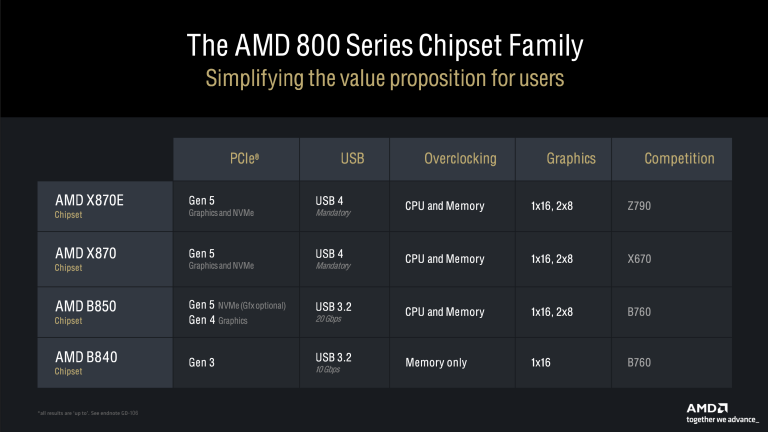
AMD’s 800-series is divided into four distinct chipsets for different market segments and use cases. It’s not as obtuse as the 600-series but there are still nuances to account for, thus ensuring that a system isn’t needlessly overspecced.
Members of the 800-series are built around the AM5 socket platform and support Ryzen 7000 and 9000 CPUs as well as 8000-series APUs. PCIe 5.0 lane allocation and supplementary I/O are the main delineating factors between the four 800-series chipsets.
X870E is the full-fat configuration that utilises two Platform Controller Hubs (PCHs) in concert for the platform ‘chipset’. It offers up-to 16 PCIe 5.0 lanes for the GPU (or, optionally, a 2×8 mode), four for the primary M.2 slot, and the final four reserved for the communication link between CPU and chipset. From the chipset an additional 20 general purpose PCIe lanes are available, putting the total (off-CPU + off-chipset) to 44.
X870 ‘non-E’ meanwhile still offers the same config PCIe 5.0 options for GPU and primary M.2, but fewer PCIe lanes are offered off-chipset due to having only one PCH.
As a dual-PCH chipset, X870E has the full gamut of platform I/O capabilities including two USB4 40Gbps ports, USB 3.2 Gen2x2 ports and as many as 8 SATA ports. The single-PCH X870 has up-to exactly half available in its base configuration, which nonetheless will still be plenty for most users. Motherboard manufacturers may offer additional I/O capabilities through auxiliary on-board controllers.
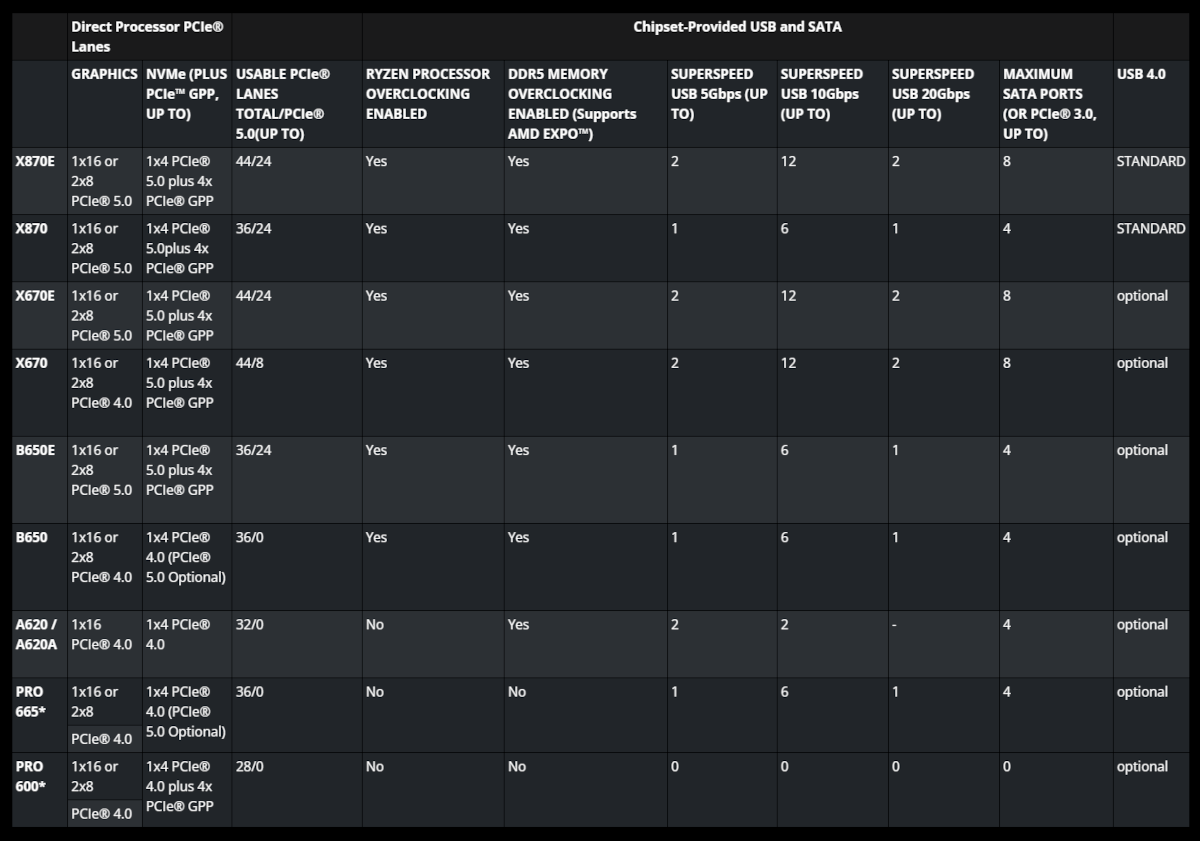
So, X870 if you really want PCIe 5.0 graphics and NVMe SSD support, X870E if you also want additional I/O options at a higher price. All X870 and X870E-series motherboards should support WiFi 7 (802.11be) as standard too.
B850 motherboards will be available later and take the platform capabilities down a step. PCIe 5.0 graphics are now optional but PCIe Gen5 NVMe SSD support is still assured. The exact makeup of advanced I/O is yet to be confirmed but we hope that both USB4 and WiFi 7 are regularly present on these designs.
There is no ‘E’ variant of the B850, eliminating a repeat of the somewhat muddled 600-series lineup caused by the presence of the B650E. That also means there will be no ‘affordable’ 800-series variants with the full range of I/O options for those who don’t need PCIe 5.0 GPU support.
B850 series motherboards will be stiff competition for X870 once released, particularly if their PCIe 5.0 support extended beyond just M.2 NVMe storage. Until then X870’s main competition is more affordable X870E boards and older 600-series designs.
B840 meanwhile is a cut-down budget board analogous to the older A-series design with support for only PCIe 3.0 graphics and NVMe SSD. It should generally be avoided except in very specific circumstances and will typically be a chipset exploited by OEMs and cheap System Integrator options.
We would be remiss to not mention that the old Curve Optimiser tool, which allowed Ryzen 7000-series processors to undervolt the CPU in a manner that was PMFW/PBO aware, has been depreciated. Instead, the 9000-series CPUs have access to a ‘Curve Shaper’ tool on 800-series motherboards to assign voltage margins in up-to 15 different frequency-temperature bands, allowing for finer control for voltage adjustment in bands that are stable and usable. Curve Shaper tables apply across all cores, and can also be shifted as a group by Curve Optimiser.
Packaging, Bundle and First Look
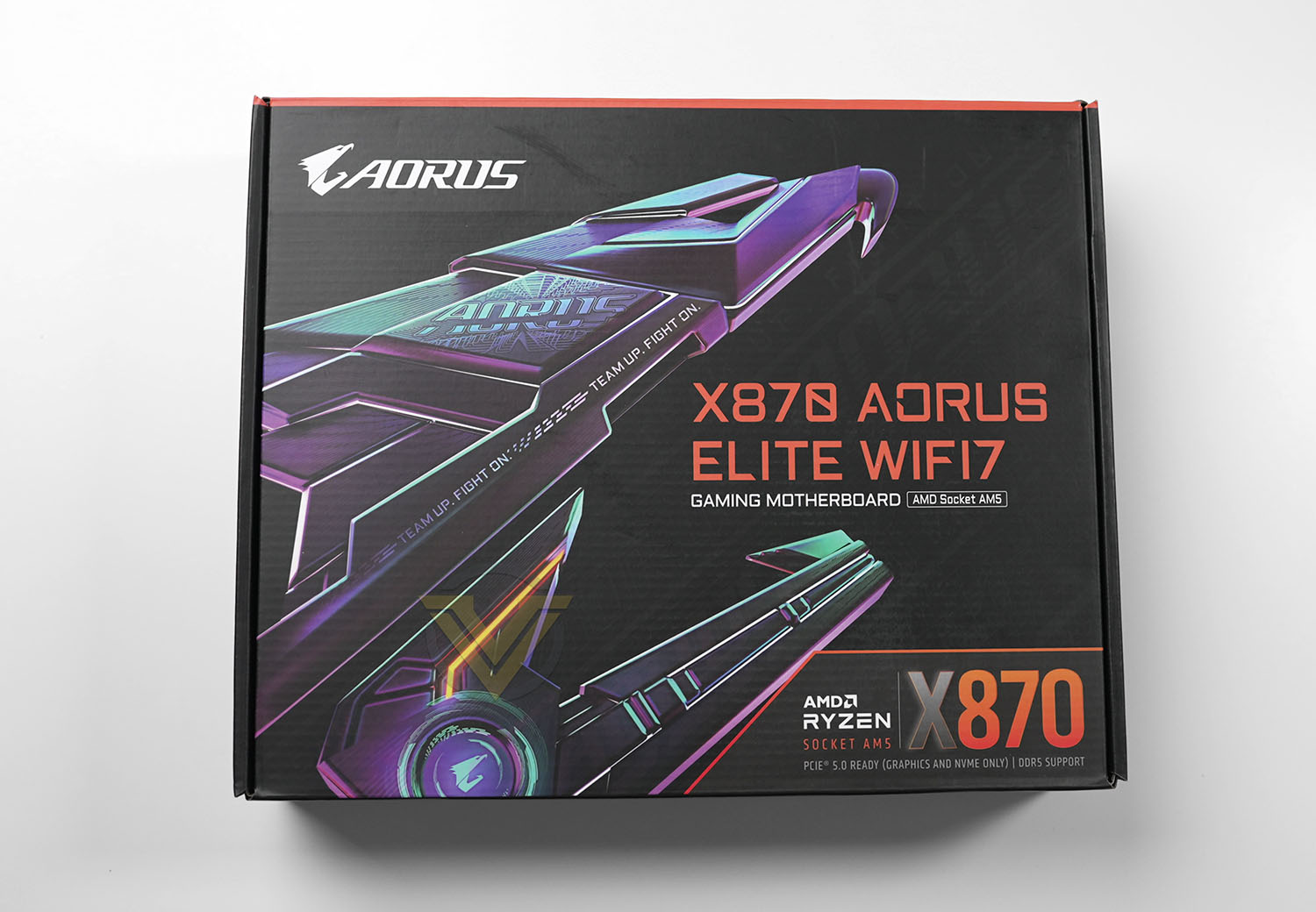
The Cyberpunk colour-scheme returns for the X870 AORUS ELITE WIFI7’s packaging, casting the stylised falcon head AORUS logo in a rather menacing light. It evokes the current AI marketing zeitgeist while being a little more attractive than just slapping the motherboard itself on the front.
GIGABYTE reference AMD Socket AM5, DDR5 memory and PCI-Express 5.0 compatibility on the front, but give very little else away in comparison to other brands. In this respect it feels like a product for display rather than a box for quick-reference in a warehouse.
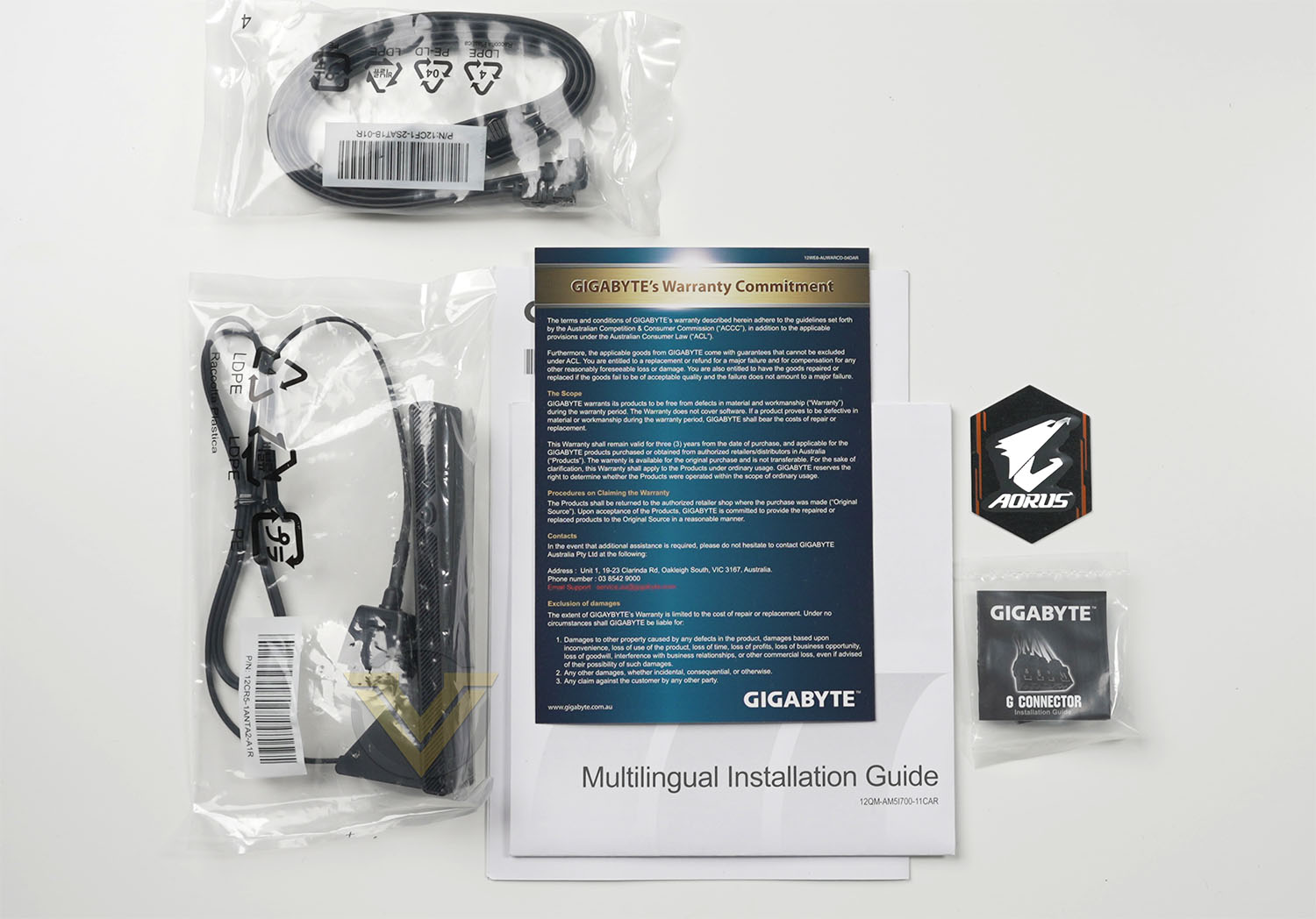
GIGABYTE’s included accessories are very sparse compared to the X870E designs we’ve looked at, despite its position in the X870 non-E lineup. Included are:
– Two SATA cables
– WiFi 7 high-gain antenna with EZ-Plug connector.
– G-Connector
– User Manual
– Warranty Information
– AORUS Sticker
– WiFi 7 high-gain antenna with EZ-Plug connector.
– G-Connector
– User Manual
– Warranty Information
– AORUS Sticker
They’re not exactly generous here but we do very much welcome the G-Connector. This handy little jumper block lets you attach the individual front panel cables (for power switch, reset switch, LED indicators etc.) to it first and then plug the whole block into the jumper array on the motherboard. It’s extremely useful and at a stroke eliminates a lot of frustration associated with putting a PC together.
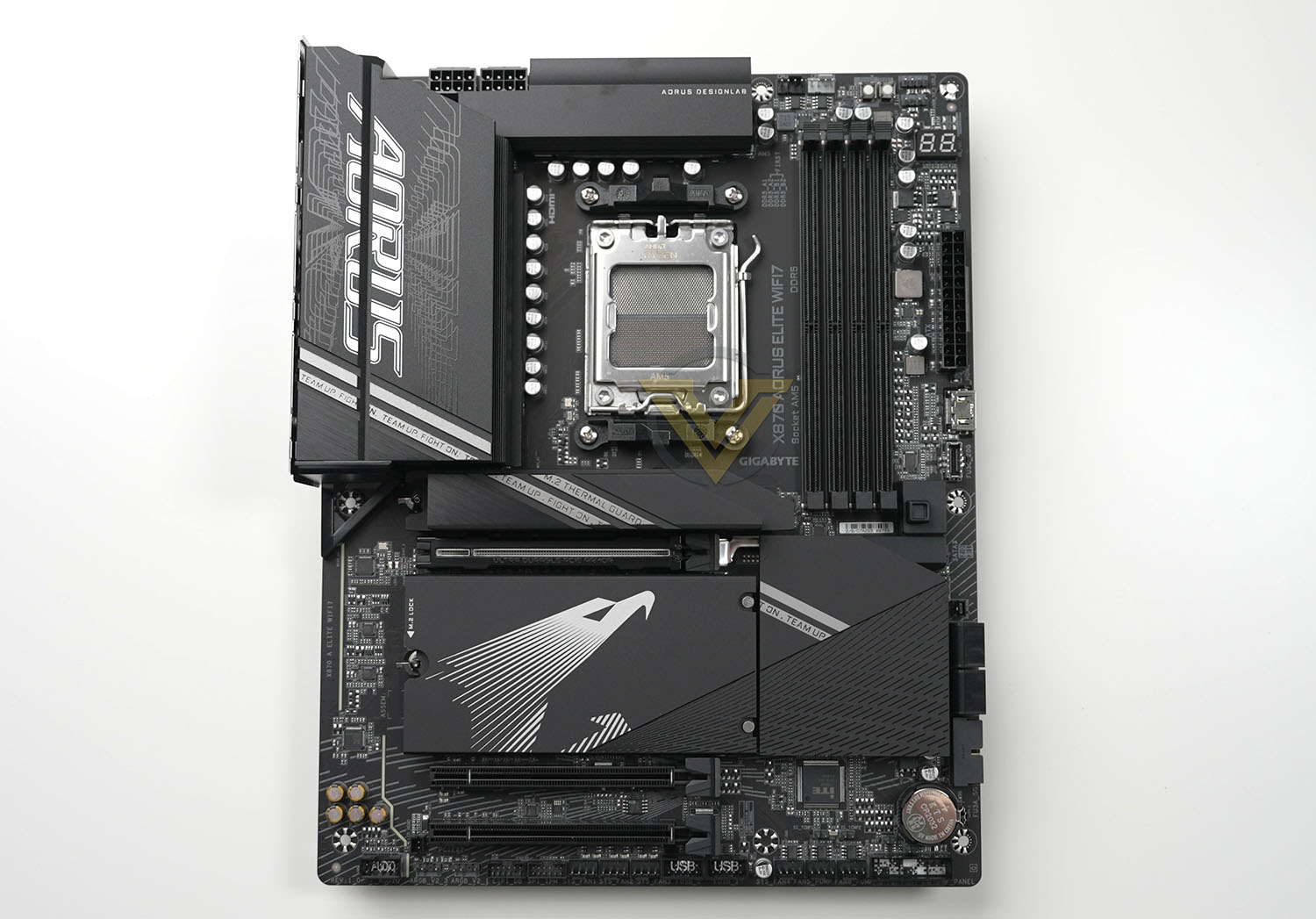
Here’s our first look at the X870 AORUS ELITE WiFi7 gaming motherboard. The sharp lines of this design seems to be a trend echoing throughout the X870/E product segment, leading to clean if potentially uninspired aesthetics that benefit from the artist flair of owners adding touches of customisation. That’s the case more so than most for the Elite; GIGABYTE has toned down the highlights significantly to just a small amount of branding on the heatsinks, despite the extensive heatsink/heatspreader board coverage.
A straightforward ATX footprint should mean that the motherboard is compatible with almost every ATX PC case on the market, though for a distinct minority of cases it’s possible that the edge-mounted SATA and USB 3 headers will cause some difficulty, dependent on cable management hole locations. There should be no compatibility issues with the plethora of AM5 coolers available today, those VRM heatsinks shouldn’t be tall enough to pose an issue.
Closer Look
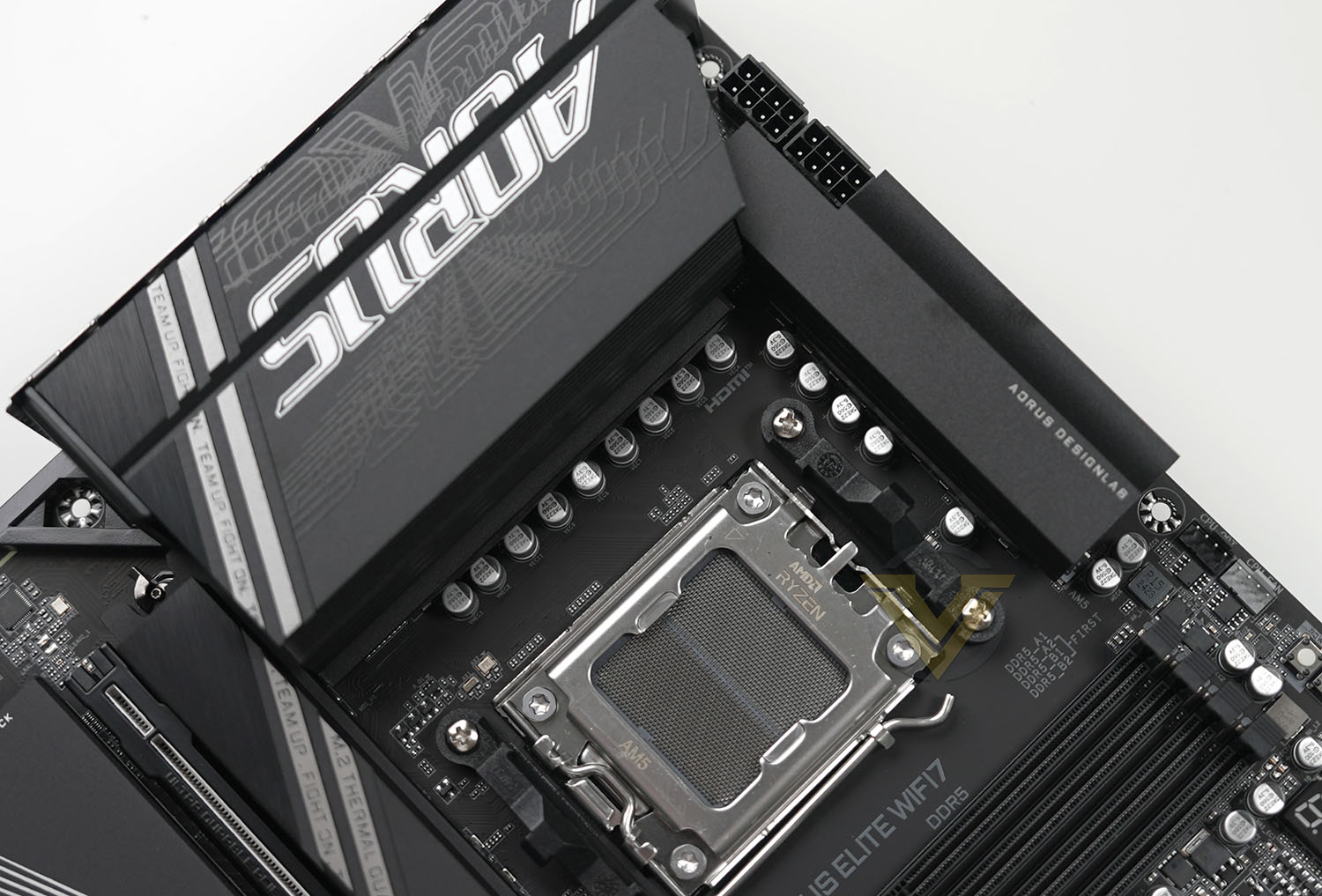
The X870 AORUS ELITE’s AM5 socket takes a standard position in the top-centre of the motherboard, surrounded on two sides by VRM heatsinks. The heatsinks channel air through them, and the rear I/O plate is perforated to allow air to escape. VRM temps will benefit from air flow directed by the CPU cooler, but it’s possible that the left-most heatsink and the area behind the I/O shield will become something of a dust trap.
The 16+2+2 phase power (16 CPU, 2 SOC, 2 Misc) is fed by two 8-pin EPS 12V connectors in their standard locations. Opposite them and above the DDR5 memory slots are two 4-pin fan headers for the CPU fan and AIO pump. Next to them are compact power and a reset switches, then 4-pin (12v) and 3-pin (5v) RGB/ARGB LED headers. GIGABYTE have also printed the recommended memory slot population guide on the PCB itself which is a nice touch.
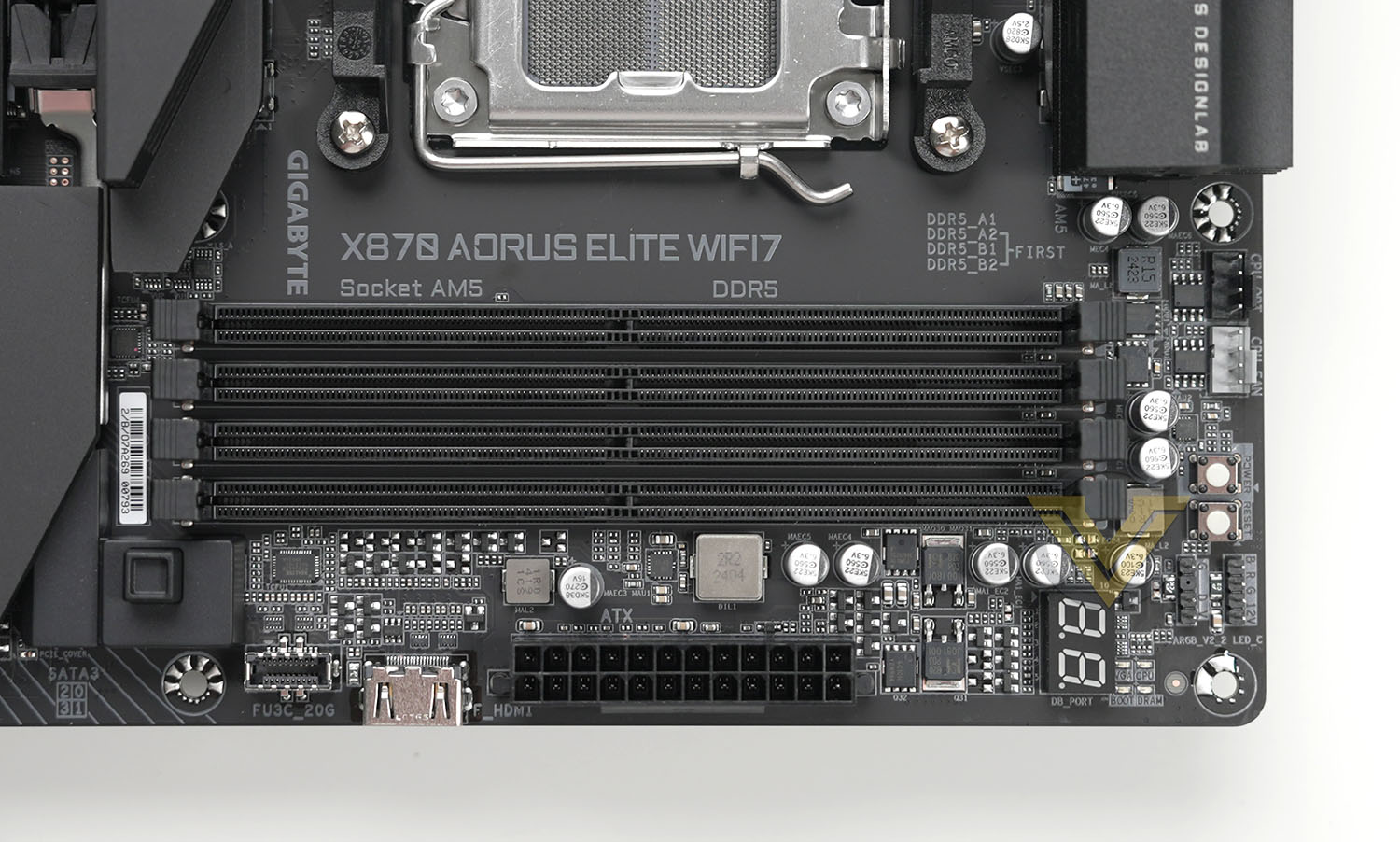
Coming down the right edge of the motherboard alongside the DIMM slots we start with the 2-digit debug display (for which GIGABYTE include error codes in the mobo. manual), 24–pin ATX power connector, internal HDMI port for small case-mounted displays and USB Type-C header (USB 3.2 Gen2x2 20Gbps). To the left at this point is the GIGABYTE EZ Latch for the main PCIe x16 slot, which releases the card latch for no-fuss GPU removal.
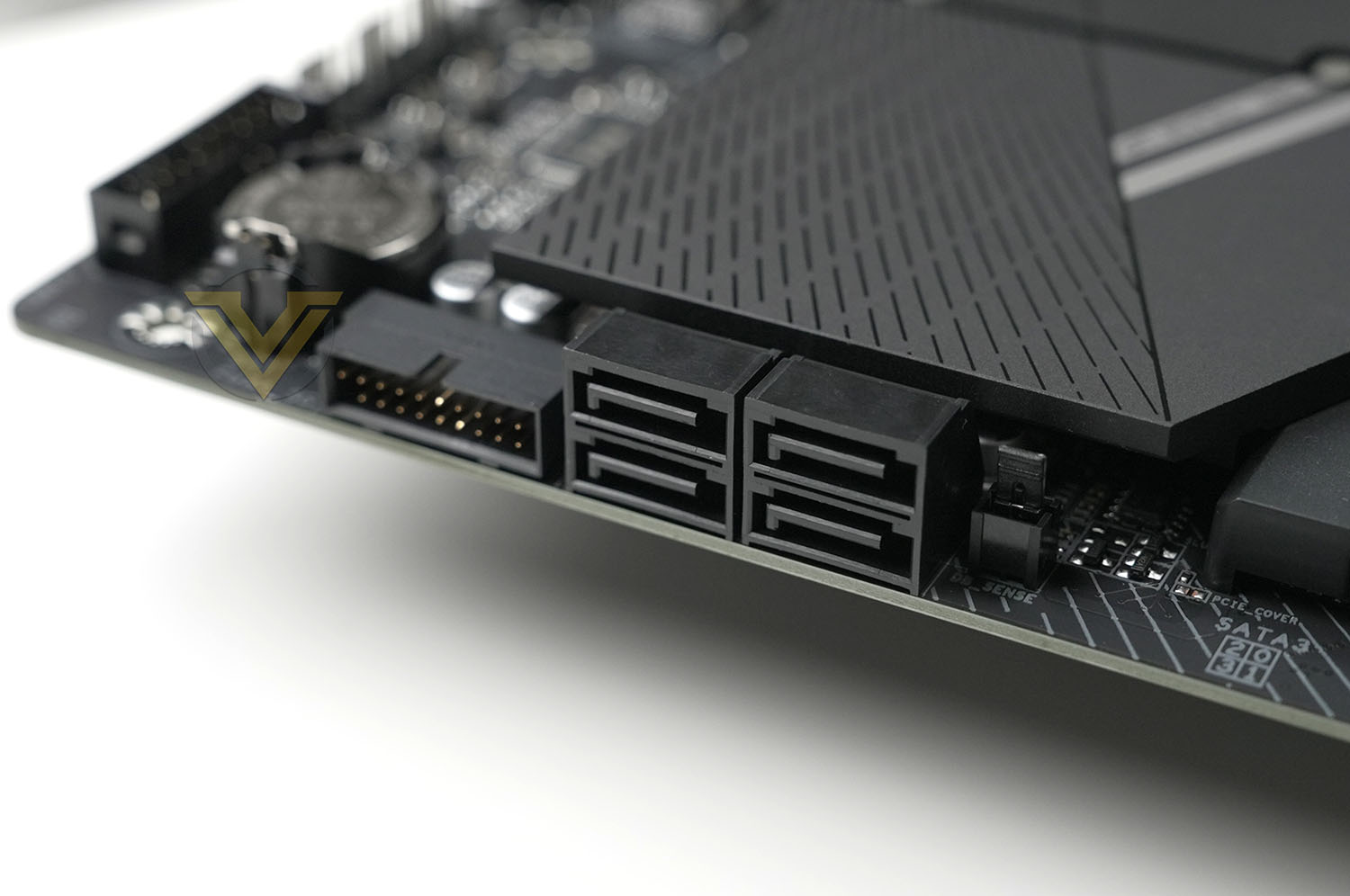
Hidden away next to the SATA ports is a 2-pin sensor header labelled ‘DB_Sense’, which the manual indicates can be used for some measure of fan control, but no additional information on the header’s purpose is listed. Next to it are four SATA III 6Gbps ports and a USB 3 port, edge-mounted for tidier cable management.
A small amount of RGB LED lighting is present on the bottom-edge of the chipset heatsink but that’s the sole nod to on-board customisation. The ARGB lighting headers, as well as other illuminated components, will be how this motherboard is personalised by each user.
Continuing around the bottom edge, from right to left, there is the front-panel header block just below the CMOS battery and reset jumper. The supplied G-Connector plugs directly into this, or front-panel Power, Reset and LED cables can be hooked up on an individual basis. We recommend using the G-Connector for obvious reasons.
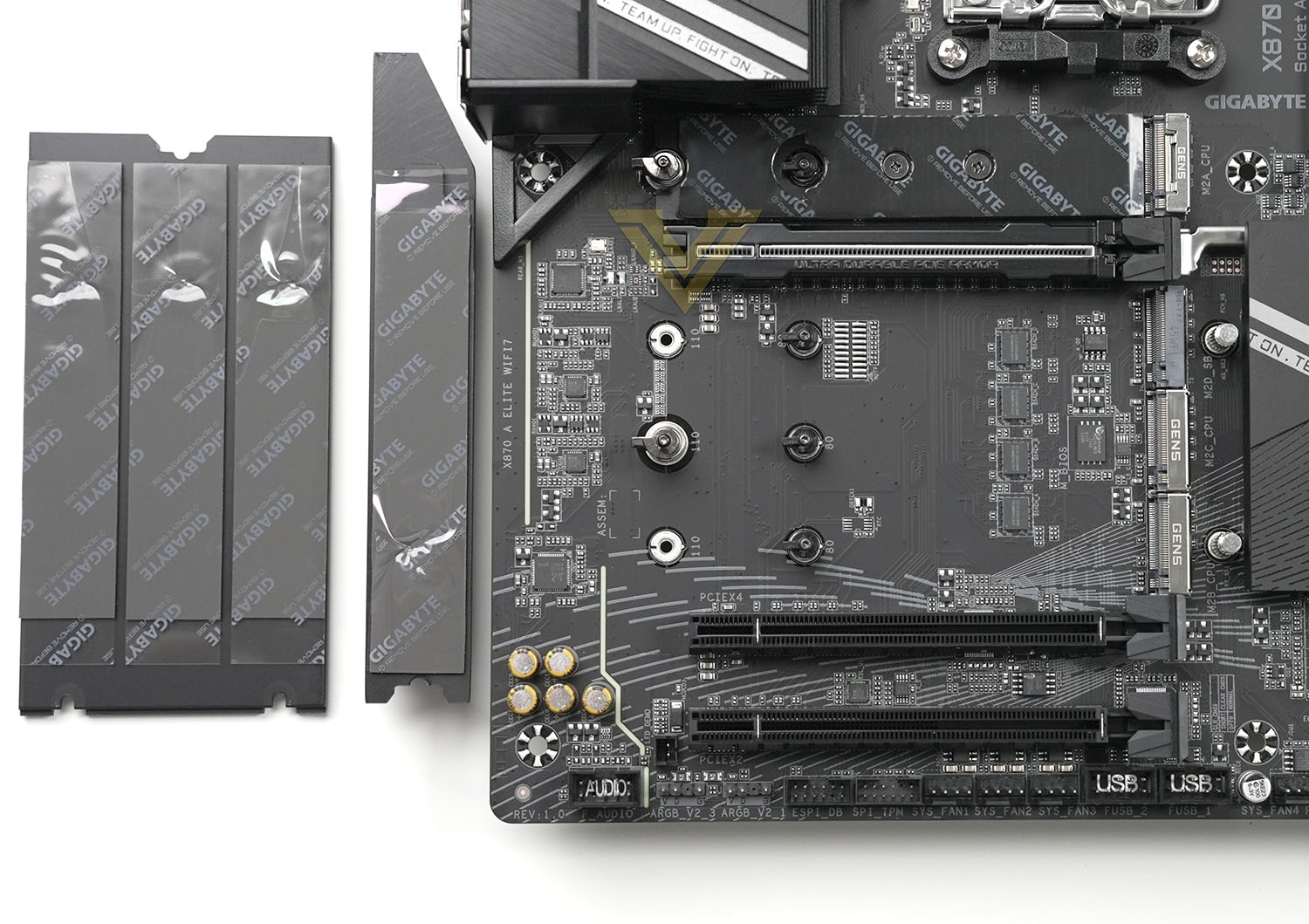
Next up are three 4-pin PWM fan headers just below the iTE controller chip and a pair of 2-pin temperature sensor headers, then two USB 2.0 headers, followed by a further three 4-pin fan headers. That’s a lot of fan headers congregating at the bottom of the motherboard, potentially leading to some long trailing leads; getting them behind the motherboard tray shouldn’t be too difficult though.
The TPM module header sits next to an eSPI debugging header (not really for consumer use), followed by two more 3-pin (5v) ARGB headers and finally a front panel audio header. Juse above the left ARGB header is a 2-pin jumper for demoing the on-board LED lighting without a CPU installed.
While not being ‘tricked out’, there’s a lot packed into this model’s ATX footprint. You get a lot of fan headers – eight in total – even if some are located less than optimally, and lighting headers are relatively plentiful too. The debugging features – from DeBug Display to surface-mounted power switches, are pleasant additions too on the off-chance an error occurs or the board spends a significant amount of time installed on a test bench.
With the heatspreaders removed the M.2 slots are exposed. The top-most slot is wired for PCIe Gen5x4 operation with four dedicated lanes off-CPU, supporting up-to 110mm-long and 25mm wide 25110 form factor M.2 NVMe SSDs. GIGABYTE are the only manufacturer we have come across thus far that supports up-to this larger M.2 drive footprint. A long thermal pad is installed between the drive and motherboard PCB to improve the heat dissipation of dual-sided high-performance drives.
This slot’s M.2 heatspreader is also composed of stacked metal layers with an air-gap in between, allowing it to dissipate heat more readily and cool high-performance PCIe Gen4/Gen5 SSDs.
Below is the reinforced PCIe x16 slot, supporting sixteen PCIe 5.0 lanes from the CPU. It shares eight of these with the 3rd and 4th M.2 slot, dropping down to x8 operation when either or both slots are populated.
The main PCIe slot is connected up to the EZ Latch system and strengthened to handle heavier graphics cards. The heaviest cards should still be supported by a brace or bracket to keep it level and not mechanically overload the slot with weight.
Of the bank of three M.2 slots, only the top-most is off the chipset. This PCIe Gen4 slot is shared with the middle PCIe x16 slot which is wired for PCIe 4.0 x4 operation. Each of the positions has a heatspreader with compressible thermal pads to draw heat away from the NAND chips on single-sided drives.
The bottom slot supports PCIe 3.0 x2 signalling, making it ideal for an additional network card or other peripheral device.
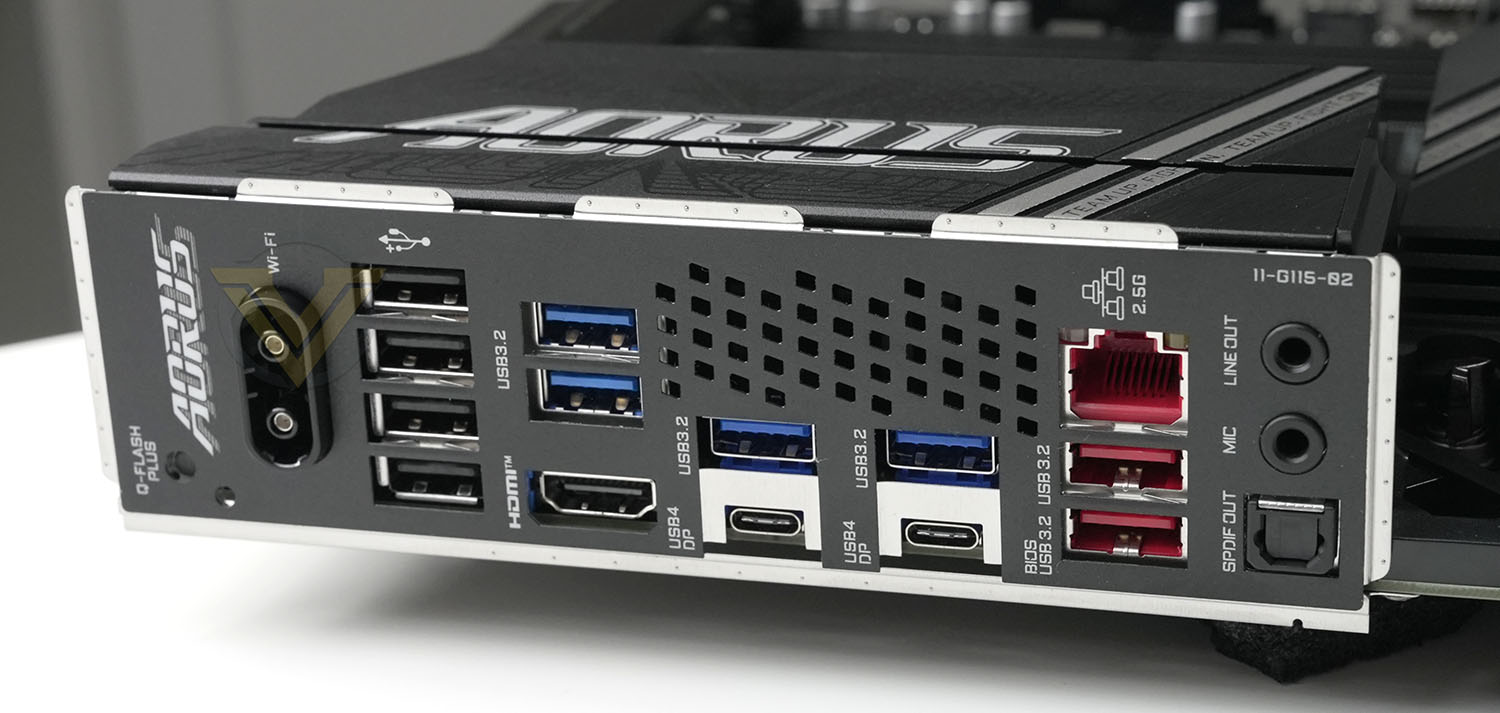
GIGABYTE have preinstalled the I/O shield, removing yet another system install pinch-point. Located on the rear I/O panel are:
– Q-FLASH PLUS Button: Updates the system BIOS without CPU, GPU or DRAM installed
– Antenna Connector (WiFi EZ Plus)
– Four USB 2.0 Ports
– Two USB 3.2 Gen 1 (5Gbps) Ports
– HDMI Port (HDMI 1.4 | HDCP 2.3 | 4K@60fps) for Ryzen iGPU
– Two USB 3.2 Gen1 (5Gbps) Ports (Blue)
– Two USB4 Type-C Port (White) (supports Displayport over USB signalling)
– RJ45 2.5Gb Ethernet Port
– Two USB 3.2 Gen 2 (10Gbps) Ports, the lower of which support Q-FLASH Plus function
– Audio Line Out/Mic In. Can be used combined with front audio ports for up-to 7.1 sound)
– SPDIF Out
– Antenna Connector (WiFi EZ Plus)
– Four USB 2.0 Ports
– Two USB 3.2 Gen 1 (5Gbps) Ports
– HDMI Port (HDMI 1.4 | HDCP 2.3 | 4K@60fps) for Ryzen iGPU
– Two USB 3.2 Gen1 (5Gbps) Ports (Blue)
– Two USB4 Type-C Port (White) (supports Displayport over USB signalling)
– RJ45 2.5Gb Ethernet Port
– Two USB 3.2 Gen 2 (10Gbps) Ports, the lower of which support Q-FLASH Plus function
– Audio Line Out/Mic In. Can be used combined with front audio ports for up-to 7.1 sound)
– SPDIF Out
GIGABYTE have specced the X870 AORUS ELITE WIFI7 to have two USB4 ports rather than just the standard single port that’s part of X870’s reference spec, which could certainly push the needle when it comes to adoption over the more expensive X870E designs. I/O provision is middle of the road otherwise, with sufficient USB 2 / 3.0 / 3.2 provision.
This motherboard’s WiFi antenna sockets are also non-standard and may not be compatible with standard high gain antenna. Such is sometimes the trade-off for the easy to install features.
The glaring omission is higher specc’d wired LAN support than 2.5GbE, necessitating upgrading your WiFI infrastructure to WiFi7 (802.11be) to enable faster transfer speeds. It’s not a dealbreaker for the vast majority of PC users, but something to consider if you hammer your LAN/wired internet and live or work in an environment unsuitable for full WiFi bandwidth utilisation.
Test Setup & Methodology
Notes: We’ve revamped our benchmark regime by removing a number of tests which reveal little, to no difference between each motherboard model. Gaming performance is one such area which has been removed due to the inability for each motherboard to offer any advantage over another. Instead, we have focussed on meaningful/tangible analysis which examines the VRM/chipset design, and the storage performance which will be far more informative to the end user.
TEST SETUP
CPU AMD Ryzen 9 9900XCooling: Corsair Hydro Series H110i
Memory: 32GB Kingston FURY Renegade 7600 MHz
Storage: XPGX950 SATA SSD + Silicon Power XPower XS70
PSU: Corsair HX1050 80 Plus Gold Certified PSU
Monitor: AOC U2879VF
BENCHMARKS
PCMark 10 – Overall Extended ScoreSiSoftware SANDRA – SATA/PCIe Storage Tests
SiSoftware SANDRA – Overall System Score
OTHER SOFTWARE
Temperature Analysis: HWMonitorStress Testing Software: AIDA64 Stability Test
CPU Specification Monitoring: CPU-Z
Benchmarks: Power Consumption
In this first test we analyse the power efficiency from the wall for each motherboard (Minus the GPU). While each model uses the same chipset/platform, energy results can fluctuate between manufacturers due to the features and specifications that are integrated. First of all, for the idle tests the system is cold booted into Windows and no additional applications are executed – wattage is noted on the external energy monitor we use and then we open Aida64 stability test and execute a stress test, noting the highest reading on the monitor. Below are the results of this energy test.
Benchmarks: VRM & PCH Cooling
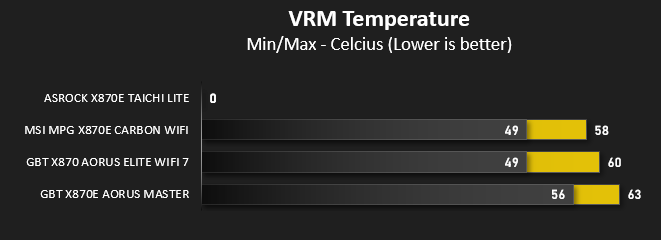
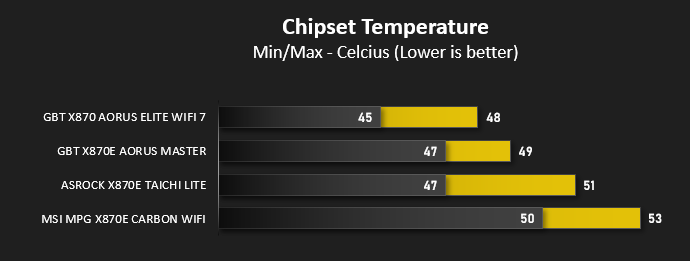
Each motherboard manufacturer designs their board with a unique set of heatsinks to cover key areas like the VRM/mosfets and the chipset itself. We load up Aida64 stability test again and perform a 20 minute run, recording the maximum value for both attributes.
Benchmarks: PCMark 10
PCMark 10 features a comprehensive set of tests that cover the wide variety of tasks performed in the modern workplace. With a range of performance tests, custom run options, and the new Battery Life Profile, PCMark 10 is the complete PC benchmark for the modern office.
Benchmarks: SATA Performance
In order to ascertain the SATA performance for our motherboards we use SiSoftware SANDRA and the File System Bandwidth performance test. This allows us to obtain the sequential read/write transfer rates for the drive being tested – Crucial MX300 SSD.
Benchmarks: PCIe M.2 Performance
In order to ascertain the PCIe M.2 performance for our motherboards we use SiSoftware SANDRA and the File System Bandwidth performance test. This allows us to obtain the sequential read/write transfer rates for the drive being tested – Kingston KC2500.
Benchmarks: Overall Computer Score
In our last test we observe the Overall Computer Score supplied by SANDRA. This test is exhaustive, and is specifically designed for measuring a comprehensive score for the system, measured in kPT.
Conclusion
Like the MSI X870E motherboard we reviewed last week, GIGABYTE’s X870 AORUS ELITE WIFI7 takes a very consumer-focussed approach that makes it supremely easy to work with. There’s a real sense of relief you experience when building a system is effectively hassle-free, something you notice most after building dozens, and so our gut instinct would be to give it a hearty recommendation… but let’s not get ahead of ourselves.Those looking to upgrade to the AM5 platform may have been worried that X870 would be a neutered version of X870, the ‘cheap version’ that would be merely a consolation prize. If this design is anything to go by then that couldn’t be further from the truth.
GIGABYTE have endowed this model with plenty of features both core and bespoke that speaks to plenty of care and attention, enough to easily make it an aspirational product for early adopters. It’s very likely that you will not need the full suite of I/O X870E provides, in which case the X870 AORUS ELITE WIFI7 is hardly a runners-up prize. WiFi 7 (802.11be) and USB 4 support gives it a measure of future-proofing that complements the extended life-span expected from AMD’s AM5 platform.
We’re increasingly pleased to see manufacturers roll out proprietary ease-of-use features that help with component installation, removal and eventual upgrades. GIGABYTE have done a great job with EZ Latch for PCIe and M.2, and we’re starting to side-eye premium motherboards that don’t have such features. The jury is out on WiFi EZ Plug however as it breaks compatibility with antenna socket standards, something that could be a concern long-term or if the stock antenna fails.
The X870 AORUS ELITE WIFI7 performed well in tests, keeping up with the X870E boards as expected. Temperatures were also good, though we should note that the chipset heatspreader only needs to handle one rather than two PCH chips.
This design isn’t, however, a model for extreme overclockers. Sixteen 60A phases are unexceptional in allowance in a world with 22-phase power delivery, and other features are good but clearly not optimised for repeated overclocking attempts. Consumer enthusiast overclockers should be quite happy with the tools available as well as auto-OC features, so long as they have modest expectations and maintain sufficient VRM cooling.
Meshing well with its overclocking bona fides nonetheless are troubleshooting tools that should set a fundamental standard on consumer designs. DeBug codes and CPU-less BIOS Flashing are both very valuable to end-users with some knowledge and eagerness to fix any problems they have, and should boost the platform’s longevity well past warranty deadlines.
A final feature we’d like to explicitly call out is the internal HDMI header for a mini sensor-display. We’re not quite sure exactly who would use this feature regularly but we appreciate that it exists, helping owners craft their perfect aesthetic with sensor data or dynamic display just a glance away.
Speaking of aesthetic, there’s something very pleasant about GIGABYTE’s toned-down approach to this model. It’s not completely free from AORUS branding but nonetheless strikes a good balance, helping users express their creativity rather than having the canvas dominate the piece.
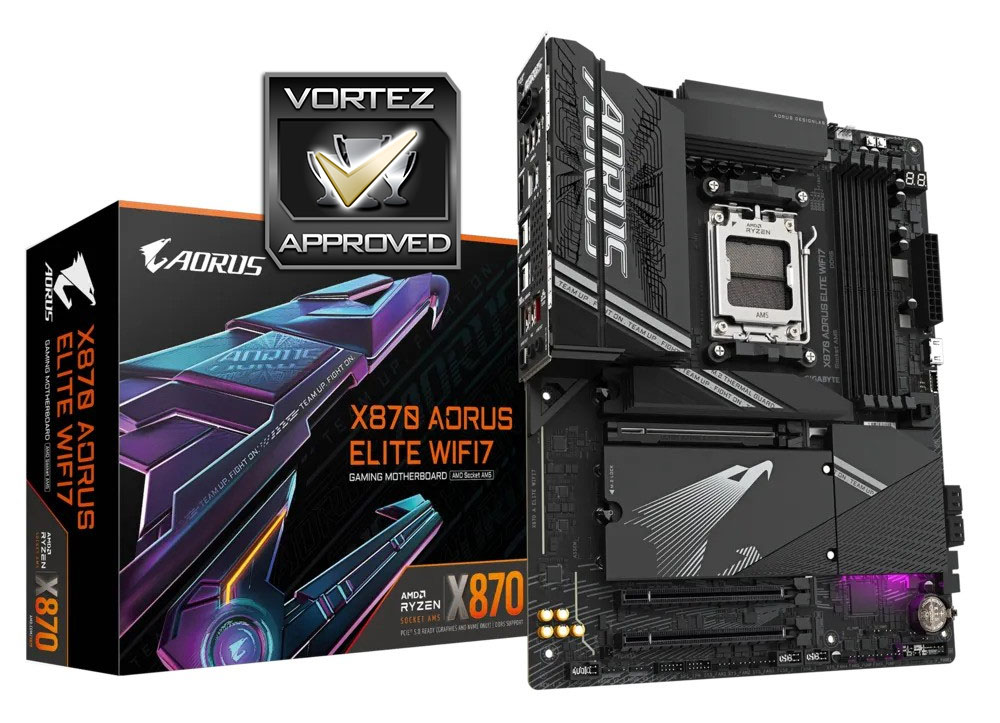
In the final tally $289 is perhaps a little expensive for the model in a vacuum, and that’s likely a consequence of early adopter status and a lack of B850 to draw down pricing. That being said, you get a lot of motherboard for your money and we wouldn’t be surprised to see it fly off the shelves alongside Ryzen 9xx0X3D chips when they arrive. It easily earns our Approved award.
Trepidation gives way to relief as X870, specifically GIGABYTE’s X870 AORUS ELITE WIFI7, doesn’t have the air of a neutered X870E. It’s streamlined for the more price-conscious enthusiast without ever appearing cheap, and still maintains an exceptional feature-set both stock and proprietary. A welcome first look at the X870-series, this <$300 design encourages us to see more of an underappreciated segment.
Pros
+ Great proprietary features
+ Strong forward-looking chipset
+ GIGABYTE’s ‘EZ’ adaptations live up to the billing
+ up-to 3 PCIe Gen 5 M.2 slots (if you’re willing to sacrifice x16 GPU operation)
+ Q-FLASH PLUS CPU-less BIOS update functionality
= Cleaner aesthetic than many competing designs
= Also available in a white ‘ICE’ version
Cons
– A little expensive at $289 / £279 / AUD$599
– Not sold by a proprietary back panel plug for WiFi antenna
+ Great proprietary features
+ Strong forward-looking chipset
+ GIGABYTE’s ‘EZ’ adaptations live up to the billing
+ up-to 3 PCIe Gen 5 M.2 slots (if you’re willing to sacrifice x16 GPU operation)
+ Q-FLASH PLUS CPU-less BIOS update functionality
= Cleaner aesthetic than many competing designs
= Also available in a white ‘ICE’ version
Cons
– A little expensive at $289 / £279 / AUD$599
– Not sold by a proprietary back panel plug for WiFi antenna
Click here for an explanation of our awards at Vortez.net.
Stay connected with the Vortez Social Media pages:
Join in with the discussions on Discord