Touted as GIGABYTE’s premium offering under the Intel Z890 banner, the Z890 AORUS MASTER motherboard is up for review. Will it take the top spot?

Product on Review: Z890 AORUS MASTER
Manufacturer: GIGABYTE
Street Price: USD 600 | GBP 539 | AUD 969
Calm has returned to the desktop CPU and motherboard market following monumental platform releases from both Intel and AMD. AMD’s initial ‘Zen 5’ Ryzen 9000-series salvo received reply in the form of Intel’s ‘Arrow Lake’ Core Ultra 200 series, all before a tactical X3D-shaped nuke was dropped as the red team’s final 2024 release. Now we can take a breath and look more closely at the processor’s most important partners and a platform landscape that is exceptionally diverse and more than a little daunting.
Motherboards based on Intel’s premium Z890 chipset currently form the backbone of support for their Core Ultra 200-series processors, starting just below the US$200 breakpoint and reaching well over $900 for the most well-equipped models. Unlike the competing X870/E platform, each manufacturer has stacked the segment with models in seemingly every price tier. Consumers will have plenty of choice between models and brands, so long as they choose Z890.
Intel Z890 leverages the LGA1851 socket and is only compatible with ‘Arrow Lake-S’ Core Ultra 200-series CPUs. Key features – along flagship overclocking support exclusive to their Z-series chipsets – include PCIe 5.0 signalling for both GPU (16 lanes) and M.2 storage (4 lanes) alongside a plethora of PCIe 4.0 lanes for peripherals, ancillary components and storage; DDR5 memory including high-performance CUDIMM support; comprehensive USB 3.2 Gen2x2 provision; and WiFi 6E. Manufacturer implementations may augment these features somewhat but that’s still a very solid list of capabilities.
That’s key because, unlike AMD’s X870/X870E approach, Intel doesn’t bifurcate their flagship chipset according to I/O provision despite actually coming in slightly cheaper at the entry level. Unfortunately for Intel, AMD still has aging X670 and B650 designs in retail channels to lean on.
With the preamble covered, let’s set our eyes on today’s model up for review: GIGABYTE’s Z890 AORUS MASTER. You’d be forgiven for thinking that (like the X870E counterpart) this is their flagship in the segment given its price and moniker. That honour however goes to the Z890 AORUS MASTER AI TOP, a design with more robust power delivery and dual X16 slots to enable dual-GPU solutions (x8/x8 signalling) as chief differentiating factors.
The AORUS MASTER is nonetheless an exceptionally well appointed design. It boasts a robust 18+1+2 DigiPhase power delivery system to feed the thirsty Core Ultra 200 CPUs which, although not quite as heavy-duty as the AI TOP model, should be well sufficient to heavily overclocked 285K processors. High-end dual wireless and wired networking in the form of both WiFi 7 and 10Gb Ethernet are peripheral inclusions that are rare even among premium designs, setting it well above most of the competition. Bluetooth 5.4 is also available through the integrated WiFi module.
Pulling double-duty will be dual Thunderbolt 4 ports which offers both USB 4 and DisplayPort as aux. modes. Six USB 3.2 Gen 2 ports – a mix of 20, 10 and 5 Gbps – are available alongside the higher bandwidth ports on the rear I/O panel alone.
Rounding off the Z890 AORUS MASTER’s headlines are proprietary accessibility tweaks such as EZ Latch that make installing and updating components significantly easier, both on initial setup and once a build is complete and in situ. Clearly GIGABYTE are pitching this design at masters but even the less confident should find it welcoming and low-stress to build in.
At $599.99 the Z890 AORUS MASTER is firmly in flagship territory when it comes to pricing without quite straying into the most extravagant ‘halo product’ bracket. Cheaper X870E and Z890 models shouldn’t be quite so well-appointed but might lean towards niche aspects of desktop computing, particularly hardcore overclocking. The AORUS MASTER will need to be an exceptional ‘Jack of All Trades,’ hopefully mastering more than just the one.
Technical Specifications
Socket:- Intel LGA1851
CPU Support:- Intel Core Ultra Processors
Chipset:- Intel Z890
Form Factor:- ATX
Dimensions:- 30.5cm x 24.4cm
Memory:
– Support for up-to DDR5 9500(OC) / 6400 (JEDEC) MT/s memory modules
– 4 x DDR5 DIMM sockets supporting up to 256 GB (64 GB single DIMM capacity) of system memory
– Dual channel memory architecture
– Support for EEC & non-ECC Un-buffered DIMM 1Rx8/2Rx8/1Rx16 memory modules
– Support for Extreme Memory Profiles (XMP)
– Support CUDIMM Memory Module (see vendor list for validated model support)
Onboard Graphics:
Integrated Graphics Processor — Intel HD Graphics
– 2 x Intel Thunderbolt 4 connectors (USB4 USB Type-C) supporting DisplayPort and Thunderbolt video outputs. Maximum resolution of 3840×2160@240 Hz (DP 2.1 & HDR), 5120×2880@60Hz (Thunderbolt)
– 1 x front HDMI port, supporting a maximum resolution of 1920×1080@30 Hz (HDMI 1.4)
Audio:
– Realtek® ALC1220 CODEC
– ESS ES9118 DAC
– Support for DTS:X® Ultra; 2/4/5.1/7.1-channel (software controlled)
– Support for S/PDIF Out
Networking
– Marvell AQtion AQC113C 10GbE LAN chip (10Gbps/5Gbps/2.5 Gbps/1 Gbps/100 Mbps)
Wireless Communication module
Intel® Wi-Fi 7 BE200NGW
– 802.11a, b, g, n, ac, ax, be, supporting 2.4/5/6 GHz carrier frequency bands
– BLUETOOTH 5.4
– Support for 11be 320MHz wireless standard
* Wi-Fi 7 features require Windows 11 SV3 to function properly. (There is no support driver for Windows 10.)
** Wi-Fi 7 channels on 6 GHz band availability depends on individual country’s regulations.
Expansion Slots
Off-CPU:
– 1 x PCI Express x16 slot (PCIEX16), supporting PCIe 5.0 operating at up-to x16
Chipset:
– 1 x PCI Express x16 slot, supporting PCIe 4.0 and running at x4 (PCIEX4)
– 1 x PCI Express x16 slot, supporting PCIe 4.0 and running at x1 (PCIEX1)
Storage Interface
Off-CPU:
– 1 x M.2 connector (M2A_CPU), supporting Socket 3, M key, type 25110/22110/2580/2280 SSDs @ PCIe 5.0 x4.
– 1 x M.2 connector (M2B_CPU), supporting Socket 3, M key, type 22110/2280 SSDs @ PCIe 4.0 x4.
– 1 x M.2 connector (M2D_CPU), supporting Socket 3, M key, type 22110/2280 SSDs @ PCIe 5.0 x4.
Off-Chipset:
– 1 x M.2 connector (M2P_SB), supporting Socket 3, M key, type 2280 SSDs @ PCIe 4.0 x4.
– 1 x M.2 connectors (M2M_SB), supporting Socket 3, M key, type 2280 SATA & PCIe 4.0 x4 SSDs.
– 4 x SATA 6Gb/s connectors. RAID 0, RAID 1, RAID 5, and RAID 10 support for NVMe & SATA SSD storage devices
USB:
CPU:
– 2 x Intel® Thunderbolt™ 4 (USB Type-C®) ports on the back panel
*Support up to 40Gbps with Thunderbolt devices
*Support up to 20Gbps with USB4 devices
*Support up to 10Gbps with USB 3.2 devices
Chipset:
– 6 x USB 3.2 Gen 2 Type-A ports (red) on the back panel
Chipset+USB 3.2 Gen 2×2 Hub:
– 1 x USB Type-C® port with USB 3.2 Gen 2×2 support, available through the internal USB header
Chipset+2 USB 3.2 Gen 1 Hubs:
– 8 x USB 3.2 Gen 1 ports (4 ports on the back panel, 4 ports available through the internal USB headers)
Chipset+2 USB 2.0 Hubs:
– 6 x USB 2.0/1.1 ports (2 ports on the back panel, 4 ports available through the internal USB headers)
Internal I/O Connectors:
1 x 24-pin ATX main power connector
2 x 8-pin ATX 12V power connectors
1 x CPU fan header
1 x CPU fan/water cooling pump header
4 x system fan headers
4 x system fan/water cooling pump headers
4 x addressable RGB Gen2 LED strip headers
1 x RGB LED strip header
5 x M.2 Socket 3 connectors
4 x SATA 6Gb/s connectors
1 x front panel header
1 x front panel audio header
1 x USB Type-C® header, with USB 3.2 Gen 2×2 support
2 x USB 3.2 Gen 1 headers
2 x USB 2.0/1.1 headers
1 x noise detection header
1 x Trusted Platform Module header (For the GC-TPM2.0 SPI/GC-TPM2.0 SPI 2.0/GC-TPM2.0 SPI V2 module only)
1 x HDMI port (Note)
1 x power button
1 x reset button
1 x reset jumper
1 x Clear CMOS jumper
2 x temperature sensor headers
Voltage Measurement Points
Back Panel Connectors
1 x Q-Flash Plus button
1 x Clear CMOS button
2 x Intel® Thunderbolt™ 4 connectors (USB Type-C® ports)
6 x USB 3.2 Gen 2 Type-A ports (red)
4 x USB 3.2 Gen 1 ports
2 x USB 2.0/1.1 ports
1 x RJ-45 port
2 x antenna connectors (2T2R)
2 x audio jacks
1 x optical S/PDIF Out connector
I/O Controller
– iTE® I/O Controller Chip
H/W Monitoring
– Voltage detection
– Temperature detection
– Fan speed detection
– Water cooling flow rate detection
– Fan fail warning
– Fan speed control
– Noise detection
BIOS
– 1 x 256 Mbit flash
Unique Features
– Support for Q-Flash
– Support for Q-Flash Plus
– Support Smart Backup
Bundled Software
– Norton® Internet Security (OEM version)
– LAN bandwidth management software
CPU Support:- Intel Core Ultra Processors
Chipset:- Intel Z890
Form Factor:- ATX
Dimensions:- 30.5cm x 24.4cm
Memory:
– Support for up-to DDR5 9500(OC) / 6400 (JEDEC) MT/s memory modules
– 4 x DDR5 DIMM sockets supporting up to 256 GB (64 GB single DIMM capacity) of system memory
– Dual channel memory architecture
– Support for EEC & non-ECC Un-buffered DIMM 1Rx8/2Rx8/1Rx16 memory modules
– Support for Extreme Memory Profiles (XMP)
– Support CUDIMM Memory Module (see vendor list for validated model support)
Onboard Graphics:
Integrated Graphics Processor — Intel HD Graphics
– 2 x Intel Thunderbolt 4 connectors (USB4 USB Type-C) supporting DisplayPort and Thunderbolt video outputs. Maximum resolution of 3840×2160@240 Hz (DP 2.1 & HDR), 5120×2880@60Hz (Thunderbolt)
– 1 x front HDMI port, supporting a maximum resolution of 1920×1080@30 Hz (HDMI 1.4)
Audio:
– Realtek® ALC1220 CODEC
– ESS ES9118 DAC
– Support for DTS:X® Ultra; 2/4/5.1/7.1-channel (software controlled)
– Support for S/PDIF Out
Networking
– Marvell AQtion AQC113C 10GbE LAN chip (10Gbps/5Gbps/2.5 Gbps/1 Gbps/100 Mbps)
Wireless Communication module
Intel® Wi-Fi 7 BE200NGW
– 802.11a, b, g, n, ac, ax, be, supporting 2.4/5/6 GHz carrier frequency bands
– BLUETOOTH 5.4
– Support for 11be 320MHz wireless standard
* Wi-Fi 7 features require Windows 11 SV3 to function properly. (There is no support driver for Windows 10.)
** Wi-Fi 7 channels on 6 GHz band availability depends on individual country’s regulations.
Expansion Slots
Off-CPU:
– 1 x PCI Express x16 slot (PCIEX16), supporting PCIe 5.0 operating at up-to x16
Chipset:
– 1 x PCI Express x16 slot, supporting PCIe 4.0 and running at x4 (PCIEX4)
– 1 x PCI Express x16 slot, supporting PCIe 4.0 and running at x1 (PCIEX1)
Storage Interface
Off-CPU:
– 1 x M.2 connector (M2A_CPU), supporting Socket 3, M key, type 25110/22110/2580/2280 SSDs @ PCIe 5.0 x4.
– 1 x M.2 connector (M2B_CPU), supporting Socket 3, M key, type 22110/2280 SSDs @ PCIe 4.0 x4.
– 1 x M.2 connector (M2D_CPU), supporting Socket 3, M key, type 22110/2280 SSDs @ PCIe 5.0 x4.
Off-Chipset:
– 1 x M.2 connector (M2P_SB), supporting Socket 3, M key, type 2280 SSDs @ PCIe 4.0 x4.
– 1 x M.2 connectors (M2M_SB), supporting Socket 3, M key, type 2280 SATA & PCIe 4.0 x4 SSDs.
– 4 x SATA 6Gb/s connectors. RAID 0, RAID 1, RAID 5, and RAID 10 support for NVMe & SATA SSD storage devices
USB:
CPU:
– 2 x Intel® Thunderbolt™ 4 (USB Type-C®) ports on the back panel
*Support up to 40Gbps with Thunderbolt devices
*Support up to 20Gbps with USB4 devices
*Support up to 10Gbps with USB 3.2 devices
Chipset:
– 6 x USB 3.2 Gen 2 Type-A ports (red) on the back panel
Chipset+USB 3.2 Gen 2×2 Hub:
– 1 x USB Type-C® port with USB 3.2 Gen 2×2 support, available through the internal USB header
Chipset+2 USB 3.2 Gen 1 Hubs:
– 8 x USB 3.2 Gen 1 ports (4 ports on the back panel, 4 ports available through the internal USB headers)
Chipset+2 USB 2.0 Hubs:
– 6 x USB 2.0/1.1 ports (2 ports on the back panel, 4 ports available through the internal USB headers)
Internal I/O Connectors:
1 x 24-pin ATX main power connector
2 x 8-pin ATX 12V power connectors
1 x CPU fan header
1 x CPU fan/water cooling pump header
4 x system fan headers
4 x system fan/water cooling pump headers
4 x addressable RGB Gen2 LED strip headers
1 x RGB LED strip header
5 x M.2 Socket 3 connectors
4 x SATA 6Gb/s connectors
1 x front panel header
1 x front panel audio header
1 x USB Type-C® header, with USB 3.2 Gen 2×2 support
2 x USB 3.2 Gen 1 headers
2 x USB 2.0/1.1 headers
1 x noise detection header
1 x Trusted Platform Module header (For the GC-TPM2.0 SPI/GC-TPM2.0 SPI 2.0/GC-TPM2.0 SPI V2 module only)
1 x HDMI port (Note)
1 x power button
1 x reset button
1 x reset jumper
1 x Clear CMOS jumper
2 x temperature sensor headers
Voltage Measurement Points
Back Panel Connectors
1 x Q-Flash Plus button
1 x Clear CMOS button
2 x Intel® Thunderbolt™ 4 connectors (USB Type-C® ports)
6 x USB 3.2 Gen 2 Type-A ports (red)
4 x USB 3.2 Gen 1 ports
2 x USB 2.0/1.1 ports
1 x RJ-45 port
2 x antenna connectors (2T2R)
2 x audio jacks
1 x optical S/PDIF Out connector
I/O Controller
– iTE® I/O Controller Chip
H/W Monitoring
– Voltage detection
– Temperature detection
– Fan speed detection
– Water cooling flow rate detection
– Fan fail warning
– Fan speed control
– Noise detection
BIOS
– 1 x 256 Mbit flash
Unique Features
– Support for Q-Flash
– Support for Q-Flash Plus
– Support Smart Backup
Bundled Software
– Norton® Internet Security (OEM version)
– LAN bandwidth management software
The Z890 AORUS MASTER supports PCIe 4.0 x4 in the 3rd PCIe slot, and neither it nor the four PCIe 4.0 lanes of the 2nd shot are shared with M.2 storage. This makes them excellent candidates for additional storage or expansion cards with high bandwidth requirements such as video capture, networking or storage.
GIGABYTE 800-series motherboards (both Intel and AMD) support Q-FLASH BIOS updates as well as Q-FLASH PLUS, a means of updating the BIOS without having a CPU installed or when both main and backup BIOSes are partially corrupted. These are essential troubleshooting tools which will also prime you for future CPU updates should you fall behind BIOS revisions.
The Z890 AORUS MASTER joins the X870 AORUS ELITE and MASTER in offering an internal HDMI header that’s a variant of GIGABYTE’s Sensor-Panel Link seen on Intel 700-series motherboards. This display output supports 1920×1080 displays (1080p) at 30fps through HDMI rather than USB-C, and is intended for real-time sensor readouts. It requires a CPU with integrated graphics and is helped by 3rd party software that supports skins and overlays to discrete monitors.
Small 1080p30Hz panels cost around $40 and would also require supplementary power, likely via an internal USB header.
GIGABYTE’s proprietary RGB Fusion 2.0 LED lighting system controls the on-board LED illumination and any generated by the supplementary RGB LED headers. Finally, the AORUS MASTER provides a noise sensor and header interface that allows internal system fan noise to be a criteria by which fan speed is controlled.
Closer Look
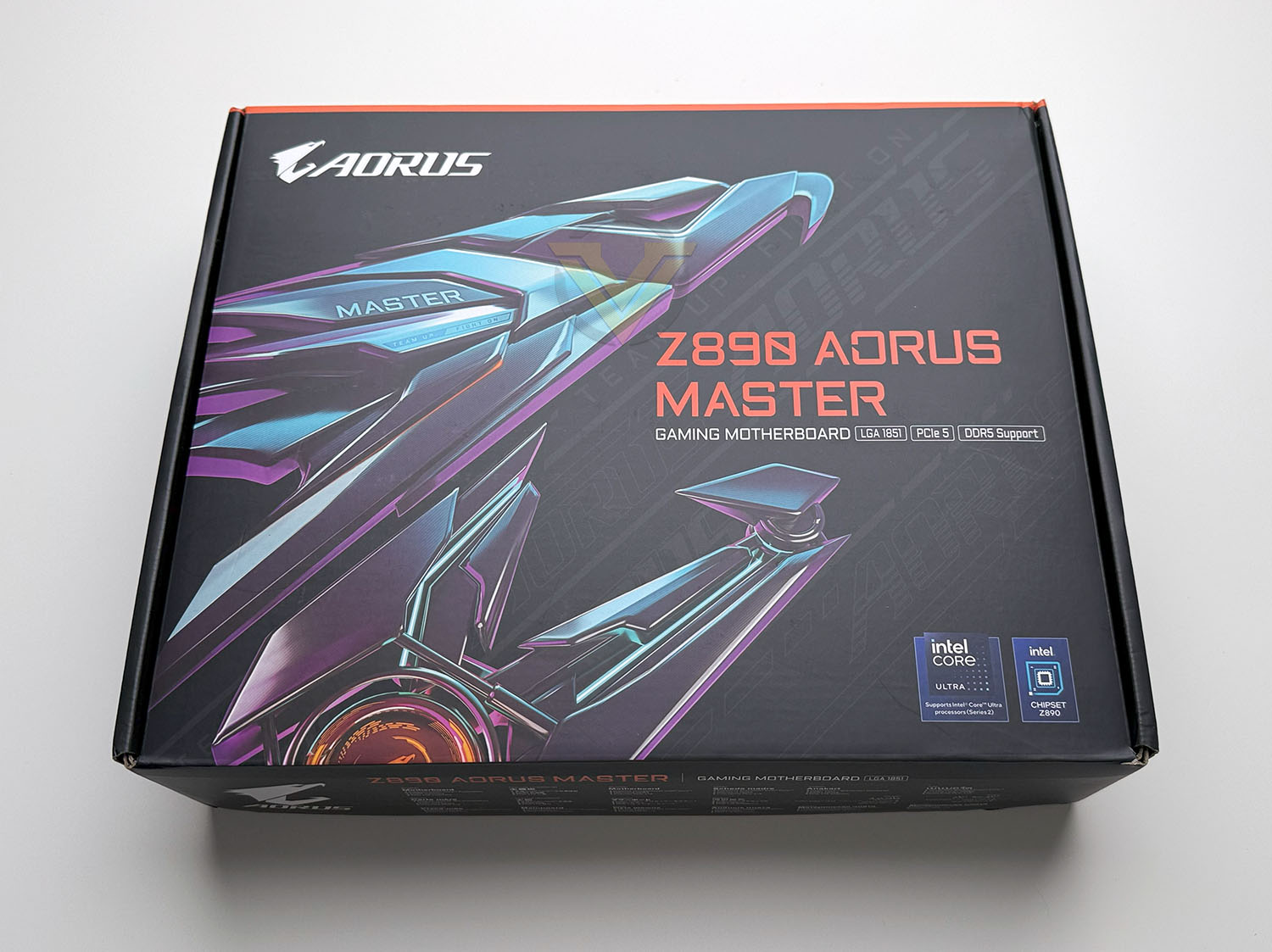
The neo-futuristic theme returns for GIGABYTE’s Z890 AORUS MASTER’s packaging in the form of purple and blue ‘Cyberpunk’ color schemes highlighting a large AORUS falcon-head logo. This streamlined style is echoed by the information on the front being strictly what you need to know: Intel LGA1851 socket, DDR5 memory and PCI-Express 5.0 compatibility, and support for the Intel Core Ultra 200-series CPUs.
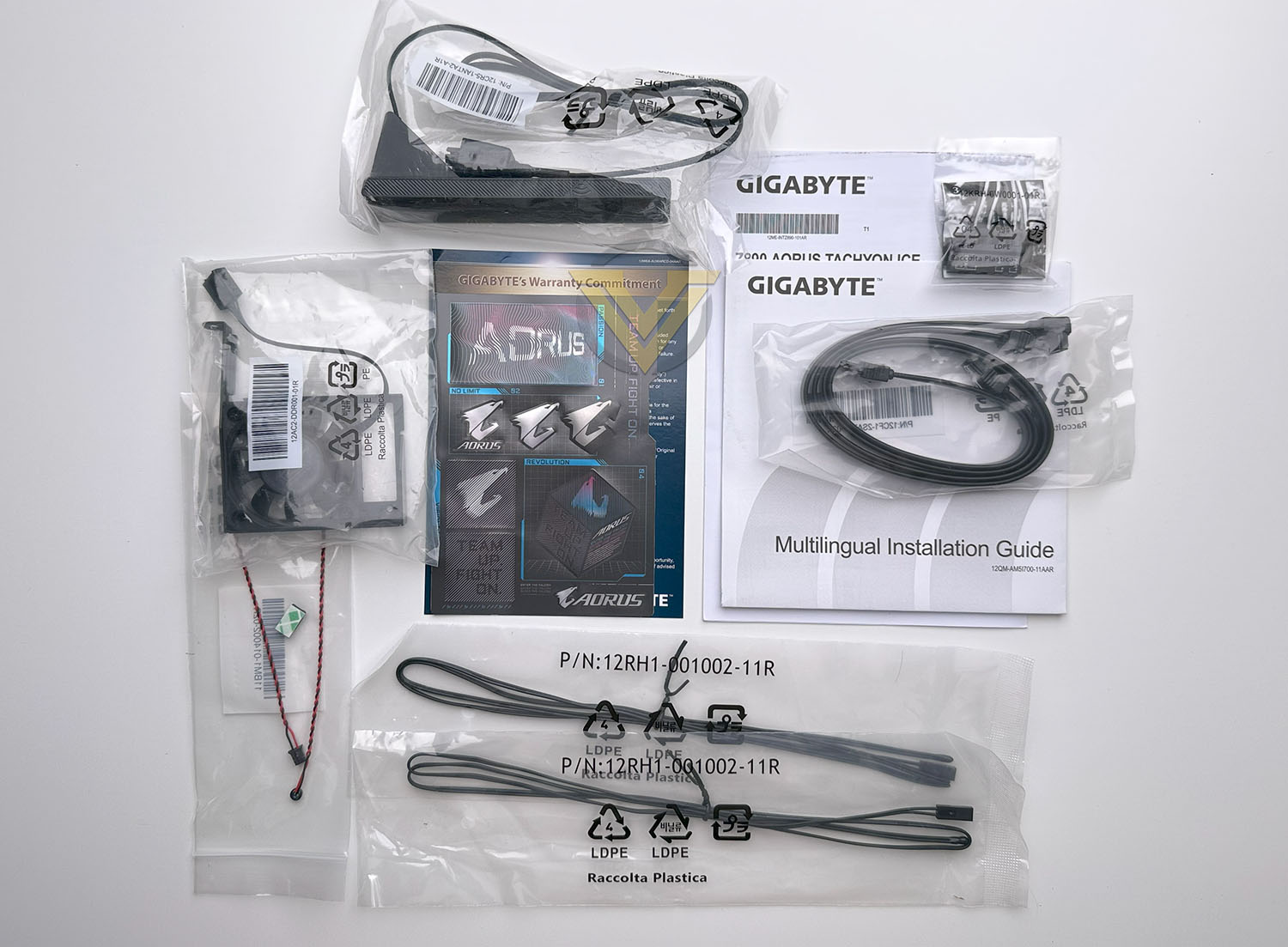
GIGABYTE’s included accessories are much more generous and varied than other recent designs we’ve looked at (as well as the X870 AORUS ELITE), touching on most core aspects of the ‘board. Included are:
– One WiFi 7 antenna
– DDR Wind Blade fan
– 2x SATA cables
– 1x noise detection cable
– 2x thermistor cables
– 2x M.2 Thermal Pads
– 3x M.2 rubber pad packs
– 1x G Connector
– User’s Manual
– Quick Installation Guide
– DDR Wind Blade fan
– 2x SATA cables
– 1x noise detection cable
– 2x thermistor cables
– 2x M.2 Thermal Pads
– 3x M.2 rubber pad packs
– 1x G Connector
– User’s Manual
– Quick Installation Guide
Cable tidy accessories and thermistors are relatively common at this tier, but a dedicated fan for system memory cooling is only common in GIGABYTE’s MASTER series motherboards. The 802.11be antenna features their proprietary WiFi EZ Plug connector for straightforward installation into the rear I/O panel, and we also have a noise detection sensor cable for the labelled port on the motherboard.
As with other recently reviewed GIGABYTE motherboard models, we very much appreciate the inclusion of their G Connector as standard. This handy little jumper block lets you attach the individual front panel cables (for power switch, reset switch, LED indicators etc.) to it first and then plug the whole block into the jumper array on the motherboard. It’s extremely useful and at a stroke eliminates a lot of frustration associated with putting a PC together.
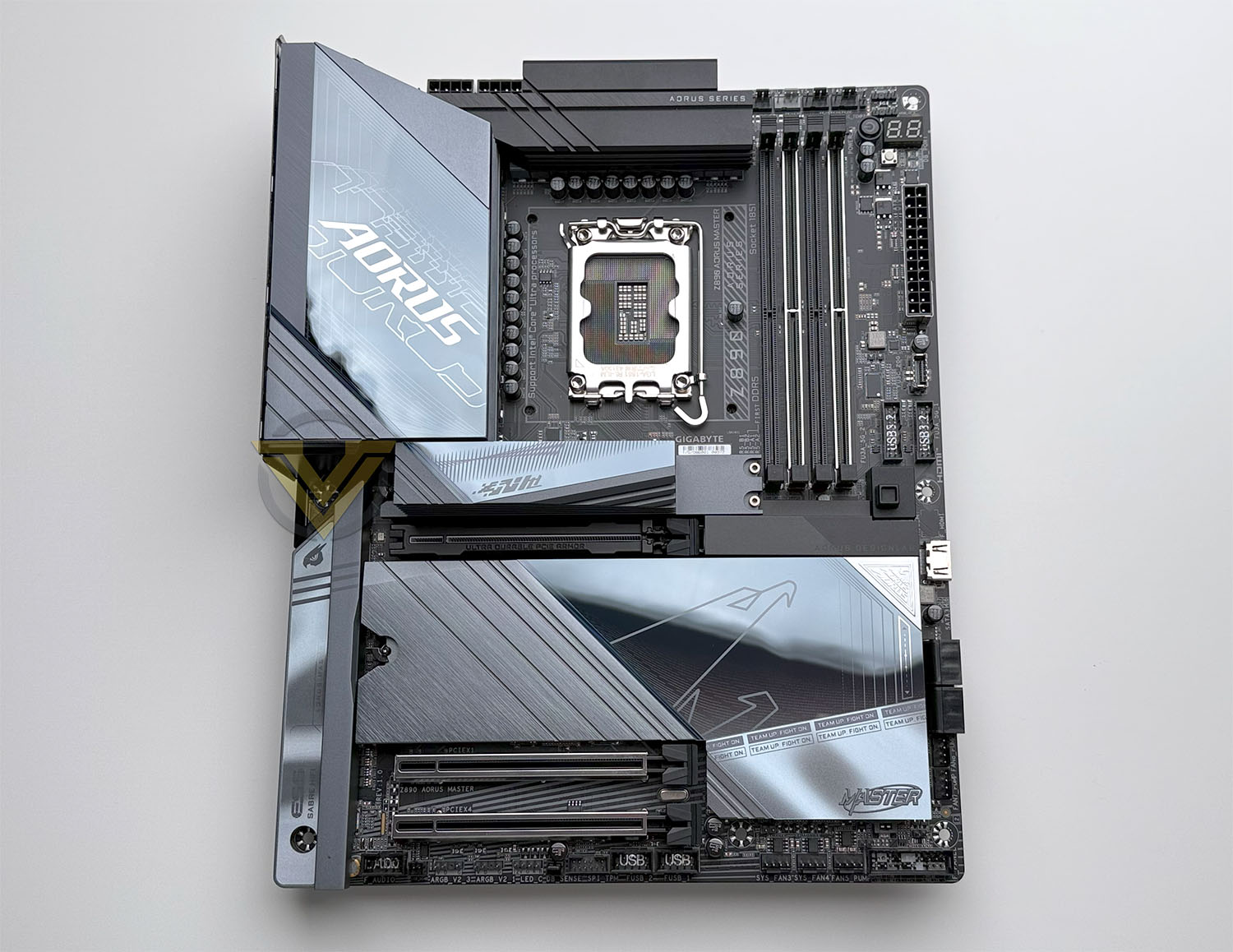
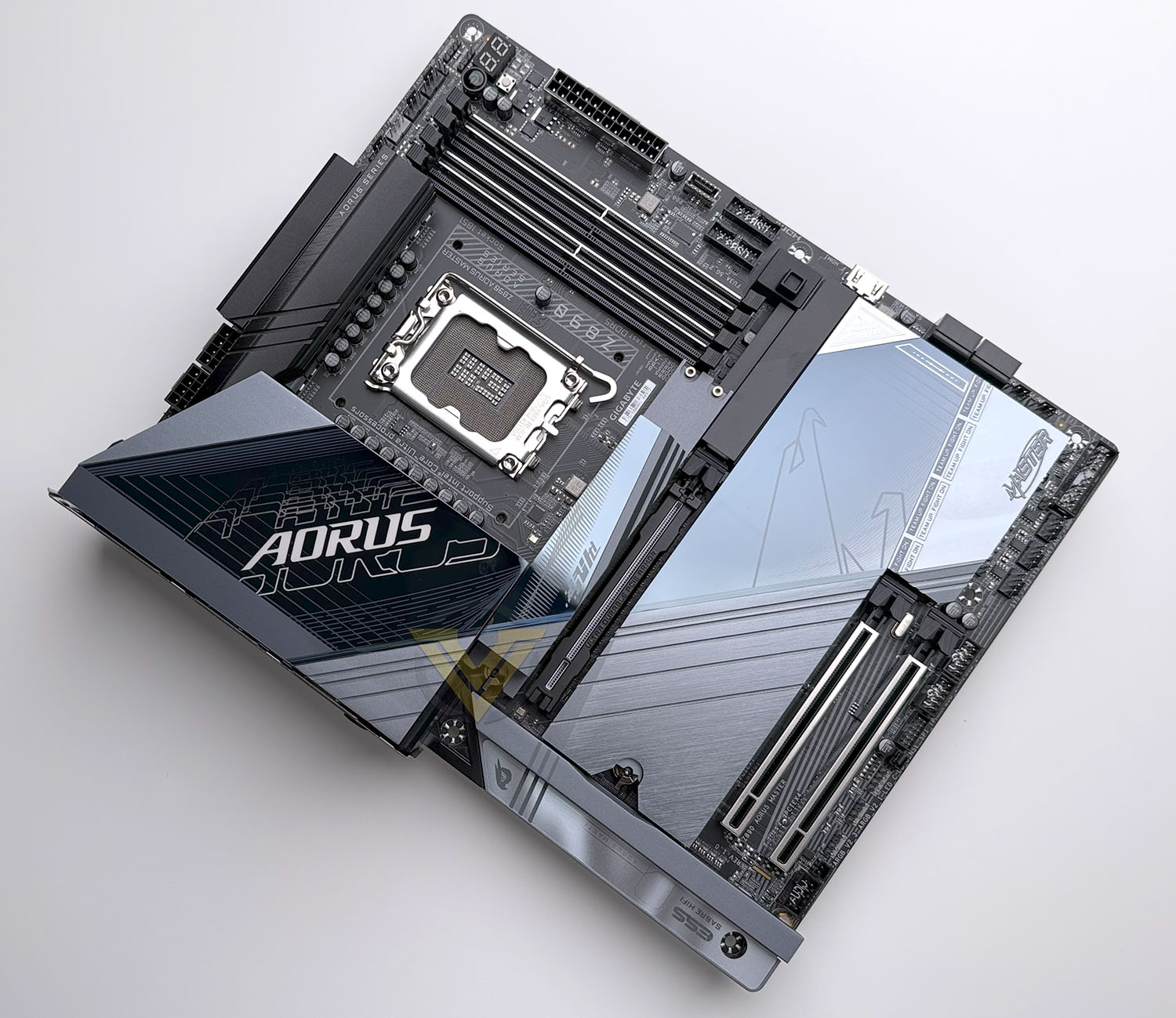
Here’s our first look at the Z890 AORUS MASTER gaming motherboard. The design appears busy in a fashion that’s similar to its X870E counterpart but laid out a little more neatly and methodically. We’re not sure that the ‘Team Up, Fight On’ tagline resonates particularly well but GIGABYTE sure won’t give it up on it without a fight.
The AORUS MASTER gets a little more integrated RGB than mainstream competition, adding some configurable illumination to the VRM heatsink as well as the bottom edge of the chipset cooler. The latter acts as an attractive edge for the heatspreader but the former is much more of an acquired taste. Each, of course, can be turned off.
A straightforward ATX footprint should mean that the motherboard is compatible with almost every ATX PC case on the market. It does however feature more pair of edge-aligned SATA headers on the bottom-right of the board so you’ll want to be in a position to take full advantage of them. There should be no compatibility issues with the plethora of LGA1851 and LGA1700 coolers available today, although in extreme cases older air coolers with a wide and low base could foul on the VRM or top-most M.2 heatsink.
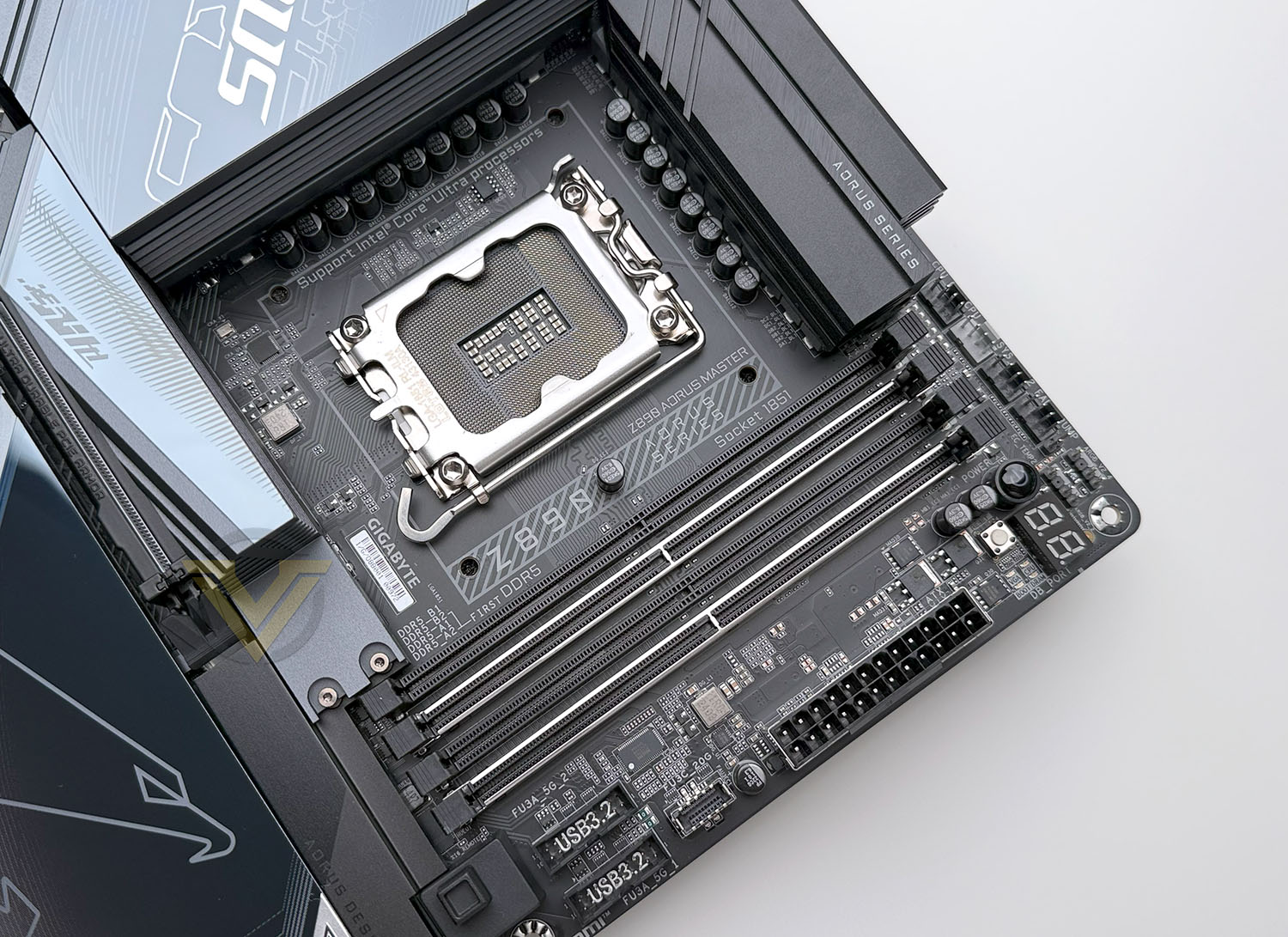
The Z890 AORUS MASTER’s LGA1851 socket takes a standard position in the top-centre of the motherboard, surrounded on two sides by VRM heatsinks. The heatsinks channel air through them, and the rear I/O plate is perforated to allow air to escape. VRM temps will benefit from air flow directed by the CPU cooler, but it’s possible that the left-most heatsink and the area behind the I/O shield will become something of a dust trap.
Intel’s LGA1851 socket incorporates a new ILM design (dubbed RL-ILM) which more evenly distributes mounting pressure around the CPU heatspreader, helping to reduce the chance of warping the chip when high mounting pressure is used. This should reduce the need for cooler ‘contact frames’ that replace the stock ILM (though one can still be used) and improve thermal performance more generally.
An 18+1+2 phase power delivery circuit (18-phase CPU, 1 VCCGT for iGPU & DRAM management, 2 VCCSA for connected PCIe lanes) is fed by two 8-pin EPS 12V connectors in their standard locations, next to which is a single 4-pin PWM system fan header. Opposite them and above the DDR5 memory slots are four 4-pin fan headers for the CPU fan, AIO pump, system fan and optional second CPU fan. Next to them are two 3-pin ARGB headers, raised board-mounted power button and two-character DrDebug display. GIGABYTE also printed the recommended memory slot population guide (A2+B2) on the PCB, so no need to go digging in the manual for that information.
Coming down the right edge of the motherboard alongside the DIMM slots we start a bank of four POST status indicator LEDs for troubleshooting purposes, flattened reset button, 24-pin ATX power connector, Front Panel USB 3.2 Gen2x2 Type C internal header, two USB 3.2 Gen 1 (5Gbps) headers, and an internal ‘Sensor-Panel Link’ HDMI port for small case-mounted displays. To the left at this point is the GIGABYTE EZ Latch for the main PCIe x16 slot, which releases the card latch for no-fuss GPU removal.
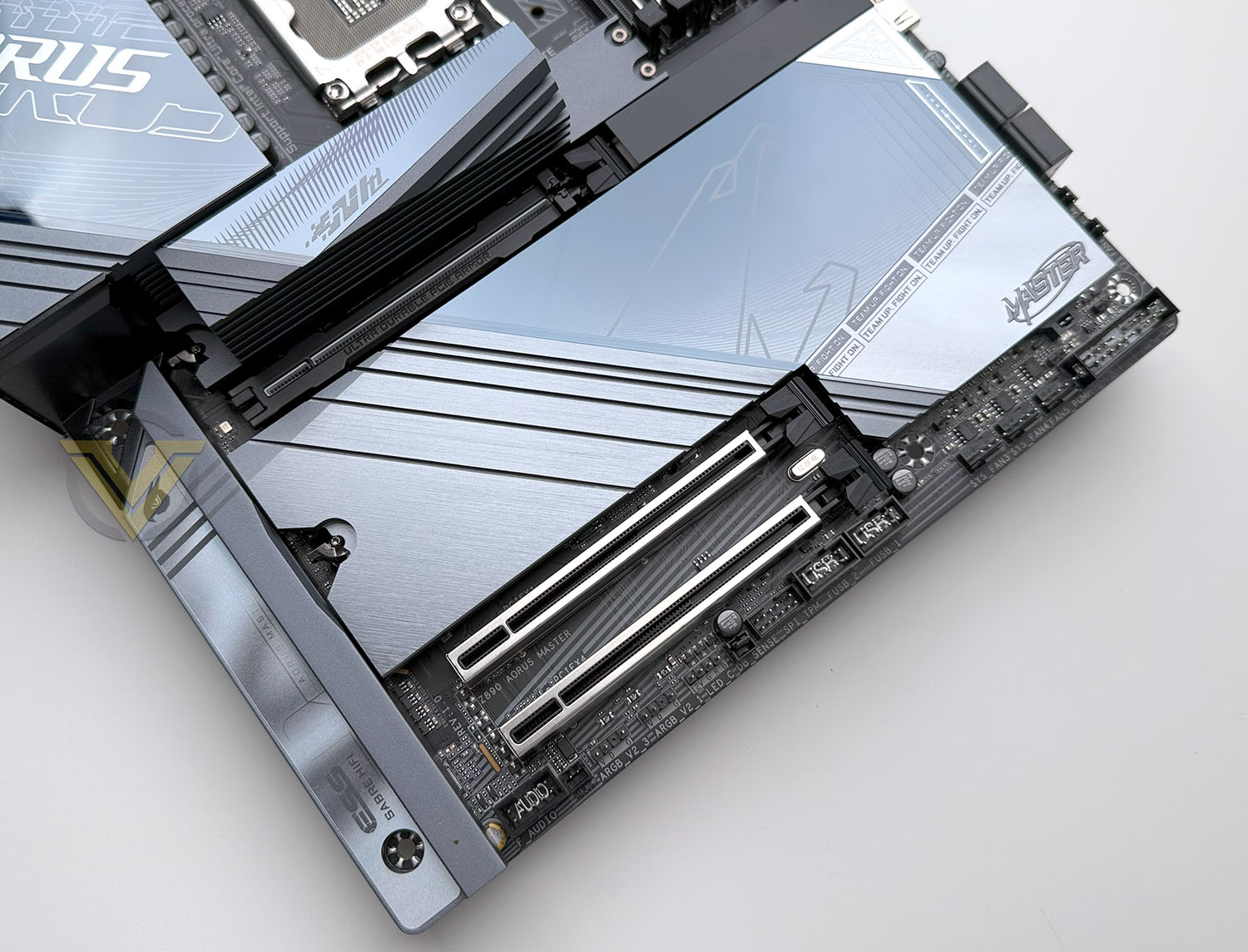
Further down are two stacks of two SATA III 6Gbps ports aligned parallel to the motherboard for better cable management. Below them are a pair of 4-pin PWM fan/pump headers, though these are conventionally oriented.
Just next to the SATA ports is the M.2 EZ Latch which can unhook for toolless removal of the M.2 and chipset heatspreader.
Continuing around the bottom edge we’re greeted by the front-panel header block. The supplied G-Connector plugs directly into this, or individual front-panel cables can be hooked up on a piecemeal basis. Just above this block is an independent reset jumper. Users can optionally plug their case reset switch cable into this header to be remapped to another function. Configuration for this is located in the system BIOS.
Next up are a trio of 4-pin PWM fan headers above which is the CMOS battery, Clear CMOS jumper and a temperature sensor header. It’s then just a small jump to the two USB 2.0 headers.
The TPM module header sits next to a 4-pin RGB LED (12v) header, two 3-pin (5v) ARGB headers and finally a front panel audio header. Between the ARGB and Front Panel Audio headers is a LED Demo jumper for activating lighting when no CPU is present.
Hidden away between the TPM and 4-pin LED header is a 2-pin sensor header labelled ‘DB_Sense’, which the manual indicates can be used for some measure of fan control. The AORUS MASTER includes a Noise Sensor which, when inserted, can measure internal chassis noise and serve as an input for fan control software within the BIOS alongside standard Temperature readings.
While not necessarily weighed down by a surfeit of potentially extraneous or redundant features, there’s a lot packed into this model’s ATX footprint. You get plenty of fan headers – ten in total – that when viewed as a whole are very close to optimally positioned, and lighting headers are relatively plentiful too. The debugging features – from DrBug Display to surface-mounted power switches, are pleasant additions too for troubleshooting, limit testing, or when the board spends a significant amount of time installed on a test bench.
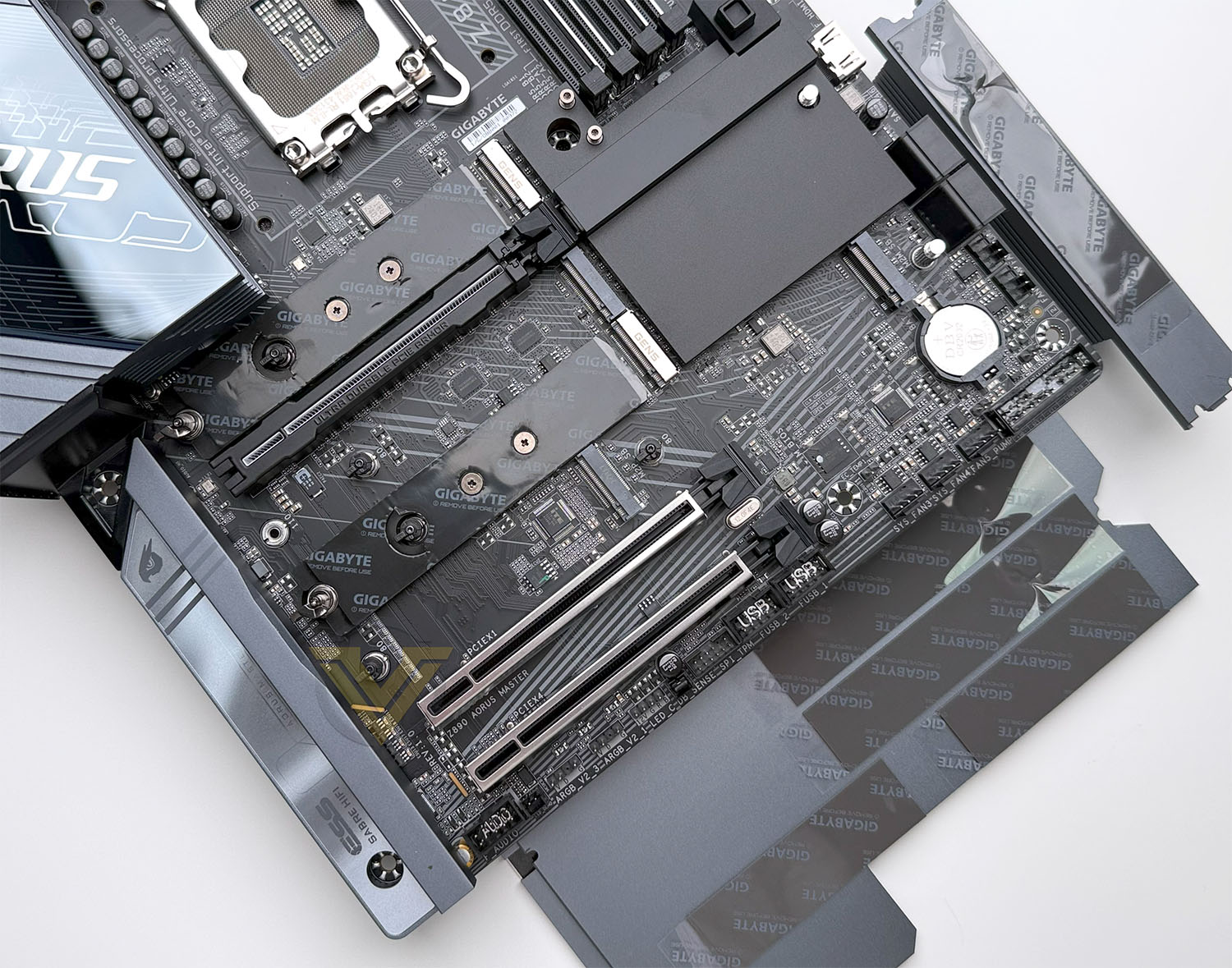
With the heatspreaders removed the M.2 slots are exposed. The top-most slot is wired for PCIe Gen5 x4 operation with four dedicated lanes off-CPU, supporting up-to 110mm-long and 25mm wide 25110 form factor M.2 NVMe SSDs. GIGABYTE are the only manufacturer we have come across thus far that regularly supports up-to this larger M.2 drive footprint. A long thermal pad is installed on top of the motherboard PCB to improve heat dissipation on dual-sided drives.
This slot’s M.2 heatspreader is also composed of stacked layers with an air-gap in between, allowing it to dissipate heat more readily and cool the hot high-performance PCIe Gen5 SSDs. As a side-note, GIGABYTE recommend using 1.25mm-thick thermal pads if you need to replace those already installed for the M.2 drives.
Below is the ‘PCIe UD Slot X’, the primary PCIe x16 slot supporting sixteen PCIe 5.0 lanes from the CPU that has been reinforced and surrounded in rubber to prevent PCB scratches. Unlike the X870 AORUS MASTER it does not share PCIe lanes with other slots.
The main PCIe slot is connected up to the EZ Latch system and strengthened to handle heavier graphics cards. The heaviest cards should still be supported by a brace or bracket to keep it level and not mechanically overload the slot with weight.
Of the bank of three M.2 slots below the first PCIe slot, only the bottom-most is off the chipset. Each of this bank of three M.2 slots has a heatspreader with compressible thermal pads to draw heat away from the NAND chips. The PCIe 4.0 slot below them is wired for a single lane of operation and can be used for networking or audio, while a high bandwidth slot wired for PCIe 4.0 x4 operation is more suited to high-performance storage and networking.
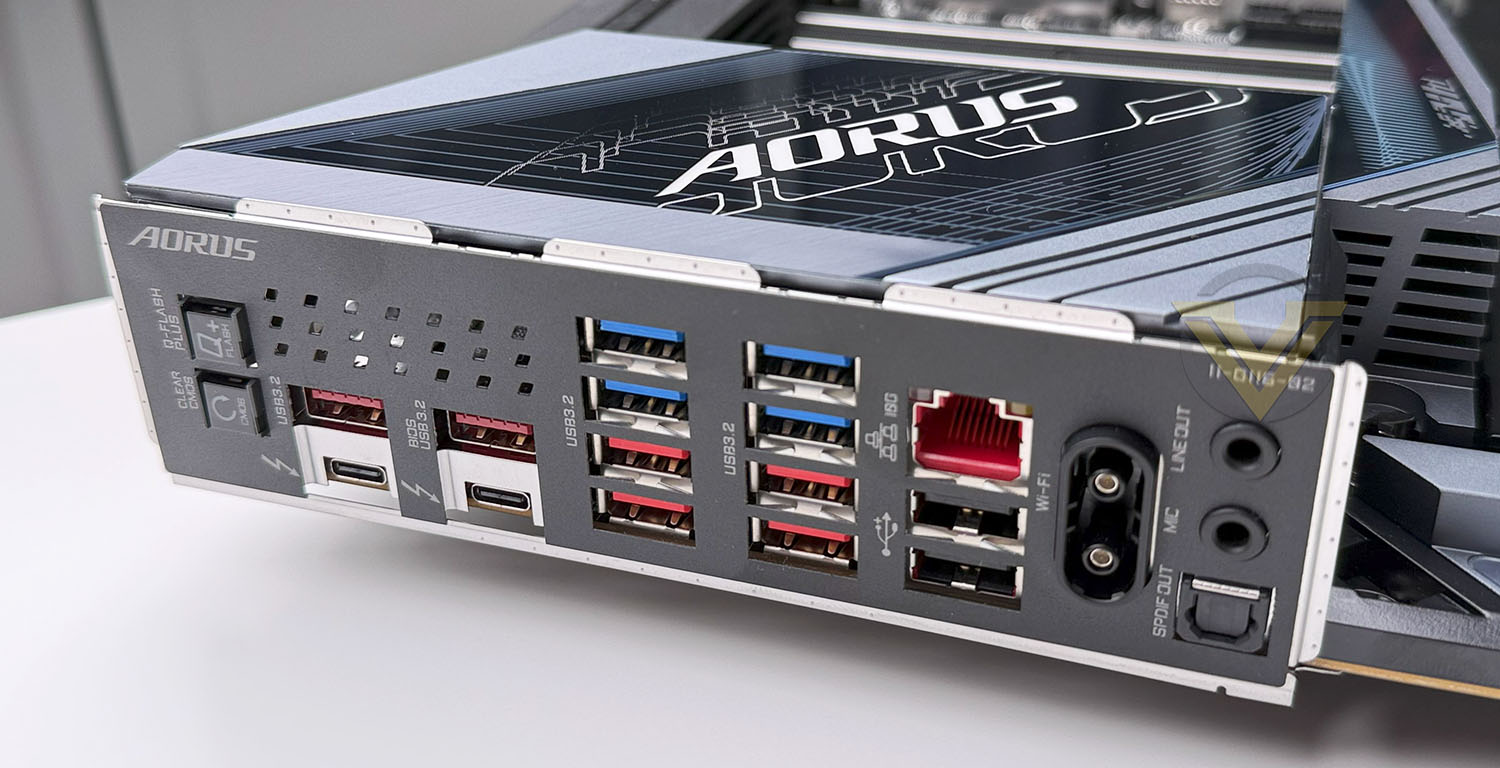
GIGABYTE have preinstalled the rear I/O shield, removing yet another system install pinch-point. Located on the rear I/O panel are:
– Q-FLASH PLUS Button: Updates the system BIOS without CPU, GPU or DRAM installed,
– Clear CMOS Button,
– Two USB 3.2 (10Gbps) Ports, one labelled a the Q-Flash port for simplified BIOS updates,
– Two Thunderbolt 4 Ports (USB 4 Type C connector),
– Four USB 3.2 Gen 1 (5Gbps) Ports,
– Four USB 3.2 Gen 2 (10Gbps) Ports (red),
– RJ45 10Gbps Ethernet Port (10GbE)
– Two USB 2 (480Mbps) Ports
– Antenna Connector (WiFi EZ Plus)
– Audio Line Out/Mic In (Can be used combined with front audio ports for up-to 5.1 sound)
– SPDIF Out
– Clear CMOS Button,
– Two USB 3.2 (10Gbps) Ports, one labelled a the Q-Flash port for simplified BIOS updates,
– Two Thunderbolt 4 Ports (USB 4 Type C connector),
– Four USB 3.2 Gen 1 (5Gbps) Ports,
– Four USB 3.2 Gen 2 (10Gbps) Ports (red),
– RJ45 10Gbps Ethernet Port (10GbE)
– Two USB 2 (480Mbps) Ports
– Antenna Connector (WiFi EZ Plus)
– Audio Line Out/Mic In (Can be used combined with front audio ports for up-to 5.1 sound)
– SPDIF Out
This motherboard’s WiFi EZ Plug antenna sockets are non-standard and may not be compatible with standard high gain 802.11be antenna. Such is sometimes the trade-off for the easy to install features.
GIGABYTE opted to equip the Z890 AORUS MASTER with 10GbE, a large step up from the 2.5GbE present on more affordable models. This is a very useful addition in a world where Gigabit Fibre is becoming more common and home networks are starting to situationally push a lot of data too.
Test Setup & Methodology
Notes: We’ve revamped our benchmark regime by removing a number of tests which reveal little, to no difference between each motherboard model. Gaming performance is one such area which has been removed due to the inability for each motherboard to offer any advantage over another. Instead, we have focussed on meaningful/tangible analysis which examines the VRM/chipset design, and the storage performance which will be far more informative to the end user.
TEST SETUP
CPU Intel Core Ultra 9 285KCooling: Corsair iCUE LINK TITAN 360 RX RGB
Memory: 32GB Kingston FURY Renegade 7600 MHz
Storage: Silicon Power A55 512GB + Silicon Power XPower XS70
PSU: Corsair HX1050 80 Plus Gold Certified PSU
Monitor: AOC U2879VF
BENCHMARKS
PCMark 10 – Overall Extended ScoreSiSoftware SANDRA – SATA/PCIe Storage Tests
SiSoftware SANDRA – Overall System Score
OTHER SOFTWARE
Temperature Analysis: HWMonitorStress Testing Software: AIDA64 Stability Test
CPU Specification Monitoring: CPU-Z
Benchmarks: Power Consumption
In this first test we analyse the power efficiency from the wall for each motherboard (Minus the GPU). While each model uses the same chipset/platform, energy results can fluctuate between manufacturers due to the features and specifications that are integrated. First of all, for the idle tests the system is cold booted into Windows and no additional applications are executed – wattage is noted on the external energy monitor we use and then we open Aida64 stability test and execute a stress test, noting the highest reading on the monitor. Below are the results of this energy test.
Benchmarks: VRM & PCH Cooling
Each motherboard manufacturer designs their board with a unique set of heatsinks to cover key areas like the VRM/mosfets and the chipset itself. We load up Aida64 stability test again and perform a 20 minute run, recording the maximum value for both attributes.
Benchmarks: PCMark 10
PCMark 10 features a comprehensive set of tests that cover the wide variety of tasks performed in the modern workplace. With a range of performance tests, custom run options, and the new Battery Life Profile, PCMark 10 is the complete PC benchmark for the modern office.
Benchmarks: SATA Performance
In order to ascertain the SATA performance for our motherboards we use SiSoftware SANDRA and the File System Bandwidth performance test. This allows us to obtain the sequential read/write transfer rates for the drive being tested – Crucial MX300 SSD.
Benchmarks: PCIe M.2 Performance
In order to ascertain the PCIe M.2 performance for our motherboards we use SiSoftware SANDRA and the File System Bandwidth performance test. This allows us to obtain the sequential read/write transfer rates for the drive being tested – Kingston KC2500.
Benchmarks: Geekbench
Geekbench 6 measures your processor’s single-core and multi-core power, for everything from checking your email to taking a picture to playing music, or all of it at once. Geekbench 6’s CPU benchmark measures performance in new application areas including Augmented Reality and Machine Learning, so you’ll know how close your system is to the cutting-edge.
Conclusion
The Z890 AORUS MASTER is a feature-packed motherboard designed to give consumers every conceivable tool at their disposal for building a sdolid, high-performance PC. Packed with an impressive array of fan headers, robust debug features, and cutting-edge connectivity, it delivers an unmatched level of control and customisation. With its striking, unique design and premium build quality, this motherboard has become one of our favourite models tested on this new platform. If we were in the market for a motherboard, this would be our top choice.
Performance-wise, the Z890 AORUS MASTER shines, offering consistently excellent results across gaming and intensive workloads. Its VRM temperatures remain impressively low even under heavy demands, ensuring stability and reliability for overclockers. The audio performance is exceptional, delivering clear and immersive sound that caters to audiophiles and gamers alike. A plethora of connectivity options and convenient quick-release mechanisms for M.2 and PCIe slots add to its appeal, making it a dream for builders seeking efficiency and ease of use.
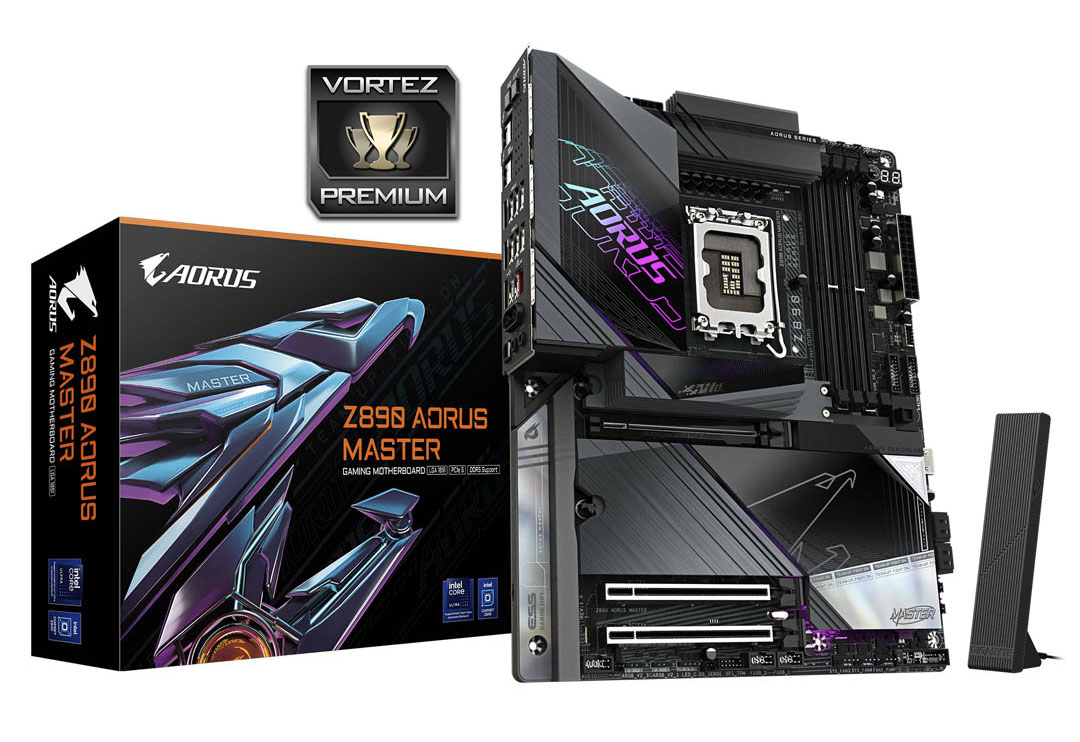
The only significant downside to this motherboard is its premium price, which places it out of reach for budget-conscious users. However, for those willing to invest, the extensive feature set and consistently strong performance justify the cost. Professionals, gamers, and enthusiasts will find it a worthwhile addition to their systems, offering unmatched reliability and capability.
In conclusion, the Z890 AORUS MASTER is a stellar motherboard that combines power, style, and innovation. Its exceptional feature set, premium design, and top-tier performance make it an ideal foundation for high-end PC builds. Despite its steep price, it offers outstanding value for those who demand the best, solidifying its place as our top recommendation in this category.
PROS
+ Plethora of fan headers
+ Excellent array of debug features
+ 10GbE networking
+ Very attractive, unique looking design
+ Good VRM temperatures
+ Excellent audio
+ Consistently good performance
+ Multitude of connectivity options
+ Quick release for M.2 and PCIe
CONS
– Expensive
+ Plethora of fan headers
+ Excellent array of debug features
+ 10GbE networking
+ Very attractive, unique looking design
+ Good VRM temperatures
+ Excellent audio
+ Consistently good performance
+ Multitude of connectivity options
+ Quick release for M.2 and PCIe
CONS
– Expensive
Click here for an explanation of our awards at Vortez.net.
Stay connected with the Vortez Social Media pages:
Join in with the discussions on Discord