We take a detailed look at one of MSI’s most popular models donning the Intel Z890 chipset. Can the MSI MPG Z890 Carbon WiFi impress? Let’s find out!

Product on Review: MPG Z890 CARBON WIFI
Manufacturer: MSI
Street Price: USD 805 | GBP 489 | AUD 829
Today we’re continuing our coverage of motherboard’s based on Intel’s Z890 chipset with a popular series entrant from component specialists MSI. The MPG Z890 CARBON WIFI wears the moniker of a motherboard range well-liked for both features and aesthetics, and is set to be one of the stronger releases as the wider Z890 ecosystem is fleshed out ahead of any shakeups CES 2025 will bring in the new year.
Intel’s Z890 chipset is tailor-made for their new Core Ultra 200-series ‘Arrow Lake’ processors, boasting a new socket and baked-in features to make it a true next-generation platform, and is their counterpart to AMD’s X870/X870E chipset. PCI-Express 5 support for both GPU and M.2 Storage, DDR5 memory with high-performance CUDIMM compatibility, integrated WiFi 6E (upgraded to WiFi 7 on most models), a huge number of potential USB ports and even Thunderbolt 4 aggregate to connectivity that’s second-to-none.
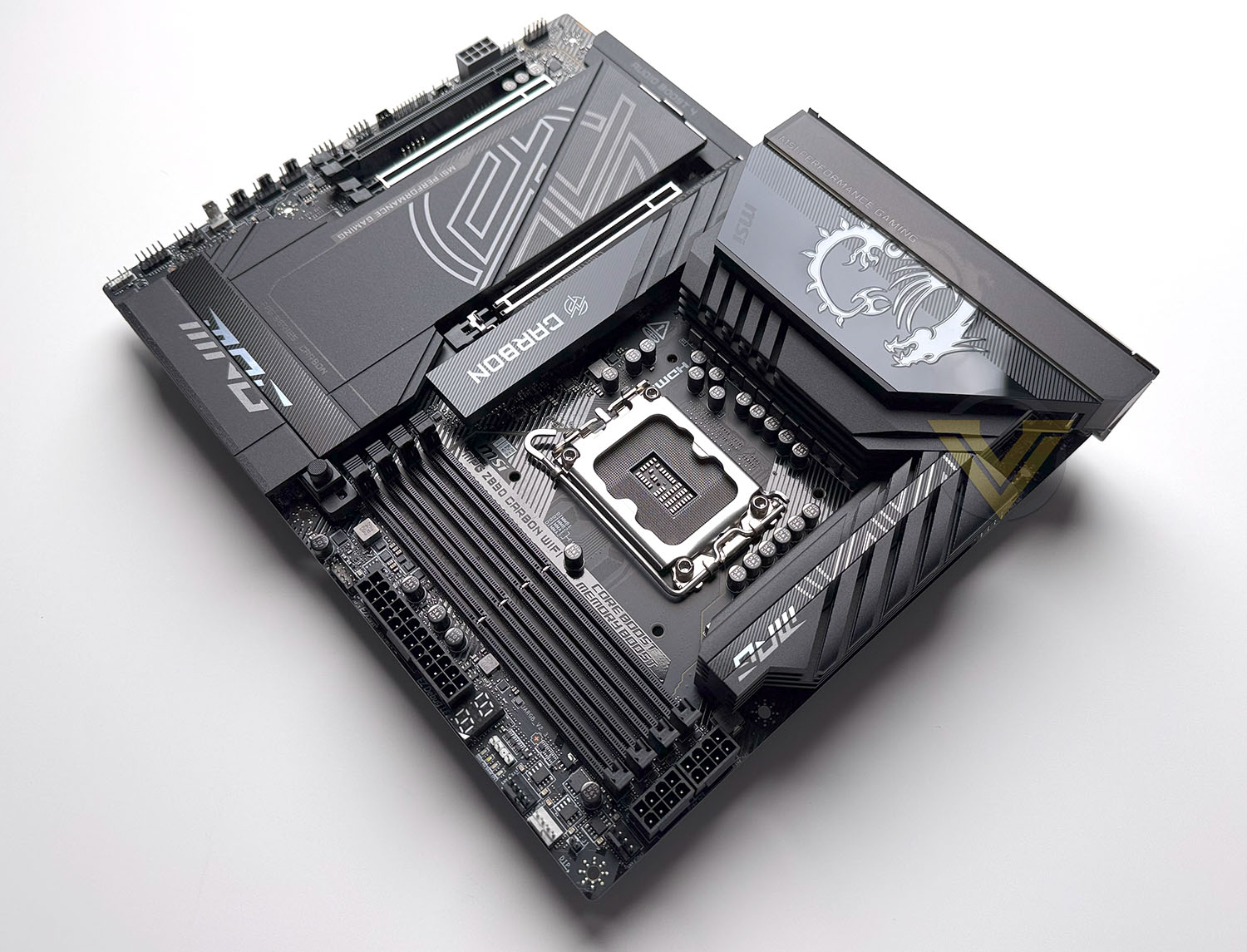
MSI’s Carbon series has previously been priced as a mainstream full-feature design with aesthetic distinct from, in particular, their Gaming series. Its popularity and pedigree however have morphed it into a premium model for performance gaming sitting just below MSI’s MEG-series designs such as the ACE, UNIFY-X and GODLIKE.
The MPG Z890 CARBON WIFI incorporates 20+1+1+1-phase power delivery, which is a more significant provision than some competition and beyond the requirements of Z890’s reference specs. While specific CPU overclocking hardware optimisations are sparse on this model in particular, being starved or afflicted by dirty power shouldn’t be an issue.
In that vein MSI have also integrated supplemental 12V power into the ‘board for peripheral devices via an auxiliary 8-pin PCIe power connector. This can optionally supply as much as 252W of power to the board, for when limitations are tested to the brink and beyond by brutish GPUs and monstrous additional cooling.
MSI’s FROZR thermal design should help to keep things cool however, offering heatspreader effects for M.2 drives and more robust heatsinks for power delivery and PCIe 5 storage. Users will want to be mindful of their case’s internal air flow to really take advantage of this.
Speaking of those users, experienced system integrators and novice DIY PC assemblers will be pretty pleased to see MSI focusing so much on usability. The industry as a whole is moving in that direction, particularly at the premium end, and making installing and removing M.2 drives, GPUs and even WiFi antenna almost foolproof.
AI is an industry watchword and used extensively in MSI’s marketing, but that technology hasn’t really filtered down to consumer practicality at this point. While a Z890 platform will have AI capabilities thanks to the NPU integrated on each Core Ultra 200-series processor (and as a feature in any discrete GPU made since 2019), motherboards currently leverage pre-trained AI through tools to help with overclocking and maintaining system stability, none of which requires ‘AI’ hardware to operate. MSI’s exclusive feature is AI Boost, a tool that can overclock the Intel NPU but without a way to exploit that performance presently.
The MPG Z890 CARBON WIFI is priced at $499 excl Tax in the US, £490 in the UK and AUD $830 at the time of writing, placing it in a premium price tier but not at halo price status. With performance and features largely dictated by the chipset, integrated features and usability will be a major differentiating factor setting it against competing Z890 models. Comparisons to X870 are less impactful; Core Ultra 200-series vs Ryzen 9000-series contrasts are far more salient in those head-to-heads.
Technical Specifications
Technical Specifications
Form Factor:- ATX
Dimensions:- 243.84mm x 304.8mm
Chipset:- Intel Z890
Socket:- LGA 1851
CPU:- Supports Intel Core Ultra 200-series Processors
Memory:
– 4x DDR5 UDIMM, Max. Capacity 256GB
– Memory Support 9200 – 6400 (OC) MT/s / 6400 – 4800 (JEDEC) MT/s
Onboard Graphics:
– 1x HDMI, supporting HDMI 2.1 with FRL port, max. resolution of 8K @60Hz
– 2x Type-C DisplayPort via Thundebolt 4 ports, supporting DisplayPort 2.1 with UHBR20 over USB Type-C, max. resolution of 4K@120Hz / 8K@60Hz*
PCIe Expansion Slots:
– 3x PCI-E x16 slot
– PCI_E1 Gen PCIe 5.0 supports up to x16 (From CPU)
– PCI_E2 Gen PCIe 5.0 supports up to x8 (From CPU)
– PCI_E3 Gen PCIe 4.0 supports up to x4 (From Chipset)
Audio:
– Realtek® ALC1220P Codec
– 7.1-Channel USB High Defination Audio
– Supports S/PDIF output
Storage
– 5 x M.2
– M.2_1 Source (From CPU) supports up to PCIe 5.0 x4 , supports 2280/2260 devices
– M.2_2 Source (From CPU) supports up to PCIe 4.0 x4 , supports 2280/2260 devices
– M.2_3 Source (From Chipset) supports up to PCIe 4.0 x4 , supports 2280/2260 devices
– M.2_4 Source (From Chipset) supports up to PCIe 4.0 x4 , supports 22110/2280/2260 devices
– M.2_5 Source (From Chipset) supports up to PCIe 4.0 x4 / SATA mode, supports 2280/2260 devices
– 4x SATA III 6 Gbps
Onboard Thunderbolt:
– 2x Thunderbolt4 ports (Rear)
– Supports up to 5V/3A,15W power charging
– Ports can daisy-chain up to three Thunderbolt 4 devices or five Thunderbolt 3 devices
– Supports up to 8K display
USB:
– 4x USB 2.0 (Front)
– 4x USB 5Gbps Type A (Front)
– 10x USB 10Gbps Type A (Rear)
– 1x USB 10Gbps Type C (Rear)
– 1x USB 20Gbps Type C (Front)
NB: USB 20Gbps Type-C (Front) support USB PD 27W fast charging for JUSBC1
LAN:
– 1x Intel® Killer™ E5000B 5G LAN
– 1x Intel® I226V 2.5G LAN
WIRELESS LAN & BLUETOOTH
– Intel® Killer™ BE1750x Wi-Fi 7
– Supports MU-MIMO TX/RX, 2.4GHz/ 5GHz/ 6GHz* (320MHz) up to 5.8Gbps
– Supports 802.11 a/ b/ g/ n/ ac/ ax/ be
– Supports Bluetooth® 5.4**, MLO, 4KQAM
Internal IO
– 1x Power Connector(ATX_PWR)
– 2x Power Connector(CPU_PWR)
– 1x Power Connector(PCIE_PWR 8pin)
– 1x Front Type-C Quick Charge Connector(PD_PWR1)
– 1x CPU Fan
– 1x Combo Fan (Pump_Sys Fan)
– 5x System Fan
– 1x EZ Conn-header (JAF_2)
– 2x Front Panel (JFP)
– 1x Chassis Intrusion (JCI)
– 1x Water Flow connector
– 1x Front Audio (JAUD)
– 1x Thermal Sensor connectors(T_SEN)
– 3x Addressable V2 RGB LED connector (JARGB_V2)
– 1x RGB LED connector(JRGB)
– 1x TPM pin header(Support TPM 2.0)
– 4x USB 2.0 ports
– 4x USB 5Gbps Type A ports
– 1x USB 20Gbps Type C ports
LED FEATURE
– 4x EZ Debug LED
– 1x EZ Digit Debug LED
Dimensions:- 243.84mm x 304.8mm
Chipset:- Intel Z890
Socket:- LGA 1851
CPU:- Supports Intel Core Ultra 200-series Processors
Memory:
– 4x DDR5 UDIMM, Max. Capacity 256GB
– Memory Support 9200 – 6400 (OC) MT/s / 6400 – 4800 (JEDEC) MT/s
Onboard Graphics:
– 1x HDMI, supporting HDMI 2.1 with FRL port, max. resolution of 8K @60Hz
– 2x Type-C DisplayPort via Thundebolt 4 ports, supporting DisplayPort 2.1 with UHBR20 over USB Type-C, max. resolution of 4K@120Hz / 8K@60Hz*
PCIe Expansion Slots:
– 3x PCI-E x16 slot
– PCI_E1 Gen PCIe 5.0 supports up to x16 (From CPU)
– PCI_E2 Gen PCIe 5.0 supports up to x8 (From CPU)
– PCI_E3 Gen PCIe 4.0 supports up to x4 (From Chipset)
Audio:
– Realtek® ALC1220P Codec
– 7.1-Channel USB High Defination Audio
– Supports S/PDIF output
Storage
– 5 x M.2
– M.2_1 Source (From CPU) supports up to PCIe 5.0 x4 , supports 2280/2260 devices
– M.2_2 Source (From CPU) supports up to PCIe 4.0 x4 , supports 2280/2260 devices
– M.2_3 Source (From Chipset) supports up to PCIe 4.0 x4 , supports 2280/2260 devices
– M.2_4 Source (From Chipset) supports up to PCIe 4.0 x4 , supports 22110/2280/2260 devices
– M.2_5 Source (From Chipset) supports up to PCIe 4.0 x4 / SATA mode, supports 2280/2260 devices
– 4x SATA III 6 Gbps
Onboard Thunderbolt:
– 2x Thunderbolt4 ports (Rear)
– Supports up to 5V/3A,15W power charging
– Ports can daisy-chain up to three Thunderbolt 4 devices or five Thunderbolt 3 devices
– Supports up to 8K display
USB:
– 4x USB 2.0 (Front)
– 4x USB 5Gbps Type A (Front)
– 10x USB 10Gbps Type A (Rear)
– 1x USB 10Gbps Type C (Rear)
– 1x USB 20Gbps Type C (Front)
NB: USB 20Gbps Type-C (Front) support USB PD 27W fast charging for JUSBC1
LAN:
– 1x Intel® Killer™ E5000B 5G LAN
– 1x Intel® I226V 2.5G LAN
WIRELESS LAN & BLUETOOTH
– Intel® Killer™ BE1750x Wi-Fi 7
– Supports MU-MIMO TX/RX, 2.4GHz/ 5GHz/ 6GHz* (320MHz) up to 5.8Gbps
– Supports 802.11 a/ b/ g/ n/ ac/ ax/ be
– Supports Bluetooth® 5.4**, MLO, 4KQAM
Internal IO
– 1x Power Connector(ATX_PWR)
– 2x Power Connector(CPU_PWR)
– 1x Power Connector(PCIE_PWR 8pin)
– 1x Front Type-C Quick Charge Connector(PD_PWR1)
– 1x CPU Fan
– 1x Combo Fan (Pump_Sys Fan)
– 5x System Fan
– 1x EZ Conn-header (JAF_2)
– 2x Front Panel (JFP)
– 1x Chassis Intrusion (JCI)
– 1x Water Flow connector
– 1x Front Audio (JAUD)
– 1x Thermal Sensor connectors(T_SEN)
– 3x Addressable V2 RGB LED connector (JARGB_V2)
– 1x RGB LED connector(JRGB)
– 1x TPM pin header(Support TPM 2.0)
– 4x USB 2.0 ports
– 4x USB 5Gbps Type A ports
– 1x USB 20Gbps Type C ports
LED FEATURE
– 4x EZ Debug LED
– 1x EZ Digit Debug LED
While not part of the specification or marketing of the competing model, one aspect we appreciated of GIGABYTE’s Z890 AORUS Master was their openness with regards to PCIe lane sharing between PCIe and M.2 slots, both for the off-CPU and off-Chipset lanes. MSI have not provided any information on their website product page or the manual, leaving users to assume that all provision is available at all times (a very unlikely fact). MSI shouldn’t be afraid to provide this information and do themselves a disservice by not doing so.
MSI 800-series motherboards (both Intel and AMD) support BIOS updates which can be performed without CPU or memory installed. It’s excellent that this feature is increasingly common for premium designs intended to last multiple CPU generations on one socket, making the process of ensuring compatibility easy even if you don’t have a CPU of an older generations. If Intel LGA1851 lasts as close to as long as AM5 is slated to, it could turn out to be a killer feature for the future and its longevity as a platform.
• The DIMM slots on this motherboard have single-sided latches.
• PCI_E1 supports BIOS adjustment to x8+x4+x4*
• PCI_E2 supports BIOS adjustment to x4+x4*
Closer Look
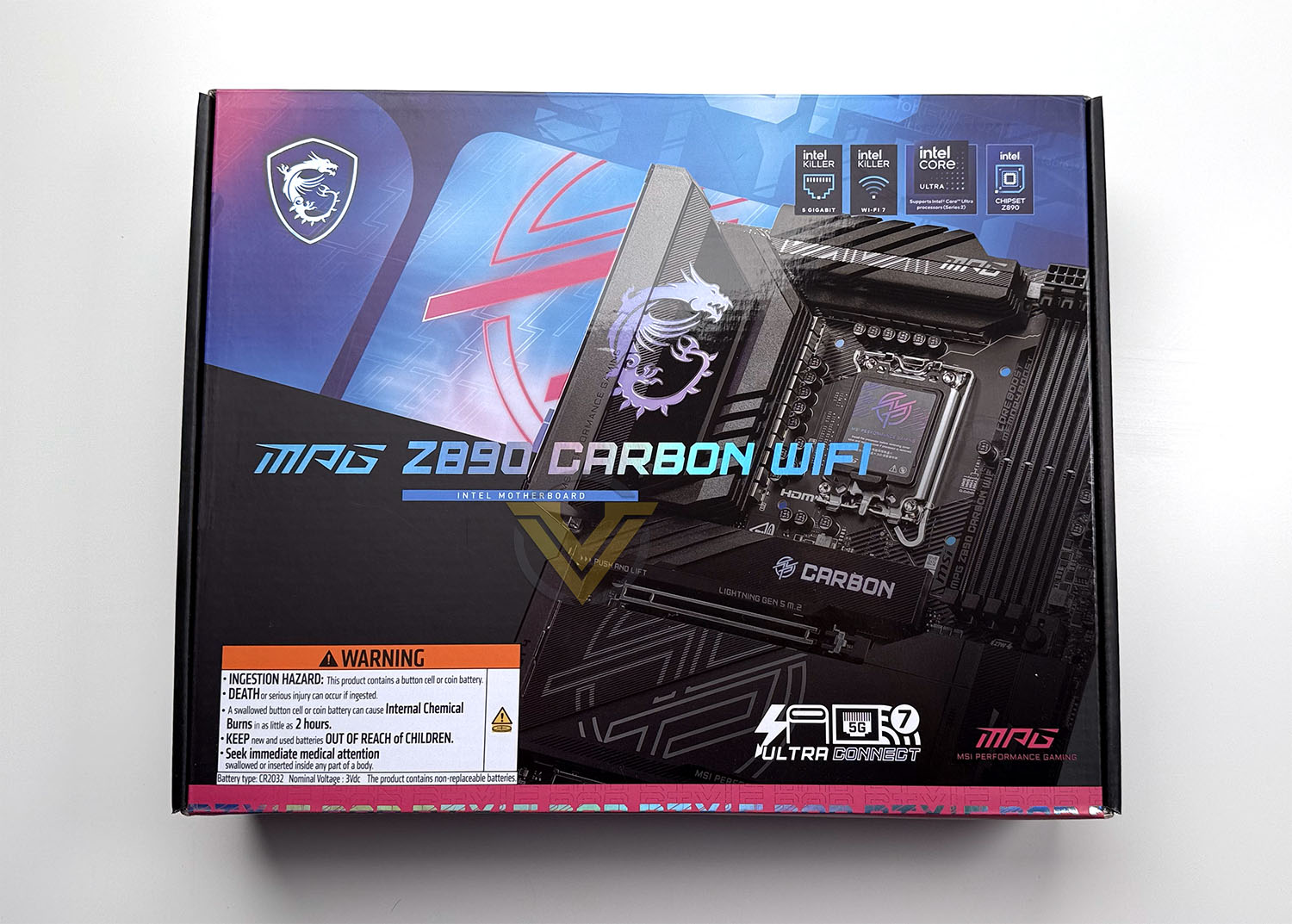
We just can’t seem to get away from light blues and purples in this generation as MSI’s MPG Z890 CARBON WIFI boast this neon ‘cyberpunk-inspired’ livery. Using it on the Carbon series – one known for a predominantly black colour-scheme, is certainly a choice, but it fits in with the AI theme many brands are leveraging for this round of platform updates.
Relevant technical highlights – Chipset, processor support, connectivity etc – are all featured on the front of the packaging.
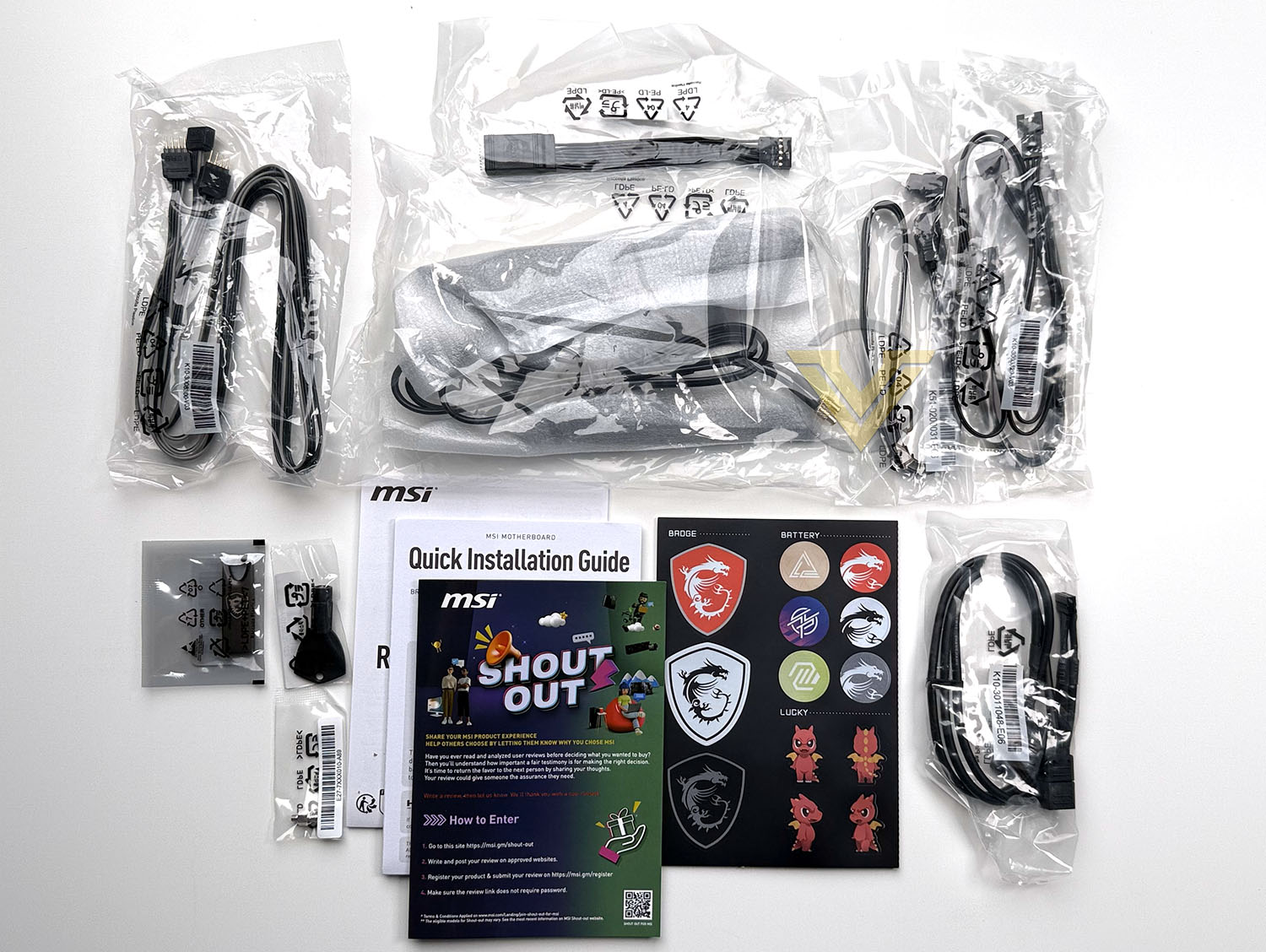
MSI buck a relatively recent trend of sparse bundled accessories with the MPG Z890 CARBON WIFI:
– EZ WiFi Antenna
– EZ M.2 Clip II
– EZ M.2 Clip II Remover
– 1 to 3 EZ Conn-Cable (V2)
– 2 x SATA cables
– ARGB Extension Cable
– 1 to 2 RGB extension/splitter cable
– EZ Front Panel cable
– Colour-coded Cable Stickers
– EZ M.2 Clip II
– EZ M.2 Clip II Remover
– 1 to 3 EZ Conn-Cable (V2)
– 2 x SATA cables
– ARGB Extension Cable
– 1 to 2 RGB extension/splitter cable
– EZ Front Panel cable
– Colour-coded Cable Stickers
Once again there is that focus on ‘EZ’ adaptations which makes the final platform easier to assemble and use whatever the experience level of the owner. The 802.11be antenna utilises a proprietary clip-in rather than threaded installation style, while the EZ Front Panel cable is a god-send as it allows you to connect up front panel jumpers outside of the confines of the dark and cramped case. The EZ M.2 Clip II meanwhile means you don’t have to deal with at least one of the tiny M.2 screws of typical motherboards.
As mentioned in our review of this design’s X870 counterpart, the longevity of MSI’s EZ-Conn connector and cable standard – which unifies fan, RGB and USB signalling into one proprietary header – remains to be seen. That being said, it’s a novel solution to the tangle of cables cooling and case lighting currently requires.
Sharp lines and a majority black colour-scheme are the hallmark of MSI’s CARBON series and their Z890 version doesn’t disappoint. A majority of its footprint consists of flat matte black heatspreaders or VRM heatsinks, giving the board a smooth and uncluttered appearance despite an extensive feature-set. The motherboard is equipped with five M.2 slots and three PCI-Express slots despite its ATX form factor, offering interesting configurations for discrete graphics and peripheral PSIe devices.
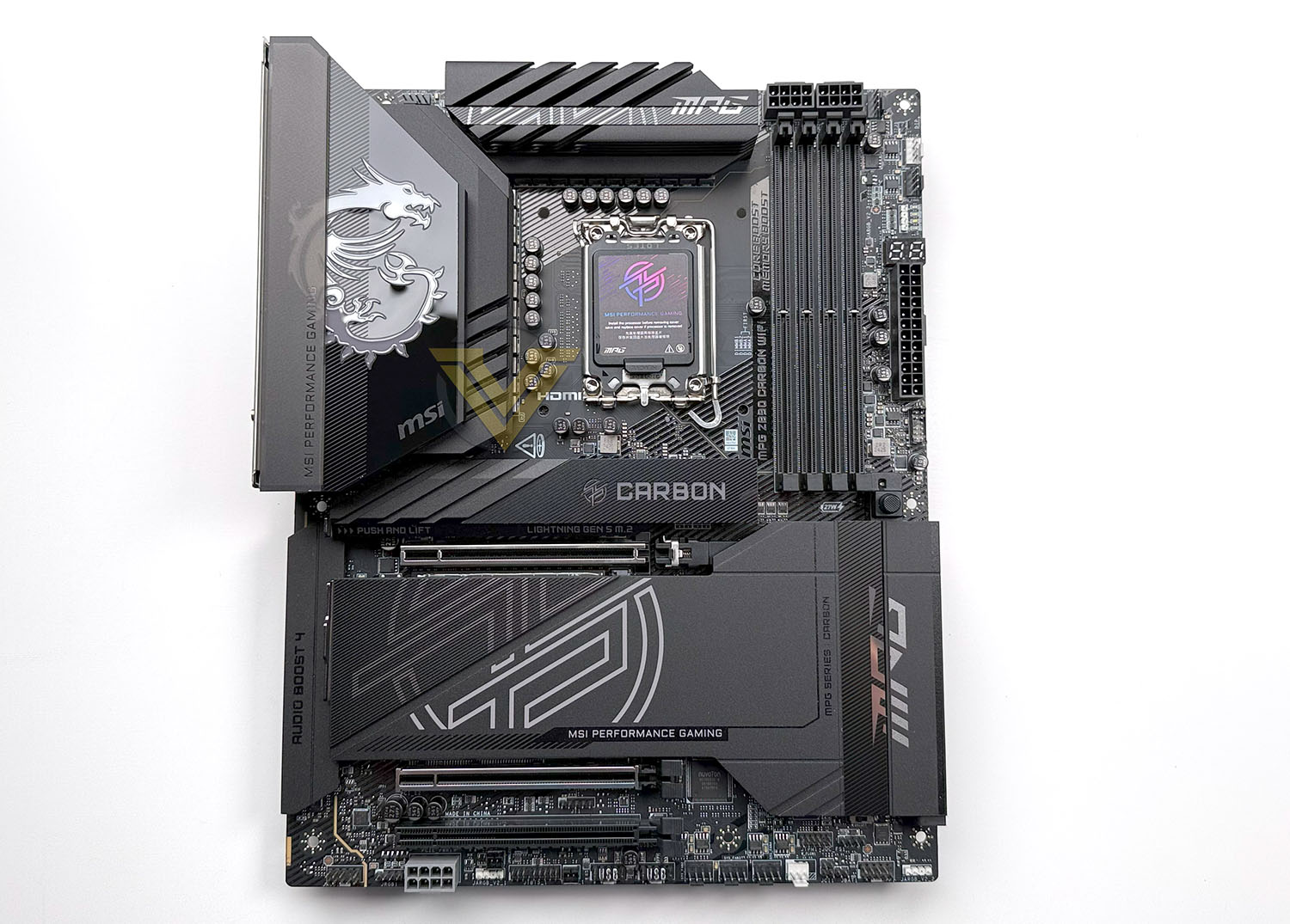
A straightforward ATX footprint will mean compatibility with almost every ATX PC case on the market. None of the connectors appear out of place at first glance and there shouldn’t be compatibility issues with the vast majority of LGA1700/LGA1851 coolers on the market either.
Once again however, we feel that MSI could perhaps tone down the branding and aesthetic detailing on this motherboard. Their CARBON series has historically been some of their most restrained, making them perfect to build around when customising your own system theme, so it’s a shame that so much iconography is so prominent. Particularly the circular MPG logo.
Closer Look
The MPG Z890 CARBON WIFI’s LGA1851 socket is surrounded on two sides by VRM heatsinks that channel air upwards through them, requiring modest air flow to work efficiently. VRM temps will benefit from air flow directed by the CPU cooler and it’s possible that the left-most heatsink and the area behind the I/O shield will become a heat trap if the air flow in an enclosed case is only incidental.
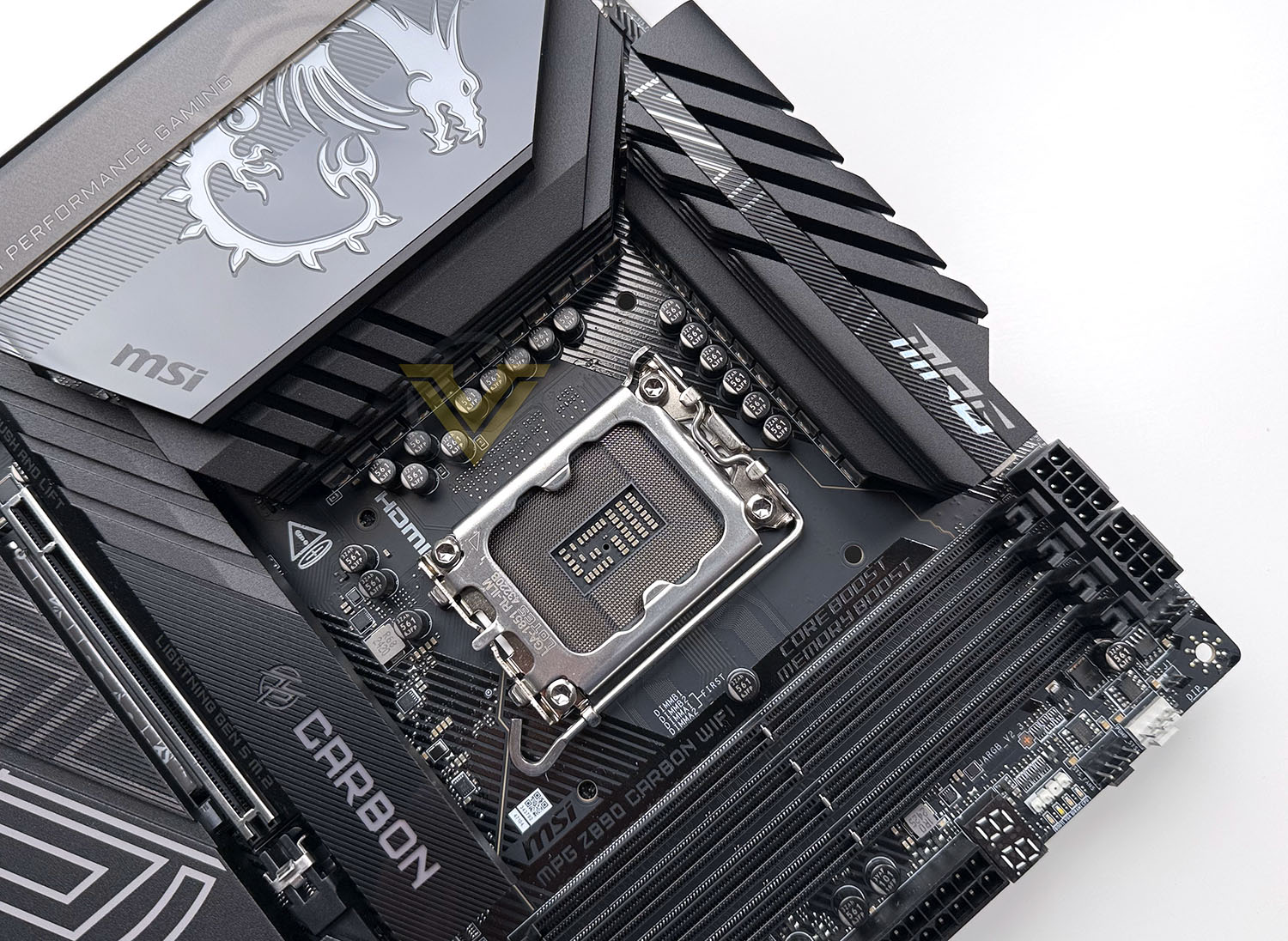
Intel’s LGA1851 socket incorporates a new ILM design (dubbed RL-ILM) which more evenly distributes mounting pressure around the CPU heatspreader, helping to reduce the chance of warping the chip when high mounting pressure is used. This should reduce the need for cooler ‘contact frames’ that replace the stock ILM (though one can still be used) and improve thermal performance more generally.
A 20+1+1+1 phase power delivery circuit (20-phase CPU, 1 for System Agent i.e. chiefly the IMC, 1 for GT i.e. Integrated Graphics, 1 for VNNAON) is fed by two 8-pin EPS 12V connectors in a non-standard location: the top-right of the board. This placement should be noted as not all ATX cases will have conveniently close gaps in the motherboard tray for cables, but on the other hand it makes connecting them, particularly when the motherboard is installed in a case, a lot easier. Sitting in the top-left is a single 4-pin PWM fan connector, and there’s just enough space between the VRM heatsinks to thread a CPU fan cable.
Below the EPS 12V connectors are the four DDR5 memory slots, and to the right connectors is a single 4-pin PWM fan connector. Turning the corner there are two further 4-pin PWM fan connectors, the top of which is indicated as appropriate for a water cooling pump. Below them is a 3-pin (5V) ARGB connector, next to which is a bank of EZ Debug Boot LEDs to show debug status of CPU, RAM, GPU and Boot device. The LED will remain illuminated when the boot process is hanging on that device. Below this is the traditional 2-digit Debug LED for status codes when troubleshooting.
The DIMM slots are identified as (from left to right) B1, B2, A1 and A2. MSI note that installation of DDR5 DIMMs should prioritise the A2 (outermost) slot in single-DIMM configurations, then the B2 (2nd) slot when adding a 2nd DIMM. This information is replicated on the PCB itself.
Coming further down the right edge of the motherboard alongside the DIMM slots we have the 24-pin ATX power connector and and EZ Conn-Header V2. The latter utilises the supplied 1 to 3 EZ Conn v2 cable to split out 4-pin PWM fan, ARGB Gen1/2 and a USB 2.0 header signalling to connect these devices behind the motherboard tray for cleaner cable management.
Note that some MSI CPU and system cooling hardware can interface with the EZ Conn-Header natively.
Next up is a USB Type-C (supporting 20Gbps) front panel header, two USB 3.2 Gen1 (5Gbps) headers, and two banks of two SATA III 6Gbps ports. Note that each of these connectors are angled parallel to the motherboard, leading to clean cable management when installed in a case.
Also located just to the right of the DIMM slots is the EZ PCIe Release button. Pressing this releases the card retention latch of the main PCIe x16 slot, a considerably easier process than manually unclipping it. This feature is getting all the more essential as GPU cooling solutions become heavier and more elaborate, and as a result the pressure on the latch increases.
Continuing around the bottom edge we’re greeted by a 3-pin (5V) ARGB header and then the front-panel header block. The supplied EZ Front Panel cable plugs directly into this, or individual front-panel cables can be hooked up on a piecemeal basis. Just above this block is an independent LED switch, 12-pin TPM module connector, and 4-pin auxiliary header for speaker and buzzer that has been divorced from the standard block of front panel headers.
Next as we move to the left is a safe-boot header that when closed boots the PC with a default config and lower PCIe speed, followed by a Clear CMOS jumper, and then a chassis intrusion detection sensor header. A 3-pin Water Flow meter header is to the right of three 4-pin PWM fan headers, two USB 2.0 headers, thermal probe sensor header, Thunderbolt 5 header (for optional expansion card) 3-pin 5V ARGB header and RGB LED demo header.
One differentiating feature of this design that’s up next is the supplemental 8-pin PCIe power connector for on-board components. This optional connector can supply up-to an additional 252W (12V, 21A) to the motherboard when under the heaviest load, ensuring component stability when tested to the limit.
The last two items of significance along this bottom edge are the motherboard’s single 4-pin (12V) RGB LED header and the HD AUDIO front panel header.
Despite its minorly idiosyncratic connector positioning there’s not a lot unexpected in terms of onboard connectivity. It’s logically laid out, though the positioning of 12V EPS and PCIe power connectors will fox some case designs, and so will pose few problems to novice and inexperience system builders. The inclusion of two debug pathways – a simple LED indicator and two-digit panel – will help immeasurably if troubleshooting is required, and of course anything that helps to hook up those pesky front panel switches is always welcome.
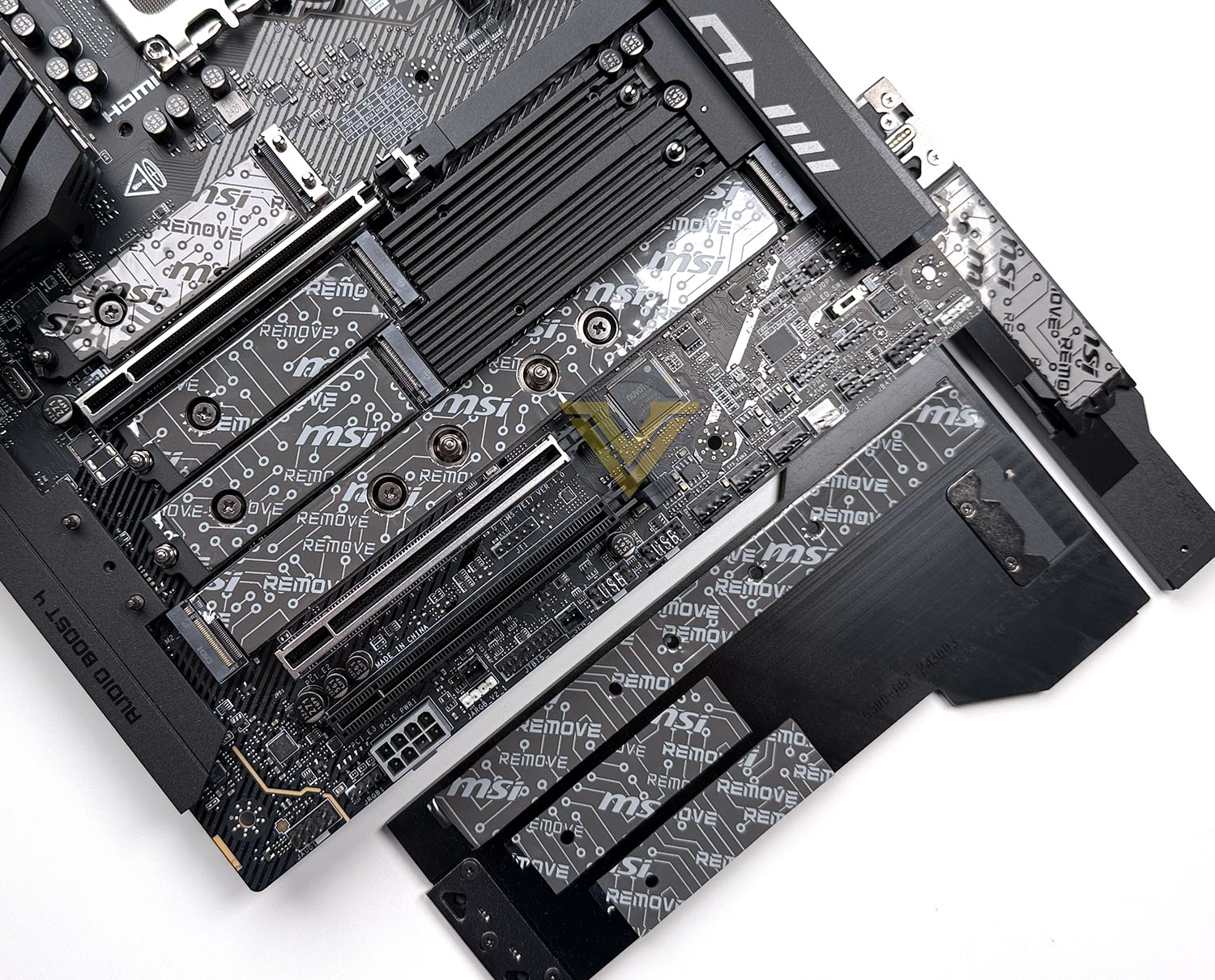
With the heatspreaders removed the M.2 slots are exposed. The top-most slot is wired for PCIe Gen5 x4 operation off-CPU with four dedicated lanes off-CPU, supporting up-to 80mm-long and 25mm-wide 2580 form factor M.2 NVMe SSDs as well as more conventional 22mm side models. MSI have joined GIGABYTE to support up-to this wider M.2 drive footprint. A long thermal pad is installed on top of the motherboard PCB to improve heat dissipation on dual-sided drives.
The top slot’s M.2 Shield FROZR II heatspreader acts as heatsink for the NVMe SSD installed, allowing it to dissipate heat more readily and cool high-performance PCIe Gen5 SSDs. Just to the left of the M.2 drive retention clip is a 4-pad header for the RGB embedded in the heatspreader. Each M.2 slot has thermal pads on both the underside of the heatspreader and facing the drive from below.
Below the primary M.2 slot is the primary PCIe x16 slot. This is wired for 16 PCIe 5.0 lanes off-CPU, stepping down to x8 operation depending on the status of additional installed PCIe devices in the lower slots. Both the primary and secondary slot have been reinforced to better support heavy graphics cards but additional support in the form of anchor points on the case or a bracing strut at the end of the card are still recommended. As noted, the primary x16 slot is augmented by the MSI EZ Release system.
Of the bank of four M.2 slots between the first and second PCIe slots, only the top-most is off the CPU. The rest are provided by the chipset, and all are configured for PCIe 4.0 signalling. Only one is long enough to accommodate 110mm-long M.2 drives (22110 form factor) while the rest all handle up-to 80mm (2280) SSDs. The PCIe slot below them is wired for up-to PCIe 5.0 x8 operation that’s ideal for supplementary high-speed storage, while the final PCIe slot is wired for PCIe 4.0 x4 operation and hence suitable for other high-bandwidth components.
We’d like to mention here that MSI provides no information on how or if off-CPU and off-Chipset PCIe lanes are shared between each M.2 and PCIe slot. That’s in stark contrast to some of their competitors who go to great pains to break down how populating a slot could impact the operation of another device.
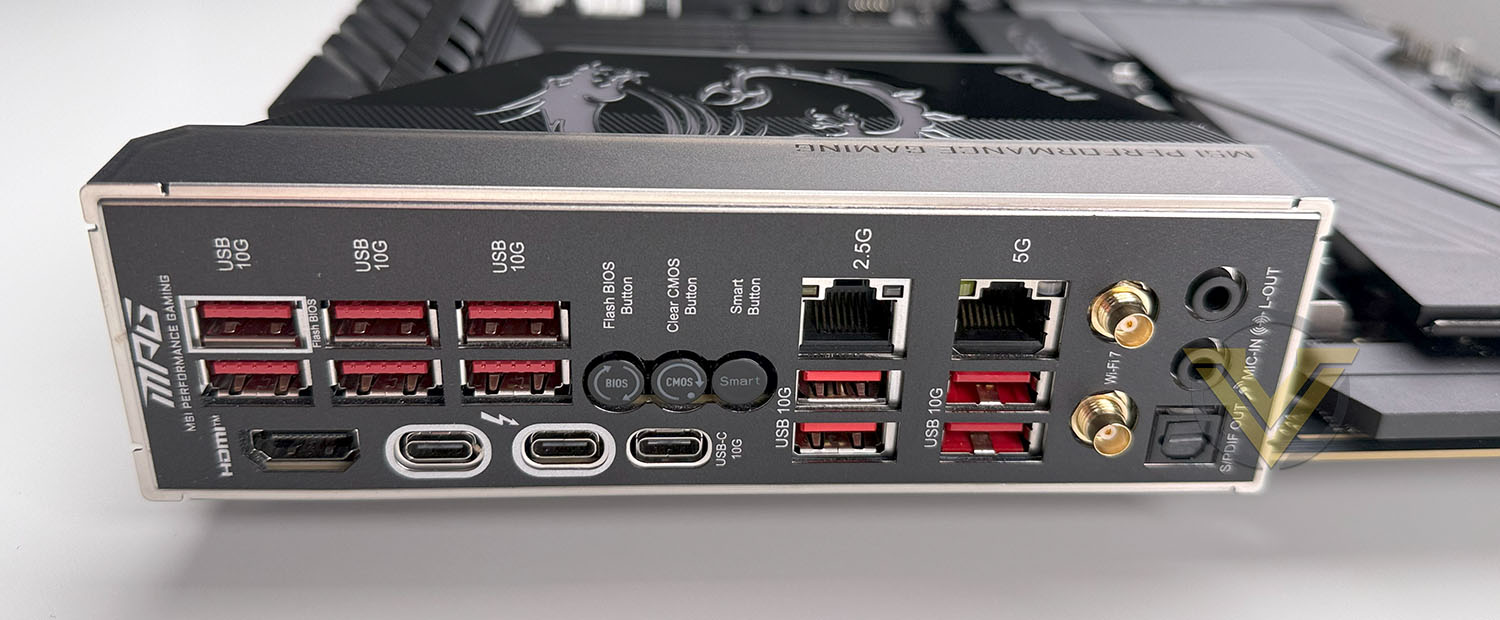
MSI have preinstalled the rear I/O shield, removing a significant install pinch-point. Located on the rear I/O panel are:
– 6 x USB 3.2 Gen2 10Gbps Type-A
– HDMI 2.1 Port
– 2 x Thunderbolt 4 Type-C
– Flash BIOS Button
– Clear CMOS Button
– Smart Button (UEFI-configurable button)
– USB Gen2 10Gbps Type C
– 2.5G (2.5Gbps) LAN
– 2 x USB 3.2 Gen2 10Gbps Type-A
– 5G (5 Gbps) LAN
– 2 x USB 3.2 Gen2 10Gbps Type-A
– Wifi/Bluetooth EZ WiFi Antenna connector
– Auto-detect Audio
– Optical S/PDIF Audio Out
– HDMI 2.1 Port
– 2 x Thunderbolt 4 Type-C
– Flash BIOS Button
– Clear CMOS Button
– Smart Button (UEFI-configurable button)
– USB Gen2 10Gbps Type C
– 2.5G (2.5Gbps) LAN
– 2 x USB 3.2 Gen2 10Gbps Type-A
– 5G (5 Gbps) LAN
– 2 x USB 3.2 Gen2 10Gbps Type-A
– Wifi/Bluetooth EZ WiFi Antenna connector
– Auto-detect Audio
– Optical S/PDIF Audio Out
This motherboard’s WiFi antenna sockets are non-standard and may not be compatible with standard high gain 802.11be antenna.
MSI have opted to pair 5G and 2.5G LAN for this board’s wired networking rather than higher performance 10GbE. The latter’s utility remains somewhat limited compared to 5GbE, but having an option above 2.5GbE is a wise consideration at this price bracket.
Test Setup & Methodology
Notes: We’ve revamped our benchmark regime by removing a number of tests which reveal little, to no difference between each motherboard model. Gaming performance is one such area which has been removed due to the inability for each motherboard to offer any advantage over another. Instead, we have focussed on meaningful/tangible analysis which examines the VRM/chipset design, and the storage performance which will be far more informative to the end user.
TEST SETUP
CPU Intel Core Ultra 9 285KCooling: Corsair iCUE LINK TITAN 360 RX RGB
Memory: 32GB Kingston FURY Renegade 7600 MHz
Storage: Silicon Power A55 512GB + Silicon Power XPower XS70
PSU: Corsair HX1050 80 Plus Gold Certified PSU
Monitor: AOC U2879VF
BENCHMARKS
PCMark 10 – Overall Extended ScoreSiSoftware SANDRA – SATA/PCIe Storage Tests
SiSoftware SANDRA – Overall System Score
OTHER SOFTWARE
Temperature Analysis: HWMonitorStress Testing Software: AIDA64 Stability Test
CPU Specification Monitoring: CPU-Z
Benchmarks: Power Consumption
In this first test we analyse the power efficiency from the wall for each motherboard (Minus the GPU). While each model uses the same chipset/platform, energy results can fluctuate between manufacturers due to the features and specifications that are integrated. First of all, for the idle tests the system is cold booted into Windows and no additional applications are executed – wattage is noted on the external energy monitor we use and then we open Aida64 stability test and execute a stress test, noting the highest reading on the monitor. Below are the results of this energy test.
Benchmarks: VRM & PCH Cooling
Each motherboard manufacturer designs their board with a unique set of heatsinks to cover key areas like the VRM/mosfets and the chipset itself. We load up Aida64 stability test again and perform a 20 minute run, recording the maximum value for both attributes.
Benchmarks: PCMark 10
PCMark 10 features a comprehensive set of tests that cover the wide variety of tasks performed in the modern workplace. With a range of performance tests, custom run options, and the new Battery Life Profile, PCMark 10 is the complete PC benchmark for the modern office.
Benchmarks: SATA Performance
In order to ascertain the SATA performance for our motherboards we use SiSoftware SANDRA and the File System Bandwidth performance test. This allows us to obtain the sequential read/write transfer rates for the drive being tested – Crucial MX300 SSD.
Benchmarks: PCIe M.2 Performance
In order to ascertain the PCIe M.2 performance for our motherboards we use SiSoftware SANDRA and the File System Bandwidth performance test. This allows us to obtain the sequential read/write transfer rates for the drive being tested – Kingston KC2500.
Benchmarks: Geekbench
Geekbench 6 measures your processor’s single-core and multi-core power, for everything from checking your email to taking a picture to playing music, or all of it at once. Geekbench 6’s CPU benchmark measures performance in new application areas including Augmented Reality and Machine Learning, so you’ll know how close your system is to the cutting-edge.
Conclusion
The MSI MPG Z890 Carbon WiFi motherboard impresses as a premium offering, particularly for gamers and enthusiasts looking for robust performance and features. Its strong phase power delivery system ensures smooth and reliable operation, even under demanding workloads. A standout aspect is its extensive connectivity, featuring multiple USB ports, including dual Thunderbolt 4 for high-speed data transfer and display support, as well as dual network ports for versatility in networking configurations. The inclusion of CUDIMM support and five M.2 slots provides ample opportunities for expansion and high-speed storage solutions.
The board’s design blends functionality with aesthetics, boasting an attractive and modern look that complements high-end builds. Its VRM cooling system performs well, keeping temperatures low under heavy usage, and its tool-less installation options for M.2 and PCIe slots simplify the building process. Debugging features are well thought out, catering to overclockers and enthusiasts who may need quick and effective troubleshooting.
Performance-wise, the Z890 Carbon WiFi holds its own with consistently good results across various benchmarks, making it a reliable choice for gamers and creators alike. Its price point further enhances its appeal, offering excellent value for its class by undercutting some rival models that may lack its breadth of features or performance consistency.
The MSI MPG Z890 Carbon WiFi is an outstanding motherboard that checks all the right boxes, from performance and connectivity to ease of use and aesthetics. With no apparent drawbacks, it stands as a top-tier choice for anyone seeking a feature-rich, reliable, and reasonably priced motherboard in its category. Whether for gaming, professional workloads, or future-proofing a high-performance system, this motherboard delivers exceptional value and functionality.
PROS
+ Strong phase power delivery system
+ Packed with USB inc. twin Thunderbolt 4
+ CUDIMM support
+ Good selection of debug features
+ Attractive looking design
+ Good VRM temperatures
+ Five M.2 slots
+ Consistently good performance
+ Dual network ports
+ Tool-less functionality for M.2 and PCIe
+ Priced cheaper than some rival models in same league
CONS
– None
+ Strong phase power delivery system
+ Packed with USB inc. twin Thunderbolt 4
+ CUDIMM support
+ Good selection of debug features
+ Attractive looking design
+ Good VRM temperatures
+ Five M.2 slots
+ Consistently good performance
+ Dual network ports
+ Tool-less functionality for M.2 and PCIe
+ Priced cheaper than some rival models in same league
CONS
– None
Click here for an explanation of our awards at Vortez.net.
Stay connected with the Vortez Social Media pages:
Join in with the discussions on Discord