ASrock X870 Roundup Review: X870 Taichi Creator, PG X870 Nova Wifi, X870 LiveMixer Wifi

In this roundup, we’ll be putting three of ASRock’s latest releases, to see how they stack up against one another and the wider X870 field.

Product On Review:
X870 LiveMixer Wifi
Phantom Gaming X870 Nova Wifi
X870 Taichi Creator
Manufacturer: ASRock
Street Price:
X870 Live Mixer Wifi: USD $230
Phantom Gaming X870 Nova Wifi: USD $280
X870 Taichi Creator: $320
While AMD’s X870 chipset has already established itself as the backbone of the Ryzen 9000 series platform, ASRock is refreshing its lineup mid-cycle with three new additions aimed at broadening its reach across gaming, streaming, and professional workloads. These boards—the X870 LiveMixer Wifi, Phantom Gaming X870 Nova Wifi, and X870 Taichi Creator—arrive partway through the platform’s lifecycle, bringing updated designs and feature sets that build on the strengths of AM5 while addressing different segments of the enthusiast market. With PCIe 5.0 support, refined DDR5 compatibility, and modern connectivity like Wi-Fi 7, they aim to keep the X870 ecosystem competitive well into the next wave of hardware releases.
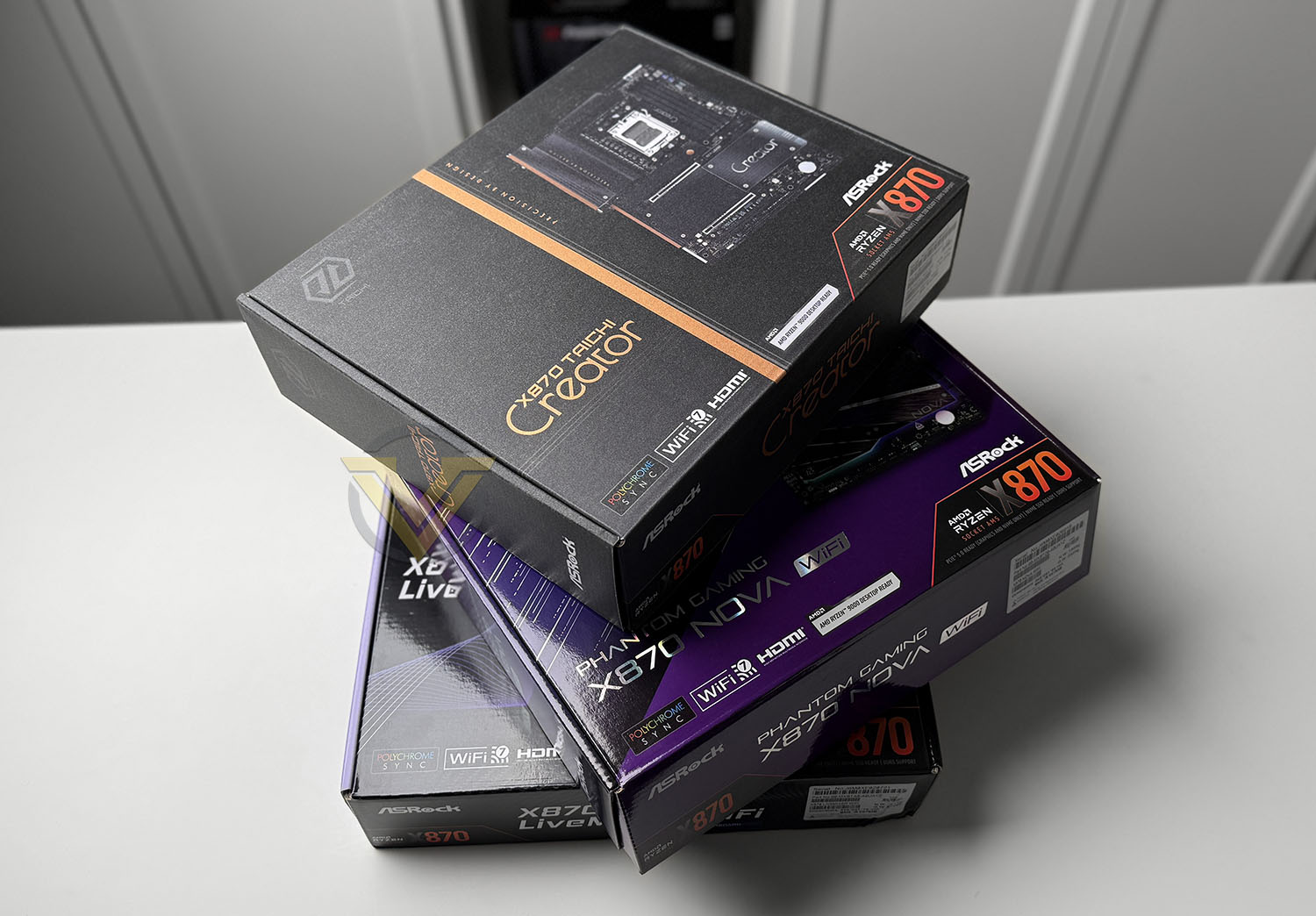
The X870 LiveMixer Wifi continues ASRock’s tradition of delivering a board geared toward creators and streamers, emphasizing high connectivity and expansion with its generous USB count, multiple PCIe slots, and standout aesthetics. The Phantom Gaming X870 Nova Wifi, meanwhile, provides a more mainstream performance option, with upgraded VRM power delivery, an eye-catching design, and optimizations designed to handle high-refresh-rate gaming and overclocked CPU configurations.
Sitting at the top of the stack is the X870 Taichi Creator, which caters to power users and professionals who demand workstation-class features in a desktop form factor. With robust networking options, high-quality onboard audio, and extensive storage flexibility, it’s positioned as the most versatile of the trio. In this roundup, we’ll be putting all three boards through their paces—evaluating power delivery, thermals, connectivity, and real-world performance—to see how ASRock’s latest releases stack up against one another and the wider X870 field.
X870 LiveMixer Wifi
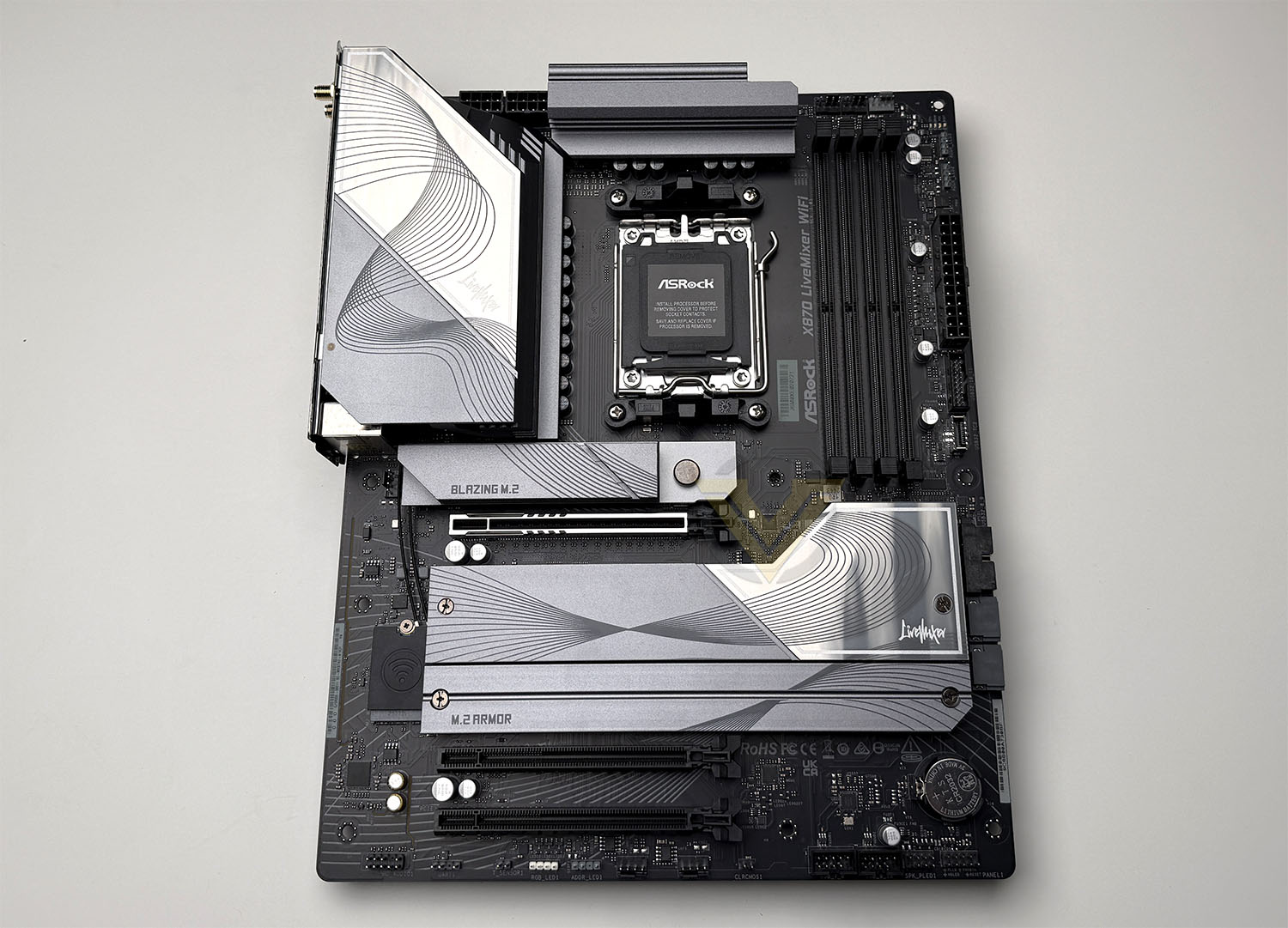
The X870 LiveMixer WiFi is a full-sized ATX board and has a predominantly dark aesthetic, with heatsinks and shrouds in muted grey/black tones. The overall design is pleasing to the eye and the layout is familiar. ASRock bundles the board with two SATA data cables, a thermistor cable, and dual-band WiFi antennas (covering 2.4 / 5 / 6 GHz) for its onboard wireless module.
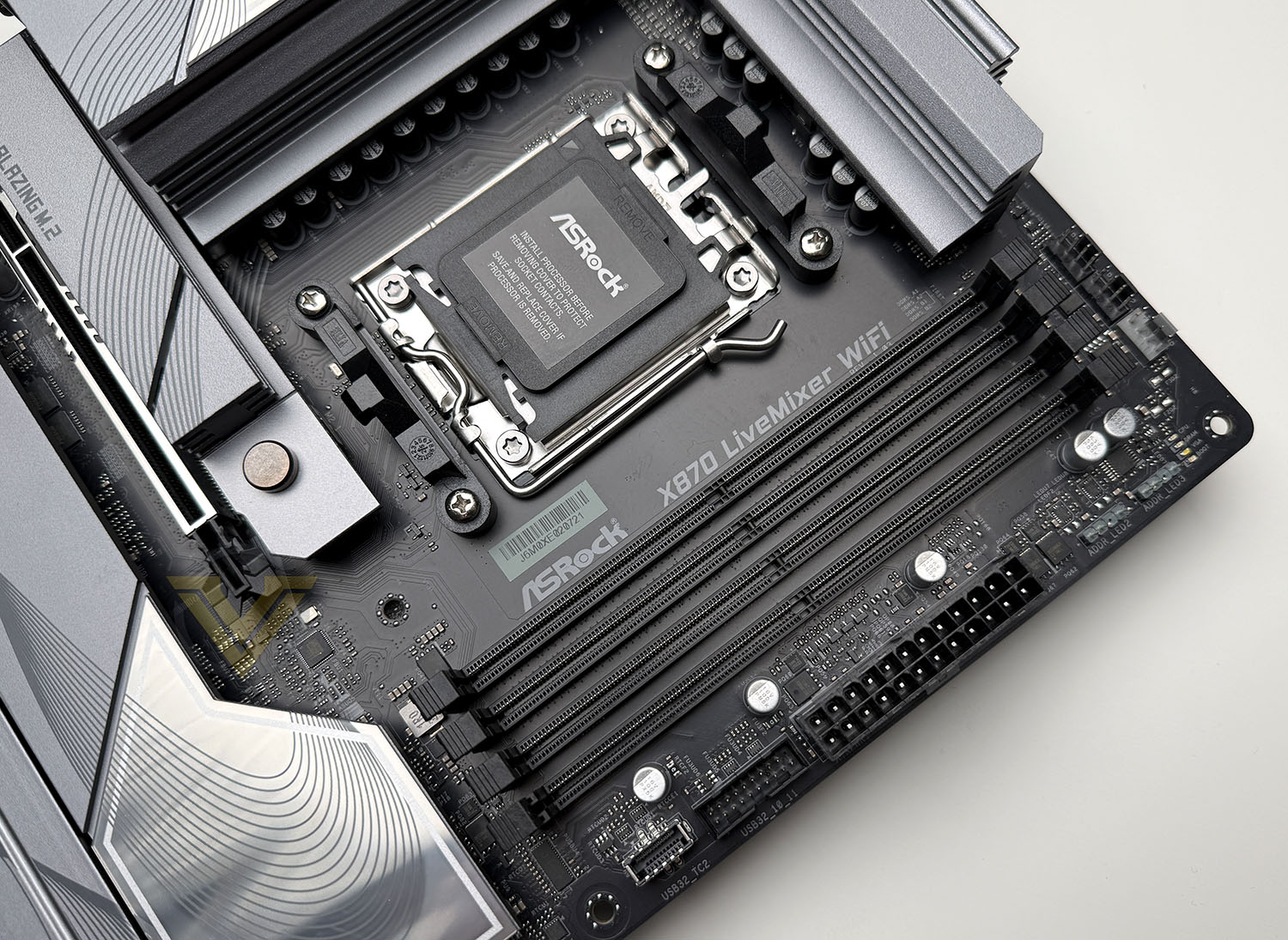
The LiveMixer adopts AMD’s AM5 socket which has support for their very latest Ryzen 9000 CPUs. The VRM design is based on a 16 + 2 + 1 phase design with 80A Dr.MOS components for VCore, and SOC.
Our board comes with a good assortment of fan headers which are dotted around, in key areas and they include: 2 × CPU fan connectors (4-pin) 3 × chassis fan connectors (4-pin) 1 × AIO pump connector (4-pin).
On memory, the board supports dual-channel DDR5 across 4 DIMM slots, with a stated overclocking ceiling of 8000+ (OC) and up to a whopping 256GB. In the top-right corner, beside the memory slots we have LED indicators which help to diagnose possible POST issues and there are two addressable ARGB headers.
Also in this area there is a USB 3.2 Gen2x2 front panel header, as well as a USB 3.2 Gen1 front panel header.
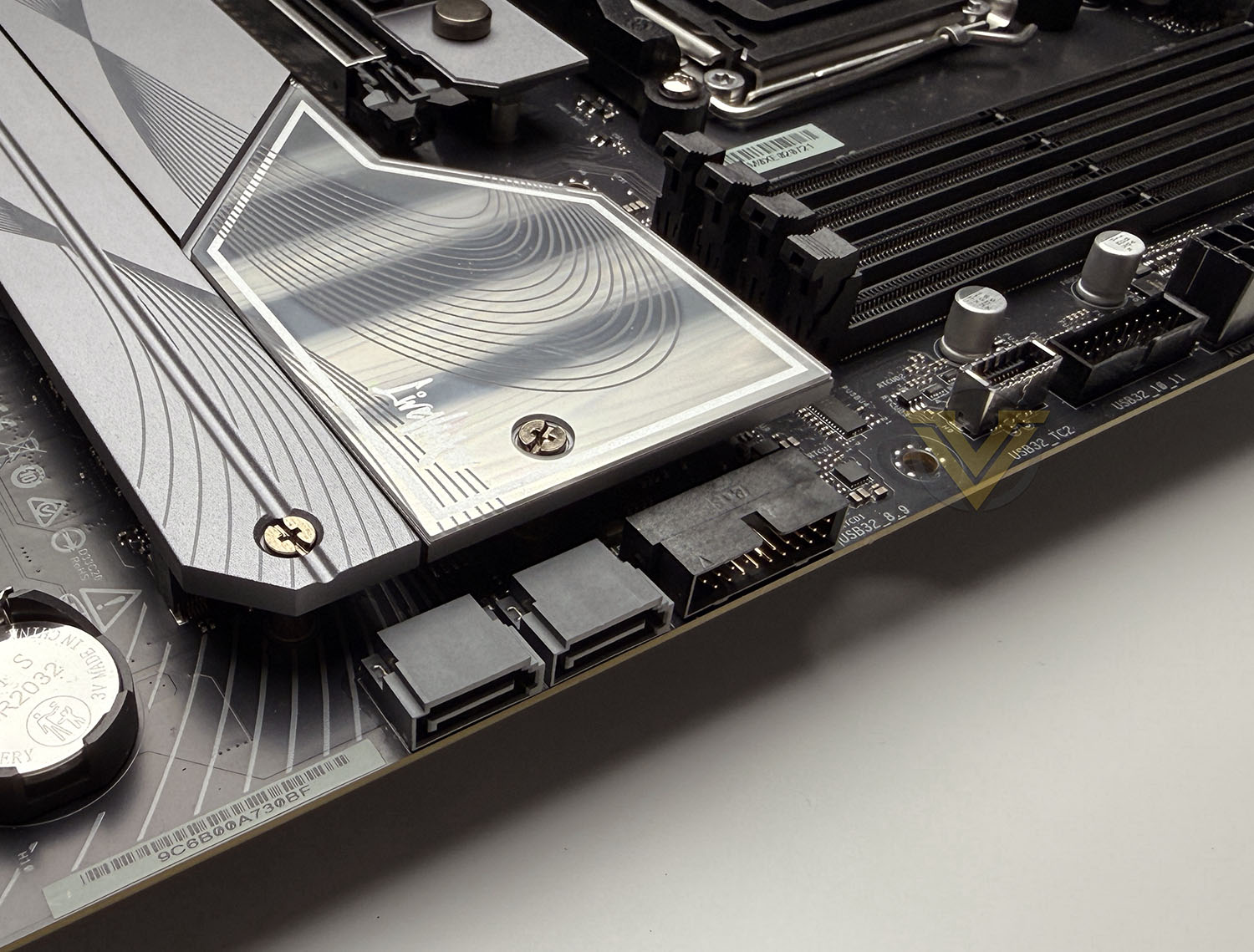
Storage is well-covered on LiveMixer Wifi. It offers 2 × SATA3 (6.0 Gb/s) ports. There are also a total of 4x M.2 slots. Two of these M.2 slots support Gen5 x4, and the other two are Gen4 x4 compatible. (One being the smaller 2230 form factor).
There are some lane-sharing behaviours to be aware of: if M2_2 is occupied, the two rear USB4 Type-C ports (and M2_2 itself) will drop to x2 mode unless a BIOS setting changes that (which, however, disables the USB4 ports) Also, occupancy of M2_3 and M2_4 can force reductions in throughput for PCIe slots PCIE2/PCIE3.
Moving to the PCI Express region, there are 3x PCIe x16 slots, one supporting PCIe 5.0 and two supporting PCIe 3.0. The top slot benefits from EZ Release – which is a quick release mechanism for installing/removing graphics cards from the slot.
Audio on the LiveMixer is handled by the Realtek ALC4082 codec, delivering 7.1 channel HD audio. This board also provides support for the Nahimic audio suite, which includes features such as static noise suppression, echo cancellation, voice stabilizer, lateral sound cancellation, and a “Sound Tracker” visual radar to indicate directional audio cues. On the PCB itself, ASRock isolates left and right audio channels on separate layers for better signal integrity
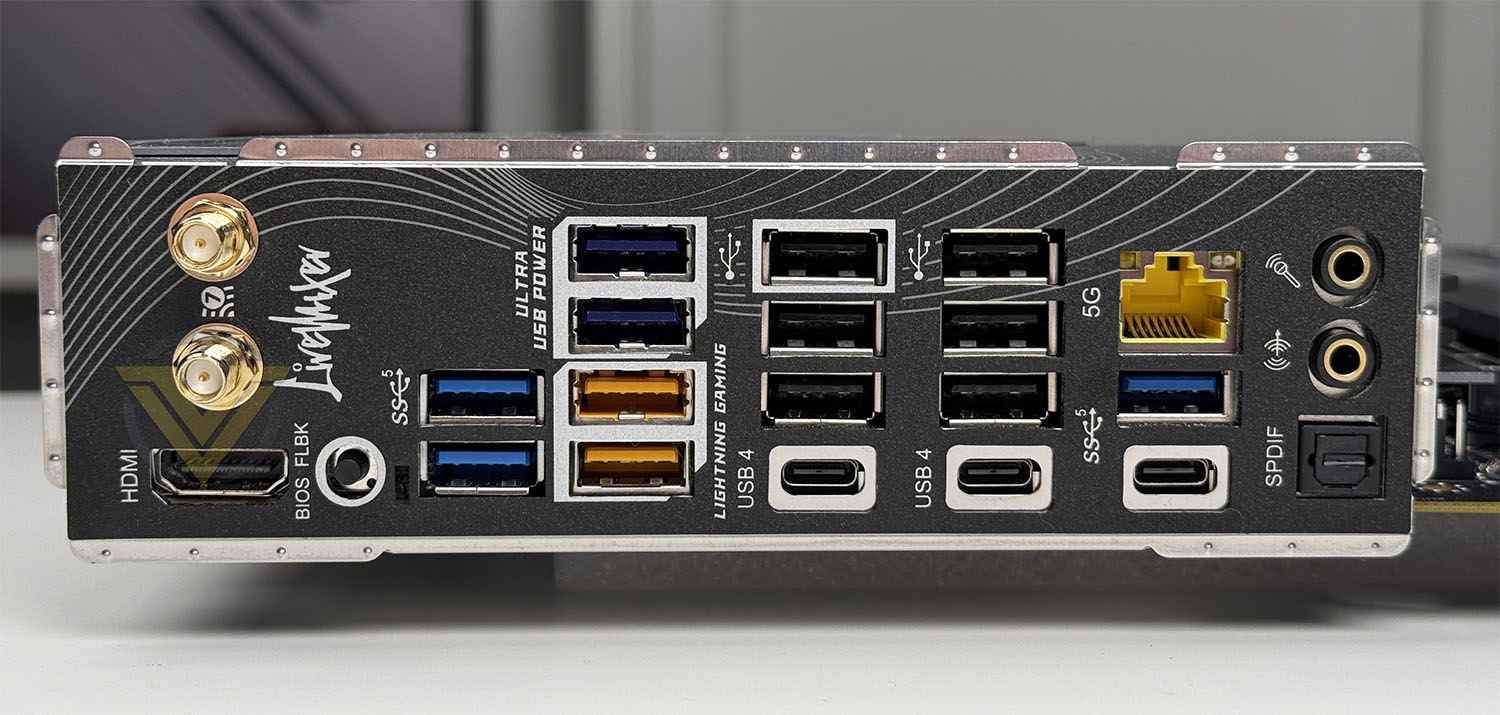
The Rear IO panel is packed with a good assortment of ports to maximise functionality. On this panel we get:
2 × WiFi antenna connectors (for the 802.11be / Wi-Fi 7 module)
1 × HDMI port (HDMI 2.1 / FRL 8G, up to 4K @ 120 Hz)
1 × Optical SPDIF out
2 × USB4 Type-C ports (40 Gb/s)
1 × USB 3.2 Gen1 Type-C port
7 × USB 3.2 Gen1 Type-A ports
6 × USB 2.0 ports
1 × RJ-45 LAN port (Realtek 5 GbE)
1 × BIOS Flashback button
Phantom Gaming X870 Nova Wifi
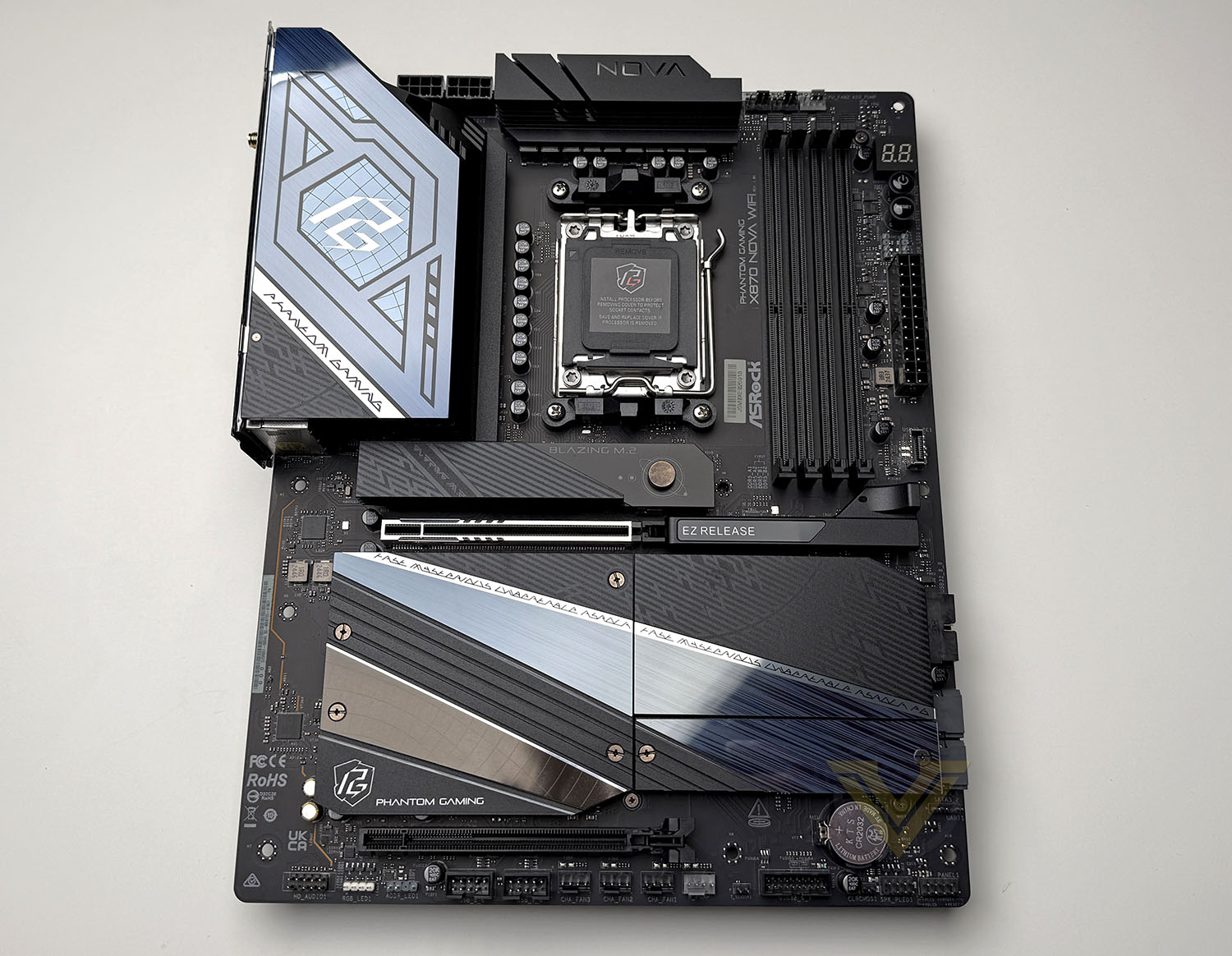
The PG X870 Nova Wifi is again, another ATX form factor motherboard which boasts a dark/black theme with reflective accents across heatsinks and covers. The bundles accessories include two SATA cables, A wifi antenna for the Wifi 7 module, a thermistor cable and ARGB extension splitter cable.
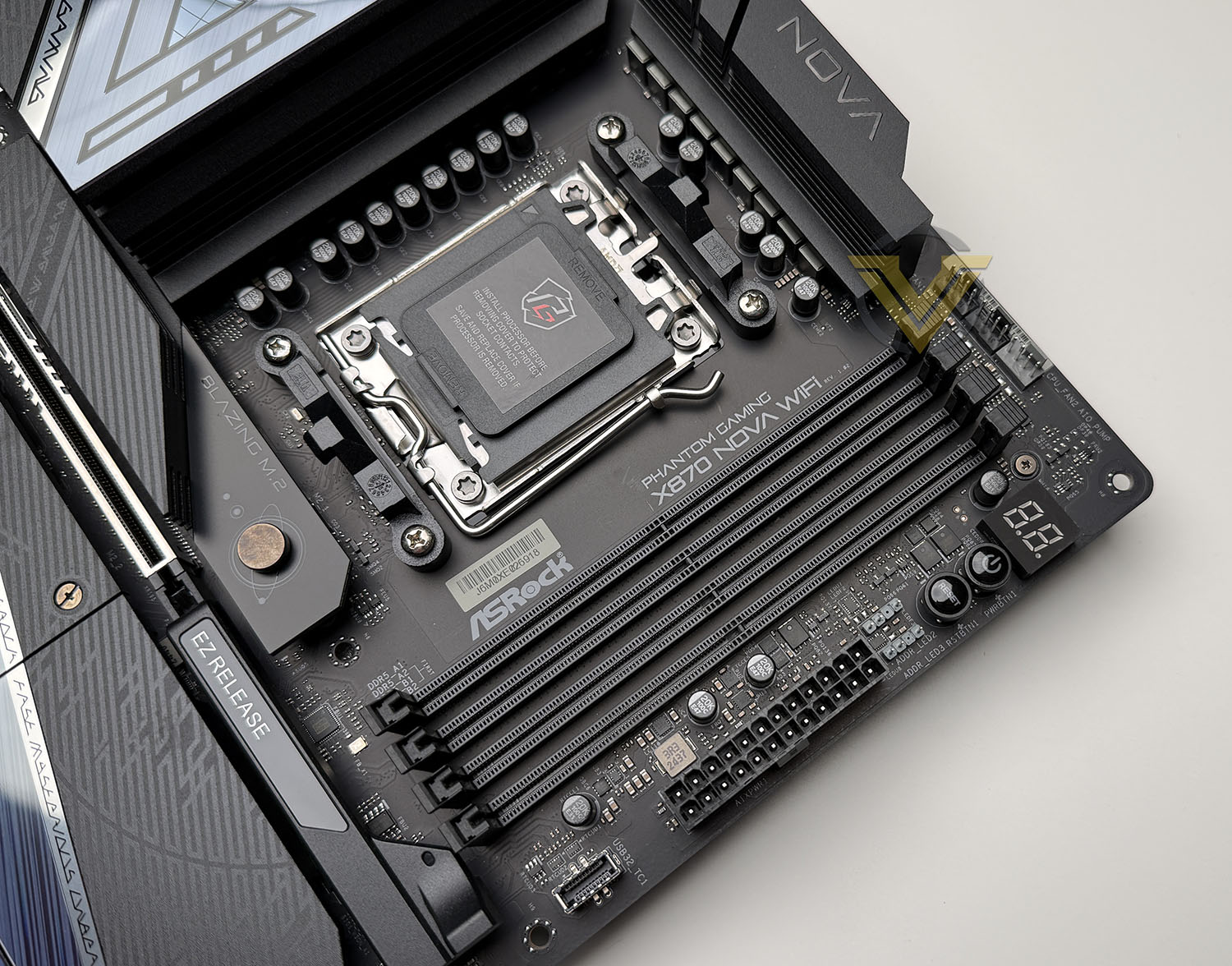
Our board uses the AM5 socket, providing support for AMD’s latest Ryzen 9000 series CPUs and there is a solid, 18 + 2 + 2 digital phase design with smart power stages. There are a multitude of fan headers across Nova Wifi – totalling 7 for CPU, pump, and chassis fans.
Memory support comes in the form of 4x DDR5 DIMM slots providing support for up to 256GB. The maximum stated speed compatible is 8400+ OC. In the memory region we have a debug panel, LED indicators for diagnosing issues on POST, onboard power/reset buttons and two addressable ARGB headers. (there are three found on this board).
Along with this we also have a front panel USB 3.2 Gen2x2 header, which accompanies two USB 3.2 Gen1 headers.
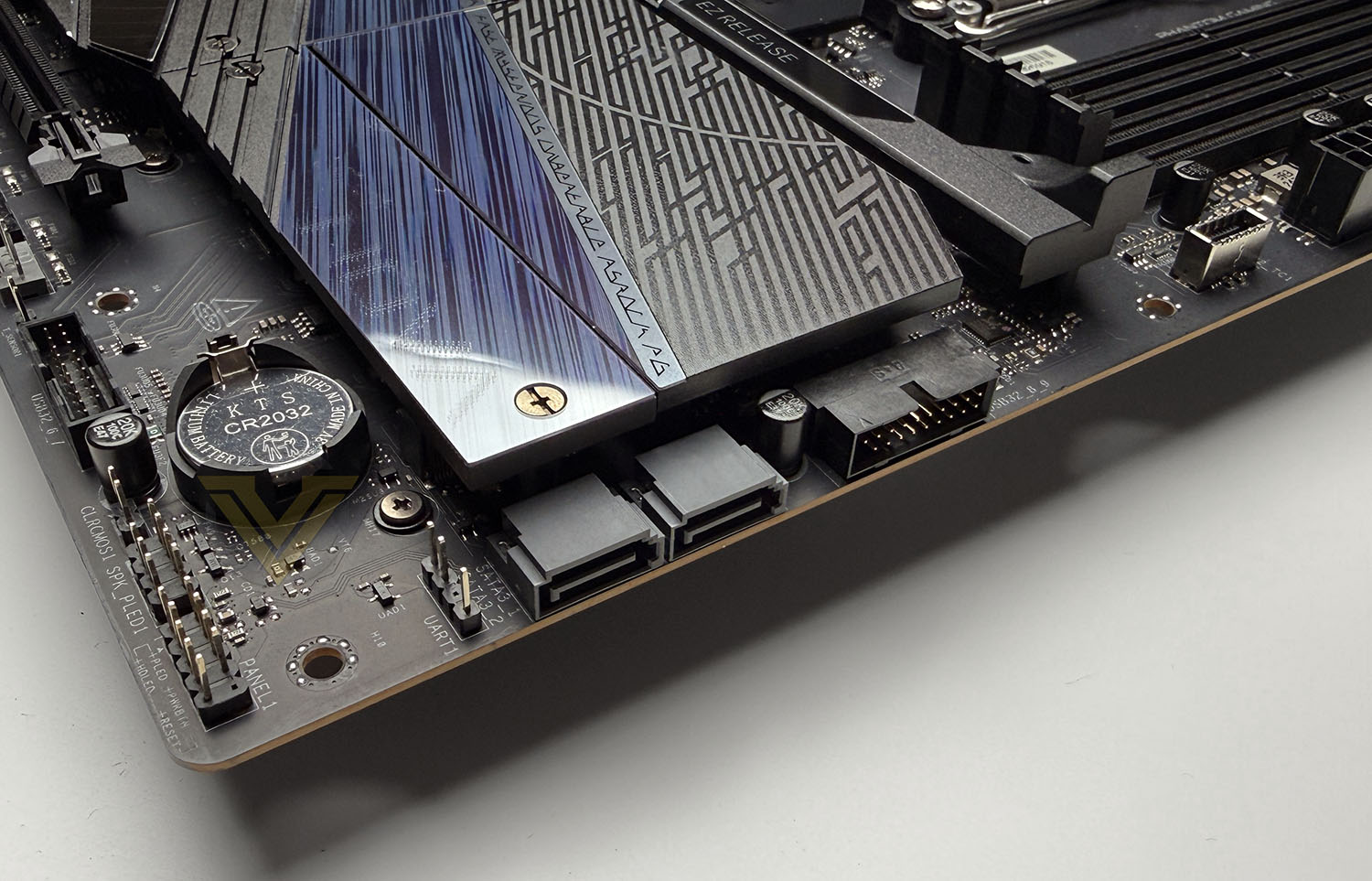
Just like the LiveMixer, Nova has a downsizing of SATA ports, with just two, but we do however have five M.2 slots Two are PCIe Gen5 x4 and three are PCIe Gen4 x4. All of these slots benefit from a supplied heatsink.
The PCIe region features two full-sized x16 slots – the upper being Gen4 x16 and the lower being Gen4 x4. The upper benefits from having the EZ Release system – ASRock’s quick release latch. This makes installing and removing a GPU very easy and tool-free.
Audio on Nova Wifi is handled by Realtek ALC4082 codec which supports up to 7.1 channel high-definition audio. ASRock complements this with Nahimic audio software (via SteelSeries integration) to offer features such as noise suppression, voice enhancement, and spatial audio tools. On the PCB, the audio section is isolated to reduce interference, and gold-plated jacks are provided for improved signal contact.
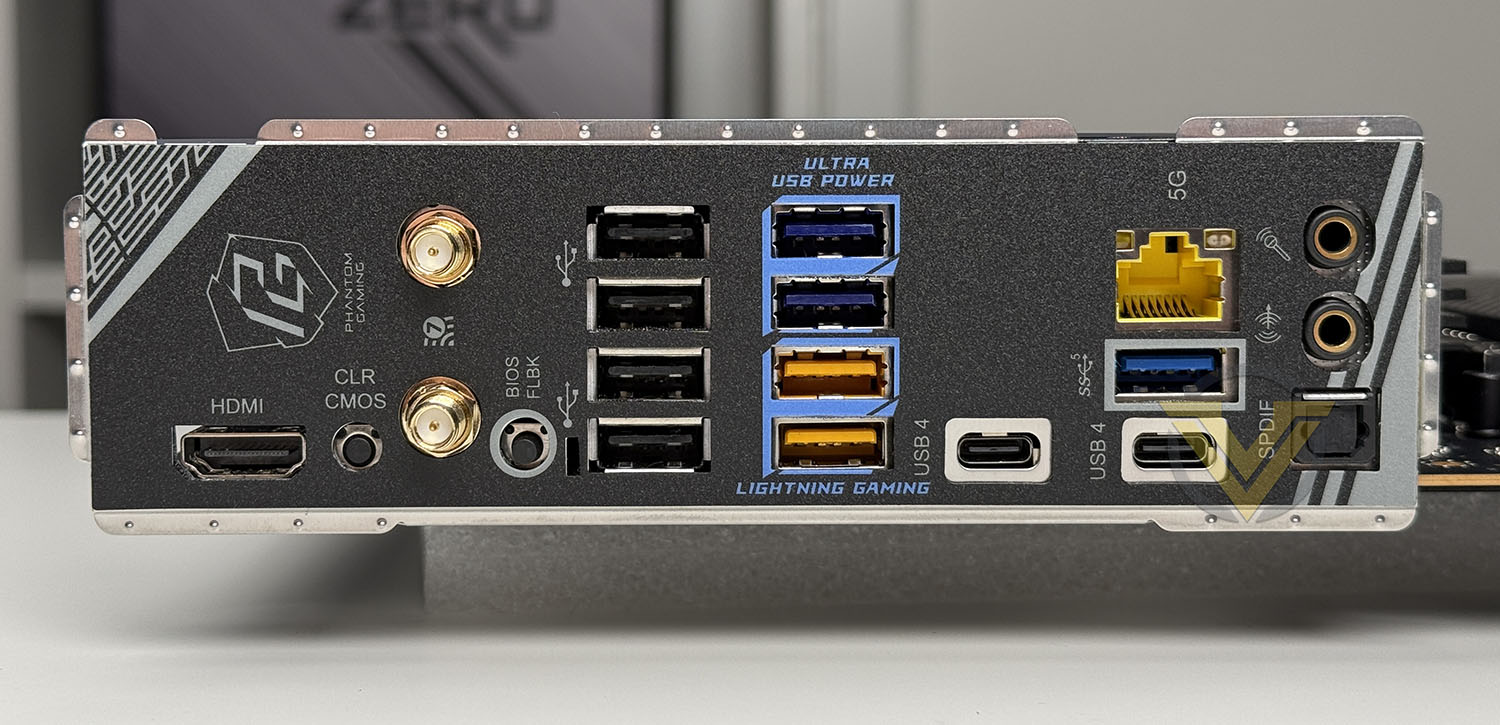
Lastly, turning to the Rear IO panel we have a broad selection of ports to get the most out of the user experience. Here we have:
2 × Wi-Fi antenna connectors (for the onboard Wi-Fi 7)
1 × HDMI 2.1 port
2 × USB4 Type-C ports (40 Gb/s)
4 x USB 2.0 ports
2 x USB 3.2 Gen1 Type A ports
1 x USB 3.2 Gen2 Type A port
5 GbE LAN port (Realtek RTL8126)
Optical SPDIF out and analog audio jacks
BIOS Flashback / CMOS reset button
X870 Taichi Creator
Out of our three motherboards being reviewed today, the Taichi Creator is by far my favourite in terms of the overall look and aesthetics. The black and gold theme is stunning and the design choices are excellent. Taichi Creator conforms to the ATX form factor and comes with four SATA cables, a Wifi antenna, an ARGB splitter cable, and a thermistor cable.
Taichi Creator uses the AM5 socket and supports AMD’s Ryzen 9000 Series CPUs. It boasts an 18 + 2 + 1 digital phase design with 80 A Smart Power Stage (SPS) modules for the VCore and SOC rails. All fan headers on this board are 4-pin and include 2 × CPU fan connectors 4 × chassis fan connectors 1 × AIO pump connector.
For memory we have 4x DDR5 DIMM slots supporting up to 256GB and 8000+ OC frequencies. In the memory region we have a debug panel, LED indicators for diagnosing issues on POST, onboard power/reset buttons and two addressable ARGB headers. There are a total of three RGB headers on this board for LED.
Storages sees us receive 4x SATA 6GB/s ports and in the PCIe region we have 4x M.2 slots – 2x PCIe 5.0, 1x PCIe 4.0 and 1x PCIe 3.0. The upper slot has a quick release, toolfree design for removing the heatsink.
In total we have three full-sized PCI Express x16 slots, with two being PCIe 5.0 and the lower slot being PCIe 3.0. The upper slot which should be used for installing the graphics card features the EZ Release system – a quick release latch for installing/removing the GPU.
The audio codec on Creator is managed by Realtek ALC4082 which delivers 7.1 channel HD audio. We have isolated left and right channels. ASRock has their full audio package on this board which includes Nahimic audio enhancements: static noise suppression, echo cancellation, voice stabiliser, lateral sound cancellation, and a “Sound Tracker” visual radar for directional audio cues.
Turning to the Rear IO panel, we are treated to a huge array of ports to satisfy every possible need. Available here we have:
2 × WiFi antenna connectors (Wi-Fi 7 module)
1 × HDMI 2.1 port
1 × Optical SPDIF out port
2 × USB4 Type-C ports (40 Gb/s)
2 × USB 3.2 Gen2 Type-A (10 Gb/s) ports
6 × USB 3.2 Gen1 Type-A ports
2 × USB 2.0 ports
2 × RJ-45 LAN ports: 1x 10 GbE (Aquantia / Marvell) and 1x 5 GbE (Realtek RTL8126)
A Clear CMOS button
BIOS Flashback button
Test Setup & Methodology
Notes: We’ve revamped our benchmark regime by removing a number of tests which reveal little, to no difference between each motherboard model. Gaming performance is one such area which has been removed due to the inability for each motherboard to offer any advantage over another. Instead, we have focussed on meaningful/tangible analysis which examines the VRM/chipset design, and the storage performance which will be far more informative to the end user.
TEST SETUP
CPU AMD Ryzen 9 9900XCooling: Corsair Hydro Series H110i
Memory: 32GB Kingston FURY Renegade 7600 MHz
Storage: XPGX950 SATA SSD + Silicon Power XPower XS70
PSU: Corsair HX1050 80 Plus Gold Certified PSU
Monitor: AOC U2879VF
BENCHMARKS
PCMark 10 – Overall Extended ScoreSiSoftware SANDRA – SATA/PCIe Storage Tests
SiSoftware SANDRA – Overall System Score
OTHER SOFTWARE
Temperature Analysis: HWMonitorStress Testing Software: AIDA64 Stability Test
CPU Specification Monitoring: CPU-Z
Benchmarks: Power Consumption
In this first test we analyse the power efficiency from the wall for each motherboard (Minus the GPU). While each model uses the same chipset/platform, energy results can fluctuate between manufacturers due to the features and specifications that are integrated. First of all, for the idle tests the system is cold booted into Windows and no additional applications are executed – wattage is noted on the external energy monitor we use and then we open Aida64 stability test and execute a stress test, noting the highest reading on the monitor. Below are the results of this energy test.
Benchmarks: VRM & PCH Cooling
Each motherboard manufacturer designs their board with a unique set of heatsinks to cover key areas like the VRM/mosfets and the chipset itself. We load up Aida64 stability test again and perform a 20 minute run, recording the maximum value for both attributes.
Benchmarks: PCMark 10
PCMark 10 features a comprehensive set of tests that cover the wide variety of tasks performed in the modern workplace. With a range of performance tests, custom run options, and the new Battery Life Profile, PCMark 10 is the complete PC benchmark for the modern office.
Benchmarks: SATA Performance
In order to ascertain the SATA performance for our motherboards we use SiSoftware SANDRA and the File System Bandwidth performance test. This allows us to obtain the sequential read/write transfer rates for the drive being tested – Crucial MX300 SSD.
Benchmarks: PCIe M.2 Performance
In order to ascertain the PCIe M.2 performance for our motherboards we use SiSoftware SANDRA and the File System Bandwidth performance test. This allows us to obtain the sequential read/write transfer rates for the drive being tested – Kingston KC2500.
Benchmarks: Overall Computer Score
In our last test we observe the Overall Computer Score supplied by SANDRA. This test is exhaustive, and is specifically designed for measuring a comprehensive score for the system, measured in kPT.
Conclusion
ASRock’s latest X870 Refresh lineup demonstrates a clear strategy: provide targeted solutions for different kinds of enthusiasts while ensuring that every board delivers on core fundamentals such as storage performance, robust thermal solutions, and efficient power consumption. All three boards—the X870 LiveMixer WiFi, Phantom Gaming X870 Nova WiFi, and X870 Taichi Creator—share a common DNA of stability and strong AM5 support, but each has been deliberately designed to address different user needs without stepping on one another’s toes.
Of the trio, the X870 Taichi Creator stands as the flagship offering. It is the most striking in design, with ASRock’s refined Taichi aesthetics and premium finish, but more importantly it comes with the deepest feature set. From dual LAN (10 GbE + 5 GbE), dual USB4 Type-C ports, and PCIe 5.0 ×16 flexibility, to its 18+2+1 VRM design and multiple M.2 slots including dual Gen5 options, the Taichi Creator is engineered for creators, professionals, and advanced enthusiasts who demand everything in one package. It is the board to choose for dual-GPU workloads, heavy multitasking, or any workflow where expansion and connectivity are critical.
The X870 LiveMixer WiFi, by contrast, positions itself as a highly practical solution for those who prioritise connectivity and ease of use. Its vibrant design may polarize tastes, but the extensive array of rear I/O ports—particularly USB—makes it a standout for users with multiple peripherals, audio devices, and external storage solutions. While it doesn’t carry the same prestige as the Taichi Creator, its balance of features, functionality, and wide connectivity options makes it an excellent tool for streamers, creative professionals with peripheral-heavy setups, or anyone who simply needs more USB bandwidth.
For high-end gamers, the Phantom Gaming X870 Nova WiFi strikes the right balance between premium capability and gaming-oriented practicality. It has more than enough power delivery to handle top-tier Ryzen CPUs, but trims away some of the creator-focused extras in exchange for a cleaner layout and a focus on performance essentials. Users who want a strong, gaming-centric board without needing excessive expansion or connectivity overhead will find the Nova an appealing and more accessible choice compared to the Taichi Creator.
Overall, this X870 Refresh trio neatly rounds out ASRock’s high-end AM5 motherboard lineup. The Taichi Creator excels as the most feature-rich and premium choice, the LiveMixer WiFi shines in connectivity, and the Nova provides a gamer-friendly balance of power and practicality. ASRock’s approach ensures that there is now a well-defined option for creators, gamers, and connectivity-focused power users alike—each offering excellent performance in storage, thermals, and power efficiency, while making the AM5 ecosystem more complete.
X870 LiveMixer Wifi:
Pros
+ Lowest power consumption
+ Lowest thermals
+ Good assortment of features
+ Cheapest at USD $230
Cons
– Just two SATA ports
– Design/theme may not be to everyone’s taste
+ Lowest power consumption
+ Lowest thermals
+ Good assortment of features
+ Cheapest at USD $230
Cons
– Just two SATA ports
– Design/theme may not be to everyone’s taste
PG X870 Nova Wifi:
Pros
+ Excellent overall performance
+ Well-balanced feature-set
+ Reasonably priced
Cons
– Just two SATA ports
+ Excellent overall performance
+ Well-balanced feature-set
+ Reasonably priced
Cons
– Just two SATA ports
X870 Taichi Creator:
Pros
+ Sleek, impressive design/theme
+ Massive array of ports on Rear IO panel
+ Strong VRM design
+ Has thermistor header
+ Includes 10G ethernet and Wifi 7
Cons
– Most expensive at USD $320
+ Sleek, impressive design/theme
+ Massive array of ports on Rear IO panel
+ Strong VRM design
+ Has thermistor header
+ Includes 10G ethernet and Wifi 7
Cons
– Most expensive at USD $320
Click here for an explanation of our awards at Vortez.net.
Stay connected with the Vortez Social Media pages:
Join in with the discussions on Discord