We take Intel’s latest Arrow Lake-S Refresh CPU for a spin and see if it is worthy of the high-performance badge. Is the Ultra 270K Plus worth considering?

Manufacturer: Intel
MSRP: US: $289
Intel’s Core Ultra 200S desktop stack is already an exercise in segmentation, but the introduction of the Core Ultra 7 270K Plus sharpens that positioning even further. Sitting above the Core Ultra 5 250K Plus and effectively displacing the earlier 265K, the 270K Plus occupies the upper-midrange tier in Intel’s LGA1851 ecosystem, targeting enthusiast gamers and power users who want near-flagship core counts without stepping into halo-class pricing. With a 24-core configuration split into 8 performance cores and 16 efficiency cores, along with boost frequencies reaching up to 5.5 GHz and a 36 MB L3 cache, this SKU mirrors the structure of higher-end parts while remaining firmly anchored in the Core Ultra 7 bracket.
Architecturally, the 270K Plus is not a ground-up redesign but rather a refinement of Intel’s Arrow Lake-S platform, representing what is effectively an Arrow Lake refresh. The “Plus” designation signals incremental but targeted changes: higher effective memory speeds, improved interconnect bandwidth, and subtle clock tuning layered on top of the existing disaggregated tile-based design. Intel is also leaning heavily on software augmentation, most notably with the introduction of the Intel Binary Optimisation Tool (iBOT), which aims to improve instruction scheduling and IPC efficiency in real-world workloads, particularly gaming.
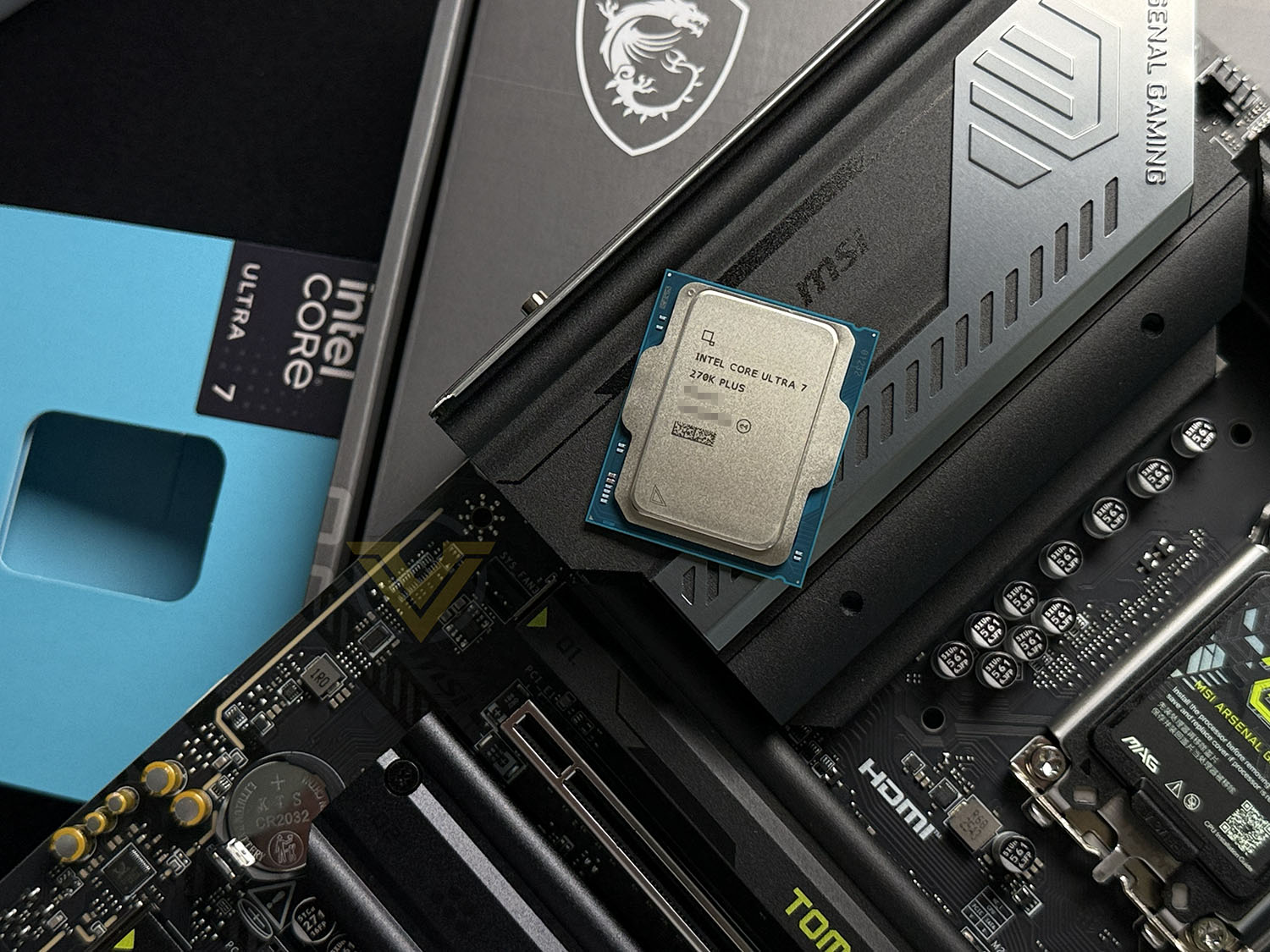
This refresh arrives at a critical moment for Intel, as Arrow Lake’s initial reception exposed gaps in gaming performance relative to AMD’s Ryzen 9000 series, especially X3D-equipped parts. The 270K Plus is clearly positioned as a corrective measure, combining additional efficiency cores, faster DDR5 support (extending into the 8000 MT/s range), and platform-level optimisations to claw back competitiveness. Pricing strategy reinforces this intent, with the chip launching aggressively against AMD’s Ryzen 5 9600X and Ryzen 7 9700X, suggesting Intel is prioritising performance-per-dollar as much as absolute throughput.
Platform considerations remain central to the value proposition. The 270K Plus continues to use the LGA1851 socket and is compatible with existing 800-series chipsets, making it a drop-in upgrade for current Arrow Lake systems with minimal friction. This continuity, combined with improved memory controller behaviour and firmware-level enhancements, suggests Intel is attempting to mature the ecosystem rather than replace it outright. In the following review, we will evaluate how these architectural tweaks and platform refinements translate into measurable gains across a wide range of synthetic and real-world benchmarks.
Test Setup & Testing
For the purpose of testing the ULTRA 7 270K PLUS we used the MSI Z890 TOMAHAWK WIFI II since it is placed as solid Z890 motherboard, this should give us the capabilities of showing the true potential of this chip.
CPU being tested
Intel ULTRA 270K PLUSTEST SETUP
Cooling CORSAIR H150i ELITE LCDMotherboard MSI Z890 TOMAHAWK WIFI II
Memory 64GB CORSAIR Dominator Platinum RGB 5200MHz DDR5
Graphics ZOTAC RTX 3070 Ti HOLO Extreme
Storage CORSAIR Force LX 512GB SSD
PSU Corsair RM 1000 80 Plus Gold Certified PSU
Monitor AOC U2879VF
BENCHMARKS
Cinebench R23 – Single/Multi-core CPU Renderingx264 HD 4.0 – 1st and 2nd pass encoding
SiSoftware SANDRA – CPU & Memory benchmarks (Now discontinued)
POV-RAY – CPU Ray Tracing
TrueCrypt – CPU Encryption Read/Write
AIDA64 – CPU benchmarks & Memory
PCMARK 10 – CPU Productivity
Davinci Resolve – Puget Benchmark
Blender – Classroom Benchmark
Games – Assassin’s Creed Odyssey & Total War: WARHAMMER II
OTHER SOFTWARE
Temperature Analysis: CoreTempStress Testing Software: AIDA64 Stability Test
CPU Specification Monitoring: CPU-Z
Temperatures
Below are the temperatures for each of the CPUs – without any overclock applied. We’ve also compared to previously released AMD and Intel counterparts (which we’ve also benchmarked against on the subsequent pages too):Power Consumption
It’s interesting to note the power consumption across all processors. Although they are using a combination of different motherboard chipsets, energy results can fluctuate between manufacturers due to the features and specifications that are integrated. First of all, for the idle tests the system is cold booted into Windows and no additional applications are executed – the watts are noted on the external energy monitor we use and then the system is loaded with 3DMark FireStrike – watts are again monitored for the duration of the test and the highest rated wattage result is then noted down. Below are the results of this energy test.
Ray Tracing Performance – POV-Ray 3.7
Persistence of Vision Raytracer’s PovRay is a free and open source 3D animator application with versions for computers with different operating systems.
This product allows users to build their custom 3D worlds with excellent quality despite their computer’s hardware. It has adjustable options for levels of radiance, refraction, and reflection. Calculation time may vary depending on the computer model, but PovRay can adapt to many computer builds, and is supported by the open source community.
This product allows users to build their custom 3D worlds with excellent quality despite their computer’s hardware. It has adjustable options for levels of radiance, refraction, and reflection. Calculation time may vary depending on the computer model, but PovRay can adapt to many computer builds, and is supported by the open source community.
AES Encryption Performance – TrueCrypt 7.1a
TrueCrypt is a discontinued source-available freeware utility used for on-the-fly encryption (OTFE). It can create a virtual encrypted disk within a file or encrypt a partition or (under Microsoft Windows except Windows 8 with GPT) the entire storage device (pre-boot authentication).
Encoding Performance – X264 HD
Simply put, this test measures how fast your machine can encode a short, DVD quality MPEG-2 video clip into a high-quality x264 video clip. What’s x264, you ask? It’s more or less the next-generation Xvid/DivX codec. I think it’s ideal for a benchmark because the application (x264.exe) reports fairly accurate compression results (in frames per second) for each pass of the video encoding process, and it uses multi-core processors very efficiently.
x264 HD gives results for 2 passes when compressing an MPEG-2 clip into x264. It presents 4 separate results for each pass giving a total of 8 – all results are given in FPS. For each pass I have averaged out the results.
Processing Features Performance – AIDA64
AIDA64 Product Page
This simple integer benchmark focuses on the branch prediction capabilities and the misprediction penalties of the CPU. It finds the solutions for the classic “Queens problem” on a 10 by 10 sized chessboard. At the same clock speed theoretically the processor with the shorter pipeline and smaller misprediction penalties will attain higher benchmark scores. For example — with HyperThreading disabled — the Intel Northwood core processors get higher scores than the Intel Prescott core based ones due to the 20-step vs 31-step long pipeline. CPU Queen test uses integer MMX, SSE2 and SSSE3 optimizations.
Memory Transfer Performance – AIDA64
AIDA64 Product Page
This simple integer benchmark focuses on the branch prediction capabilities and the misprediction penalties of the CPU. It finds the solutions for the classic “Queens problem” on a 10 by 10 sized chessboard. At the same clock speed theoretically the processor with the shorter pipeline and smaller misprediction penalties will attain higher benchmark scores. For example — with HyperThreading disabled — the Intel Northwood core processors get higher scores than the Intel Prescott core based ones due to the 20-step vs 31-step long pipeline. CPU Queen test uses integer MMX, SSE2 and SSSE3 optimizations.
Processing Power Performance – Cinebench R23
CINEBENCH can measure systems with up to 64 processor threads. This test scene contains approximately 2,000 objects which in turn contain more than 300,000 polygons in total, and uses sharp and blurred reflections, area lights, shadows, procedural shaders, antialiasing, and much more. The result is displayed in points (pts). The higher the number, the faster your processor.
Overall System Performance – PCMark 10
PCMark 10 Product Page Developed in partnership with Benchmark Development Program members Acer, AMD, Condusiv Technologies, Dell, HGST, HP, Intel, Microsoft, NVIDIA, Samsung, SanDisk, Seagate and Western Digital, PCMark 10 is the latest version in FutureMark’s popular series of PC benchmarking tools. Improving on previous releases, PCMark 10 includes new tests using popular applications from Adobe and Microsoft.
4K Editing Performance – DaVinci Resolve PugetBench
DaVinci Resolve is not only an industry-standard coloring tool, but also includes features for video editing, VFX, and more. While we also have benchmarks for Premiere Pro, After Effects, and other creative applications, every application will utilize the hardware in a computer in very different and unique ways which can make it extremely difficult to determine exactly what hardware will give the end user the best possible performance.
Rendering Performance – Blender
Blender is a free and open-source 3D computer graphics software toolset used for creating animated films, visual effects, art, 3D printed models, motion graphics, interactive 3D applications, virtual reality, and computer games. Blender’s features include 3D modeling, UV unwrapping, texturing, raster graphics editing, rigging and skinning, fluid and smoke simulation, particle simulation, soft body simulation, sculpting, animating, match moving, rendering, motion graphics, video editing, and compositing.
Please note: Blender has recently been updated and the metric for results has changed with the new update, rendering our historical benchmarks void – hence why we have less results for this benchmark, taking on the new samples per minute metric.
Gaming Performance – AC: Odyssey & Total War: WARHAMMER II
It’s important for us to perform a number of game benchmarks as well as the synthetic tests because gamers will want to know if there are any significant benefits. So here we have two recent gaming titles benchmarked with the RTX 3070 Ti. Both gaming titles are CPU-intensive – AC Odyssey is the last AC title in the series to be CPU-bound. Valhalla uses DX12 API.
Conclusion
The Core Ultra 7 270K Plus ultimately lands as a highly refined iteration of Intel’s Arrow Lake-S design, delivering a tangible uplift over its immediate predecessors in both gaming and content creation workloads. With its 24-core configuration arranged as 8 performance cores and 16 efficiency cores, the processor is engineered to maximise parallel throughput while maintaining strong single-thread responsiveness. Notably, this results in a 24-core, 24-thread topology—an unusual configuration in the modern desktop space, where simultaneous multithreading is typically employed. By instead scaling physical core count without SMT, Intel reduces scheduling overhead and inter-thread contention, which can lead to more consistent latency in games and improved efficiency in parallelised workloads such as encoding and rendering.
In practice, these architectural decisions translate into clear real-world gains. The 270K Plus delivers a significant generational improvement, particularly in heavily threaded applications. Encoding performance is a major highlight, while video editing workloads benefit from the combination of high core density and improved memory behaviour. Gaming performance is equally compelling, with the processor emerging as one of the strongest performers we have tested, particularly in modern, CPU-sensitive titles and ray-traced scenarios where frame pacing and data throughput are critical.
Platform maturity also plays a key role in these results. The processor is designed for Intel’s latest Z890 chipset ecosystem, and in our testing it was paired with the MSI TOMAHAWK WIFI II motherboard, which provided a stable and fully featured foundation for evaluating performance. Support for high-speed DDR5 memory and ongoing firmware optimisations help unlock additional performance, allowing the CPU to better utilise its architecture and maintain consistency across a wide range of workloads.
At a price point of $289, the Core Ultra 7 270K Plus represents strong value, especially given that it frequently outperforms competing CPUs that command higher prices. The primary drawback remains power consumption, which is notably higher than some competing offerings under sustained load. However, for users prioritising outright performance—whether in gaming, encoding, or content creation—the trade-off is easy to justify. Taken as a whole, the 270K Plus stands out as a well-executed refresh that not only improves on Arrow Lake-S, but positions itself as one of the most compelling options in its class.
Pros
+ Significant improvement over previous generation CPUs
+ Excellent ray-tracing performance
+ Excels with encoding
+ Leading performance with video editing
+ Outstanding gaming performance (Best we have tested)
Cons
– Higher power consumption than competition
+ Significant improvement over previous generation CPUs
+ Excellent ray-tracing performance
+ Excels with encoding
+ Leading performance with video editing
+ Outstanding gaming performance (Best we have tested)
Cons
– Higher power consumption than competition
Click here for an explanation of our awards at Vortez.net.
Stay connected with the Vortez Social Media pages:
Join in with the discussions on Discord