Equipped with the latest Intel 8th Gen. Core i7-8750H processor and GTX 1060, can Acer’s gaming laptop take the 1080p mobile gaming crown?

Product on Review: Predator Helios 300
Manufacturer & Sponsor: Acer
Street Price: UK £1299 – AU $1999
Acer is no stranger to the computing industry with products in their portfolio which dip into many categories, from the mighty monitor to the humble optical mouse. Although the brand has been supplying tech for four decades, their Predator division was only formed in 2008 and was designed to focus primarily on gaming. Over the last few years Acer’s Predator lineup has been at the forefront of innovation, most notably the brand introduced a 21-inch curved display gaming laptop at CES 2017.
In our hands today is the recently released Acer Predator Helios 300. This gaming laptop is designed to satisfy the mid-range with Intel’s Core i7-8750H, 16GB DDR4 and GTX 1060. Acer has also stepped away from the typical TN panel you’d usually see on a laptop of this price-point, in favour of the superior IPS display.
We’ve reviewed plenty of gaming laptops at Vortez but this is our first outing with Acer. Can they impress? Read on to find out!
About Acer
Founded in 1976, today Acer is one of the world’s top ICT companies and has a presence in over 160 countries. As Acer looks into the future, it is focused on enabling a world where hardware, software and services will infuse with one another to open up new possibilities for consumers and businesses alike. From service-oriented technologies to the Internet of Things to gaming and virtual reality, Acer’s 7,000+ employees are dedicated to the research, design, marketing, sale, and support of products and solutions that break barriers between people and technology.
Technical Specifications
Below are the technical details surrounding Helios 300 from Acer:
OS
Windows 10 Home
Display
15.6″ (1920×1080) IPS 60Hz
CPU
Intel Core i7-8750H
Chipset
Intel® HM370
Graphics
NVIDAI GTX 1060 6GB
Memory
16GB DDR4 (2400MHz)
SSD
1x 128GB M.2 SSD (SATA 6Gbps)
HDD
1x 1TB 2.5″ SATA HDD
Webcam
720p / 30fps
Communication
LAN – Gigabit Ethernet
WiFi – 802.11ac
Audio Jack
1x Mic-in 1x Headphone-out (HiFi / SPDIF) 1x Line-in 1x Line-out
USB 2.0
2x
USB 3.1 Gen1
2x
Card Reader
1x SD (XC/HC) Card Reader
Video Out
1 x HDMI 2.0 (4K @ 60Hz)
Battery (Cell)
4-Cell
Battery (Type)
Li-Ion
AC Adapter
180W adapter
Dimension (WxDxH) mm
391 x 266 x 28
Weight (kg w/ Battery)
2.6 KG
Battery (Whr)
41
Windows 10 Home
Display
15.6″ (1920×1080) IPS 60Hz
CPU
Intel Core i7-8750H
Chipset
Intel® HM370
Graphics
NVIDAI GTX 1060 6GB
Memory
16GB DDR4 (2400MHz)
SSD
1x 128GB M.2 SSD (SATA 6Gbps)
HDD
1x 1TB 2.5″ SATA HDD
Webcam
720p / 30fps
Communication
LAN – Gigabit Ethernet
WiFi – 802.11ac
Audio Jack
1x Mic-in 1x Headphone-out (HiFi / SPDIF) 1x Line-in 1x Line-out
USB 2.0
2x
USB 3.1 Gen1
2x
Card Reader
1x SD (XC/HC) Card Reader
Video Out
1 x HDMI 2.0 (4K @ 60Hz)
Battery (Cell)
4-Cell
Battery (Type)
Li-Ion
AC Adapter
180W adapter
Dimension (WxDxH) mm
391 x 266 x 28
Weight (kg w/ Battery)
2.6 KG
Battery (Whr)
41
Packaging
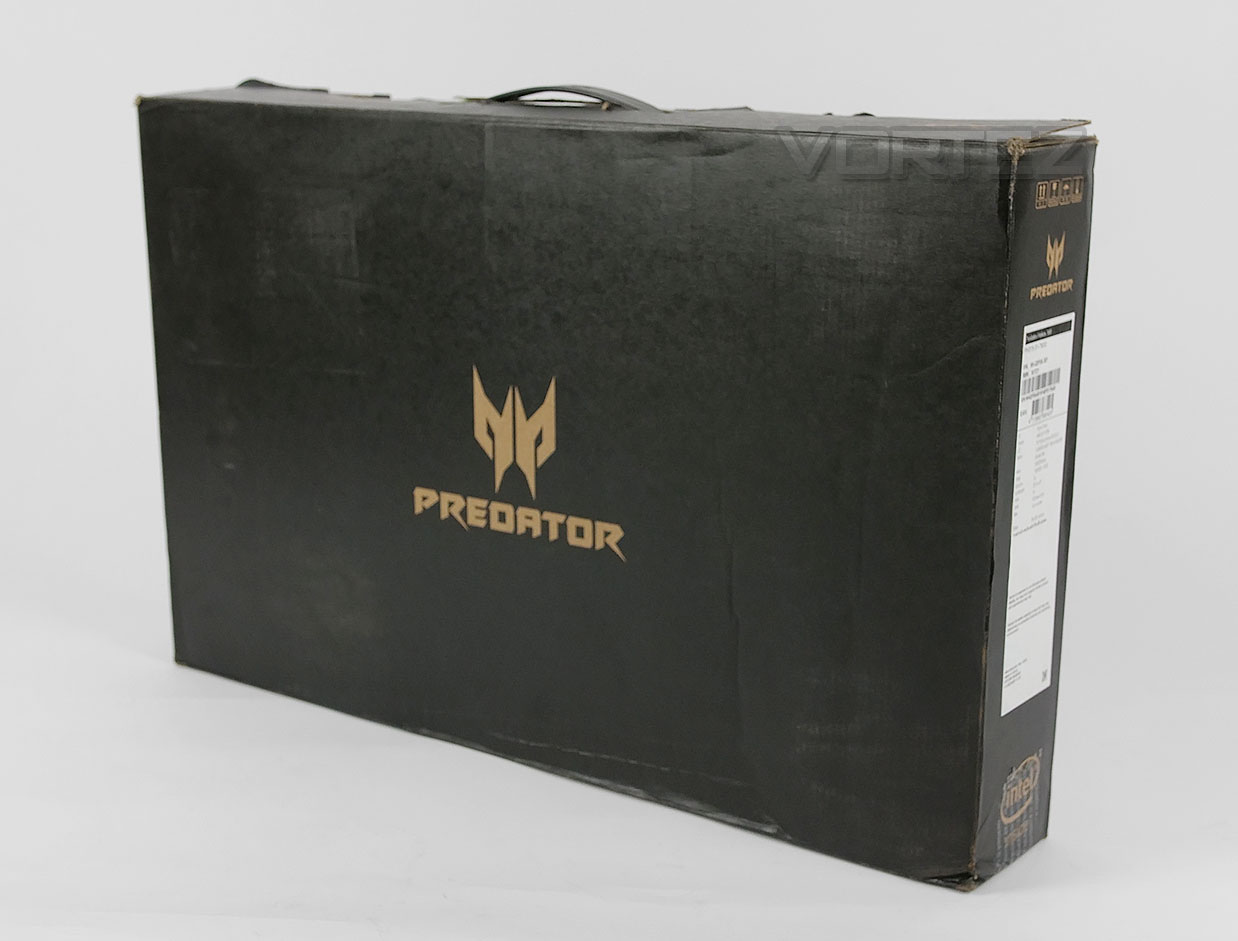
Helios 300 is presented in a fairly nondescript box with just the “Predator” logo being displayed. Apart from the handle and specifications label on the side, there is nothing else to comment on.
Inside, the laptop is concealed within another box which is padded and this box is held in place with Styrofoam blocks.
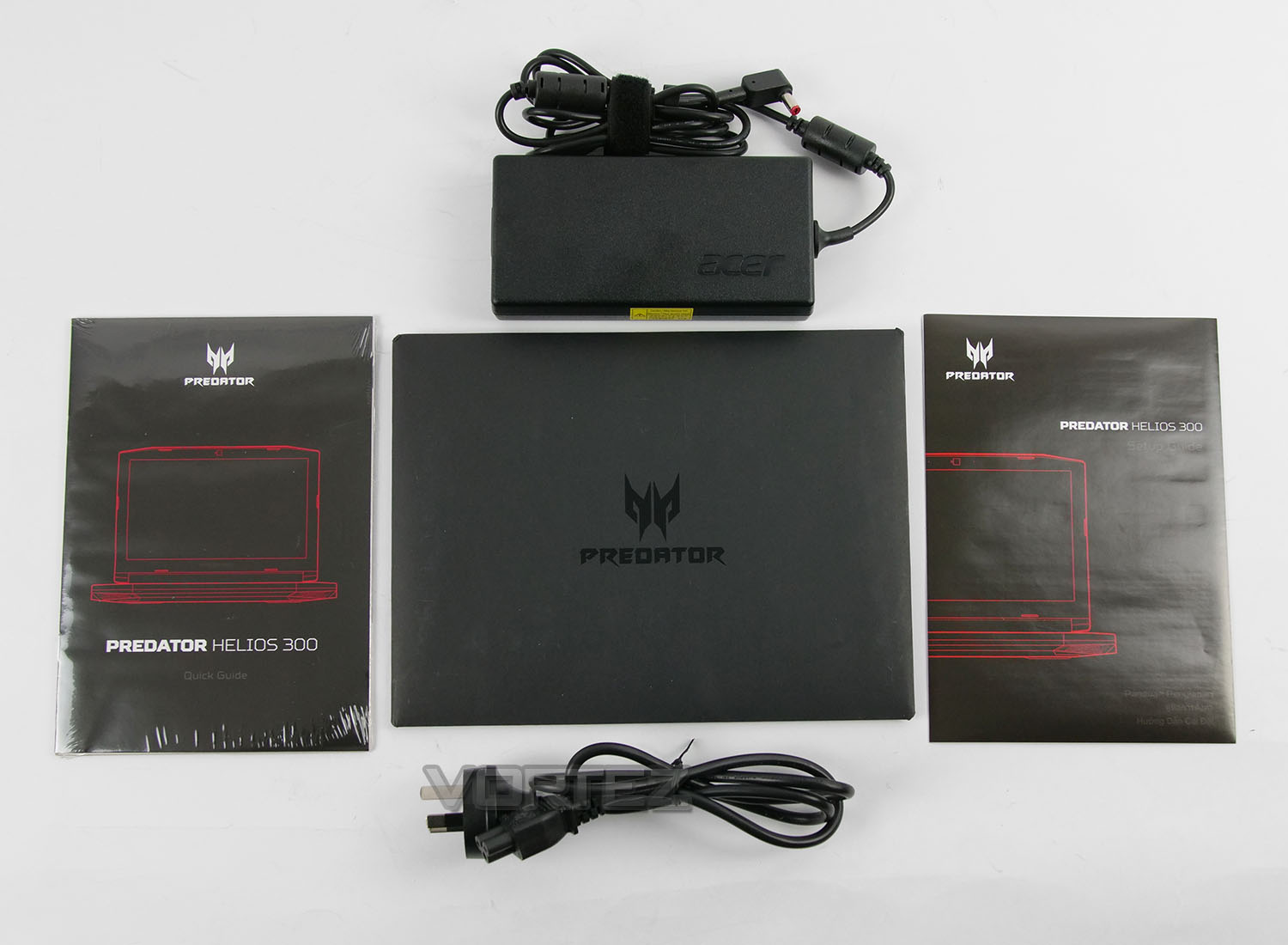
The accessories bundle is quite sparse, offering two documents within an envelope – quick start guide and setup guide, 180W charging unit with regional power cable.
Closer Look (External)
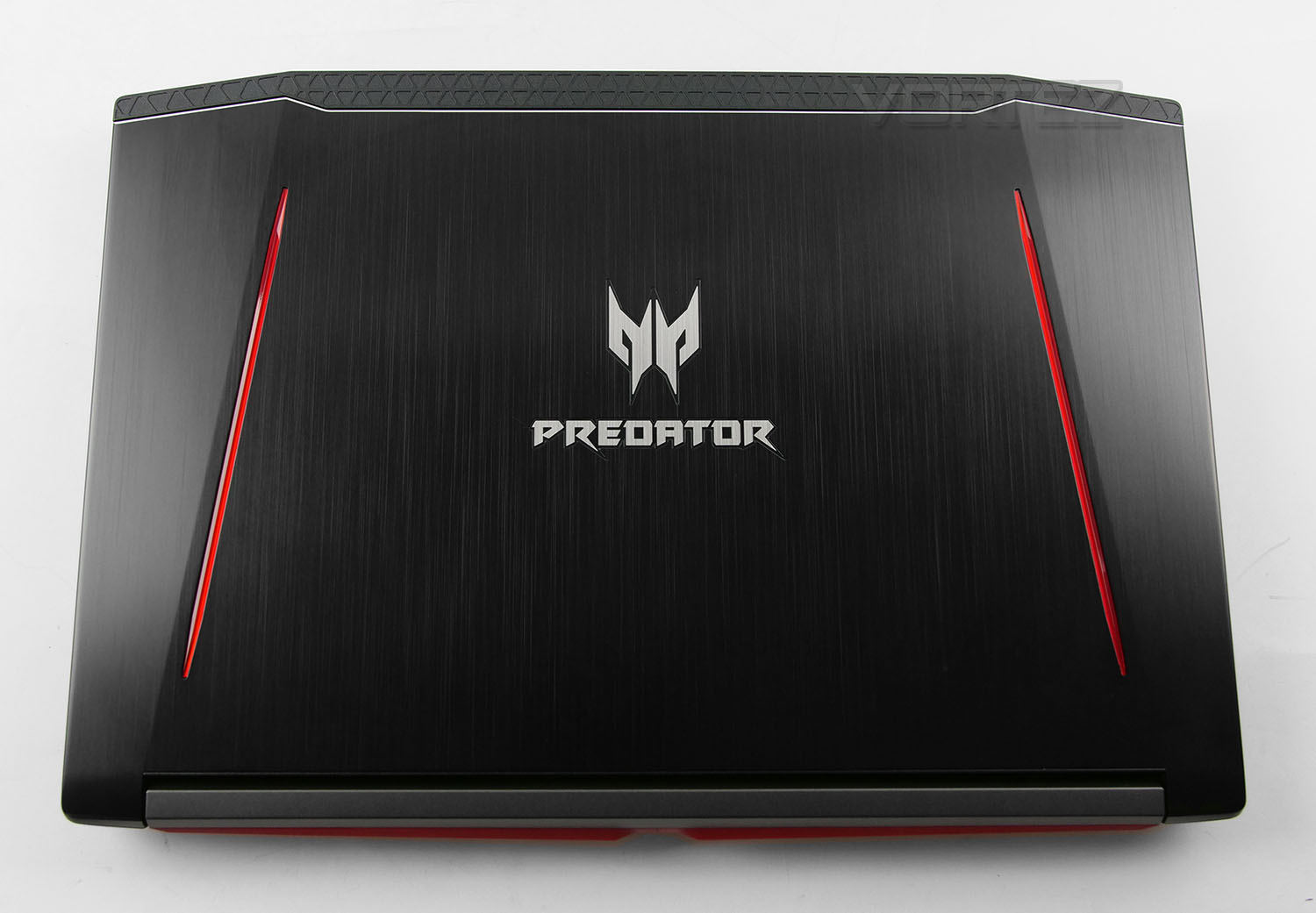
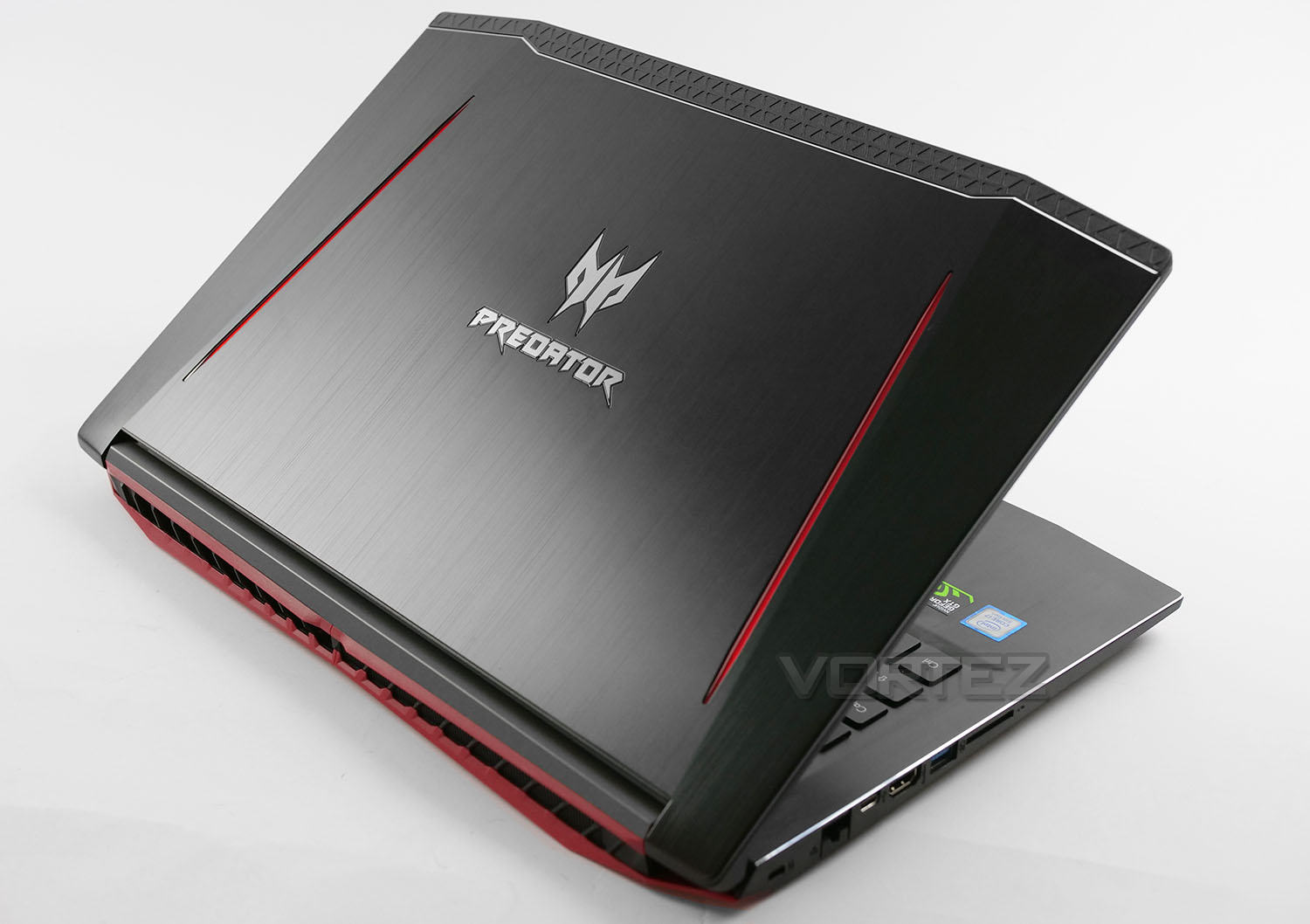
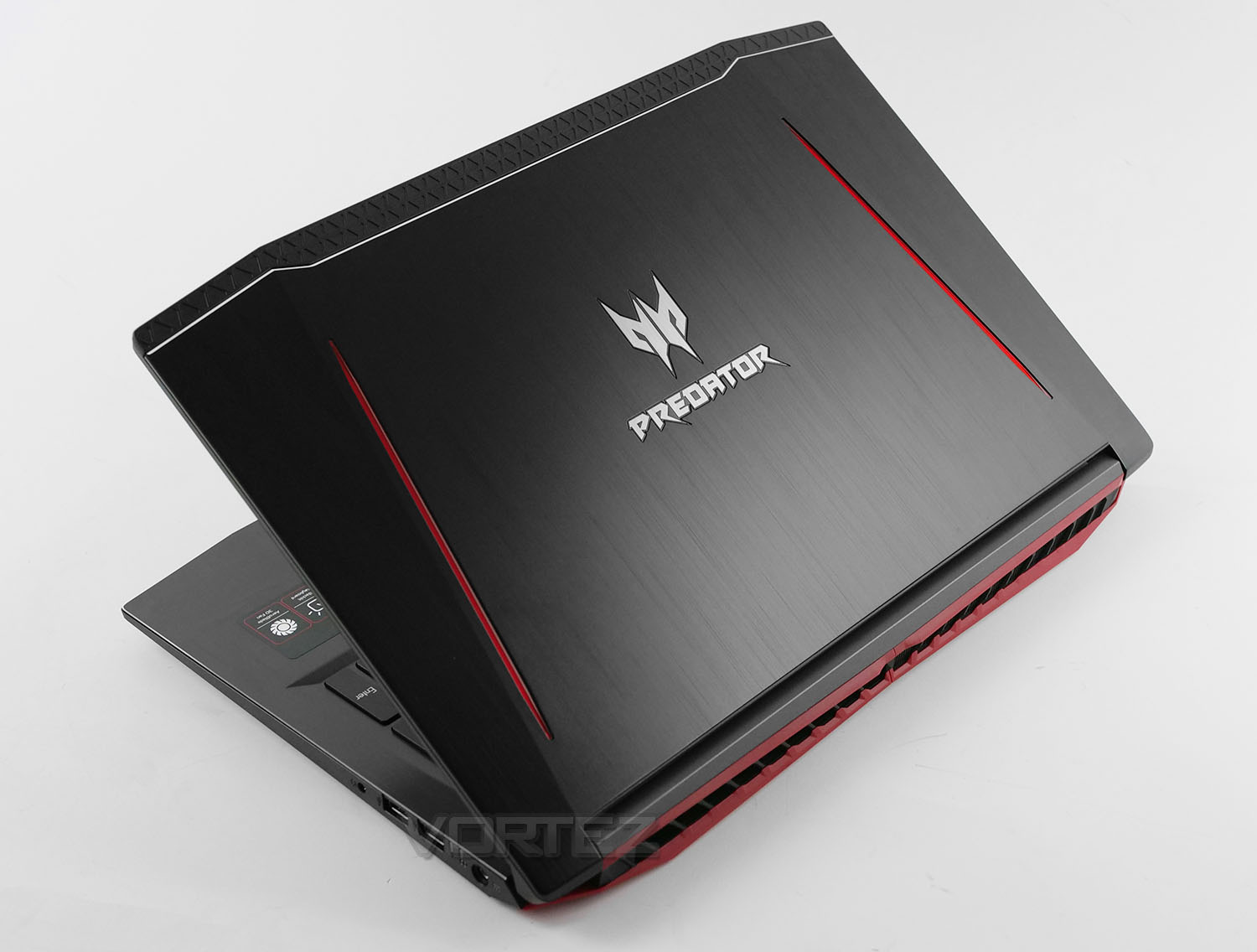
The 300’s has been masterfully crafted and features brushed aluminium with two distinct curves providing an element of depth. Acer has placed two red lines on the inside and the Predator insignia is found in the very centre. Along the edge of the lid there is a section of plastic which not only helps with gripping to open/close the unit, but also prevents any nasty smudges or fingerprints appearing on the lid. This may only be a minor attention to detail but it is functional and appreciated.
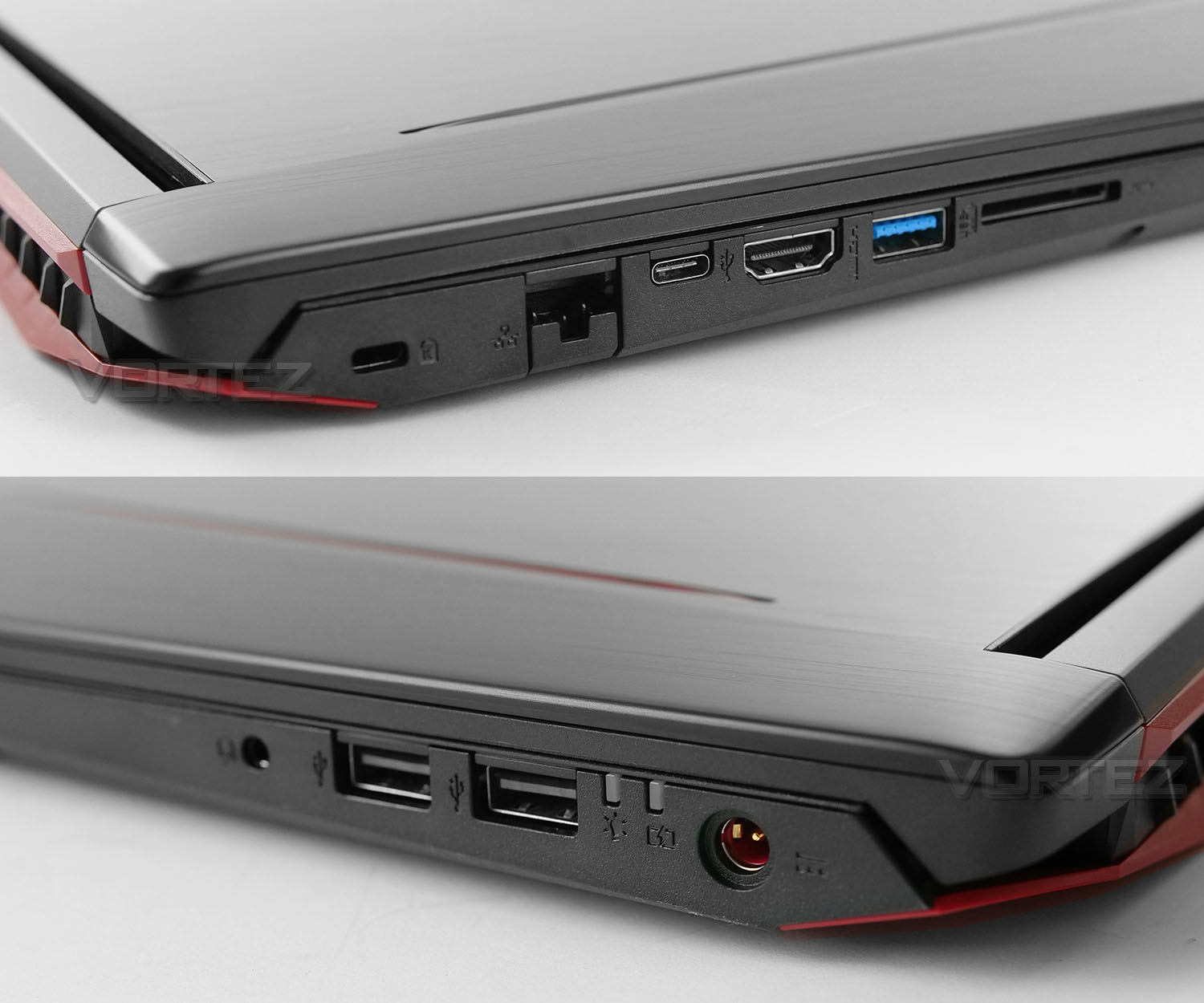
Connectivity is located in the usual place – along each side. On one edge we have:
• 1x Kensington lock allocation
• 1x Gigabit Ethernet LAN port
• 1x USB 3.1 Gen2 Type-C port
• 1x HDMI 2.0 port
• 1x USB 3.1 Gen1 port
• SDXC card slot reader
You’ll notice the LAN port looks rather different to a conventional slot – the lower latch drops down, cable is connected and then the latch is released for a secure fitment.
Over on the other side we have:
• 2x USB 2.0 ports
• Activity/battery LED indicators
• DC-in port
Including USB 2.0 on an Intel 8th Gen-laptop should be avoided – since there is only one USB 3.1 Gen1 (USB 3.0) port on this unit, it leave us with a limitation on fast connectivity.
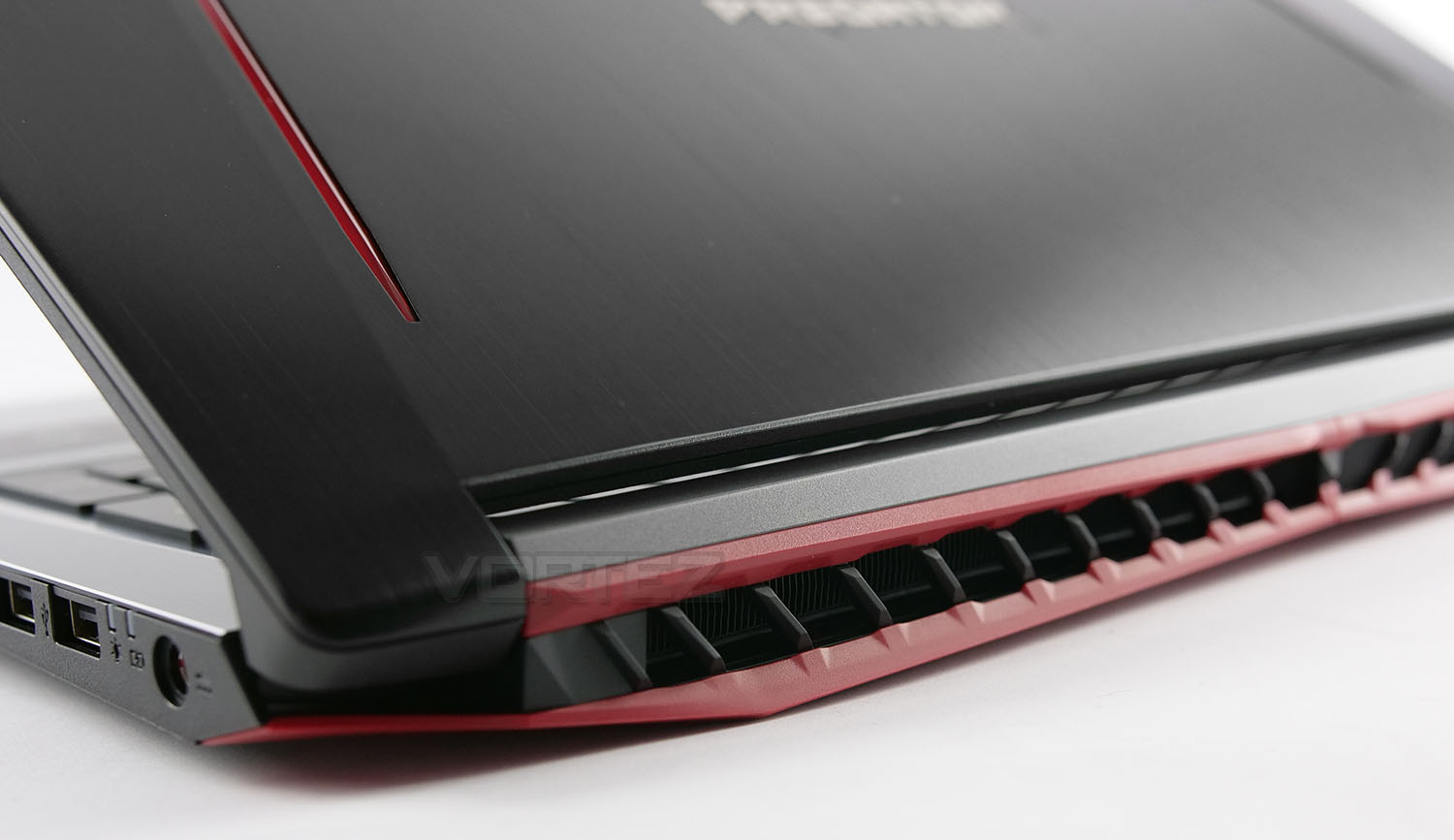
Around the back, while there are no additional ports, there is a an outlet for the cooling solution, with an elaborate (albeit plastic) fin design. Underneath we have Acer’s own AeroBlade 3D design – we’ll take a closer look at this later in the review.
So, this section will exhaust unwanted heat out of the system and we’re pleased to see the rear location used for such practise, instead of the sides – which can interfere if you’re making use of a USB mouse.
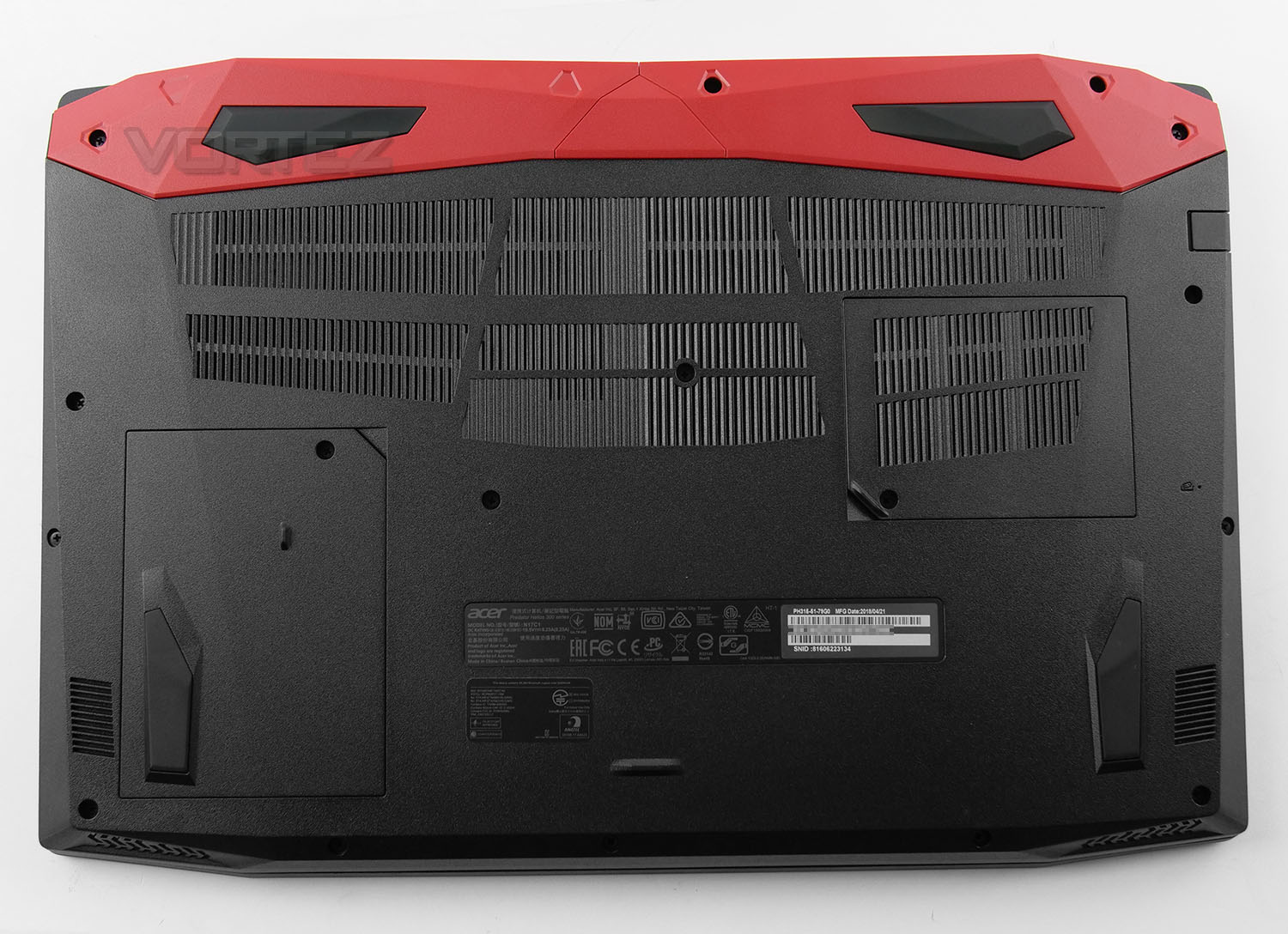
Flipping 300 over, we can see the underside is largerly ventilated in the area where the heatsink/fan solution is installed. There are also two designated panels which can be removed to gain access to memory/HDD. This allows upgrades to be conducted without having to detach the entire back panel.
As well as four large rubber feet, the only other item to mention is the spec label which includes the serial number – something which will be important, should you need to contact technical support.
Closer Look (Under Lid)
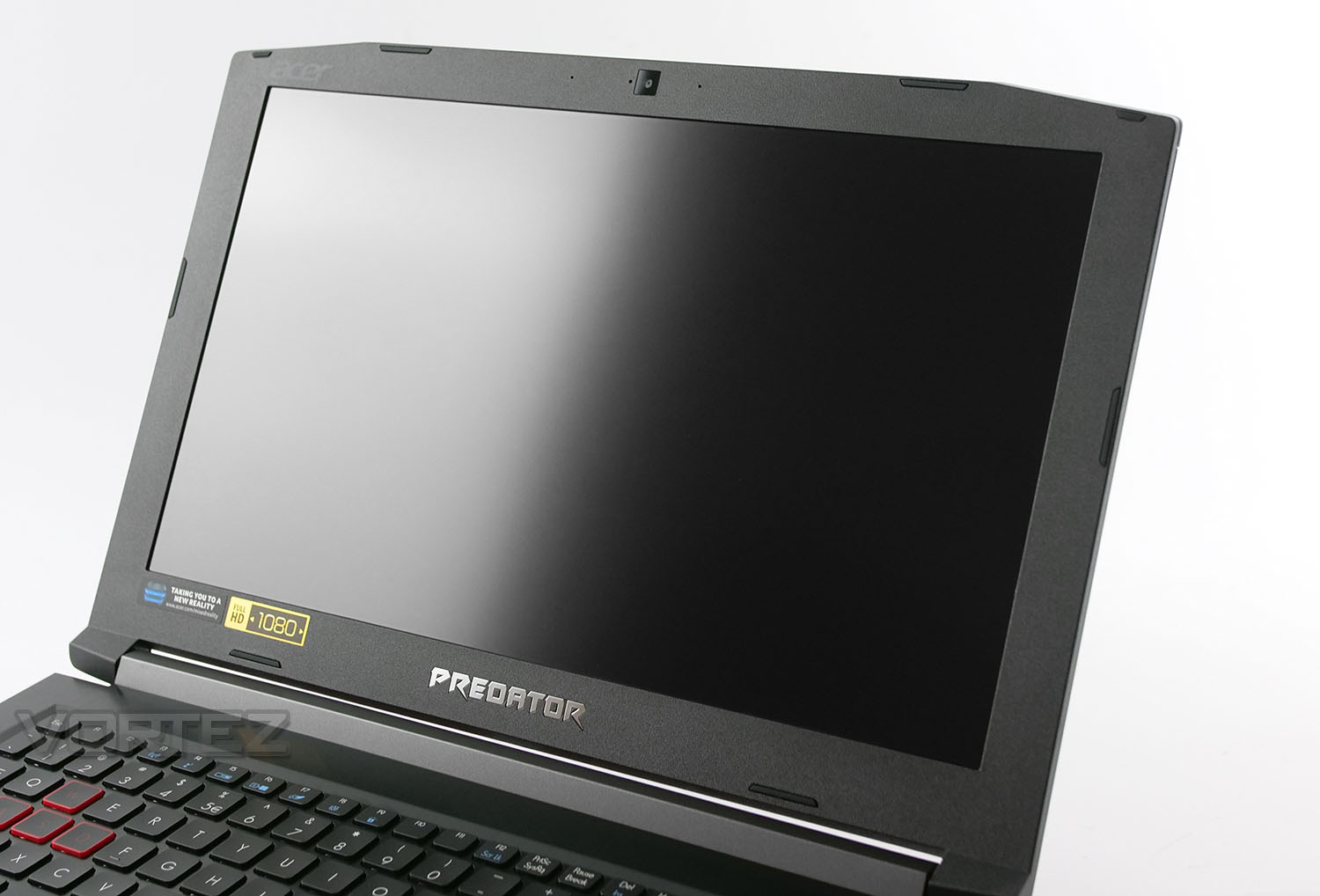
Opening up the unit, we are met by a 15.6” full HD display which offers up to 1080p resolution and is IPS. It’s refreshing to see IPS used on a gaming laptop, as most models opt for TN panels and colour reproduction isn’t as clear or vibrant. This IPS panel is superb and it offers good viewing angles.
At the top of the screen Acer has included a HD webcam with integrated microphone. This offers 720p and is ideal for basic video calls with friends, or a starting point for streaming.
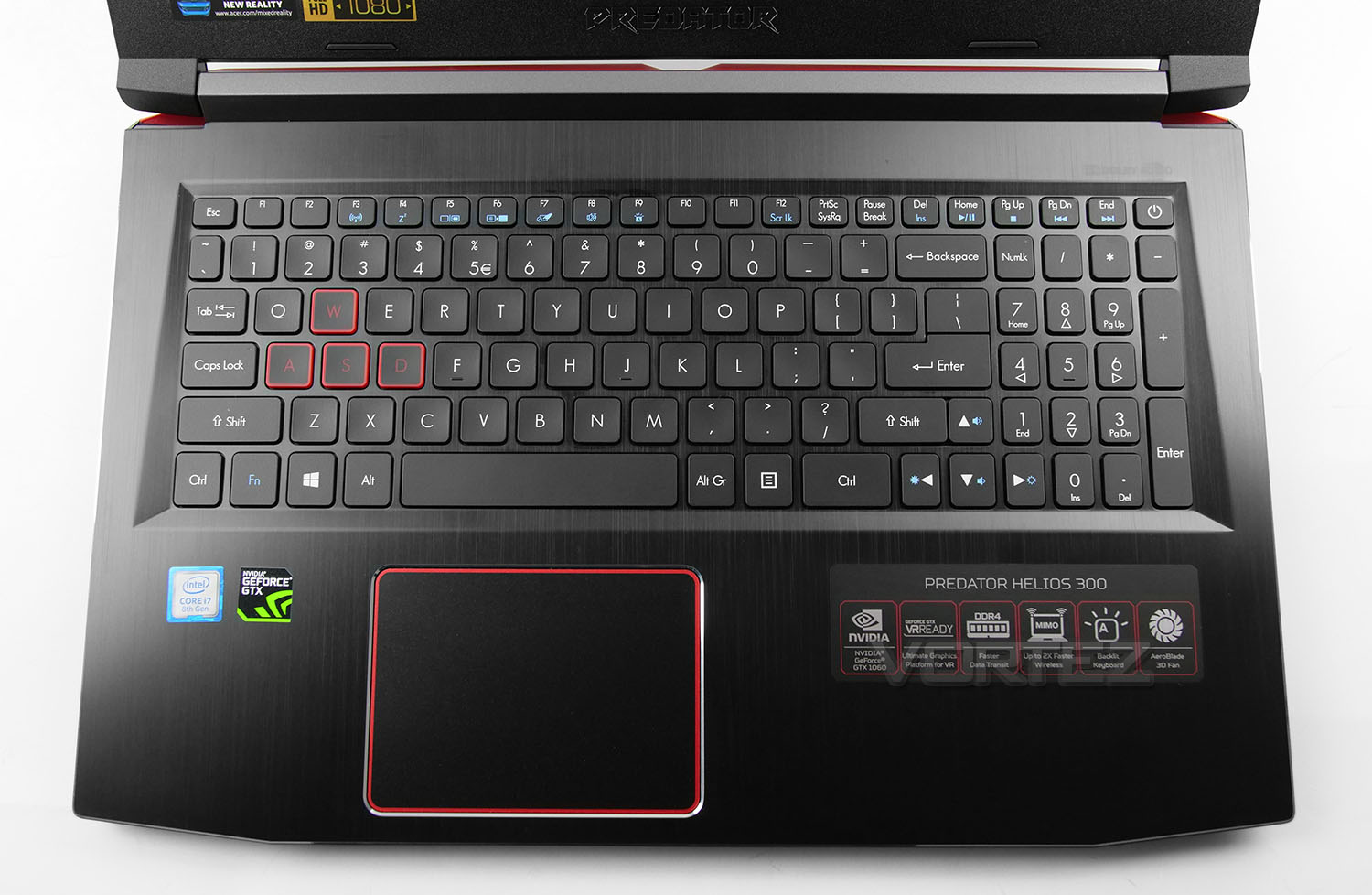
Casting an eye over the keyboard area we have a continuation of the brushed aluminium with a condensed qwerty-centric keyboard. As can be expected from a laptop keyboard there are specific hotkeys for adjusting certain features including multimedia options. Acer has marked this keyboard out as a gaming model with the red WASD keys. Red LED backlighting is also included – lighting originates from around the key and is not visible through the character etching.
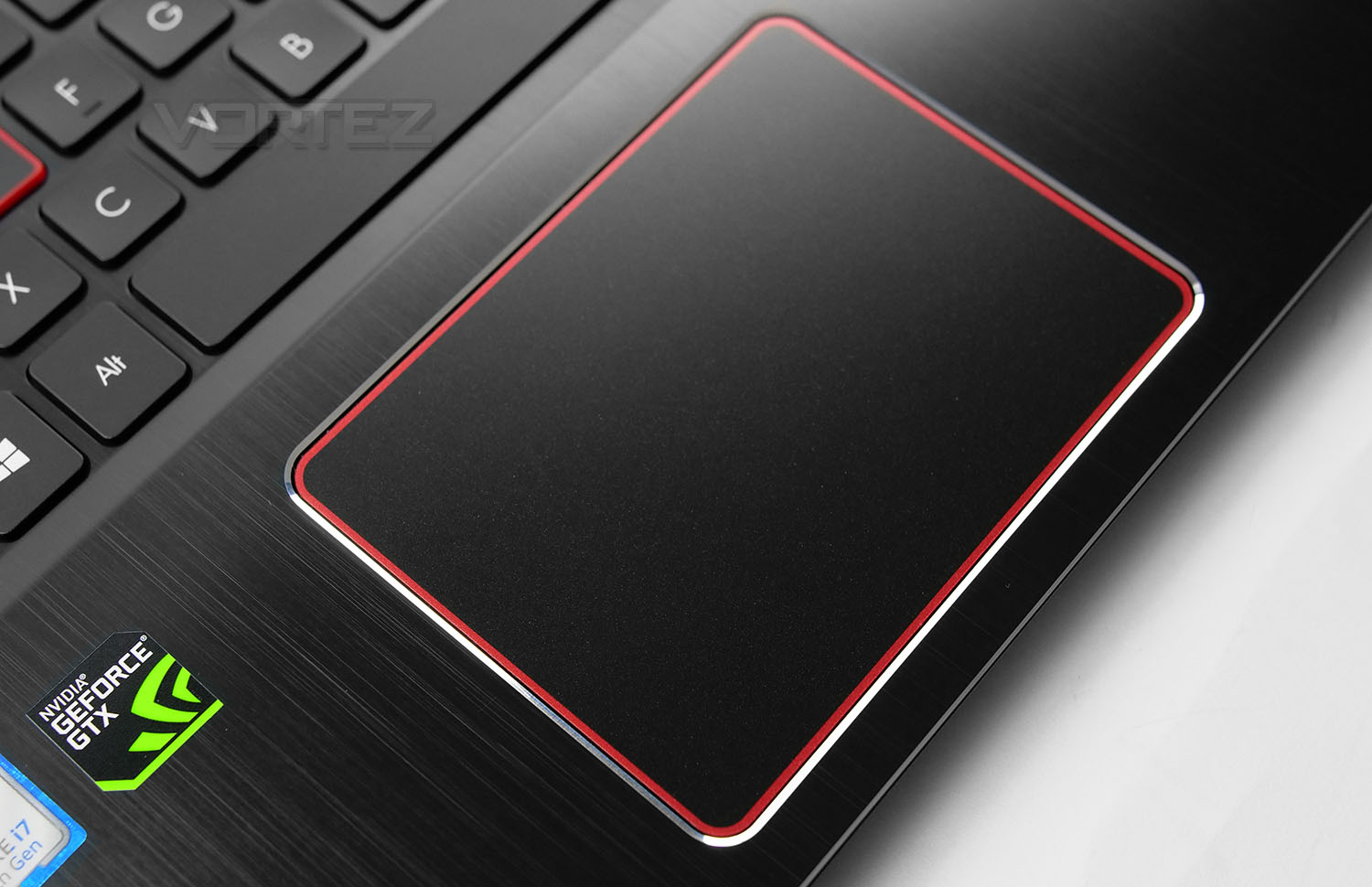
Below the keyboard we have the touchpad which is off-centre and lacks the dedicated left-right clickers. While this touchpad offers decent feedback and performance we still prefer separated clickers as this can significantly reduce accidental clicks.
Closer Look (Internals)
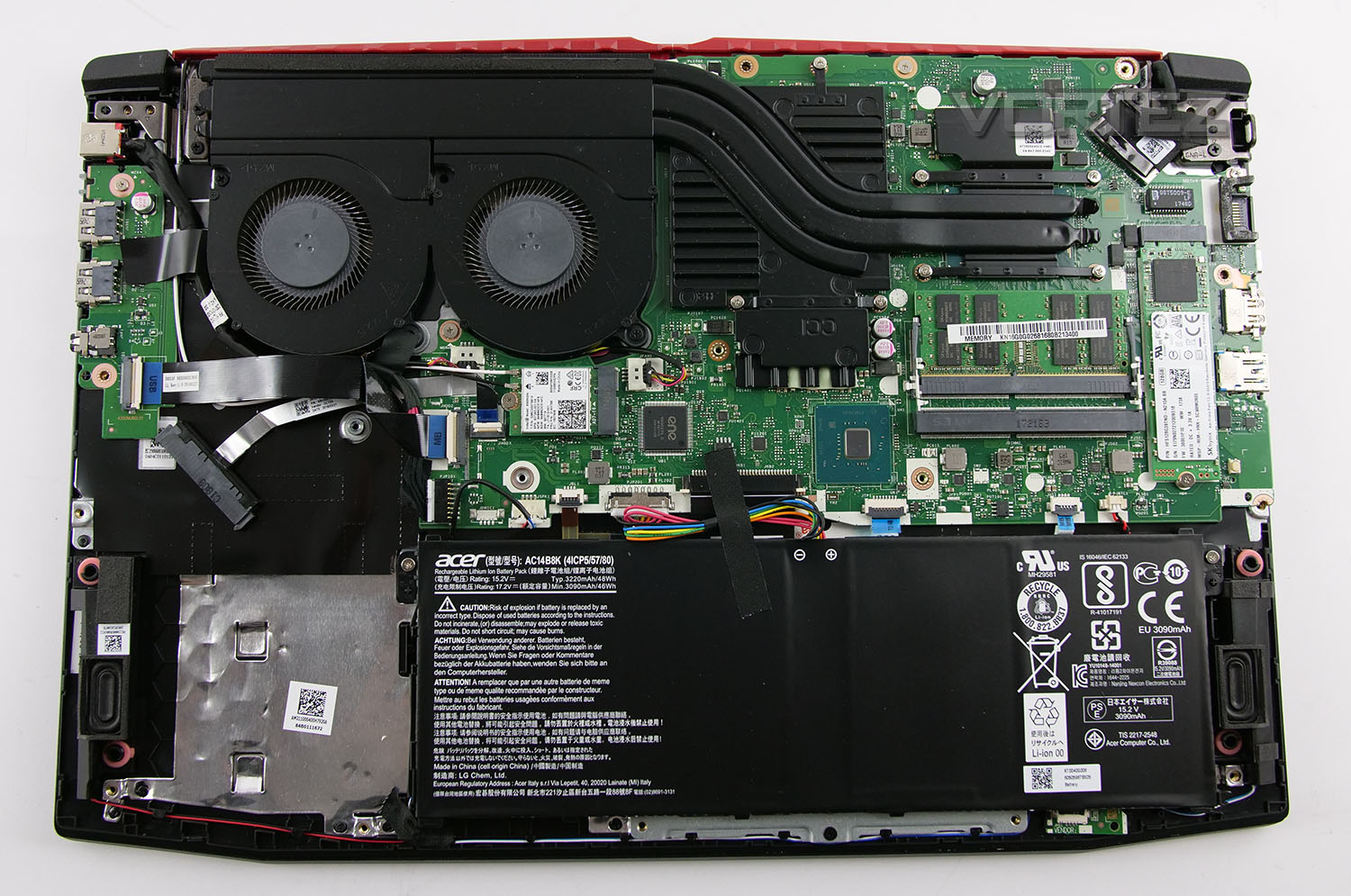
After removing the back panel on the 300 we can get a better understanding of the included hardware, weighing up the choices Acer has made.
While the cooling is relatively efficient in delivering acceptable temperatures under load (as you can see on the next page), you can note that both the CPU and GPU share the same heatpipes and heatsink design. There are just three heatpipes designated for both components and the solution is situated over to the left-side. Had the CPU and GPU utilised their own heatpipes (rather than sharing) and their own heatsink, the cooling figures may have been lower.
Incidentally, the component choice for this unit sees Acer choose the new Intel Coffee Lake Core i7-8750H which is hexa-core and capable of up to 2.20GHz. 16GB DDR4 is supplied via one stick – dual channel would have been preferred for faster transfer rates and performance, but there is the option to add in another stick of memory. Acer has used Hynix 2400MHz.
For the GPU, the NVIDIA GTX 1060 has been selected and in this case, the 6GB version. This model is ideal for 1080p gaming and is the sweetspot for this category of laptop. Most games will be able to sustain a healthy 60fps with detail maxed out.
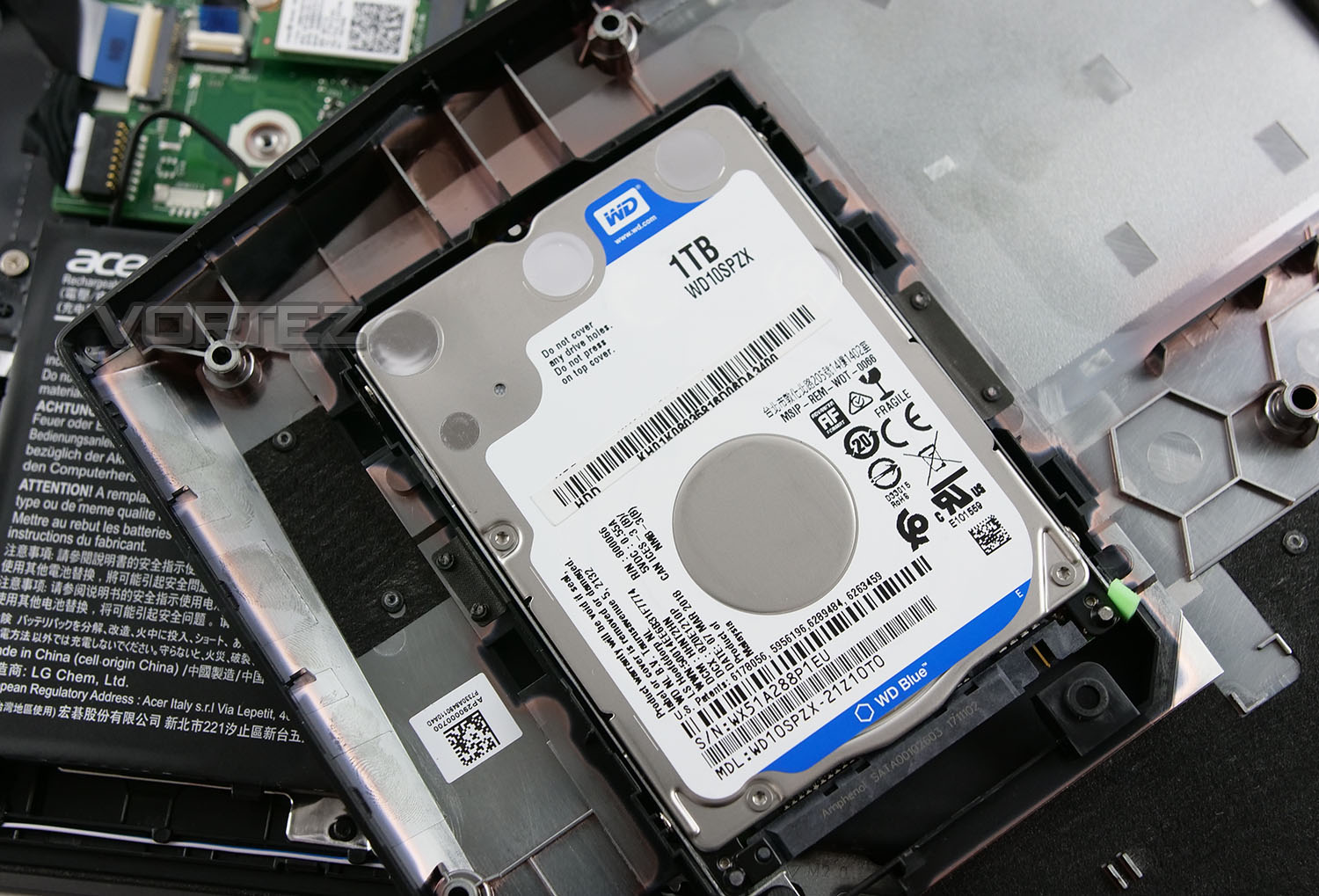
Drawing attention to the storage – we have another Hynix product being used, this time it’s the HFS128G39TND which is a SATA-based M.2 SSD. While this offers 128GB of storage for the primary drive, we’re rather disappointed to see Acer using the SATA interface rather than NVMe. Transfer rates from this drive are limited to 400MB/s whereas other models of laptop which offer NVMe SSDs (which Intel 8th Gen natively supports) offer up to 2000MB/s. Acer should be taking advantage of this. For the bulk of storage, a large 1TB WD 7200RPM mechanical drive – this is ideal for taking care of gaming, photo and video libraries.
For those interested in the WiFi module – 300 uses Intel 9560NGW. This M.2 device offers dual-band 802.11ac – 2.4GHz/5GHz as well as Bluetooth v5.
Benchmarks: Temperatures
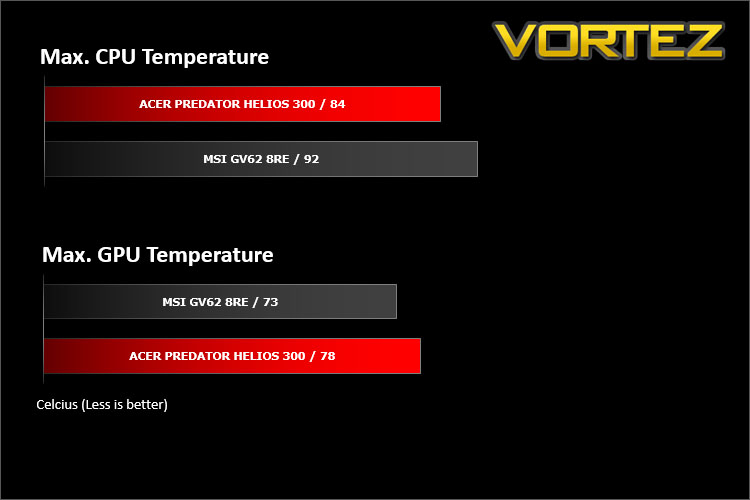
For our first benchmark test we observe the max. CPU/GPU temperatures of the system while allowing Unigine Heaven 4.0 to run on a 30 minute loop. To report back on the temperatures we use RealTemp and GPU-Z which provide the peak figures.
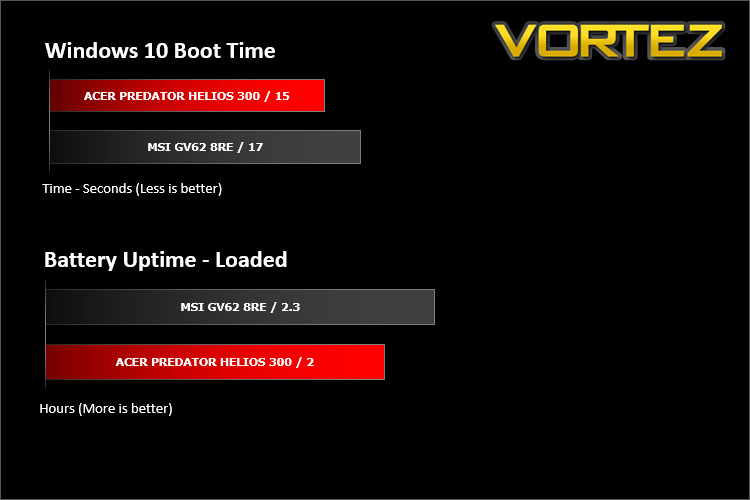
Benchmarks: Boot Time & Battery Uptime
In this test we observe how fast the boot into Windows 10 is by using a digital stopwatch. Battery uptime is another important observation, for this we charge the notebook up to 100% and then disconnect the charging unit and leave Heaven 4.0 running on a continuous loop until the notebook loses all power.
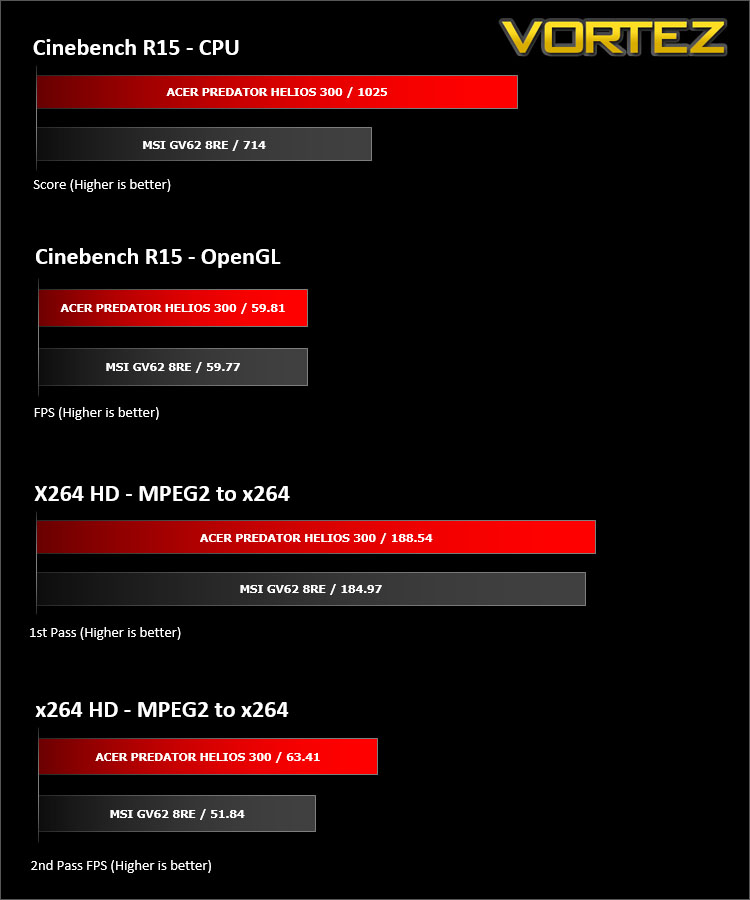
Benchmarks: Cinebench R15 & x264 HD
CINEBENCH can measure systems with up to 64 processor threads. This test scene contains approximately 2,000 objects which in turn contain more than 300,000 polygons in total, and uses sharp and blurred reflections, area lights, shadows, procedural shaders, antialiasing, and much more. The result is displayed in points (pts). The higher the number, the faster your processor is.
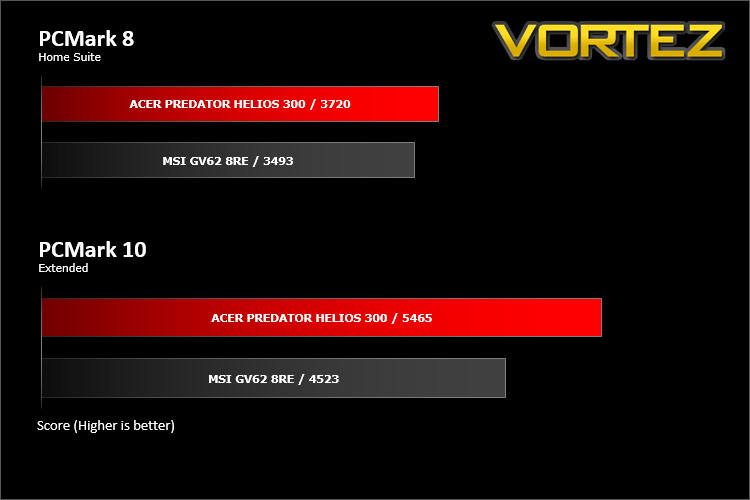
Benchmarks: PCMark 8 & PCMark 10
PCMark 8 combines performance benchmarking with battery life measurement and includes tests based on popular Adobe and Microsoft applications. Whether you are looking for long battery life, or maximum power, PCMark 8 will help you find the devices that offer the perfect combination of efficiency and performance for your needs. It’s the complete PC performance benchmark for home and business.
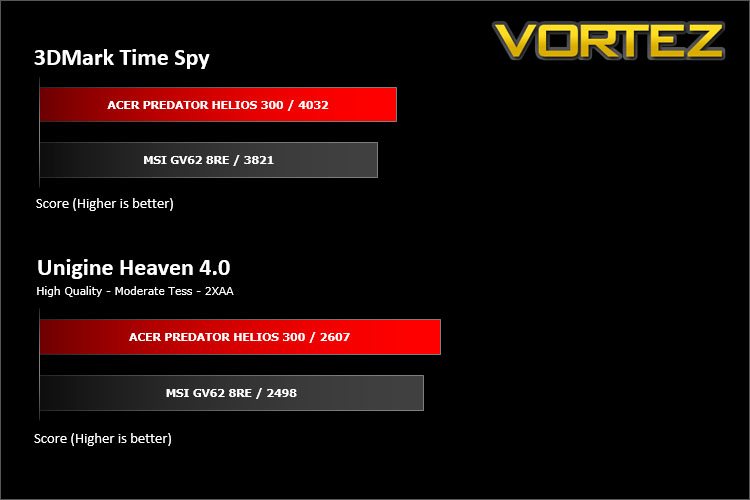
Benchmarks: 3DMark TimeSpy & Heaven 4.0
Time Spy is a DirectX 12 benchmark test for gaming PCs running Windows 10. With its pure DirectX 12 engine, built from the ground up to support new API features like asynchronous compute, explicit multi-adapter, and multi-threading, Time Spy is the ideal benchmark for testing the DirectX 12 performance of the latest graphics cards.
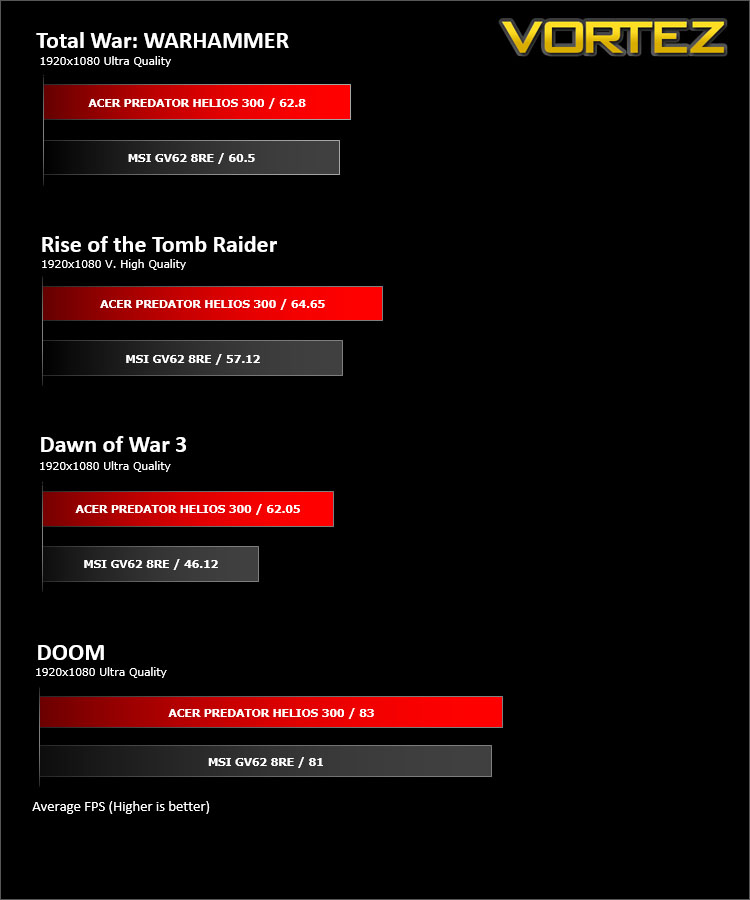
Benchmarks: TW: WARHAMMER, Rise of the Tomb Raider, Dawn of War 3, DOOM
The Predator Helios 300 uses the GTX 1060 for graphics delivery, in this section we test the latest gaming titles to see how effective the 3D capabilities are. We report on the average framerate using FRAPS or in-game benchmark tool.
Conclusion
Having never reviewed Acer laptops before, we were pleasantly surprised by what they have to offer in the Predator Helios 300.
Taking 300 purely on an external basis, we’re mightily impressed. Acer has given this model the full-metal treatment which not only looks superb, but feels it too. It’s great to see that even the region around the keyboard also benefits from brushed metal.
Inside, a selection of high-performance kit has been used which includes Intel’s new Core i7-8750H – a Coffee Lake-based six core processor. Fusing this CPU with the 16GB DDR4 and GTX 1060 6GB model provides us with the horsepower to achieve framerates which exceed 60fps in most games, with the detail level on maximum. The use of an IPS display throughout such gaming sessions is also encouraging to see because we typically see models around this price-bracket using TN panels which can supply poor colour reproduction and viewing angles, however, with this screen we have plenty of vibrancy and far less distortion at certain viewing angles.
There are however a few areas which we’d like to see improved on. Using a SATA-based SSD in such a calibre of laptop and with Intel 8th Gen architecture at our fingertips appears to be missed opportunity. As such we can only tap into 400MB/s transfer rates as opposed to other laptop models which use NVMe SSDs capable of up to 2000MB/s. On a mobile platform like this, greater bandwidth in this area is extremely beneficial. We’re also disappointed to see only one USB 3.1 Type-A port on this unit, in total there are four ports – two USB 2.0 ports, one USB 3.1 Type-C and one USB 3.1 Type-A. Again, similar to the SSD point above, USB 2.0 should be phased out on this generation of laptop. Gaining access to USB functionality which is more than 10 times quicker than USB 2.0 is advantageous.
As with other laptops, the Helios 300 arrives in a number of configurations and it’s advisable to cross-reference the exact model in store to the Acer website. The unit we’ve reviewed is the PH315-51 and has a price-tag of UK £1299 – AU $1999. This represents decent value for money considering what’s on offer.
The Acer Predator Helios 300 offers great overall performance and takes advantage of Intel’s latest 8th Gen. Processor. If you’re looking for something which offers decent 1080p performance and that’s build to last, we can definitely recommend this laptop!
Pros
+ Appealing design
+ Brushed alu lid/keyboard area
+ LED backlit keyboard
+ Great overall performance
+ Features IPS display
+ Memory/storage can be easily upgraded
Cons
– CPU temperatures get rather high
– SATA-based SSD (400MB/s)
– Only single channel 16GB DDR4
– Just one USB 3.1 type-A port
+ Appealing design
+ Brushed alu lid/keyboard area
+ LED backlit keyboard
+ Great overall performance
+ Features IPS display
+ Memory/storage can be easily upgraded
Cons
– CPU temperatures get rather high
– SATA-based SSD (400MB/s)
– Only single channel 16GB DDR4
– Just one USB 3.1 type-A port
Click here for an explanation of our awards at Vortez.net.
Stay connected with the Vortez Social Media pages:
Join in with the discussions on Discord