







A top-flow CPU cooler with six copper heatpipes and a single 140mm Wing Boost cooling fan. Can Gotthard cope with Intel Sandy Bridge-E? It’s time to find out!

Manufacturer and Sponsor: Alpenföhn
Street Price: £55 (At time of review)
Alpenföhn may not be a name some will be familiar with but over the last couple of years they have steadily been gathering momentum, releasing some fantastic products which have proven their worth in an extremely competitive market. Alpenföhn’s CPU cooler lineup take their names from a mountainous theme. We’ve had K2, Himalaya and many others – today we taken on a cooler which again takes its name from a mountain pass – Gotthard.
Gotthard is the second top-flow design CPU cooler in Alpenföhn product range. It features a three heatsink design, six copper heatpipes and a single 140mm Wing Boost cooling fan. Gotthard has the makings for a very effective cooling solution and it can support a plethora of CPU sockets but how will it cope with the high-end LGA2011 and Sandy Bridge-E?
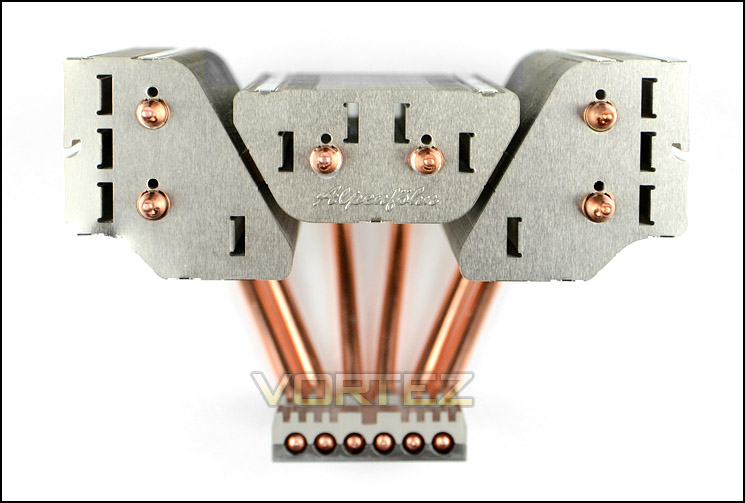
Alpenföhn on Gotthard
Alpenföhn Gotthard the new Topflow-rival. His weapons are 6*6mm heatpipes, full copper baseplate and a 140mm fan. Latest development in fin design with 3 seperated fin packages and cooling areas. These fin packages can better benefit from the airflow and increase the air speed to cool all critical components on the mainboard.
Technical Specifications
Dimensions (without fan)
167 x 130 x 147 mm (W x H x D)
Dimensions (with fan)
167 x 155 x 147 mm (W x H x D)
Weight (without / with fan)
800 / 1,000 g
Material
Copper (base plate, heat pipes), aluminum (blades)
Heatpipes
6 x 6 mm Ø
Fan
1x 140mm Wing Boost Plus
Material
Rubberized plastic
Color
Black, Blue
Weight
200 g
Volume
10 to 19.4 dB (A)
Speed
300-1100 r / min
Funding
104.7 m³ / h
Connector
4-pin PWM (with Y-Soft)
Compatibility
Intel Socket 775, 1155, 1156, 1366 AMD Socket AM2, AM2 +, AM3 and AM3 +, FM1
167 x 130 x 147 mm (W x H x D)
Dimensions (with fan)
167 x 155 x 147 mm (W x H x D)
Weight (without / with fan)
800 / 1,000 g
Material
Copper (base plate, heat pipes), aluminum (blades)
Heatpipes
6 x 6 mm Ø
Fan
1x 140mm Wing Boost Plus
Material
Rubberized plastic
Color
Black, Blue
Weight
200 g
Volume
10 to 19.4 dB (A)
Speed
300-1100 r / min
Funding
104.7 m³ / h
Connector
4-pin PWM (with Y-Soft)
Compatibility
Intel Socket 775, 1155, 1156, 1366 AMD Socket AM2, AM2 +, AM3 and AM3 +, FM1
Packaging, Bundle & Fan
Gotthard arrives in an attractive looking box. There is a depiction of the cooler on the topside and technical specifications on the sides. Inside, the cooler and its accessories are placed within a plastic compartment to ensure a safe delivery.
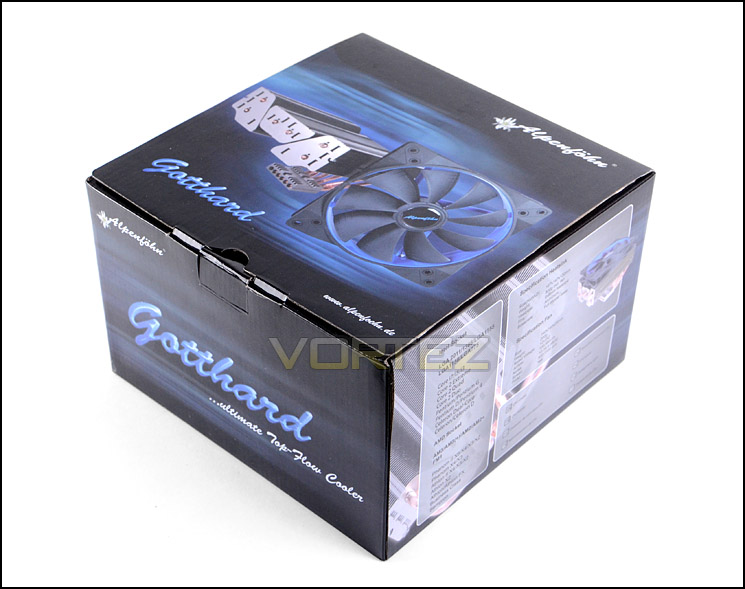
Gotthard packaging
Gotthard has support for a multitude of different sockets and as a result there is support for: Intel Socket 775, 1155, 1156, 1366 AMD Socket AM2, AM2 +, AM3 and AM3 +, FM1. We’ve had experience of using the LGA155 mounting kit with Alpenfohn before and it’s generally easy to use so it will be interesting to see how the LGA2011 kit differs later when we install the CPU cooler.
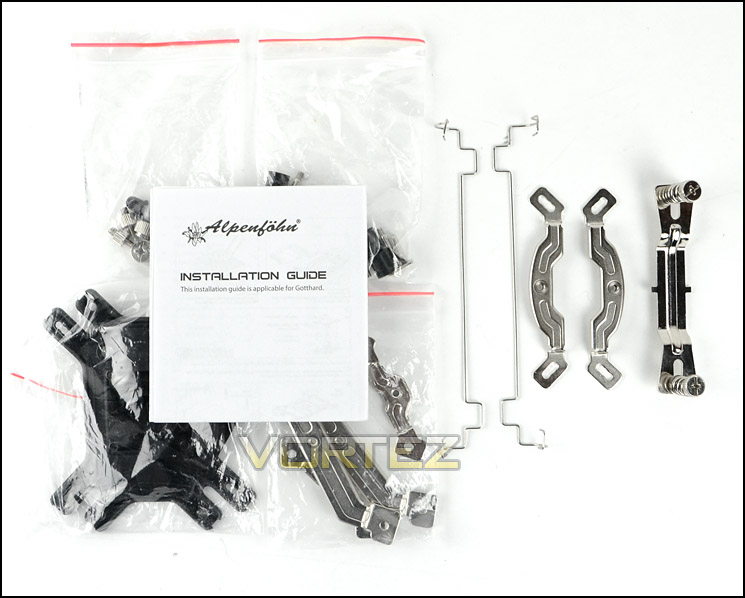
Mounting kit bundle covers a range of sockets
Gotthard supports a single fan and Alpenfohn have included a single 140mm Wing Boost PWM fan to attach to the heatsink, Alpenfohn have given this particular fan the two-tone black/blue treatment and as is typical of the Wing Boost Series, this fan has a combination of hard plastic and matt rubber. This fan is 9-blade and can spin up to 1200RPM.
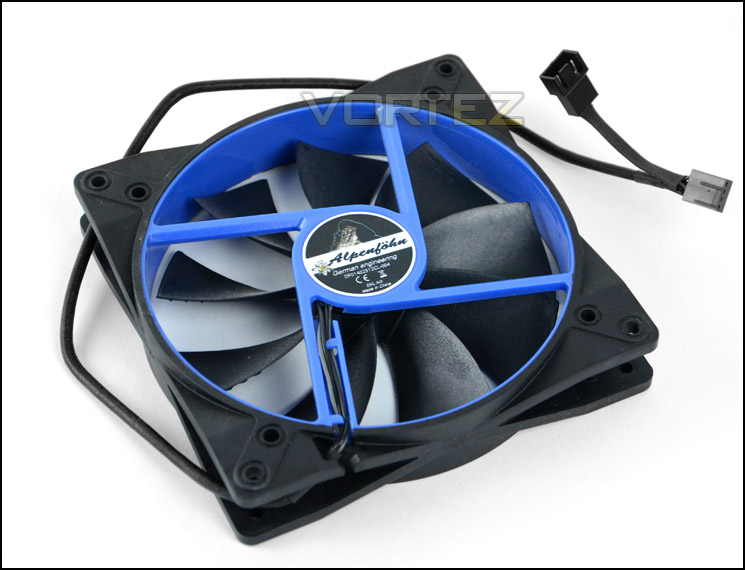
140mm Wing Boost PWM fan
Closer Look
Gotthard is a top-down CPU cooler – meaning the orientation of the heatsink is different from the traditional cooler. It’s orientation places the cooling fan in a position whereby it blows air down onto the heatsink and over the motherboard. This type of cooler is the preferred design for those wanting to build a compact system.
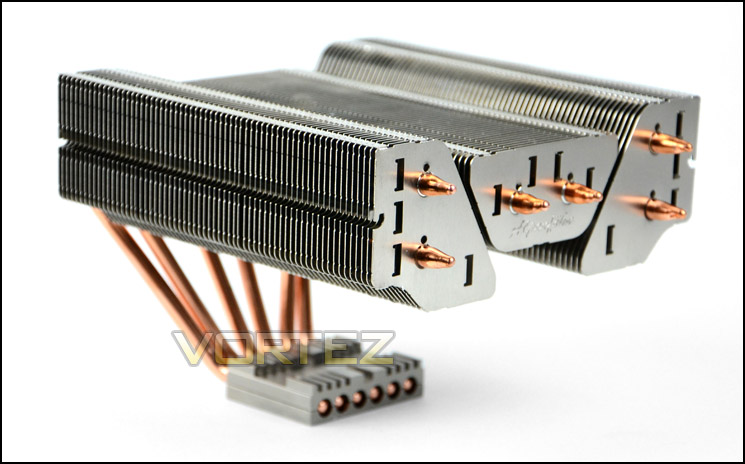
Gotthard – the top-down CPU cooler
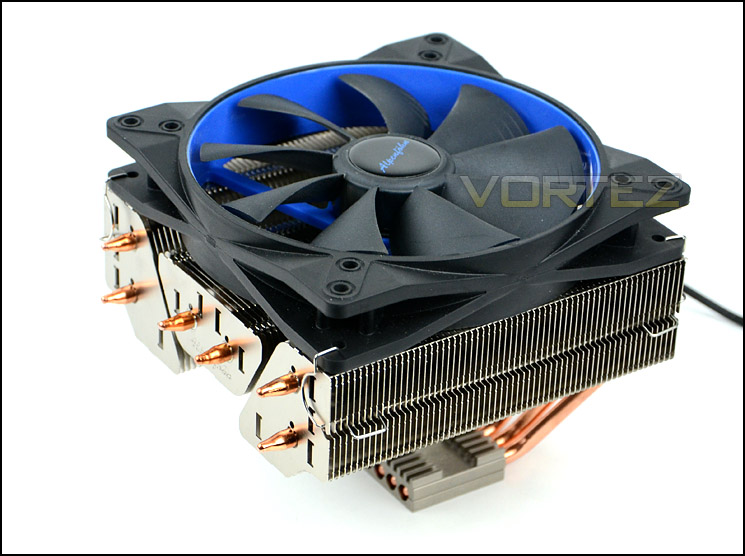
Gotthard with 140mm Wing Boost fan attached
To install the fan two of the provided clips just need to be attached. The method is fairly easy to fulfil but care should be taken as any adverse pressure when pressing down on the heatink can cause the copper heatpipes to bend.
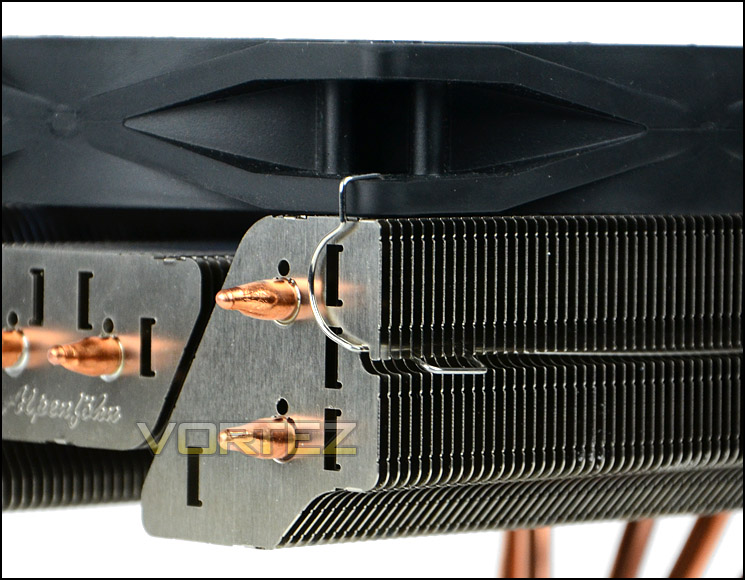
Installing fan clips is easy
Gotthard is made up of three individual heatsinks each with two copper heatpipes running through them – a total of six heatpipes. The heatpipes will take heat from the CPU/baseplate and up through the fins, then the fan has the job of blowing heat away from the cooler.
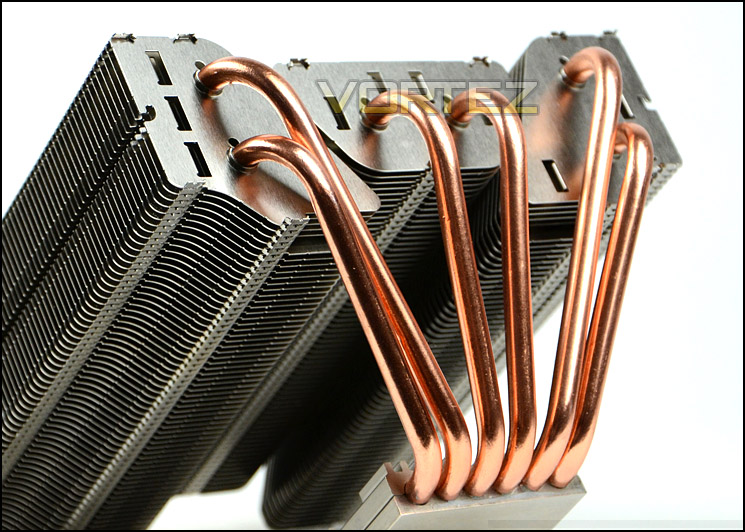
Six copper heatpipes
Closer Look (Continued)
From the top an overview of the fin arrangement can be clearly seen, all fins are aluminium. The width and depth of the heatsink is 167mm x 147mm allowing it to adequately accommodate any 140mm cooling fan whilst the height of the cooler from its baseplate is a mere 130mm.
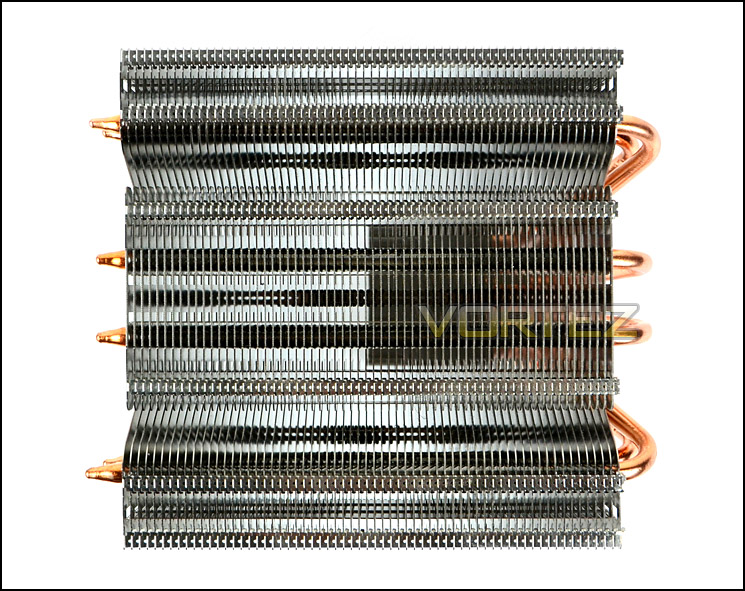
A bird eye view of Gotthard
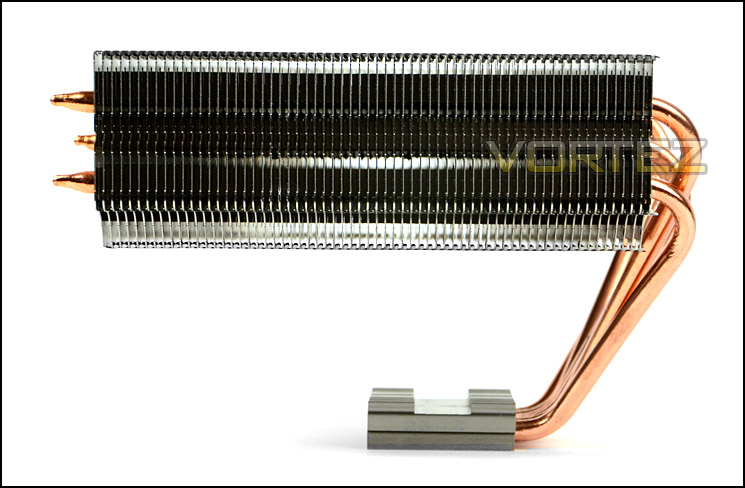
Gotthard from the side
Gotthard has a copper baseplate and Alpenfohn have opted for a mirror finish so that it is reflective. All of the heatpipes pass through the entire width of the baseplate.
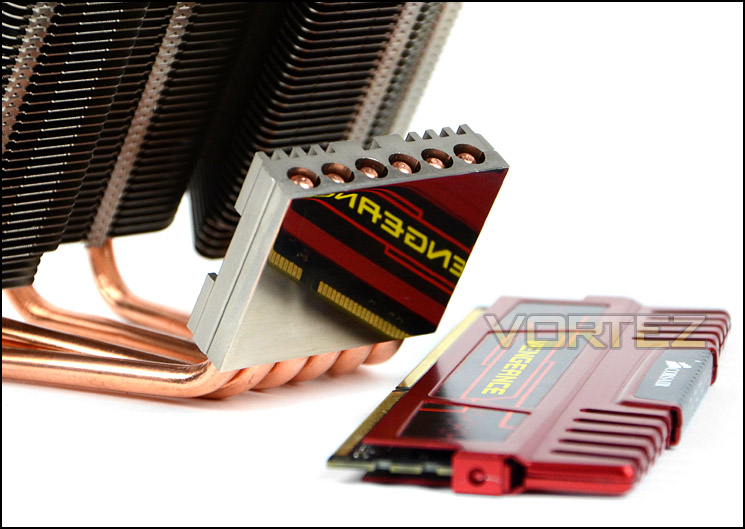
A reflective baseplate
Installation Process
Installing Gotthard is easy thanks to the kit which Alpenfohn have provided. For the installation we are using the LGA2011 mounting kit.
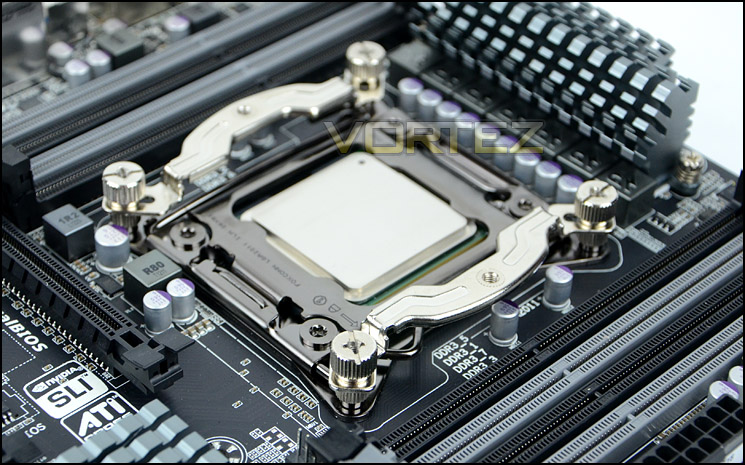
The first step is to screw in the four double sided mounting screws into the mounting holes on the LGA2011 socket. The next step is to attach the mounting brackets over the screws. Depending on the orientation of how you want the cooler to be positioned will depend on which way these brackets will sit. It is highly recommended to have the brackets positioned as pictured below so that that heatpipes face the top of the motherboard and thus the top of a computer chassis for optimal thermal dissipation. Once the brackets are in place four thumbscrews must be applied. It’s best to tighten the screws with your fingers and then complete tension with a screwdriver.
The final step in the installation process is to apply thermal paste, place the cooler over the CPU and then attach the cross bracket – tightening the screws with your fingers.
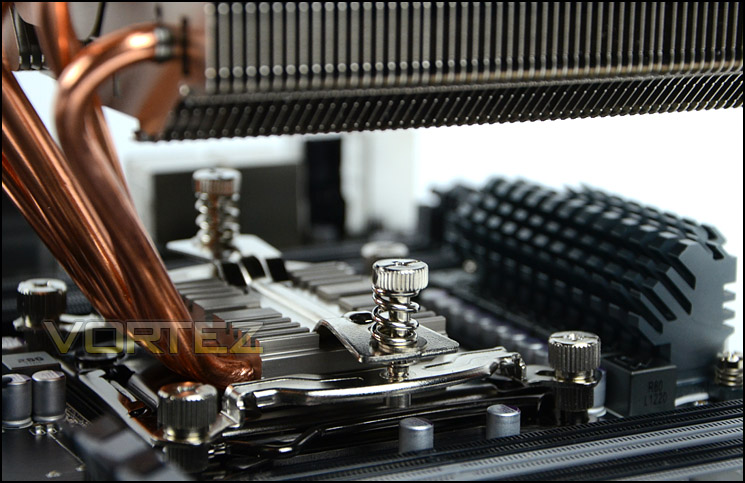
It’s important to tighten both screws at the same time to apply even pressure to the CPU. It would have been nice to see cut-outs within the fins in order to feed a screwdriver down and onto these screws unfortunately the entire tightening process must be done with your bare fingers and it can be difficult due to space and tension.
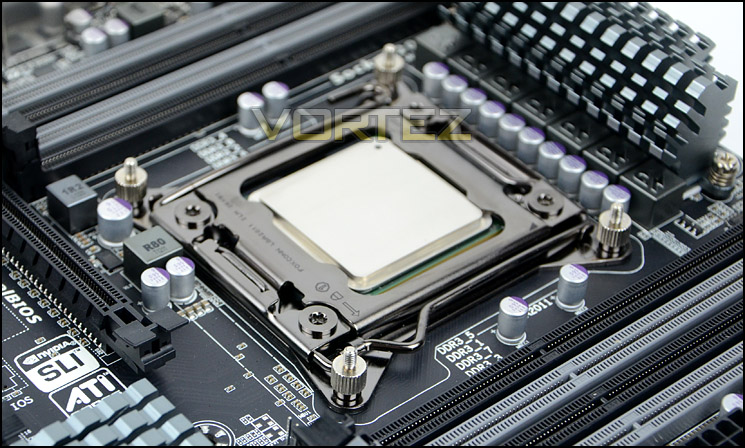
Installed – Memory Clearance
Memory clearance is something which many system builders and enthusiasts are eager to discover since this will ascertain whether a memory kit will be compatible with the CPU cooler or not. To demonstrate this a low profile memory kit is used.
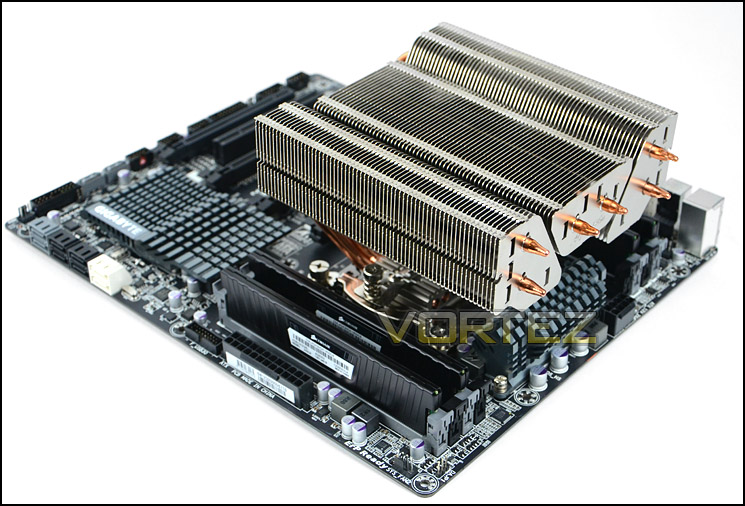
Gotthard installed without fan
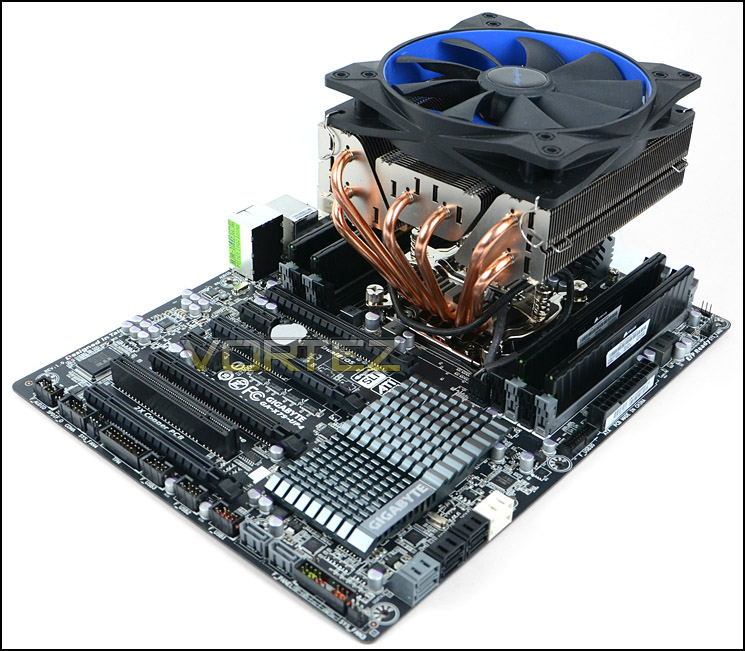
Gotthard installed with fan
As you can see there is approximately 5.5cm for the total height of the memory sticks at the lowest point. This will allow for the installation of memory kits which are extremely tall such as Corsair Vengeance which are 5.5cm exactly.
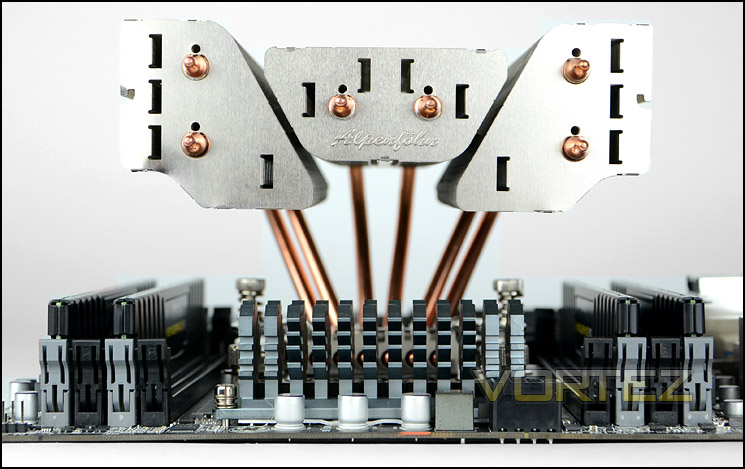
An observation of memory clearance
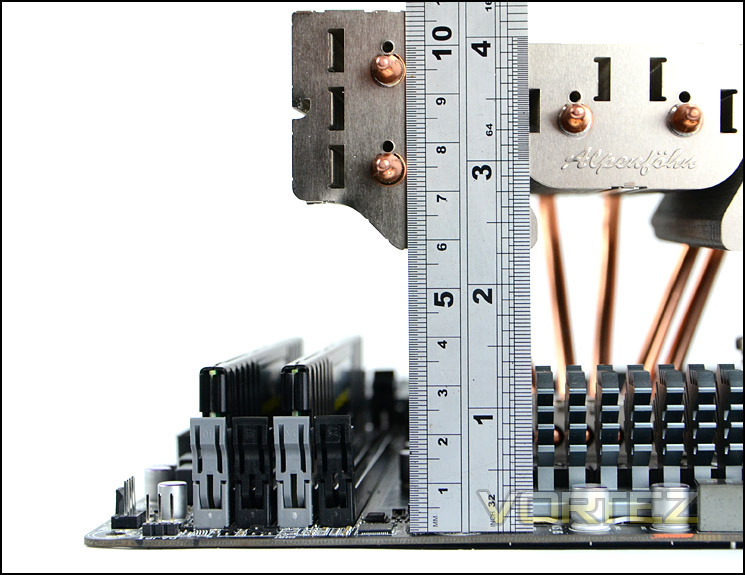
Memory clearance measure
Due to its nature, Gotthard can overhang the motherboard slightly and this should be taken into account. If you have tight clearance at the top of the computer chassis then be aware that you will need an additional 2cm for Gotthard to fit suitably.
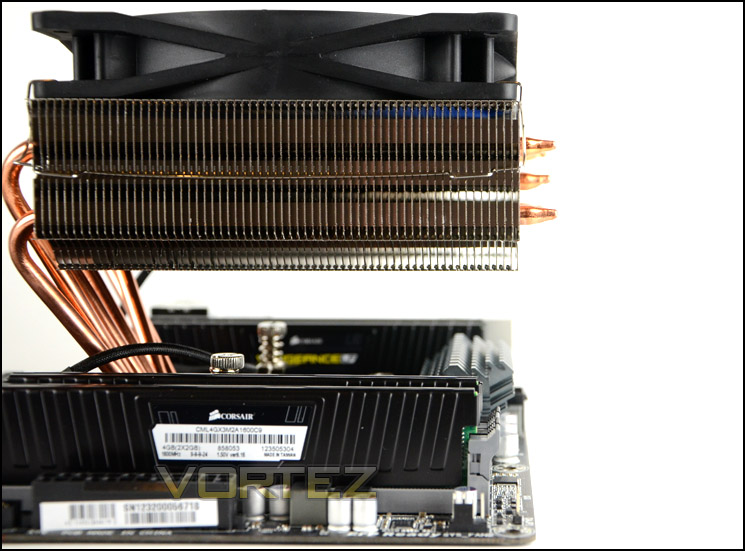
Gotthard overhangs the motherboard
Test Setup & Methodology
Test System
CPU – Intel Core i7-3930K (3.6GHz)
Motherboard – GIGABYTE X79-UP4
Memory – 8GB Corsair Vengeance LP 1600MHz CL9
Graphics – Sapphire Radeon HD 6850 1GB
PSU – NZXT Hale90 650W
Hard Drive – Kingston HyperX 240GB SATA III SSD
Case – Corsair Carbide 500R White
Motherboard – GIGABYTE X79-UP4
Memory – 8GB Corsair Vengeance LP 1600MHz CL9
Graphics – Sapphire Radeon HD 6850 1GB
PSU – NZXT Hale90 650W
Hard Drive – Kingston HyperX 240GB SATA III SSD
Case – Corsair Carbide 500R White
CPU Coolers
Alpenföhn Matterhorn Pure(120mm Wingboost: 300-1200RPM)
Alpenföhn K2 (120mm Wingboost: 500-1500RPM, 140mm Wingboost: 300-1100RPM)
Alpenföhn Gotthard (140mm Wingboost: 300-1100RPM)
Noctua NH-D14 (120mm NF-P12 PWM + 140mm NF-P14 PWM: up to 1200RPM)
Thermalright SilverArrow SB-E Extreme (Dual TY-143 fans – 600-2500RPM)
Corsair Hydro H100 (Dual 120mm fans – low: 1300RPM, mid: 2000RPM, high: 2600RPM)
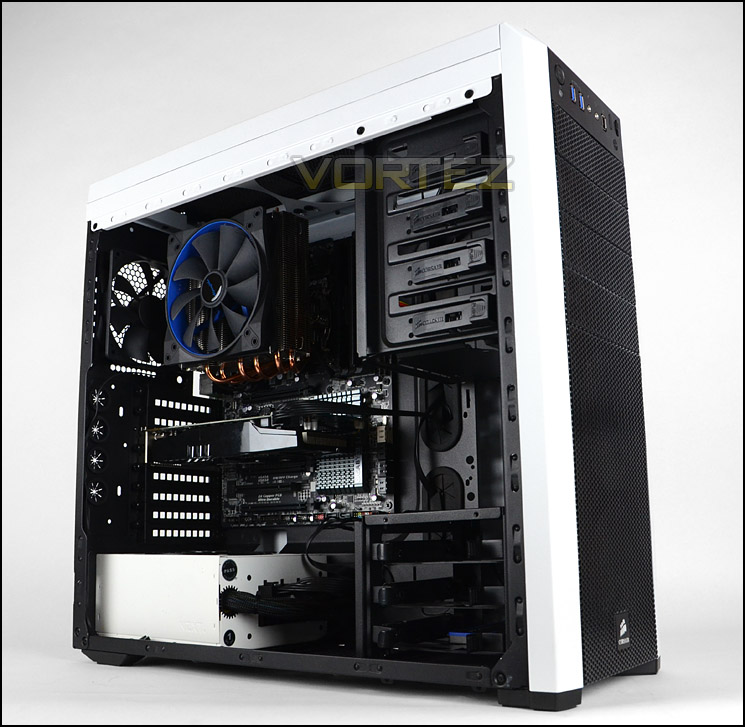
Program Suite
Real Temp – Maximum temperature analysis
LinX 0.6.4 – Applies thorough stress test to CPU
CPU-Z – Confirmation of CPU frequency/voltage
AIDA64 Extreme Edition – Confirmation of temperatures/fan speeds
Testing methodology
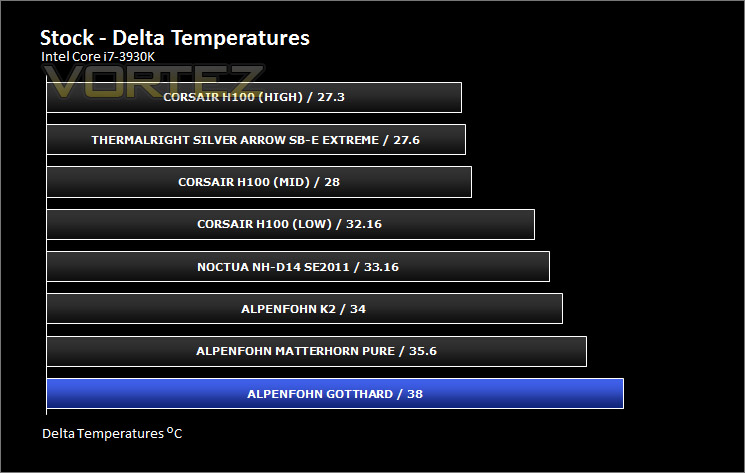
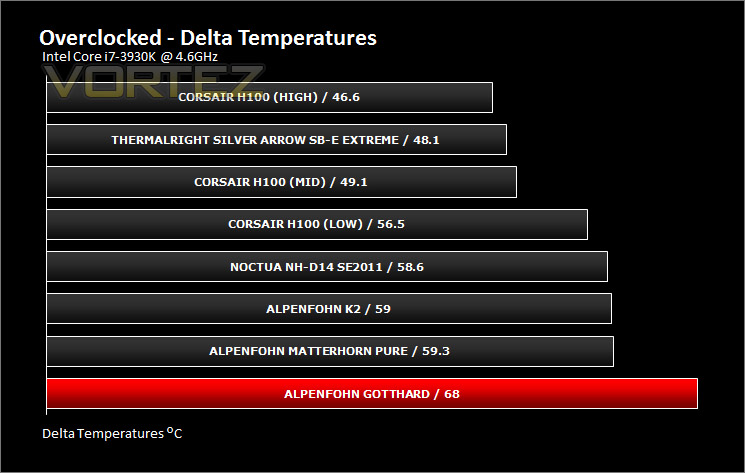
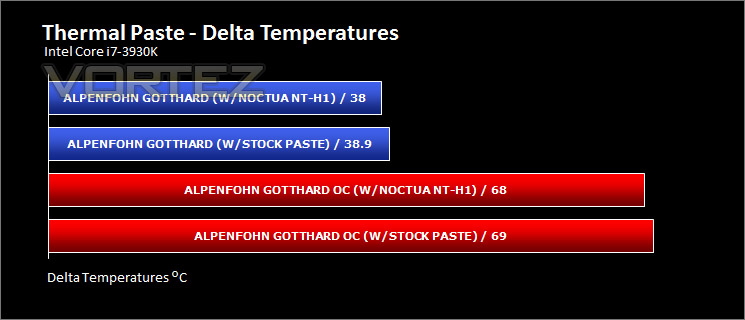
Testing will be based on temperatures recorded by Real Temp after 20 passes of LinX stress test. The maximum absolute temperatures will be recorded after the test and averaged over the 6 cores. The delta is then calculated by subtracting the ambient temperature recorded near the intake fans from the average temperature calculated. Tests are conducted with the Intel i7 3930K at its default 3.6GHz stock speed and overclocked to 4.6GHz @ 1.42V. The tests are done inside the Corsair Carbide 500R chassis to simulate real world conditions. To keep the tests standardised we are using Noctua’s NT-H1 thermal paste on all coolers.
CPU coolers are reviewed as they come out of the box – with their factory cooling fans, as the manufacturer intended and as the consumer expects.
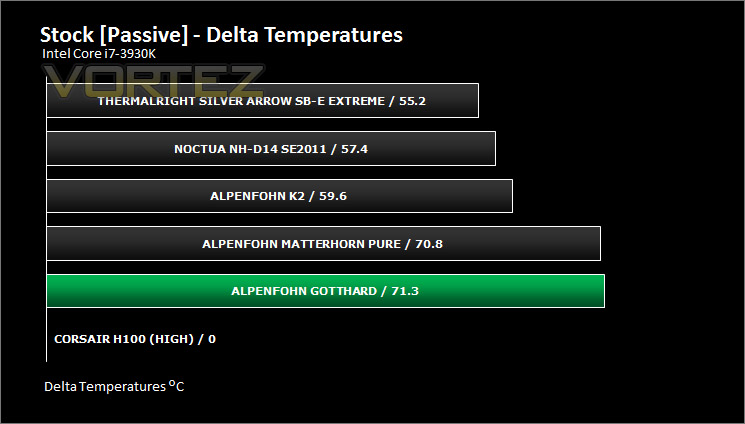
Additional tests include a passive test where the cooling fans are taken away from the heatsink and a comparison between the cooler used with stock thermal paste against our Noctua NT-H1 paste.
A kind thank you to Noctua for supplying us with NT-H1 thermal compound.
Results – Stock Performance
With the 3930K set to stock settings Gotthard handles the temperatures from our Sandy Bridge-E chip very well compared to the titans previously tested. When you appreciate these coolers are higher in specification and feature dual fans respect must be given to Gotthard for its performance here. Fan speed remained at 1184RPM throughout testing.
Results – Overclocked Performance
Sadly a bump in frequency shatters Gotthard’s performance, showing its intended use is not overclocking. Fan speed remained at 1184RPM throughout testing.
Results – Passive Performance
For passive testing the cooler relies completely on the thermal design offered up by the heatsink itself. Without its cooling fan Gotthard still offers respectable performance for a heatsink with lower specifications compared to the likes of K2, D14 and others.
Results – Chipset Performance
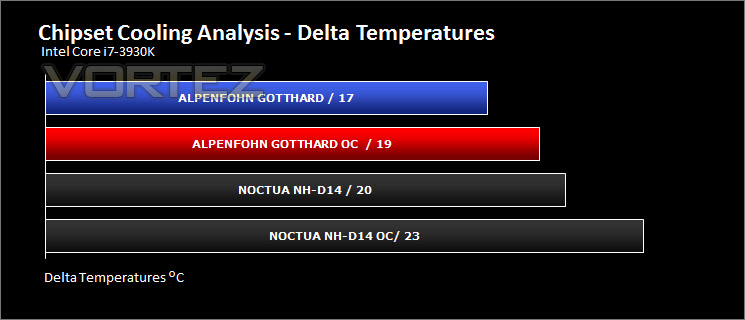
With Gotthard being a top-down design cooler it has the potential to deliver lower chipset temperatures for the motherboard because the fan blows down onto the motherboard. For this test we compared Gotthard to a popular tower design CPU cooler – Noctua NH-D14. As you can see from the results there is some improvement for the chipset temperatures.
Results – Thermal Paste Comparison
Most CPU coolers come accompanied with thermal paste provided by the manufacturer. For our CPU cooling tests we use Noctua’s NT-H1, so to offer up some interesting analysis we test the thermal paste given with the product against N1-H1 to see which gives the best results during stock and overclocked performance.
Conclusion
Top-down CPU coolers are an interesting choice for those wanting to build a smaller, more compact system and Alpenfohn’s Gotthard is one such cooler which is ideal for such a scenario.
We’ve been impressed with Alpenfohn’s products in the past and Gotthard continues this trend. The quality of the heatsink engineering, bundle and fan is very good indeed but the installation can however be a little tricky. The main issue is when attaching the heatsink – the screws that need to be tightened are awkward to tighten with your bare fingers. Alpenfohn should have included cut-outs on the heatsink in order to allow a screwdriver to placed onto these screws.
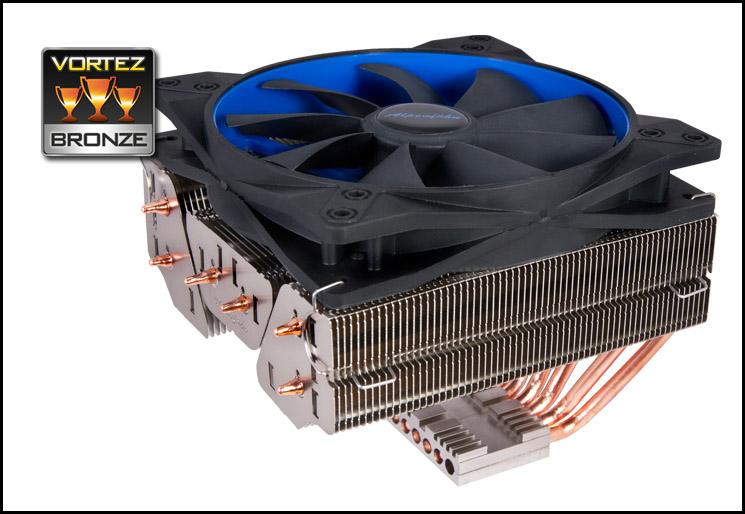
The results given by Gotthard portray a cooler that fares well when the CPU is left at stock frequencies. Passive performance, although not the best due to heatsink specification still offered reasonable results but when overclocked Gotthard does struggle to effectively cool the CPU. It’s fair to say that this cooler isn’t intended for overclocking and is better suited to being situated in a compact chassis and at stock settings.
Against performance and the product as a whole, the price of £55 is quite steep. Gotthard needs a slight price-drop in order to make it a plausible option. Make no mistake, this is a good product – it offers a good route for those wanting to build a compact system and experience good stock performance.
Pros
+ Good for none-overclocked systems
+ Ideal for smaller cases
+ Low noise fan
+ Reasonably priced
Cons
– High temperatures when overclocked
– Can be tricky to install
– Cost
+ Good for none-overclocked systems
+ Ideal for smaller cases
+ Low noise fan
+ Reasonably priced
Cons
– High temperatures when overclocked
– Can be tricky to install
– Cost

Click here for an explanation of our awards at Vortez.net.


