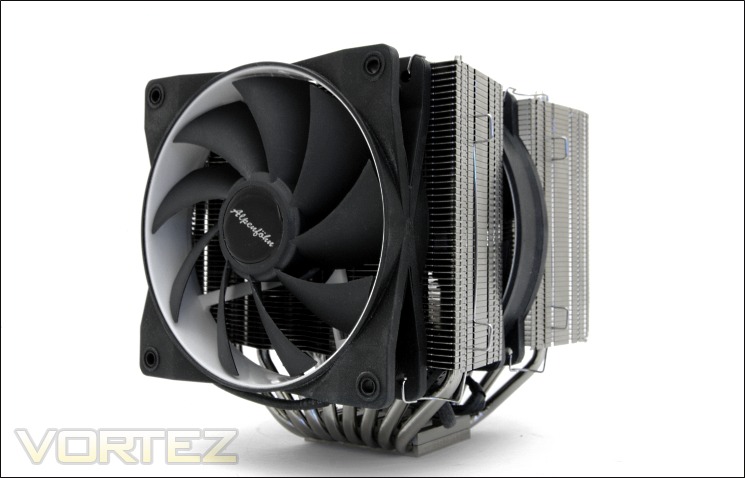
Alpenföhn have sent us a second sample of the K2 to prove to us that their flagship cooler is even better than we originally found.

Manufacturer and Sponsor: Alpenföhn
MSRP: ~£59.99/ 69.90Euros
Street Price: £59.99
A few months ago, Alpenföhn allowed us to take an exclusive look at their monstrous twin-tower flagship cooler, the K2. In the original review, we concluded that despite the K2’s good performance and superbly sleek finish, it failed to live up to its true potential much to our disappointment. Lagging behind its main rivals; the Noctua NH-D14, Thermalright Silver Arrow, Phanteks PH-TC14PE and even the more compact Thermalright Venomous X, the K2 left itself in a difficult position. So when Alpenföhn contacted me to test a second sample which they promised would give improved performance, I was very sceptical, much of that stemming from the fact that our testing procedures are extensive and there seemed little that could possibly change our results. The reason behind this was the claim that the second sample would be straight out of the production batch rather than a mere pre-production ‘hand-made’ prototype which the previously reviewed cooler was. As such, the cooler we have here today features superior manufacturing and is fully representative of what customers will be able to buy at retail. Perked by my curiosity of potential performance gains, I duly accepted their request so let’s find out if the K2 can live up to its expectations.
Before going into the results, have a look at the previous review for an in-depth break-down of the cooler and its features:
Alpenföhn K2 CPU Cooler Review – Introduction
Alpenföhn K2 CPU Cooler Review – Packaging and Content
Alpenföhn K2 CPU Cooler Review – Closer Look
Let’s see what Alpenföhn have to say about their K2 heatsink:
For ages myths and legend surround one of the scariest mountains on earth. Icy winds and heavy snow fall had been the reason all attempts to reach the peak failed…
You might not be surprised that the K2 inspired us to choose the name for our latest creation. By using 8 heat pipes in a twin tower design, dual wing boost configuration and MnTal-Airflow Technology, the new Alpenföhn reaches highest performance at lowest noise.
For ages myths and legend surround one of the scariest mountains on earth. Icy winds and heavy snow fall had been the reason all attempts to reach the peak failed…
You might not be surprised that the K2 inspired us to choose the name for our latest creation. By using 8 heat pipes in a twin tower design, dual wing boost configuration and MnTal-Airflow Technology, the new Alpenföhn reaches highest performance at lowest noise.
Features & Specifications
Features
Twin tower with 8x6mm Heat pipes:
The new Twin Tower Design can reach best results in noise and performance by using a combination of 2 fans. The trapezoid fin shape ensures better compatibility with VGA coolers by keeping the distance to the PCI-X slot. All contact surfaces between fins, heat pipes and the base plate are soldered.
Wing Boost 120/140mm Dual Combination:
Equipped with integrated decoupling elements, WB technology and HD bearing, the K2 comes with each one 120mm and 140mm Wing Boost fans.
Fins:
The K2 is the first cooler to feature the brand new Minimised noise Transfer at Low Airflow Technology (MnTal). The advanced fin structure influences the airflow through the heatsink to increase the heat transfer.
Heat pipes/Base plate:
The U-Shape heat pipes offer a large connection area to the base plate for a better heat absorption. By CNC machining the surface of the base plate it is perfectly even and the thermal transfer is optimised.
The new Twin Tower Design can reach best results in noise and performance by using a combination of 2 fans. The trapezoid fin shape ensures better compatibility with VGA coolers by keeping the distance to the PCI-X slot. All contact surfaces between fins, heat pipes and the base plate are soldered.
Wing Boost 120/140mm Dual Combination:
Equipped with integrated decoupling elements, WB technology and HD bearing, the K2 comes with each one 120mm and 140mm Wing Boost fans.
Fins:
The K2 is the first cooler to feature the brand new Minimised noise Transfer at Low Airflow Technology (MnTal). The advanced fin structure influences the airflow through the heatsink to increase the heat transfer.
Heat pipes/Base plate:
The U-Shape heat pipes offer a large connection area to the base plate for a better heat absorption. By CNC machining the surface of the base plate it is perfectly even and the thermal transfer is optimised.
Specifications
•Cooler dimensions : 154x144x160mm (LxWxH)
•Cooler weight: 1378g (With 2 fans) / 1050g (With no fans)
•Heat pipe: 6mm x8 units
•Cooler material: full copper heat pipes and base, aluminium fins
•Compatibility: Intel Socket LGA1155, 1156, LGA1366, LGA775 (LGA2011 mounting kit provided free on request), and AMD AM2/2+/AM3, K8, FM1
Fan specifications – Wing Boost 120
•Fan dimension: Length 120x120x25mm (LxHxW)
•Weight: 165g
•Operating voltage: 12 VDC
•Fan speed: 500-1500RPM
•Fan noise level: 8-24.8 dB(A)
•Fan Airflow: 63.92 CFM
•PWM: Yes
Fan specifications – Wing Boost 140
•Fan dimension: Length 140x140x25mm (LxHxW)
•Weight: 143g
•Operating voltage: 12 VDC
•Fan speed: 300-1100RPM
•Fan noise level: 10-19.4 dB(A)
•Fan Airflow: 61.62 CFM
•PWM: Yes
Included accessories:
•1x Mounting material for Socket 775,1156,1366, AM2, AM2(+), AM3
•6x Fan mounting brackets
•1x syringe thermal grease
Dimensions
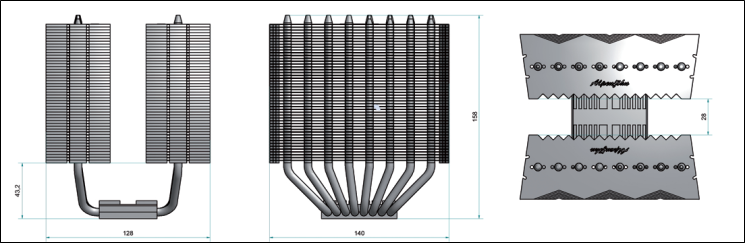
The Alpenföhn K2 boasts a list of features that can compares favourably to other ultra-high-end dual tower coolers. Starting with the dimensions, we see that it is 160mm in height, similar to the Noctua NH-D14 but shorter than the Phanteks PH-TC14PE and Thermalright Silver Arrow, thus ensuring compatibility with the majority of mid tower cases. Compatibility is a key factor of the K2 as reflected by the trapezoid shape of the fins. However, its maximum width of 144mm is 4mm wider than even the Phanteks PH-TC14PE. Length/depth-wise, the K2 is 154mm, 5mm less than the Phanteks cooler, noting that the dimension includes the fans installed. Further highlighting compatibility is the cooler’s support for all sockets dating back nearly 7 years.
Of all the dual tower radiators, the K2 is one of the heaviest at 1378g, a good 128g more than the already hefty Phanteks, although less that the Zero Infinity Free Flow+. This could be attributed to the full copper base and the two extra heat pipes over conventional 6 heat piped designs. The fans are also slightly heavier than previous fans we have encountered. Speaking of the fans, we observe that Alpenföhn have gone for a 120mm and 140mm fan configuration to alleviate some memory compatibility issues. The fan specifications are also comparable to Noctua’s NF-P12 and NF-P14s. The former goes up against the same sized Wing Boost 120 which delivers slightly better performance thanks to the extra 200 RPM operational speed it has over the Noctua. Conversely, the Wing Boost 140 operates at 100 RPM less than the equivalent NF-P14 and not surprisingly delivers slightly less airflow, the difference being marginal at best. The main advantage of the Alpenföhn fans is their PWM functionality which only Thermalright fans currently support (amongst the four dual tower coolers), although this will soon change with Noctua’s new fans.
Like the other three coolers we will keep comparing the K2 to, Alpenföhn hopes to deliver the best in-class performance at low noise, achieving so with heatsink design and fan performance.
Test Setup
CPU – Intel Core i7 920 – 2.66/4.0GHz
RAM – 6GB (3x2GB) OCZ Platinum DDR3 1333MHz
Motherboard – ASUS Rampage III Extreme
Graphics card – Inno3D GTX570 1.25GB
Power Supply – Enermax Revolution 85+ 850W
Hard Drive – OCZ Vertex 2E 120GB
Samsung F1 320GB
Samsung F3 1TB
Case – Lian Li B25B
Drivers – Nvidia ForceWare 285.38
CPU Coolers:
Alpenföhn K2 including tests using 2 stock fans, 2 Föhn 120, 2/3 Noctua NF-P12s/NF-P14s and 2 SWiF2-120Ps (Retail)
Alpenföhn K2 including tests using 2 stock fans, 2 Föhn 140, 2/3 Noctua NF-P12s/NF-P14s and 2 SWiF2-120Ps (Prototype)
Alpenföhn K2 including tests using 2 stock fans, 2 Föhn 140, 2/3 Noctua NF-P12s/NF-P14s and 2 SWiF2-120Ps (Prototype)
Zero Infinity Free Flow+ including passive and tests using 1/2/3 stock fans, 2 Noctua NF-P12s/NF-P14s and 2 SWiF2-120Ps
Enermax ETS-T40-TA including tests using 1 stock fan, 2 Noctua NF-P12s and 2 SWiF2-120Ps
Alpenföhn Himalaya including tests using 1/ 2 Föhn 140, 2 Noctua NF-P12s/NF-P14s and 2 SWiF2-120Ps
Cooler Master Hyper 612S including tests using 1 stock fan, 2 Noctua NF-P12s/NF-P14s and 2 SWiF2-120Ps
Corsair H100 including tests using 2/4 stock fans, 2 Noctua NF-P12s and 2 SWiF2-120Ps
Phanteks PH-TC14PE including tests using 3 Phanteks PH-F140TS, 2 Noctua NF-P12s/NF-P14s and 2 SWiF2-120Ps
Alpenföhn Triglav including tests using 1 stock fan, 2 Noctua NF-P12s/NF-P14s and 2 SWiF2-120Ps
Antec KÜHLER H2O 620 including tests using 1 stock fan, 2 Noctua NF-P12s and 2 SWiF2-120Ps
Antec KÜHLER H2O 920 including tests using 2 stock fans, 2 Noctua NF-P12s and 2 SWiF2-120Ps
Prolimatech Genesis including tests using 2 Noctua NF-P12s/NF-P14s, 2 SWiF2-120Ps and 2 Prolimatech Blue Vortex 14s
NZXT Havik 140 including tests using 2 NZXT fans, 2 Noctua NF-P12s/NF-P14s and 2 SWiF2-120Ps
Alpenföhn Matterhorn including tests using 2 Noctua NF-P12s/NF-P14s, 2 SWiF2-120Ps and 2 Föhn 120 Wing Boost fans
Prolimatech Super Mega including tests using 2 Noctua NF-P12s/NF-P14s, 2 SWiF2-120Ps and 2 Prolimatech Blue Vortex 14s
Noctua NH-C14 (U.L.N.A and default speed) including tests using 2 SWiF2-120Ps
Thermalright Silver Arrow including passive and tests using 2 Noctua NF-P12s and 2 SWiF2-120Ps
Thermalright HR-02 including passive and tests using Noctua NF-12/NF-P14s and Thermalright TR TY-140
Thermaltake Frio (Low/med/high speed) including tests using 2 Noctua NF-P12s
Corsair H50 including tests using 2 Noctua NF-P12s and 2 SWiF2-120Ps
CoolIT ECO A.L.C including tests using 2 Noctua NF-P12s and 2 SWiF2-120Ps
Thermalright Venomous X using 2 Noctua NF-P12s and 2 SWiF2-120Ps
Coolink Corator DS including tests with dual fan setups
Tuniq Propeller 120(High speed fan)
Noctua NH-C12P SE14
Prolimatech Megahalem
Noctua NH-D14 (U.L.N.A and default speed)
Noctua NH-U12P SE1366
Thermolab Baram (with 2 Noctua NF-P12 fans)
CoolIT Domino A.L.C
Sunbeam Core Contact Freezer
Cooler Master Hyper 212 Plus including test with 2 Noctua NF-P12 fans
Alpenföhn Nordwand including test with 2 Noctua NF-P12 fans
Tuniq Tower 120 Extreme (Low/med/high speed)
Program Suite:
Core Temp 0.99.5
LinX stress Test
CPUID HWMonitor
How I tested:
Testing will be based on temperatures recorded by Core Temp and HWMonitor after 20 passes of LinX stress test. The maximum absolute temperatures will be recorded after the test and averaged over the 4 cores. The delta is then calculated by substituting the ambient temperature recorded near the intake fans. All tests are conducted with the i7 920 at its default 2.66GHz stock speed and overclocked to 4GHz. As always, the tests are done inside my own Lian Li B25B case to simulate real world conditions. To keep the tests standardised and based on people’s tendency to use their own thermal paste, we apply Thermalright’s ChillFactor II thermal paste to all coolers unless specified in the result entries (where the bundled thermal paste performs better).
Results (Old VS New)
In our first set of results, we will look at how the retail samples compares to the previous prototype we tested. Highlighted in blue (stock CPU speed) and red (Overclocked CPU) are the new results.
Stock
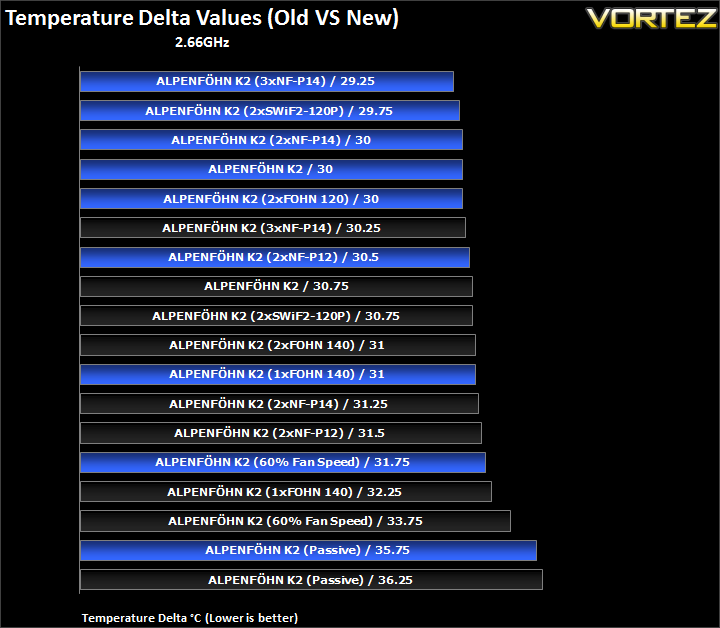
To put my scepticism at ease, we immediately see that Alpenföhn were right about the claimed performance improvements. Starting from the top, we see that with three Noctua NF-P14s, performance has increased by 1C, which as we will see later is enough to propel the K2 to compete with the very best. With two Coolink fans, the temperature delta drops by 1C again. Coupled with two NF-P14s, performance is a heftier 1.25C ahead of the prototype sample. The stock K2 configuration also sees improved performance by 0.75C. Unfortunately, we didn’t have two Föhn 140s so had to make do with two of the 120mm variants instead and results were more than pleasing. With two Noctua NF-P12s, we again see a 1C improvement over the prototype sample. Using a single fan, an improvement of 1.25C is observed which yields a result that is comparable to using two Föhn 140s previously. More impressively, performance at 60% fan speed is a more significant 2C ahead of the old sample. Conversely, passive performance is only 0.5C better. So across the board, we see that the new retail sample is superior to our original prototype.
4GHz
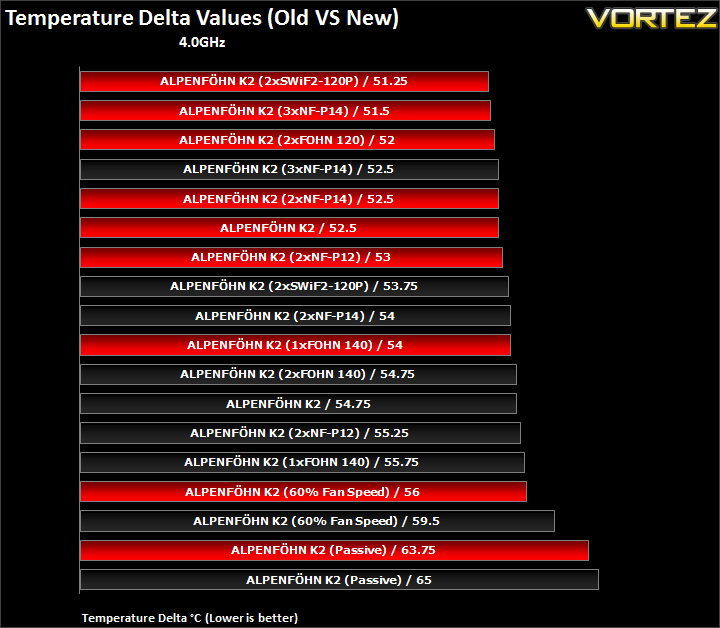
With the overclocked CPU, we see the same trend as before i.e. the retail sample yields improved results across all configurations. The two Cooling fans produce an improvement of 2.5C on the new K2 whereas the three Noctua NF-P14s show a marginal 1C gain. With just two NF-P14s, the temperatures lower by 1.5C. More importantly, the new sample yields a 2.25C improvement over the prototype in its default configuration. The NF-P12 setup shows the same performance gains. Going to a single fan setup, the improvement observed is by 1.75C. At reduced fan speed, the new sample impresses with 3.5C lower temperatures whereas passively, the improvement is 1.25C.
Results (Grouped)
The results have been arranged in terms of the fan configuration that yields the best results for each cooler. However, it is important to take into account that many coolers come with their own fans and changing those increases the costs significantly, so the “out of the box” cooler configurations have been highlighted in red each group.
Stock

Compared to the old results, the K2 has moved up two positions. Let’s start by looking at the different fan configurations. The default setup gives a delta temperature of 30C, same as with two NF-P14s or two Föhn 120s. Opting for a third 140mm Noctua fan reduces temperatures by 0.75C whereas using a single Föhn 140 increases the delta by a mere 1C. The second best configuration, not surprisingly, is through two high RPM Coolink fans. Impressively, even with the fan speeds at 60%, the delta is 31.75C, not a significant drop from the default K2 setup. Passively, the temperature delta is 35.75C.
Results (Ascending order)
Stock

The K2 now compared even more favourably against its competitors. The three setups yielding a delta of 30C and coupled with the Coolink fans producing a delta of 29.75C, performance proves superior to the default Noctua NH-D14 and the Thermalright Silver Arrow. Only the much louder ALC units with fans above 2000RPM and the Phanteks with three fans are able to outperform the K2. With three NF-P14s, the K2 ranks fourth on our extensive list! The single fan on the K2 is able to match the likes of the Corsair H100 with 4 fans at 1300RPM and manages to even outperform the Thermalright Silver Arrow. At 60% fan speed, the results are still enough to match the Zero Infinity Free Flow+ and outperform the Phanteks also with lowered fan speed. The main difference is that the Föhn 120 and Föhn 140 still operated at 1000RPM and 800RPM respectively, higher than the Phanteks’s fan speeds. Finally, we see that passive performance is enough to beat the popular Antec KUHLER 620.
Results (In-depth analysis)
In the next comparison, we look at the default cooler performance as they come out of the box with their bundled fans. Coolers that come with no fans have been coupled with Noctua’s NF-P12 or fans that the manufacturers intended their coolers to be used with.
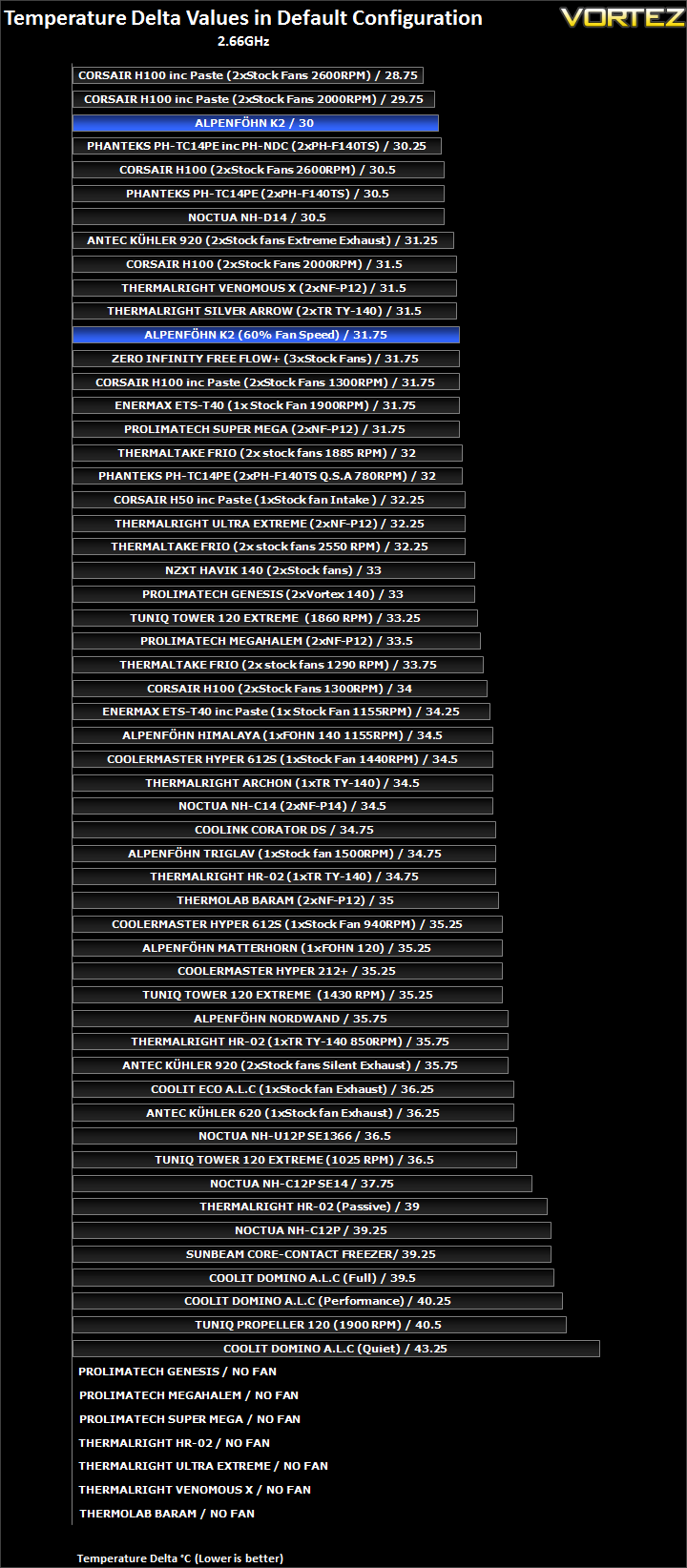
In its default configuration, the K2 is only topped by the Corsair H100 using much louder fans at 2000RPM+. The K2 outguns all its other key rivals from Phanteks, Noctua and Thermalright. Even with reduced fan speeds, the K2 manages to outperform the behemoth that is the Zero Infinity Free Flow+ which boasts three 140mm fans.
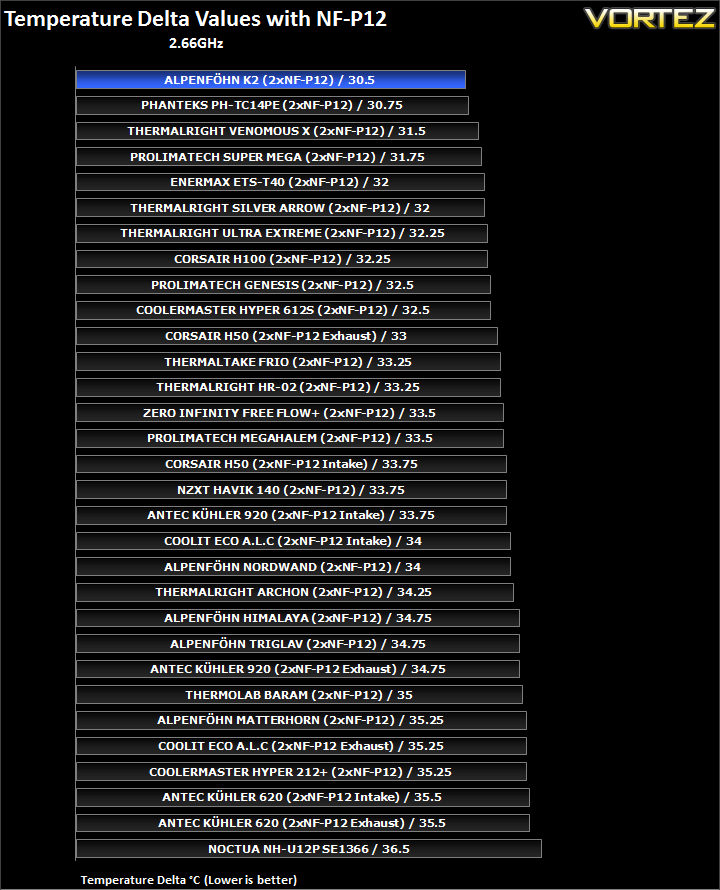
Efficiency is untouchable when the K2 is teamed up with the two Noctua fans.
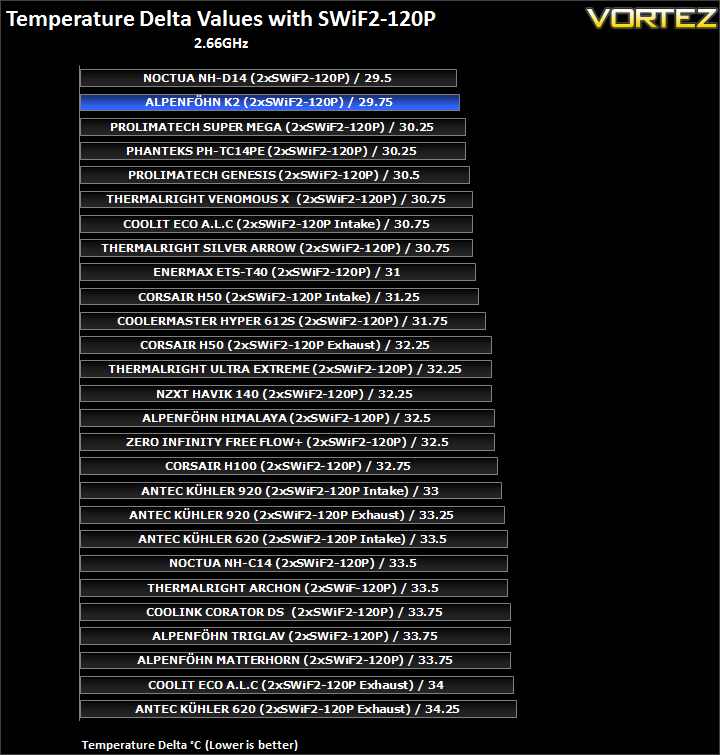
With two Coolink fans, the K2 is a mere 0.25C behind the Noctua but leaves a larger 0.5C margin to the next set of heatsinks.
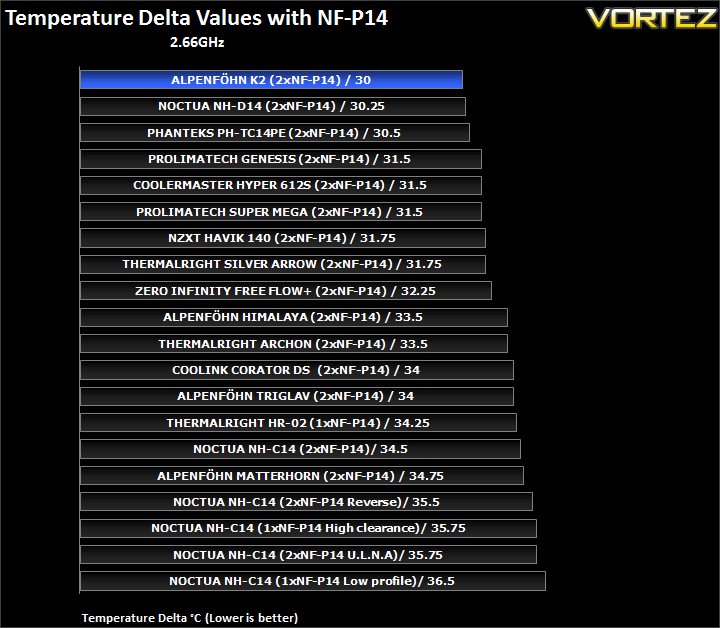
Again, the K2 proves to be the most efficient cooler we have tested with the NF-P14s.
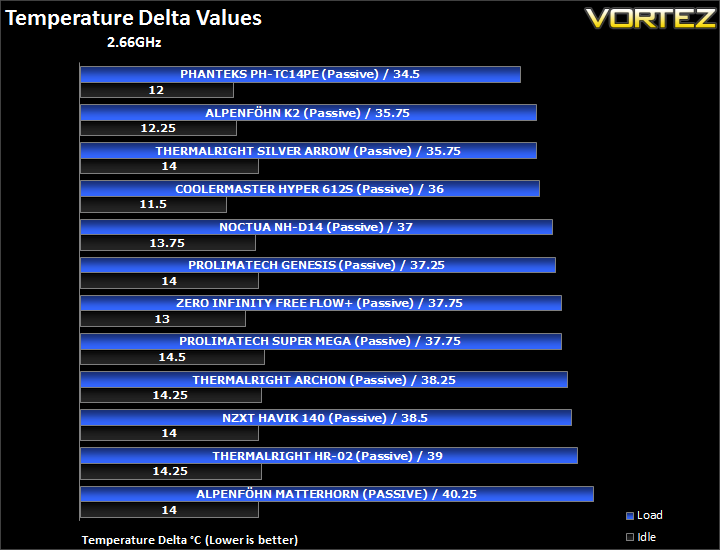
Passively, the K2 can’t quite match the Phanteks, but it is able to match the Silver Arrow and outperforming the latter at idle.
Results Overclocked (Grouped)
The results have been arranged in terms of the fan configuration that yields the best results for each cooler. However, it is important to take into account that many coolers come with their own fans and changing those increases the costs significantly, so the “out of the box” cooler configurations have been highlighted in black each group.
4GHz

The pattern of results follows our previous findings very closely, except this time the best performance is through two Coolink fans generating a delta temperature of 51.25C closely followed by using three Noctua NF-P14s at 51.5C. Coupled with two Föhn 120s, performance is 0.5C lower whereas two NF-P14s and the default fan setup produce the same delta of 52.5C. Going to a single fan increases the temperature by 1.5C. With reduced fan speeds, performance is still very impressive at 56C. Passively, the delta temperature is 63.75C.
Results Overclocked (Ascending order)
4GHz

Our chart is very competitive at the top and yet the K2 finds no problem competing fitting in amongst the best. The default K2 setup provides performance to match the likes of the Thermalright Silver Arrow and Corsair H100 with fans at 2600RPM. Switching to two Föhn 120s improves performance by 0.5C which is enough to put the K2 on par with the Venomous X using two Coolink fans and the Silver Arrow using three TR TY-140s. With a single 140mm fan, the K2 matches the Super Mega with two much higher RPM Coolink fans but is left slightly behind the Silver Arrow also using a single fan setup. At reduced fan speed, the K2 matches the Archon and outperforms the likes of the NZXT Havik. The best performance comes from the two Coolink fans which allow the K2 to match the NH-D14 using the same fans and also outperform the default Phanteks setup. Not far behind is the K2 and three NF-P14s.
Results Overclocked (In-depth analysis)
In the next comparison, we look at the default cooler performance as they come out of the box with their bundled fans. Coolers that come with no fans have been coupled with Noctua’s NF-P12 or fans that the manufacturers intended their coolers to be used with.
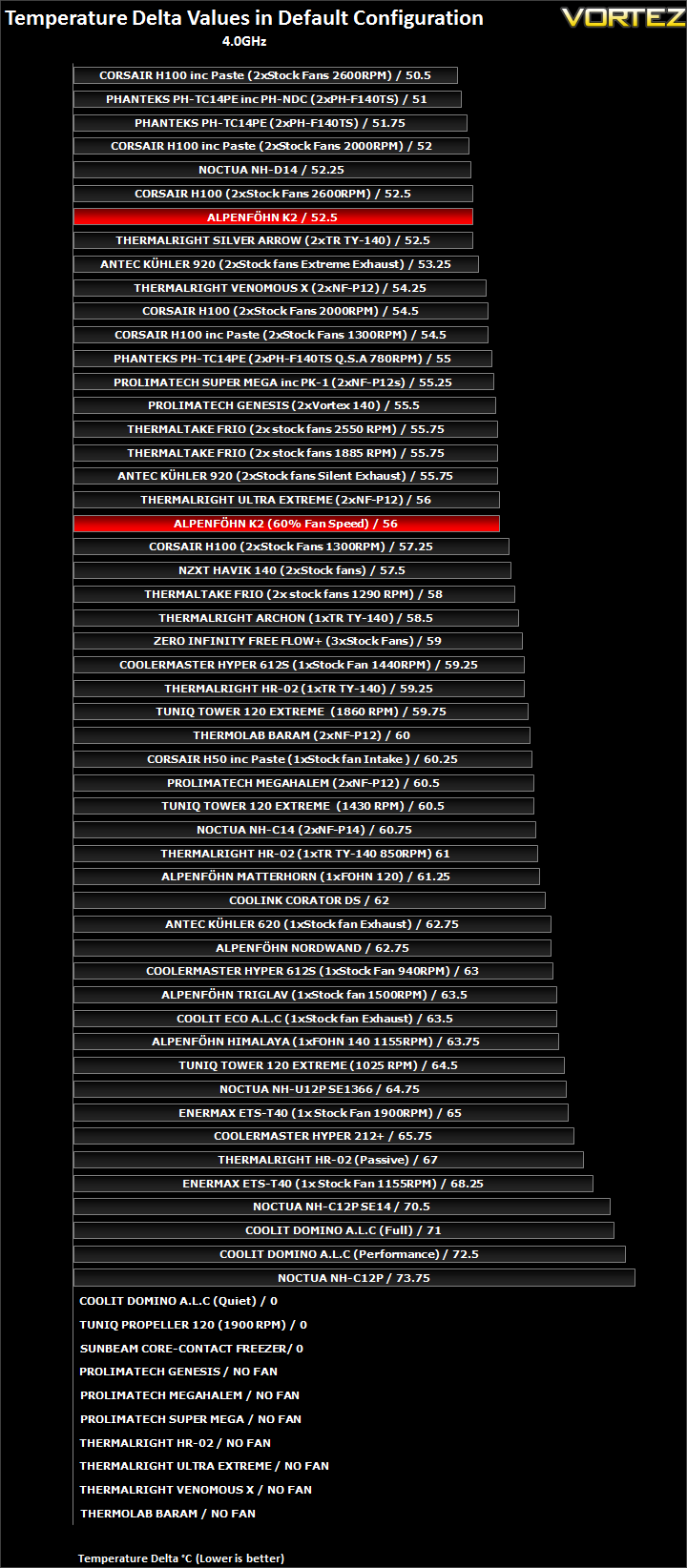
In its default setup, the K2 can match the Corsair H100 and Thermalright Silver Arrow. And at 60% fan speed, it beats the Corsair H100 with 1300RPM fans by a 1.25C margin. The latter result is 1C higher than the Phanteks with reduced fan speeds.
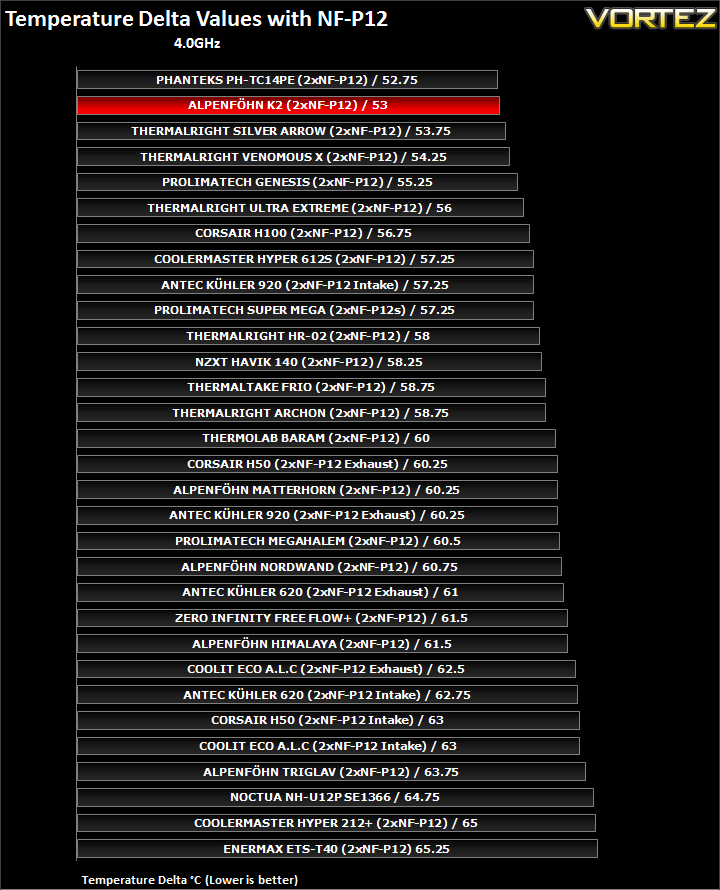
As before, efficiency proves to be the K2’s strong point, only losing to the Phanteks and only by a mere 0.25C at that. Compared to the Silver Arrow, there is a greater margin of 0.75C.
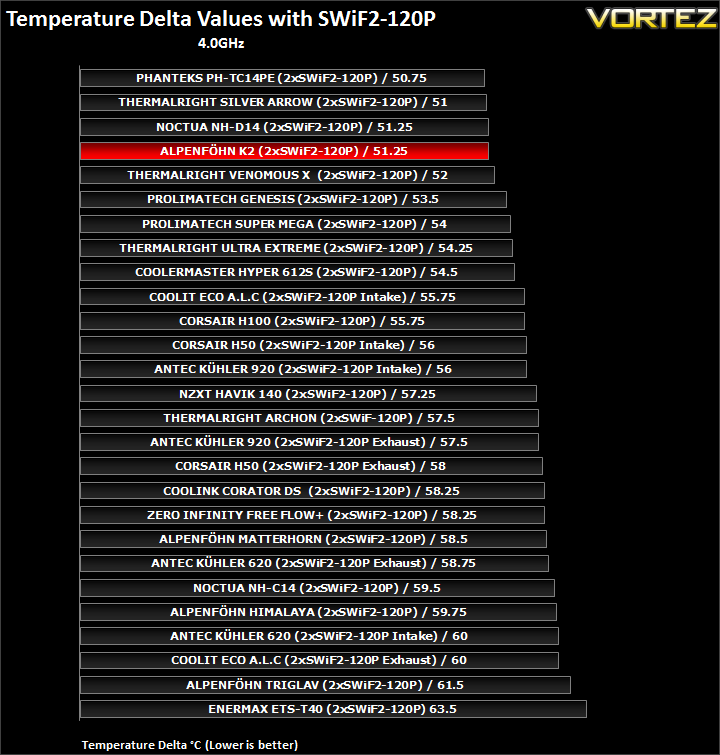
Only 0.5C differentiates the K2 from the Phanteks in this case demonstrating how efficient the unit is and how competitive the top coolers are with each other. Our four ‘super-coolers’ take the top four spot as expected.
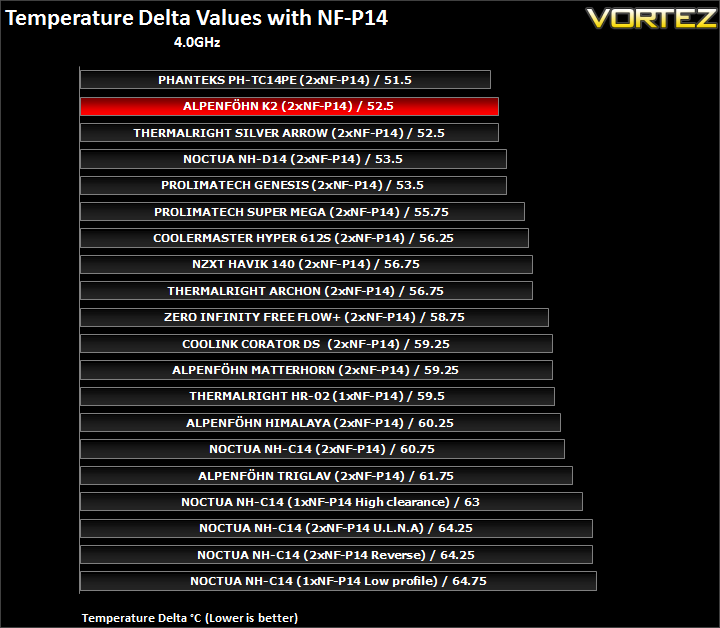
Yet again, the 4 ‘super-coolers’ take the first four spots, except that in this case, the K2 comes out second matching the Silver Arrow.
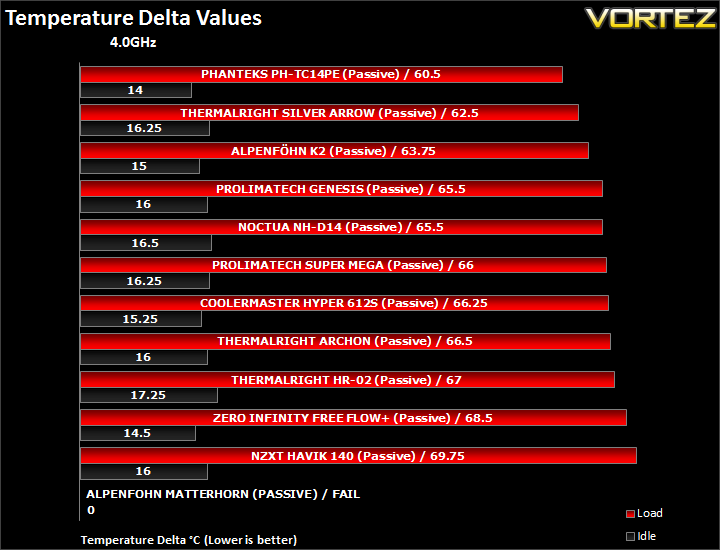
Passively, the K2 continues to impress, edging ahead of the Noctua NH-D14 and Prolimatech Genesis but falling behind the Thermalright Silver Arrow by 1.25C. The Phanteks remains the clear leader.
Conclusion
So there we have it, the Alpenföhn have finally delivered to us what we were originally anticipating of the K2. Before going any further, I have to highlight and stress that this sample is no different visually to the initial prototype we received, the only difference being the fact that it came from the retail production line as opposed to being ‘hand-made’. As such, it is demonstrative of the actual performance users can expect. In the original article, I concluded that the K2 was easily the best looking cooler on the market and this has not changed. The eight heat-piped monster still boasts an impressive matte silver finish that typifies Alpenföhn’s superb attention to detail. With its two black and white fans, one Föhn 120 and one Föhn 140, users not only have a versatile cooler to match any colour scheme they might opt for, but they are also ensured quiet operation with brilliant performance to boot. The mounting kit I also praised highly thanks to its ease of installation and robustness to cope with the K2’s weight without flexing the motherboard.
Where the K2 began to falter previously was in the performance department. Thankfully this time, we observe a drop of around 1-2C across all fan configurations on the K2. While this may not seem like much, it paints a much more positive picture compared to other coolers in its class when we realise just how close the performance difference is at the top of our charts. The K2 finally manages to not only enter the realms of our ‘super-coolers’ but also fare favourably against the likes of the Noctua NH-D14, Thermalright Silver Arrow and the Phanteks PH-TC14PE. Looking back to the performance at stock CPU speed, we see the K2 vying for the top spot in many cases. Its efficiency with various fans proves to be class leading and only losing to the Phanteks and Noctua in two cases out of five. This performance is maintained even at 4GHz, where the K2 constantly swaps positions with the other three dual tower coolers. Very little differentiates those four dual tower coolers which is testament to their sheer performance and efficiency despite sharing little else in design features. The Phanteks still remains the overall best cooler but this is where Alpenföhn have an ace up its sleeves. As from last week, Alpenföhn have reduced the price of their K2 to 69.90Euros/£59.99 in order to compete with its rivals on price. Previously, my recommendations mostly went to the cheaper and quieter Thermalright Silver Arrow but now that the K2 can be found for a similar price, Thermalright should be sweating. Thermalright’s solution still remains the quietest solution of the three thanks to its two brilliant 140mm fans but despite that, the K2 has more to offer in response. The front 120mm fan allows taller memory modules to be installed and its aesthetics will undoubtedly appeal to more people. We should also note that an extra set of fan clips are provided to mount an additional fan at the back and the K2 now comes with LGA2011 mounting screws as standard.
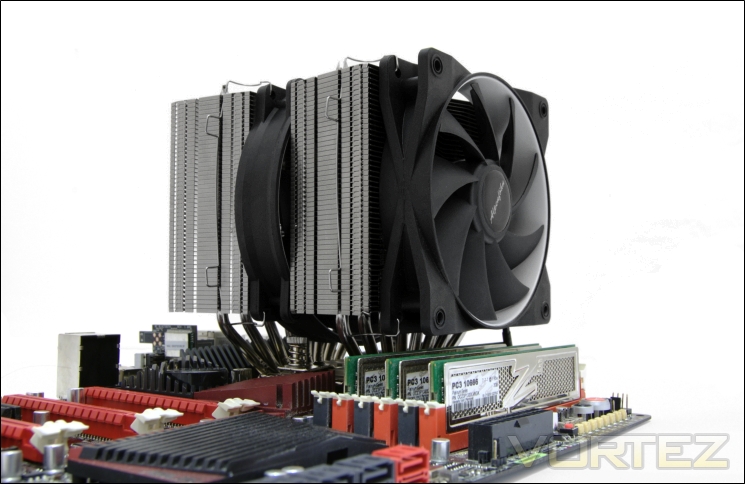
So with three of my previous cons addressed, can Alpenföhn go the full fold and fix my last complaint? That depends; the fan clips still prove to be a bit of a pain to use but this may be reserved to the fact that the CPU socket on my Rampage III Extreme is positioned further up that on traditional boards leaving me with little space to work with above the cooler. However, for most people this may not be an issue and even if it is, it’s a one-time annoyance.
Looking back, I’m glad Alpenföhn sent us this second sample to demonstrate the potential the K2 always had reserved inside. I’m still somewhat puzzled as to why they sent me a prototype originally but it highlights the trust manufacturers have in us to give them an honest feedback and their conviction to top our notorious charts.
Pros
+Brilliant performance
+Aesthetics and broad colour appeal
+Very well packaged
+Two quality PWM fans included
+Low noise
+Rich bundle
+Support for Intel and AMD sockets (including LGA2011 mounting kit)
+Ease of installation
+Innovative
+Efficient
+Excellent support
+Support for three fans
+Cost
Cons
-Small clearance for very tall memory modules (Easily fixed by buying lower profile modules)
-Fan wire clips are tedious to install
+Brilliant performance
+Aesthetics and broad colour appeal
+Very well packaged
+Two quality PWM fans included
+Low noise
+Rich bundle
+Support for Intel and AMD sockets (including LGA2011 mounting kit)
+Ease of installation
+Innovative
+Efficient
+Excellent support
+Support for three fans
+Cost
Cons
-Small clearance for very tall memory modules (Easily fixed by buying lower profile modules)
-Fan wire clips are tedious to install
The Alpenföhn K2 can finally claim our Vortez Gold Award.


Click here for an explanation of our awards at Vortez.net.