AMD’s own frame rate synching technology is here, and we put it under the spotlight thanks to an ACER XG270HU and XFX Radeon R9 285 Black Edition
Initially demonstrated at CES in January 2014, AMD has been working on hard on making their FreeSync technology a reality for at least the past 14 months. A reaction to the public release of Nvidia’s G-SYNC the previous month, the implementation was obviously in its infancy – the demonstration was performed on a laptop where the engineers had far greater control over the scalar component of the LCD panel. Nevertheless it showed great promise.
AMD then went down the route less taken – attempting to make the standard an open one which could be adopted by monitor manufacturers without expensive licencing arrangements or additional costs to the end-user. Their argument was simple – the VESA V-Blank specification, which defines the refresh rate of a given panel, was too limited to allow true synchronisation but that an implementation would be possible which didn’t place onerous requirements on monitor manufacturers. VESA eventually found that their argument had some merit, despite representations against it by their competitors, christening the new standard Adaptive Sync.
As part of DisplayPort 1.2a Adaptive Sync is a purely optional standard which monitor manufacturers can apply to their DisplayPort 1.2-enabled monitors, free of liscensing. AMD’s graphics hardware can then make use of FreeSync technology to essentially tell the monitor when to grab a new frame from the frame buffer, rather than rely on continuous polling from new and more complicated scaler hardware.
Even at that stage one would have assumed that getting manufactuters on board would have been very difficult. However news percolated in mid-to-late 2014 that certain panels had been unofficially adapted via firmware update to support FreeSync, and it turned out by CES this year that the number of manufacturers who were willing to develop new designs for FreeSync was substantially more than most would have expected. With the likes of Samsung, Acer, BenQ and LG on board the future certainly looks promising.
AMD on FreeSync
With input from AMD, the latest DisplayPort specification now includes DisplayPort Adaptive-Sync – a feature that allows the monitor’s refresh rate to vary (e.g., between 30 and 144Hz) and lets the graphics card control the refresh rate instead. This eliminates large jumps in frame rate for noticeably smoother gameplay. Gamers sensitive to input latency – a delay between mouse movement and cursor movement – will also see a distinct increase in responsiveness.
AMD FreeSync™ technology – bringing it all together
AMD FreeSync™ is our name for the complete solution: an AMD Freesync™ technology-compatible AMD Radeon™ graphics card, an AMD Freesync™ technology-enabled AMD Catalyst™ graphics driver and a DisplayPort Adaptive-Sync-compatible display. These three pieces will work together to abolish tearing, eliminate stuttering and greatly reduce input latency, making life better for gamers, and – really – for anyone who appreciates a seamless viewing experience.
AMD FreeSync™ technology – bringing it all together
AMD FreeSync™ is our name for the complete solution: an AMD Freesync™ technology-compatible AMD Radeon™ graphics card, an AMD Freesync™ technology-enabled AMD Catalyst™ graphics driver and a DisplayPort Adaptive-Sync-compatible display. These three pieces will work together to abolish tearing, eliminate stuttering and greatly reduce input latency, making life better for gamers, and – really – for anyone who appreciates a seamless viewing experience.
Today AMD are releasing the first FreeSync drivers – Catalyst 15.3.1 – to complement a new wave of FreeSync monitors due to be released imminently. FreeSync is compatible with these new monitors and AMD graphics hardware based on the GCN 1.2 architecture, essentially R9 290-class, R9 285-class and R9 260 GPUs (including the older HD7790) and selected APUs. Looking ahead, new GPUs and APUs including the upcoming Carrizo line will also support FreeSync.
Why is Frame Rate Syncing Important?
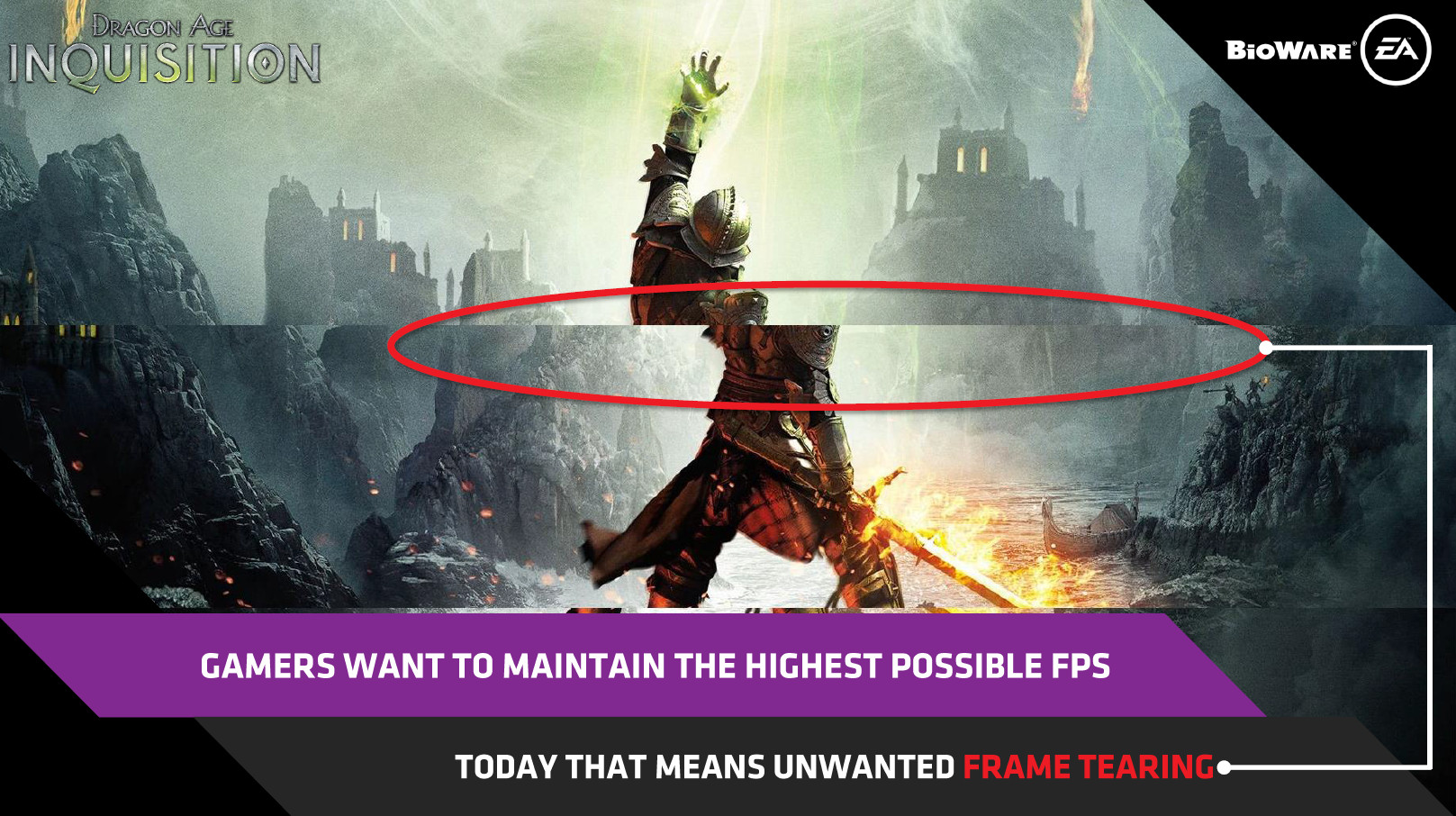
FreeSync and similar frame synchronisation technologies are born from the same underlying issue – a mismatch between the normally fixed refresh rate of a monitor with the variable frame rate a GPU will render at. We’ve all experienced it – texture tearing in a scene, or something we’ve just perceived as odd bands running up and down the screen. Many have learned to ignore it. But it’s still there, just waiting for the unsuspecting and breaking immersion when we least expect it.
V-SYNC is the typical means which we overcome the frame-rate/refresh-rate mismatch. By artificially limiting GPU frame rates to the refresh rate of a monitor – usually 60Hz/60fps for historical reasons – tearing is eliminated. However there are still downsides:
Latency – A game doesn’t just pause whilst a monitor waits for a new complete frame to be rendered by a GPU; you’re still playing and potentially important information isn’t being presented to you. For this reason many competitive gamers won’t play with V-SYNC, instead dealing with tearing as a prices for low latency.
Stuttering – What happens when the GPU can’t keep up with the 60fps needed for proper synchronisation? A frame is repeated, visually obvious as a stutter on the screen if it only happens for a frame or two. If it happens for longer the viewable frame rate effectively defaults to 30fps, with odd situations where motion will appear to be smooth for a moment. 30fps may be fine for consoles, but this is PC gaming.
Stuttering – What happens when the GPU can’t keep up with the 60fps needed for proper synchronisation? A frame is repeated, visually obvious as a stutter on the screen if it only happens for a frame or two. If it happens for longer the viewable frame rate effectively defaults to 30fps, with odd situations where motion will appear to be smooth for a moment. 30fps may be fine for consoles, but this is PC gaming.
So, what if you could tell the monitor to update whenever there is a new frame, effectively changing the refresh rate of the panel on the fly? Well it turns out that the groundwork for this had already been layout out by VESA in the early days of the LCD panel through the use of the V-Blank portion of the monitors specification, which was defined as potentially variable rather than fixed.
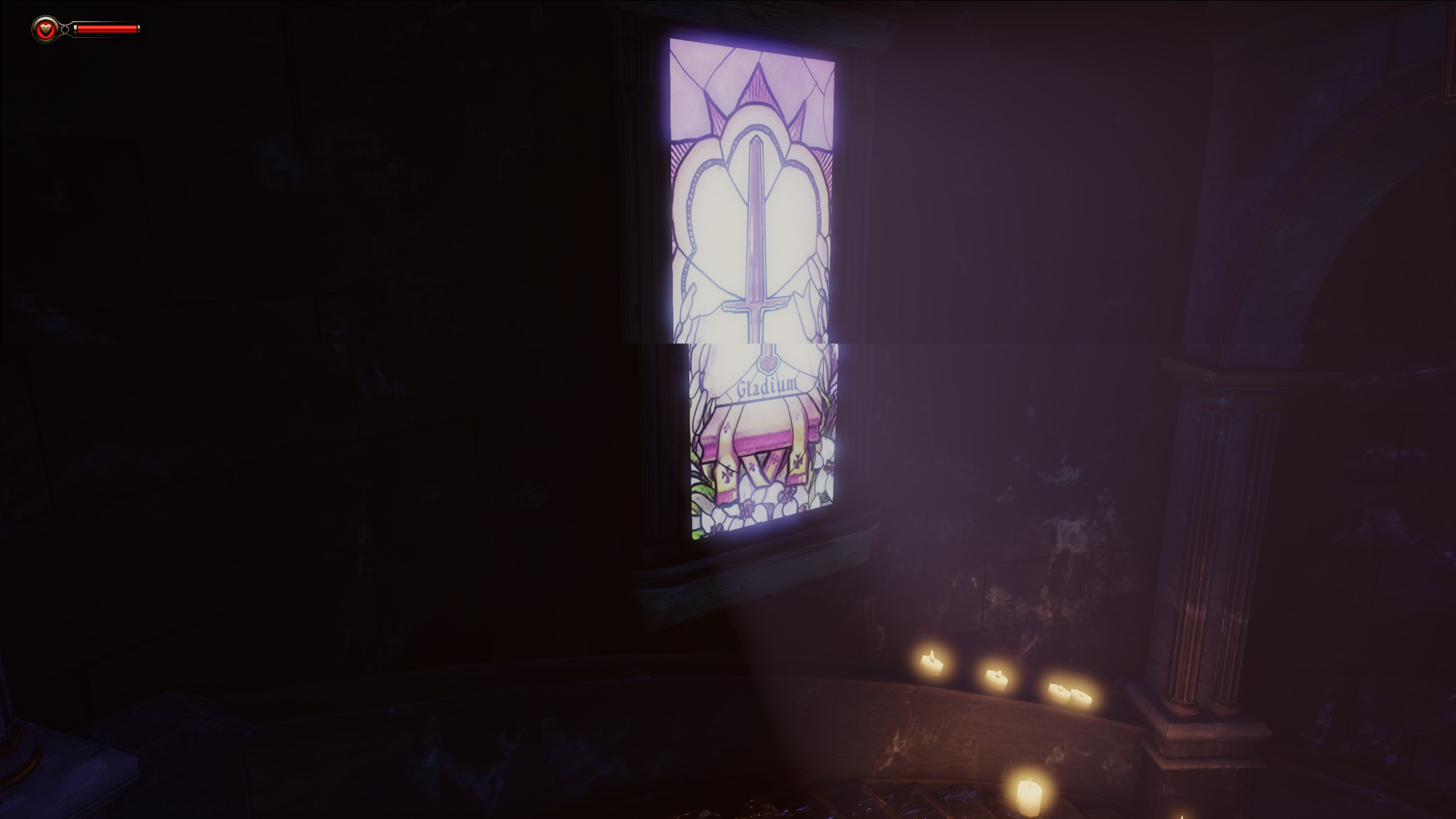
Another example of tearing, this time in Bioshock Infinite
There is essentially no reason that an LCD panel should have a fixed refresh rate. The 60Hz design is an artefact of cathode rate tube monitors and televisions which used a beam of electrons to cause phosphorescent pixels to illuminate, and this process was easiest if it was (ironically) synced to the frequency of the mains supply (or rather a factor thereof, essentially one quarter of 240Hz AC). An LCD panel may need a minimum refresh rate so that no damage is caused to the display components, but beyond that fixed refresh rates are mainly down to convention and ease of implementation.
Nvidia announced G-SYNC in 2013, taking a rather extreme approach in synchronising frame and refresh rates. The current implementation replaces the monitor scaler part with a proprietary ‘G-SYNC Module’, which communicates via Displayport with an Nvidia Kepler or Maxwell-class GPU only. The module continuously polls the GPU for a new frame, holding the display static until it gets the go-ahead that a new frame is fully rendered and available. This also allows Nvidia to have significantly more control over the way that a frame is rolled out on to the screen, obviating the need for a top-to-bottom refresh pattern in favour of something more exotic. Nvidia also build additional proprietary modes into the module which go beyond frame-rate syncing to include low-persistence modes (periodic pulsing of the backlight to reduce ghosting) and 3D Vision. G-SYNC is currently integrated into certain models from Acer, BenQ, Asus and Philips.
Unfortunately Nvidia’s implementation immediately locks out non-Nvidia graphics hardware, whilst also increasing the cost of monitor hardware to the consumer. Estimates of the cost for a G-SYNC module are in the ballpark of $100, which is $100 you’re not spending on another part of your system. Furthermore you’re locked in to Nvidia graphics if you ever want to take advantage of this feature, which is problematic for many. Naturally therefore alternatives were bound to be proposed.
How Is FreeSync Different?
Early in 2014 AMD began to show off and early implementation of FreeSync. The name was chosen deliberately: whilst the AMD would have their own methodology within the GPU the monitor part of the spec should be open and free to tap in to, potentially allowing the likes of Intel and Nvidia to also make use of it. Furthermore it wouldn’t involve the use of proprietary hardware and licencing fees, making the costs of adoption to both monitor manufacturers and consumers relatively low. A tempting proposal you have to agree.VESA, the standards body who develop the Displayport specification, had already implemented a standard they called Adaptive Sync within the spec for embedded-Displayport (eDP), it was likely this which AMD utilised in their early FreeSync demonstrations on jury-rigged laptops. It was AMD’s argument that Adaptive Sync should also be adopted in DisplayPort 1.3 (i.e. a mandatory port of the forthcoming spec) and if possible implemented as an option for DisplayPort 1.2a. In May last year AMD got their wish, despite representations from the competition, as VESA announced the addition of Adaptive Sync as an extension to DisplayPort 1.2a.
AMD suggested that FreeSync-compatible monitors would start to roll out in 6-12 months. At the time that sounded quite optimistic, despite manufacturer familiarity with eDP, but just ten months later we’re starting to see the first FreeSync monitors released. Most importantly they appear to have held to at least part of their assertions – there’s no proprietary hardware on the monitor side of the equation, and indeed AMD have stated that simply adhering to the Adaptive Sync standard should be enough to have a GPU recognise it as a FreeSync-capable monitor.
FreeSync Implementation
Supporting Adaptive Sync in new monitor models appears to have been straightforward if the number of new monitors with the feature is anything to go by, and is in stark contrast to Nvidia G-SYNC. Furthermore the technology replaces neither scaler components nor other input modes, allowing the continued use of HDMI and DVI (in non-FreeSync operation) as well as audio.
One criticism we would have of FreeSync is that graphics support on AMD’s side is somewhat muddled, chiefly due to the rebranding which took place during the release of the R9 290-class (Hawaii) GPU in 2013. In essence, AMD GPUs and APUs built on GCN 1.2 architecture will support FreeSync, however earlier GCN-class GPUs will not.
Supported Hardware
Discrete Desktop GPUs
AMD Radeon R9 295X2
AMD Radeon R9 290X
AMD Radeon R9 290
AMD Radeon R9 285
AMD Radeon R9 260X
AMD Radeon R9 260
AMD Radeon HD 7790*
Desktop APU
AMD A10 7850K APU
AMD A10 7800 APU
AMD A10 7700K APU
AMD A8 7650K APU
AMD A8 7600 APU
AMD A8 7400K APU
*The HD7790 is has the same Bonaire GPU as the R9 260 and 260X, and hence is the only GPU in the HD7000 range which is FreeSync compatible.
AMD Radeon R9 295X2
AMD Radeon R9 290X
AMD Radeon R9 290
AMD Radeon R9 285
AMD Radeon R9 260X
AMD Radeon R9 260
AMD Radeon HD 7790*
Desktop APU
AMD A10 7850K APU
AMD A10 7800 APU
AMD A10 7700K APU
AMD A8 7650K APU
AMD A8 7600 APU
AMD A8 7400K APU
*The HD7790 is has the same Bonaire GPU as the R9 260 and 260X, and hence is the only GPU in the HD7000 range which is FreeSync compatible.
Those who have purchased an R9 280-class or 270-class GPU will not be able to take advantage of FreeSync, and it’s disappointing that this hasn’t been obvious. On the plus side all future desktop GPUs and APUs should be compatible with FreeSync, including the recently announced Carrizo line.
By not introducing their own monitor hardware AMD leave monitor manufacturers to implemented their own proprietary display technologies and support them in tandem with FreeSync on a case-by-case basis. For example, the Acer XG270HU is a 144Hz FreeSync panel which supports OverDrive and Acer eColour Management in FreeSync, however the BenQ XL2730Z (also a 144Hz panel) will not support their Blur reduction technology in FreeSync mode. AMD are working with manufacturers to smooth out incompatibilities wherever possible.
FreeSync Compatible Monitors
All monitors which claim FreeSync compatible have been validated by AMD as such, although AMD holding the validation criteria, (which includes the minimum acceptable refresh rate range) under NDA. Others such as the 120Hz 27” Asus MG279Q also feature Adaptive Sync support and so should be FreeSync compatible, but won’t necessarily meet AMD’s own minimum standards and hence it being being a FreeSync monitor is open to interpretation. Here are a selection of monitors launching with FreeSync support:
ACER XG270HU
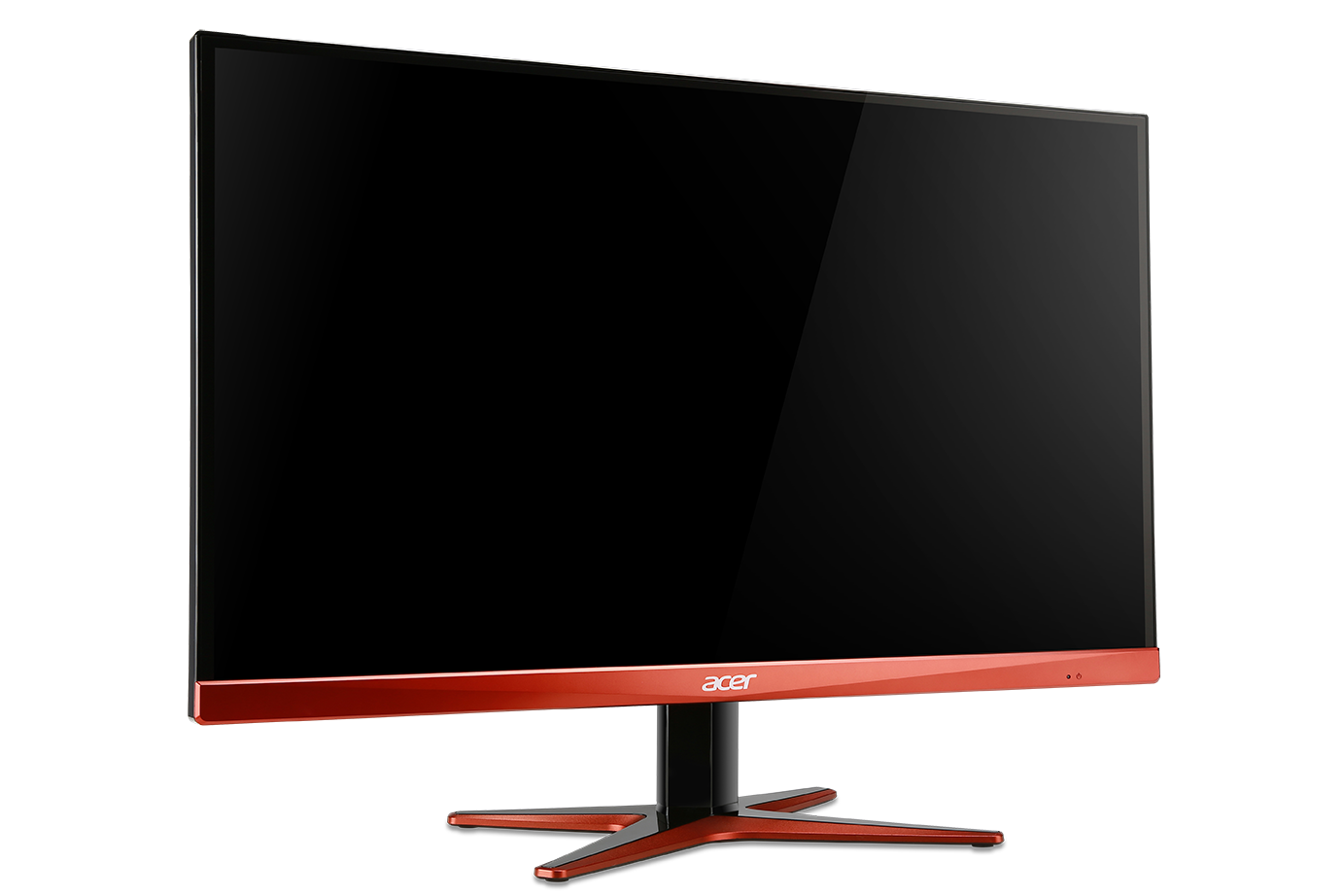
Panel Type: 27” TN Panel
Resolution: 2560×1440 (1440p, 16:9)
Dynamic Refresh Rate Range: 40-144Hz
Price: $499 USD (MSRP)
Resolution: 2560×1440 (1440p, 16:9)
Dynamic Refresh Rate Range: 40-144Hz
Price: $499 USD (MSRP)
BenQ XL2730Z
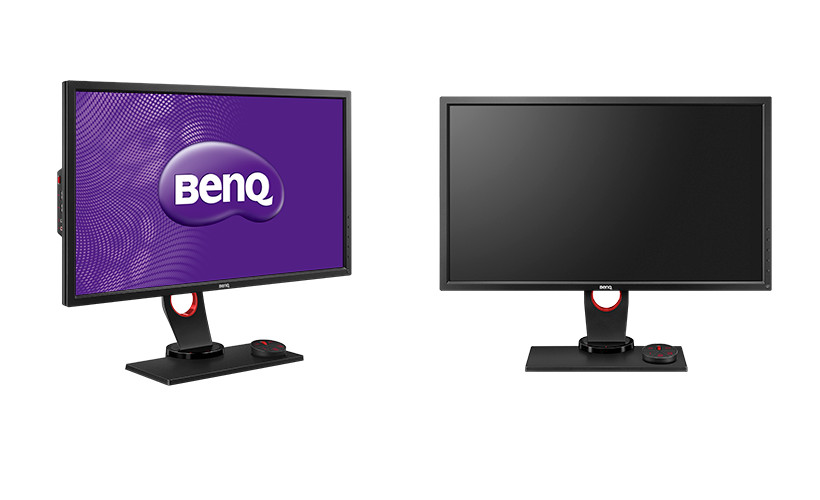
Panel Type: 27” TN Panel
Resolution: 2560×1440 (1440p, 16:9)
Dynamic Refresh Rate Range: 40-144Hz
Price: $599 USD (MSRP)
Resolution: 2560×1440 (1440p, 16:9)
Dynamic Refresh Rate Range: 40-144Hz
Price: $599 USD (MSRP)
LG 34UM67
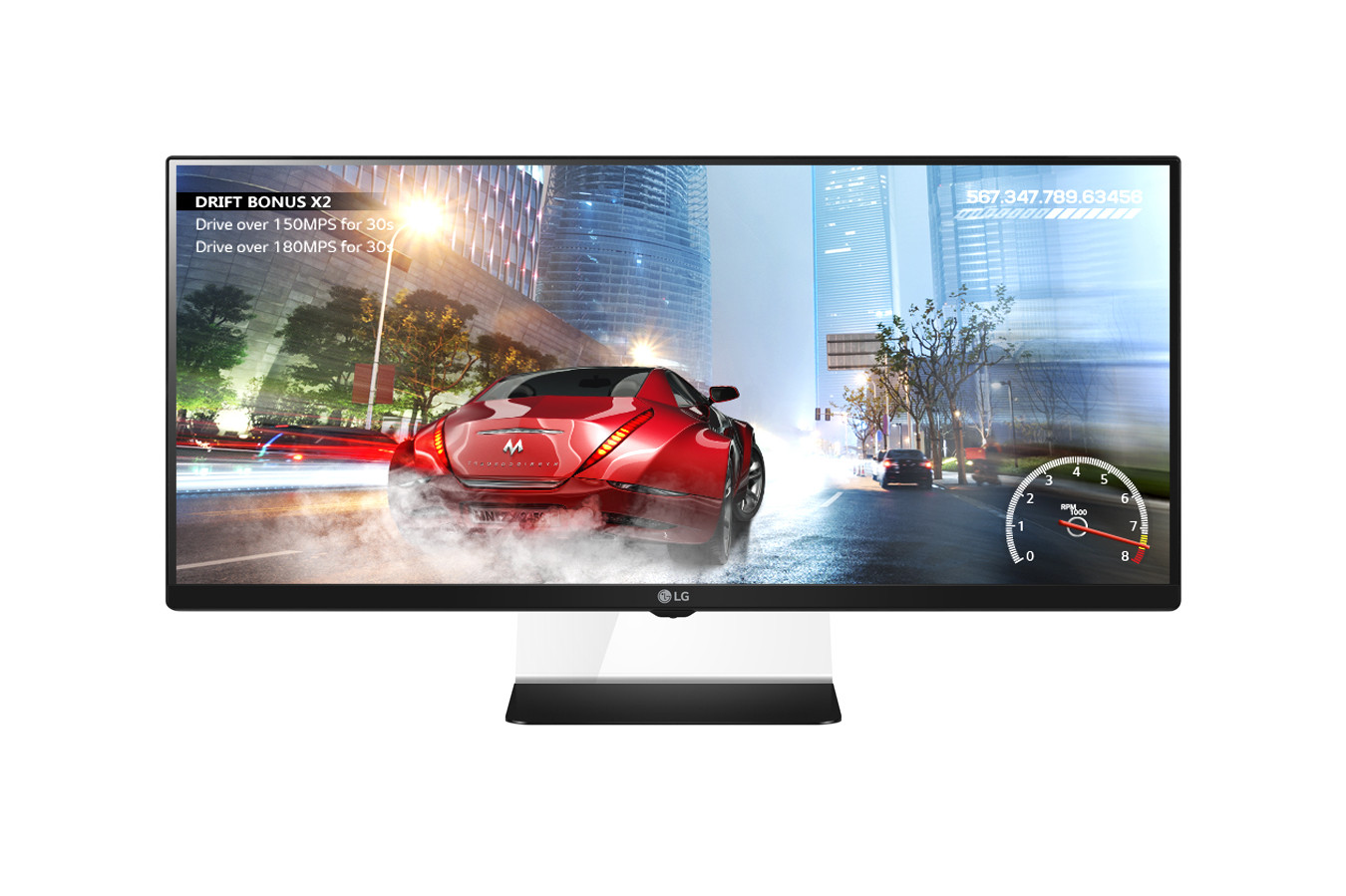
Panel Type: 34” IPS Panel
Resolution: 2560×1080 (Ultrawide 21:9)
Dynamic Refresh Rate Range: 48-75Hz
Price: $649 USD (MSRP)
Resolution: 2560×1080 (Ultrawide 21:9)
Dynamic Refresh Rate Range: 48-75Hz
Price: $649 USD (MSRP)
LG 29UM67
Panel Type: 29” IPS Panel
Resolution: 2560×1080 (Ultrawide 21:9)
Dynamic Refresh Rate Range: 48-75Hz
Price: $449 USD (MSRP)
Resolution: 2560×1080 (Ultrawide 21:9)
Dynamic Refresh Rate Range: 48-75Hz
Price: $449 USD (MSRP)
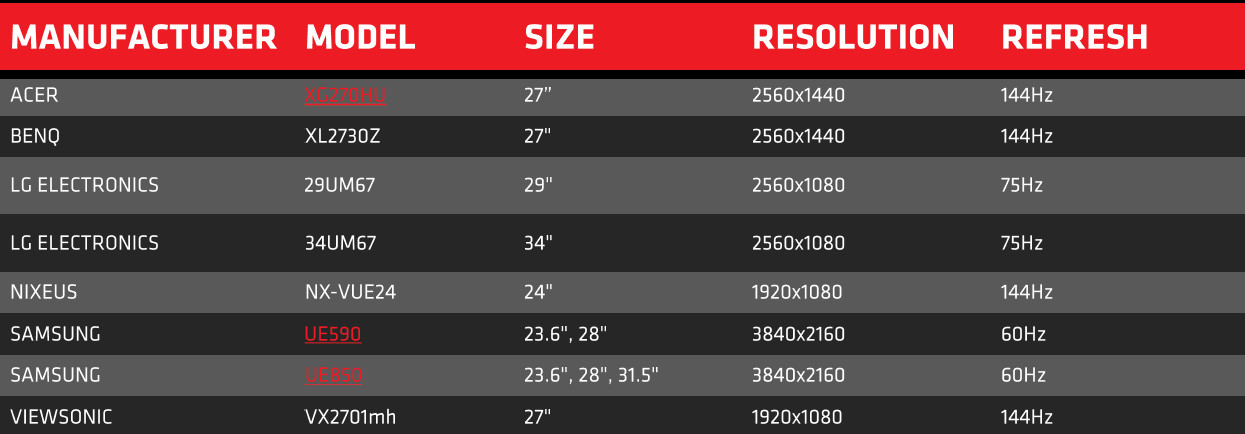
A summary of FreeSync monitors announced and coming soon.
Although only eight models are summarised above AMD claims that eleven are currently in production. They run the gamut of resolutions, from 1080p all the way to 4K including non-standard formats, with the only thing in common being support for FreeSync and a DisplayPort interface.
AMD obviously gained much from the monitor market currently transitioning to higher resolutions and monitor sizes, with all manufacturers attempting to provide 1440p and 4K solutions that offer a great experience. Mainstream graphics are also finally able to achieve these higher resolutions at relevant image quality settings, reducing the overall cost of an acceptable high resolution gaming configuration. By seizing the mood of the market AMD and their partners have the chance to capitalise just as thoughts move to Windows 10 and broad system upgrades.
One area of potential concern however is pricing. Monitors currently listed with pricing information are typically in the $400-$600 range as they tend to be high-end 27” 144Hz panels, and whilst 1080p monitors are being launched we don’t yet know their cost. At least one relatively low-cost 24” 1080p panel which supports FreeSync is probably essential for the technology to reach the notoriously frugal mass gaming market.
With few comparable G-SYNC designs it’s difficult to gauge savings for FreeSync over G-SYNC, but we should mention that the ACER XG270HU is approximately £200 cheaper than the similarly 1440p 144Hz ASUS PG278Q ROG SWIFT. Similarly it’s possible to purchase 1440p FreeSync monitors for less than the price of 1080p G-SYNC designs in the same size range. However the underlying technologies and capabilities in each panel (with the exception of some form of frame syncing tech) differ wildly.
Hands On With FreeSync
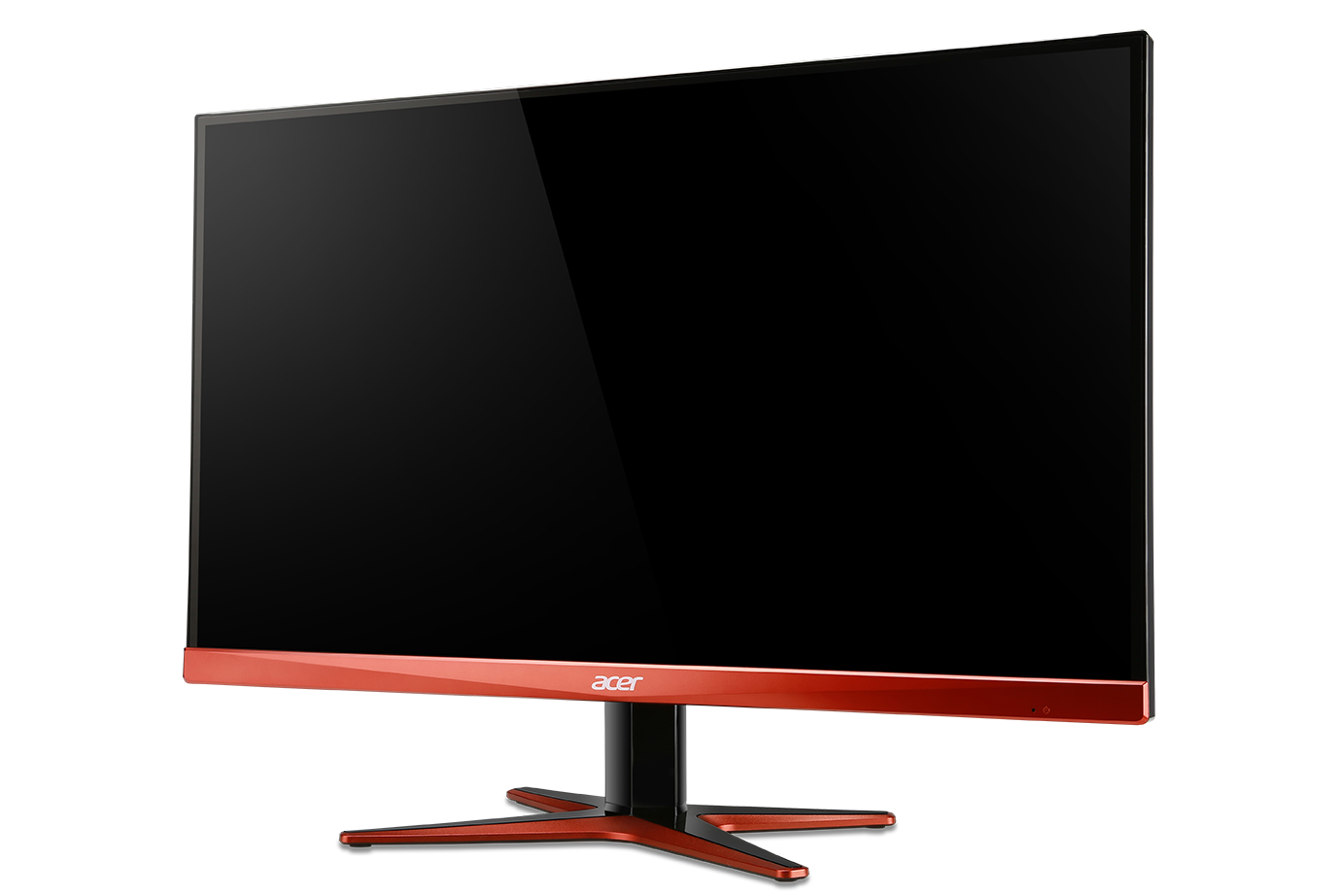
In preparation for this article we’ve had some time with one of the FreeSync launch models, the ACER XG270HU. This is a 27” 144Hz TN panel which supports resolutions up to 1440p, and hence by any measure is a pretty high-end design.
In testing we married the XG270HU to the same basic testing rig we’ve used for the recent GPU driver analysis articles, pairing it this time with an XFX R9 285 Black Edition. The Radeon R9 285 was released in September 2014 and is an evolution of the Tahiti GPU found within the R9 280, boasting a little more performance as well as support for new technologies such as FreeSync. Current the ‘bang for your buck’ king in AMD’s desktop GPU lineup, the R9 285 is really the baseline for hardcore gaming with FreeSync. It’s also going to be pushed to the limit rendering modern games at 1440p, providing us with some indication of the behaviour of FreeSync below the optimum envelope for the XG270HU.
Testing System
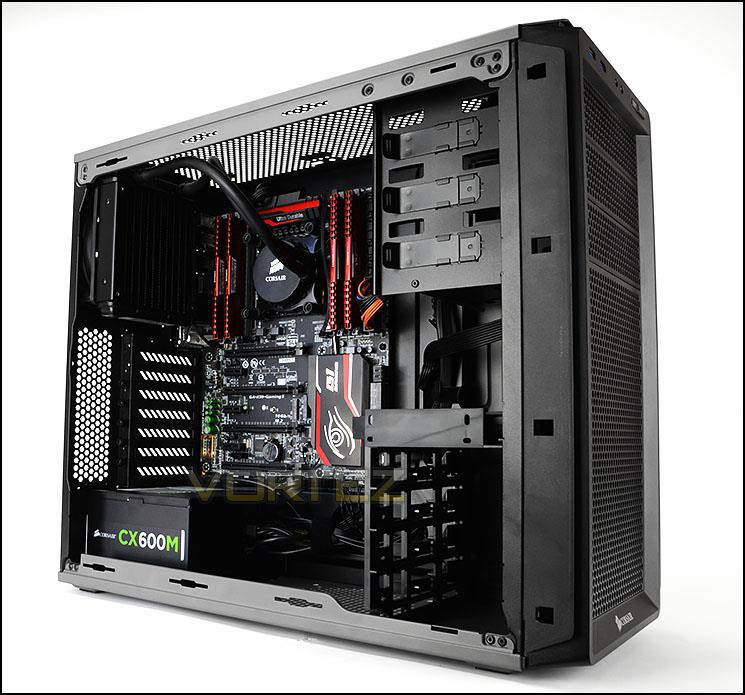
Monitor: ACER XG270HU
CPU: Intel Core i7-5930K @ 3.5GHz
RAM: 8GB Corsair Vengerance LPX DDR4 (4 x 2GB)
Motherboard: GIGABYTE GA-X99-Gaming 5
Storage: Corsair Force LX 256GB SSD
PSU: Corsair CX600M Modular PSU
GPU: XFX Radeon R9 285 Black Edition
OS: Windows 8.1
CPU: Intel Core i7-5930K @ 3.5GHz
RAM: 8GB Corsair Vengerance LPX DDR4 (4 x 2GB)
Motherboard: GIGABYTE GA-X99-Gaming 5
Storage: Corsair Force LX 256GB SSD
PSU: Corsair CX600M Modular PSU
GPU: XFX Radeon R9 285 Black Edition
OS: Windows 8.1
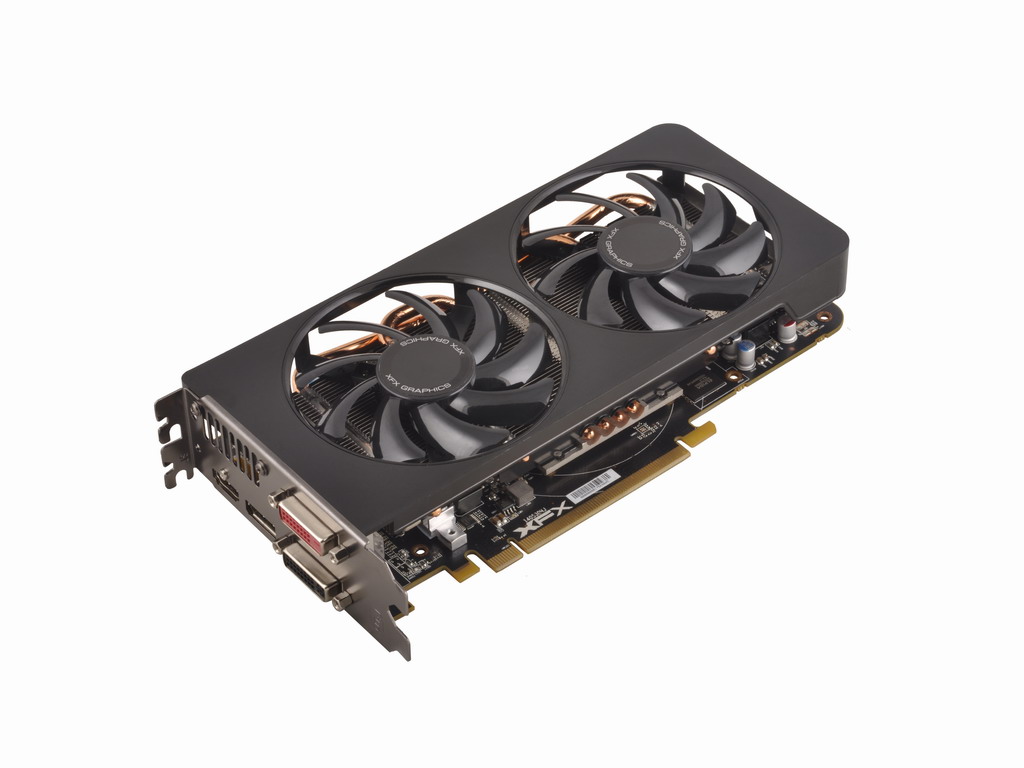
The XFX Radeon R9 285 Black Edition
GPU Specifications
1792 Stream Processors
975 MHz Core Clock
2GB 256-Bit DDR5
5500 MHz Effective Memory Clock
PCI Express 3.0
975 MHz Core Clock
2GB 256-Bit DDR5
5500 MHz Effective Memory Clock
PCI Express 3.0
Methodology
Unfortunately the best mode for assessing frame rate syncing technology is by inspection – no simple screenshot or benchmark can capture if the technology is working and what effect it has.
We would have like to go back to our usual testing tools for this system – namely Far Cry 4 and Assassins Creed: Unity. However these two Ubisoft titles are notorious for idiosyncratic behaviour and have no integrated benchmarking utility, making repeatable frame-rate comparisons difficult. Instead we’ll be returning to two stalwart titles in our assessment – Tomb Raider (2013) and Bioshock Infinite – as well as Thief 4 to discover just how well FreeSync performs
Software
Microsoft Windows 8.1
AMD Catalyst 15.3.1 beta (issued March 11th)
AMD FreeSync Testing Utility
Thief 4
Bioshock Infinite
Tomb Raider 2013
AMD Catalyst 15.3.1 beta (issued March 11th)
AMD FreeSync Testing Utility
Thief 4
Bioshock Infinite
Tomb Raider 2013
Enabling FreeSync and AMD FreeSync Testing Tool
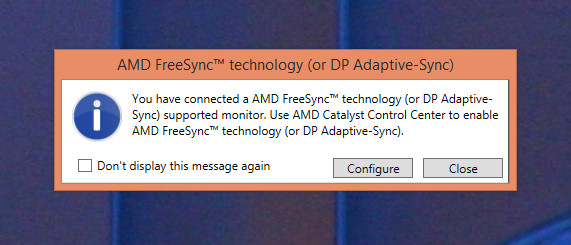
Enabling AMD FreeSync could hardly be easier. Upon installing the Catalyst 15.3.1 drivers and if connected to the monitor via Displayport the software automatically detects monitors which support FreeSync. It will prompt the user to configure FreeSync immediately and on every subsequent boot of the system, as well as when the AMD FreeSync Testing Tool is installed.
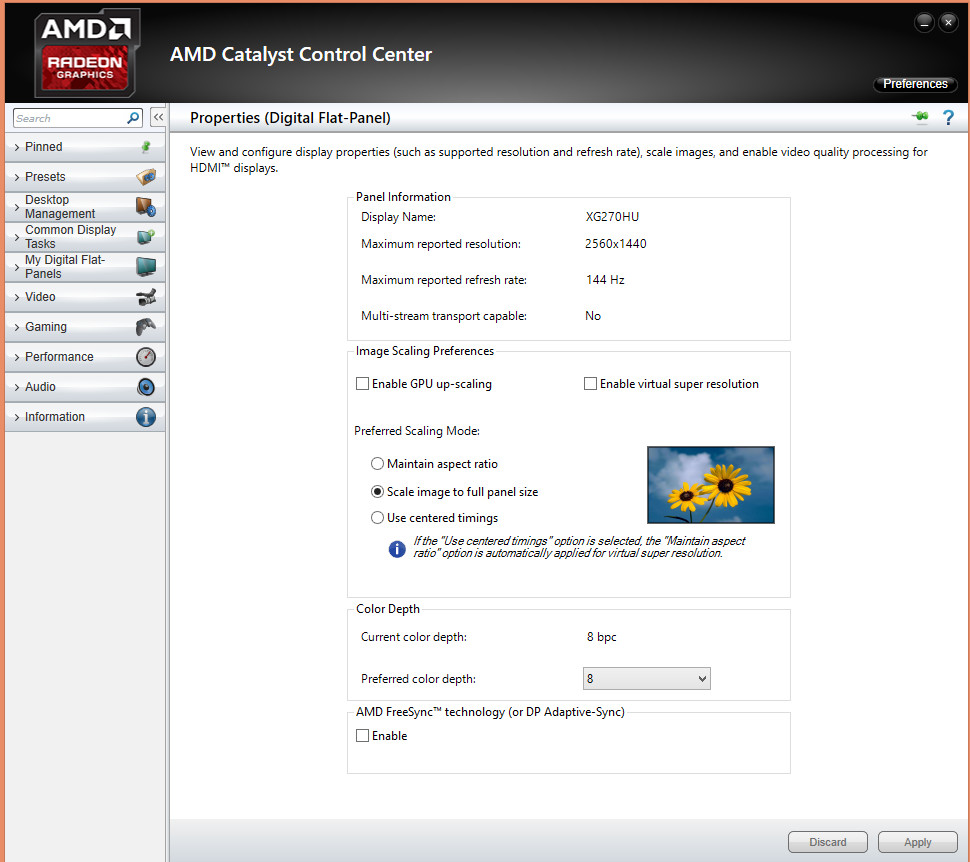
Following installation FreeSync can be manually enabled or disabled via the Catalyst Control Panel. It’s generally best to do this before launching a game as many titles don’t react well to being alt-tabbed out of.
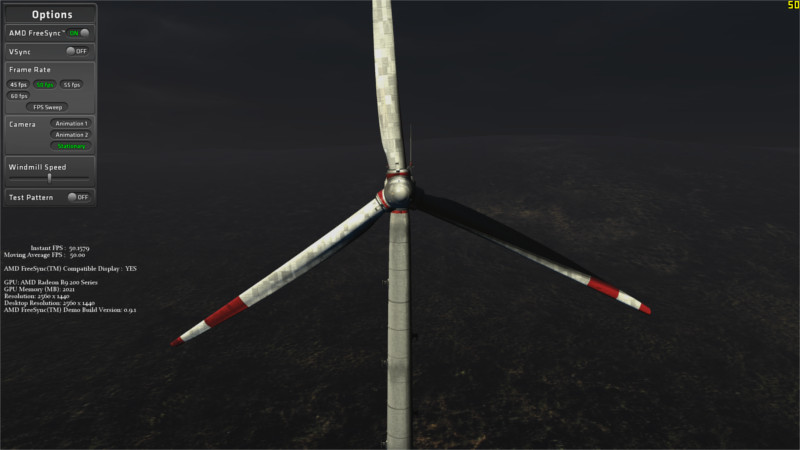
Here you can see the AMD ‘Windmill’ Testing Tool which you may be familiar with from previous convention floor footage. Thanks to the rotating blades of a windmill and a lateral camera movement you can clearly see the impact of sub-60 frame rates when in operation, including both tearing and stuttering.
The Windmill Tool should be your first port of call on connecting a FreeSync monitor to your AMD GPU as it provides an excellent ‘quick and dirty’ mechanism for finding out if it’s operational. The tool also shows what you should and should not expect when operating in FreeSync mode in games, not only as regards obvious tearing in the scene but also broken vertical lines such as windows and pillars in a moving scene.
In-Game Testing
Initial Downsides
Before we start on our first pass at testing we should take note of two core inadequacies with current FreeSync as it is supported by the Catalyst 15.3.1beta drivers.
The first, and most glaring as things stand, is a lack of FreeSync support whilst in multi-GPU Crossfire configurations. This only applies to a tiny fraction of AMD customers but it’s still a flagship configuration, and would presumably also impact users of their current flagship GPU the Radeon R9 295X2. We understand that AMD are planning a release of a driver which supports Crossfire FreeSync as soon as possible with April penciled in, and for many of their core customers that cannot come soon enough.
A second issue, and similarly fringe case, is that FreeSync isn’t currently supported in dual-Display mode. Exclusive Fullscreen mode is mandatory for FreeSync and effectively negates secondary monitor use, a factor which is important for many streamers. It’s currently not yet known if multi-monitor/Eyefinity support is planned for FreeSync, but it is perhaps the largest oversight we envision that would affect enthusiast gamers.
With that aside, on to the testing:
Tomb Raider
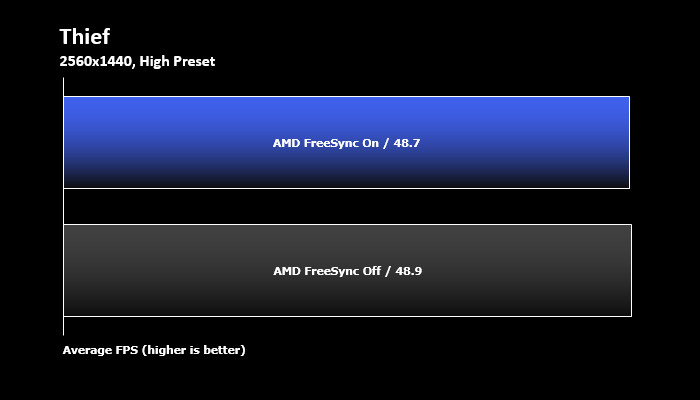
Thief
Bioshock Infinite
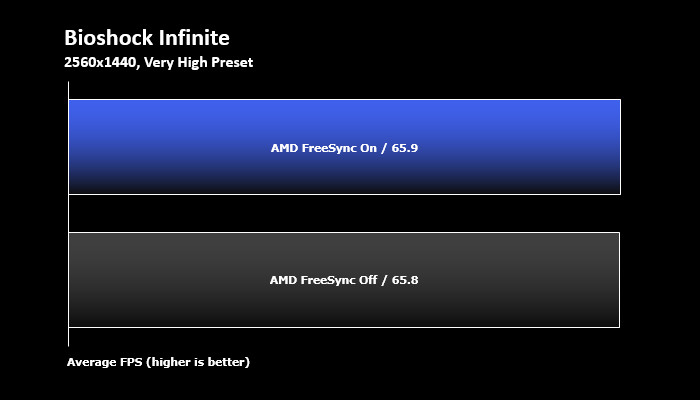
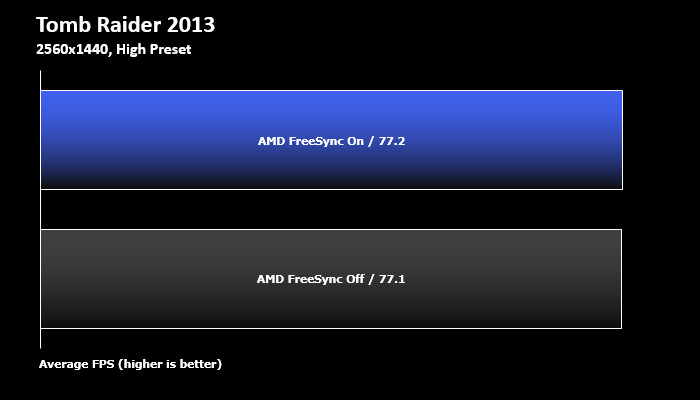
The performance impact of FreeSync appears to be effectively nil, which is a great benefit for gaming when you’re trying to eek out every frame you can from potentially stretched hardware.
General Observations
Without doubt FreeSync allows some of the smoothest gameplay possible on current hardware. Being able to vary outside of 60fps V-SYNC for sharp images and non-stuttering scenes has huge impact on immersion, precision and just overall fun. Setting the games up to do this was very straight-forward, but a reasonably brief official how-to guide would be useful for newcomers to tinkers with in-game graphics settings.
The difference was particularly noteworthy in Tomb Raider 2013, which features both darker environments and some particularly picturesq vistas. Enabling V-SYNC limited the frame rate to 144Hz (only really applicable when testing at very low image quality settings), and whilst in the 45-144Hz optimum envelope FreeSync was able to perform it magic.
Thief by contrast, being a stealth game and particularly dark in general, saw less of a benefit except overall. However specific scenes that feature bright object on dark backgrounds, such as windows or ghosts, didn’t exhibit tearing and was significantly sharper in appearance.
A very specific oddity occurred during out testing of BioShock Infinite. Contrary to experience with Tomb Raider and Thief the game exhibited tearing at >60fps, but none whilst operating in the 40-60fps range. It’s possible that the game wasn’t registering our monitor as a 144Hz model, causing some conflict with Freesync. This was reinforced when V-SYNC was enabled, limiting the frame-rate to a maximum of 60 (rather than the expected 144) but showing perfect synchronisation when dropping as low as 40Hz (i.e. within the Acer XG270HU’s FreeSync envelope).
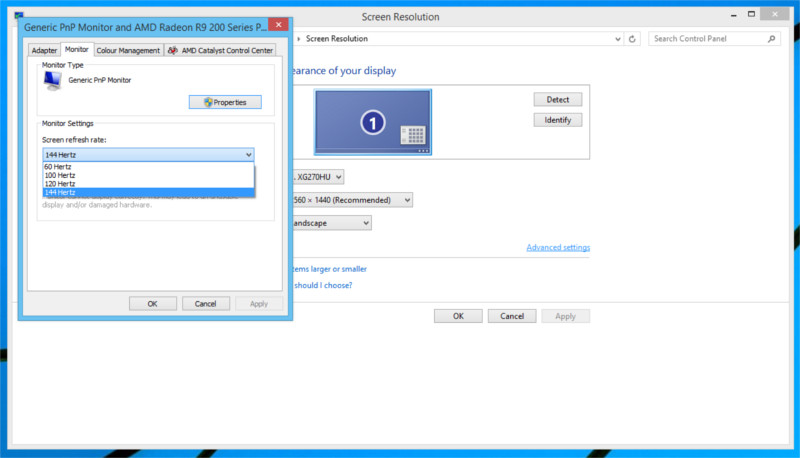
The solution was simple however. Bioshock Infinite, unlike Tomb Raider and Thief, inherits it monitor refresh rate settings from the OS rather than have an in-game setting. Leaving it at the default of 60 mimicked the dynamics of a 40-60Hz FreeSync monitor rather than the correct 40-144Hz behaviour. Correcting this oversight immediately solved the problem, and is something news users should be aware of when using FreeSync and other high refresh rate displays.
Deeper Testing: Bioshock Infinite
Next up we took a deeper look at comparative frame rates for FreeSync Enabled and Disabled, specifically looking at Bioshock Infinite. We once again utilised the canned benchmark using the Very High preset, which also helpfully provides detailed breakdowns of frame rates at time indices in the demo.
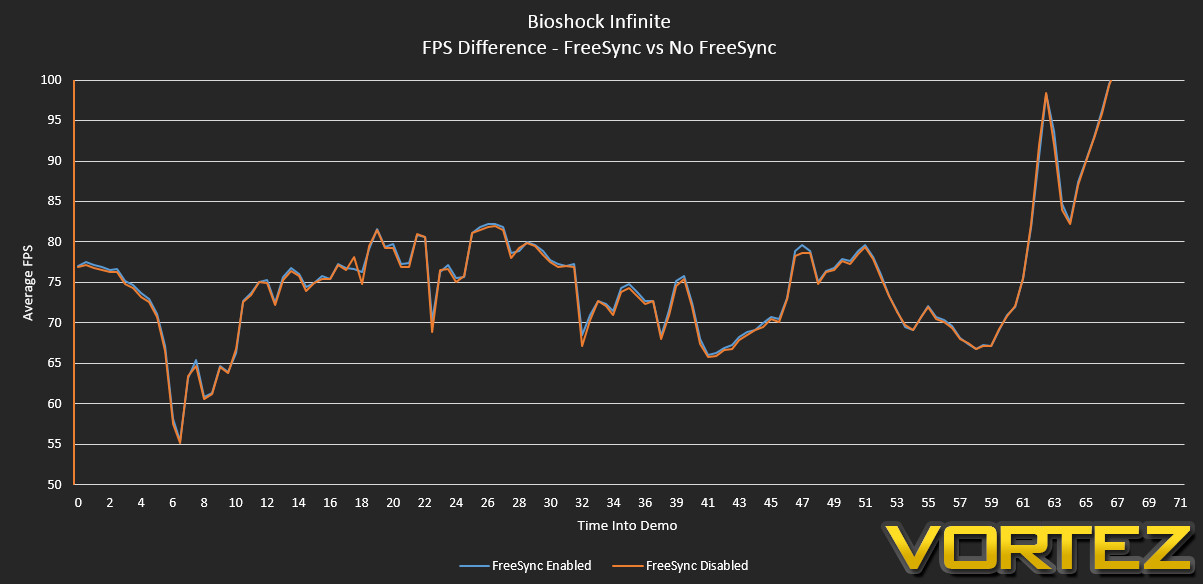
As you can see, FreeSync performance closely tracked and in most cases exceeded performance when FreeSync is disabled. On average FreeSync performance exceeded non-FreeSync by a stastically insignificant 0.3%, but certain scenes time indices did exhibit benefits of as much as 1.9%. Even if this comes down to statistical noise, the lack of performance impact is a huge plus for FreeSync.
We should note that AMD claim Nvidia G-SYNC incurs an approximately 2.5% drain compared to unsyncced performance, but we are not able to independently confirm this.
Deeper Testing: V-Sync Behaviour
Secondary functionality which AMD are keen to explore with FreeSync is the behavior whilst V-Sync is enabled. Nvidia G-Sync always limits the frame rate to the upper boundary of the monitor’s frame-rate envolope, generally 144 FPS. FreeSync by contrast alters its behavior depending on whether V-Sync is enabled or disabled, limiting frame rate to the upper bounds of the envelope is the former or letting it exceed it if the latter.
That can be a little confusing, so we once again took to Tomb Raider to demonstrate this behaviour. Rather than once again rely on the canned benchmark we took to 60-second snippet of gameplay, cranking down the image quality settings until the frame rate naturally crossed the 144fps boundary that’s in effect for the Acer XG270HU.
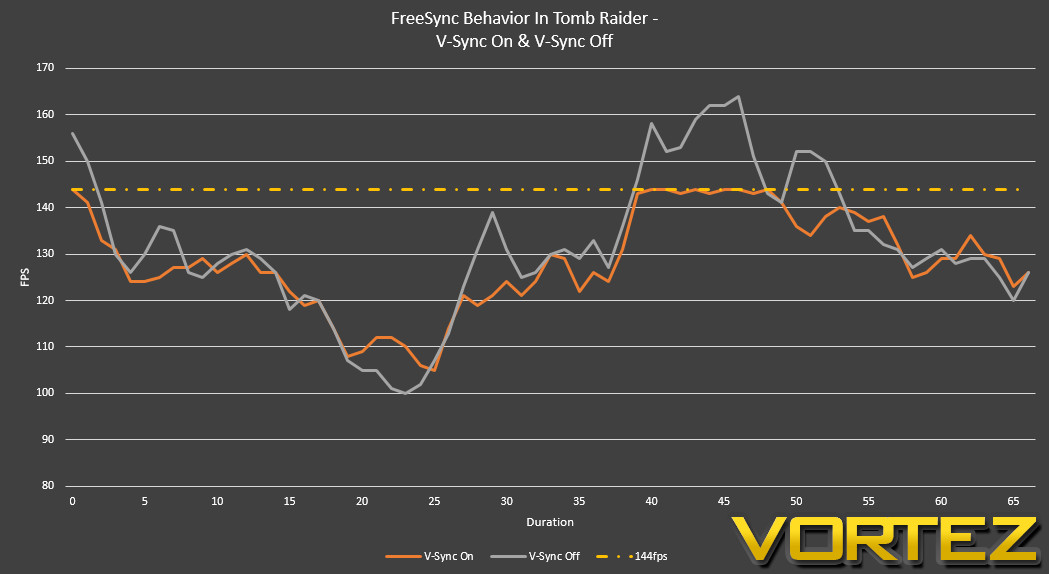
As you can see, when V-Sync is off FreeSync operation is like any other monitor – it will attempt to render the frames for the monitor to display as fast as it can, likely exhibiting some tearing. However when V-Sync is on the frame rate is limited to the upper frame rate boundary, in this case 144 fps.
When you limit the frame-rate in this fashion you still have one of the same downsides of V-Sync at 60Hz: increased gameplay latency. In effect your GPU can render the frame and be part way through the next one before the frame can be displayed on the monitor, and that time spent part-way rendering is the effective additional latency you introduce. At 144Hz and above it won’t be be particularly significant – the time spent rendering a frame is less than 7ms, and additional latency would only be a fraction of that.
Where it does become interesting is with other FreeSync monitors currently in the pipeline that top out at 70Hz. At those frame rates render times are hitting double-digit milliseconds (~14ms @70Hz) and so additional latency would begin to encroach on times which give peripheral manufacturers cold sweats. Recall that gaming mice promote 1ms response times with 8ms being the norm (USB normally polls at 125Hz), so if you’re approaching 4ms added latency due to V-Sync at the top end it will start to add up.
Even in this best case scenario disabling V-Sync at the top-end will be of most value to competitive gamers rather than us mere mortals. Nonetheless this flexibility is a definite plus for the technology.
Conclusion
Refresh rate synching is an interesting beast. Sometimes it’s difficult to be sure if it is working, but other times you can be absolutely positive when it’s not in use. Such was certainly our experience. When working well it’s silky smooth, and when you disable it it feels like going back to a second-class experience; there can be few more glowing recommendations with graphics technologies.
Previously I had the view that adaptive sync technologies could make high-end graphics somewhat redundant as gamers could pick a low-end GPU and be happy with syncing at 35-50fps. Having experience FreeSync I’ve now revised that assessment. High end graphics hardware is very much rewarded as frames are clearer in motion, plus you’re hitting the low-end of the envelope less often. Deeper analysis of GPU frame rates will become all the more important as frame synching envelopes become commonplace on gaming monitors, and hitting a magical 40fps minimum at all times will be enormously satisfying in any upgrade you perform.
The development of FreeSync makes enormous sense with Mantle, DirectX 12 and next generation OpenGL, rendering techniques designed to reduce CPU load and hence also reduce frame timings in a pronounced fashion. Adaptive Sync technologies break down with microstutter and other instantaneous high frame render times, so staying consistent above all else is of primary value.
In that regard our R9 285, though an excellent card in its own right for 1080p gaming, is just on the cusp of greatness at 1440p. For this resolution, especially with newer titles, an R9 290-class GPU or whatever AMD have coming up in the near future would be a spot-on choice.
As good as Freesync is, it’s not a panacea. Just as with any piece of high-end hardware you’ll need to thoroughly investigate every FreeSync Monitor design. Panels which show evidence of ghosting will still do under FreeSync; limited viewing angles will not be affected; colour reproduction will be as good or bad as the basic monitor on which it is based. Ghosting especially will tend to undermine the clarity benefits of FreeSync at higher frame rates, which could be an issue with certain 144Hz designs that rely on aggressive OverDrive implementations.
So, what’s our overall assessment of Freesync? Two words: deeply impressive. However that assessment comes with a caveat: AMD claims that the technology would not significantly add to the list price of a comparable non-FreeSync Displayport monitor, and that principle needs to hold up. If it does AMD are on to a winner, as a combination of their graphics hardware and frame-rate-syncing monitor would be much more affordable than the competition. As things stand a FreeSync monitor of any stripe is far more aggressively priced than the most directly comparable G-Sync designs, and that in itself should be a wake-up call for the industry.
The fact that FreeSync is getting major support right out of the gate from some huge brands is very heartening for the chances of the VESA Adaptive Sync standard as well as FreeSync. If it can gain traction, and that popularity start to stimulate sales of AMD graphics hardware, it seems difficult to see Nvidia not either supporting Adaptive Sync themselves or cutting the price of G-Sync drastically. Adaptive-Sync also has applications in the new VR technology in the pipeline, aiding ‘presence’ and in theory providing another open standard from which VR can launch. One can only hope that this is the start of some genuine momentum for the Red Team, and major overall benefits for all gamers no matter their brand preferences.
So, huge plaudits to AMD and their partners for FreeSync, and to VESA for implementing Adaptive Sync as a optional standard in DisplayPort 1.2a. With continued support many more people should be enjoying tear-and-stutter-free gaming in the very near future. In the mean time we have more to look at with FreeSync, and will be adding to this article accordingly. Even so, despite this being a strictly first impressions, FreeSync has to get our Elite award for being an absolute game changer.
Pros
+ Excellent frame syncing technology.
+ Smooth gameplay without needing to remain fixed at 60fps.
+ No tearing so long as you can meet a generous minimum frame rate.
+ Additional low-latency mode during high frame rate gameplay.
Cons
– Only works on a sub-set of AMD GPUs
– Nvidia don’t support Adaptive Sync.
Also
= Higher frame rates are still beneficial, so buying a high-end GPU is rewarded.
+ Excellent frame syncing technology.
+ Smooth gameplay without needing to remain fixed at 60fps.
+ No tearing so long as you can meet a generous minimum frame rate.
+ Additional low-latency mode during high frame rate gameplay.
Cons
– Only works on a sub-set of AMD GPUs
– Nvidia don’t support Adaptive Sync.
Also
= Higher frame rates are still beneficial, so buying a high-end GPU is rewarded.

Click here for an explanation of our awards at Vortez.net.