







The wait is over. Have AMD unleashed the TITAN killer everyone is hoping for? Find out as put the AMD R9 290X against the best NVIDIA have to offer…

Product on Review: Radeon R9 290X
Manufacturer and Sponsor: AMD
Recommended Retail Price: £449.99
The wait is finally over. The R9 290X is finally here. After a somewhat disjointed media frenzy we can today reveal everything you wanted to know about AMD’s latest flagship graphics card. Fuelled by enthusiast speculation, there have been numerous details ‘leaked’ to the public from some very dubious origins. Rumours ranged from TITAN Killer performance for less than the price of a GTX780 to a total flop of epic proportions. Sifting through the wheat we can say, after thoroughly testing this graphics card that some of the rumours were correct to a certain extent, and others were wildly inaccurate. The question everyone wants to know is can it beat a GTX TITAN and lay claim to being the new performance king? Yes and no. Yes it does better the NVIDIA GTX Titan in certain scenarios but not in others.
Why tell you this at the beginning of a review? Why make a statement that would normally be reserved for the conclusion? Well there is so much more to this new card than performance alone, both good and bad. We will examine all aspects of this tremendously powerful GPU without bias or preconceptions, telling it how it is. To do so, we will be pitching it up against the top tier cards available today which will allow you to judge for yourself whether the AMD R9 290X is truly a success or not. We dare say that your opinion will often change, as ours did, throughout this review. Such is the effect the R9 290X has on you. So without further delay, let’s take a look at the official specification of the new flagship card from AMD.
AMD on their R9 Series
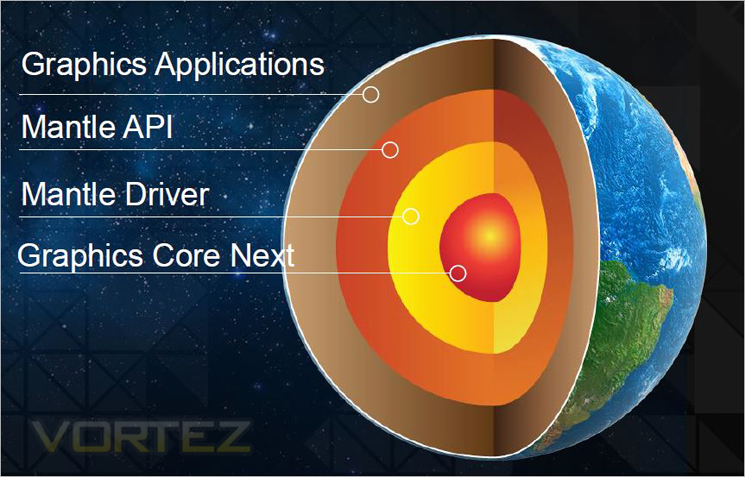
With Mantle, games like DICE’s “Battlefield 4” will be empowered with the ability to speak the native language of the Graphics Core Next architecture, presenting a deeper level of hardware optimization no other graphics card manufacturer can match. Mantle also assists game developers in bringing games to life on multiple platforms by leveraging the commonalities between GCN-powered PCs and consoles for a simple game development process.
Specification
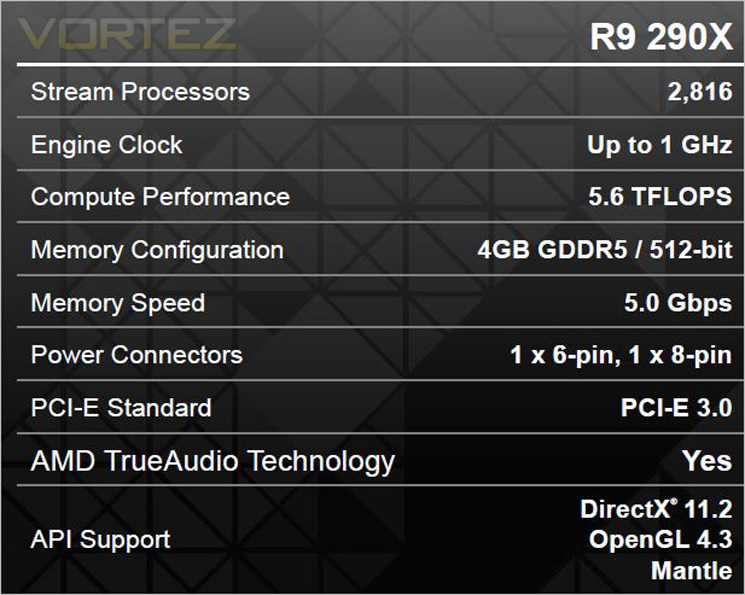
Above we see the official specification of the AMD R9 290X. Rather than opt for a lower clockspeed and leaving a little in reserve for later ‘GHz Editions’ as with the R7000 series, AMD are going straight for the jugular with 1GHz of power straight from the off. With some 2816 streaming processors, the R9 290X has 512 more than a GTX780 and 128 more than a GTX Titan which could to be trouble for the green team. The extra cores and 1GHz clockspeed equates to some serious performance benefits by generating 5.6 TFLOPs as standard.
Memory bus is as widely rumoured to be, 512bit. With a huge 4GB GDDR5 there is plenty of future proofing and sufficient memory to manage 4K resolutions. Interestingly, the card remains within PCIe power specifications by utilising a 6+8pin power configuration.
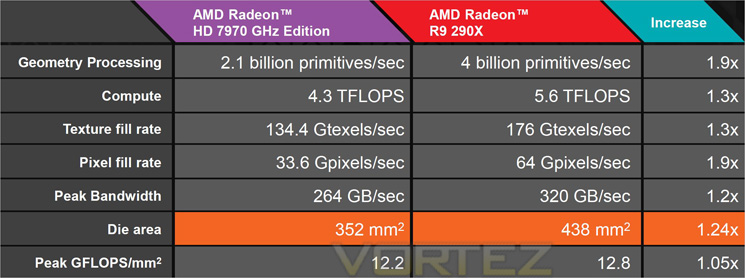
Looking back at the HD7970 which the R9 290X supersedes you can appreciate just how much work AMD have put into the new Hawaii core. Geometry processing is almost doubled resulting in almost twice as much Pixel production topping out at a huge 64 GPixels/second. Inevitably though it is a comparison with the R9-290X competitors I’m sure you want to know about.
Out and out clockspeed goes to the 290X with that huge 1GHz barrier broken as standard. Memory speed however falls to the NVIDIA cards but it is worth remembering that the AMD card has the higher bus width (512bit vs. 384bit) along with 2GB more GDDR5 than a standard GTX780 yet 2GB less than the GTX Titan. All three cards are still based on the 28nm process with the TITAN and GTX780 having the bigger die size at 561mm2 vs. the 290x comparatively small 438 mm2. AMD have however managed to cram much more cores into the available silicon real estate.
Pixel fill rate goes to the 290X with a ground breaking 64 GPixels and also betters the GTX780 with regarding to texture production topping out at a mammoth 176 GTexel/s vs. 165.7 from the GTX780. Only the GTX Titan produces more textures at 187.5GTexel/s.
On paper then, the R9 290X is a very well balanced graphics card, more than capable of handling the GTX780 and perhaps even squaring up to the GTX Titan, a considerably more expensive card.
Let’s delve a little deeper into the architecture…
GCN (Graphics Core Next)
The AMD Radeon R9 290X features an evolution of Graphics Core Next Architecture (GCN).
AMD has taken great strides to ensure that the GCN Architecture is capable of efficiently using its hardware resources. This seems like such a simple idea, but designing a GPU to frequently approach its peak theoretical performance is a challenge the GCN Architecture tackles with ease.
The GCN Architecture is designed for improved utilization, which ensures that the GPU is making optimal use of its resources for maximum performance.
The GCN Architecture also benefits from dramatically improved tessellation performance. Games featuring this DirectX® 11 technology are considerably faster than they were on the previous generation of AMD Radeon™ products. There is also the new Mantle API which promises to dominate NVIDIA, especially in titles such as Battlefield 4. Project Mantle is one of AMD’s most innovative and game-changing features, delivered with the Radeon™ R9 and R7 Series product line. Mantle is a new application programming interface (API), leveraging the commonality between the next-gen consoles and Radeon™. It enables game developers direct communication to our GPUs, unlocking the true potential of GCN and resulting in significantly higher gaming performance at all segments. We will be looking at Mantle in a separate article but if what we hear is correct, Microsoft (who are responsible for DirectX) should be very worried.
Every gamer knows that the GPU’s clockspeed also has a big impact on the performance of a graphics card, and the GCN Architecture keeps that in mind.
But what many don’t know is that every graphics card is designed to draw only a certain amount of power from your PC’s power supply. This is called the Thermal Design Profile, or TDP, and it’s critical that the GPU architecture is capable of making the most of every watt. The GCN Architecture can do that thanks to a technology called AMD PowerTune technology.
AMD PowerTune is an intelligent system that performs real-time analysis of the games and applications that utilize a GPU. Examples of such software might include Battlefield 3 or Furmark. In the event that an application is not making the most of the power available to the GPU, AMD PowerTune can improve that application’s performance by raising the GPU’s clockspeed by up to 30%! Best of all, this technology is completely automatic and is designed specifically to improve gaming performance.
Available on all 28nm AMD Radeon™ products, AMD PowerTune is designed to enable significantly higher clockspeeds in your favorite games-automatically!
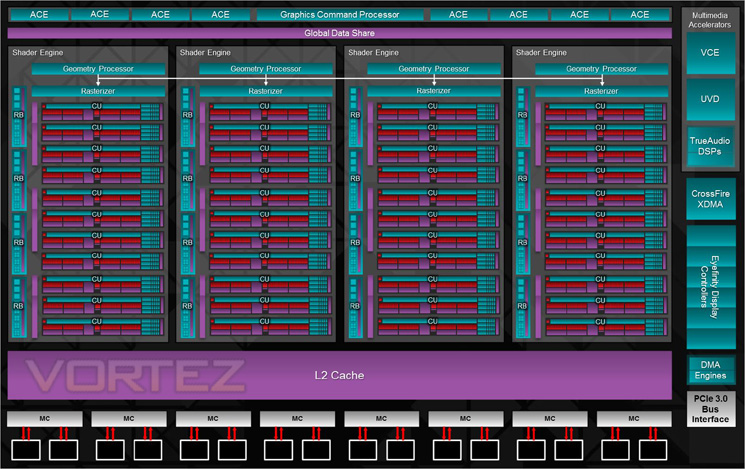
The block diagram above shows us that the R9 290X has the following features:
– Up to 44 Compute Units
– 4 Geometry Processors
– 64 Pixel Output/Clock
– 1 MB L2 cache
– 512-bit GDDR5 memory interface
– AMD TrueAudio technology
– New AMD CrossFire™ technology
– 6 AMD Eyefinity technology Display Controllers
– 6.2 billion transistors
– 28nm process node
The GPU has 4 shader engines, with each shader comprising of one geometry processor per shader engine which is load balanced with other shader engines on die. The 4x Geometry Processors feature a geometry assembler, a tessellator and vertex assembler. Performance is improved on the geometry shader and tesselation thanks to a reduction in off-chip bandwidth by LDS utilisation along with off-chip buffering.
The shader engine also features scalable compute resources with the new architecture supporting a possible 9 compute units. The instruction set and cache can be shared by up to 4 compute units each. The new GCN features 44 of these compute units equating to 2816 shaders on the 290X. In addition to the the scalable compute resources, there is one rasteriser unit per shader engine and 16 render back ends, each with 64b pixels per cycle and 256 Z/Stencil operations resulting in a massive pixel fill rate.
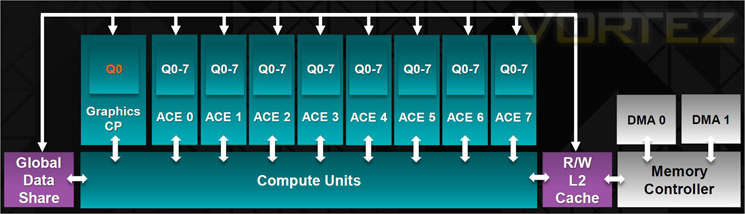
Finally, the GPU features asynchronous compute with up to 8 of these ACE per GPU. With independent scheduling and work item dispatch for ultra efficient multi tasking operations. Each ACE can manage up to 8 queues and has access to both L2 cache and GDS.
GCN Architecture is now the foundation of a common architecture that spans PC’s, next generation consoles and the new Mac Pro. The industry has spoken and resoundingly endorsed GCN for high performance graphics platforms.
Let’s take a look at some of the more familiar features of the Radeon card…
AMD ZeroCore Power
Enabling the World’s Most Power Efficient GPUs
When a discrete GPU is in a static screen state it works to minimize idle power by enabling a host of active power saving functions including (but not limited to); clock gating, power gating, memory compression, and a host of other features. However, GPUs with AMD’s exclusive AMD ZeroCore Power technology can take energy savings to entirely new heights by completely powering down the core GPU while the rest of the system remains active.
Nearly all PCs can be configured to turn off their displays after a long period of inactivity. This is known as the long idle state; where the screen is blanked but the rest of the system remains in an active and working power state (ACPI G0/S0). As soon as the system goes into long idle state and applications are not actively changing the screen contents, the GPU enters the AMD ZeroCore power state. In the AMD ZeroCore power state, the GPU core (including the 3D engine / compute units, multimedia and audio engines, displays, memory interfaces, etc.) is completely powered down.
However, one cannot simply remove the GPU and its associated device context completely; particularly when it is the only GPU in the system as is the case in many enthusiast platforms. The operating system and SBIOS must still be aware that a GPU is still present in the system. For this reason, the AMD ZeroCore Power state maintains a very small bus control block to ensure that GPU context is still visible to the operating system and SBIOS. The AMD ZeroCore power state also manages the power sequencing of the GPU to ensure that the power up/down mechanism is self-contained and independent of the rest of the system.
The enablement of the AMD ZeroCore Power feature is controlled by the driver. The driver monitors the display contents and allows the GPU to enter the AMD ZeroCore Power in the condition that the GPU enters long idle and subsequent work requests are no longer being submitted to the engine. If any applications update the screen contents, AMD ZeroCore Power technology can periodically wake the GPU to update the framebuffer contents and put the GPU back into the AMD ZeroCore Power state. Furthermore, applications such as Windows 7 desktop gadgets are architected to minimize activity and save power in the long idle state. These applications are active during screen-on mode to display dynamic content such as weather, RSS feeds, stock symbols, system status, etc. but also have the intelligence to suspend any updates and activity when the system enters long idle. These applications will not wake the GPU from the AMD ZeroCore Power state in long idle.
AMD ZeroCore Power technology delivers tremendous energy savings. Many PCs remain in the long idle state for a variety of use cases that are highly relevant to everyday consumers, enthusiasts and professionals. In AMD ZeroCore Power mode, users can still enjoy non-graphics activities such as file serving/streaming, motherboard audio and music, and remote access while the GPU core is essentially powered off.
AMD ZeroCore Power technology also scales with AMD CrossFire™ technology. With an AMD CrossFire platform, all non-primary GPUs are in the AMD ZeroCore Power state when not in use. For AMD CrossFire workloads, the driver will engage the non-primary GPUs to deliver full performance on-demand. The primary GPU can also enter the AMD ZeroCore Power state during long idle as well. This delivers scalable benefits for the enthusiast. First, it effectively removes the power increase for users of AMD CrossFire under idle and light (single GPU) workloads. Second, it removes the noise penalty multiGPU users have always had to endure since the GPU fans are off in AMD ZeroCore Power mode.
4K Ultra HD Gaming
Commonly addressed as Ultra HD, UHD or 4K, this new resolution refers to the ultra-high resolutions with approximately 4000 horizontal pixels. Ultra HD resolution also has four times the number of pixels of a typical 1920×1080 resolution.
With four times the pixels, an unprecedented level of immersion can be created for gamers on a single display. Gamers will be able to experience richer details and a new sense of realism with the next generation of gaming on Ultra HD displays.
Your AMD Radeon™ R9 290X features support for Ultra HD resolutions over both HDMI 1.4b (low refresh) and DisplayPort 1.2. We recommend you do all performance testing at Ultra HD resolution to truly test what the product is capable of.
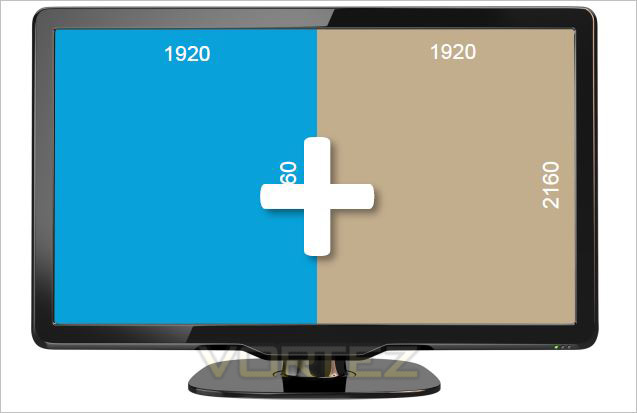
Many UltraHD/4K monitors can achieve a 60 Hz refresh rate using a tiled display configuration. AMD Eyefinity technology can be leverage to support these tiled displays by making two 2Kx2K tiles act as one 4Kx2K monitor. AMD has taken steps to make this easy for end users by providing an Automatic AMD Eyefinity Configuration features. This feature allows an automatic “plug and play” configuration of supported UltraHD/4K tiled displays when a Display Port cable is connected.
When a user hotplugs a tiled 4K monitor (such as the Sharp PN-K321 or Asus PQ321Q), a 2×1 display group will be automatically created and the two tiles will be combined to act as one monitor. This configuration will be remembered and re-enabled when the display is unplugged or the system is rebooted. It is also possible to manually disable the display group in CCC, and have the two tiles act as independent monitors. It should be noted that once the display group is manually disabled, it can no longer be automatically configured as a tiled display via the Automatic AMD Eyefinity Configuration feature.
Additionally, AMD is supporting a new industry standard for tiled displays in VESA DisplayID v1.3. The “Tiled Display Topology Data Block” describes additional display capabilities that can be leveraged to enable the plug and play experience with tiled displays. Tiled displays supporting this data block can be supported by the Automatic AMD Eyefinity Configuration with no driver update required.
First Look
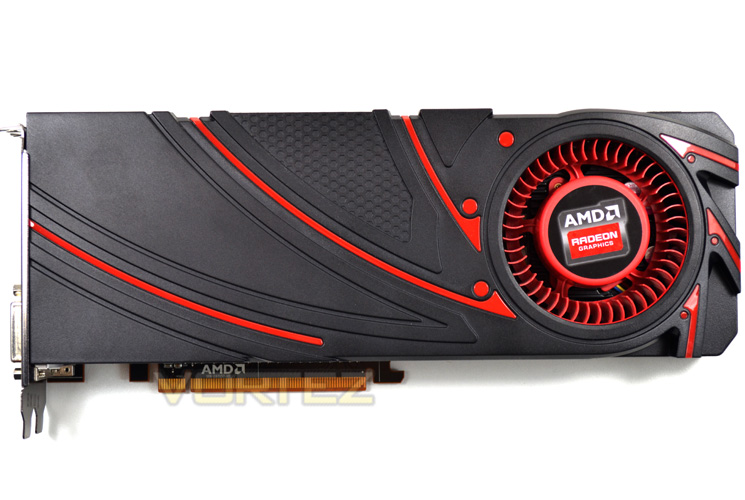
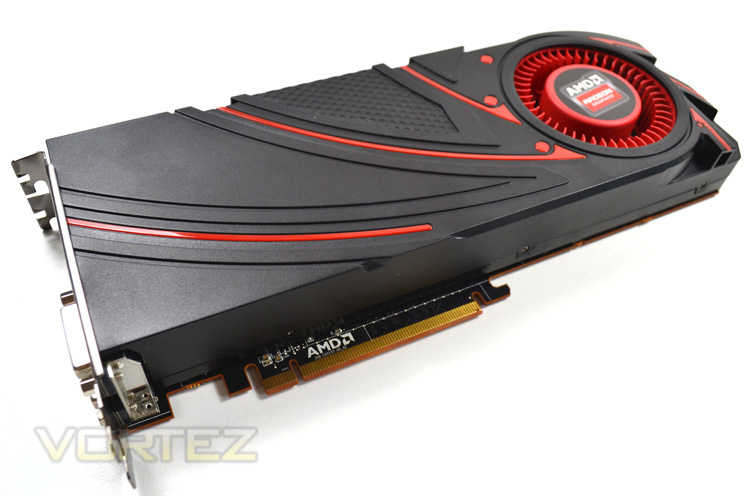
First impressions aren’t the best in all honesty. We were expecting something a little more ‘up market’ for a flagship GPU. While we appreciate this is simply the reference design, a more radical approach would appeal more than the design used which looks a little dated when compared to its competitor reference designs. The mat black plastic shroud has louvers and glossy red inserts but sadly these do little to distract from the fact it is simply not as aesthetically pleasing to the eye as the competition.
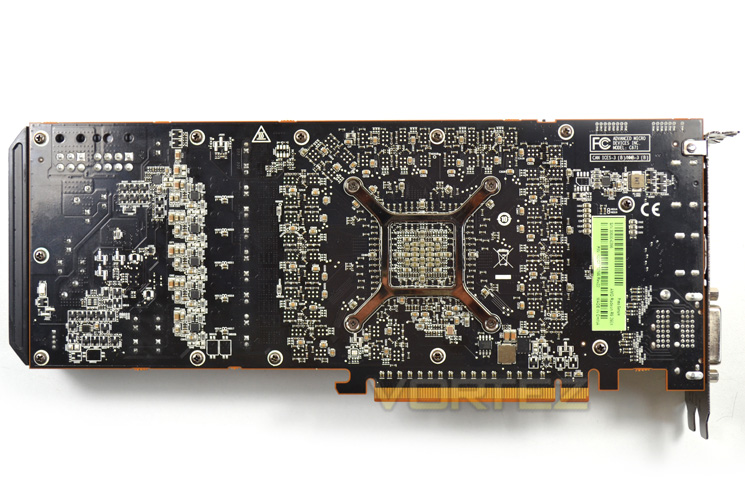
The rear of the card is standard AMD with a black PCB and familiar GPU retention bracket. A back-plate of some description would be a welcome addition here but sadly all we are met with is an exposed power circuit board.
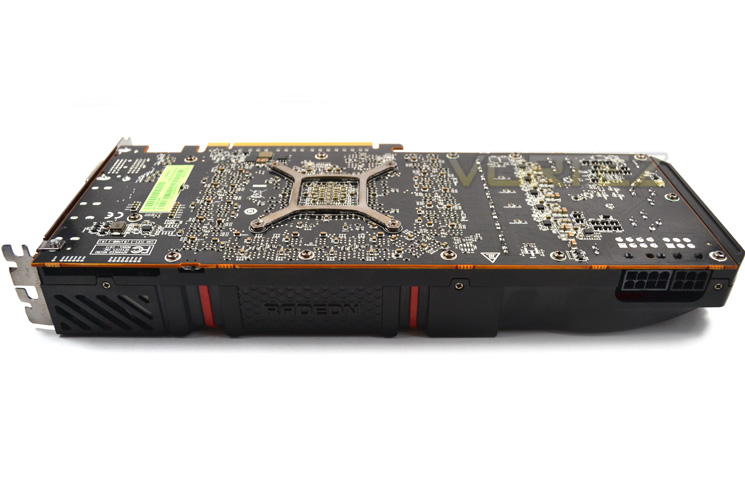
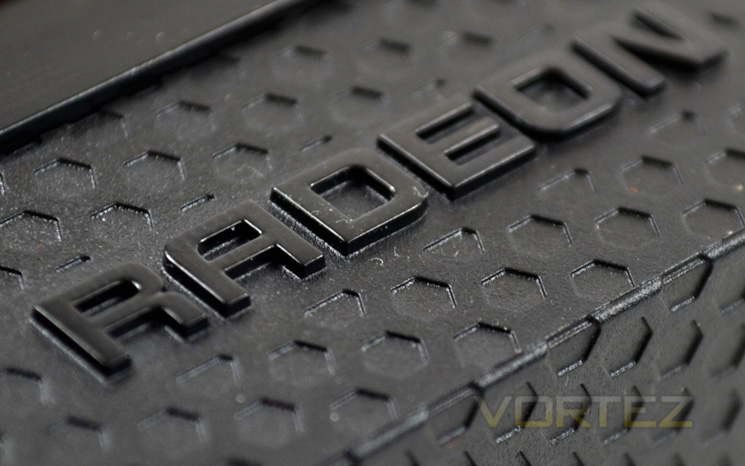
The profile of the card features more of the same bland looks. A discreet faux mesh insert with an embossed ‘Radeon’ logo does serve to break up the plain black profile of the card but in a dimly lit PC you would be hard pushed to notice.
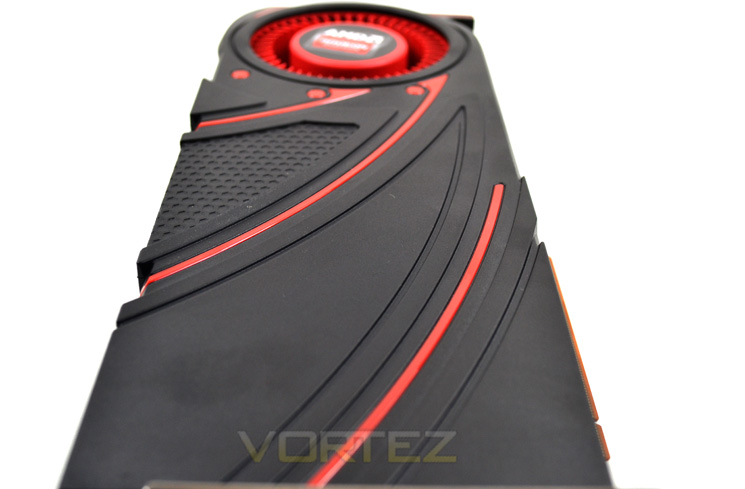
The card measures 275mm in length, 5mm longer than the GTX780. It will take up two expansion ports (dual slot) and measure 95mm in width which is fairly standard for a card of this nature. From this angle the card looks a little more dramatic but we believe overall, the AMD card does little to catch the eye and pales in comparison to the competition with regard to aesthetics.
Let’s take a look at the functionality of the design…
Closer Look
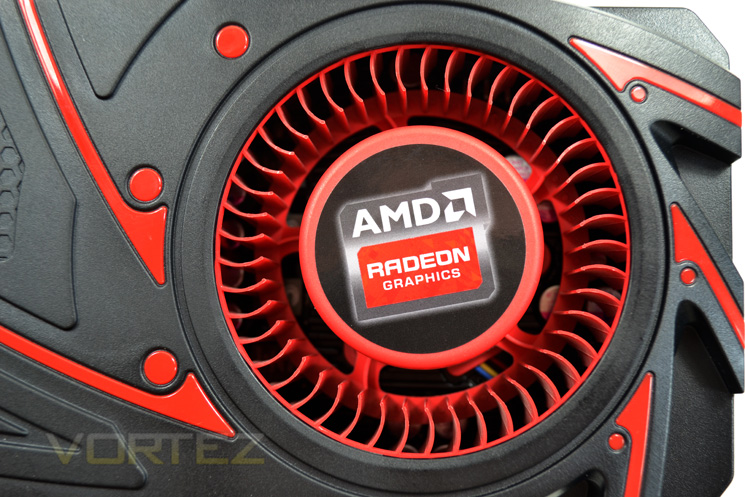
AMD clearly feel the current fan design works well because we see it used here on the R9-290X. While we agree it is certainly powerful, we would also argue that it is tremendously noisy.
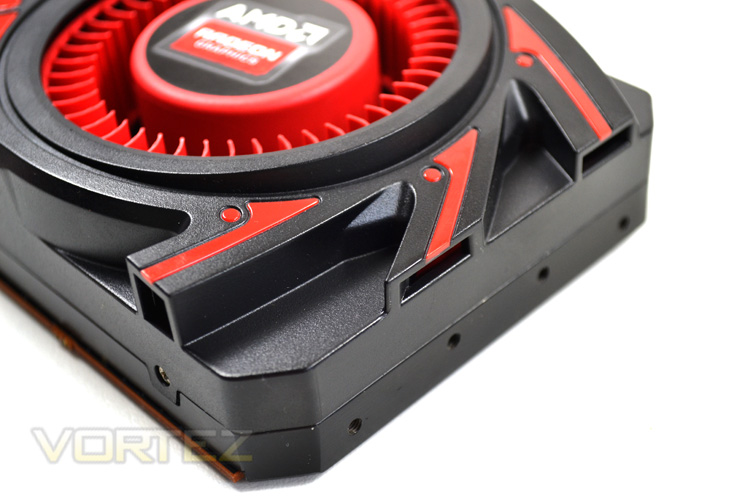
The cooling shroud has three small intakes at the end of the card which along with the fan itself, draws cool air in to the heatsink assembly. This air passes through the heatsink and is expelled toward the rear of the GPU. There are twin exit points for heat, one above the I/O area which is standard for exhausting fans however there is also another small venting area on the side of the fan which will allow hot air to escape back into the case.
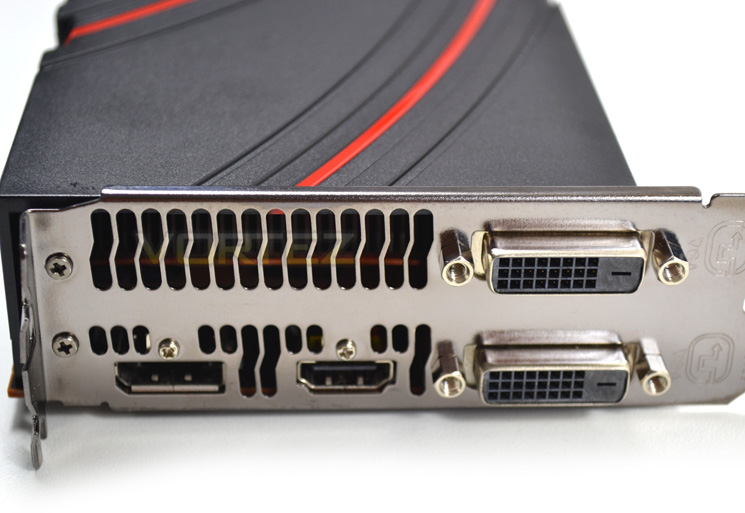
The I/O area features 2x twin dual link DVI ports, a single HDMI port and a Display port. The display port is however capable of being expanded to 3 ports with separate optional hardware (Multi-Stream Transport). It is also worth noting that should you have 3 matching monitors, any of the 4 (6) ports can be used. If you want to use 6 monitors then AMD also has this covered as this card officially supports up to 6 displays (with Multi-Stream Transport)!
The MST hubs are available from most leading vendors.
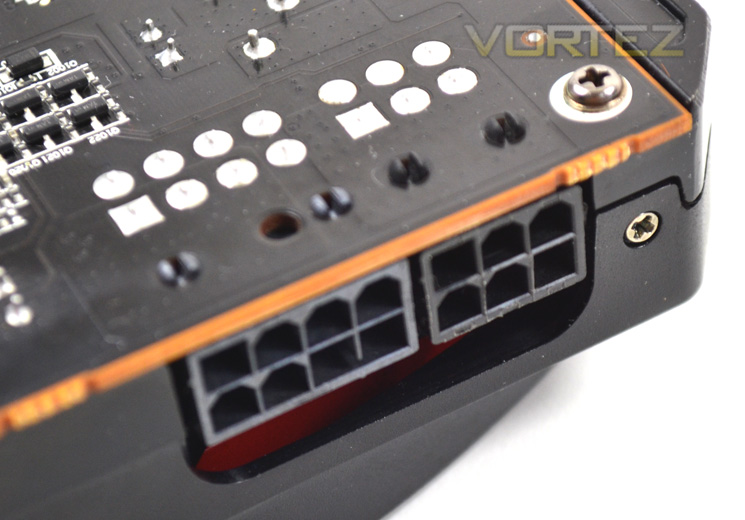
The R9-290X requires both 6pin and 8pin power cables. We have no confirmed figures but our testing showed that the R9-290X to consume similar power to a GTX Titan and a factory overclocked HD7970. With this in mind a 650-700W quality branded PSU would prove adequate.
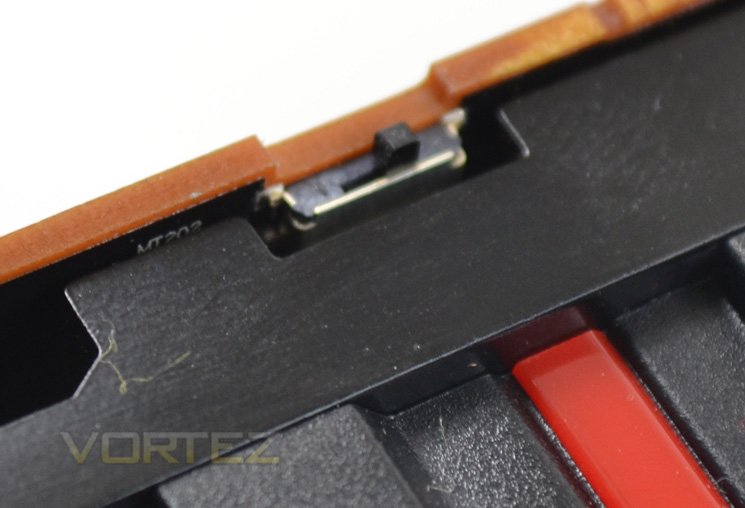
We see a welcome return of the dual BIOS switch. This time though there are a few key differences. Rather than have a ‘reference’ and overclocked state, this time the different states on the card are touted as Quiet Mode and UBER Mode.
Quiet mode is suited towards gamers who like to keep a tight rein on acoustics.
Uber Mode on the other hand cares little for noise; instead it will power the card as fast as it can while keeping temperatures under the 95c threshold (more on this in our Temperature, Power & Acoustics section).
Crossfire
Those astute among you will notice that there doesn’t appear to be any crossfire tabs. The new design has allowed AMD to allow crossfire to communicate directly across the PCIe lanes. No unsightly copper coloured bridge is required and there are no performance penalties in configuring crossfire this way. In fact, Crossfire still shows exceptional scaling with up to 1.87x the performance by adding a second and 2.6x by adding a third R9-290X based on 3DMark® FireStrike performance preset (*AMD claimed).
Let’s move on to the innards of the graphics card…
Detailed Look
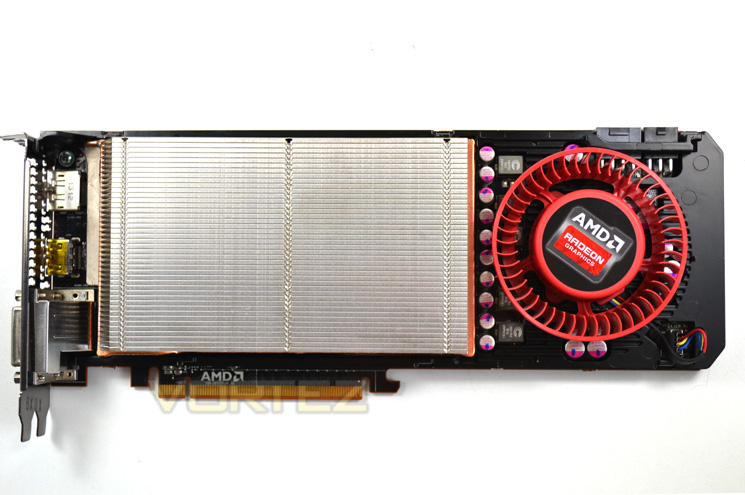
First we removed the shroud which is a simple plastic affair to reveal an enclosed, longitudinal aluminium heatsink design. The blower, as discussed earlier is the same used on previous designs which is quiet good at low RPM but could make your ears bleed at full pelt!
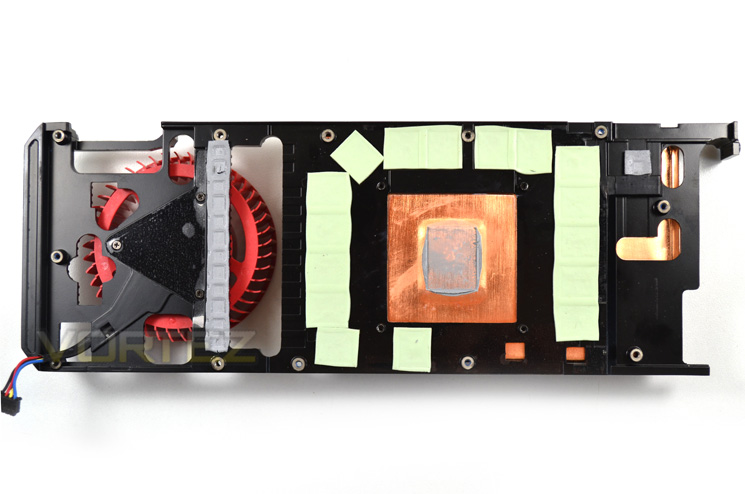
The underside of the cooler is made up of a black painted steel brace with the contact plate to the core being copper. The mid-plate makes contact with both the VRM and memory areas via thermal interface pads ensuring every component receives direct cooling.
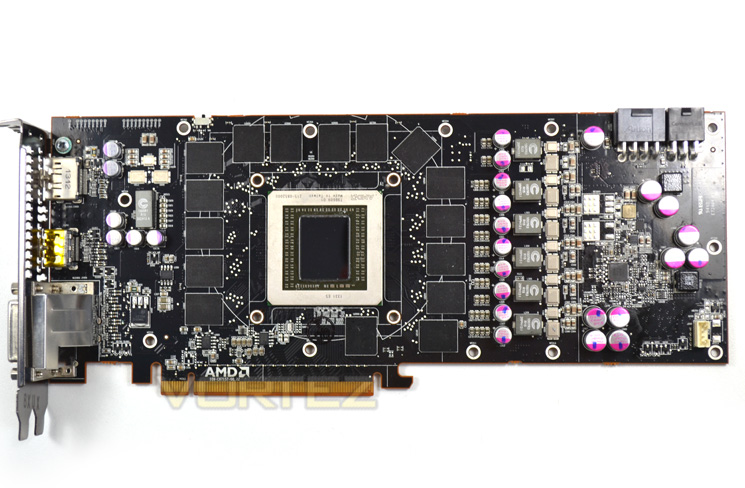
The PCB layour appears to be effeciently designed to cut down on electrical noise thanks to the VRM area being positioned closest to the power input points. 16x256MB GDDR5 modules frame the exposed core with an additional inductor and twin MOSFETs closest to the input/output area.
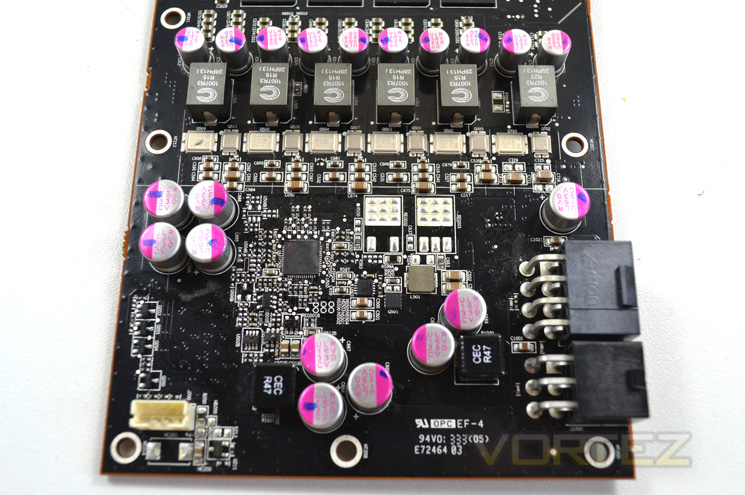
The VRM is a 6+1 power phase design utilising both solid capacitors and Coiltronics ferrite core lo profile surface mount inductors.
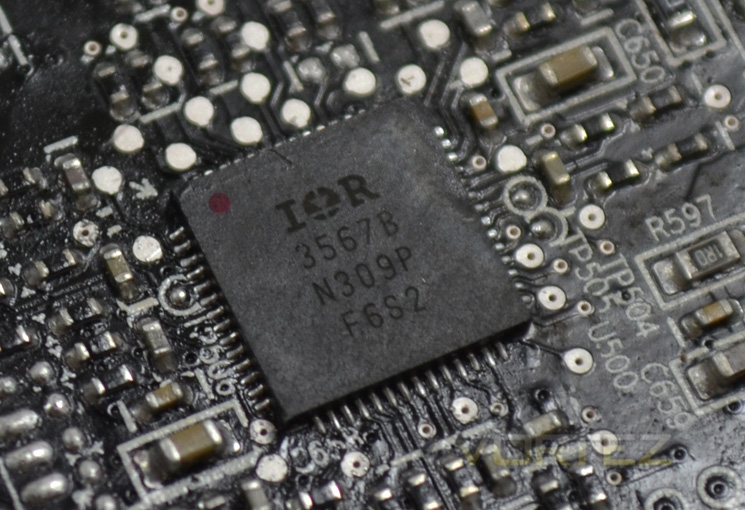
Regulating voltages is a 2nd generation Serial VID (SV12) interface. It is capable of 255 voltage steps between 0.00V and 1.55V which means that what ever power the GPU is demanding, it can provide this with precision.
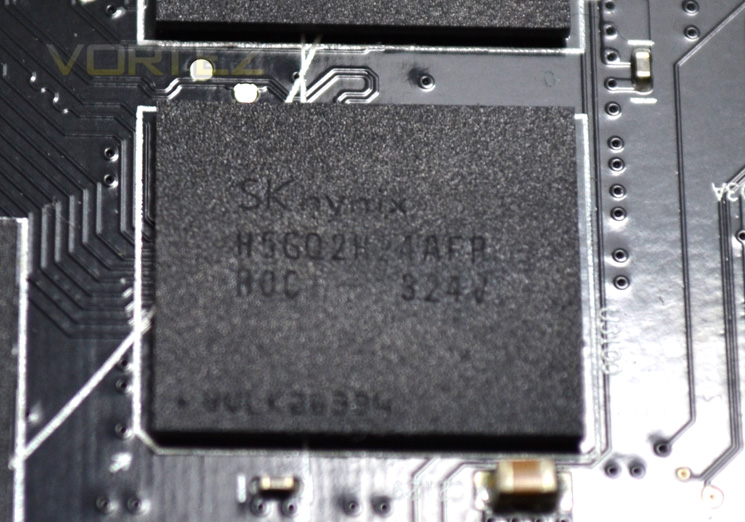
The 16x256mb GDDR5 memory modules come courtesy of Hynix and carry the product code of H5GQ2H24AFR R0C which is the same memory used on more recent editions of the HD7970 so are proven performers.
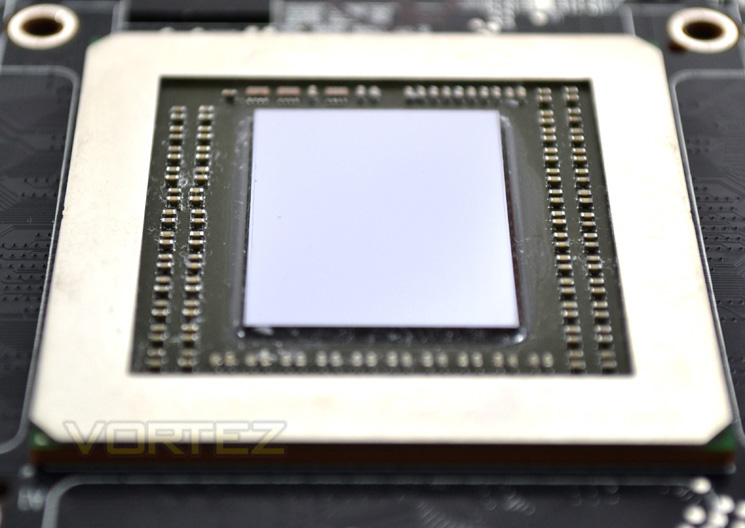
Finally we reach the heart of the R9-290X the Hawaii core. Featuring over 5 TFLOPS of compute performance with over 6 billion transistors along with supporting DirectX 11.2 we expect some blistering performance from this sliver of silicon.
I think it is time we found out just how fast this new flagship card really is…
Test Setup & Methodology
How we test graphics cards
Testing a graphics card is an extremely lengthy process. We sometimes see reviews where a graphic card has been tested using out of date equipment, out of date games and out of date drivers. While the latter can be excused due to the sheer amount of driver updates making a thorough review impossible we will however notify the reader when we have used a different driver to the normal for example a pre-release driver. For the most part however we will always use the same hardware and where possible the same drivers unless a newer driver rectifies an issue we have encountered or significantly improves performance to such an extent that continuing with an outdated driver is not feasible.
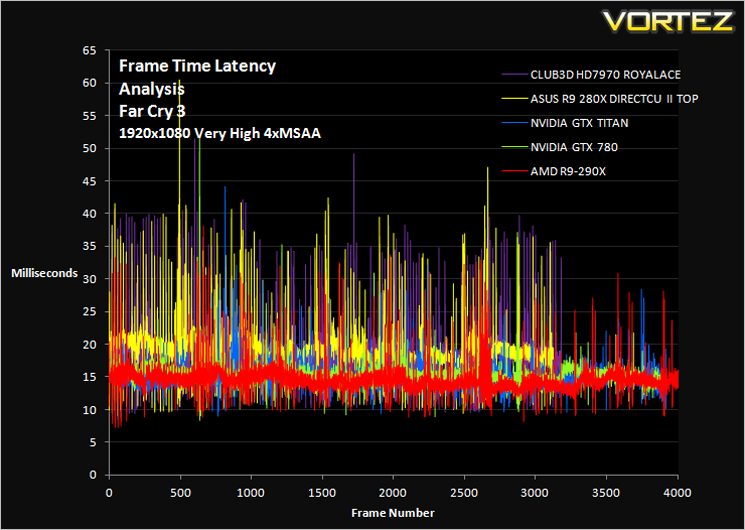
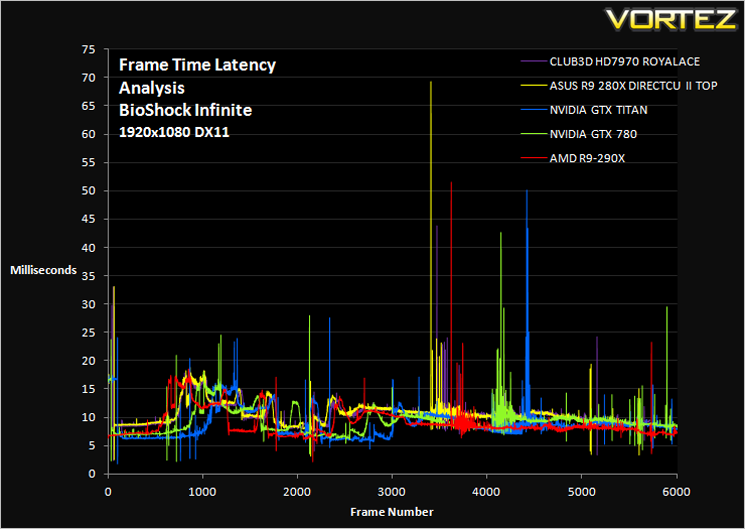
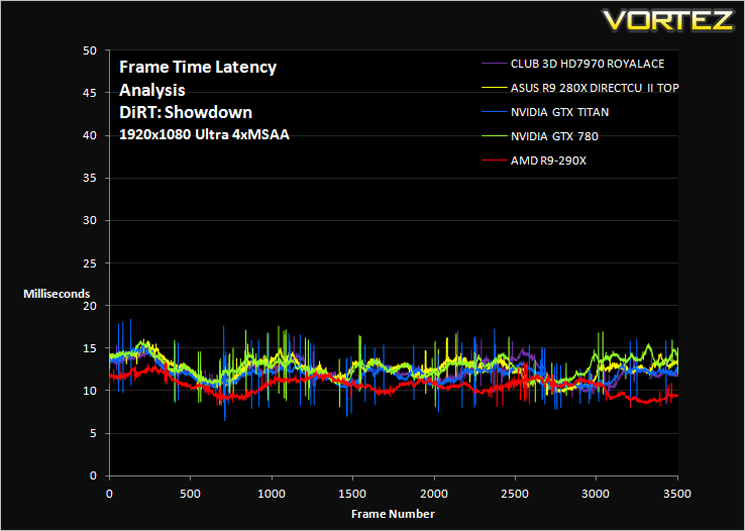
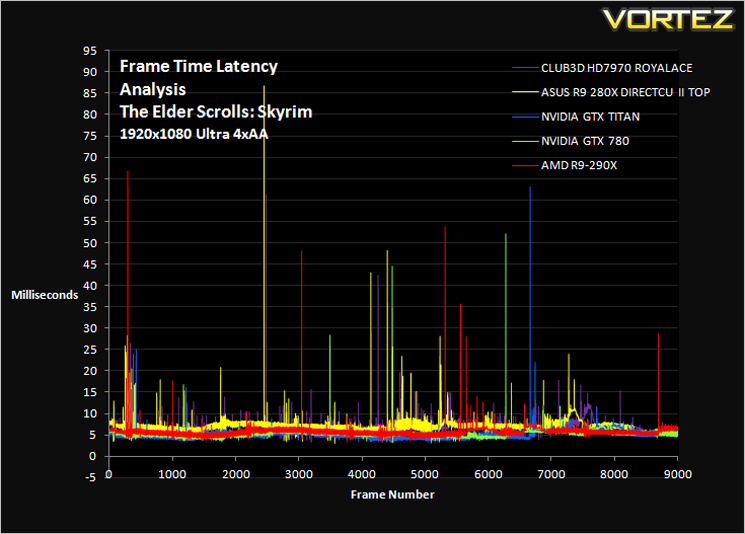
Frame Time Analysis
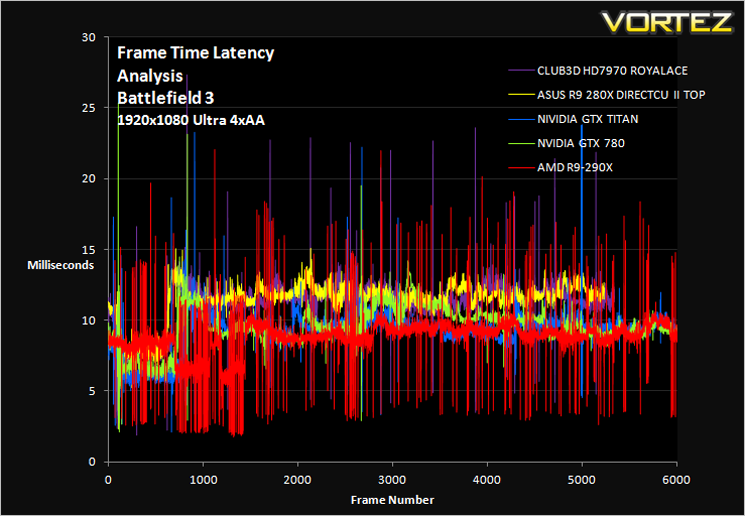
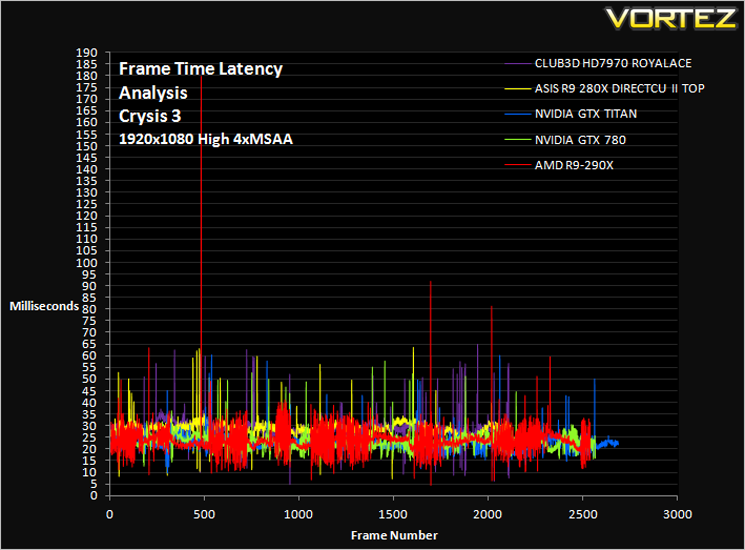
We have also seen the emergence of frame time analysis. We covered this in a separate article here: GPU Reviews: Why Frame Time Analysis is important so we won’t go into the reasoning again but to summarise, our testing comprises both FPS testing and perhaps arguably more importantly, frame time analysis. We also look at overall performance by equating averages across the games and finally before concluding our review we take a look at value for money.
HardwareWith the latest Intel chipset release we decided to update our ageing X58 setup to the new X79 chipset. Not only that but we will be using the flagship Core i7-3960X Extreme Edition processor clocked to 4.5GHz to ensure we have no CPU bottlenecks. With 16GB of ram on board there should be minimal paging so the benchmarks we run today will hopefully give a true reflection of the graphics card’s performance.
High End Graphics cards on test:
ASUS R9 280X DirectCU II 3GB GDDR5(CAT 13.11 Beta v1)
ASUS GTX760 DirectCU Mini OC 2GB GDDR5(Forceware 320.49)
Inno3D iChill GTX 780 HerculeZ X3 Ultra 3GB GDDR5(Forceware 320.49)
ASUS GTX770 DIRECT II CU OC 2GB GDDR5(Forceware 320.49)
MSI GTX760 Twin Frozr Gaming 2GB GDDR5(Forceware 320.49)
GIGABYTE GTX780 Windforce x3 OC 3GB GDDR5(Forceware 320.49)
GAINWARD GTX780 PHANTOM ‘GLH’ 3GB GDDR5(Forceware 320.49)
INNO3D GTX760 ICHILL HERCULEZ 2GB GDDR5(Forceware 320.49)
GIGABYTE GTX770 WINDFORCE 3X OC 2GB GDDR5(Forceware 320.49)
ZOTAC GTX760 2GB GDDR5(Forceware 320.39)
NVIDIA GTX760 2GB GDDR5(Forceware 320.39)
]NVIDIA GTX760 2GB GDDR5 SLI(Forceware 320.39)
SAPPHIRE DUAL-X HD7950 3GB GDDR5 (Catalyst 13.6 beta)
CLUB 3D HD7970 royalAce 3GB GDDR5 (Catalyst 13.6 beta)
GAINWARD PHANTOM GTX 770 2GB GDDR5 (Forceware 320.18)
NVIDIA GeForce GTX 770 2GB GDDR5 (Forceware 320.18)
NVIDIA GeForce GTX 780 3GB GDDR5 (Forceware 320.18)
NVIDIA GeForce GTX 690 4GB GDDR5 (Forceware 314.22)
NVIDIA GeForce GTX TITAN 6GB GDDR5 (Forceware 314.22)
NVIDIA GeForce GTX TITAN SLI 12GB(2x6GB) GDDR5 (Forceware 314.22)
NVIDIA GTX680 2GB GDDR5 (Forceware 314.22)
AMD HD7970 3GB GDDR5 (AMD CAT 13.3 beta)
CPU: Intel Core i7-3960X Extreme Edition @ 4.5GHz
RAM – 16GB (4x4GB) Corsair Vengeance (Red) DDR3 @ 1866MHz 9-10-9-27
Power Supply – Thortech Thunderbolt Plus 1200W
Hard Drive – Kingston HyperX 240GB
Cooler – Corsair H100
Benchmarks
If you are a regular reader of our reviews you will know we like to test the latest hardware with the latest games and benchmarks on the market. Here are the games we have chosen:
Crysis 3
Far Cry 3
BioShock Infinite
DiRT: Showdown
The Elder Scrolls: Skyrim
We also take into consideration the benchmarkers out there so have included 3 of the more popular synthetic benchmarks available:
Unigine: Heaven 4
Futuremark 3DMark Firestrike
Let’s see how today’s graphics card performed…
Temperature, Acoustics and Power Consumption
Power Consumption
To test for power consumption we use the included iPower Meter found with our Thortech PSU. As system load figures obviously differ from idle it is extremely difficult to get an accurate figure of system draw and then simply take this figure away from the overall amount because each game will generate varying levels of CPU and hard drive activity. Dynamic power adjustments which fluctuate in game will also affect accurate power figures thus rendering any such power consumption calculations redundant at worst and approximate at best.
We will therefore take our system readings averaged over a benchmark run of Tessmark (100% load) and after 20 minutes of being idle in Windows 7. These can then be used as a comparison to other graphics cards to determine how much more or less power you can expect a GPU to consume.
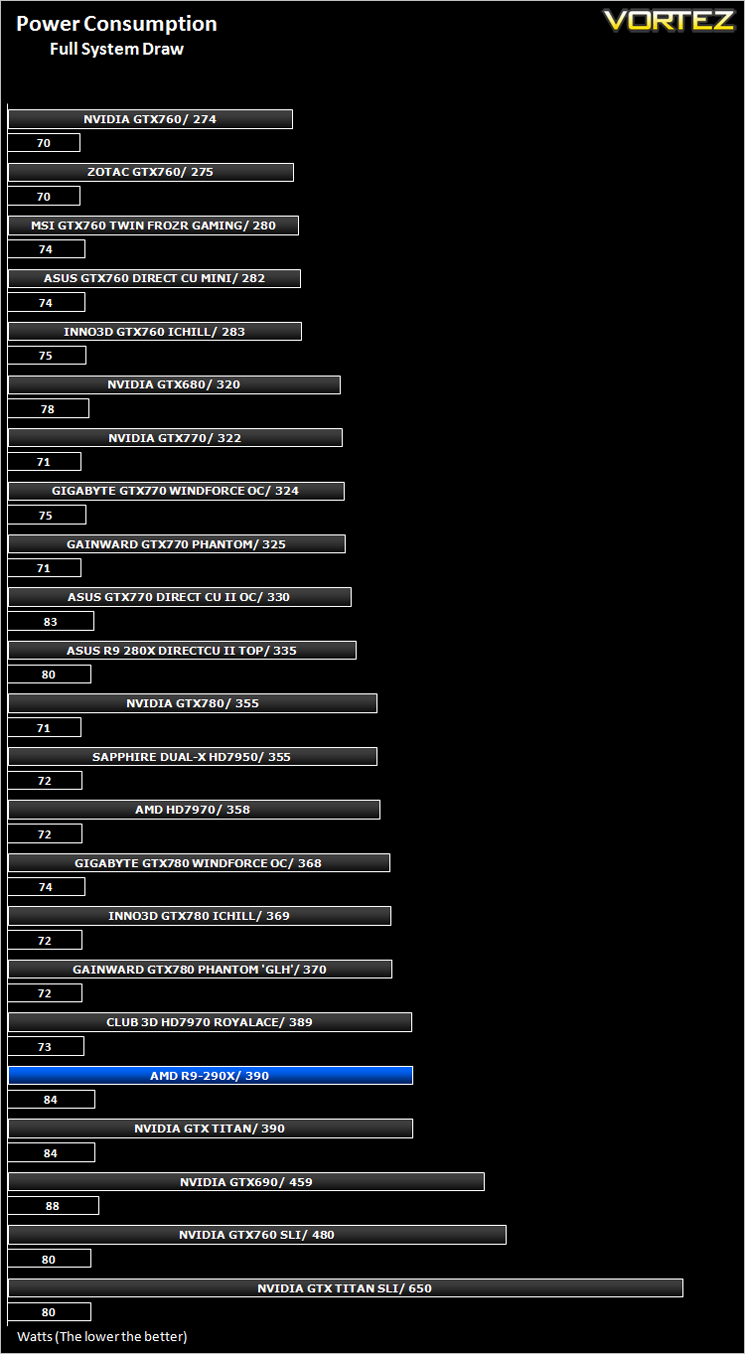
Power consumption was as expected, falling around the same level as both the GTX TITAN and GTX 780 with no card having a clear advantage over the other. Nothing to see here. Move along please.
Temperature
To test temperatures we measured idle temperatures after booting windows, letting all applications finish loading and ran a few benchmarks. Once the benchmarks were complete we left the card to reach a cooling plateau where we then took the idle temperatures. For the load tests, we would normally run Furmark for 20 minutes, taking the absolute maximum temperature attained however we found that this throttled the card and resulted in spurious results. So we set Heaven running continuously for 20 minutes and used this as a temperature result as the card did not throttle with this application.
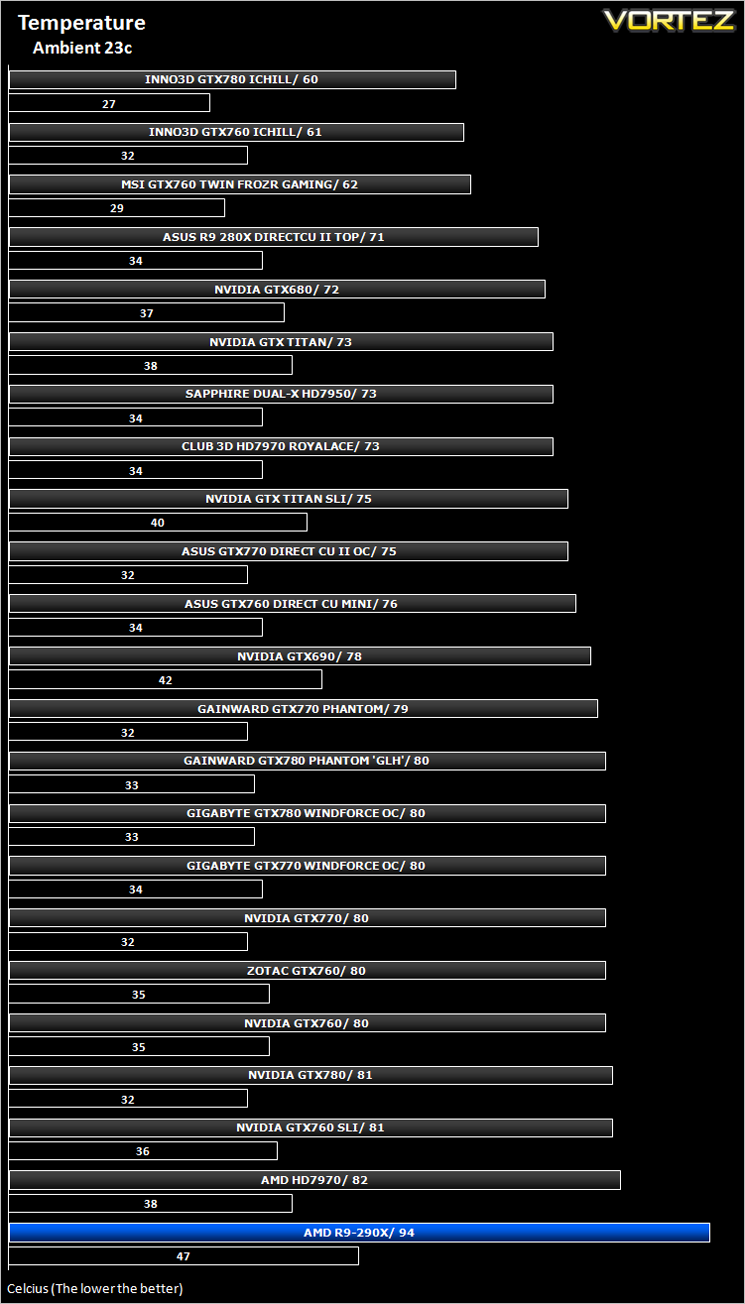
Oh dear! When we first tested the R9-290X we shut the benchmark down prematurely because we didn’t think the temperatures were going to stop rising. With a little more courage we kept the benchmark running and temps flat lined between the 94c and 95c mark. We spoke to AMD regarding this matter but were reassured that this was within the design specification and no damage would be done to the GPU.
Explaining further, AMD categorically state that the 95c threshold set in ‘Uber Mode’ will NOT damage the card. To maintain a balance between noise and performance the card will increase clocks/voltages and/or reducie the fan speed until the GPU runs at the temperature target of 95c. By having the GPU target at lower temperature, the card will sacrifice acoustics. If the GPU temperatures do however concern you, like they did us, then you can of course adjust this to your liking by making adjustments in the Catalyst Overdrive utility (see overclocking section).
Despite this reassurance, we still feel that 95c is uncomfortably hot perhaps because historically having a GPU running at those kinds of temperatures meant something was drastically wrong with the cooling or worse, the GPU was on its death bed. However, if AMD claim it is perfectly safe and within design specifications then who are we to argue? What do we care if it is 95c or 50c? We just hope the enthusiast market share in AMD’s confidence because this could be one of those areas that could tip the scales against the popularity of this card. Many enthusiasts will rage about the temperatures without understanding the theory AMD are attempting to present and this is how bad information is spread to the unlearned which in turn could hurt sales.
Time will tell and we hope we are wrong but at present we feel AMD have taken a massive gamble here.
Acoustics
In balanced mode the card is as you would expect, relatively quiet. Strap your headset on tightly though because in Uber mode things can get quite noisy indeed. Temperatures will obviously be dependent on your ambient/case temperatures and it’s these temperatures that will determine just how hard the fan on the 290X has to work. If you have a hot case, expect a lot of noise. Good cooling and the noise will be lessoned but still noticeable.
Let’s see how the card can redeem itself in our suite of benchmarks…
Gaming Experience (Frame Time Analysis)
Comment
Average and 99th Percentile response times (Frame Time Analysis)
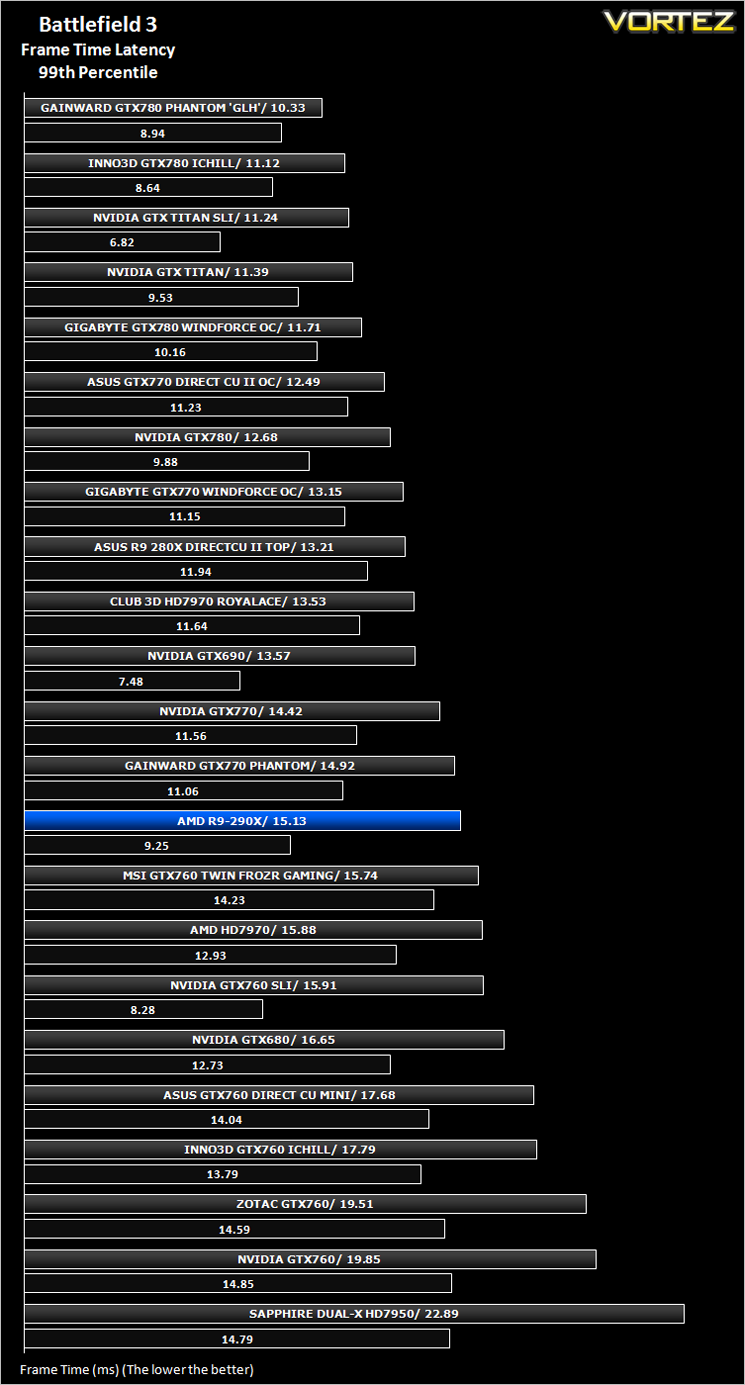
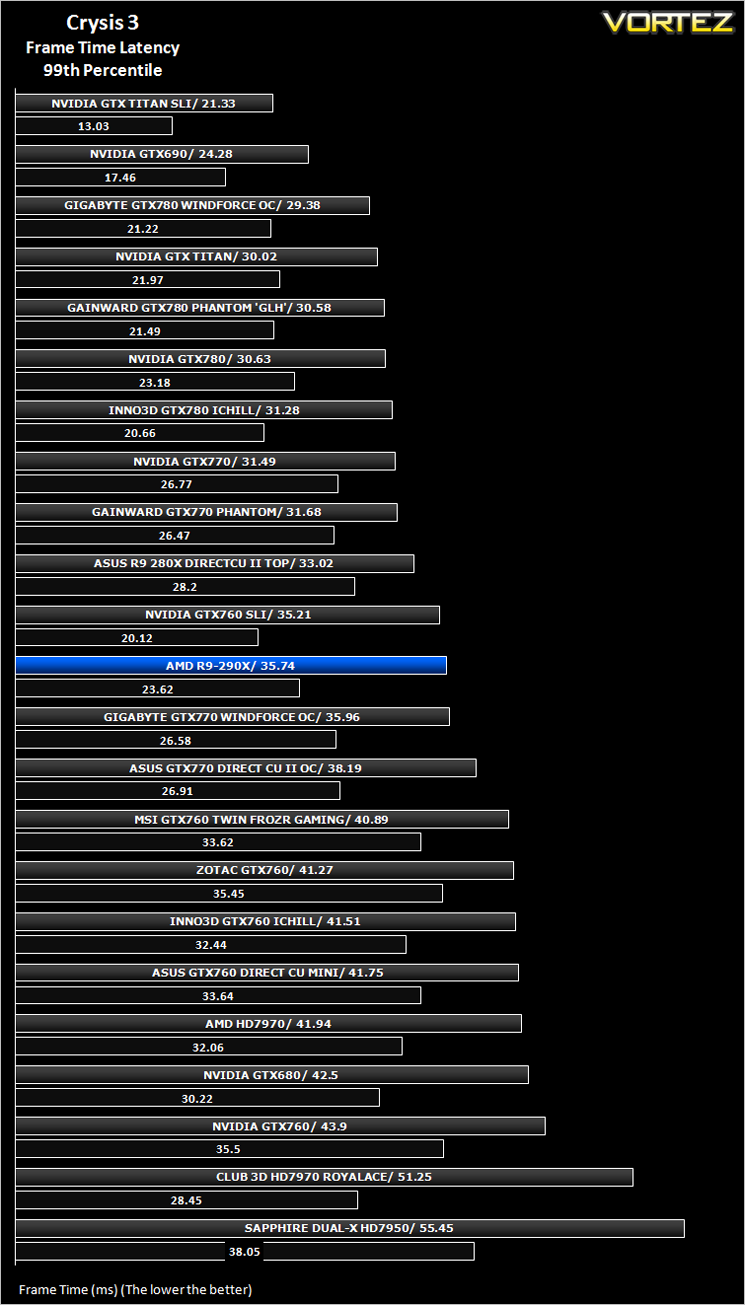
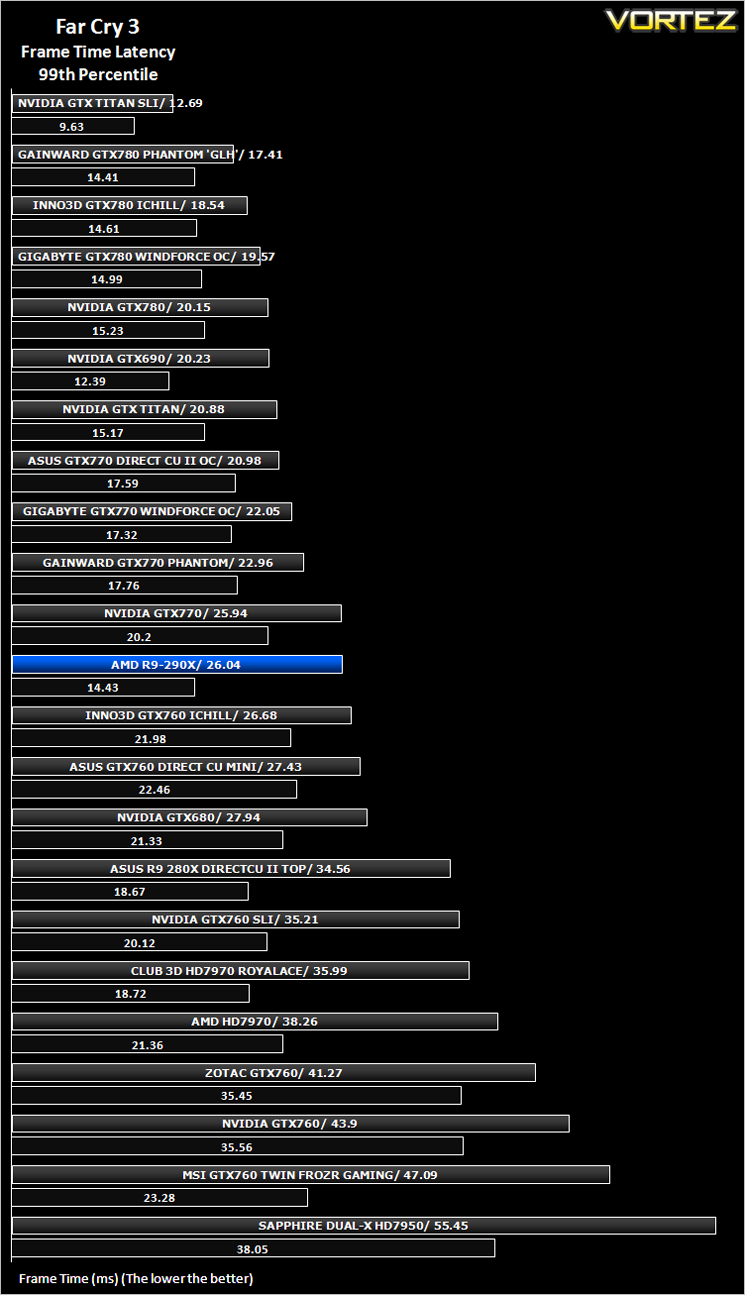
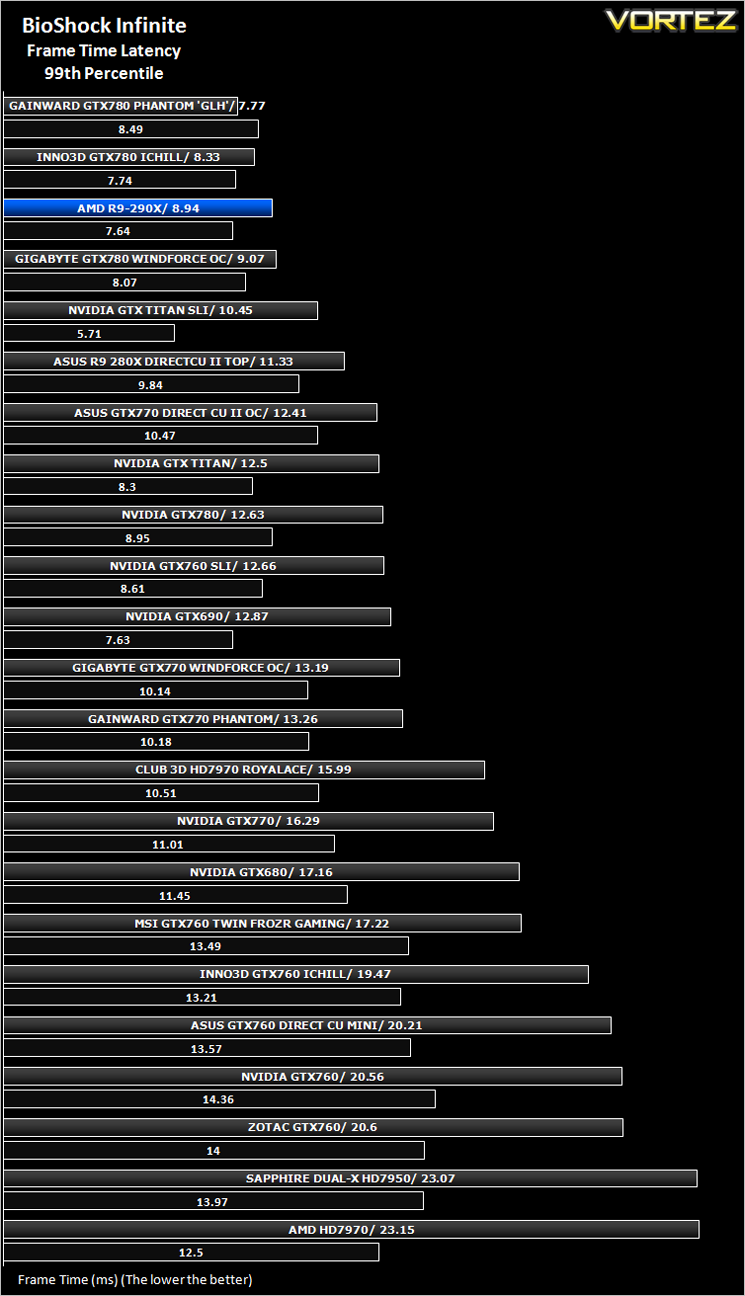
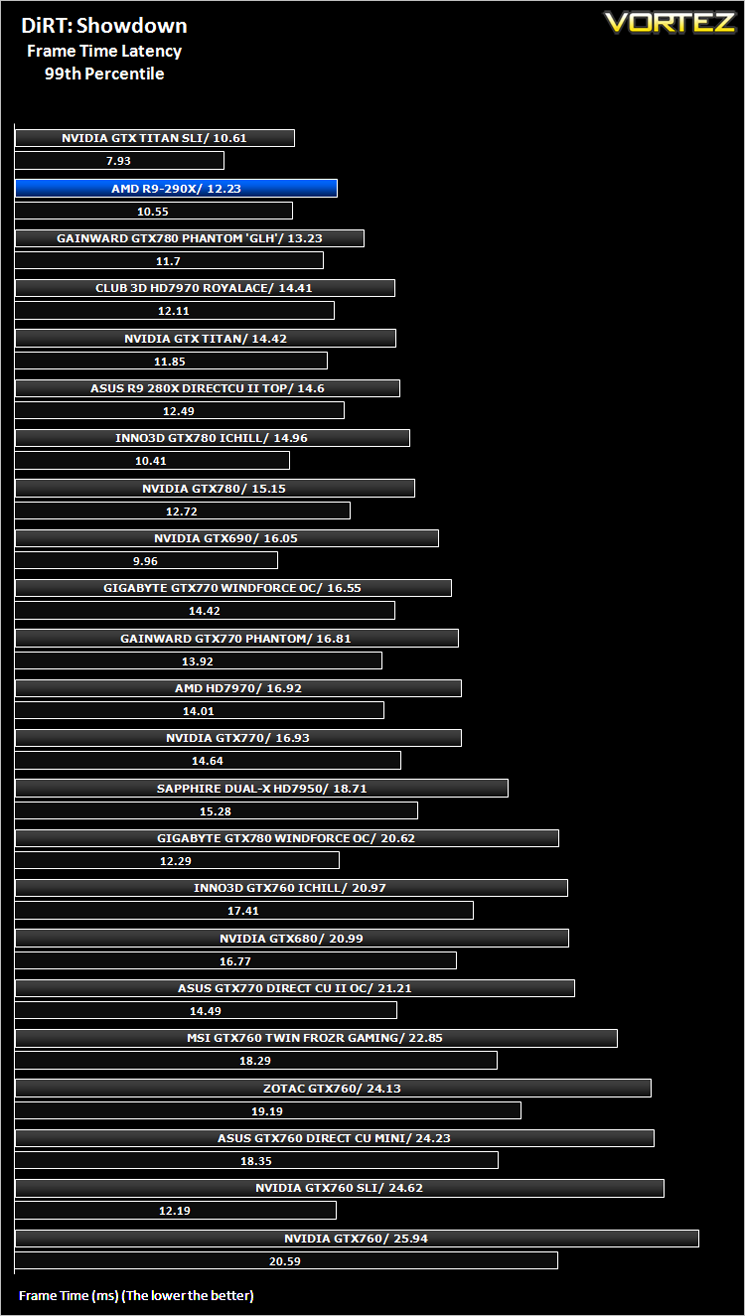
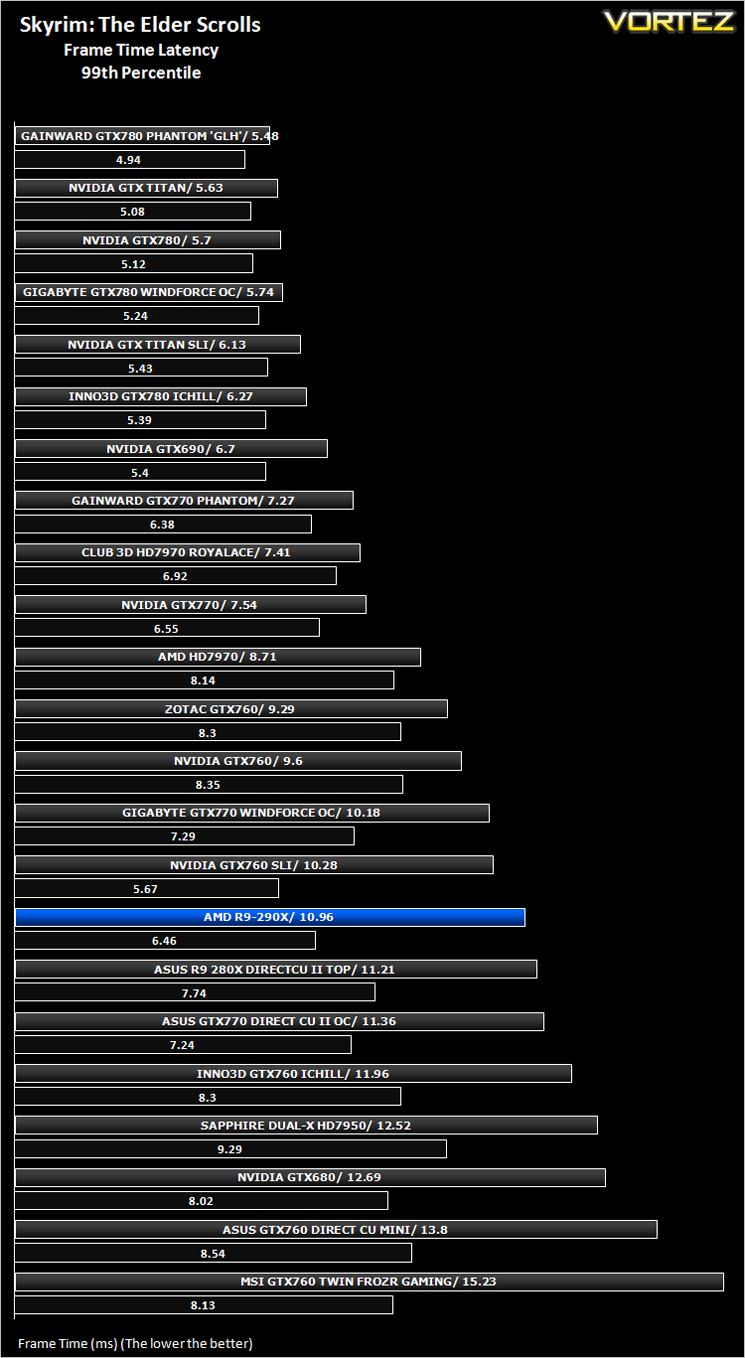
Futuremark 3DMark Fire Strike (Synthetic)
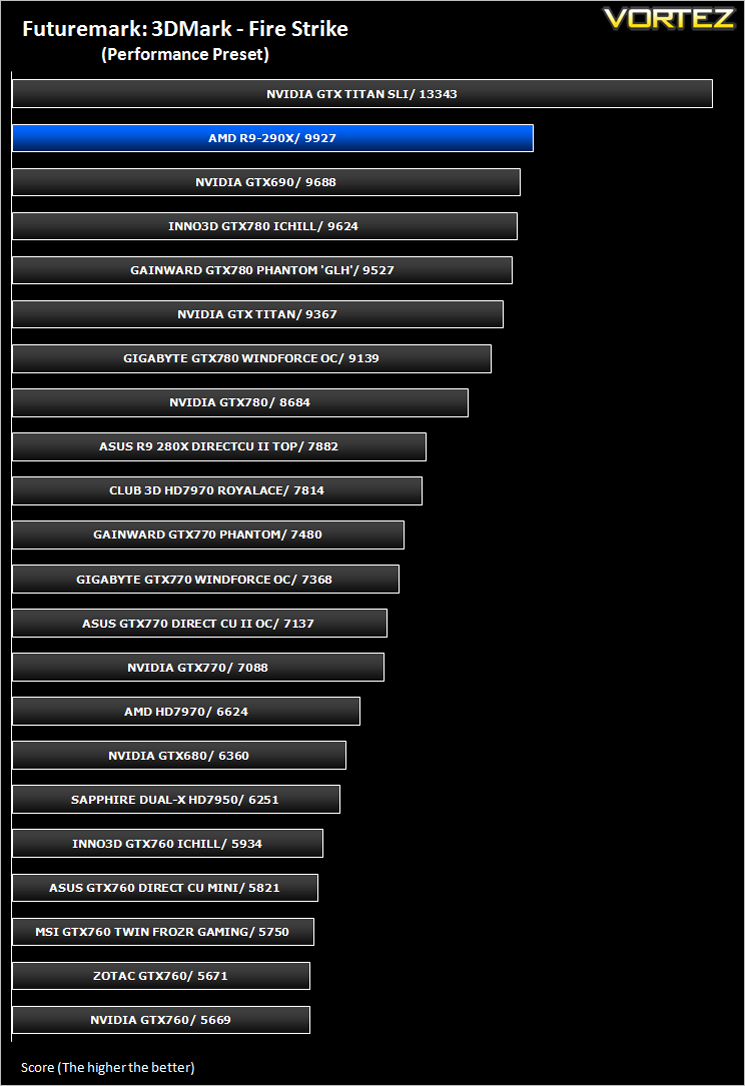
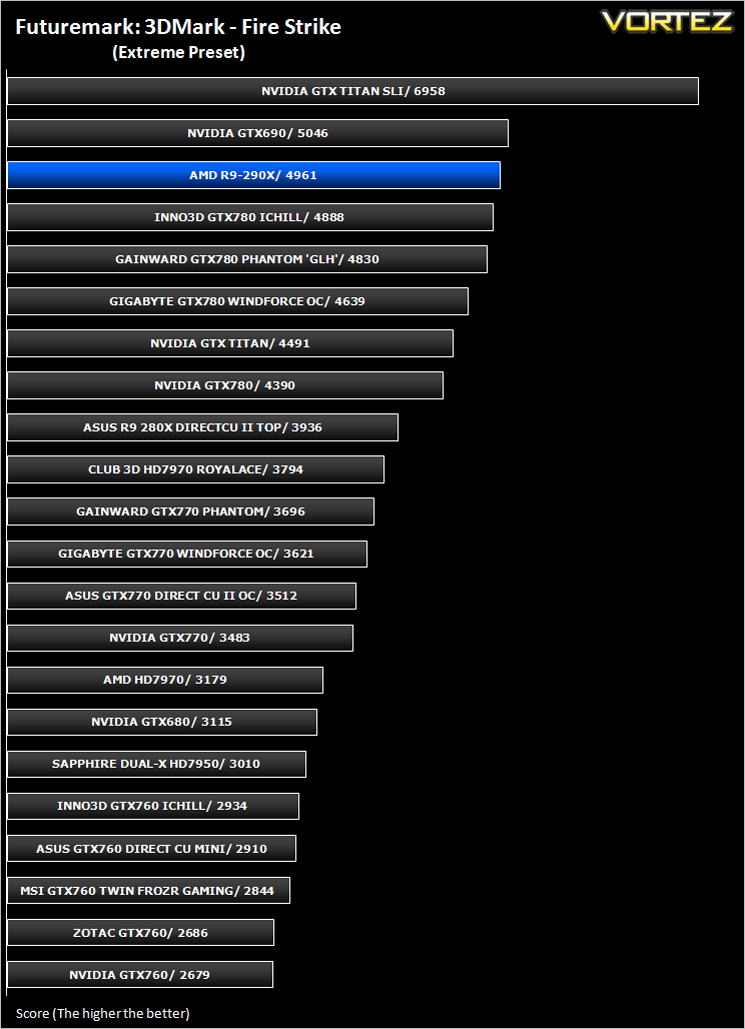
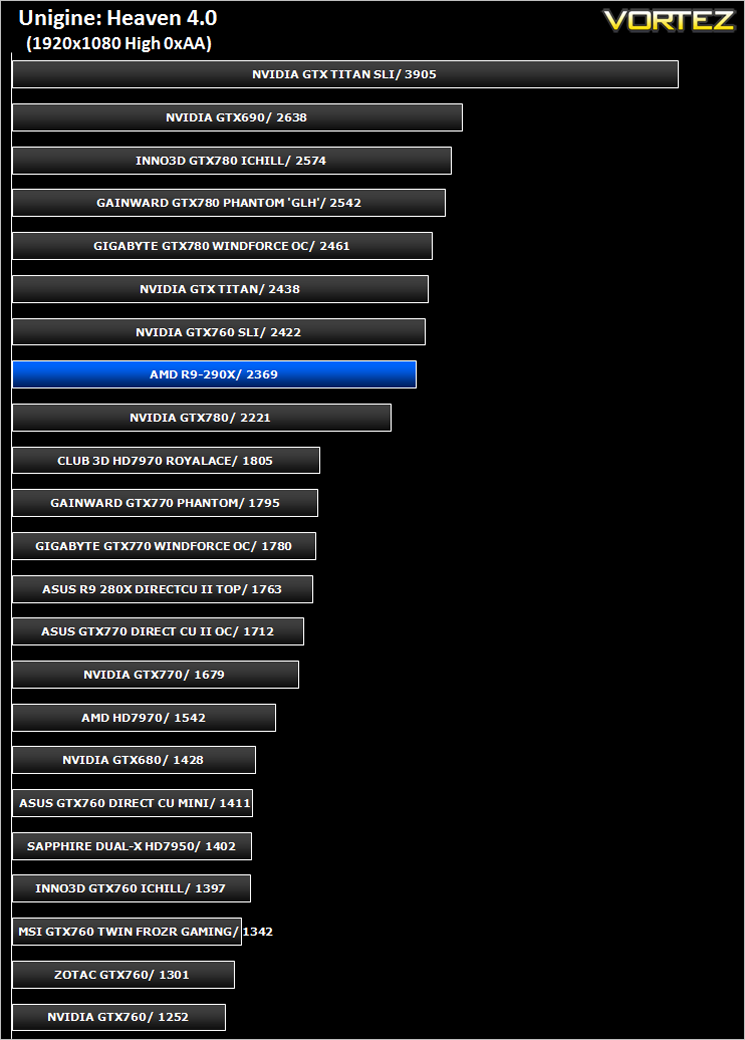
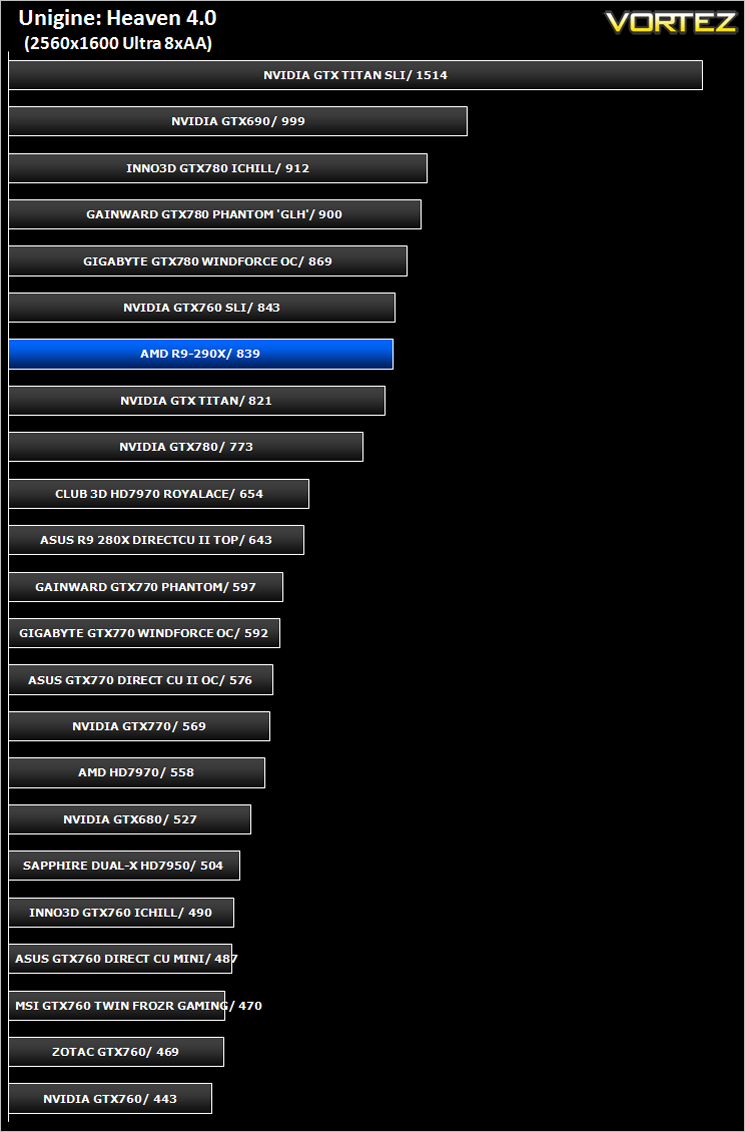
Unigine: Heaven 4 (Synthetic)
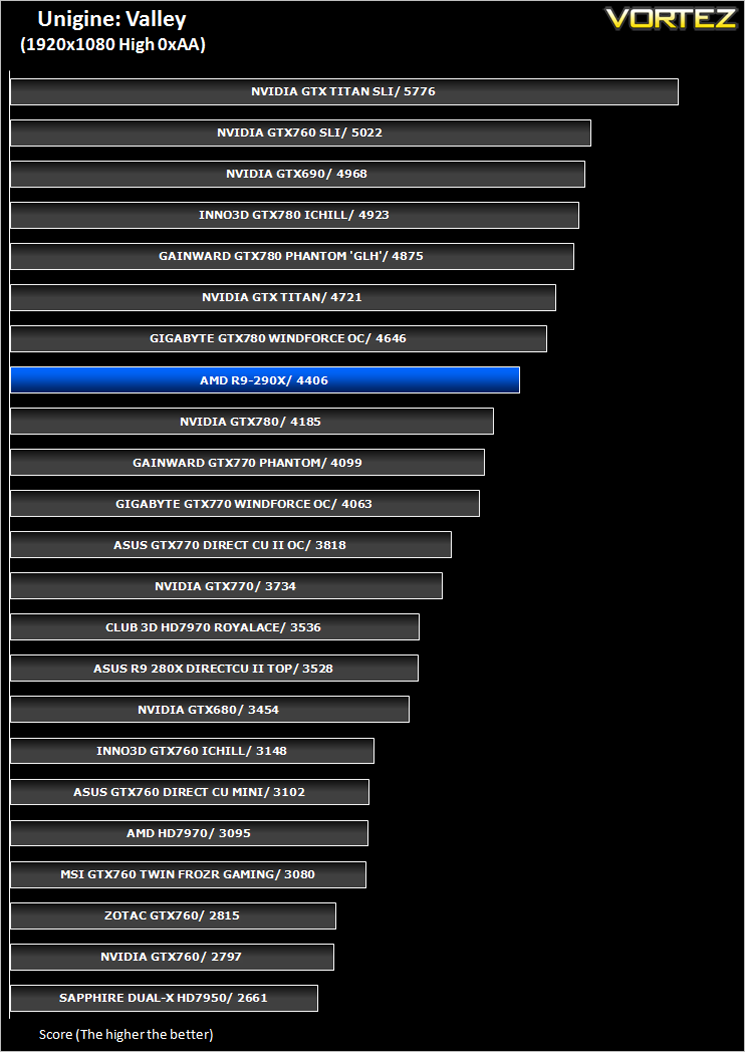
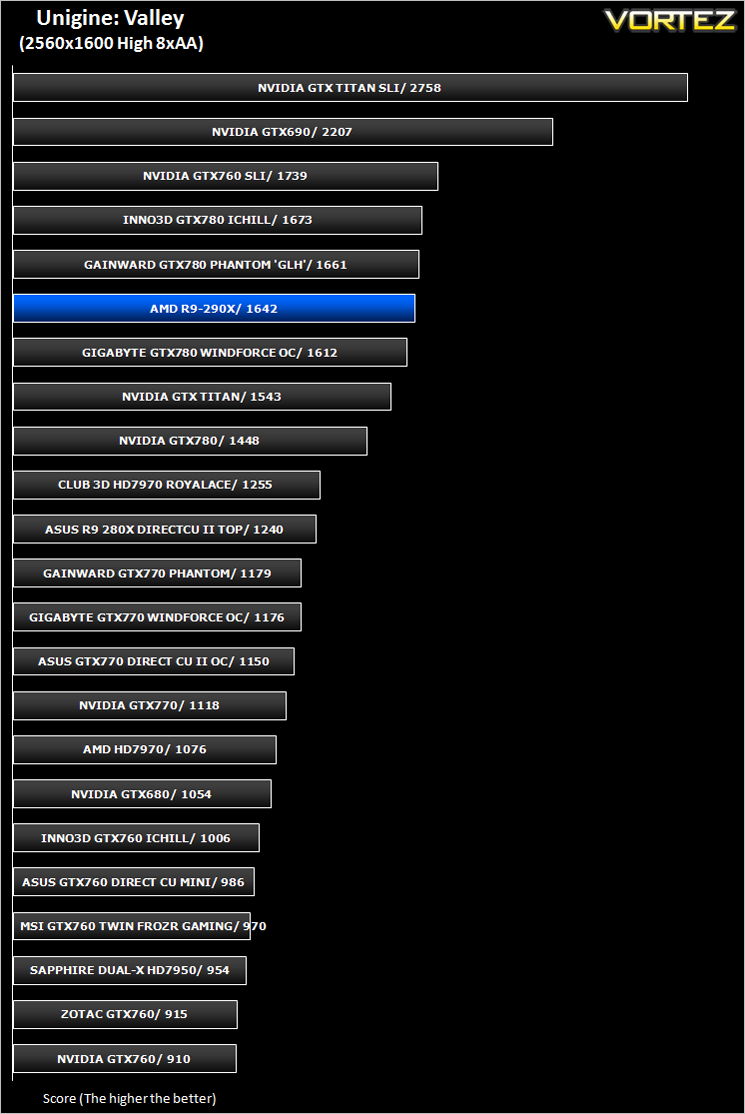
Unigine: Valley (Synthetic)
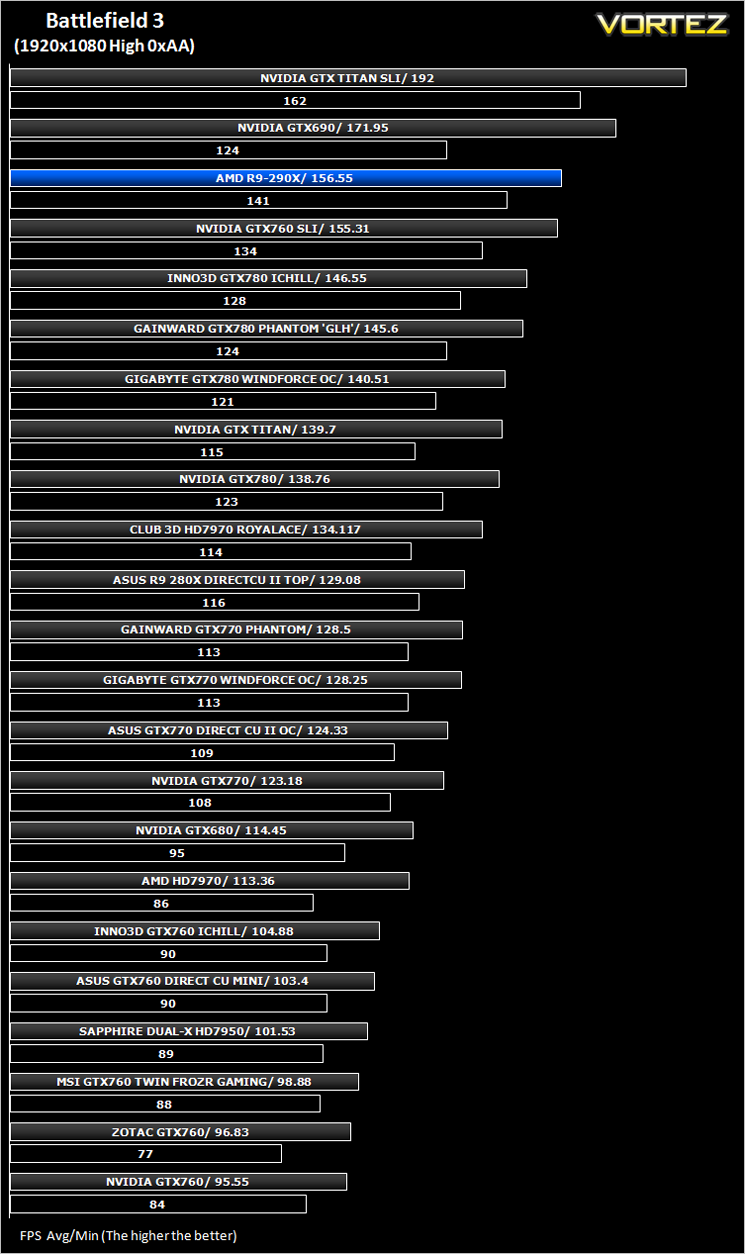
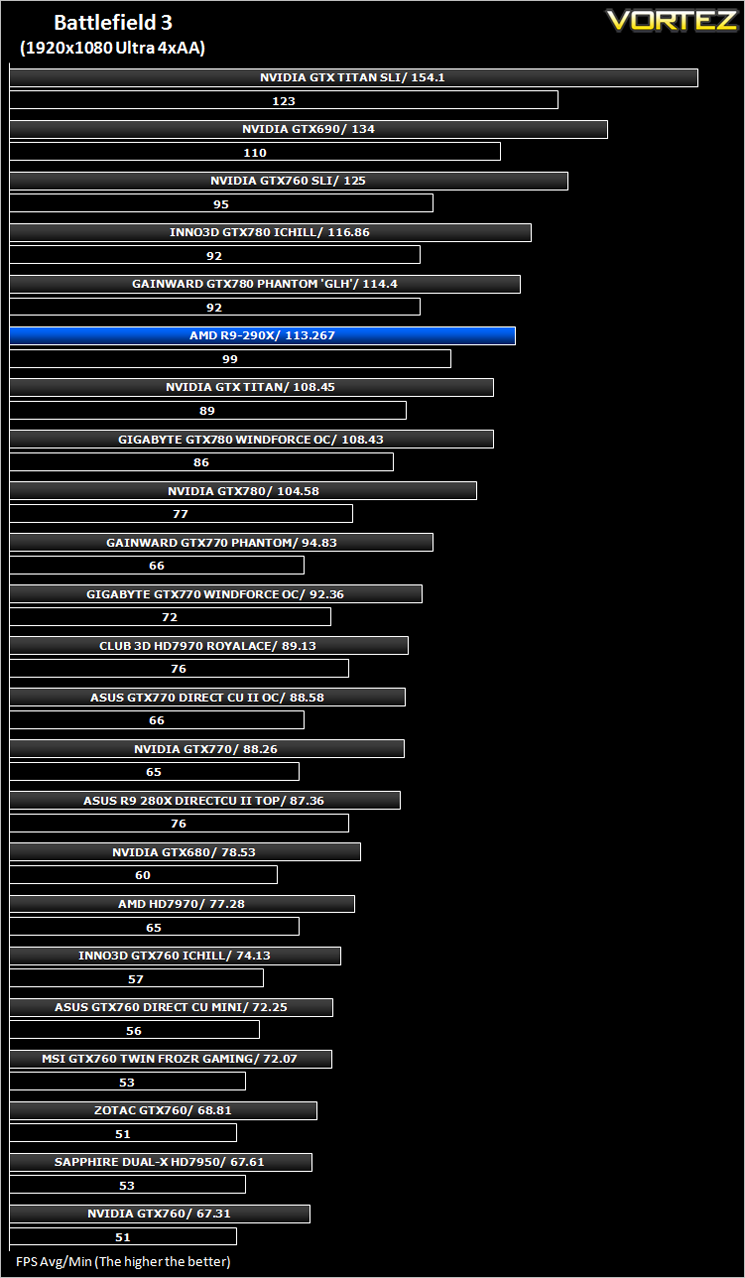
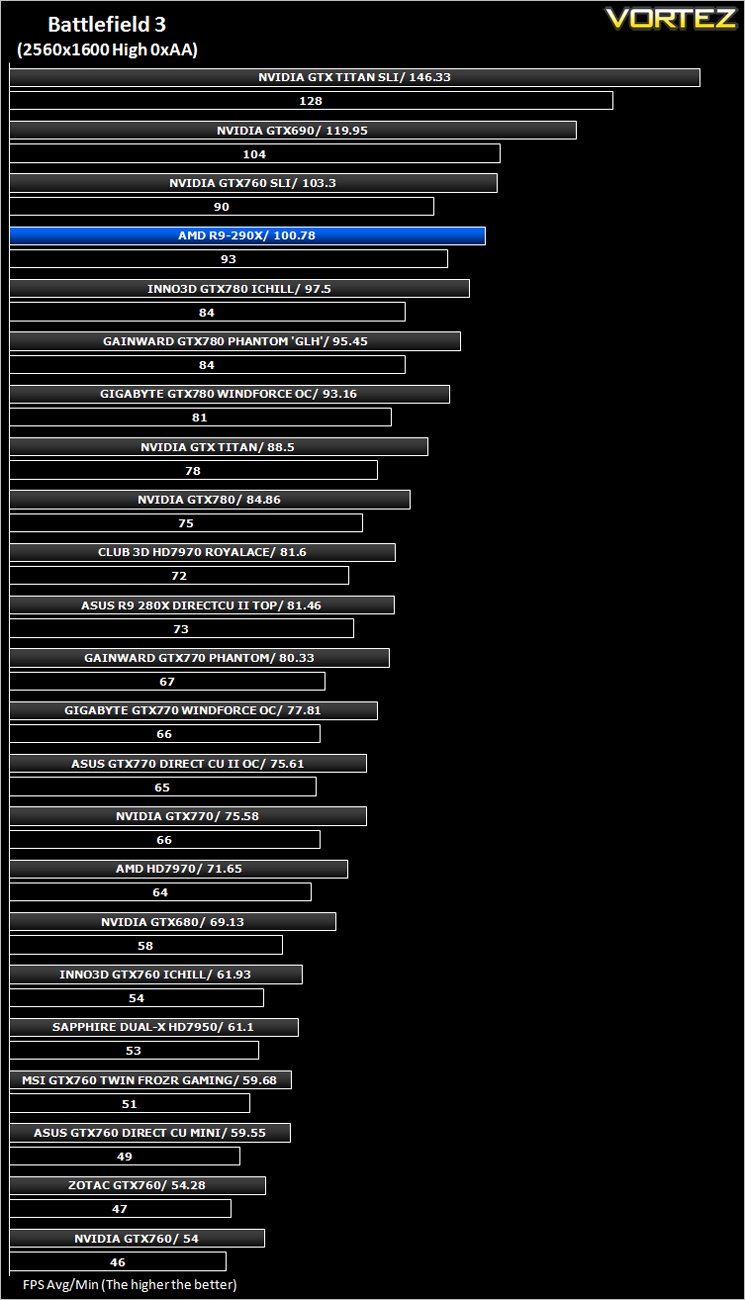
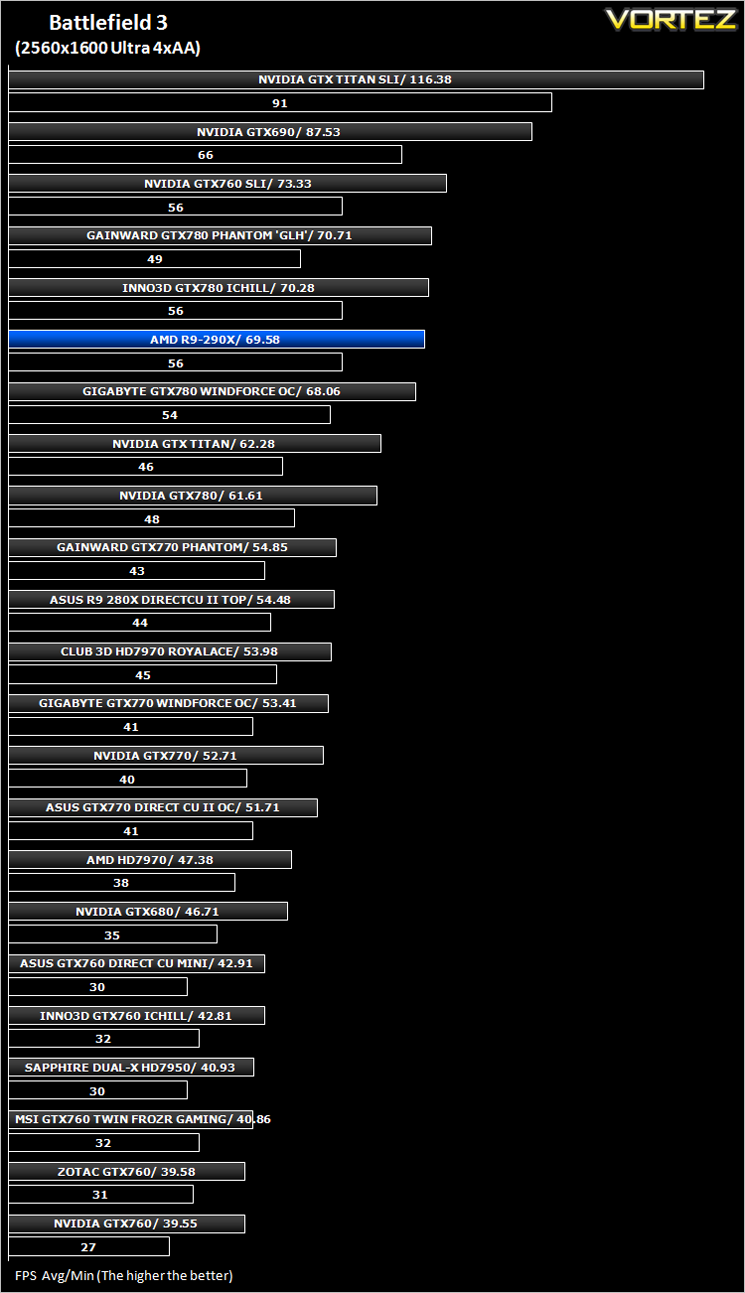
Battlefield 3 (FPS)
Average and minimum frames per second were measured using Fraps during the parking lot scene on Operation Sword Breaker. High and Ultra presets were loaded at both resolutions.
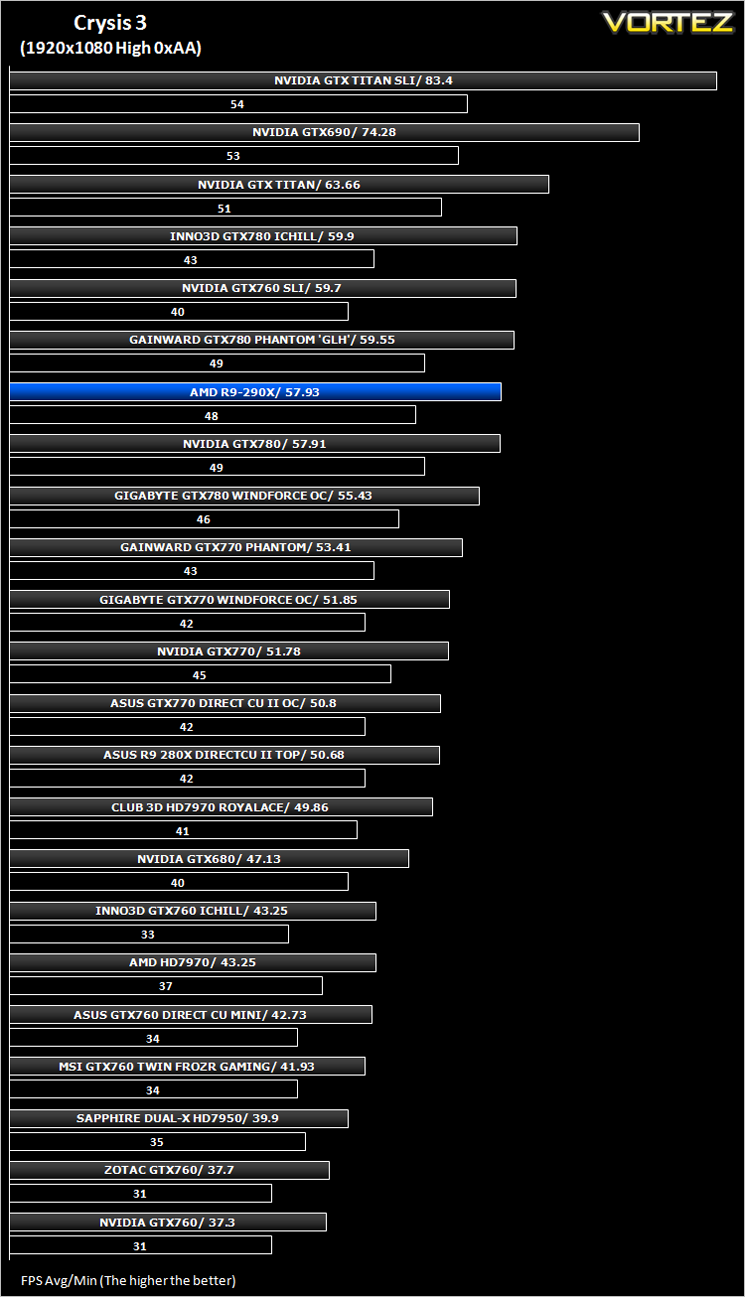
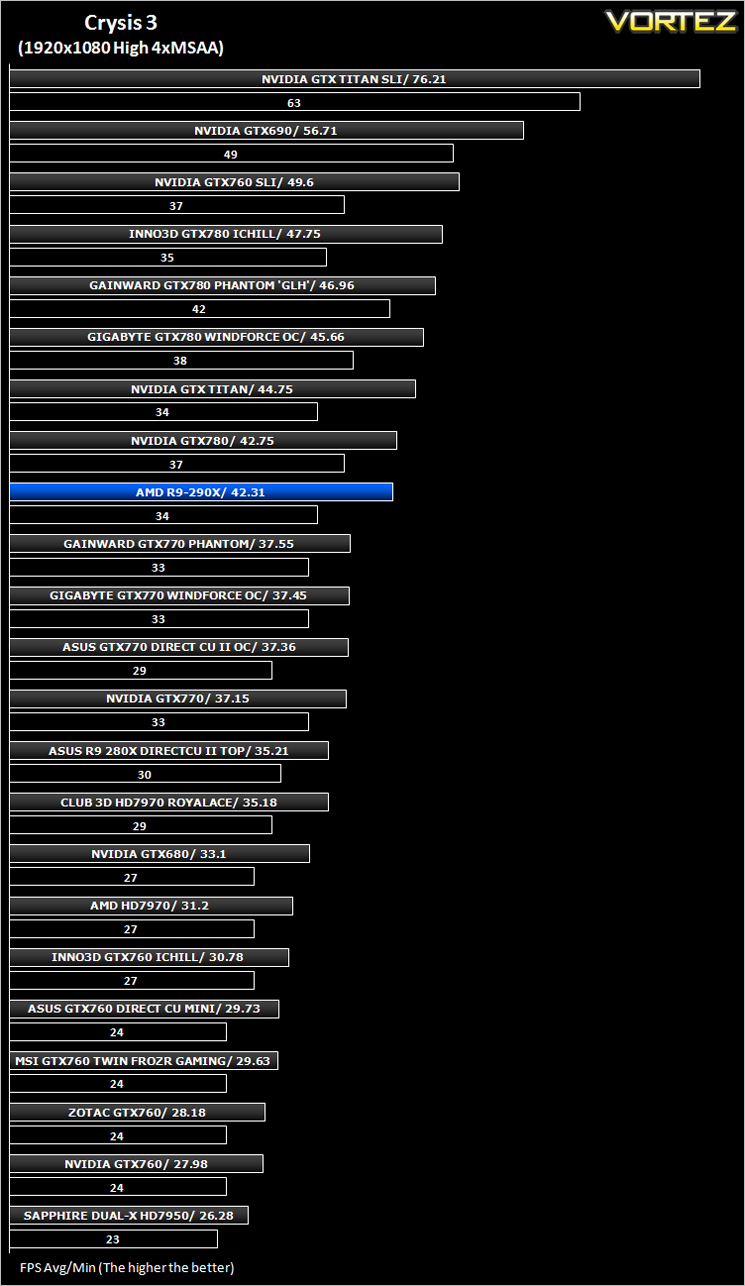
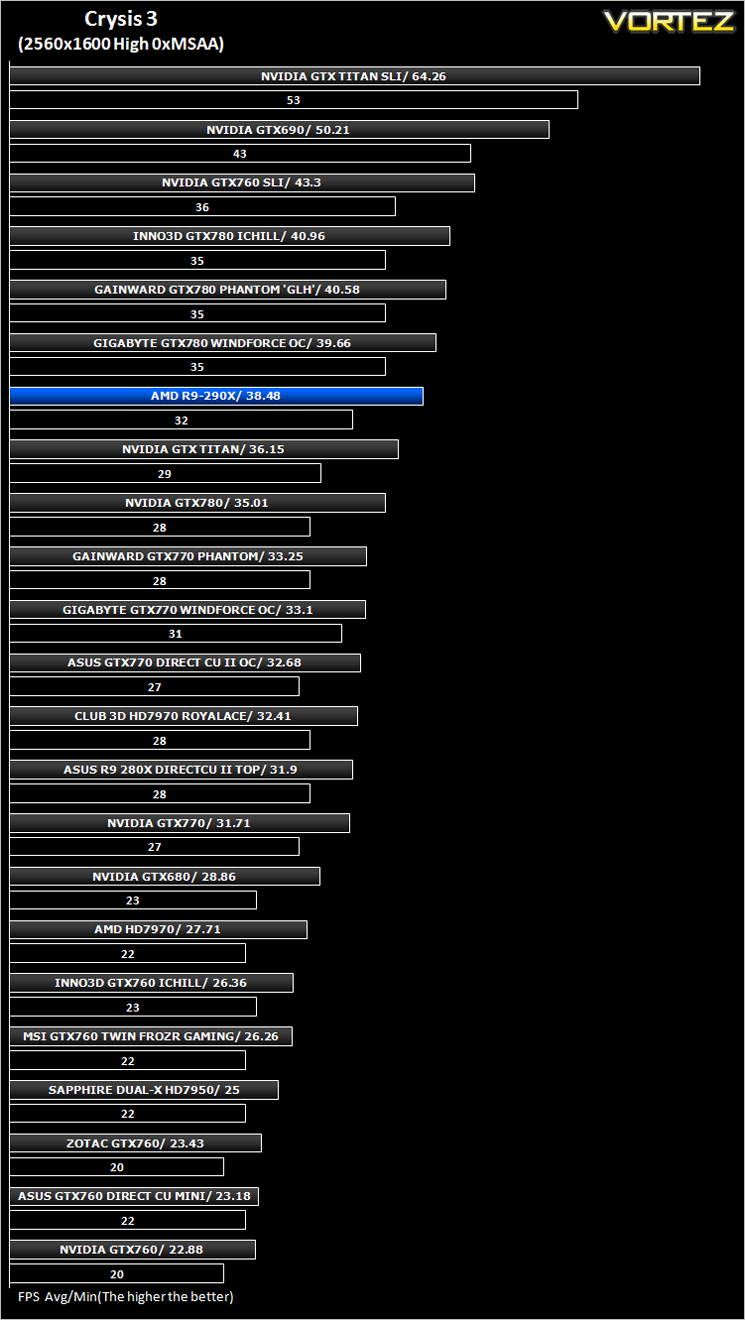
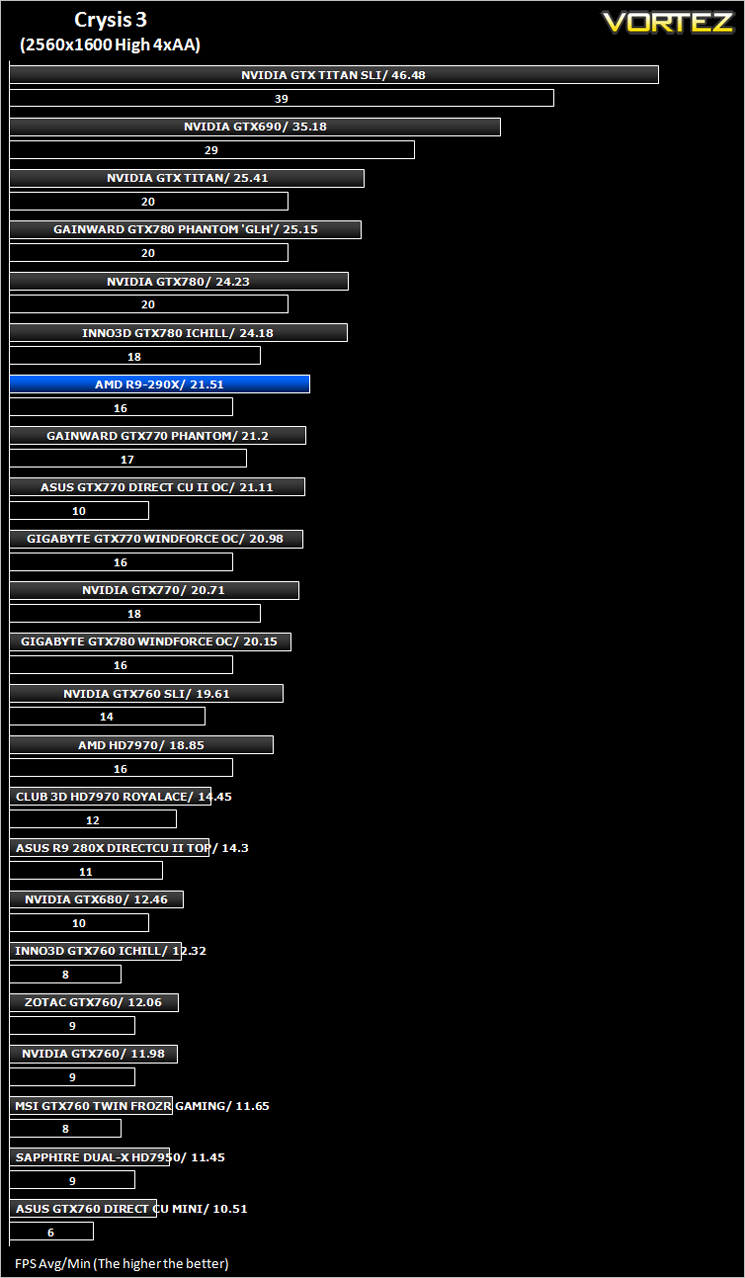
Crysis 3 (FPS)
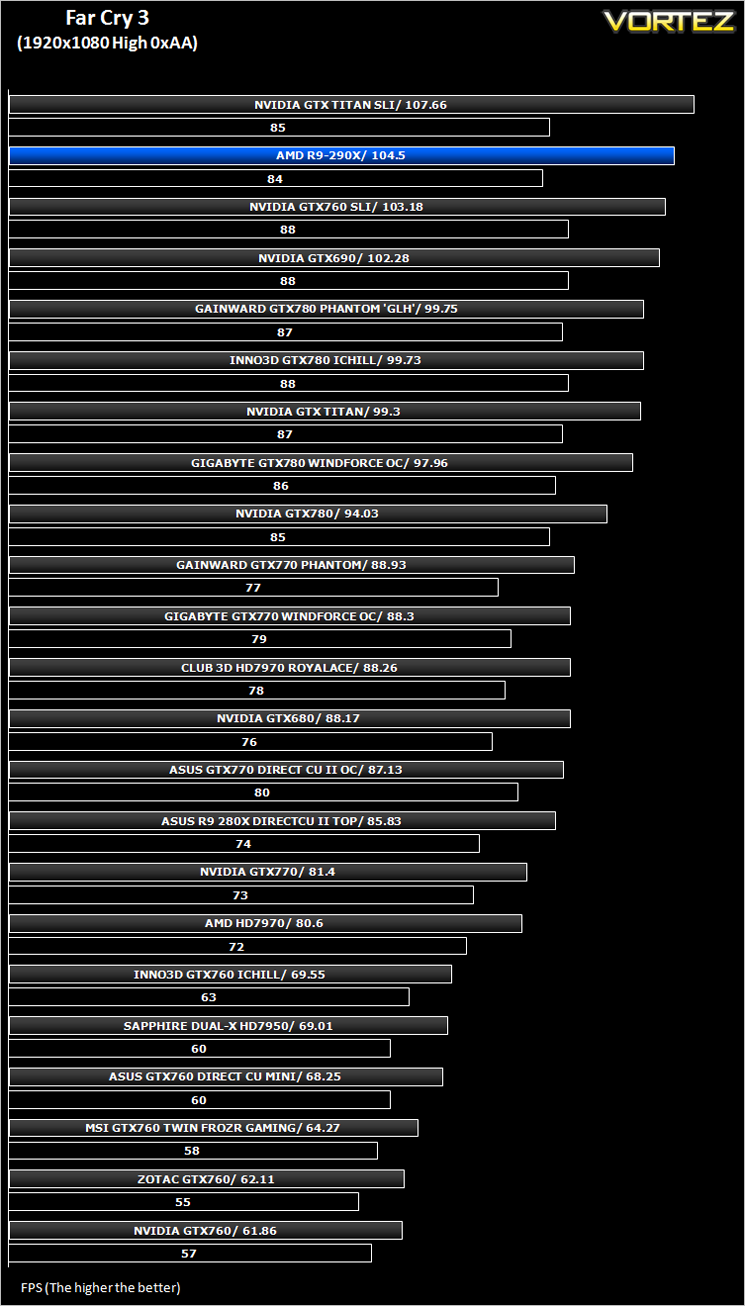
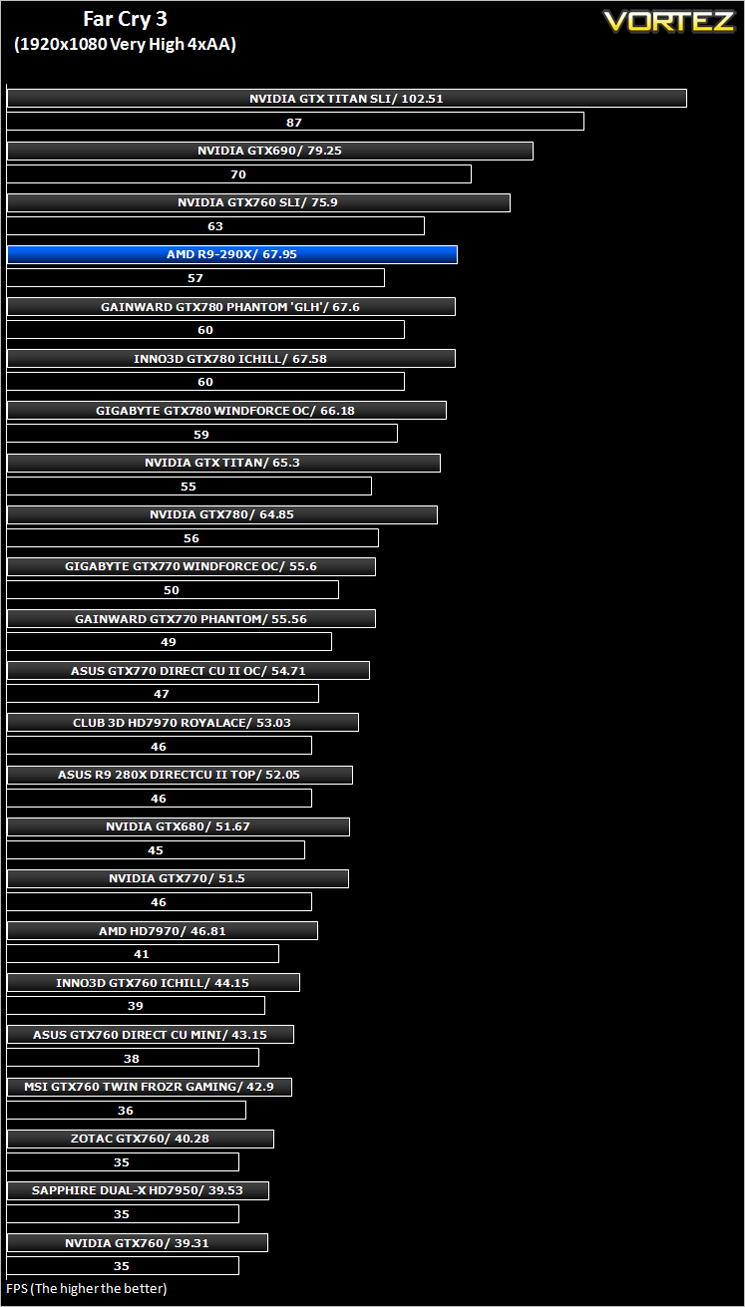
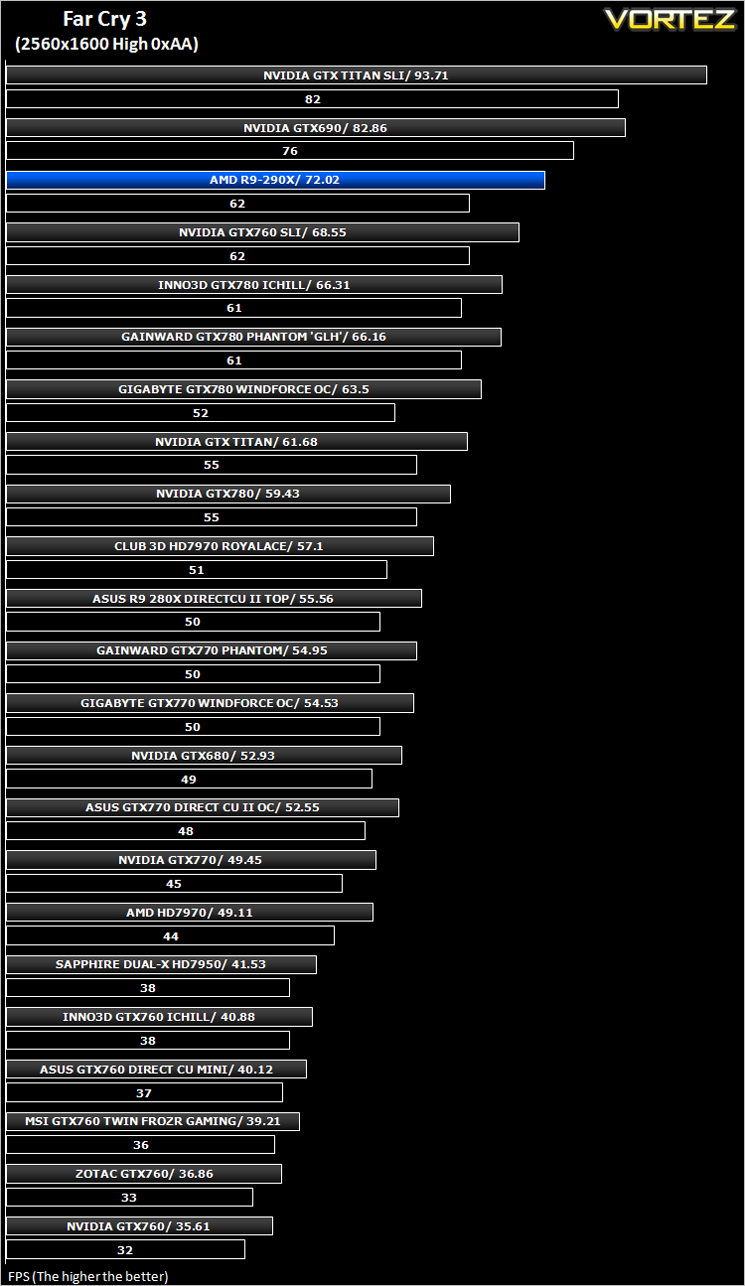
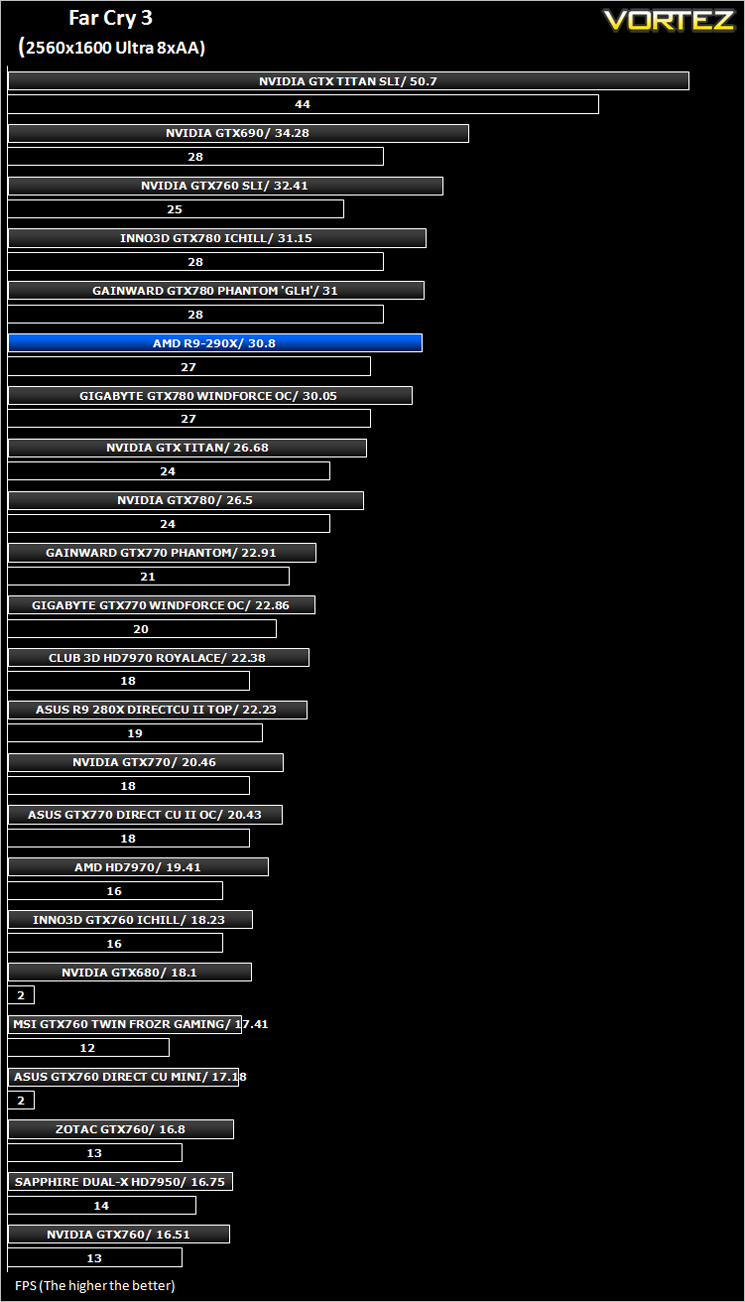
Far Cry 3 (FPS)
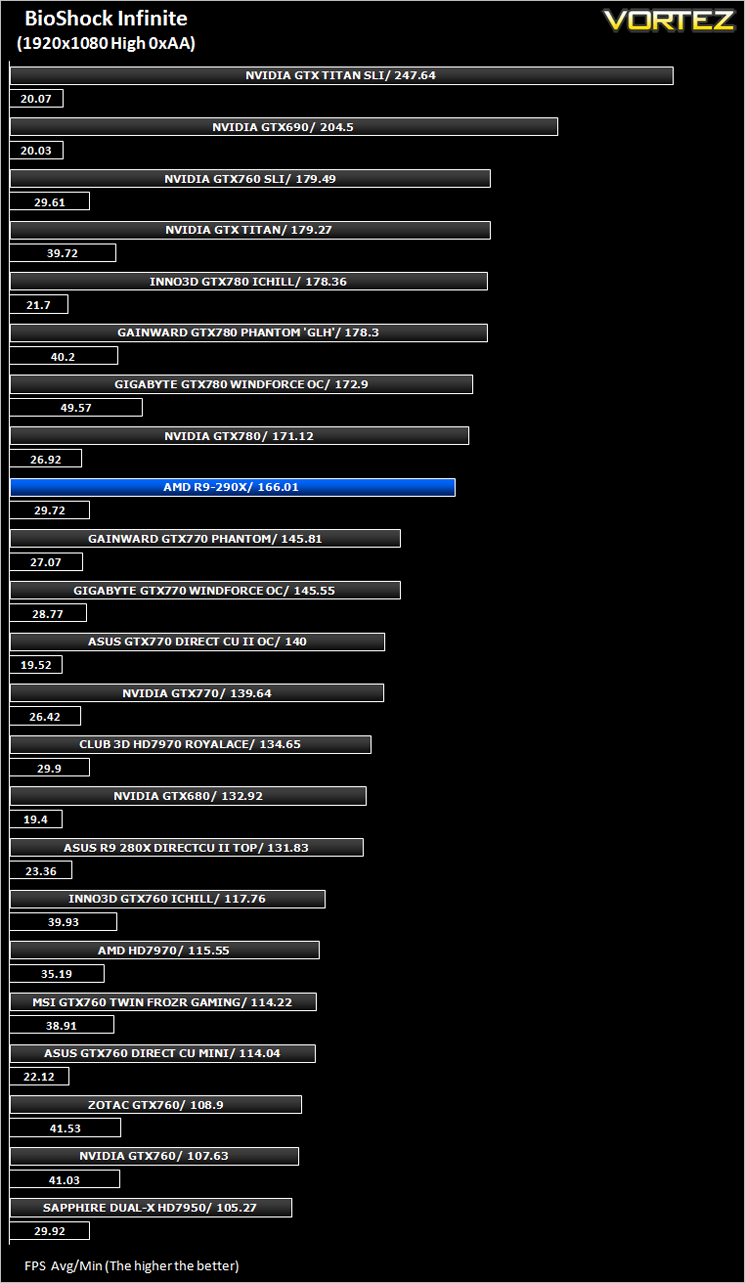
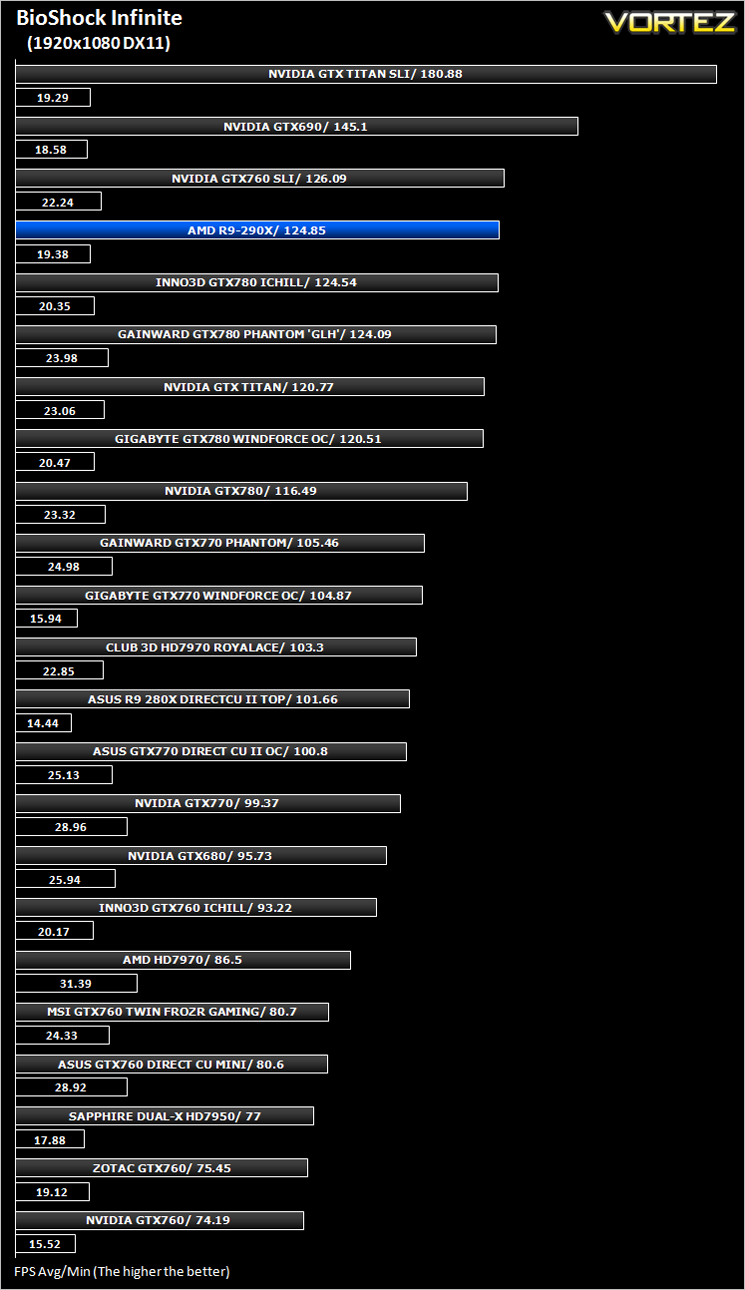
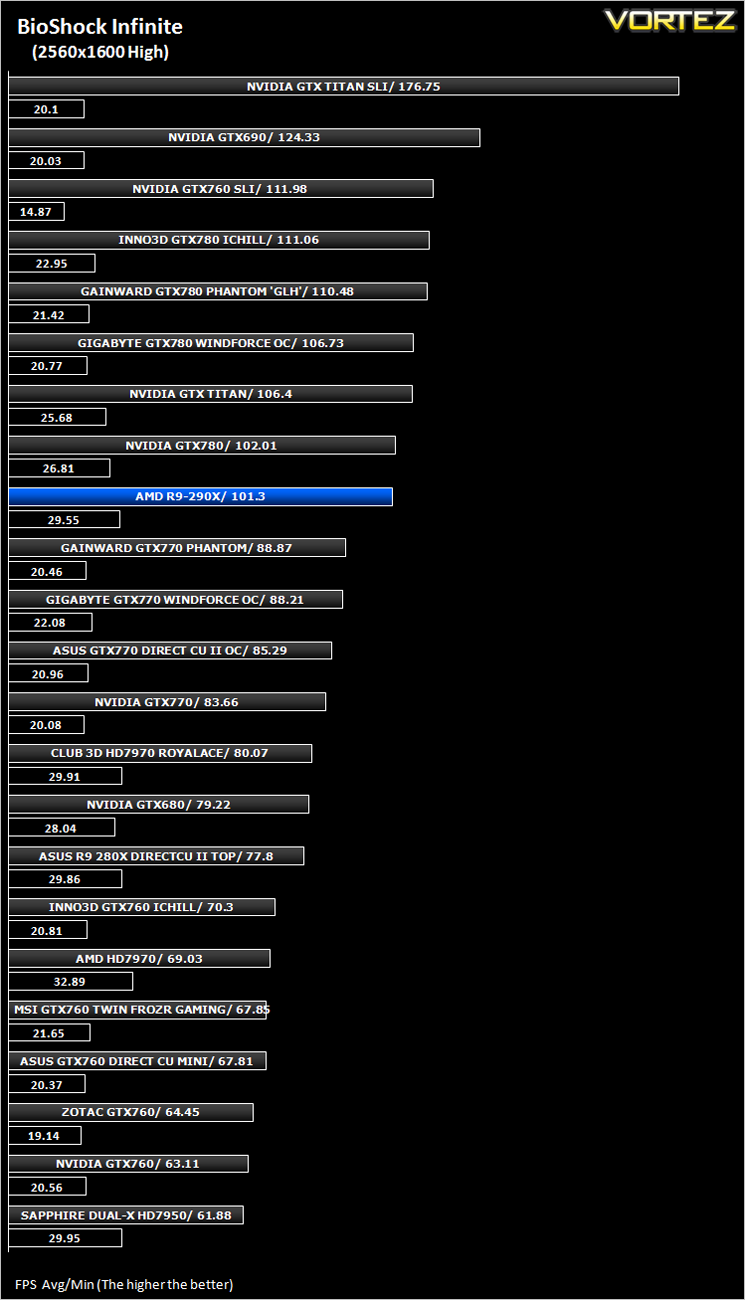
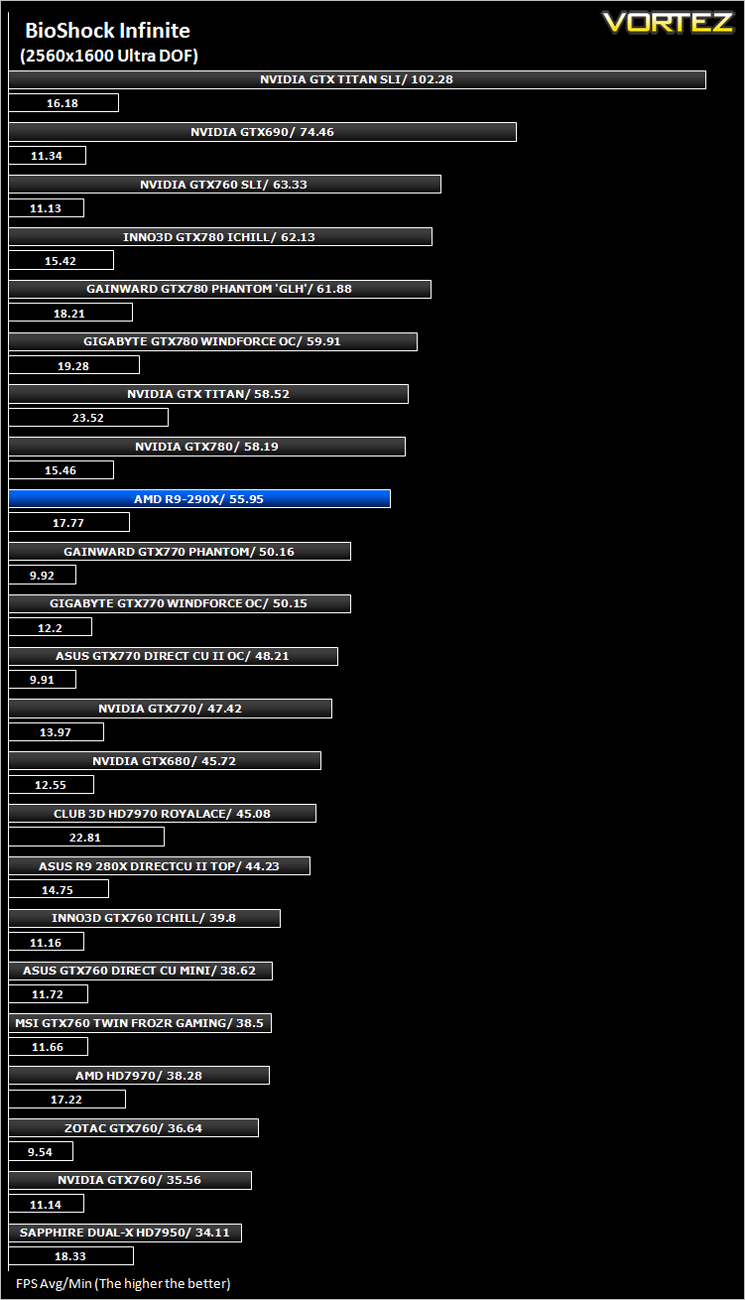
BioShock Infinite (FPS)
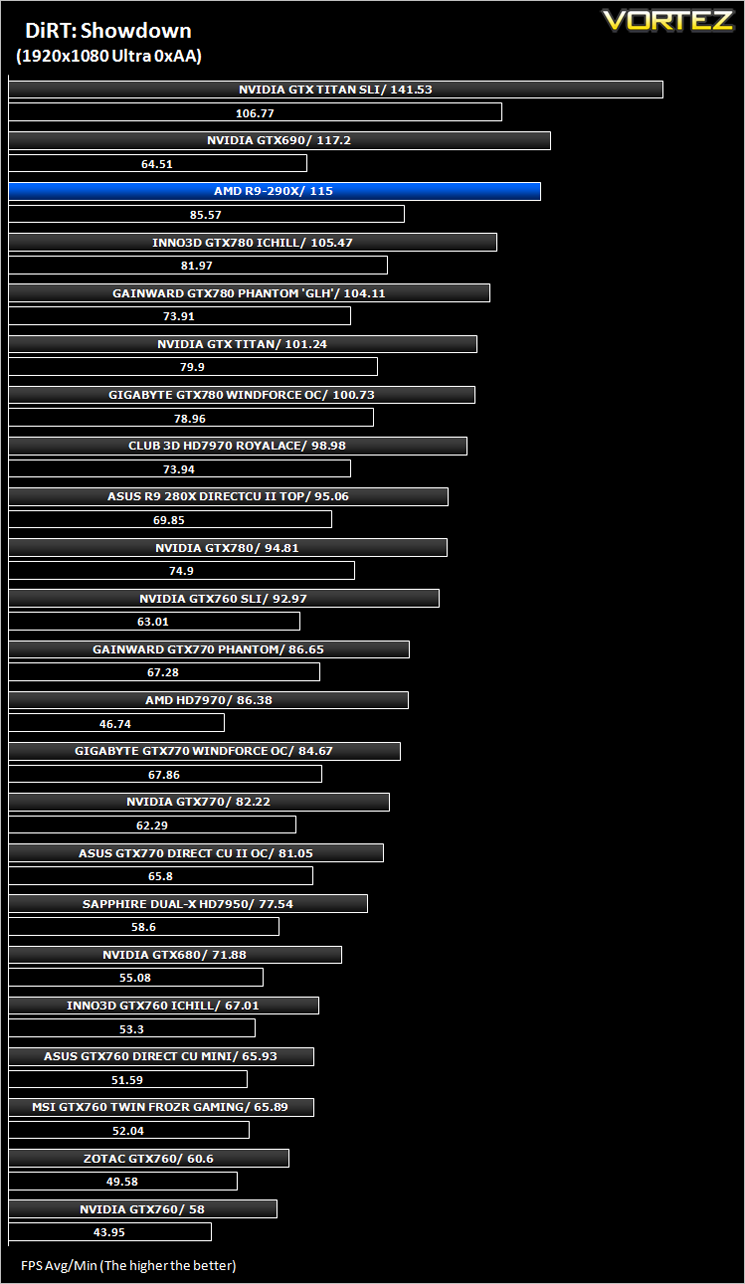
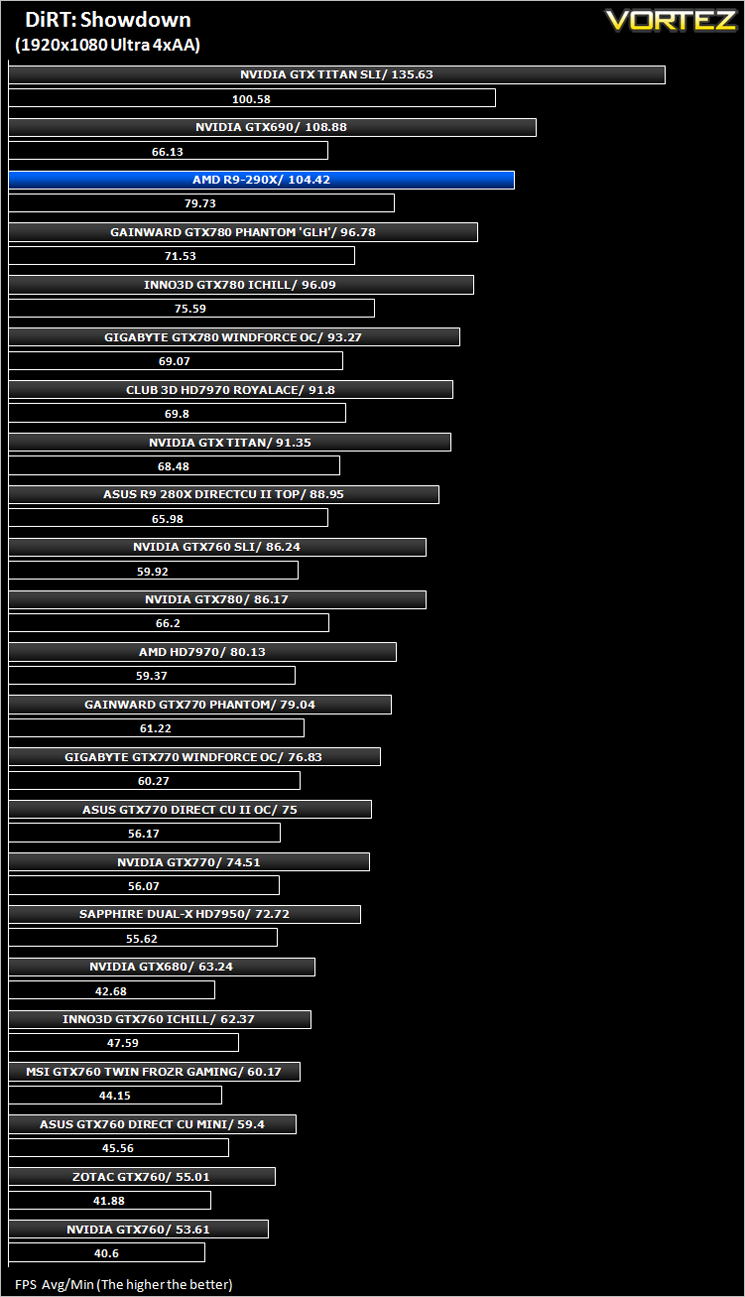
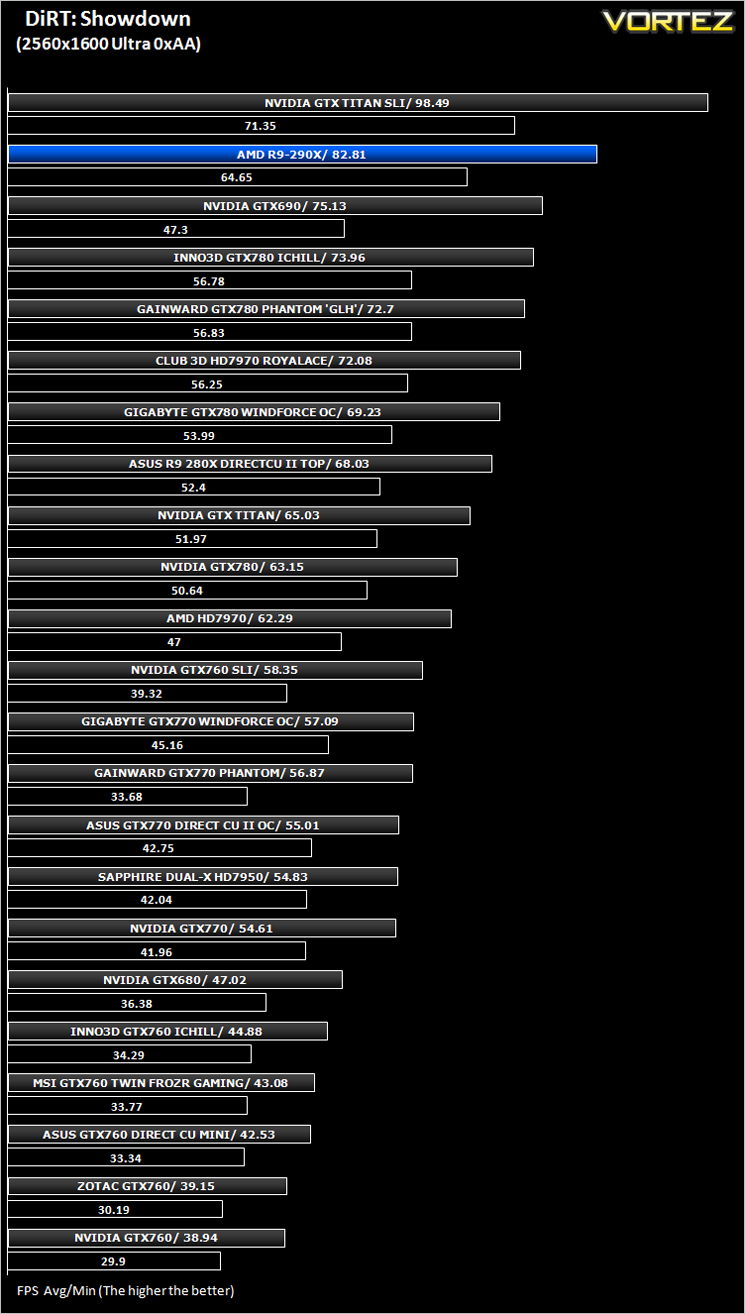
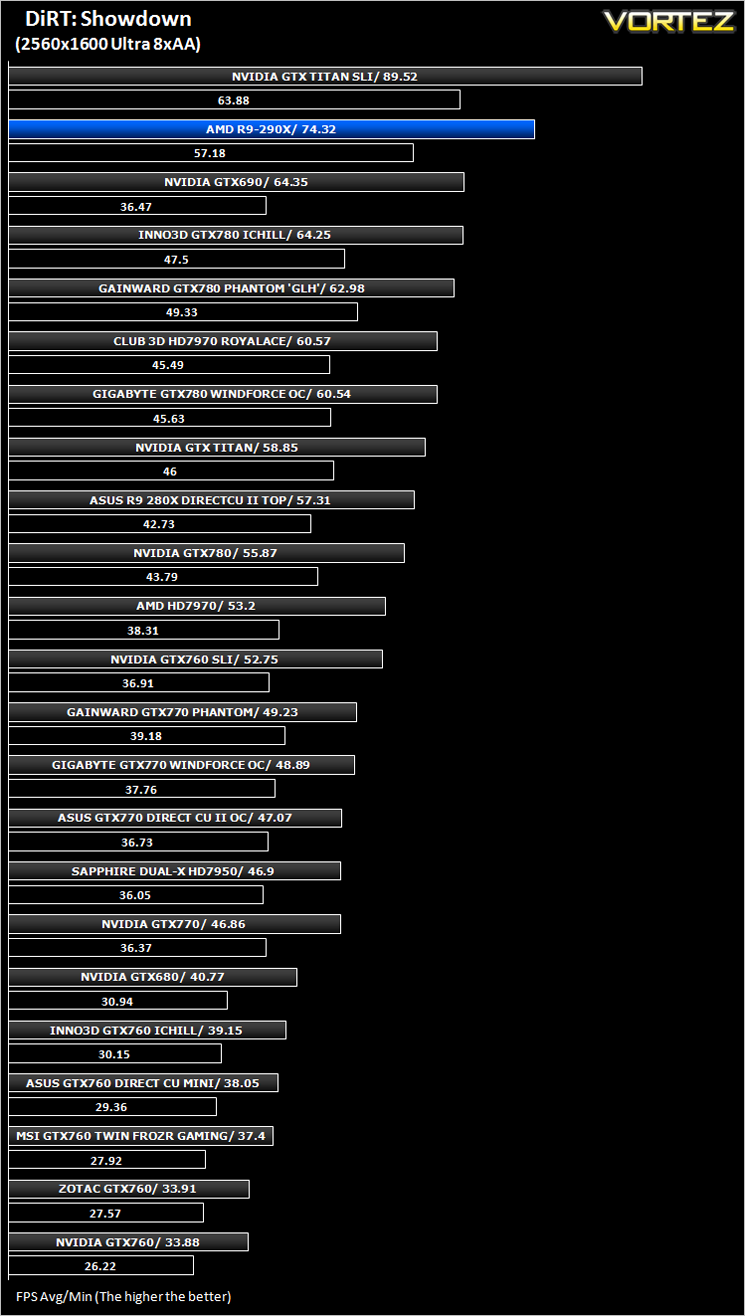
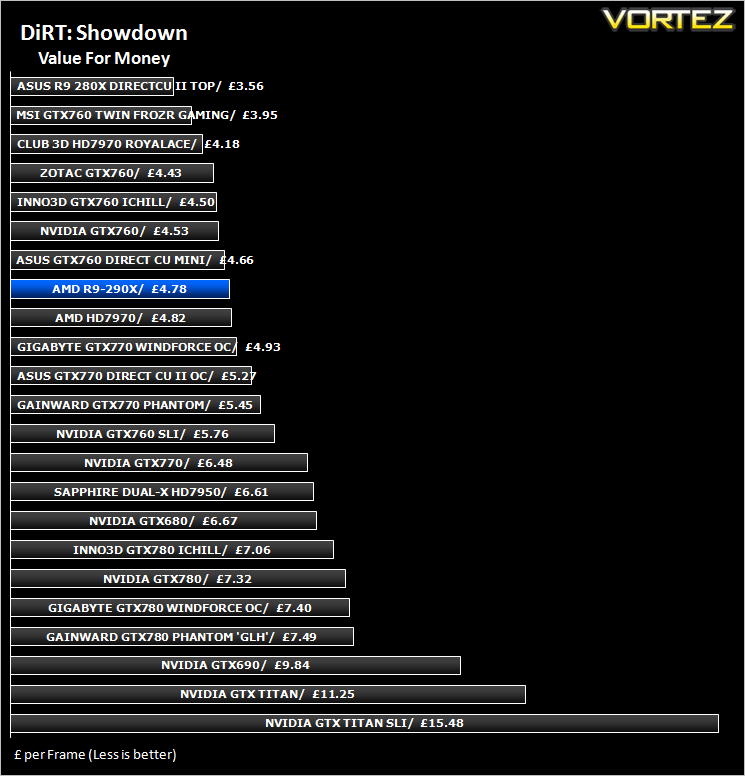
DiRT: Showdown (FPS)
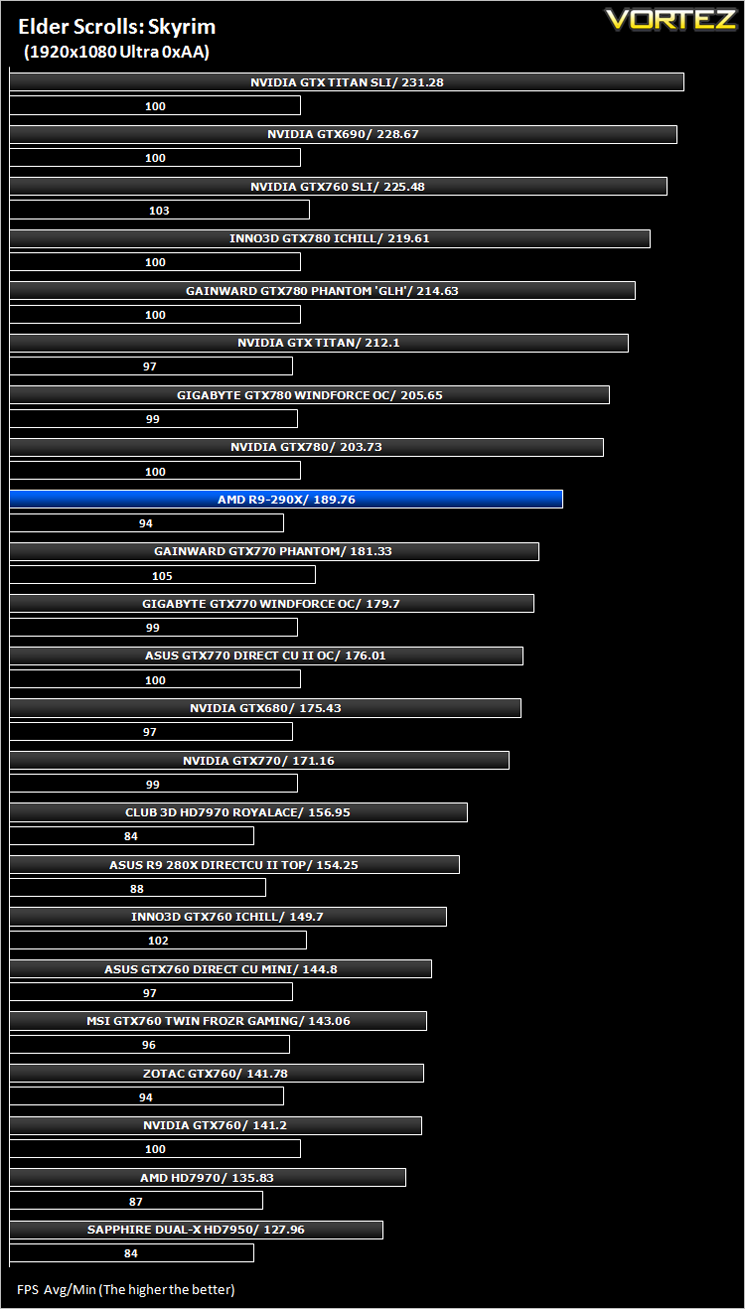
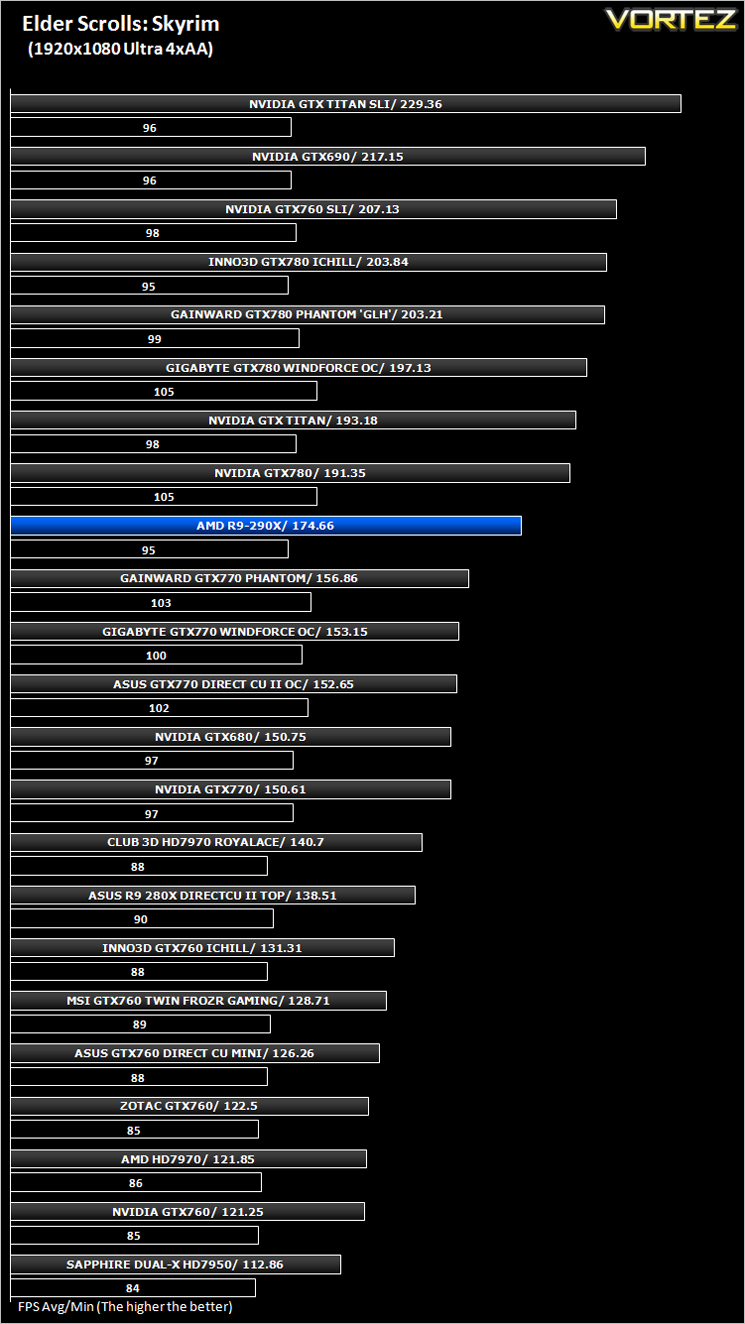
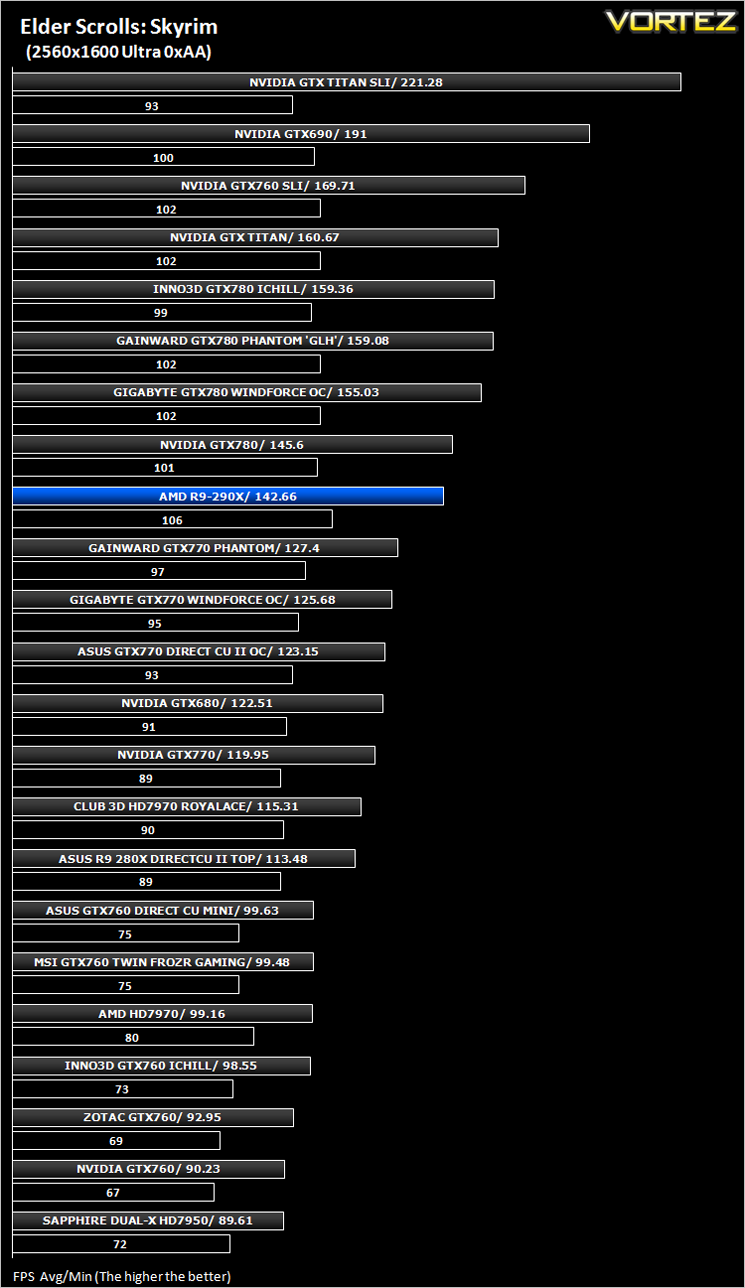
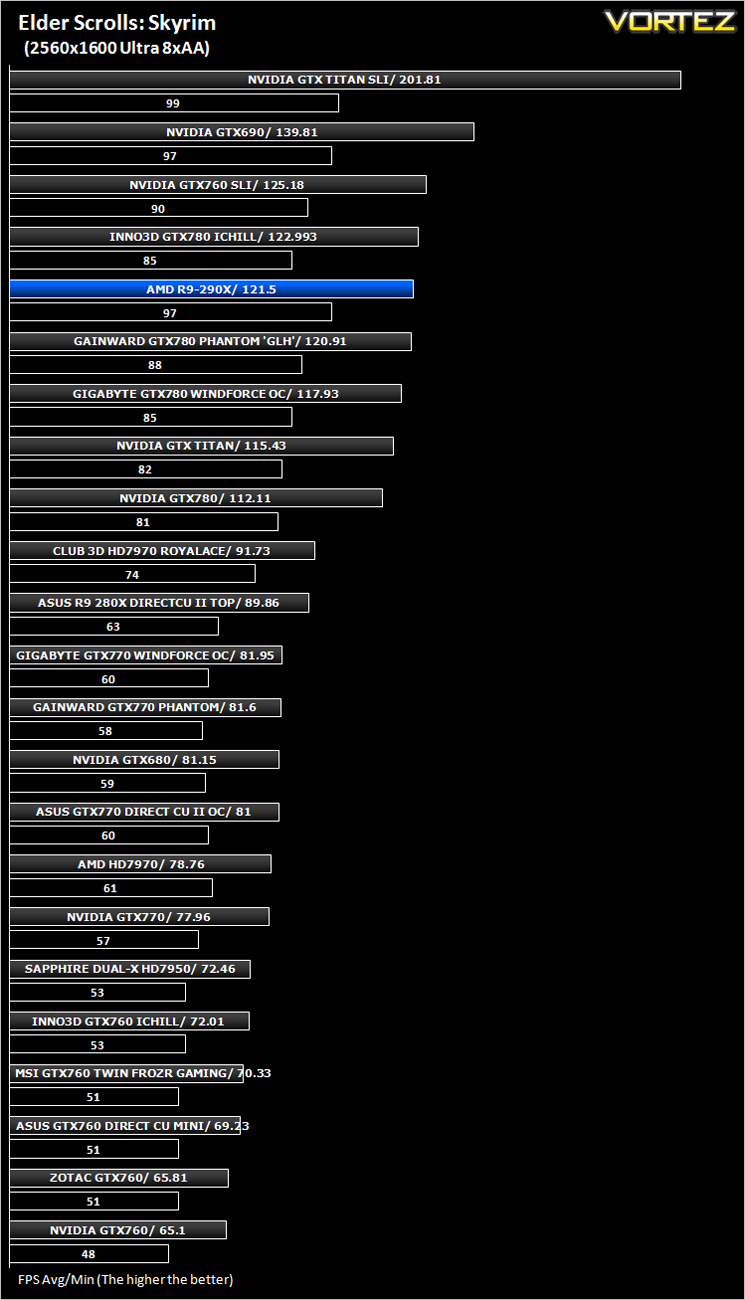
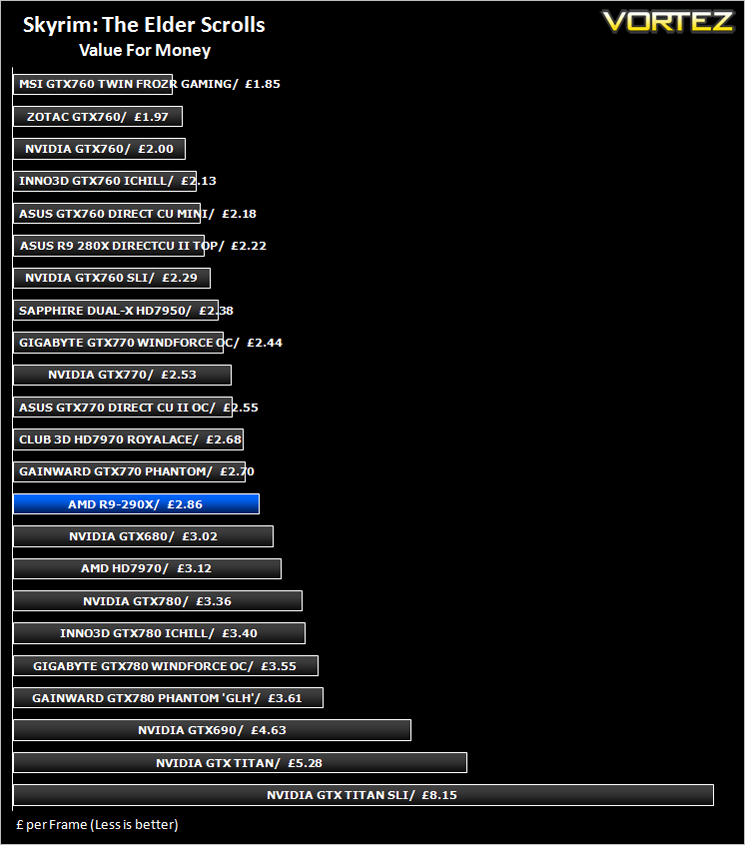
The Elder Scrolls: Skyrim (FPS)
Average and minimum frames per second were measured using Fraps during the drop down passage to Riverwood. V-sync was disabled to allow fluctuating (higher the 60) FPS for these runs. It is however recommended that v-sync is left enabled during normal gameplay due to the games dynamics.
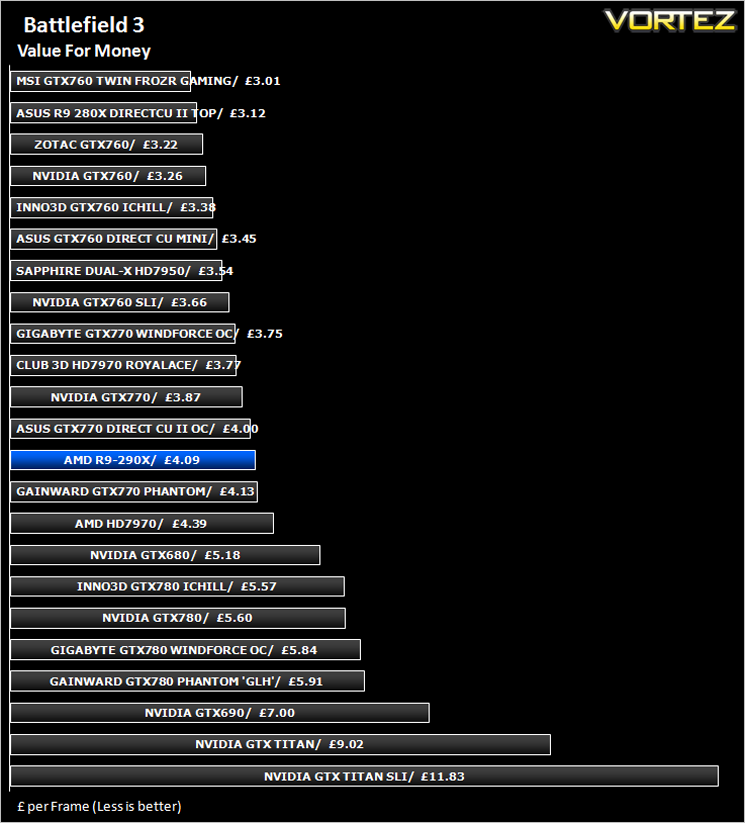
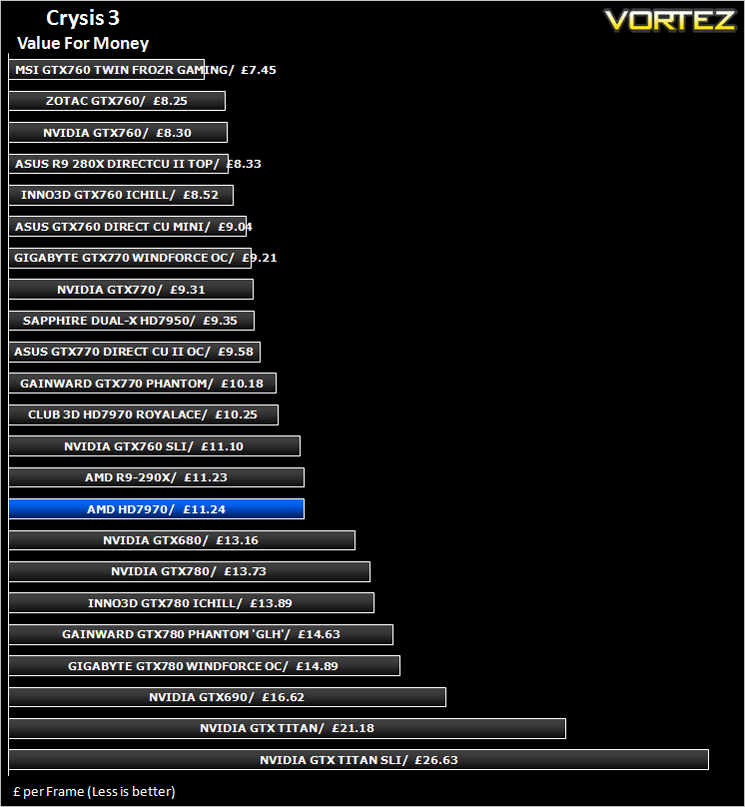
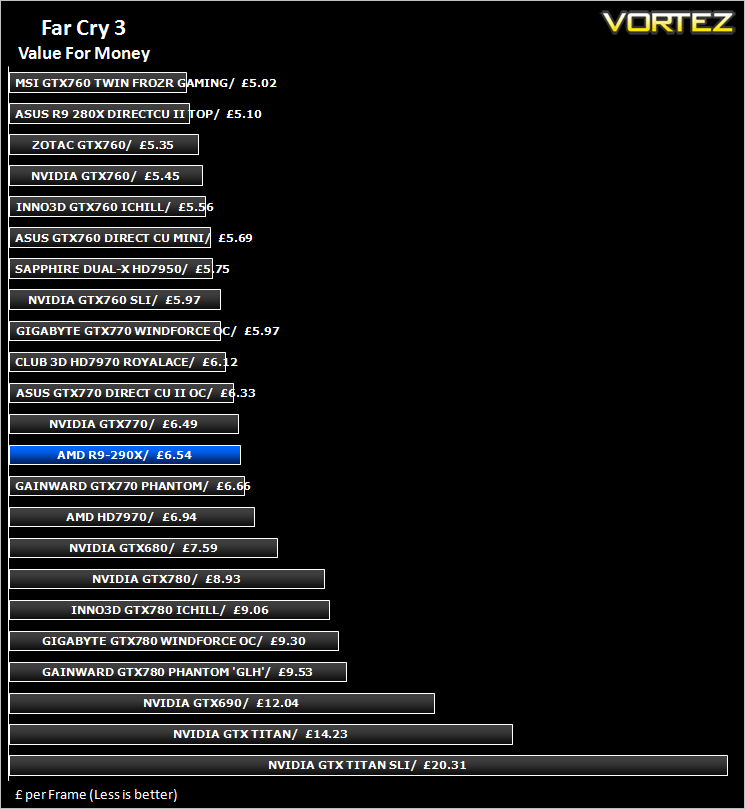
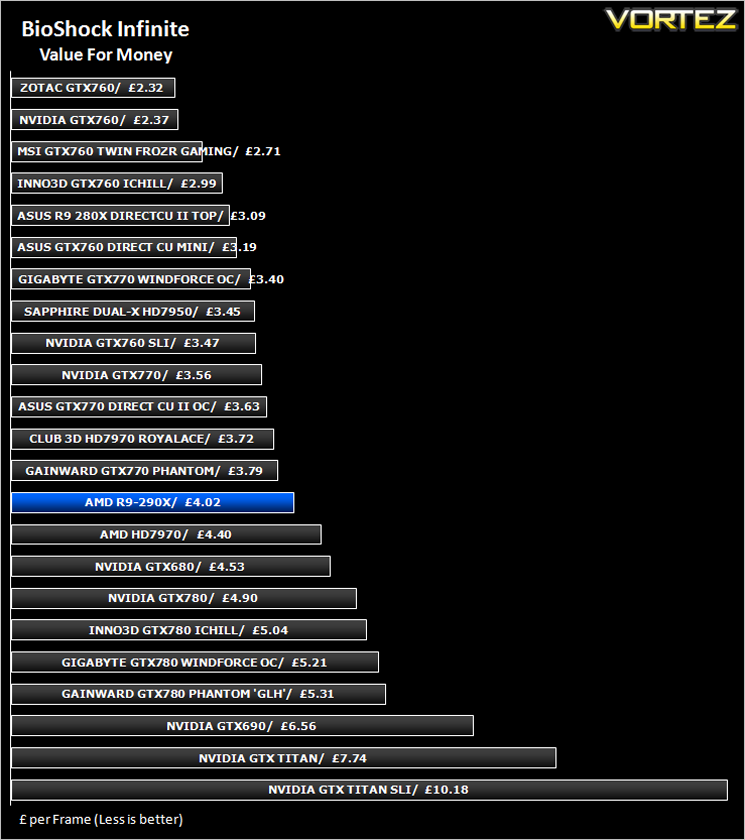
Value For Money
Overclocking
For overclocking the AMD R9 290X we will be trying out the new version of AMDs Overdrive.
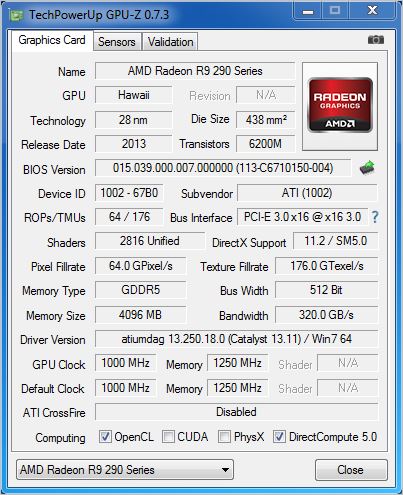
Above is a screenshot of GPU-Z showing the reference clockspeeds. It is worth pointing at this point that you should NOT run an old version of GPU-Z. The older versions interfere with GPU activity, fully loading the GPU even when idle. The GPU-Z revision we ran, while still version 7.3 is a revised ‘fixed’ version. Hopefully by the time of going to press, the new version with be available to the public.
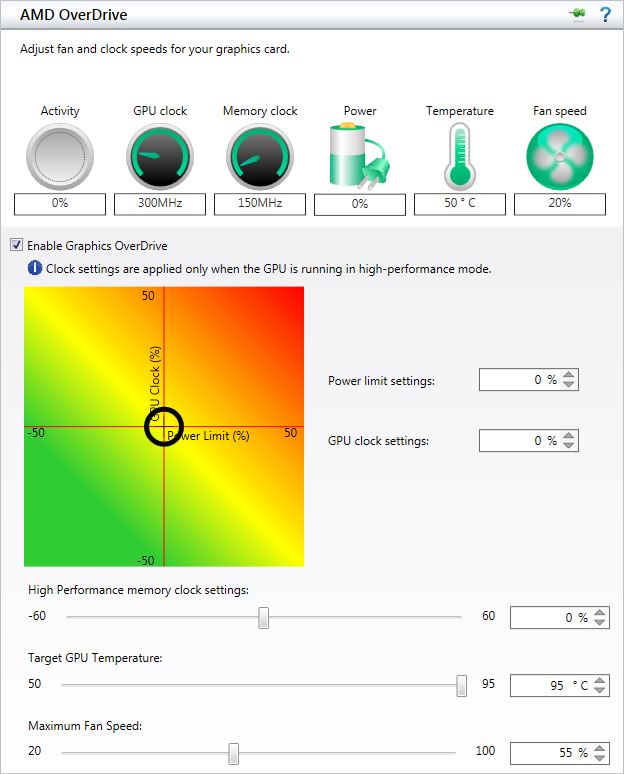
Above is a screenshot of the new overdrive utility found within the Catalyst Control Centre. As you can see, the biggest change is the GPU Clock vs. Power Limit chart. The figure you set is determined where you position the cursor on the coloured square. the further right you go along the horizontal axis, the higher the power limit. The higher up the vertical axis, the higher the clockspeed. Temperatures are also estimated depending on colour (Red = hot, Green = cool).
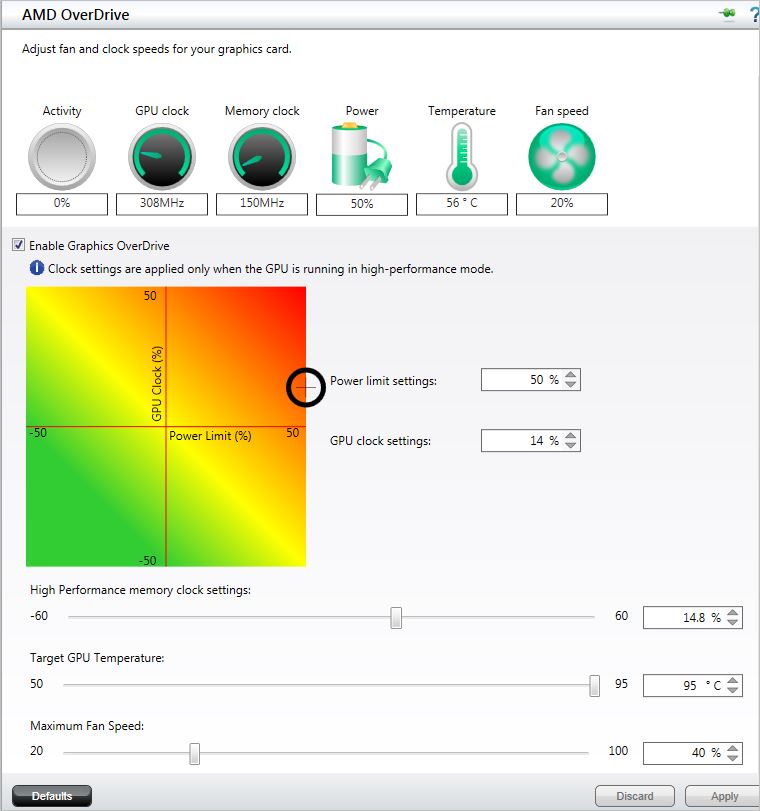
We are not completely sold on this method of overclocking the card. Primarily we have never been a fan of ‘percentage’ increases, instead preferring to work with actual clockspeed figures. We can see the usefulness of it but unless you are a wizard at working out percentages, you will not know what the actual load clockspeed you are actually setting. This can lead to over ambitious clockspeeds being set resulting in a PC lockup. Get too over ambitious with this utility and you will be stuck in a hard boot cycle because overdrive will automatically load the last applied settings upon the next reboot, which if they are not stable, or worse, lock you pc up will mean you cannot enter a full windows environment. Your only option is to enter safemode prevent CCC from starting up through MSconfig to get you back into Windows where you can uninstall and then re install CCC to begin the process again. Overclock recovery on the 290X is less than forgiving when it all goes wrong!
As we mentioned earlier in the review, should fan speed and therefore noise become an issue then you can adjust the fan speed manually. Better still, if the 95c figure is really upsetting you then this can also be lowered to a more comfortable level of your choosing at the expense of noise.
Preferring not to get the calculator out every time we adjust the GPU clock percentage and power limit settings, we ran the latest version of MSI Afterburner to find the best stable clockspeed.
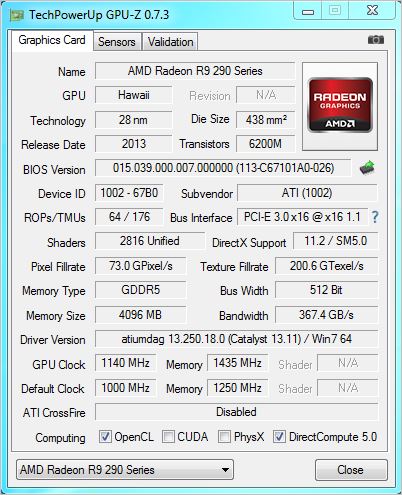
The R9-290X promised so much but sadly, the overclocking results were not the best we have seen. That isn’t to say it is a bad result but going by past ventures, AMD cards have always had plenty left in reserve. This wasn’t the case with the R9-290X which topped out at 1140MHz on the core. The memory overclock was also quite good considering the huge bus width. We did manage 1175MHz on the core but the card was far from stable other than a couple of ‘balls to the wall’ benchmark runs so we reduced the clockspeed until multiple games and benchmarks could be run with no glitches or crashes being encountered. At present we believe the card to be voltage locked. We certainly couldn’t find any software methods of adjusting voltage manually. Whether this is down to the lack of software remains to be seen but even with voltage unlocking, temperatures would obviously be adversely affected which would then mean an increase in noise as the fan and heatsink struggled to keep the temperatures under the maximum 95c threshold.
Conclusion
First let’s clear the performance questions up. It is faster than a GTX780. This is the competitor card AMD were gunning for so it is mission complete as far as that remit goes. Compared against the GTX TITAN, the R9-290X can occasionally hold its head high by putting the NVIDIA Super card in the shade but for the most part it is a few frames behind. Pitch the R9-290X against an overclocked GTX 780, and NVIDIA will come out of the brawl with little more than a thick lip while the 290X will require dental surgery. Both exchange blows but the R9-290X more often comes off worse. Of course most of these statements are game dependent but overall, they stand true. That however is only half the story because there is so much more to summarise.
The biggest negative with the R9-290X is the temperature. While the card is noisy, this will have little impact upon those gamers (and lets face it, this means most of us) who wear a headset for full game immersion. So noise, while a negative, can be avoided if you don’t mind playing around with the settings or for ease, flipping the BIOS switch to a balanced mode. What disturbs us is the temperatures.
95c is toasty whichever way you interpret it. Were someone to ask on an enthusiast forum if something were wrong with their card running at this temperature, most would agree there was. Yet AMD are insistent this temperature is completely fine and there is nothing to be concerned about. To some extent we agree with this sentiment if temperature had no effect on overclocking but as we know, with most components, the cooler they run, the higher the potential for overclocking there usually is. It will certainly be interesting to see how far the GPU can be overclocked with a better cooling design. The card can of course be run ‘cooler’ than 95c with the fan turned up. The same amount of heat is still however being created, it is just being expelled at a different rate which in turn increases the noise level. AMD therefore claim that either low temperatures or acoustics need to be sacrificed, you can’t have both. While this may well be the case with the R9-290X, we would argue there are cards already on the market that outperform the R9-290X yet run faster, quieter and cooler. These are however, more expensive and here is the ace in the hole for AMD, the price.
At £450, the AMD R9-290 represents good value for money when compared to the competition. It is rare that a flagship GPU will fall under £500 so this is most welcome from AMD. A GTX780 will cost £50 more however, for that £50 you could potentially get an overclocked and custom cooled edition which is faster, quieter and cooler. To further rain on AMD’s parade, NVIDIA will shortly be showing off their GTX780Ti so it will certainly be an interesting few weeks before the run up to Christmas.
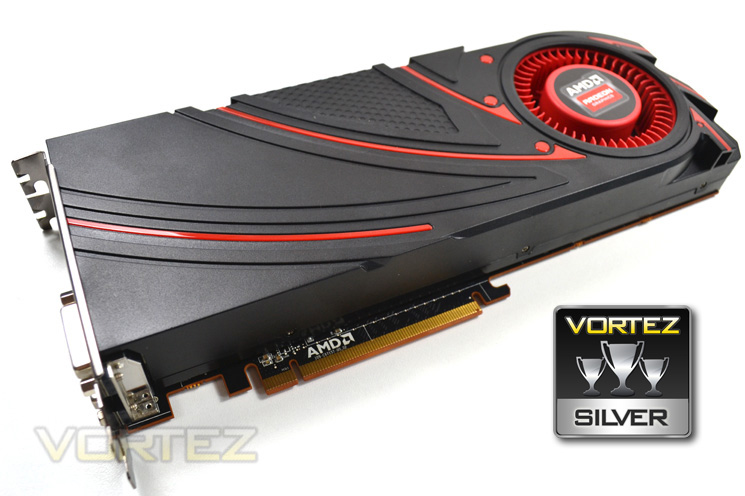
Deciding what award to give the AMD card was a difficult one. On the one hand it consistantly outperformed the reference clocked NVIDIA GTX780. Yet more impressive is that it occasionally bettered the GTX TITAN and importantly for much less money so it is certainly due credit. Performance will only increase with more mature drivers too so the future is bright for this card. The R9-290X is also packed with features, most of which we can certainly see laying the foundations for some truly awesome cards in the future. However the temperatures and the noise, despite reassurances, still leave us feeling a little uneasy. Yes we could lower the target temp but that would mean more noise which few will suffer gladly. We just feel that we are having to make some form of sacrifice on some level be it temperatures, noise, aesthetics or most importantly against the factory overclocked GTX780’s – performance. For a flagship card there should be no sacrifice and no compromise. For this reason the R9-290X will have to settle for Silver. We look forward to custom cooled varieties in the future which we are confident will fair much better and on an equal playing field. For now AMD will have to revel in the success of beating a like for like card and beating it consistently which is an achievement they should be very proud of.
To summarise:
The AMD Radeon R9-290X is a blisteringly fast GPU capable of holding its own against the best GPUs out there. This speed however comes at a price, not the one you pay at the checkout which is actually quite reasonable but the one you will pay later in life when your hearing fades! Be safe in the knowledge though that the AMD R9-290X will keep you warm. Whether that is a good or bad thing only time will tell.
+ Blistering performance
+ Good price point
+ Huge array of features
+ No Crossfire bridge required
+ Support for up to 6 screens
Cons
– Noisy
– Hot
– Starting to look a little dated


