Has AMD finally got something to challenge NVIDIA in the high-end GPU segment? We take a look at the new ‘Big Navi’ RX 6000 Series by way of the RX 6800 graphics card.

Product on Review: Radeon RX 6800
Manufacturer: AMD
Street Price: 579 USD | 550 GBP | 1000 AUD
You’d be hard pressed to find a more packed month for AMD than November 2020. Not only have we seen the debut of their Ryzen 5000-series CPUs – complete with performance that finally dominates the desktop PC market – today brings availability of the long-awaited ‘Big Navi’ Radeon RX 6800-series. And if anything their challenge in this arena is even more stern than that so recently overcome by their Zen 3 architecture; sitting atop a mountainous position in the market like a dragon on its hoard is arch-rivals NVIDIA, wielding the GeForce RTX 3000-series.
In July 2019 the first generation of AMD’s RDNA architecture launched as the RX 5700-series. Comprising a chip family codenamed Navi, it entered at a newly formed <$450 ‘mid-range’ to compete with the RTX 2060 and 2070 on price and rasterisation performance. They acquitted themselves well, more than holding their own, but left NVIDIA to their own devices at the extreme performance end of the spectrum. And, of course, let them corner the market in the first round of hardware accelerated ray traced gaming components.
Somewhat fortunately for AMD the vast swathe of games with native ray tracing support failed to materialise in the intervening years, despite the adoption of Microsoft’s DirectX Ray Tracing API and DirectX 12 Ultimate. A new generation of consoles will stimulate development however, and AMD needs to be ready on the PC.
RNDA 2-based GPUs were unveiled in October and formally announced on October 28th, with the architecture launching not only in RX 6800-series desktop GPUs (affectionately dubbed ‘Big Navi’), but also both the Xbox Series X and Playstation 5. Wider use of the architecture may spur greater optimisation for AMD’s silicon on PC as well as console, but that’s to be determined. Timing might be critical, but did AMD get in under the wire?
The headline for this launch is therefore two-fold: ‘AMD Radeon Returns to the High End’ and ‘Ray Tracing Arrives on Radeon’. That latter part is important; through their RDNA 2 architecture ray tracing will be arriving on Xbox Series X and PS5 simultaneous with AMD-powered PCs.
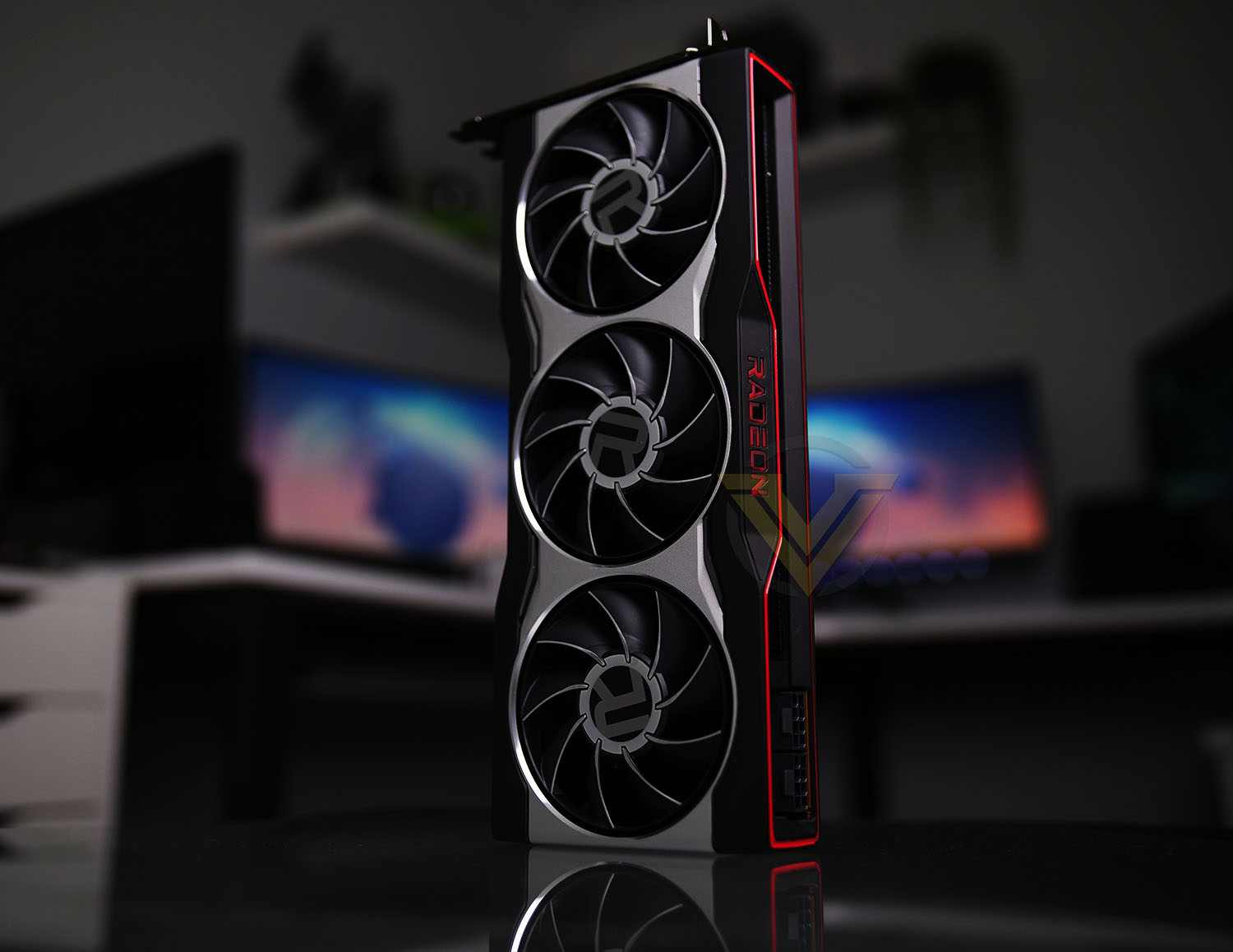
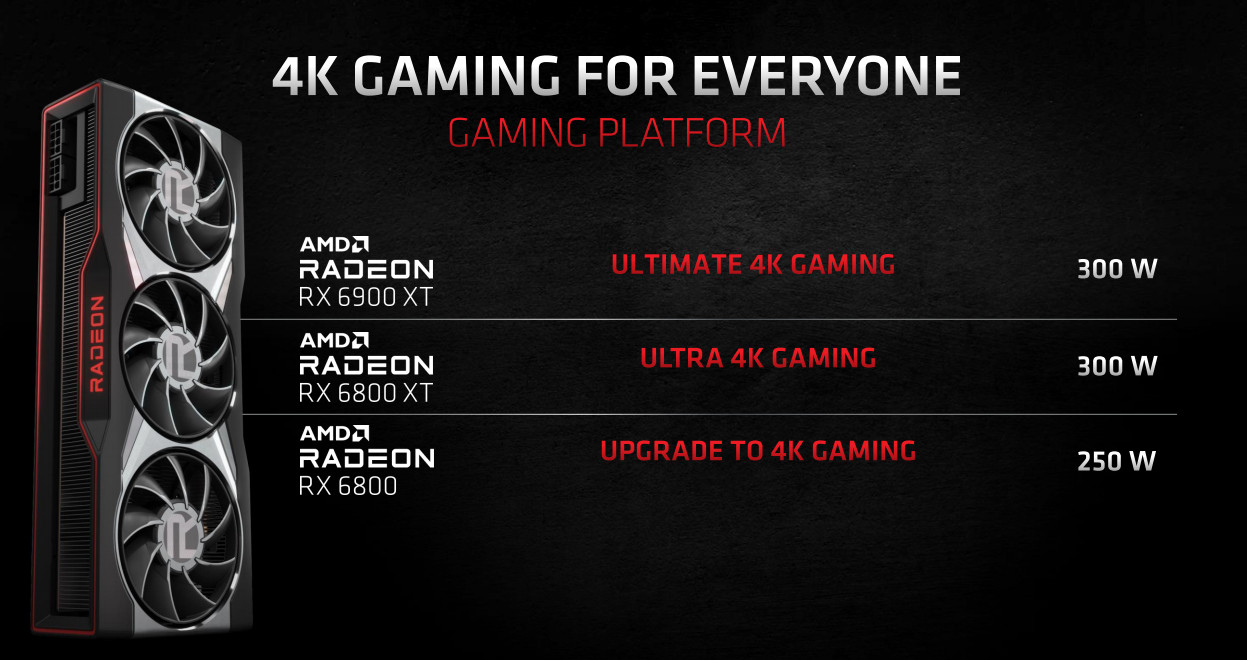
Today’s launch encompasses the Radeon RX 6800 and RX 6800 XT, while the flagship $999 RX 6900 XT will follow in early December. They form a trifecta of cards situated in the still-emerging ‘gaming enthusiast-to-prosumer’ high-end market above an MSRP of $500. The RX 6800-series cards take on the GeForce RTX 3070 and 3080 series cards respectively, although at slightly different price points, and may finally see the red team compete on raw performance.
In this review we’re putting the Radeon RX 6800 through its paces. The card is billed as AMD’s entry-point into 4K gaming, but may also find a sweet-spot in high frame rate gaming at 1440p (leveraging FreeSync, naturally) where its ray tracing capabilities might be better suited. It’s also the only member of the 6000-series announced thus far to sit within a 250W TDP envelope (albeit at the limits of that), making it a more feasible slot in upgrade rather than one that would also require a higher rated power supply and/or augmented case cooling.
At $549 it has an MSRP $50 higher than the RTX 3070, but finding any 30-series card has proved difficult since they launched. Initial in-house benchmarks showed the RX 6800 exceeding the RTX 2080 Ti, a card that the RTX 3070 trades blows with, so early indications are good. Should performance be up to the task and retail availability widespread then AMD are well placed to capture significant sales and market share.
AMD on their Radeon RX 6800
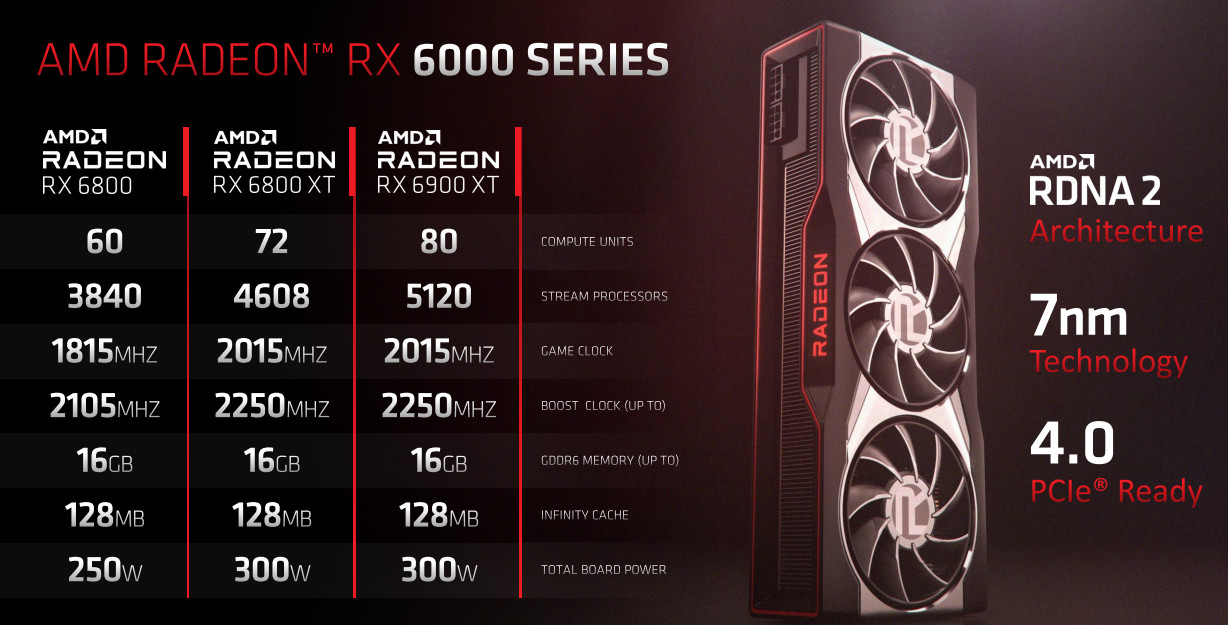
The AMD Radeon™ RX 6800 graphics card, powered by AMD RDNA™ 2 architecture, featuring 60 powerful enhanced Compute Units, 128 MB of all new AMD Infinity Cache and up to 16GB of dedicated GDDR6 memory, is engineered to deliver ultra-high frame rates and serious 4K resolution gaming.
Technical Specifications
Below are the technical specifications of the reference Radeon RX 6800:
GPU:- Navi 21
Shader Units:- 3840
Video Memory:- 16GB GDDR6
Memory Bus:- 256-bit
Engine Clock Boost:- 2105MHz
Memory Clock:- 16000MHz Effective
PCI Express:_ 4.0
Display Outputs:- 2x DisplayPort 1.4, 1x HDMI 2.0, 1x USB Type-C
Recommended Power Supply:- 600W
DirectX:- 12 API feature level 12_2
OpenGL:- 4.6
Cooling:- Triple-fan
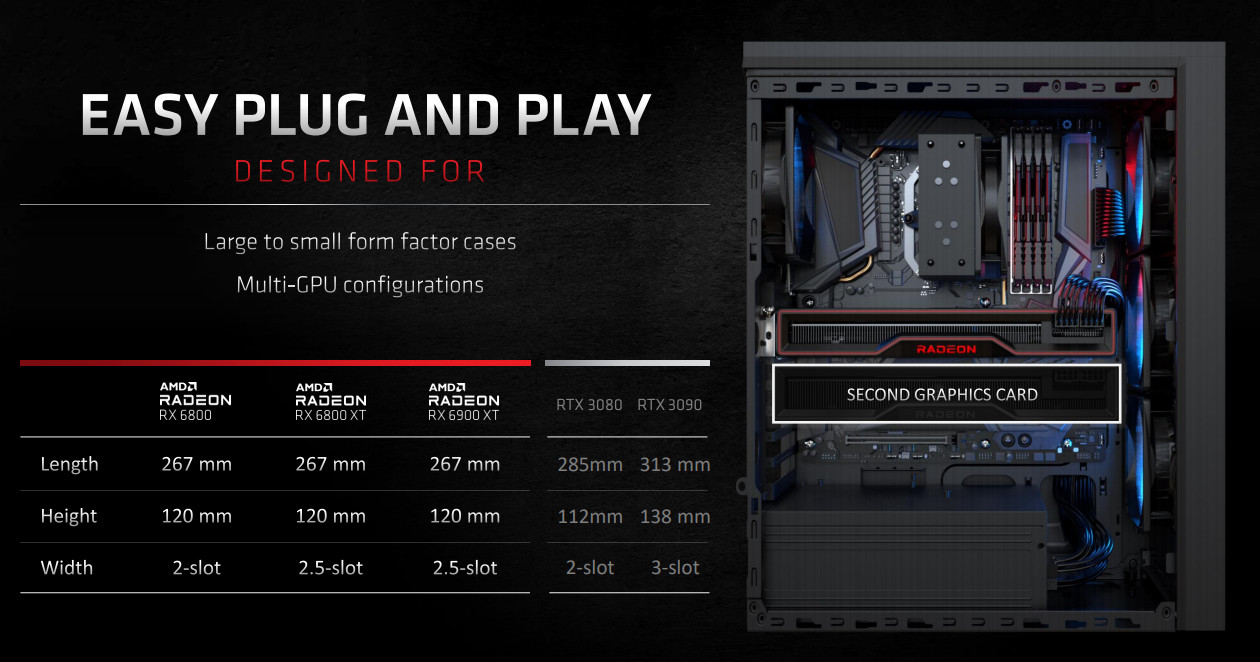
Slot Size:- 2
Supported OS:- Windows 10
Card Length:- 267 x 120 x 40mm
Shader Units:- 3840
Video Memory:- 16GB GDDR6
Memory Bus:- 256-bit
Engine Clock Boost:- 2105MHz
Memory Clock:- 16000MHz Effective
PCI Express:_ 4.0
Display Outputs:- 2x DisplayPort 1.4, 1x HDMI 2.0, 1x USB Type-C
Recommended Power Supply:- 600W
DirectX:- 12 API feature level 12_2
OpenGL:- 4.6
Cooling:- Triple-fan
Slot Size:- 2
Supported OS:- Windows 10
Card Length:- 267 x 120 x 40mm
Comparative Specifications
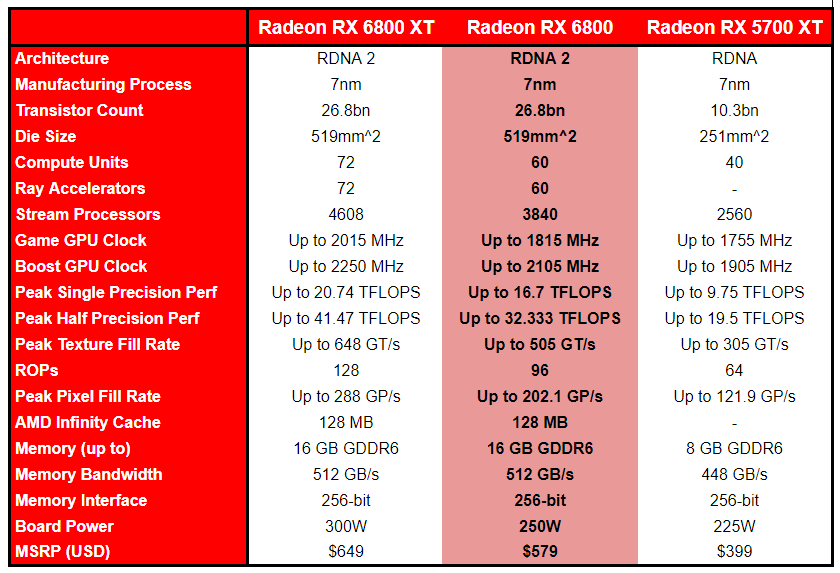
‘Big Navi’ RX 6800-series GPUs are a significant step up in size and complexity for AMD compared to the prior generation. Each is equipped with a Navi 21 GPU, but the full-fat version is reserved for AMD’s flagship Radeon RX 6900 XT. Despite 10 and 20% of shaders being disabled on the RX 6800 XT and 6800 in turn, this Big Navi GPU still greatly exceeds the performance potential of their previous best.
Big Navi, or Navi 21 to give it its codename, is by some margin the largest GPU AMD have developed in years. That being said it’s still smaller than the flagship Ampere GPU (built on 8nm and with more transistors), meaning that AMD could have the advantage in yields and manufacturing costs. All of these factors will go into the price calculation, and hopefully may indicate that availability is more prevalent than NVIDIA’s cards were at launch.
A major talking point during this generation’s launch cycle has been power draw. Until this year 250W was considered to be the top end of listed Total Board Power, and was where the RTX 2080 Ti came in at in 2018. NVIDIA’s RTX 30-series redefined what was acceptable for a performance desktop GPU, hitting a TDP of up to 350W on their flagship. The RX 6000-series follow suit, reaching a Total Board Power of up to 300W; appreciably less than the RTX 30-series but still a significant increase over what had come before.
The Radeon RX 6800 however sits within a TDP of 250W, the same as the RTX 2080 Ti. As a consequence, it will be easier for your average consumer to upgrade their desktop system with this card without also needing to improve PSU and case cooling alongside it. Echoing this concept is the recommendation of a 650W PSU, a rating that’s far more common than the 750W necessary for the RX 6800 XT, 6900 XT, RTX 3080 and RTX 3090. Plus, RX 6000-series cards utilise standard 8-pin PCIe power connectors rather than proprietary solutions in unorthodox locations, so that a turn up for the books.
One technology that the RX 6800-series is sticking with from the previous generation is GDDR6 memory. Both SKUs are equipped with 16GB that peaks at 16Gbps over a 256-bit bus, and so far AMD are avoiding a costly transition to GDDR6x, but they still have a few tricks up their sleeve when it comes to boosting effective memory bandwidth.
Display I/O will tend to vary with model once the non-reference cards are released, but the reference card adds support for two new standards alongside DisplayPort.
AMD have opted to support the 10Gbps implementation of HDMI 2.1 with Fixed Rate Link (FRL), allowing resolutions of up to 8K60 / 4K120Hz through a single cable. This is not the full 48Gbps implementation of the spec, but will be sufficient for the vast majority of users in the market.
Joining HDMI 2.1 and DisplayPort on the I/O panel is USB Type-C. This connector’s primary purpose is to support display over USB for HMD VR devices – VirtualLink may be dead for all intents and purposes, but its legacy lives on. This connector is likely the first target for AIC partners searching for means to cut cost on their non-reference implementations, as it was with the RTX 20-series in 2018.
PCIe 4.0 returns of course, and with new innovations such as DirectStorage in the pipeline this additional bandwidth may begin to have value in the not too distant future. PCIe 4.0 is currently exclusive to AMD’s Ryzen platform in the desktop market so it’s no surprise that it remains a major selling point of the architecture, but Intel should be releasing their own PCIe 4.0 CPUs in 2021.
With that overview concluded it’s time to go a bit deeper.
Features – The RDNA 2 Compute Unit
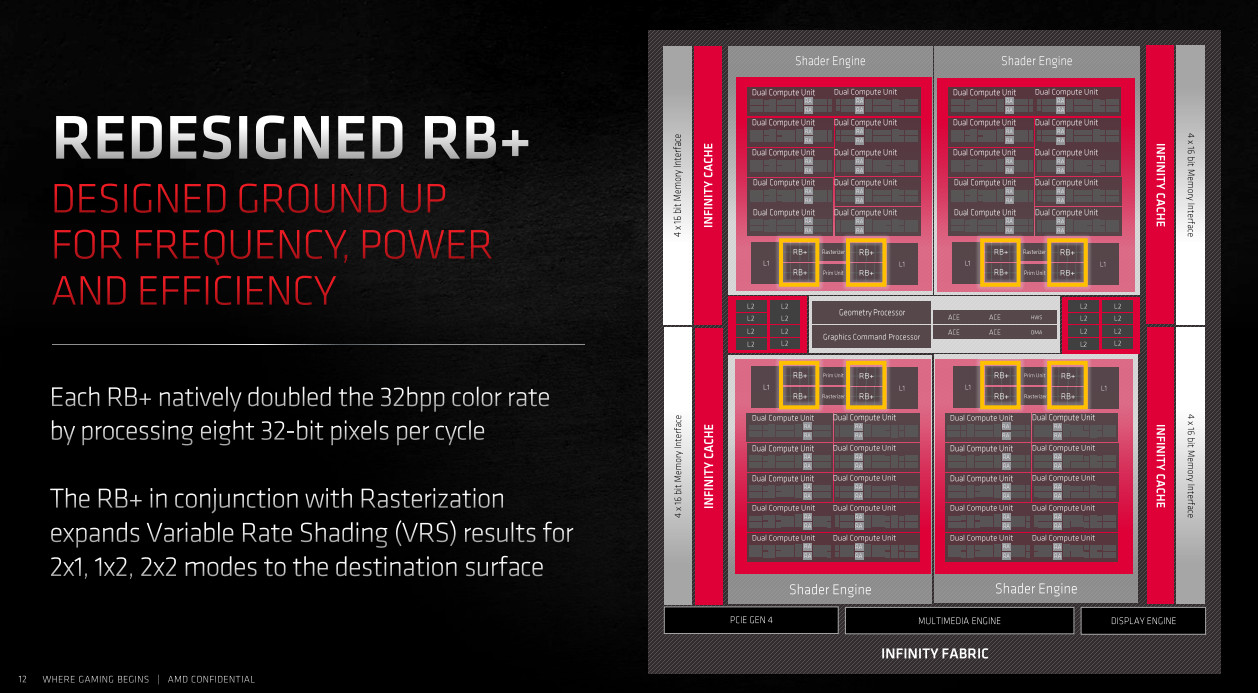
The Navi 21 GPU at the heart of the RX 6800-series has been manufactured using TSMC’s now mature 7nm process. AMD’s experience with this node in both CPU and GPU design has all fed into optimisations made to RNDA 2 for high frequency operation at low power, as well as architectural tweaks that could give it an edge. And as it turns out, that’s not the only design aspect they’re using as inspiration for this generation of graphics.
Improvements made over the first generation of RDNA have led to a very significant frequency uplift of 1.3x over the RX 5700-series, and that frequency improvement can be leveraged more widely across the die silicon. The all-important performance per watt metric has also been improved by as much as 54%, allowing AMD to squeeze more out of the silicon at all power levels. This could spell interesting things for inveterate undervolters keen to turn their new behemoth into a tame lapdog that merely sips when drawing power.
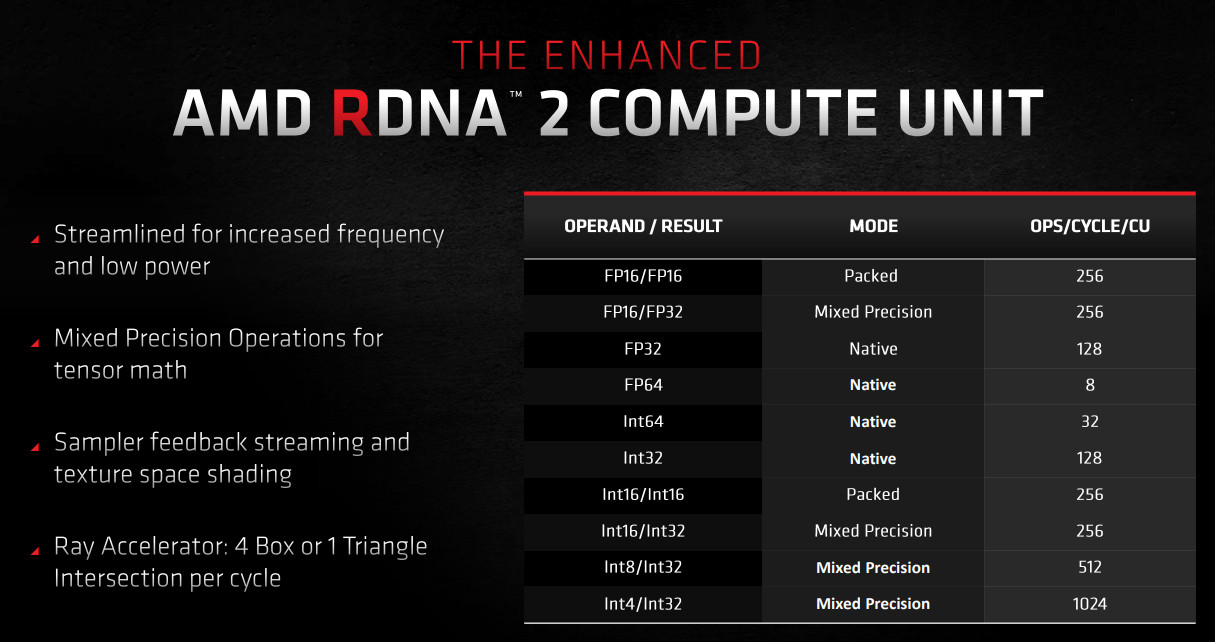
RDNA 2 performance enhancements are more than just skin deep however.
COMPUTE UNIT ENHANCED
A core building block of AMD’s RDNA GPU architecture, the Compute Unit incorporates key component units such as the stream processors (64 per CU), registers, scaler units and local caches. Improving the operation of this component will have performance ramifications throughout the rendering pipeline, and as noted RDNA 2 optimises it for much higher operating frequency.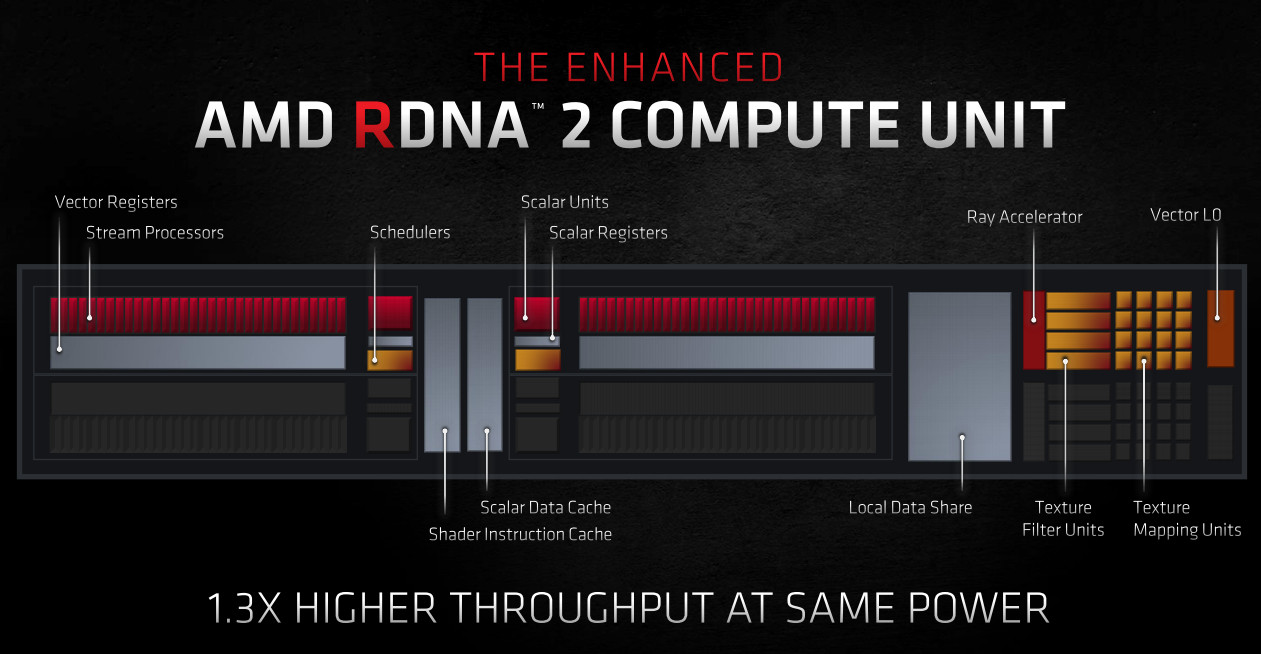
The RDNA 2 CU is also more capable in its approach to mixed precision workloads. FP32, FP64, Int32 and Int64 remain native to the chip, but other data are more widely accepted as mixed precision structures. These structures have applications beyond standard rasterisation and compute, including tensor math, which are increasingly important for a next-gen approach to rendering.
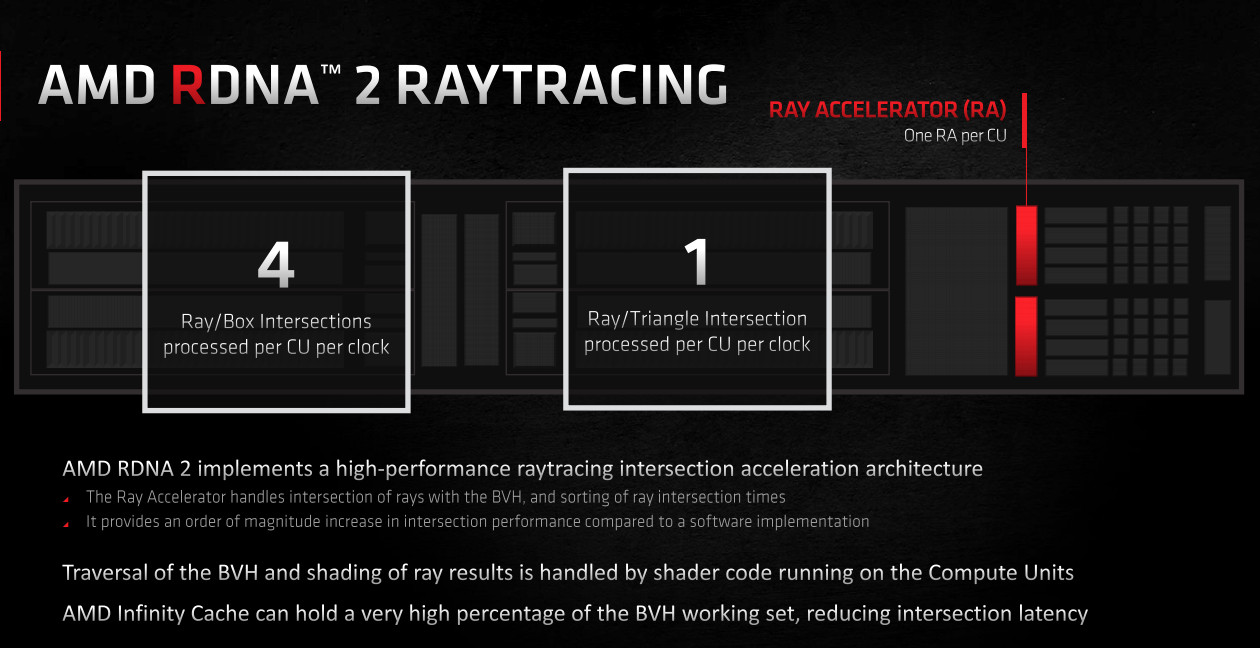
Speaking of Next Generation, RDNA 2 finally implements AMD’s Ray Accelerator for hybrid ray tracing to the tune of one per CU. The Ray Accelerator has a very specific purpose: calculating the intersection of light rays with boxes for the algorithms central to Microsoft’s DirectX Raytracing (DXR). The performance of this unit will largely determine ray tracing performance on the RX 6000-series going forward.
ADVANCED RENDER TECHNIQUE SUPPORT
Individual elements within the RNDA pipeline have been tweaked in this generation to support new advanced render techniques set to be leveraged by DirectX 12 and console analogues.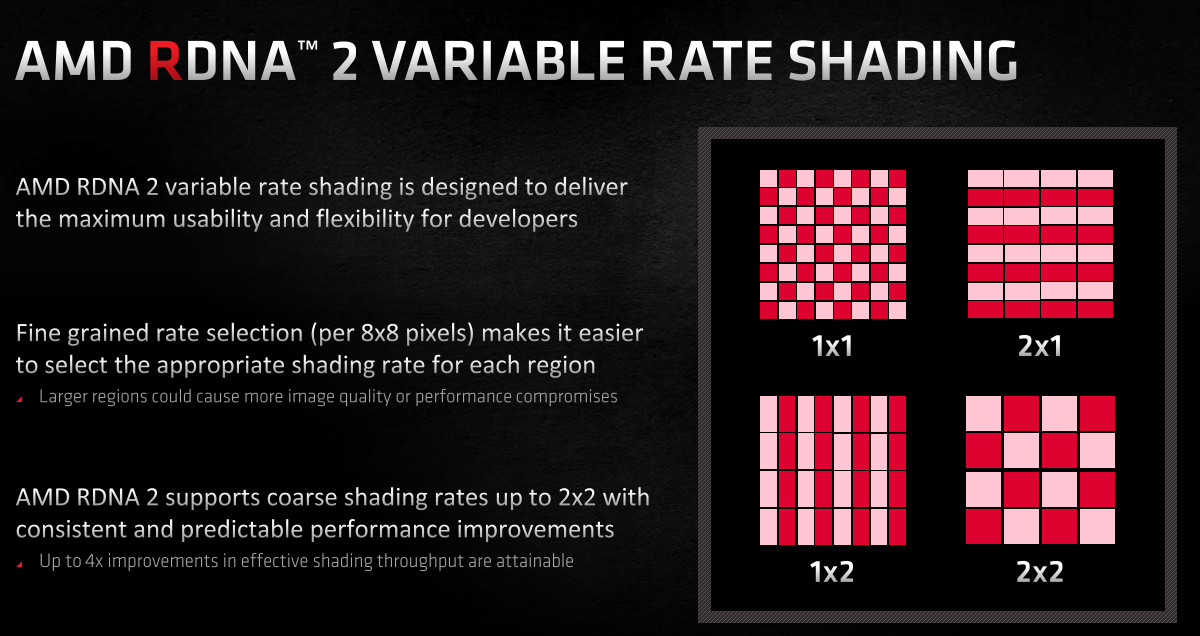
Perhaps the most important from an immediate standpoint is Variable Rate Shading. This technique splits scene into tiled regions and adjusts the shading rate of each tile, devoting fewer resources to less complex areas of a scene and more effectively balancing available processing power. RDNA 2 supports 2×1, 1×2 and 2×2 VRS modes, defining the granularity and orientation of tiles used.
First introduced as part of NVIDIA’s RTX toolkit in advance of broader adoption in the industry, forms of VRS have now been incorporated into Microsoft’s DirectX Ultimate specification. The impact on performance varies from game to game, with specific genres such as driving sims seemingly able to use it exceptionally effectively. Initial figures put the performance benefit comfortably in the double-digit percentages, but thus far VRS hasn’t been put into widespread use.
Two other technologies discussed during DirectX 12 Ultimate’s launch were Sampler Feedback and Mesh Shaders, and both are supported in RDNA 2 hardware:
1. Sampler Feedback offers developers information on what parts of a texture would have needed to be sampled in order to process a sample request. The information can then be fed back into the shaders data streaming processes to more accurately assess which data needs to be streamed to memory, optimising both the memory footprint and bandwidth use of processing and storing texture data.
2. Traditional rendering pipelines process a polygonal mesh as one coherent group, utilising novel techniques to optimise but essentially operating in serial modes. By using a compute programming model, the Mesh Shader can process chunks of a given polygonal mesh of triangles, known as “meshlets”, in parallel. Important operations such as culling etc. can then also be applied to meshlets as a whole to further optimise the pipeline.
2. Traditional rendering pipelines process a polygonal mesh as one coherent group, utilising novel techniques to optimise but essentially operating in serial modes. By using a compute programming model, the Mesh Shader can process chunks of a given polygonal mesh of triangles, known as “meshlets”, in parallel. Important operations such as culling etc. can then also be applied to meshlets as a whole to further optimise the pipeline.
In the mold of DirectX 12 as a whole, both Sampler Feedback and Mesh Shaders expose more aspects of the rendering pipeline to developer eyes rather than abstracting through drivers. They also leverage Compute techniques that have become important design aspects of the GPU since entering the server space and have been crying out for a compelling application in realtime 3D rendering (i.e. gaming).
The MSDN DirectX 12 Ultimate announcement goes into greater detail on these technologies and more, with additional reading for those interested. Check it out here.
Memory Hierarchy & Infinity Cache
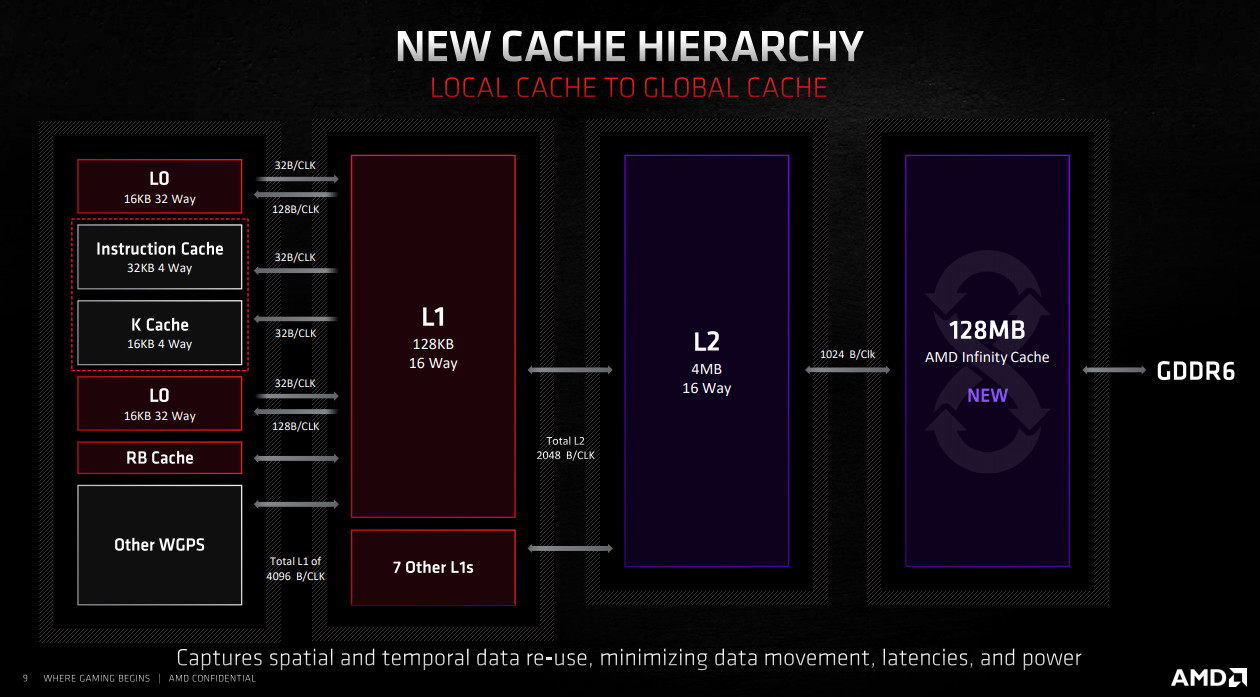
The Radeon RX 6000-series cards announced so far increased the size of the GPU up to 80 CUs from a more modest 40 while also increasing the operating frequency by up to 1.3x. That means it has a lot of processing power at its disposal, and is ever hungry for data streamed in from VRAM; if you can’t provide that data quickly enough then the render pipeline effectively bottlenecks, throttling performance.
There are two obvious solutions. The first is a natural progression of memory development – improved speed – which the RX 6000-series takes advantage of with new GDDR6 chips clocking up to 16Gbps (for 512 GB/s total bandwidth). The second is to widen the memory bus from 256-bits to 384 or 512-bits, but that is expensive in terms of development cost, silicon area and power consumption. AMD however took cues from Zen architecture design to devise a 3rd way.
Infinity Cache is a new oversized last-level cache situated between L2 and VRAM, roughly comparable to the L3 cache of AMD’s new Zen 3 processors. It’s also huge in capacity – 128MB on Navi 21 – dwarfing the 4MB L2 cache present on the GPU. However techniques developed for Zen’s server L3 cache design allows Infinity Cache to be far more dense than GPU L2, ensuring that the overall die size doesn’t bloat to a level that significantly impacts yields.
Like Zen 3, this large cache can connect to the GPU at Infinity Fabric speeds (of up to 1.94 GHz) and latencies far lower than VRAM, leading to an average reduction in overall latency of 34% and up to 4x the peak bandwidth of GDDR6 (when the memory is connected over a 256-bit bus). Furthermore, accessing data held in Infinity Cache is much cheaper power-wise than VRAM, making the process more efficient while also improving performance.
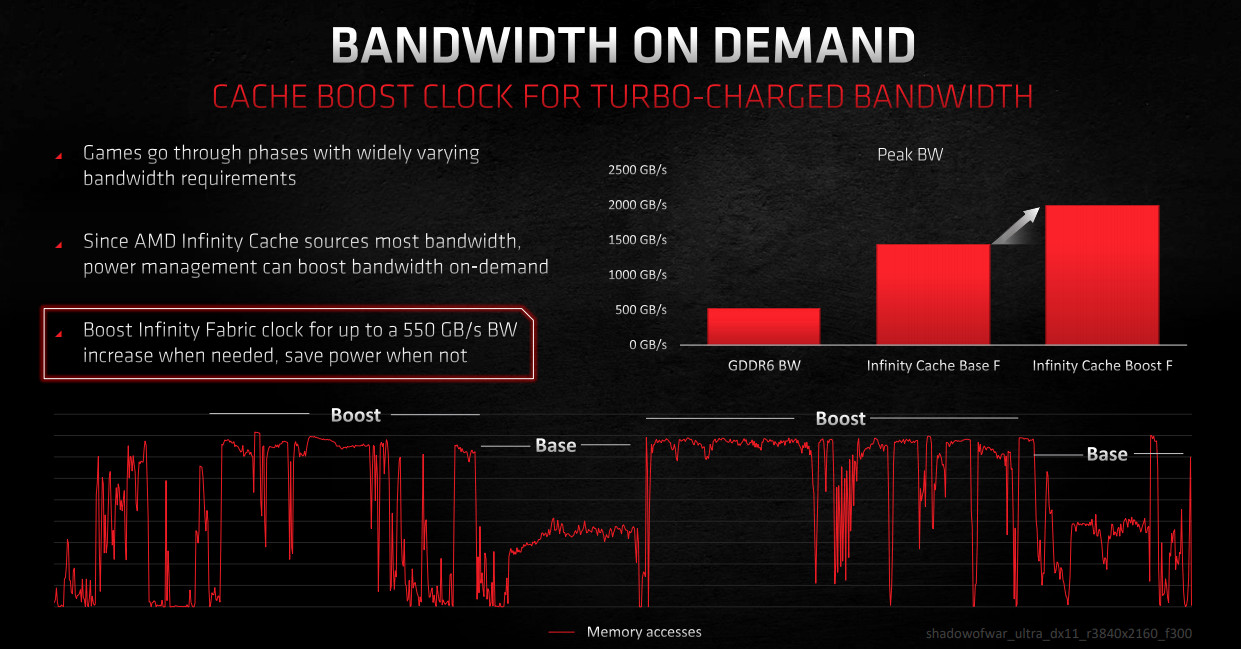
Another advantage of leveraging Infinity Fabric as a technology is that fabric frequencies can be opportunistically increased to meet higher demands, or tuned downwards when an application is not bandwidth constrained. This level of fine control once again improves power efficiency while not impacting performance, so long as the controller is in place to make fast (preferably predictive) changes to fabric clocks.
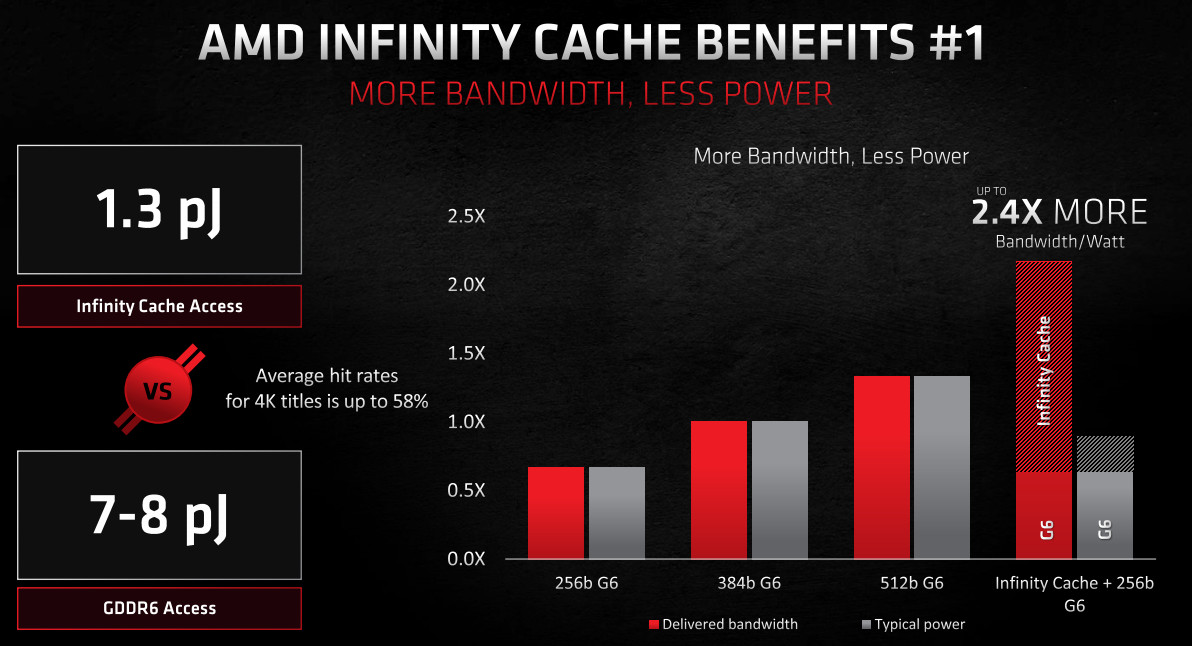
To put all that into context: when compared to a theoretical GDDR6 over a 384-bit bus (a potential alternative configuration considered for Big Navi) AMD project ~2.4x the effective bandwidth/watt through this implementation.
AMD SMART ACCESS MEMORY
With RDNA 2 AMD are also taking the opportunity to attack another aspect of the rendering pipeline: CPU access to GPU memory.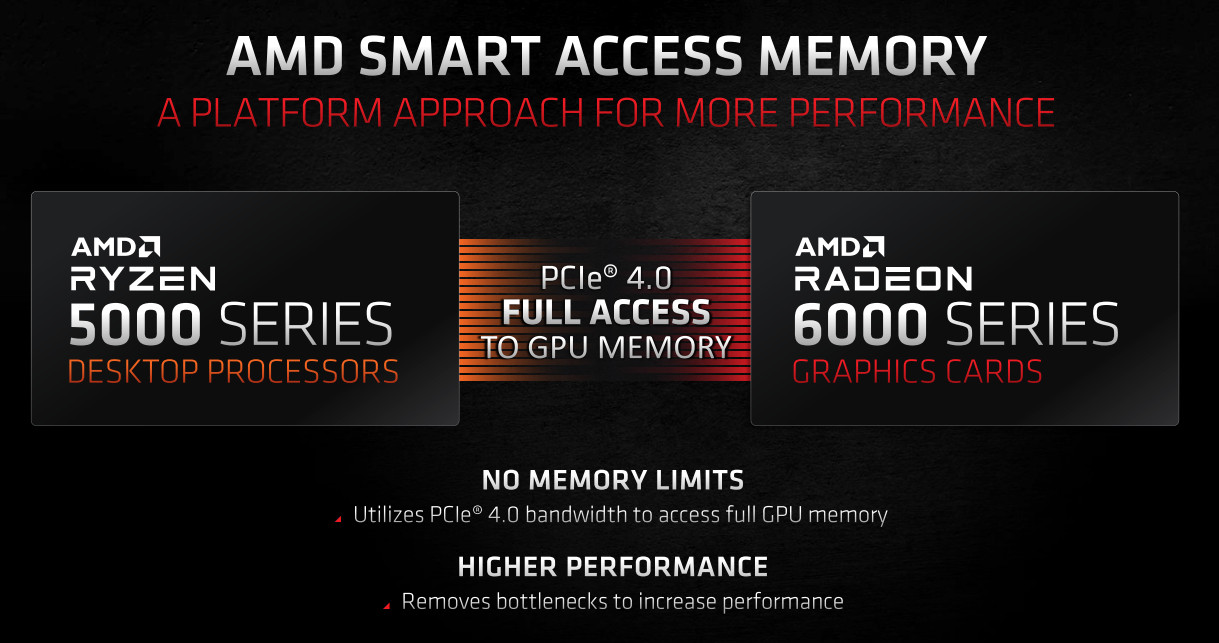
In Windows environments, the CPU can typically only map a fraction of the Video Memory at once, determined by a core aspect of the PCI Express specification known as the Base Address Register (BAR). Modern PCs usually limit access to 256MB at once, far less than the 8GB or more available to an enthusiast-class card.
The value of this data and the CPU’s need to access it varies significantly by game, but it can be a substantial bottleneck to performance. That’s where AMD Smart Access Memory comes in.
Simply put, it unlocks CPU access to the entirety of GPU memory allowing it to map the entire pool and draw more data over the PCI-Express Bus. To enable this feature AMD have leveraged their desktop motherboard and CPU platform to unlock resizing of the BAR and removing GPU-side impediments.
At launch the feature is available on system configurations consisting of a RX 6000-series GPU, X570 motherboard and Ryzen 5000-series CPU updated to the latest BIOS release. BIOSes unlocking the feature are in development for B550 motherboards, and AMD have left open the possibility of making it available to other platforms.
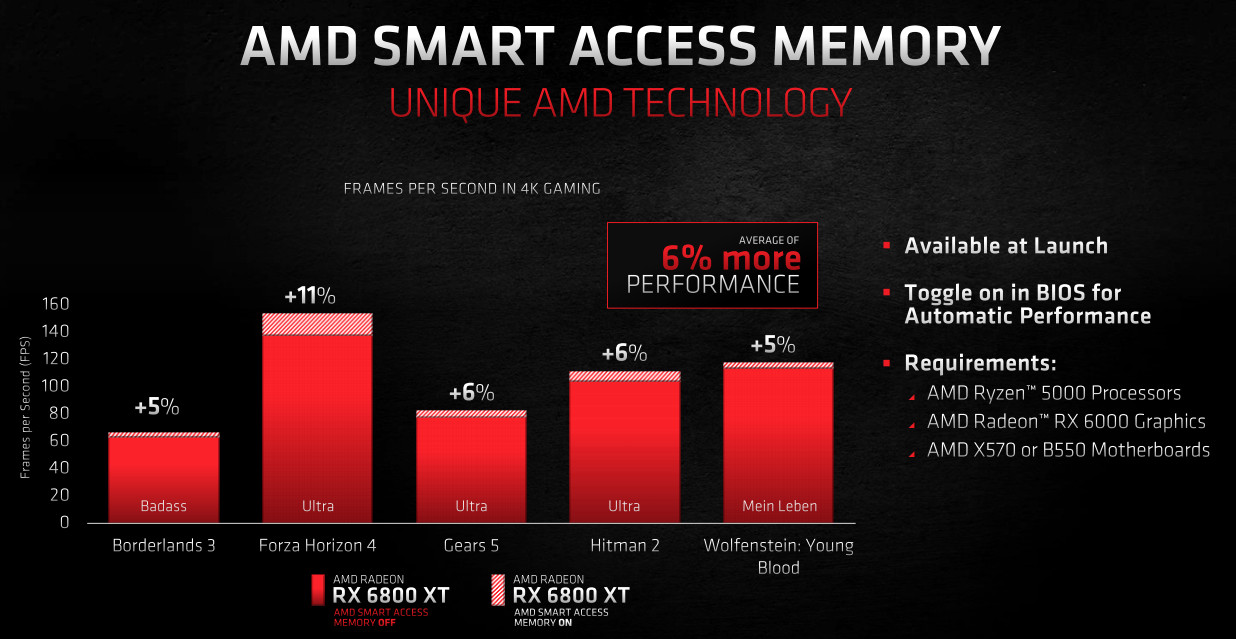
There’s currently some debate whether this feature is likely to be exclusive to AMD for long; indeed their competition have already raised the idea of implementing it on their own graphics hardware. But it’s a sign that AMD’s unique position in the market makes novel solutions like this more feasible, rather than negotiating independent standards with competing brands.
AMD’s internal testing projects that this feature could provide benefits from 0 to up to 18%, but they are highly variable. Still, it’s a welcome addition for owners of an all-AMD system.
UEFI BIOSes unlocking this feature on X570 should now be available for all models from all vendors. Once installed, simply Enable both ‘Above 4G Encode and Re-Size BAR Support’ within the BIOS settings (location varies based on motherboard model & vendor, but it’s typically within the PCIe settings page).
Ray Accelerators – Ray Tracing in Every CU
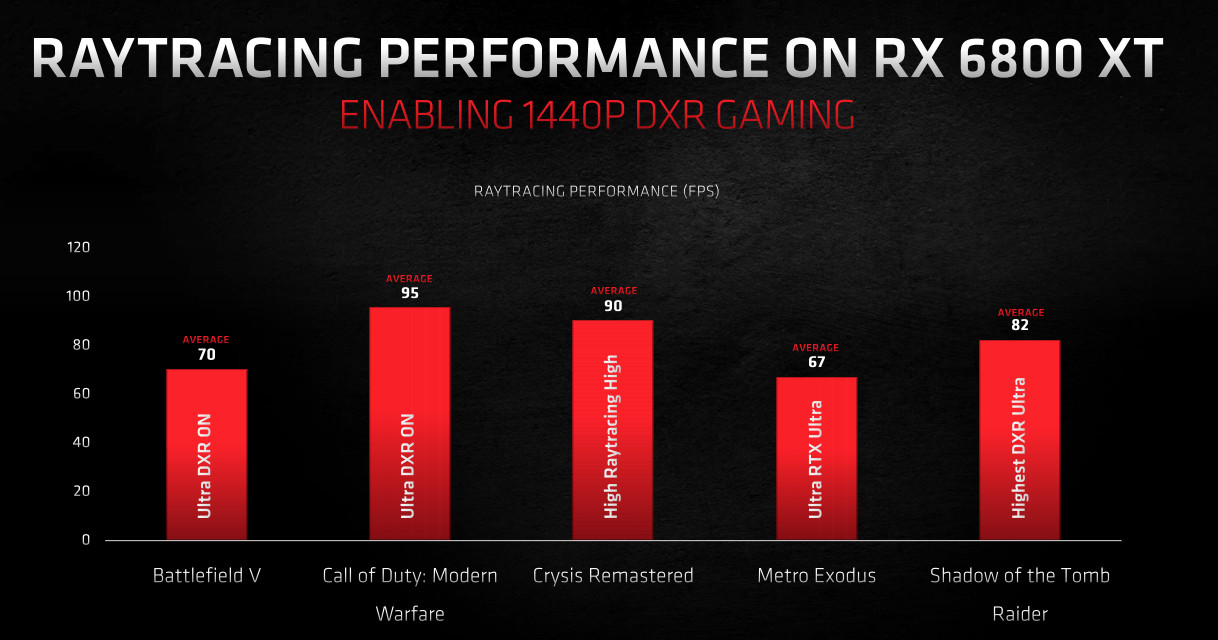
Ray Tracing has finally arrived on AMD Radeon, who are taking the realistic approach of implementing hybrid rendering techniques that blend conventional rasterisation with ray-traced elements to generate a frame in real time. These elements can include reflections, shadows and more realistic illumination, but we’re realistically some way off fully ray tracing a scene in real time.
To facilitate this in hardware RDNA 2 incorporates the Ray Accelerator component into its core CU design with the expressed purpose of traversing the Bounded Volume Hierarchy (BVH) structure and efficiently determining intersections between rays and boxes (and eventually triangles). The design fully supports DirectX Ray Tracing (DXR), which is the industry standard for PC gaming.
AMD utilise a Compute-based denoiser to clean up the specular effects of ray traced scenes, rather than rely on purpose-built hardware. This will probably put extra pressure on the mixed precision capabilities of the new Compute Unit.
Ray Accelerators are capable of processing four bounded volume box intersections or one triangle intersection per second, which is an order of magnitude faster than ray tracing without dedicated hardware. Any game with the standard implementation of DXR should be playable.
One definite up-side of RDNA 2’s ray tracing is its interaction with Infinity Cache. The sheer size of the cache means that it’s possible to store a large number of bounded volume structures simultaneously, taking some of the load off data management and memory read calls.
The stated performance aim of RDNA ray tracing is for 1440p60fps or better in gaming, and that will be a tall order given the lengths to which ray tracing is now being utilised. It’s also notable that they don’t have NVIDIA’s DLSS to lean on to render at lower resolutions and then upscale to 4K, negating the performance impact of ray tracing in the process; AMD will have to rely on the raw GPU performance at native resolutions until their own advanced upscaler is ready.
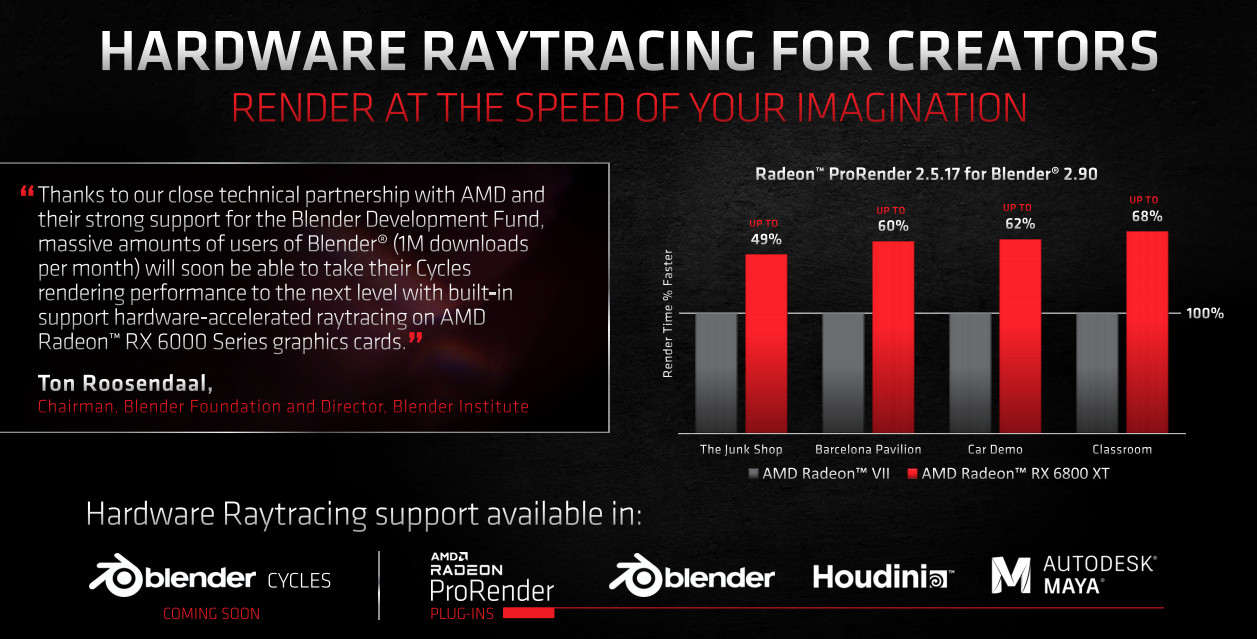
Professional applications can also take advantage of the hardware ray tracing capabilities of RDNA 2. ProRender 2.5.17 for Blender 2.90 leverages the technology to reduce render times by up to 68% compared with the Radeon VII, and other industry-leading applications such as Houdini and Autodesk Maya are also supported via Radeon ProRender plugins.
The design and integration of ray tracing capabilities into the Compute Unit is intended to be as straightforward as possible, helping to reduce the difficulty curve when it comes to leveraging the technology and make it suitable for both PC and consoles. The reason for that is simple: AMD needed to create an architecture not only to meet the requirements of Microsoft in Windows and on Xbox, but also give Sony the features required for ray tracing on PS5 with their own idiosyncratic approach.
Rage Mode – XT’s X-Factor.
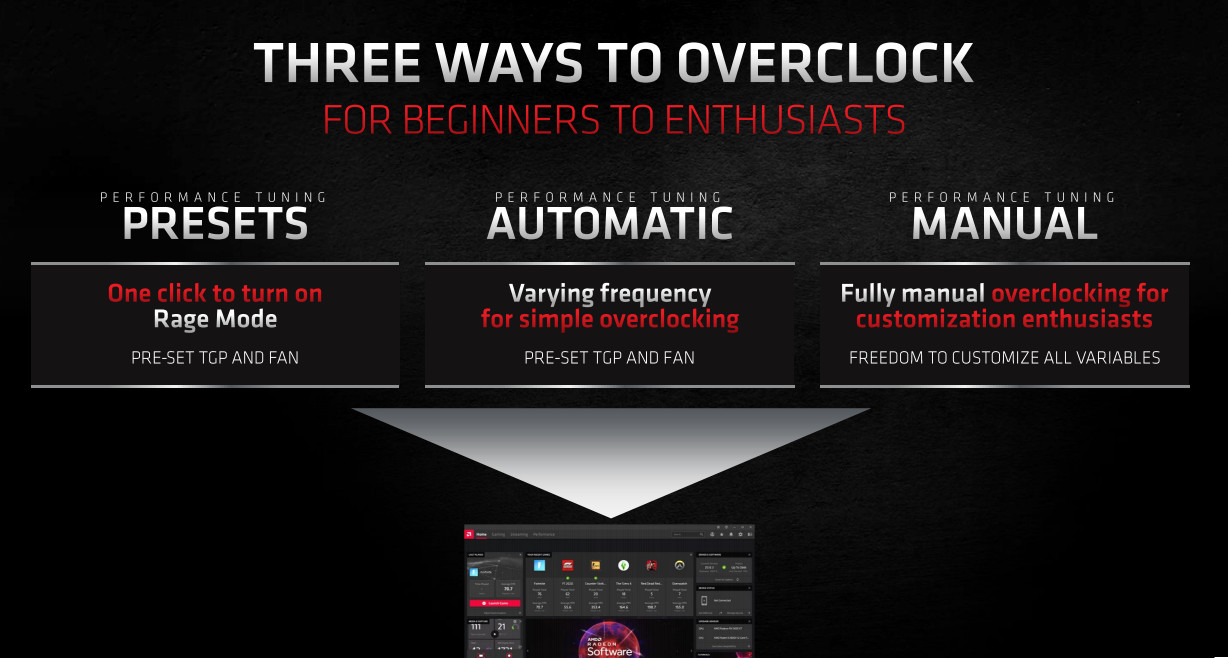
AMD’s CPU and graphics divisions have utilised dynamic overclocking for generations to boost real-world processing performance based on the unique conditions of every PC configuration. Ryzen took it to the next level with Performance Overdrive 2, an algorithmic boost calculated from data supplied by a vast array of on-die sensors. Today the 6000-series will take a different tack with feature dubbed Rage Mode (named as a homage to the original ATI Rage) that’s exclusive to XT-class SKUs*.
Every Radeon RX 6000-series GPU performs some level of dynamic overclocking based on temperatures, voltages, total power draw and some other metrics. That feature explains the disparity between Game Clock (the typical minimum operating clock during gameplay) and Boost Clock (the maximum theoretical clock for the given SKU). Each card will vary within that window according to the conditions at the time and the fabled ‘silicon lottery’, but AMD’s binning process should keep them within similar ballparks.
Rage Mode however configures the GPU for a higher power limit and switches the card to a more aggressive fan profile to compensate. It will allow the card to push higher clock speeds, but it’s up to you whether the trade-off is worth it. AMD expect it to contribute 1-2% more performance on average, which is right on the limits of marginal but still relevant.
Rage Mode is one of three power profiles exposed in Radeon Settings that alter the power and fan limits of the card, the others being ‘Quiet’ and ‘Balanced’. Critically, the use of Rage Mode should not violate your warranty, unlike some forms of bespoke software overclocking.
Partners may or may not choose to implement Rage Mode profiles on their RX 6000 XT-series variants. Many already utilise higher power limits and fan profiles as part of their factory overclock, leaving little room for an OC mode above and beyond it. Its effectiveness will also vary based on cooling solution.
Enthusiasts are of course as always able to manually overclock the 6000-series GPU, which may serve to be an alternative avenue to higher clocks for non-XT owners.
*the Radeon RX 6800 tested today does not support Rage Mode. This section is included for completeness
RX 6000-Series Reference Cooling
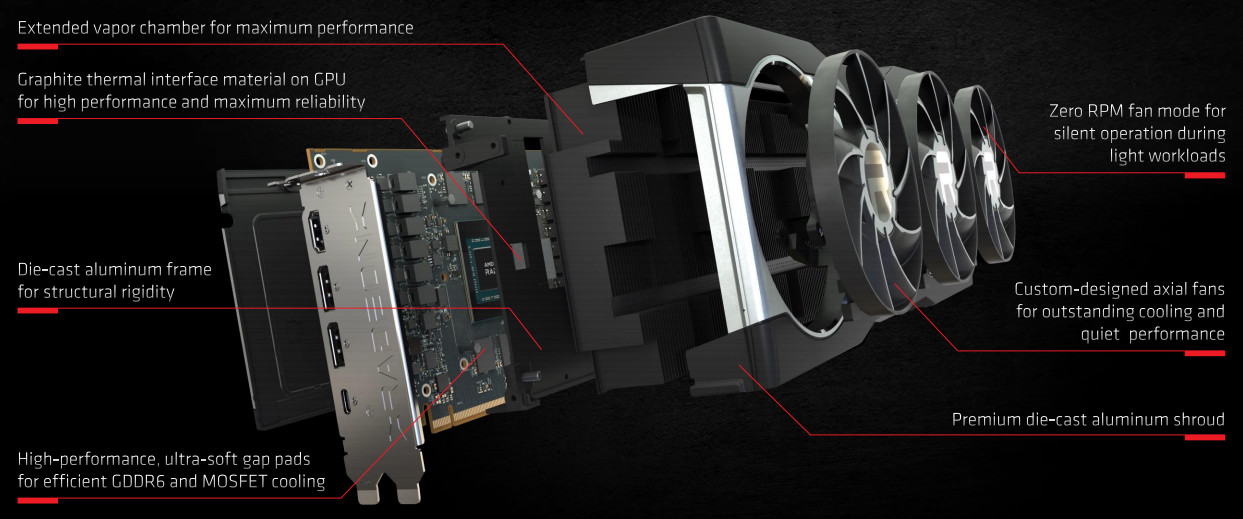
Wonder of wonders, AMD have thrown out the blower cooler and welcomed with open arms a triple-axial fan solution, the style of which has been championed by AIB partners for well over a decade. It’s not a silver bullet, and does require better air circulation in a PC chassis to use effectively, but nonetheless should be credited as a major step forward for the red team just when they needed it the most.
Most recently the Radeon VII was equipped with an ostensibly similar triple-fan solution, but shortcomings in the overall design (particularly a shroud that restricted air flow) meant that it didn’t perform as well as hoped. Thankfully it appears that the new reference design has learned from those mistakes.
Key Features
– Triple Axial Fan with custom blades
Zero Fan RPM mode for silent operation during periods with low load
Enclosed fan ring to reduce turbulence and better direct air flow through the vapour chamber
– Extended vapour chamber with dense fin stack
– Graphite on-GPU TIM
– Aluminium shroud, faceplate and backplate to enhance rigidity and act as heat spreaders
– Wide venting along top edge of GPU
– 2-Slot Solution for RX 6800; 2.5 Slot solution for RX 6800 XT & RX 6900 XT.
– RGB Header for lighting control
– Up to 70% less perceived noise (6dBA) compared to the 5700 XT reference solution.
Zero Fan RPM mode for silent operation during periods with low load
Enclosed fan ring to reduce turbulence and better direct air flow through the vapour chamber
– Extended vapour chamber with dense fin stack
– Graphite on-GPU TIM
– Aluminium shroud, faceplate and backplate to enhance rigidity and act as heat spreaders
– Wide venting along top edge of GPU
– 2-Slot Solution for RX 6800; 2.5 Slot solution for RX 6800 XT & RX 6900 XT.
– RGB Header for lighting control
– Up to 70% less perceived noise (6dBA) compared to the 5700 XT reference solution.
We’ll find out soon enough how well the cooler is able to dissipate heat from the GPU and surrounding components. There’s a lot of reason to feel confident about the abilities of the RX 6800 in this arena, but even the taller vapour chamber of the XT models will surely be taxed by their 300W TBP.
If the new Radeon reference aesthetics don’t pique your interests then be reassured that partner cards should be on their way soon with their own proven 3rd party solutions.
Additional Features
Those who take advantage of the hardware video encode/decode features of their graphics card (for streaming or video rendering/transcoding) will be pleased to note that RNDA 2 supports hardware acceleration for the AV1 codec alongside h.265. AV1 offers 34% better encode performance than h.265, and is offered as an alternative rather than the sole option on the silicon.
Furthermore, the h.265 pipeline has been augmented to improve both encode and decode performance. Combined with a general uplift to VCN block operating frequencies, the RX 6000-series’ encoding capabilities should be much improved over the 5000-series.
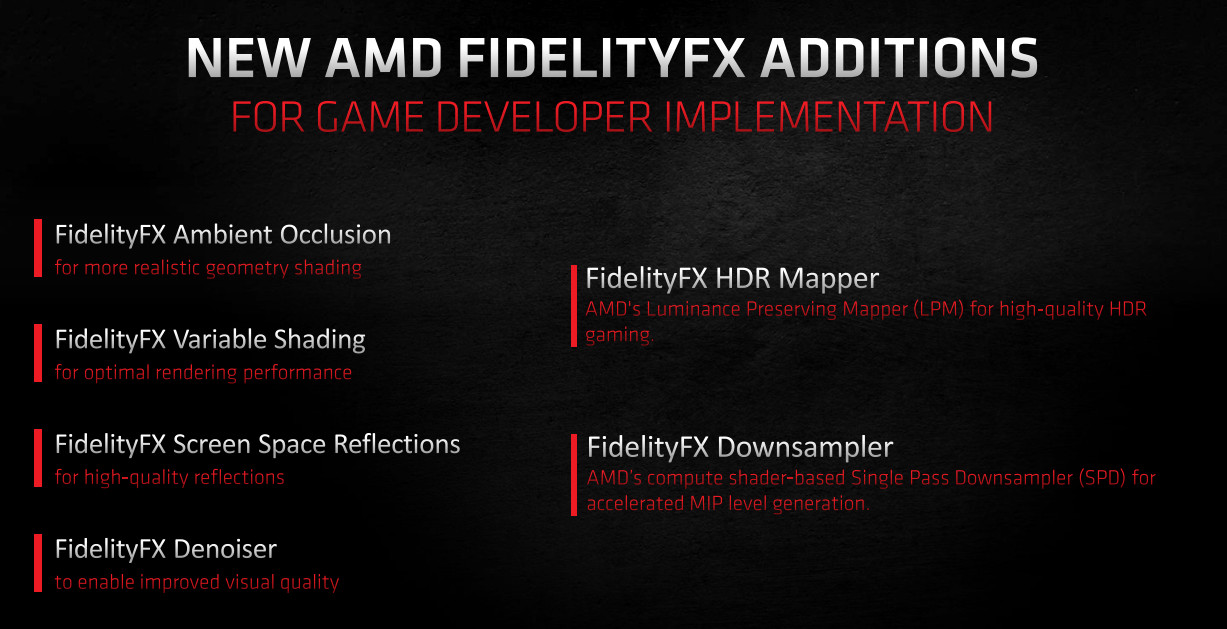
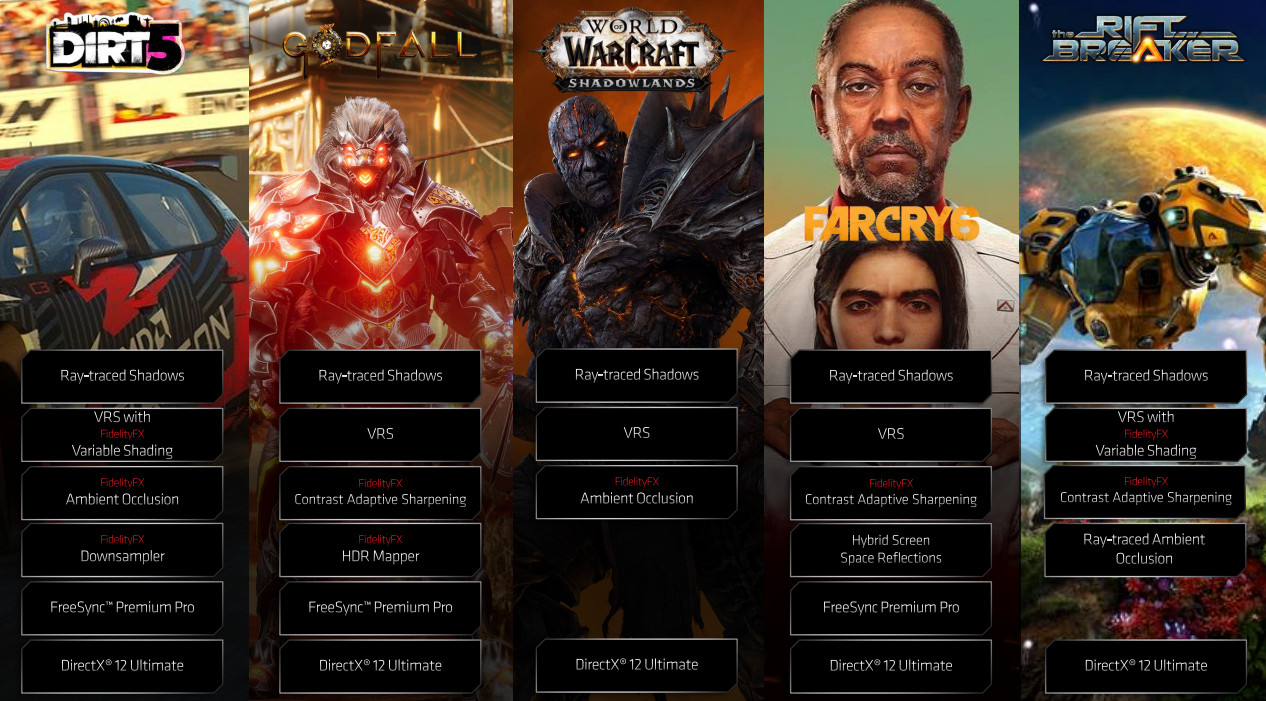
Two new effects are being added to AMD’s FidelityFX developer toolkit upon the launch of the RX 6800-series today, joining others revealed earlier this year and operating alongside an ever-increasing number of tools available on GPUOpen. FidelityFX Variable Shading and Denoiser naturally complement the new capabilities of RDNA 2, and AMD continue to operate with an open development approach that should endear them to studios keen to bring a little more pop to the proceedings.
Over 35 titles now incorporate FidelityFX effects, of which five were announced as arriving this month.
—
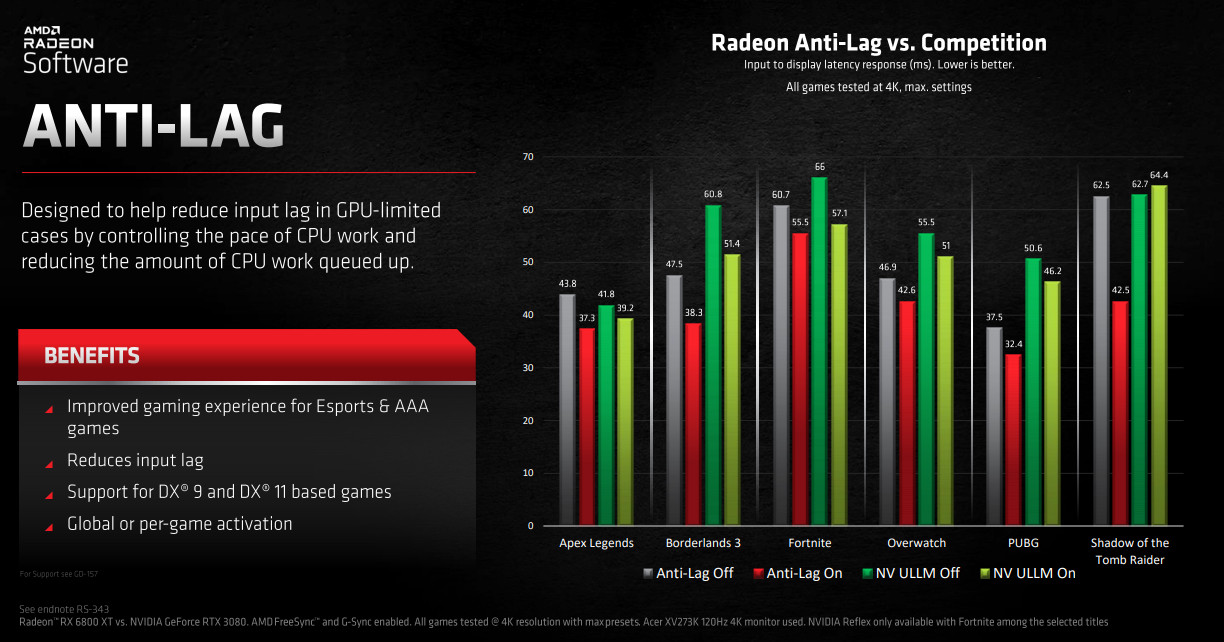
Radeon Anti-Lag and Boost continue to be features that help users leverage their hardware in an unconventional manner. While the former is AMD’s antidote to NVIDIA Reflex – a technology that minimises the click to screen latency in DX9/11 games caused by the rendering pipeline – the latter is a little more involved.
Radeon Boost is a dynamic resolution scaling technology that measures the angular velocity caused by mouse movements and drops the resolution accordingly. The theory is that GPU load is the highest during situations where you’re moving your viewpoint (hence your mouse) often, particularly in FPS titles, but that’s also when you’re less able to perceive dips in visual quality.
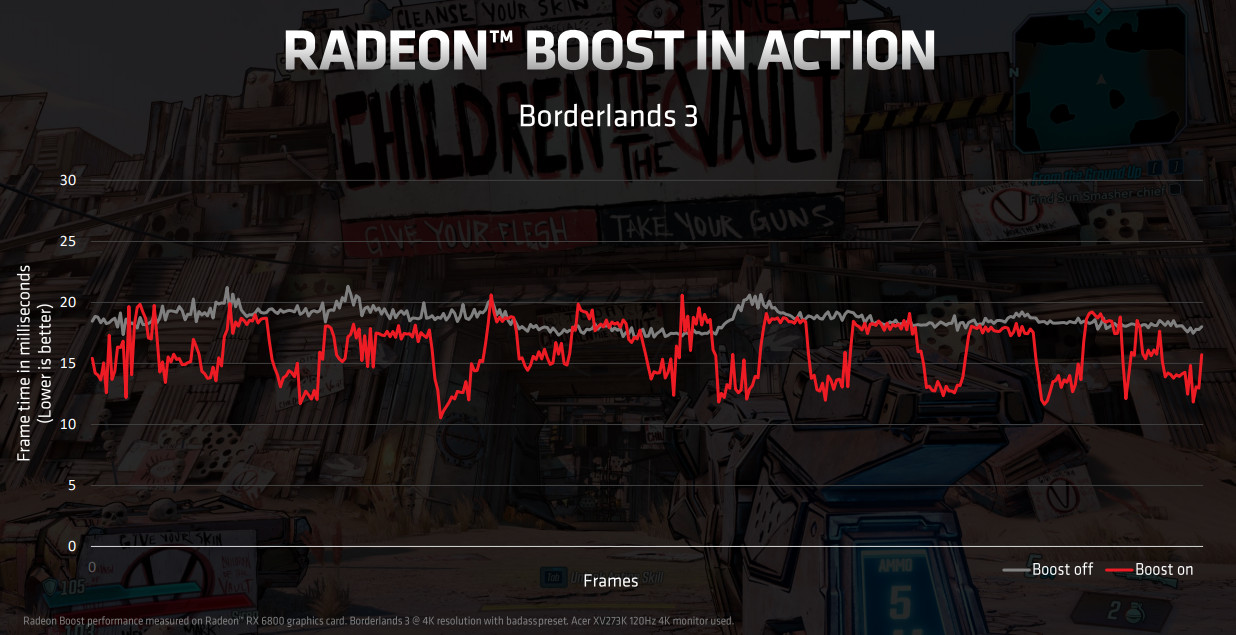
Capitalising on this, Boost dips the rendering resolution to increase frame rates and maintain a more smooth and consistent experience, normalising when mouse movements stabalize. The magnitude of the resolution decrease is controlled in software so it doesn’t drop too far and significantly worsen the user experience. Static menus are also detected and accounted for.
What’s interesting is that AMD are experimenting with coupling this technology to Variable Rate Shading capabilities present in RDNA 2 and controlling the regions in the frame where resolutions change. This could open up whole new avenues for the technology, but it’s a very fine line to tread.
Radeon Boost and Anti-Lag are currently only supported in DirectX 9 and 11 titles, and the settings are controlled within the Radeon Settings driver software.
Closer Look
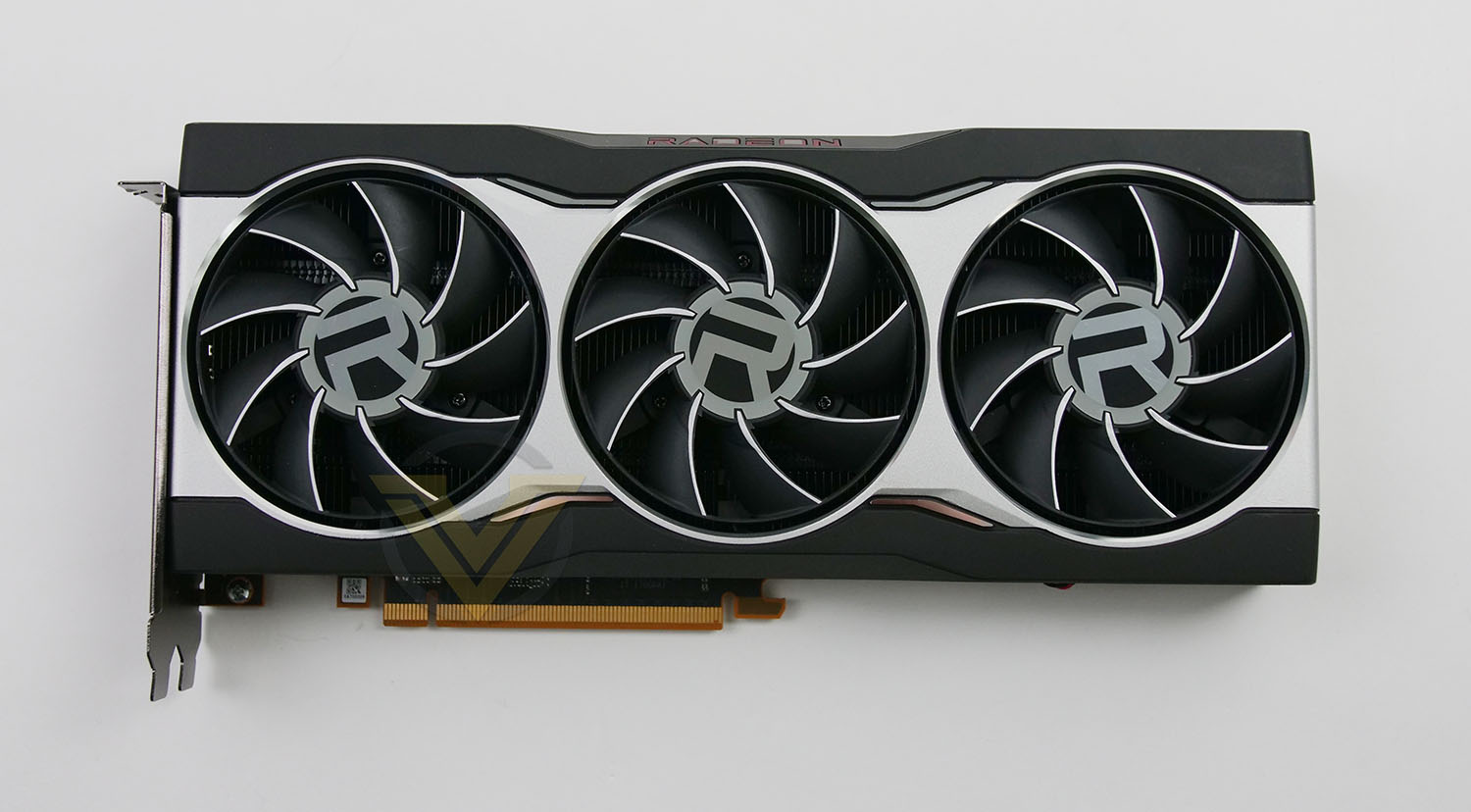
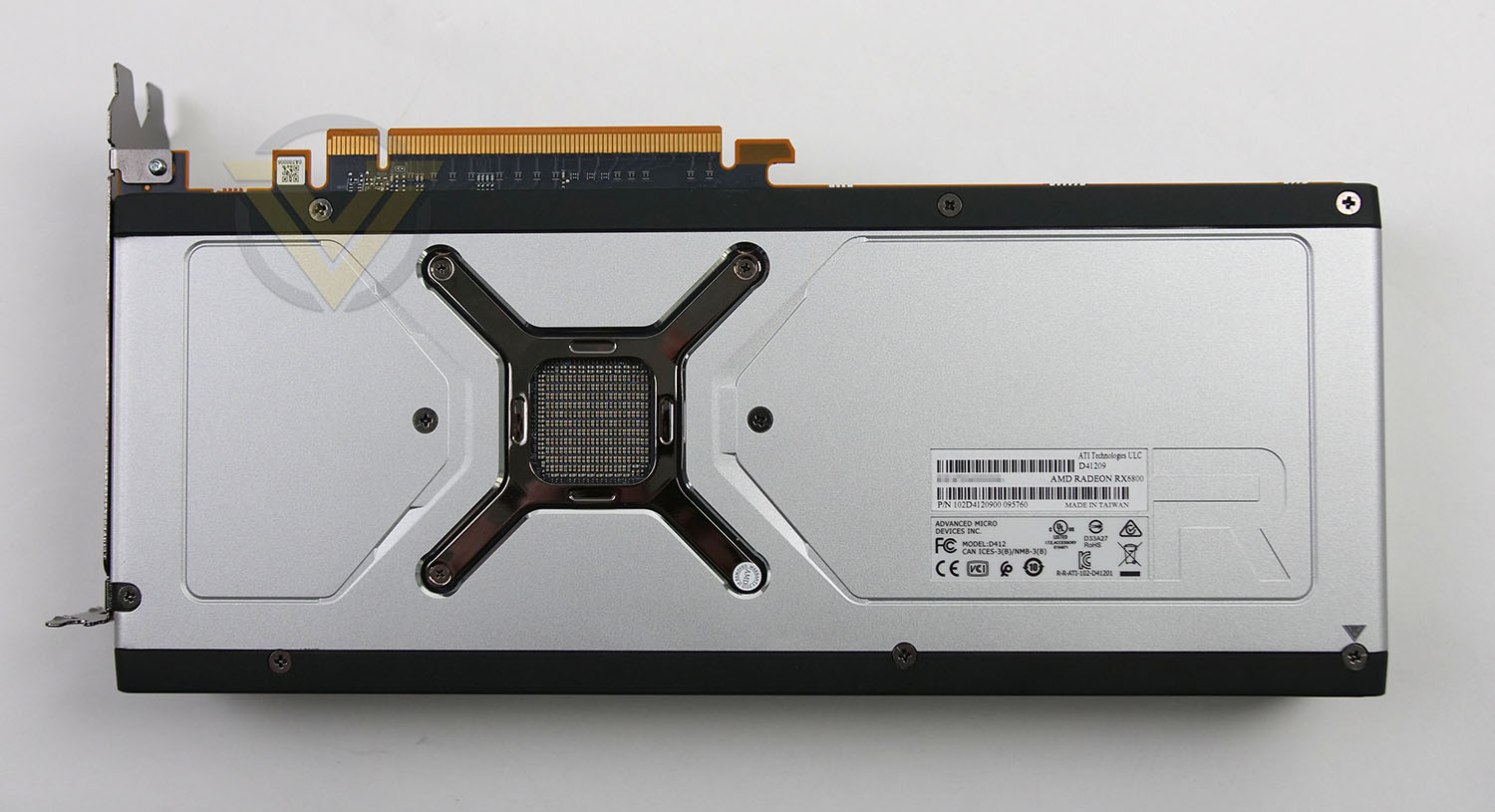
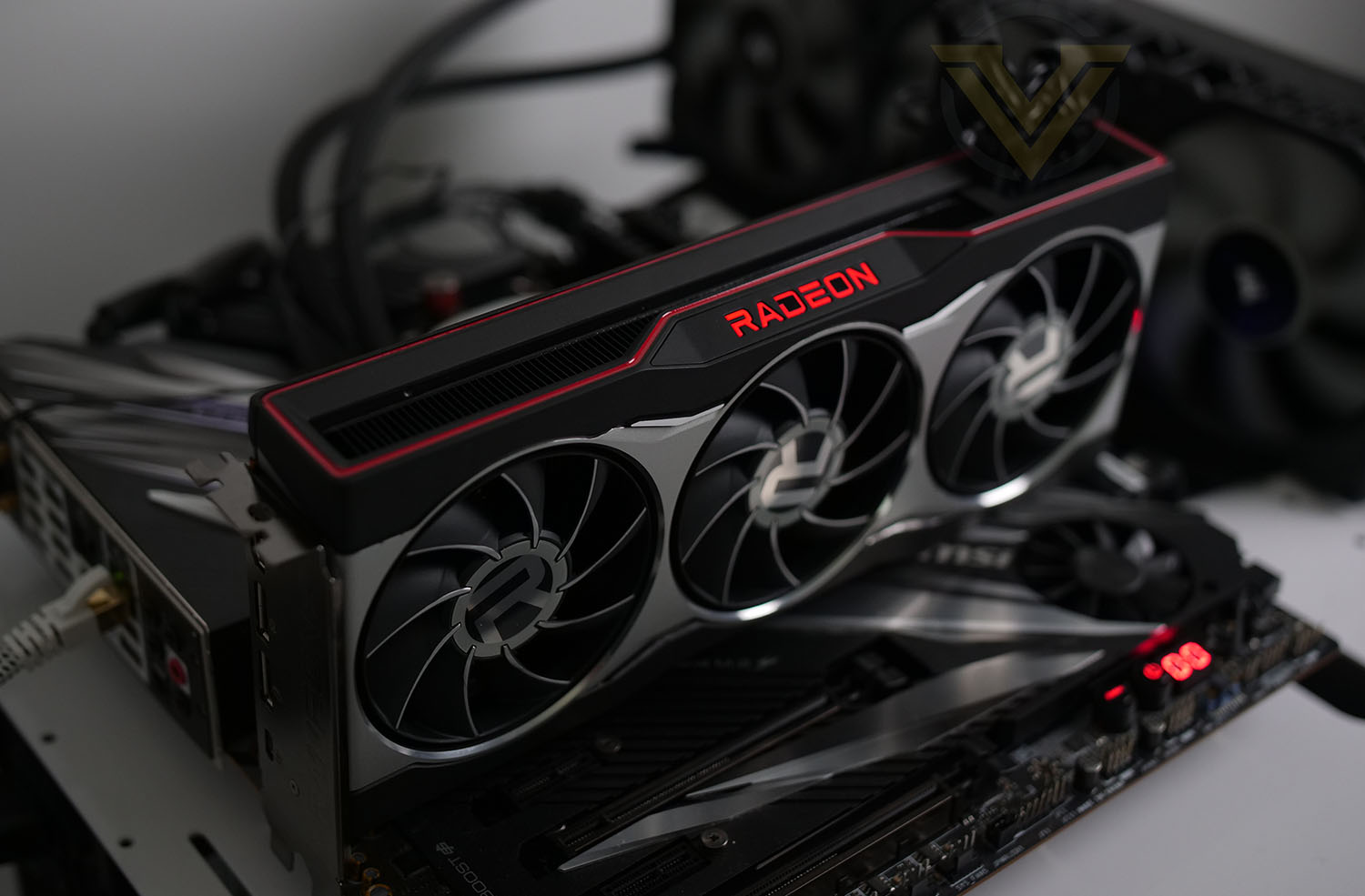
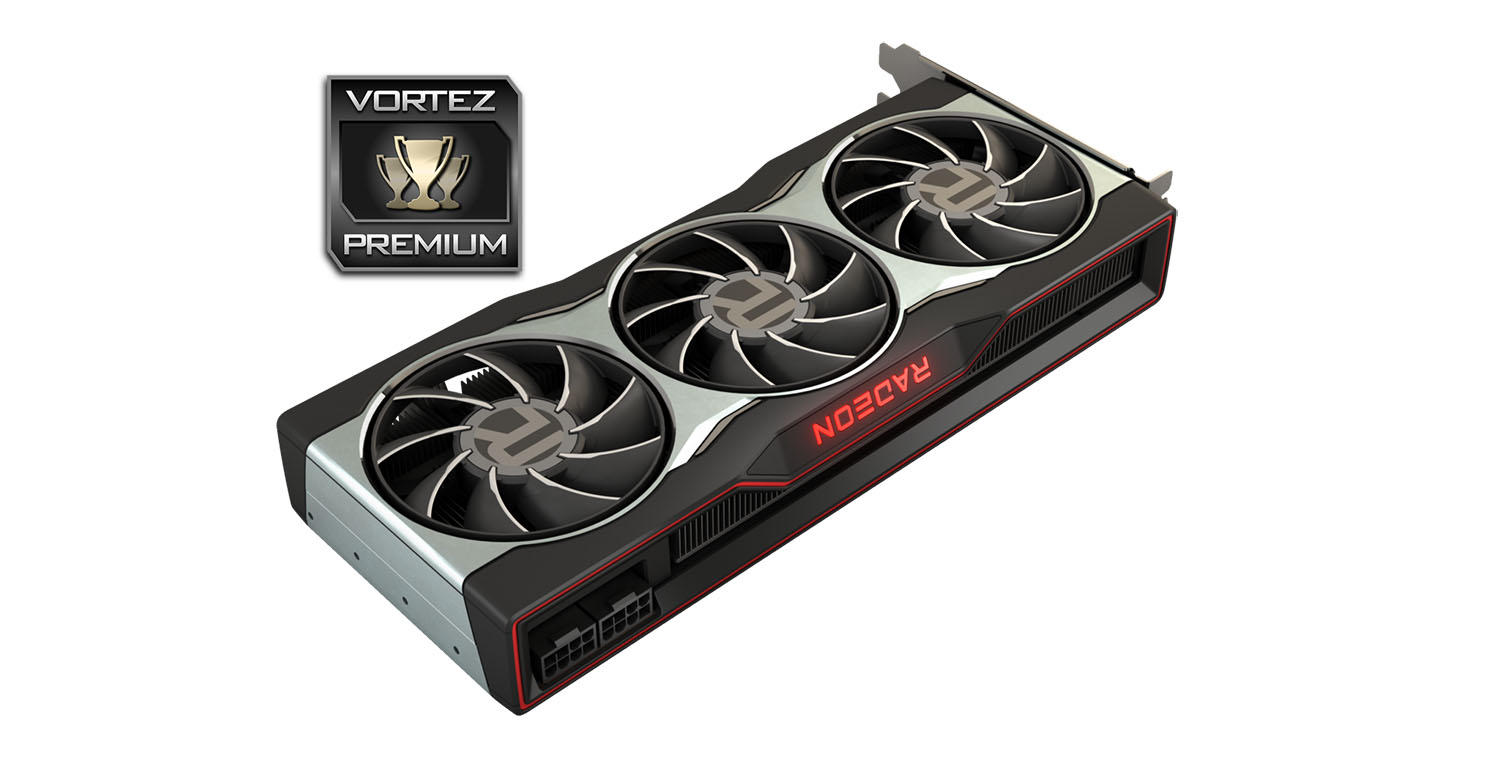
The new reference design for this latest batch of RDNA2 graphics cards is unlike any we’ve encountered. Gone is the enclosed single-fan blower design which has been customary for AMD for countless generations and instead, we’re met with a rather striking triple-fan configuration which could almost be mistaken for a third party/partner card.
We’re a big fan of what AMD has done with this their in-house design. It looks stylish and should perform better than its predecessor solutions
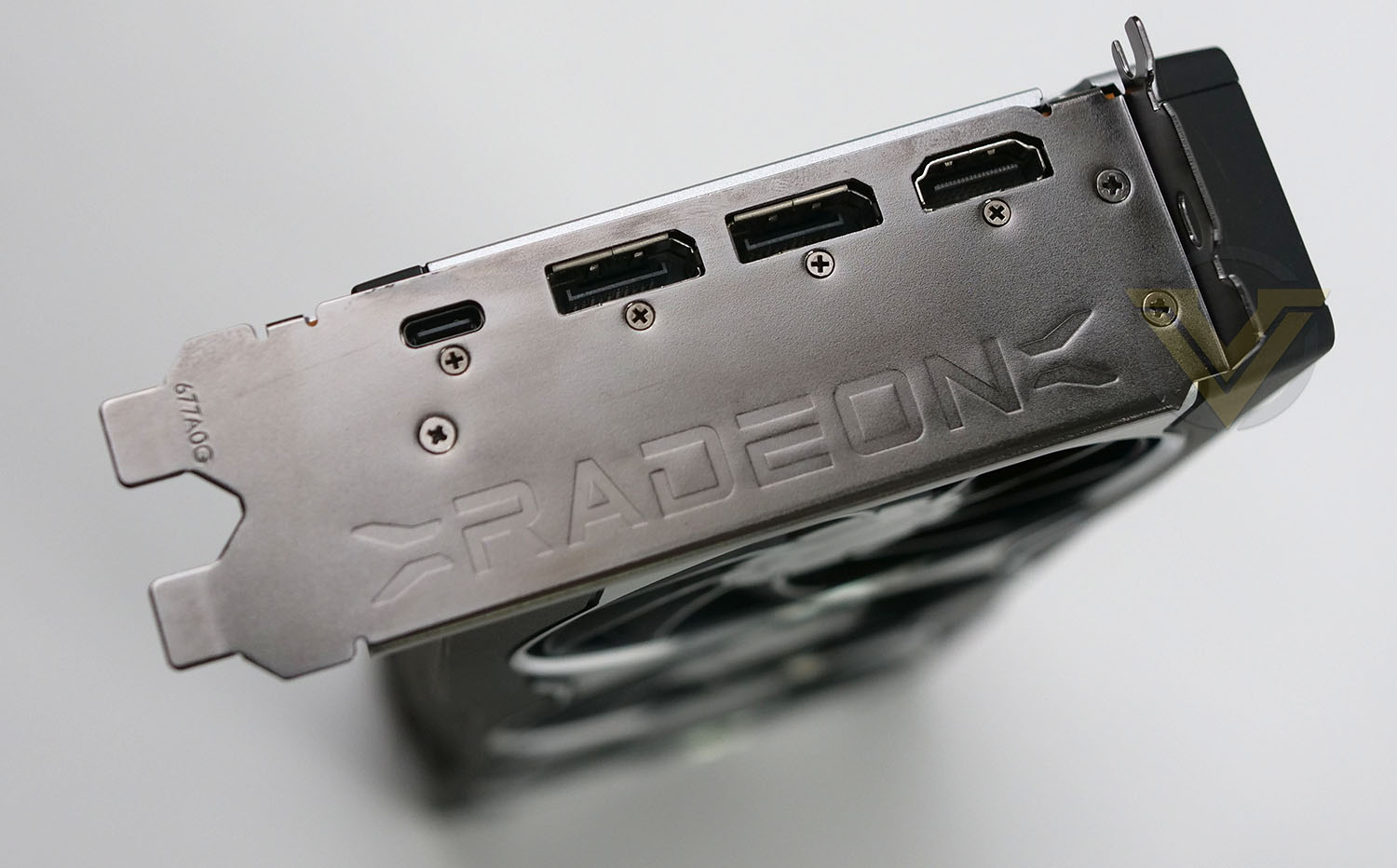
There are no big surprises when we move to the rear IO panel of this graphics card, we have 2x DisplayPort 1.4, 1x HDMI 2.1 port and a USB Type-C. The thickness of the thermal solution and plate mean that this model is a double-slot unit.
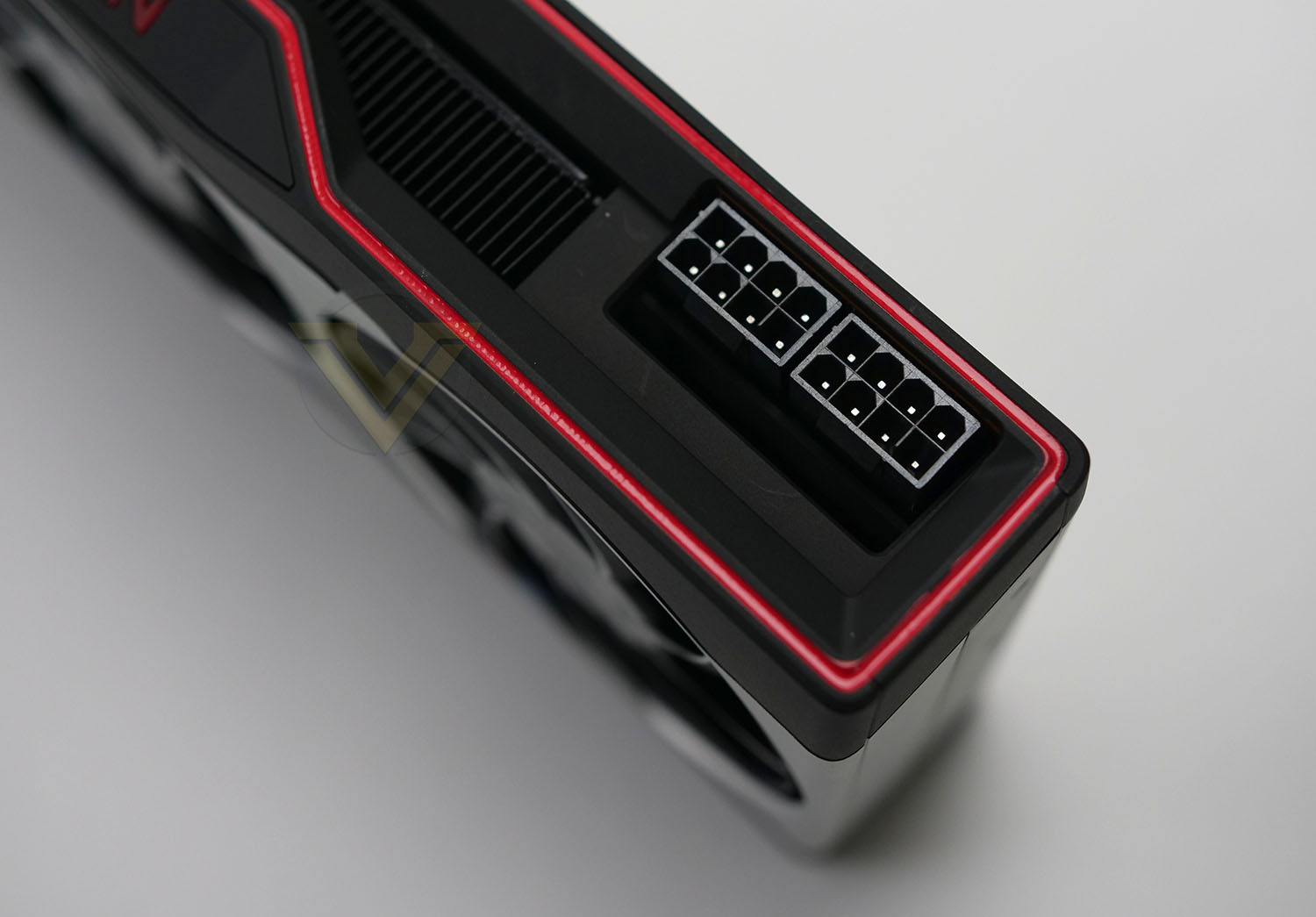
The 6800 has a 250W TBP and features 2x 8-pin PCIe connectors. AMD recommend a 650W PSU to effectively power this graphics card.
Test Setup & Methodology
HOW WE TEST GRAPHICS CARDS
Testing a graphics card is an extremely lengthy process. We sometimes see reviews where a graphics card has been tested using out of date equipment, out of date games and even out of date drivers. While the latter can be excused due to the sheer amount of driver updates making a thorough review impossible we will however notify the reader when we have used a different driver to the normal for example a pre-release driver. For the most part however we will always use the same hardware and latest drivers so this does certainly need to be taken into consideration when viewing our testing results. Each game and benchmark is tested times with the lowest and highest scores omitted out of the 5 results and the average then taken from the three remaining to give us our final result for each resolution and setting used.HARDWARE
In Q3 2020 we decided to move on from our Intel X99-based graphics card test system to embrace AMD Ryzen Gen3. The basis for this was quite simple, AMD’s platform is one of the most popular choices for gamers and by using such a configuration, we can hopefully showcase to our readership what they can expect. In the past we’ve used HEDT platforms and while this does indeed align itself to the bleeding edge for a computer system, it doesn’t reflect what most gamers will be using.With NVIDIA and AMD now using PCIe 4.0 for their bus interface on graphics cards, AMD Ryzen Gen3 and the X570 chipset are well-equipped to test appropriately.
Graphics Cards on test:
AMD RX 5700
AMD RX 5700 XT
AMD RX 6800
NVIDIA RTX 2060
NVIDIA RTX 2060 SUPER
NVIDIA RTX 2070 SUPER
NVIDIA RTX 2080 SUPER
NVIDIA RTX 2080 Ti
ASUS TUF RTX 3080 OC
ASUS ROG STRIX RTX 3090 OC
Special thanks go to AMD, MSI, Corsair, Noctua and AverMedia for providing the hardware configuration for our graphics card reviews:
Motherboard: MSI PRESTIGE X570 CREATION
CPU: AMD Ryzen 7 3800X
RAM – 16GB (2x8GB) Corsair LPX Vengeance DDR4 @ 3000MHz
Power Supply – CORSAIR HX1050
Hard Drive – Samsung 830 EVO 250GB + Crucial MX300 2TB
Cooler – CORSAIR Hydro Series™ H150i Pro 360mm Extreme Performance Liquid CPU Cooler
Capture Card – Avermedia Live Gamer Extreme 2
CPU: AMD Ryzen 7 3800X
RAM – 16GB (2x8GB) Corsair LPX Vengeance DDR4 @ 3000MHz
Power Supply – CORSAIR HX1050
Hard Drive – Samsung 830 EVO 250GB + Crucial MX300 2TB
Cooler – CORSAIR Hydro Series™ H150i Pro 360mm Extreme Performance Liquid CPU Cooler
Capture Card – Avermedia Live Gamer Extreme 2
BENCHMARKS
If you are a regular reader of our reviews you will know we like to test the latest hardware with the latest games and benchmarks on the market. Here are the games we’ve chosen:Horizon Zero Dawn
Control
Shadow of the Tomb Raider
F1 2020
A Total War Saga: Troy
Control
Shadow of the Tomb Raider
F1 2020
A Total War Saga: Troy
To capture framerates we use a combination of in-game benchmark tools and FRAPS.
We also take into consideration the benchmarkers out there so have included three of the more popular synthetic benchmarks available:
3DMark Time Spy
3DMark Port Royal
Unigine: SuperPosition
3DMark Port Royal
Unigine: SuperPosition
In light of the new RTX and DLSS features, we have also added in some tests to cover this tech to provide some analysis, showcasing what users can expect with/without such a feature enabled. For this we are using:
3DMark DLSS
Control – RTX Off/RTX On
Control – RTX Off/RTX On
Let’s see how today’s graphics card performed…
Power, Temperatures, Acoustics
To test for power consumption, we take a measurement from the plug socket. It is important to note that the figures below represent total system power use and not just the GPU. The CPU was always in a fixed state so did not affect the additional power load when the GPU was placed under 100% load using AIDA64 stability test (GPU Only) which was ran for 20 minutes at which point a load reading was taken. Idle readings were taken 5 minutes after system boot to ensure any background services and applications had loaded.
TEMPERATURE
To test temperatures we measured idle temperatures after booting windows, letting all applications finish loading and ran a few benchmarks. Once the benchmarks were complete we left the card to reach a cooling plateau where we then took the idle temperatures. For the load tests we set Unigine SuperPosition running in game mode continuously for ~30 minutes and recorded the peak/maximum GPU temperature.ACOUSTICS
For the purpose of testing audio levels we have the NDI KC-3300 sound level meter. During the temperature recording above, while in Unigine SuperPosition gamemode we monitored the audio and the results are found below. All graphics cards are tested in their out of the box state (auto).DX12: 3DMark Time Spy
Download your copy nowWith its pure DirectX 12 engine, which supports new API features like asynchronous compute, explicit multi-adapter, and multi-threading, 3DMark Time Spy is the ideal benchmark for testing the DirectX 12 performance of the latest graphics cards.
DX12: 3DMark Port Royal
Download your copy now3DMark Port Royal is the world’s first dedicated real-time ray tracing benchmark for gamers. You can use Port Royal to test and compare the real-time ray tracing performance of any graphics card that supports Microsoft DirectX Raytracing. As well as benchmarking performance, 3DMark Port Royal provides a realistic and practical example of what to expect from ray tracing in upcoming games.
DX11: Unigine SuperPosition
Superposition is a new-generation benchmark tailored for testing reliability and performance of the latest GPUs. Top-notch visuals, support for VR-devices and an interactive mode with mini-games — the list of features built into Superposition could go on and on.
DX12: Horizon Zero Dawn
Horizon Zero Dawn is an action role-playing game developed by Guerrilla Games and published by Sony Interactive Entertainment. The plot follows Aloy, a hunter in a world overrun by machines, who sets out to uncover her past
DX12: Control
Control Ultimate Edition contains the main game and all previously released Expansions (“The Foundation” and “AWE"
 in one great value package. Winner of over 80 awards, Control is a visually stunning third-person action-adventure that will keep you on the edge of your seat.
DX12: Shadow of the Tomb Raider
Shadow of the Tomb Raider is an action-adventure video game developed by Eidos Montréal in conjunction with Crystal Dynamics and published by Square Enix. It continues the narrative from the 2013 game Tomb Raider and its sequel Rise of the Tomb Raider, and is the twelfth mainline entry in the Tomb Raider series.
DX12: F1 2020
F1® 2020 allows you to create your F1® team for the very first time and race alongside the official teams and drivers. Alternatively, challenge your friends in new split-screen with casual race options for more relaxed racing. Compete on 22 circuits, with current and classic content.
DX12: A Total War Saga: TROY
A Total War Saga: TROY is the first in the award-winning strategy series to focus on the Bronze-Age Mediterranean and the legendary twenty-year conflict between the kingdoms of Troy and Mycenaean Greece, known as the Trojan War.
Overall Performance
Here we take a look at the overall performance of the graphics card. This figure is determined by finding the average FPS across all of the settings used in a particular benchmark(game) to give us an overall value.
Value For Money
We make a simple calculation for this set of results. For each game we add all of the resulting FPS totals together and then divide by the four sets to give us an overall performance figure. While the figures alone do not give you an accurate picture of how the card will perform in any given scenario, they do tell you, when averaged, which GPU is the more capable across all of the benchmarks and settings tested.
Please note: we’ve used GBP for currency but since this is relative – regardless of which currency you use, this will give you a good indication of value for money.
DLSS Analysis: 3DMark DLSS
Deep Learning Super Sampling (DLSS) is an NVIDIA RTX technology that uses the power of deep learning and AI to improve game performance while maintaining visual quality.
Ray Tracing Analysis: Control
Control is an action-adventure video game title which has the ability to take advantage of real-time ray tracing. For this test we ran the game in 1440p with Ultra Detail set. Under the settings we enable RTX and assign the preset as “High”. Below are the results with RTX On and RTX Off.
Conclusion
We’ve seen AMD make the biggest comeback with their Zen-based CPUs and they’ve now effectively dethroned Intel in their quest for dominance. Such an achievement is admirable and whether you’re a system builder, gamer or tech reviewer, having fierce competition in the market place is a good thing.
Over in the GPU arena, AMD’s efforts to compete with NVIDIA have been slow but steady. The introduction of RDNA was a clear sign that the company has a strong passion to take the enthusiasm and engineering prowess from their CPU/motherboard platform into their GPU chipsets. RDNA2 is their best attempt at challenging NVIDIA in the high-end segment.
While the RX 6800 may be the lowest in the stack of newly released ‘Big Navi’ graphics cards, it confidently competes with NVIDIA’s RTX 3070 (and an overclocked variant at that!). In most cases, we found AMD’s offering trouncing the RTX 3070. RX 6800’s sweetspot is at 1440p. Lifting the detail preset to maximum in each game, results in very few signs of weakness and this card can handle such intensive testing.
The RX 6800 is priced at 579 USD | 550 GBP | 1000 AUD, which is slightly more than the RTX 3070. Though some of the more expensive models will exceed this price-tag. It’s almost certain that a partner variant of the RX 6800 with a factory OC will offer better performance than what NVIDIA provides, but it will need to remain at a similar price-point to be worthwhile.
The RX 6000 Series is AMD’s best attempt at competing with NVIDIA at the high-end. What we’ve seen in the RX 6800 today is extremely encouraging and we can’t wait to see what partner models have to offer in the weeks to come!/b]
Pros
+ Appealing revamped design
+ Capable of Ray Tracing
+ Cooler is an improvement
+ Performs better than RTX 3070 in many instances
+ Zero decibel technology
+ Great value for money
+ Lower power consumption to the RTX 30-Series
+ Excellent performance at 1440p
Cons
– Power hungry
– Can be noisy under load
+ Appealing revamped design
+ Capable of Ray Tracing
+ Cooler is an improvement
+ Performs better than RTX 3070 in many instances
+ Zero decibel technology
+ Great value for money
+ Lower power consumption to the RTX 30-Series
+ Excellent performance at 1440p
Cons
– Power hungry
– Can be noisy under load
Click here for an explanation of our awards at Vortez.net.
Stay connected with the Vortez Social Media pages:
Join in with the discussions on Discord