We saw the resurgence of AMD last year with the Ryzen 1st Generation processors, today we look at the Ryzen 7-2700X Processor, the current top-tier CPU in AMD’s 2nd Generation Ryzen line-up. Can it possibly beat last year’s exceptional efforts?

Product on Review: AMD Ryzen 7 2700X
Manufacturer: AMD
Street Price: £299 / $329
AMD surprised the industry last year with their long-awaited “Zen” platform. The Ryzen 7 1800X finally took the fight to Intel in the high-end sector, trading blows with the 7700K. The release from AMD sparked Intel’s first major core-count change for around 10 years, truly putting the cat amongst the pigeons. The old AMD that everyone knew and loved were back, and back with a vengeance it seemed.
In Q1 of 2018, we were given the Ryzen 3 2200G and Ryzen 5 2400G, the first within the 2nd generation of “Zen” from AMD; however, these CPUs didn’t feature the newer 12nm “Zen+” architecture, compared to the 14nm from last year.
The new Zen+, codenamed “Pinnacle Ridge”, utilises the new 12nm process from GLOBALFOUNDRIES offering slightly better transistor density and performance but it’s nothing revolutionary. Architectural differences aren’t huge over the previous Zen, but we do see focus placed on improving latency and memory speeds – these differences should translate directly into overall system improvements due to Zen’s reliance on AMD’s Infinity Fabric (The internal communication system used within the CPU die).
Zen+ also arrives with a revised and improved Precision Boost 2 and XFR2, helping the Zen+ range of CPUs attain, and maintain, a higher clock frequency for a longer period.
Thanks to AMDs forward thinking, the AM4 platform is continued, however some features with the Ryzen 2nd Gen CPUs will only be available on the 4xx series of motherboards.
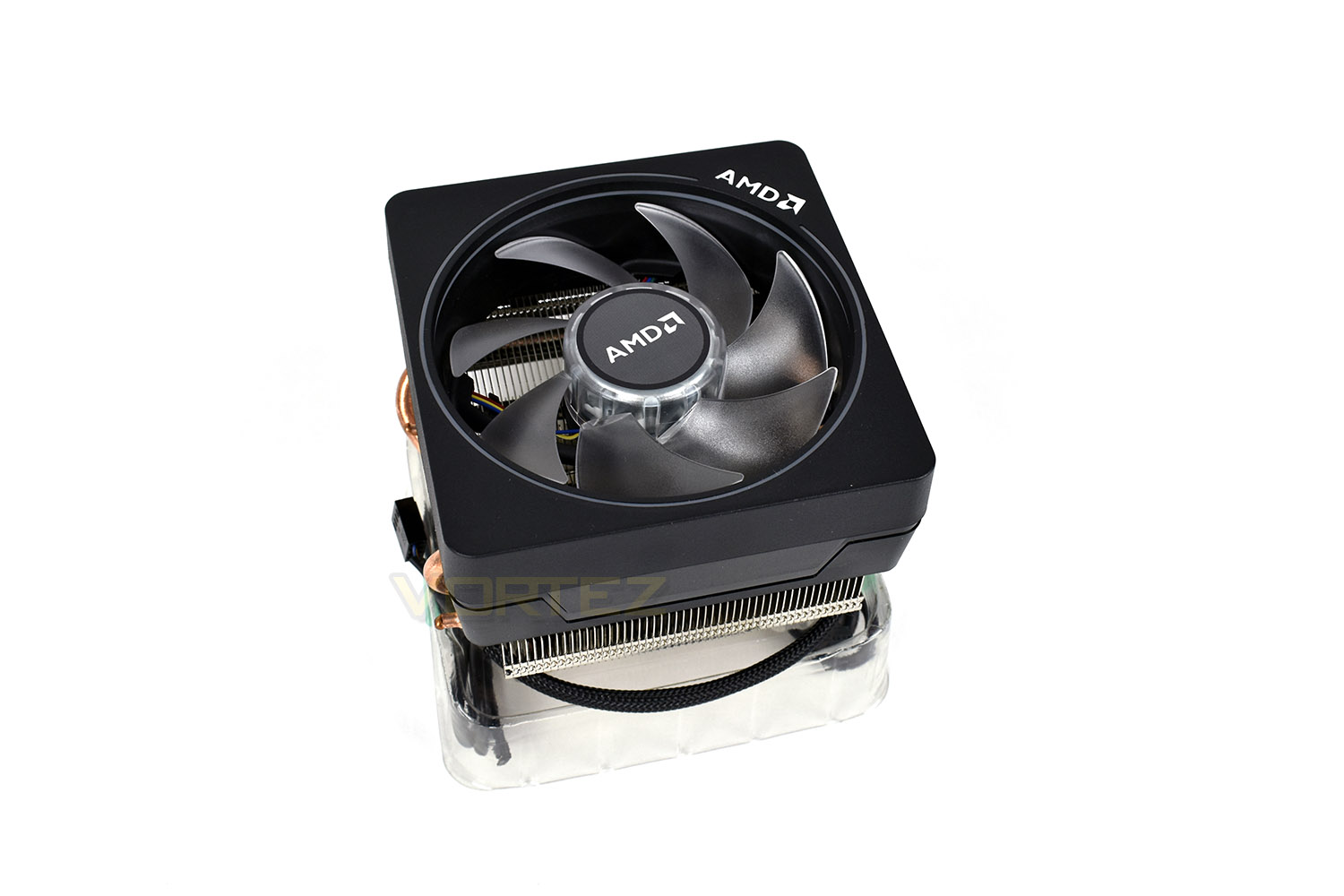
Not only are there die changes, there’s also the inclusion of a cooler with every 2000-series CPU. The 2700X, for instance, arrives with the Wraith Prism, an AM4 CPU cooler with RGB LED lighting.
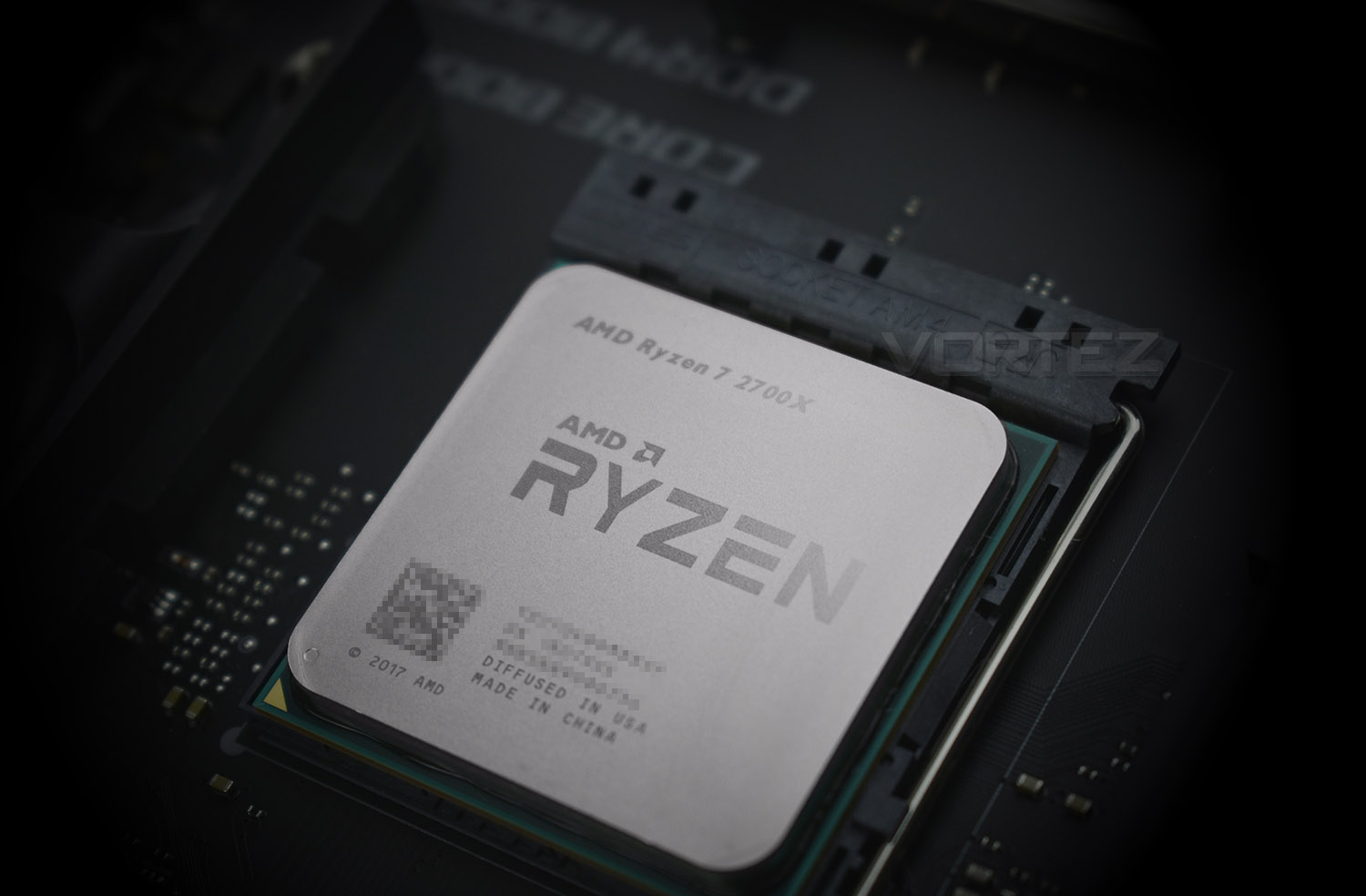
Today we look at the top-tier 2700X, the current best in the 2nd Gen range. Featuring a 3.7GHz base clock and 4.3GHz boost clock, along with 8 cores and 16 threads. AMD haven’t, at least at this moment in time, provided an analogue to the 1800 and 1800X CPUs, instead listing the 2700X as their enthusiast chip.
After reviewing the 1800X, we hoped to see further developments from AMD, pushing the boat out a bit further and bringing even more competitive products to the market. We’ll see how they’ve adapted the Zen architecture to improve performance. Can AMD further improve their market share and finally topple Intel’s dominance of the high-end industry?
AMD on the 2700X:
Technical Specifications
CPU Cores – 8 Cores, 16 Threads
CPU Max Boost Clock – Up to 4.3GHz
CPU Base Clock – 3.7GHz
L1$ – 64K I$, 32K D$ Per Core
L2$ – 512K Per Core
L3$ – 16MB Shared
TDP – 105W
DRAM Supported – DDR4-2933MHz (Dual Channel)
Transistors and Die Size – 213mm2 / 4.8 billion
Zen+ Revisions
Zen, early in 2017, set an astounding starting block for AMD to build from. Today we get to see the fruits of their labour, with a full year of adjustments, tweaks and experience to improve their CPU range with Zen+.
The 12LP Process from GLOBALFOUNDRIES
The 12nm lithography of Zen+ improves on last year’s 14nm FinFET process, seeing improvements of 10-15% over preceding nodes. This helps to extend clock speeds and reduces the current required to perform a specific task. This delivers improved performance in all the ways that enthusiast customers requested: latency, overclocking, memory speed and clock speeds.
We also see a drop in core voltage across the operating range, vs. 14nm FinFET, as well as improved all-core overclocks.
L1, L2 and L3 cache all see improvements in latency, around 13%, 34% and 16% respectively. This should contribute to a system-wide performance improvement, ensuring the CPU can execute tasks more effectively.
AMD SenseMI Technology
AMDs Ryzen CPUs have a grid of interconnected sensors, monitoring every aspect of performance; they’re accurate to 1mA, 1mV, 1mW and 1°C and are monitored 1000 times every second, to ensure the optimal performance is attained at all times. These sensors feed information to the Infinity Fabric control loop, the “brain” of the CPU, making decisions based on information available to it right now, and predicting future workloads and operating conditions.
This smart grid of sensors allows Zen+ CPUs to fine-tune performance and power characteristics of the cores, manage cache pre-fetches and perform AI-based branch prediction.
Understanding these sensors is crucial to understanding how the CPU behaves.
Precision Boost 2
With AMDs first Gen Ryzen processors, we saw Precision Boost introduced for the first time, continually monitoring all aspects of the CPU, in real time, to ensure the optimal clock speeds and boost frequencies are applied at all times. However, this technology only applied when two of the 16 cores were “taxed” in lightly threaded applications.
Precision Boost 2 improves on this idea. AMD noticed that scenarios existed where 3 or more cores were in use, yet the overall workload was relatively small. This previously resulted in a huge drop in core frequency, when no imminent issues were actually present.
Thermal, electrical and utilisation headroom has been analysed in-depth, arriving at Precision Boost 2.
When a limit is encountered, in terms of power draw or heat generation, Precision Boost 2 will dither within the frequency range, in 25MHz increments, to attain a core frequency that is manageable at that exact moment in time. The process is continuous, with the CPU adjusting parameters 1000 times per second to ensure the Ryzen 2nd Gen CPU runs at the optimal core speed for any given task.
Precision Boost 2, then, could be considered as being greedy or opportunistic – if the clock speeds are there and they won’t cause any imminent problems to the thermals or power draw, the CPU will boost its frequency to as close to the 4.3GHz Boost Clock as possible.
Extended Frequency Range 2 (XFR2)
Now that you have a grasp of Precision Boost 2, XFR2 is aimed at the enthusiast who earns improved processing power by allowing the CPU a nicer place to live, for lack of a better term. Precision Boost 2 operates within a specific window, but that specification is conservative to allow for warmer or more humid climates, which would hamper CPU performance somewhat.
The thermal environment within a PC case is something the user can influence easily, usually by increasing airflow with the addition of fans, or purchasing a high-performance heatsink for the CPU; even running the PC within an air-conditioned room. These improvements will widen the thermal envelope and allow higher frequencies for longer periods of time, pushing the onus onto power delivery instead.
Essentially, if you can largely remove one of the two major contributing factors towards clock speed degradation, you will likely end up with a faster CPU.
These architecture improvements allows greater performance in a huge range of scenarios by allowing the CPU to run at the highest clock speed possible, providing it’s inside the thermal/electrical/load envelope, regardless of the number of cores and threads active. The improvements in moderately-threaded applications, such as games, could be as big as 500MHz when compared to the 1800X.
Improved Memory Support
Perhaps one of the largest issues with the Ryzen launch was memory compatibility issues, with expensive, high-performance memory sticks sometimes not working at all, or if they did, they had to be run at a much lower frequency than advertised on the packet.
With Ryzen 2000 series CPUs, memory support has been increased from DDR4-2667MHz to DDR4-2933MHz. This is something everyone expected from the 2nd Gen Ryzen launch due to the Infinity Fabric’s reliance on memory speed.
Better support for high-speed memory kits should provide a boost to cross-core and cross-CCX communication, improving CPU performance more than you would usually see on an Intel system, for example.
Packaging & Product
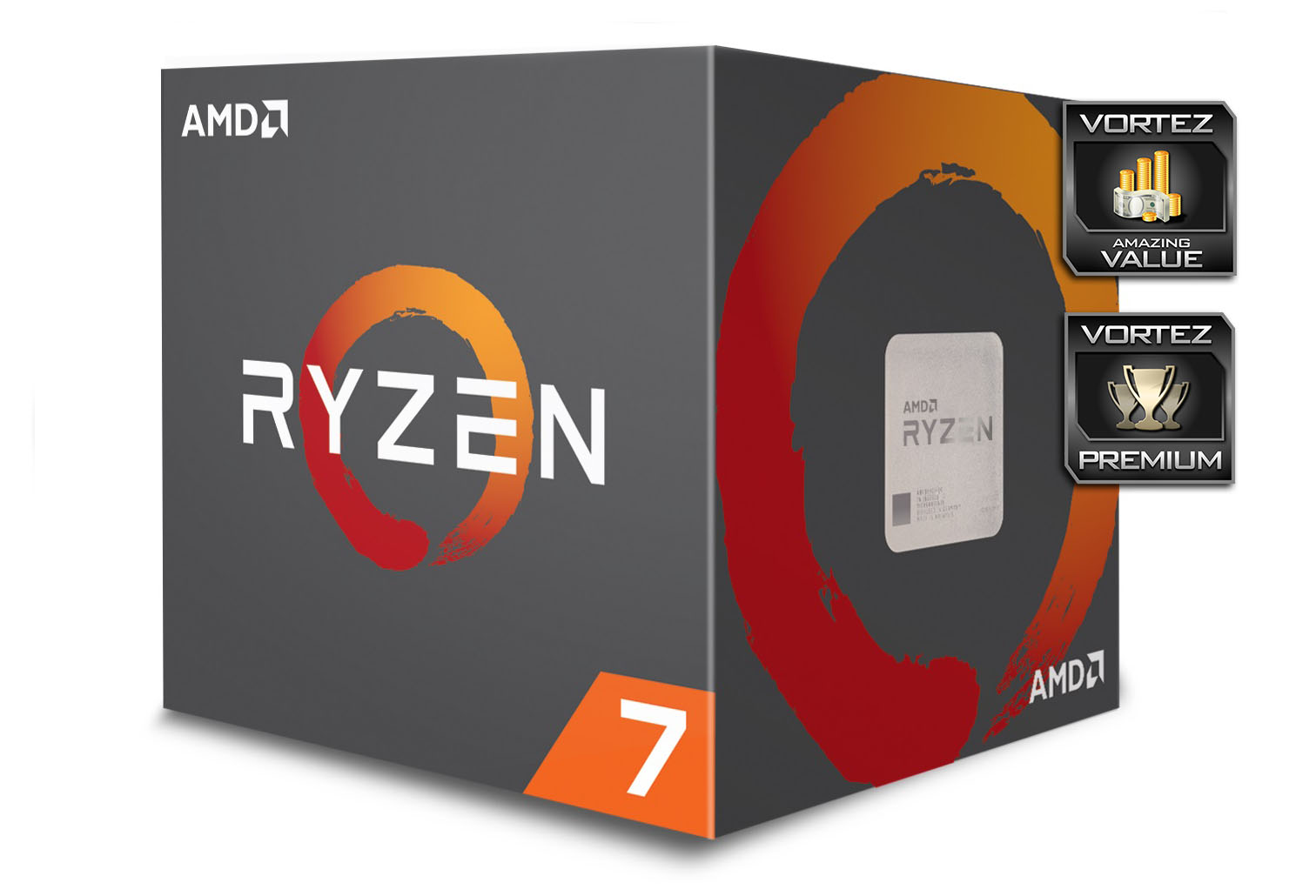
The packaging hasn’t changed since last year, save for the inclusion of a Wraith Cooler with each AMD CPU. The same Sumi style circle is still all over the packaging, with that recognisable orange/red and grey colour scheme.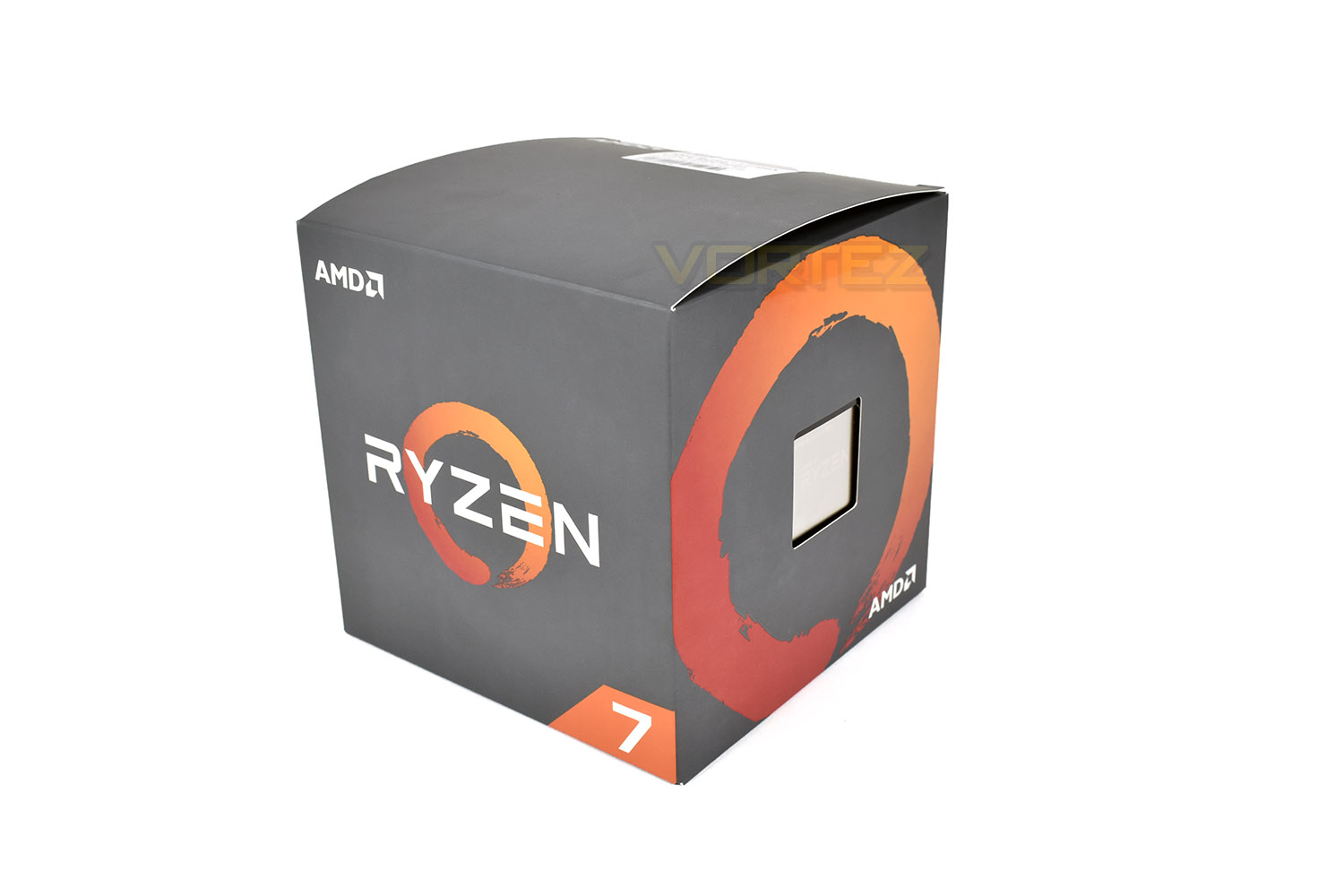
AMD, with keeping the AM4 socket, along with forwards and backwards compatability, ensures that the CPUs must remain the same shape and size. The 2700X is no exception.
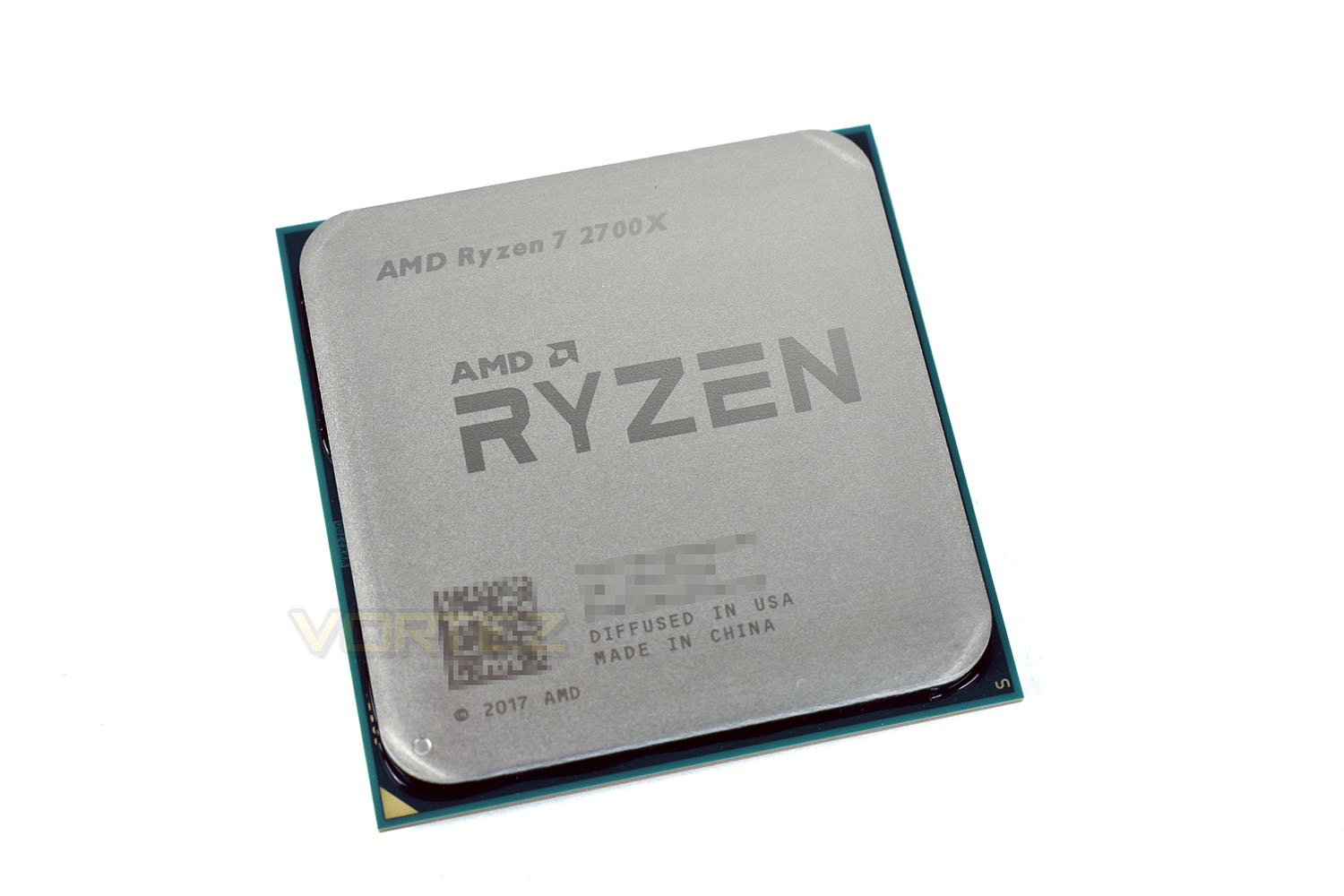
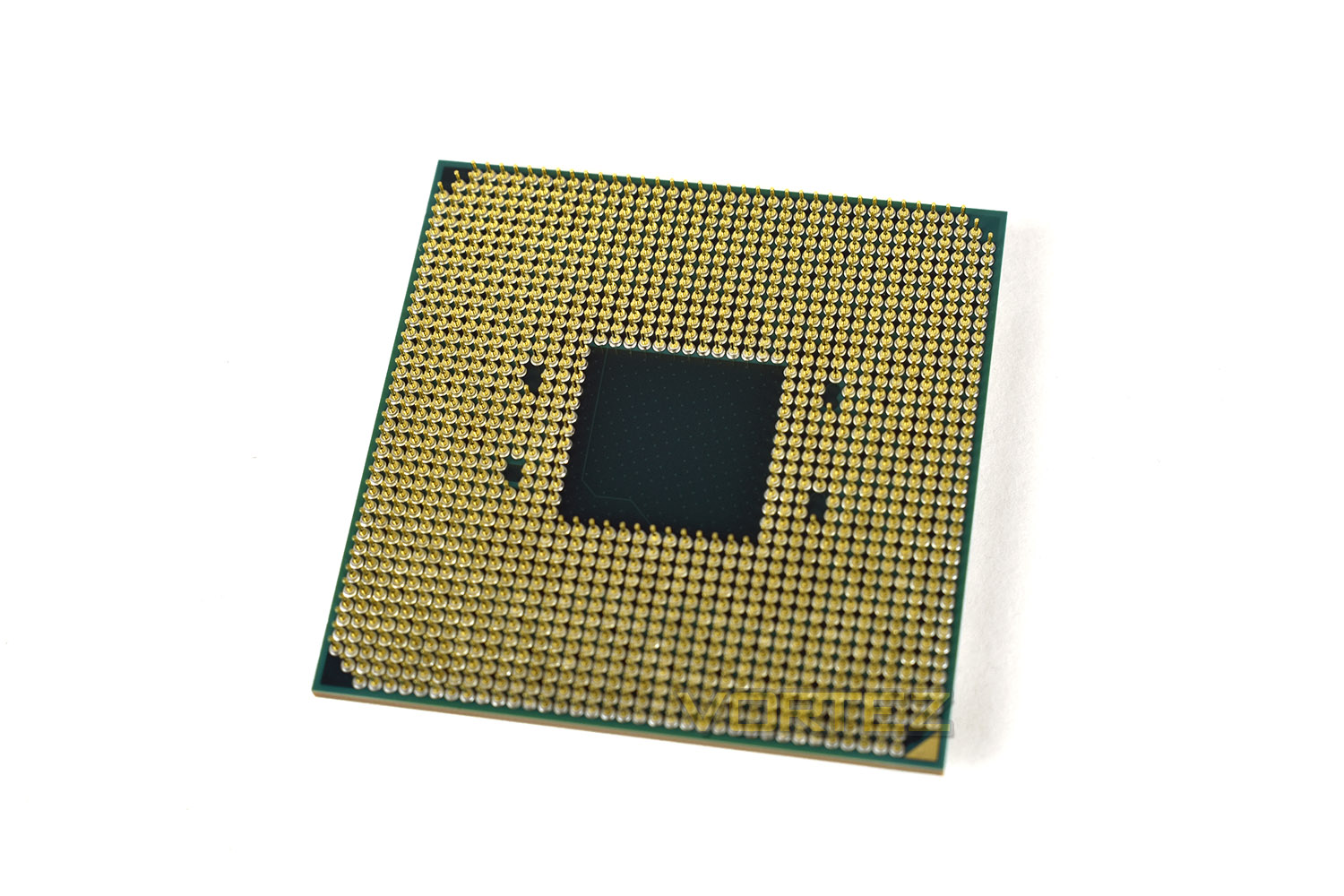
The rear of the chip features the same Socket AM4 layout, with 1331 pins.
The Wraith Prism cooler measures 112mm tall and 105mm by 115mm. The last measurement is extended by the protruding heat pipes running through the heatsink fins.
Test Setup & Software
For the purpose of testing AMD Ryzen 2700X we used the ASUS ROG STRIX X470-F – this motherboard is a strong offering and provides us with a good platform to analyse performance.CPU being tested
AMD Ryzen 2700X (3.7GHz – 4.3GHz Boost) Zen+
TEST SETUP
Cooling be quiet! Dark Rock 4
Motherboard ASUS ROG STRIX X470-F
Memory 16GB Corsair Vengeance LPX 3000MHz
Graphics Radeon RX 480 8GB
Storage Corsair LX 512GB SSD
PSU Corsair RM 1000 80 Plus Gold Certified PSU
COMPARED AGAINST
AMD Ryzen 3 2200G (3.5/3.7GHz) Raven Ridge
AMD Ryzen 5 2400G (3.6GHz/3.9GHz) Raven Ridge
AMD Ryzen 3 1200 (3.1/3.4GHz) Summit Ridge
AMD Ryzen 3 1300X (3.4/3.7GHz) Summit Ridge
AMD Ryzen 5 1400 (3.2GHz) Summit Ridge
AMD Ryzen 5 1600 (3.2GHz) Summit Ridge
AMD Ryzen 7 1700 (3.0GHz) Summit Ridge
AMD Ryzen 7 1700X (3.4GHz) Summit Ridge
AMD Ryzen 7 1800X 3.6GHz) Summit Ridge
AMD FX-8350 (4.0GHz) PileDriver
Intel Core i7-8700K (4.5GHz) Coffee Lake
Intel Core i7-7900X (3.3GHz) Skylake-X
Intel Core i7-7800X (3.5GHz) Skylake-X
Intel Core i5-7700K (4.2GHz) Kaby Lake
Intel Core i7-6950X (3.0GHz) Broadwell-E
Intel Core 7-6900K (3.2GHz) Broadwell-E
BENCHMARKS
Cinebench R15 – CPU/OpenGL Score
x264 HD 4.0 – 1st and 2nd pass encoding
SiSoftware SANDRA – CPU & Memory benchmarks
POV-RAY – CPU benchmarks
TrueCrypt – CPU benchmarks
AIDA64 – CPU benchmarks & Memory
PCMark 8 – Creative & Photoshop
PCMark 10 – Extended
3DMark FireStrike – 3D Benchmark
3DMark TimeSpy – 3D Benchmark
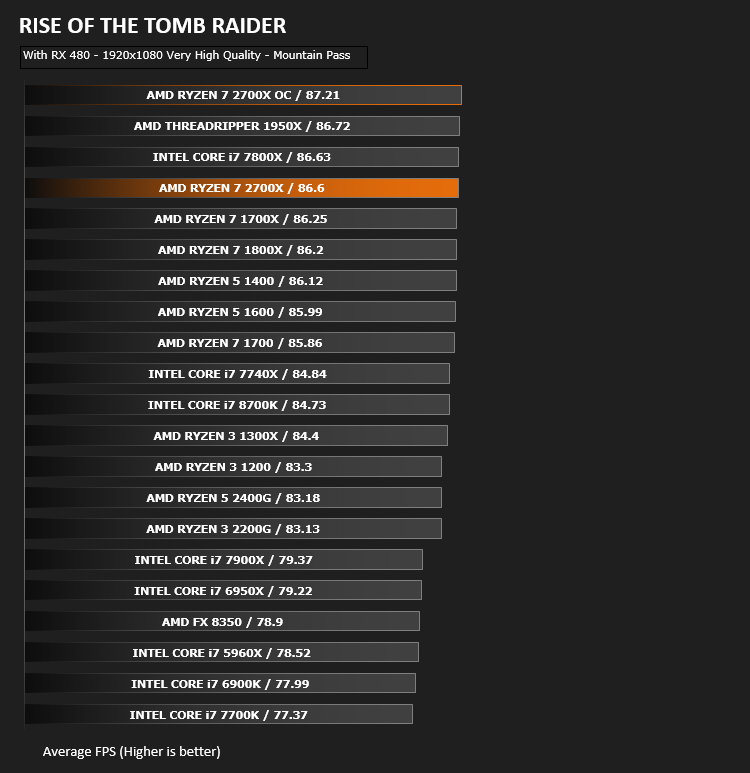
Games – Rise of the Tomb Raider & Total War: WARHAMMER
OTHER SOFTWARE
Temperature Analysis: Core Temp
Stress Testing Software: AIDA64 Stability Test
CPU Specification Monitoring: CPU-Z
Temperatures & Overclocking
While reviewing the 1st Gen Ryzen CPUs, we ran into problems in regards to memory compatibility and stability, which hampered our results somewhat. With the 2nd Gen CPUs, we’ve not had any of those problems.First off, we feel it’s worth mentioning that overclocking is the act of running a device outside of its specified limits, within which the manufacturer has found the product performs normally. We accept no responsibility for any damage caused to, in this instance, your processor, and offer this purely as a guide.
Every piece of silicon is different and will present different levels of overclockability, this is referred to as the silicon lottery. The silicon lottery applies because of tiny imperfections within the chip which affect all aspects of performance.
We set out trying to find the maximum 24/7 overclock for our 2700X sample, while staying within safe voltage limits and monitoring temperature closely.
To overclock a 2nd Gen Ryzen chip, you choose a multiplier within the BIOS. Thanks to Precision Boost 2, these multipliers are granular and adjustable in steps of 0.25x (25MHz) increments. The base clock of ~100MHz gives you the overall clockspeed of the processor. For example, a 42.75x multiplier will yield a 4275MHz core frequency.
We tested the CPU at stock settings, to gauge the headroom available to us without hitting any kind of thermal ceiling. The 2700X reached 55°C. This isn’t a direct comparison of thermal performances, but merely a guideline.
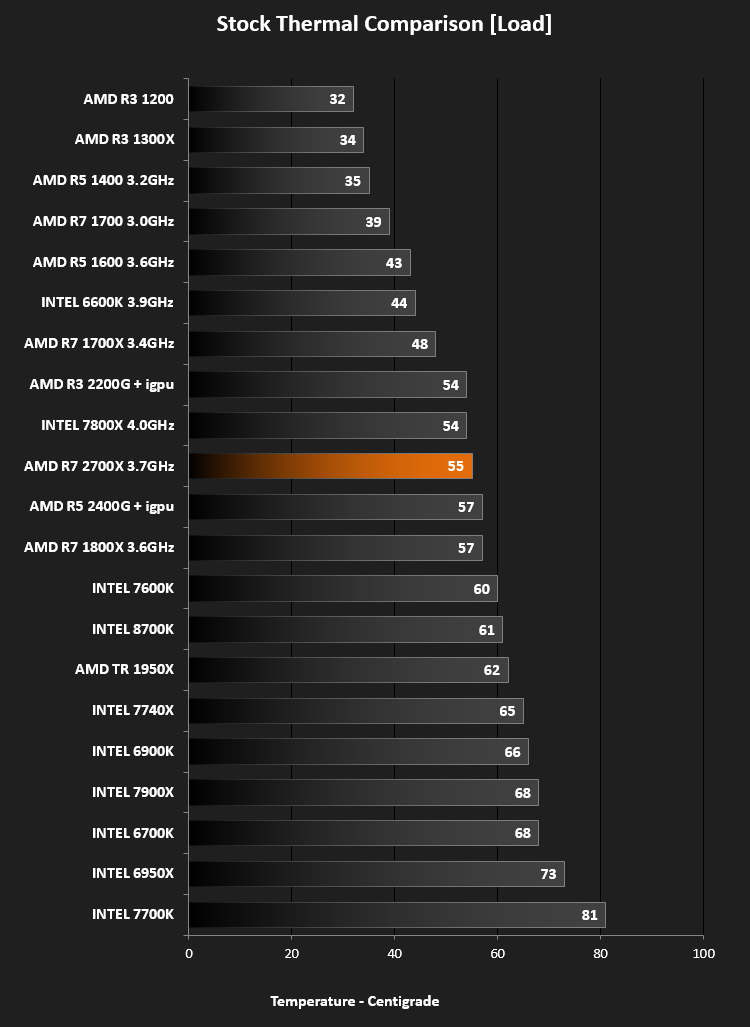
It’s also worth noting that AMD have introduced a 10°C offset on their 2700X CPU. This offset is designed to encourage more aggressive fan profiles to aid with cooling and therefore allow AMDs XFR2 and Precision Boost 2 more headroom to operate.
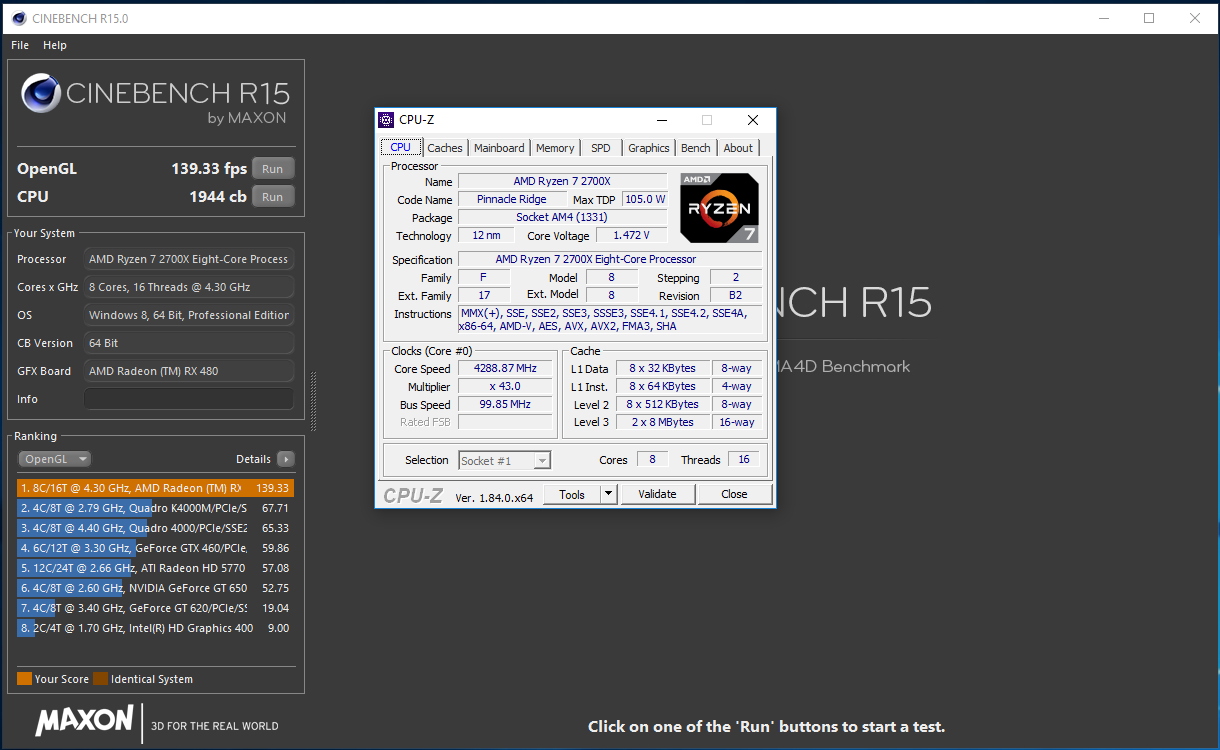
We managed a 43x multiplier on our particular sample; operating a 4.3GHz core frequency across all 16 cores. This may seem like we’ve only managed to reach the quoted boost clock of the processor, but that 4.3GHz at stock settings requires the load to be optimal and doesn’t allow applications such as AIDA64’s burn in stress test to operate at 4.3GHz, at all, eventually settling at around 4.075GHz instead. After 20 minutes of stress testing within AIDA64, we topped out at 89°C (actually 79°C with the 10°C offset). This is well below any dangerous levels and perfectly usable on a daily basis.
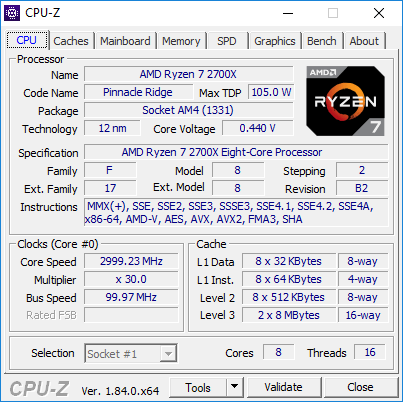
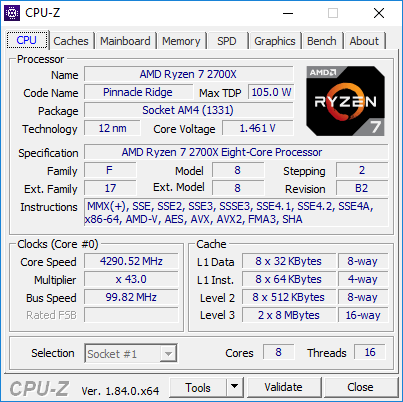
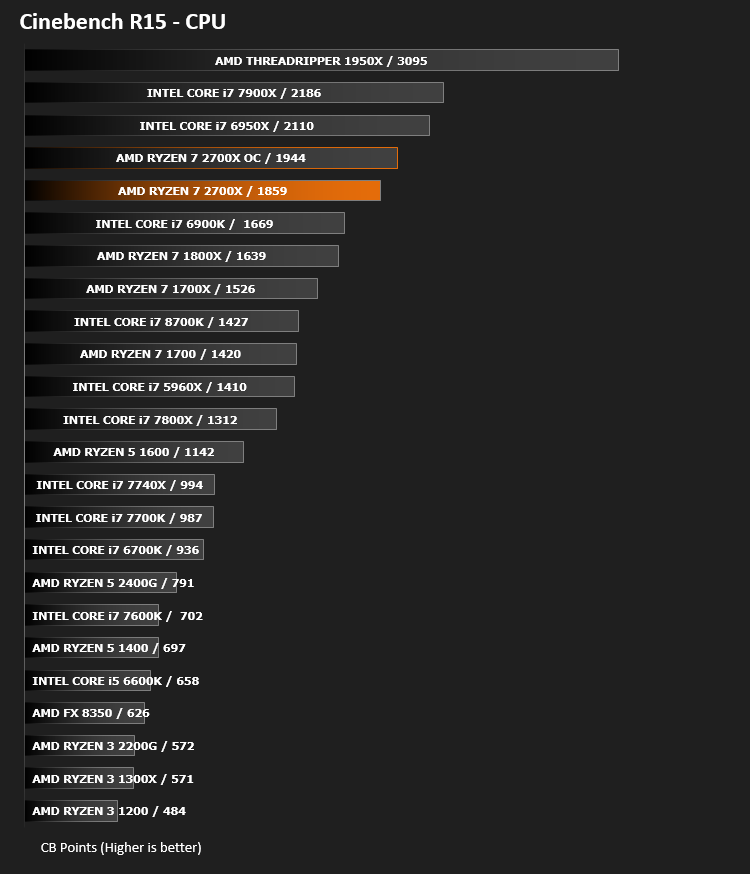
Comparing stock Cinebench R15 scores with the overclocked result:
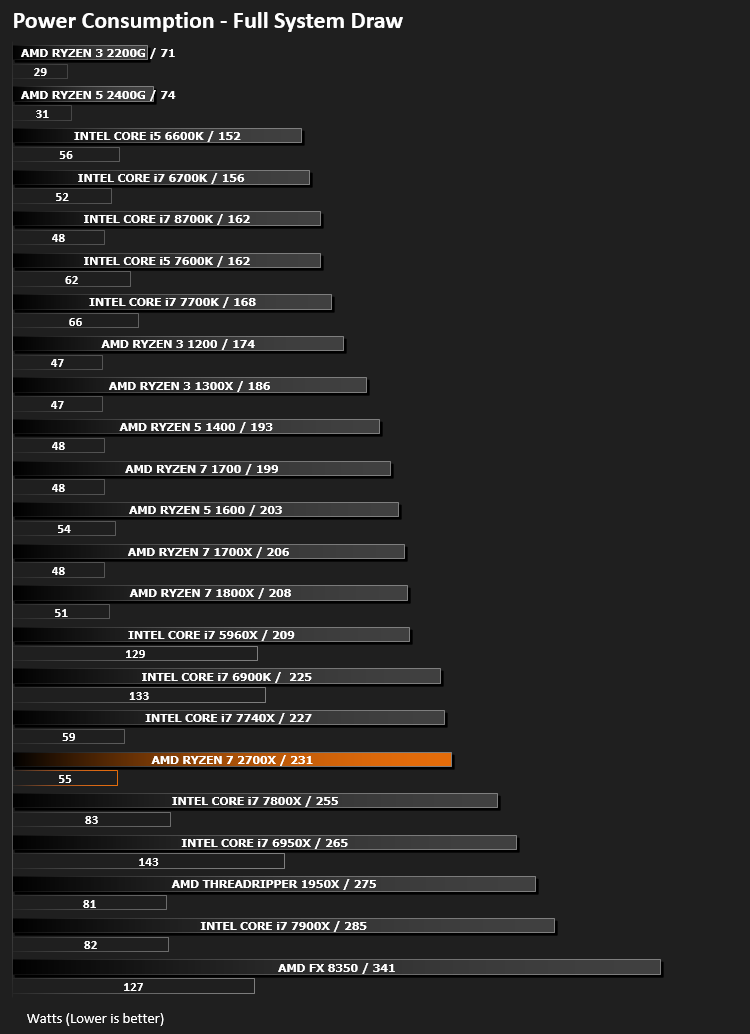
Power Consumption
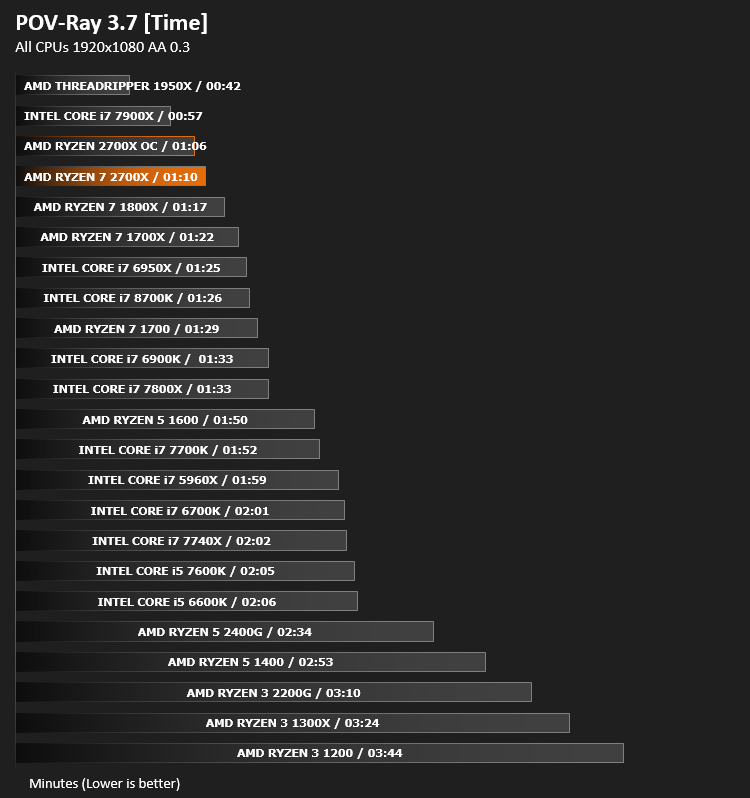
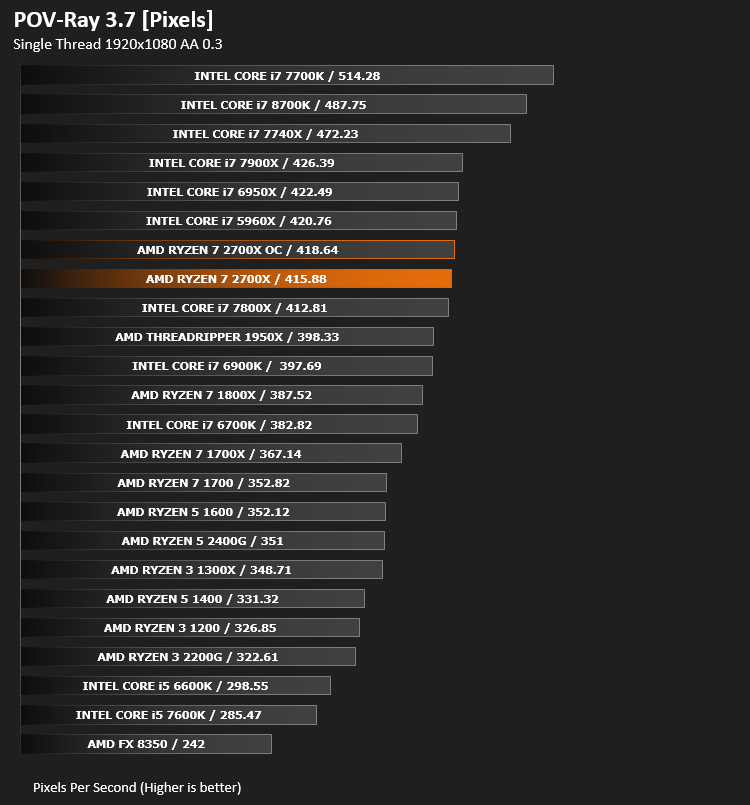
Ray Tracing Performance – POV-Ray 3.7
This product allows users to build their custom 3D worlds with excellent quality despite their computer’s hardware. It has adjustable options for levels of radiance, refraction, and reflection. Calculation time may vary depending on the computer model, but PovRay can adapt to many computer builds, and is supported by the open source community.
AES Encryption Performance – TrueCrypt 7.1a
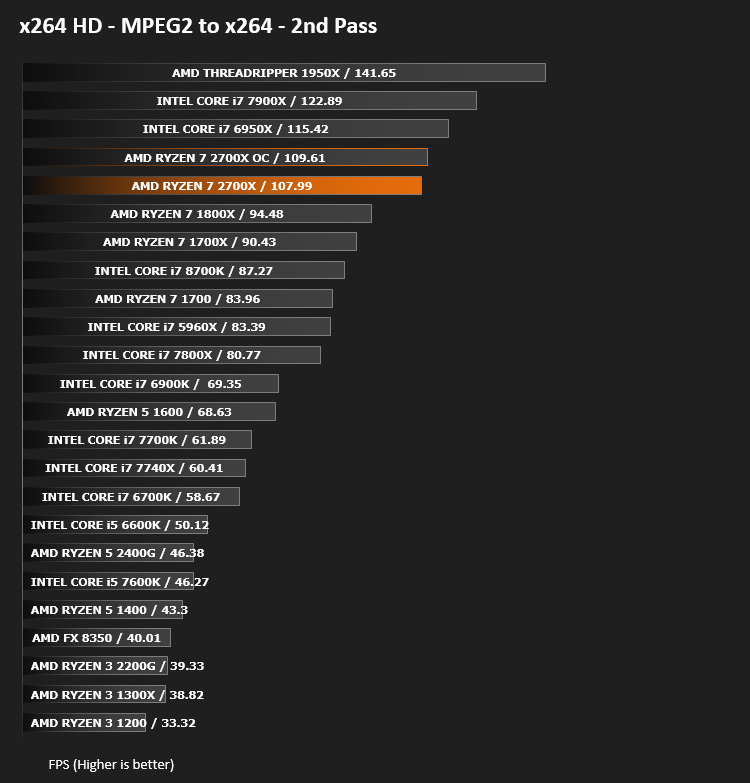
Encoding Performance – x264 HD
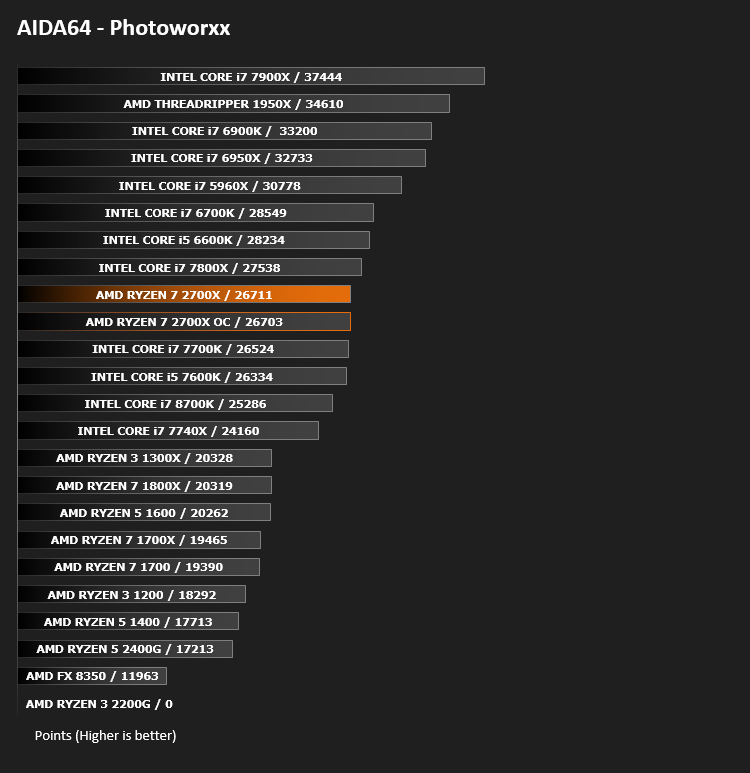
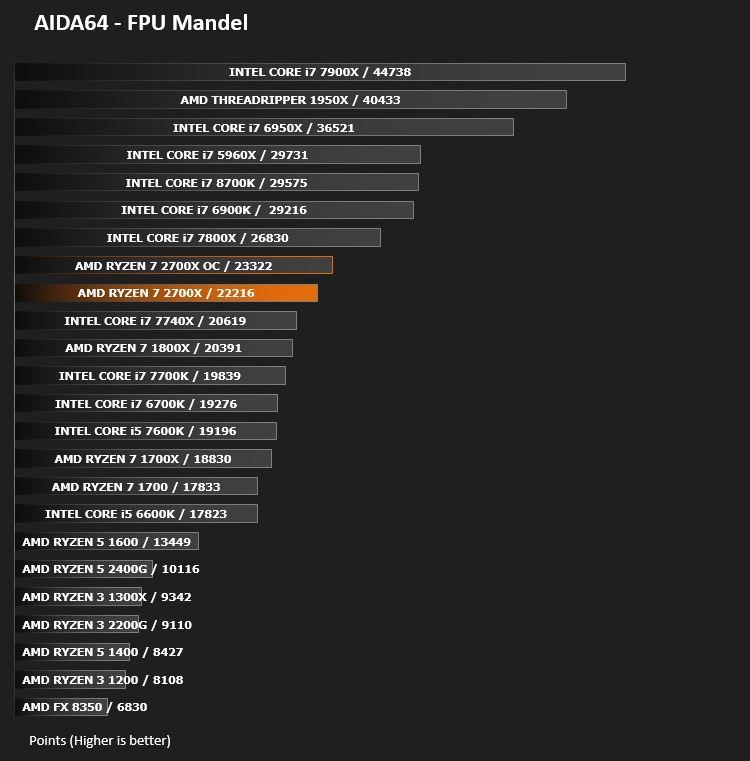
Processing Features Performance – AIDA64
AIDA64 Product Page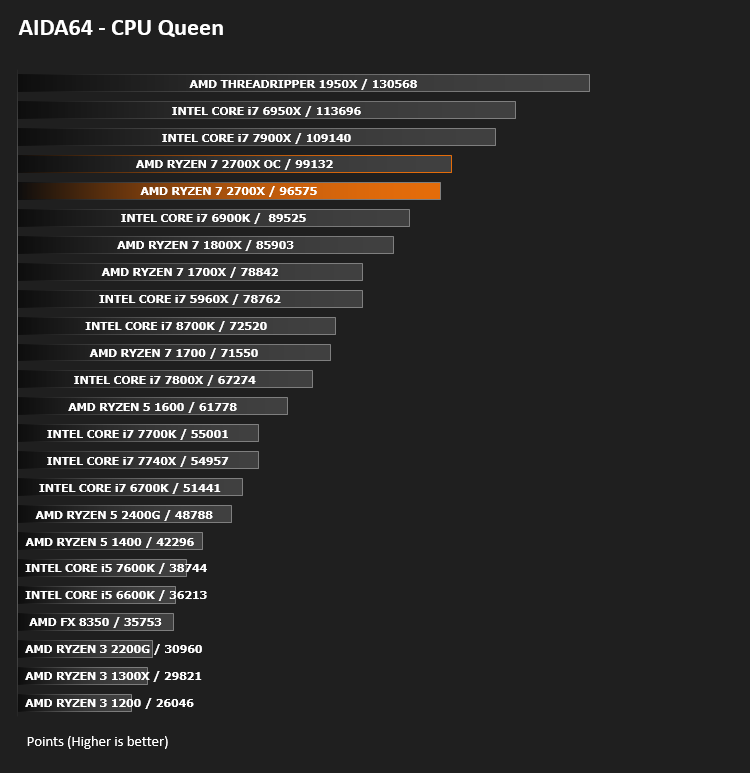
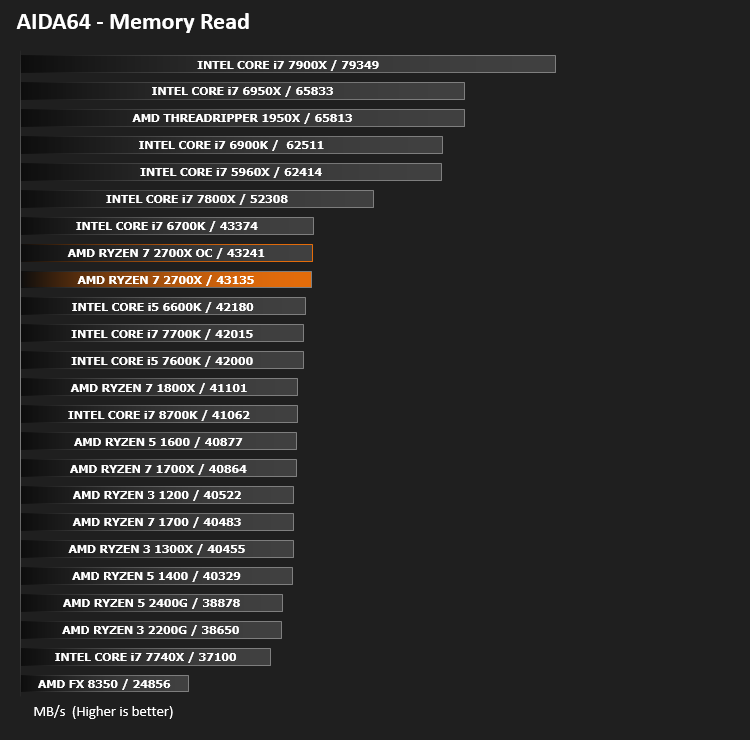
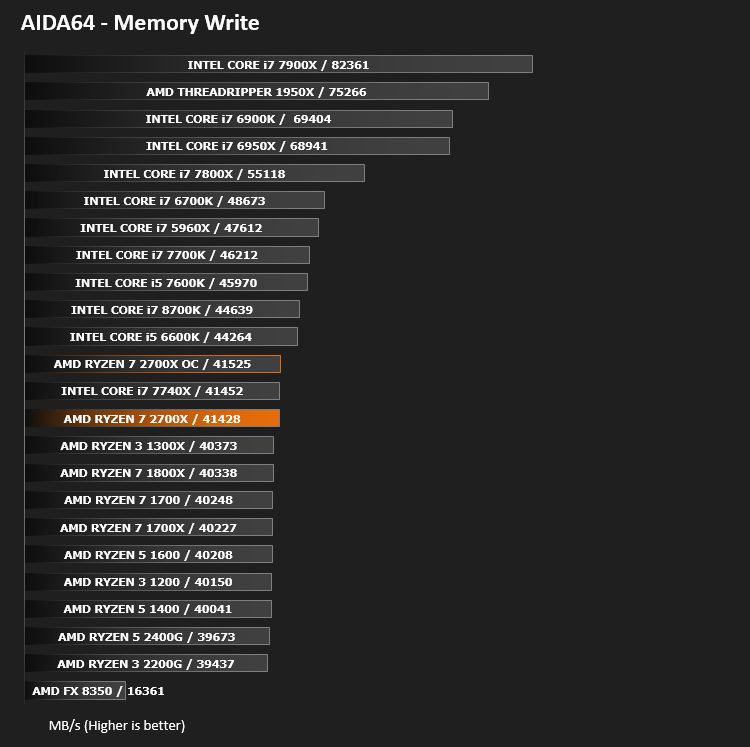
Memory Transfer Performance – AIDA64
AIDA64 Product PageThe Memory Latency benchmark measures the typical delay when the CPU reads data from system memory. Memory latency time means the penalty measured from the issuing of the read command until the data arrives to the integer registers of the CPU.
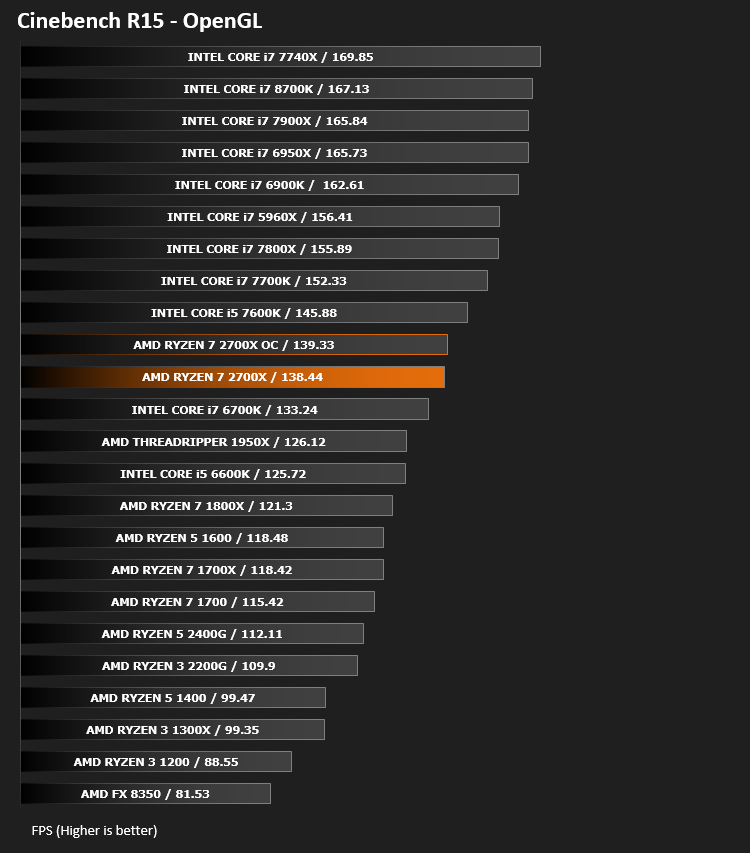
Processing Power Performance – Cinebench R15
Bandwidth Performance – SiSoftware SANDRA
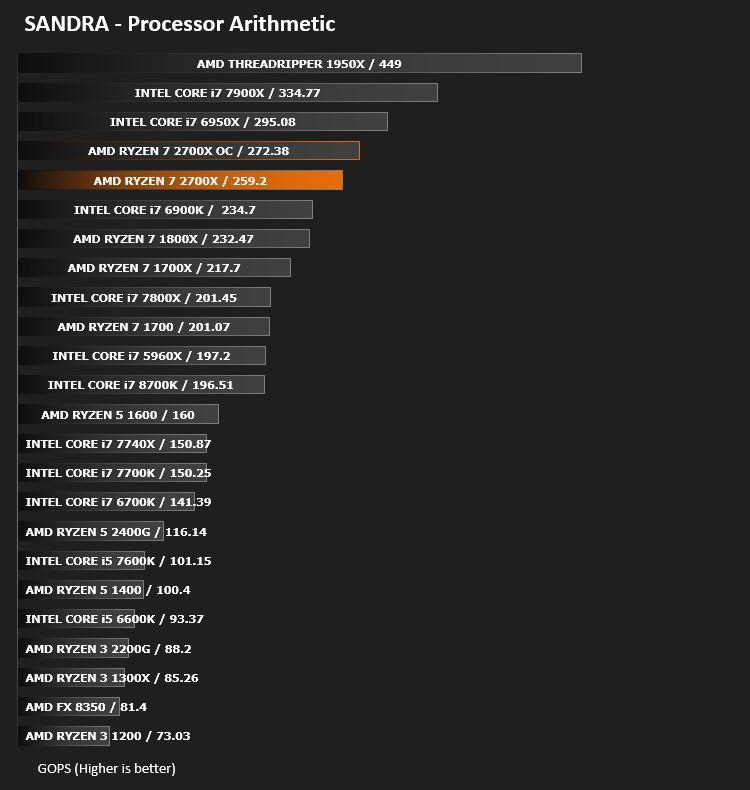
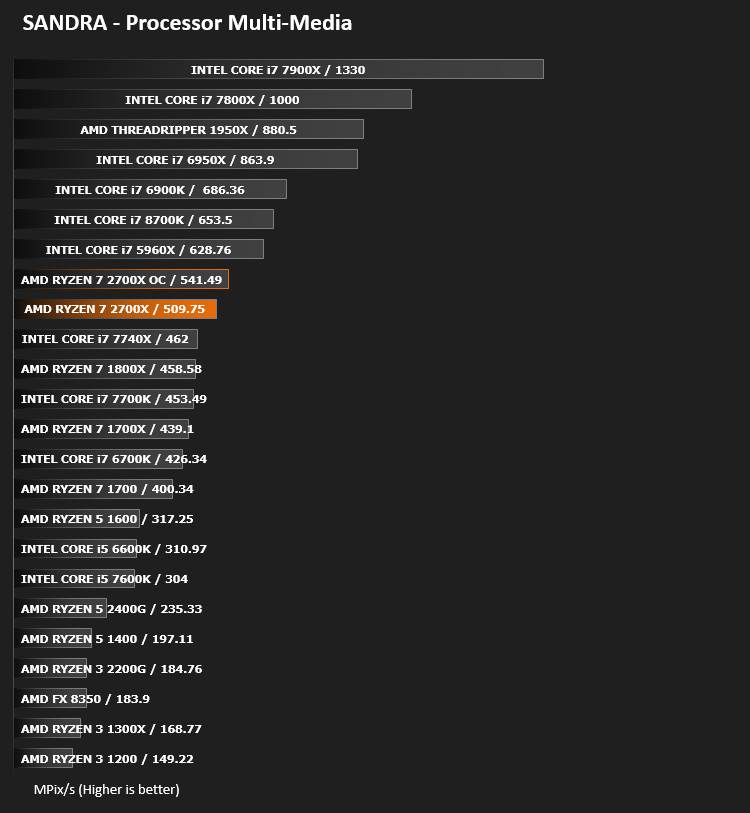
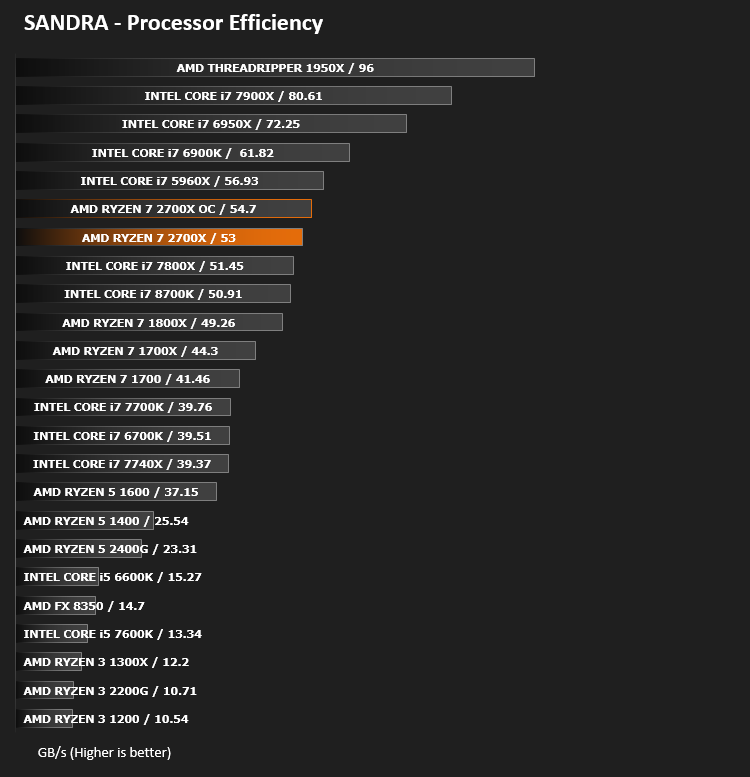
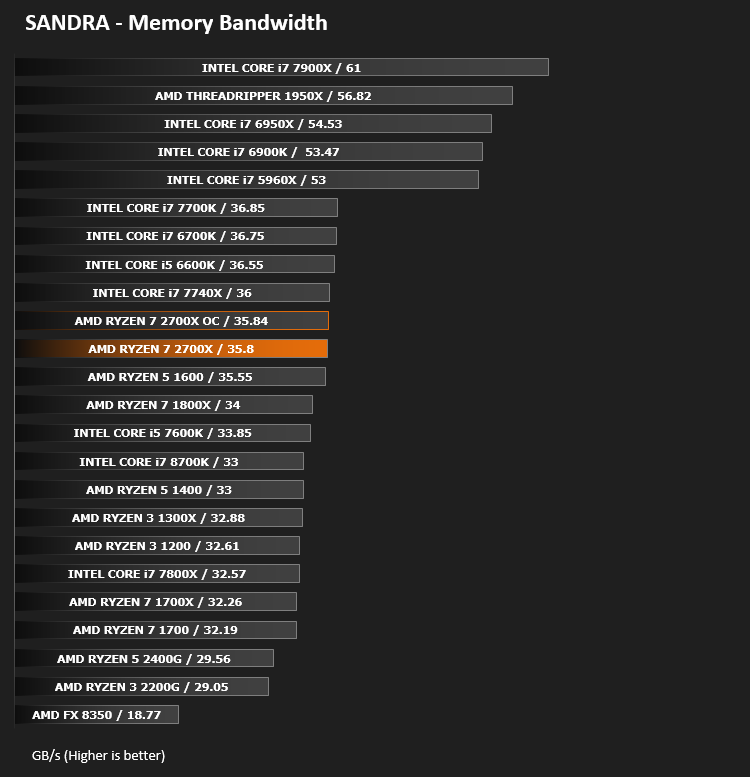
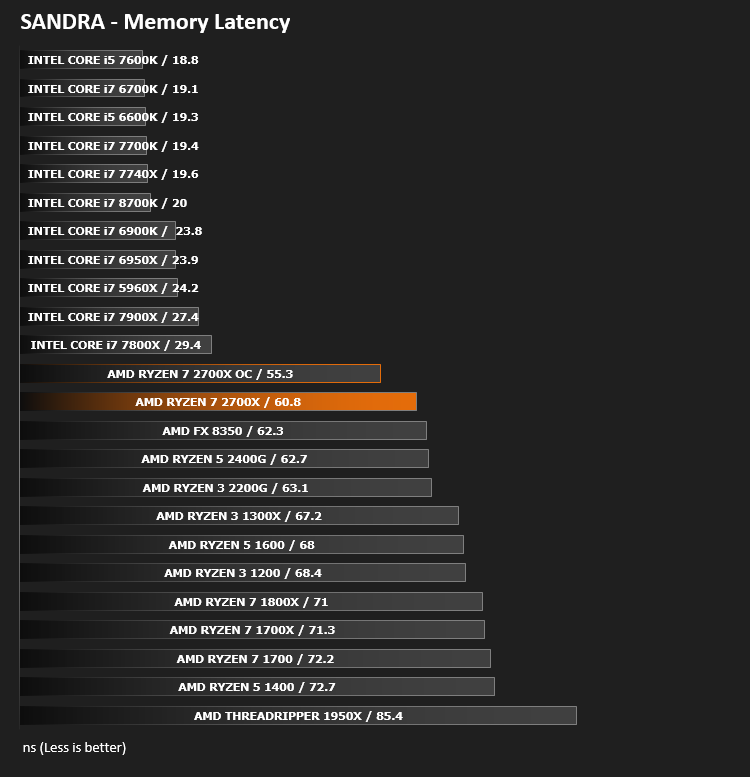
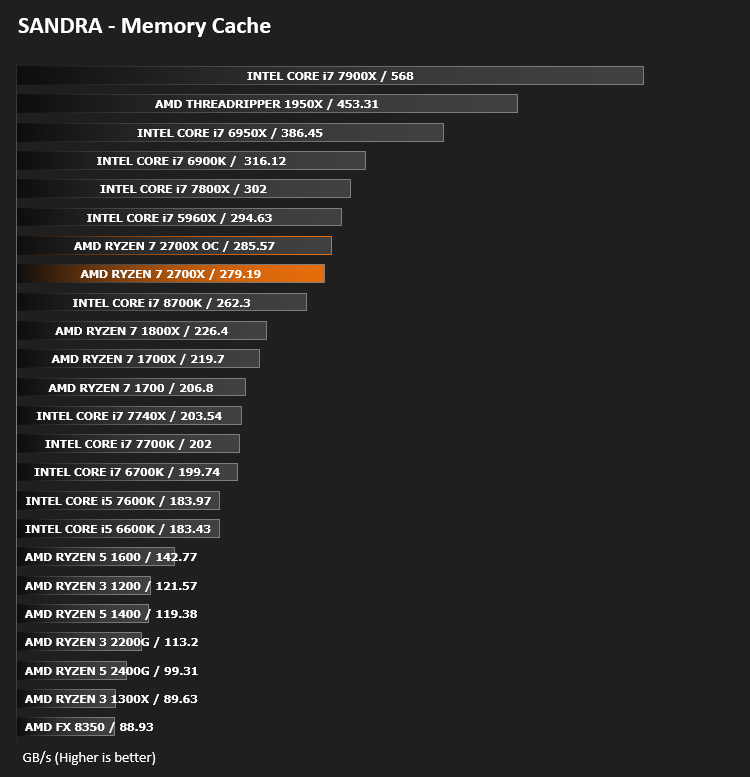
Image Editing Performance – PCMark 8 Photoshop
PCMark 8 Product Page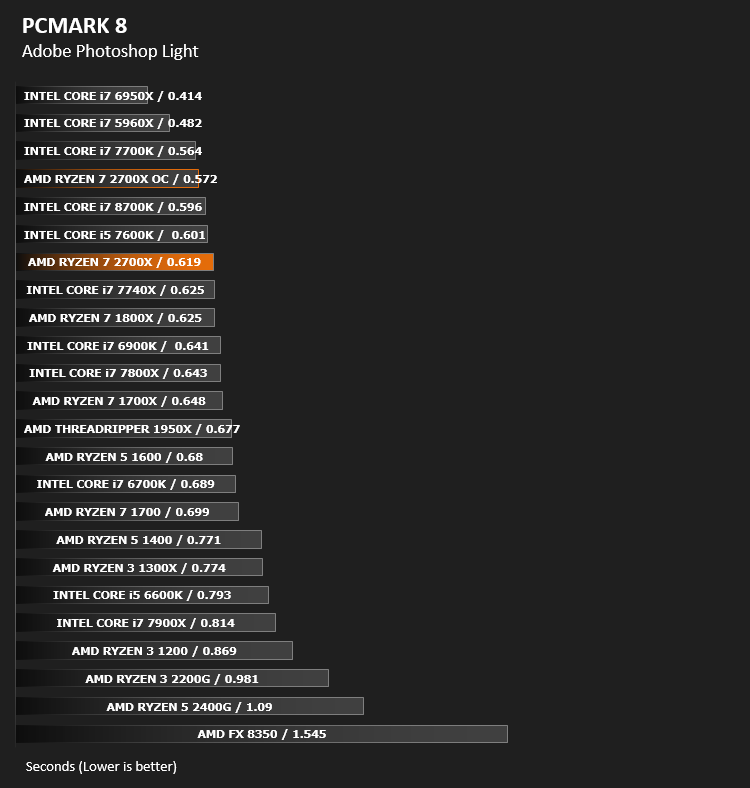
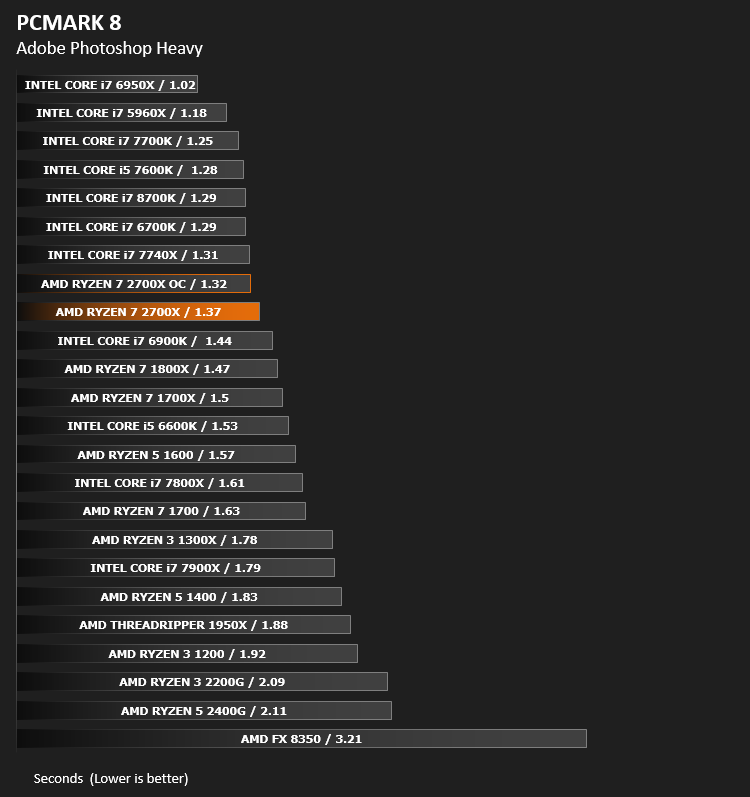
Overall System Performance – PCMark 8
PCMark 8 Product Page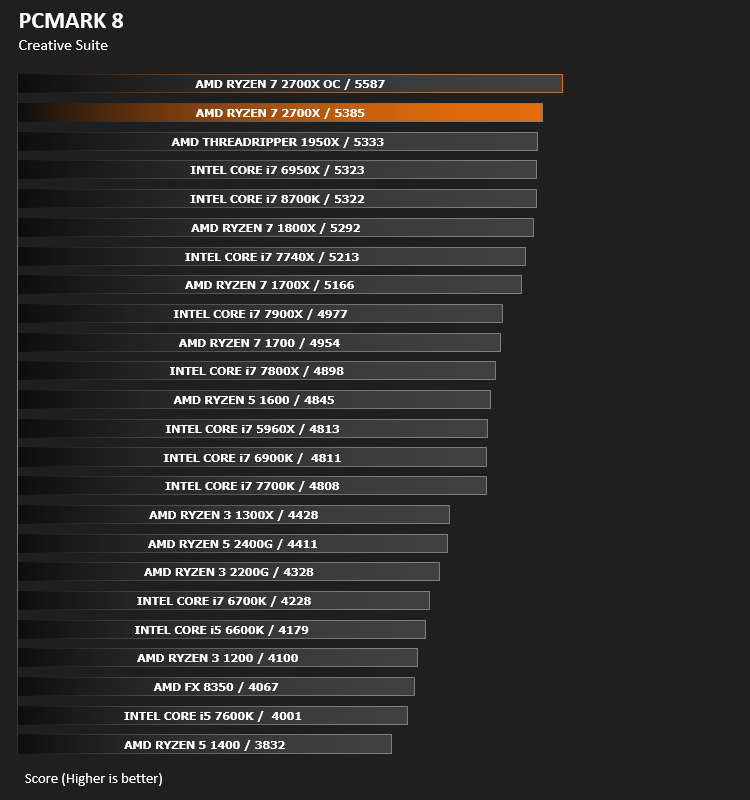
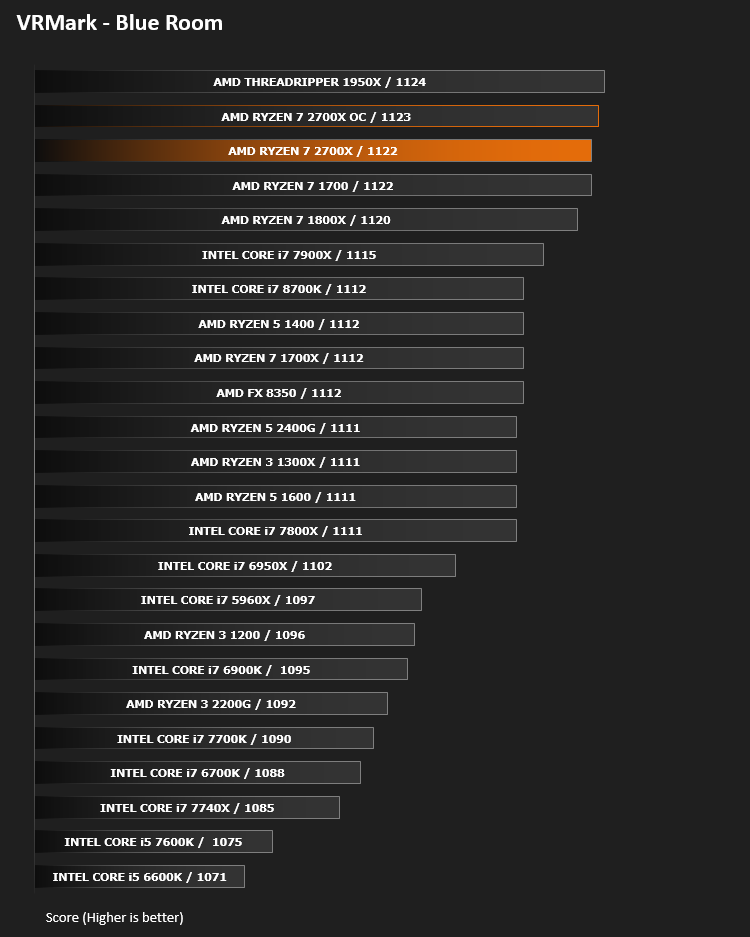
VR Performance – VRMark
VRMark Product Page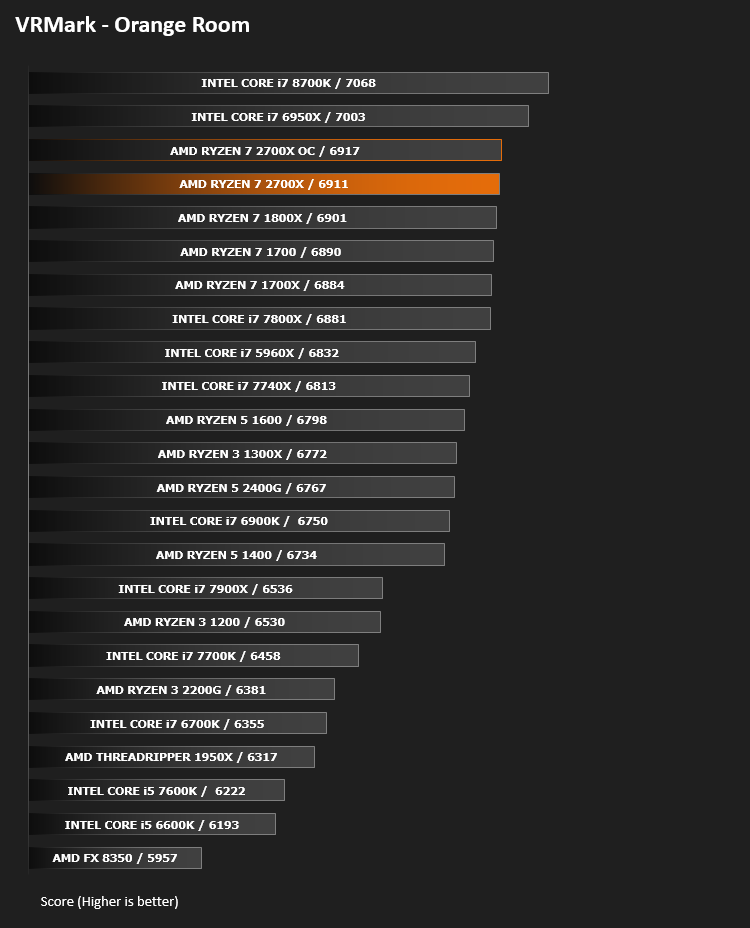
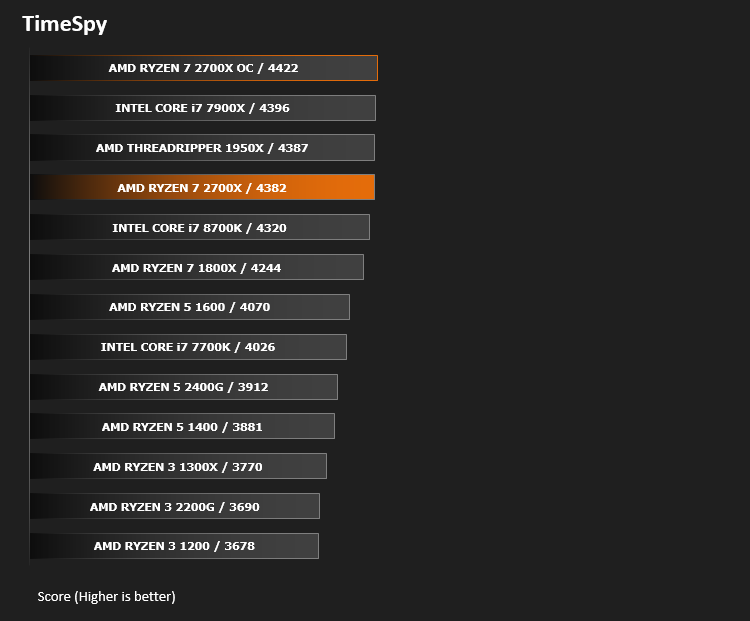
3D Performance – 3DMark FireStrike
3DMark FireStrike Product Page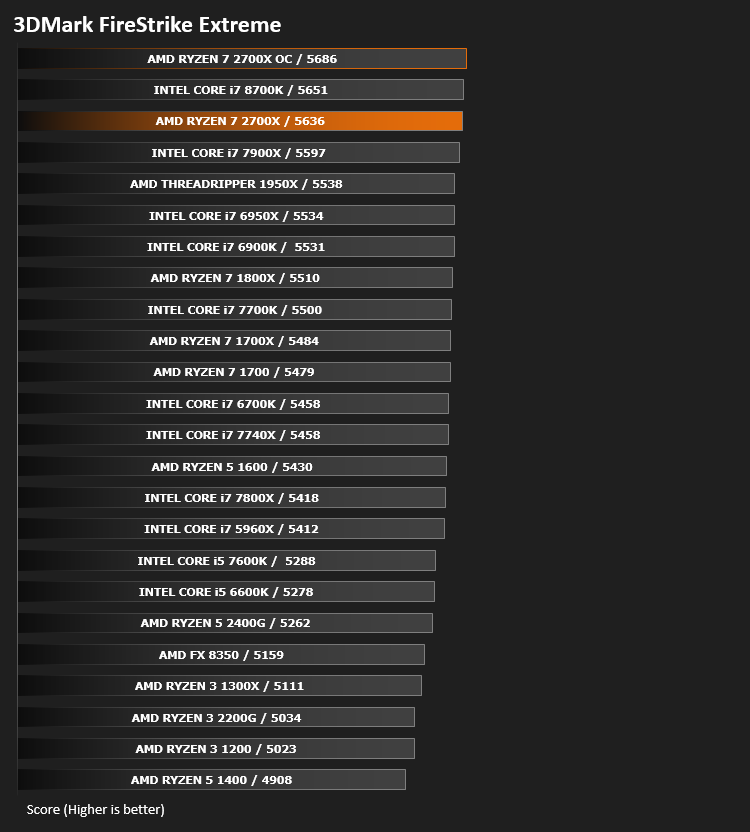
Gaming Performance – Rise of the Tomb Raider & Total War: WARHAMMER

Conclusion
Despite taking the industry by storm last year, AMD weren’t happy. There were aspects which needed attention in order to truly scare Intel. Memory performance and latency, as well as slow CPU cache, caused considerable issues with the previous generation and was almost without-doubt the Achilles heel of the Ryzen 1xxx Series CPUs; AMD have found that GLOBALFOUNDRIES 12LP Process helps to alleviate some of those latency issues and in-turn improve performance.Compared to the launch of the 1800X last year, where launch pricing was £489/$499, the performance of the 2700X is incredible, arriving with a price tag of only £299/$329. The “bang for your buck” has seemingly never been better.
Precision Boost 2 cooperating with XFR2 brings about a much more effective way of extracting performance within a specific thermal and power bracket. We saw boost clocks often reaching 4.3GHz then slowly tailing back to 4.2/4.1, eking out every last drop of power. In short bursts, such as extracting small files, editing a single image or launching an application, the 4.3GHz boost clock was immediately utilised, decreasing wait times; even in larger tasks, such as prolonged gaming, we saw no drop off worse than 4.2GHz in highly-threaded games, showing the 2700X to be strong in many areas.
Overclocking performance sadly wasn’t amazing, though it did find the chip topping some of our charts, gaming included. That’s no mean feat when Intel’s 8700K CPU is included in those graphs, a slightly more expensive chip, with more expensive motherboard chipsets to factor in.
The markets shift last year saw a massive adoption of 8 core CPUs, forcing developers to utilise more threads as a result. With games consoles now also using variants of processors we find within desktop machines, ratifying the time and effort to make use of more than 4 threads finally makes sense. Given the likelihood of you keeping this CPU for a few years to come, we’re inclined to recommend the extra cores over Intel’s higher frequency approach.
With Ryzen going from strength to strength, the end of the quad core era is truly upon us. The sky is the limit in terms of core counts, it would appear.
If you regularly produce content but also enjoy gaming, the 2700X will be the ideal chip – giving improved single-core performance and amazing multi-threaded power.
+ Even more competitive multi-threaded performance
+ Entire range now arrives with Wraith cooler
+ Improves on every aspect over previous generation
+ Faster and better memory support
+ More aggressive pricing
+ Precision Boost 2 and XFR2 are much improved
+ Ideal for content creation
Cons
– Still lacks single core performance compared to Intel
– Struggles in memory intensive applications
– 105W TDP compared to previous 95W on 1800X
– Increased power consumption compared to previous Gen.
Click here for an explanation of our awards at Vortez.net.
Stay connected with the Vortez Social Media pages:
Join in with the discussions on Discord